Export Control
EAR Export Classification: Not subject to the EAR per 15 C.F.R. Chapter 1, Part 734.3(b)(3), except for the following Service Bulletins which are currently published as EAR Export Classification 9E991: SBE70-0992, SBE72-0483, SBE72-0580, SBE72-0588, SBE72-0640, SBE73-0209, SBE80-0024 and SBE80-0025.Copyright
© IAE International Aero Engines AG (2001, 2014 - 2021) The information contained in this document is the property of © IAE International Aero Engines AG and may not be copied or used for any purpose other than that for which it is supplied without the express written authority of © IAE International Aero Engines AG. (This does not preclude use by engine and aircraft operators for normal instructional, maintenance or overhaul purposes.).Applicability
All
Common Information
TASK 73-22-35-300-001 EEC Data Entry Plug - Related Parts - Replace The Jumpers, Contacts or Connector, Repair-001 (VRS3500)
General
Price and availability - none
The practices and processes referred to in the procedure by TASK number are in the SPM.
Preliminary Requirements
Pre-Conditions
NONESupport Equipment
| Name | Manufacturer | Part Number / Identification | Quantity | Remark |
|---|---|---|---|---|
| Contact insertion tool | LOCAL | MS27495A20 | ||
| Contact removal tool | LOCAL | MS27495R20 | ||
| Soft nose pliers | LOCAL | Soft nose pliers | ||
| IAE 2P16552 EEC Software Loader and DEP Tester | 0AM53 | IAE 2P16552 | 1 |
Consumables, Materials and Expendables
NONESpares
NONESafety Requirements
NONEProcedure
The number of contacts on the jumper is the type of jumper (2, 3, 4 or 5 contacts).
If you replace the connector, you must mark all the connector hole letters and the type of each jumper that is removed.
This worksheet will be used for the installation and test.
Mark the connector hole letters and the type of jumper that is removed on the worksheet.
Hold the connector in your hand and use the Contact removal tool or equivalent
NOTE
If necessary, the jumper wires can be cut so you can easily install the removal tool on the jumper. Cut the wire 0.250 in. (6.35 mm) from the top of the connector rubber insert.
Remove the jumpers as necessary.
Use the Contact removal tool or equivalent.
A small piece of straight wire will help in the removal of the contact.
NOTE
You can install the removed contacts, sealing plugs and jumpers if they were not damaged during the removal.
Remove the contacts as necessary.
SUBTASK 73-22-35-350-051 Remove the Jumpers, Sealing Plugs and Contacts from the Connector
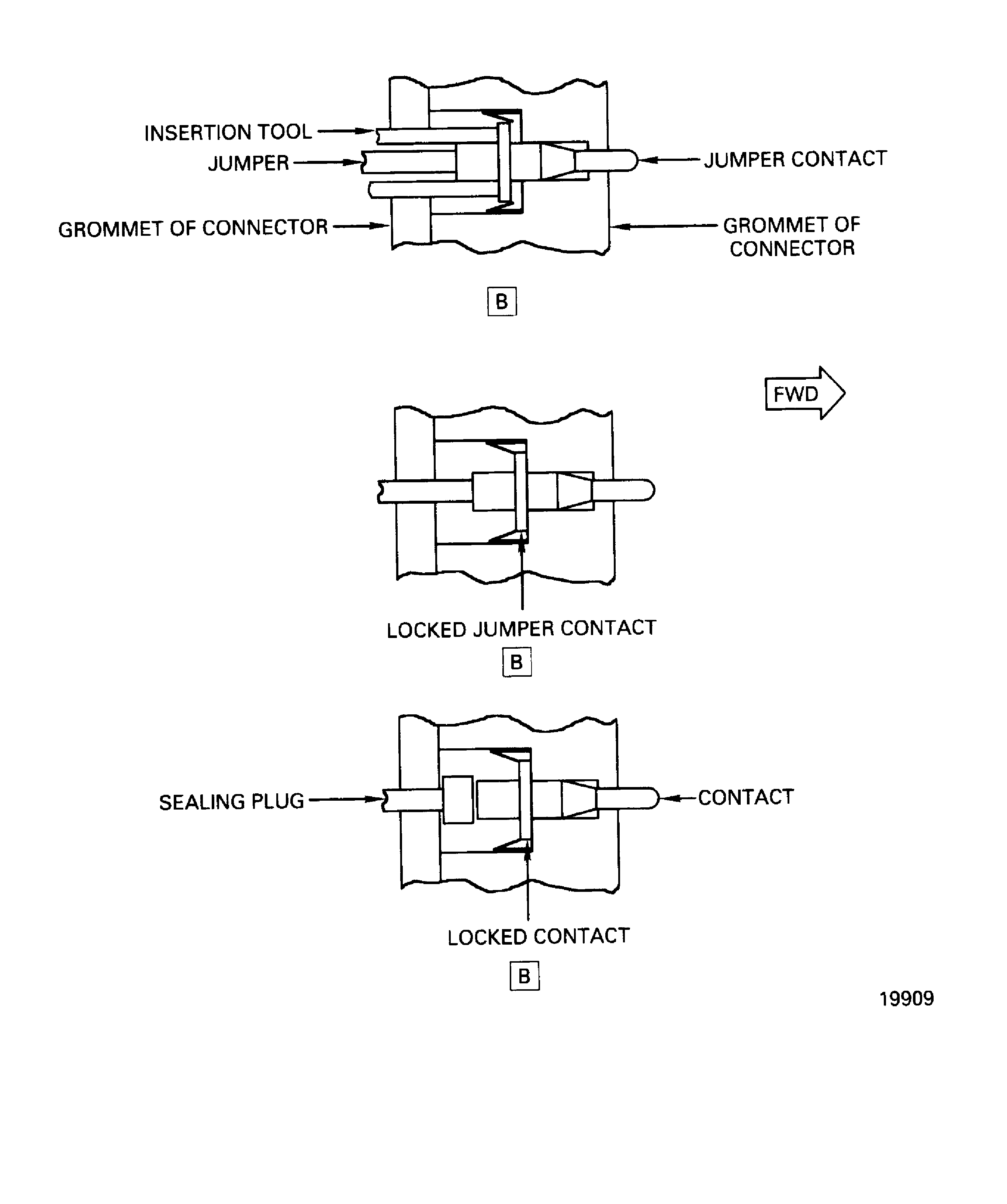
Use the Contact insertion tool or equivalent.
Use the worksheet when you remove the jumpers to install all the jumpers in the correct connector holes
NOTE
To find the correct jumper wires, refer to Test No.11 given in TASK 71-00-00-700-011 (Config-1 and Config-2).Hold the connector in your hand.
Remove the insertion tool.
NOTE
When the collet locks the contact, the collet makes a light click sound.
Install the new jumper in the correct connector holes as marked in the removal.
Use the Contact insertion tool or equivalent.
Make sure the contact is locked in the connector collet before you install the sealing plug.
Install the sealing plugs (with the larger diameter down) into the open connector holes with your fingers or soft nose pliers.
Install the contacts and sealing plugs in the open connector holes that remain.
SUBTASK 73-22-35-350-052 Install the Jumpers, Contacts and Sealing Plugs in the Connector

CAUTION
DO NOT USE THE REMOVAL TOOL TO INSTALL THE JUMPERS OR CONTACTS. IF THE REMOVAL TOOL IS USED THE COLLET IN THE CONNECTOR CANNOT RETRACT AND LOCK THE JUMPER OR CONTACT.DO NOT APPLY STRONG FORCE TO THE INSERTION TOOL WHEN YOU PUSH THE JUMPER OR CONTACT. THE STRONG FORCE CAN CAUSE DAMAGE TO THE COLLET.Follow all on-screen instructions.
NOTE
If there are errors with the tester, turn off power and disconnect the X, Y and Z cables. Then turn power on and follow all on-screen instructions. Do not reconnect cables until instructed on the screen.NOTE
If there are errors with the results of the test, follow all on-screen instructions to correct the data entry plug wiring.
Do an electrical wiring test on the data entry plug assembly. Use IAE 2P16552 EEC Software Loader and DEP Tester.
SUBTASK 73-22-35-750-051 Do an Electrical Wiring Test on the Data Entry Plug Assembly
Figure: Repair Details And Dimensions
Repair Details And Dimensions
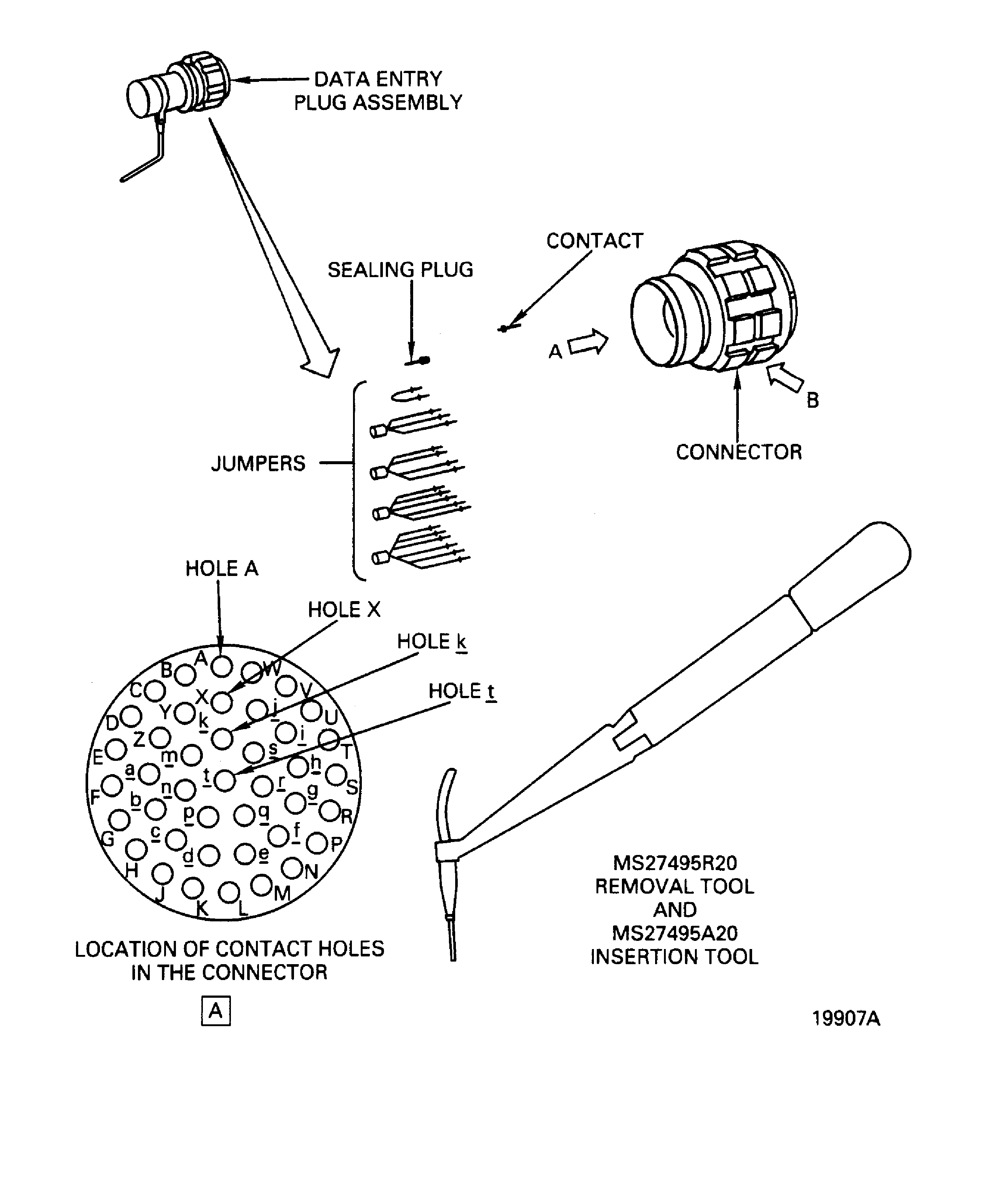
Repair Details And Dimensions
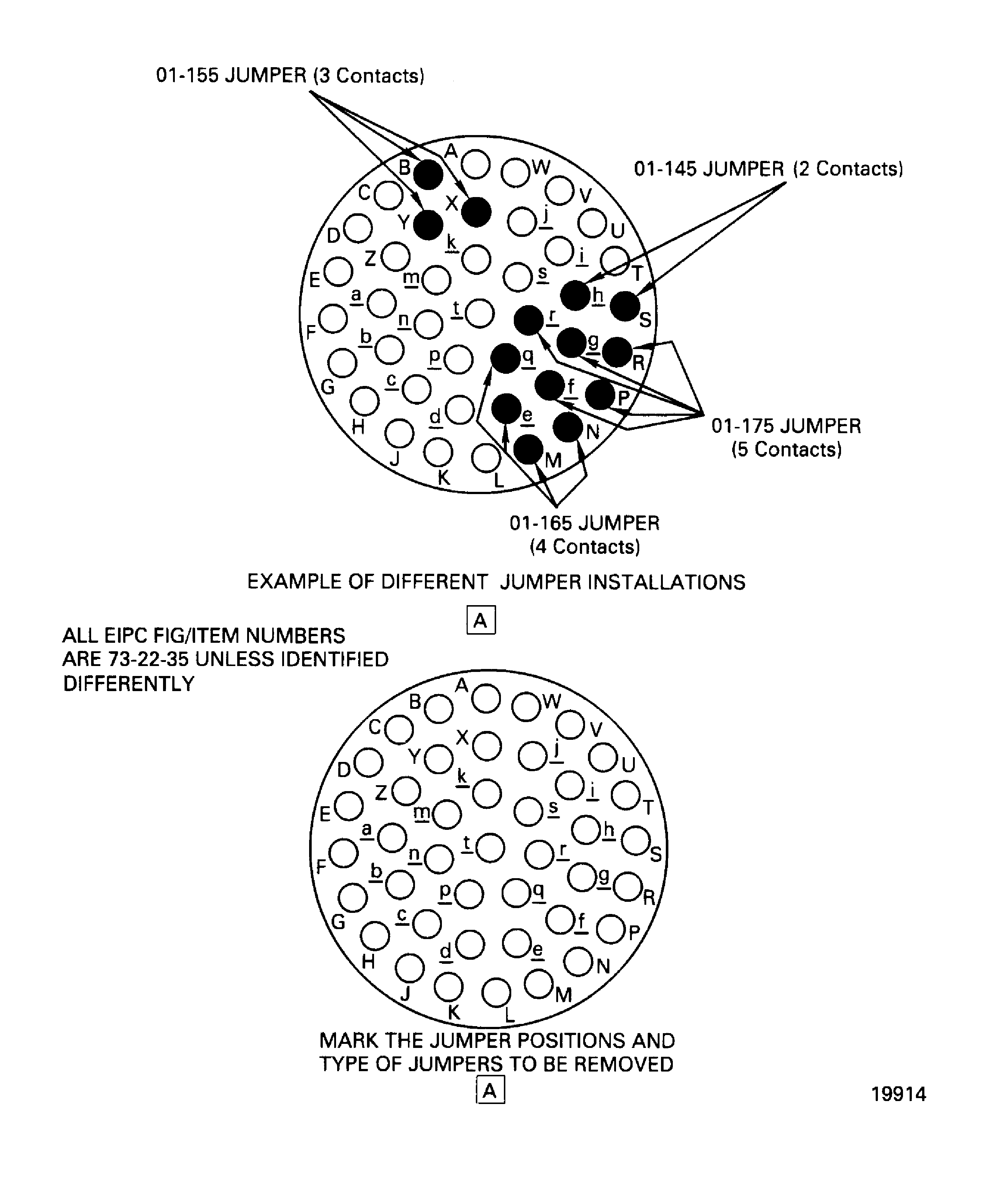
Repair Details And Dimensions
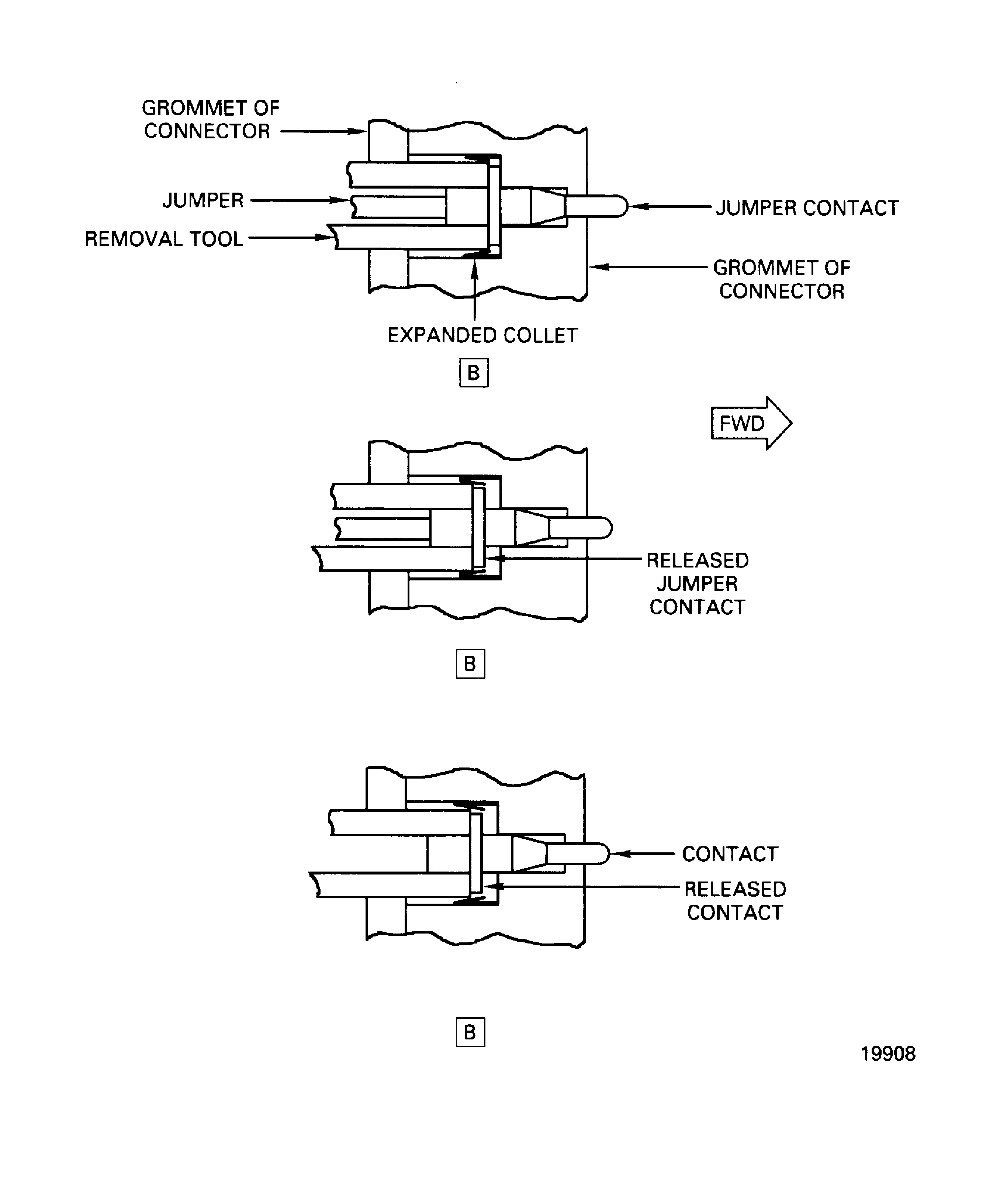
Repair Details And Dimensions