Export Control
EAR Export Classification: Not subject to the EAR per 15 C.F.R. Chapter 1, Part 734.3(b)(3), except for the following Service Bulletins which are currently published as EAR Export Classification 9E991: SBE70-0992, SBE72-0483, SBE72-0580, SBE72-0588, SBE72-0640, SBE73-0209, SBE80-0024 and SBE80-0025.Copyright
© IAE International Aero Engines AG (2001, 2014 - 2021) The information contained in this document is the property of © IAE International Aero Engines AG and may not be copied or used for any purpose other than that for which it is supplied without the express written authority of © IAE International Aero Engines AG. (This does not preclude use by engine and aircraft operators for normal instructional, maintenance or overhaul purposes.).Applicability
V2500-A5
Common Information
TASK 72-00-40-020-006-B00 HP System Module - Remove The HP System Module (Horizontal), Removal-007
General
This TASK gives the procedure to remove the HP system module in the horizontal position. Other related TASKS are:
TASK 72-00-40-560-003 (REMOVAL-008) Turn the HP system module from the horizontal to the vertical.
Fig/item numbers in parentheses in the procedure agree with those used in the EIPC. Only the primary Fig/item numbers are used. For the service bulletin alpha variants refer to the IPC.
Apply the approved CoMat 10-058 PENETRATING OIL before the removal of threaded parts or parts with an interference fit. Let the parts soak before removal.
NOTE
NOTE
Preliminary Requirements
Pre-Conditions
NONESupport Equipment
| Name | Manufacturer | Part Number / Identification | Quantity | Remark |
|---|---|---|---|---|
| IAE 1F10028 Support Pedestal | 0AM53 | IAE 1F10028 | 4 | |
| IAE 1F10262 Lift sling | 0AM53 | IAE 1F10262 | 1 | |
| IAE 1J13001 Trunnion assembly | 0AM53 | IAE 1J13001 | 1 | |
| IAE 1P16002 Cradle pedestal | 0AM53 | IAE 1P16002 | 1 | |
| IAE 1P16046 Removal/Installation fixture | 0AM53 | IAE 1P16046 | 1 | |
| IAE 1P16285 Tie-rod adapter | 0AM53 | IAE 1P16285 | 1 | |
| IAE 1P16543 Removal/Installation fixture | 0AM53 | IAE 1P16543 | 1 | |
| IAE 1R18230 Wrench | 0AM53 | IAE 1R18230 | 1 | |
| IAE 1R18234 Support rod | 0AM53 | IAE 1R18234 | 3 | |
| IAE 1R18247 Rigging pin | 0AM53 | IAE 1R18247 | 1 | (alternative to IAE 1R18423) |
| IAE 1R18325 Trunnion assembly | 0AM53 | IAE 1R18325 | 2 | |
| IAE 1R18423 Rigging pin | 0AM53 | IAE 1R18423 | 1 | (alternative to IAE 1R18247) |
| IAE 1R18893 Riggingpin | 0AM53 | IAE 1R18893 | 1 |
Consumables, Materials and Expendables
| Name | Manufacturer | Part Number / Identification | Quantity | Remark |
|---|---|---|---|---|
| CoMat 10-058 PENETRATING OIL | LOCAL | CoMat 10-058 |
Spares
NONESafety Requirements
NONEProcedure
Refer to Figure.
Attach IAE 1P16285 Tie-rod adapter 1 off onto the center ring (part of IAE 1P16046 Removal/Installation fixture or IAE 1P16543 Removal/Installation fixture 1 off).
SUBTASK 72-00-40-020-166 Install the Remove/Install Fixture and the Tie-rod Adapter to the HP System Module Rear Flange
NOTE
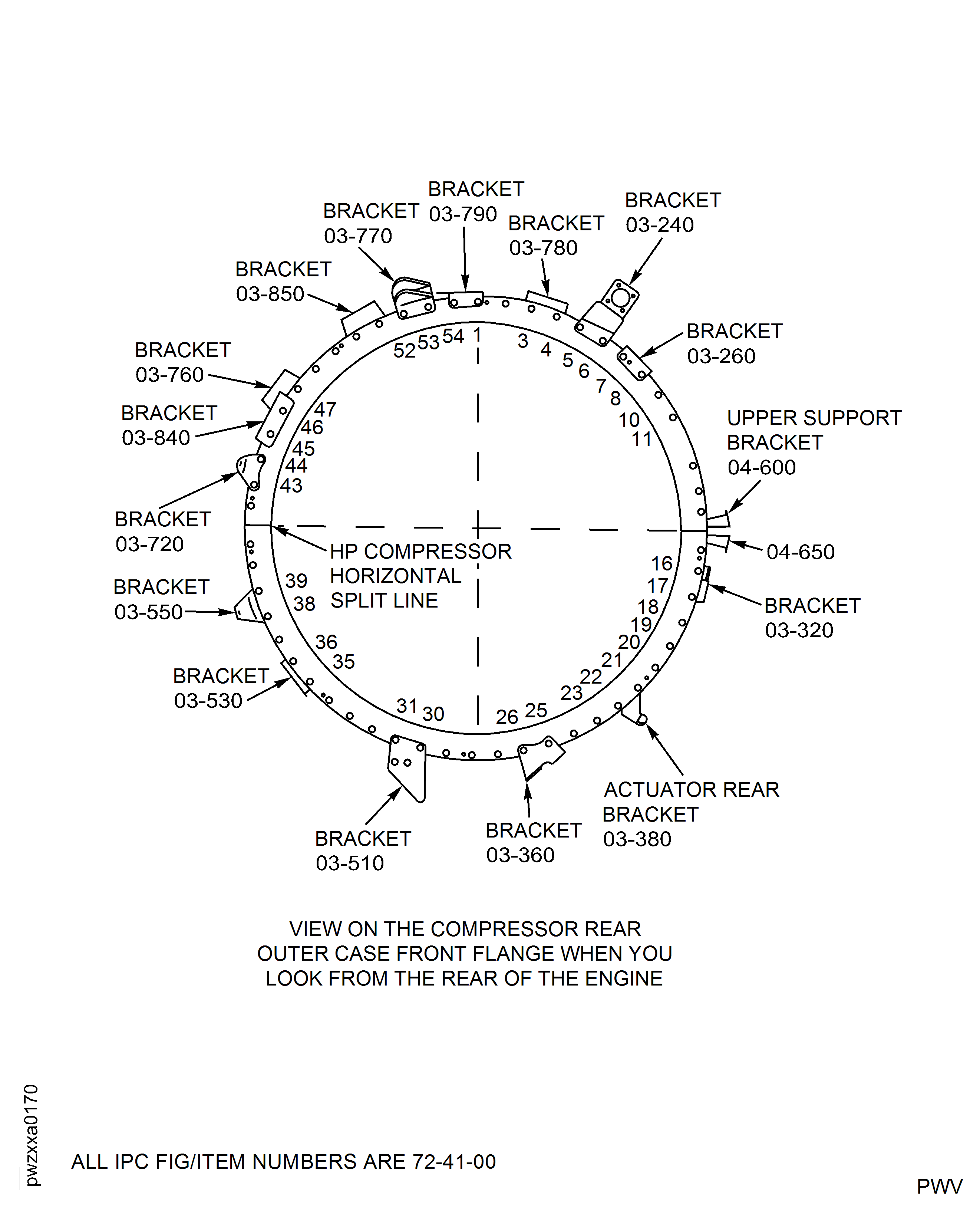
Keep the 10 nuts removed in Step. so that they can be used to install the trunnion assemblies.Remove the 10 nuts and the 10 bolts from the HP compressor front and rear cases splitline, at the No. 8, 10, 16, 17, 19, 35, 37, 38, 44 and 46 positions. The No. 1 position is to the right of T.D.C.
Safety the trunnion assembly to the module with the five tool bolts and five of the nuts removed in Step.
Safety the trunnion assembly to the module with the five tool bolts and the other five nuts removed in Step.
Install IAE 1R18325 Trunnion assembly 2 off.
SUBTASK 72-00-40-020-167 Install the Trunnion Assemblies onto the Module
Refer to Figure.
Attach the IAE 1J13001 Trunnion assembly 1 off.
Install IAE 1F10028 Support Pedestal 2 off.
SUBTASK 72-00-40-020-168 Install the Trunnion Assemblies and the Support Posts onto the LP Compressor/Intermediate Case Module
Refer to Figure.
Install the IAE 1R18247 Rigging pin 1 off or IAE 1R18423 Rigging pin 1 off or IAE 1R18893 Riggingpin 1 off through the bracket and into the HP compressor cases to lock the VSV.
Remove the six bolts HP COMPRESSOR SPLIT CASE (72-41-31, 01-122), the two brackets (HP COMPRESSOR SPLIT CASE (72-41-31, 01-115) and HP COMPRESSOR SPLIT CASE (72-41-31, 01-118)) and the three blanks HP COMPRESSOR SPLIT CASE (72-41-31, 01-120) from the HP compressor front cases.
Install IAE 1R18234 Support rod 3 off into the HP compressor front case.
SUBTASK 72-00-40-020-169 Install the HP Compressor Support Rods
Refer to Figure.
Prepare IAE 1F10262 Lift sling 1 off for installation on the HP system module.
SUBTASK 72-00-40-020-170 Install the Lift Sling to the HP System Module
Refer to Figure.
Use IAE 1R18230 Wrench 1 off to release the 20 curvic bolts.
SUBTASK 72-00-40-020-171 Release the Bolts from the HP Compressor Stage 3 Disk Curvic Coupling
Refer to Figure.
SUBTASK 72-00-40-020-217 Remove the Nuts, Bolts, Lock Plates and Pins from the LP Compressor/Intermediate Case Module to HP System Module Joint Flange (SBE 72-0290)
Refer to Figure.
SUBTASK 72-00-40-020-172 Remove the Nuts, Bolts, Lock Plates and Pins from the LP Compressor/Intermediate Case Module to HP System Module Joint Flange (Pre SBE 72-0290)
Refer to Figure.
SUBTASK 72-00-40-020-173 Remove the HP System Module
Refer to Figure.
Make sure that the trunnion support bracket part of the other IAE 1F10028 Support Pedestal 2 off are at their lowest position.
Put IAE 1P16002 Cradle pedestal 1 off under the HP system module with the support assembly slightly forward of the diffuser case rear flange. Make sure that the large face of the support assembly is forward.
SUBTASK 72-00-40-020-174 Install the HP System Module onto the Support Posts and Cradle Pedestal
Refer to Figure.
SUBTASK 72-00-40-020-176 Remove the Remove/Install Fixture and the Tie-Rod Adapter from the Rear of the Module
Visually examine the HP system module and the LP compressor/intermediate case module at interfaces C-32 and C-41. Refer to TASK 72-00-00-200-001(INSPECTION-001).
SUBTASK 72-00-40-220-107 Visually Examine the Module Interfaces

Figure: Attach the remove/install fixture and tie-rod adapter to the HP system module rear flange
Attach the remove/install fixture and tie-rod adapter to the HP system module rear flange

Figure: Install the HP compressor trunnions
Install the HP compressor trunnions
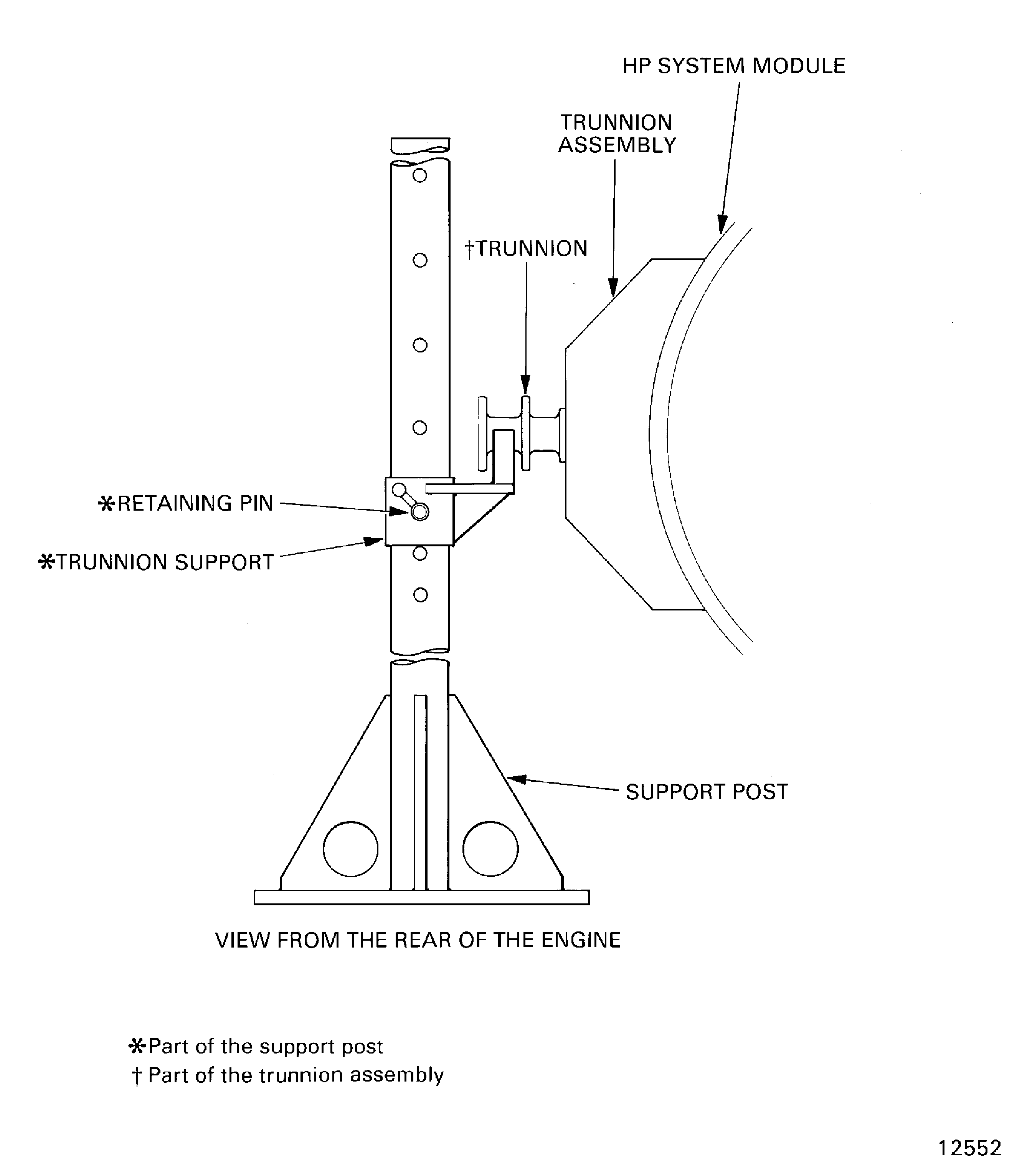
Figure: Install the trunnion assemblies and the front support posts onto the LP compressor/intermediate case module
Install the trunnion assemblies and the front support posts onto the LP compressor/intermediate case module
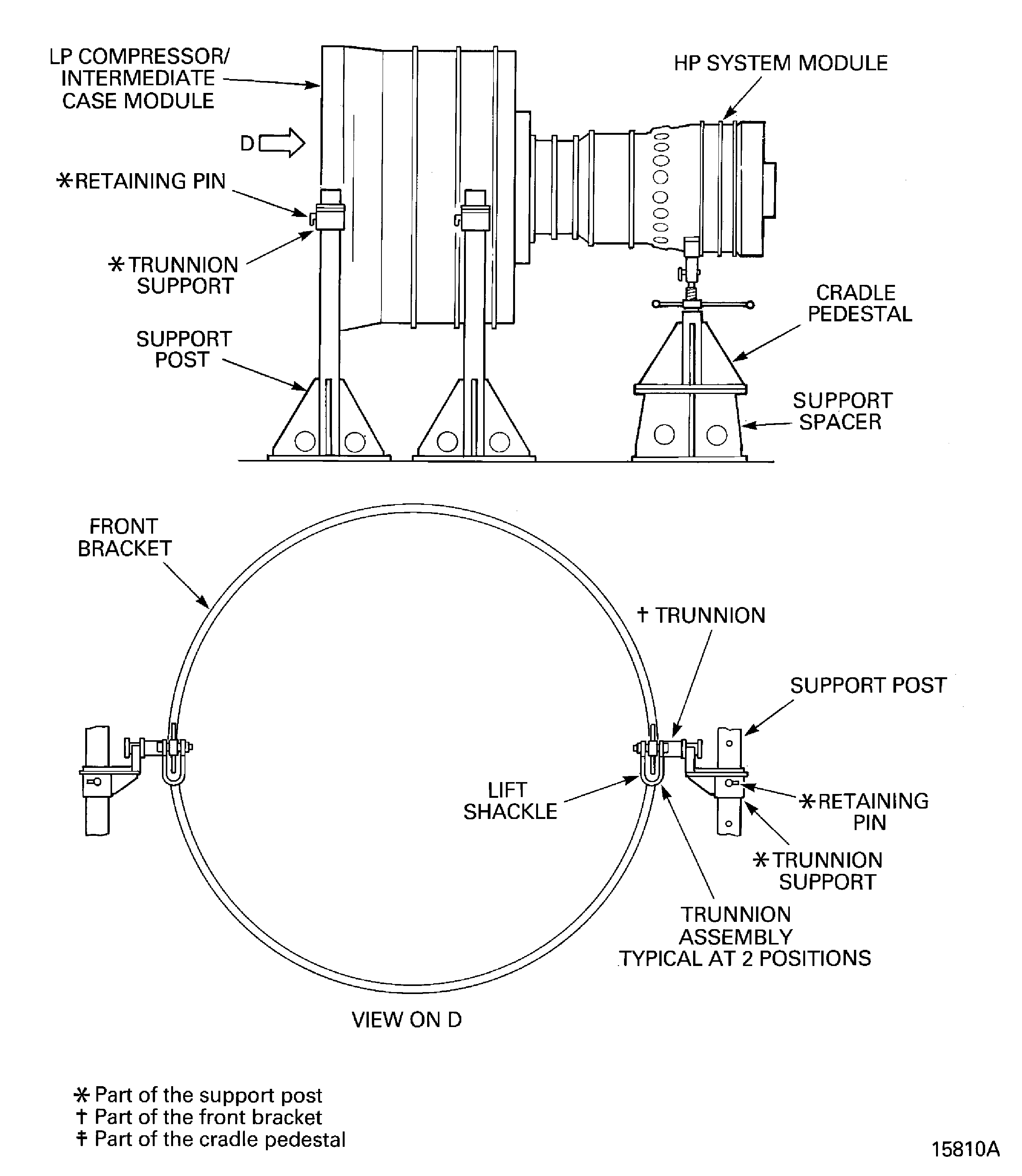
Figure: Install the support rods into the HP compressor
Sheet 1
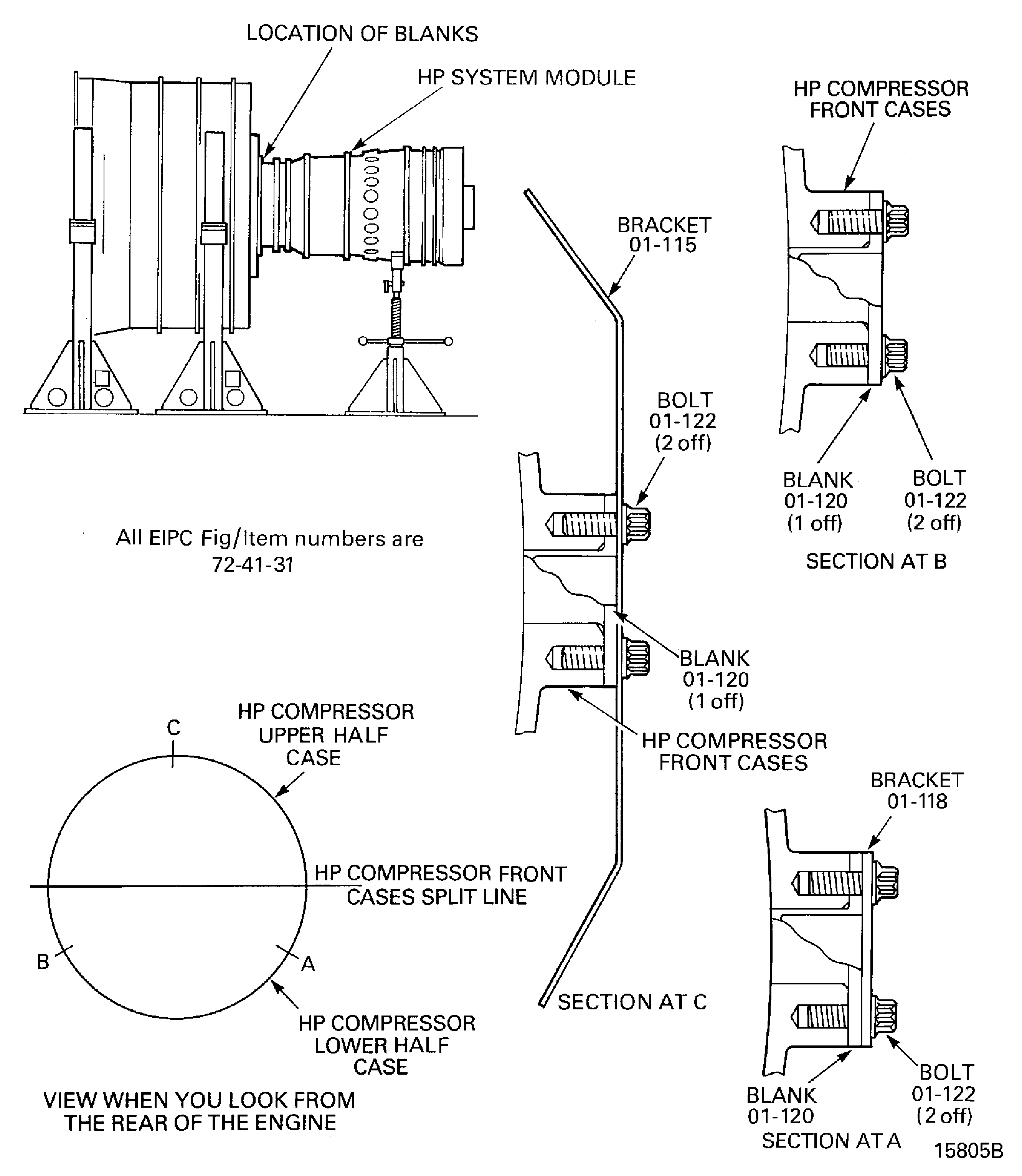
Figure: Install the support rods into the HP compressor
Install the support rods into the HP compressor

Figure: Install the HP system module lift sling
Install the HP system module lift sling

Figure: Release the curvic bolts from the stage 3 HP compressor curvic coupling
Release the curvic bolts from the stage 3 HP compressor curvic coupling
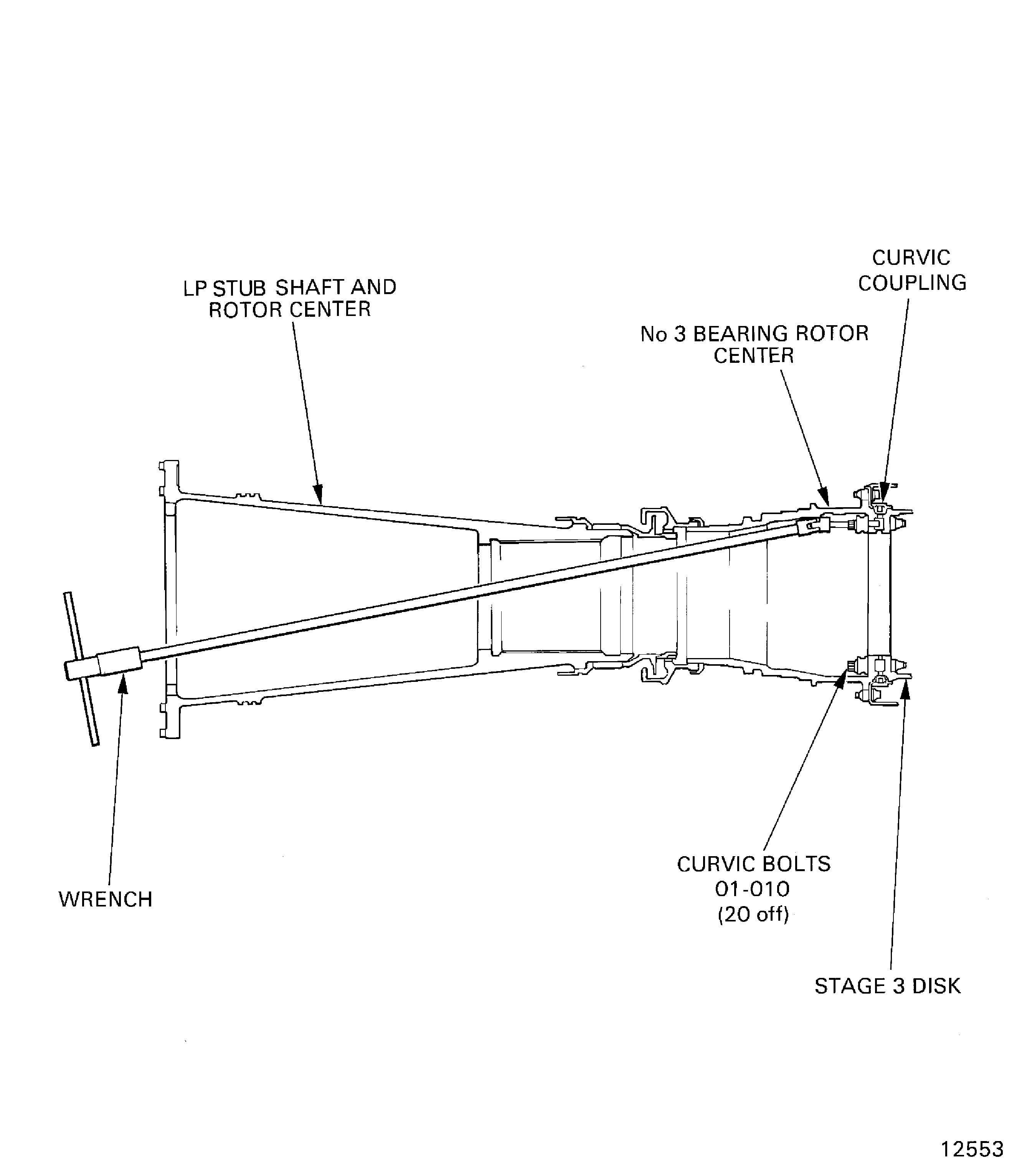
Figure: LP compressor/intermediate case module to HP system module joint flange hole positions
LP compressor/intermediate case module to HP system module joint flange hole positions
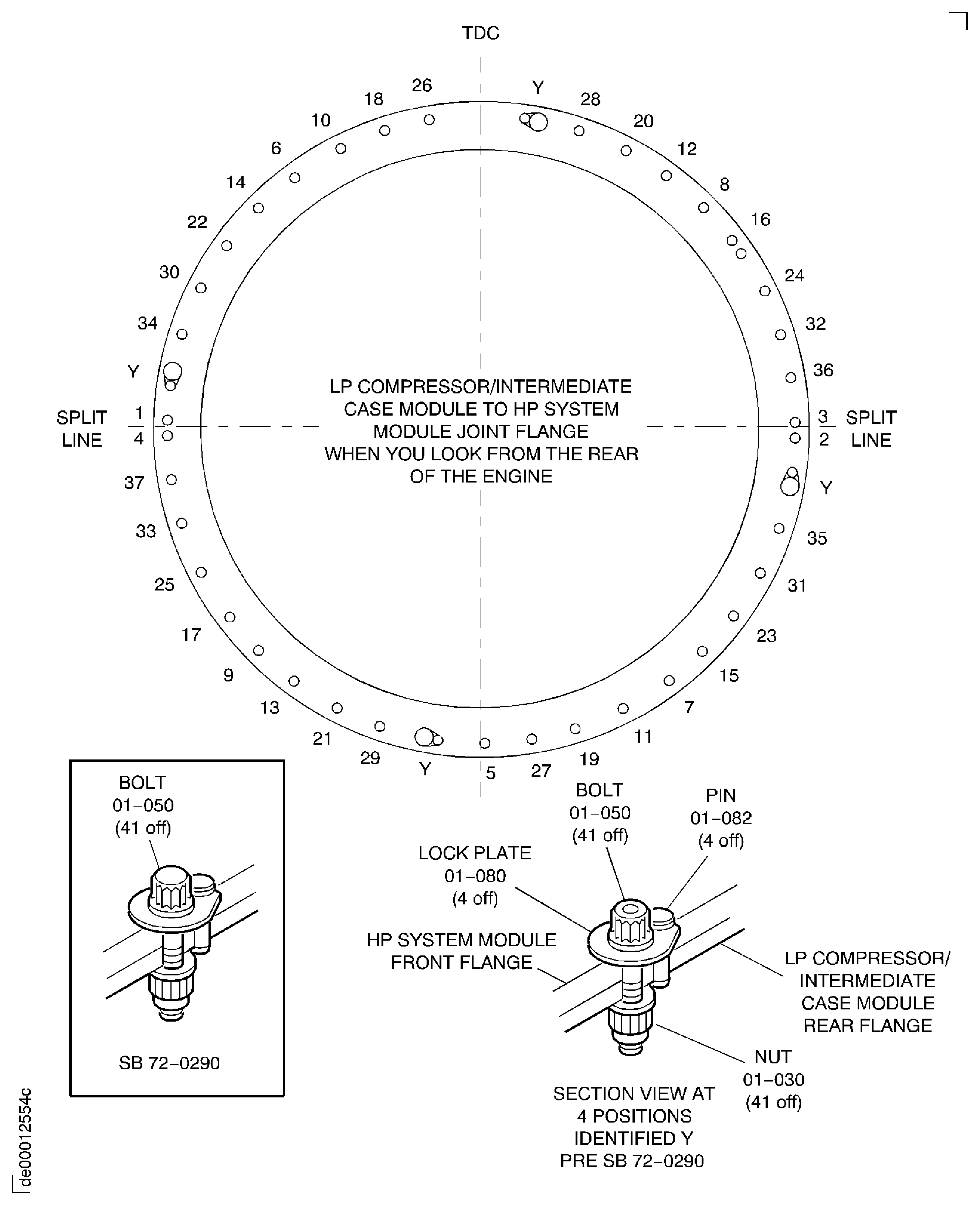
Figure: Install the HP system module onto the support posts and cradle pedestal
Install the HP system module onto the support posts and cradle pedestal

Figure: Compressor Rear Outer Case Front Flange (From Rear Of Engine)
Compressor Rear Outer Case Front Flange (From Rear Of Engine)