
TASK 72-00-31-020-001 LPC Fan Module - Remove The LPC Fan Module, Removal-001

DMC:V2500-A0-72-00-3100-01A-520A-B|Issue No:001.00|Issue Date:2014-05-01

Export Control

EAR Export Classification: Not subject to the EAR per 15 C.F.R. Chapter 1, Part 734.3(b)(3), except for the following Service Bulletins which are currently published as EAR Export Classification 9E991: SBE70-0992, SBE72-0483, SBE72-0580, SBE72-0588, SBE72-0640, SBE73-0209, SBE80-0024 and SBE80-0025.

Copyright

© IAE International Aero Engines AG (2001, 2014 - 2021) The information contained in this document is the property of © IAE International Aero Engines AG and may not be copied or used for any purpose other than that for which it is supplied without the express written authority of © IAE International Aero Engines AG. (This does not preclude use by engine and aircraft operators for normal instructional, maintenance or overhaul purposes.).

Applicability

All

Common Information

TASK 72-00-31-020-001 LPC Fan Module - Remove The LPC Fan Module, Removal-001

General

This TASK gives procedures for removal of the LP compressor (fan) module from the engine and installation on to the storage stand. There are two types of the storage stands (vertical type and horizontal type), and two different methods in this TASK.

- For vertical storage, use the IAE 1J12110 Transportation and storage stand.

- For horizontal storage, use the storage stand (horizontal type) IA21J12019 and select the method 2.

Fig/item numbers in parentheses in the procedure agree with those used in the IPC. Only the primary Fig/item numbers are used. For the service bulletin alpha variants refer to the IPC.

Apply the approved penetrating oil before the removal of threaded parts. Let the parts soak before removal. For the approved oils and procedures, refer to SPM TASK 70-64-00-640-501.

NOTE

Special tools are identified in the procedure by the tool primary number

Preliminary Requirements

Pre-Conditions

NONE

Support Equipment

NameManufacturerPart Number / IdentificationQuantityRemark
IAE 1J12016 Special wrench0AM53IAE 1J120161
IAE 1J12017 Special wrench0AM53IAE 1J120171
IAE 1J12019 Storage stand0AM53IAE 1J120191
IAE 1J12105 Cantileer sling0AM53IAE 1J121051
IAE 1J12104 Sling adapter0AM53IAE 1J121041
IAE 1J12106 Aligning pin set0AM53IAE 1J121061
IAE 1J12110 Transportation and storage stand0AM53IAE 1J121101
IAE 1J12180 Hub protector0AM53IAE 1J121801
IAE 1J12181 Protection cover0AM53IAE 1J121811
IAE 1J12182 Retaining protector0AM53IAE 1J121821

Consumables, Materials and Expendables

NONE

Spares

NONE

Safety Requirements

NONE

Procedure

    1. SUBTASK 72-00-31-020-051 Remove the Inlet Cone

    2. Remove the inlet cone. Refer to TASK 72-38-11-020-001.

    1. SUBTASK 72-00-31-020-052 Loosen and Remove the Curvic Coupling Bolts

    2. NOTE

      In this SUBTASK, remove the 21 curvic coupling bolts only. Do not remove the remaining three curvic coupling bolts until you complete Step.

      Refer to Figure, Figure and Figure.

    3. Install IAE 1J12180 Hub protector 1 off in the stage 1 fan disk.

      1. WARNING

        PUT APPROVED GLOVES ON YOUR HANDS WHEN YOU HOLD THE FAN ROTOR AT FAN BLADES. THE LEADING EDGE OF THE FAN BLADE CAN CAUSE INJURY TO YOUR HANDS.

        CAUTION

        CAREFULLY USE THE TOOLS TO PREVENT DAMAGE TO THE STAGE 1 FAN DISK WHEN YOU LOOSEN OR REMOVE THE CURVIC COUPLING BOLTS.

        Install the locating ring and the adapter ring on to the front blade retaining ring.

      2. Install the locating ring (part of IAE 1J12017 Special wrench 1 off) on to the front blade retaining ring with the four screws.

      3. Tighten the screws.

      4. Install the adapter ring (part of the special wrench) on to the locating ring with the four nuts.

      5. Tighten the nuts lightly.

      6. Adjust position of the adapter ring so that the 24 holes in the ring are aligned with the curvic coupling bolts.

      7. Tighten the nuts.

    4. Make sure that the spigot (part of the special wrench) is attached to the arm with the four bolts.

      1. Hold fan blades and loosen the 24 bolts by approximately 1/4 turn one at a time to break the torque of the bolts.

      2. Make sure that the socket (part of the special wrench) is attached to the arm.

      3. Put the arm in position so that:

        - The spigot is engaged with the hole in the adapter ring.

        - The socket is installed on the curvic coupling bolt.

      4. Install a wrench in to the wrench hole in the spigot.

      5. Hold the fan blades and apply torque to the wrench to loosen the curvic coupling bolt.

      6. Do Step thru Step to loosen each curvic coupling bolt.

    5. Remove all parts of the special wrench from the engine.

      1. Replace the three bolts, 120 degrees apart, one at a time with the three aligning pins (part of IAE 1J12106 Aligning pin set 1 off).

      2. Remove the curvic coupling bolt with IAE 1J12016 Special wrench 1 off.

      3. Install the aligning pin in to position where "F" mark line on the pin is aligned with the washer face.

    6. Let the three bolts stay at the locations adjacent to the three guide pins of the stub shaft. Then, remove the other 18 bolts.

    7. Remove the hub protector from the stage 1 fan disk.

    1. SUBTASK 72-00-31-020-053 Assemble the Sling and Adapter Assembly

    2. Refer to Figure.

    3. Attach the first hoist to the link of sling adapter and lift up.

    4. Move the sling adapter on to the work bench and remove the first hoist from the sling adapter.

    5. Attach the second hoist to the shackle (part of IAE 1J12105 Cantileer sling 1 off).

    6. Lift and attach the cantilever sling to the sling adapter and safety them with the quick release pin.

    1. SUBTASK 72-00-31-020-054 Install the Sling and Adapter Assembly

    2. Refer to Figure and Figure.

      1. Adjust the center of gravity of the sling and adapter assembly.

      2. Turn the adjustment handle to align the witness hole in the side plate with the S1-mark on the cantilever sling beam.

      3. Lock the adjustment handle in position.

    3. Attach the first hoist to the lifting ring of the cantilever sling and make the hoist rope/chains tighter.

    4. Remove the second hoist from the shackle of cantilever sling.

    5. Attach the second hoist to the link of the sling adapter and make the rope/chains tighter.

    6. Adjust the two hoists to turn the sling and adapter assembly to the horizontal position. Then, remove the second hoist.

    7. Lift the sling and adapter assembly with the first hoist and move adjacent to the forward flange of the LP compressor (fan) module.

    8. Install the sling and adapter assembly to the LP compressor (fan) module.

    9. Attach the flange of the sling adapter to the forward flange of the LP compressor (fan) module with 12 bolts. Tighten the bolts.

      1. Adjust the center of gravity of the sling and adapter assembly and the LP compressor (fan) module.

      2. Turn the adjustment handle to align the witness hole in the side plate with the S2-mark on the cantilever sling beam.

      3. Lock the adjustment handle in position.

    1. SUBTASK 72-00-31-020-055 Remove the Remaining Curvic Coupling Bolts

    2. Remove the remaining three bolts with IAE 1J12016 Special wrench 1 off.

    1. SUBTASK 72-00-31-020-056 Remove the LP Compressor (Fan) Module

    2. Refer to Figure.

    3. Slowly move the LP compressor (fan) module forward until it is clear of the LP compressor case.

    1. SUBTASK 72-00-31-020-057-001 Method 1: Install the LP Compressor (Fan) Module on the Storage Stand

    2. Refer to Figure and Figure.

    3. Attach IAE 1J12181 Protection cover 1 off to the curvic teeth of the stage 1 fan disk with the three bolts and washers. Tighten the bolts.

      1. Preparation of the storage stand.

      2. Put IAE 1J12110 Transportation and storage stand 1 off adjacent to the LP compressor (fan) module.

      3. Remove the wing nut and the clamp from the storage stand.

    4. Attach the second hoist to the link of the sling adapter. Then, make the rope/chains tighter.

    5. CAUTION

      MAKE SURE THAT THE QUICK RELEASE PIN IS ENGAGED IN THE INNER HOLES IN THE BRACKET OF THE CANTILEVER SLING.

      NOTE

      Do this operation with the two persons on each side of the LP compressor (fan) module.

      Adjust the two hoists to turn the LP compressor (fan) module to the vertical position.

    6. Engage the quick release pin into the outer holes in the brackets of the cantilever sling and hold the hoist rope/chains between the bracket.

    7. Lower the LP compressor (fan) module on to the storage stand.

      1. Remove the sling and adapter assembly from the LP compressor (fan) module.

      2. Remove the 12 bolts which attach the sling adapter to the forward flange of the LP compressor (fan) module.

      3. Adjust the two hoists to release and to lift the sling and adapter assembly until they are clear of the storage stand.

    8. Install the clamp, part of the storage stand, on the front face of the front hub of the stage 1 fan disk; safety with the wing nut, part of the storage stand.

    1. SUBTASK 72-00-31-020-057-002 Method 2: Install the LP Compressor (Fan) Module of the Storage Stand

    2. Refer to Figure and Figure.

      1. Preparation of the storage stand.

      2. Put IAE 1J12019 Storage stand 1 off adjacent to the LP compressor (fan) module.

        1. Make sure that the guards are removed from the storage stand. If the guards are installed, remove them to make space for installation of the module to the storage stand.

        2. Remove the two quick release pins from each guard.

        3. CAUTION

          DO NOT LET THE LP COMPRESSOR (FAN) MODULE HIT THE STORAGE STAND WHEN YOU MOVE THE MODULE. THE STORAGE STAND CAN CAUSE DAMAGE TO THE MODULE.

          Remove the guards from the storage stand.

    3. Slowly move the LP compressor (fan) module to the storage stand.

      1. Install the LP compressor (fan) module on the storage stand.

      2. Install the stage 1 fan disk on to the support of the storage stand with the three screws. The screws must be 120 degrees apart from each other.

    4. Tighten the screws lightly.

      1. Adjust the centre of gravity of the sling and adapter assembly.

      2. Turn the adjustment handle to align the witness hole in the side plate with the S1-mark on the cantilever sling beam.

      3. Lock the adjustment handle in position.

      1. Remove the sling and adapter assembly from the LP compressor (fan) module.

      2. Remove the 12 bolts which attach the sling adapter to the forward flange of the LP compressor (fan) module.

    5. Install IAE 1J12180 Hub protector hub protector 1 off in the stage 1 fan disk.

    6. CAUTION

      DO NOT HIT THE STAGE 1 FAN DISK WITH TOOLS WHEN YOU INSTALL AND TIGHTEN THE SCREWS. THE TOOLS CAN CAUSE DAMAGE TO THE DISK.

      Install the remaining 21 screws with IAE 1J12016 Special wrench 1 off.

    7. Tighten the 21 screws.

    8. Remove the hub protector from the stage 1 fan disk.

    9. WARNING

      DO AN INSTALLATION OF THE GUARDS ON THE STORAGE STAND IMMEDIATELY AFTER COMPLETION OF PREVIOUS PROCEDURES. THE SHARP EDGES OF THE FAN BLADES CAN CAUSE INJURY TO PERSONNEL IF THE GUARDS ARE NOT INSTALLED ON THE STORAGE STAND.

      Install all the four guards on the storage stand. Safety each guard with the two quick release pins.

    1. SUBTASK 72-00-31-020-058 Disassemble the Sling and Adapter Assembly

    2. Refer to Figure.

    3. Lower the sling and adapter assembly on to a pallet.

    4. Disengage the quick release pin which attaches the cantilever sling to the sling adapter.

    5. Remove the second hoist from the link of cantilever sling and install to the shackle of cantilever sling.

    6. Disengage the quick release pin from the outer holes and engage to inner holes of bracket of cantilever sling.

    7. Remove the first hoist from the cantilever sling.

    8. Disengage the quick release pin which attaches cantilever sling to sling adapter.

    9. Lift the cantilever sling with the second hoist to release the sling adapter.

    1. SUBTASK 72-00-31-020-059 Install the Retaining Protector on to the Curvic Teeth of the Stub Shaft

    2. Refer to Figure.

    3. Remove the three aligning pins from the stub shaft, Figure.

    4. Align the three guide pin holes in IAE 1J12182 Retaining protector 1 off with the three guide pins of the stub shaft.

    5. Attach the retaining protector to the front face of the stub shaft flange with the three bolts. Tighten the bolts.

  1. Figure: Remove the LP compressor (fan) module

    Remove the LP compressor (fan) module
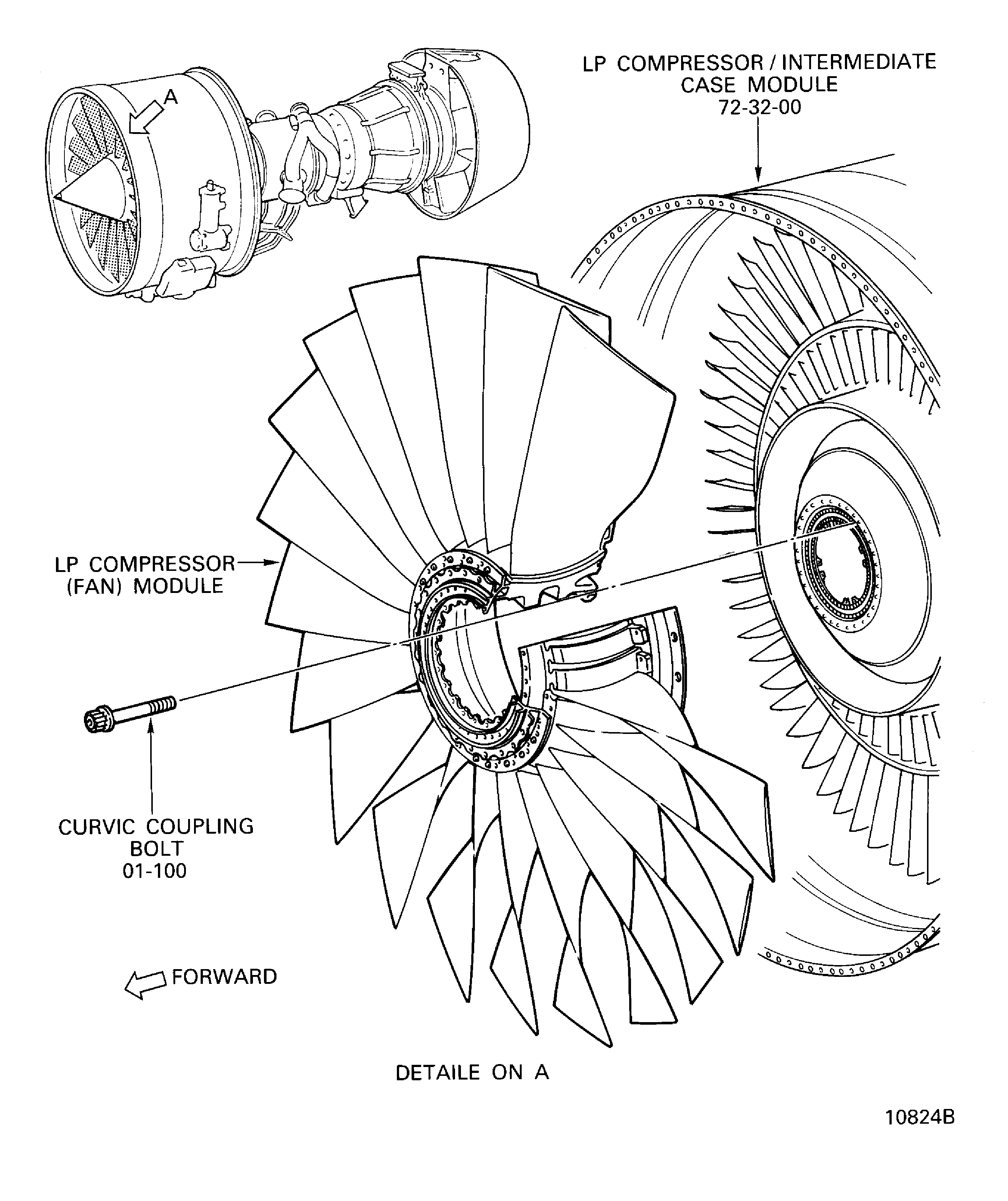
    Figure: Remove the curvic coupling bolts

    Remove the curvic coupling bolts

    Figure: Install the special wrench to the LP compressor (fan) module

    Install the special wrench to the LP compressor (fan) module

    Figure: The sling and adapter assembly

    The sling and adapter assembly
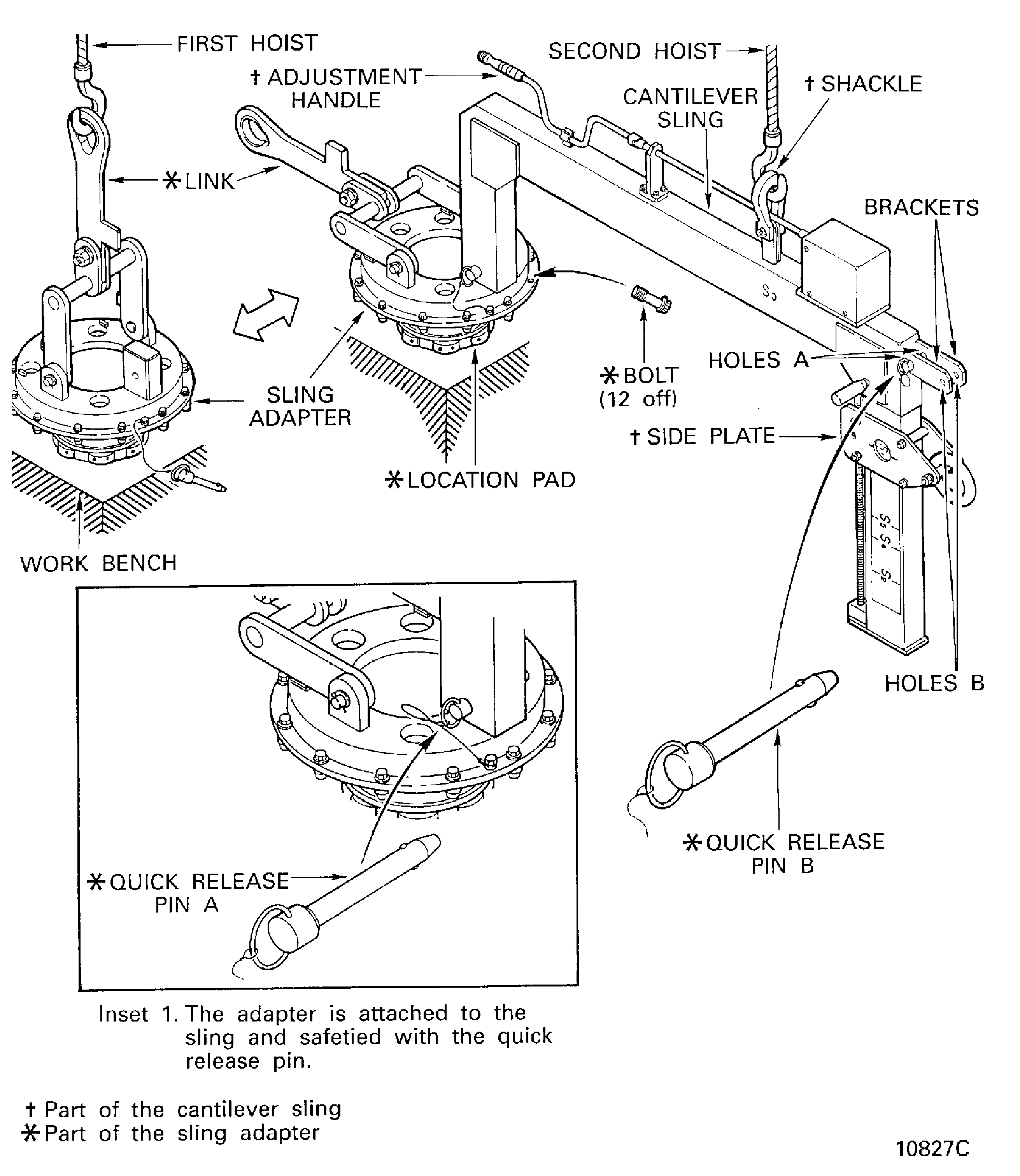
    Figure: The sling and adapter assembly

    The sling and adapter assembly

    Figure: Install the sling and adapter assembly in to the stage 1 fan disk

    Install the sling and adapter assembly in to the stage 1 fan disk
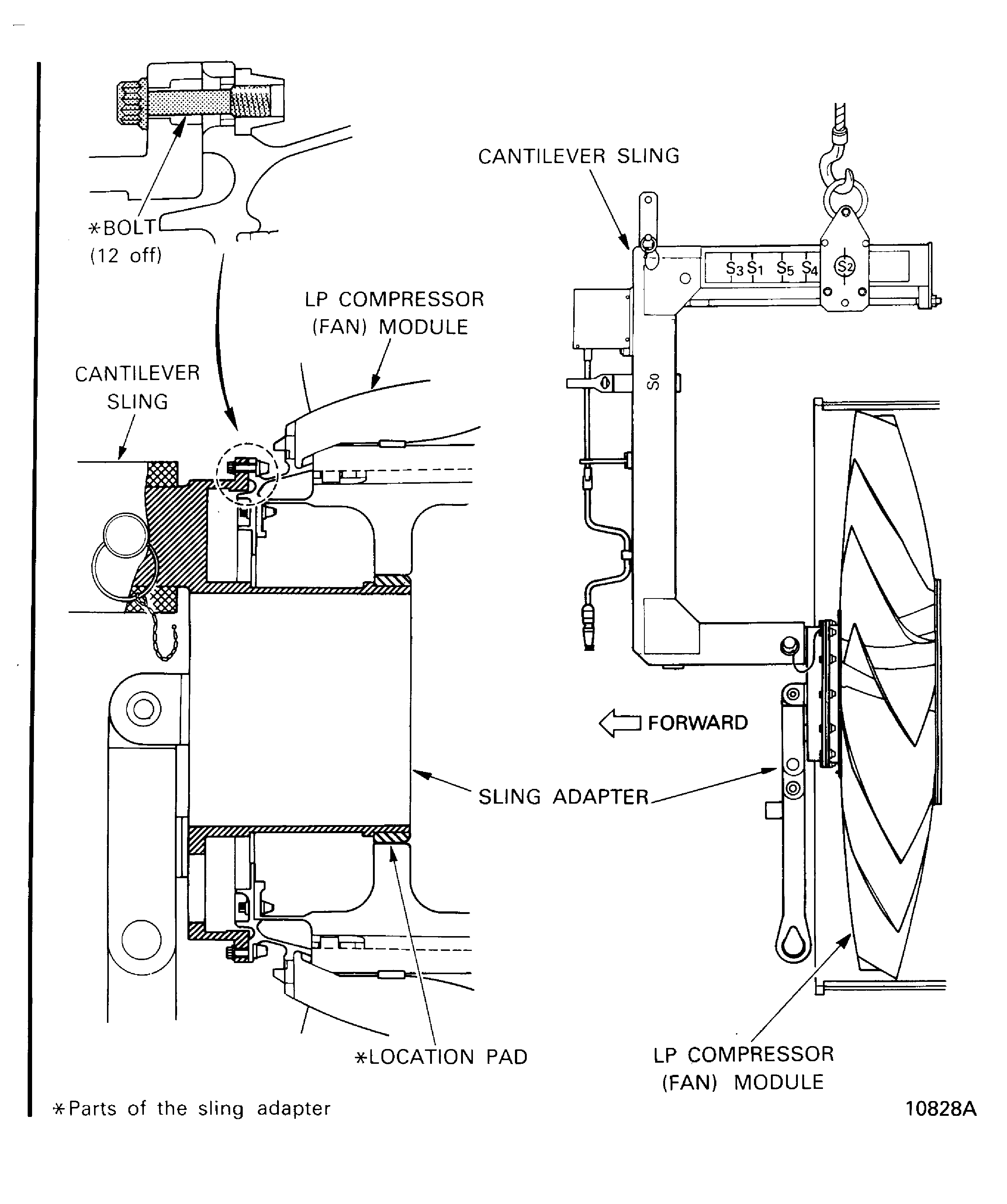
    Figure: Remove the LP compressor (fan) module

    Remove the LP compressor (fan) module

    Figure: Method 1: Install the protection cover on to the disk curvic teeth

    Method 1: Install the protection cover on to the disk curvic teeth
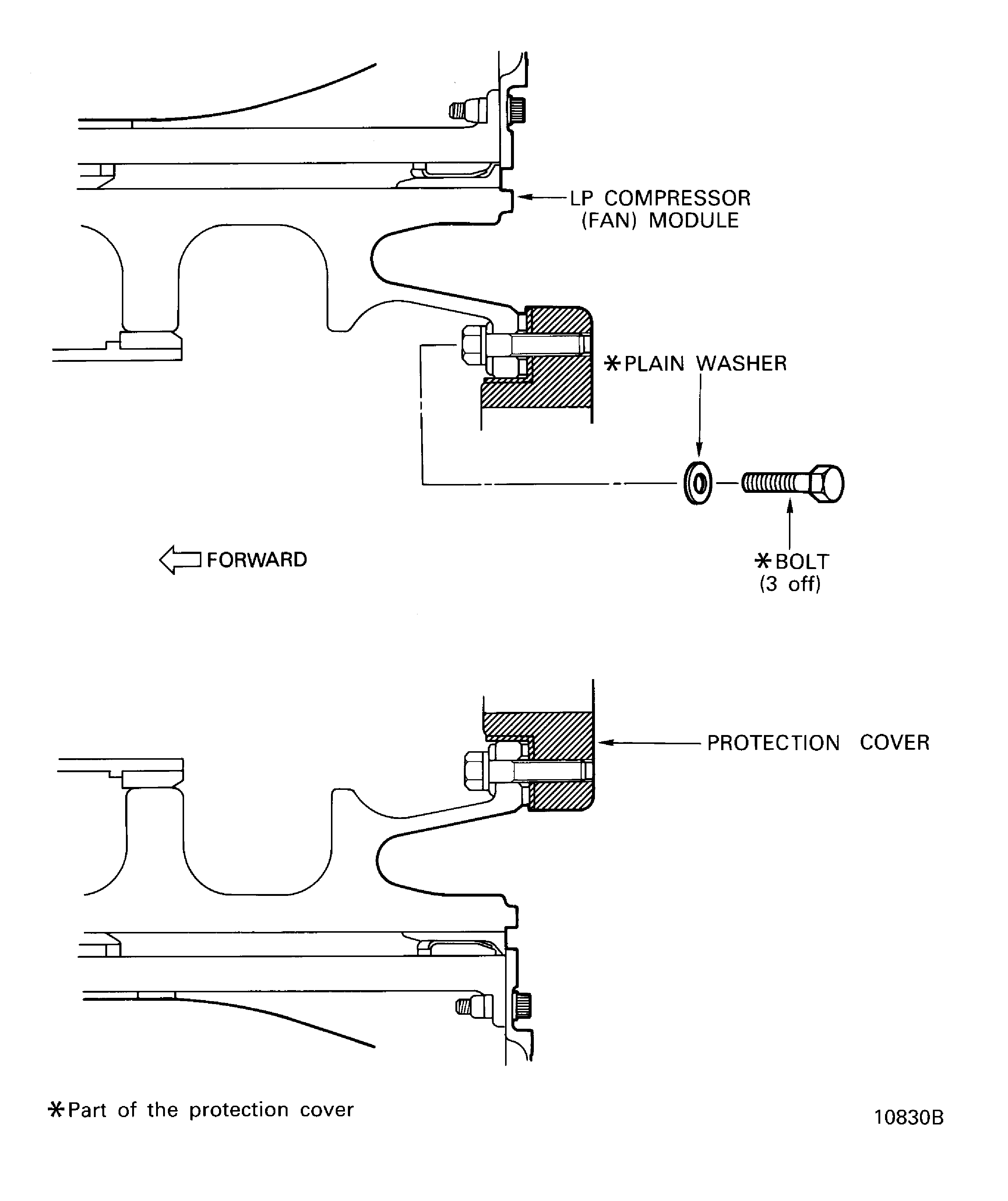
    Figure: Method 1: Install the LP compressor (fan) module on to the storage stand

    Method 1: Install the LP compressor (fan) module on to the storage stand

    Figure: Method 2: Install the LP compressor (fan) module on to the storage stand

    Method 2: Install the LP compressor (fan) module on to the storage stand

    Figure: Install the retaining protector on to the stub shaft

    Install the retaining protector on to the stub shaft

Requirements After Job Completion

Follow-On Conditions

NONE
Manufacturer Code:0AM53
Enterprise Name:IAE INTERNATIONAL AERO ENGINES AG
BU Name:NULL
Building:SUITE 400
Street:628 HEBRON AVENUE
City:GLASTONBURY
State:CT
Zip Code:06033
Country:USA
Manufacturer Code:0AM53
Tool Number:IAE 1J12016
Tool Name:IAE 1J12016 Special wrench
Manufacturer Code:0AM53
Tool Number:IAE 1J12017
Tool Name:IAE 1J12017 Special wrench
Manufacturer Code:0AM53
Tool Number:IAE 1J12019
Tool Name:IAE 1J12019 Storage stand
Manufacturer Code:0AM53
Tool Number:IAE 1J12104
Tool Name:IAE 1J12104 Sling adapter
Manufacturer Code:0AM53
Tool Number:IAE 1J12105
Tool Name:IAE 1J12105 Cantileer sling
Manufacturer Code:0AM53
Tool Number:IAE 1J12106
Tool Name:IAE 1J12106 Aligning pin set
Manufacturer Code:0AM53
Tool Number:IAE 1J12110
Tool Name:IAE 1J12110 Transportation and storage stand
Manufacturer Code:0AM53
Tool Number:IAE 1J12180
Tool Name:IAE 1J12180 Hub protector
Manufacturer Code:0AM53
Tool Number:IAE 1J12181
Tool Name:IAE 1J12181 Protection cover
Manufacturer Code:0AM53
Tool Number:IAE 1J12182
Tool Name:IAE 1J12182 Retaining protector