
TASK 72-31-00-030-001 LP Compressor (LPC) Fan Module - Disassemble

DMC:V2500-A0-72-31-0000-00A-530A-B|Issue No:002.00|Issue Date:2020-05-01

Export Control

EAR Export Classification: Not subject to the EAR per 15 C.F.R. Chapter 1, Part 734.3(b)(3), except for the following Service Bulletins which are currently published as EAR Export Classification 9E991: SBE70-0992, SBE72-0483, SBE72-0580, SBE72-0588, SBE72-0640, SBE73-0209, SBE80-0024 and SBE80-0025.

Copyright

© IAE International Aero Engines AG (2001, 2014 - 2021) The information contained in this document is the property of © IAE International Aero Engines AG and may not be copied or used for any purpose other than that for which it is supplied without the express written authority of © IAE International Aero Engines AG. (This does not preclude use by engine and aircraft operators for normal instructional, maintenance or overhaul purposes.).

Applicability

All

Common Information

TASK 72-31-00-030-001 LP Compressor (LPC) Fan Module - Disassemble

General

This TASK gives the procedure to disassemble the LP Compressor (Fan) Module.

Fig/item numbers in parentheses in the procedure agree with those used in the IPC. Only the primary Fig/item numbers are used. For the service bulletin alpha variants refer to the IPC.

Apply the approved penetrating oils before the removal of threaded parts and parts having an interference fit. Let the parts soak before removal. For the approved penetrating oils and procedures, refer to the SPM TASK 70-64-00-640-501.

Refer to Figure for a sectional view of a LP compressor (fan) module.

NOTE

Special tools are identified in the procedure by the tool primary number.

Preliminary Requirements

Pre-Conditions

NONE

Support Equipment

NameManufacturerPart Number / IdentificationQuantityRemark
IAE 1J12092 Removal puller0AM53IAE 1J120921
IAE 1J12101 Vertical sling0AM53IAE 1J121011
IAE 1J12188 Puller bolt0AM53IAE 1J121881
IAE 1J12301 Turnover stand0AM53IAE 1J123011
IAE 1J12128 Turnover stand0AM53IAE 1J121281
IAE 1J12304 Vertical sling0AM53IAE 1J123041
IAE 1J12305 Parking stand0AM53IAE 1J123051
IAE 1J12307 Balance arbor0AM53IAE 1J123071
IAE 1J12399 Handling sling0AM53IAE 1J123991

Consumables, Materials and Expendables

NONE

Spares

NONE

Safety Requirements

NONE

Procedure

    1. SUBTASK 72-31-00-030-051 Prepare the Turnover Stand for Installation of the LP Compressor (Fan) Module

    2. Refer to Figure.

    3. Use the handle of the turnover stand to turn the clamps, part of the turnover stand, to the lowest position.

    4. Attach the handling sling to the same end of the curvic teeth face of the balance arbor with the six bolts (part of the handling sling).

    5. Attach a hoist to the handling sling.

    6. Lift the balance arbor.

    7. Loosen the two wing nuts (part of the turnover stand) to open the two clamps.

    8. Attach the balance arbor to the turnover stand.

    9. Close the two clamps and safety the balance arbor with the two wing nuts.

    10. Remove the six bolts which attach the handling sling to the balance arbor.

    11. Remove the handling sling from the balance arbor.

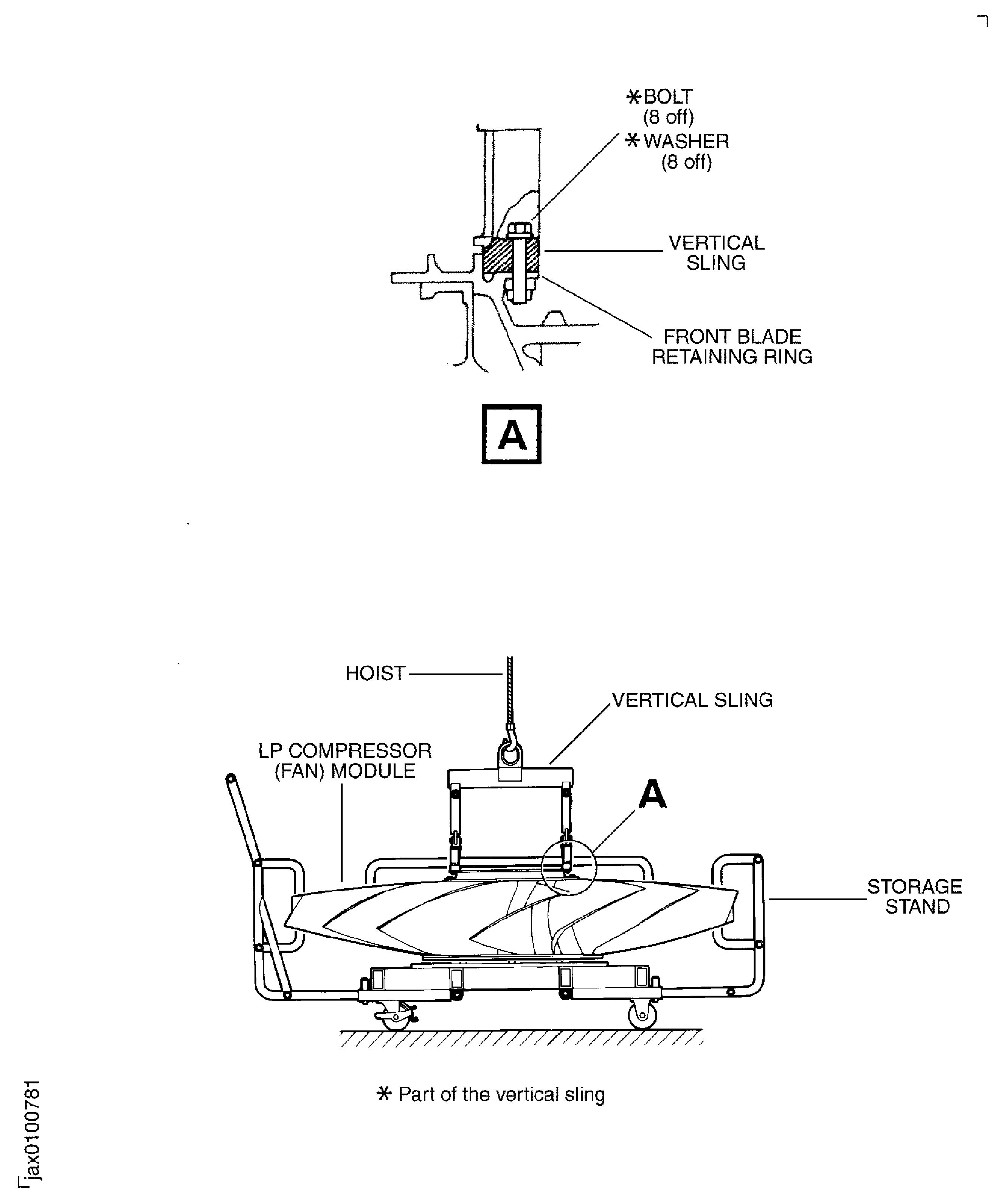
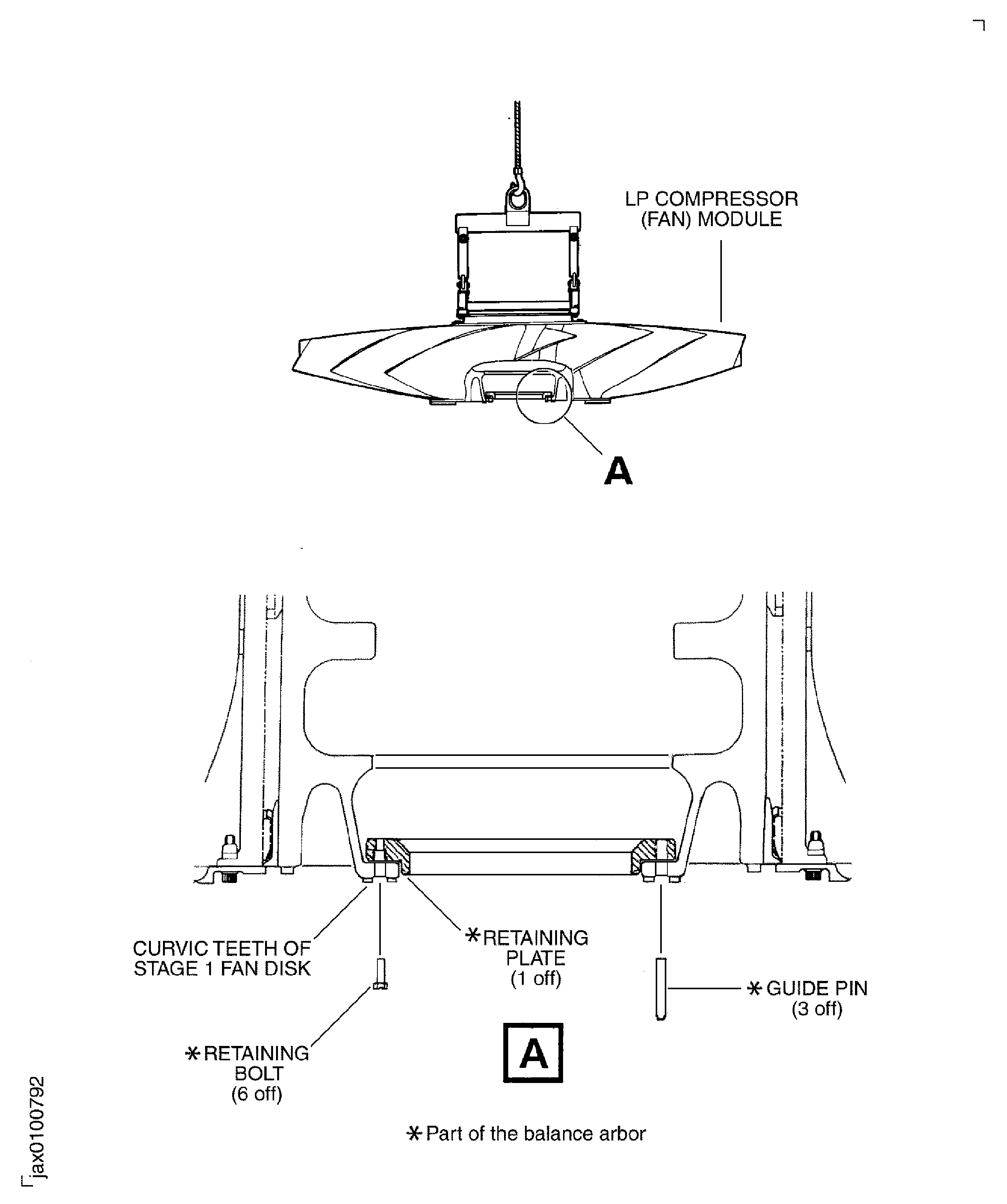
    1. SUBTASK 72-31-00-030-052 Install the LP Compressor (Fan) Module to the Turnover Stand

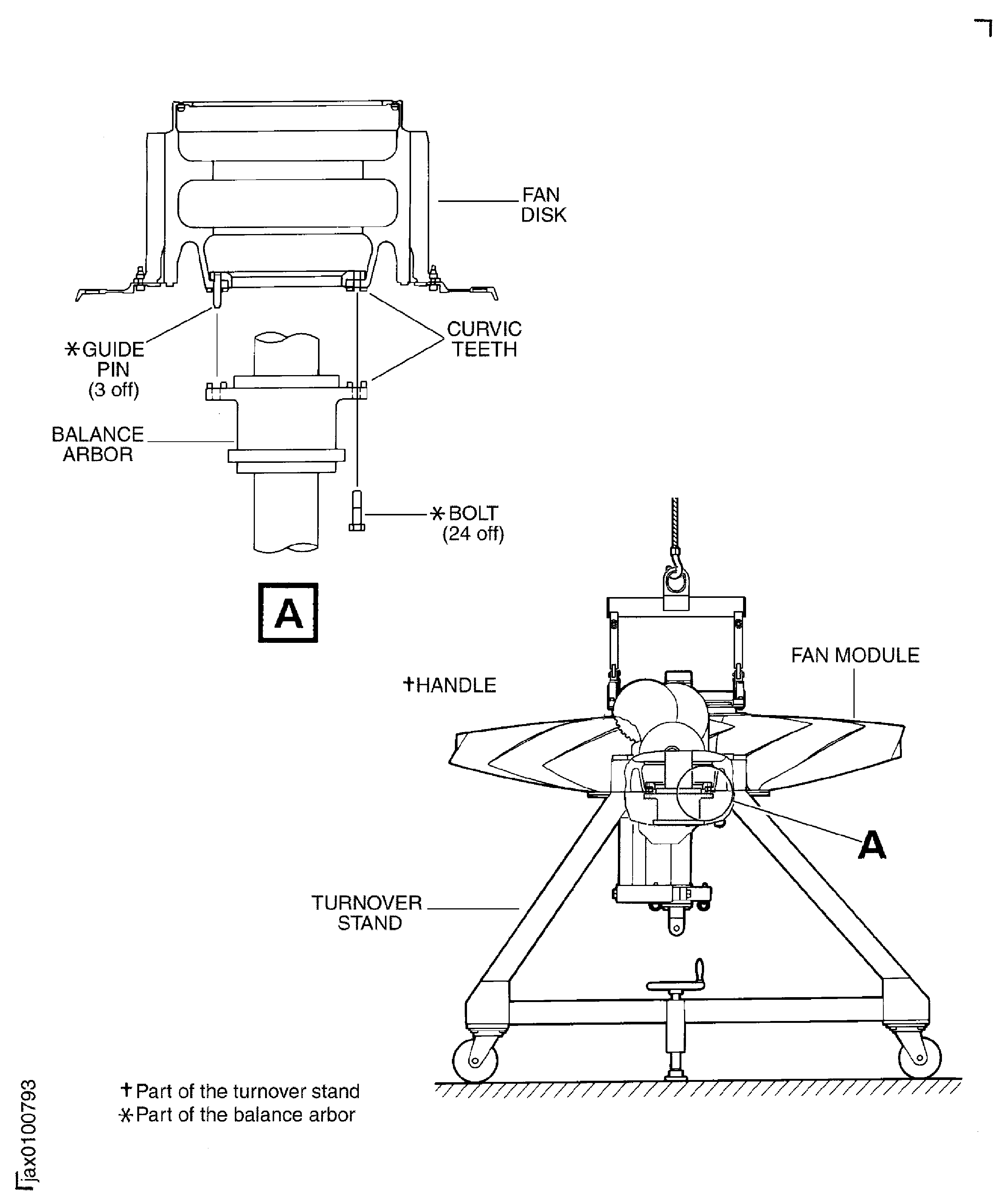
    2. Refer to Figure, Figure, Figure, Figure and Figure.

    3. Move the fan module on the storage stand and IAE 1J12101 Vertical sling 1 off to the working area.

    4. Remove the wing nut (part of the storage stand) and the clamp (part of the storage stand) which attach the fan module to the storage stand.

    5. Install the vertical sling on to the outer flange of the front blade retaining ring with the eight bolts (part of the vertical sling) and washers (part of the vertical sling).

    6. Attach a hoist to the vertical sling.

    7. Slowly lift the fan module until it is clear of the storage stand.

    8. Remove the three bolts (part of the protection cover), washers (part of the protection cover), bolts (part of the protection cover) and nuts (part of the protection cover) which attach the protection cover to the fan module.

    9. Remove the protection cover from the fan module.

    10. Install the set of the retaining plates (part of the balance arbor) to the opposite face of the curvic teeth of the stage 1 fan disk (fan disk) with the six retaining bolts (part of the balance arbor).

    11. Install the three guide pins (part of the balance arbor) to the retaining plates at the same distance through the holes of the curvic flange of the fan disk.

    12. Slowly lower the fan module to the balance arbor on the turnover stand.

    13. Align the three guide pins on the fan disk with the three of 24 bolt holes of the curvic flange of the balance arbor.

    14. Put the fan disk on the balance arbor.

    15. Install the 21 of 24 bolts (part of the balance arbor) in to the holes in the curvic flange of the balance arbor.

    16. Remove the three guide pins.

    17. Install the remaining three of 24 bolts (part of the balance arbor) in to the holes of the curvic flange of the balance arbor.

    18. Use the handle of the turnover stand to turn the module to the horizontal position.

    1. SUBTASK 72-31-00-030-053 Remove the Front Blade Retaining Ring

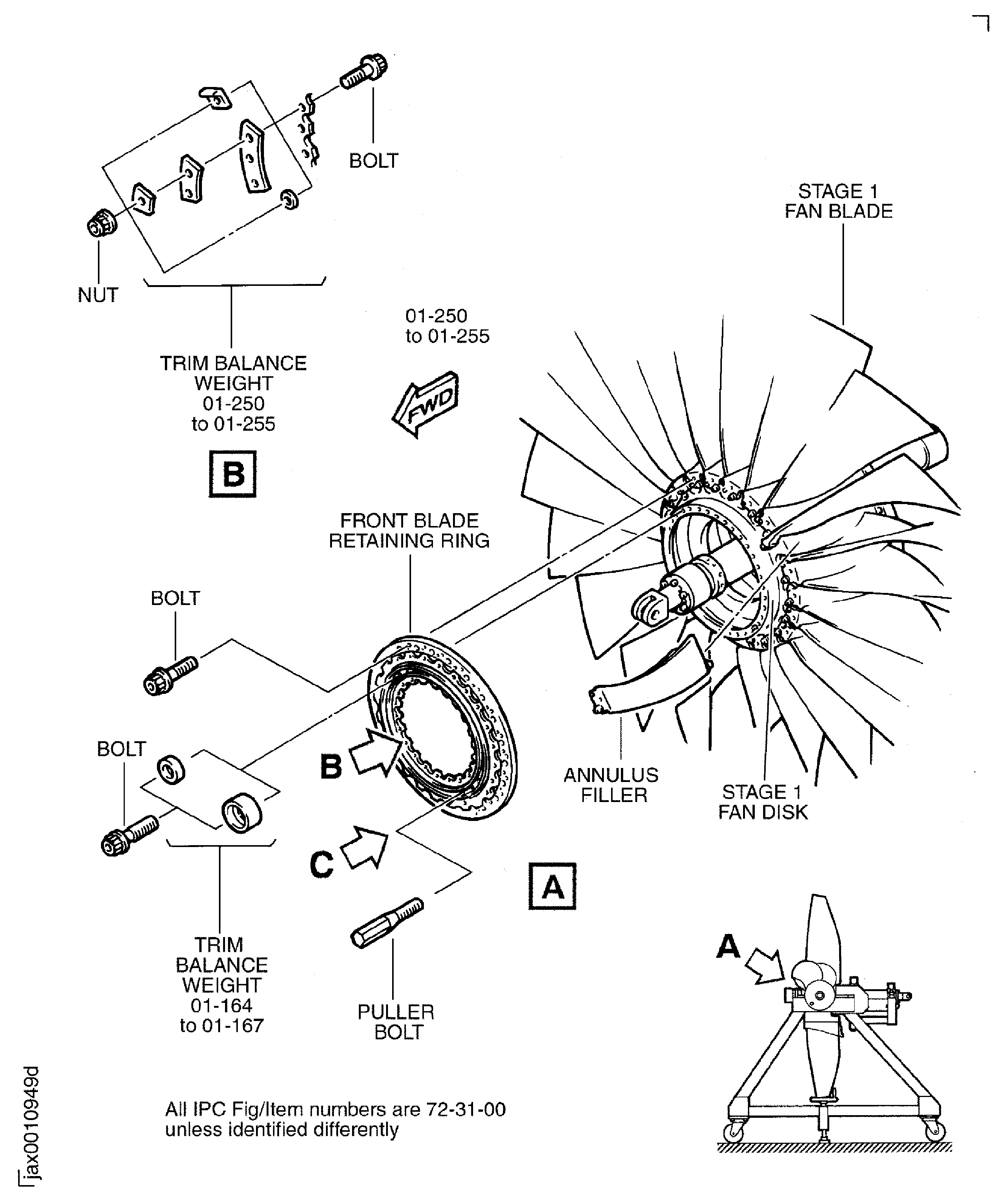
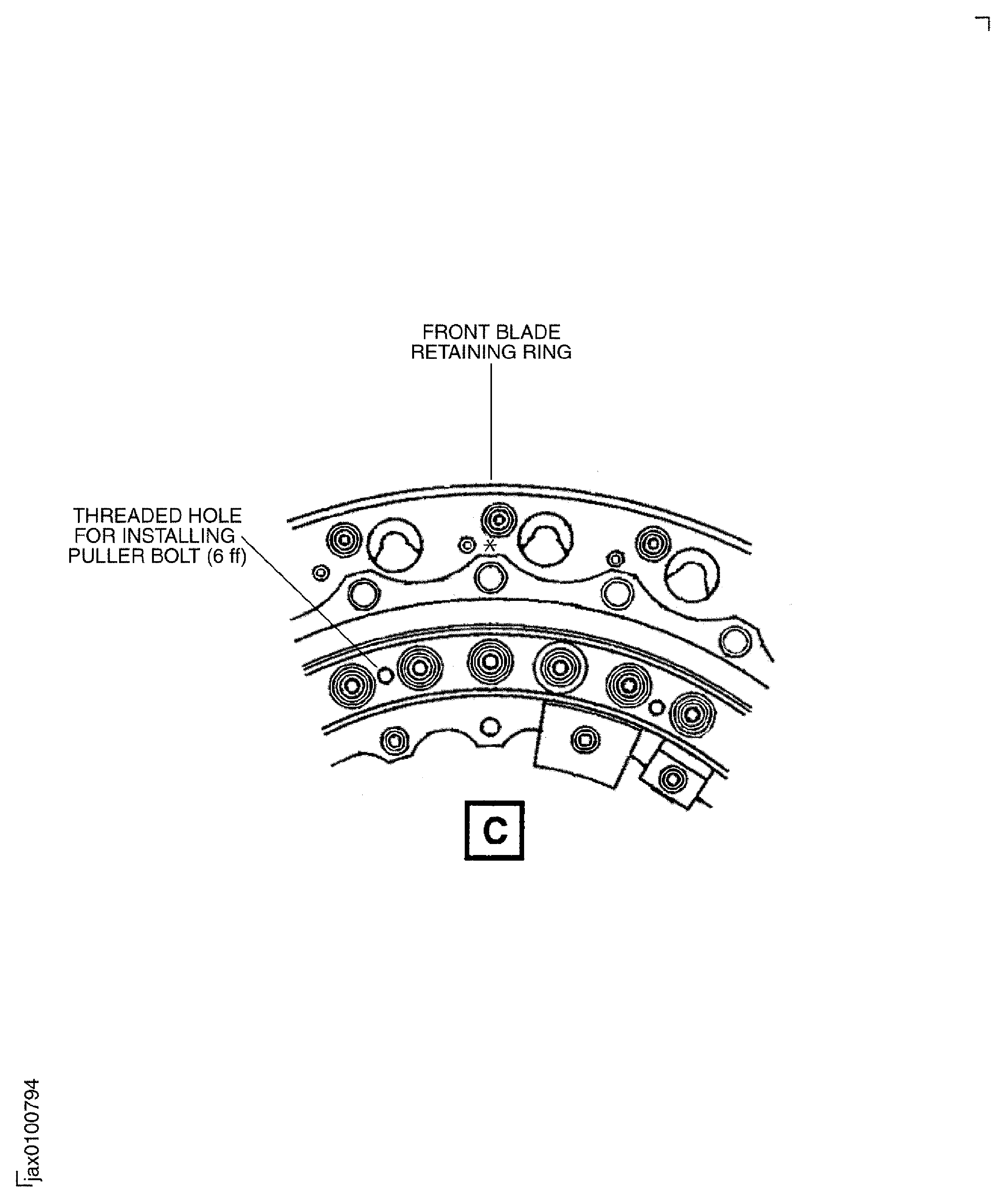
    2. Refer to Figure and Figure.

    3. CAUTION

      DO NOT PUT ANY TOOLS OR PARTS THAT ARE REMOVED IN THE FAN DISK INNER SURFACE. THE TOOLS CAN CAUSE DAMAGE TO THE FAN DISK.

      Remove the 22 bolts which safety the annulus fillers to the front blade retaining ring.

      1. Remove the trim balance weights (01-250 thru 01-255), if installed.

      2. Remove the bolts and the nuts which attach the trim balance weights to the front blade retaining ring.

      3. Remove the trim balance weights.

    4. Remove the 36 bolts and the trim balance weights (01-164 thru 01-167) (if installed) which attach the front blade retaining ring to the fan disk.

    5. WARNING

      YOU MUST BE CAREFUL DURING THE REMOVAL OF THE FRONT BLADE RETAINING RING. IT WEIGHS APPROXIMATELY 10 LB (4.5 KG). IF YOU ARE NOT CAREFUL, INJURY TO PERSONS CAN OCCUR.

      Install the six puller bolts (part of IAE 1J12188 Puller bolt 1 off) into the threaded holes of the front blade retaining ring.

    6. CAUTION

      ANNULUS FILLERS CAN BE PULLED BY FRONT RETAINING RING DURING TIGHTENING THE PULLER BOLTS.
      MIGRATION OF ANNULUS FILLERS CAN DISPLACE FRONT BLADE RETAINING RING IN CIRCUMFERENTIAL DIRECTION AND MISALIGN PULLER BOLT AND JACKING PAD PIN ON FAN DISK.
      IN THE EVENT OF MIGRATION OF ANNULUS FILLERS, THE PULLER BOLTS MUST BE UNLOADED AND THEN THE ANNULUS FILLERS MUST BE PUSHED BACK INTO PLACE.
      IF ANNULUS FILLERS ARE PUSHED BACK WITHOUT UNLOADING, IT CAN CAUSE GALLED DAMAGE TO DISK SURFACE OUTSIDE OF JACKING PAD PIN DUE TO PULLER BOLT.

      Tighten each of the six puller bolts in increments until the front blade retaining ring is released from the fan disk.

    7. Remove the front blade retaining ring.

    1. SUBTASK 72-31-00-030-058 Remove the Annulus Fillers and the Fan Blades

    2. Refer to Figure, Figure and Figure.

      1. Remove the 22 annulus fillers.

        1. CAUTION

          YOU MUST BE CAREFUL WHEN YOU REMOVE THE ANNULUS FILLERS. IF YOU ARE NOT CAREFUL, YOU CAN CAUSE DAMAGE TO THE ANNULUS FILLER RUBBER SEALS.

          Remove the annulus filler.

        2. Pull the front lug of the annulus filler outboard.

        3. Pull the annulus filler forward to remove it from the rear blade retaining ring.

        4. Turn the annulus filler counterclockwise and then remove it from the fan disk.

      2. Repeat Step until all the annulus fillers have been removed.

      1. Remove the 22 fan blades.

        1. CAUTION

          YOU MUST USE ONLY IAE 1J12092 Removal puller WHEN YOU REMOVE THE FAN BLADE. IF YOU PUT ANY OTHER TOOL BETWEEN THE REAR BLADE RETAINING RING AND THE BLADE TO REMOVE THE BLADE, THE TOOL CAN CAUSE DAMAGE TO THE REAR BLADE RETAINING RING.

          Install IAE 1J12092 Removal puller 1 off on to fan disk.

        2. Align one of three shoulder headless pins on the fan disk with the aligning hole of the plate (part of the removal puller).

        3. Attach removal puller to the fan disk with the nine bolts (part of the removal puller). Tighten the bolts.

        4. Make the stopper (part of the removal puller) touch the fan blade.

      2. Install the strap (part of the removal puller) around the fan blade and screw (part of the removal puller) and ensure that the strap is correctly fixed around the handle (part of the removal puller).

        1. Move the fan blade forward.

        2. Slowly turn the handle in direction D to move the fan blade forward. Move the fan blade forward until the front chocking pad is disengaged from the fan disk dovetail slot.

        3. Remove the strap from the fan blade and the screw.

      3. WARNING

        YOU MUST BE CAREFUL DURING THE REMOVAL OF THE FAN BLADE. IT WEIGHS APPROXIMATELY 10 LB (4.5 KG). IF YOU ARE NOT CAREFUL, INJURY TO PERSONS CAN OCCUR.

        CAUTION

        YOU MUST BE CAREFUL WHEN YOU REMOVE THE FAN BLADE. IF YOU ARE NOT CAREFUL, YOU CAN CAUSE DAMAGE TO THE FAN BLADE AND THE CHOCKING PADS.

        Remove the fan blade by hand. Pull the fan blade forward along dovetail slot of the fan disk with an axial motion so that the leading and trailing edges of the adjacent fan blades do not contact.

      4. Repeat Step thru Step to correctly remove all of the remaining fan blades.

        1. Remove the removal puller from the fan disk.

        2. Remove the nine bolts (part of the blade removal puller) which attach the removal puller to the fan disk.

        3. Remove the removal puller from the fan disk.

    1. SUBTASK 72-31-00-030-054 Remove the Fan Disk, the Rear Blade Retaining Ring and the Balance Arbor Assembly

    2. Refer to Figure, Figure and Figure.

    3. Move IAE 1J12305 Parking stand 1 off to the work area.

    4. Use the handle of the turnover stand to turn the front face of the fan disk to the lowest position.

    5. Install the handling sling to the opposite end of the curvic teeth face of the balance arbor with the six bolts (part of the handling sling).

    6. Attach a hoist to the handling sling.

    7. Tighten the hoist.

    8. Loose the wing nuts and open the two clamps.

    9. Slowly lift the fan disk, the rear blade retaining ring and the balance arbor assembly until it is clear of the turnover stand.

    10. Slowly lower the fan disk, the rear blade retaining ring and the balance arbor assembly in to the parking stand.

    11. Close the two clamps with the two wing nuts.

    1. SUBTASK 72-31-00-030-055 Remove the Balance Arbor

    2. Refer to Figure and Figure.

    3. Remove the 24 bolts which attach the fan disk to the balance arbor.

    4. Lift the balance arbor and lower it on a pallet.

    5. Remove the six bolts which attach the handling sling to the balane arbor.

    6. Remove the handling sling from the balance arbor.

    7. Remove the hoist from the handling sling.

    8. Remove the six bolts which attach the three retaining plates to the fan disk.

    9. Remove the three retaining plates from the fan disk.

    1. SUBTASK 72-31-00-030-056 Remove the Rear Blade Retaining Ring

    2. Refer to Figure and Figure.

    3. Remove the 22 bolts which attach the rear blade retaining ring to the fan disk. Remove all the fan rear balance weights if installed.

    4. Install the four puller bolts (part of IAE 1J12188 Puller bolt 1 off) in to the holes of the rear blade retaining ring.

    5. Tighten the four puller bolts equally until the rear blade retaining ring are released from the fan disk.

    6. Remove the four puller bolts from the rear blade retaining ring.

    1. SUBTASK 72-31-00-030-057 Remove the Fan Disk

    2. Refer to Figure.

    3. Move IAE 1J12304 Vertical sling 1 off to the work area.

      1. Attach the vertical sling to the curvic teeth of the fan disk.

      2. Loosen the four locknuts (part of the vertical sling).

      3. Turn the four dowel indicators (part of the vertical sling) on the end of the set bolts (part of the vertical sling) to point to the axis of the vertical sling.

      4. Attach the adapter (part of the vertical sling) on to the curvic teeth of the fan disk.

      5. Turn the four dowel indicators to point in a direction opposite to the axis of the vertical sling.

      6. Tighten the locknuts to safety the set bolts.

    4. Attach a hoist to the vertical sling.

    5. Lift the fan disk and lower it on a pallet.

    6. Remove the hoist from the vertical sling.

      1. Remove the vertical sling from the fan disk.

      2. Loosen the four locknuts.

      3. Turn the four dowel indicators on the end of the set bolts to point to the axis of the vertical sling.

      4. Remove the vertical sling from the fan disk.

  1. Figure: Sectional View of the LP Compressor (Fan) Module

    Sectional View of the LP Compressor (Fan) Module
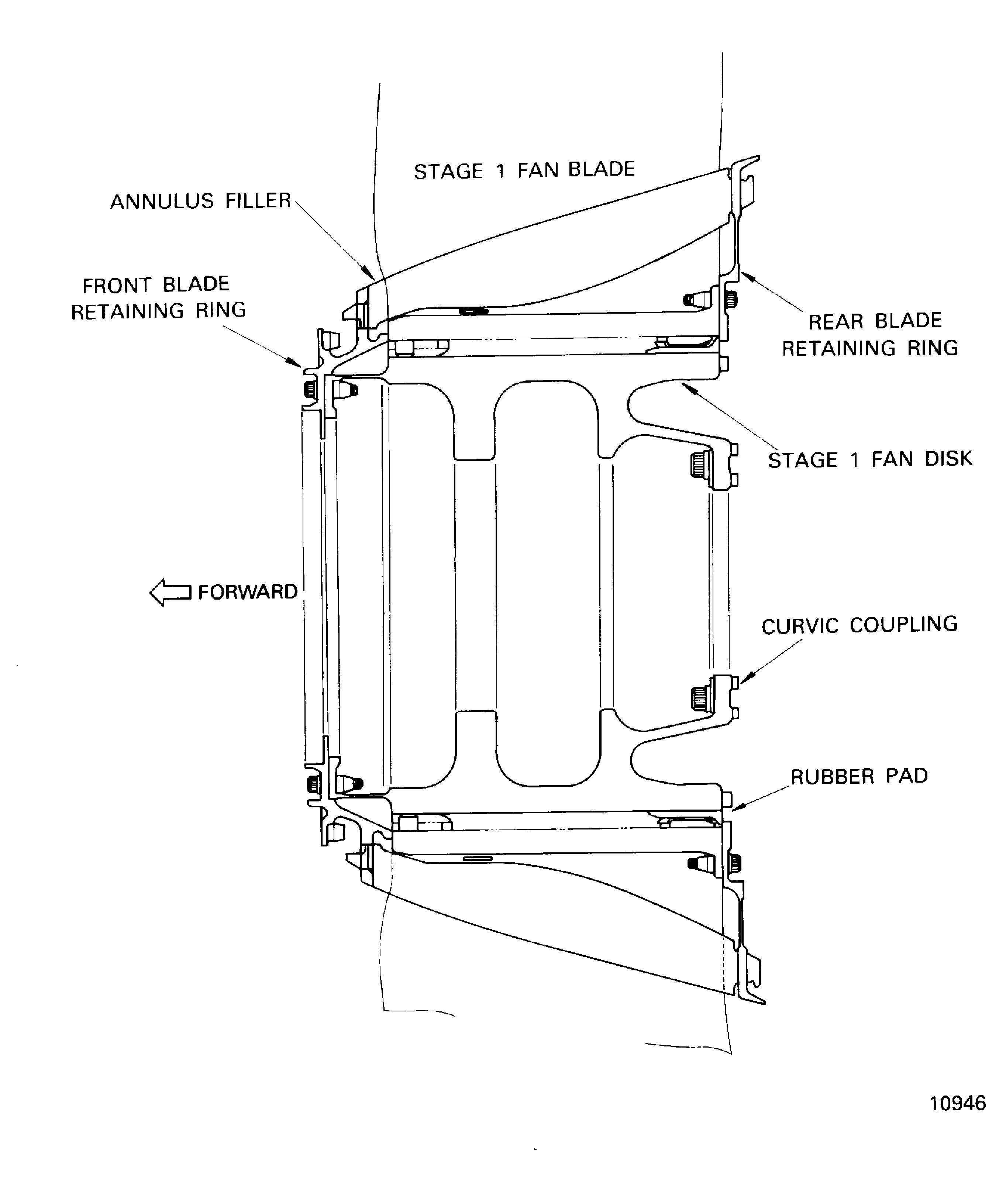
    Figure: Prepare the Turnover Stand for Installation of the LP Compressor (Fan) Module

    Prepare the Turnover Stand for Installation of the LP Compressor (Fan) Module
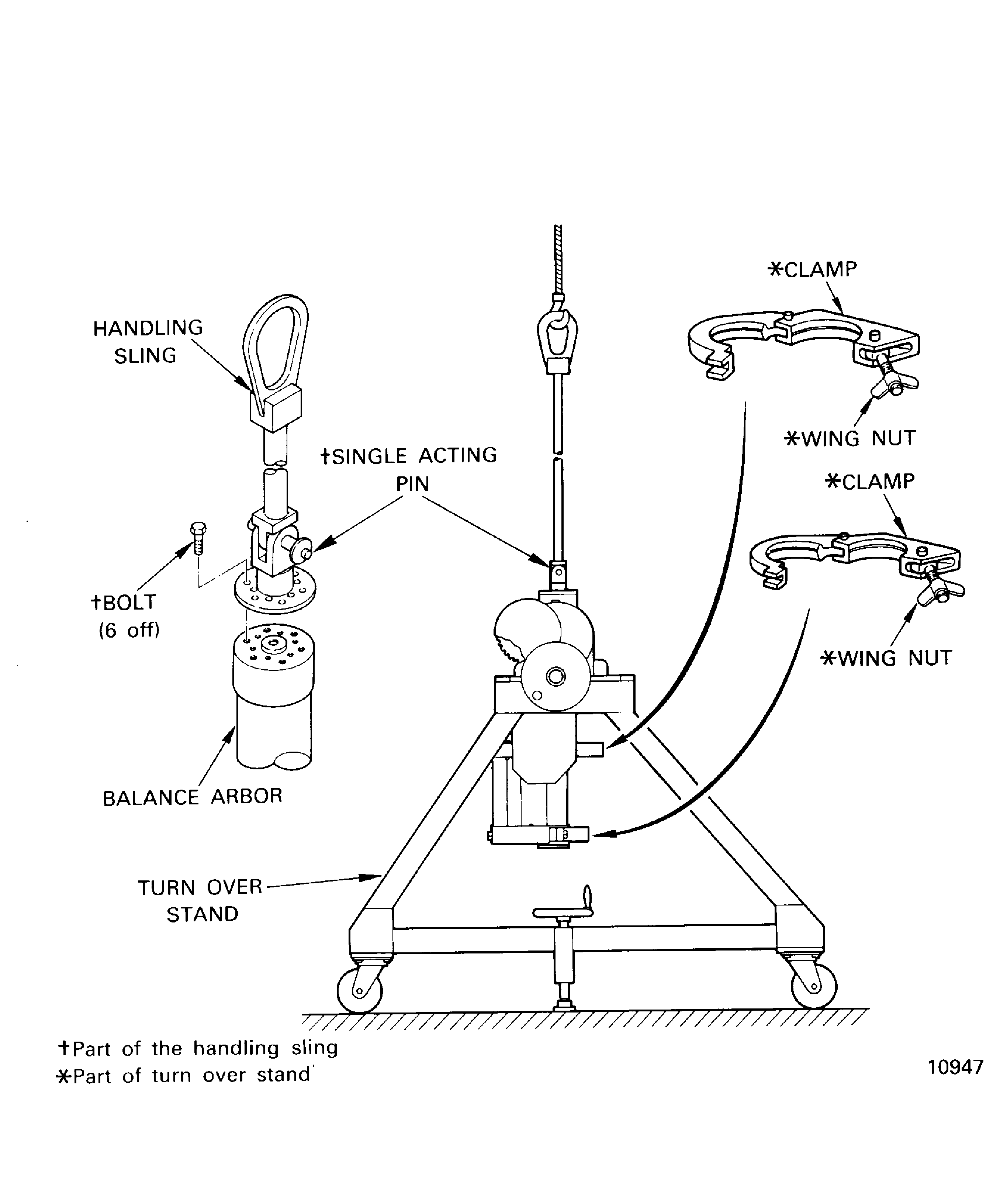
    Figure: Install the LP Compressor (Fan) Module to the Turnover Stand

    Sheet 1

    Legend
    Install the LP Compressor (Fan) Module to the Turnover Stand

    Sheet 1

    Close

    Figure: Install the LP Compressor (Fan) Module to the Turnover Stand

    Sheet 2
    Legend
    Install the LP Compressor (Fan) Module to the Turnover Stand

    Sheet 2

    Close

    Figure: Install the LP Compressor (Fan) Module to the Turnover Stand

    Sheet 3

    Legend
    Install the LP Compressor (Fan) Module to the Turnover Stand

    Sheet 3

    Close

    Figure: Install the LP Compressor (Fan) Module to the Turnover Stand

    Sheet 4
    Legend
    Install the LP Compressor (Fan) Module to the Turnover Stand

    Sheet 4

    Close

    Figure: Install the LP Compressor (Fan) Module to the Turnover Stand

    Sheet 5
    Legend
    Install the LP Compressor (Fan) Module to the Turnover Stand

    Sheet 5

    Close

    Figure: Remove the Front Blade Retaining Ring

    Sheet 1
    Legend
    Remove the Front Blade Retaining Ring

    Sheet 1

    Close

    Figure: Remove the Front Blade Retaining Ring

    Sheet 2
    Legend
    Remove the Front Blade Retaining Ring

    Sheet 2

    Close

    Figure: Remove the Annulus Fillers

    Sheet 1

    Legend
    Remove the Annulus Fillers

    Sheet 1

    Close

    Figure: Remove the Annulus Fillers

    Sheet 2

    Legend
    Remove the Annulus Fillers

    Sheet 2

    Close

    Figure: Remove the Fan Blades

    Remove the Fan Blades
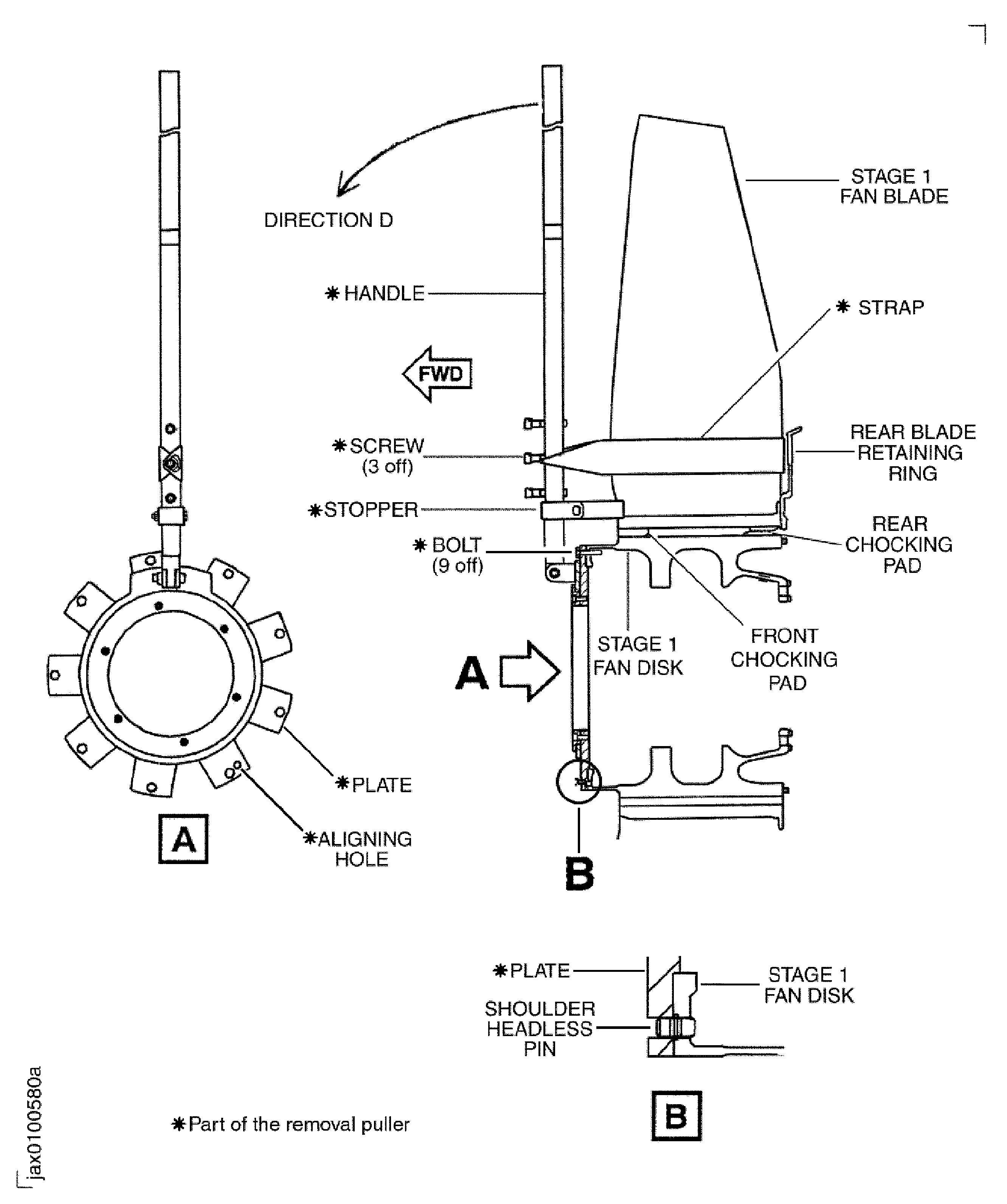
    Figure: Remove the Fan Disk, Rear Blade Retaining Ring and Balance Arbor Assembly

    Remove the Fan Disk, Rear Blade Retaining Ring and Balance Arbor Assembly

    Figure: Remove the Fan Disk, Rear Blade Retaining Ring and Balance Arbor Assembly

    Sheet 1
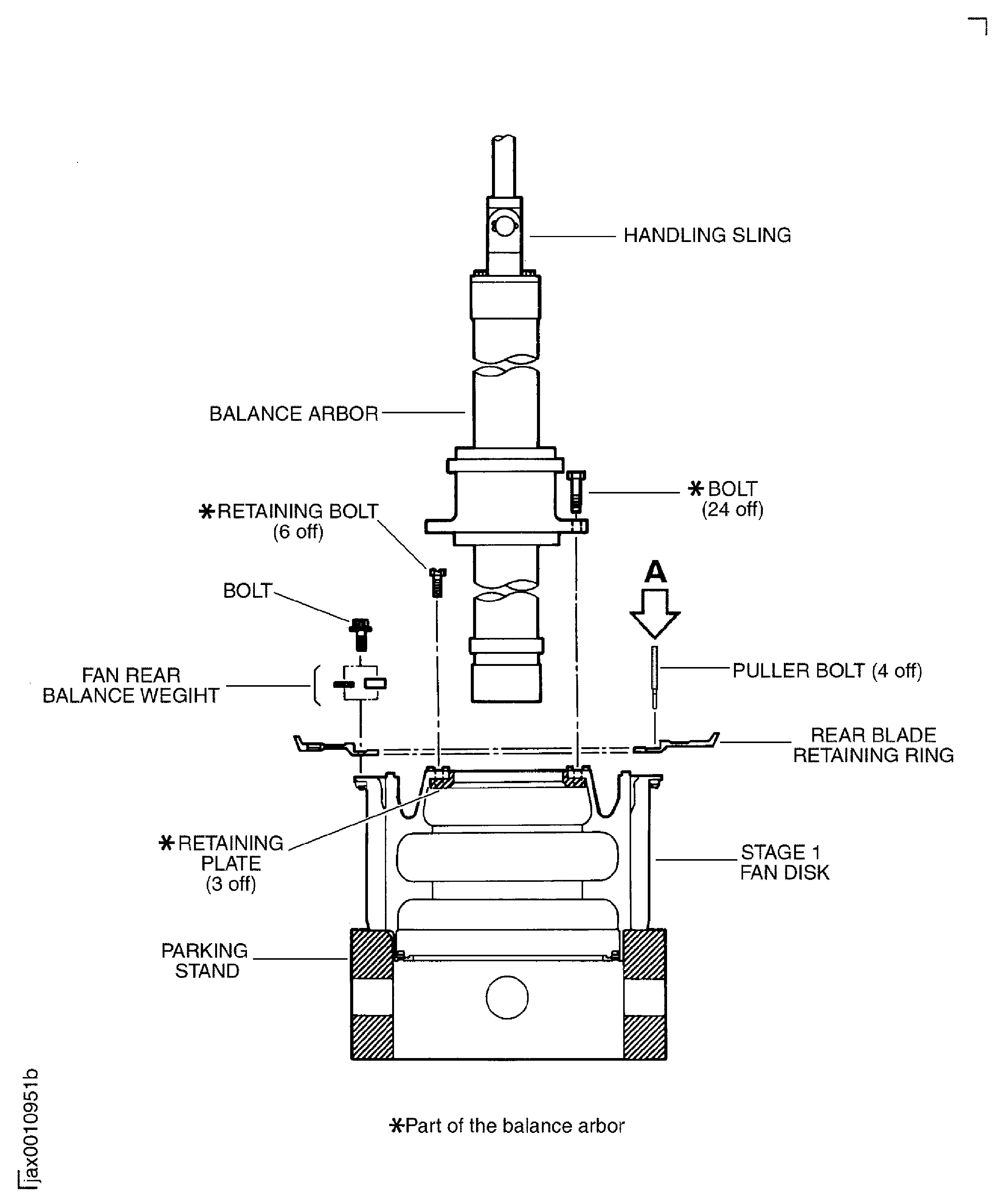
    Legend
    Remove the Fan Disk, Rear Blade Retaining Ring and Balance Arbor Assembly

    Sheet 1

    Close

    Figure: Remove the Fan Disk, Rear Blade Retaining Ring and Balance Arbor Assembly

    Sheet 2

    Legend
    Remove the Fan Disk, Rear Blade Retaining Ring and Balance Arbor Assembly

    Sheet 2

    Close

    Figure: Remove the Fan Disk

    Remove the Fan Disk

Requirements After Job Completion

Follow-On Conditions

NONE
Change Type:

Added caution. (16VJ810)

Manufacturer Code:0AM53
Enterprise Name:IAE INTERNATIONAL AERO ENGINES AG
BU Name:NULL
Building:SUITE 400
Street:628 HEBRON AVENUE
City:GLASTONBURY
State:CT
Zip Code:06033
Country:USA
Manufacturer Code:0AM53
Tool Number:IAE 1J12092
Tool Name:IAE 1J12092 Removal puller
Manufacturer Code:0AM53
Tool Number:IAE 1J12101
Tool Name:IAE 1J12101 Vertical sling
Manufacturer Code:0AM53
Tool Number:IAE 1J12128
Tool Name:IAE 1J12128 Turnover stand
Manufacturer Code:0AM53
Tool Number:IAE 1J12188
Tool Name:IAE 1J12188 Puller bolt
Manufacturer Code:0AM53
Tool Number:IAE 1J12301
Tool Name:IAE 1J12301 Turnover stand
Manufacturer Code:0AM53
Tool Number:IAE 1J12304
Tool Name:IAE 1J12304 Vertical sling
Manufacturer Code:0AM53
Tool Number:IAE 1J12305
Tool Name:IAE 1J12305 Parking stand
Manufacturer Code:0AM53
Tool Number:IAE 1J12307
Tool Name:IAE 1J12307 Balance arbor
Manufacturer Code:0AM53
Tool Number:IAE 1J12399
Tool Name:IAE 1J12399 Handling sling