
TASK 72-41-00-530-001 HPC Assembly - Pack The HPC Assembly, Storage-001

DMC:V2500-A0-72-41-0000-00A-830A-C|Issue No:001.00|Issue Date:2013-11-01

Export Control

EAR Export Classification: Not subject to the EAR per 15 C.F.R. Chapter 1, Part 734.3(b)(3), except for the following Service Bulletins which are currently published as EAR Export Classification 9E991: SBE70-0992, SBE72-0483, SBE72-0580, SBE72-0588, SBE72-0640, SBE73-0209, SBE80-0024 and SBE80-0025.

Copyright

© IAE International Aero Engines AG (2001, 2014 - 2021) The information contained in this document is the property of © IAE International Aero Engines AG and may not be copied or used for any purpose other than that for which it is supplied without the express written authority of © IAE International Aero Engines AG. (This does not preclude use by engine and aircraft operators for normal instructional, maintenance or overhaul purposes.).

Applicability

All

Common Information

TASK 72-41-00-530-001 HPC Assembly - Pack The HPC Assembly, Storage-001

General

For standard torque data and procedures refer to the SPM TASK 70-41-00-400-501, SPM TASK 70-41-01-400-501 and SPM TASK 70-41-02-400-501.

Special torque data is identified with the symbol * after the torque value.

Lubricate all threads and abutment faces of the nuts and bolts with CoMat 10-077 APPROVED ENGINE OILS unless other lubricants are referred to in the procedure.

Refer to the V2500 Illustrated Tool and Equipment Manual (ITEM) Pub.ref. ITE-V2500-1IA, for the illustrations of the special tools given in this procedure.

The shipping container includes IAE 5R18287 1 off, and IAE 5R18235 Transportation front support 1 off.

All the parts must be visually examined for damage, corrosion and wear. Any defects that are not identified in the procedure must be referred to IAE.

NOTE

To identify the consumable materials refer to the PCI.

NOTE

Special tools are identified in the procedure by the tool primary number.

Preliminary Requirements

Pre-Conditions

NONE

Support Equipment

NameManufacturerPart Number / IdentificationQuantityRemark
Four legged slingLOCALFour legged sling
Three legged slingLOCALThree legged sling
Two legged slingLOCALTwo legged sling
IAE 1R18075 Support pedestal0AM53IAE 1R180751
IAE 1R18217 Lift fixture0AM53IAE 1R182171
IAE 1R18234 Support rod0AM53IAE 1R182343
IAE 1R18247 Rigging pin0AM53IAE 1R182471
IAE 1R18423 Rigging pin0AM53IAE 1R184231
IAE 1R18892 Rigging pin0AM53IAE 1R188921
IAE 1R18893 Riggingpin0AM53IAE 1R188931
IAE 1R18894 Rigging pin0AM53IAE 1R188941
IAE 1R18895 Rigging pin0AM53IAE 1R188951
IAE 1R18896 Rigging pin0AM53IAE 1R188961
IAE 5R18288 Shipping container0AM53IAE 5R182881
IAE 1R18441 Lifting adapter0AM53IAE 1R184411
IAE 5R18235 Transportation front support0AM53IAE 5R182351

Consumables, Materials and Expendables

NameManufacturerPart Number / IdentificationQuantityRemark
CoMat 04-005 JOINTING COMPOUND, MEDIUM GRADELOCALCoMat 04-005
CoMat 10-077 APPROVED ENGINE OILSLOCALCoMat 10-077
CoMat 12-013 PRINTED, WAXED, VCI COATED PAPERLOCALCoMat 12-013
CoMat 12-022 DESICCANT SELF INDICATINGLOCALCoMat 12-022

Spares

NONE

Safety Requirements

NONE

Procedure

    1. SUBTASK 72-41-00-530-051 Remove the HP Compressor Shipping Container Lid

    2. Attach an applicable four legged sling to a hoist.

    3. Move the hoist over IAE 5R18288 Shipping container 1 off, and attach the four legged sling to the four lid lift rings.

    4. Release the 20 butterfly catches.

    5. Lift the shipping container lid away from the shipping container base and put it on a suitable surface.

    6. Remove the sling from the hoist.

    1. SUBTASK 72-41-00-530-052 Install the Lift Fixture and the Lifter on to the HP Compressor Module

    2. Refer to Figure.

    3. Remove the protective cover from the rear of the HP compressor module.

      1. Install IAE 1R18217 Lift fixture 1 off, on the HP compressor module.

      2. Attach a suitable three legged sling to a hoist.

      3. Move the hoist over the lift fixture and attach the three legged sling to the three lift eyes.

      4. Lift the lift fixture and position it over the HP compressor assembly. Carefully lower the lift fixture on to the HP compressor shaft and the HP compressor rear outer case.

      5. Remove the three legged sling and the hoist.

      6. Adjust the position of the three thumbscrews so that the frame touches the HP compressor rear outer case rear flange in all positions. At the same time make sure the ring is correctly located on the HP compressor rotor.

      7. Install the six bolts, the 12 washers and the six nuts that attach the lift fixture to the HP compressor rear outer case.

      8. Tighten the six nuts.

      1. Install IAE 1R18441 Lifting adapter 1 off, on to the end of the HP compressor shaft.

      2. Engage the lifter on the end of the compressor shaft.

      3. Turn the lifter clockwise to move the lifter on to the HP compressor shaft.

      4. Continue to turn the lifter clockwise until the locating pin is clear of the sleeve and the lifter touches the lift fixture.

      5. Tighten the lock screw in to the lifter. Make sure that the lock screw goes into a slot in the end of the HP compressor shaft. If the lock screw does not go into a slot, then turn the lifter anti-clockwise until the lock screw will go into the first available slot.

      6. Turn the sleeve until a hoist can be attached to the lift eye.

    1. SUBTASK 72-41-00-530-053 Install the HP Compressor Support Rods

    2. Refer to Figure and Figure.

      1. Use a suitable spanner to turn the variable stator vane (VSV) actuating mechanism crankshaft and put the VSV's in to the low speed position.

      2. Install IAE 1R18247 Rigging pin 1 off or IAE 1R18423 Rigging pin 1 off or (IAE 1R18892 Rigging pin thru IAE 1R18896 Rigging pin) 1 off, through the bracket HPC Variable Stator Vane Actuation System (72-41-34, 02-780) and in to the HP compressor case, to lock the VSV's.

      3. Remove the six bolts HP COMPRESSOR SPLIT CASE (72-41-31, 01-122), the two brackets (HP COMPRESSOR SPLIT CASE (72-41-31, 01-115) and HP COMPRESSOR SPLIT CASE (72-41-31, 01-118)), and the three blanks HP COMPRESSOR SPLIT CASE (72-41-31, 01-120) from the HP compressor front cases.

      4. Turn the adjustment handle to retract the blade of the support rods.

      5. Carefully install the support rods through the holes in the HP compressor split cases. Make sure the blades are rearwards.

      6. Safety the support rods to the HP compressor split cases with the six tool bolts.

      7. Turn the adjustment handle until the blades touch the HP compressor stage 3 disk and lightly tighten.

    1. SUBTASK 72-41-00-530-054 Remove the Transportation Front Support from the HP Compressor Shipping Frame

    2. Refer to Figure.

    3. Attach a hoist to the lift bobbin on the transportation front support. Adjust the hoist to hold it.

    4. Remove the two pins that attach the transportation front support to the HP compressor shipping frame.

    5. Lift the transportation front support and put it on a suitable work surface, with the pads at the bottom.

    1. SUBTASK 72-41-00-530-055 Remove the Dummy Stub Shaft from HP Compressor Module

    2. Refer to Figure.

    3. Attach a hoist to the lifter.

    4. Remove the HP compressor/support ring bolts.

    5. Lift and remove the HP compressor module from the build stand.

    6. Lower the HP compressor module on to IAE 1R18075 Support pedestal 1 off. Do not release the hold on the HP compressor module.

    7. NOTE

      The 20 curvic coupling bolts remain with the dummy stub shaft.

      Release the 20 curvic coupling bolts.

    8. Lift and remove the HP compressor module from the dummy stub shaft.

    1. SUBTASK 72-41-00-530-056 Install the Transportation Front Support on to the HP Compressor Front Flange

    2. Refer to Figure.

    3. Move the HP compressor module over the transportation front support.

    4. Lower the HP compressor module on to the transportation front support. Make sure that the curvic protector is correctly located on the stage 3 disk curvic coupling. At the same time locate the two location dowels.

    5. Attach the transportation front support to the HP compressor module with the 18 tool bolts and the 18 tool nuts.

    6. Remove the hoists from the lift eye.

    1. SUBTASK 72-41-00-530-057 Remove the Lifter and the Lift Fixture from the HP Compressor Module

    2. Refer to Figure.

      1. Remove the lifter from the HP compressor shaft.

      2. Turn the sleeve until the lockscrew can be released.

      3. Release the lockscrew from the slot in the HP compressor shaft.

      4. Turn the lifter anti-clockwise until it can be lifted from the HP compressor shaft.

      5. Remove the lifter from the HP compressor shaft.

      1. Remove the lift fixture from the HP compressor module.

      2. Attach the three legged sling to a hoist and the lift fixture.

      3. Remove the six nuts, the 12 washers and the six bolts which attach the lift fixture to the HP compressor rear outer case.

      4. Carefully lift and remove the lift fixture from the HP compressor module and put it on an applicable surface.

      5. Remove the three legged sling from the hoist and the lift fixture.

    1. SUBTASK 72-41-00-530-058 Remove the HP Compressor Support Rods

    2. Refer to Figure.

    3. Turn the adjustment handles to retract the blades.

    4. Remove the six support rod tool bolts.

    5. Remove the three support rods.

    6. Remove the rigging pin from the variable stator vane (VSV) crankshaft bearing housing.

    7. Use a suitable spanner to turn the VSV actuating mechanism crankshaft and put the VSVs in to the high speed position.

    8. Install the tool locking pin into the VSV actuating mechanism crankshaft.

      1. Install one of the blanks HP COMPRESSOR SPLIT CASE (72-41-31, 01-120), the bracket HP COMPRESSOR SPLIT CASE (72-41-31, 01-118) and two of the bolts HP COMPRESSOR SPLIT CASE (72-41-31, 01-122) into the HP compressor at location A.

      2. Put a thin layer of CoMat 04-005 JOINTING COMPOUND, MEDIUM GRADE on the bracket where it touches the blank.

      3. Install the blank, the bracket and the bolts.

      4. Torque the bolts to 85 to 105 lbfin (10 to 12 Nm).

      1. Install one of the blanks HP COMPRESSOR SPLIT CASE (72-41-31, 01-120), the bracket HP COMPRESSOR SPLIT CASE (72-41-31, 01-115) and two of the bolts HP COMPRESSOR SPLIT CASE (72-41-31, 01-122) in the HP compressor at location C.

      2. Put a thin layer of CoMat 04-005 JOINTING COMPOUND, MEDIUM GRADE on the bracket where it touches the blank.

      3. Install the blank, the bracket and the bolts.

      4. Torque the bolts to 85 to 105 lbfin (10 to 12 Nm).

    9. Install the other blank HP COMPRESSOR SPLIT CASE (72-41-31, 01-120) and the other bolts HP COMPRESSOR SPLIT CASE (72-41-31, 01-122) into the HP compressor at location A. Torque the bolts to 85 to 105 lbfin (10 to 12 Nm).

    1. SUBTASK 72-41-00-530-059 Install the Conical Rear Support and Shaft Cover on the Rear of the HP Compressor Module, and 72-41-00-990-059

    2. Refer to Figure.

    3. Make sure that the lock nut is loose and the lock bolt is fully retracted.

    4. Attach an applicable two legged sling to a hoist.

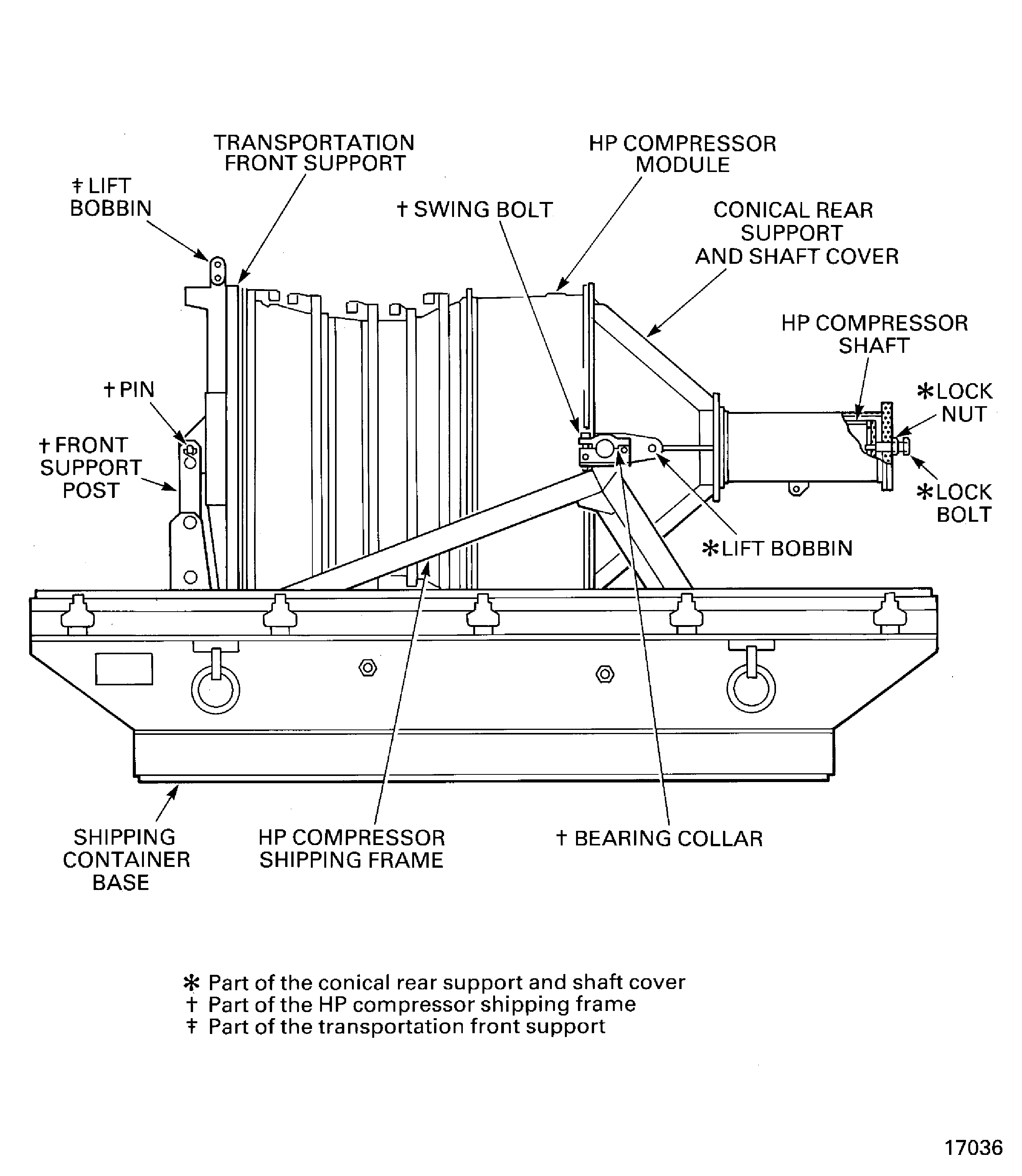
    5. Move the hoist over the shipping container and attach the two legged sling to the conical rear support lift bobbin.

    6. Adjust the hoist until it holds the conical rear support.

    7. Remove the pin that attaches the shaft cover to the shipping frame.

    8. Use the hoist to move the conical rear support and shaft cover into the vertical position.

    9. NOTE

      The conical rear support and shaft cover will need to be supported in the vertical position, during the next three steps.

      Support the conical rear support and shaft cover in the vertical position.

    10. Loosen the swing bolt and open the bearing collar.

    11. Lift the conical rear support and shaft cover and position it over the HP compressor module.

    12. Lower the conical rear support and shaft cover on to the HP compressor module. At the same time make sure that the shaft protector engages on the shaft.

    13. Install the 42 tool bolts and the 42 tool nuts. Tighten the tool nuts.

    14. Turn the lock bolt until the anti-score disk touches the end of the HP compressor shaft.

    15. Tighten the lock bolts to 91 * lbfft (123.5 Nm). Tighten the lock nut.

    1. SUBTASK 72-41-00-530-060 Prepare the HP Compressor Module for Storage

    2. Put a cover on, and seal, all the openings on the HP compressor module and the tools. Use CoMat 12-013 PRINTED, WAXED, VCI COATED PAPER to make the covers.

    1. SUBTASK 72-41-00-530-061 Install the HP Compressor Module into the HP Compressor Shipping Frame

    2. Refer to Figure.

    3. Use the hoist to lift the HP compressor module and position it over the front support post.

    4. Adjust the position of the HP compressor module, to align the holes in the front support post with the hole in the transportation front support.

    5. Install the pin that attaches the transportation front support to the HP compressor shipping frame. Safety with the safety pin.

    6. Use the hoist to lower the HP compressor module into the HP compressor shipping frame, so that the bearings on the conical rear support are located in the bearing collars.

    7. Close the bearing collar and put the swing bolt into position. Tighten the bearing collar nut.

    8. Remove the two legged sling from the conical rear support lift bobbin and the the hoist.

    1. SUBTASK 72-41-00-530-062 Seal the Shipping Container

    2. Refer to Figure.

    3. Attach a hoist to the four legged sling that is attached to the shipping container lid.

    4. Lift the shipping container lid and put it over the HP system module.

    5. Lower the shipping container lid on to the shipping container base.

    6. Attach the shipping container lid to the shipping container base with the 20 butterfly catches.

    7. Remove the four legged sling from the four lid lift rings.

    8. Remove the four legged sling from the hoist and put it on an applicable work surface.

    1. SUBTASK 72-41-00-530-063 Put the Desiccant and the Records into the Shipping Container

    2. Refer to Figure.

    3. Put the correct amount of desiccant into the desiccant receptacle. Follow the instructions given on the shipping container lid adjacent to the desiccant receptacle. Use CoMat 12-022 DESICCANT SELF INDICATING. Replace the desiccant receptacle cover.

    4. Complete the relevant documentation. Put the documentation into the record receptacle. Put the cover on the record receptacle.

    1. SUBTASK 72-41-00-530-064 Do the Subsequent Checks after the Shipping Container is Sealed

      1. Examine the humidity indicator to make sure it is safe at the times shown.

      2. 24 hours, 7 days and then at regular 28 day cycles.

      1. If the humidity indicator changes color from blue, do the subsequent steps.

        1. Remove the shipping container lid from the base.

        2. Attach a four legged sling to a hoist.

        3. Move the hoist over the shipping container and attach the four legged sling to the four lid lift rings.

        4. Release the 20 butterfly catches.

        5. Remove the shipping container lid to put it on a suitable surface.

      2. Do a visual inspection for corrosion and damage.

        1. Install the shipping container lid.

        2. Lift the shipping container lid and put it on the base.

        3. Attach the shipping container lid to the base with the 20 butterfly catches.

      3. Remove the desiccant from the desiccant receptacle and replace it with new desiccant. Follow the instructions given on the shipping container lid, adjacent to the desiccant receptacle for the correct amount. Use CoMat 12-022 DESICCANT SELF INDICATING. Replace the desiccant receptacle cover.

      4. Do step A again.

  1. Figure: Install the lift fixture and the lifter on to the HP compressor module

    Install the lift fixture and the lifter on to the HP compressor module
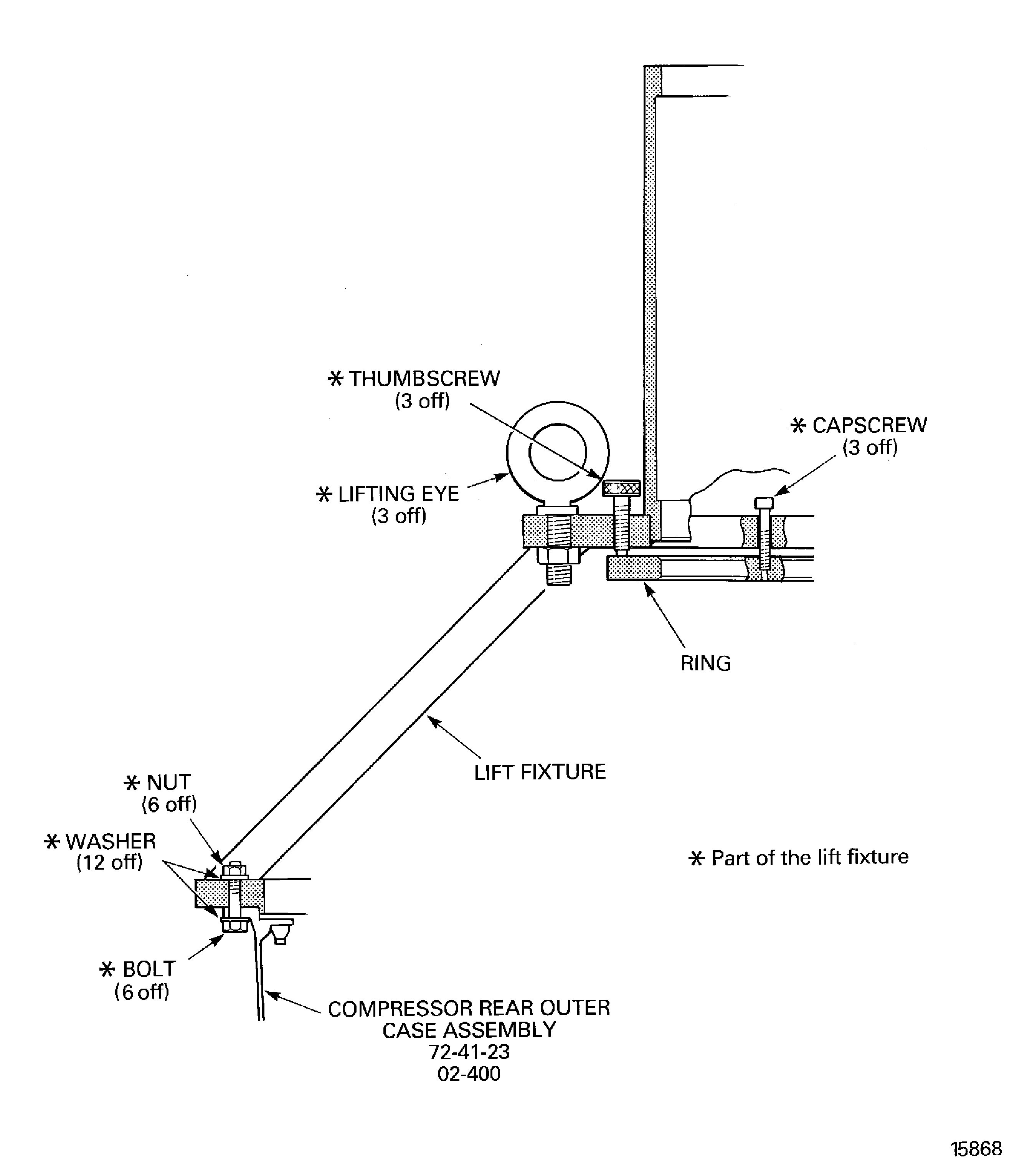
    Figure: Install the lift fixture and the lifter on to the HP compressor module

    Install the lift fixture and the lifter on to the HP compressor module
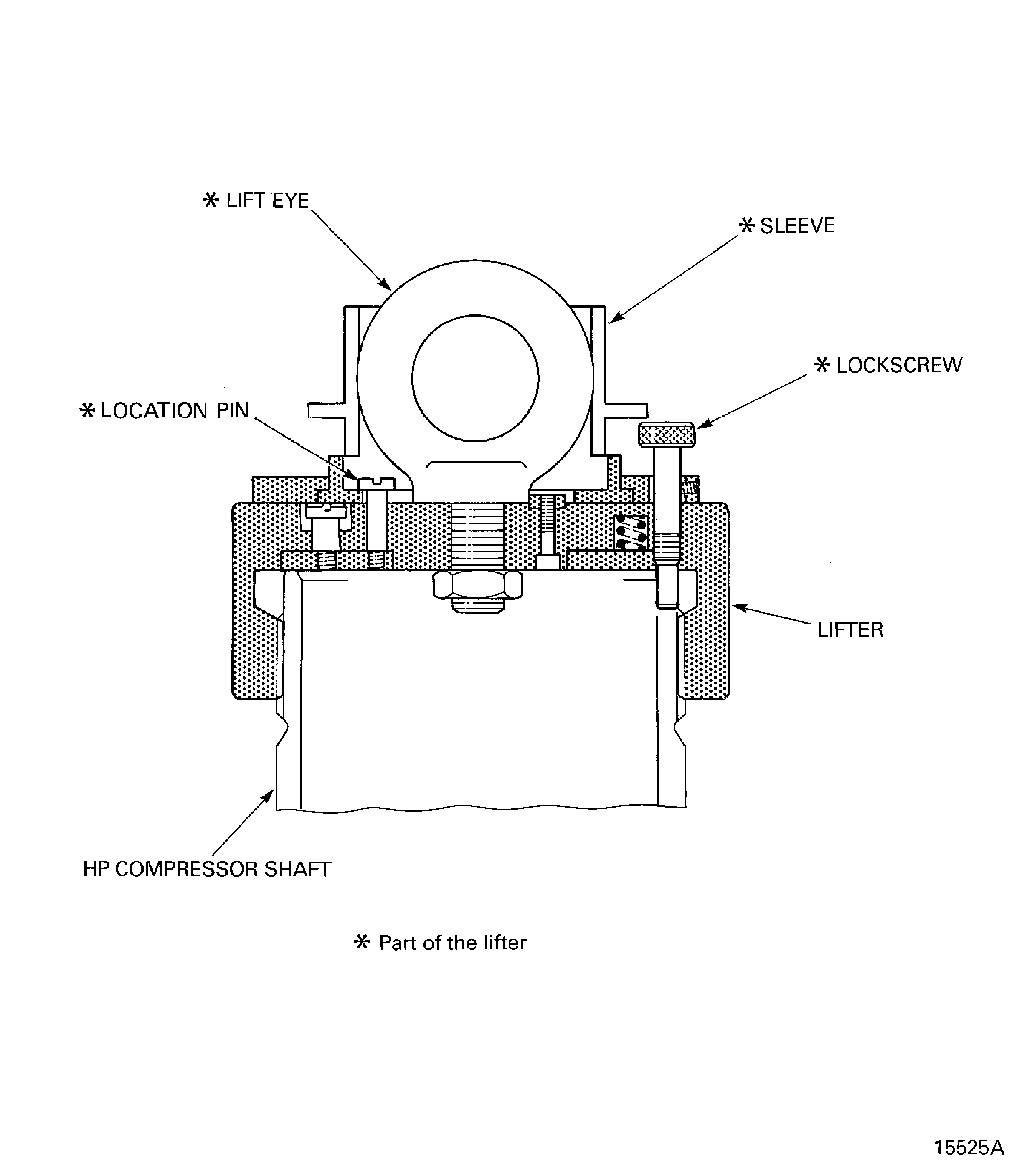
    Figure: Install the HP compressor support rods

    Install the HP compressor support rods

    Figure: Install the HP compressor support rods

    Install the HP compressor support rods

    Figure: HP compressor shipping container

    HP compressor shipping container
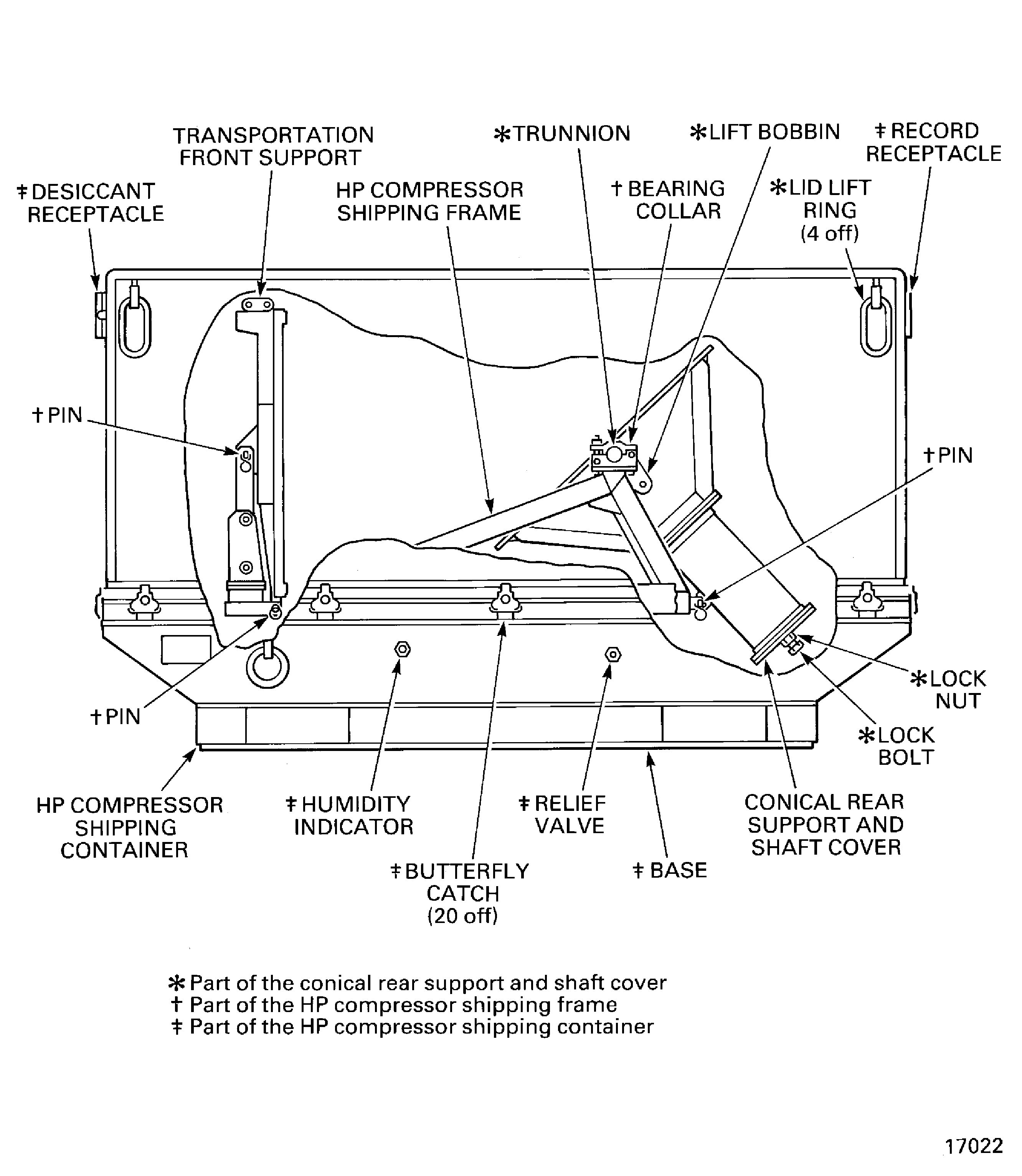
    Figure: Remove the dummy stub shaft from the HP compressor module

    Remove the dummy stub shaft from the HP compressor module

    Figure: Remove the dummy stub shaft from the HP compressor module

    Remove the dummy stub shaft from the HP compressor module

    Figure: Install the transportation front support on to the HP compressor module

    Install the transportation front support on to the HP compressor module
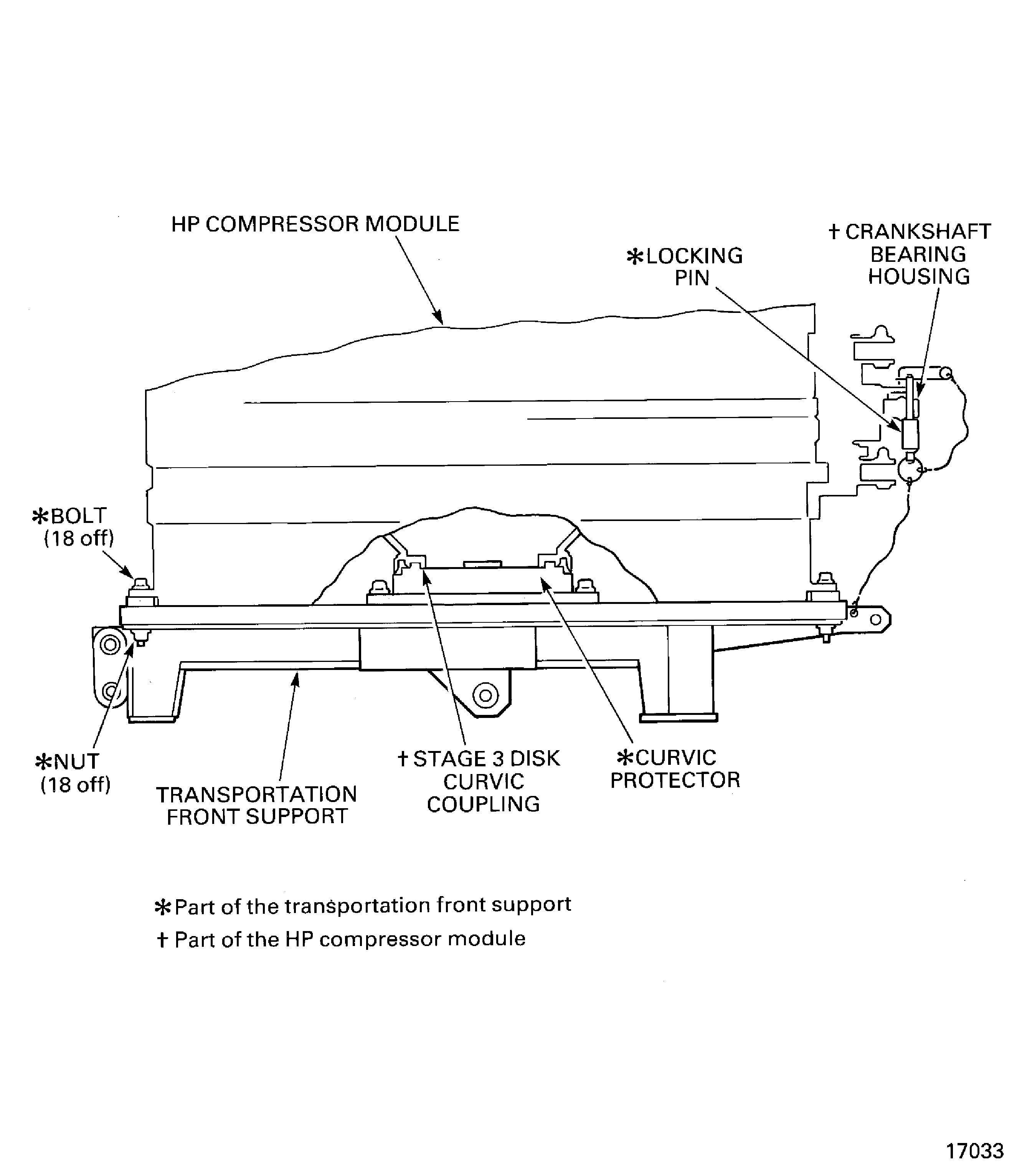
    Figure: Install the conical rear support and shaft cover on to the HP compressor module

    Install the conical rear support and shaft cover on to the HP compressor module
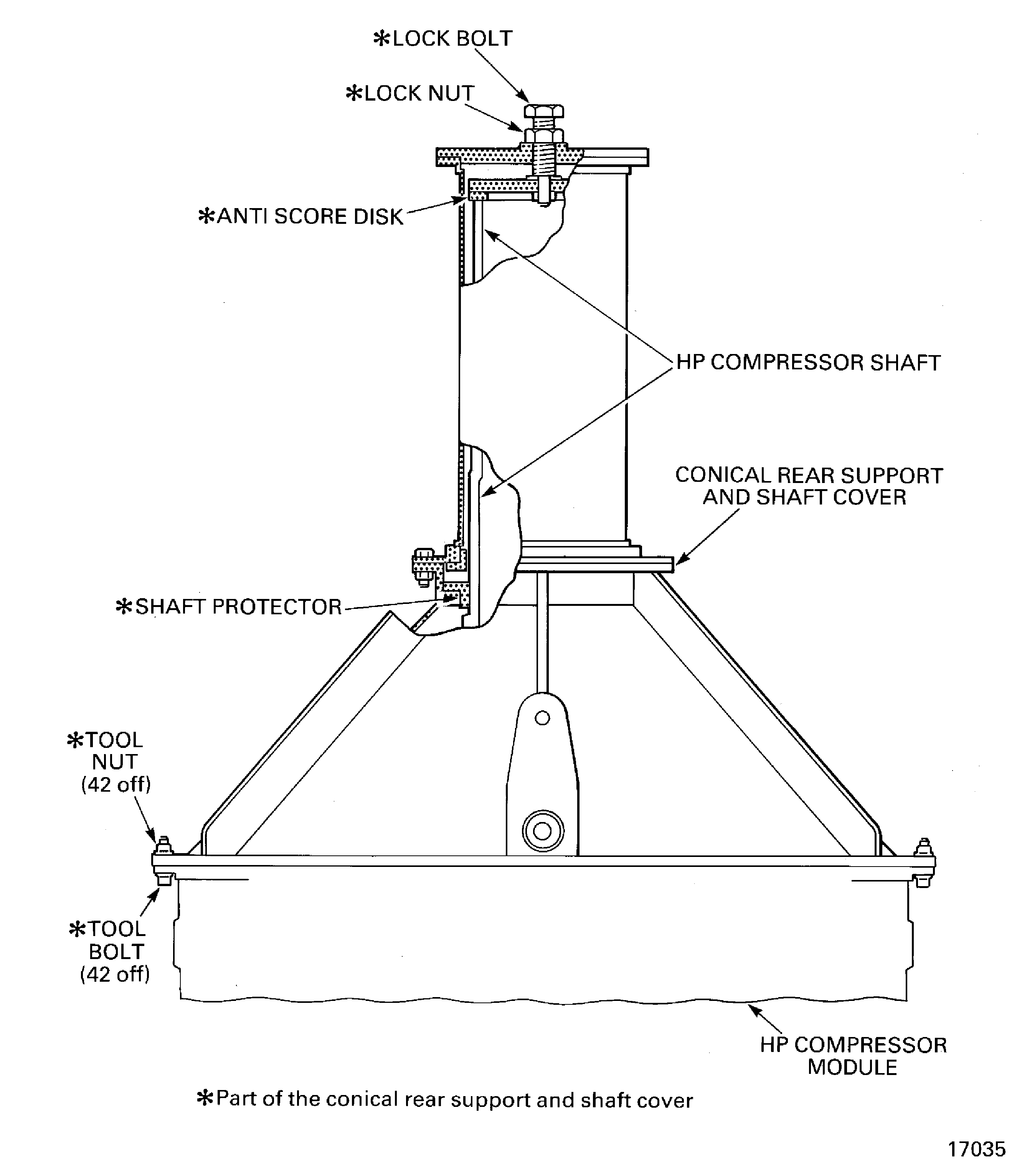
    Figure: Install the HP compressor module in to the HP compressor shipping frame

    Install the HP compressor module in to the HP compressor shipping frame
Requirements After Job Completion

Follow-On Conditions

NONE
Manufacturer Code:0AM53
Enterprise Name:IAE INTERNATIONAL AERO ENGINES AG
BU Name:NULL
Building:SUITE 400
Street:628 HEBRON AVENUE
City:GLASTONBURY
State:CT
Zip Code:06033
Country:USA
Manufacturer Code:LOCAL
Enterprise Name:LOCALLY SUPPLIED
Manufacturer Code:LOCAL
Supply Number:CoMat 04-005
Type:sp01
Supply Short Name:CoMat 04-005 JOINTING COMPOUND, MEDIUM GRADE
Supply Name:CoMat 04-005 JOINTING COMPOUND, MEDIUM GRADE
Specification Groups:
Doc NumberType
OMAT: 4/47 (RR REF)HYLOMAR AEROGRADE (PL32), MEDIUM GRADE
JCR-026 (JAEC REF)HYLOMAR AEROGRADE (PL32), MEDIUM GRADE
DTD 900/4586 (RR REF, MOD UK REF)HYLOMAR AEROGRADE (PL32), MEDIUM GRADE
MSRR 9055 (RR REF)HYLOMAR AEROGRADE (PL32), MEDIUM GRADE
Suppliers:
ManufacturerRemarks
LOCAL
460Y4
CJ731
K3237
Manufacturer Code:X333X
Supply Number:CoMat 10-077
Type:sp01
Supply Short Name:CoMat 10-077 APPROVED ENGINE OILS
Supply Name:CoMat 10-077 APPROVED ENGINE OILS
Specification Groups:
Doc NumberType
For V2500-A1/A5/D5 models - Refer to V2500 Service Bulletin ENG-79-0108
For V2500-E5 model - Refer to Service Bulletin E5-79-0001
Suppliers:
ManufacturerRemarks
X333X
Manufacturer Code:K6835
Supply Number:CoMat 12-013
Type:sp01
Supply Short Name:CoMat 12-013 PRINTED, WAXED, VCI COATED PAPER
Supply Name:CoMat 12-013 PRINTED, WAXED, VCI COATED PAPER
Specification Groups:
Doc NumberType
MIL-P-3420
Suppliers:
ManufacturerRemarks
K6835
K8888
Manufacturer Code:K6835
Supply Number:CoMat 12-022
Type:sp01
Supply Short Name:CoMat 12-022 DESICCANT SELF INDICATING
Supply Name:CoMat 12-022 DESICCANT SELF INDICATING
Specification Groups:
Doc NumberType
SILICA GEL B.S.3523 COBALT CHLORIDE TYPE
Suppliers:
ManufacturerRemarks
K6835
22627
LOCAL
K8888
KD685
Manufacturer Code:LOCAL
Tool Number:Four legged sling
Tool Name:Four legged sling
Manufacturer Code:0AM53
Tool Number:IAE 1R18075
Tool Name:IAE 1R18075 Support pedestal
Manufacturer Code:0AM53
Tool Number:IAE 1R18217
Tool Name:IAE 1R18217 Lift fixture
Manufacturer Code:0AM53
Tool Number:IAE 1R18234
Tool Name:IAE 1R18234 Support rod
Manufacturer Code:0AM53
Tool Number:IAE 1R18247
Tool Name:IAE 1R18247 Rigging pin
Manufacturer Code:0AM53
Tool Number:IAE 1R18423
Tool Name:IAE 1R18423 Rigging pin
Manufacturer Code:0AM53
Tool Number:IAE 1R18441
Tool Name:IAE 1R18441 Lifting adapter
Manufacturer Code:0AM53
Tool Number:IAE 1R18892
Tool Name:IAE 1R18892 Rigging pin
Manufacturer Code:0AM53
Tool Number:IAE 1R18893
Tool Name:IAE 1R18893 Riggingpin
Manufacturer Code:0AM53
Tool Number:IAE 1R18894
Tool Name:IAE 1R18894 Rigging pin
Manufacturer Code:0AM53
Tool Number:IAE 1R18895
Tool Name:IAE 1R18895 Rigging pin
Manufacturer Code:0AM53
Tool Number:IAE 1R18896
Tool Name:IAE 1R18896 Rigging pin
Manufacturer Code:0AM53
Tool Number:IAE 5R18235
Tool Name:IAE 5R18235 Transportation front support
Manufacturer Code:0AM53
Tool Number:IAE 5R18288
Tool Name:IAE 5R18288 Shipping container
Manufacturer Code:LOCAL
Tool Number:Three legged sling
Tool Name:Three legged sling
Manufacturer Code:LOCAL
Tool Number:Two legged sling
Tool Name:Two legged sling