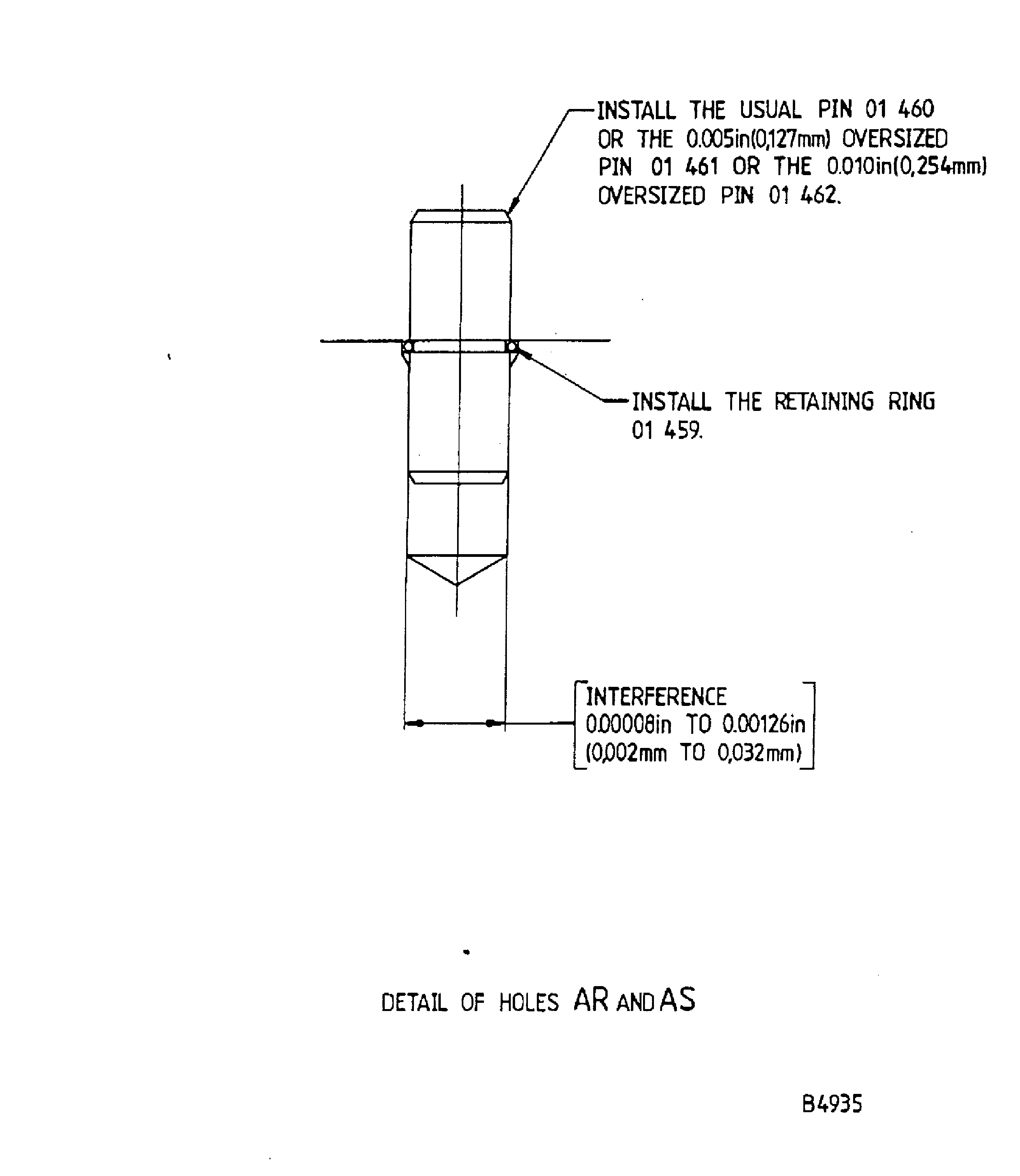
TASK 72-41-31-300-012 HPC Front Cases - Repair Loose Or Damaged Pin(s), Repair-012 (VRS6321)

DMC:V2500-A0-72-41-3101-00A-659A-C|Issue No:001.00|Issue Date:2013-11-01

Export Control

EAR Export Classification: Not subject to the EAR per 15 C.F.R. Chapter 1, Part 734.3(b)(3), except for the following Service Bulletins which are currently published as EAR Export Classification 9E991: SBE70-0992, SBE72-0483, SBE72-0580, SBE72-0588, SBE72-0640, SBE73-0209, SBE80-0024 and SBE80-0025.

Copyright

© IAE International Aero Engines AG (2001, 2014 - 2021) The information contained in this document is the property of © IAE International Aero Engines AG and may not be copied or used for any purpose other than that for which it is supplied without the express written authority of © IAE International Aero Engines AG. (This does not preclude use by engine and aircraft operators for normal instructional, maintenance or overhaul purposes.).

Applicability

All

Common Information

TASK 72-41-31-300-012 HPC Front Cases - Repair Loose Or Damaged Pin(s), Repair-012 (VRS6321)

Effectivity

FIG/ITEM

PART NO.

01-400

6A3462

Assembly A

01-400

6A3675

Assembly A

DELETED

DELETED

01-400

6A5470

Assembly B

01-400

6A4439

Assembly C

Material of component

PART IDENT

SYMBOL

MATERIAL

HP Compressor Front Case Assembly

TEG

4 per cent Aluminium, 6 percent Vanadium Titanium Alloy

Pin

QAL

or

QAK

Nickel chromium heat resisting alloy

Retaining ring

Nickel chromium steel

General

This repair must only be done when the instruction to do so is given in 72-41-31 Inspection/Check.

The practices and processes referred to in the procedure by the TASK number are in the SPM.

Price and availability

Refer to International Aero Engines

Related repairs - none

NOTE

More equipment and materials necessary to do this Repair are given in the SPM TASK 70-09-00-400-501, SPM TASK 70-11-08-300-503 and SPM TASK 70-23-05-230-501.

NOTE

To identify the consumable materials refer to the PCI.

Preliminary Requirements

Pre-Conditions

NONE

Support Equipment

NameManufacturerPart Number / IdentificationQuantityRemark
Chemical cleaning equipmentLOCALChemical cleaning equipment
Penetrant Crack Test EquipmentLOCALPenetrant crack test equipment
Standard workshop equipmentLOCALStandard workshop equipment
Workshop Inspection equipmentLOCALWorkshop Inspection equipment
Jig boring machineLOCALJig boring machine
Vibrating marking pencilLOCALVibrating marking pencil

Consumables, Materials and Expendables

NameManufacturerPart Number / IdentificationQuantityRemark
CoMat 03-026 LIQUID NITROGENLOCALCoMat 03-026
CoMat 06-022 FLUORESCENT PENETRANT (POST-EMULSIFIED ULTRA HIGH SENSITIVITY)LOCALCoMat 06-022

Spares

NameManufacturerPart Number / IdentificationQuantityRemark
Ring, retainingAS207623 AR
Pin, grooved, Headless,AS207423 AR

(standard)

Pin, grooved, Headless, 0.005 in.6A59543 AR

(0,127 mm), (oversize)

Pin, grooved, Headless, 0.010 in.6A59553 AR

(0,254 mm), (oversize)

Ring, RetainingAS207633 AR
Pin, grooved, HeadlessAS207452 AR

(standard)

Pin, grooved, Headless 0.005 in.6A59562 AR

(0,127 mm) , (oversize)

Pin, grooved, Headless, 0.010 in.6A59572 AR

(0,254 mm), (oversize)

Pin, grooved, HeadlessAS207441 AR

(standard)

Pin, grooved, Headless 0.005 in.6A59581 AR

(0,127 mm), (oversize)

Pin, grooved, Headless, 0.010 in.6A59591 AR

(0,254 mm), (oversize)

Safety Requirements

NONE

Procedure

    1. SUBTASK 72-41-31-110-109 Clean the Assembly

      1. Chemically clean.

      2. Refer to TASK 72-41-31-100-000 (CLEANING-000).

        Use chemical cleaning equipment.

    1. SUBTASK 72-41-31-230-106 Do a Crack Test

      1. Do a penetrant crack test.

      2. Refer to TASK 72-41-31-200-000 (INSPECTION/CHECK-000).

        Use penetrant crack test equipment.

        Cracks are not permitted.

    1. SUBTASK 72-41-31-350-093-A00 Remove Loose or Damaged Pin(s) and Retaining Ring(s), Assembly A

    2. Refer to Figure.

      1. Remove loose or damaged pin(s) and retaining ring(s).

      2. Use standard workshop equipment.

    1. SUBTASK 72-41-31-350-093-B00 Remove Loose or Damaged Pin(s) and Retaining Ring(s) Assembly B

    2. Refer to Figure.

      1. Remove loose or damaged pin(s) and retaining ring(s).

      2. Use standard workshop equipment.

    1. SUBTASK 72-41-31-350-093-C00 Remove Loose or Damaged Pin(s) and Retaining Ring(s), Assembly C

    2. Refer to Figure.

      1. Remove loose or damaged pin(s) and retaining ring(s).

      2. Use standard workshop equipment.

    1. SUBTASK 72-41-31-110-110 Do a Swab Etch

      1. Chemically clean.

      2. Refer to the SPM TASK 70-11-08-300-503, SUBTASK 70-11-08-300-001.

        Use chemical cleaning equipment.

      1. Swab etch the repaired area(s).

      2. Refer to the SPM TASK 70-11-08-300-503, SUBTASK 70-11-08-300-002.

        Use chemical cleaning equipment.

    1. SUBTASK 72-41-31-230-107 Do a Crack Test

      1. Do a penetrant crack test.

      2. Refer to the SPM TASK 70-23-05-230-501.

        Cracks not permitted.

    1. SUBTASK 72-41-31-220-231-A00 Examine the Pin Hole(s), Assembly A

      1. Visually examine and measure the dimensions of the pin hole(s).

      2. Use workshop inspection equipment.

      1. If you can get an interference of 0.00008 to 0.00126 in. (0.002 to 0.032 mm), between the hole(s) and pin(s).

      2. Do Step.

      1. If the hole(s) is damaged, or the interference is more than the limit specified above.

      2. Do Step.

    1. SUBTASK 72-41-31-220-231-B00 Examine the Pin Hole(s), Assembly B

      1. Visually examine and measure the dimensions of the pin hole(s).

      2. Use workshop inspection equipment.

      1. If you can get an interference of 0.00008 to 0.00126 in. (0.002 to 0.032 mm), between the hole(s) and pin(s).

      2. Do Step.

      1. If the hole(s) is damaged, or the interference is more than the limit specified above.

      2. Do Step.

    1. SUBTASK 72-41-31-220-231-C00 Examine the Pin Hole(s), Assembly C

      1. Visually examine and measure the dimensions of the pin hole(s).

      2. Use workshop inspection equipment.

      1. If you can get an interference of 0.00008 to 0.00126 in. (0.002 to 0.032 mm), between the hole(s) and pin(s).

      2. Do Step.

      1. If the hole(s) is damaged, or the interference is more than the limit specified above.

      2. Do Step.

    1. SUBTASK 72-41-31-322-052-A00 Machine the Pin Hole(s), Assembly A

      CAUTION

      TITANIUM COMPONENT - YOU MUST USE SILICON CARBIDE TYPE ABRASIVE WHEELS, STONES AND PAPERS TO DRESS, BLEND AND POLISH THIS COMPONENT.

      CAUTION

      TITANIUM COMPONENT - DO NOT USE FORCE WITH MECHANICAL CUTTERS OR THE MATERIAL WILL BECOME TOO HOT.

      CAUTION

      TITANIUM COMPONENT - IF THE MATERIAL SHOWS A CHANGE IN COLOR, TO DARKER THAN A LIGHT STRAW COLOR, THE COMPONENT IS TO BE REJECTED.
      1. Secure the HP Compressor Front Case Assembly on to the jig boring machine.

      2. Use a jig boring machine with standard workshop equipment.

      1. Machine the pin hole(s).

      2. Use standard drills and reamers with standard workshop equipment.

        Machine to the miniumum oversize.

      1. Remove burrs.

      2. Use standard workshop equipment.

    1. SUBTASK 72-41-31-322-052-B00 Machine the Pin Hole(s), Assembly B

      CAUTION

      TITANIUM COMPONENT - YOU MUST USE SILICON CARBIDE TYPE ABRASIVE WHEELS, STONES AND PAPERS TO DRESS, BLEND AND POLISH THIS COMPONENT.

      CAUTION

      TITANIUM COMPONENT - DO NOT USE FORCE WITH MECHANICAL CUTTERS OR THE MATERIAL WILL BECOME TOO HOT.

      CAUTION

      TITANIUM COMPONENT - IF THE MATERIAL SHOWS A CHANGE IN COLOR, TO DARKER THAN A LIGHT STRAW COLOR, THE COMPONENT IS TO BE REJECTED.
      1. Secure the HP Compressor Front Case Assembly on to the jig boring machine.

      2. Use a jig boring machine with standard workshop equipment.

      1. Machine the pin hole(s).

      2. Use standard drills and reamers with standard workshop equipment.

      1. Remove burrs.

      2. Use standard workshop equipment.

    1. SUBTASK 72-41-31-322-052-C00 Machine the Pin Hole(s), Assembly C

      CAUTION

      TITANIUM COMPONENT - YOU MUST USE SILICON CARBIDE TYPE ABRASIVE WHEELS, STONES AND PAPERS TO DRESS, BLEND AND POLISH THIS COMPONENT.

      CAUTION

      TITANIUM COMPONENT - DO NOT USE FORCE WITH MECHANICAL CUTTERS OR THE MATERIAL WILL BECOME TOO HOT.

      CAUTION

      TITANIUM COMPONENT - IF THE MATERIAL SHOWS A CHANGE IN COLOR, TO DARKER THAN A LIGHT STRAW COLOR, THE COMPONENT IS TO BE REJECTED.
      1. Secure the HP Compressor Front Case Assembly on to the jig boring machine.

      2. Use a jig boring machine with standard workshop equipment.

      1. Machine the pin hole(s).

      2. Use standard drills and reamers with standard workshop equipment.

      1. Remove burrs.

      2. Use standard workshop equipment.

    1. SUBTASK 72-41-31-110-113 Do a Swab Etch

      1. Chemically clean.

      2. Refer to the SPM TASK 70-11-08-300-503, SUBTASK 70-11-08-300-001.

        Use chemical cleaning equipment.

      1. Swab etch the repair area(s).

      2. Refer to the SPM TASK 70-11-08-300-503, SUBTASK 70-11-08-300-002.

        Use chemical cleaning equipment.

    1. SUBTASK 72-41-31-230-110 Do a Crack Test

      1. Do a penetrant crack test.

      2. Refer to the SPM TASK 70-23-05-230-501.

        Use Co Mat 06-022 fluorescent penetrant with penetrant crack test equipment.

        Cracks are not permitted.

    1. SUBTASK 72-41-31-220-232-A00 Examine the Pin Hole(s), Assembly A

      1. Visually examine and measure the dimensions of the pin hole(s).

      2. Use workshop inspection equipment.

    1. SUBTASK 72-41-31-220-232-B00 Examine the Pin Hole(s), Assembly B

      1. Visually examine and measure the dimensions of the pin hole(s).

      2. Use workshop inspection equipment.

    1. SUBTASK 72-41-31-220-232-C00 Examine the Pin Hole(s), Assembly C

      1. Visually examine and measure the dimensions of the pin hole(s).

      2. Use workshop inspection equipment.

    1. SUBTASK 72-41-31-350-095-A00 Install the Pin(s) and Retaining ring(s) into the HP Compressor Front Case Assembly, Assembly A

      1. Freeze the pin(s).

      2. Use AS20742 , 3 off, 01-456 or 6A5954 , 3 off 01-457 or 6A5955 , 3 off, 01-458.

        or AS20745 , 2 off, 01-460 or 6A5956 , 2 off, 01-461 or 6A5957 , 2 off, 01-462.

        or AS20744 , 1 off, 01-465 or 6A5958 , 1 off, 01-466 and/or 6A5959 , 1 off, 01-467, as necessary.

        Use CoMat 03-026 LIQUID NITROGEN and standard workshop equipment.

      1. Assemble the retaining ring(s) to the pin(s).

      2. Use AS20762 , 3 off, 01-455 and/or AS20763 , 3 off, 01-459, as necessary.

      1. Install the retainig ring(s) and pin(s) into the HP Compressor Front Case Assembly.

      2. Make sure the the pin(s) is/are located correctly until the temperature of the pin(s) and the temperature of the HP Compressor Front Case Assembly become the same.

        Use standard workshop equipment.

    1. SUBTASK 72-41-31-350-095-B00 Install the Pin(s) and Retaining ring(s) into the HP Compressor Front Case Assembly, Assembly B

      1. Freeze the pin(s).

      2. Use AS20742 , 3 off, 01-456 or 6A5954 , 3 off 01-457 or 6A5955 , 3 off, 01-458.

        or AS20745 , 2 off, 01-460 or 6A5956 , 2 off, 01-461 or 6A5957 , 2 off, 01-462.

        or AS20744 , 1 off, 01-465 or 6A5958 , 1 off, 01-466 and/or 6A5959 , 1 off, 01-467, as necessary.

        Use CoMat 03-026 LIQUID NITROGEN and standard workshop equipment.

      1. Assemble the retaining ring(s) to the pin(s).

      2. Use AS20762 , 3 off, 01-455 and/or AS20763 , 3 off, 01-459, as necessary.

      1. Install the retainig ring(s) and pin(s) into the HP Compressor Front Case Assembly.

      2. Make sure the the pin(s) is/are located correctly until the temperature of the pin(s) and the temperature of the HP Compressor Front Case Assembly become the same.

        Use standard workshop equipment.

    1. SUBTASK 72-41-31-350-095-C00 Install the Pin(s) and Retaining ring(s) into the HP Compressor Front Case Assembly, Assembly C

      1. Freeze the pin(s).

      2. Use AS20742 , 3 off, 01-456 or 6A5954 , 3 off 01-457 or 6A5955 , 3 off, 01-458.

        or AS20745 , 2 off, 01-460 or 6A5956 , 2 off, 01-461 or 6A5957 , 2 off, 01-462.

        or AS20744 , 1 off, 01-465 or 6A5958 , 1 off, 01-466 and/or 6A5959 , 1 off, 01-467, as necessary.

        Use CoMat 03-026 LIQUID NITROGEN and standard workshop equipment.

      1. Assemble the retaining ring(s) to the pin(s).

      2. Use AS20762 , 3 off, 01-455 and/or AS20763 , 3 off, 01-459, as necessary.

      1. Install the retaining ring(s) and the pin(s) into the HP Compressor Front Case Assembly.

      2. Make sure the the pin(s) is/are located correctly until the temperature of the pin(s) and the temperature of the HP Compressor Front Case Assembly become the same.

        Use standard workshop equipment.

    1. SUBTASK 72-41-31-220-233-A00 Examine the Pin(s), Assembly A

      1. Visually examine and measure the dimensions of the installed pin(s).

      2. Make sure the pin(s) is/are installed correctly.

    1. SUBTASK 72-41-31-220-233-B00 Examine the Pin(s), Assembly B

      1. Visually examine and measure the dimensions of the installed pin(s).

      2. Make sure the pin(s) is/are installed correctly.

    1. SUBTASK 72-41-31-220-233-C00 Examine the Pin(s), Assembly C

      1. Visually examine and measure the dimensions of the installed pin(s).

      2. Make sure the pin(s) is/are installed correctly.

    1. SUBTASK 72-41-31-350-096 Identify the Repair

      1. Make a mark VRS6321 adjacent to the part number.

      2. Refer to the SPM TASK 70-09-00-400-501, SUBTASK 70-09-00-400-001.

        Use Vibro-engraving equipment.

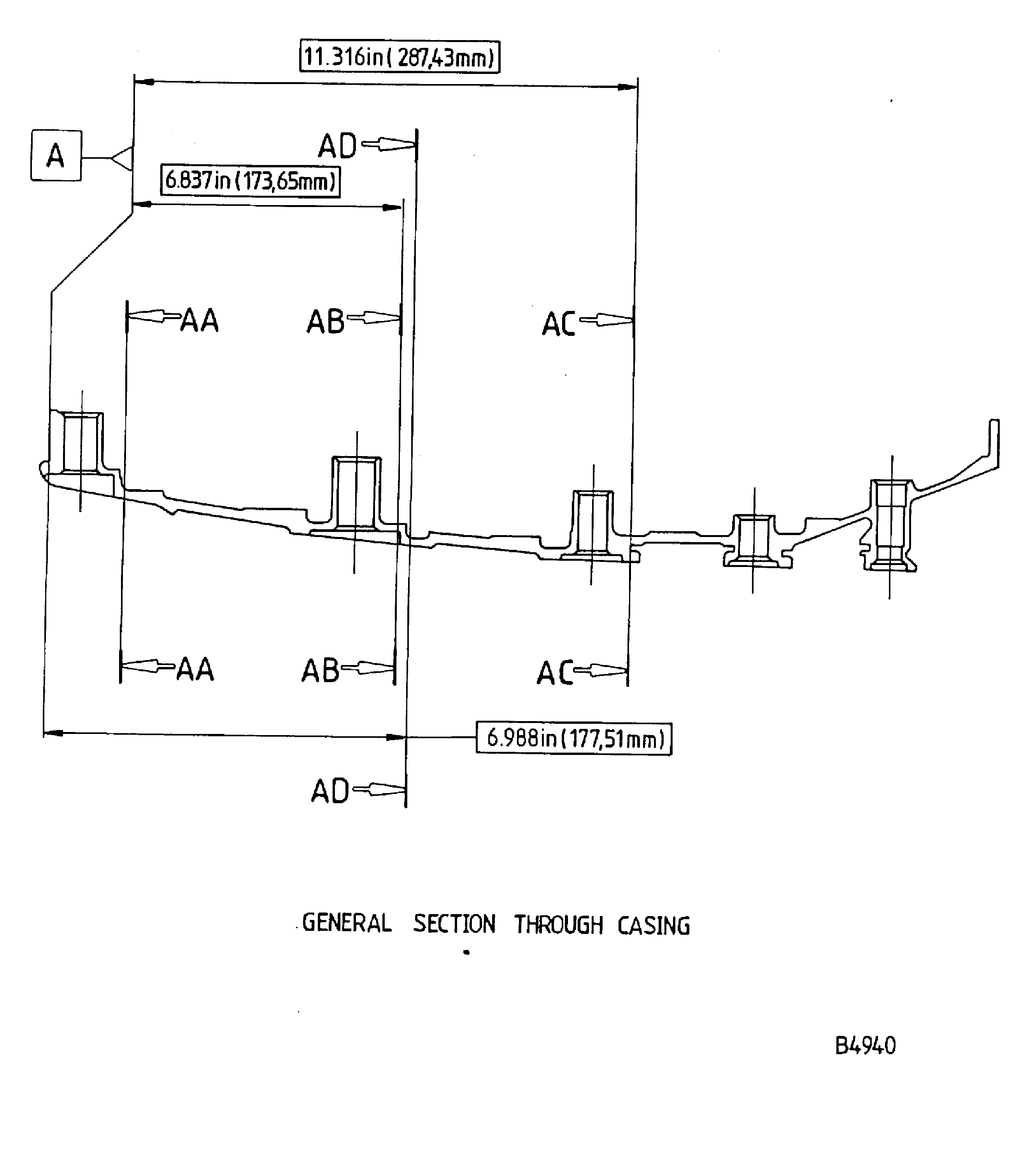
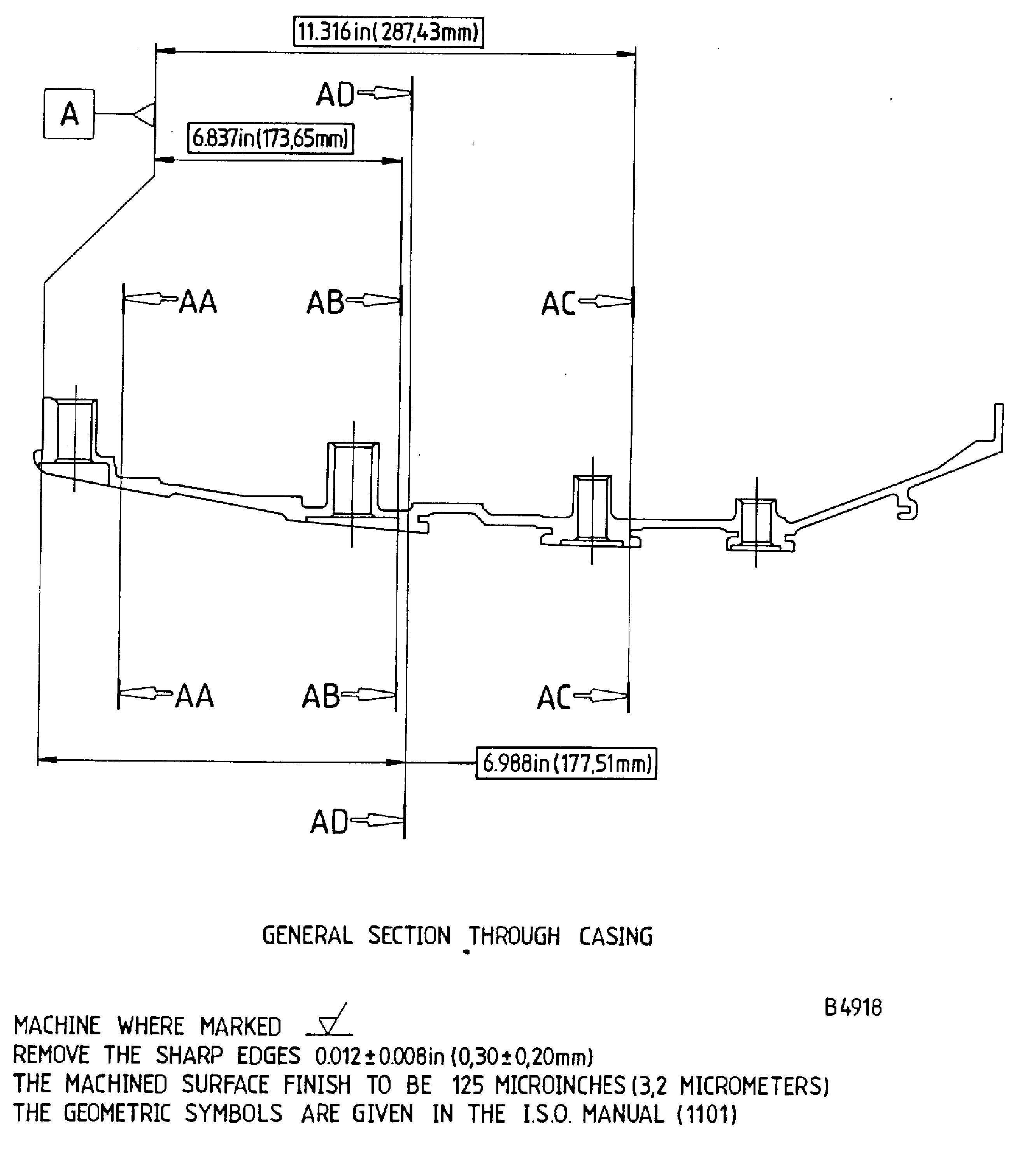
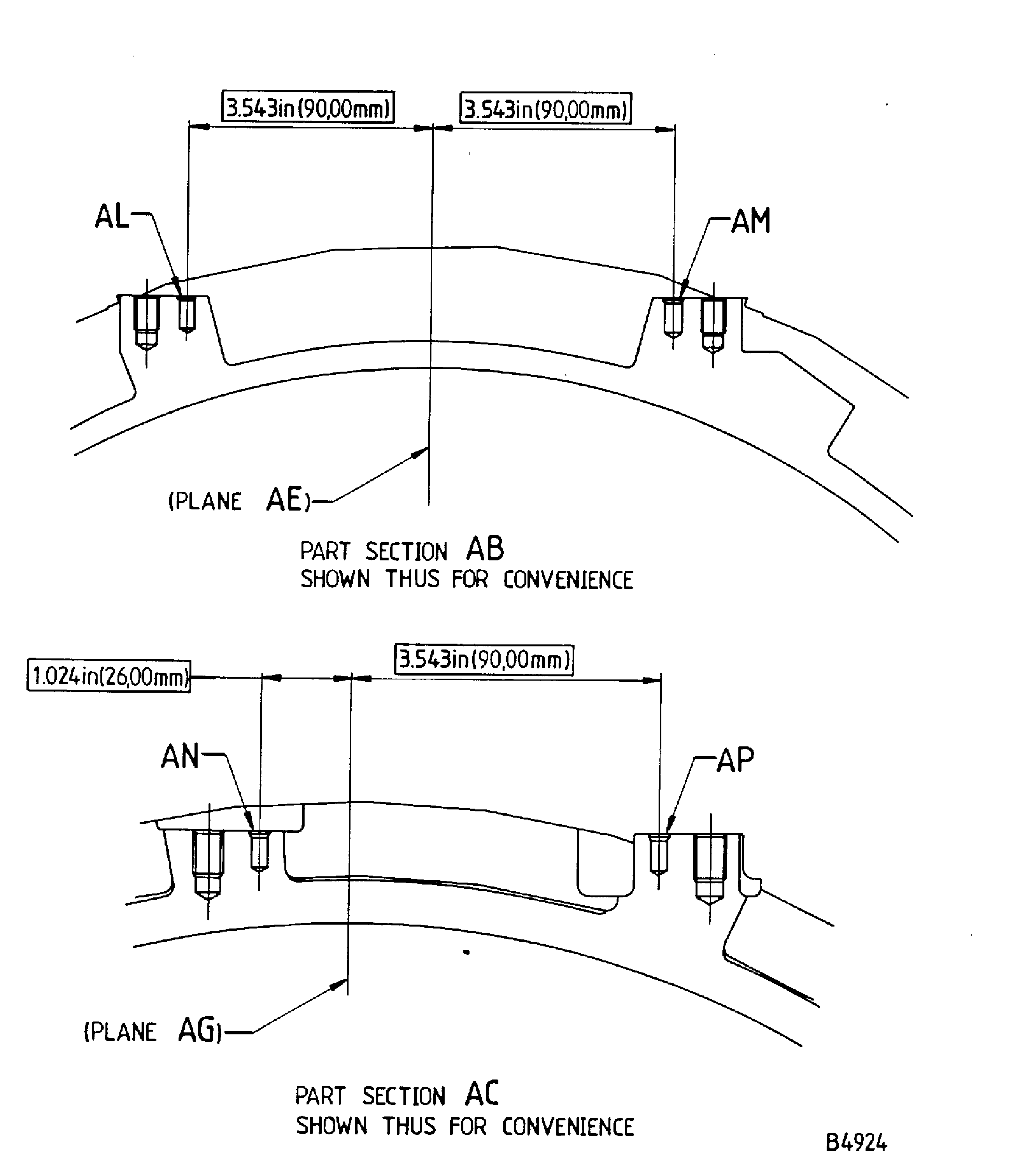
  1. Figure: Repair details and dimensions - Assembly A

    Repair details and dimensions - Assembly A

    Figure: Repair details and dimensions - Assembly B

    Repair details and dimensions - Assembly B

    Figure: Repair details and dimensions - Assembly C

    Repair details and dimensions - Assembly C

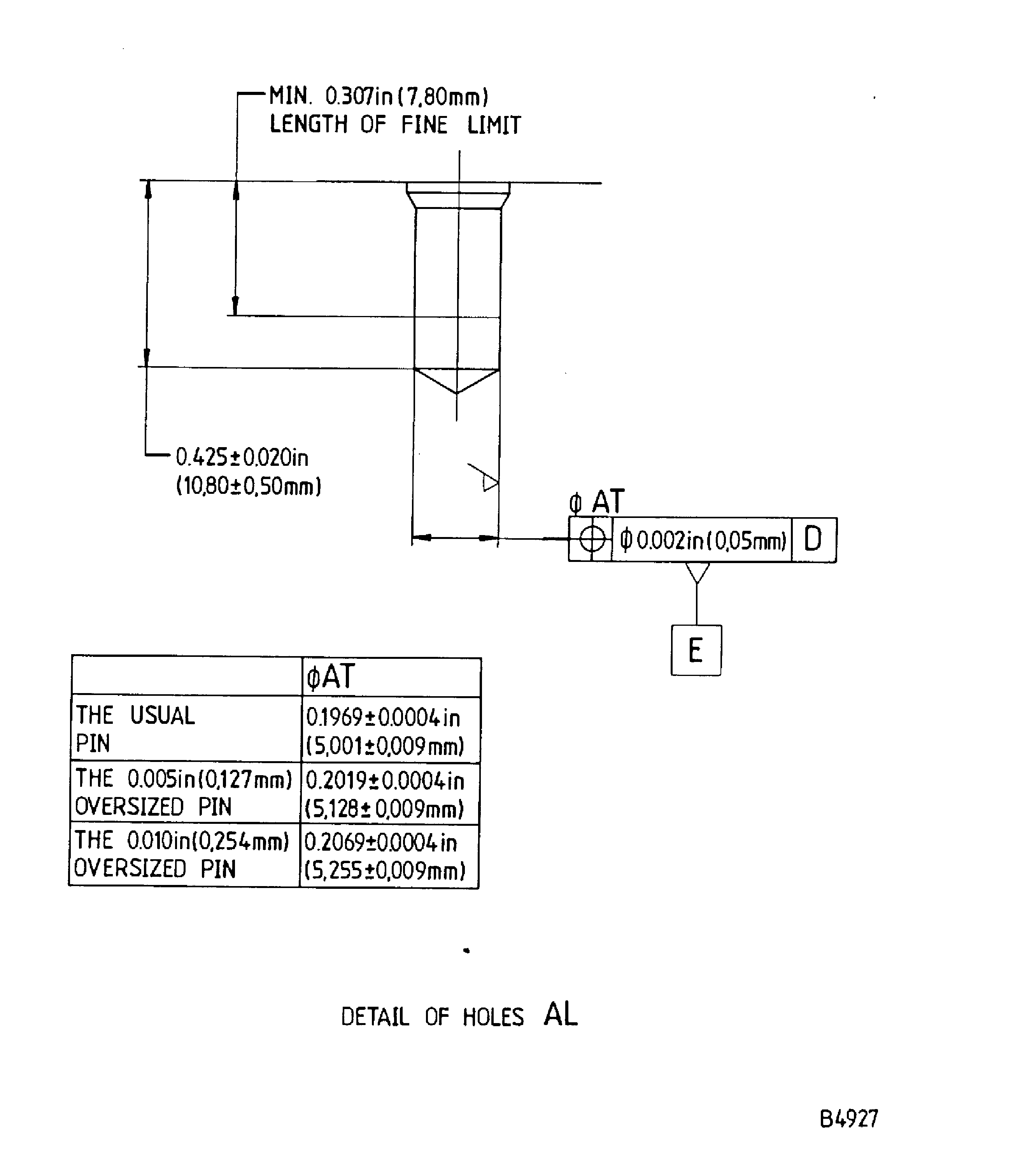
    Figure: Repair details and dimensions - Assembly A, Assembly B and Assembly C

    Repair details and dimensions - Assembly A, Assembly B and Assembly C

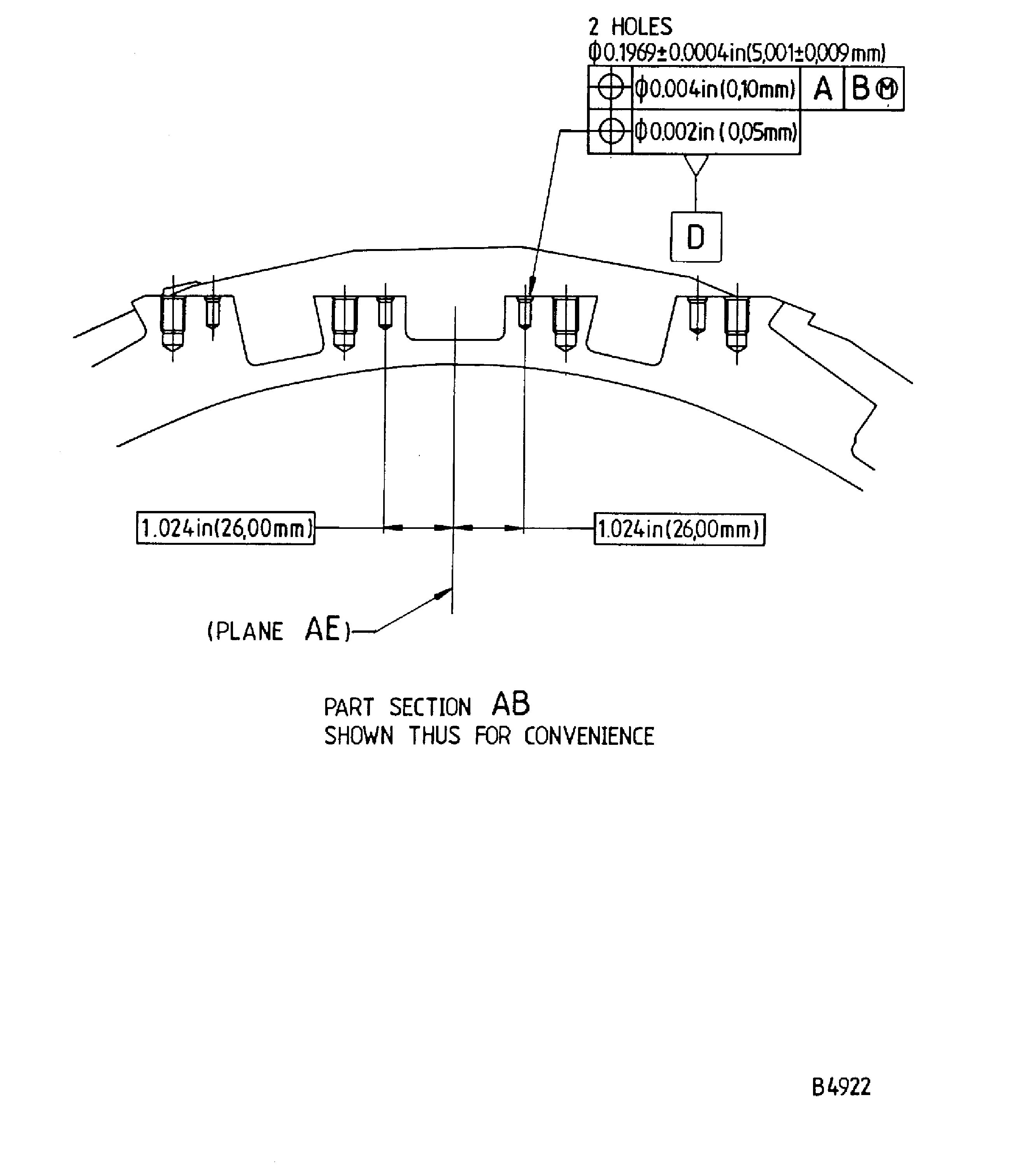
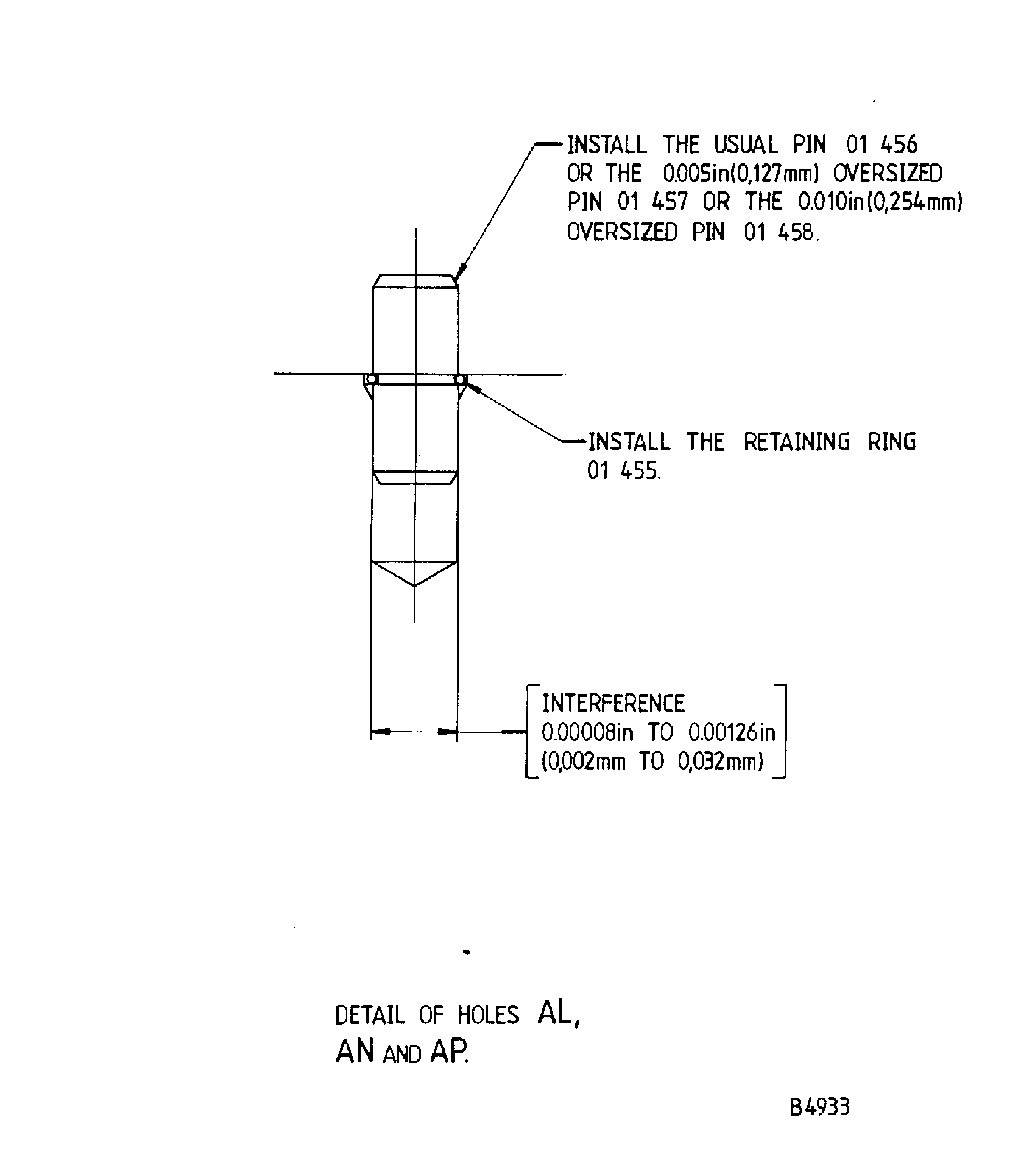
    Figure: Repair details and dimensions - Assembly A, Assembly B and Assembly C

    Repair details and dimensions - Assembly A, Assembly B and Assembly C

    Figure: Repair details and dimensions - Assembly A, Assembly B and Assembly C

    Repair details and dimensions - Assembly A, Assembly B and Assembly C

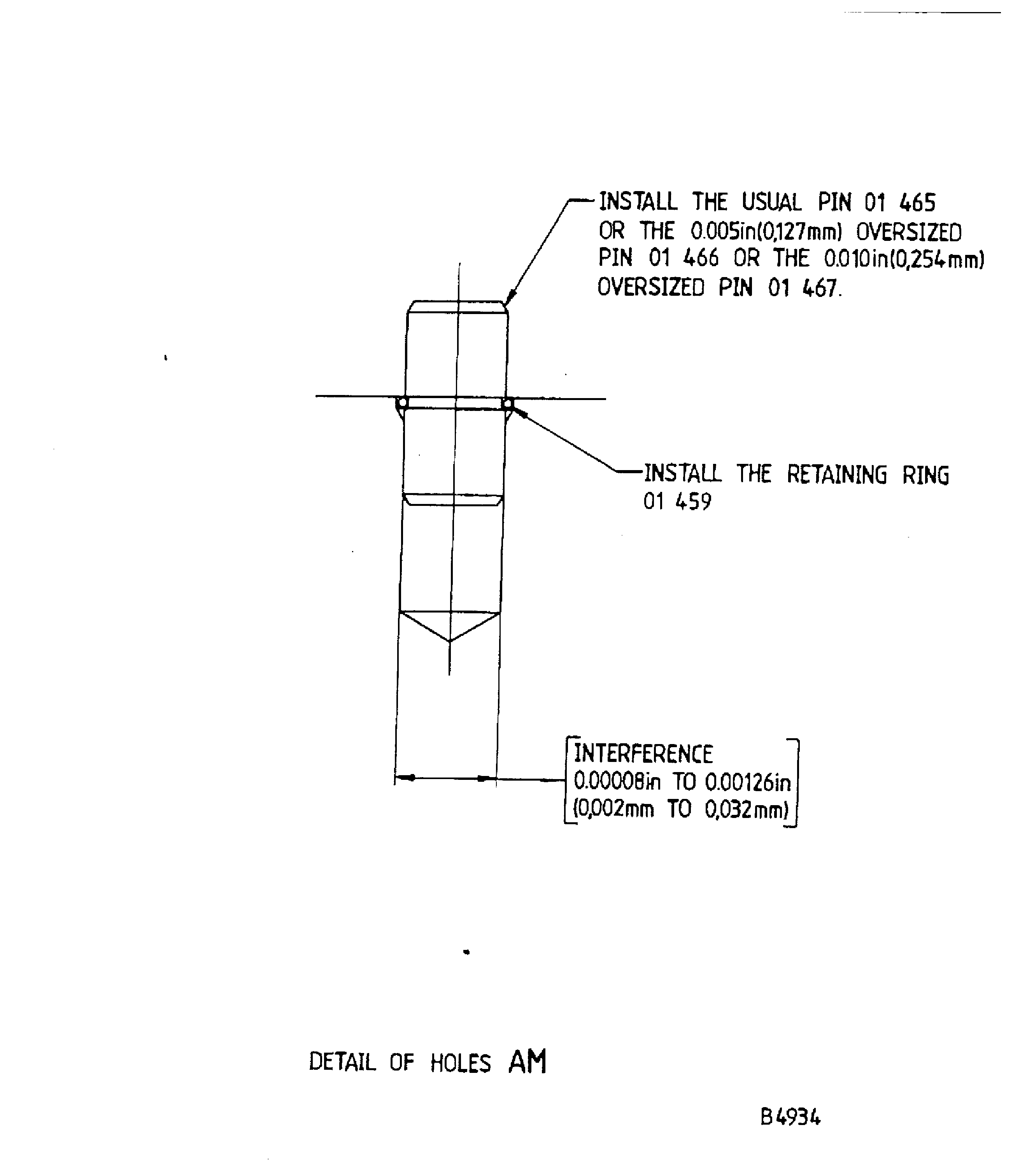
    Figure: Repair details and dimensions - Assembly A

    Repair details and dimensions - Assembly A
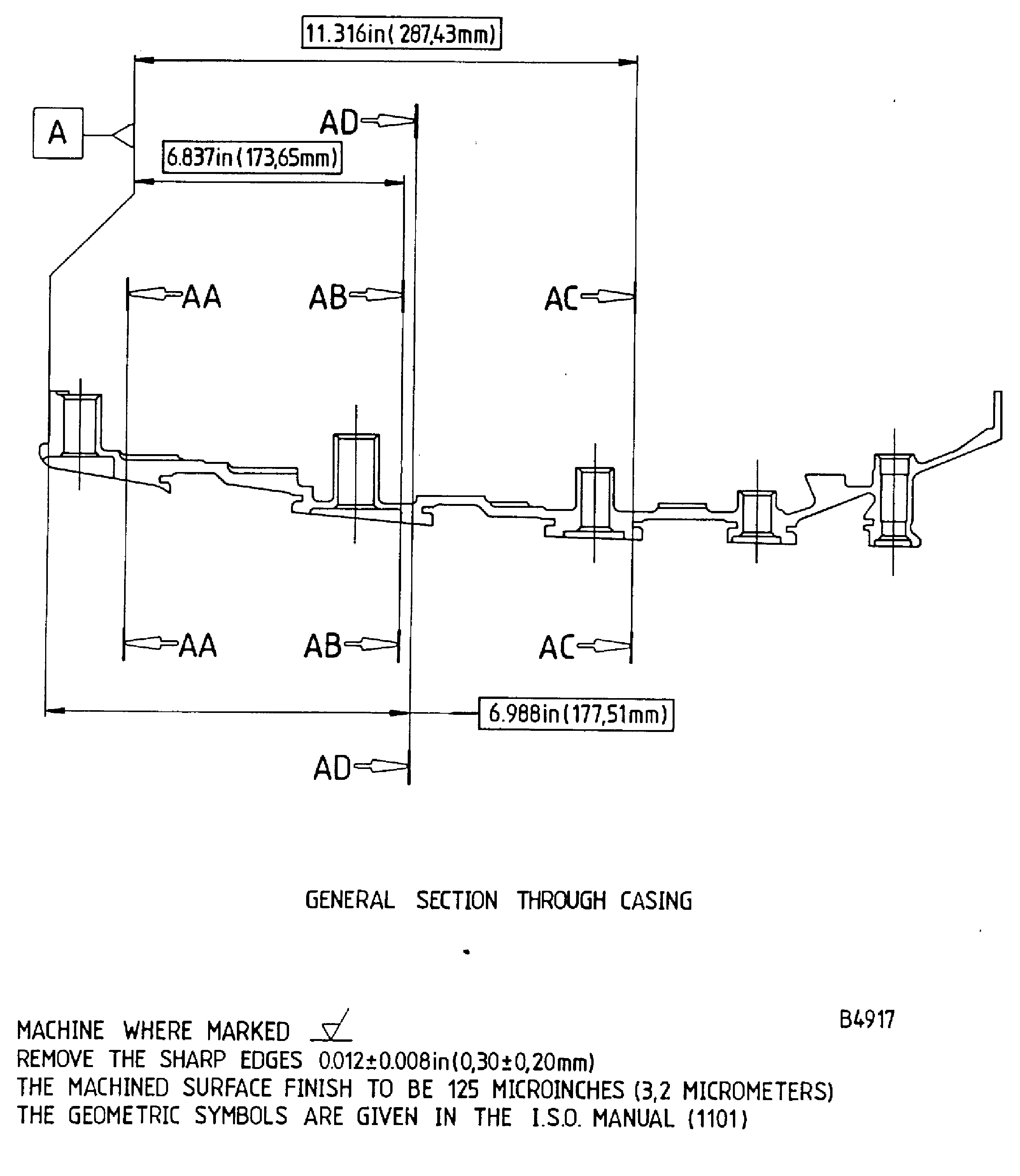
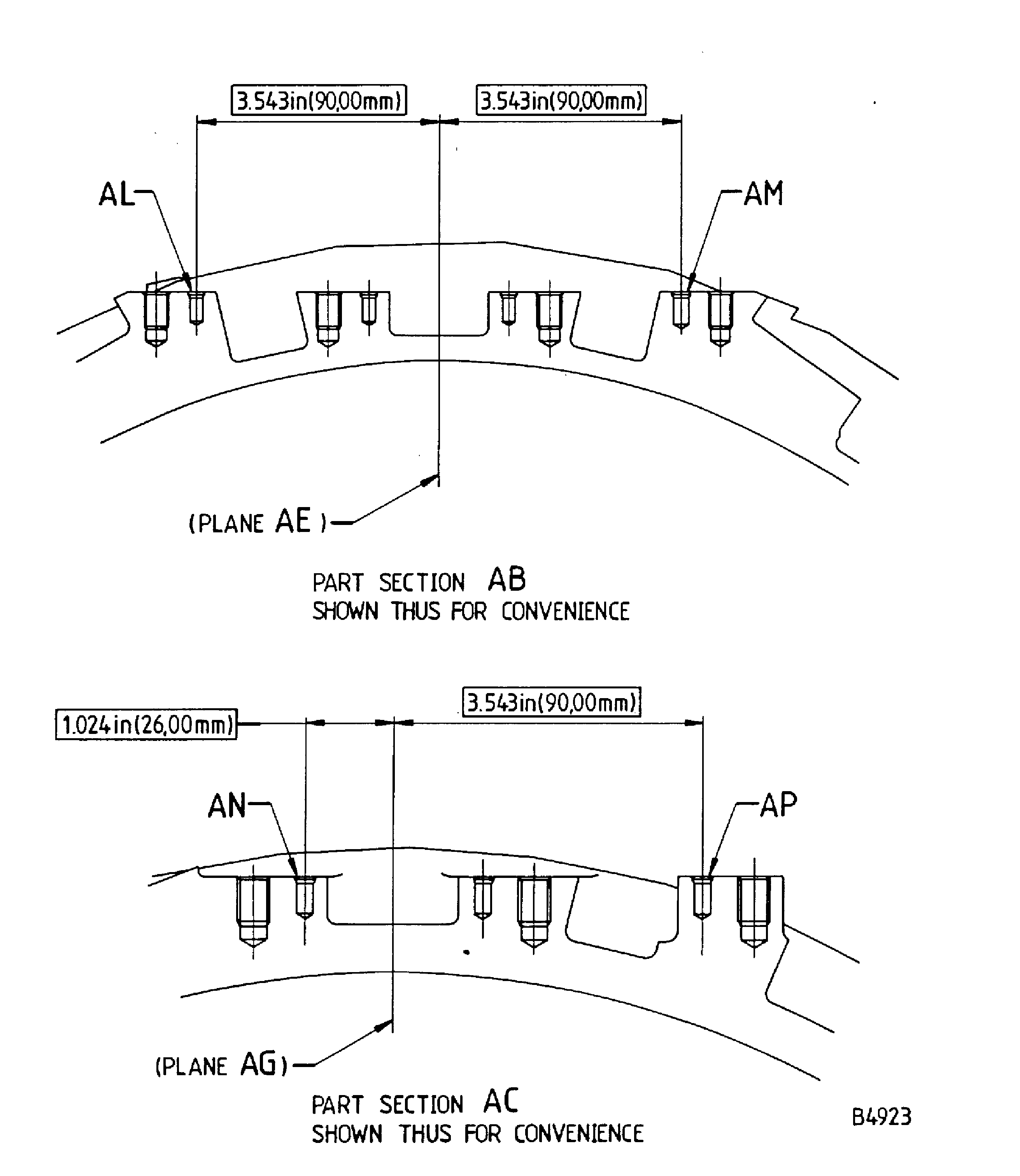
    Figure: Repair details and dimensions - Assembly A

    Repair details and dimensions - Assembly A

    Figure: Repair details and dimensions - Assembly A and Assembly B

    Repair details and dimensions - Assembly A and Assembly B

    Figure: Repair details and dimensions - Assembly A, Assembly B and Assembly C

    Repair details and dimensions - Assembly A, Assembly B and Assembly C
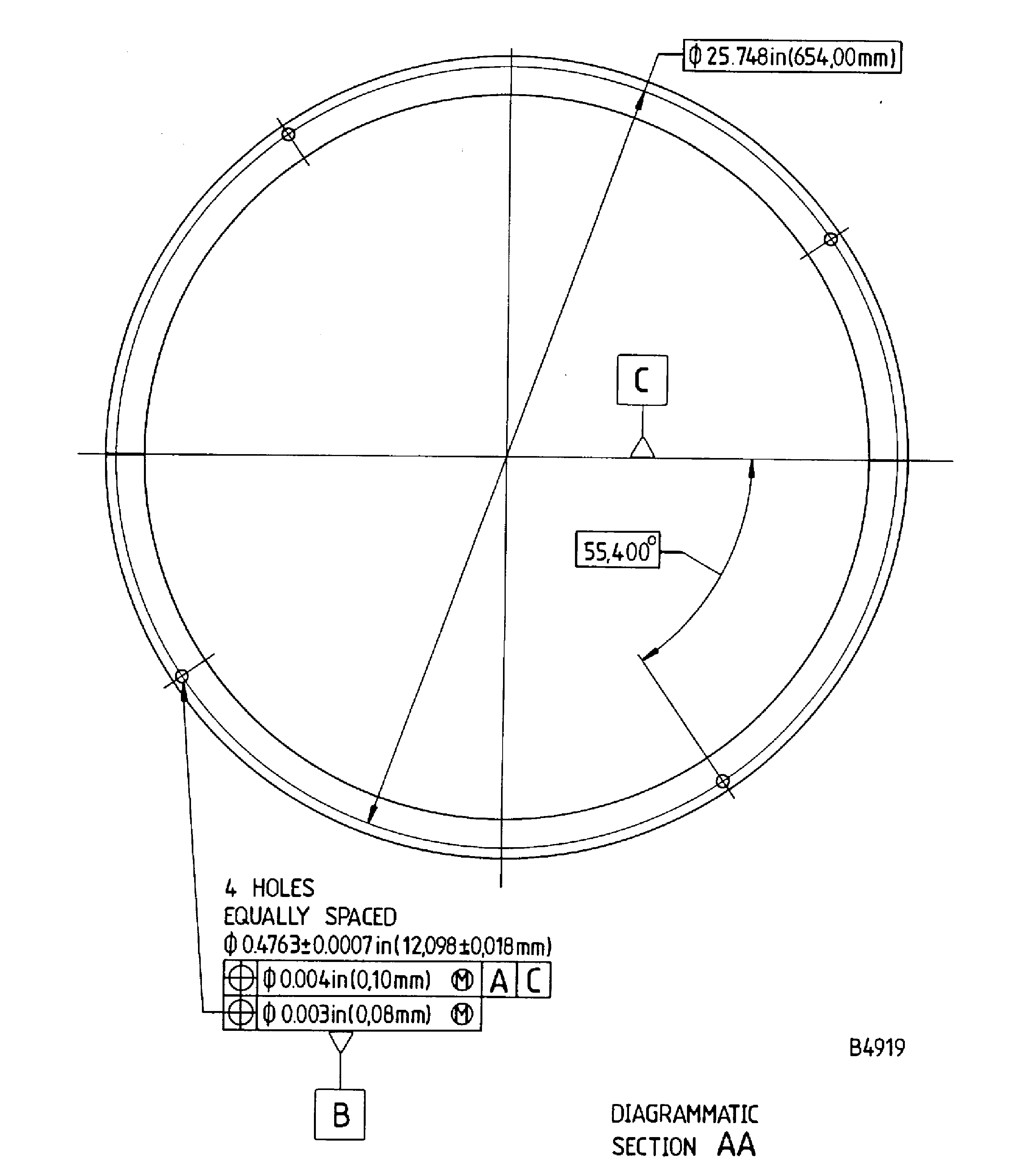
    Figure: Repair details and dimensions - Assembly A, Assembly B and Assembly C

    Repair details and dimensions - Assembly A, Assembly B and Assembly C
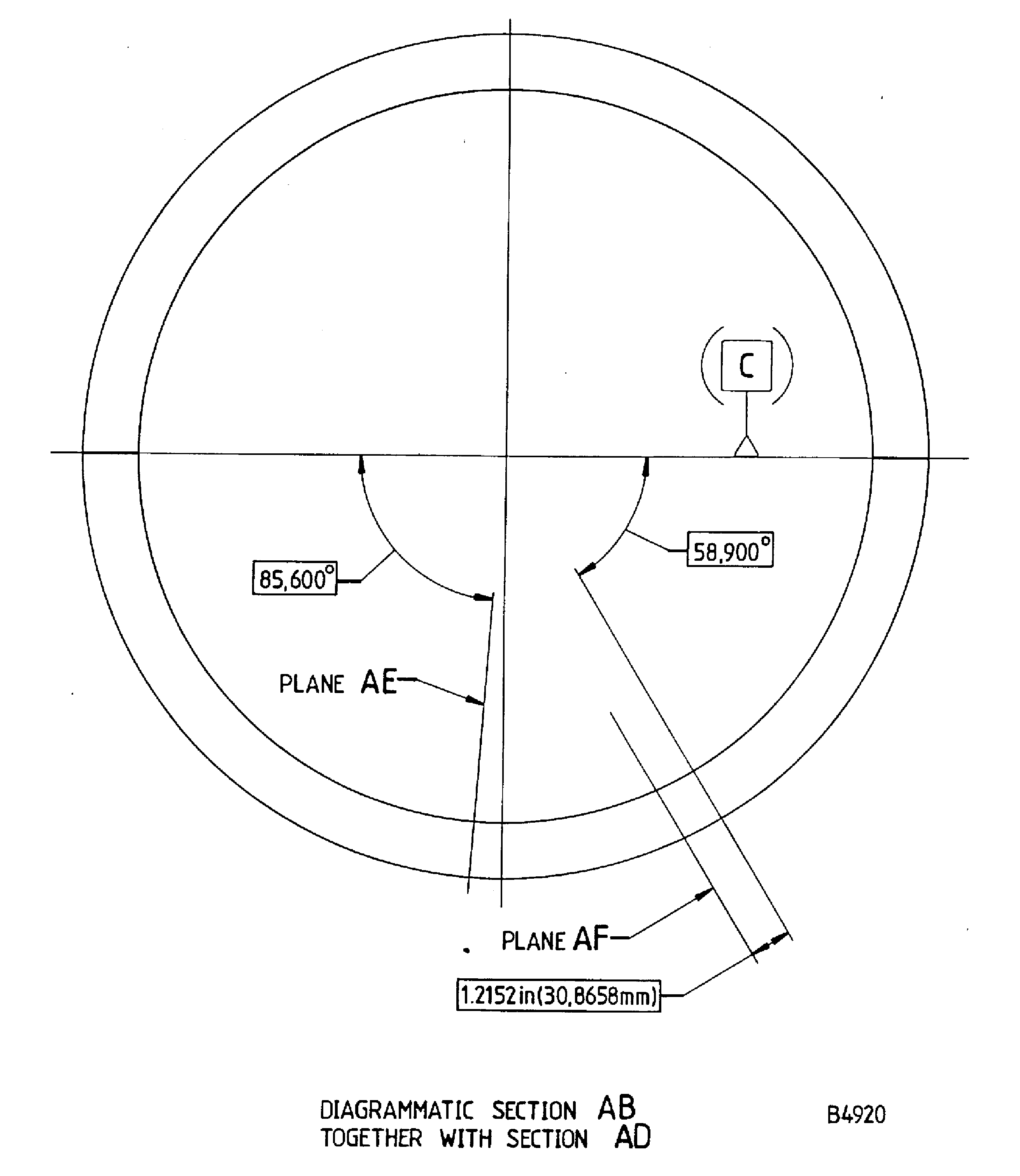
    Figure: Repair details and dimensions - Assembly A

    Repair details and dimensions - Assembly A

    Figure: Repair details and dimensions - Assembly A, Assembly B and Assembly C

    Repair details and dimensions - Assembly A, Assembly B and Assembly C
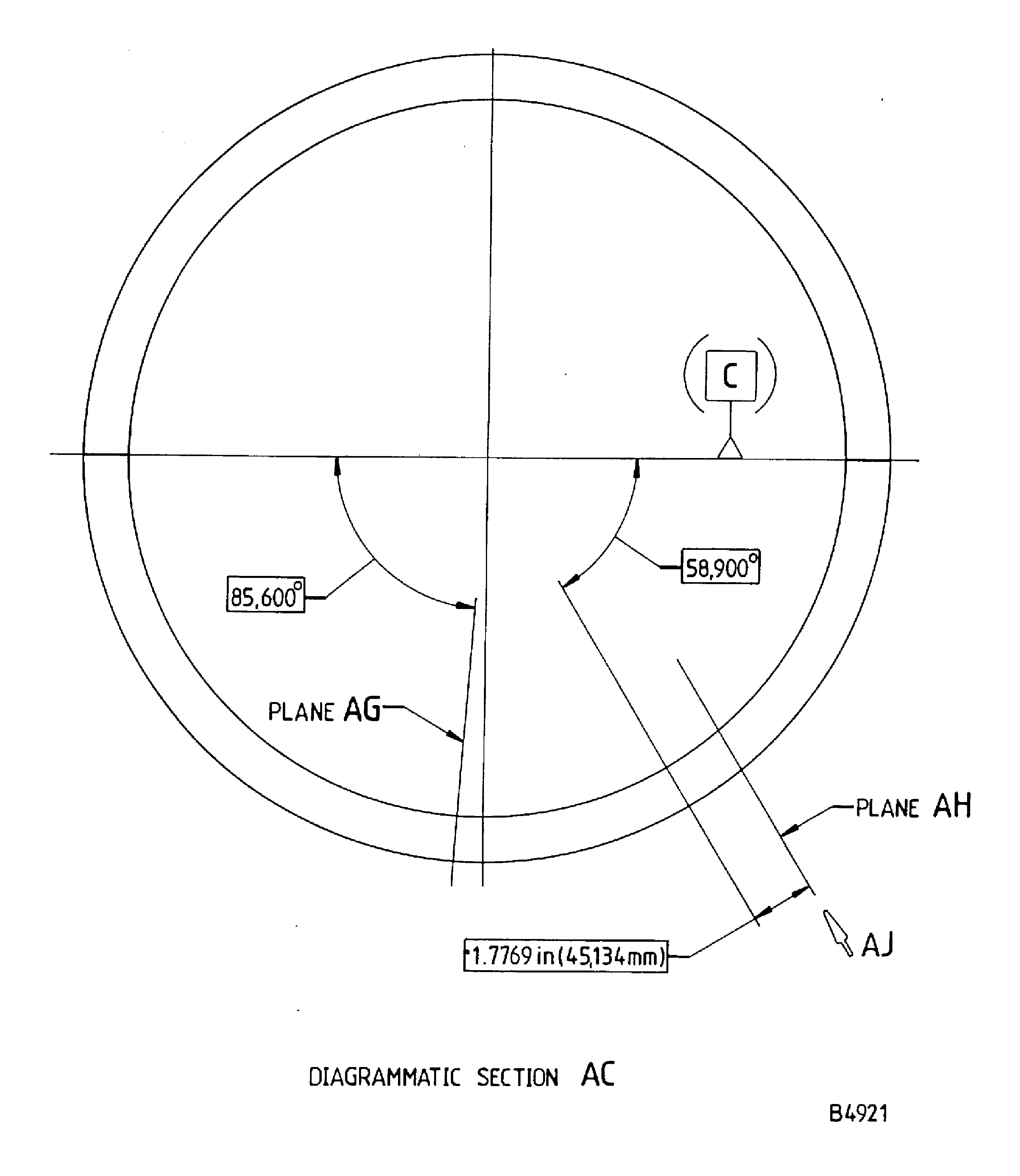
    Figure: Repair details and dimensions - Assembly A, Assembly B and Assembly C

    Repair details and dimensions - Assembly A, Assembly B and Assembly C
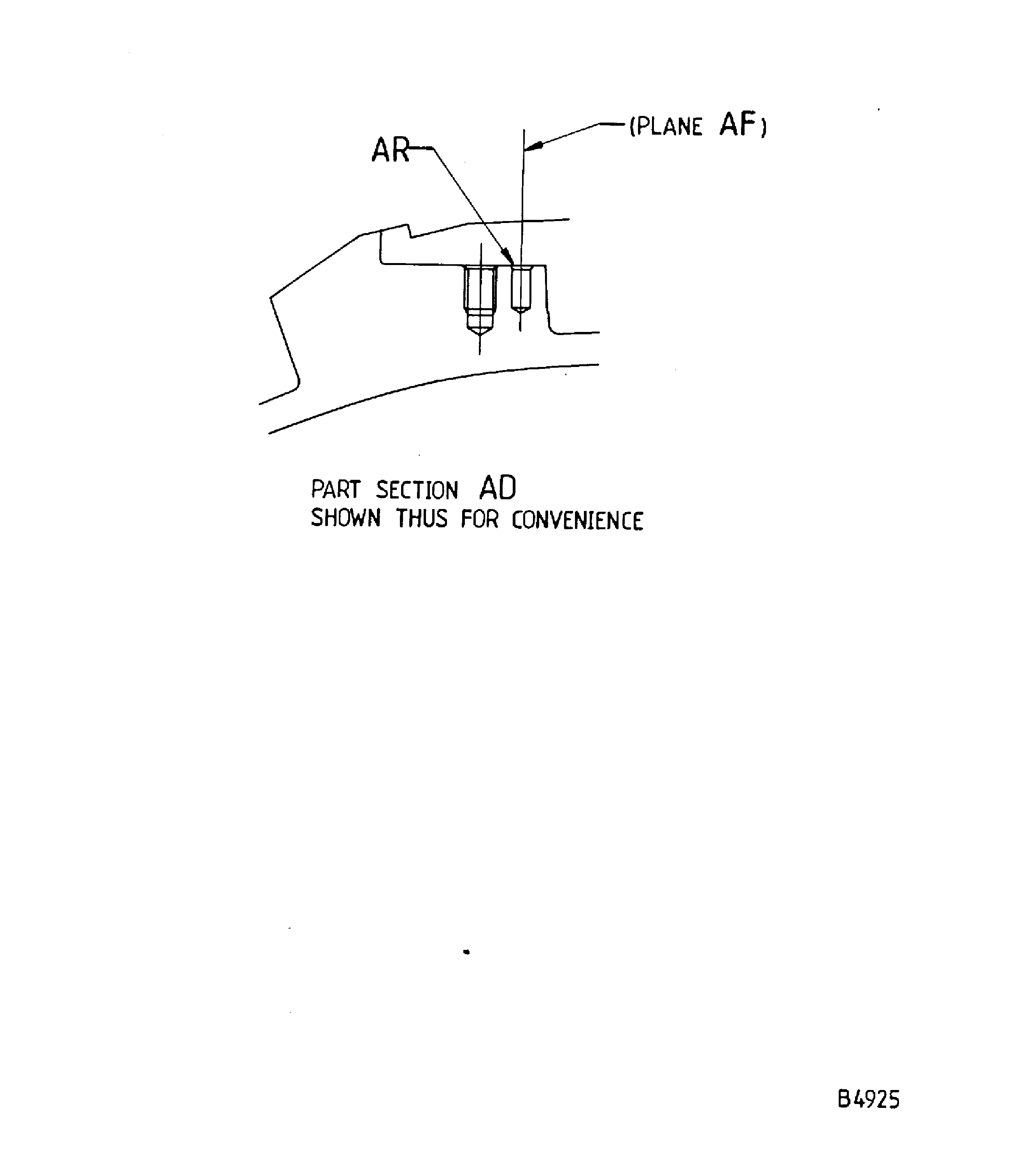
    Figure: Repair details and dimensions - Assembly A, Assembly B and Assembly C

    Repair details and dimensions - Assembly A, Assembly B and Assembly C
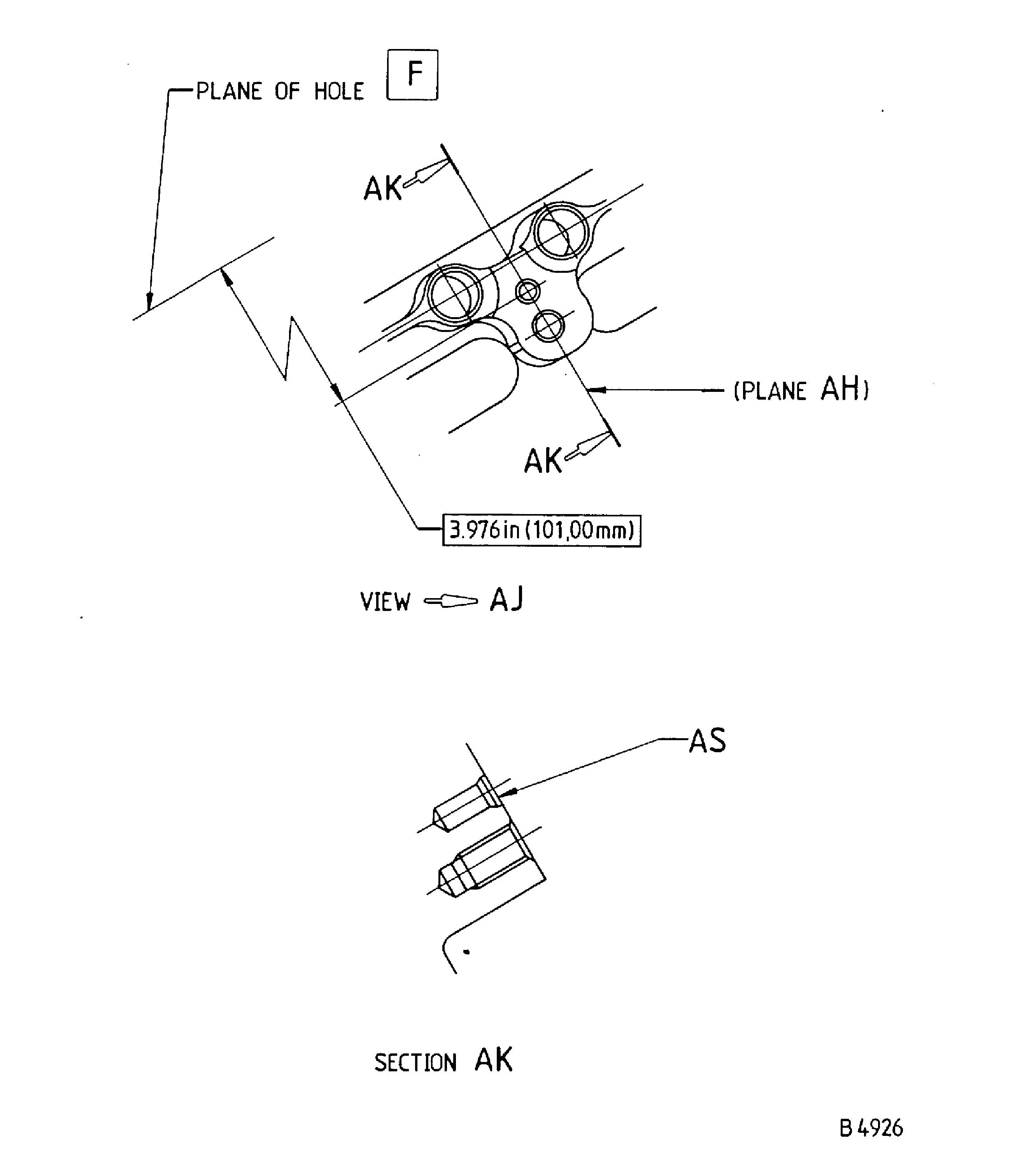
    Figure: Repair details and dimensions - Assembly A, Assembly B and Assembly C

    Repair details and dimensions - Assembly A, Assembly B and Assembly C
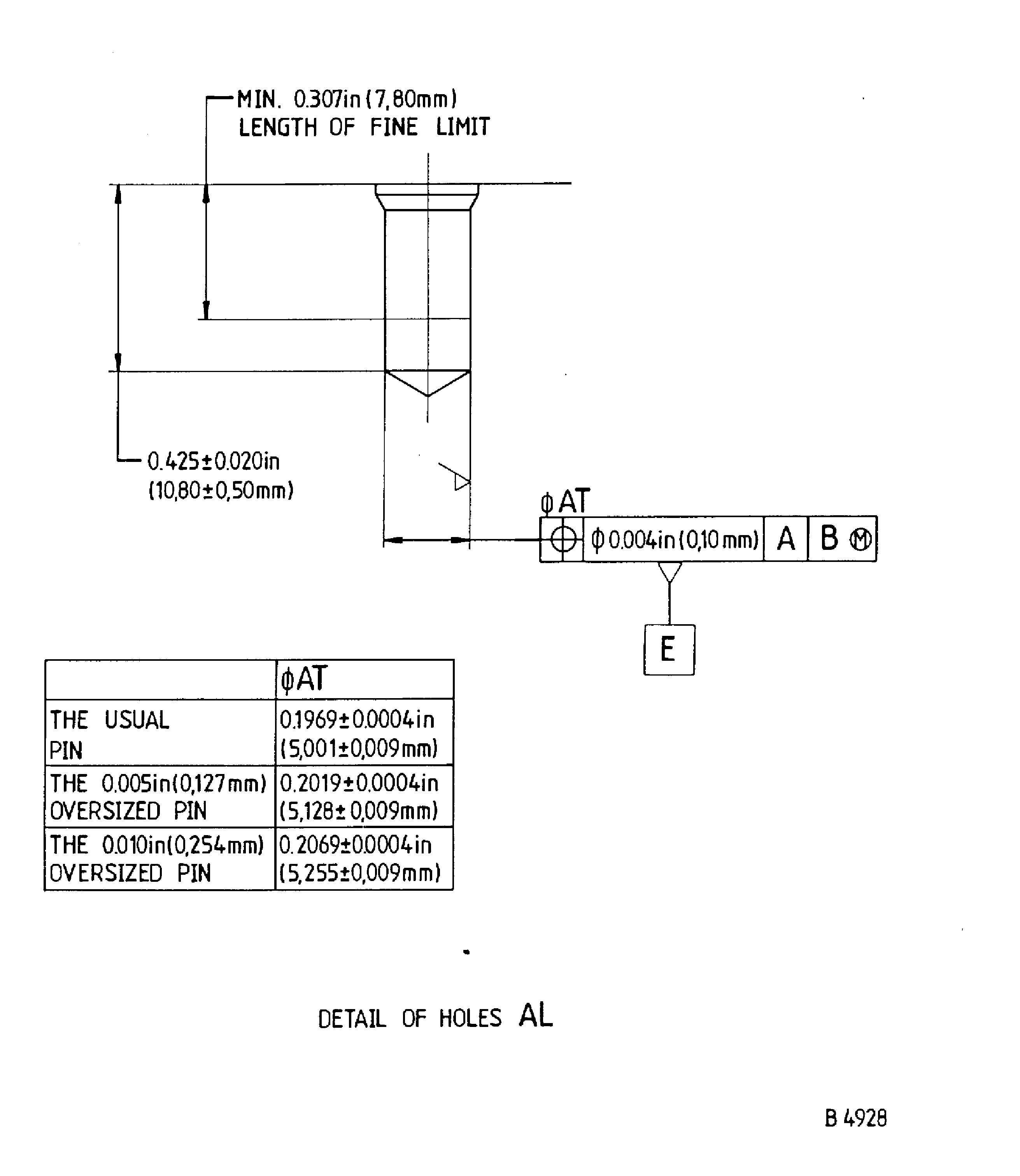
    Figure: Repair details and dimensions - Assembly A, Assembly B and Assembly C

    Repair details and dimensions - Assembly A, Assembly B and Assembly C
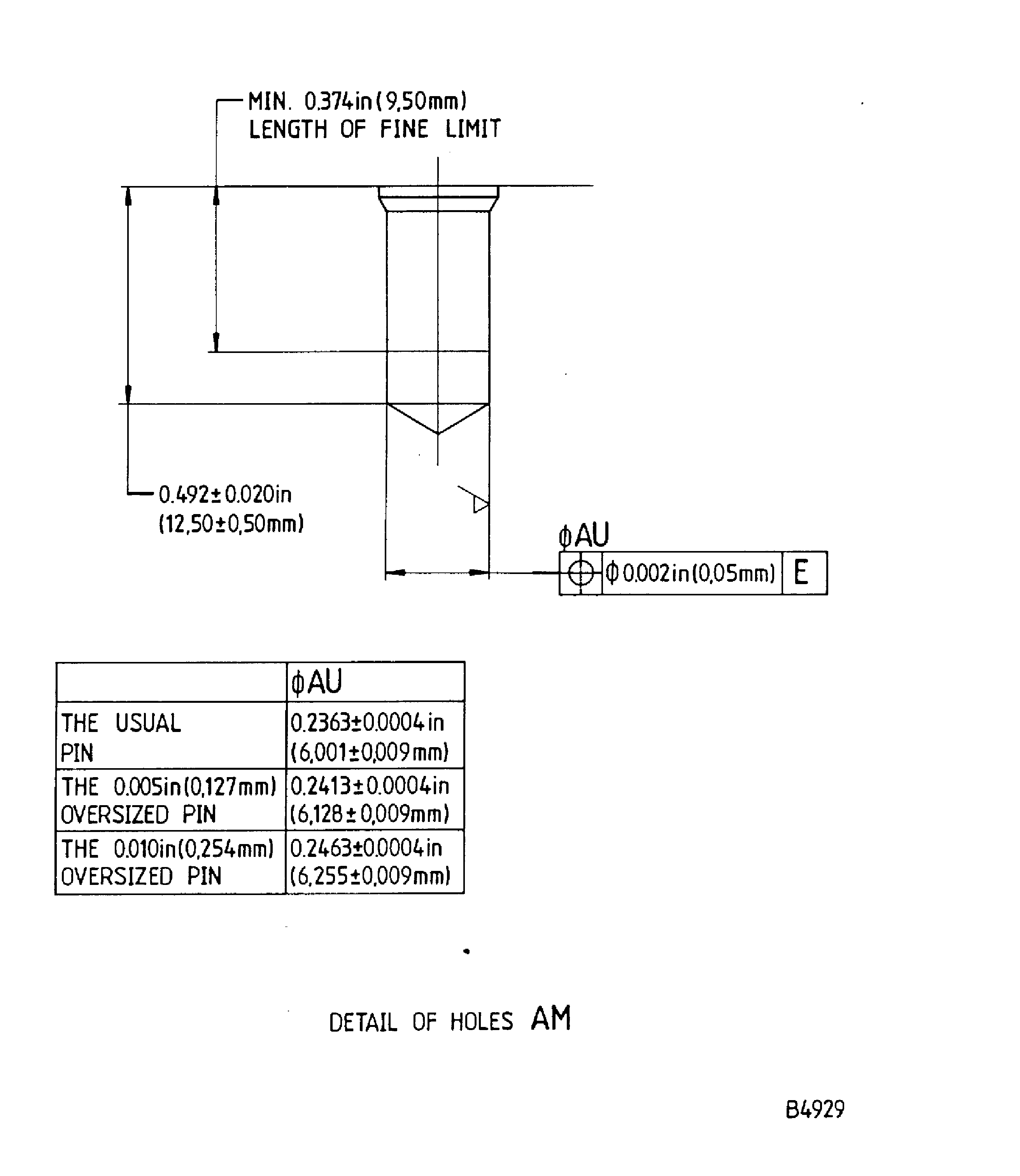
    Figure: Repair details and dimensions - Assembly A, Assembly B and Assembly C

    Repair details and dimensions - Assembly A, Assembly B and Assembly C
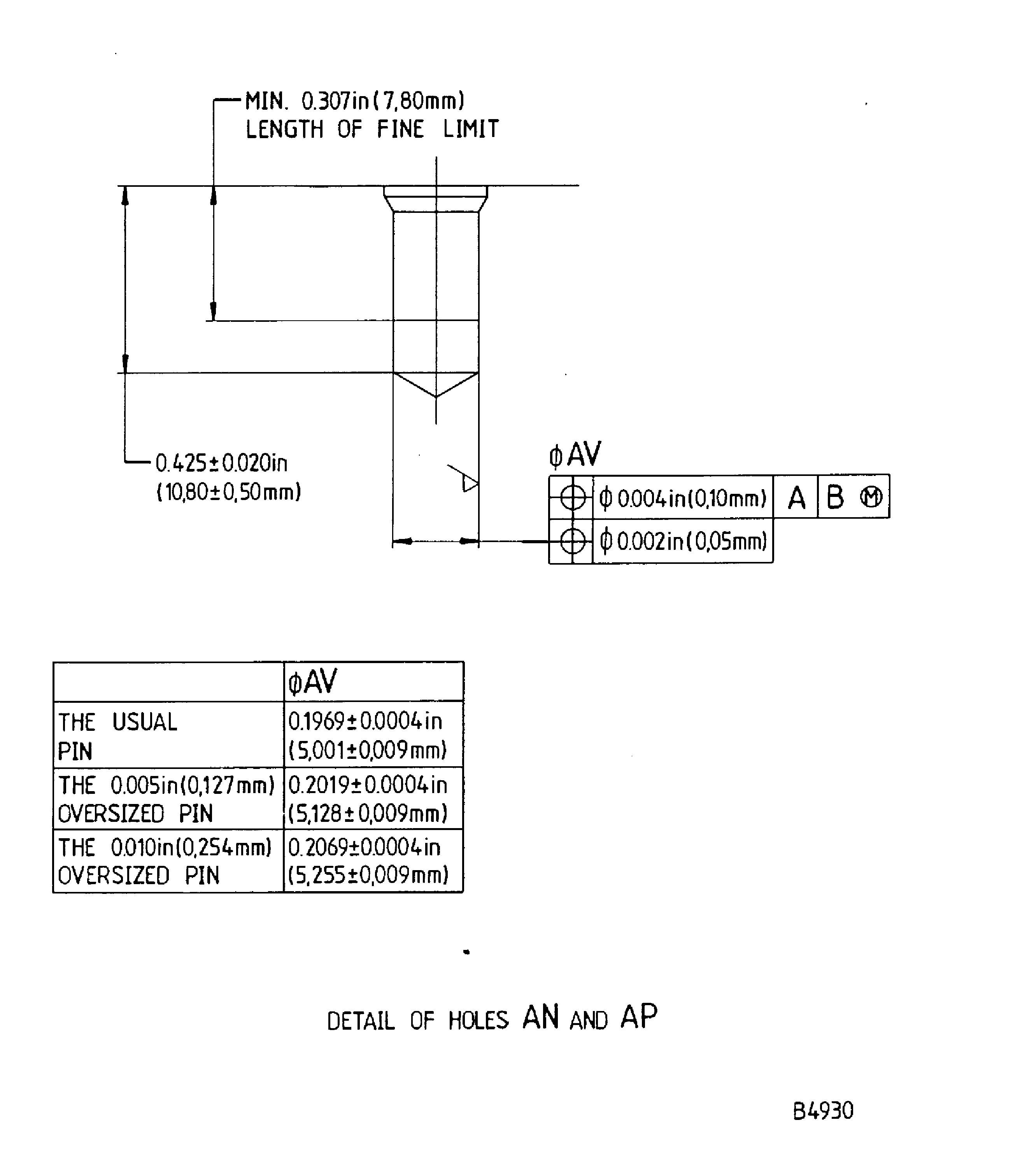
    Figure: Repair details and dimensions - Assembly A, Assembly B and Assembly C

    Repair details and dimensions - Assembly A, Assembly B and Assembly C
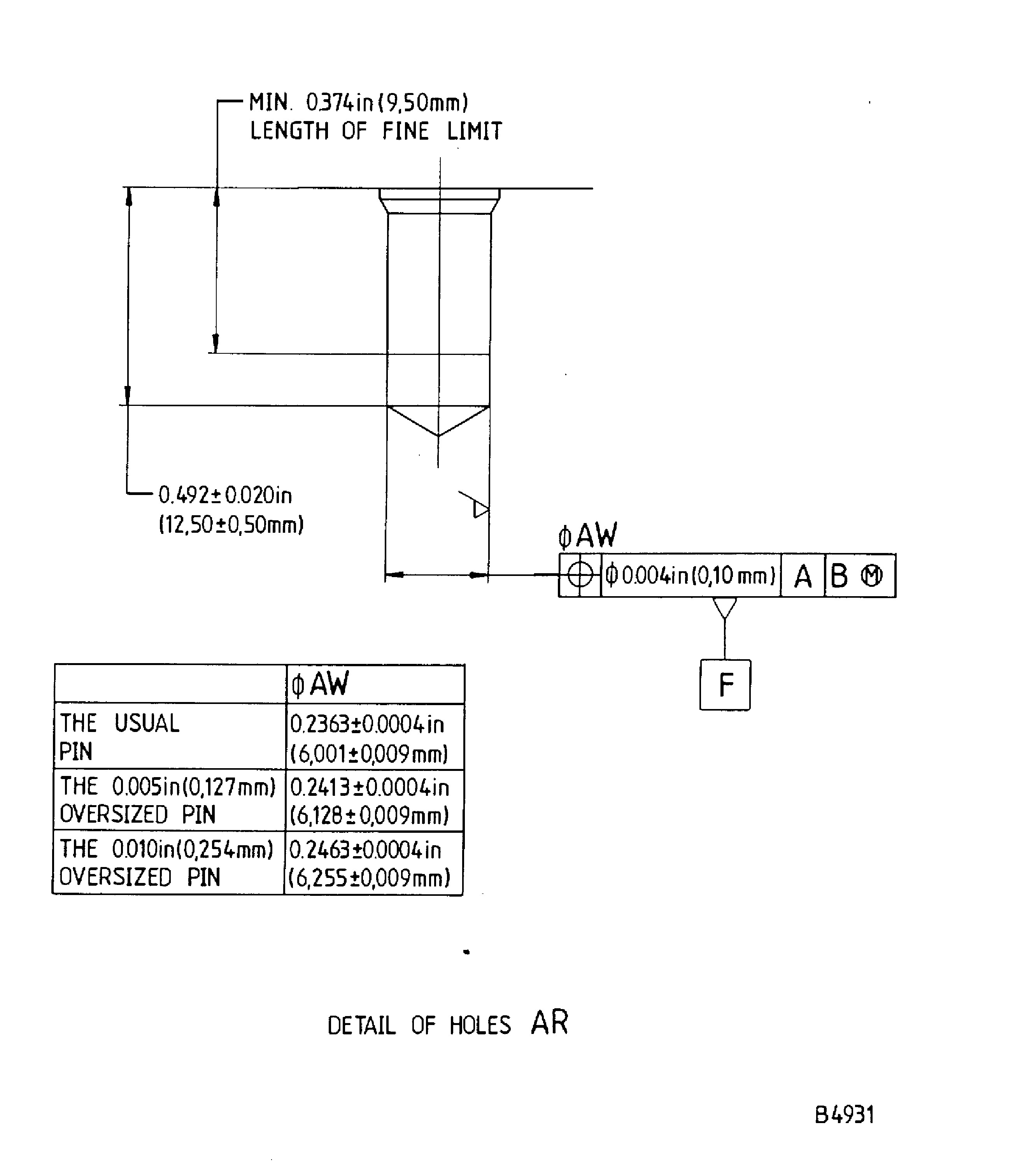
    Figure: Repair details and dimensions - Assembly A, Assembly B and Assembly C

    Repair details and dimensions - Assembly A, Assembly B and Assembly C
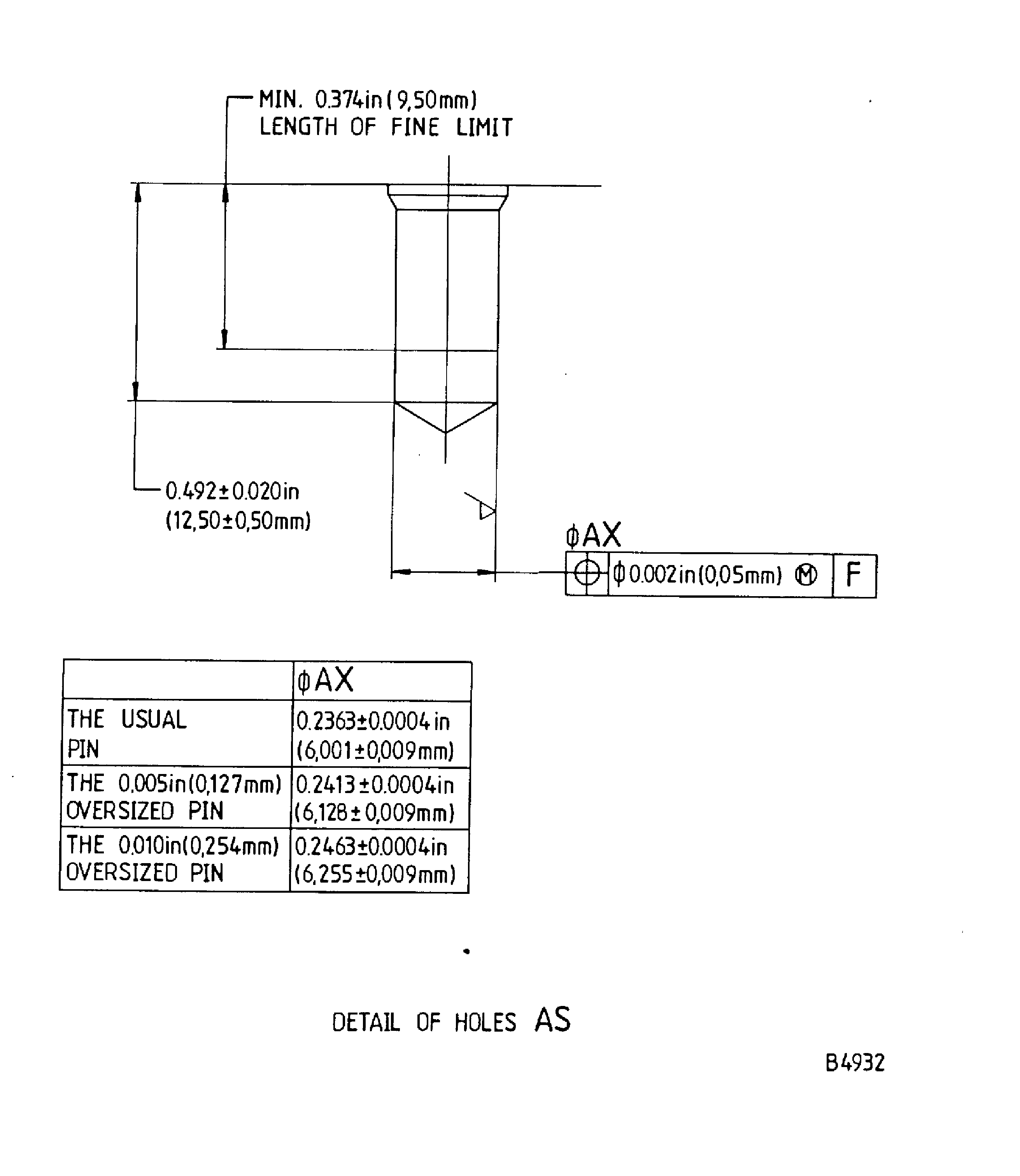
Requirements After Job Completion

Follow-On Conditions

NONE
Link not Found
Manufacturer Code:LOCAL
Enterprise Name:LOCALLY SUPPLIED
Link not Found
Link not Found
Link not Found
Link not Found
Link not Found
Link not Found
Link not Found
Link not Found
Link not Found
Link not Found
Link not Found
Manufacturer Code:LOCAL
Supply Number:CoMat 03-026
Type:sp01
Supply Short Name:CoMat 03-026 LIQUID NITROGEN
Supply Name:CoMat 03-026 LIQUID NITROGEN
Specification Groups:
Doc NumberType
OMAT:220BB-N-411 T2GBC1
JCR-135BB-N-411 T2GBC1
Suppliers:
ManufacturerRemarks
LOCAL
U2046
U2096
Manufacturer Code:X222X
Supply Number:CoMat 06-022
Type:sp01
Supply Short Name:CoMat 06-022 FLUORESCENT PENETRANT (POST-EMULSIFIED ULTRA HIGH SENSITIVITY)
Supply Name:CoMat 06-022 FLUORESCENT PENETRANT (POST-EMULSIFIED ULTRA HIGH SENSITIVITY)
Specification Groups:
Doc NumberType
ARDROX 985-P14 OMAT: 652 (CHEMETALL OAKITE 985-P14)It is not permitted to mix the selected CoMat 06‐022 letter suffix material with other CoMat 06‐022 letter suffix materials. Where CoMat 06‐022 is specified with no suffix, use one of the CoMat 06‐ 022 letter suffix materials.
Suppliers:
ManufacturerRemarks
X222X
Manufacturer Code:LOCAL
Tool Number:Chemical cleaning equipment
Tool Name:Chemical cleaning equipment
Manufacturer Code:LOCAL
Tool Number:Jig boring machine
Tool Name:Jig boring machine
Manufacturer Code:LOCAL
Tool Number:Penetrant crack test equipment
Tool Name:Penetrant Crack Test Equipment
Link not Found
Link not Found
Link not Found