
TASK 72-50-24-840-003 LPT Inner Diffuser Duct Support - Replace The Self-Locking Clinch Nuts, Rework-003 - SBE 72-0125

DMC:V2500-A0-72-50-2402-04A-920A-C|Issue No:001.00|Issue Date:2013-11-01

Export Control

EAR Export Classification: Not subject to the EAR per 15 C.F.R. Chapter 1, Part 734.3(b)(3), except for the following Service Bulletins which are currently published as EAR Export Classification 9E991: SBE70-0992, SBE72-0483, SBE72-0580, SBE72-0588, SBE72-0640, SBE73-0209, SBE80-0024 and SBE80-0025.

Copyright

© IAE International Aero Engines AG (2001, 2014 - 2021) The information contained in this document is the property of © IAE International Aero Engines AG and may not be copied or used for any purpose other than that for which it is supplied without the express written authority of © IAE International Aero Engines AG. (This does not preclude use by engine and aircraft operators for normal instructional, maintenance or overhaul purposes.).

Applicability

All

Common Information

TASK 72-50-24-840-003 LPT Inner Diffuser Duct Support - Replace The Self-Locking Clinch Nuts, Rework-003 - SBE 72-0125

Effectivity

FIG/ITEM

PART NO.

01-100

3A0104

01-100

3A1564

General

The practices and processes referred to in the procedure by the TASK number are in the SPM. Refer to the indicated Service Bulletin for specific aplication requirements.

Preliminary Requirements

Pre-Conditions

NONE

Support Equipment

NONE

Consumables, Materials and Expendables

NONE

Spares

NameManufacturerPart Number / IdentificationQuantityRemark
Nut, Clinch, Self-locking29

Safety Requirements

NONE

Procedure

    1. SUBTASK 72-50-24-040-001 Disassemble the Inner Diffuser Support Assembly

      1. Remove the inner diffuser support assembly.

    1. SUBTASK 72-50-24-320-001 Remove the Worn Nuts of the Inner Diffuser Support Assembly

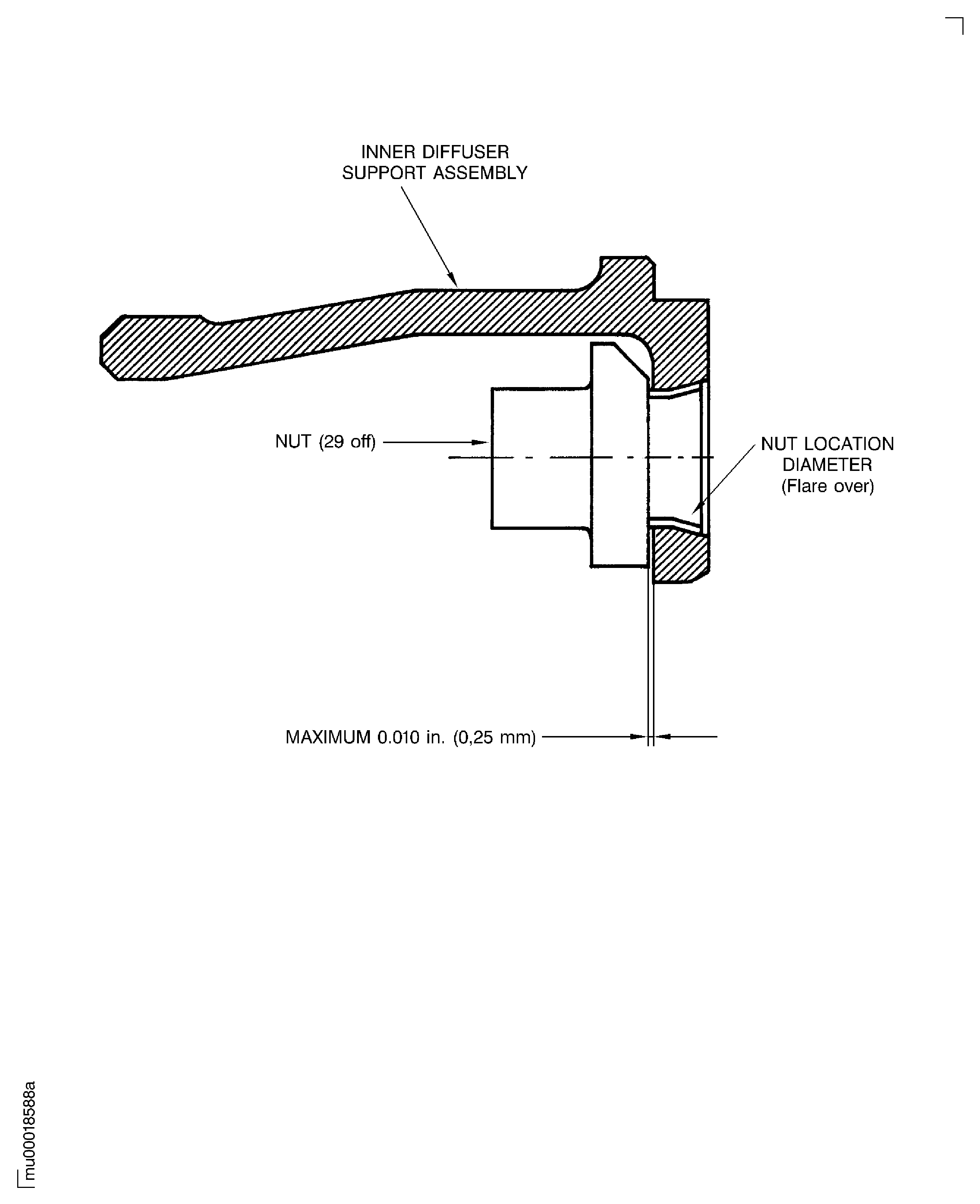
    2. Refer to Fig. 72-50-24-990-001.

      1. Machine off the flared part of the worn nuts.

      2. Use electric hand drill, diameter of drill 0.27 in. (6.9 mm).

        Damages at chamfer, the bore and the faces of the inner diffuser support assembly are not permitted.

      1. Hit lightly the remainder of the nut shaft to remove it from the inner diffuser support.

      2. Use pin punch with diameter 0.29 in. (7.4 mm).

    1. SUBTASK 72-50-24-220-001 Examine the Inner Diffuser Support Assembly for Damage

    2. Refer to Fig. 72-50-24-990-001.

      1. Examine the inner diameter of the hole for damage.

      2. Fine scratches are permitted.

        Remove raised material.

        Use needle file and stones.

    1. SUBTASK 72-50-24-350-001 Install the New Nuts

    2. Refer to Fig. 72-50-24-990-001.

      1. Install the hollow sections of the new nuts into the holes.

      2. Make sure that the shoulder of the nuts is installed so that the nuts cannot rotate.

      1. Flare over the locations diameter of the nuts.

      2. Axial movement of the nuts is permitted to a maximum of not more than 0.010 in. (0.25 mm).

    1. SUBTASK 72-50-24-220-002 Do the Post Repair Inspection

      1. Visually examine the installed nuts for cracks.

      2. No cracks are permitted.

        Use illuminated comparator magnifier.

      1. Examine the nuts for correct installation.

      2. The flare must be formed symmetrically without broken or rough edges.

        Use illuminated comparator magnifier.

      1. Dimensionally examine the installed nuts.

      2. Axial movement of the nuts is permitted to a maximum of not more than 0.010 in. (0.25 mm).

    1. SUBTASK 72-50-24-850-001 Identify the Inner Diffuser Support Assembly with New Part Number

    2. Identify the inner diffuser support assembly with the new part number adjacent to the part number that was before.

    3. PART NUMBER BEFORE - 3A0104.

      NEW PART NUMBER - 3A2202.

      .

      PART NUMBER BEFORE - 3A1564.

      NEW PART NUMBER - 3A2201.

    4. Vibropeen the new part number adjacent to the existing part number.

    5. REFER to the SPM TASK 70-09-00-400-501.

    1. SUBTASK 72-50-24-440-051 Assemble the Inner Diffuser Support Assembly

    2. Install the inner diffuser support assemblies.

  1. Figure: Replace the Nuts of the Inner Diffuser Support

    Replace the Nuts of the Inner Diffuser Support
Requirements After Job Completion

Follow-On Conditions

NONE
Link not Found
Link not Found