
TASK 72-00-40-020-006-A00 HP System Module - Remove The HP System Module (Horizontal), Removal-007

DMC:V2500-A1-72-00-4000-06B-520A-B|Issue No:003.00|Issue Date:2017-08-01

Export Control

EAR Export Classification: Not subject to the EAR per 15 C.F.R. Chapter 1, Part 734.3(b)(3), except for the following Service Bulletins which are currently published as EAR Export Classification 9E991: SBE70-0992, SBE72-0483, SBE72-0580, SBE72-0588, SBE72-0640, SBE73-0209, SBE80-0024 and SBE80-0025.

Copyright

© IAE International Aero Engines AG (2001, 2014 - 2021) The information contained in this document is the property of © IAE International Aero Engines AG and may not be copied or used for any purpose other than that for which it is supplied without the express written authority of © IAE International Aero Engines AG. (This does not preclude use by engine and aircraft operators for normal instructional, maintenance or overhaul purposes.).

Applicability

V2500-A1

Common Information

TASK 72-00-40-020-006-A00 HP System Module - Remove The HP System Module (Horizontal), Removal-007

General

This TASK gives the procedure to remove the HP system module in the horizontal position. Other related TASKS are:

TASK 72-00-40-560-003 (REMOVAL-008) Turn the HP system module from the horizontal to the vertical.

Fig/item numbers in parentheses in the procedure agree with those used in the EIPC. Only the primary Fig/item numbers are used. For the service bulletin alpha variants refer to the EIPC.

Apply the approved CoMat 10-058 PENETRATING OIL before the removal of threaded parts or parts with an interference fit. Let the parts soak before removal.

NOTE

To identify the consumable materials refer to the PCI.

NOTE

Special tools are identified in the procedure by the tool primary number.

Preliminary Requirements

Pre-Conditions

NONE

Support Equipment

NameManufacturerPart Number / IdentificationQuantityRemark
IAE 1F10028 Support Pedestal0AM53IAE 1F100284
IAE 1F10262 Lift sling0AM53IAE 1F102621
IAE 1J13001 Trunnion assembly0AM53IAE 1J130011
IAE 1P16002 Cradle pedestal0AM53IAE 1P160021
IAE 1P16046 Removal/Installation fixture0AM53IAE 1P160461
IAE 1P16057 Tie-rod adapter0AM53IAE 1P160571
IAE 1P16285 Tie-rod adapter0AM53IAE 1P162851
IAE 1P16543 Removal/Installation fixture0AM53IAE 1P165431
IAE 1R18230 Wrench0AM53IAE 1R182301
IAE 1R18234 Support rod0AM53IAE 1R182343
IAE 1R18247 Rigging pin0AM53IAE 1R182471
IAE 1R18325 Trunnion assembly0AM53IAE 1R183252
IAE 1R18423 Rigging pin0AM53IAE 1R184231
IAE 1R18893 Riggingpin0AM53IAE 1R188931

Consumables, Materials and Expendables

NameManufacturerPart Number / IdentificationQuantityRemark
CoMat 10-058 PENETRATING OILLOCALCoMat 10-058

Spares

NONE

Safety Requirements

NONE

Procedure

    1. SUBTASK 72-00-40-020-060 Install the Remove/Install Fixture and the Tie-rod Adapter to the HP System Module Rear Flange

    2. Refer to Figure.

      1. Put the puck and shaft through the center ring until the tie-rod adapter touches the rear face of the center ring.

      2. Align the two holes on the tie-rod adapter with two opposite holes in the center ring. Install the two tool screws. Tighten the screws.

      3. Move the locknut until it is adjacent to the wrench location.

      4. Push the tie-rod adapter in to the engine until the puck engages on the HP compressor front shoulder. At the same time push the center ring over the HP compressor shaft until it touches the stage 2 HP turbine disk.

      5. Turn the locknut until the puck is against the HP compressor front shoulder. Tighten the locknut.

        NOTE

        If necessary use a wrench on the wrench location so that the shaft does not turn.
      6. Attach a hoist to the remove/install fixture lift eye.

      7. Lift the remove/install fixture and move it adjacent to the rear of the HP system module. Make sure the hand knobs are rearwards.

      8. Move the remove/install fixture over the center ring until it touches the HP turbine case rear flange.

      9. Put the upper split ring on to the front of the HP turbine case rear flange. Install 12 of the tool bolts and 12 of the tool nuts.

      10. Put the lower split ring on to the front of the HP turbine case rear flange. Install 13 of the tool bolts and 13 of the tool nuts.

      11. Tighten the 25 tool nuts.

      12. Remove the hoist from the lift eye.

    1. SUBTASK 72-00-40-020-061 Install the Trunnion Assemblies on to the Module,.nd

    2. Refer to Figure and Figure.

    3. NOTE

      Keep the 10 nuts removed in Step. so that they can be used to install the trunnion assemblies.

      Remove the 10 nuts and the 10 bolts from the HP compressor front and rear cases splitline, at the No. 8, 10, 16, 17, 19, 35, 37, 38, 44 and 46 positions. The No.1 position is to the right of T.D.C.

      1. Locate the right hand trunnion assembly on to the front of the HP compressor front and rear cases splitline. Make sure the clearance holes engage on the heads of the bolts at the No.9 and 18 positions.

      2. Safety the trunnion assembly to the module with the five tool bolts and five of the nuts removed in step A.

      3. Locate the left hand trunnion assembly on to the front of the HP compressor front and rear cases splitline. Make sure the clearance holes engage on the heads of the bolts at the No.36 and 45 positions.

      4. Safety the trunnion assembly to the module with the five tool bolts and the other five nuts removed in Step.

    1. SUBTASK 72-00-40-020-062 Install the Trunnion Assemblies and the Support Posts on to the LP Compressor/Intermediate Case Module

    2. Refer to Figure.

      1. Position the trunnion centerline along the LP compressor/intermediate case module centerline.

      2. Safety the trunnion assembly with 20 equally spaced tool bolts, the 20 tool nuts and the 20 tool washers.

      1. Make sure that the trunnion supports are at their lowest position.

      2. Put the support posts adjacent to the trunnion assembly with the trunnion supports below the trunnions.

      3. Move the trunnion supports up the support post until they touch the trunnions.

      4. Look at the holes in the trunnion supports and the support posts to see if they are aligned.

      5. If necessary adjust the pedestal at the rear of the module to make the holes align.

      6. When the holes are aligned install the retaining pins through the holes.

    1. SUBTASK 72-00-40-020-063 Install the HP Compressor Support Rods

    2. Refer to Figure.

    3. Make sure that the variable stator vanes (VSV) are in the low speed position.

    4. Install the IAE 1R18247 Rigging pin 1 off or IAE 1R18423 Rigging pin 1 off or IAE 1R18893 Riggingpin 1 off through the bracket and in to the HP compressor cases to lock the VSV.

    5. Remove the six bolts ENGINE-HP COMPRESSOR SPLIT CASES (72-41-31, 01-122), the two brackets (ENGINE-HP COMPRESSOR SPLIT CASES (72-41-31, 01-115) and ENGINE-HP COMPRESSOR SPLIT CASES (72-41-31, 01-118)) and the three blanks ENGINE-HP COMPRESSOR SPLIT CASES (72-41-31, 01-120) from the HP compressor front cases.

      1. Install IAE 1R18234 Support rod 3 off in to the HP compressor front case.

      2. Turn the adjustment handle to retract the blade of the tool.

      3. Install the support rods through the holes in the HP compressor front case. Make sure the blades are rearwards.

      4. Safety the support rods to the HP compressor front case with six tool bolts.

      5. Turn the adjustment handles until the blades touch the HP compressor stage 3 disk and lightly tighten.

    1. SUBTASK 72-00-40-020-064 Install the Lift Sling to the HP System Module

    2. Refer to Figure.

      1. Prepare IAE 1F10262 Lift sling 1 off for installation on the HP system module.

      2. Make sure that the cross beam is in the correct position to lift the HP system module.

      3. NOTE

        If necessary turn the adjustment wheel to put the eye plate in to the identified position.

        Make sure that the eye plate is at the identified position for the center of gravity for the lift sling only.

    3. Attach a hoist to the eye plate.

    4. Lift the lift sling and put it over the HP system module.

    5. Adjust the height of the lift sling to permit the hook and bolt plates to be installed.

    6. Install the hook and bolt plates on to the outer trunnions.

    7. Use the adjustment wheel to move the eye plate to the identified position for the center of gravity for the HP system module lift.

    8. NOTE

      Small adjustments may be necessary to get the correct center of gravity for the assembly.

      Adjust the height of the hoist to hold the HP system module.

    1. SUBTASK 72-00-40-020-065 Release the Bolts from the HP Compressor Stage 3 Disk Curvic Coupling

    2. Refer to Figure.

    3. Use IAE 1R18230 Wrench 1 off to release the 20 curvic bolts.

    4. Remove the curvic bolts from the No.3 bearing rotor center.

    1. SUBTASK 72-00-40-020-213 Remove the Nuts, Bolts, Brackets, Lock Plates and Pins from the LP Compressor/Intermediate Case Module to HP System Module Joint Flange (SBE 72-0290)

    2. Refer to Figure.

    3. NOTE

      There is no countersunk hole in the head of the bolts.

      Remove the 37 nuts, the 37 bolts from the joint flange. Do not remove the nuts and the bolts from the positions Y.

    4. Remove the four nuts, the four bolts from the joint flange at the positions Y.

    5. Use an applicable parallel punch to remove the four pins and the four lock plates from the joint flange at the positions Y.

    1. SUBTASK 72-00-40-020-066 Remove the Nuts, Bolts, Brackets, Lock Plates and Pins from the LP Compressor/Intermediate Case Module to HP System Module Joint Flange (Pre SBE 72-0290)

    2. Refer to Figure.

    3. NOTE

      There is a countersunk hole in the head of the bolts.

      Remove the 37 nuts, the 37 bolts from the joint flange. Do not remove the nuts and the bolts from the positions Y.

    4. Remove the four nuts and the four bolts from the joint flange at the positions Y.

    5. Use an applicable parallel punch to remove the four pins and the four lock plates from the joint flange at the positions Y.

    1. SUBTASK 72-00-40-020-067 Remove the HP System Module

    2. Refer to Figure.

    3. Turn the adjustment handle on the cradle pedestal to lower the support bracket to its lowest position.

    4. Move the cradle pedestal away from the module.

    5. Move the HP system module away from the LP compressor/intermediate case module.

    1. SUBTASK 72-00-40-020-068 Install the HP System Module on to the Support Posts and Cradle Pedestal

    2. Refer to Figure.

    3. Make sure that the trunnion support bracket part of the other IAE 1F10028 Support Pedestal 2 off are at their lowest position.

    4. Put the support posts adjacent to the trunnion assemblies with the trunnion support brackets below the trunnions.

    5. CAUTION

      YOU MUST MAKE SURE THAT THE HEIGHT OF MODULE IS SUFFICIENT FOR THE CRADLE PEDESTAL TO BE INSTALLED.

      Move the trunnion support brackets up the support posts until they touch the trunnions.

    6. Look at the holes in the trunnion support brackets and the support posts to see if they are aligned.

    7. If necessary adjust the height of the HP system module to make the holes align.

    8. Install the retaining pins throught the holes.

    9. Put IAE 1P16002 Cradle pedestal 1 off under the HP system module with the support assembly slightly forward of the diffuser case rear flange. Make sure that the large face of the support assembly is forward.

    10. Turn the adjustment handle on the cradle pedestal to move the support assembly upwards. When the cradle pedestal has taken the weight of the module, stop the procedure.

    11. Adjust the height of the lift sling to permit the hook and bolt plates to be removed.

    12. Remove the hook and bolt plates from the trunnions.

    13. Move the lift sling away and put it on an applicable work surface. Remove the hoist.

    1. SUBTASK 72-00-40-020-070 Install the Curvic Protectors on to the Curvic Couplings

    2. Install the applicable curvic protectors on to the No.3 bearing rotor center curvic coupling and the stage 3 disk curvic coupling.

    1. SUBTASK 72-00-40-020-071 Remove the Remove/Install Fixture and the Tie-Rod Adapter from the Rear of the Module

    2. Refer to Figure.

    3. Attach a hoist to the lift eye on the remove/install fixture. Adjust the height of the hoist to hold the weight of the remove/install fixture.

    4. Remove the 25 nuts and the 25 bolts which safety the remove/install fixture to the HP turbine case. Remove the two split rings.

    5. Release the locknut on the end of the tie-rod shaft.

    6. Remove the two screws that safety the tie-rod adapter on to the remove/install fixture.

    7. Move the shaft in to the engine to disengage the puck from the HP compressor shaft front shoulder.

    8. Remove the tie-rod adapter from the module.

    9. Remove the remove/install fixture from the module and put it on to a suitable work surface. Remove the hoist.

    1. SUBTASK 72-00-40-220-075 Visually Examine the Module Interfaces

    2. Visually examine the HP system module and the LP compressor/intermediate case module at interfaces C-32 and C-41. Refer to TASK 72-00-00-200-001 (INSTALLATION/CHECK-001).

  1. Figure: Attach the remove/install fixture and tie-rod adapter to the HP system module rear flange

    Attach the remove/install fixture and tie-rod adapter to the HP system module rear flange

    Figure: Install the HP compressor trunnions

    Install the HP compressor trunnions
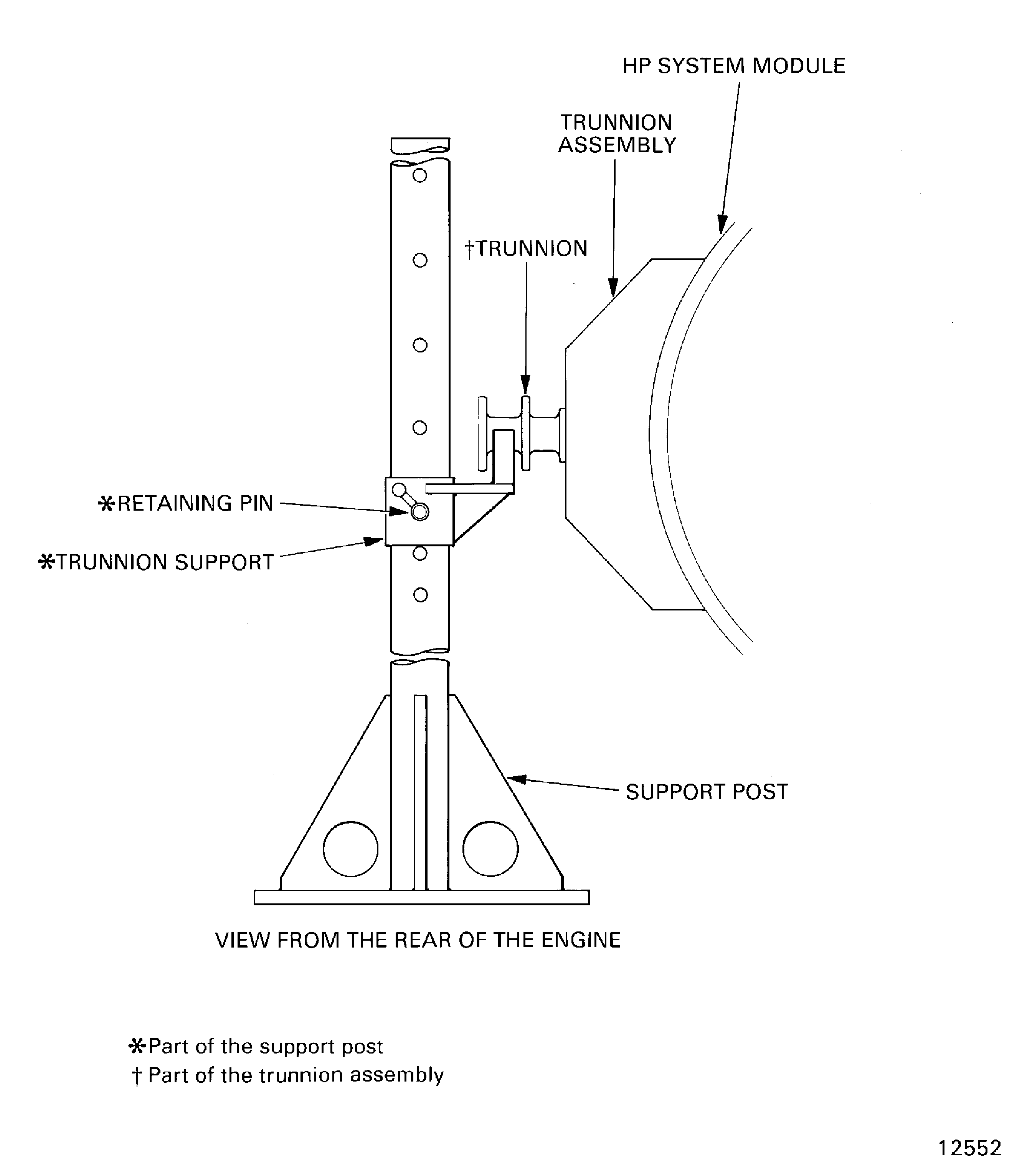
    Figure: Install the trunnion assemblies and the front support posts on to the LP compressor/intermediate case module
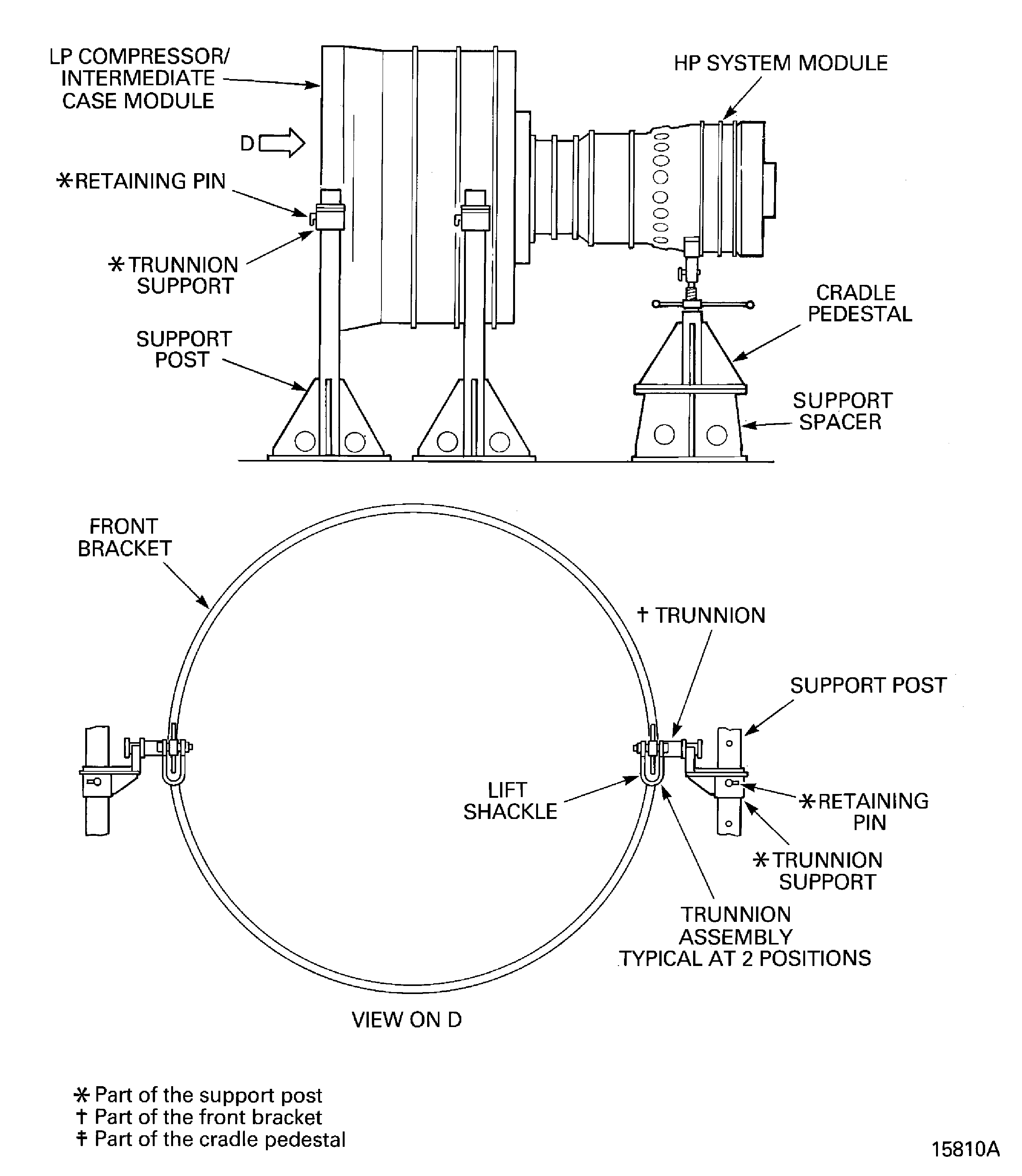
    Install the trunnion assemblies and the front support posts on to the LP compressor/intermediate case module

    Figure: Install the support rods in to the HP compressor

    Install the support rods in to the HP compressor
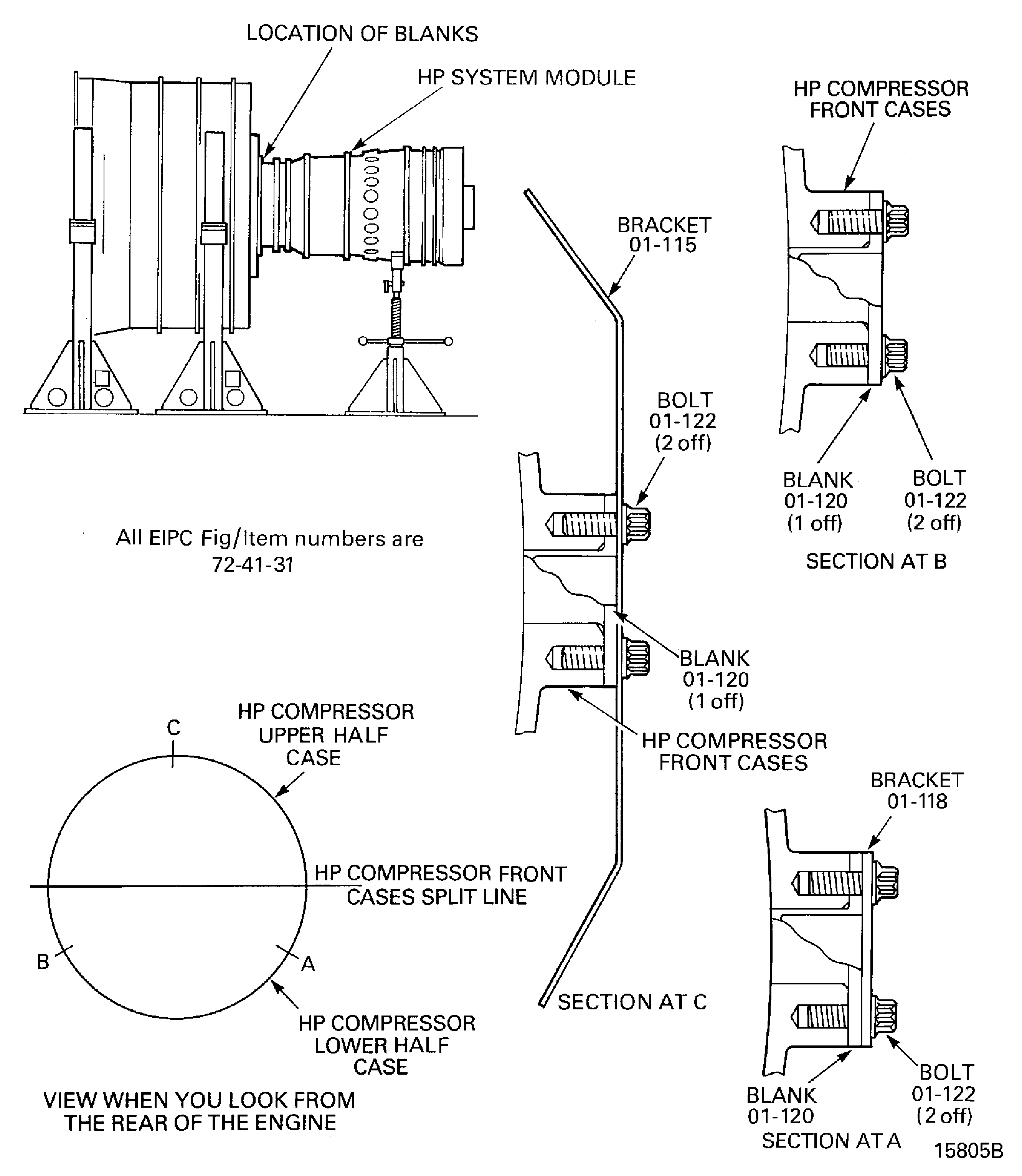
    Figure: Install the support rods in to the HP compressor

    Install the support rods in to the HP compressor

    Figure: Install the HP system module lift sling

    Install the HP system module lift sling

    Figure: Release the curvic bolts from the stage 3 HP compressor curvic coupling

    Release the curvic bolts from the stage 3 HP compressor curvic coupling
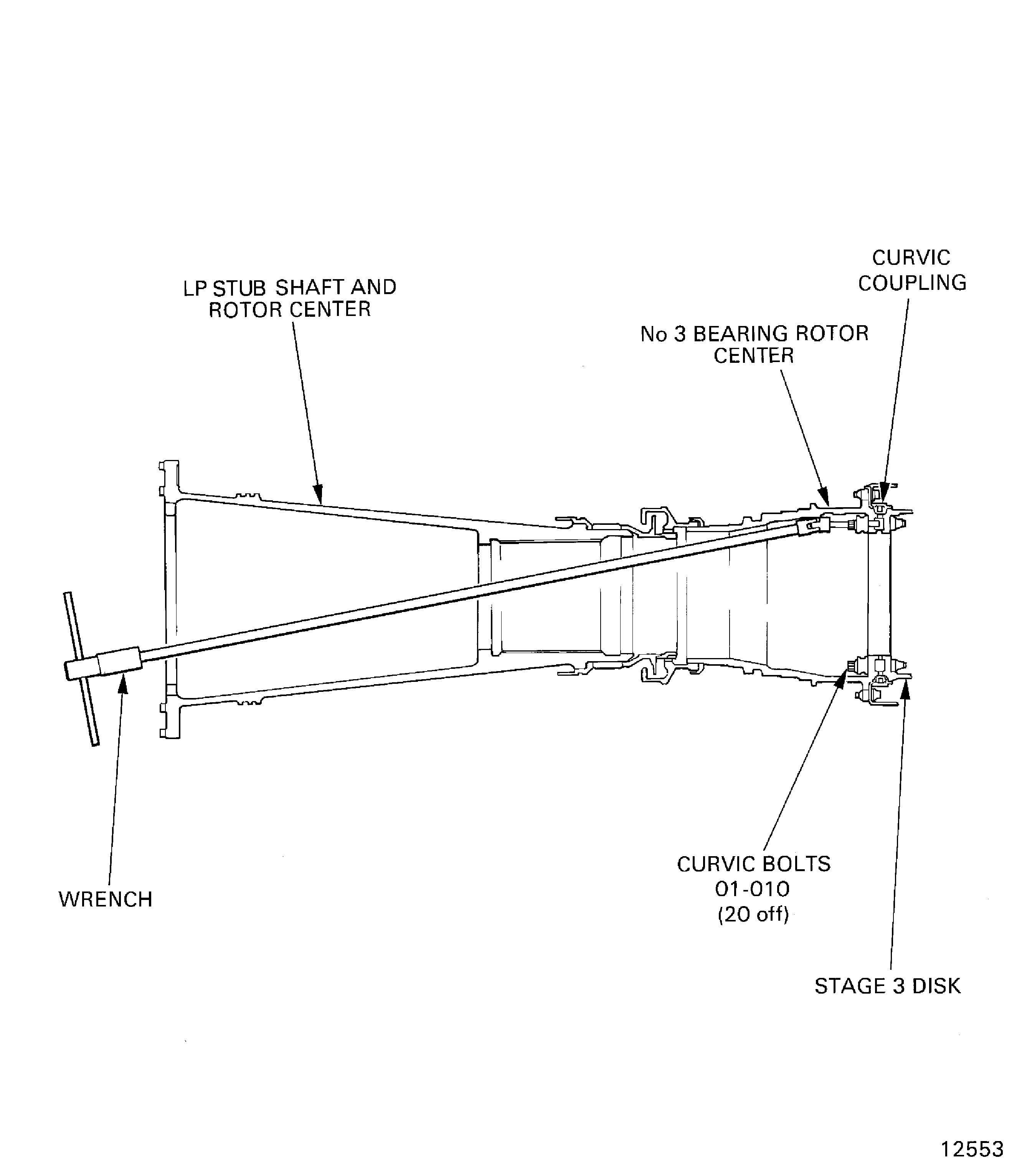
    Figure: LP compressor/intermediate case module to HP system module joint flange hole positions

    LP compressor/intermediate case module to HP system module joint flange hole positions
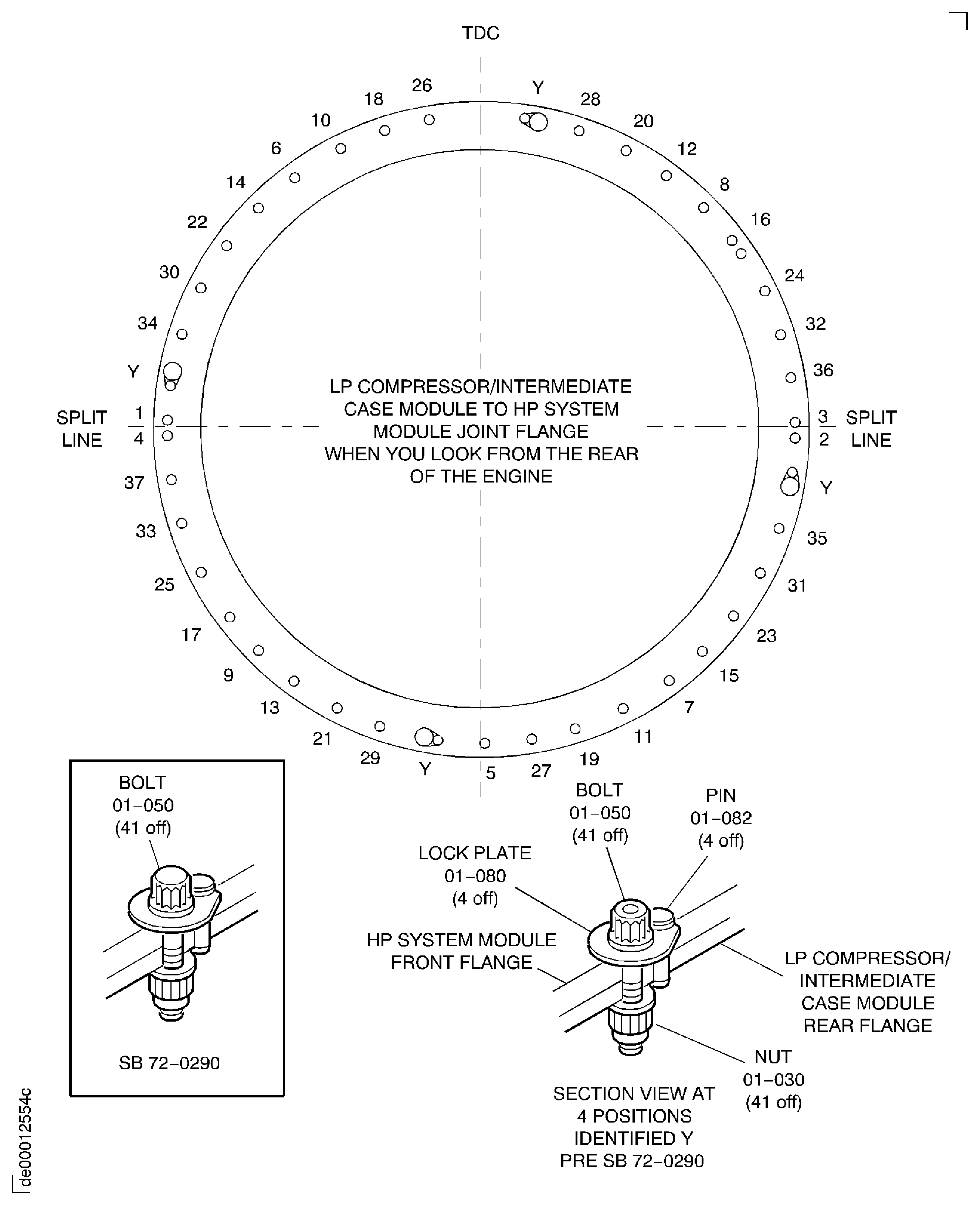
    Figure: Install the HP system module on to the support posts and cradle pedestal

    Install the HP system module on to the support posts and cradle pedestal

Requirements After Job Completion

Follow-On Conditions

NONE
Change Type:

Revised the procedure to add IAE 1P16543 as an option to IAE 1P16046. (14VC396)

Manufacturer Code:0AM53
Enterprise Name:IAE INTERNATIONAL AERO ENGINES AG
BU Name:NULL
Building:SUITE 400
Street:628 HEBRON AVENUE
City:GLASTONBURY
State:CT
Zip Code:06033
Country:USA
Manufacturer Code:LOCAL
Enterprise Name:LOCALLY SUPPLIED
Manufacturer Code:X222X
Supply Number:CoMat 10-058
Type:sp01
Supply Short Name:CoMat 10-058 PENETRATING OIL
Supply Name:CoMat 10-058 PENETRATING OIL
Suppliers:
ManufacturerRemarks
X222X
Manufacturer Code:0AM53
Tool Number:IAE 1F10028
Tool Name:IAE 1F10028 Support Pedestal
Manufacturer Code:0AM53
Tool Number:IAE 1F10262
Tool Name:IAE 1F10262 Lift sling
Manufacturer Code:0AM53
Tool Number:IAE 1J13001
Tool Name:IAE 1J13001 Trunnion assembly
Manufacturer Code:0AM53
Tool Number:IAE 1P16002
Tool Name:IAE 1P16002 Cradle pedestal
Manufacturer Code:0AM53
Tool Number:IAE 1P16046
Tool Name:IAE 1P16046 Removal/Installation fixture
Manufacturer Code:0AM53
Tool Number:IAE 1P16057
Tool Name:IAE 1P16057 Tie-rod adapter
Manufacturer Code:0AM53
Tool Number:IAE 1P16285
Tool Name:IAE 1P16285 Tie-rod adapter
Manufacturer Code:0AM53
Tool Number:IAE 1P16543
Tool Name:IAE 1P16543 Removal/Installation fixture
Manufacturer Code:0AM53
Tool Number:IAE 1R18230
Tool Name:IAE 1R18230 Wrench
Manufacturer Code:0AM53
Tool Number:IAE 1R18234
Tool Name:IAE 1R18234 Support rod
Manufacturer Code:0AM53
Tool Number:IAE 1R18247
Tool Name:IAE 1R18247 Rigging pin
Manufacturer Code:0AM53
Tool Number:IAE 1R18325
Tool Name:IAE 1R18325 Trunnion assembly
Manufacturer Code:0AM53
Tool Number:IAE 1R18423
Tool Name:IAE 1R18423 Rigging pin
Manufacturer Code:0AM53
Tool Number:IAE 1R18893
Tool Name:IAE 1R18893 Riggingpin