Export Control
EAR Export Classification: Not subject to the EAR per 15 C.F.R. Chapter 1, Part 734.3(b)(3), except for the following Service Bulletins which are currently published as EAR Export Classification 9E991: SBE70-0992, SBE72-0483, SBE72-0580, SBE72-0588, SBE72-0640, SBE73-0209, SBE80-0024 and SBE80-0025.Copyright
© IAE International Aero Engines AG (2001, 2014 - 2021) The information contained in this document is the property of © IAE International Aero Engines AG and may not be copied or used for any purpose other than that for which it is supplied without the express written authority of © IAE International Aero Engines AG. (This does not preclude use by engine and aircraft operators for normal instructional, maintenance or overhaul purposes.).Applicability
V2500-A5
Common Information
TASK 72-41-20-440-007-B02 HPC Rear Cases And Vanes Assembly - Disassemble (For Subsequent Final Assembly) After Machining (Mechanical Clamping Tool Method), Assembly-007
General
Fig/item numbers in parentheses in the procedure agree with those used in the IPC. Only the primary Fig./item numbers are used. For the service bulletin alpha variants refer to the IPC.
For all parts identified in a different Chapter/Section/Subject, the applicable Chapter/Section/Subject comes before the Fig/item number.
The number for each radial location must be identified in a clockwise direction. These start at the engine top position when you look from the rear of the engine, unless stated differently in the procedure.
Make sure that the clamping tools are removed and the HP compressor rear cases and vanes are machined before you remove the stator vanes, rotor path ring or case. Refer to TASK 72-41-20-440-006-B02 (ASSEMBLY-006).
As each set of stator vanes are removed from the assembly they must be kept in IAE 1R18283 Cabinet 1 off. Make sure the stator vanes are put in to the cabinet in the correct sequence.
As each rotor path ring or case is removed they must be put in to IAE 1R18281 Storage rack 1 off.
NOTE
Preliminary Requirements
Pre-Conditions
NONESupport Equipment
| Name | Manufacturer | Part Number / Identification | Quantity | Remark |
|---|---|---|---|---|
| IAE 1R18240 Extractor | 0AM53 | IAE 1R18240 | 3 | |
| IAE 1R18242 Extractor | 0AM53 | IAE 1R18242 | 3 | |
| IAE 1R18243 Extractor | 0AM53 | IAE 1R18243 | 3 | |
| IAE 1R18281 Storage rack | 0AM53 | IAE 1R18281 | 1 | |
| IAE 1R18283 Cabinet | 0AM53 | IAE 1R18283 | 1 | |
| IAE 1R18284 Extractor | 0AM53 | IAE 1R18284 | 1 | |
| IAE 1R18321 Turnover stand | 0AM53 | IAE 1R18321 | 1 | |
| IAE 1R18412 Turning fixture | 0AM53 | IAE 1R18412 | 1 | |
| IAE 1R18413 Turnover stand adaptor | 0AM53 | IAE 1R18413 | 1 | |
| IAE 1R18415 Pallet | 0AM53 | IAE 1R18415 | 1 | |
| IAE 1R18416 Lifting tool | 0AM53 | IAE 1R18416 | 1 | |
| IAE 1R18431 Lifting beam | 0AM53 | IAE 1R18431 | 1 | |
| IAE 1R18434 Case extractor | 0AM53 | IAE 1R18434 | 3 | |
| IAE 1R18636 Spanner Wrench | 0AM53 | IAE 1R18636 | 1 | |
| IAE 1R18684 Case extractor | 0AM53 | IAE 1R18684 | 1 | |
| IAE 1R18827 Extractor | 0AM53 | IAE 1R18827 | 3 |
Consumables, Materials and Expendables
NONESpares
NONESafety Requirements
NONEProcedure
Before any part is removed it must be identified with its position on the assembly. Refer to SPM TASK 70-09-00-400-501 for the procedure to mark components and assemblies.
SUBTASK 72-41-20-440-203 Identify the Positions of the HP Compressor Rear Cases and Vanes Parts
Remove the 10 bolts which attach the stage 10 rear heatshield to the stage 10 case rear flange. Refer to Figure detail identified B.
Use IAE 1R18636 Spanner Wrench 1 off and remove the 10 bolts, washers and nuts which attach the stage 10 front heatshield to the stage 10 case front flange. Refer to Figure detail at B.
Remove the 10 bolts which attach the stage 9 front heatshield to the stage 9 case front flange. Refer to Figure detail identified B.
Remove the 10 bolts which attach the stage 7 rear heatshield to the stage 7 case rear flange. Refer to Figure detail identified B.
Remove the 10 bolts which attach the stage 7 front heatshield to the stage 7 case front flange. Refer to Figure detail identified B.
SUBTASK 72-41-20-440-207-A00 Remove the Stage 7, 9 and 10 Front and Rear Heatshields (Pre SBE 72-0296, Pre SBE 72-0343 and Pre SBE 72-0477)
Remove the 10 bolts which attach the stage 10 rear heatshield to the stage 11 rotor path case assembly rear flange. Refer to Figure detail at B.
Use IAE 1R18636 Spanner Wrench 1 off and remove the 10 bolts, washers and nuts which attach the stage 10 front heatshield to the stage 11 rotor path case assembly front flange. Refer to Figure detail at B.
Remove the 10 bolts which attach the stage 9 front heatshield to the stage 10 rotor path case assembly front flange. Refer to Figure detail at B.
Remove the 10 bolts which attach the stage 7 rear heatshield to the stage 8 rotor path case assembly rear flange. Refer to Figure detail at B.
SUBTASK 72-41-20-440-207-B00 Remove the Stage 7, 9 and 10 Front and Rear Heatshields (SBE 72-0296, SBE 72-0343 and Pre SBE 72-0477)
SBE 72-0477: Engine - HP compressor ring cases - Deletion of stage 8 to 11 heatshields.
Remove the 10 bolts which attach the stage 7 rear heatshield to the stage 7 case rear flange. Refer to Figure detail at B.
Remove the 10 bolts which attach the stage 7 front heatshield to the stage 7 case front flange. Refer to Figure detail at B.
SUBTASK 72-41-20-440-207-C00 Remove the Stage 7 Front and Rear Heatshields (Pre SBE 72-0296, Pre SBE 72-0343 and SBE 72-0477)
SBE 72-0296: Engine-HP compressor-Introduction of integral front support cone/stage 7 rotor path and revised heatshield and fastener configuration.
SBE 72-0343: Engine - HP compressor ring cases - Introduction of integral HP compressor cases and rotor paths.
SBE 72-0477: Engine - HP compressor ring cases - Deletion of stage 8 to 11 heatshields.
Remove the 10 bolts which attach the stage 7 rear heatshield to the stage 8 rotor path case assembly rear flange. Refer to Figure detail at B.
SUBTASK 72-41-20-440-207-D00 Remove the Stage 7 Front and Rear Heatshields (SBE 72-0296, SBE 72-0343 and SBE 72-0477)
Use IAE 1R18827 Extractor off to remove the assembly. The extractors must be set at equal distances around the flange. Refer to Figure extractor detail A.
Remove the cross key location ring, the seal ring and the stage 12 rotor path ring as an assembly.
Engage the pins of IAE 1R18284 Extractor 1 off in the extraction holes in the stage 12 rotor path ring flange.
Remove the cross key location ring from the stage 12 rotor path ring.
SUBTASK 72-41-20-440-208-A00 Remove the Cross Key Ring and Seal Assembly and the Stage 12 Rotor Path Ring (Pre SBE 72-0343 and Pre SBE 72-0280)
SBE 72-0280: Engine - HP compressor ring cases - Introduction of HPC system with stage 12 heatshields deleted.
SBE 72-0343: Engine - HP compressor ring cases - Introduction of integral HP compressor cases and rotor paths.
Use IAE 1R18827 Extractor 3 off to remove the assembly. The extractor must be set at equal distances around the flange. Refer to Figure extractor detail at A.
Remove the cross key location ring, the seal ring and the stage 12 rotor path case assembly as an assembly.
Engage the pins of IAE 1R18284 Extractor 1 off in the extraction holes in the stage 12 rotor path case assembly flange.
Remove the cross key location ring from the stage 12 rotor path case assembly.
SUBTASK 72-41-20-440-208-B00 Remove the Cross Key Ring and Seal Assembly and the Stage 12 Rotor Path Case Assembly (SBE 72-0343 and SBE 72-0280)
Use the IAE 1R18827 Extractor 3 off. Locate the extractors at equal distances around the stage 11 case.
Remove the stage 11 case. Refer to Figure extractor detail at B.
Remove the stage 11 stator vanes from the stage 11 rotor path ring. As each stator vane is removed it must be identified with its location number. Vane No. 1 is located adjacent to the stator stop vane at the 11 o'clock position. Number the vanes in a clockwise direction. Identify the vane location number on the stator vane platform outer face.
SUBTASK 72-41-20-440-209-A00 Remove the Stage 11 Case and Stator Vanes (Pre SBE 72-0343)
SBE 72-0343: Engine - HP Compressor ring cases - Introduction of integral HP Compressor cases and rotor paths.
Use the IAE 1R18827 Extractor 3 off. Locate the extractors at equal distances around the stage 12 rotor path case assembly.
Remove the stage 12 rotor path case assembly. Refer to Figure extractor detail at B.
Remove the stage 11 stator vanes from the stage 12 rotor path case assembly. As each stator vane is removed it must be identified with its location number. Vane No. 1 is located adjacent to the stator vane at the 11 o'clock position. Give number to the vanes in a clockwise direction. Identify the vane location number on the stator vane platform outer face.
SUBTASK 72-41-20-440-209-B00 Remove the Stage 12 Rotor Path Case Assembly and Stator Vanes (SBE 72-0343)
Use IAE 1R18636 Spanner Wrench 1 to remove the 37 flange nuts and bolts. These attach the stage 10 case and rotor path ring to the stage 9 case. Refer to Figure detail at A.
Use IAE 1R18827 Extractor 3 off. Locate the extractors at equal distances around the stage 10 case.
Remove the stage 11 rotor path ring. Refer to Figure extractor detail at B.
Remove the stage 10 case. Refer to Figure extractor detail at B. Use the three extractors used in step C. Locate the extractors at equal distances around the stage 10 case.
Remove the stage 10 stator vanes from the stage 10 rotor path ring. As each stator vane is removed it must be identified with its location number. Vane No. 1 is located adjacent to the stator stop vane at the 11 o'clock position. Number the vanes in a clockwise direction. Identify the vane location number on the stator vane platform outer face.
SUBTASK 72-41-20-440-211-A00 Remove the Stage 11 Rotor Path Ring, the Stage 10 Case and Stator Vanes (Pre SBE 72-0343)
SBE 72-0343: Engine - HP compressor ring cases - Introduction of integral HP compressor cases and rotor paths.
Use IAE 1R18636 Spanner Wrench 1 to remove the 37 flange nuts and bolts. These attach the stage 11 rotor path case assembly to the stage 10 rotor path case assembly. Refer to Figure detail at A.
Use IAE 1R18827 Extractor 3 off. Locate the extractors at equal distances around the stage 11 rotor path case assembly.
Remove the stage 12 rotor path case assembly. Refer to Figure extractor detail at B.
Remove the stage 11 rotor path case assembly. Refer to Figure extractor detail at B. Use the three extractors used in step C. Locate the extractors at equal distances around the stage 11 rotor path case assembly.
Remove the stage 10 stator vanes from the stage 11 rotor path case assembly. As each stator vane is removed it must be identified with its location number. Vane No. 1 is located adjacent to the stator stop vane at the 11 o'clock position. Number the vanes in a clockwise direction. Identify the vane location number on the stator vane platform outer face.
SUBTASK 72-41-20-440-211-B00 Remove the Stage 11 Rotor Path Case Assembly and Stator Vanes (SBE 72-0343)
Remove the 37 nuts and bolts which attach the stage 9 case and rotor path ring to the stage 8 case. Refer to Figure detail at A.
Use IAE 1R18240 Extractor 3 off. Locate the extractors at equal distances around the stage 9 case.
Remove the stage 10 rotor path ring. Refer to Figure extractor detail at C.
Remove the stage 9 case. Refer to Figure extractor detail at B. Use the extractors used in step C. Locate the extractors at equal distances around the stage 9 case.
Remove the stage 9 stator vanes from the stage 9 rotor path ring. As each stator vane is removed it must be identified with its location number. Vane No. 1 is located adjacent to the stator stop vane at the 11 o'clock position. Number the vanes in a clockwise direction. Identify the vane location number on the stator vane platform outer face.
SUBTASK 72-41-20-440-232-A00 Remove the Stage 10 Rotor Path Ring, the Stage 9 Case and Stator Vanes (Pre SBE 72-0343)
SBE 72-0343: Engine - HP compressor ring cases - Introduction of integral HP compressor cases and rotor paths.
Remove the 37 nuts and bolts which attach the stage 10 rotor path case assembly to the stage 9 rotor path case assembly. Refer to Figure detail at A.
Use IAE 1R18240 Extractor 3 off. Locate the extractors at equal distances around the stage 10 rotor path case assembly.
Remove the stage 10 rotor path case assembly. Refer to Figure extractor detail at C.
Remove the stage 10 rotor path case assembly. Refer to Figure extractor detail at B. Use the extractors used in step C. Locate the extractors at equal distances around the stage 10 rotor path case assembly.
Remove the stage 9 stator vanes from the stage 10 rotor path case assembly. As each stator vane is removed it must be identified with its location number. Vane No. 1 is located adjacent to the stator stop vane at the 11 o'clock position. Number the vanes in a clockwise direction. Identify the vane location number on the stator vane platform outer face.
SUBTASK 72-41-20-440-232-B00 Remove the Stage 10 Rotor Path Case Assembly and Stator Vanes (SBE 72-0343)
Remove the 28 nuts and bolts which attach the stage 8 case and rotor path ring to the stage 7 case. Refer to Figure detail at A.
Use IAE 1R18240 Extractor extractor 3 off. Locate the extractors at equal distances around the stage 8 case.
Remove the stage 9 rotor path ring. Refer to Figure extractor detail at C.
Remove the stage 8 case. Refer to Figure extractor detail at B. Locate the extractors used in step C at equal distances around the stage 8 case.
Remove the stage 8 stator vanes from the stage 8 rotor path ring. As each stator vane is removed it must be identified with its location number. Vane No. 1 is located adjacent to the stator stop vane at the 12 o'clock position. Identify the vane location number on the stator vane platform outer face.
SUBTASK 72-41-20-440-238-A00 Remove the Stage 9 Rotor Path Ring, the Stage 8 Case and Stator Vanes (Pre SBE 72-0343)
SBE 72-0343: Engine - HP Compressor ring cases - Introduction of integral HP Compressor cases and rotor paths.
Remove the 28 nuts and bolts which attach the stage 9 rotor path case assembly to the stage 8 rotor path case assembly. Refer to Figure detail at A.
Use IAE 1R18240 Extractor 3 off. Locate the extractors at equal distances around the stage 9 rotor path case assembly.
Remove the stage 9 rotor path case assembly. Refer to Figure extractor detail at C.
Remove the stage 9 rotor path case assembly. Refer to Figure extractor detail at B. Locate the extractors used in step C at equal distances around the stage 9 rotor path case assembly.
Remove the stage 8 stator vanes from the stage 9 rotor path case assembly. As each stator vane is removed it must be identified with its location number. Vane No. 1 is located adjacent to the stator stop vane at the 12 o'clock position. Identify the vane location number on the stator vane platform outer face.
SUBTASK 72-41-20-440-238-B00 Remove the Stage 9 Rotor Path Case Assembly and Stator Vanes (SBE 72-0343)
Use the IAE 1R18684 Case extractor 1 off to remove the stage 8 rotor path ring.
Remove the stage 8 rotor path ring. Refer to Figure extractor detail A.
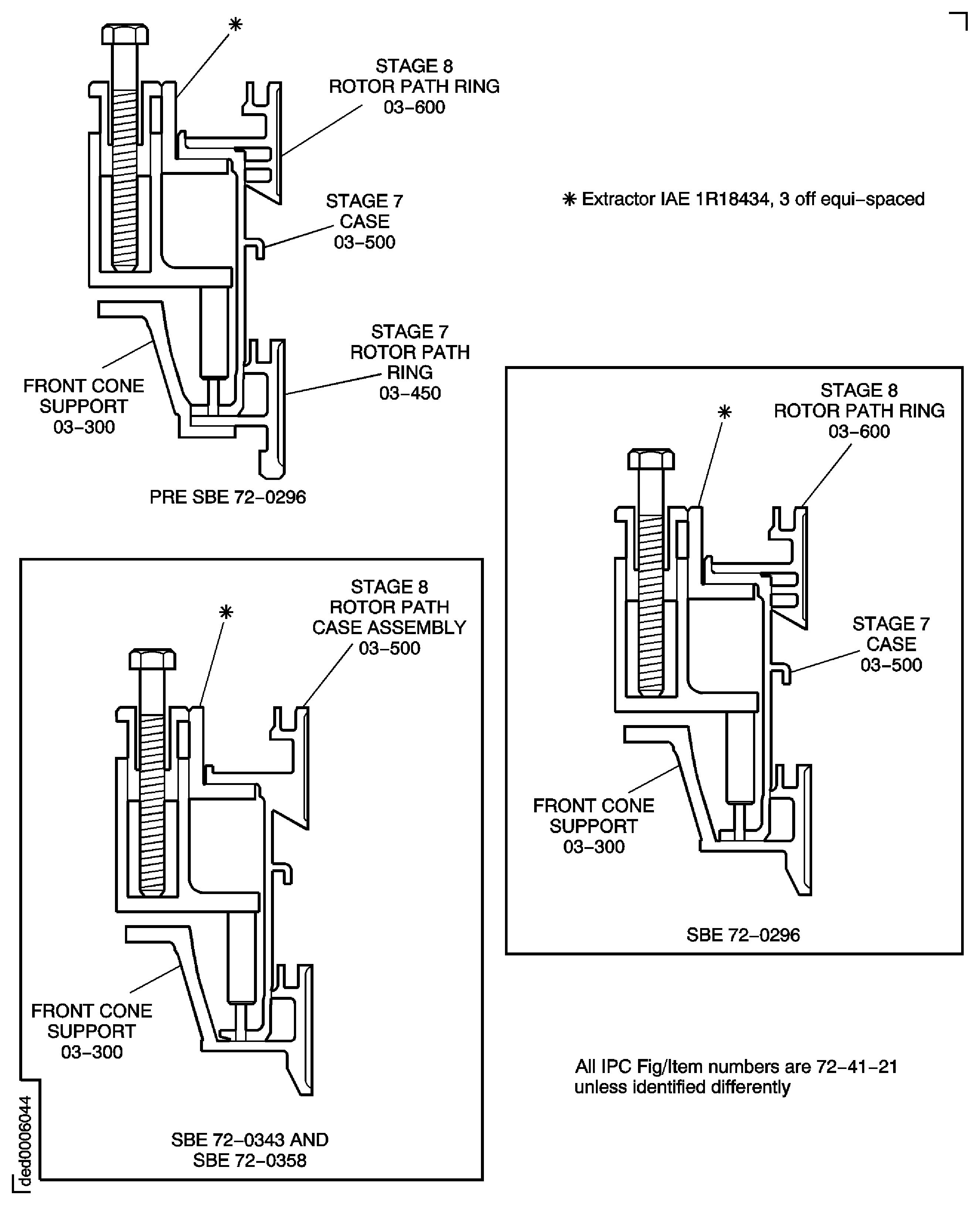
Remove the 37 nuts and bolts which attach the stage 7 case and rotor path ring to the front support cone. Refer to Figure detail identified A.
Remove the stage 7 case. Install IAE 1R18684 Case extractor 1 off or IAE 1R18434 Case extractor 3 off.
Remove the stage 7 stator vanes from the stage 7 rotor path ring. As each stator vane is removed it must be identified with its location number. Vane No. 1 is located adjacent to the stator stop vane at the 11 o'clock position. Identify the vane location number on the stator vane platform outer face.
Use IAE 1R18242 Extractor 3 off. Locate the extractors at equal distances around the front support cone outer flange.
Remove the stage 7 rotor path ring. Refer to Figure extractor detail D.
Use IAE 1R18243 Extractor 3 off. Locate the extractors at equal distances around the front support cone.
Remove the front support cone stiffening ring from the front support cone. Refer to Figure extractor detail C.
SUBTASK 72-41-20-440-239-A00 Remove the Stage 8 Rotor Path Ring, the Stage 7 Case and Stator Vanes (Pre SBE 72-0343)
SBE 72-0343: Engine - HP Compressor ring cases - Introduction of integral HP Compressor cases and rotor paths.
SBE 72-0296: Engine-HP Compressor-Introduction of Integral Front Support Cone/Stage 7 Rotor Path and Revised Heatshield and Fastener Configuration.
Use the IAE 1R18684 Case extractor 1 off to remove the stage 8 rotor path case assembly.
Remove the stage 8 rotor path case assembly. Refer to Figure extractor detail A.
Remove the 37 nuts and bolts which attach the stage 8 rotor path case assembly to the stage 7 cone and rotor path assembly. Refer to Figure detail identified A.
Remove the stage 8 rotor path case assembly. Use the IAE 1R18684 Case extractor 1 off or IAE 1R18434 Case extractor 3 off.
Remove the stage 7 stator vanes from the stage 7 cone and rotor path assembly. As each stator vane is removed it must be identified with its location number. Vane No. 1 is located adjacent to the stator stop vane at the 11 o'clock position. Identify the vane location number on the stator vane platform outer face.
SUBTASK 72-41-20-440-239-B00 Remove the Stage 8 Rotor Path Case Assembly and the Stage 7 Stator Vanes (SBE 72-0343 and SBE 72-0296)
Figure: Pre SBE 72-0296 and Pre SBE 72-0343: View Through the HP Compressor Rear Cases and Vanes
Sheet 1
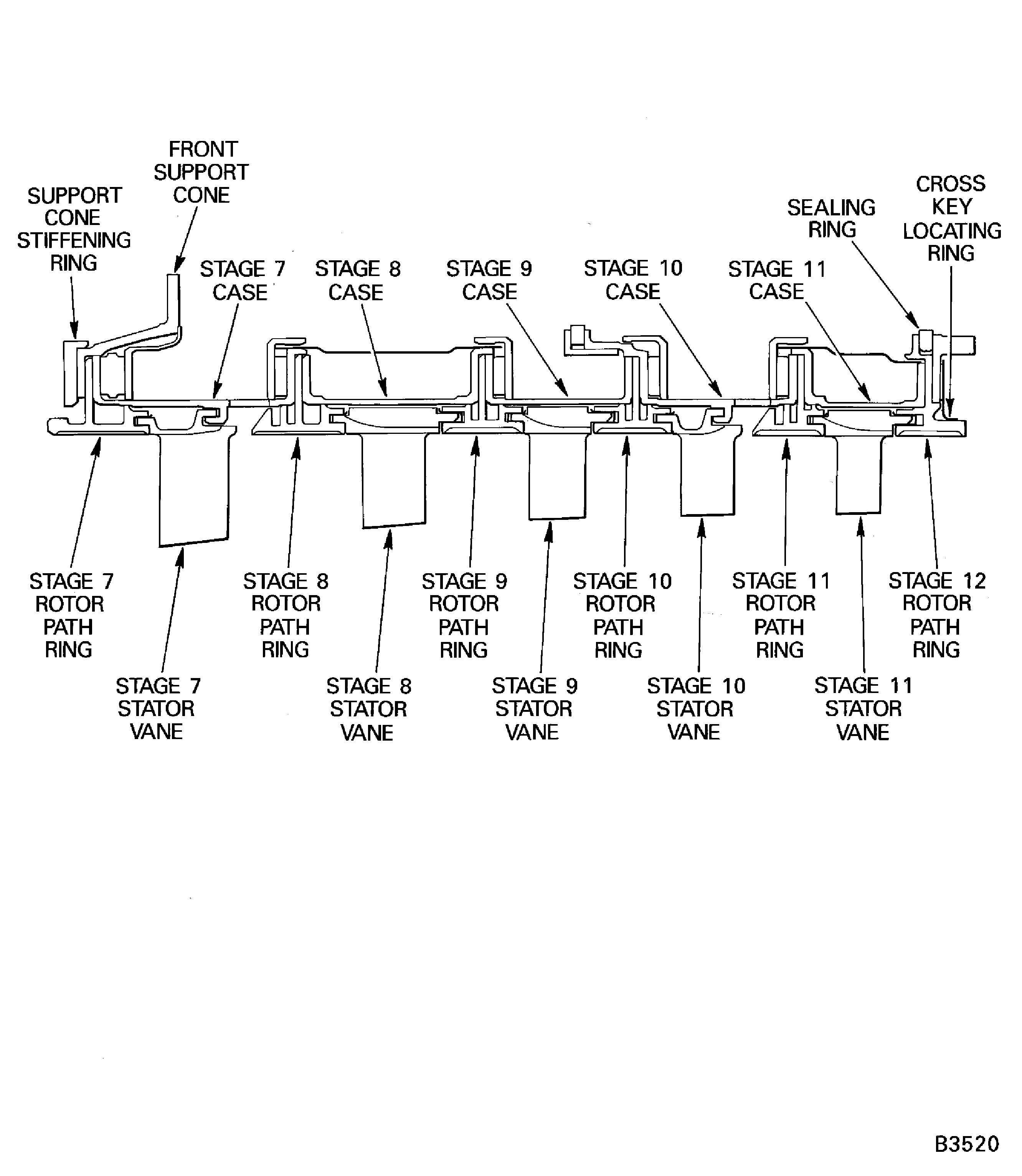
Figure: SBE 72-0296 and SBE 72-0343: View Through the HP Compressor Rear Cases and Vanes
Sheet 2

Figure: Pre SBE 72-0343, SBE 72-0343 and Pre SBE 72-0477: Stage 11 Rotor Path Ring Flange Details
Sheet 1
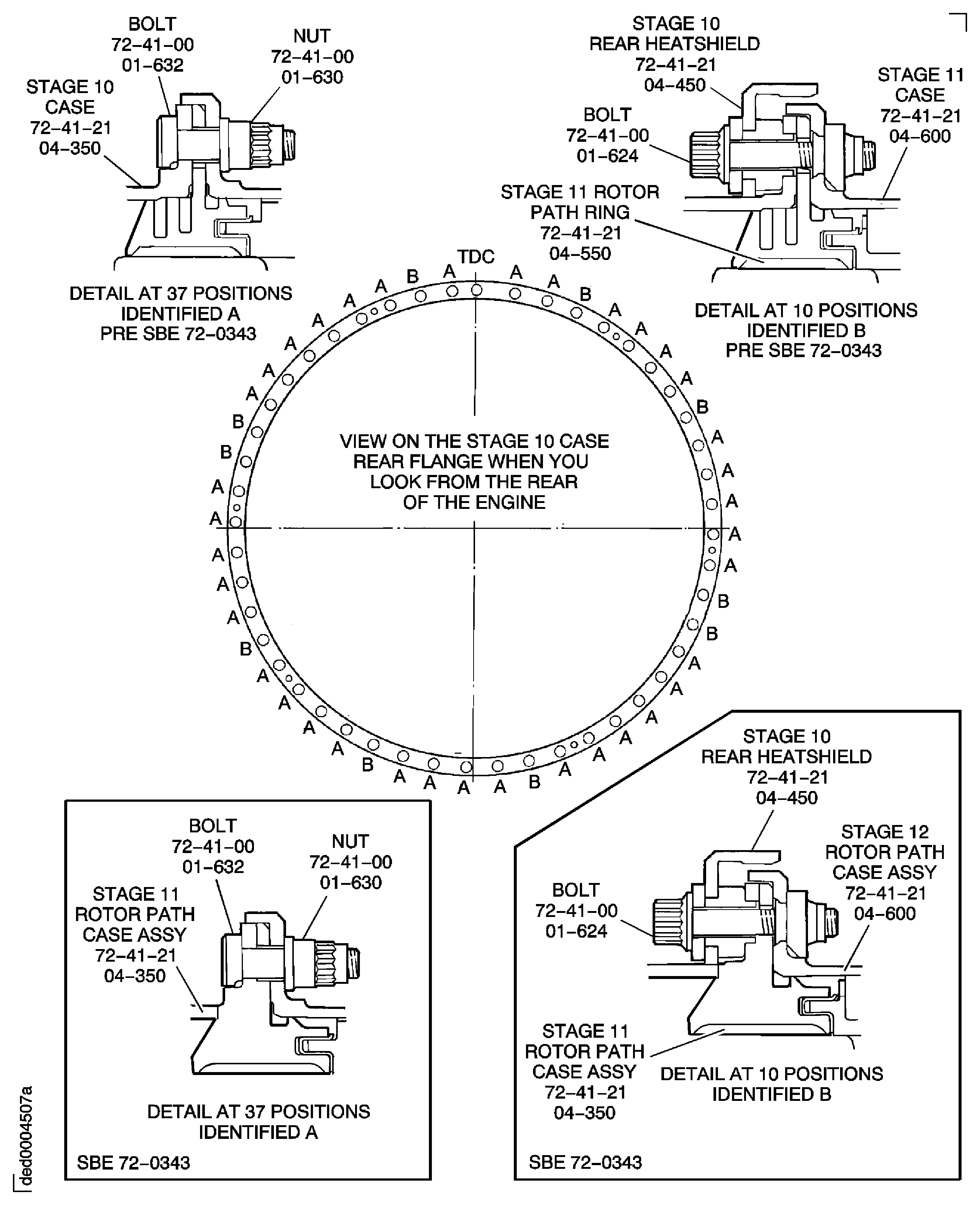
Figure: Pre SBE 72-0343, SBE 72-0343 and SBE 72-0477: Stage 11 Rotor Path Ring Flange Details
Sheet 2

Figure: Pre SBE 72-0343, SBE 72-0343 and Pre SBE 72-0477: Stage 10 Rotor Path Ring Flange Details
Sheet 1

Figure: Pre SBE 72-0343, SBE 72-0343 and SBE 72-0477: Stage 10 Rotor Path Ring Flange Details
Sheet 2

Figure: Pre SBE 72-0343, SBE 72-0343 and Pre SBE 72-0477: Stage 9 Rotor Path Ring Flange Details
Sheet 1

Figure: Pre SBE 72-0343, SBE 72-0343 and SBE 72-0477: Stage 9 Rotor Path Ring Flange Details
Sheet 2

Figure: Stage 8 Rotor Path Ring Details
Stage 8 Rotor Path Ring Details
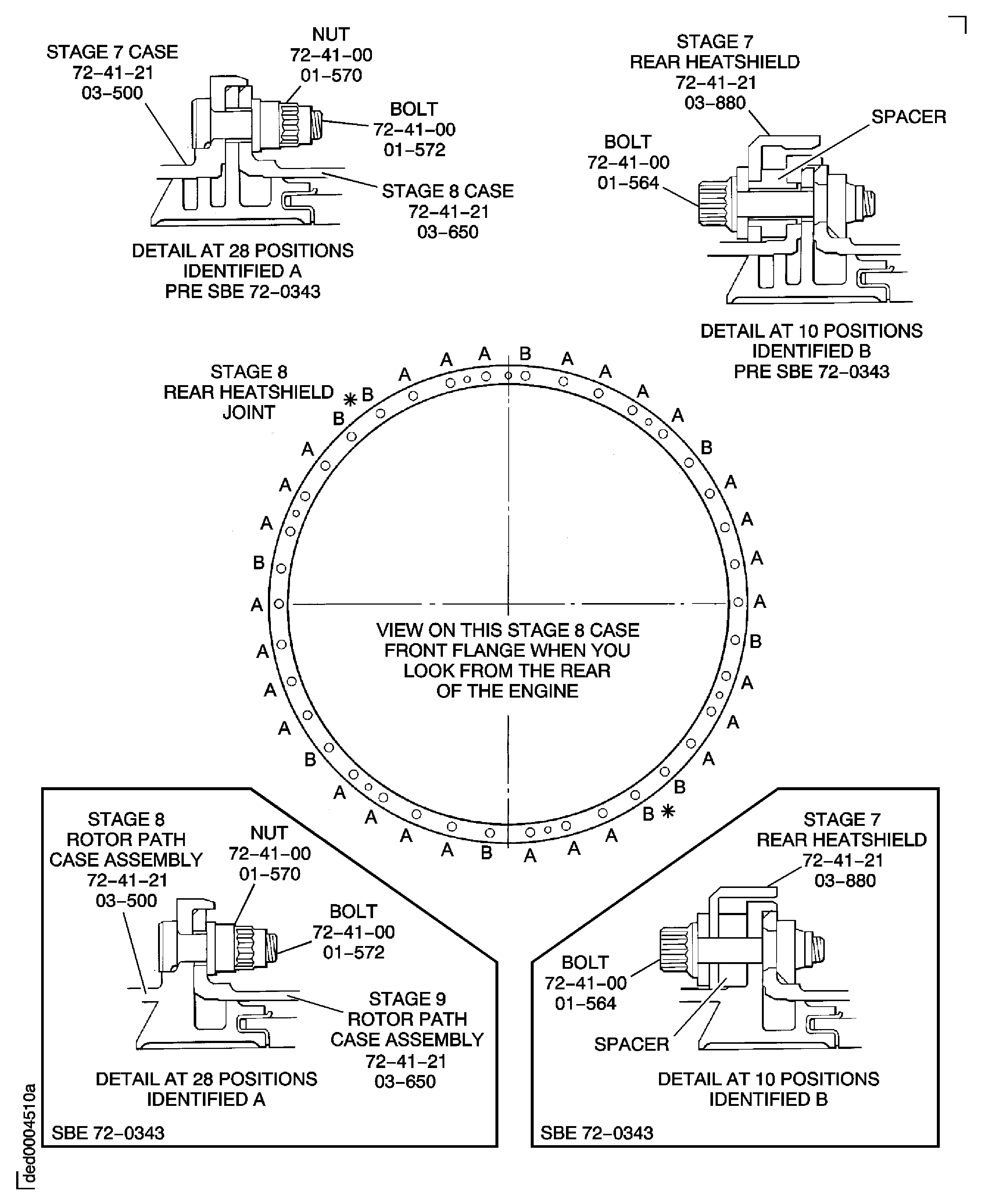
Figure: Stage 7 Rotor Path Ring Flange Details
Stage 7 Rotor Path Ring Flange Details
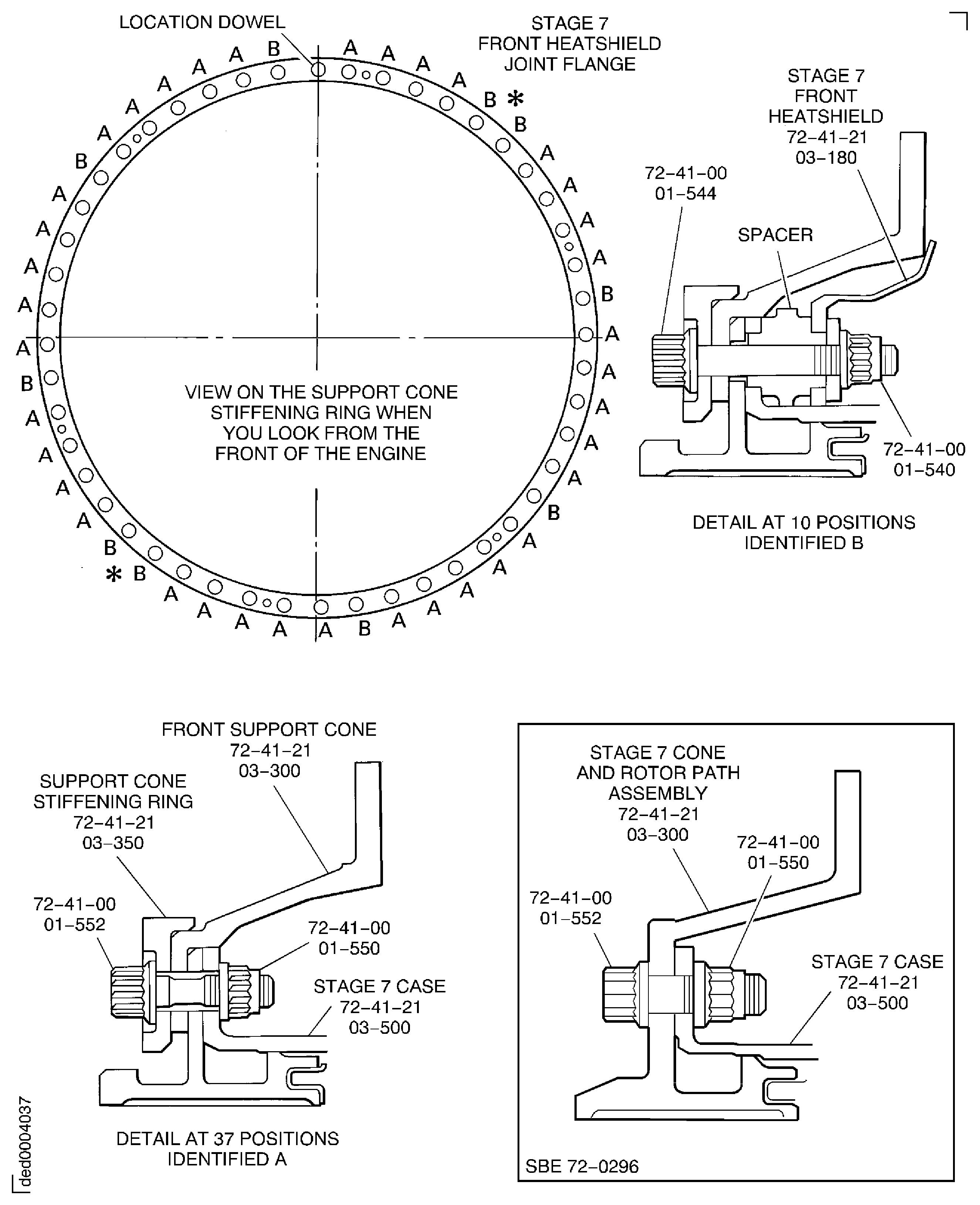
Figure: Tools to Remove the Rotor Path Rings and the Cases
Tools to Remove the Rotor Path Rings and the Cases
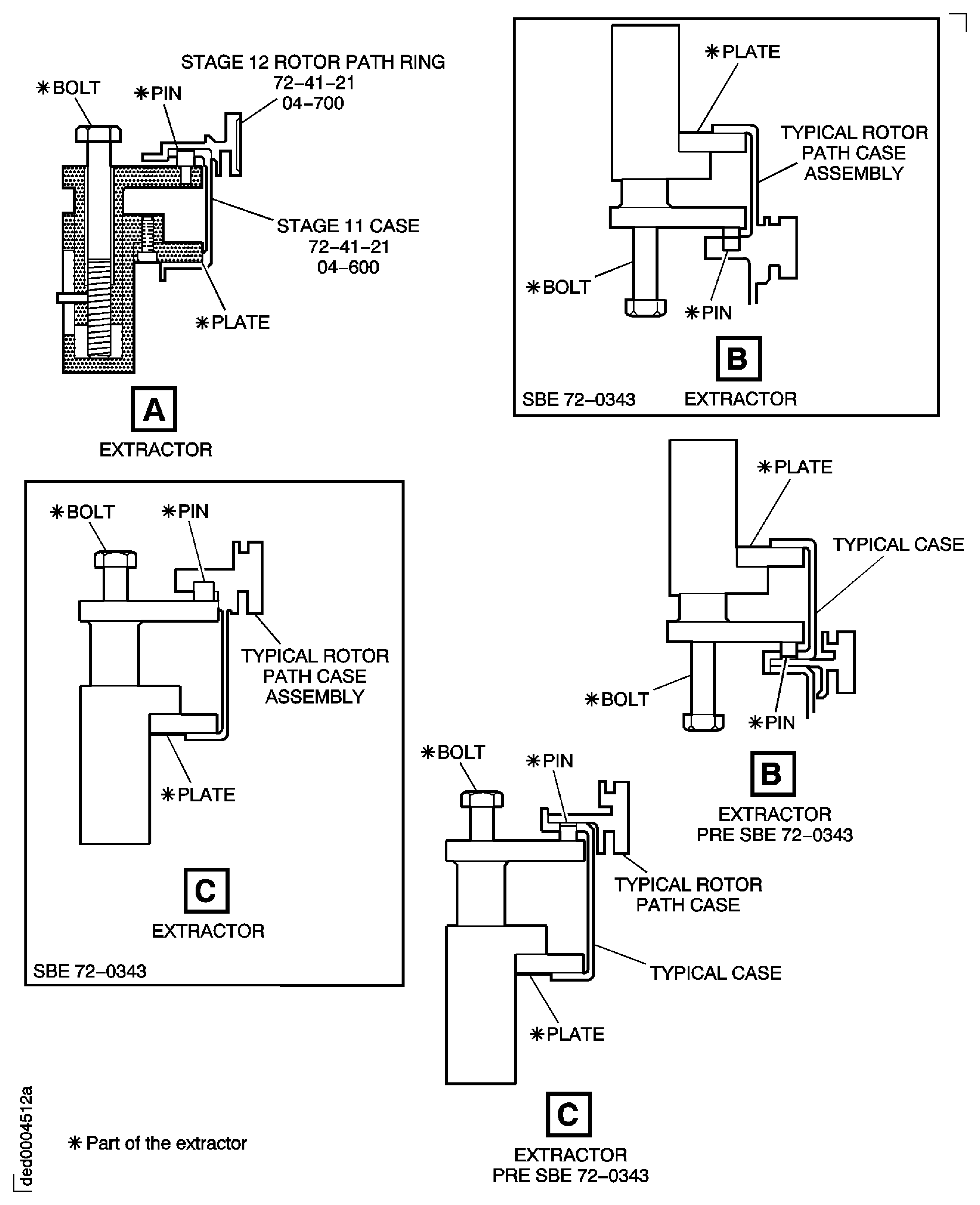
Figure: SBE 72-0343 and Pre SBE 72-0477: Remove the Cross Key Ring and Seal Assembly and the Stage 12 Rotor Path Ring
Sheet 1
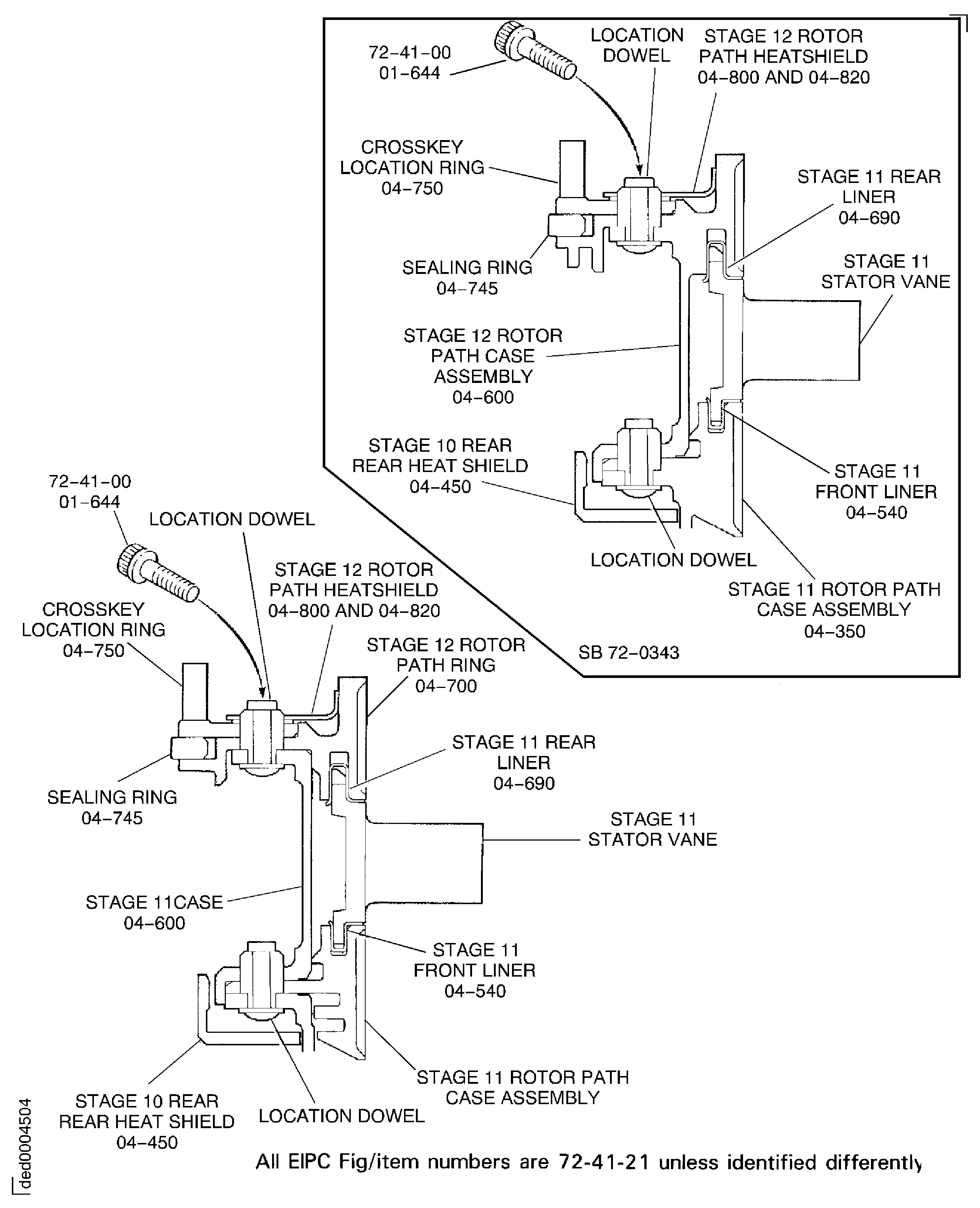
Figure: SBE 72-0343 and SBE 72-0477: Remove the Cross Key Ring and Seal Assembly and the Stage 12 Rotor Path Ring
Sheet 2

Figure: Remove the Cross Key Location Ring From the Stage 12 Rotor Path Ring
Remove the Cross Key Location Ring From the Stage 12 Rotor Path Ring
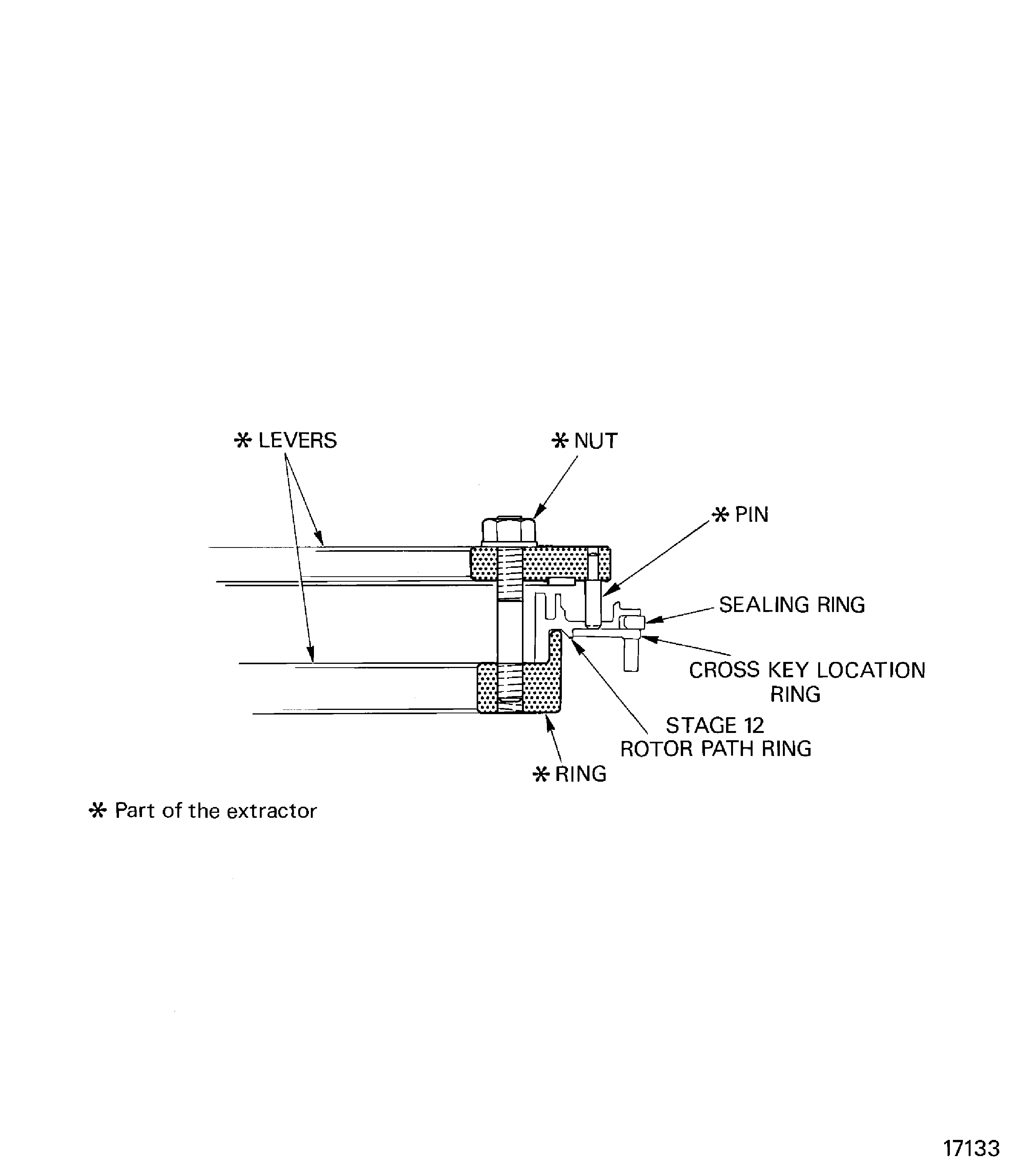
Figure: SBE 72-0343 and Pre SBE 72-0477: Remove the Stage 11 Case and Stator Vanes
Sheet 1
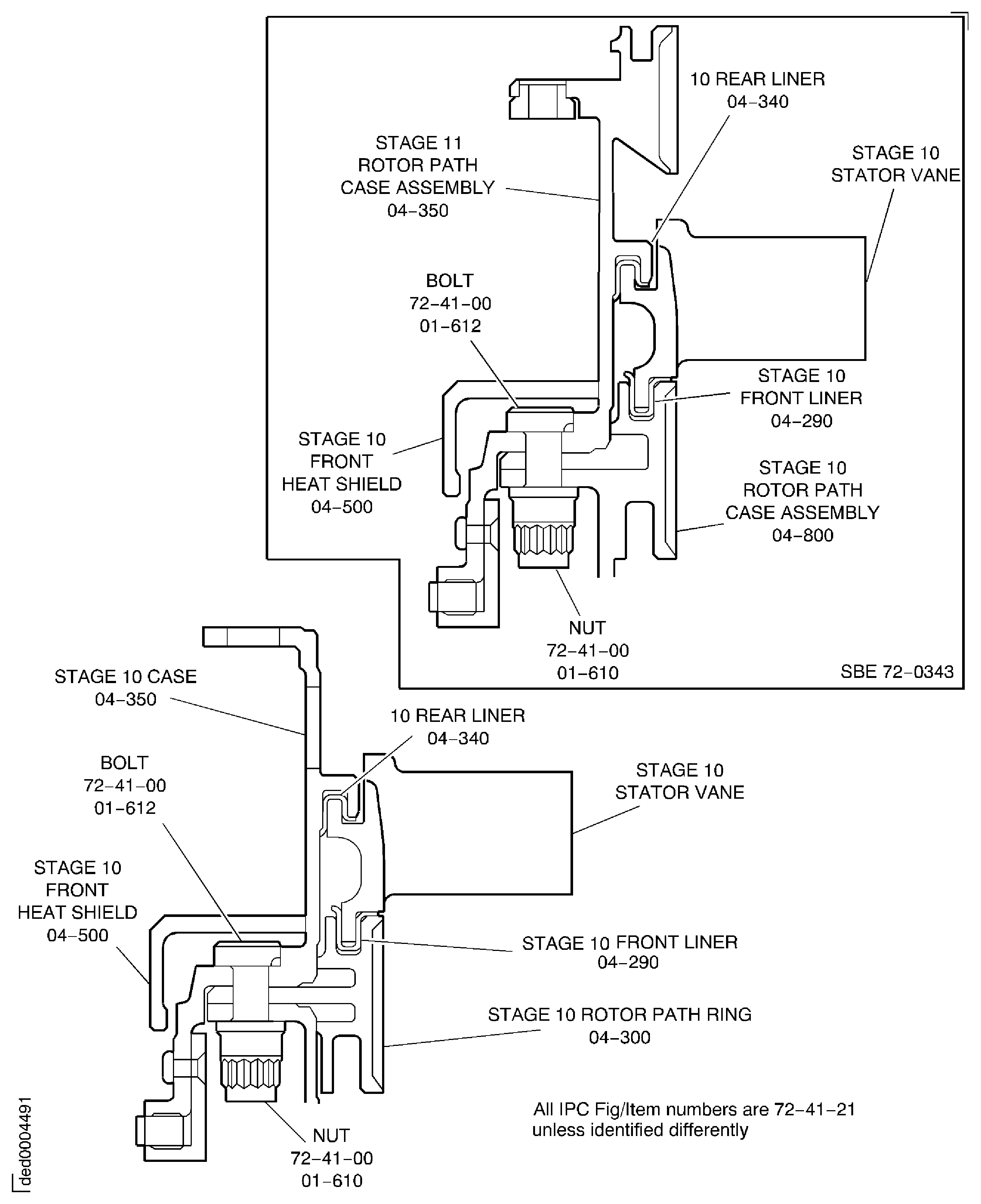
Figure: SBE 72-0343 and SBE 72-0477: Remove the Stage 11 Case and Stator Vanes
Sheet 2

Figure: SBE 72-0296, SBE 72-0343 and Pre SBE 72-0477: Remove the Stage 10 Rotor Path Ring, the Stage 9 Case and the Stator Vanes
Sheet 1

Figure: SBE 72-0296, SBE 72-0343 and SBE 72-0477: Remove the Stage 10 Rotor Path Ring, the Stage 9 Case and the Stator Vanes
Sheet 2
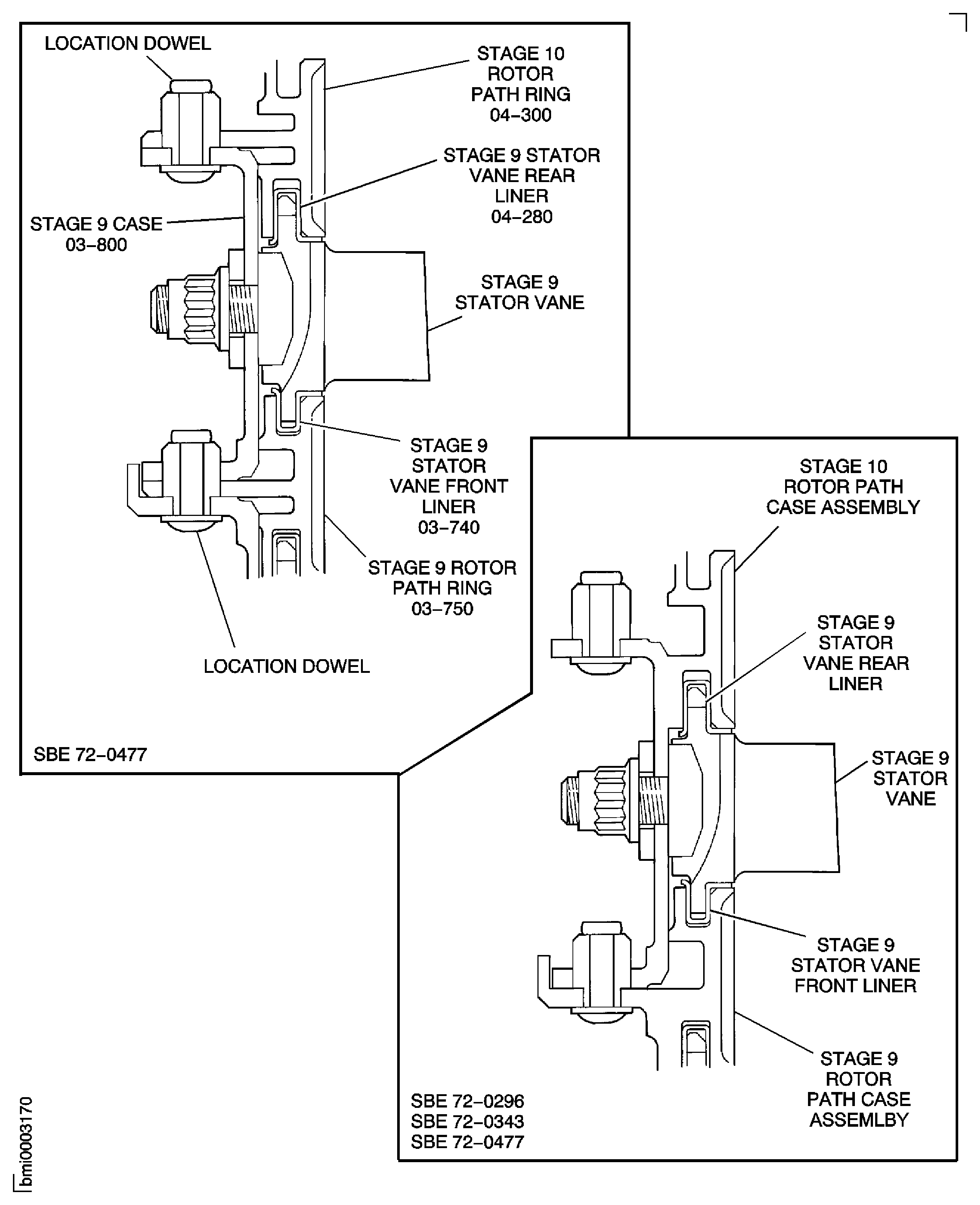
Figure: Pre SBE 72-0343 and SBE 72-0343: Remove the Stage 9 Rotor Path Ring, the Stage 8 Case and the Stator Vanes
Pre SBE 72-0343 and SBE 72-0343: Remove the Stage 9 Rotor Path Ring, the Stage 8 Case and the Stator Vanes
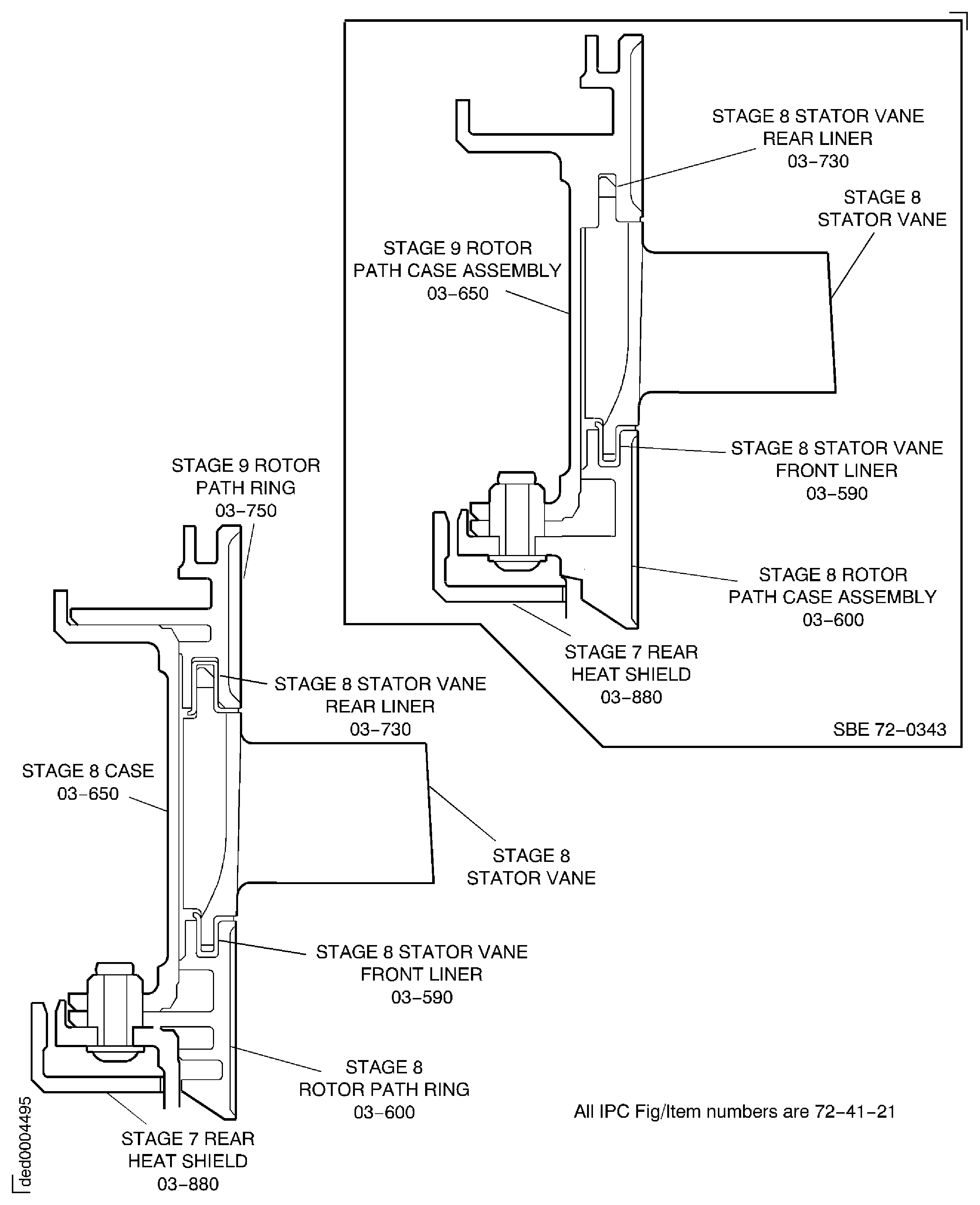
Figure: Pre SBE 72-0296, Pre SBE 72-0343 and SBE 72-0296, SBE 72-0343: Remove the Stage 8 Rotor Path Ring, the Stage 7 Case and Stator Vanes and the Front Support Cone
Pre SBE 72-0296, Pre SBE 72-0343 and SBE 72-0296, SBE 72-0343: Remove the Stage 8 Rotor Path Ring, the Stage 7 Case and Stator Vanes and the Front Support Cone
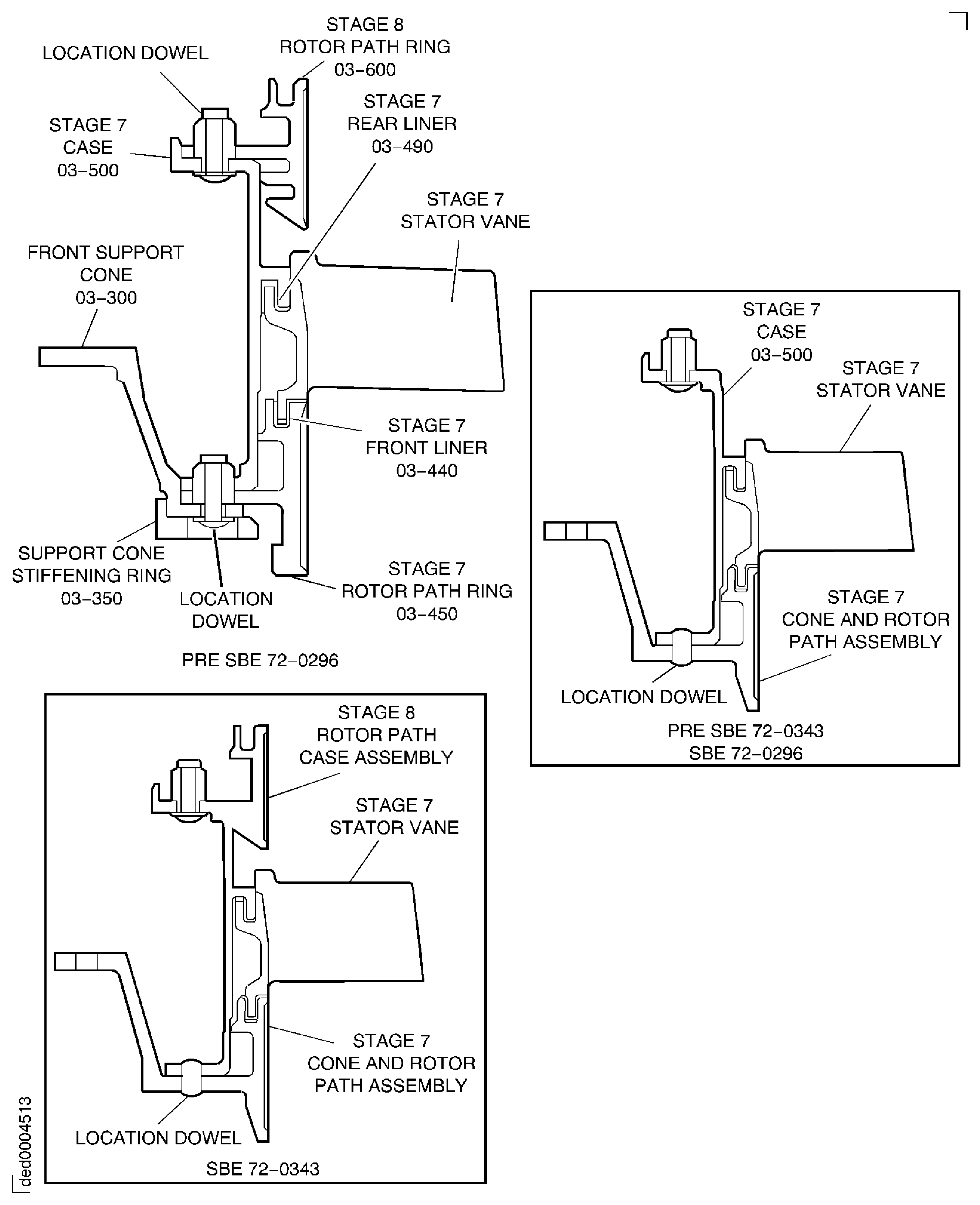
Figure: Remove the Stage 8 Rotor Path Ring, Stage 7 Case and Rotor Path Ring and the Front Support Cone and Stiffening Ring
Sheet 1
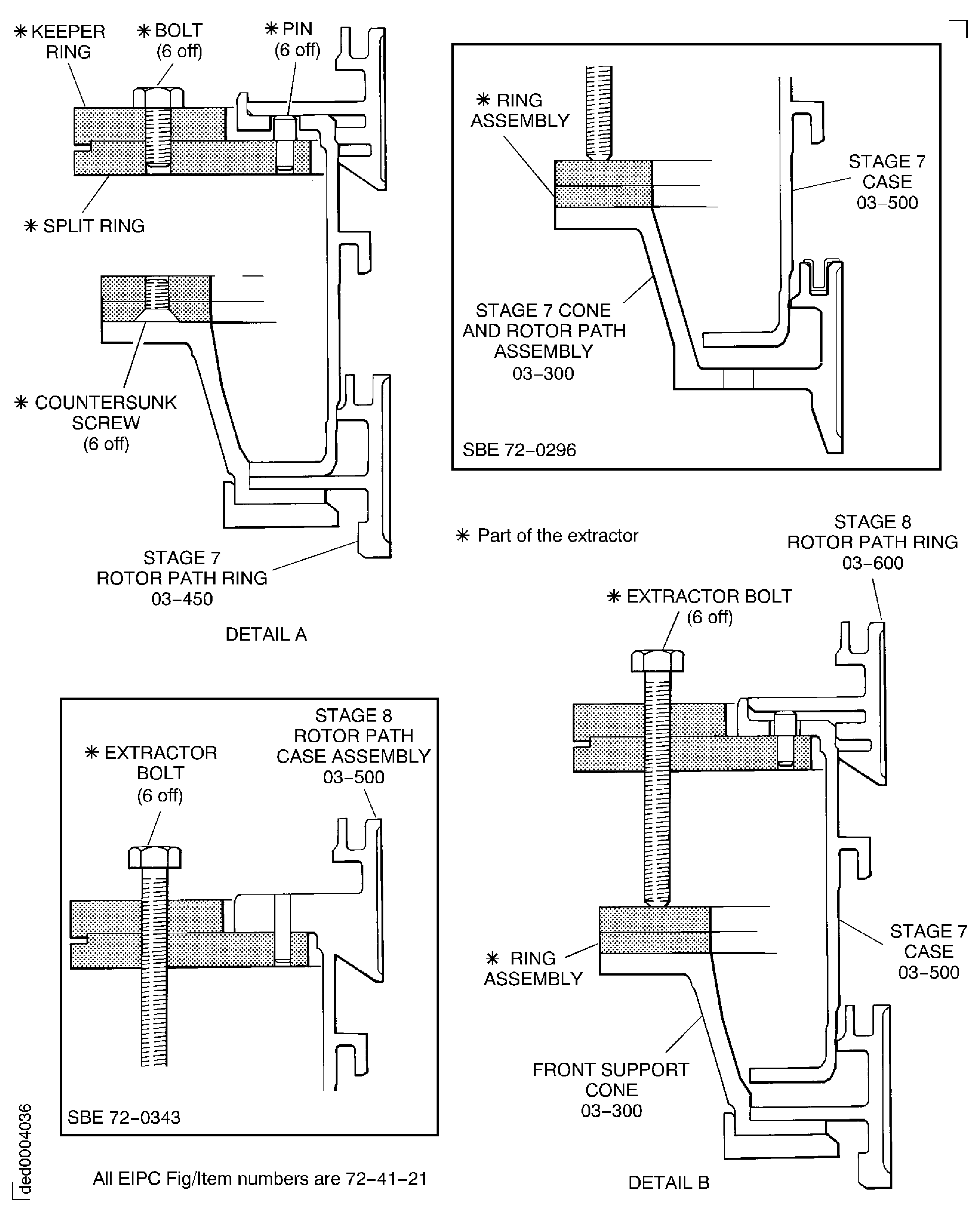
Figure: Pre SBE 72-0296 and SBE 72-0343: Remove the Stage 8 Rotor Path Ring, Stage 7 Case and Rotor Path Ring and the Front Support Cone and Stiffening Ring
Sheet 2
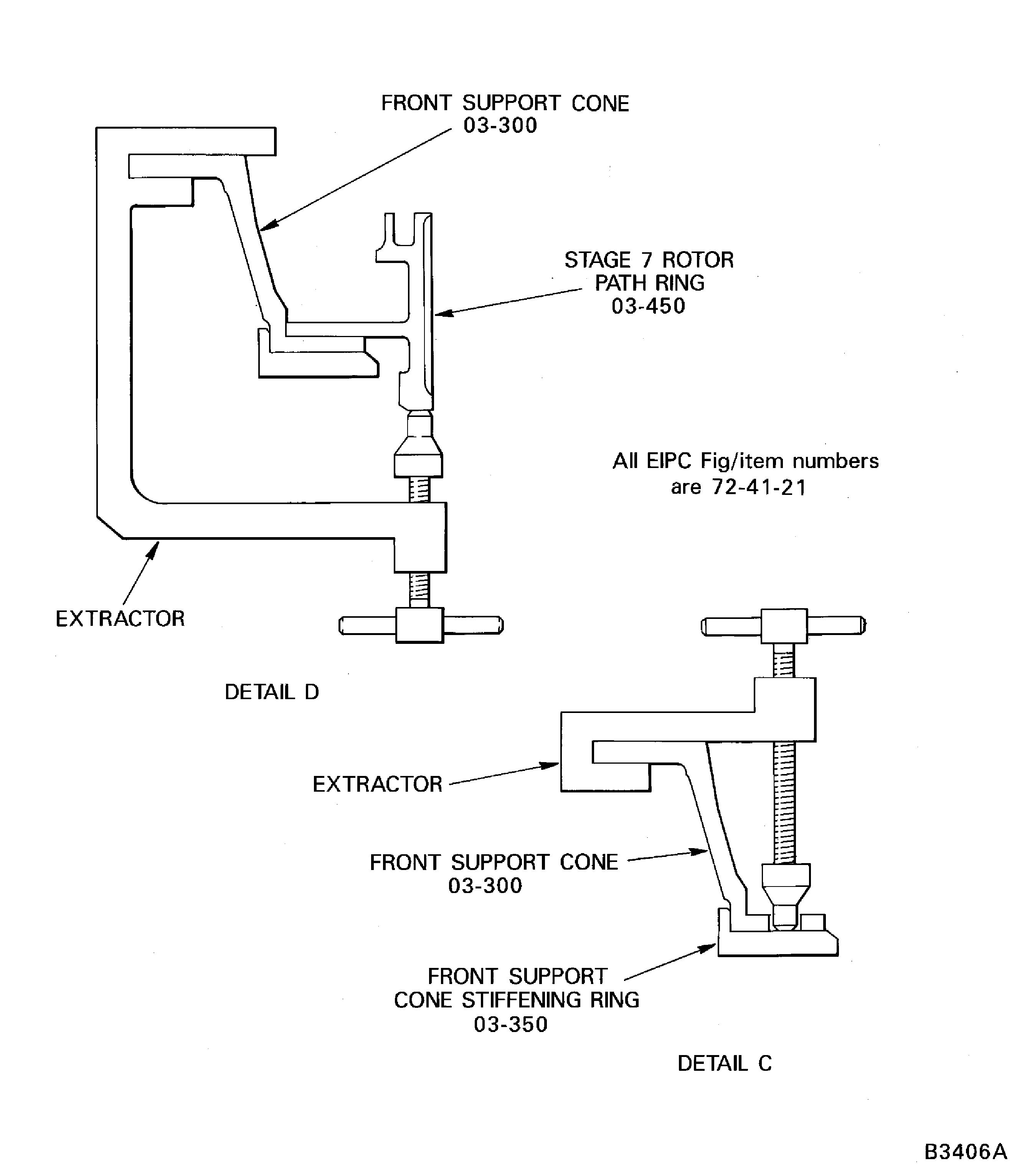
Figure: Extraction Tool IAE 1R18434 to Remove Rotor Path Rings and Cases
Sheet 3