Export Control
EAR Export Classification: Not subject to the EAR per 15 C.F.R. Chapter 1, Part 734.3(b)(3), except for the following Service Bulletins which are currently published as EAR Export Classification 9E991: SBE70-0992, SBE72-0483, SBE72-0580, SBE72-0588, SBE72-0640, SBE73-0209, SBE80-0024 and SBE80-0025.Copyright
© IAE International Aero Engines AG (2001, 2014 - 2021) The information contained in this document is the property of © IAE International Aero Engines AG and may not be copied or used for any purpose other than that for which it is supplied without the express written authority of © IAE International Aero Engines AG. (This does not preclude use by engine and aircraft operators for normal instructional, maintenance or overhaul purposes.).Applicability
All
Common Information
TASK 70-35-25-300-001-A01 Replace The Contact Pin(s) Or Socket(s) In The Electrical Connector Or Receptacle Of The Electrical Harness, Repair-001 (VRS7002)
General
This TASK details the procedure for the replacement of electrical contact pins or sockets.
Refer to Repair, VRS7002 SPM TASK 70-35-25-300-001 (REPAIR-001) for the following:
Effectivity
Equipment and materials
General
All illustrations/Figs
Preliminary Requirements
Pre-Conditions
NONESupport Equipment
| Name | Manufacturer | Part Number / Identification | Quantity | Remark |
|---|---|---|---|---|
| IAE 3J12704 Wrench and holder | LOCAL | IAE 3J12704 |
Consumables, Materials and Expendables
| Name | Manufacturer | Part Number / Identification | Quantity | Remark |
|---|---|---|---|---|
| CoMat 02-146 LOCKWIRE | LOCAL | CoMat 02-146 | ||
| CoMat 08-013 COLD CURING SILICONE COMPOUND | X222X | CoMat 08-013 | 75 ml | Silicoset 152, optional for BiFi connectors (point 11 of the procedure) |
| CoMat 02-148 ADHESIVE TAPE (ELECTRICAL) | LOCAL | CoMat 02-148 | Optional for 90deg backshell (point 11 of the procedure) |
Spares
NONESafety Requirements
NONEProcedure
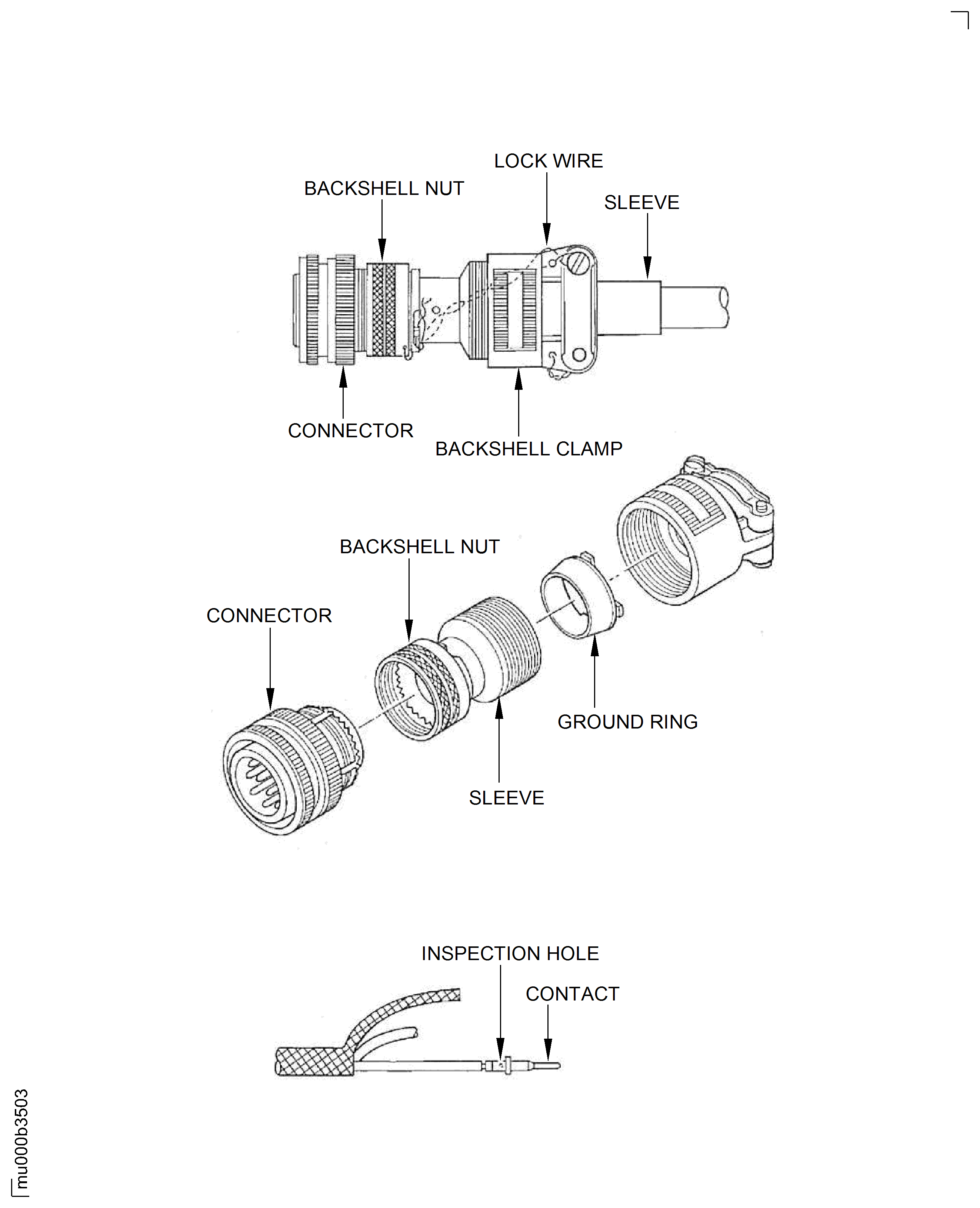
Install the electrical connector assembly to the IAE 3J12704 Wrench and holder, 1 off. Disconnect the backshell nut and move it along the cables.
Remove the backshell nut.
Remove the upper ring, sleeve, and split ring. Disconnect the backshell with the IAE 3J12704 Wrench and holder and move the backshell along the cables. Discard the knitmesh. Remove the electrical connector or receptacle from the IAE 3J12704 Wrench and holder.
Remove the backshell.
SUBTASK 70-35-25-350-002 Disassemble the Backshell Assembly from the Electrical Connector or Receptacle
Use a clean blunt-edge tool.

CAUTION
BE CAREFUL NOT TO DAMAGE THE INSULATION OF CABLES WHEN REMOVING THE SEALANT FROM CONNECTORRemove all the sealant from the connector to completely uncover all cables and connector's surface.
SUBTASK 70-35-25-350-059 Remove the Sealant from the BiFi Connectors of EEC Core Harness And Voltage Divider Harness Assembly
NOTE
This subtask to be used only if following conditions applied:If repairing BIFI CONNECTOR (4008VC or 4009VC) of EEC Core Harness And Voltage Divider Harness Assembly (6A8171 or 6A8172) please check if the connector is filled with sealant and if there is a mark VRS9906/A on the identification sleeve of the harness adjacent to the connector. If so, use blunt-edge tool to remove the sealant.Use a clean blunt-edge tool.
CAUTION
BE CAREFUL NOT TO DAMAGE THE INSULATION OF CABLES WHEN REMOVING THE ANTI-CHAFING TAPE FROM CONNECTORRemove all the anti-chafing tape from the connector to completely uncover all cables.
SUBTASK 70-35-25-350-060 Remove the Anti-chafing Tape from the 90deg Backshells
NOTE
This subtask to be used only if following conditions applied:If repairing connector with 90deg backshell please check if the wires in the connector are wrapped by anti-chafing tape and if there is a mark VRS9907/A or VRS9908/A on the identification sleeve of the harness adjacent to the connector. If so, use blunt-edge tool to remove the anti-chafing tape.Bend the core lead slightly to slide it into the insertion tool slot. Move the core lead and the tool in opposite directions, so that the core lead slides into the tabular area of the tool. Pull the core lead rearwards through the tool until the tip of the tool seats against the contact pin(s) or socket(s) shoulder. Slowly press the contact pin(s) or socket(s) and the tool into the insert hole by hand so they are vertical with the electrical connector or receptacle surface. When the contact pin(s) or socket(s) is in the correct position in the insert hole, release the cable and remove the tool. Lightly pull the cable to make sure the contact pin(s) or socket(s) is engaged correctly in the insert hole.
Install the contact pin(s) or socket(s).
SUBTASK 70-35-25-350-007 Install the Contact Pin(s) or Socket(s) into the Electrical Connector or Receptacles
Install the electrical connector or receptacle assembly to the IAE 3J12704 Wrench and holder, 1 off. Attach the backshell to the electrical connector or receptacle and tighten the nut by hand. Tighten the backshell nut through 90 degrees with the IAE 3J12704 Wrench and holder.
Install the backshell.
SUBTASK 70-35-25-350-008 Install the Backshell to the Electrical Connector or Receptacle
Use the applicable color lacing tape and lace ties. The lacing positions are the same as the previous positions. Refer to SPM TASK 70-35-25-300-001-H01. Push the black rubber sleeve forward so it packs the cables at the forward clamp bars. Attach the clamp bars together with the two screws, tighten the screws.
Install the cable ties, black rubber sleeve and clamp bar adjacent to the electrical connector or receptacle.
Safety the backshell, nuts, and screws with CoMat 02-146 LOCKWIRE.
Safety the parts.
SUBTASK 70-35-25-350-009 Finish the Harness Adjacent to the Electrical Connector or Receptacle
NOTE
If repairing BIFI CONNECTOR (4008VC or 4009VC) of EEC Core Harness And Voltage Divider Harness Assembly (6A8171 or 6A8172) and if the connector before repair was filled with sealant and marked VRS9906/A on the identification sleeve of the harness adjacent to the connector please perform TASK 71-52-43-300-006 EEC Core Harness And Voltage Divider Harness Assembly - ADDING SEALANT TO BIFI CONNECTORS TO AVOID MOISTURE INGRESS, REPAIR-006 (VRS9906) before continue the assembly of electrical connector.NOTE
If you find the repairing connector with 90deg backshell and also before you do repair to the connector, if it has anti-chafing tape applied and marked VRS9907/A or VRS9908/A on the identification sleeve of the harness adjacent to the connector. You must do TASK 71-51-41-300-009 THE 90DEG BACKSHELL ANTI CHAFING TAPE REPAIR - WRAPPING TAPE AROUND WIRES INSIDE 90DEG BACKSHELL, REPAIR-009 (VRS9907) or TASK 71-52-43-300-008 THE 90DEG BACKSHELL ANTI CHAFING TAPE REPAIR - WRAPPING TAPE AROUND WIRES INSIDE 90DEG BACKSHELL, REPAIR-008 (VRS9908) accordingly before you do with the assembly of electrical connector.Use permanent marker.
Make a mark VRS7002/A on the identification sleeve of the harness adjacent to the part number.
SUBTASK 70-35-25-350-051 Identify the Repair
Figure: Repair details and dimensions
Repair details and dimensions
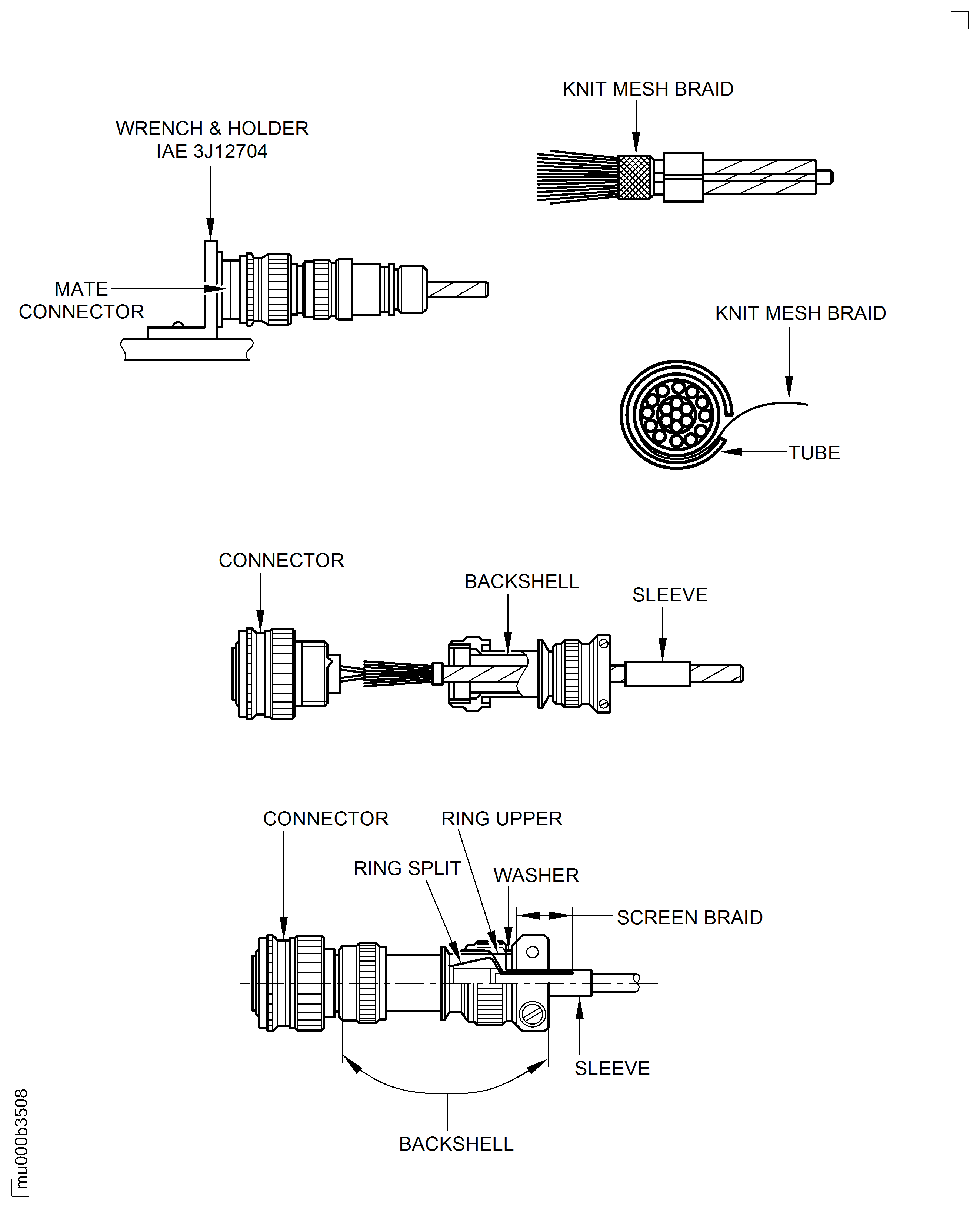
Figure: Repair details and dimensions
Repair details and dimensions