
Export Control
EAR Export Classification: Not subject to the EAR per 15 C.F.R. Chapter 1, Part 734.3(b)(3), except for the following Service Bulletins which are currently published as EAR Export Classification 9E991: SBE70-0992, SBE72-0483, SBE72-0580, SBE72-0588, SBE72-0640, SBE73-0209, SBE80-0024 and SBE80-0025.Copyright
© IAE International Aero Engines AG (2001, 2014 - 2021) The information contained in this document is the property of © IAE International Aero Engines AG and may not be copied or used for any purpose other than that for which it is supplied without the express written authority of © IAE International Aero Engines AG. (This does not preclude use by engine and aircraft operators for normal instructional, maintenance or overhaul purposes.).Applicability
All
Common Information
TASK 72-00-31-420-001 LPC Fan Module - Install The LPC Fan Module, Installation-001
General
This TASK gives procedures for removal of the LP compressor (fan) module from the storage stand and installation on to the engine. There are two types of the storage stands (vertical type and horizontal type), and two different methods in this TASK.
- If the module is installed on the storage stand (vertical type, IAE 1J12110 Transportation and storage stand, select the method 1.
- If the module is installed on the storage stand (horizontal type), IAE 1J12019 Storage stand, select the method 2.
Fig/item numbers in parentheses in the procedure agree with those used in the IPC. Only the primary Fig/item numbers are used. For the service bulletin alpha variants refer to the IPC.
For all parts identified in a different Chapter/Section/Subject, the applicable Chapter/Section/Subject comes before the Fig/item number.
For standard torque data and procedures, refer to the SPM TASK 70-41-00-400-501 and SPM TASK 70-41-02-400-501.
Special torque data and assembly tolerances are included in the procedure.
Special torque data is identified with the symbol * after the torque value.
Lubricate all threads and abutment faces of nuts and bolts with CoMat 10-077 APPROVED ENGINE OILS, unless other lubricants are referred to in the procedure.
The number for each radial location must be identified in a clockwise direction. These start at the engine top position when you look from the rear of the engine, unless stated differently in the procedure.
Transportation covers/blanks must be removed immediately before the installation of the components.
NOTE
NOTE
Preliminary Requirements
Pre-Conditions
NONESupport Equipment
| Name | Manufacturer | Part Number / Identification | Quantity | Remark |
|---|---|---|---|---|
| IAE 1J12026 Turning handle | 0AM53 | IAE 1J12026 | 1 | |
| IAE 1J12016 Special wrench | 0AM53 | IAE 1J12016 | 1 | |
| IAE 1J12017 Special wrench | 0AM53 | IAE 1J12017 | 1 | |
| IAE 1J12105 Cantileer sling | 0AM53 | IAE 1J12105 | 1 | |
| IAE 1J12104 Sling adapter | 0AM53 | IAE 1J12104 | 1 | |
| IAE 1J12106 Aligning pin set | 0AM53 | IAE 1J12106 | 1 | |
| IAE 1J12180 Hub protector | 0AM53 | IAE 1J12180 | 1 | |
| IAE 1J12019 Storage stand | 0AM53 | IAE 1J12019 | ||
| IAE 1J12110 Transportation and storage stand | 0AM53 | IAE 1J12110 |
Consumables, Materials and Expendables
| Name | Manufacturer | Part Number / Identification | Quantity | Remark |
|---|---|---|---|---|
| CoMat 10-077 APPROVED ENGINE OILS | LOCAL | CoMat 10-077 | ||
| CoMat 06-069 MARKER | IE207 | CoMat 06-069 | ||
| CoMat 01-124 ISOPROPYL ALCOHOL | LOCAL | CoMat 01-124 |
Spares
NONESafety Requirements
NONEProcedure
Remove the wingnut and the clamp which safety the LP compressor (fan) module to the storage stand, Figure.
Install IAE 1J12104 Sling adapter 1 off on to the LP compressor (fan) module, Figure and Figure.
Install IAE 1J12105 Cantileer sling 1 off to the sling adapter, Figure.
Adjust the center of the gravity of the sling and adapter asssembly and the LP compressor (fan) module, Figure.
SUBTASK 72-00-31-420-052-001 Method 1: Install the Sling and Adapter Assembly to the LP Compressor (Fan) Module
Attach the first hoist to the link (part of IAE 1J12104 Sling adapter) and lift up, Figure.
Attach the second hoist to the shackle (part of IAE 1J12105 Cantileer sling 1 off).
Adjust the two hoists to turn the sling and adapter assembly to the horizontal position, Figure.
Remove the guards from the storage stand to make space for removal of the module from the storage stand, Figure.
Install IAE 1J12180 Hub protector 1 off into the fan disk, Figure.

CAUTION
DO NOT HIT THE STAGE 1 FAN DISK WITH THE SPECIAL WRENCH WHEN YOU INSTALL AND TIGHTEN THE CURVIC COUPLING BOLTS. THE TOOL CAN CAUSE DAMAGE TO THE DISK.Remove the 21 screws which attach the LP compressor (fan) module to the support (part of IAE 1J12019 Storage stand 1 off) with IAE 1J12016 Special wrench 1 off, Figure.
Adjust the center of the gravity of the sling and adapter assembly, Figure.
Install IAE 1J12104 Sling adapter 1 off to the LP compressor (fan) module, Figure.
Adjust the center of the gravity of the sling and adapter assembly and the LP compressor (fan) module, Figure.
SUBTASK 72-00-31-020-052-002 Method 2: Install the Sling and Adapter Assembly to the LP Compressor (Fan) Module
NOTE
Do this operation with the two hoist operators and the two persons to assure.Slowly lift the two hoists equally at the same time until the LP compressor (fan) module is clear of the storage stand, Figure.
Adjust the two hoists to turn the LP compressor (fan) module to the horizontal position, Figure.
Remove the second hoist from the link of the sling adapter, Figure.
Remove the protection cover from the flange of the stage 1 fan disk, Figure.
SUBTASK 72-00-31-420-053-001 Method 1: Remove the LP Compressor (Fan) Module from the Storage Stand
Refer to Figure.
SUBTASK 72-00-31-420-053-002 Method 2: Remove the LP Compressor (Fan) Module from the Storage Stand
Replace the three bolts (part of the retaining protector) with the three aligning pins (part of IAE 1J12106 Aligning pin set 1 off) one at a time. Tighten the pins lightly.
SUBTASK 72-00-31-420-054 Attach the Aligning Pins to the Stub Shaft
Use a soft bristle brush or swab and apply CoMat 01-124 ISOPROPYL ALCOHOL to the curvic teeth. Refer to the SPM TASK 70-11-26-300-503.
Clean the curvic teeth on the stage 1 fan disk and the LP compressor stub shaft.
SUBTASK 72-00-31-420-068 Clean the Curvic Coupling for Assembly
Mark a line on the disk inner diameter face with a CoMat 06-069 MARKER at the same position as the correlation mark "*".
Make a mark on the stage 1 fan disk, Figure.
Install the IAE 1J12026 Turning handle 1 off to the stub shaft with the two washers and wing bolts, Figure. Tighten the wing bolts.
Lift the LP compressor (fan) module and move in to the fan case, Figure. Make sure that the correlation U-slot and the line on the disk are aligned.
SUBTASK 72-00-31-420-055-A00 V2500-A1: Adjust the Angular Position of the Stub Shaft
Mark a line on the disk inner diameter face with a CoMat 06-069 MARKER at the same position as the correlation mark "*".
Make a mark on the stage 1 fan disk, Figure.
Install the IAE 1J12026 Turning handle 1 off to the stub shaft with the two washers and wing bolts, Figure. Tighten the wing bolts.
Lift the LP compressor (fan) module and move in to the fan case, Figure. Make sure that the correlation mark "*" on the stub shaft and the line on the disk are aligned.
SUBTASK 72-00-31-420-055-B00 V2500-A5: Adjust the Angular Position of the Stub Shaft
Apply CoMat 10-077 APPROVED ENGINE OILS to the threads and mating faces of the 24 curvic coupling bolts.
CAUTION
DO NOT HIT THE STAGE 1 FAN DISK WITH THE SPECIAL WRENCH WHEN YOU INSTALL AND TIGHTEN THE CURVIC COUPLING BOLTS. THE TOOL CAN CAUSE DAMAGE TO THE DISK.Tighten the bolts at No. 5 thru 8 positions with IAE 1J12016 Special wrench 1 off in the sequence given in Figure and Figure.
Attach the stage 1 fan disk to stub shaft with four curvic coupling bolts (01-100) at No.5, 6, 7 and 8 positions, Figure and Figure.
SUBTASK 72-00-31-420-056 Install the LP Compressor (Fan) Module on the LP Compressor Intermediate Case Module
Refer to Figure.
Attach the second hoist to the link (part of IAE 1J12104 Sling adapter) and turn the sling and adapter assembly to the vertical position.
Remove the second hoist from the link of sling adapter and attach to the shackle (part of IAE 1J12105 Cantileer sling).
SUBTASK 72-00-31-420-057 Disassemble the Sling and Adapter Assembly
Install IAE 1J12180 Hub protector 1 off in stage 1 fan disk, Figure.
CAUTION
DO NOT HIT THE STAGE 1 FAN DISK WITH THE SPECIAL WRENCH WHEN YOU INSTALL AND TIGHTEN THE CURVIC COUPLING BOLTS. THE TOOL CAN CAUSE DAMAGE TO THE DISK.Tighten the 20 bolts lightly in the sequence given in Figure and Figure. with the IAE 1J12016 Special wrench.
Install the locating ring (part of IAE 1J12017 Special wrench 1 off) on to the front blade retaining ring with the four screws.
Install the locating ring and the adapter ring on to the front blade retaining ring Figure.
CAUTION
WHEN YOU TORQUE, IT IS IMPORTANT THAT THE TORQUE VALUE IS ON THE INCREASE, A NEW BOLT MUST BE INSTALLED IF THE TORQUE VALUE IS CONSTANT OR DECREASES.CAUTION
THE BOLTS MUST NOT BE POWER WRENCHED.Torque the 24 bolts to 443 to 567* lbf.in (50 to 64 Nm) in the sequence given in Figure and Figure and on the adapter ring.
SUBTASK 72-00-31-420-058 Torque the Curvic Coupling Bolts
Install the inlet cone. Refer to TASK 72-38-11-420-001 (INSTALLATION).
SUBTASK 72-00-31-420-059 Install the Inlet Cone
Figure: The sling and adapter assembly
The sling and adapter assembly
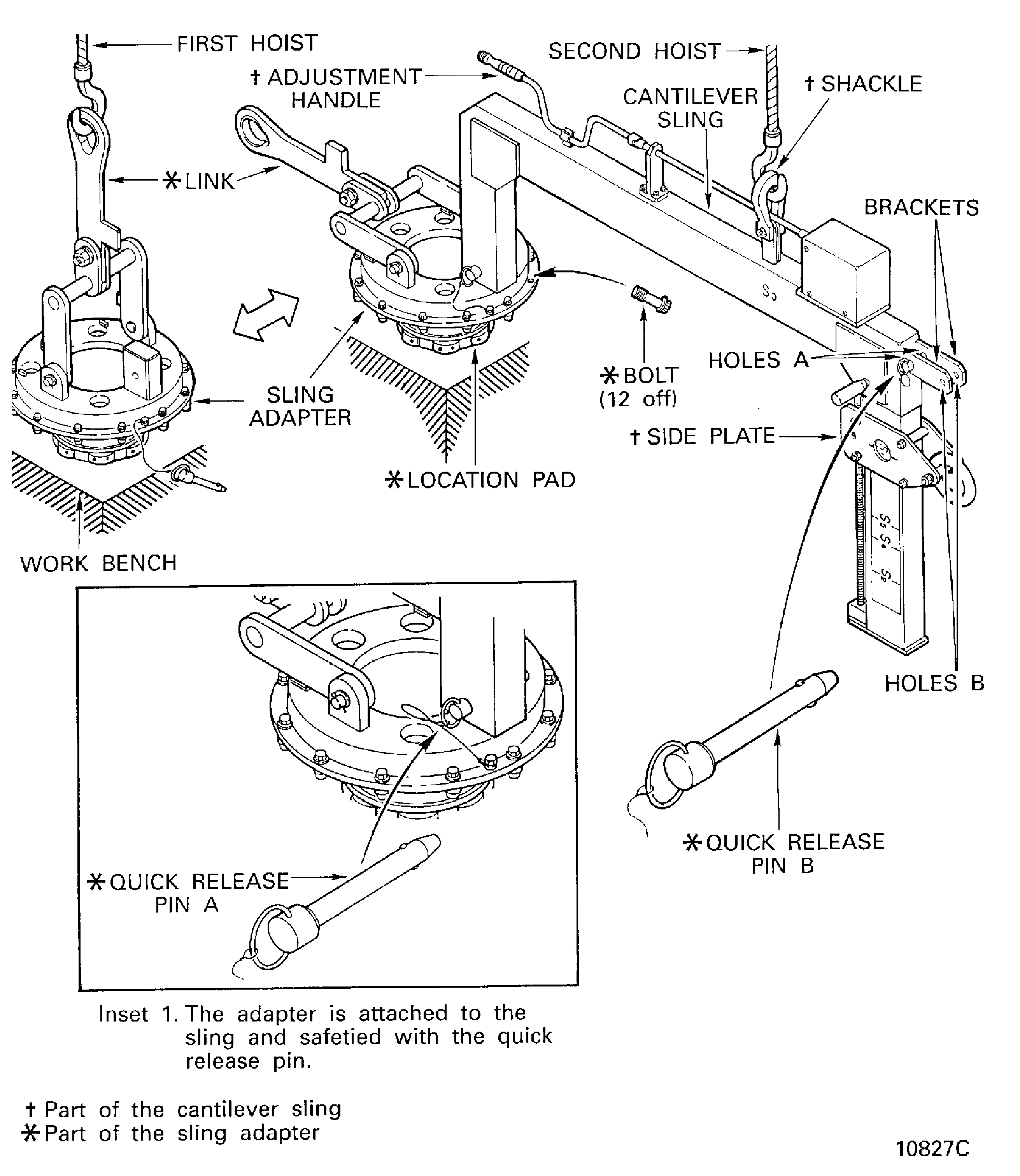
Figure: The sling and adapter assembly
The sling and adapter assembly

Figure: Method 1: Install the sling and adapter assembly
Method 1: Install the sling and adapter assembly

Figure: Method 1: Remove the LP compressor (fan) module from the storage stand
Method 1: Remove the LP compressor (fan) module from the storage stand

Figure: Method 2: Remove the LP compressor (fan) module from the storage stand
Method 2: Remove the LP compressor (fan) module from the storage stand

Figure: Install the LP compressor (fan) module
Install the LP compressor (fan) module

Figure: Method 1: Remove the protection cover from the disk curvic teeth
Method 1: Remove the protection cover from the disk curvic teeth
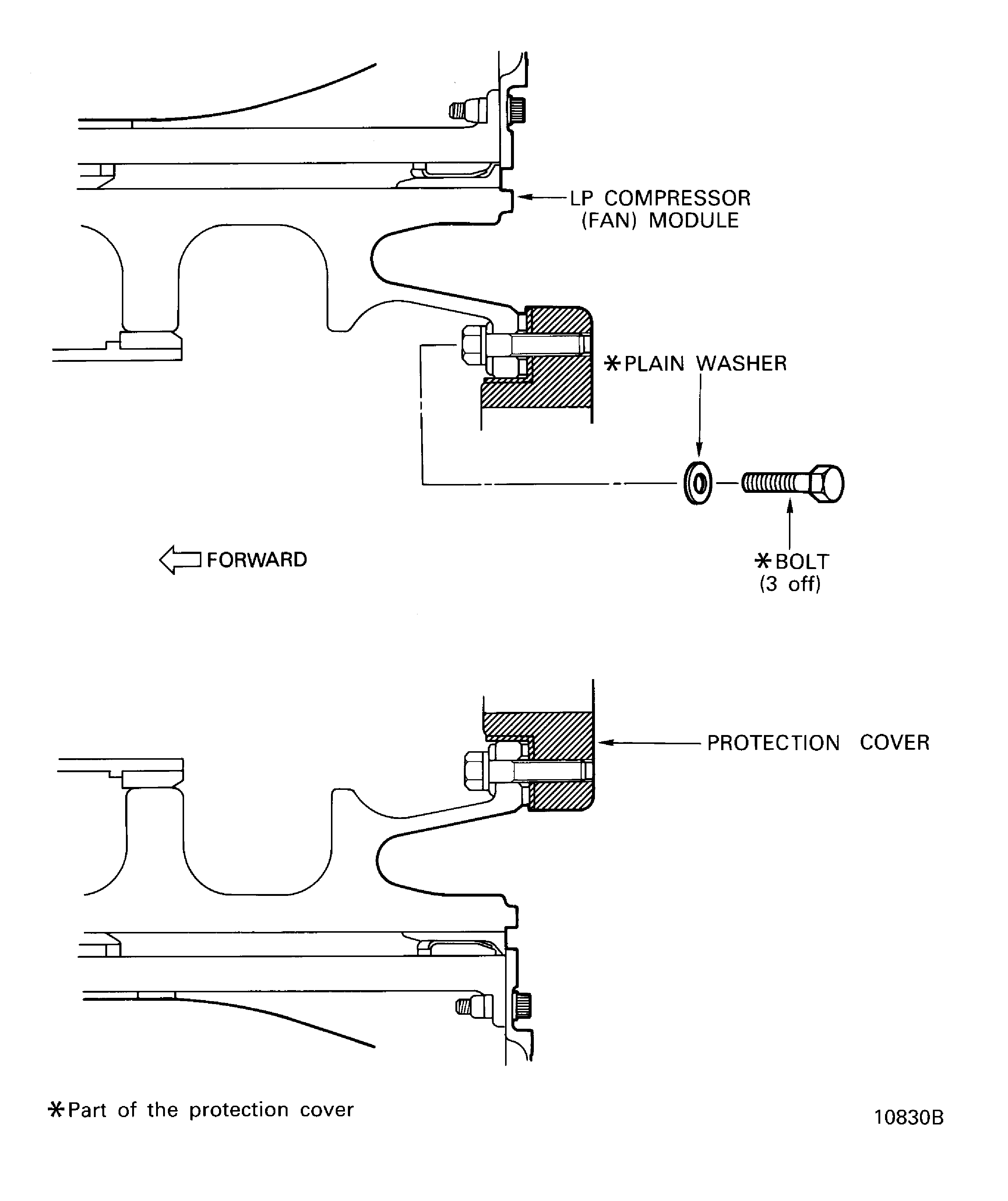
Figure: Remove the retaining protector from the stub shaft
Remove the retaining protector from the stub shaft

Figure: The stage 1 fan disk - Correlation
The stage 1 fan disk - Correlation
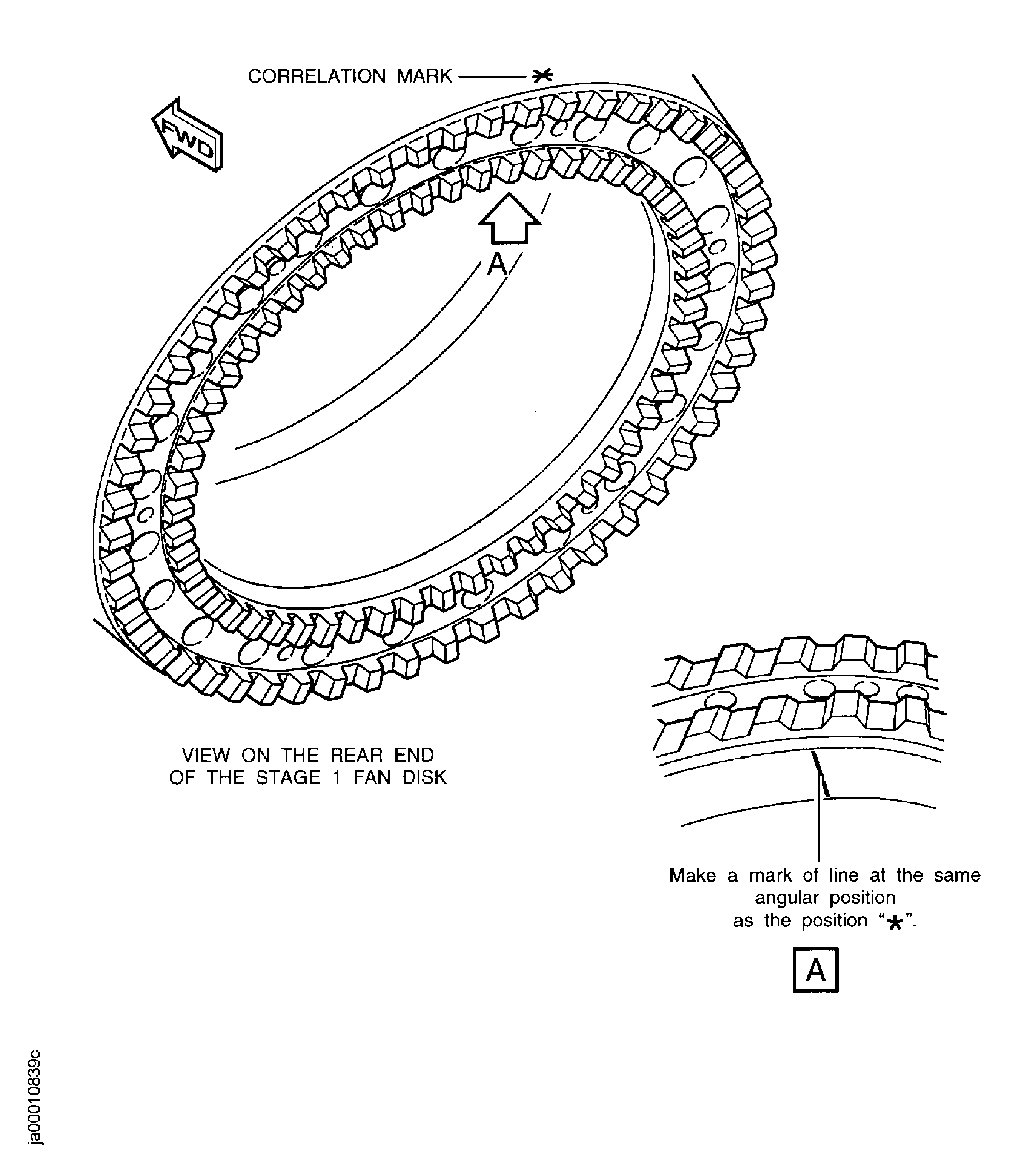
Figure: V2500-A1: The LP compressor stub shaft - Correlation
Sheet 1
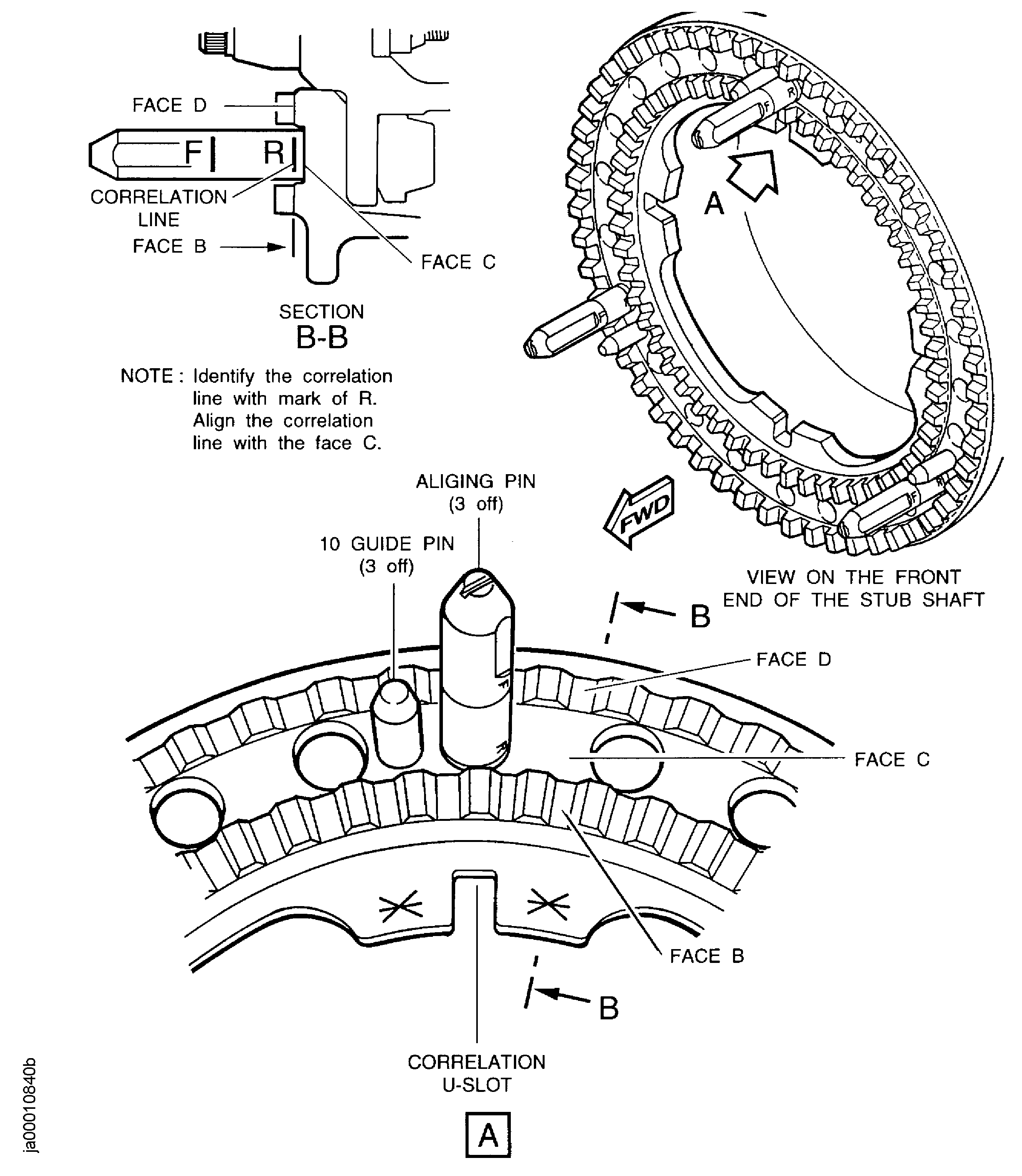
Figure: V2500-A5: The LP compressor stub shaft - Correlation
Sheet 2
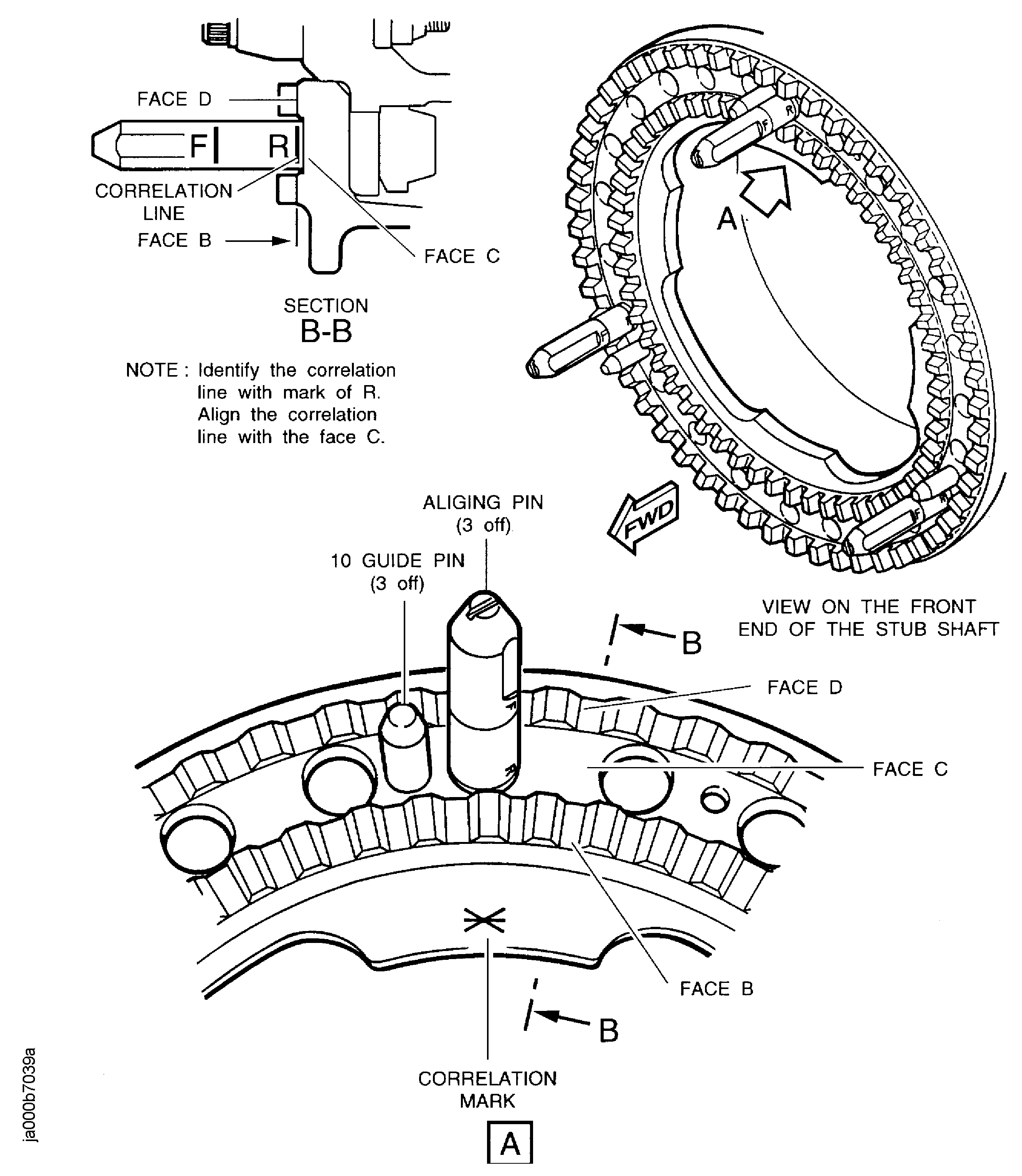
Figure: Install the turning handle
Install the turning handle

Figure: Install the curvic coupling bolts
Sheet 1

Figure: V2500-A1: Install the curvic coupling bolts
Sheet 2
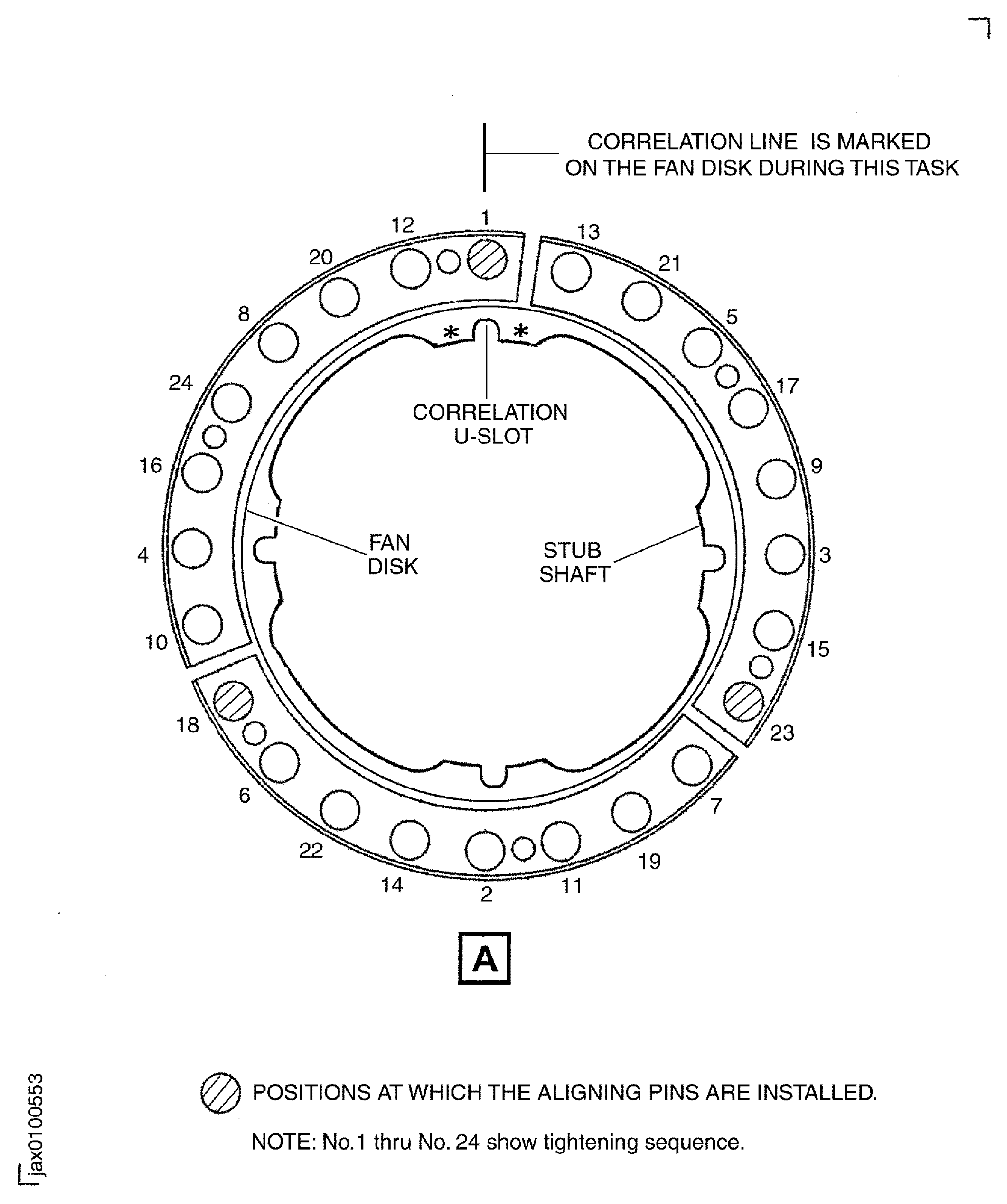
Figure: V2500-A5: Install the curvic coupling bolts
Sheet 3

Figure: The torque tightening sequence for the curvic coupling bolts
The torque tightening sequence for the curvic coupling bolts

Figure: Install the LP compressor (fan) module
Install the LP compressor (fan) module
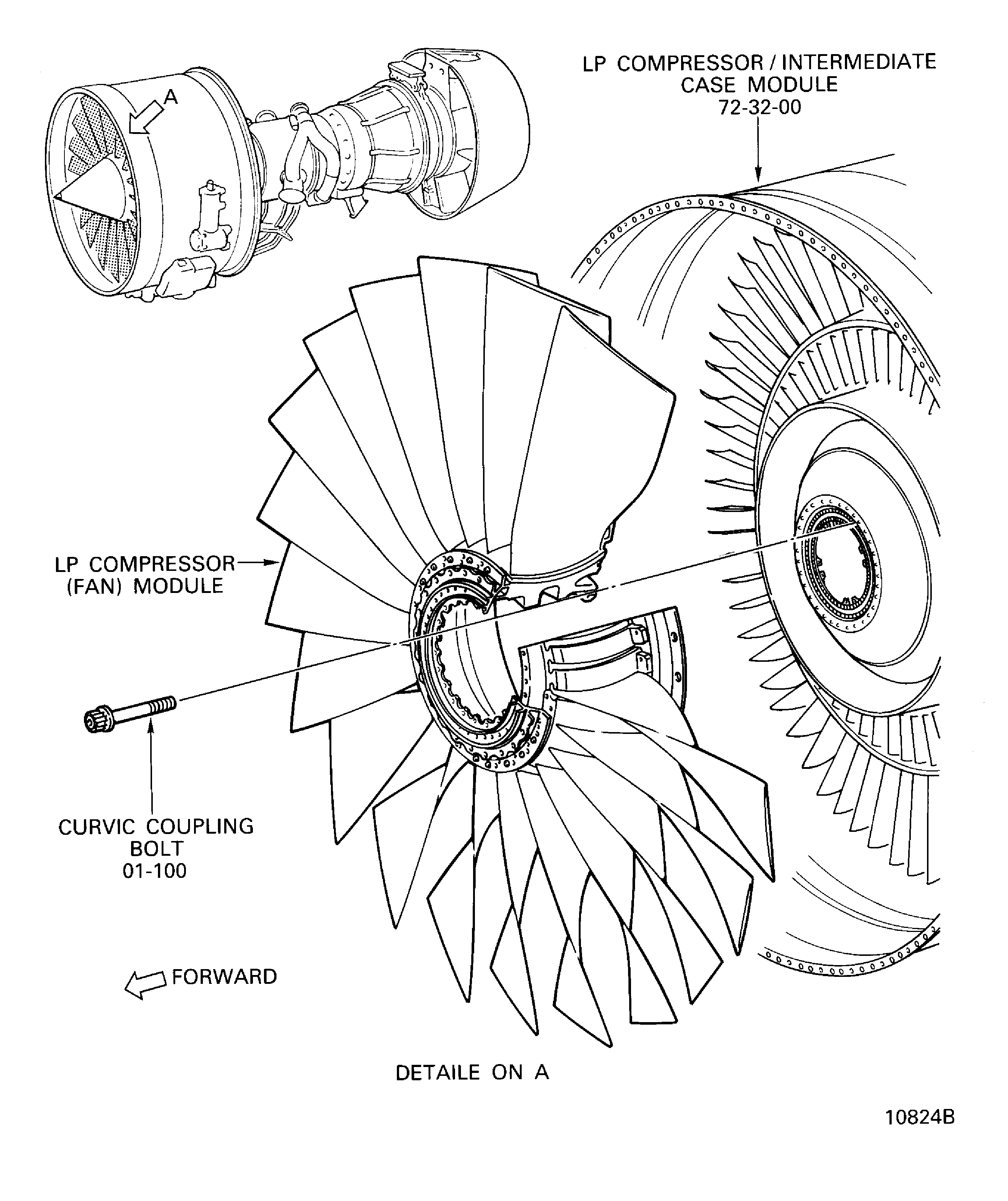
Figure: Install the special wrench to the LP compressor (fan) module
Install the special wrench to the LP compressor (fan) module
