Export Control
EAR Export Classification: Not subject to the EAR per 15 C.F.R. Chapter 1, Part 734.3(b)(3), except for the following Service Bulletins which are currently published as EAR Export Classification 9E991: SBE70-0992, SBE72-0483, SBE72-0580, SBE72-0588, SBE72-0640, SBE73-0209, SBE80-0024 and SBE80-0025.Copyright
© IAE International Aero Engines AG (2001, 2014 - 2021) The information contained in this document is the property of © IAE International Aero Engines AG and may not be copied or used for any purpose other than that for which it is supplied without the express written authority of © IAE International Aero Engines AG. (This does not preclude use by engine and aircraft operators for normal instructional, maintenance or overhaul purposes.).Applicability
All
Common Information
TASK 72-40-00-030-005 HP System Module - Remove The Diffuser Case Assembly, Disassembly-005
General
Fig/item numbers in parentheses in the procedure agree with those used in the IPC. Only the primary Fig/item numbers are used. For the service bulletin alpha variants refer to the IPC.
Remove the combustion system with the HP system module installed in the workshop stand. The procedure for the installation of the HP system module in to the workshop stand is given in TASK 72-00-40-020-002-A00 and TASK 72-00-40-020-002-B00 (REMOVAL-002, CONFIG-001, CONFIG-002)
Remove and discard the lockwire before parts are disconnected or removed.
Discard all rubber seal rings, cotter pins and seal washers removed in this procedure.
NOTE
Preliminary Requirements
Pre-Conditions
NONESupport Equipment
| Name | Manufacturer | Part Number / Identification | Quantity | Remark |
|---|---|---|---|---|
| IAE 1P16004 Handling bracket | 0AM53 | IAE 1P16004 | 2 | |
| IAE 1P16005 Build stand | 0AM53 | IAE 1P16005 | 1 | |
| IAE 1P16104 Cover | 0AM53 | IAE 1P16104 | 1 | |
| IAE 1P16107 cover | 0AM53 | IAE 1P16107 | 1 | |
| IAE 1P16108 cover | 0AM53 | IAE 1P16108 | 1 | |
| IAE 1P16122 Installation fixture | 0AM53 | IAE 1P16122 | 1 |
Consumables, Materials and Expendables
NONESpares
NONESafety Requirements
NONEProcedure
Refer to TASK 72-40-00-030-002 (DISASSEMBLY-002).
SUBTASK 72-40-00-030-080 Remove the Stage 1 Turbine Nozzle Assembly
Remove the IAE 1P16104 Cover.
SUBTASK 72-40-00-030-081 Remove the Cover
Refer to TASK 72-40-00-030-004 (DISASSEMBLY-004, Pages-501).
SUBTASK 72-40-00-030-082 Remove the No. 4 Bearing Compartment Parts
Refer to Figure.
Make sure the IAE 1P16104 Cover 1 off is in position.
Attach a hoist to the eyebolt detail of the IAE 1P16122 Installation fixture 1 off. Lift the fixture over the combustion system.
SUBTASK 72-40-00-030-083 Attach the Fixture to the Combustion System
Install the IAE 1P16004 Handling bracket 2 off on the front flange of the diffuser case assembly 90 degrees either side of the locating pin in the front flange.
SUBTASK 72-40-00-030-085 Install the Handling Brackets on to the Front Flange of the Diffuser Case Assembly
Refer to Figure.

CAUTION
MAKE SURE THE BALL-LOCK PIN ENGAGES THE LOCKING DISK TO KEEP THE BUILD STAND STABLE.Attach the IAE 1P16004 Handling bracket 2 off to the IAE 1P16005 Build stand 1 off with the eight work bolts, Figure.
Remove the 15 bolts from the IAE 1P16122 Installation fixture 1 off and move the fixture away from the combustion system.
Install the IAE 1P16107 cover 1 off over the threaded part of the No. 4 bearing support.
Install the IAE 1P16108 cover 1 off in the ID of the No. 4 bearing cooling duct.
SUBTASK 72-40-00-030-086 Install the Combustion System on to the Build Stand
NOTE
This SUBTASK is only to be completed if the diffuser case is not to be overhauled.Refer to Figure.
Remove the IAE 1P16108 cover from the ID of the No. 4 bearing cooling duct.
NOTE
Submit the static seal assembly to TASK 72-42-50-200-000 for Inspection.Make sure that the OGV case surface is free from damage.Remove the static seal assembly.
Remove the static seal assembly.
Install the IAE 1P16108 cover 1 off in the ID of the No. 4 bearing cooling duct.
SUBTASK 72-40-00-030-088-A00 V2500-A1: Remove the Heatshield and the Static Seal Assembly (Pre SBE 72-0143)
NOTE
This SUBTASK is only to be completed if the diffuser case is not to be overhauled.Refer to Figure.
Remove the IAE 1P16108 cover from ID of the No. 4 bearing cooling duct.
NOTE
Submit the static seal assembly to TASK 72-42-50-200-000 for Inspection.Make sure that the OGV case surface is free from damage.Remove the static seal assembly.
Remove the static seal assembly.
Install the IAE 1P16108 cover 1 off in the ID of the No. 4 bearing cooling duct.
SUBTASK 72-40-00-030-088-B00 V2500-A1: Remove the Static Seal Assembly (SBE 72-0143)
NOTE
This SUBTASK is only to be completed if the diffuser case is not to be overhauled.Refer to Figure
Remove the IAE 1P16108 cover from the ID of the No. 4 bearing cooling duct.
NOTE
Submit the static seal assembly to TASK 72-42-50-200-000 for Inspection.Make sure that the OGV case surface is free from damage.Remove the static seal assembly.
Remove static seal assembly.
Install the IAE 1P16108 cover 1 off in the ID of the No. 4 bearing cooling duct.
SUBTASK 72-40-00-030-088-C00 V2500-A5: Remove the Static Seal Assembly
Figure: Attach the IAE 1P16122 fixture to the combustion system
Attach the IAE 1P16122 fixture to the combustion system

Figure: Install the combustion system in to the IAE 1P16005 build stand
Install the combustion system in to the IAE 1P16005 build stand

Figure: V2500-A1: Remove the heatshield and the static seal
Sheet 1
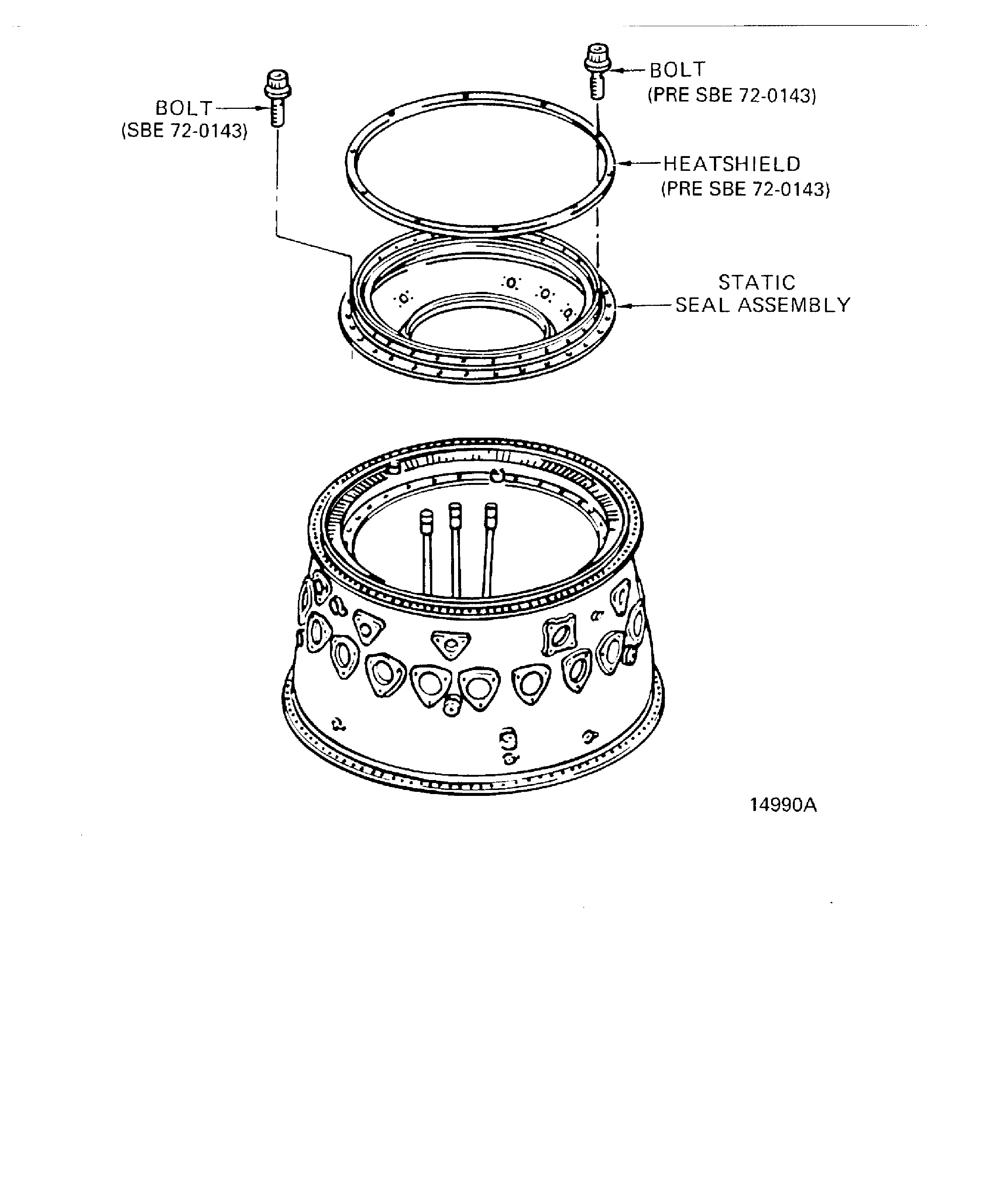
Figure: V2500-A5: Remove the static seal assembly
Sheet 2

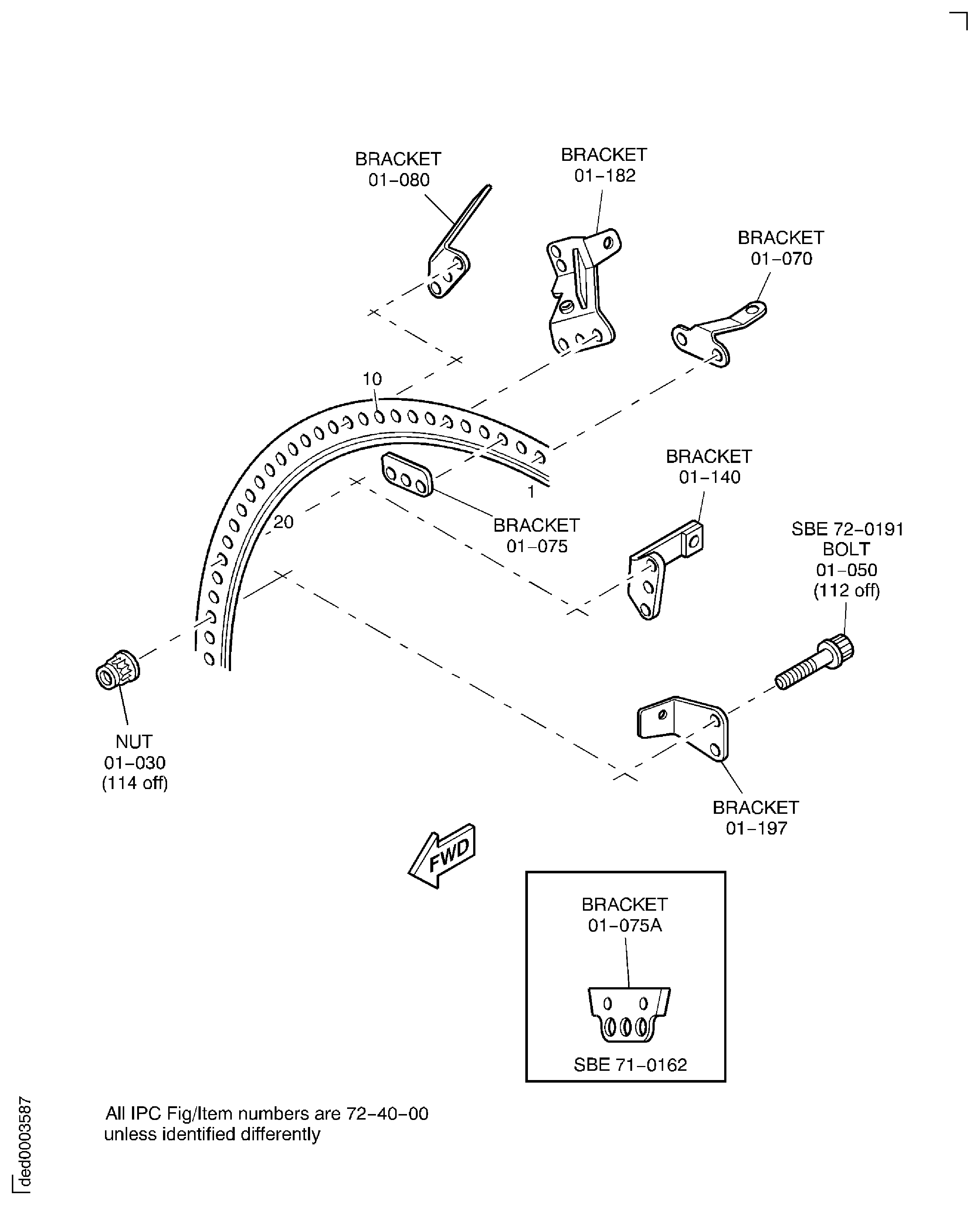
Figure: V2500-A1: Remove the brackets from the HP diffuser case front flange
Sheet 1
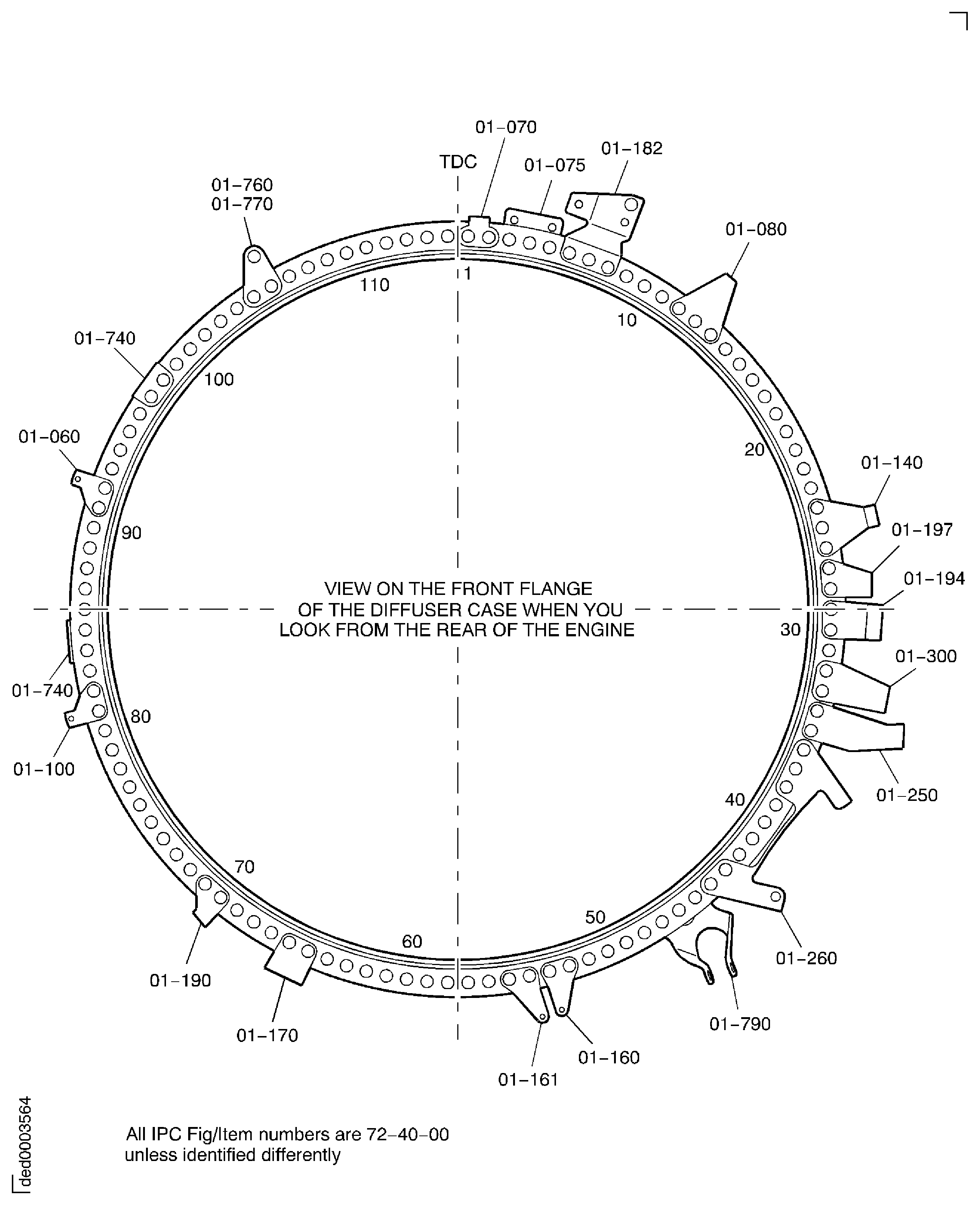
Figure: V2500-A1: Remove the brackets from the HP diffuser case front flange
Sheet 2
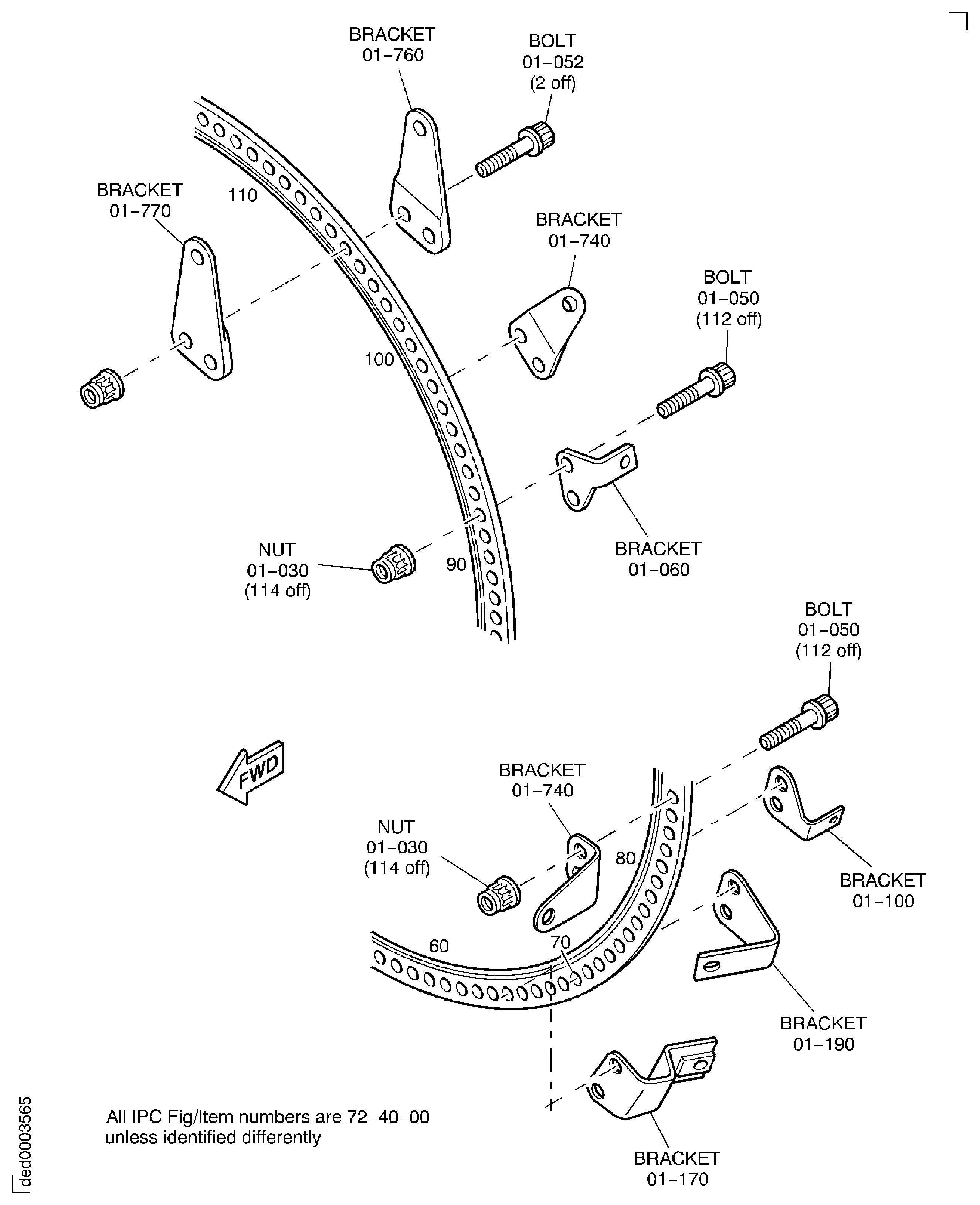
Figure: V2500-A1: Remove the brackets from the HP diffuser case front flange
Sheet 3
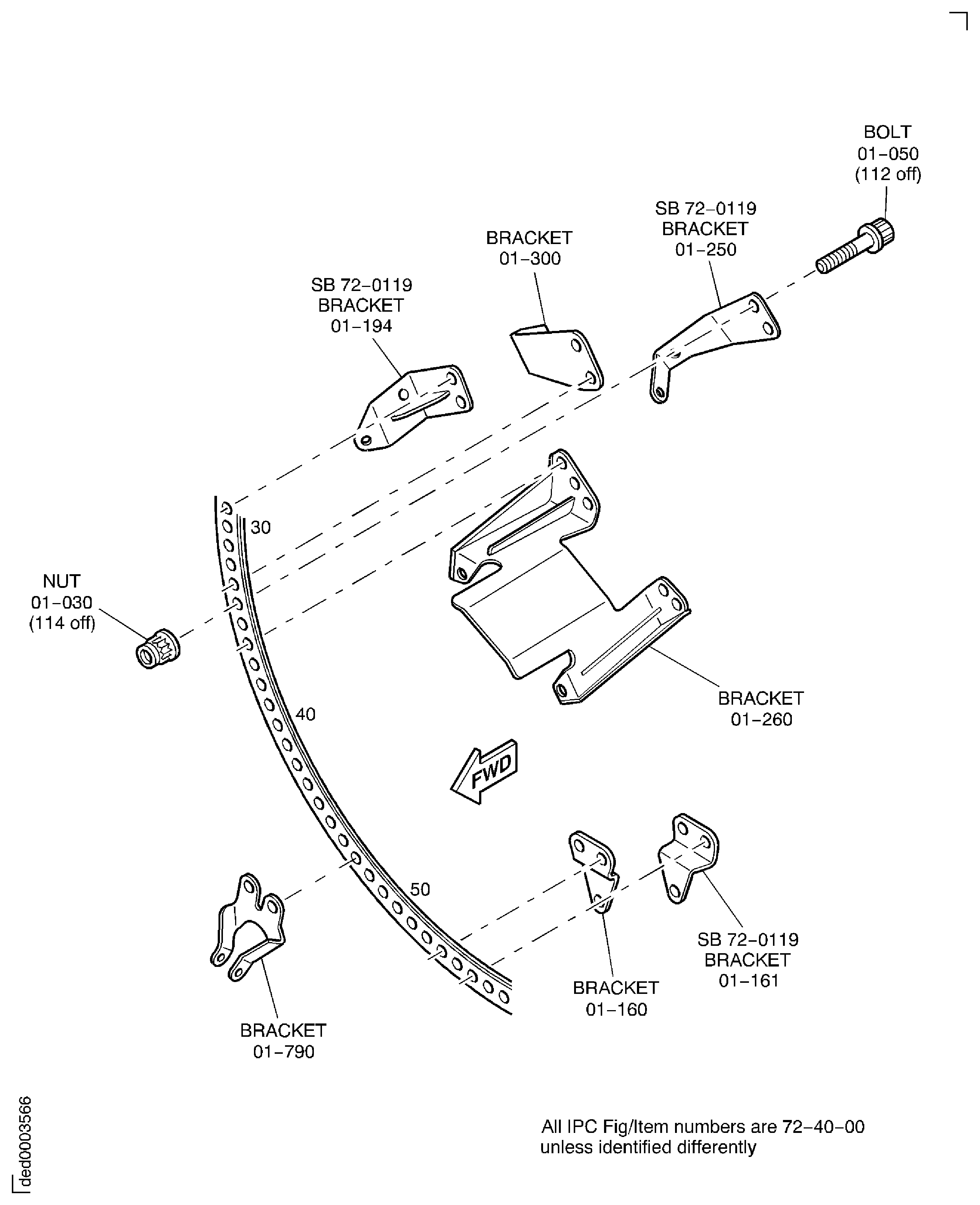
Figure: V2500-A1: Remove the brackets from the HP diffuser case front flange
Sheet 4
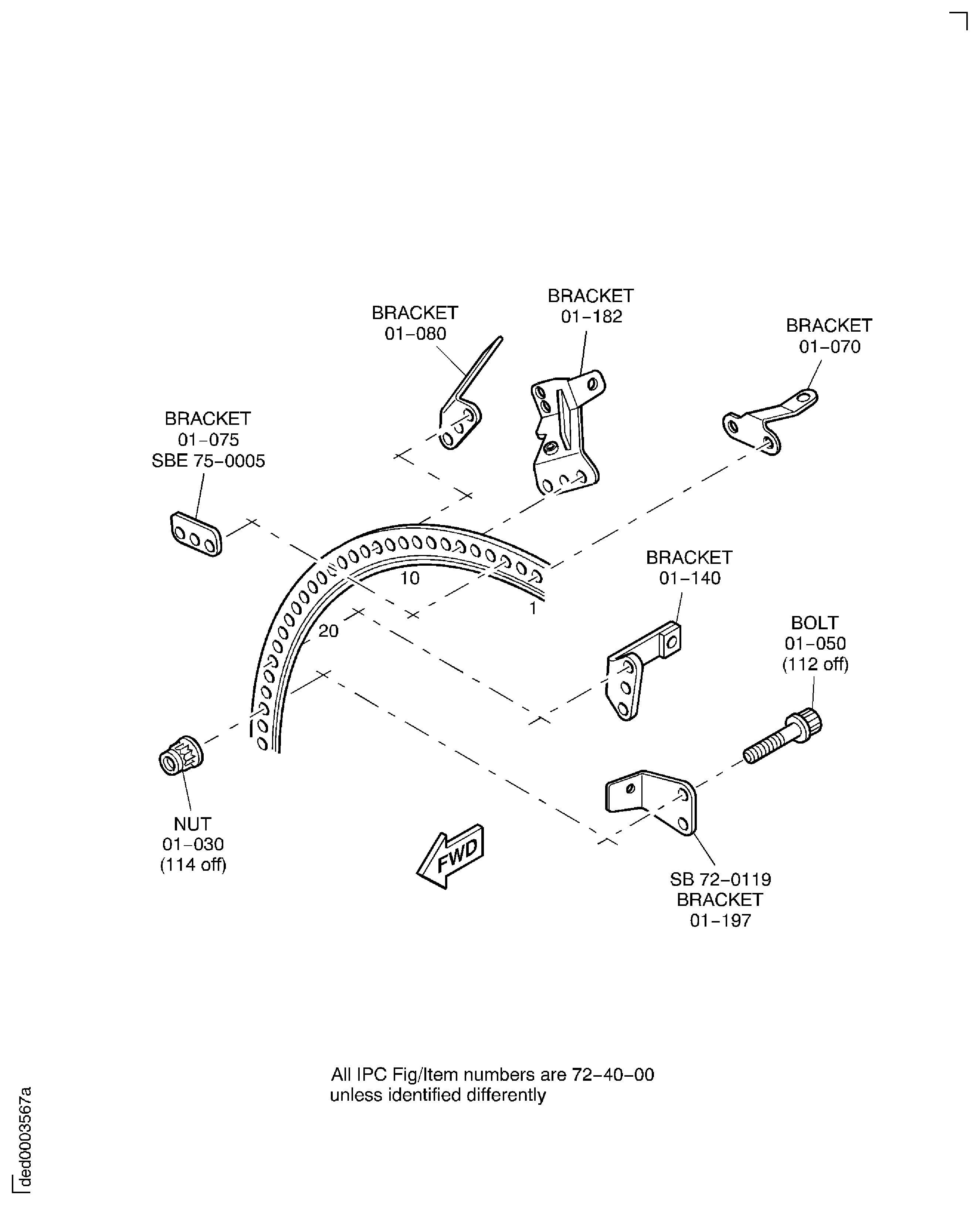
Figure: V2500-A5: Remove the brackets from the HP diffuser case front flange
Sheet 1
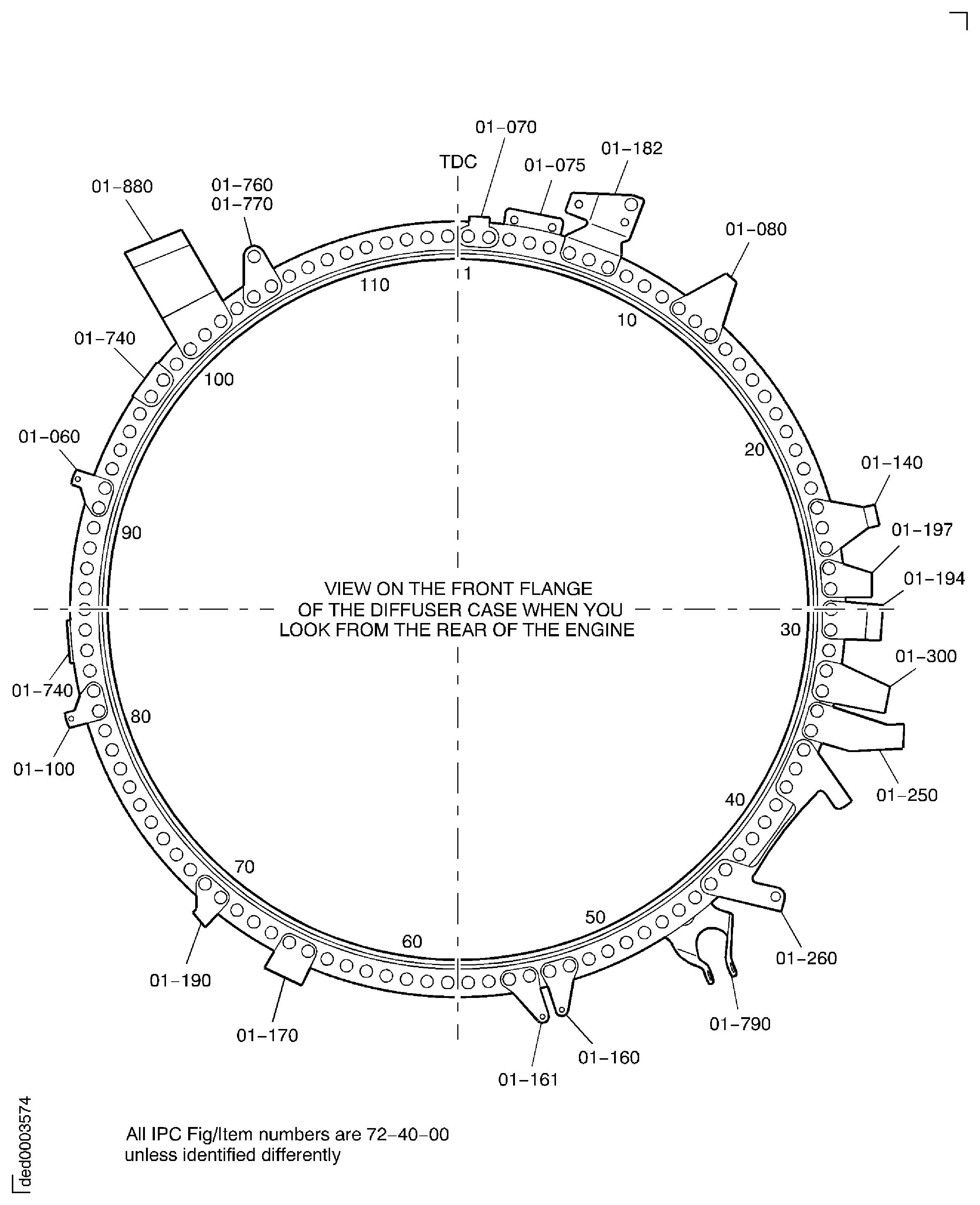
Figure: V2500-A5: Remove the brackets from the HP diffuser case front flange
Sheet 2
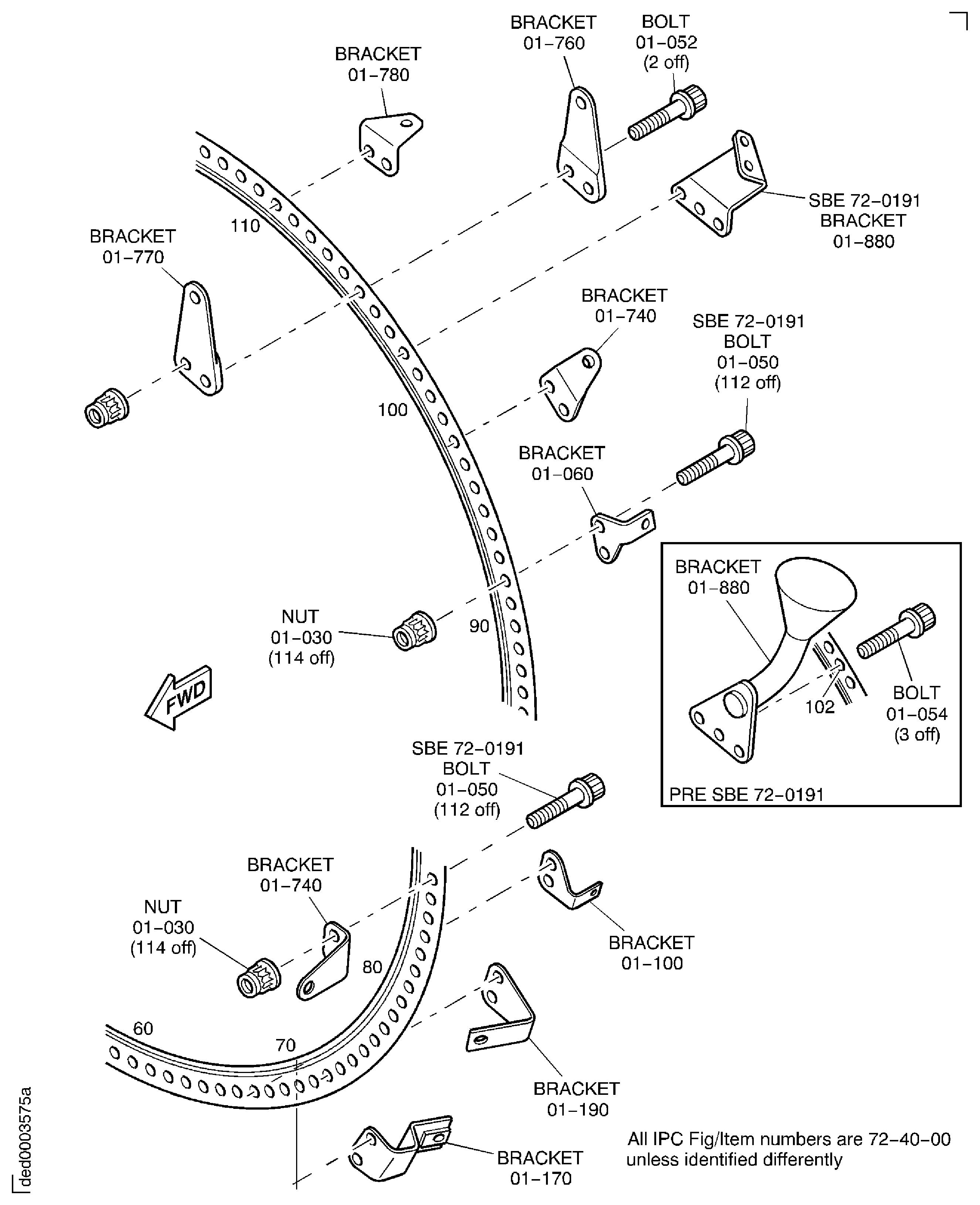
Figure: V2500-A5: Remove the brackets from the HP diffuser case front flange
Sheet 3
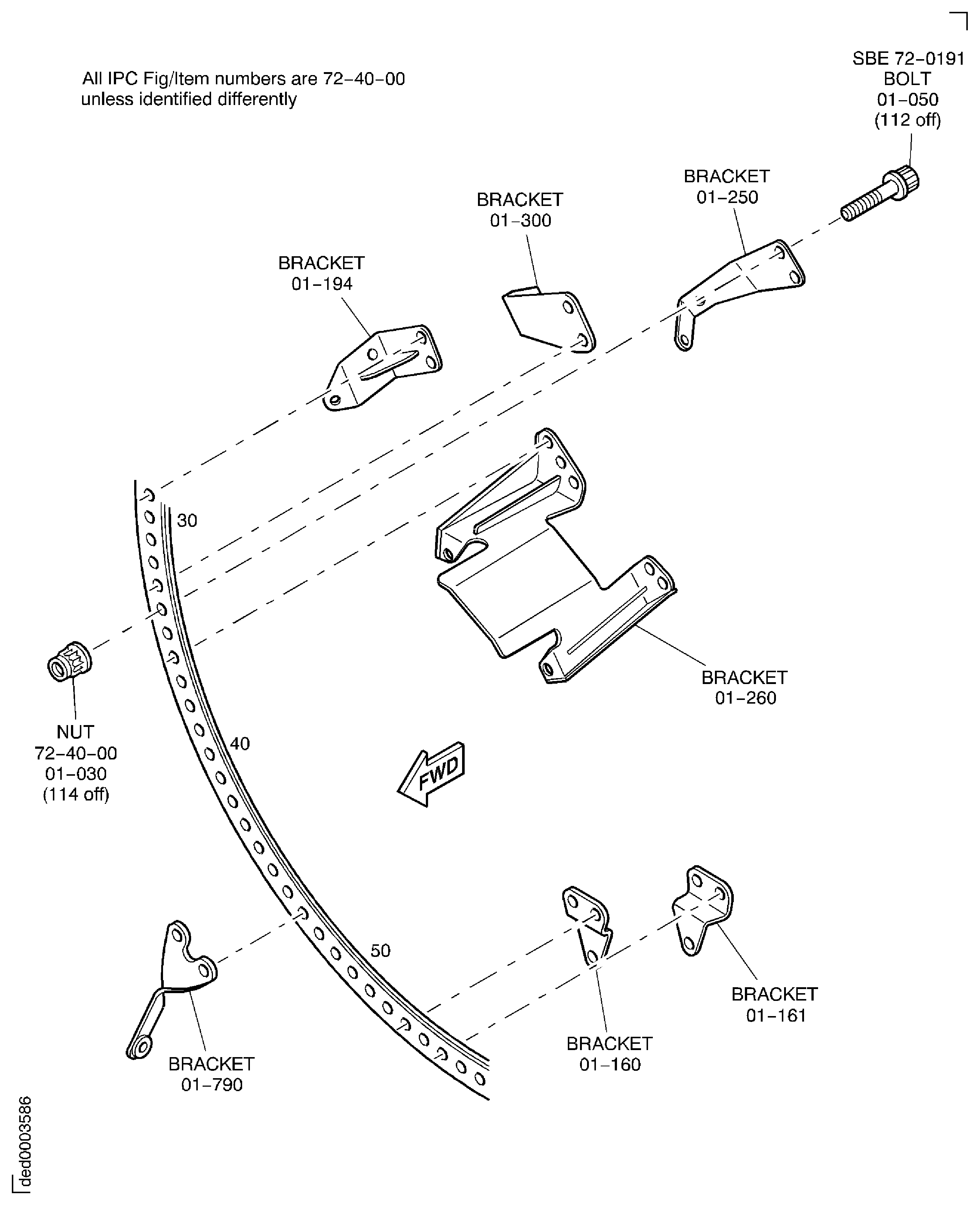
Figure: V2500-A5: Remove the brackets from the HP diffuser case front flange
Sheet 4