Export Control
EAR Export Classification: Not subject to the EAR per 15 C.F.R. Chapter 1, Part 734.3(b)(3), except for the following Service Bulletins which are currently published as EAR Export Classification 9E991: SBE70-0992, SBE72-0483, SBE72-0580, SBE72-0588, SBE72-0640, SBE73-0209, SBE80-0024 and SBE80-0025.Copyright
© IAE International Aero Engines AG (2001, 2014 - 2021) The information contained in this document is the property of © IAE International Aero Engines AG and may not be copied or used for any purpose other than that for which it is supplied without the express written authority of © IAE International Aero Engines AG. (This does not preclude use by engine and aircraft operators for normal instructional, maintenance or overhaul purposes.).Applicability
All
Common Information
TASK 73-22-34-300-013 EEC Terminal Block Assembly - Repair The Mounting Rail, Repair-013 (VRS2776)
General
Related repairs - none
To identify the consumable materials, refer to the PCI.
Preliminary Requirements
Pre-Conditions
NONESupport Equipment
| Name | Manufacturer | Part Number / Identification | Quantity | Remark |
|---|---|---|---|---|
| Suction device | LOCAL | Suction device |
Consumables, Materials and Expendables
| Name | Manufacturer | Part Number / Identification | Quantity | Remark |
|---|---|---|---|---|
| CoMat 01-076 METHYL ETHYL KETONE | LOCAL | CoMat 01-076 | ||
| CoMat 02-099 LINT-FREE CLOTH | LOCAL | CoMat 02-099 |
Spares
NONESafety Requirements
NONEProcedure
Refer to Disassembly-001TASK 73-22-34-040-301.
Remove the cover of the terminal block assembly
Refer to Disassembly-001TASK 73-22-34-040-301.
Remove the cables from the terminal block assembly
SUBTASK 73-22-34-010-001 Get Access to the Terminal Blocks

WARNING
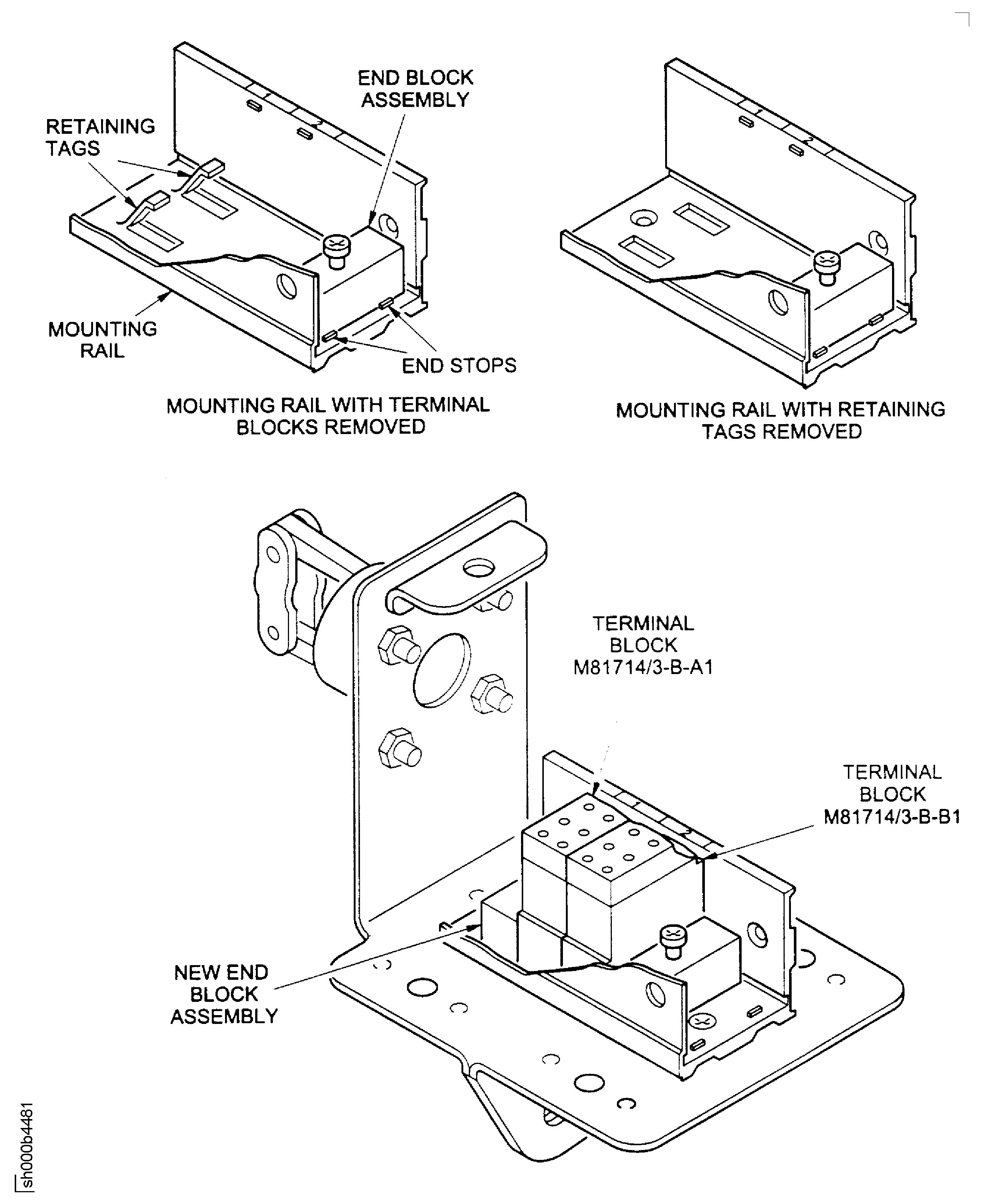
KEEP FLAMES AND ELECTRICAL EQUIPMENT WHICH IS NOT FLAMEPROOF AWAY FROM THE WORK AREA.Use the standard workshop tools. Loosen the screw sufficiently to let the end block assembly move along the mounting rail to the end stops.
Release the end block assembly
Move each terminal block along the mounting rail to the end block assembly.
Remove each terminal block from the mounting rail.
Remove the terminal blocks from the mounting rail.
SUBTASK 73-22-34-020-001 Remove the Terminal Blocks
Use the standard workshop tools.
Remove the two screws that attach the mounting rail to the terminal block housing.
Remove the mounting rail from the terminal block housing.
Remove the mounting rail from the terminal block housing.
Use the standard workshop tools.
Remove all sharp edges from the terminal block mounting-rail.
SUBTASK 73-22-34-020-002 Remove the Terminal Block Mounting-Rail

CAUTION
MAKE SURE THAT YOU USE THE MINIMUM FORCE NECESSARY WHEN YOU REMOVE THE MOUNTING RAIL FROM THE TERMINAL BLOCK HOUSING. TOO MUCH FORCE MAY BREAK THE CONNECTIONUse the CoMat 01-076 METHYL ETHYL KETONE and the CoMat 02-099 LINT-FREE CLOTH.
Rub the mounting rail with a clean piece of lint free cloth before the methylethylketone dries.
Clean the terminal block mounting-rail
SUBTASK 73-22-34-110-058 Clean the Terminal Block Mounting-Rail
WARNING
DO NOT GET CLEANING FLUID ON YOUR SKIN OR IN YOUR EYES. PUT ON PROTECTIVE CLOTHING, GOGGLES AND A MASK. USE THE FLUID IN A WELL VENTILATED AREA. DO NOT BREATHE THE GAS. IF YOU GET THE FLUID ON YOUR SKIN OR IN YOUR EYES, FLUSH IT AWAY WITH WATER. GET MEDICAL AID IF YOUR SKIN OR EYES BECOME IRRITATED.Install the new end block assembly on the mounting rail.
Install the new end block assembly
Use the standard workshop tools. Put the mounting rail on the terminal block housing in the correct position for installation.
Attach the mounting rail to the terminal block housing with the two screws. Tighten the two countersunk screws into position.
Install the mounting rail to the terminal block housing.
SUBTASK 73-22-34-420-001 Install the Terminal Block Mounting-Rail
If there are signs of wear, install new terminal blocks.
If there are no signs of wear, install the used terminal blocks.
Examine the terminal blocks for signs of wear
SUBTASK 73-22-34-710-001 Do a Check of the Terminal Blocks
Move one end block assembly to the end stops. Move the other end block assembly to the opposite side of the mounting rail.
Move the end block assemblies
Put the terminal block assembly (M81714/3-B-A1) on to the mounting rail and move it to alignment mark '1'.
Put the terminal block assembly (M81714/3-B-B1) on to the mounting rail and move it to alignment mark '2'.
Install the terminal blocks
Use the standard workshop tools.
Move and hold the two end block assemblies in position against the terminal block assemblies.
Make sure that the terminal blocks stay aligned with their applicable marks '1' and '2'.
Tighten the two self-locking screws into position
Safety the terminal blocks in the correct position
SUBTASK 73-22-34-420-002 Install the Terminal Blocks
Make sure that the terminal blocks are held tightly and do not move from their positions.
Do a check of the terminal blocks
SUBTASK 73-22-34-710-002 Examine the Terminal Blocks
Refer to Assembly-001 TASK 73-22-34-440-301
Install the cables into the terminal block assembly
Refer to Assembly-001 TASK 73-22-34-440-301
Install the cover of the terminal block assembly
SUBTASK 73-22-34-410-001 Install the Terminal Block Cover
Mark the repair scheme number VRS2776 on the terminal block assembly adjacent to the part number.
SUBTASK 73-22-34-850-001 Identify the Repair
Figure: Terminal Block Repair
Terminal Block Repair
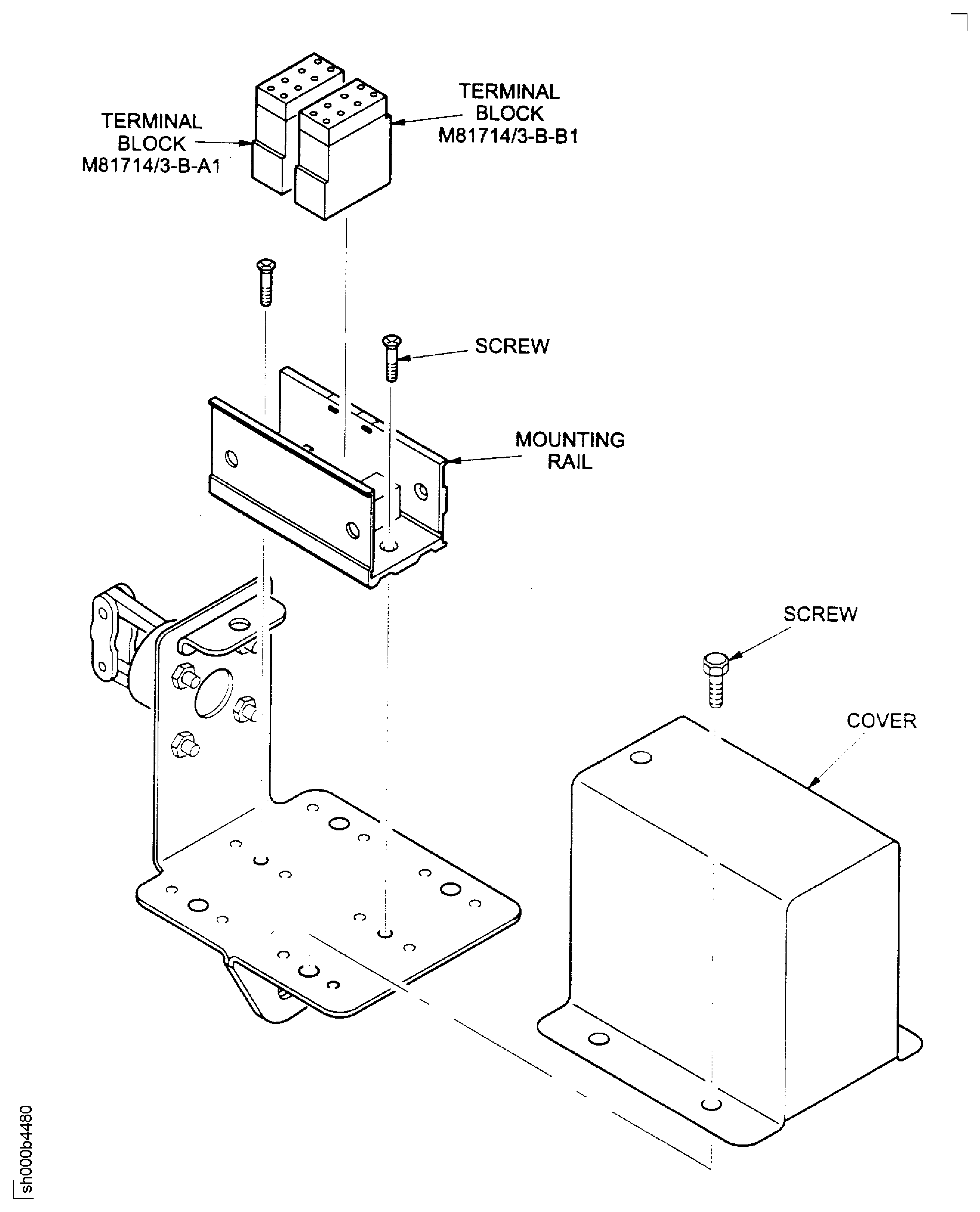
Figure: Terminal Block Repair
Terminal Block Repair