Export Control
EAR Export Classification: Not subject to the EAR per 15 C.F.R. Chapter 1, Part 734.3(b)(3), except for the following Service Bulletins which are currently published as EAR Export Classification 9E991: SBE70-0992, SBE72-0483, SBE72-0580, SBE72-0588, SBE72-0640, SBE73-0209, SBE80-0024 and SBE80-0025.Copyright
© IAE International Aero Engines AG (2001, 2014 - 2021) The information contained in this document is the property of © IAE International Aero Engines AG and may not be copied or used for any purpose other than that for which it is supplied without the express written authority of © IAE International Aero Engines AG. (This does not preclude use by engine and aircraft operators for normal instructional, maintenance or overhaul purposes.).Applicability
All
Common Information
TASK 73-22-34-440-301 EEC Terminal Block Assembly - Assemble The Terminal Block Assembly (01-560) To The Harnesses, Assembly-001
General
Fig/item numbers in parentheses in the procedure agree with those used in the IPC. Only the primary Fig/item numbers are used. For the service bulletin alpha variants refer to the IPC.
For all parts identified in a different Chapter/Section/Subject, the applicable Chapter/Section/Subject comes before the Fig/item number.
Lubricate all threads and abutment faces of nuts and bolts with CoMat 10-039 ENGINE OIL, unless other lubricants are referred to in the procedure.
For the lockwire data and procedures refer to SPM TASK 70-42-05-400-501
For the torque tightening procedures, refer to SPM TASK 70-41-00-400-501 and SPM TASK 70-41-01-400-501.
To identify consumable materials refer to the PCI.
Special tools are identified in the procedure by the tool primary number.
Preliminary Requirements
Pre-Conditions
NONESupport Equipment
| Name | Manufacturer | Part Number / Identification | Quantity | Remark |
|---|---|---|---|---|
| Inserter/extractor tool | LOCAL | M81969/14-03 |
Consumables, Materials and Expendables
| Name | Manufacturer | Part Number / Identification | Quantity | Remark |
|---|---|---|---|---|
| CoMat 01-002 SOLVENT, DELETED. | LOCAL | CoMat 01-002 | ||
| CoMat 02-099 LINT-FREE CLOTH | LOCAL | CoMat 02-099 | ||
| CoMat 02-148 ADHESIVE TAPE (ELECTRICAL) | LOCAL | CoMat 02-148 | ||
| CoMat 02-159 LACING TAPE | LOCAL | CoMat 02-159 | ||
| CoMat 08-026 THREADLOCKING MATERIAL | LOCAL | CoMat 08-026 | ||
| CoMat 10-039 ENGINE OIL | LOCAL | CoMat 10-039 |
Spares
NONESafety Requirements
NONEProcedure
Backshell threads
Screw threads
Terminal block connector.
Remove the unwanted material from the components with a clean piece of the lint free cloth before the fluid dries.
Use the CoMat 01-002 SOLVENT, DELETED. and the CoMat 02-099 LINT-FREE CLOTH to clean these parts:
SUBTASK 73-22-34-110-051 Clean the Backshell, the Terminal Block Connector and the Screws

WARNING
DO NOT GET THE CLEANING FLUID ON YOUR SKIN OR IN YOUR EYES. PUT ON PROTECTIVE CLOTHING, GLOVES, GOGGLES AND A MASK. USE THE FLUID IN A WELL VENTILATED AREA. DO NOT BREATHE THE GAS. IF YOU GET THE FLUID ON YOUR SKIN OR IN YOUR EYES FLUSH IT AWAY WITH WATER. GET MEDICAL HELP IF YOUR SKIN OR EYES BECOME IRRITATED.Find the cable 8P023, 8P024, 8P032, 8P055 and 8P082 in the general services harness (71-51-43,01-005) and the cables 8T033 and 8T077 in the EEC and ignition supply harness (71-51-42,01-005).
Hold the seven cables together and put them through the backshell and ground ferrule.
Put the cables through the terminal block connector.
Cable 8P055 to terminal A on terminal block TM817.
Cable 8P023 to terminal B on terminal block TM817.
Cable 8P032 to terminal C on terminal block TM817.
Cable 8T077 to terminal E on terminal block TM817.
Cable 8P082 to terminal A on terminal block TM824.
Cable 8P024 to terminal B on terminal block TM824.
Cable 8T033 to terminal C on terminal block TM824.
Use the Inserter/extractor tool to connect the cables as follows:
Put the screen tails equally around the ground ferrule. Attach the screen tails to the cables with the CoMat 02-159 LACING TAPE.
Move the ground ferrule along the harness to make sure that the screen tails touch the backshell.
Use CoMat 02-159 LACING TAPE to secure the screen tails to the harness immediately behind the ground ferrule.
NOTE
Make sure that you trim all screen tails that overlap the ground ferrule when it is installed in the backshell.
CAUTION
MAKE SURE THE LOCKING COMPOUND IS APPLIED ONLY TO THE THREADS.Apply two drops of the CoMat 08-026 THREADLOCKING MATERIAL opposite to each other, to the threads of the backshell.
Install the backshell to the terminal block connector. Torque the backshell to 10 lbfin (1.13 Nm).
Apply one drop of the locking compound to the threads of the two screws.
Attach the cable clamp to the backshell with the two screws. Torque the two screws to between 10 and 20 lbfin (1.13 and 2.26 Nm)
Connect the seven cables to the terminal block assembly (01-560).
Put the cover on the bracket.
Attach the cover to the bracket with the five screws and the washers. Torque the five screws to 40 lbfin (4.5 Nm).
Install the cover of the terminal block assembly (01-560)
SUBTASK 73-22-34-440-051-A00 Install the Terminal Block Assembly (Pre SBE 73-0137)
Find the cables 8P023, 8P024, 8P032, 8P055 and 8P082 in the general services harness (71-51-43,01-005) and the cables 8T033 and 8T077 in the EEC and ignition supply harness (71-51-42,01-005).
Hold the seven cables together and put them through the backshell and the ground ferrule.
Put the cables through the terminal block connector.
Cable 8P055 to terminal A on terminal block M81714/3-D-A1.
Cable 8P023 to terminal B on terminal block M81714/3-D-A1.
Cable 8P032 to terminal C on terminal block M81714/3-D-A1.
Cable 8T077 to terminal E on terminal block M81714/3-D-A1.
Cable 8P082 to terminal A on terminal block M81714/3-D-B1.
Cable 8P024 to terminal B on terminal block M81714/3-D-B1.
Cable 8T033 to terminal C on terminal block M81714/3-D-B1.
Use the Inserter/extractor tool to connect the cables as follows:
Put the screen tails equally around the ground ferrule. Attach the screen tails to the cables with CoMat 02-159 LACING TAPE.
Move the ground ferrule along the harness to make sure that the screen tails touch the backshell.
Use CoMat 02-159 LACING TAPE to secure the screen tails to the harness immediately behind the ground ferrule.
NOTE
Make sure that you trim all screen tails that overlap the ground ferrule when it is installed in the backshell.Wind the CoMat 02-148 ADHESIVE TAPE (ELECTRICAL) around the cables at clamp position, so that the clamp will hold the cables tightly.
CAUTION
DO NOT INSTALL THE ADHESIVE TAPE IF THE CABLES ARE DAMAGED. YOU MUST REPLACE THE CABLES IF THEY ARE DAMAGED BEFORE YOU INSTALL THE ADHESIVE TAPE. REFER TO ASSEMBLY-001 TASK 73-22-34-440-301.YOU MUST MAKE SURE THAT THE ADHESIVE TAPE IS INSTALLED AT THE THROUGH HOLE OF THE TERMINAL MODULE BRACKET TO PREVENT CHAFING.Install three layers of CoMat 02-148 ADHESIVE TAPE (ELECTRICAL) along the length of the harness starting from the M81714/3-D-A1 terminal junction module and the M81714/3-D-B1 terminal junction module, for a distance of approximately not more than 6.00 in. (152.4 mm) and including the through hole in the terminal module bracket.
NOTE
You can move the cables in the forward and aft direction to make sure that CoMat 02-148 ADHESIVE TAPE (ELECTRICAL) is installed easily at the through hole of the terminal module bracket. The CoMat 02-148 ADHESIVE TAPE (ELECTRICAL) can be split at this point, but there must not be gaps in the protective layers.CAUTION
MAKE SURE THE LOCKING COMPOUND IS APPLIED ONLY TO THE THREADS.Apply two drops of CoMat 08-026 THREADLOCKING MATERIAL opposite to each other, to the threads of the backshell.
Install the backshell to the terminal block connector. Torque the backshell to 10 lbfin (1.13 Nm).
Apply one drop of the locking compound to the threads of the two screws.
Attach the cable clamp to the backshell with the two screws. Torque the two screws to between 10 and 20 lbfin (1.13 and 2.26 Nm).
Connect the seven cables to the terminal block assembly (01-560).
Put the cover on the bracket.
Attach the cover to the bracket with the five screws and washers. Torque the five screws to 40 lbfin (4.5 Nm).
Install the cover of the terminal block assembly (01-560)
SUBTASK 73-22-34-440-051-B00 Install the Terminal Block Assembly (SBE 73-0137 and PRE SBE 71-0275)
Find the cables 8P023, 8P024, 8P032, 8P055 and 8P082 in the general services harness (71-51-43,01-005) and the cables 8T033 and 8T077 in the EEC and ignition supply harness (71-51-42,01-005).
Hold the seven cables together and put them through the backshell and the ground ferrule.
Put the cables through the terminal block connector.
Cable 8P055 to terminal A on terminal block M81714/3-D-A1.
Cable 8P023 to terminal B on terminal block M81714/3-D-A1.
Cable 8P032 to terminal C on terminal block M81714/3-D-A1.
Cable 8T077 to terminal E on terminal block M81714/3-D-A1.
Cable 8P082 to terminal A on terminal block M81714/3-D-B1.
Cable 8P024 to terminal B on terminal block M81714/3-D-B1.
Cable 8T033 to terminal C on terminal block M81714/3-D-B1.
Use the Inserter/extractor tool to connect the cables as follows:
Install three layers of CoMat 02-148 ADHESIVE TAPE (ELECTRICAL) along the length of the cables, from the M81714/3-D-A1 terminal junction module and the M81714/3-D-B1 terminal junction module, for a distance of approximately 6.0 in. (152 mm).
NOTE
You can adjust the cables in the forward and aft direction to make sure that there is easy installation of the adhesive tape at the through-hole in the bracket. The tape can be split at this point for easy installation but there must not be gaps in the protective layers.Wind more CoMat 02-148 ADHESIVE TAPE (ELECTRICAL) around the cables at the clamp position, so that the clamp will hold the harness tightly.
Put the screen tails equally around the ground ferrule. Attach the screen tails to the cables with CoMat 02-159 LACING TAPE.
Move the ground ferrule along the harness to make sure that the screen tails touch the backshell.
Use CoMat 02-159 LACING TAPE to secure the screen tails to the harness immediately behind the ground ferrule.
NOTE
Make sure that you trim all screen tails that overlap the ground ferrule when it is installed in the backshell.CAUTION
MAKE SURE THE LOCKING COMPOUND IS APPLIED ONLY TO THE THREADS.Apply two drops of CoMat 08-026 THREADLOCKING MATERIAL opposite to each other, to the threads of the backshell.
Install the backshell to the terminal block connector. Torque the backshell to 10 lbfin. (1.13 Nm).
NOTE
Make sure that the cables have enough bend radii to prevent a sharp angle at the attachment to the M8714/3-D-A1 terminal junction module and the M8714/3-D-B1 terminal junction module.Apply one drop of the locking compound to the threads of the two screws.
Attach the cable clamp to the backshell with the two screws. Torque the two screws to between 10 and 20 lbfin. (1.3 and 2.26 Nm).
Connect the seven cables to the terminal block assembly (01-560).
Put the cover on the bracket.
Attach the cover to the bracket with the five screws and washers. Torque the five screws to 40 lbfin. (4.5 Nm).
Install the cover of the terminal block assembly (01-560)
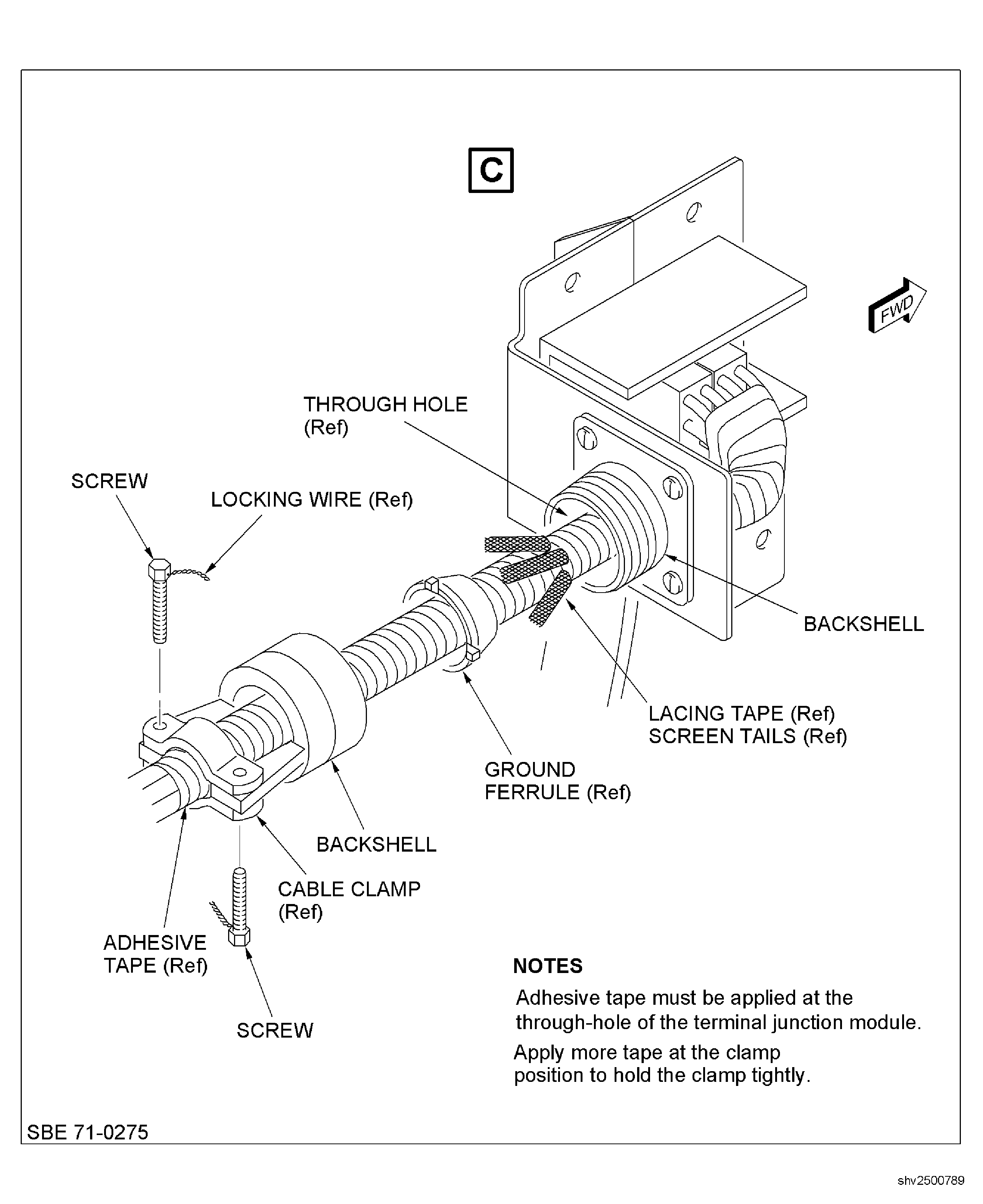
SUBTASK 73-22-34-440-051-C00 Install the Terminal Block Assembly (SBE 71-0275)
SB 71-0275: Engine Build Unit (EBU) - Terminal Module Assembly - Rerouting of the Harness.
Figure: Terminal Block Assembly
Terminal Block Assembly
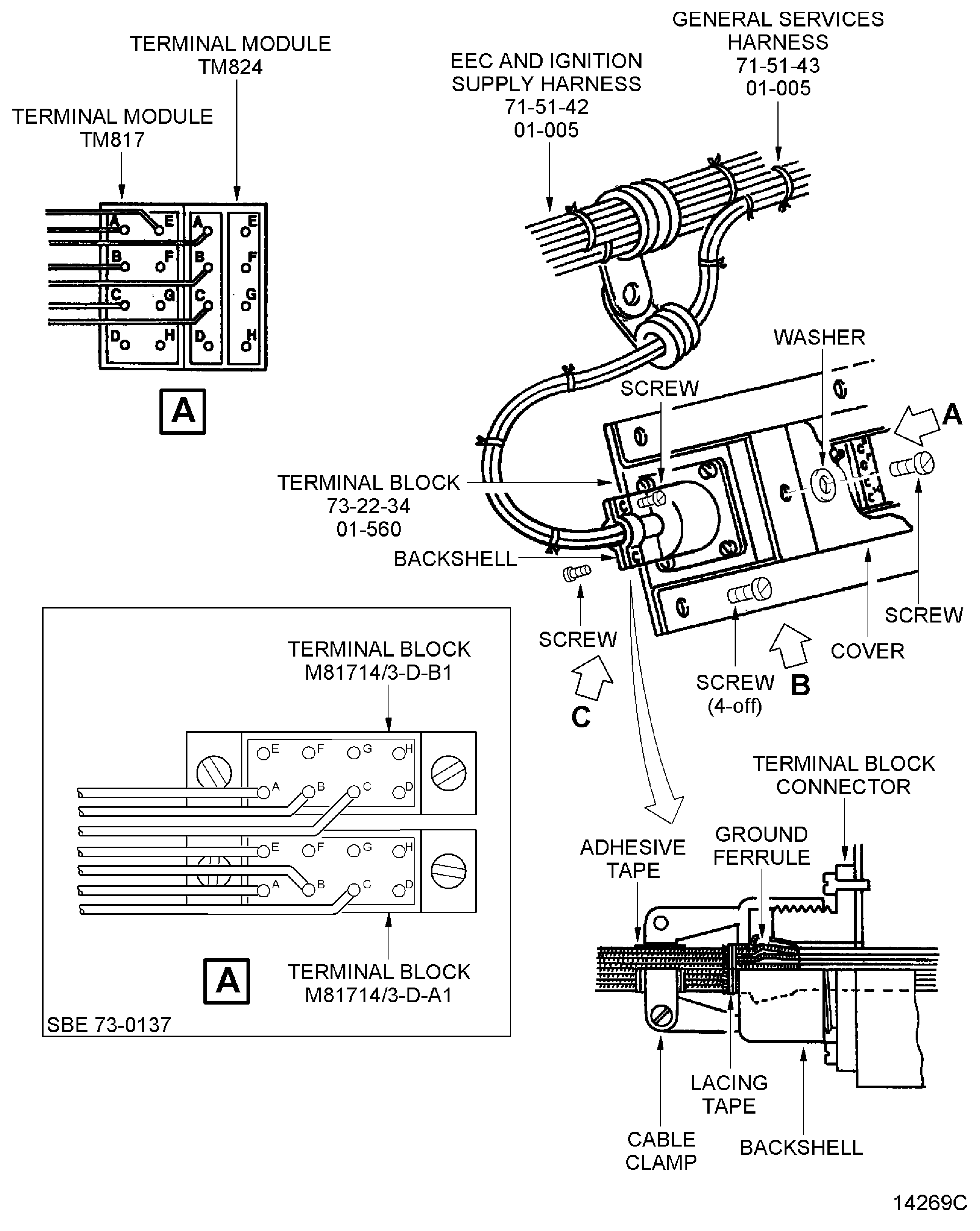
Figure: Terminal Block Assembly
Terminal Block Assembly
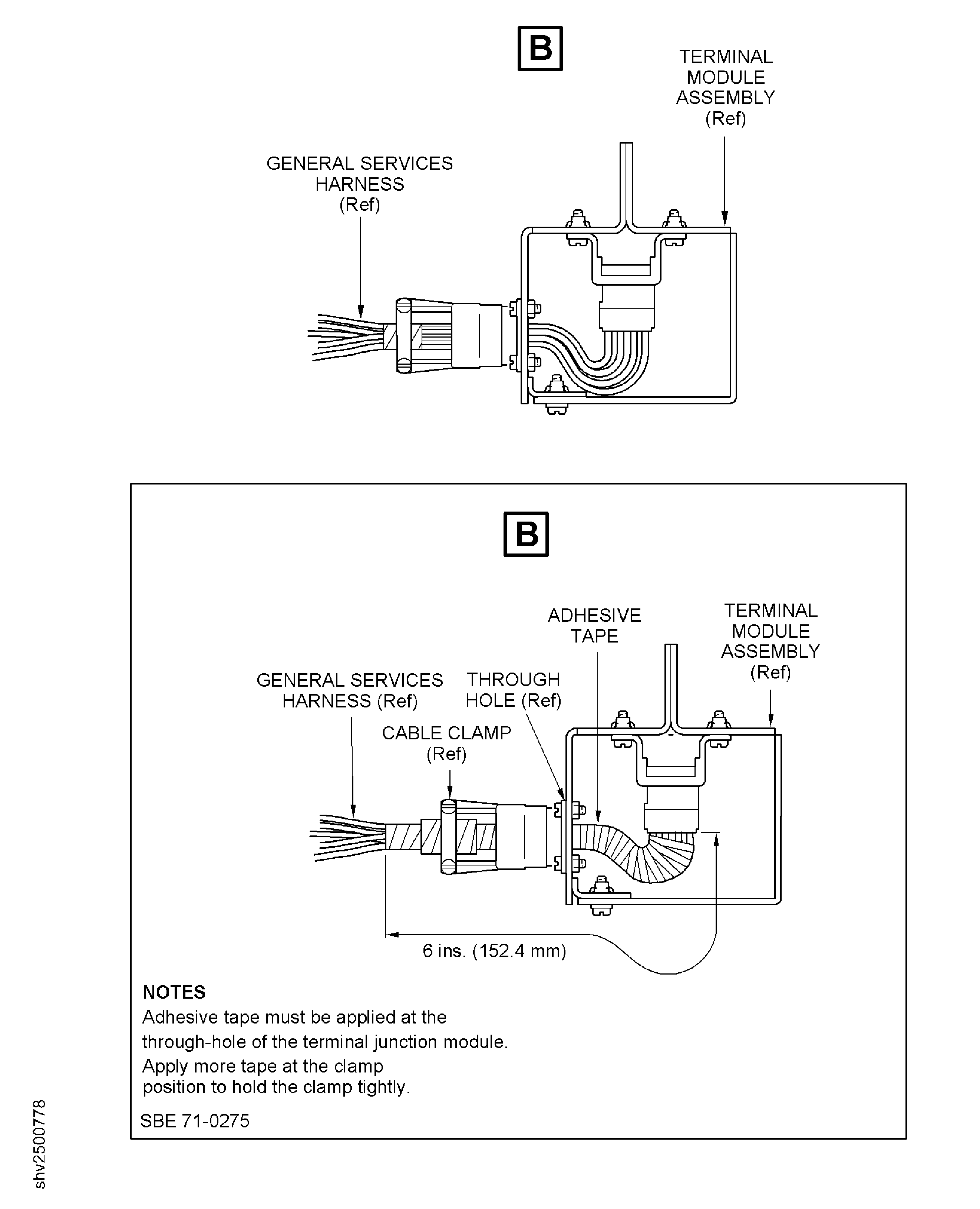
Figure: Terminal Block Assembly
Terminal Block Assembly