
TASK 72-00-40-020-007-A00 HP System Module - Remove The HP System Module (Vertical), Removal-009

DMC:V2500-A1-72-00-4000-07B-520A-B|Issue No:003.00|Issue Date:2017-08-01

Export Control

EAR Export Classification: Not subject to the EAR per 15 C.F.R. Chapter 1, Part 734.3(b)(3), except for the following Service Bulletins which are currently published as EAR Export Classification 9E991: SBE70-0992, SBE72-0483, SBE72-0580, SBE72-0588, SBE72-0640, SBE73-0209, SBE80-0024 and SBE80-0025.

Copyright

© IAE International Aero Engines AG (2001, 2014 - 2021) The information contained in this document is the property of © IAE International Aero Engines AG and may not be copied or used for any purpose other than that for which it is supplied without the express written authority of © IAE International Aero Engines AG. (This does not preclude use by engine and aircraft operators for normal instructional, maintenance or overhaul purposes.).

Applicability

V2500-A1

Common Information

TASK 72-00-40-020-007-A00 HP System Module - Remove The HP System Module (Vertical), Removal-009

General

This TASK gives the procedure to remove the HP system module in the vertical position. Other related TASKS are:

TASK 72-00-40-560-005 Turn the LP compressor/intermediate case module and the HP system module from the horizontal to the vertical.

Fig/item numbers in parentheses in the procedure agree with those used in the IPC. Only the primary Fig/item numbers are used. For the service bulletin alpha variants refer to the IPC.

Apply the approved CoMat 10-058 PENETRATING OIL before the removal of threaded parts or parts with an interference fit. Let the parts soak before removal.

NOTE

To identify the consumable materials refer to the PCI.

NOTE

Special tools are identified in the procedure by the tool primary number.

Preliminary Requirements

Pre-Conditions

NONE

Support Equipment

NameManufacturerPart Number / IdentificationQuantityRemark
IAE 1F10052 Two cables sling0AM53IAE 1F100521
IAE 1P16046 Removal/Installation fixture0AM53IAE 1P160461
IAE 1P16057 Tie-rod adapter0AM53IAE 1P160571
IAE 1P16543 Removal/Installation fixture0AM53IAE 1P165431
IAE 1R18075 Support pedestal0AM53IAE 1R180751
IAE 1R18090 Safety support stand0AM53IAE 1R180901
IAE 1R18214 Build stand0AM53IAE 1R182141
IAE 1R18222 Support rod0AM53IAE 1R182222
IAE 1R18230 Wrench0AM53IAE 1R182301
IAE 1R18234 Support rod0AM53IAE 1R182343
IAE 1R18247 Rigging pin0AM53IAE 1R182471
IAE 1R18673 Dummy stub shaft0AM53IAE 1R186731

Consumables, Materials and Expendables

NameManufacturerPart Number / IdentificationQuantityRemark
CoMat 01-002 SOLVENT, DELETED.LOCALCoMat 01-002
CoMat 04-005 JOINTING COMPOUND, MEDIUM GRADELOCALCoMat 04-005
CoMat 10-058 PENETRATING OILLOCALCoMat 10-058

Spares

NONE

Safety Requirements

NONE

Procedure

    1. SUBTASK 72-00-40-020-116 Install the Remove/Install Fixture and the Tie-Rod Adapter to the HP System Module Rear Flange

    2. Refer to Figure.

      1. Put the puck and shaft through the center ring until the tie-rod adapter touches the rear face of the center ring.

      2. Align the two holes on the tie-rod adapter with two opposite holes in the center ring. Install the two tool screws. Tighten the screws.

      3. Move the locknut until it is adjacent to the wrench location.

      4. Push the tie-rod adapter in to the engine until the puck engages on the HP compressor front shoulder. At the same time push the center ring over the HP compressor shaft until it touches the stage 2 HP turbine disk.

      5. Turn the locknut until the puck is against the HP compressor front shoulder. Tighten the locknut.

        NOTE

        If necessary use a wrench on the wrench location so that the shaft does not turn.
      6. Attach a hoist to the IAE 1F10052 Two cables sling 1 off and attach the lift sling to the remove/install fixture lift eye.

      7. Lift the remove/install fixture and move it adjacent to the rear of the HP system module. Make sure the hand knobs are rearwards.

      8. Move the remove/install fixture over the center ring until it touches the HP turbine case rear flange.

      9. Put the upper split ring on to the front of the HP turbine case rear flange. Install 12 of the tool bolts and 12 of the tool nuts.

      10. Put the lower split ring on to the front of the HP turbine case rear flange. Install 13 of the tool bolts and 13 of the tool nuts.

      11. Tighten the 25 tool nuts.

      12. Remove the hoist from the lift eye.

    1. SUBTASK 72-00-40-020-117 Install the HP Compressor Support Rods

    2. Refer to Figure.

    3. Make sure the variable stator vanes are in the low speed position.

    4. Install IAE 1R18247 Rigging pin 1 off through the bracket and in to the HP compressor cases to lock the variable stator vanes.

    5. Remove the six bolts and three blanks from the HP compressor front cases.

      1. Turn the adjustment handle to retract the blade of the tool.

      2. Carefully install the support rods through the holes in the HP compressor lower split case. Make sure the blades are rearwards.

      3. Safety the support rods to the HP compressor lower split case with four of the six tool bolts.

      4. Turn the adjustment handle until the blades touch the HP compressor stage 3 disk and lightly tighten.

    1. SUBTASK 72-00-40-020-118 Remove the Bolts from the HP Compressor Stage 3 Disk Curvic Coupling

    2. Refer to Figure.

    3. Use IAE 1R18230 Wrench 1 off to release and remove the curvic bolts from the No. 3 bearing rotor center.

    1. SUBTASK 72-00-40-020-214 Remove the Parts that Attach the LP Compressor/Intermediate Case Module and the HP System Module Joint Flanges (SBE 72-0290)

    2. Refer to Figure.

    3. Remove the 37 nuts, the 37 bolts from the joint flange. Do not remove the nuts and the bolts from the positions Y.

      NOTE

      There is no countersunk hole in the head of the bolts.
    4. Remove the four nuts, the four bolts from the joint flange at the positions Y.

    5. Use an applicable parallel punch to remove the four pins and the four lock plates from the joint flange at the positions Y.

    1. SUBTASK 72-00-40-020-119 Remove the Parts that Attach the LP Compressor/Intermediate Case Module and the HP System Module Joint Flanges (Pre SBE 72-0290)

    2. Refer to Figure.

    3. Remove the 37 nuts, the 37 bolts from the joint flange. Do not remove the nuts and the bolts from the positions Y.

      NOTE

      There is a countersunk hole in the head of the bolts.
    4. Remove the four nuts and the four bolts from the joint flange at the positions Y.

    5. Use an applicable parallel punch to remove the four pins and the four lock plates from the joint flange at the positions Y.

    1. SUBTASK 72-00-40-020-120 Remove the HP System Module from the LP Compressor/Intermediate Case Module

    2. Refer to Figure.

    3. Use the hoist and carefully lift the HP system module.

    1. SUBTASK 72-00-40-020-121 Prepare the HP System Module for Interface Inspection

    2. Refer to Figure.

    3. Lower the HP system module on to IAE 1R18090 Safety support stand 1 off. The HP compressor front flange should touch the safety support stand pads. Do not release the lift sling hold.

    1. SUBTASK 72-00-40-220-074 Visually Examine the Interfaces

    2. Visually examine the HP system module and the LP compressor/intermediate case module at interfaces C-32 and C-41. Refer to TASK 72-00-00-200-002.

    1. SUBTASK 72-00-40-020-122 Install the Dummy Stub Shaft on to the HP System Module

    2. Refer to Figure.

    3. Install the IAE 1R18673 Dummy stub shaft 1 off in to the IAE 1R18075 Support pedestal 1 off. Make sure the curvic protector is at the rear.

      1. Remove the curvic protector from the dummy stub shaft.

      2. Release the bolts and the nuts from the curvic protector.

        NOTE

        The bolts remain with the dummy stub shaft.
      3. Remove the curvic protector.

      1. Clean the curvic teeth on the dummy stub shaft and the HP compressor stage 3 disk.

      2. WARNING

        WHEN YOU USE COMAT 01-002 INHIBITED AND STABILIZED TRICHLOROETHANE YOU MUST USE THE NECESSARY PROTECTIVE CLOTHING. DO NOT GET THE SOLVENT ON YOUR SKIN OR IN YOUR EYES. YOU MUST NOT SMOKE WHEN YOU USE THE SOLVENT AS THE VAPOR CHANGES AND BECOMES TOXIC.

        Use a soft brush and apply CoMat 01-002 SOLVENT, DELETED. to the curvic teeth.

      3. Dry the curvic teeth with a clean dry air blast.

      1. Install the dummy stub shaft on to the HP system module.

      2. Align the four tool location pins on the dummy stub shaft with the applicable location hole on the curvic coupling.

      3. Lift the HP system module from the safety support stand and position over the build pedestal.

      4. Carefully lower the HP system module onto the dummy stub shaft and hold in position.

      5. Safety the dummy stub shaft with the 20 curvic coupling tool bolts.

    1. SUBTASK 72-00-40-020-123 Install the HP System Module on to the Build Stand

    2. Refer to Figure.

      1. Install IAE 1R18222 Support rod 2 off on to the IAE 1R18214 Build stand 1 off.

      2. Align the support ring end faces so that they are adjacent to the two location pins on the build stand.

      3. Secure the support rings with the six build stand/support ring bolts.

    3. Lift the HP module system off the pedestal build stand and carefully lower on to the build stand. Make sure the support ring splitline is aligned with the HP compressor front cases splitline. Also align the support ring location pins with the applicable hole in the HP compressor front flange.

    4. Secure the HP compressor front flange to the support ring. Use the six HP compressor/support ring bolts.

    5. Release the hold on the lift sling.

    1. SUBTASK 72-00-40-020-124 Remove the Hoist, the Remove/Install Fixture, the Tie-Rod Adapter and the HP Compressor Support Rods and

    2. Refer to Figure and Figure.

      1. Remove the support rods.

      2. Turn the adjustment handles to retract the blade.

      3. Release the six support rod tool bolts.

      4. Remove the support rods.

        1. Install one of the blanks ENGINE-HP COMPRESSOR SPLIT CASES (72-41-31, 01-120), the bracket ENGINE-HP COMPRESSOR SPLIT CASES (72-41-31, 01-118) and two of the bolts ENGINE-HP COMPRESSOR SPLIT CASES (72-41-31, 01-122) in to the HP compressor at location C.

        2. Put a thin layer of CoMat 04-005 JOINTING COMPOUND, MEDIUM GRADE on to the bracket where it touches the blank.

        3. Install the blank, the bracket and the bolts.

        4. Torque the bolts to 85 to 105 lbf.in (10 to 12 Nm).

        1. Install one of the blanks ENGINE-HP COMPRESSOR SPLIT CASES (72-41-31, 01-120), the bracket ENGINE-HP COMPRESSOR SPLIT CASES (72-41-31, 01-115) and two of the bolts ENGINE-HP COMPRESSOR SPLIT CASES (72-41-31, 01-122) in the HP compressor at location A.

        2. Put a thin layer of CoMat 04-005 JOINTING COMPOUND, MEDIUM GRADE on the bracket where it touches the blank.

        3. Install the blank, the bracket and the bolts.

        4. Torque the bolts to 85 to 105 lbf.in (10 to 12 Nm).

      5. Install the other blank ENGINE-HP COMPRESSOR SPLIT CASES (72-41-31, 01-120) and the other bolts ENGINE-HP COMPRESSOR SPLIT CASES (72-41-31, 01-122) in to the HP compressor at location B. Torque the bolts to 85 to 105 lbf.in (10 to 12 Nm).

      6. Remove the rigging pin installed in Step.

      1. Remove the remove/install fixture and the tie-rod adapter from the rear of the HP system module.

      2. Adjust the height of the hoist to hold the weight of the remove/install fixture to the HP turbine case. Remove the two split rings.

      3. Release the locknut on the end of the tie-rod shaft.

      4. Remove the two screws that safety the tie-rod adapter on to the remove/install fixture.

      5. Move the shaft in to the engine to disengage the puck from the HP compressor shaft front shoulder.

      6. Remove the tie-rod adapter from the module.

      7. Remove the remove/install fixture from the module and put it on to a suitable work surface. Remove the hoist and the lift sling.

  1. Figure: Install the remove/install fixture and the tie-rod adapter on to the HP system module

    Install the remove/install fixture and the tie-rod adapter on to the HP system module
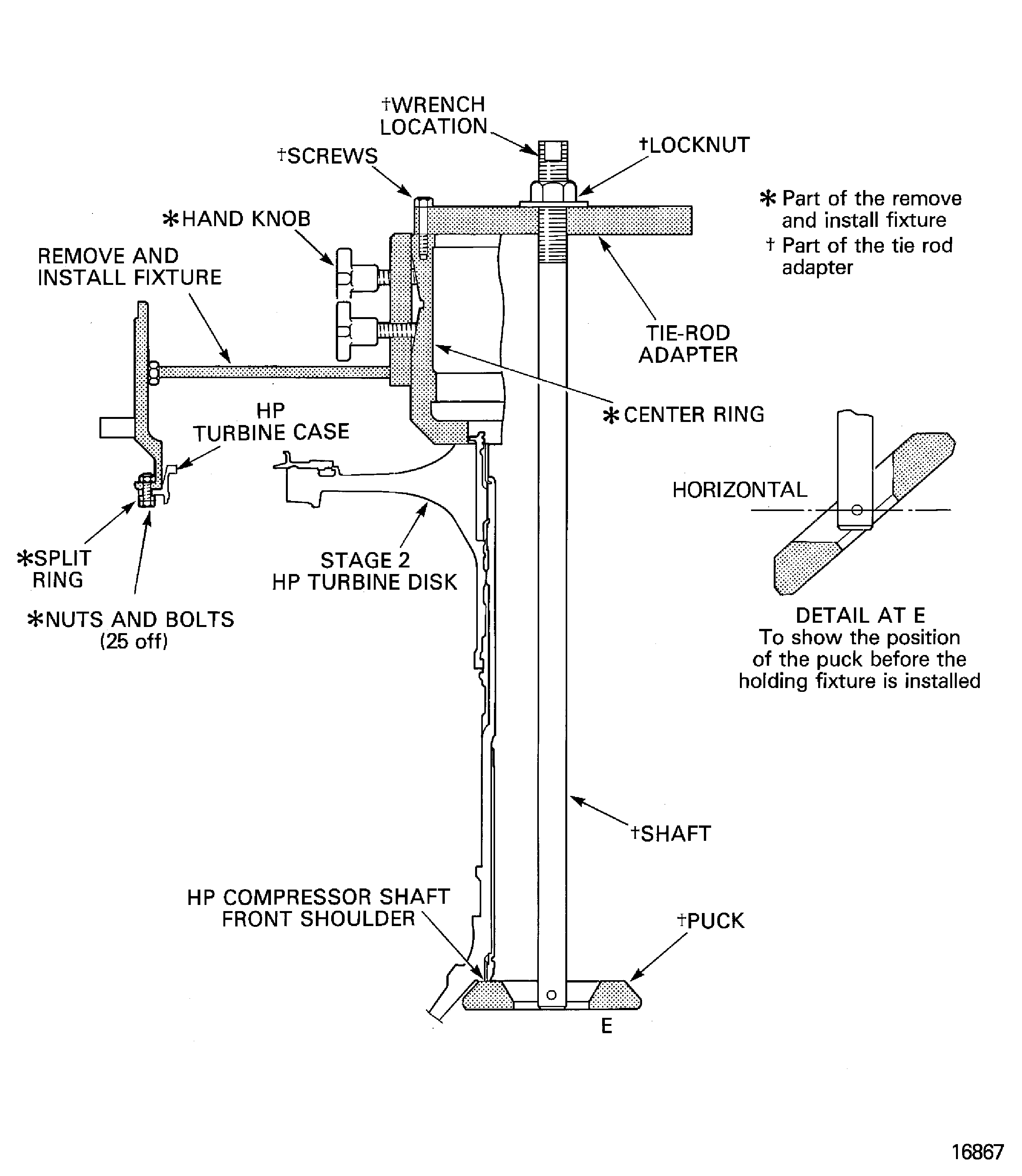
    Figure: Install the remove/install fixture and the tie-rod adapter to the HP system module

    Install the remove/install fixture and the tie-rod adapter to the HP system module
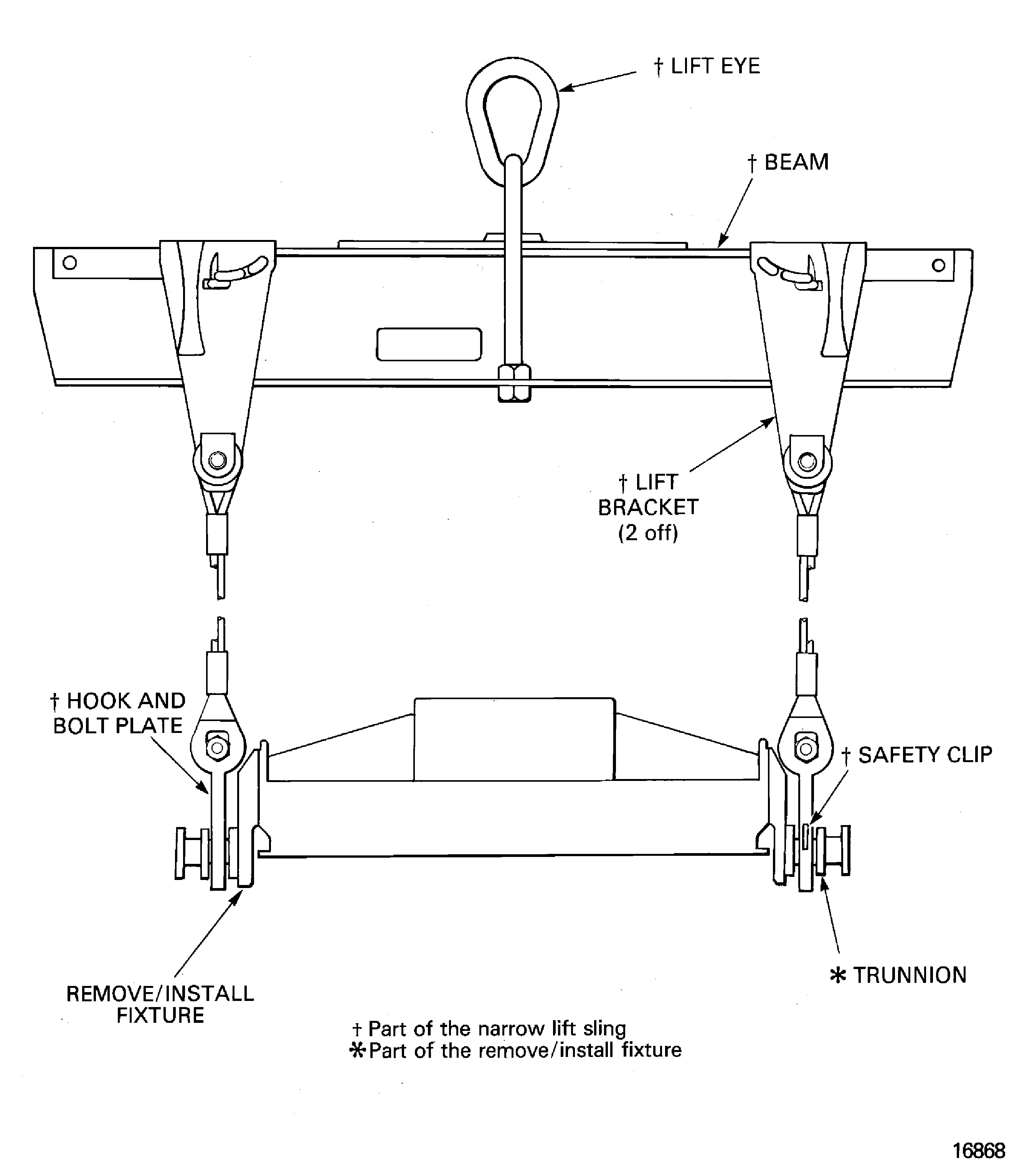
    Figure: Install the support rods in to the HP compressor

    Install the support rods in to the HP compressor

    Figure: Install the support rods in to the HP compressor

    Install the support rods in to the HP compressor

    Figure: Remove the stage 3 HP compressor curvic bolts

    Remove the stage 3 HP compressor curvic bolts
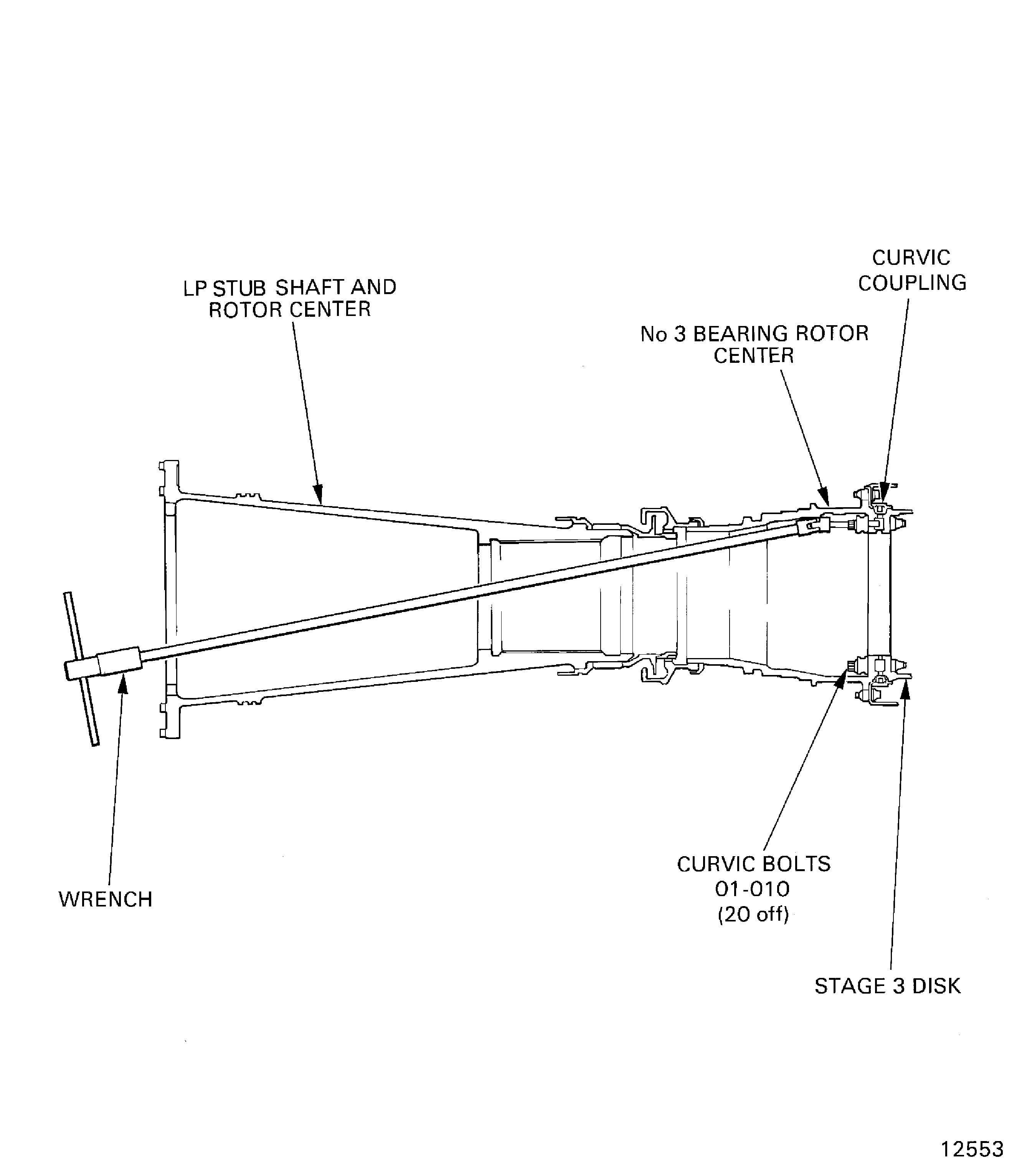
    Figure: LP compressor/intermediate case module to HP system module joint flange hole positions

    LP compressor/intermediate case module to HP system module joint flange hole positions
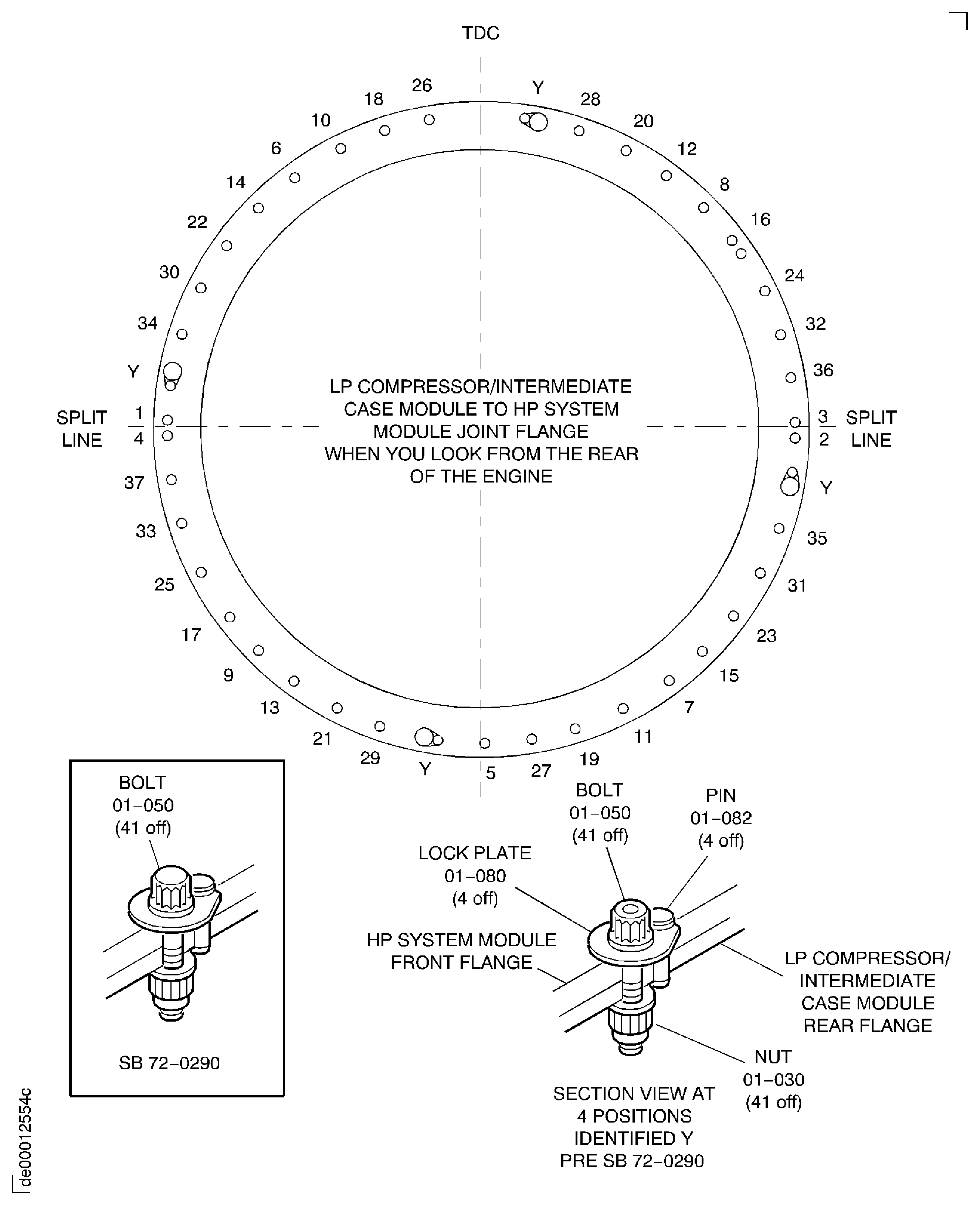
    Figure: Install the HP system module on to the safety support stand

    Install the HP system module on to the safety support stand
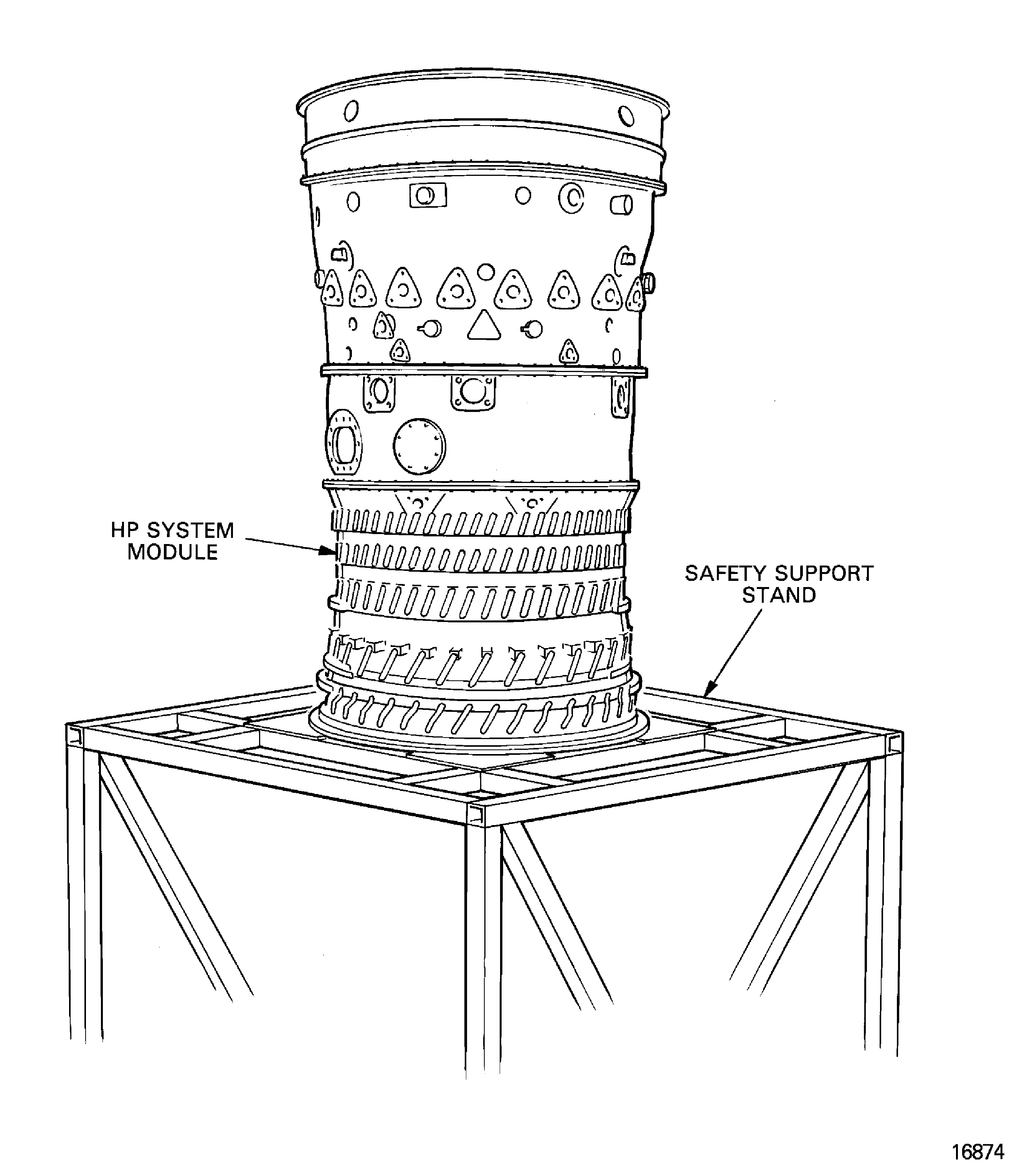
    Figure: Install the dummy stub shaft on to the stage 3 disk curvic coupling

    Install the dummy stub shaft on to the stage 3 disk curvic coupling

    Figure: Install the HP compressor/diffuser case assembly on to the build stand

    Install the HP compressor/diffuser case assembly on to the build stand

Requirements After Job Completion

Follow-On Conditions

NONE
Change Type:

Revised the procedure to add IAE 1P16543 as an option to IAE 1P16046. (14VC396)

Manufacturer Code:0AM53
Enterprise Name:IAE INTERNATIONAL AERO ENGINES AG
BU Name:NULL
Building:SUITE 400
Street:628 HEBRON AVENUE
City:GLASTONBURY
State:CT
Zip Code:06033
Country:USA
Manufacturer Code:LOCAL
Enterprise Name:LOCALLY SUPPLIED
Manufacturer Code:X111X
Supply Number:CoMat 01-002
Type:sp01
Supply Short Name:CoMat 01-002 SOLVENT, DELETED.
Supply Name:CoMat 01-002 SOLVENT, DELETED.
Specification Groups:
Doc NumberType
wiring harnesses. Where CoMat 01‐002 is specified to clean mechanical components, use one or more of the solvents that SPM TASK 70‐11‐26‐300‐503 specifies as applicable.DELETED. Where CoMat 01‐002 is specified to clean electrical contacts or wiring harnesses, use one or more of the solvents that SPM TASK 70‐11‐57‐110‐501 specifies to clean electrical contacts or
Suppliers:
ManufacturerRemarks
X111X
Manufacturer Code:LOCAL
Supply Number:CoMat 04-005
Type:sp01
Supply Short Name:CoMat 04-005 JOINTING COMPOUND, MEDIUM GRADE
Supply Name:CoMat 04-005 JOINTING COMPOUND, MEDIUM GRADE
Specification Groups:
Doc NumberType
OMAT: 4/47 (RR REF)HYLOMAR AEROGRADE (PL32), MEDIUM GRADE
JCR-026 (JAEC REF)HYLOMAR AEROGRADE (PL32), MEDIUM GRADE
DTD 900/4586 (RR REF, MOD UK REF)HYLOMAR AEROGRADE (PL32), MEDIUM GRADE
MSRR 9055 (RR REF)HYLOMAR AEROGRADE (PL32), MEDIUM GRADE
Suppliers:
ManufacturerRemarks
LOCAL
460Y4
CJ731
K3237
Manufacturer Code:X222X
Supply Number:CoMat 10-058
Type:sp01
Supply Short Name:CoMat 10-058 PENETRATING OIL
Supply Name:CoMat 10-058 PENETRATING OIL
Suppliers:
ManufacturerRemarks
X222X
Manufacturer Code:0AM53
Tool Number:IAE 1F10052
Tool Name:IAE 1F10052 Two cables sling
Manufacturer Code:0AM53
Tool Number:IAE 1P16046
Tool Name:IAE 1P16046 Removal/Installation fixture
Manufacturer Code:0AM53
Tool Number:IAE 1P16057
Tool Name:IAE 1P16057 Tie-rod adapter
Manufacturer Code:0AM53
Tool Number:IAE 1P16543
Tool Name:IAE 1P16543 Removal/Installation fixture
Manufacturer Code:0AM53
Tool Number:IAE 1R18075
Tool Name:IAE 1R18075 Support pedestal
Manufacturer Code:0AM53
Tool Number:IAE 1R18090
Tool Name:IAE 1R18090 Safety support stand
Manufacturer Code:0AM53
Tool Number:IAE 1R18214
Tool Name:IAE 1R18214 Build stand
Manufacturer Code:0AM53
Tool Number:IAE 1R18222
Tool Name:IAE 1R18222 Support rod
Manufacturer Code:0AM53
Tool Number:IAE 1R18230
Tool Name:IAE 1R18230 Wrench
Manufacturer Code:0AM53
Tool Number:IAE 1R18234
Tool Name:IAE 1R18234 Support rod
Manufacturer Code:0AM53
Tool Number:IAE 1R18247
Tool Name:IAE 1R18247 Rigging pin
Manufacturer Code:0AM53
Tool Number:IAE 1R18673
Tool Name:IAE 1R18673 Dummy stub shaft