Export Control
EAR Export Classification: Not subject to the EAR per 15 C.F.R. Chapter 1, Part 734.3(b)(3), except for the following Service Bulletins which are currently published as EAR Export Classification 9E991: SBE70-0992, SBE72-0483, SBE72-0580, SBE72-0588, SBE72-0640, SBE73-0209, SBE80-0024 and SBE80-0025.Copyright
© IAE International Aero Engines AG (2001, 2014 - 2021) The information contained in this document is the property of © IAE International Aero Engines AG and may not be copied or used for any purpose other than that for which it is supplied without the express written authority of © IAE International Aero Engines AG. (This does not preclude use by engine and aircraft operators for normal instructional, maintenance or overhaul purposes.).Applicability
V2500-A1 AND Post SBE 72-0103 AND Post SBE 72-0105
Common Information
TASK 72-32-00-030-004-B00 LPC/Intermediate Case Module - Remove The Rear Fairings, Transition Panels, Fan Exit Guide Vanes, Front Liner Panels, Middle Liner Panel, Rear Liner Panels, And Panel Rubber Seals, Disassembly-004 - SBE 72-0103, SBE72-0105
General
Fig/Item numbers in parentheses in the procedure agree with those used in the IPC. Only the primary numbers are used. For the service bulletin alpha variants refer to the IPC.
This TASK gives the procedure to remove the rear fairings, the transition panels, the fan exit guide vanes, the front liner panels, the middle liner panel, the rear liner panels and the panel rubber seals.
Apply the approved penetrating oil before the removal of threaded parts. Let the parts soak before removal. For the approved penetrating oils and procedures, refer to the SPM TASK 70-64-00-640-501.
The number for each radial location must be identified in a clockwise direction. These start at the engine top position when you look from the rear of the engine, unless stated differently in the procedure.
The No.1 strut, which is the top position strut of the fan frame assembly, is identified by the five pressure tubes on the leading edge.
Preliminary Requirements
Pre-Conditions
NONESupport Equipment
NONEConsumables, Materials and Expendables
NONESpares
NONESafety Requirements
NONEProcedure
Make sure that the fan frame and the fan case assembly is installed horizontally on the turnover stand. Refer to TASK 72-32-00-030-003-A00 (DISASSEMBLY-003, CONFIG-001).
SUBTASK 72-32-00-030-150 Remove Silicone Compound from the Fan Exit Guide Vanes (FEGVs) and the Transition Panels
Refer to Figure.
SUBTASK 72-32-00-030-151 Remove the Rear Fairings from the LP Compressor Bleed Duct
Refer to Figure.
SUBTASK 72-32-00-030-152 Remove the Transition Panels from the FEGVs
Refer to Figure.
SUBTASK 72-32-00-030-153 Remove the Brackets from the LP Compressor Rear Case
Refer to Figure.
SUBTASK 72-32-00-030-154 Remove the FEGVs from the Fan Case

CAUTION
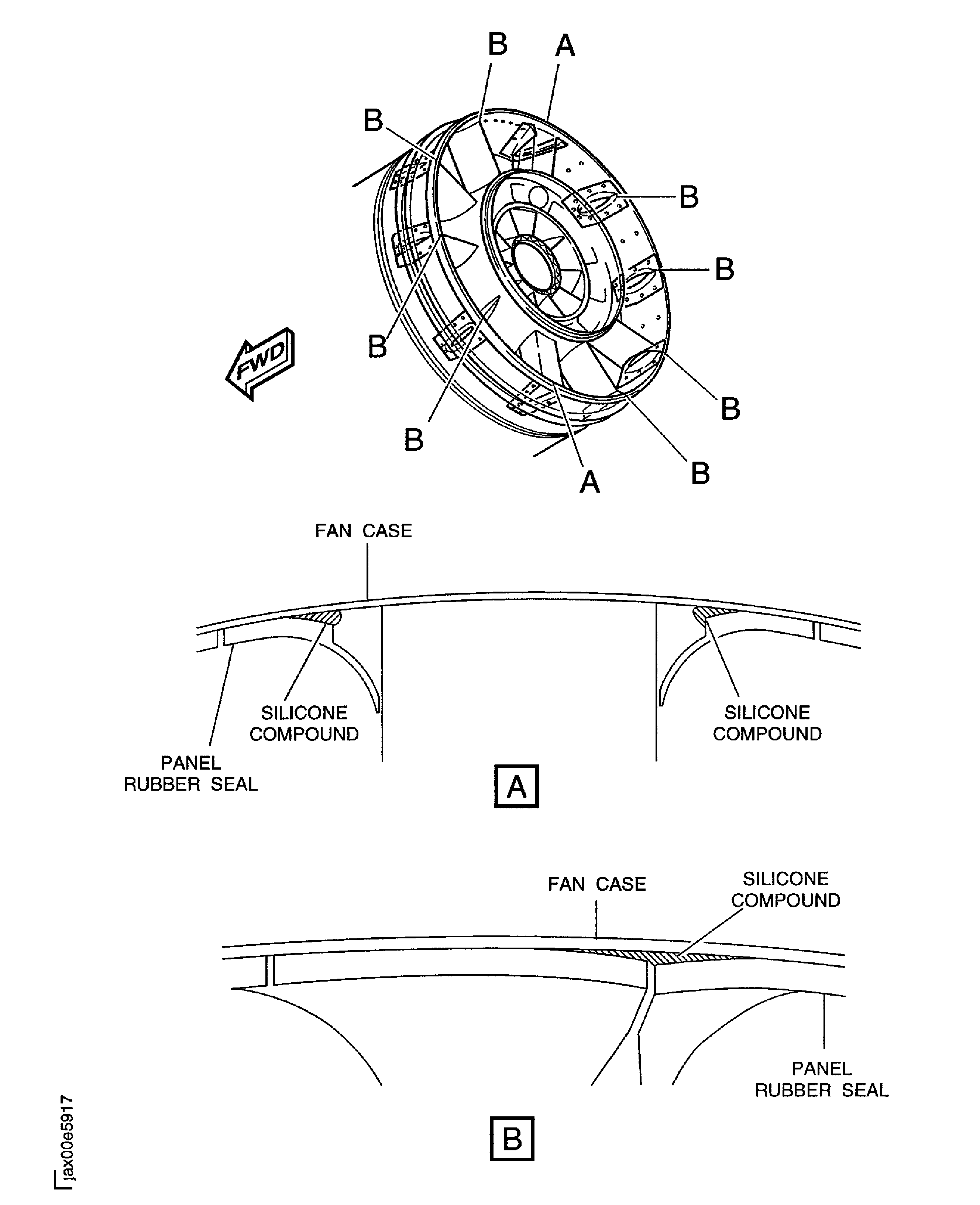
CAREFULLY USE A THIN BLADE CUTTER. THE CUTTER CAN CAUSE DAMAGE TO THE SURFACE OF THE PANEL RUBBER SEALS AND THE FAN CASE.Cut the silicone compound between the panel rubber seals and the fan case if the silicone compound prevents removal of the panel rubber seals. Use a thin blade cutter or an equivalent hand tool.
Remove the panel rubber seals.
SUBTASK 72-32-00-030-227-A00 Remove the Panel Rubber Seals (Pre SBE 72-0156)
CAUTION
CAREFULLY USE A THIN BLADE CUTTER. THE CUTTER CAN CAUSE DAMAGE TO THE SURFACE OF THE NO. 1 PANEL RUBBER SEAL AND THE FAN FRAME NO. 1 STRUT.Cut the silicone compound between the No. 1 panel rubber seal and the fan frame No. 1 strut if the silicone compound prevents removal of the panel rubber seal. Use a thin blade cutter or an equivalent hand tool.
CAUTION
CAREFULLY USE A THIN BLADE CUTTER. THE CUTTER CAN CAUSE DAMAGE TO THE SURFACE OF THE PANEL RUBBER SEALS AND THE FAN CASE.Cut the silicone compound between the panel rubber seals and the fan case if the silicone compound prevents removal of the panel rubber seals. Use a thin blade cutter or an equivalent hand tool.
Remove the panel rubber seals.
SUBTASK 72-32-00-030-227-B00 Remove the Panel Rubber Seals (SBE 72-0156)
SBE 72-0156: Replace the fan case No. 1 rubber seal
Refer to Figure.
SUBTASK 72-32-00-030-228-A00 Remove the Unwanted Silicone Compound from the Panel Rubber Seals and the Fan Case (Pre SBE 72-0156)
CAUTION
CAREFULLY USE A SCRAPER. THE SCRAPER CAN CAUSE DAMAGE TO THE SURFACE OF THE PANEL RUBBER SEAL, THE FAN CASE AND THE FAN FRAME NO. 1 STRUT.Use a scraper or an equivalent hand tool to remove the silicone compound from these:
- the front end of the No. 1 panel rubber seal.
- the rear ends of the No. 1 thru 10 panel rubber seals.
- the fan case.
- the fan frame No. 1 strut.
SUBTASK 72-32-00-030-228-B00 Remove the Unwanted Silicone Compound from the Panel Rubber Seals, the Fan Case and the Fan Frame No. 1 Strut (SBE 72-0156)
SBE 72-0156: Replace the fan case No. 1 rubber seal
Figure: Remove silicone compound from the FEGV outer platforms and the transition panels
Remove silicone compound from the FEGV outer platforms and the transition panels
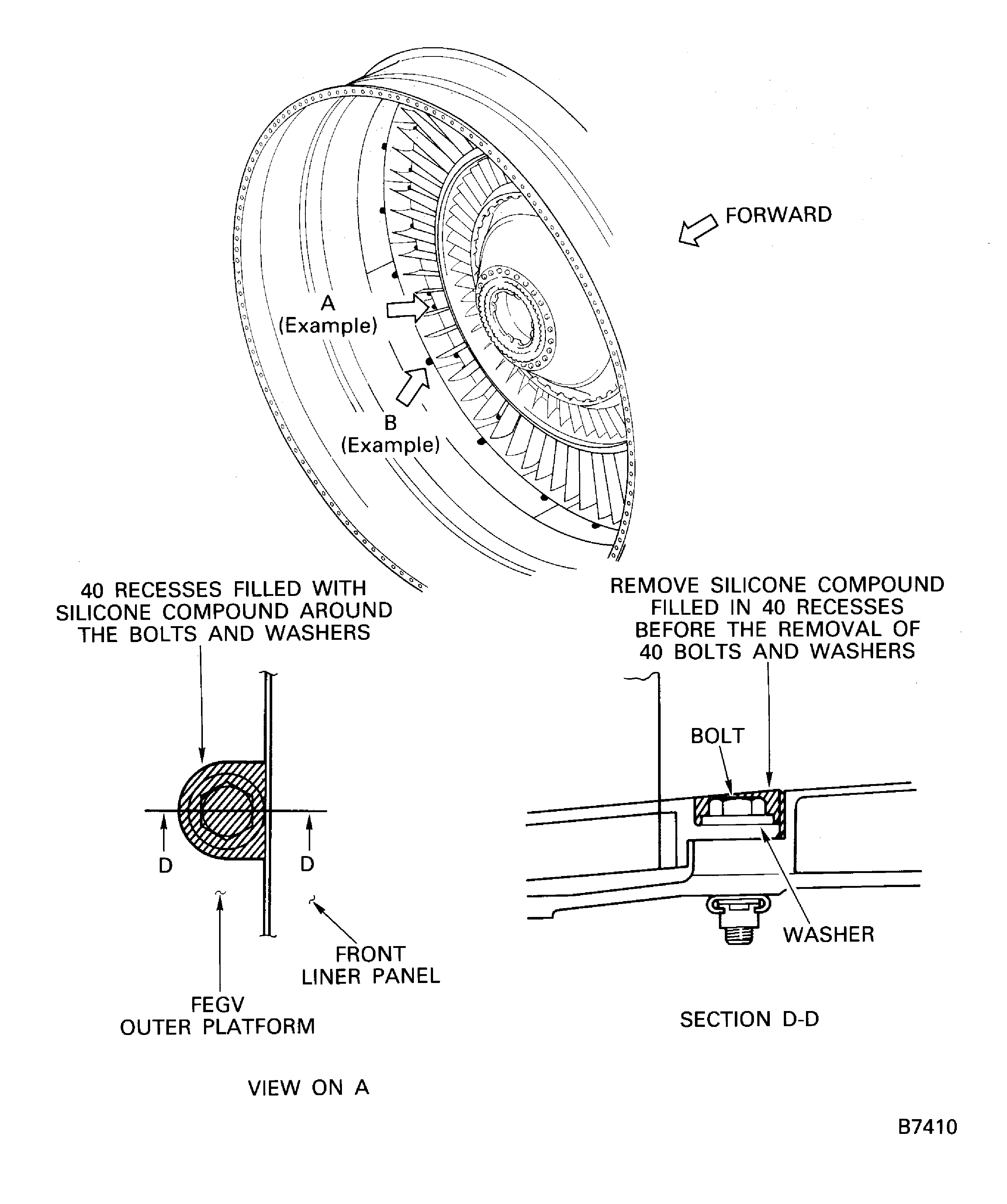
Figure: Remove silicone compound from the FEGV outer platforms and the transition panels
Remove silicone compound from the FEGV outer platforms and the transition panels
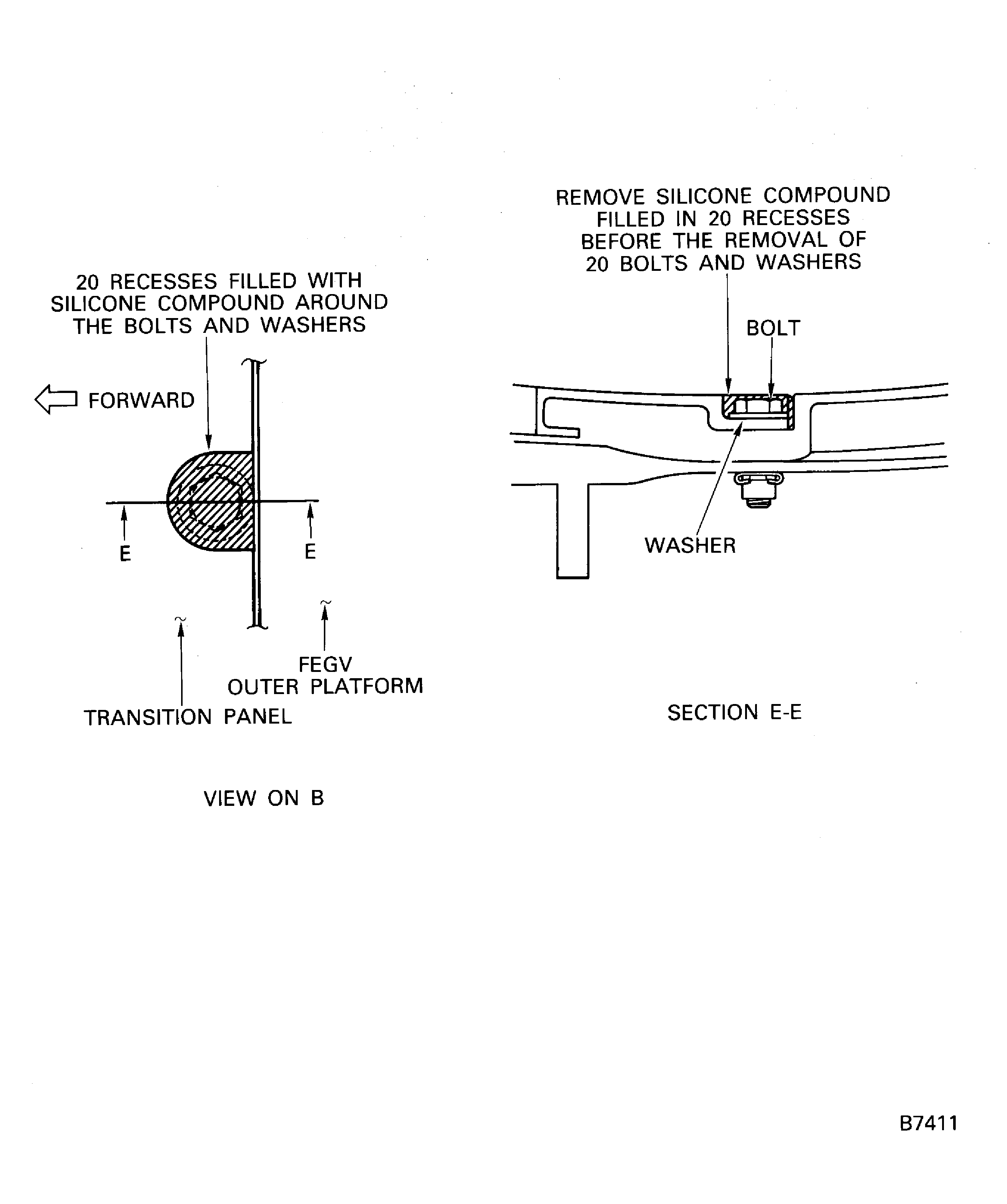
Figure: Remove silicone compound from the FEGV inner platforms
Remove silicone compound from the FEGV inner platforms
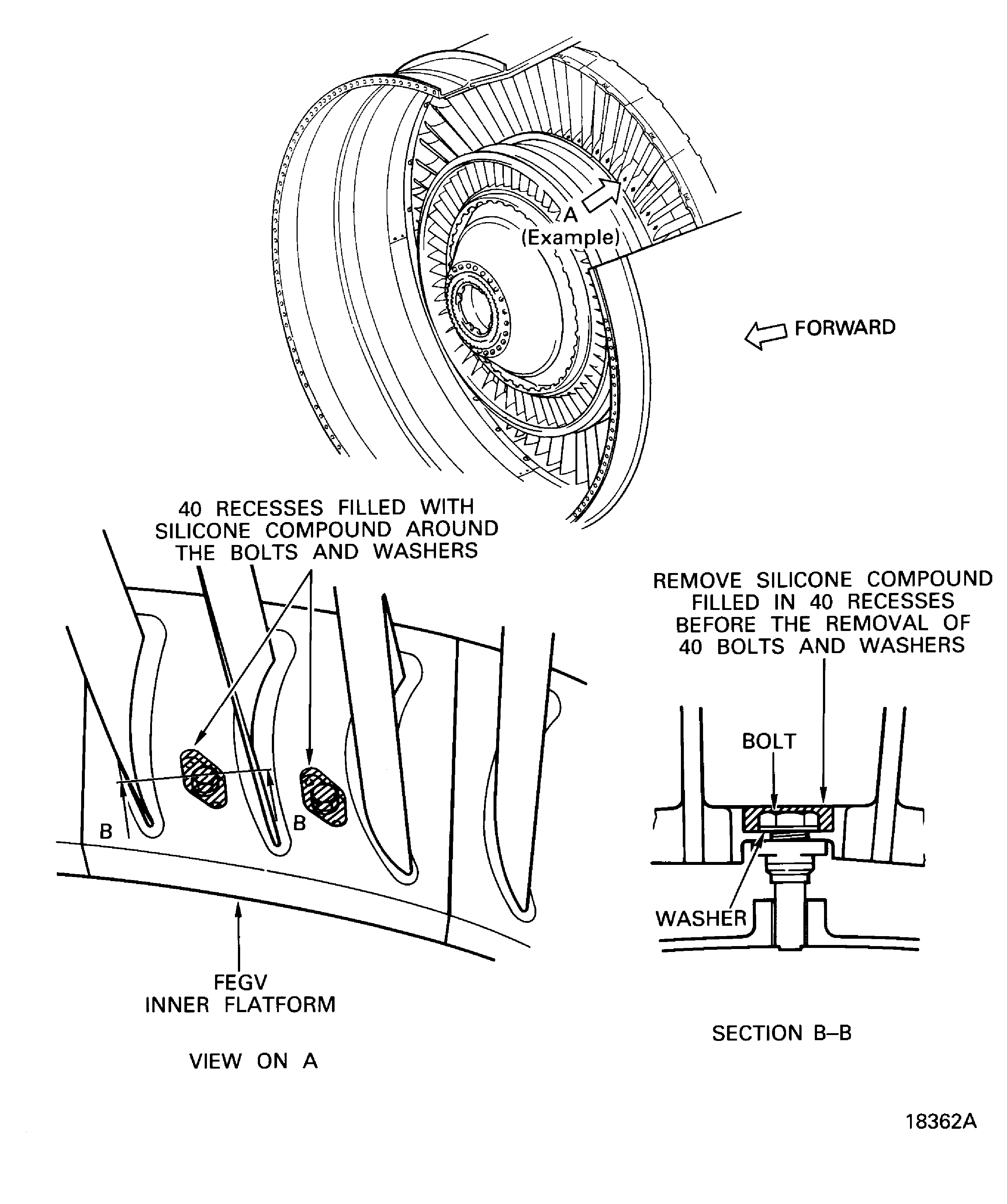
Figure: Remove the rear fairing from the LP compressor bleed duct
Remove the rear fairing from the LP compressor bleed duct
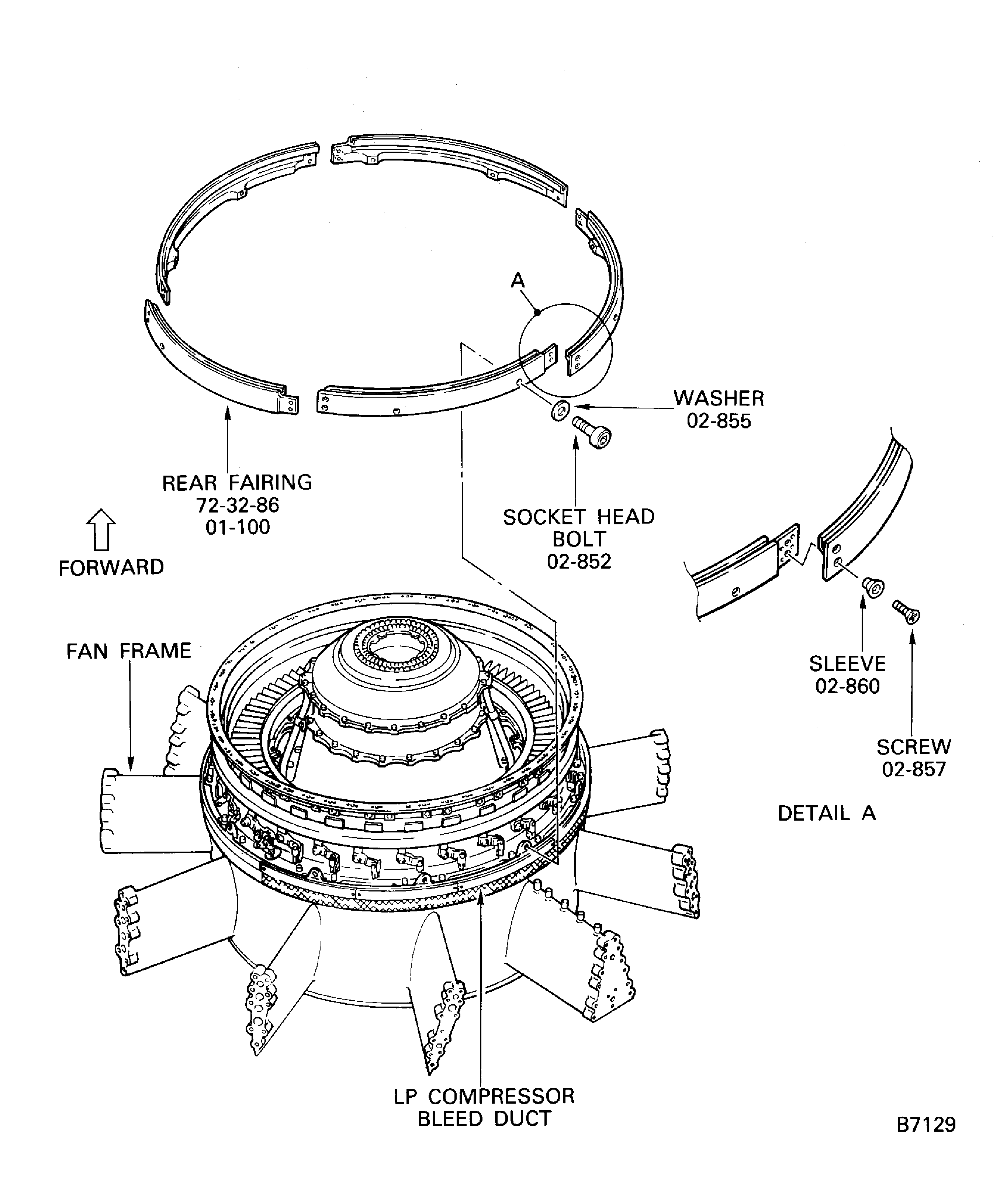
Figure: Remove the transition panels from the FEGVs
Remove the transition panels from the FEGVs
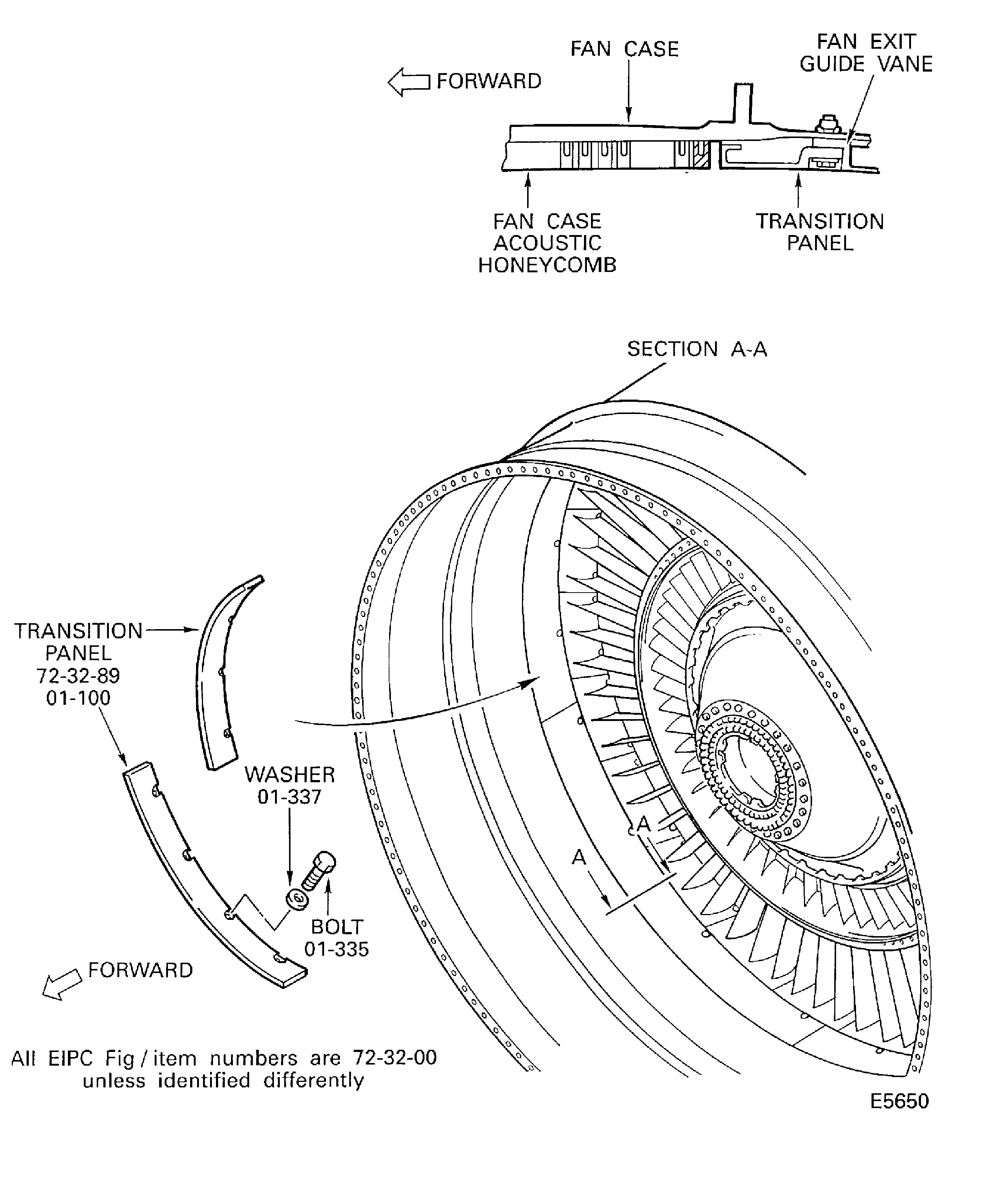
Figure: Remove the brackets from the LP compressor rear case
Remove the brackets from the LP compressor rear case
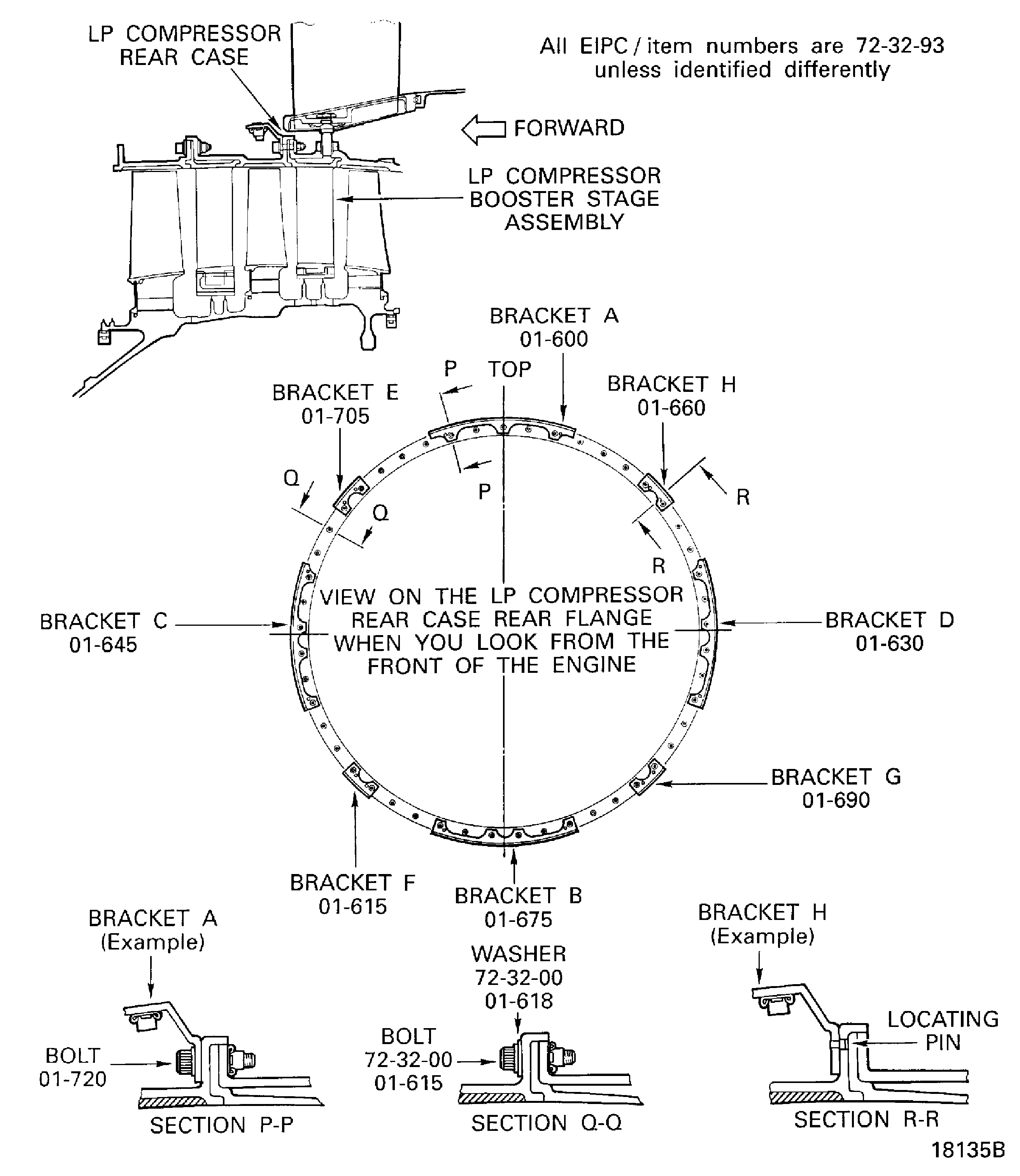
Figure: Remove the FEGVs from the fan case
Remove the FEGVs from the fan case
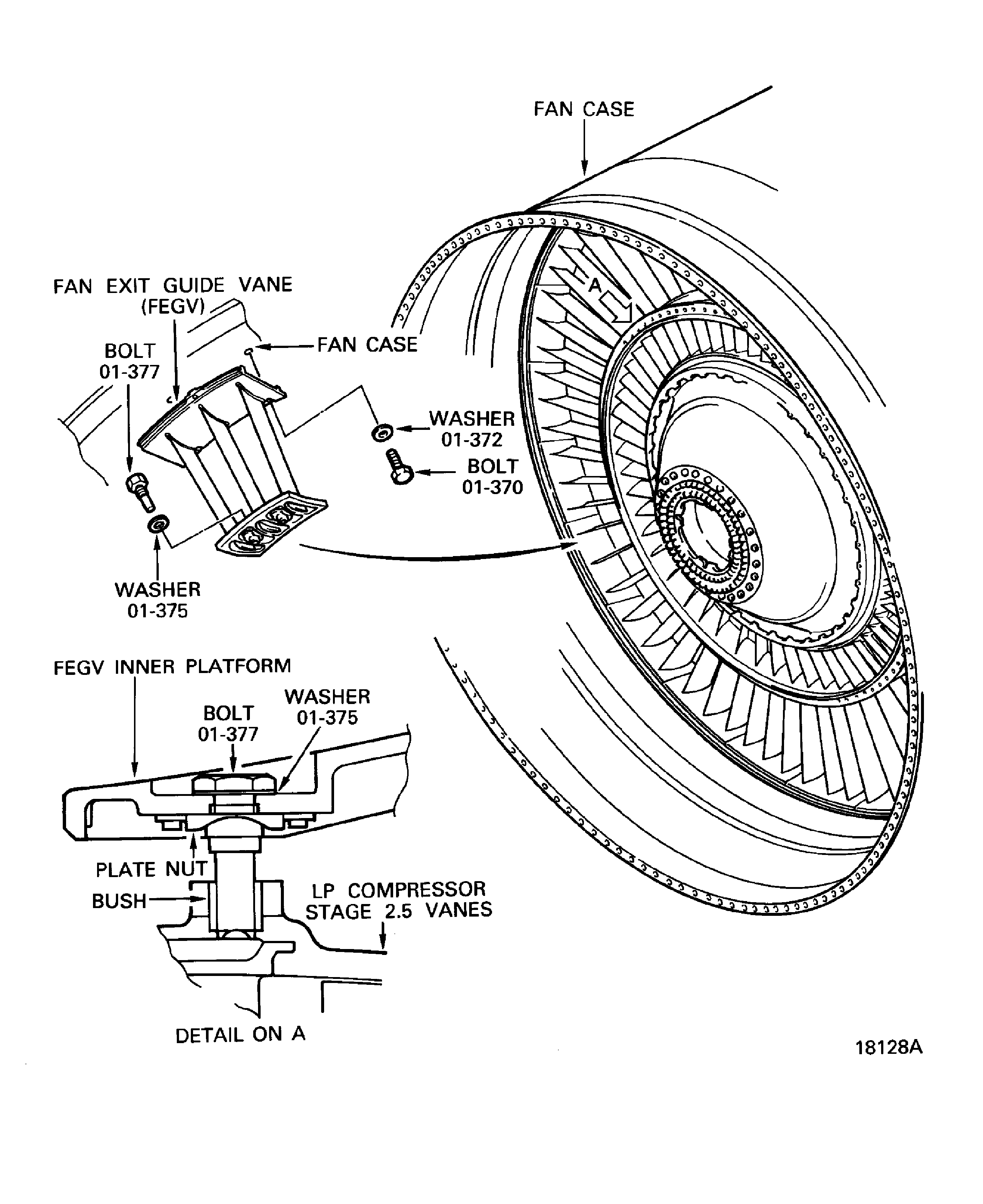
Figure: Positions of the screws and the nuts which attach the rear liner panels, the middle liner panel and the front liner panels to the fan case
Positions of the screws and the nuts which attach the rear liner panels, the middle liner panel and the front liner panels to the fan case
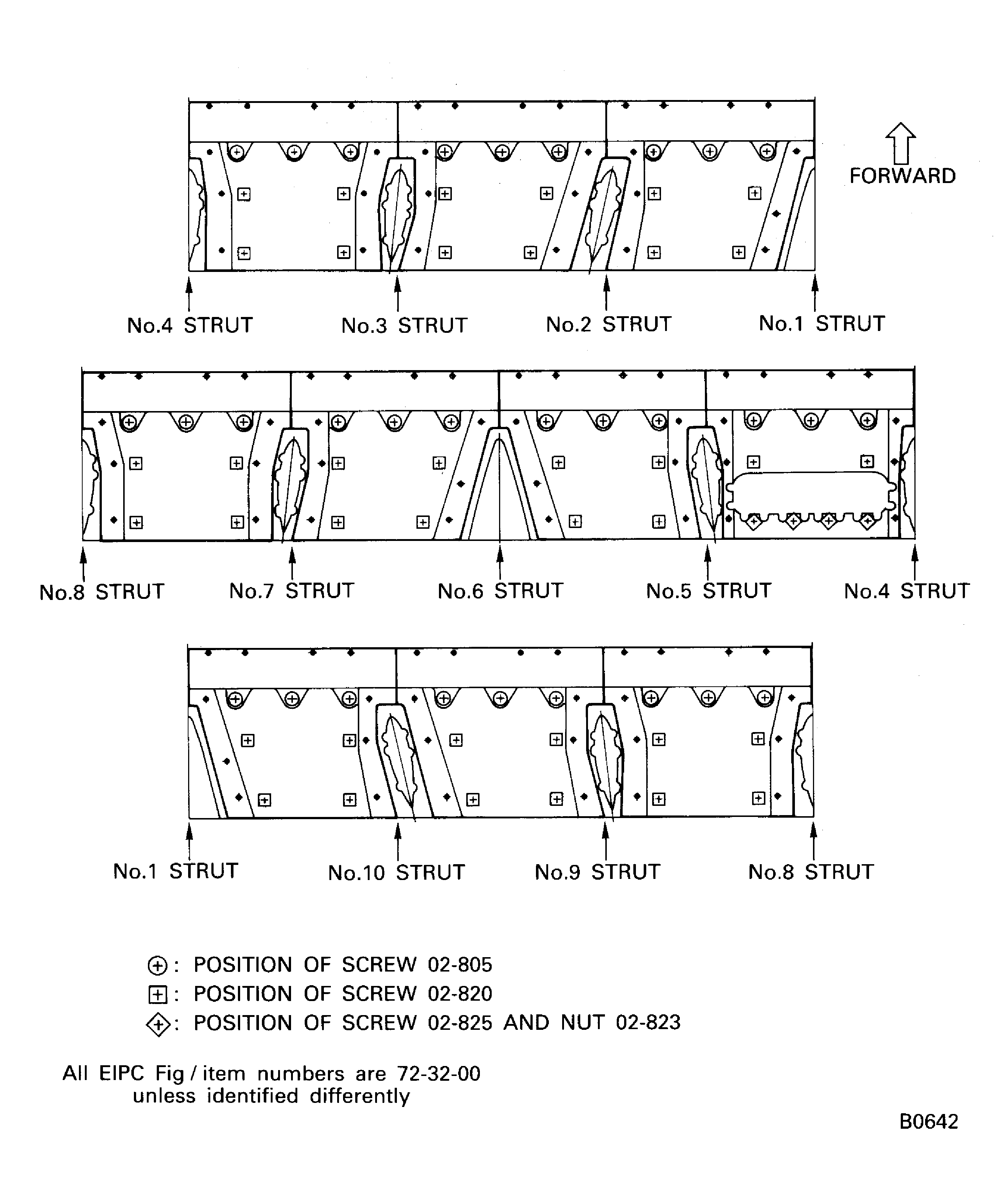
Figure: Remove the rear liner panels, the middle liner panel and the front liner panels from the fan case
Remove the rear liner panels, the middle liner panel and the front liner panels from the fan case
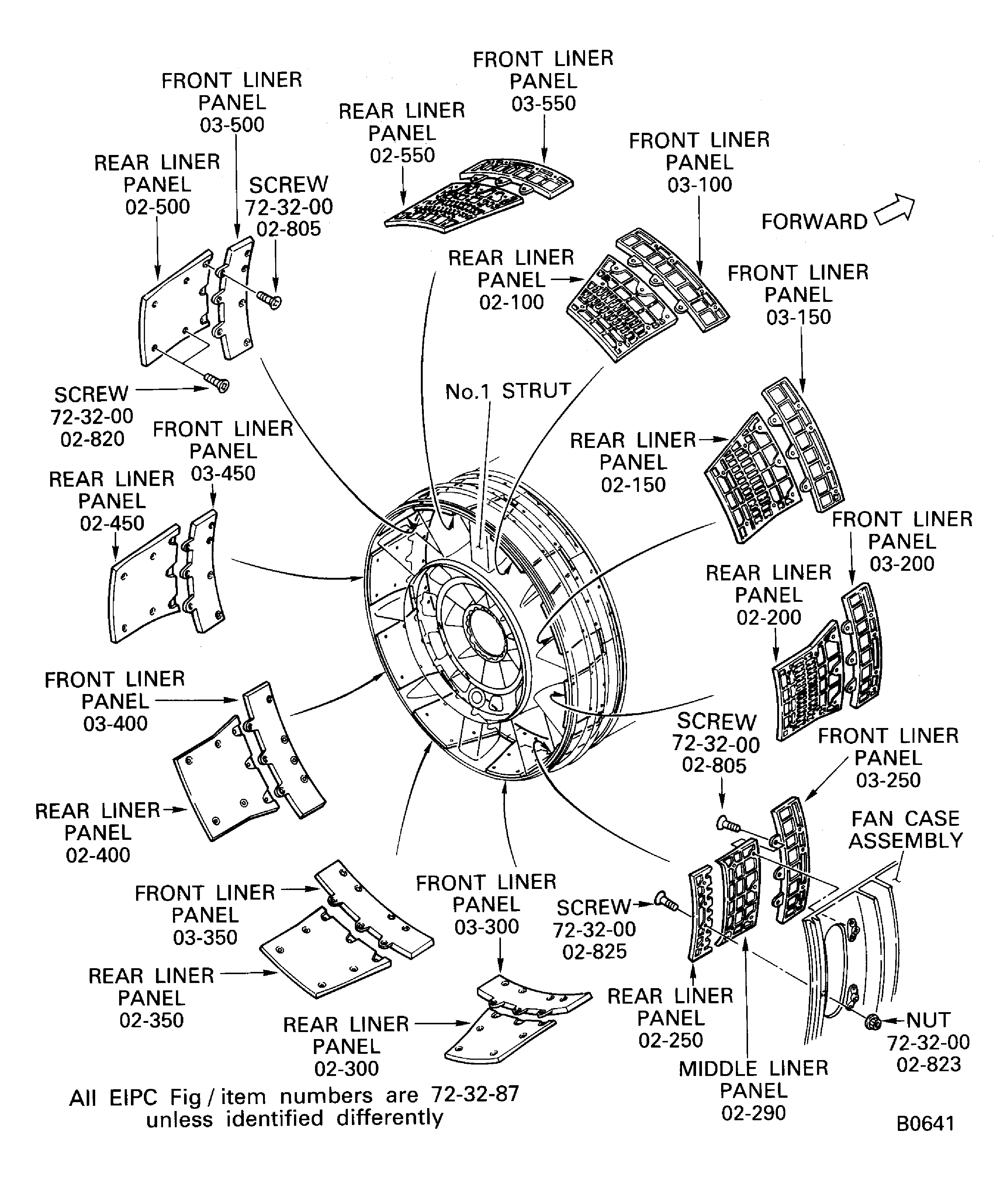
Figure: Position of the screws and the nuts which attach the panel rubber seals to the fan case
Position of the screws and the nuts which attach the panel rubber seals to the fan case
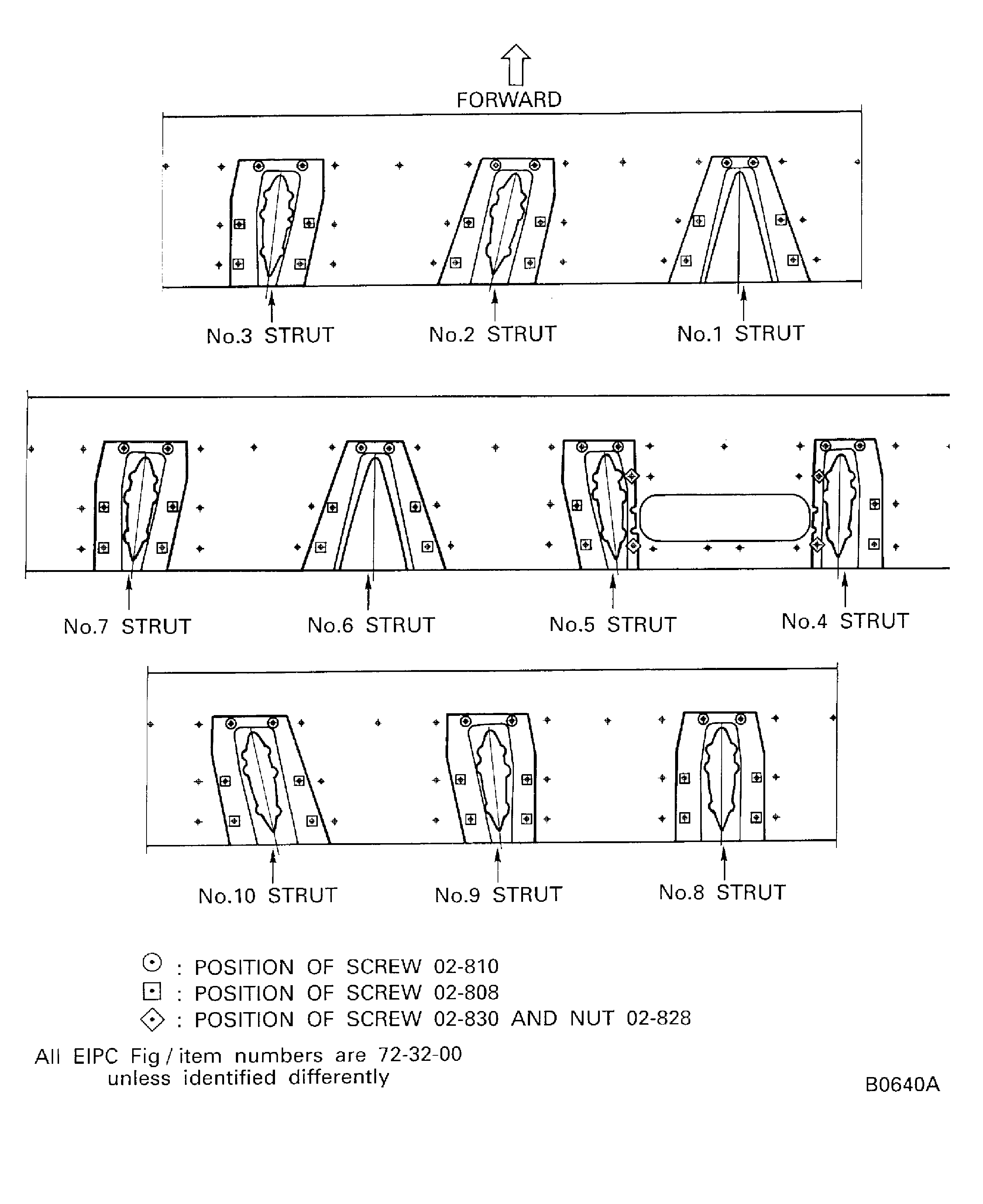
Figure: Remove the panel rubber seals from the fan case
Remove the panel rubber seals from the fan case
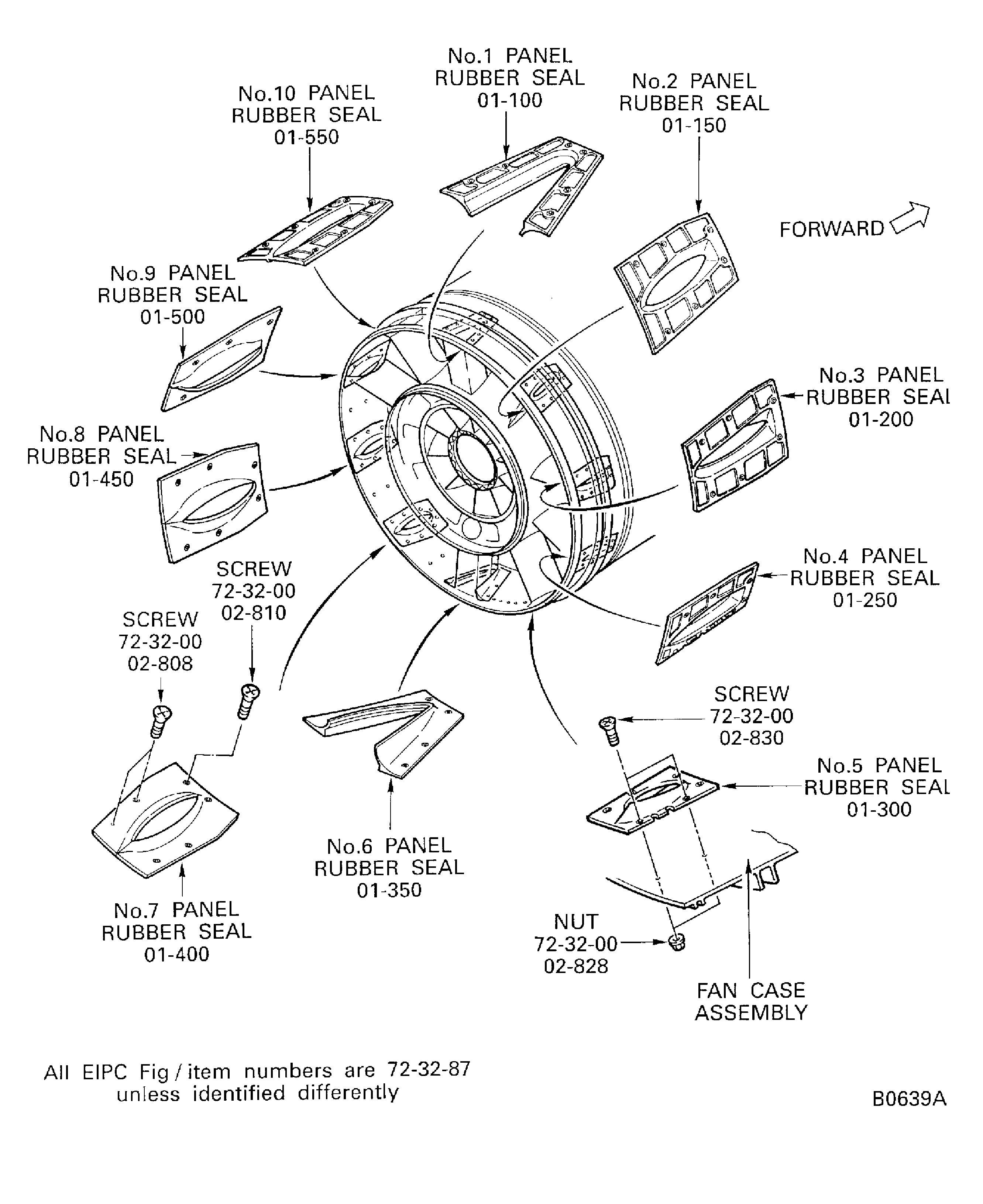
Figure: SBE 72-0156: Remove silicone compound from the No. 1 panel rubber seal and the fan frame No. 1 strut
SBE 72-0156: Remove silicone compound from the No. 1 panel rubber seal and the fan frame No. 1 strut
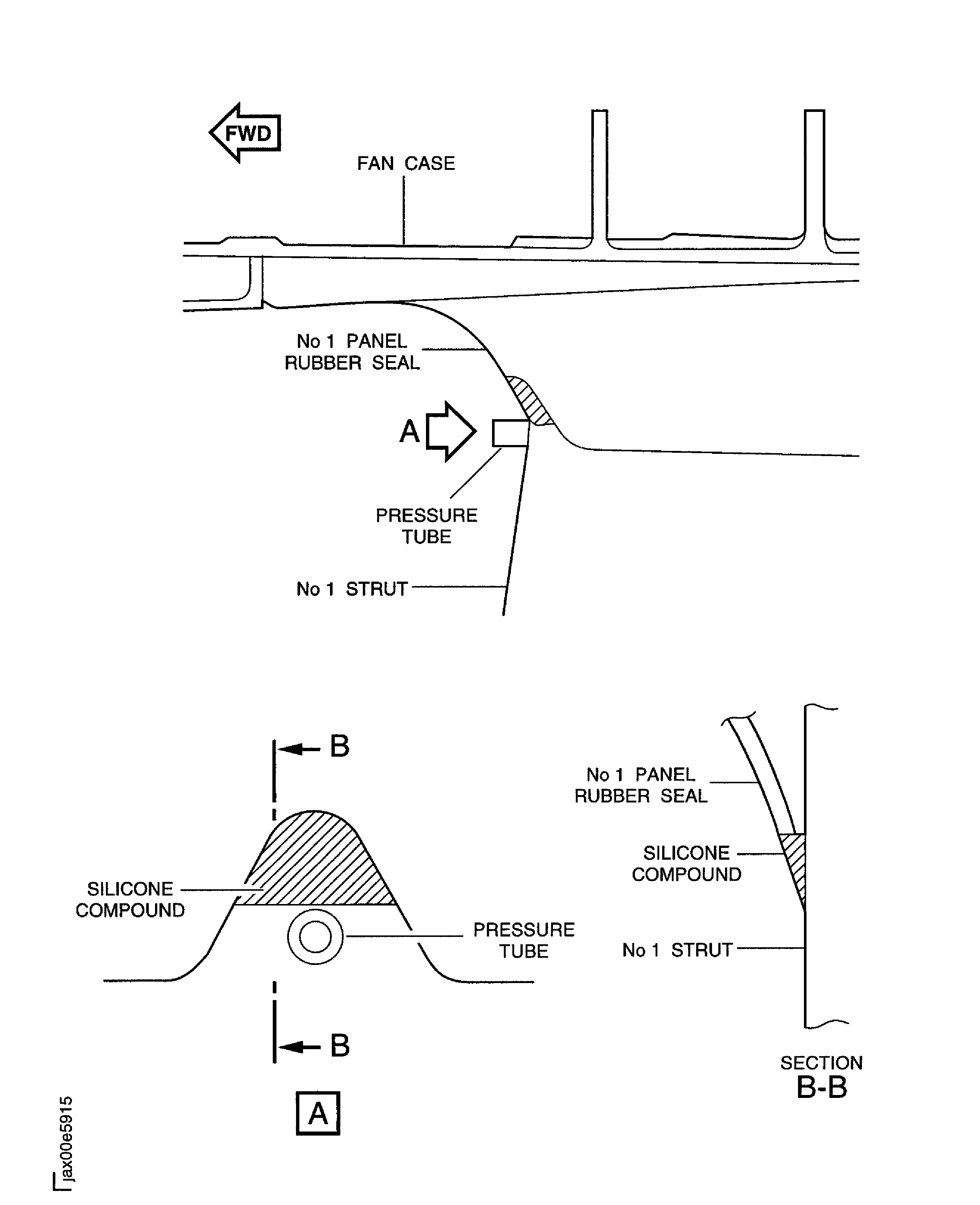
Figure: Remove silicone compound from the panel rubber seals and the fan case
Remove silicone compound from the panel rubber seals and the fan case