
Export Control
EAR Export Classification: Not subject to the EAR per 15 C.F.R. Chapter 1, Part 734.3(b)(3), except for the following Service Bulletins which are currently published as EAR Export Classification 9E991: SBE70-0992, SBE72-0483, SBE72-0580, SBE72-0588, SBE72-0640, SBE73-0209, SBE80-0024 and SBE80-0025.Copyright
© IAE International Aero Engines AG (2001, 2014 - 2021) The information contained in this document is the property of © IAE International Aero Engines AG and may not be copied or used for any purpose other than that for which it is supplied without the express written authority of © IAE International Aero Engines AG. (This does not preclude use by engine and aircraft operators for normal instructional, maintenance or overhaul purposes.).Applicability
All
Common Information
TASK 71-00-00-700-011-A00 Test No. 11 - Set Jumpers In Data Entry Plug (DEP), Testing-011
General
This TASK gives the procedures to set the jumper configuration in the Data Entry Plug (DEP).
Do not apply this TASK to the slave (DEP).
The DEP is used to input engine statistics to the Electronic Engine Control (EEC). Engine statistics that are input to the EEC by the DEP are:
Engine Take-off Rating - Bump Number
Engine Pressure Ratio (EPR) Modifier No. (Class No.)
Engine Serial Number
Engine statistics (except for the engine serial number) are input to both EEC Channels A and B. Engine Take-off Rating - Bump No., EPR Modifier No. and Engine Serial Number are obtained from the engine identification plate.
Figure shows the connector of the DEP and the pin letters given to each pin hole. The upper case letters I, O and Q and the lower case letters l and o are not used. Pin holes in the connector are connected by jumpers to set the DEP with the necessary engine statistics.
Figure shows the four types of jumpers that are used.
DEP's cannot be moved from engine to engine. Except for EPR Modifier No., a DEP can be identified and jumpered again only as instructed by service bulletin. The DEP and Engine Identification Plate marks must agree in relation to DEP Part No., EPR Modifier No., Engine Serial No. and Take-off Rating - Bump No.
The Bump Number Configuration of a DEP cannot be changed without approval from IAE.
NOTE
If a DEP is damaged or needs replacement, the replacement DEP must be jumpered exactly like the old one.
Refer to Figure to determine correct DEP and EEC part number relationship.
Use this test to set DEP jumpers if:
Test No. 10 results show a new DEP EPR Modifier No. (Class No.) is necessary.
The DEP is lost and no information about the DEP requirements is known.
Fig/item numbers in parentheses in the procedure agree with those used in the IPC. Only the primary Fig/item numbers are used. For the service bulletin alpha variants refer to the IPC.
For lockwire data and procedures, refer to SPM TASK 70-42-05-400-501.
For standard torque data and procedures, refer to SPM TASK 70-41-00-400-501 and SPM TASK 70-41-02-400-501.
NOTE
NOTE
Preliminary Requirements
Pre-Conditions
NONESupport Equipment
| Name | Manufacturer | Part Number / Identification | Quantity | Remark |
|---|---|---|---|---|
| Contact insertion tool | LOCAL | MS27495A20 | ||
| Contact removal tool | LOCAL | MS27495R20 | ||
| Plastic Cap | LOCAL | Plastic Cap | ||
| Soft Nose Pliers | LOCAL | Soft Nose Pliers | ||
| Strap Wrench | LOCAL | TG-70 | ||
| IAE 1R19416 EEC harness wrench | 0AM53 | IAE 1R19416 | 1 | supersedes IAE 1R19279 |
| IAE 1R19279 EEC harness wrench | 0AM53 | IAE 1R19279 | 1 | superseded by IAE 1R19416, supersedes IAE 1J12018 |
| IAE 1J12018 EEC harness wrench | 0AM53 | IAE 1J12018 | 1 | superseded by IAE 1R19279 |
| IAE 1P16271 Holding fixture | 0AM53 | IAE 1P16271 | 1 | |
| IAE 2P16369 EEC Software Loader and DEP Tester | 0AM53 | IAE 2P16369 | 1 | |
| IAE 2P16552 EEC Software Loader and DEP Tester | 0AM53 | IAE 2P16552 | 1 |
Consumables, Materials and Expendables
| Name | Manufacturer | Part Number / Identification | Quantity | Remark |
|---|---|---|---|---|
| CoMat 02-138 LOCKWIRE | LOCAL | CoMat 02-138 |
Spares
| Name | Manufacturer | Part Number / Identification | Quantity | Remark |
|---|---|---|---|---|
| Jumper | 1 | (1) | ||
| Jumper | 1 | (2) | ||
| Jumper | 1 | (3) | ||
| Jumper | 1 | (4) | ||
| Sealing plug | 1 | |||
| Contact pin | 1 |
Safety Requirements
NONEProcedure
Refer to Figure.
Disconnect the DEP from the EEC connector with IAE 1J12018 EEC harness wrench 1 off.
SUBTASK 71-00-00-060-051 Disconnect the Data Entry Plug (DEP) from the Electronic Engine Control (EEC)
Install the DEP onto the IAE 1P16271 Holding fixture 1 off, as follows:
SUBTASK 71-00-00-060-052 Remove the Backshell from the Connector of the DEP
NOTE
For engines that need only modification of the EPR Modifier No. as a result of doing Test No.10, TASK 71-00-00-700-010-A00 (TESTING-0010, CONFIG-001), use the procedure in Figure for the applicable DEP part number. Refer to Figure for bump definitions and EEC software applicability.
SUBTASK 71-00-00-350-051 Find the Fan Module Identification No., Take-off Rating - Bump No., EPR Modifier No. and Engine Serial No.
Refer to Figure.

CAUTION
DO NOT APPLY STRONG FORCE TO THE INSERTION TOOL WHEN YOU PUSH THE JUMPER. THIS COULD CAUSE DAMAGE TO THE COLLET.NOTE
When the collet locks the contact, the collet makes a light click sound.Push one end of the jumper into the correct hole in the connector until the shoulder of the contact becomes locked by the collet.
Install the jumpers in to the connector (2 pin).
NOTE
When the collet locks the contact, the collet makes a light click sound.Push all of the jumper ends into the correct holes with your hand. Use the insertion tool to push the contacts into the connector until the shoulder of the contact is locked by the collet. Push each contact a little at a time.
Install the jumpers into the connector (3, 4 or 5-pin).
SUBTASK 71-00-00-350-053 Install the Jumpers (73-22-35,01-145, 01-155, 01-165 and 01-175) into the Connector (73-22-35,01-200)
CAUTION
DO NOT USE THE REMOVAL TOOL IN THIS SUBTASK. THE COLLET CAN NOT RETRACT AND CAN NOT LOCK THE JUMPER.Refer to Figure.
SUBTASK 71-00-00-350-054 Install the Contact Pins (73-22-35, 01-210) and Sealing Plugs (73-22-35, 01-190) in to the Remaining Open Connector Holes
NOTE
If there is no area on the backshell to make marks, replace the backshell with a new one. Make sure you mark the new backshell with the same data that is given on the old backshell.If the DEP was reworked to a new configuration, see the service bulletin for the applicable engine identification plate instructions.If the EPR modifier number is changed, you can vibration peen the new number on the data entry plug backshell and the engine identification plate.If you replace the engine identification plate, see your IAE representative.As necessary, write the Part No. and CL1 or CL2, Rating - Bump No., EPR Modifier No. and Engine Serial No. on the backshell and the engine identification plate. Use the vibration peen method. Refer to SPM TASK 70-09-00-400-501.
SUBTASK 71-00-00-350-055 Make Marks on the Backshell (73-22-35, 01-130) Outer Face and on the Engine Identification Plate
Install the connector on the IAE 1P16271 Holding fixture 1 off, as follows:
CAUTION
MAKE SURE THE BACKSHELL DOES NOT TURN WHEN YOU TIGHTEN THE BACKSHELL NUT. IF THE BACKSHELL TURNS, DAMAGE TO THE JUMPER WIRES CAN OCCUR.Engage the nut of the backshell with the threads on the connector. Torque the nut to 53 to 58 lbf.in (5.988 to 6.553 Nm). Use TG-70 strap wrench or equivalent.
Safety the nut with CoMat 02-138 LOCKWIRE. Refer to SPM TASK 70-42-05-400-501.
SUBTASK 71-00-00-460-051 Install the Backshell to the Connector
Do an electrical continuity test on the DEP. UseIAE 2P16369 EEC Software Loader and DEP Tester 1 off as follows:
SUBTASK 71-00-00-750-105-A00 Do an Acceptance Test for PN 5A0431 and PN 5A0432
Make sure the POWER switch for the IAE 2P16552 EEC Software Loader and DEP Tester 1 off is in the OFF position.
Connect the IAE 2P16552 EEC Software Loader and DEP Tester 1 off to an external power source (110V/60Hz or 220V/50Hz).
NOTE
Do not attach the Yellow Y cable connectors to the TDS Ranger or theIAE 2P16552 EEC Software Loader and DEP Tester 1 off until instructed to do so, or the DEP test will not be successful.Setup of the IAE 2P16552 EEC Software Loader and DEP Tester 1 off.
Follow the instructions in the table below:
STEP
ACTION
RESULT(S)
ADDITIONAL INFORMATION
NOTE
The center of the "D-Pad" and the "Enter" key can be used interchangeably throughout the following procedure.(a)
Move the main power switch which is labeled "AC POWER INPUT" on the IAE 2P16552 EEC Software Loader and DEP Tester 1 off, to the ON position.
The orange "AC PWR ON" light will be on.
The orange light means the equipment is powered and ready for use.
(b)
Push and hold the green power button on the TDS Ranger until the word "Booting" appears at the bottom of the screen next to an arrow.
The "V2500 Front End Program" screen will be displayed.
If the unit was already on, a count down screen will appear after approximately three seconds. Wait for the countdown to reach zero. Continue to hold the green power button until the word "Booting" appears.
If the unit was off, the word "Booting" will appear after approximately two seconds.
(c)
When the "V2500 Front End Program" screen is shown, connect the Yellow Y cable to IAE 2P16552 EEC Software Loader and DEP Tester 1 off and TDS Ranger as labeled.
NOTE
If the Yellow Y Cable was already connected to the TDS Ranger before step (b), the DEP test will not be successful. Disconnect the Yellow Y Cable from the TDS Ranger and go back to step (b).The system setup is complete.
(d)
Use the "D-Pad" on the TDS Ranger and highlight "Go to Engine Support Program".
Push the ENTER key.
The "V2500 Engine Support Programs" screen will be displayed.
At this screen, there will be three options:
V2500 Loader.
DEP Tester.
Administrative Functions.
(e)
Use the "D-Pad" on the TDS Ranger and select DEP Tester.
Push the ENTER key.
The "Data Entry Plug Tester" screen will be displayed.
At this screen, there will be two options:
Test Data Entry Plug.
Data Entry Plug Tester Self Test.
(f)
Use the "D-Pad" on the TDS Ranger and select "Test Data Entry Plug".
Push the ENTER key.
The Document Property Rights Notice will be displayed.
NOTE
You must agree to the terms and conditions or it is not permissible to use this device.(g)
If you agree to the terms and conditions, use the "D-Pad" to highlight the check box, and push the ENTER key.
Use the "D-Pad" to highlight "Continue" and push the ENTER key.
The "Data Entry Plug Tester" screen will be displayed with instructions to 1. Install the Data Entry Plug and 2. Select Continue
(h)
Install the DEP on the panel marked "Data Entry Plug Tester Interface" on IAE 2P16552 EEC Software Loader and DEP Tester 1 off.
Use the "D-Pad" on the TDS Ranger and select "Continue".
Push the ENTER key.
The "Data Entry Plug Tester" screen will be displayed with radio buttons to select the applicable engine model.
(i)
Use the "D-Pad" and "Key Pad" on the TDS Ranger to highlight the applicable engine model.
Push the ENTER key to turn the radio button black next to the appropriate engine model.
Use the "D-Pad" on the TDS Ranger and select "Continue".
The detected configuration of the DEP will be displayed.
If the DEP wiring configuration is not recognized, "Unknown DEP Jumper Connection" will be displayed. Use the "D-Pad" on the TDS Ranger to select "Continue" and push the ENTER key.
Continue with step (l).
Otherwise, go to step (j).
(j)
If the configuration displayed is the setting you want, use the "D-Pad" on the TDS Ranger to select "Yes".
If the configuration displayed is not the setting you want, use the "D-Pad" on the TDS Ranger to select "Yes".
Push the ENTER key.
If "Yes" is selected, the DEP configuration will be displayed. Go to step (k).
If "No" is selected, you will be asked to enter the DEP configuration you want. Go to step (l).
(k)
Use the "D-Pad" on the TDS Ranger to select "Finish".
Push the ENTER key.
The "V2500 Engine Support Programs" menu will be displayed.
You should be at step (k) if the DEP was wired correctly, and you selected "Yes" at step (j). Otherwise, go to step (l).
(l)
If an unknown DEP jumper connection was detected, or if the configuration you detected was not the configuration you wanted, the words "Enter Desired" will be displayed, followed by several empty boxes.
Use the "D-Pad" ENTER key, TAB key, and keypad to enter the configuration you want.
Use the "D-Pad" to select "Continue".
The results you wanted will be displayed alongside the results you got.
When you enter the Engine Serial Number, enter the number without a "V" before it.
(m)
Remove the DEP from the panel that says "Data Entry Plug Tester Interface" on IAE 2P16552 EEC Software Loader and DEP Tester 1 off.
For each row on the TDS Ranger that show "Fail" in the right column, correct the wiring as necessary.
Install the DEP on the panel that says "Data Entry Plug Tester Interface" on IAE 2P16552 EEC Software Loader and DEP Tester 1 off.
Use the "D-Pad" on the TDS Ranger to select "Continue".
Push the ENTER key.
The words "Do you want to retest this plug?" will be displayed.
It is possible to go back to the wiring display screen by using the "D-Pad" on the TDS Ranger to select "back" and pushing the ENTER key.
(n)
Use the "D-Pad" on the TDS ranger to select "Yes".
Push the ENTER key.
A screen will be displayed with instructions to select "DEP P/N to be tested". Go back to step (i) for instructions to continue with the DEP test.
If you selected "No", the "V2500 Engine Support Programs" menu will be displayed.
Do a test of the DEP wiring.
Make sure the power switch for IAE 2P16552 EEC Software Loader and DEP Tester 1 off is in the OFF position.
Disconnect the Yellow Y Cable from IAE 2P16552 EEC Software Loader and DEP Tester 1 off and TDS Ranger.
Disconnect the Data Entry Plug from the panel that says "Data Entry Plug Interface" on IAE 2P16552 EEC Software Loader and DEP Tester 1 off.
Shut Down IAE 2P16552 EEC Software Loader and DEP Tester 1 off.
Do an electrical wiring test on the DEP plug assembly. Use the IAE 2P16552 EEC Software Loader and DEP Tester 1 off.
SUBTASK 71-00-00-750-105-B00 Do an Acceptance Test for PN 2A2309
Connect the DEP to the EEC connector with IAE 1J12018 EEC harness wrench 1 off. Torque to 32 lbf.in (3.616 Nm). Refer to SPM TASK 70-43-01-400-501.
Connect the DEP to the EEC connector.
SUBTASK 71-00-00-450-054 Connect the DEP to the EEC
Figure: Contact hole locations
Contact hole locations

Figure: Types of jumpers
Types of jumpers
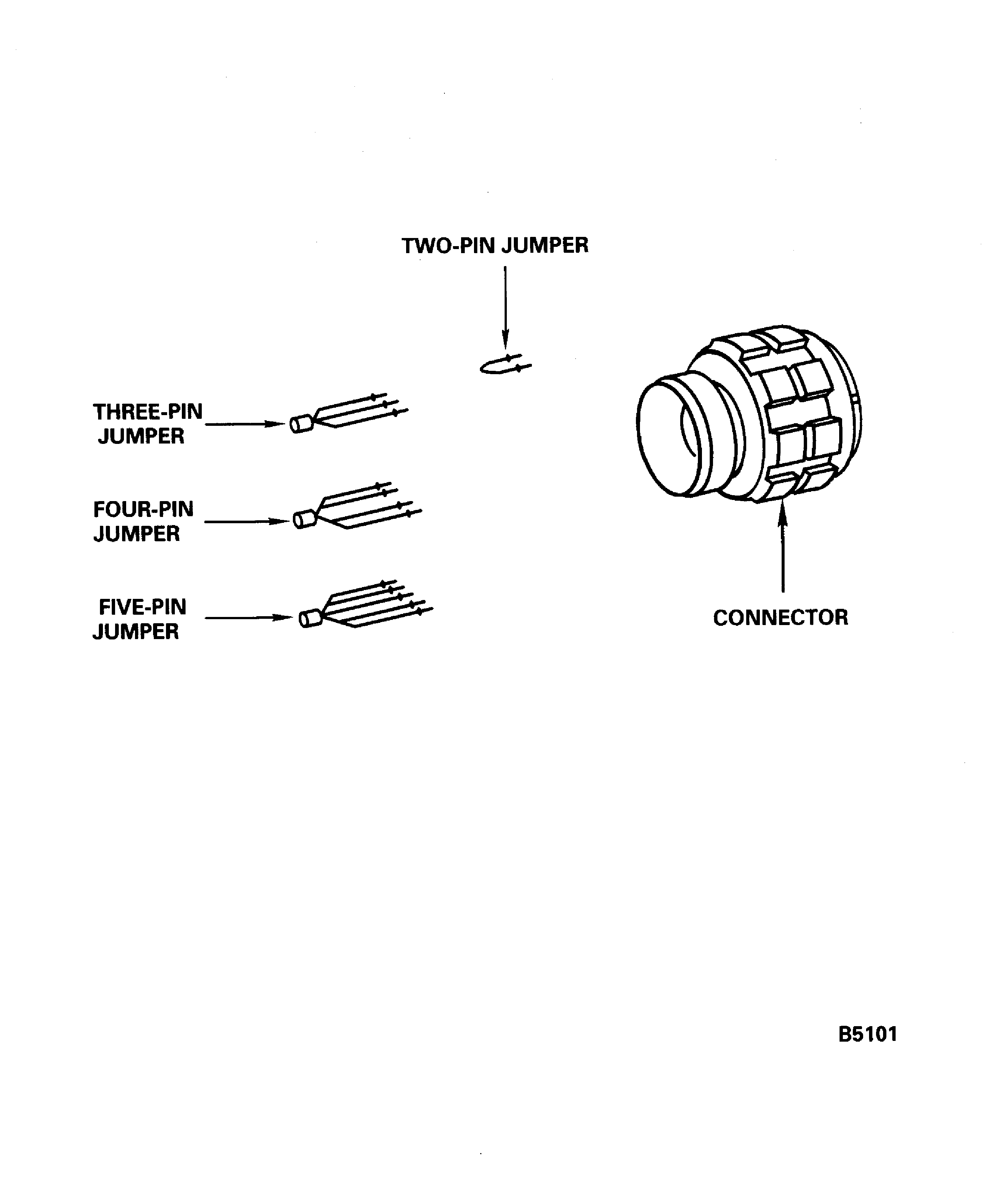
Figure: Bump definitions and EEC software applicability
Bump definitions and EEC software applicability
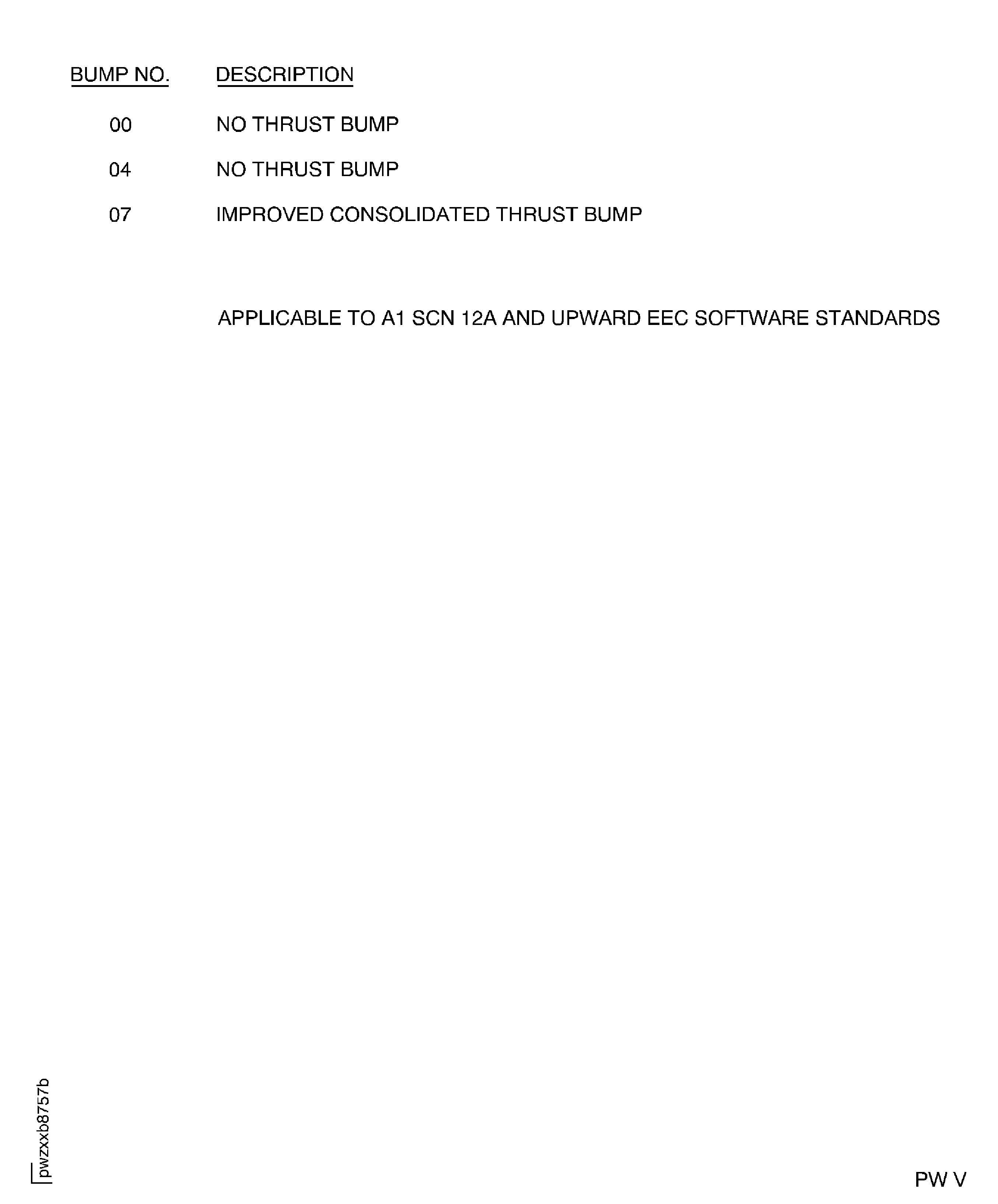
Figure: Data entry plug jumpering selection
Data entry plug jumpering selection
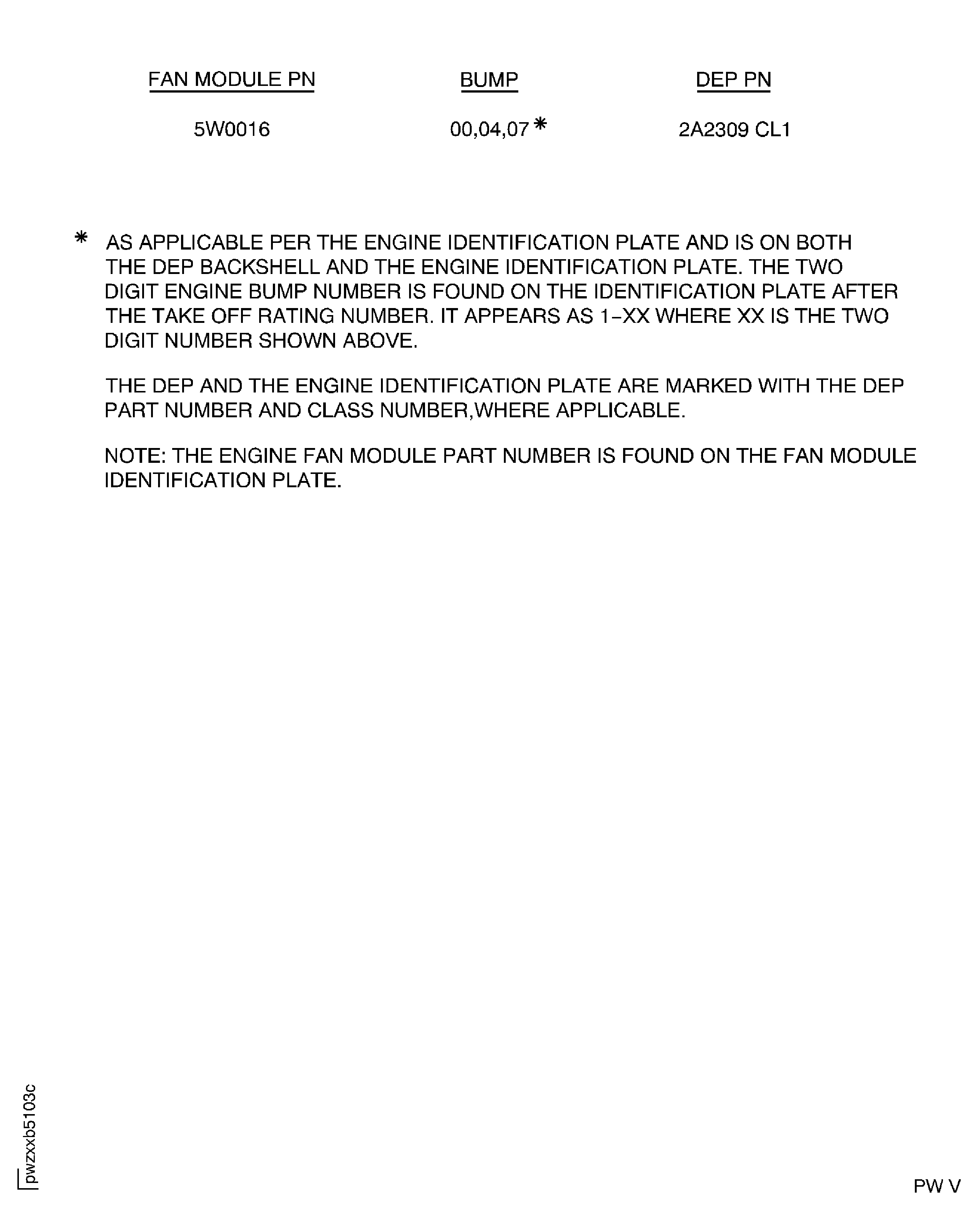
Figure: Data entry plug jumpering selection
Data entry plug jumpering selection
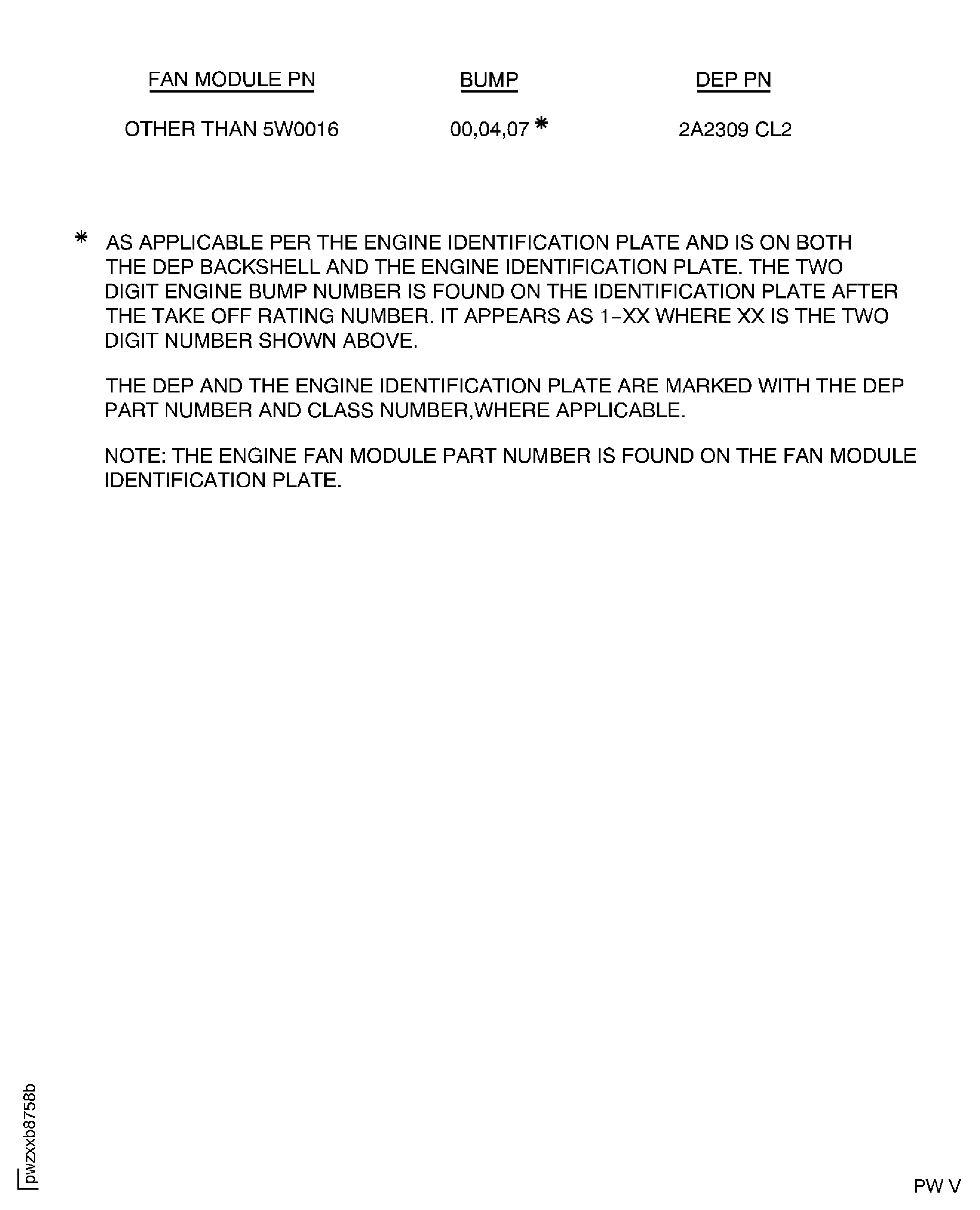
Figure: Data entry plug pin selection procedure for EPR Modifier No.
Data entry plug pin selection procedure for EPR Modifier No.
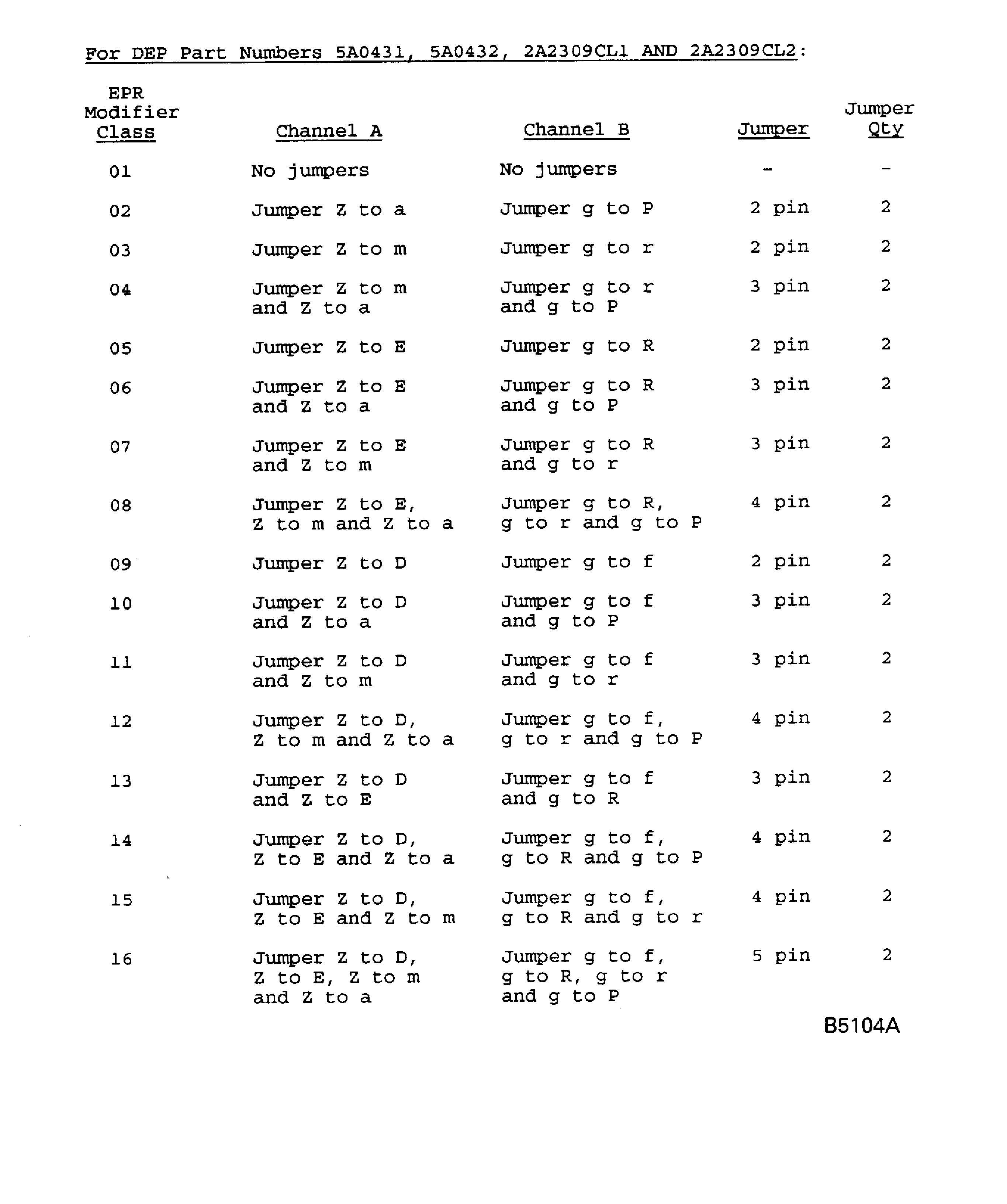
Figure: Data entry plug pin selection procedure for Engine Bump No.
Data entry plug pin selection procedure for Engine Bump No.
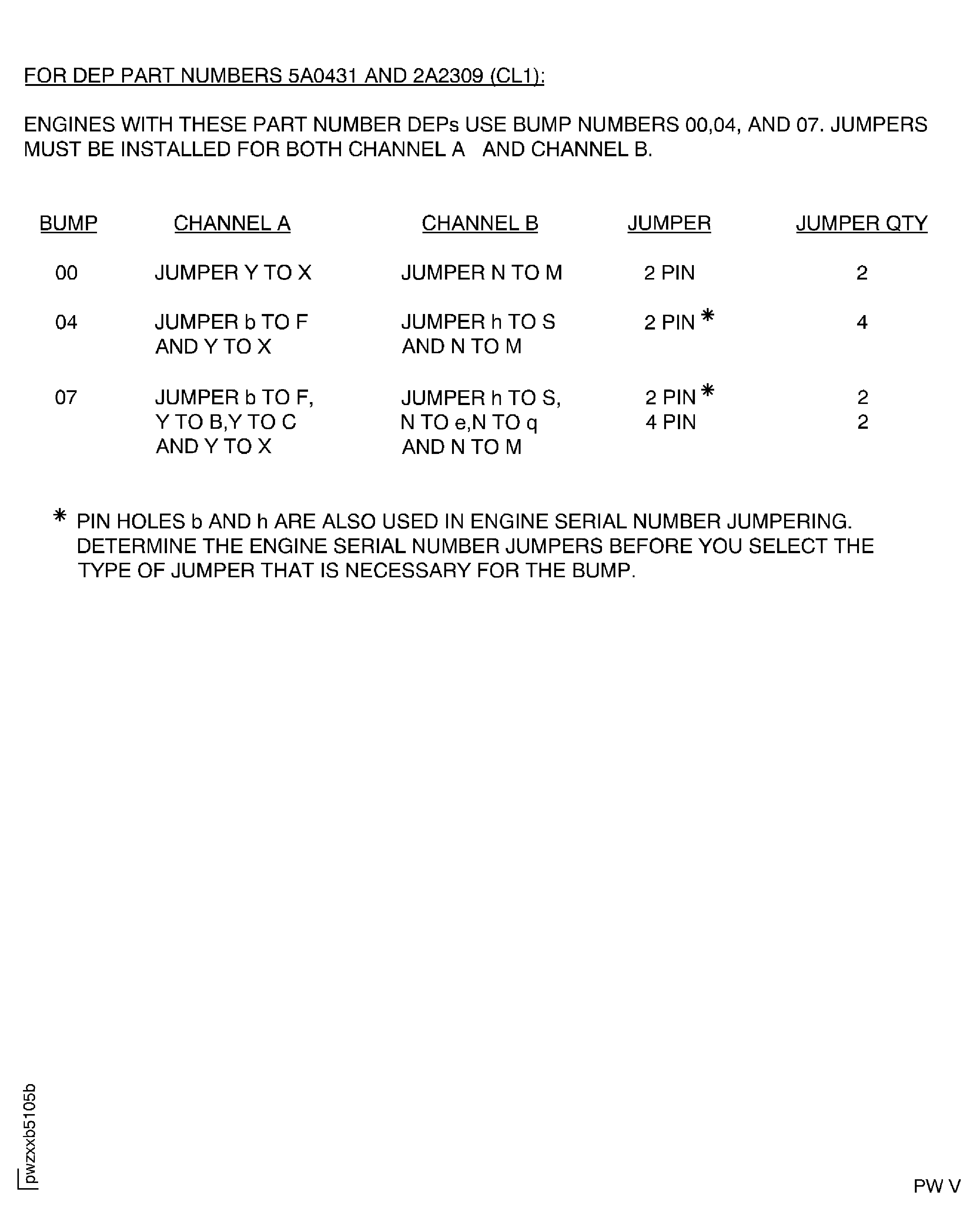
Figure: Data entry plug pin selection procedure for Engine Bump No.
Data entry plug pin selection procedure for Engine Bump No.
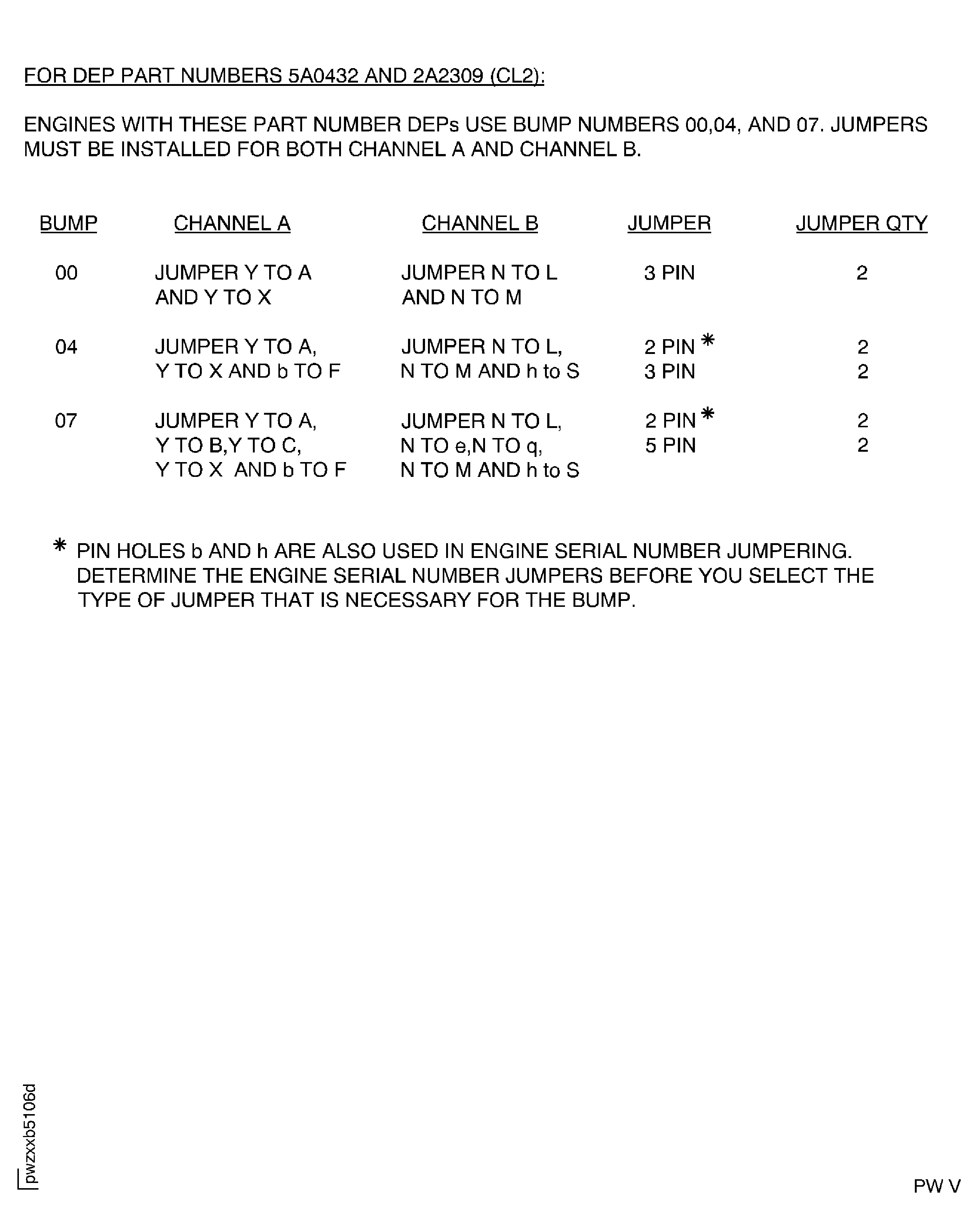
Figure: Data entry plug pin selection procedure for Engine Serial No.
Data entry plug pin selection procedure for Engine Serial No.
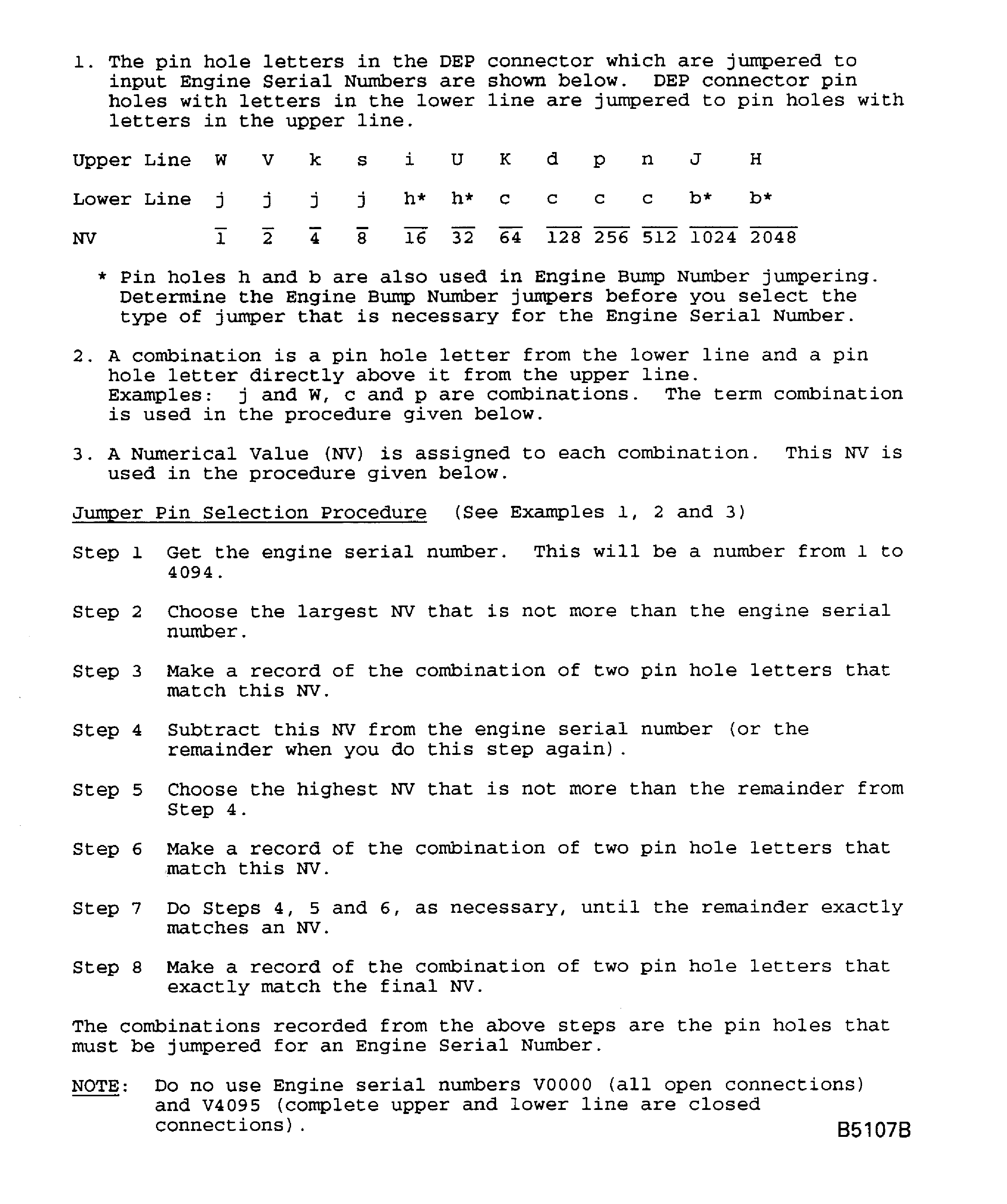
Figure: Data entry plug pin selection procedure for Engine Serial No.
Data entry plug pin selection procedure for Engine Serial No.
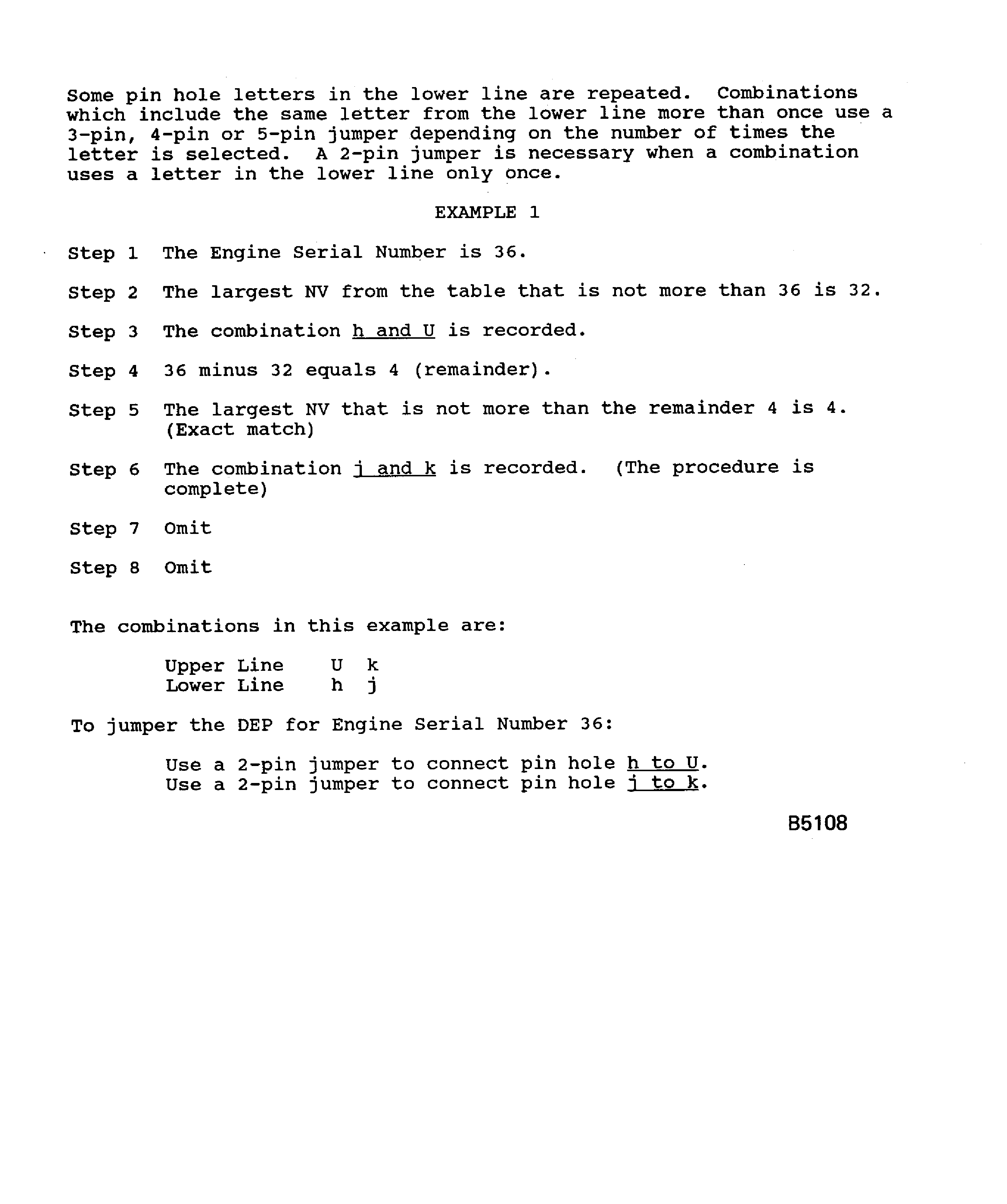
Figure: Data entry plug pin selection procedure for Engine Serial No.
Data entry plug pin selection procedure for Engine Serial No.
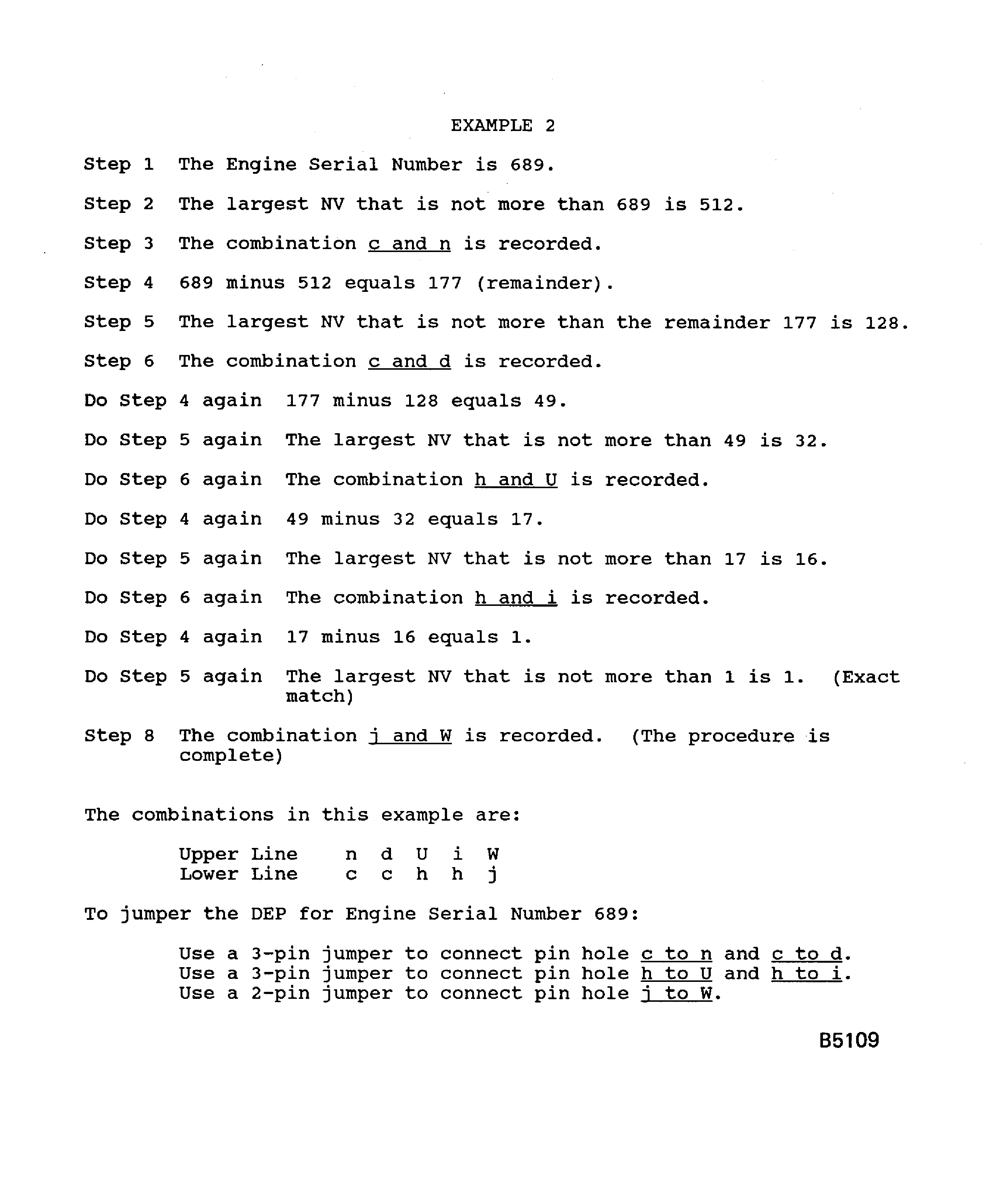
Figure: Data entry plug pin selection procedure for Engine Serial No.
Data entry plug pin selection procedure for Engine Serial No.
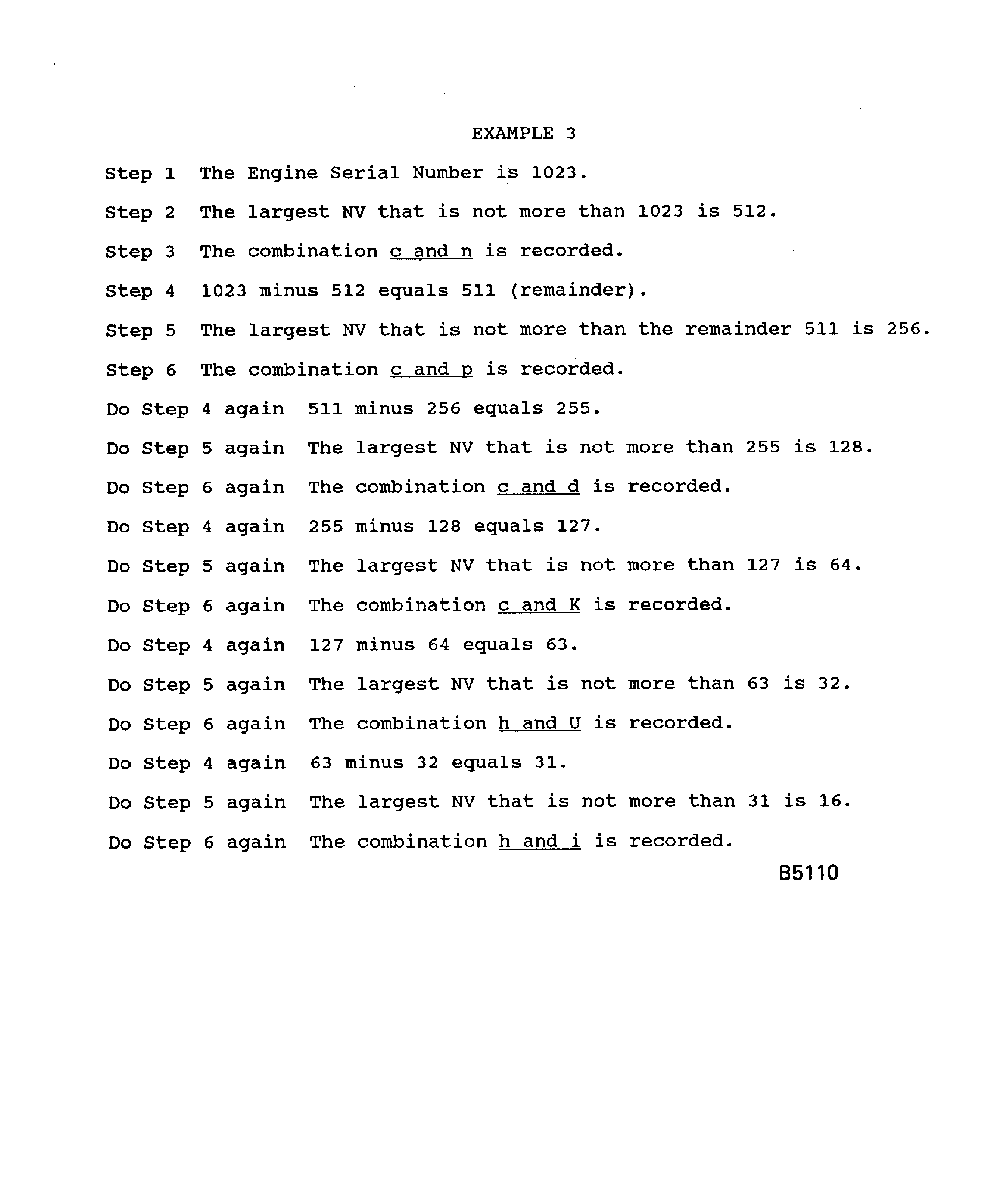
Figure: Data entry plug pin selection procedure for Engine Serial No.
Data entry plug pin selection procedure for Engine Serial No.
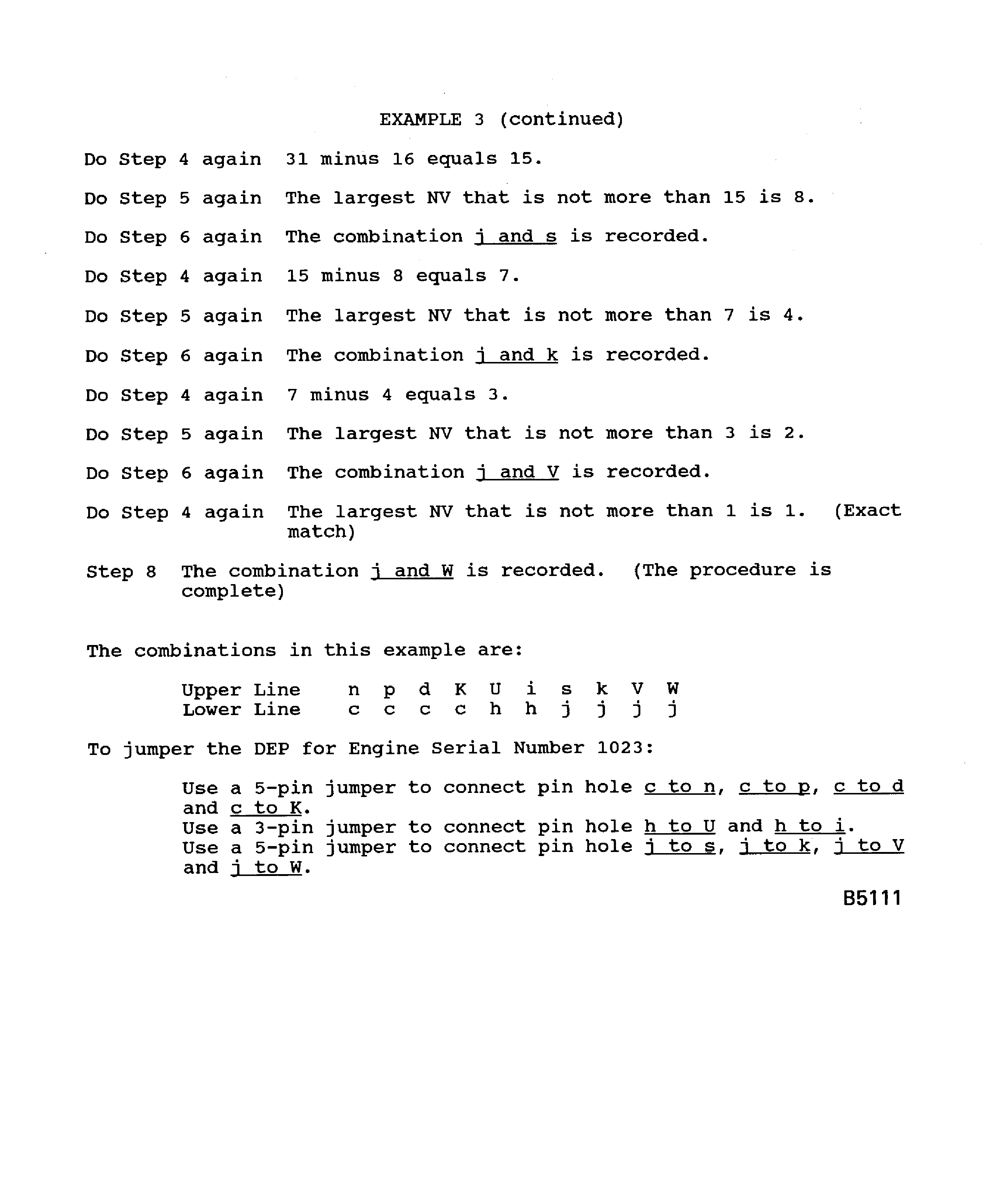
Figure: Disconnect/connect the DEP
Disconnect/connect the DEP
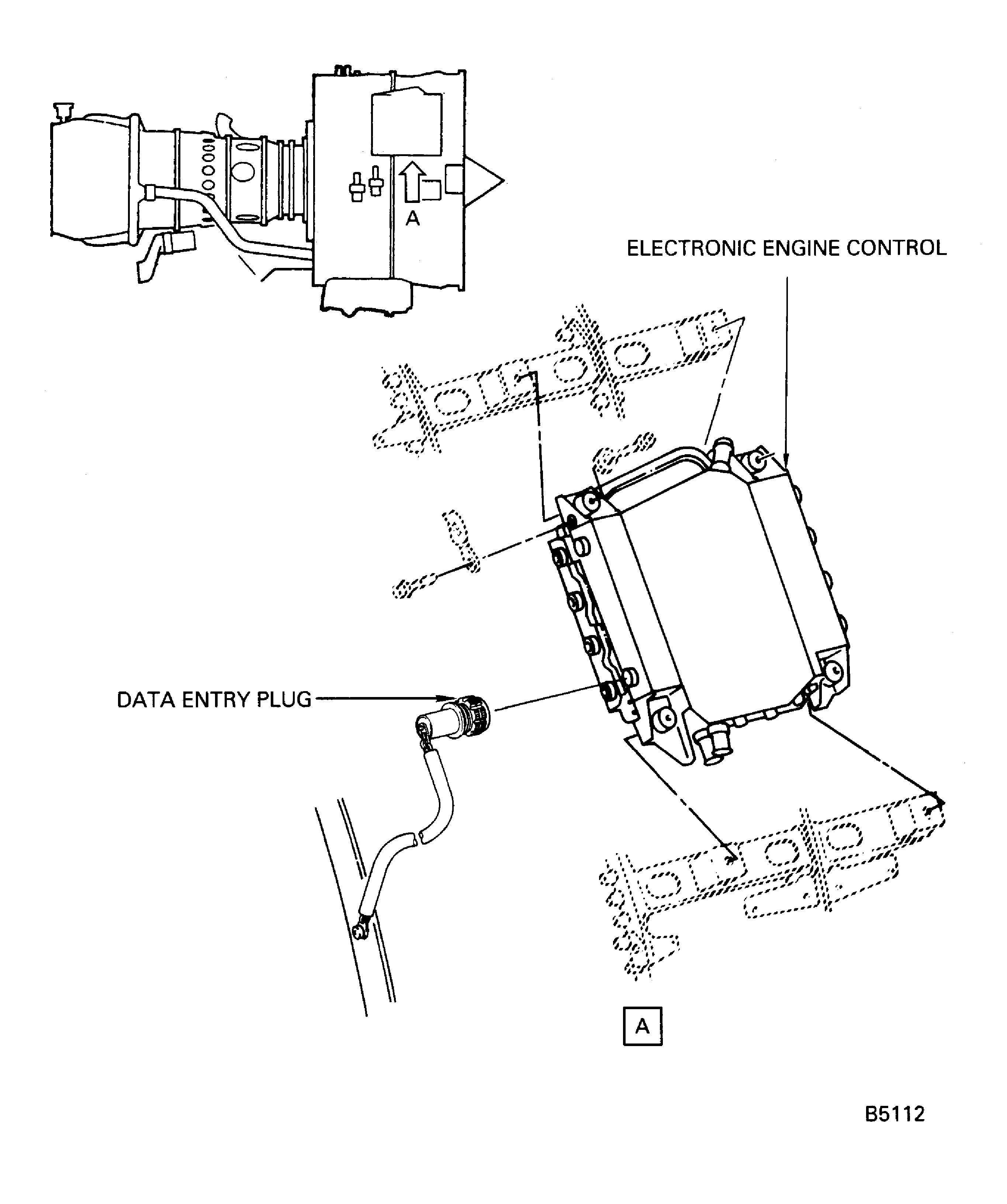
Figure: Remove/install the backshell
Remove/install the backshell
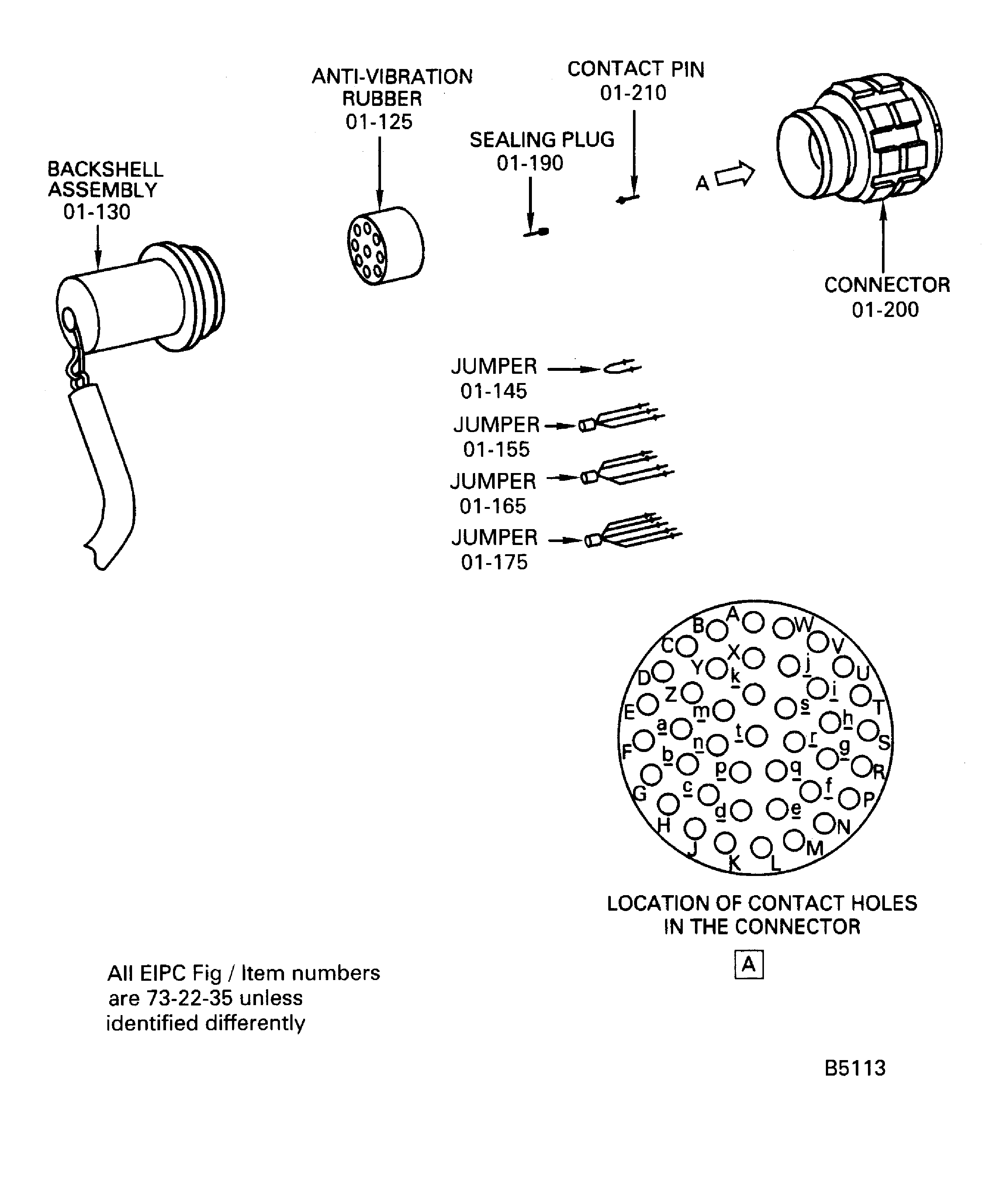
Figure: IAE 1P16271 data entry plug holding fixture
IAE 1P16271 data entry plug holding fixture

Figure: Engine and module identification plates
Engine and module identification plates
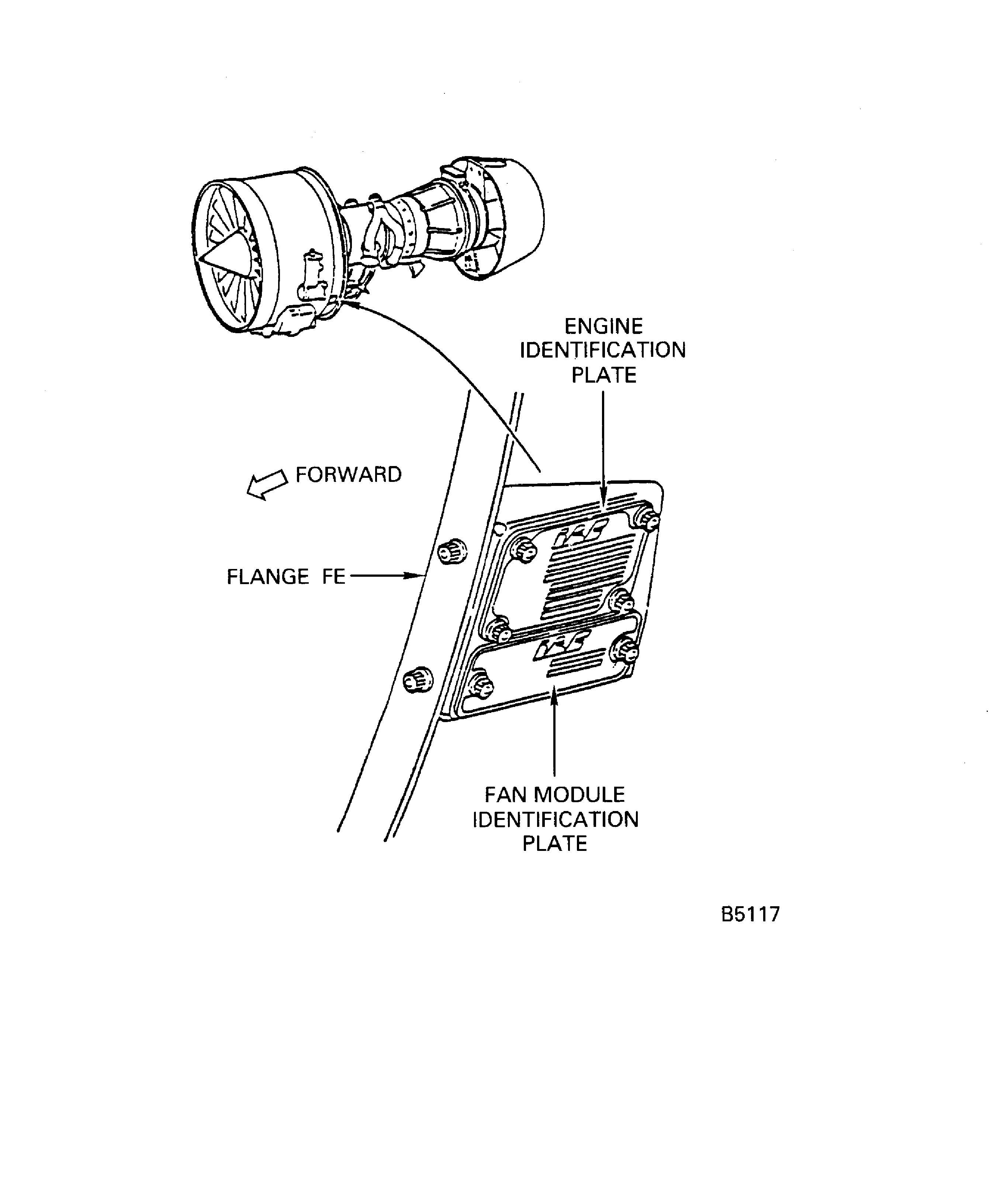
Figure: Remove the jumpers or pins from the connectors
Remove the jumpers or pins from the connectors
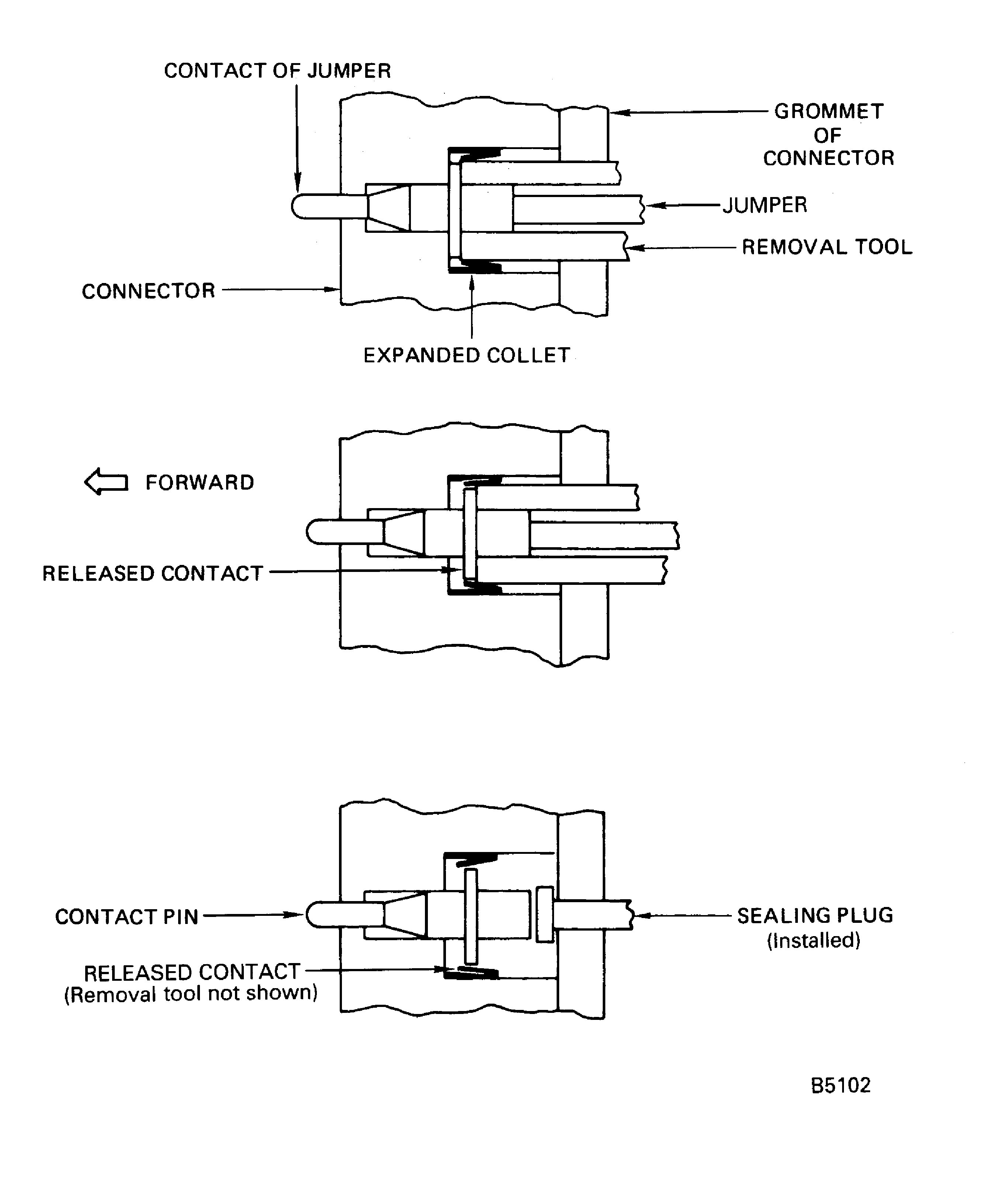
Figure: Install the jumpers into the connector
Install the jumpers into the connector

Figure: Install the sealing plug into the connector
Install the sealing plug into the connector
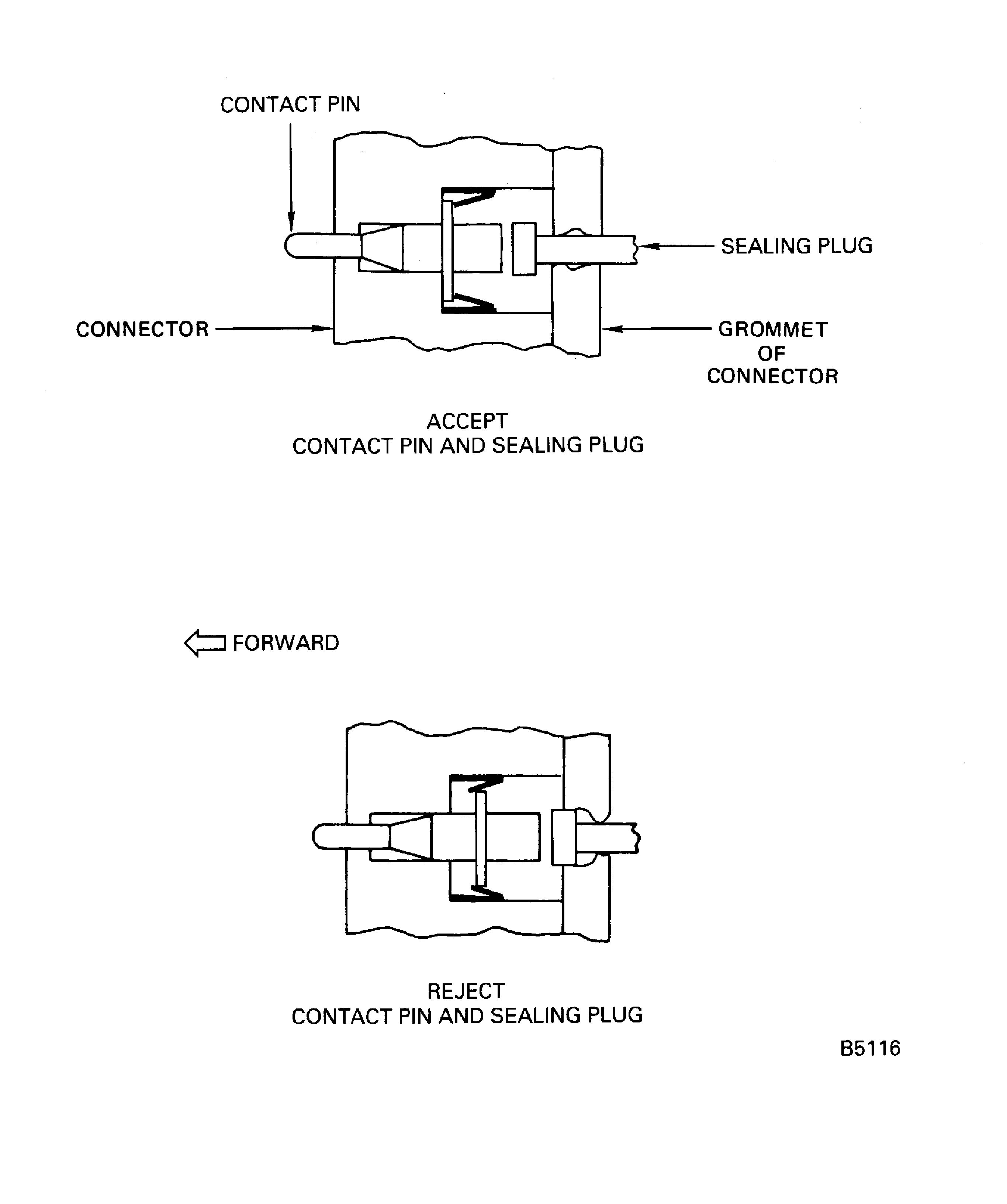
Figure: IAE 2P16369 EEC data entry plug tester
IAE 2P16369 EEC data entry plug tester
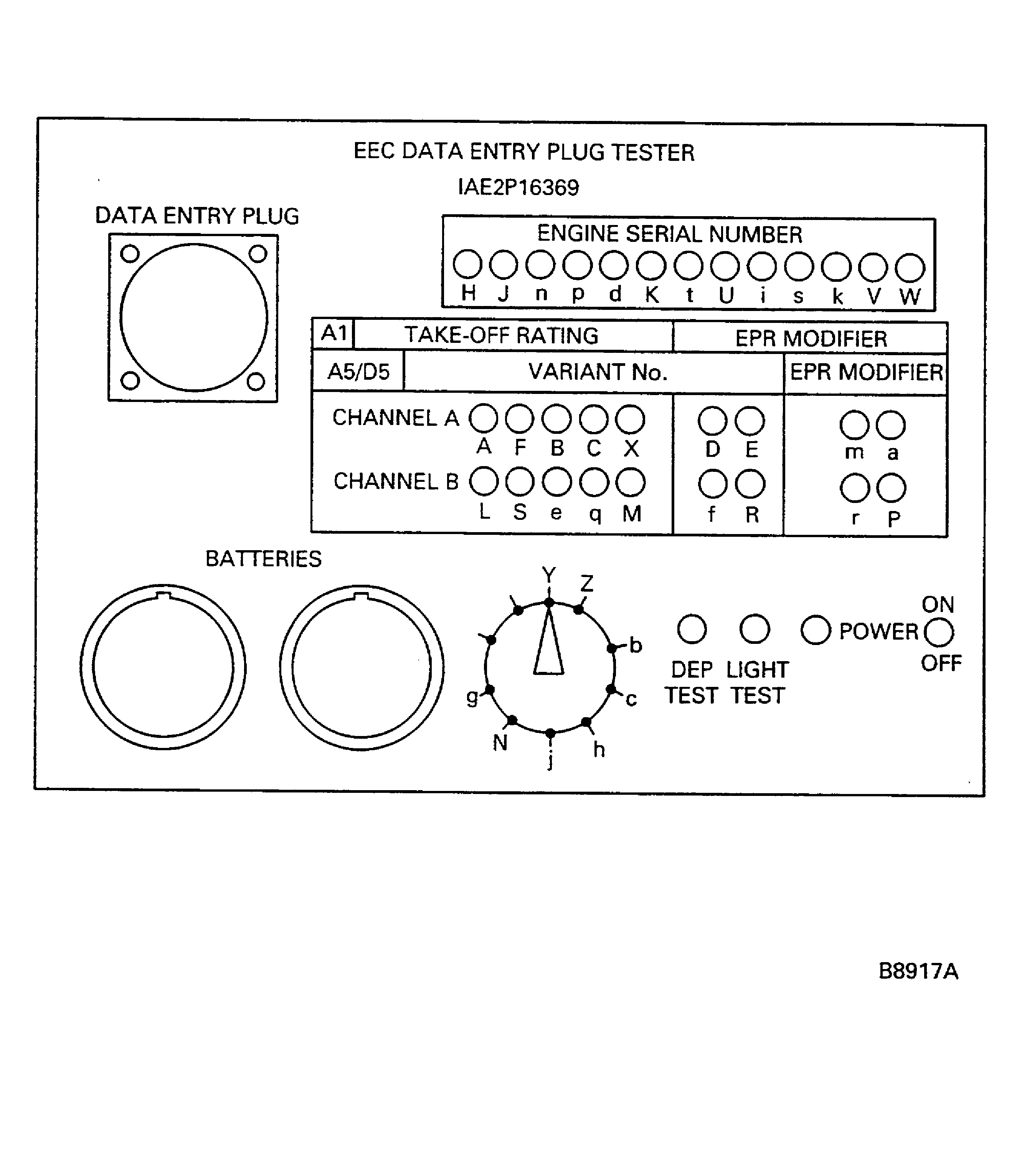
Figure: Make marks on the outer face of the backshell
Make marks on the outer face of the backshell
