Export Control
EAR Export Classification: Not subject to the EAR per 15 C.F.R. Chapter 1, Part 734.3(b)(3), except for the following Service Bulletins which are currently published as EAR Export Classification 9E991: SBE70-0992, SBE72-0483, SBE72-0580, SBE72-0588, SBE72-0640, SBE73-0209, SBE80-0024 and SBE80-0025.Copyright
© IAE International Aero Engines AG (2001, 2014 - 2021) The information contained in this document is the property of © IAE International Aero Engines AG and may not be copied or used for any purpose other than that for which it is supplied without the express written authority of © IAE International Aero Engines AG. (This does not preclude use by engine and aircraft operators for normal instructional, maintenance or overhaul purposes.).Applicability
2A1497
Common Information
TASK 71-52-43-300-002 EEC Core Harness And Voltage Divider Harness Assembly - Replace The Cable Of The EEC Core Harness, Repair-002 (VRS1072)
General
The practices and processes referred to in the procedure by the TASK number are in the SPM.
For the method to clean the parts, refer to Cleaning-000 TASK 71-52-43-100-300.
Preliminary Requirements
Pre-Conditions
NONESupport Equipment
NONEConsumables, Materials and Expendables
NONESpares
NONESafety Requirements
NONEProcedure

CAUTION
DO NOT CUT THE CABLES.Cut off the spot ties.
SUBTASK 71-52-43-350-064 Remove the Spot Ties
Refer to Repair, VRS1074 (Repair-003) TASK 71-52-43-300-003.
Loosen the backshell of the connector which is connected to the damaged cable
SUBTASK 71-52-43-350-065 Loosen the Backshell
Remove the contacts (pin and socket) from the damaged cable.
Refer to Repair, VRS1074 (Repair-003) TASK 71-52-43-300-003.
Pull out the cable from the connectors
SUBTASK 71-52-43-350-066 Remove the Damaged Cable
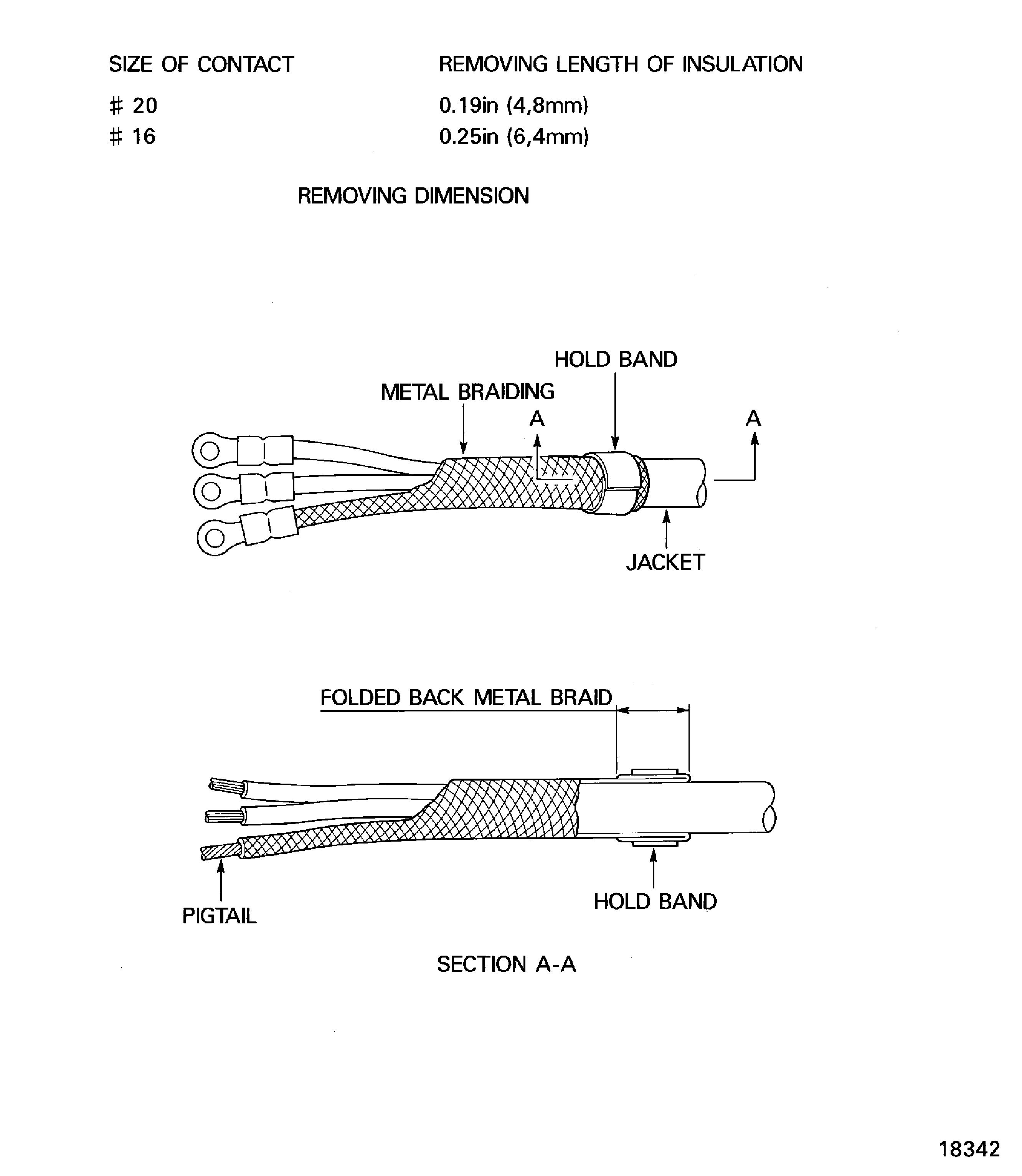
Refer to Figure.
Cut the cable to the same length as the damaged cable.
Use a cable stripper.
Remove the insulation
Refer to Repair, VRS1074 (Repair-003) TASK 71-52-43-300-003.
Install the contacts
SUBTASK 71-52-43-350-067 Install Contacts on the New Cable
Refer to Repair, VRS1074 (Repair-003) TASK 71-52-43-300-003.
If necessary remove all the contacts from the connector with the cables and reinstall all the contacts into the connectors from the center to the outside.
Install the contacts into the connectors
SUBTASK 71-52-43-350-068 Install the Contacts into the Connectors
Refer to Repair, VRS1074 (Repair-003) TASK 71-52-43-300-003.
Install the backshell
SUBTASK 71-52-43-350-069 Install the Backshell
Refer to Repair, VRS1074 (Repair-003) TASK 71-52-43-300-003.
Install the spot ties
SUBTASK 71-52-43-350-070 Install the Spot Ties
Refer to Repair, VRS1076 (Repair-004) TASK 71-52-43-300-004.
Install terminal
SUBTASK 71-52-43-350-071 Install the terminal
Refer to Figure.
Cover the pigtail by metal braiding.
Fold back the metal braiding and install the hold band on it.
Install the hold band
SUBTASK 71-52-43-350-072 Cover the Pigtail (for Earth) by Metal Braiding
Install the sleeve marker and the protective sleeve.
Refer to Repair, VRS1077 (Repair-005) TASK 71-52-43-300-005.
SUBTASK 71-52-43-350-073 Install the Sleeve Marker and the Protective Sleeve
Figure: Replacement Of The Cable
Replacement Of The Cable