Export Control
EAR Export Classification: Not subject to the EAR per 15 C.F.R. Chapter 1, Part 734.3(b)(3), except for the following Service Bulletins which are currently published as EAR Export Classification 9E991: SBE70-0992, SBE72-0483, SBE72-0580, SBE72-0588, SBE72-0640, SBE73-0209, SBE80-0024 and SBE80-0025.Copyright
© IAE International Aero Engines AG (2001, 2014 - 2021) The information contained in this document is the property of © IAE International Aero Engines AG and may not be copied or used for any purpose other than that for which it is supplied without the express written authority of © IAE International Aero Engines AG. (This does not preclude use by engine and aircraft operators for normal instructional, maintenance or overhaul purposes.).Applicability
All
Common Information
TASK 72-50-10-430-004 LPT Case And Rotor Assembly - Assemble The LPT Stage 4 Rotor Assembly To The LPT, Assembly-004
General
Fig/item numbers in parentheses in the procedure agree with those used in the IPC. Only the primary Fig/item numbers are used. For the service bulletin alpha variants refer to the IPC.
For all parts identified in a different Chapter/Section/Subject, the applicable Chapter/Section/Subject comes before the Fig/item number.
For standard torque data and procedures, refer to the SPM TASK 70-41-01-400-501 and SPM TASK 70-41-02-400-501.
Special torque data and assembly tolerances are included in the procedure.
The number for each radial location must be identified in a clockwise direction. These start at the engine top position when you look from the rear of the engine, unless stated differently in the procedure.
Use new rotor bolts and new nuts.
NOTE
NOTE
NOTE
Preliminary Requirements
Pre-Conditions
NONESupport Equipment
| Name | Manufacturer | Part Number / Identification | Quantity | Remark |
|---|---|---|---|---|
| Straight edge | LOCAL | Straight edge | ||
| Depth gage | LOCAL | Depth gage | ||
| IAE 6F10027 Heater control unit | 0AM53 | IAE 6F10027 | 1 | |
| IAE 1M14030 Assembly trolley | 0AM53 | IAE 1M14030 | 1 | |
| IAE 1M14049 Position retainer | 0AM53 | IAE 1M14049 | 1 | |
| IAE 1M14054 Torque wrench adapter | 0AM53 | IAE 1M14054 | 1 | |
| IAE 1M14055 Special wrench | 0AM53 | IAE 1M14055 | 1 | |
| IAE 1M14059 Lifting fixture | 0AM53 | IAE 1M14059 | 1 | |
| IAE 1M14061 Heating fixture | 0AM53 | IAE 1M14061 | 1 | |
| IAE 1M14074 Heating fixture carrier | 0AM53 | IAE 1M14074 | 1 | |
| IAE 1M14080 Clamping ring | 0AM53 | IAE 1M14080 | 1 | |
| IAE 1M14119 Protector ring segment | 0AM53 | IAE 1M14119 | 3 | |
| IAE 1M14131 Guide pin | 0AM53 | IAE 1M14131 | 1 | |
| IAE 1M14134 Installation bolt/nut | 0AM53 | IAE 1M14134 | 6 | |
| IAE 1M14156 Lifting fixture | 0AM53 | IAE 1M14156 | 1 | |
| IAE 1M14010 Assembly/Disassembly fixture | 0AM53 | IAE 1M14010 |
Consumables, Materials and Expendables
| Name | Manufacturer | Part Number / Identification | Quantity | Remark |
|---|---|---|---|---|
| CoMat 10-129A ANTI-SEIZE PASTE | 71984 | CoMat 10-129A | ||
| CoMat 10-129 ANTI-SEIZE PASTE | 34568 | CoMat 10-129 |
Safety Requirements

WARNING
Procedure
Refer to: Figure
Calculate the clearance at location 3347.
Table 1. Fits and Clearances (all dimensions are in inches) NEW PART
DIMENSIONS
WORN PART
DIMENSIONS
REJECT IF
PART IDENT
Size
Clearance
(Non-select)
MORE THAN
LOCATION 3347
Stage 3 turbine disk
LPT Stage 3, 4, 5, 6, 7 Disks (72-50-31,01-200) to the
abutment diameter of the
stage 4 turbine disk
LPT Stage 3, 4, 5, 6, 7 Disks (72-50-31,01-150)
Stage 3 disk diameter
18.5709
18.5669
Intf
0.0276
Intf
0.0295
Stage 4 disk diameter
18.5472
18.5433
0.0197
0.0138
Table 2. Fits and Clearances (all dimensions are in millimeters) NEW PART
DIMENSIONS
WORN PART
DIMENSIONS
REJECT IF
PART IDENT
Size
Clearance
(Non-select)
MORE THAN
LOCATION 3347
Stage 3 turbine disk
LPT Stage 3, 4, 5, 6, 7 Disks (72-50-31,01-200) to the
abutment diameter of the
stage 4 turbine disk
LPT Stage 3, 4, 5, 6, 7 Disks (72-50-31,01-150)
Stage 3 disk diameter
471.7
471.6
Intf
0.7
Intf
0.75
Stage 4 disk diameter
471.1
471.0
0.5
0.35
SUBTASK 72-50-10-220-094-A00 V2500-A1: Make sure that the Fits and Clearances of the Stage 3 Turbine Disk and the Stage 4 Turbine Disk are in the Limits given at Location 3347 (Pre SBE 72-0138)
Refer to: Figure
Calculate the clearance at location 3647.
Table 3. Fits and Clearances (all dimensions are in inches) NEW PART
DIMENSIONS
WORN PART
DIMENSIONS
REJECT IF
PART IDENT
Size
Clearance
(Non-select)
MORE THAN
LOCATION 3647
Stage 3 turbine disk
LPT Stage 3, 4, 5, 6, 7 Disks (72-50-31,01-200) to the
abutment diameter of the
stage 4 turbine disk
LPT Stage 3, 4, 5, 6, 7 Disks (72-50-31,01-150)
Stage 3 disk diameter
18.5709
18.5669
Intf
0.0276
Intf
0.0295
Stage 4 disk diameter
18.5472
18.5433
0.0197
0.0138
Table 4. Fits and Clearances (all dimensions are in millimeters) NEW PART
DIMENSIONS
WORN PART
DIMENSIONS
REJECT IF
PART IDENT
Size
Clearance
(Non-select)
MORE THAN
LOCATION 3647
Stage 3 turbine disk
LPT Stage 3, 4, 5, 6, 7 Disks (72-50-31,01-200) to the
abutment diameter of the
stage 4 turbine disk
LPT Stage 3, 4, 5, 6, 7 Disks (72-50-31,01-150)
Stage 3 disk diameter
471.7
471.6
Intf
0.7
Intf
0.75
Stage 4 disk diameter
471.1
471.0
0.5
0.35
SUBTASK 72-50-10-220-094-B00 V2500-A1: Make sure that the Fits and Clearances of the Stage 3 Turbine Disk and the Stage 4 Turbine Disk are in the Limits given at Location 3647 (SBE 72-0138)
Refer to: Figure
Calculate the clearance at location 3747.
Table 5. Fits and Clearances (all dimensions are in inches) NEW PART
DIMENSIONS
WORN PART
DIMENSIONS
REJECT IF
PART IDENT
Size
Clearance
(Non-select)
MORE THAN
LOCATION 3747
Stage 3 turbine disk
LPT Stage 3, 4, 5, 6, 7 Disks (72-50-31,01-200) to the
abutment diameter of the
stage 4 turbine disk
LPT Stage 3, 4, 5, 6, 7 Disks (72-50-31,01-150)
Stage 3 disk diameter
18.5709
18.5669
Intf
0.0276
Intf
0.0295
Stage 4 disk diameter
18.5472
18.5433
0.0197
0.0138
Table 6. Fits and Clearances (all dimensions are in millimeters) NEW PART
DIMENSIONS
WORN PART
DIMENSIONS
REJECT IF
PART IDENT
Size
Clearance
(Non-select)
MORE THAN
LOCATION 3747
Stage 3 turbine disk
LPT Stage 3, 4, 5, 6, 7 Disks (72-50-31,01-200) to the
abutment diameter of the
stage 4 turbine disk
LPT Stage 3, 4, 5, 6, 7 Disks (72-50-31,01-150)
Stage 3 disk diameter
471.7
471.6
Intf
0.7
Intf
0.75
Stage 4 disk diameter
471.1
471.0
0.5
0.35
SUBTASK 72-50-10-220-094-C00 V2500-A5: Make sure that the Fits and Clearances of the Stage 3 Turbine Disk and the Stage 4 Turbine Disk are in the Limits given at Location 3747
Refer to: Figure
Install the two halves of the IAE 1M14080 Clamping ring 1 off to the stage 4 disk.
SUBTASK 72-50-10-430-092 Install the Clamping Ring to the Stage 4 Disk
Refer to Figure.
Use hoist equipment to install the IAE 1M14156 Lifting fixture 1 off to the clamping ring.
Put the stage 4 disk, front side down, on to the IAE 1M14030 Assembly trolley 1 off.
SUBTASK 72-50-10-430-093 Put the Stage 4 Disk on to the Assembly Trolley
Refer to: Figure
Use hoist equipment to install the IAE 1M14059 Lifting fixture 1 off. Make sure that the clamps of the lifting fixture are locked in the inner position. Install the teflon bolts in the holes which are marked with the stage number of the disk to be installed.
SUBTASK 72-50-10-430-094 Attach the Lifting Fixture on to the Stage 4 Disk
Refer to: Figure
Put the IAE 1M14061 Heating fixture 1 off on to the IAE 1M14074 Heating fixture carrier 1 off. The two locating pins must engage to the bushings of the heating fixture carrier.
SUBTASK 72-50-10-430-095 Install the Heating Fixture on to the Heating Fixture Carrier
Refer to: Figure
SUBTASK 72-50-10-430-096 Install the Heating Fixture Carrier with the Heating Fixture on to the LP Turbine Case
Refer to: Figure
SUBTASK 72-50-10-430-097 Install the Stage 4 Disk to the Heating Fixture
Refer to: Figure
NOTE
The high point position of the stage 3 rotor is marked on the disk hub by a circled dash symbol. Refer to TASK 72-50-30-440-001 (ASSEMBLY-001).Engage the guide cable, part of the IAE 1M14131 Guide pin 1 off, through a hole 175 to 185 degrees apart of the marked high point position of the stage 3 rear flange.
Compress the IAE 1M14049 Position retainer 1 off and put it under the guide pin.
SUBTASK 72-50-10-430-098 Install the Guide Pin to the Stage 3 Disk
Refer to: Figure
Increase the temperature of the stage 4 disk front flange with the heating fixture. Use the IAE 6F10027 Heater control unit 1 off.
SUBTASK 72-50-10-430-099 Increase the Temperature of the Stage 4 Disk Front Flange
Refer to: Figure
SUBTASK 72-50-10-430-100 Remove the Heating Fixture from the LP Turbine Case
Refer to: Figure

CAUTION
MAKE SURE THAT THE THREE PROTECTOR RING SEGMENTS ARE NOT INSTALLED.NOTE
The high point position of the stage 4 rotor is marked on the disk hub by a circled dash symbol. Refer to TASK 72-50-30-440-002 (ASSEMBLY-002).Engage the guide cable through a hole near the marked high point position of the stage 4 disk.
SUBTASK 72-50-10-430-101 Install the Stage 4 Disk on to the Stage 3 Disk Rear Flange
Refer to: Figure
SUBTASK 72-50-10-430-102 Remove the Lifting Fixture from the Stage 4 Disk
Refer to: Figure
SUBTASK 72-50-10-430-103 Remove the Guide Pin
Refer to: Figure
CAUTION
HOLD THE INSTALLATION BOLTS IN THEIR POSITION WHEN YOU INSTALL THE INSTALLATION NUTS ON TO THE INSTALLATION BOLTS. DO NOT TURN THE INSTALLATION BOLTS OR MAKE TO-AND-FRO MOVEMENTS. THE DISK/INNER AIR SEAL FLANGES CAN BE DAMAGED BY SCORES.Install 60 degrees apart 6 installation bolts with the head up and 6 installation nuts, part of the IAE 1M14134 Installation bolt/nut 6 off, to the disk flanges.
Tighten the installation nuts. Use the IAE 1M14055 Special wrench 1 off.
Torque the installation nuts from 119.0 to 133.0 lbfin. (13.5 to 15 Nm). Use the IAE 1M14054 Torque wrench adapter 1 off.
SUBTASK 72-50-10-430-104 Attach the Disk Flanges
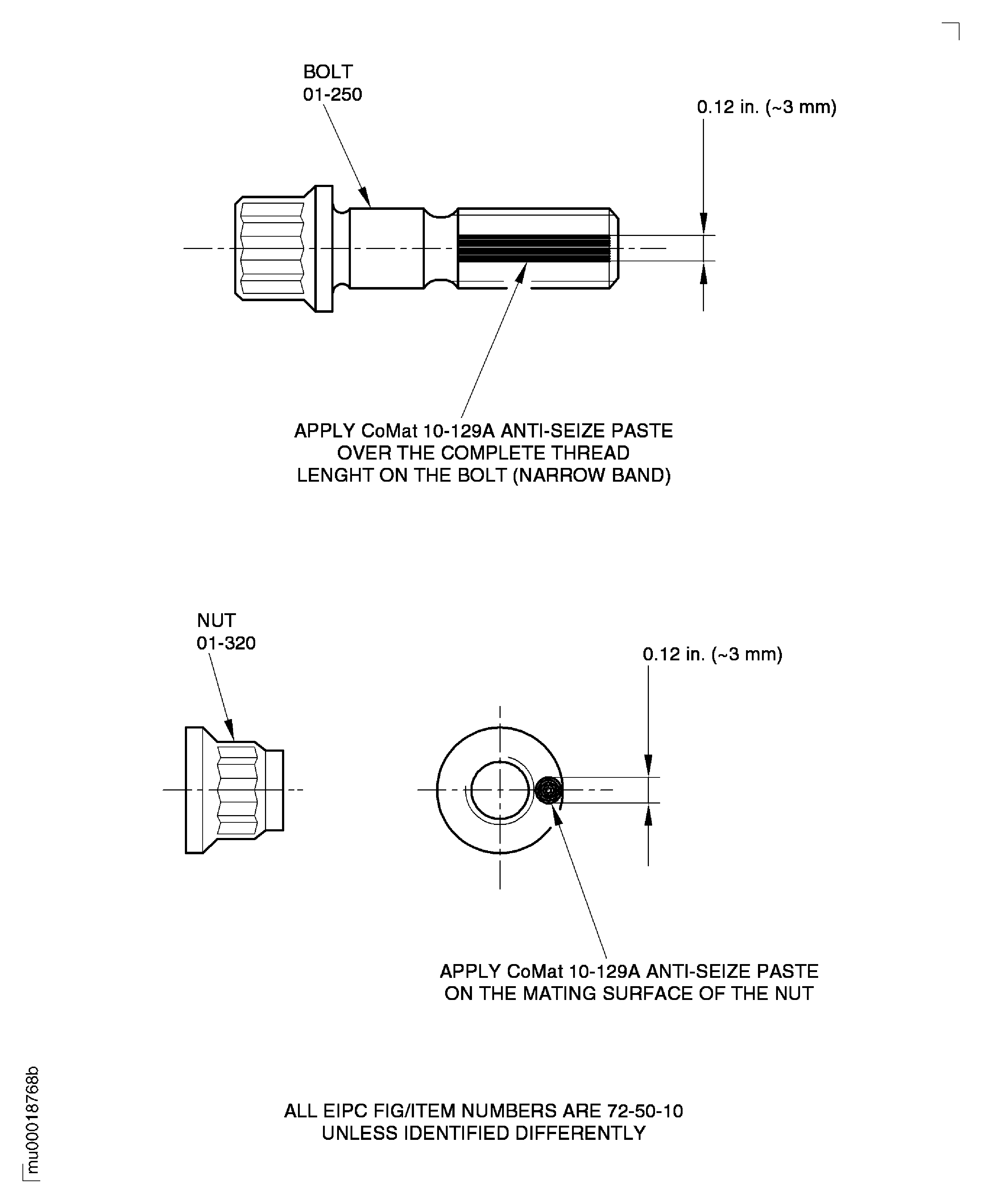
Lubricate all new bolts and new nuts with CoMat 10-129A ANTI-SEIZE PASTE as follows:
CAUTION
HOLD THE BOLTS IN THEIR POSITION WHEN YOU INSTALL/REMOVE THE NUTS ON TO/FROM THE BOLTS. DO NOT TURN THE BOLTS OR MAKE TO-AND-FRO MOVEMENTS. THE DISK/INNER AIR SEAL FLANGES AND/OR THE BOLTS CAN BE DAMAGED BY SCORES.MAKE SURE THAT THE LOCKING TORQUE OF THE NUTS IS BETWEEN 3.5 AND 30.0 LBFIN (0.4 AND 3.4 NM). TURN THE NUTS DOWN ON TO THE BOLTS UNTIL FINGER TIGHT. CONTINUE TO TURN THE NUTS WITH A WRENCH. MAKE SURE THAT THE NUTS GIVE SUFFICIENT RESISTANCE. IT SHOWS THAT THE SELF LOCKING PROPERTY IS STILL AVAILABLE.IT IS PERMITTED TO USE POWER TOOLS TO TURN THE NUTS ON TO THE REMAINING BOLTS THREADS. MAKE SURE THAT THE POWER TOOL IS SET TO A TORQUE VALUE WHICH IS NOT MORE THAN 50 PERCENT OF THE FINAL TORQUE VALUE. THE SPEED MUST BE SLOW TO PREVENT INCREASE OF HEAT WHICH CAN CAUSE THREAD PICK-UP AND SEIZURE.Install 30 new bolts with the head up and the new nuts to the disk flanges. Tighten the nuts on to the bolts with the IAE 1M14055 Special wrench 1 off.
Remove the installation nuts and installation bolts. Use the IAE 1M14055 Special wrench to remove the installation nuts.
Install the remaining 6 new bolts with the head up and the 6 new nuts. Tighten the nuts on to the bolts with the IAE 1M14055 Special wrench.
Check all nuts again in clockwise direction for final torque. Use the IAE 1M14054 Torque wrench adapter 1 off.
CAUTION
MAKE SURE THAT ALL INSTALLATION BOLTS AND INSTALLATION NUTS ARE REPLACED.NOTE
The tightening torque value includes the self locking torque value.Torque the nuts with the IAE 1M14054 Torque wrench adapter 1 off in two steps. For the torque sequence.
SUBTASK 72-50-10-430-105 Attach the Stage 3 Disk and the Stage 4 Disk with the Bolts and the Nuts
Move the lifting ring, of the IAE IAE 1M14010 Assembly/Disassembly fixture 1 off from the 'zero-position' in the 'lifting-position' with the lever.
SUBTASK 72-50-10-430-290 Move the Lifting Ring
Figure: Lift and Turn the Stage 4 Disk with the Clamping Ring
Lift and Turn the Stage 4 Disk with the Clamping Ring
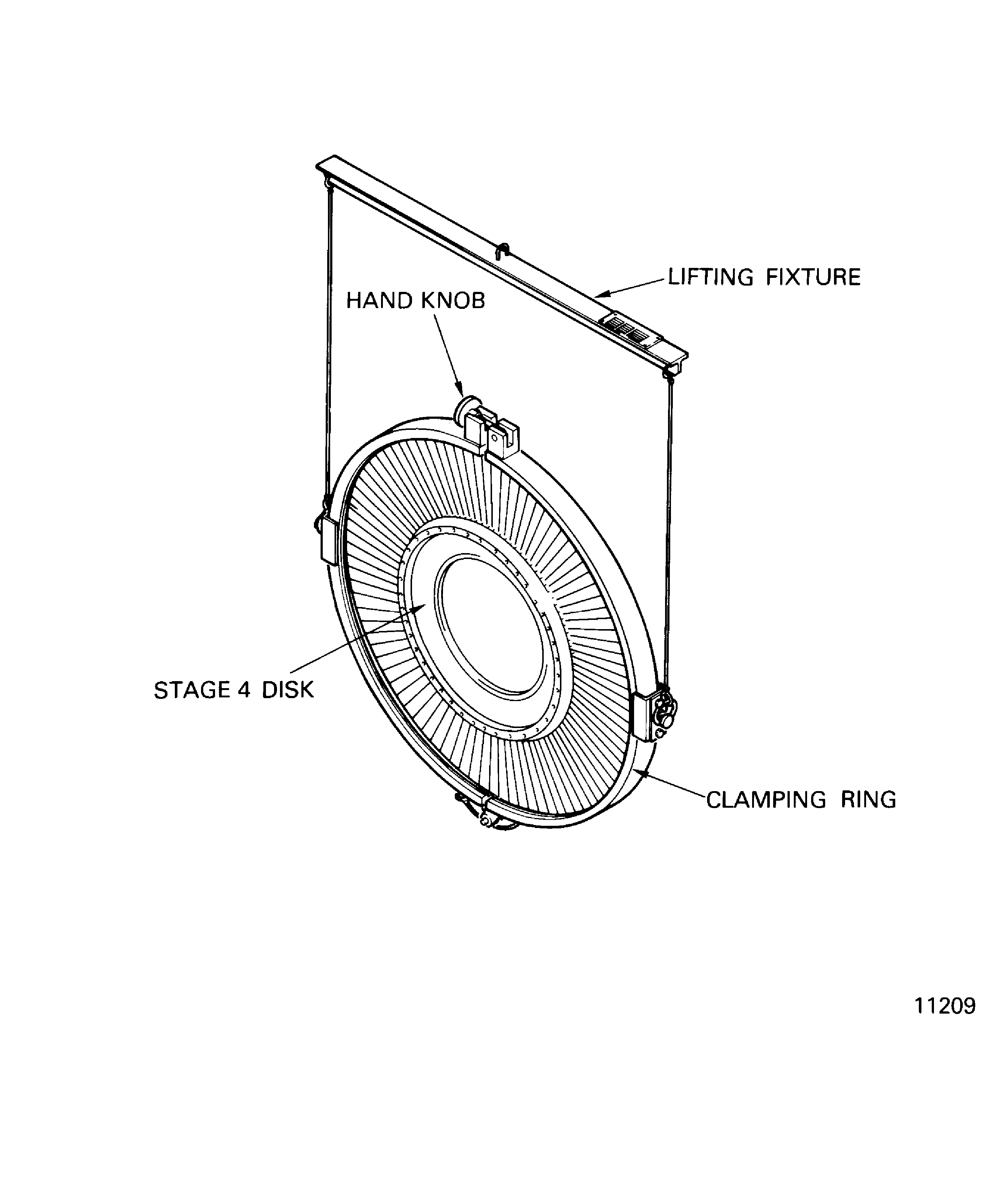
Figure: Increase the Temperature of the Stage 4 Disk with the Heating Fixture
Increase the Temperature of the Stage 4 Disk with the Heating Fixture
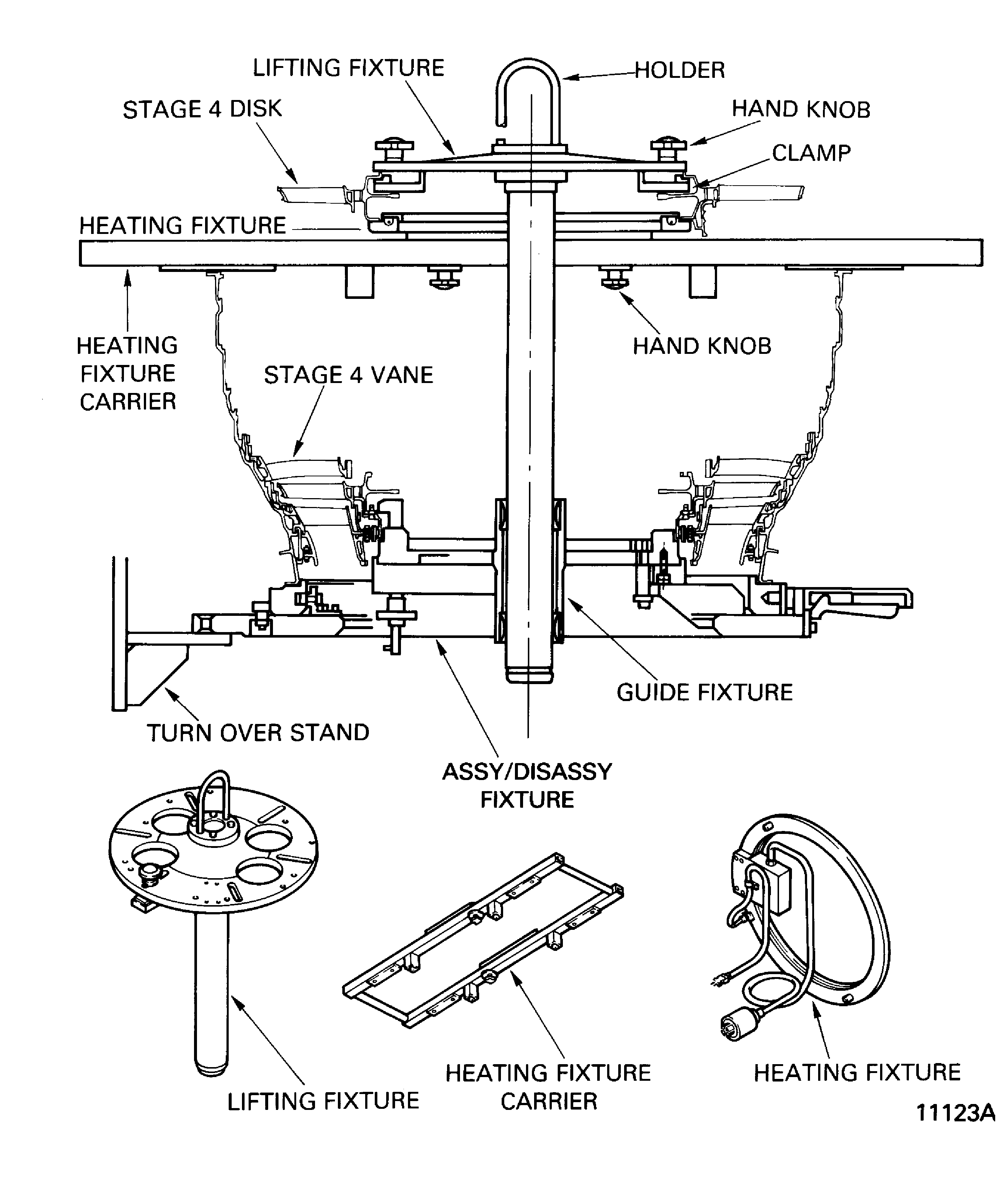
Figure: Install the Stage 4 Disk
Install the Stage 4 Disk
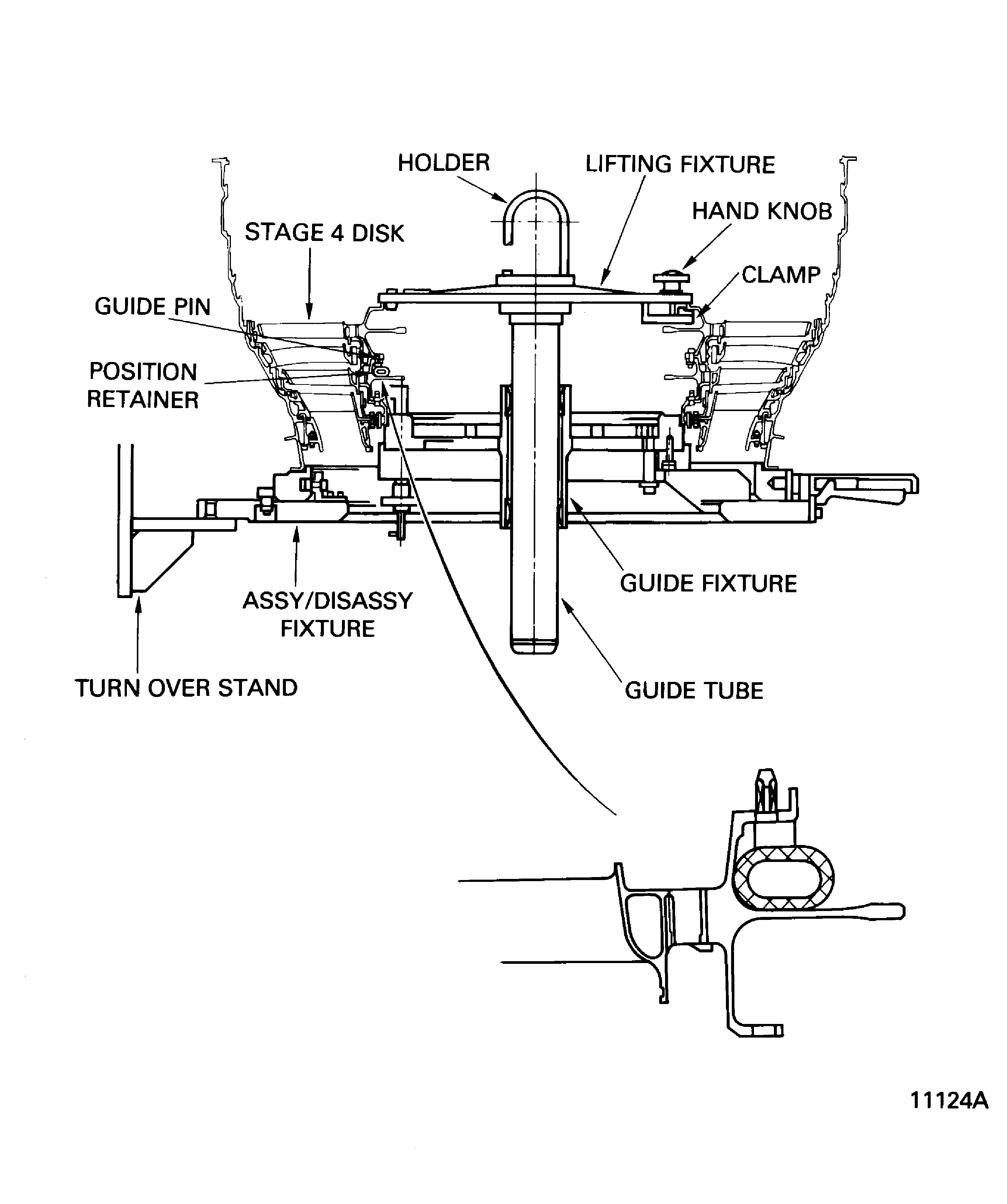
Figure: Torque Sequence of the Nuts which Attach the Stage 3 Disk and the Stage 4 Disk
Torque Sequence of the Nuts which Attach the Stage 3 Disk and the Stage 4 Disk
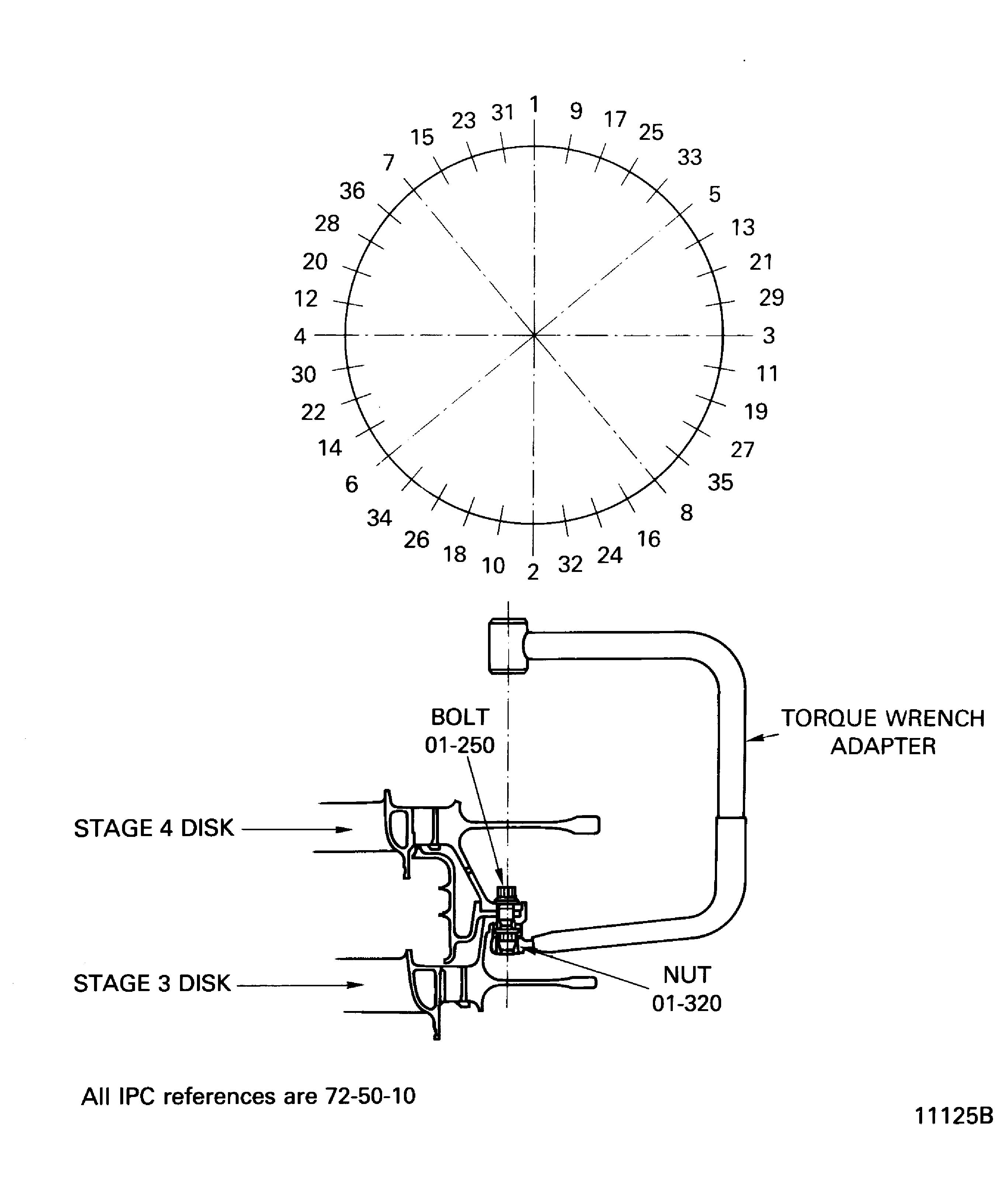
Figure: Pre SBE 72-0138 V2500-A1: Fits and Clearances of the Stage 4 Rotor
Sheet 1
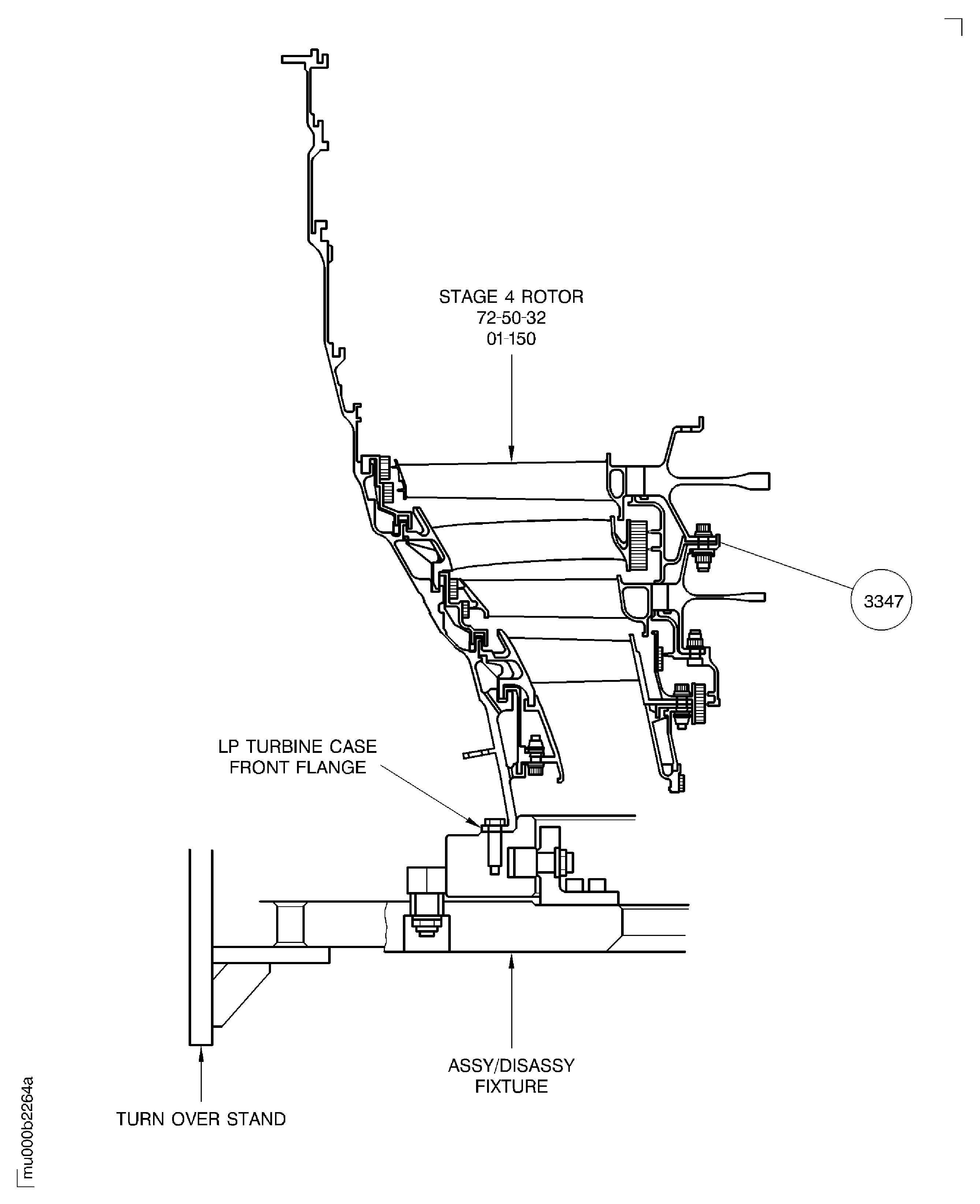
Figure: SBE 72-0138 V2500-A1: Fits and Clearances of the Stage 4 Rotor
Sheet 2
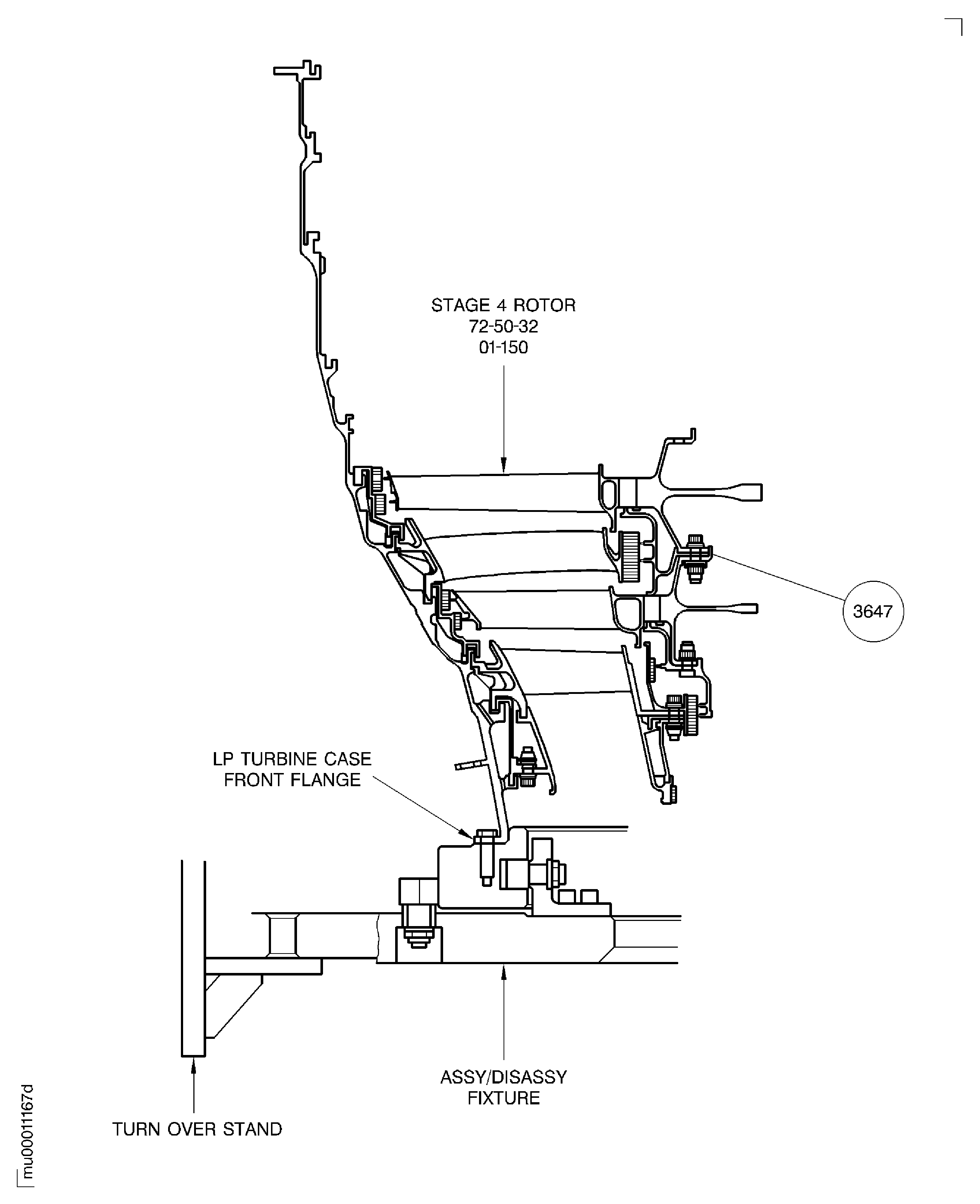
Figure: V2500-A5: Fits and Clearances of the Stage 4 Rotor
V2500-A5: Fits and Clearances of the Stage 4 Rotor
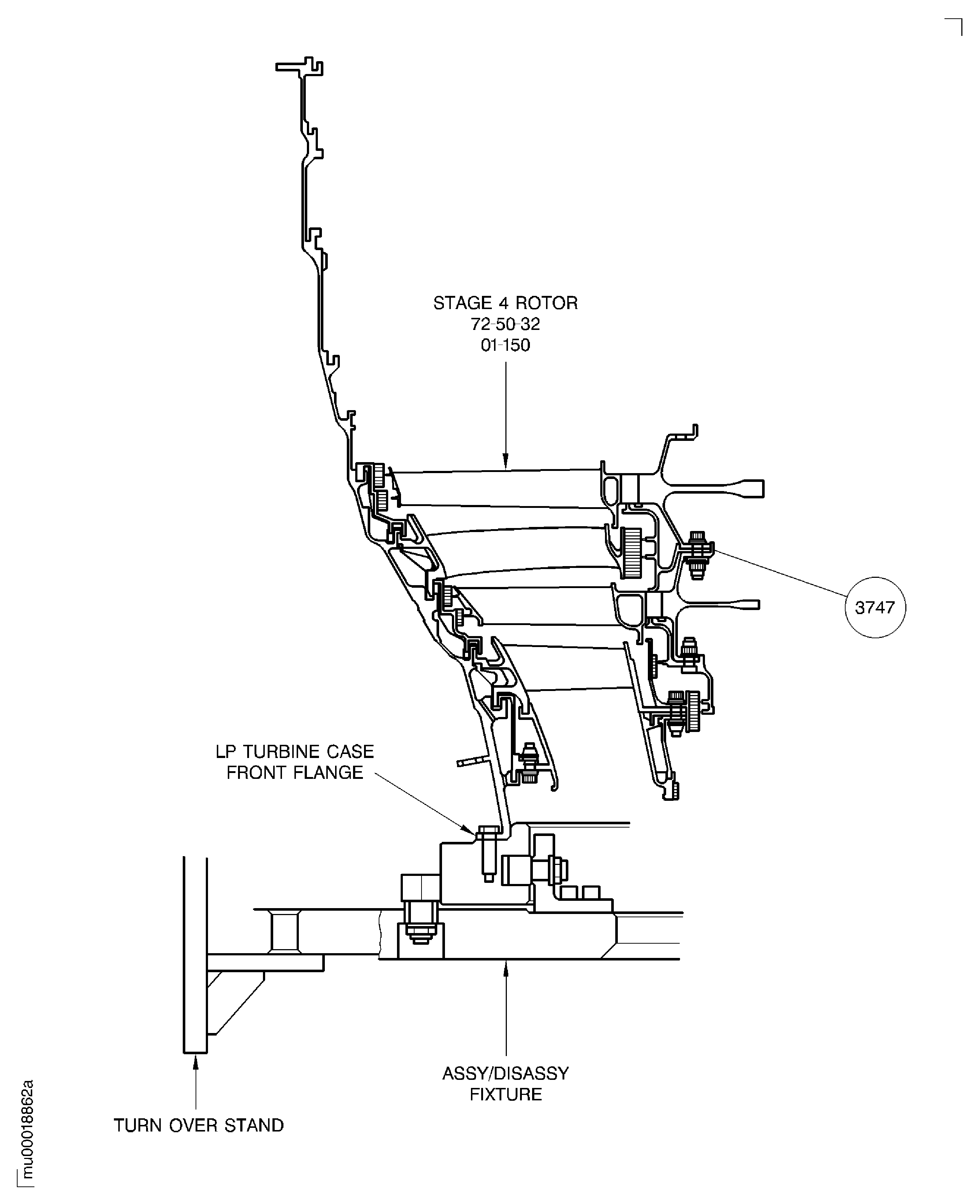
Figure: Tighten the Nuts with the Special Wrench
Tighten the Nuts with the Special Wrench
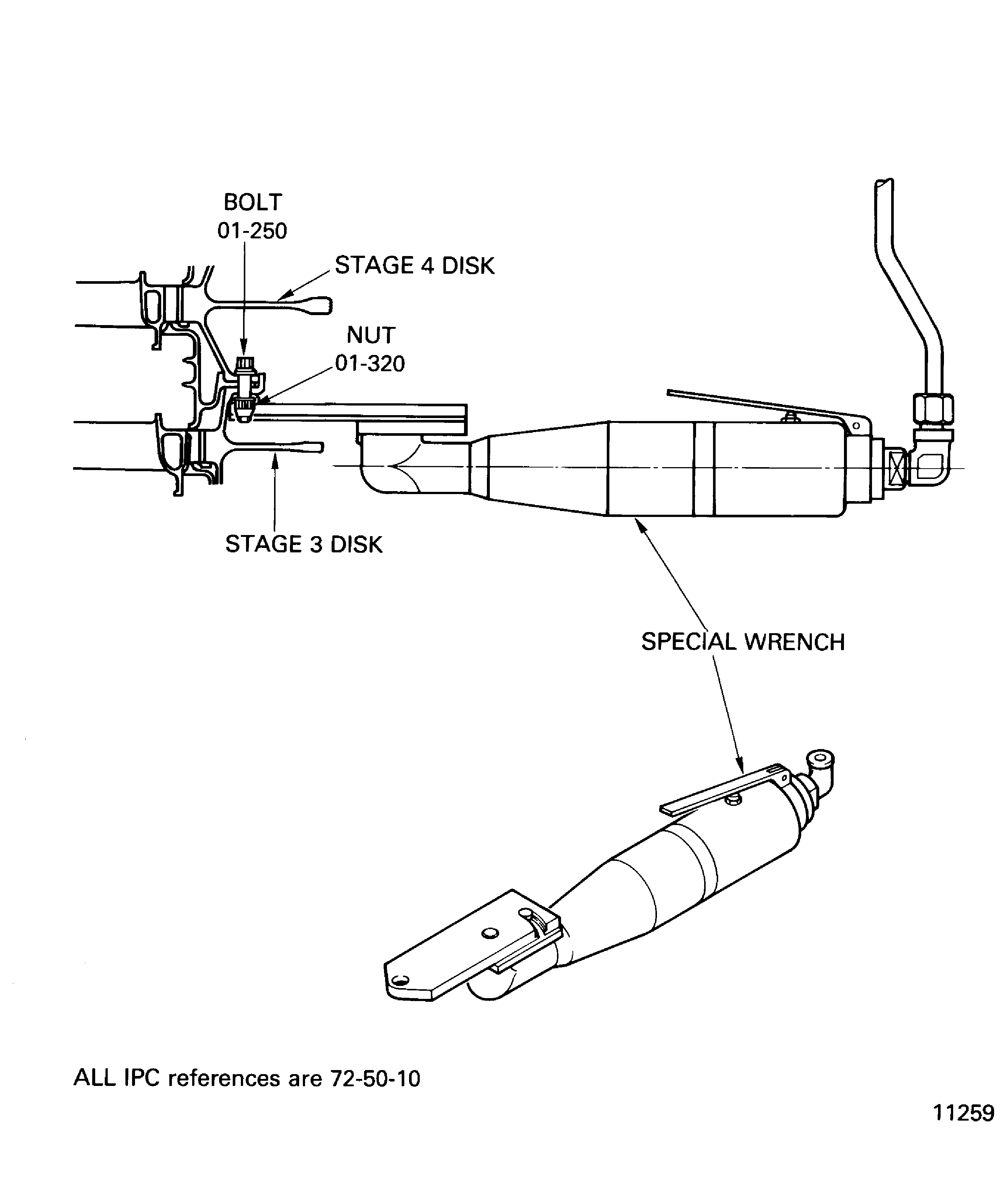
Figure: Lubrication of the Bolt Thread and The Nut Mating Surface
Lubrication of the Bolt Thread and The Nut Mating Surface