Export Control
EAR Export Classification: Not subject to the EAR per 15 C.F.R. Chapter 1, Part 734.3(b)(3), except for the following Service Bulletins which are currently published as EAR Export Classification 9E991: SBE70-0992, SBE72-0483, SBE72-0580, SBE72-0588, SBE72-0640, SBE73-0209, SBE80-0024 and SBE80-0025.Copyright
© IAE International Aero Engines AG (2001, 2014 - 2021) The information contained in this document is the property of © IAE International Aero Engines AG and may not be copied or used for any purpose other than that for which it is supplied without the express written authority of © IAE International Aero Engines AG. (This does not preclude use by engine and aircraft operators for normal instructional, maintenance or overhaul purposes.).Applicability
Post SBE 72-0561 (SELECTONE PRODUCTION ENGINE)
Common Information
TASK 72-41-20-440-006-C01 HPC Rear Cases And Vanes Assembly - Machine The Stator Vane Tips And The Rotor Path Ring Liners (Encapsulating Method) - SBE 72-0561 (SelectOne Production Standard), Assembly-006
General
This task gives the procedure for machine the stator vane tips and the rotor path ring liners only for engines, which have SBE 72-0561 (SelectOne Production Standard) incorporated.
Fig/item numbers in parentheses in the procedure agree with those used in the IPC. Only the primary Fig/item numbers are used. For the Service Bulletin alpha variants refer to the IPC.
For all parts identified in a different Chapter/Section/Subject the applicable Chapter/Section/Subject comes before the Fig/item number.
For standard torque data and procedures refer to SPM TASK 70-41-00-400-501, SPM TASK 70-41-01-400-501 and SPM TASK 70-41-02-400-501.
Special torque data and assembly tolerances are included in the procedure.
Lubricate all threads and abutment faces of nuts and bolts with CoMat 10-077 APPROVED ENGINE OILS approved engine oil unless other lubricants are referred to in the procedure.
After assembly apply CoMat 07-038 AIR DRYING ENAMEL to any damaged surface protection, joint flanges and parts used to attach. Use the correct color of the air drying enamel. Refer to SPM TASK 70-63-02-380-501.
The number for each radial location must be identified in a clockwise direction. These start at the engine top position when you look from the rear of the engine, unless stated differently in the procedure.
Refer to Figure for a sectional view of the HP compressor rear cases and vanes.
Make sure all the flange faces and tool faces that touch are very clean.
This TASK gives the procedures to machine the stator vane tips and the rotor path ring liners.
For other parts of the HP compressor rear cases and vanes assembly refer to TASK 72-41-20-440-000 (ASSEMBLY-000).
Machining Requirements
The data that follows is a guideline. If any additional data is necessary contact IAE.
For the rotor path ring machining, a machine is necessary that can meet the conditions that follow:
Permits a 31.00 in. (787.4 mm) diameter by 16.00 in. (406.4 mm) depth workpiece to be installed.
The workpiece must be turned in a counterclockwise direction, when viewed from the tailstock.
Permits a K Grade Carbide I.T.T. turning tool with a 0.031 in. (0.80 mm) radius tip to be installed.
The conditions that follow must be used when you machine the rotor path linings:
A component surface speed of 70m/min. This is equivalent to a speed of 43 r.p.m.
The maximum depth of cut to be used is 0.006 in. (0.15 mm).
The feed rate is to be determined by 'general feel' for the workpiece.
For the stator vane tip grinding, a machine is necessary that can meet the conditions that follow:
Permits a 31.00 in. (787.4 mm) diameter by 16.00 in. (406.4 mm) depth workpiece to be installed.
The workpiece must be turned in a clockwise direction, when viewed from the tailstock.
Permits a grinding set-up to be attached to the machine. It will be necessary for the grinding wheel to be turned.
The grinding wheel must be turned in a counterclockwise direction, when viewed from the tailstock.
Permits a swarf extraction unit to be installed.
The conditions that follow must be used when you are grinding the stator vane tips:
A component surface speed of 34 m/min. This is equivalent to a speed of 23 r.p.m.
A grinding wheel surface speed of 1675 m/min. This is equivalent to a speed of approximately 4090 r.p.m. at the recommended grinding wheel diameter.
A grinding wheel diameter of between 4.6 in. (117 mm) and 5.5 in. (140 mm).
It is recommended that you use a plunge grinding method with an infeed rate of 0.0075 mm per revolution.
Use a 'spark-out' time of 10 revolutions or 25 seconds.
NOTE
NOTE
Preliminary Requirements
Pre-Conditions
NONESupport Equipment
| Name | Manufacturer | Part Number / Identification | Quantity | Remark |
|---|---|---|---|---|
| IAE 1R18212 Support ring | 0AM53 | IAE 1R18212 | 1 | |
| IAE 1R18321 Turnover stand | 0AM53 | IAE 1R18321 | 1 | |
| IAE 1R18412 Turning fixture | 0AM53 | IAE 1R18412 | 1 | |
| IAE 1R18413 Turnover stand adaptor | 0AM53 | IAE 1R18413 | 1 | |
| IAE 1R18414 Boring bar | 0AM53 | IAE 1R18414 | 1 | |
| IAE 1R18415 Pallet | 0AM53 | IAE 1R18415 | 1 | |
| IAE 1R18416 Lifting tool | 0AM53 | IAE 1R18416 | 1 | |
| IAE 1R18417 Lifting Turnover trunnions | 0AM53 | IAE 1R18417 | 2 | |
| IAE 1R18418 Multiflex holder | 0AM53 | IAE 1R18418 | 1 | |
| IAE 1R18419 Probe holder | 0AM53 | IAE 1R18419 | 1 | |
| IAE 1R18420 Dressing attachment | 0AM53 | IAE 1R18420 | 1 | |
| IAE 1R18421 Diamond dresser | 0AM53 | IAE 1R18421 | 1 | |
| IAE 1R18422 Support probe bracket | 0AM53 | IAE 1R18422 | 1 | |
| IAE 1R18430 Turning holder | 0AM53 | IAE 1R18430 | 1 | |
| IAE 1R18431 Lifting beam | 0AM53 | IAE 1R18431 | 1 | |
| IAE 1R18700 Machine drawing | 0AM53 | IAE 1R18700 | 1 | |
| IAE 1R18738 Setting block | 0AM53 | IAE 1R18738 | ||
| IAE 1R18739 Setting block | 0AM53 | IAE 1R18739 | ||
| IAE 1R18740 Setting block | 0AM53 | IAE 1R18740 | ||
| IAE 1R18741 Setting block | 0AM53 | IAE 1R18741 | ||
| IAE 1R18760 Grinding head | 0AM53 | IAE 1R18760 | 1 | |
| IAE 1R18796 Protect guard | 0AM53 | IAE 1R18796 | 1 | |
| IAE 1R18797 Protect guard | 0AM53 | IAE 1R18797 | 1 | |
| IAE 1R18798 Protect guard | 0AM53 | IAE 1R18798 | 1 | |
| IAE 1R18799 Protect guard | 0AM53 | IAE 1R18799 | 1 | |
| IAE 1R18800 Protect guard | 0AM53 | IAE 1R18800 | 1 | |
| IAE 1R18801 Protect guard | 0AM53 | IAE 1R18801 | 1 | |
| IAE 1R18802 Protect guard | 0AM53 | IAE 1R18802 | 1 | |
| IAE 1R18803 Protect guard | 0AM53 | IAE 1R18803 | 1 | |
| IAE 1R18804 Protect guard | 0AM53 | IAE 1R18804 | 1 | |
| IAE 1R18806 Setting piece | 0AM53 | IAE 1R18806 | 1 | |
| IAE 1R18807 Setting piece | 0AM53 | IAE 1R18807 | 1 | |
| IAE 1R18808 Setting piece | 0AM53 | IAE 1R18808 | 1 | |
| IAE 1R18809 Setting piece | 0AM53 | IAE 1R18809 | 1 | |
| IAE 1R19793 Clamping Ring | 0AM53 | IAE 1R19793 | 1 | |
| IAE 1R19794 Clamping Ring | 0AM53 | IAE 1R19794 | 1 | |
| IAE 1R19795 Clamping Ring | 0AM53 | IAE 1R19795 | ||
| IAE 1R19796 Clamping Ring | 0AM53 | IAE 1R19796 | ||
| IAE 1R19797 Clamping Ring | 0AM53 | IAE 1R19797 | ||
| IAE 1R19798 Clamping Ring | 0AM53 | IAE 1R19798 | ||
| IAE 3R18232 Lifting beam | 0AM53 | IAE 3R18232 | 1 | |
| Heat resistant gloves | LOCAL | Heat resistant gloves | ||
| 'K' grade carbide I.T.T. turning tool | LOCAL | 'K' grade carbide I.T.T. turning tool | ||
| Oven | LOCAL | Oven | ||
| Vacuum | LOCAL | Vacuum |
Consumables, Materials and Expendables
| Name | Manufacturer | Part Number / Identification | Quantity | Remark |
|---|---|---|---|---|
| DELETED | LOCAL | DELETED | ||
| CoMat 01-103 FERRIC CHLORIDE HEXAHYDRATE | K6835 | CoMat 01-103 | ||
| CoMat 02-002 ADHESIVE TAPE GENERALPURPOSE PAPER | LOCAL | CoMat 02-002 | ||
| CoMat 02-181 MODELLING CLAY | LOCAL | CoMat 02-181 | ||
| CoMat 07-038 AIR DRYING ENAMEL | k3504 | CoMat 07-038 | ||
| CoMat 08-036 SILICONE RUBBER COMPOUND | LOCAL | CoMat 08-036 | ||
| CoMat 10-077 APPROVED ENGINE OILS | X333X | CoMat 10-077 | ||
| CoMat 12-031 FRENCH CHALK | LOCAL | CoMat 12-031 |
Spares
NONESafety Requirements
NONEProcedure
Apply the CoMat 02-002 ADHESIVE TAPE GENERALPURPOSE PAPER to the subsequent areas.
SUBTASK 72-41-20-440-262 Apply the Masking Tape to the HP Compressor Rear Cases and Vanes
Refer to Figure.
Attach a 0.118 in. (3.00 mm) to 0.276 in. (7.00 mm) strip of CoMat 02-181 MODELLING CLAY to the outer face of the protect guard.
Apply a thin layer of CoMat 12-031 FRENCH CHALK to the faces of the modeling clay that will touch the stator vanes.
Install IAE 1R18796 Protect guard 1 off, on to the stage 7 stator vanes.
NOTE
The outer face is the one that goes on to the stator vane tips.Use CoMat 02-002 ADHESIVE TAPE GENERALPURPOSE PAPER to hold the protect guards in their correct position.
Install IAE 1R18801 Protect guard 1 off, on to the stage 7 stator vanes.
Install IAE 1R18797 Protect guard 1 off, on to the stage 8 stator vanes.
Install IAE 1R18802 Protect guard 1 off, on to the stage 8 stator vanes.
Install IAE 1R18798 Protect guard 1 off, on to the stage 9 stator vanes.
Use CoMat 02-002 ADHESIVE TAPE GENERALPURPOSE PAPER to hold the protect guard in their correct positions.
Install IAE 1R18803 Protect guard 1 off, on to the stage 9 stator vanes.
Install IAE 1R18799 Protect guard 1 off, on to the stage 10 stator vanes.
Install IAE 1R18803 Protect guard 1 off, on to the stage 10 stator vanes.
Install IAE 1R18800 Protect guard 1 off, on to the stage 11 stator vanes.
Install IAE 1R18804 Protect guard 1 off, on to the stage 11 stator vanes.
SUBTASK 72-41-20-440-263 Install the Protect Guards on to the Stage 7 to 11 Stator Vanes
Mix a sufficient amount of CoMat 08-036 SILICONE RUBBER COMPOUND moulding material in accordance with the manufacturers data sheet. It is recommended that the mixture is put in a vacuum chamber to remove trapped air. Alternatively allow mixture to cure for 10 to 15 minutes at room temperature to let the bubbles to rise to the surface for removal.
Carefully apply the CoMat 08-036 SILICONE RUBBER COMPOUND moulding material to the stage 9 to 11 stator vane moulding cavities.
IAE 1R19796 Clamping Ring V2500-A5 stage 9 vanes.
IAE 1R19797 Clamping Ring V2500-A5 stage 10 vanes.
IAE 1R19798 Clamping Ring V2500-A5 stage 11 vanes.
Engine type (V2500-A5).
Stage number (eg stage 9 vanes).
Use a black permanent marker pen to identify the tool with the following:
SUBTASK 72-41-20-440-265 Manufacture the Tool to Restrain the Stator Vanes Stages 9 to 11
NOTE
The tooling can only be manufactured using new stator vanes.NOTE
The procedure is not necessary if the tool is made before and is still in good condition.If tooling has defects or loss of elasticity, reject and do the Step again.
Visually examine the silicone rubber tooling for defects and loss of elasticity.
IAE 1R19796 Clamping Ring V2500-A5 stage 9 vanes.
IAE 1R19797 Clamping Ring V2500-A5 stage 10 vanes.
IAE 1R19798 Clamping Ring V2500-A5 stage 11 vanes.
Install the silicone rubber tooling to the HP Compressor stage with fixed geometry stator vanes stages 9 to 11.
SUBTASK 72-41-20-440-266 Install the Tooling to Hold the Stage 9 to 11 Stator Vanes
Refer to Figure.
Install the IAE 1R18212 Support ring 1 off on the front support cone.
Install IAE 1R18417 Lifting Turnover trunnions 2 off.
Use a correct hoist attached to IAE 1R18431 Lifting beam 1 off and set the lifting beam above the HP compressor rear case and vanes.
SUBTASK 72-41-20-440-267 Turn the HP Compressor Rear Cases and Vanes
Mix a sufficient amount of CoMat 08-036 SILICONE RUBBER COMPOUND moulding material in accordance with the manufacturers data sheet. It is recommended that the mixture is put in a vacuum chamber to remove trapped air. Alternatively let the mixture to cure for 10 to 15 minutes at room temperature to let the bubbles to rise to the surface for removal.
Carefully apply the CoMat 08-036 SILICONE RUBBER COMPOUND moulding material to the stage 7 to 8 stator vane moulding cavities.
IAE 1R19794 Clamping Ring V2500-A5 stage 7 vanes.
IAE 1R19795 Clamping Ring V2500-A5 stage 8 vanes.
Engine type (V2500-A5).
Stage number (eg stage 7 vanes).
Use a black permanent marker pen to identify the tool with the following:
SUBTASK 72-41-20-440-269 Manufacture the Tool to Restrain the Stator Vanes Stages 7 to 8
NOTE
The tooling can only be manufactured using new stator vanes.NOTE
The procedure is not necessary if the tool is made before and is still in good condition.If tooling has defects or loss of elasticity, reject and do the Step again.
Visually examine the silicone rubber tooling for defects and loss of elasticity.
IAE 1R19794 Clamping Ring V2500-A5 stage 7 vanes.
IAE 1R19795 Clamping Ring V2500-A5 stage 8 vanes.
If this TASK has not already been completed, install the silicone rubber tooling to the HP Compressor stages with fixed geometry stator vanes stages 7 to 11.
SUBTASK 72-41-20-440-270 Install the Tooling to Restrain the HP Compressor Stage 7 to 11 Stator Vanes
Refer to Figure.
Install IAE 1R18413 Turnover stand adaptor 1 off, on to IAE 1R18321 Turnover stand 1 off.
Install IAE 1R18412 Turning fixture 1 off, on to the turnover stand adapter.
SUBTASK 72-41-20-440-271 Prepare the Tools to Turn the HP Compressor Rear Cases and Vanes from the Horizontal to the Vertical
Align the four holes in the lifting tool with four holes in the front support cone HPC Ring Cases And Related Parts (72-41-21, 03-300) outer flange. Use the bolt holes that are on each side of a location dowel hole.
Install the IAE 1R18416 Lifting tool 1 off on to the front support cone HPC Ring Cases And Related Parts (72-41-21, 03-300).
Carefully lower the HP compressor rear cases and vanes in to the turning fixture. Engage the 10 dowels in the turning fixture with the 10 dowel locating holes in the front support cone outer flange. There is a dowel location hole on each of the legs of the lifting tool. These must be located on two of the dowels on the turning fixture.
Install the 10 clamps removed in Step. Tighten the 10 nuts in sequence.
Move the location blocks radially in. Tighten the 24 nuts in the correct sequence. The location blocks must not change the position of the HP compressor rear cases and vanes. The HP compressor rear cases and vanes must be held by a minimum of six location blocks. The location blocks must be set at equal positions around the flange.
Install the HP compressor rear cases and vanes in to the tools assembled in Step.
SUBTASK 72-41-20-440-272 Install the HP Compressor Rear Cases and Vanes in the Turning Fixture
Refer to Figure.
Install the four bolts removed in Step.
Install the IAE 3R18232 Lifting beam 1 off on to the IAE 1R18412 Turning fixture 1 off.
Adjust the hoist used in Step until it just holds the weight of the turning fixture and the HP compressor rear cases and vanes.
Lift the HP compressor rear cases and vanes.
Carefully lower the assembly in to the IAE 1R18415 Pallet 1 off.
SUBTASK 72-41-20-440-273 Install the HP compressor Rear Cases and Vanes in the Pallet
Attach the IAE 1R18760 Grinding head 1 off to the machine. Use an applicable adapter plate.
Attach the IAE 1R18420 Dressing attachment 1 off to the grind attachment on the machine and safety with the four set screws.
Set the dressing angle. Use IAE 1R18738 Setting block 1 off, IAE 1R18739 Setting block 1 off, IAE 1R18740 Setting block 1 off or IAE 1R18741 Setting block 1 off. Refer to IAE 1R18700 Machine drawing 1 off for correct setting piece.
Attach the IAE 1R18421 Diamond dresser 1 off to the dressing attachment and safety with the set screw.
Attach the IAE 1R18422 Support probe bracket 1 off to the grind attachment. Position the support probe bracket behind the dressing attachment and safety with the four set screws.
Attach the IAE 1R18418 Multiflex holder 1 off at the locating slot on the support probe bracket and safety with the three set screws.
Set up the universal machining centre.
To measure the stage 7 to 11 stator vanes attach the IAE 1R18419 Probe holder 1 off at the multiflex holder interface and safety with the allen screw.
Use a Vacuum adjacent to the grinding wheel to remove the dust during the grinding process.
SUBTASK 72-41-20-440-274 Machine the Stage 7 to 11 Stator Vanes
Remove the CoMat 02-002 ADHESIVE TAPE GENERALPURPOSE PAPER from the stage 7 to 12 rotor path rings.
Attach the IAE 1R18414 Boring bar 1 off to the machine tool post and safety with the three set screws.
Attach the IAE 1R18418 Multiflex holder 1 off at the locating slot on the boring bar and safety with the three grub screws.
Attach the IAE 1R18430 Turning holder 1 off at the multiflex holder interface and safety with the allen screw.
Set up the universal machining centre.
To measure the rotor path rings remove the IAE 1R18430 Turning holder and fit the IAE 1R18419 Probe holder 1 off at the multiflex holder interface and safety with the allen screw.
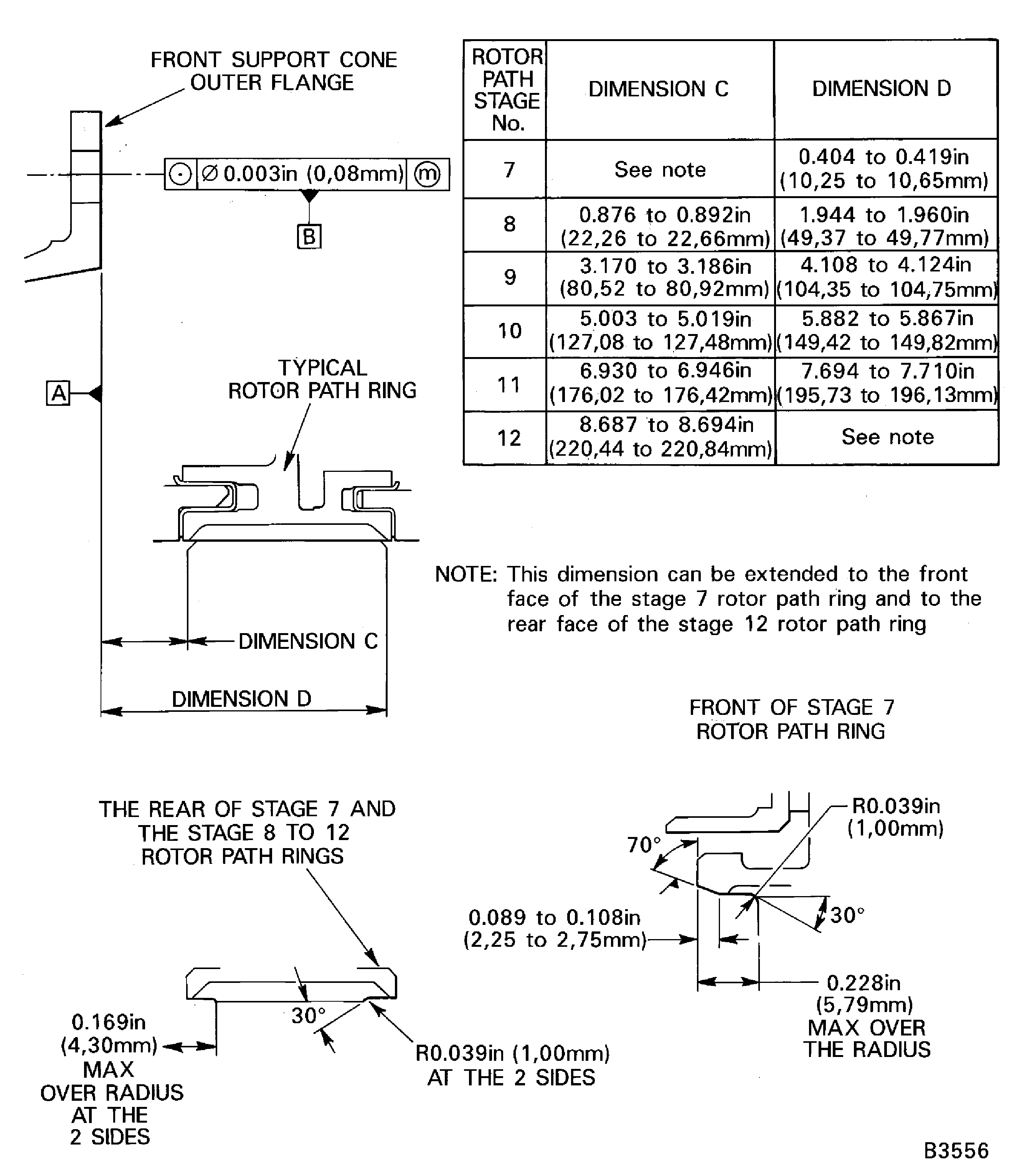
Use the conditions given in machining requirements to machine the stage 7 to 12 rotor path rings. Write down a record of the dimensions the rotor path rings are machined to.
NOTE
Only remove the minimum quantity of abradable lining to show the metal of the rotor path rings at the front and rear of the liner.Use a Vacuum adjacent to the grinding wheel to remove the dust during the grinding process.
Put the HP compressor rear cases and vanes in to IAE 1R18415 Pallet 1 off.
SUBTASK 72-41-20-440-275 Machine the Stage 7 to 12 Rotor Path Rings and Rotor Path Case Assemblies
Refer to Figure.
Install the IAE 1R18416 Lifting tool 1 off as given in Step.
SUBTASK 72-41-20-440-276 Prepare the HP Compressor Rear Cases and Vanes to be Cleaned
Use a Vacuum to remove any loose swarf or dust which may have accumulated during the grinding process.
Aqueous degrease the HP compressor cases and vanes by TASK 70-11-03-300-503.
SUBTASK 72-41-20-110-058 Clean the HP Compressor Rear Case and Vanes
Refer to Figure.
Install the IAE 1R18212 Support ring 1 off and the IAE 1R18417 Lifting Turnover trunnions 2 off, on the front support cone as given in Step.
Attach the IAE 1R18431 Lifting beam 1 off on a correct hoist to the lifting turnover trunnions.
SUBTASK 72-41-20-440-277 Install the HP Compressor Rear Cases and Vanes on to the Support Rings
Figure: View through the HP Compressor Rear Cases and Vanes
View through the HP Compressor Rear Cases and Vanes
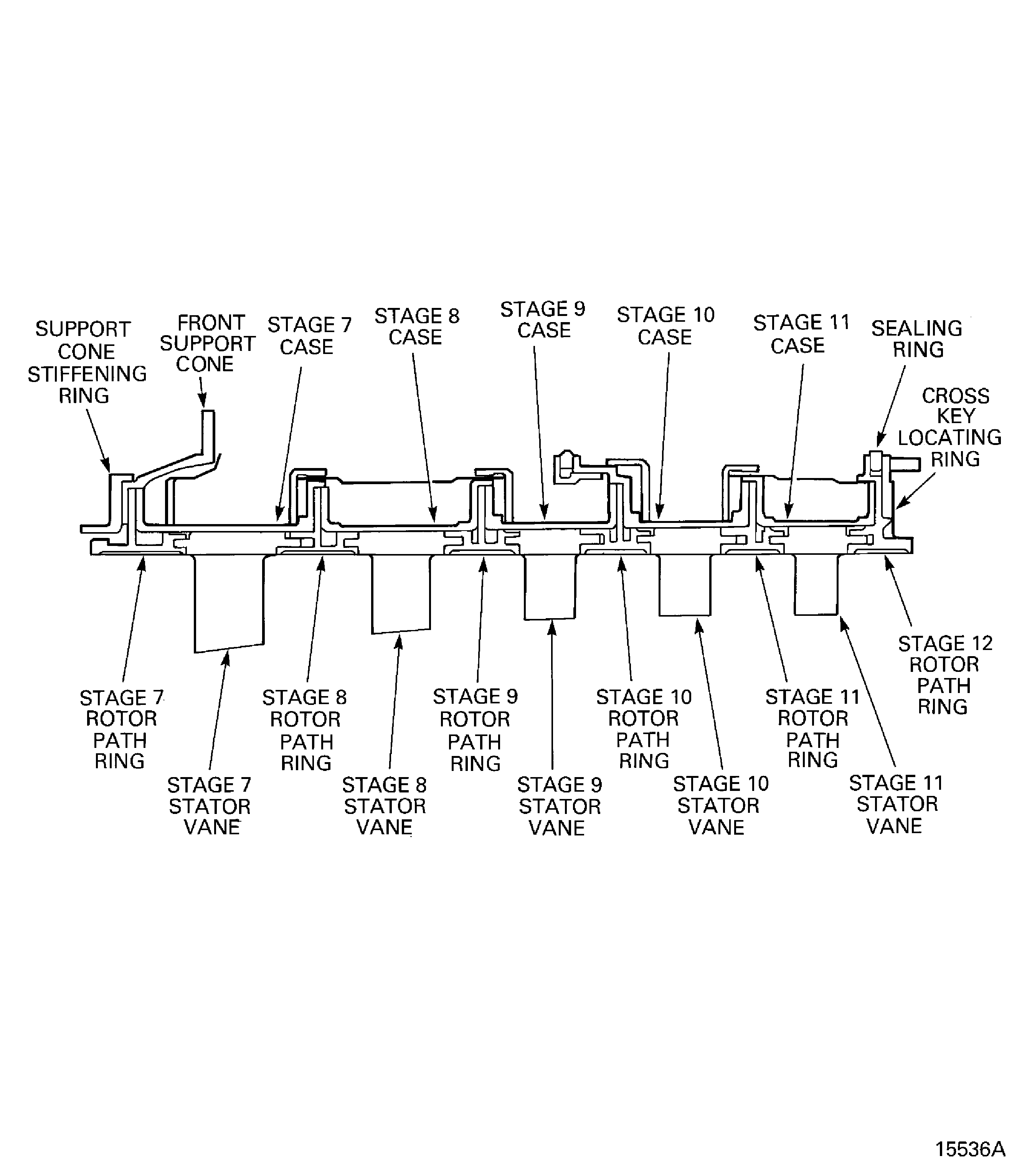
Figure: Install the Protect Guards
Install the Protect Guards
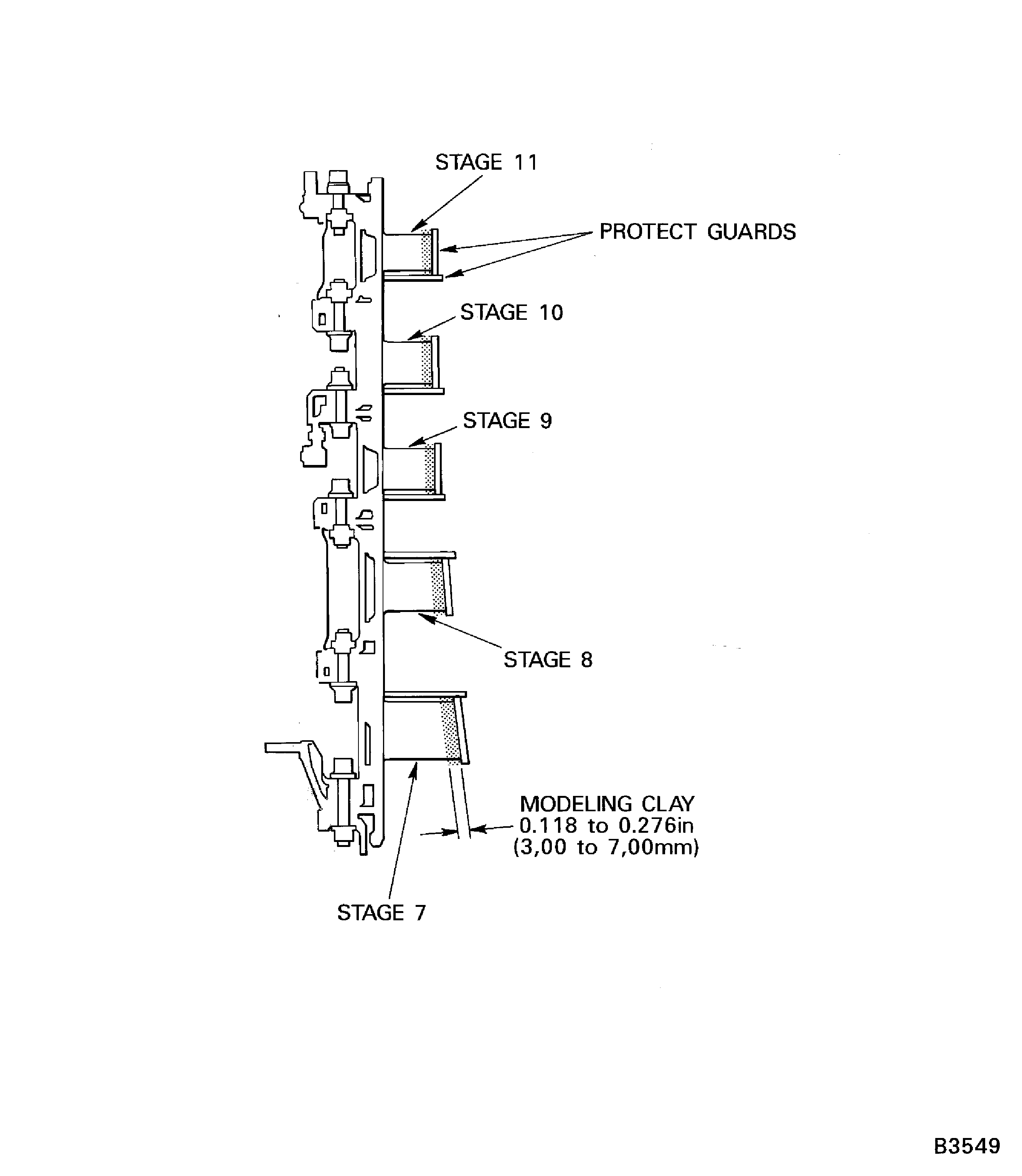
Figure: Install the Lifting Turnover Trunnions
Install the Lifting Turnover Trunnions
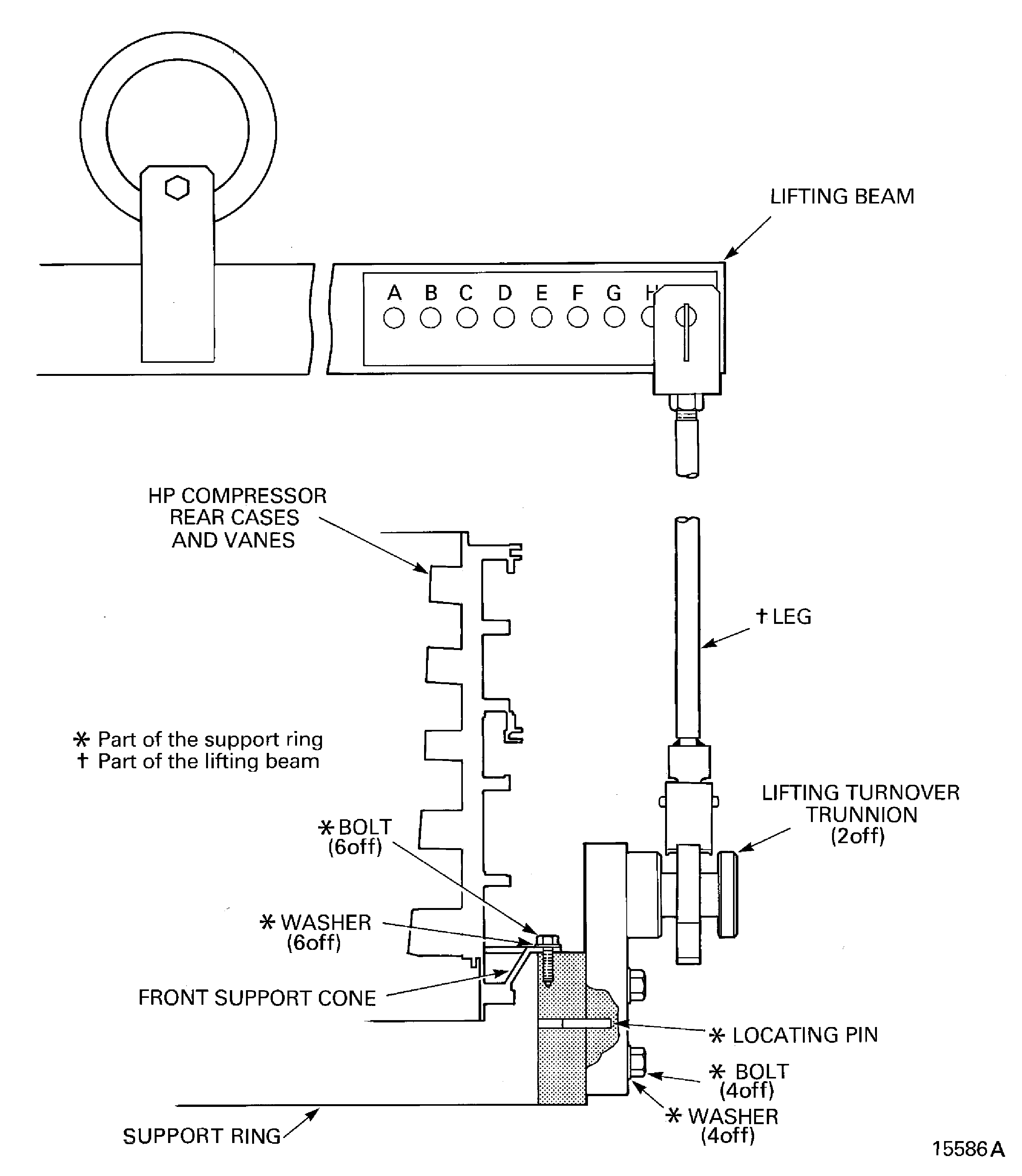
Figure: Prepare the Tools to Turn the HP Compressor Rear Cases and Vanes
Prepare the Tools to Turn the HP Compressor Rear Cases and Vanes
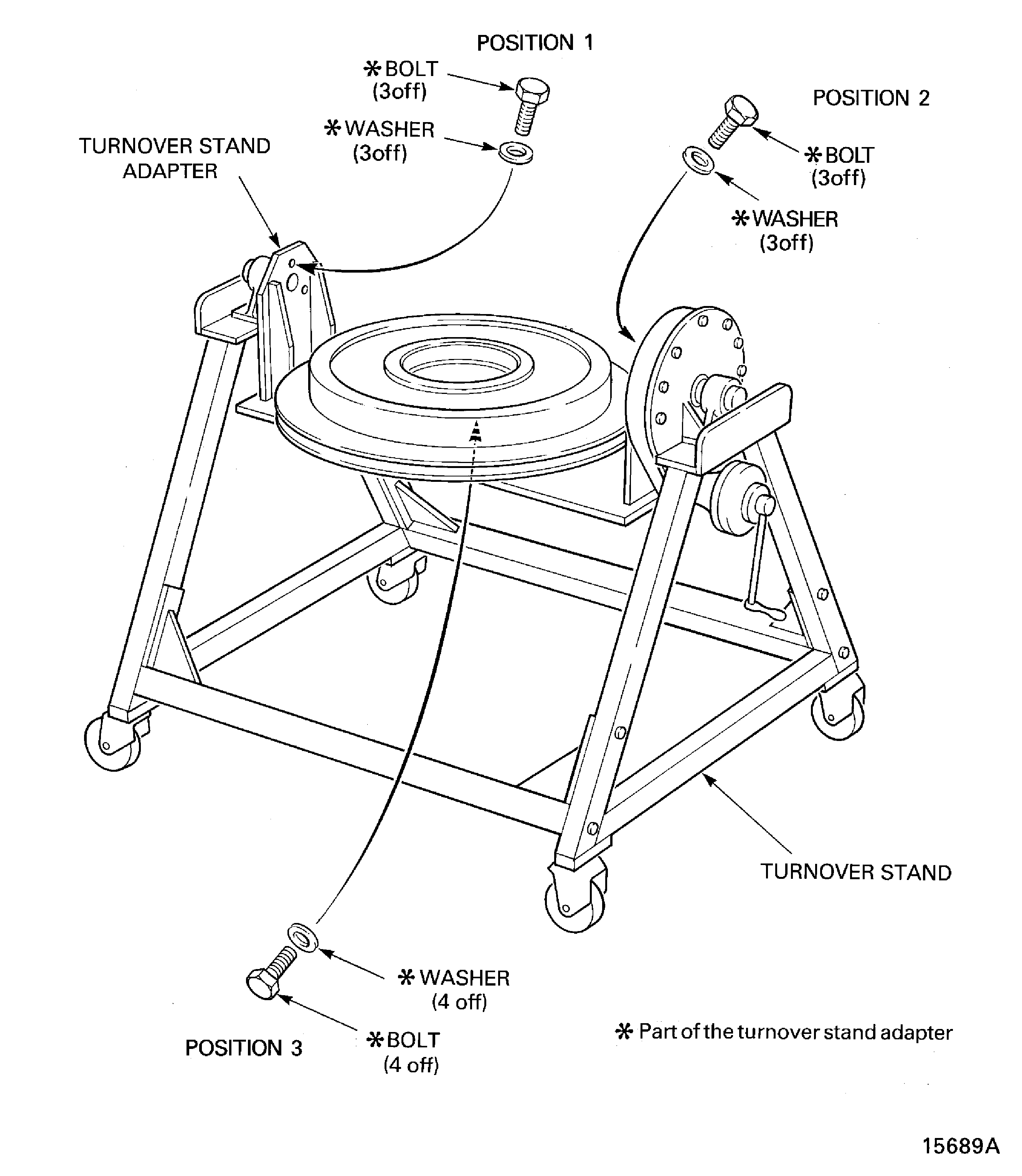
Figure: Install the HP Compressor Rear Cases and Vanes in to the Turning Fixture
Install the HP Compressor Rear Cases and Vanes in to the Turning Fixture
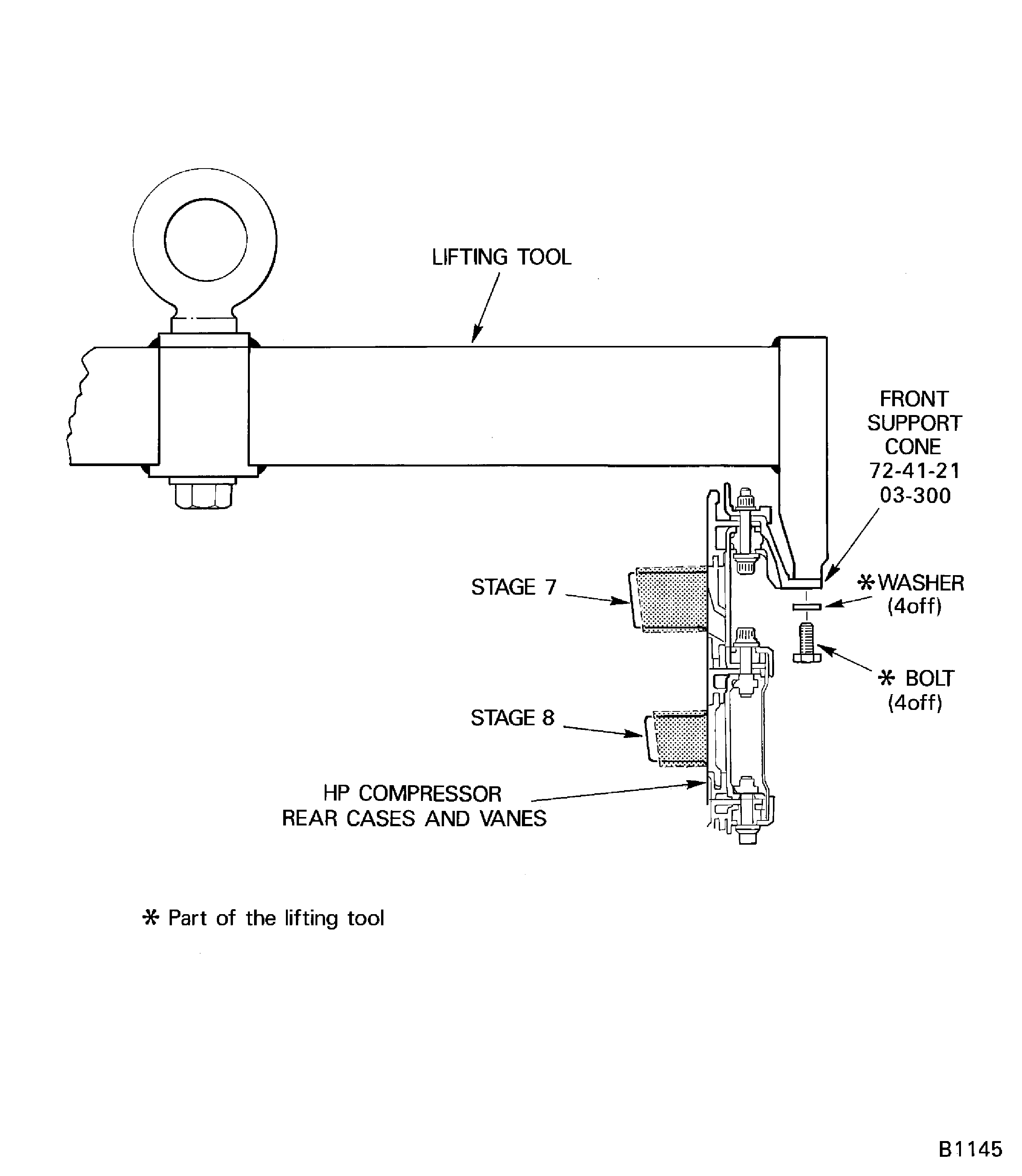
Figure: Install the HP Compressor Rear Cases and Vanes in to the Turning Fixture
Install the HP Compressor Rear Cases and Vanes in to the Turning Fixture
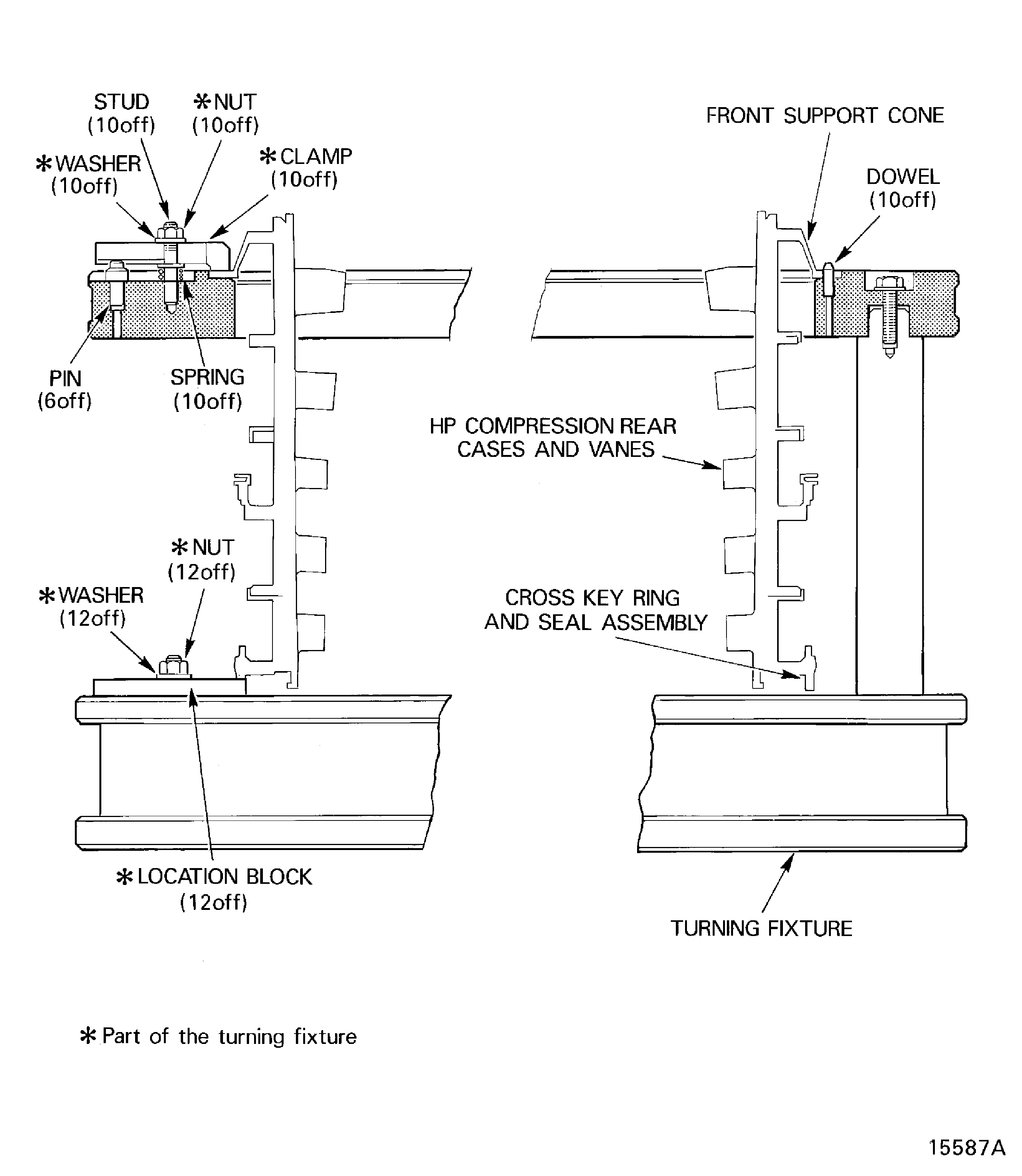
Figure: Transfer the HP Compressor Rear Cases and Vanes from the Turnover Stand to the Pallet
Transfer the HP Compressor Rear Cases and Vanes from the Turnover Stand to the Pallet
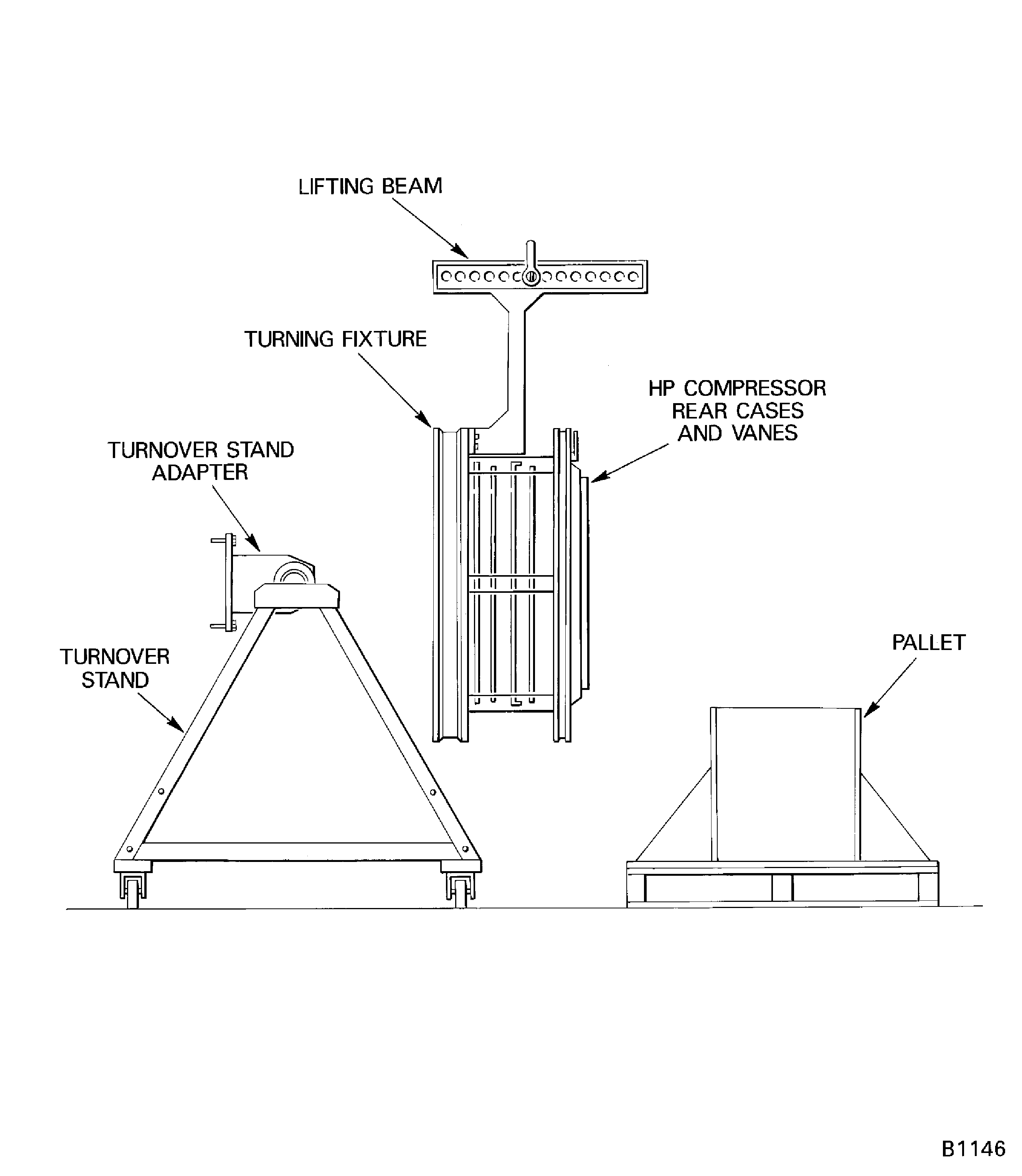
Figure: Machine the Stator Vane Tips
Machine the Stator Vane Tips
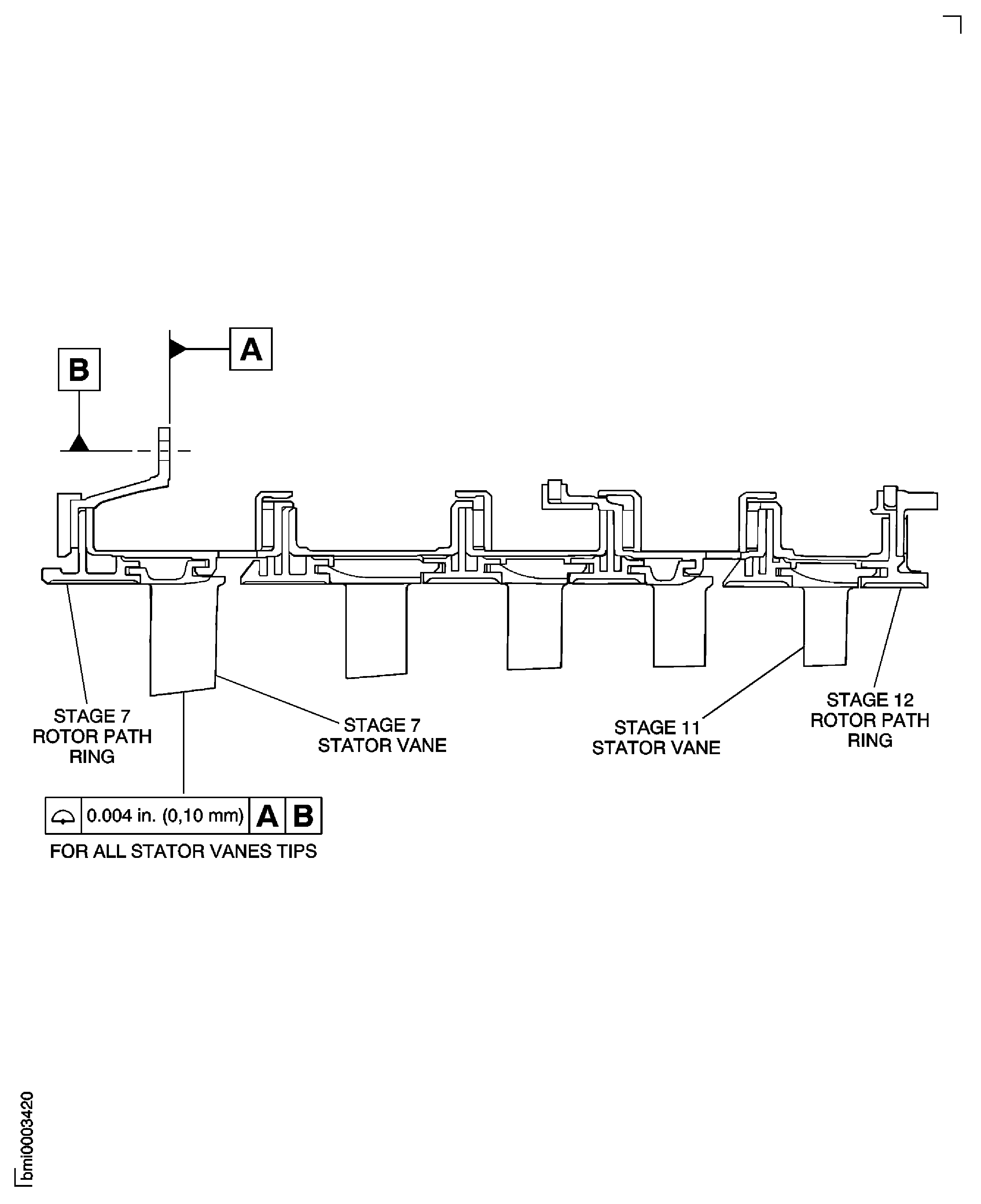
Figure: Machine the Stator Vane Tips
Machine the Stator Vane Tips
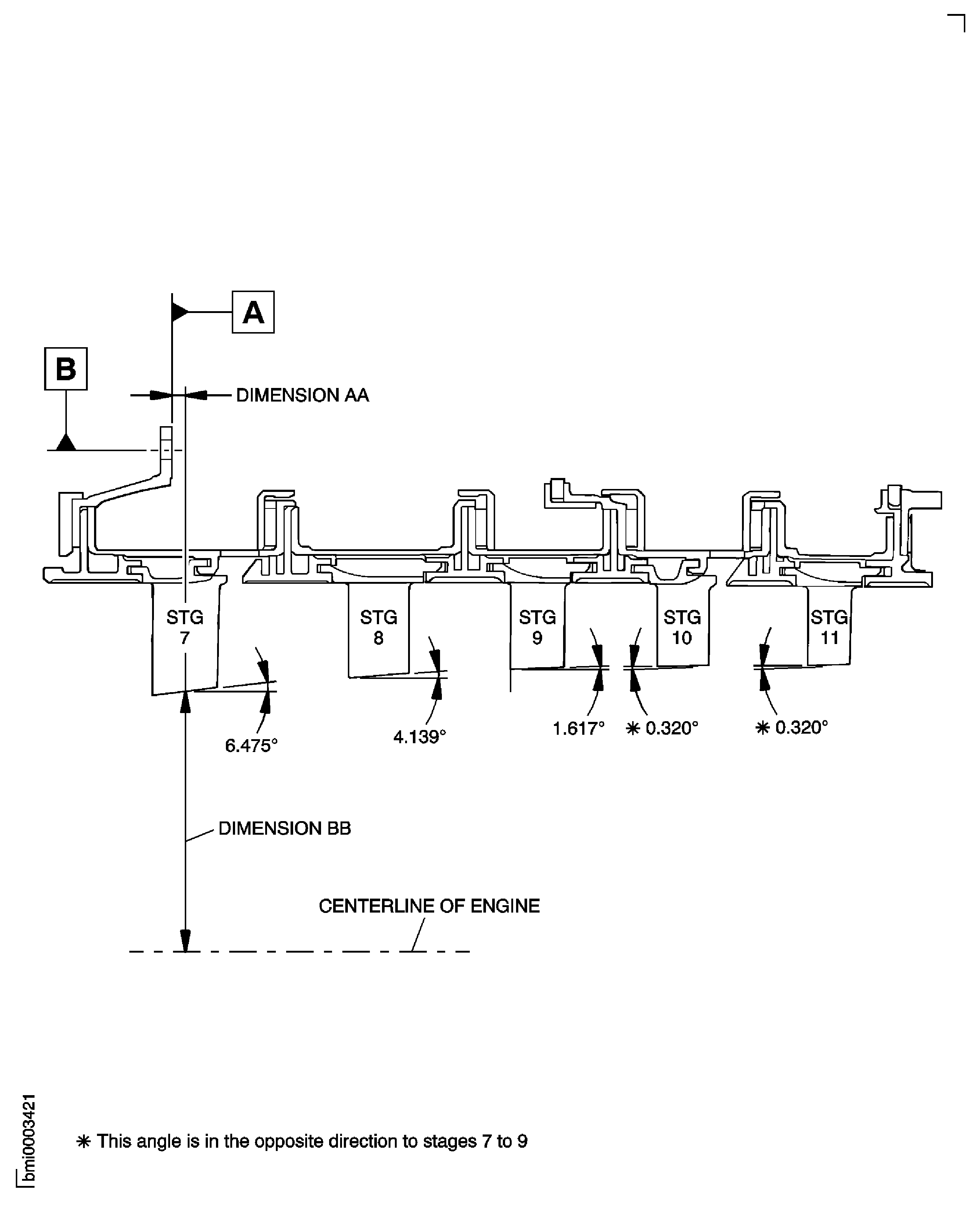
Figure: Machine the Stator Vane Tips
Machine the Stator Vane Tips
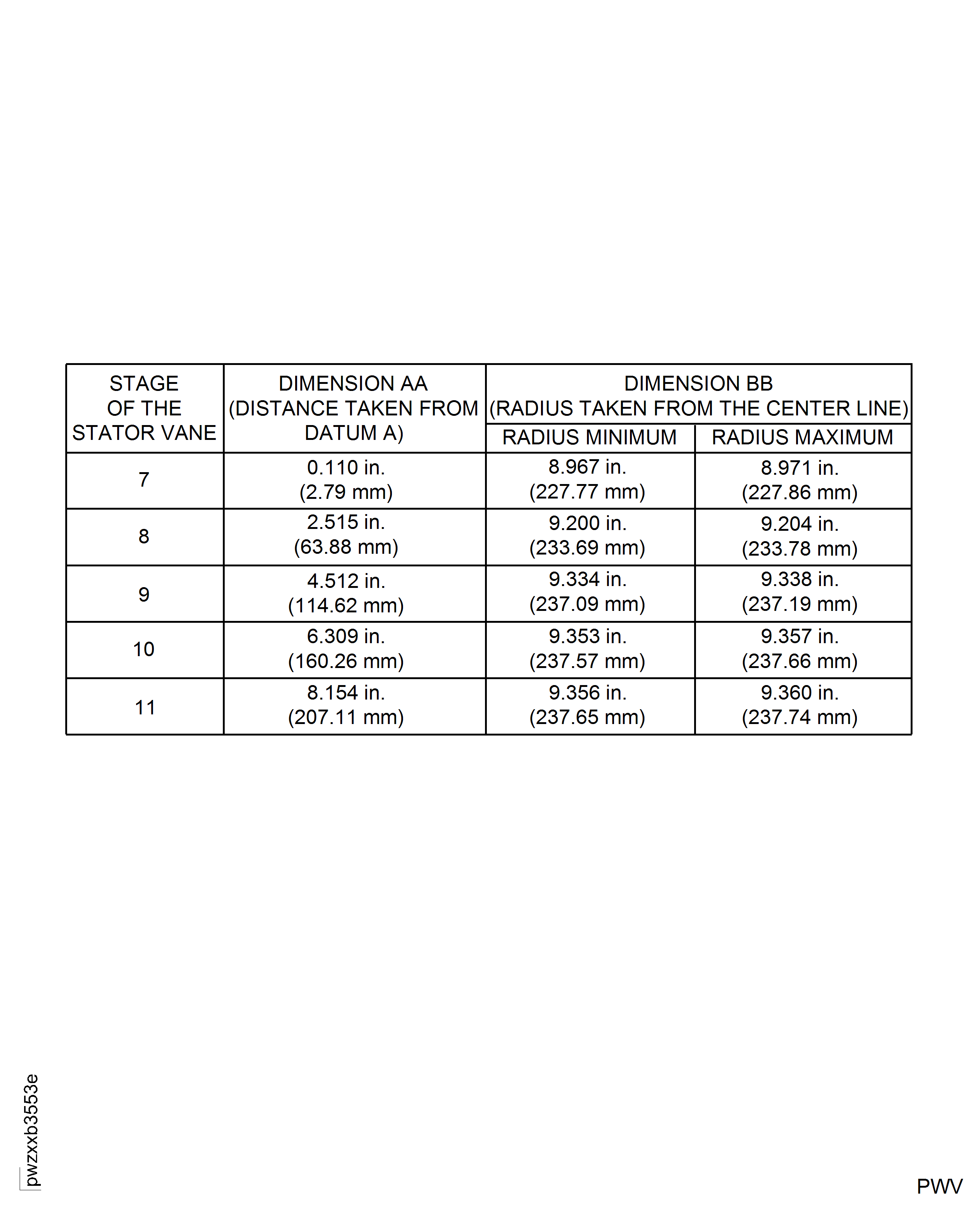
Figure: Machine the Rotor Path Ring Linings
Machine the Rotor Path Ring Linings
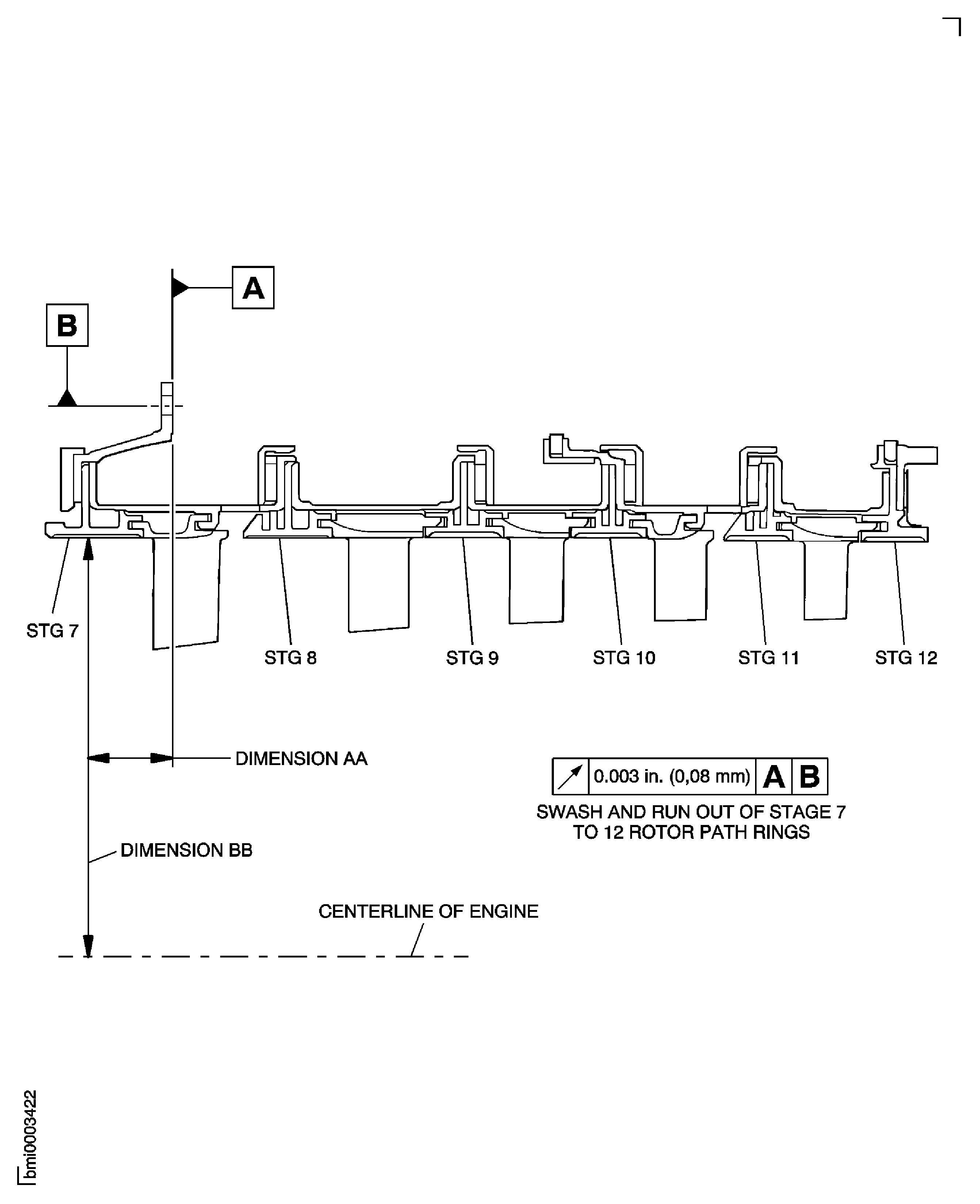
Figure: Machine the Rotor Path Ring Linings
Machine the Rotor Path Ring Linings
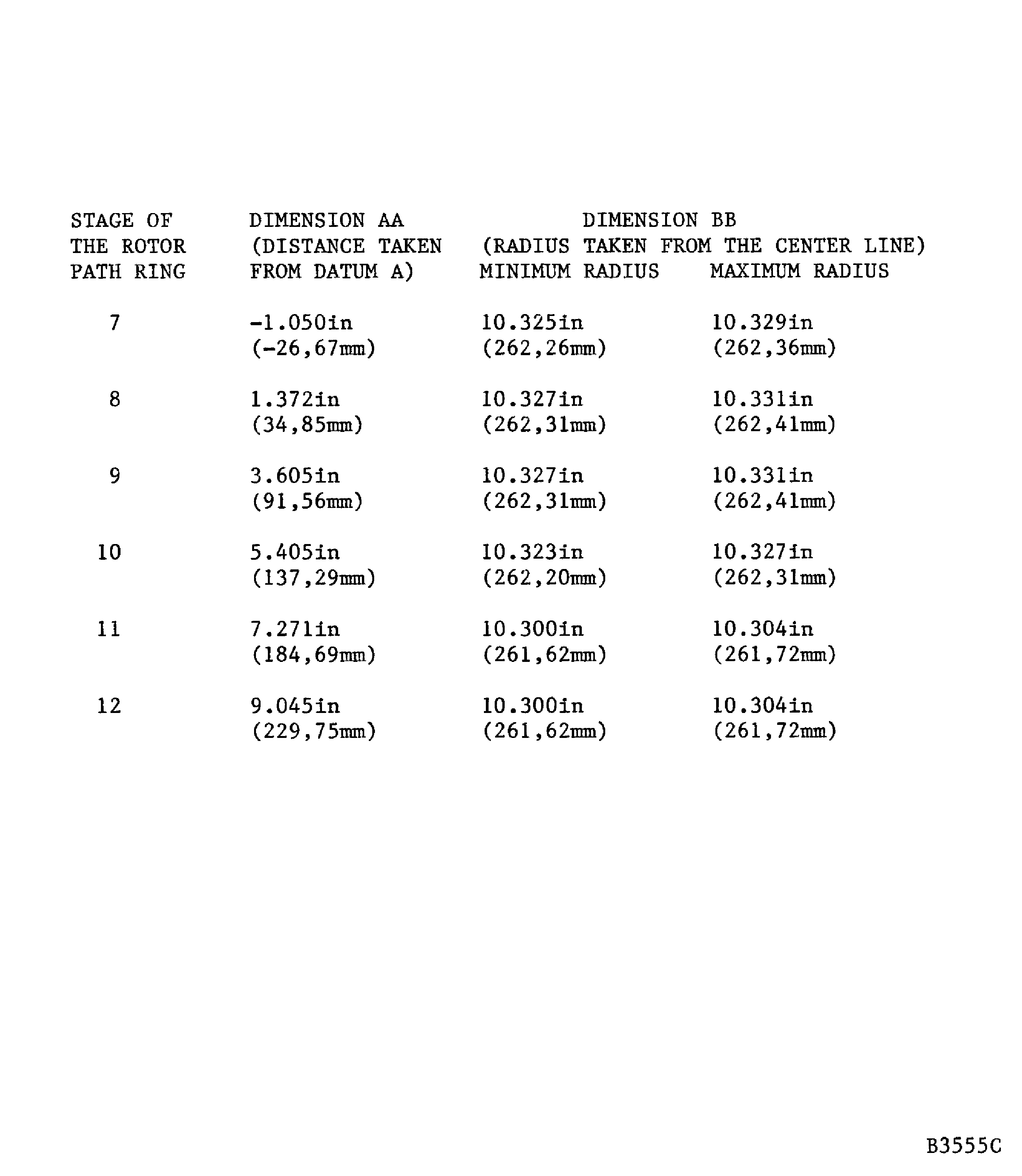
Figure: Machine the Rotor Path Ring Linings
Machine the Rotor Path Ring Linings