Export Control
EAR Export Classification: Not subject to the EAR per 15 C.F.R. Chapter 1, Part 734.3(b)(3), except for the following Service Bulletins which are currently published as EAR Export Classification 9E991: SBE70-0992, SBE72-0483, SBE72-0580, SBE72-0588, SBE72-0640, SBE73-0209, SBE80-0024 and SBE80-0025.Copyright
© IAE International Aero Engines AG (2001, 2014 - 2021) The information contained in this document is the property of © IAE International Aero Engines AG and may not be copied or used for any purpose other than that for which it is supplied without the express written authority of © IAE International Aero Engines AG. (This does not preclude use by engine and aircraft operators for normal instructional, maintenance or overhaul purposes.).Applicability
All
Common Information
TASK 72-00-32-020-004 LPC/Intermediate Case Module - Remove The Components, Removal-004
General
Refer to the TASKS which follow for the other related procedures:
TASK 72-00-32-020-001 Remove the LP compressor/intermediate case hydraulic tubes, the thermal anti-ice duct, the pneumatic starter duct and the EEC cooling ducts
TASK 72-00-32-020-002 Remove the LP compressor/intermediate case electrical harnesses
TASK 72-00-32-020-003 Remove the LP compressor/intermediate case tubes and the electrical harness raceways
TASK 72-00-32-020-005 Remove the LP compressor/intermediate case brackets and the bifurcation panel
Fig./item numbers in parentheses in the procedure agree with those used in the IPC. Only the primary Fig./item numbers are used. For the service bulletin alpha variants refer to the IPC.
For all parts identified in a different Chapter/Section/Subject the applicable Chapter/Section/Subject comes before the Fig/item number.
Apply the approved CoMat 10-058 PENETRATING OIL before the removal of threaded parts. Let the parts soak before removal.
Seal all openings to prevent contamination from unwanted material.
Discard all rubber seal rings removed in this procedure.
NOTE
Preliminary Requirements
Pre-Conditions
NONESupport Equipment
NONEConsumables, Materials and Expendables
| Name | Manufacturer | Part Number / Identification | Quantity | Remark |
|---|---|---|---|---|
| CoMat 10-058 PENETRATING OIL | 0AM53 | CoMat 10-058 |
Spares
NONESafety Requirements
NONEProcedure
Refer to Figure.
Remove the nut, the two washers and the bolt that attaches the bonding strap to the bracket Ignition Relay Box (71-51-49, 01-380) on flange FB.
SUBTASK 72-00-32-020-065 Remove the Relay Box
Refer to Figure.

WARNING
BE CAREFUL DURING THE REMOVAL OF THE EEC BECAUSE IT WEIGHS 41 LB (18.6 KG).NOTE
The data entry plug is permanently installed on the LP compressor/intermediate case flange. It is not necessary to remove the data entry plug in this procedure.
If the data entry plug is to be removed from the LP compressor/intermediate case flange, refer to the procedure given in TASK 72-00-32-050-023.
Disconnect the data entry plug EEC Data Entry Plug (73-22-35, 01-100) from the EEC, put a special plastic cap or an applicable blank on the plug.
SUBTASK 72-00-32-020-066 Remove the Electronic Control Unit (EEC)
Refer to Figure.
NOTE
The No.4 bearing pressure transducer must have its maintenance completed, as given in the Eaton/Consolidated Controls Component Maintenance Manual (79-33-16).Remove the two bolts and clipnuts that attach the transducer to the mounting bracket EEC Fan Harness(71-51-41, 05-760) on flange FA1. Remove the transducer.
SUBTASK 72-00-32-020-067 Remove the No.4 Bearing Pressure Transducer
Refer to Figure.
NOTE
The oil pressure transmitter must have its maintenance completed, as given in the Eaton/Consolidated Controls Component Maintenance Manual (79-33-15).Remove the four bolts that attach the pressure transmitter to the mounting bracket General Services Harness (71-51-43, 05-990) between flanges FA1 and FB. Remove the transmitter.
SUBTASK 72-00-32-020-068 Remove the Oil Pressure Transmitter
Refer to Figure.
NOTE
The low oil pressure switch must have its maintenance completed, as given in the Eaton/Consolidated Controls Component Maintenance Manual (79-34-15).Remove the three bolts that attach the pressure switch to the mounting bracket General Services Harness (71-51-43, 05-990) between flanges FA1 and FB. Remove the switch.
SUBTASK 72-00-32-020-069 Remove the Low Oil Pressure Switch
Refer to Figure.
Remove the two bolts HYDRAULIC POWER-HYDRAULIC PRESSURE SWITCH (29-11-17, 01-020) that attach the warning switch HYDRAULIC POWER-HYDRAULIC PRESSURE SWITCH (29-11-17, 01-010) to the mounting bracket General Services Harness (71-51-43, 05-866). Remove the warning switch HYDRAULIC POWER-HYDRAULIC PRESSURE SWITCH (29-11-17, 01-010) and mount adapter HYDRAULIC POWER-HYDRAULIC PRESSURE SWITCH (29-11-17, 01-030) complete.
NOTE
The hydraulic low pressure warning switch must have its maintenance completed, as given in the Elecktro Metall Export Component Maintenance Manual (29-11-17).Hold the adapter HYDRAULIC POWER-HYDRAULIC PRESSURE SWITCH (29-11-17, 01-030) with an applicable wrench and remove the hydraulic low pressure warning switch HYDRAULIC POWER-HYDRAULIC PRESSURE SWITCH (29-11-17, 01-010) and the packing HYDRAULIC POWER-HYDRAULIC PRESSURE SWITCH (29-11-17, 01-015).
SUBTASK 72-00-32-020-070-A00 V2500-A1 Remove the Hydraulic Low Pressure Warning Switch (Pre SBN 29-0001)
Refer to Figure.
Remove the two bolts HYDRAULIC POWER-HYDRAULIC PRESSURE SWITCH (29-11-17, 01-020) and the spacer HYDRAULIC POWER-HYDRAULIC PRESSURE SWITCH (29-11-17, 01-025) that attach the warning switch HYDRAULIC POWER-HYDRAULIC PRESSURE SWITCH (29-11-17, 01-010) to the mounting bracket General Services Harness (71-51-43, 05-866). Remove the warning switch HYDRAULIC POWER-HYDRAULIC PRESSURE SWITCH (29-11-17, 01-010) and mount adapter HYDRAULIC POWER-HYDRAULIC PRESSURE SWITCH (29-11-17, 01-030) complete.
NOTE
The hydraulic low pressure warning switch must have its maintenance completed, as given in the Elecktro Metall Export Component Maintenance Manual (29-11-17).Hold the adapter HYDRAULIC POWER-HYDRAULIC PRESSURE SWITCH (29-11-17, 01-030) with an applicable wrench and remove the hydraulic low pressure warning switch HYDRAULIC POWER-HYDRAULIC PRESSURE SWITCH (29-11-17, 01-010) and the packing HYDRAULIC POWER-HYDRAULIC PRESSURE SWITCH (29-11-17, 01-015).
SUBTASK 72-00-32-020-070-B00 V2500-A1 Remove the Hydraulic Low Pressure Warning Switch (SBN 29-0001, Pre SBN 29-0262 and Pre SBN 29-0263)
Refer to Figure.
Cut and remove the lockwire from the anchor tab HYDRAULIC POWER-HYDRAULIC PRESSURE SWITCH (29-11-17, 01-027). Remove the two bolts HYDRAULIC POWER-HYDRAULIC PRESSURE SWITCH (29-11-17, 01-020), the anchor tabs and the spacer HYDRAULIC POWER-HYDRAULIC PRESSURE SWITCH (29-11-17, 01-025) that attach the warning switch to the mounting bracket General Services Harness (71-51-43, 05-866). Remove the warning switch and mount adapter complete.
NOTE
The hydraulic low pressure warning switch must have its maintenance completed, as given in the Elecktro Metall Export Component Maintenance Manual (29-11-17).Hold the adapter HYDRAULIC POWER-HYDRAULIC PRESSURE SWITCH (29-11-17, 01-030) with an applicable wrench and remove the hydraulic low pressure warning switch HYDRAULIC POWER-HYDRAULIC PRESSURE SWITCH (29-11-17, 01-010) and the packing HYDRAULIC POWER-HYDRAULIC PRESSURE SWITCH (29-11-17, 01-015).
SUBTASK 72-0-32-020-070-C00 V2500-A1 Remove the Hydraulic Low Pressure Warning Switch (SBN 29-0001, SBN 29-0262 and Pre SBN 29-0263)
Refer to Figure.
Remove the clipnut HYDRAULIC POWER-HYDRAULIC PRESSURE SWITCH (29-11-17, 01-045), the bolt HYDRAULIC POWER-HYDRAULIC PRESSURE SWITCH (29-11-17, 01-040) and the P-clip HYDRAULIC POWER-HYDRAULIC PRESSURE SWITCH (29-11-17, 01-035) that attach the warning switch HYDRAULIC POWER-HYDRAULIC PRESSURE SWITCH (29-11-17, 01-010) to the support bracket General Services Harness (71-51-43, 05-875). Cut and remove the lockwire from the anchor tabs HYDRAULIC POWER-HYDRAULIC PRESSURE SWITCH (29-11-17, 01-027). Remove the two bolts HYDRAULIC POWER-HYDRAULIC PRESSURE SWITCH (29-11-17, 01-020), the anchor tabs and the spacer HYDRAULIC POWER-HYDRAULIC PRESSURE SWITCH (29-11-17, 01-025) that attach the warning switch HYDRAULIC POWER-HYDRAULIC PRESSURE SWITCH (29-11-17, 01-010) to the mounting bracket General Services Harness (71-51-43, 05-866). Remove the warning switch HYDRAULIC POWER-HYDRAULIC PRESSURE SWITCH (29-11-17, 01-010) and mount adapter HYDRAULIC POWER-HYDRAULIC PRESSURE SWITCH (29-11-17, 01-030) complete.
NOTE
The hydraulic low pressure warning switch must have its maintenance completed, as given in the Elecktro Metall Export Component Maintenance Manual (29-11-17).Hold the adapter HYDRAULIC POWER-HYDRAULIC PRESSURE SWITCH (29-11-17, 01-030) with an applicable wrench and remove the hydraulic low pressure warning switch HYDRAULIC POWER-HYDRAULIC PRESSURE SWITCH (29-11-17, 01-010) and the packing HYDRAULIC POWER-HYDRAULIC PRESSURE SWITCH (29-11-17,01-015).
SUBTASK 72-00-32-020-070-D00 V2500-A1 Remove the Hydraulic Low Pressure Warning Switch (SBN 29-0001, SBN 29-0262 and SBN 29-0263)
Refer to Figure.
Remove the two bolts HYDRAULIC POWER-HYDRAULIC PRESSURE SWITCH (29-11-17, 01-020) and the spacer HYDRAULIC POWER-HYDRAULIC PRESSURE SWITCH (29-11-17, 01-025) that attach the warning switch HYDRAULIC POWER-HYDRAULIC PRESSURE SWITCH (29-11-17, 01-010) to the mounting bracket General Services Harness (71-51-43, 05-866). Remove the warning switch HYDRAULIC POWER-HYDRAULIC PRESSURE SWITCH (29-11-17, 01-010) and mount adapter HYDRAULIC POWER-HYDRAULIC PRESSURE SWITCH (29-11-17, 01-030) complete.
NOTE
The hydraulic low pressure warning switch must have its maintenance completed, as given in the Elecktro Metall Export Component Maintenance Manual (29-11-17).Hold the adapter HYDRAULIC POWER-HYDRAULIC PRESSURE SWITCH (29-11-17, 01-030) with an applicable wrench and remove the hydraulic low pressure warning switch HYDRAULIC POWER-HYDRAULIC PRESSURE SWITCH (29-11-17, 01-010) and the packing HYDRAULIC POWER-HYDRAULIC PRESSURE SWITCH (29-11-17, 01-015).
SUBTASK 72-00-32-020-070-E00 V2500-A5 Remove the Hydraulic Low Pressure Warning Switch (Pre SBN 29-0262 and Pre SBN 29-0263)
Refer to Figure.
Cut and remove the lockwire from the anchor tab HYDRAULIC POWER-HYDRAULIC PRESSURE SWITCH (29-11-17, 01-027). Remove the two bolts HYDRAULIC POWER-HYDRAULIC PRESSURE SWITCH (29-11-17, 01-020) the two anchor tabs HYDRAULIC POWER-HYDRAULIC PRESSURE SWITCH (29-11-17, 01-025) and the spacer HYDRAULIC POWER-HYDRAULIC PRESSURE SWITCH (29-11-17, 01-025) that attach the warning switch to the mounting bracket General Services Harness (71-51-43, 05-866). Remove the warning switch and mount adapter complete.
NOTE
The hydraulic low pressure warning switch must have its maintenance completed, as given in the Elecktro Metall Export Component Maintenance Manual (29-11-17).Hold the adapter HYDRAULIC POWER-HYDRAULIC PRESSURE SWITCH (29-11-17, 01-030) with an applicable wrench and remove the hydraulic low pressure warning switch HYDRAULIC POWER-HYDRAULIC PRESSURE SWITCH (29-11-17, 01-010) and the packing HYDRAULIC POWER-HYDRAULIC PRESSURE SWITCH (29-11-17, 01-015).
SUBTASK 72-00-32-020-070-F00 V2500-A5. Remove the Hydraulic Low Pressure Warning Switch (SBN 29-0262 and Pre SBN 29-0263)
Refer to Figure.
Remove the clipnut HYDRAULIC POWER-HYDRAULIC PRESSURE SWITCH (29-11-17,01-045), the bolt HYDRAULIC POWER-HYDRAULIC PRESSURE SWITCH (29-11-17, 01-040) and the P-clip HYDRAULIC POWER-HYDRAULIC PRESSURE SWITCH (29-11-17, 01-035) that attach the warning switch to the support bracket General Services Harness (71-51-43, 05-875). Cut and remove the lockwire from the anchor tabs HYDRAULIC POWER-HYDRAULIC PRESSURE SWITCH (29-11-17, 01-027). Remove the two bolts HYDRAULIC POWER-HYDRAULIC PRESSURE SWITCH (29-11-17, 01-020), the anchor tabs and the spacer HYDRAULIC POWER-HYDRAULIC PRESSURE SWITCH (29-11-17, 01-025) that attach the warning switch to the mounting bracket General Services Harness (71-51-43, 05-866). Remove the warning switch and mount adapter complete.
NOTE
The hydraulic low pressure warning switch must have its maintenance completed, as given in the Elecktro Metall Export Component Maintenance Manual (29-11-17).Hold the adapter HYDRAULIC POWER-HYDRAULIC PRESSURE SWITCH (29-11-17, 01-030) with an applicable wrench and remove the hydraulic low pressure warning switch HYDRAULIC POWER-HYDRAULIC PRESSURE SWITCH (29-11-17, 01-010) and the packing HYDRAULIC POWER-HYDRAULIC PRESSURE SWITCH (29-11-17, 01-015).
SUBTASK 72-00-32-020-070-G00 V2500-A5 Remove the Hydraulic Low Pressure Warning Switch (SBN 29-0262 and SBN 29-0263)
Refer to Figure.
NOTE
The pressure switch must have its maintenance completed, as given in the Eaton/Consolidated Controls Component Maintenance Manual (79-35-16).Remove the three bolts that attach the pressure switch to the mounting bracket General Services Harness (71-51-43, 05-890) on flange FA1. Remove the switch.
SUBTASK 72-00-32-020-071 Remove the Scavenge Filter Differential Pressure Switch
Refer to Figure.
NOTE
The solenoid valves must have their maintenance completed, as given in the Dunlop Component Maintenance Manual (75-23-52 and 75-32-53).Remove the six bolts, the six washers and the five clipnuts that attach the two solenoid valves to the mounting bracket AIR-STAGE 10 AIR SOLENOID VALVE (75-23-52, 01-500). Remove the valves.
SUBTASK 72-00-32-020-072 Remove the Stage 10 HP Compressor Air Solenoid Valves
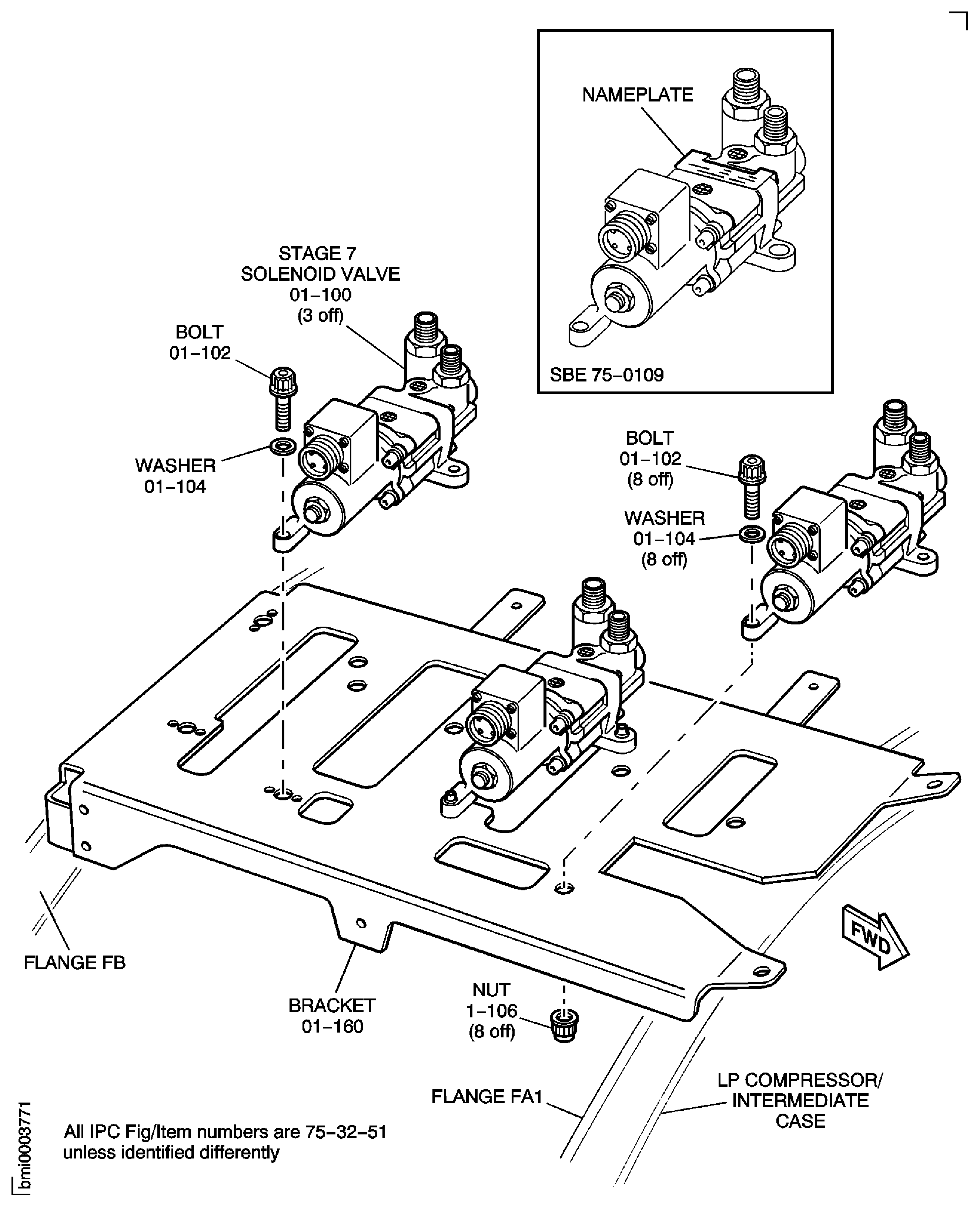
SBE 75-0047: Air - HP Compressor Stage 7 Solenoid Valve - Introduction of a new HP compressor bleed control valve solenoid mounting bracket.
NOTE
The solenoid valve must have its maintenance completed, as given in the Dunlop Component Maintenance Manual (36-11-57).Pre SBE 75-0047: Remove the three bolts and the three washers that attach the solenoid to the mounting bracket HPC Stage 7 Solenoid Valve (75-32-51, 01-160).
NOTE
The solenoid valve must have its maintenance completed, as given in the Dunlop Component Maintenance Manual (36-11-57).SBE 75-0047: Remove the nut, the three bolts and the three washers that attach the solenoid valve to the mounting bracket HPC Stage 7 Solenoid Valve (75-32-51, 01-160). Remove the valve.
SUBTASK 72-00-32-020-058 Remove the Stage 10 Air Solenoid Valve (Pre SBE 75-0047 and SBE 75-0047)
SBE 75-0047: Air - HP Compressor Stage 7 Solenoid Valve - Introduction of a new HP compressor bleed control valve solenoid mounting bracket.
NOTE
The solenoid valves must have their maintenance completed, as given in the Dunlop Component Maintenance Manual (75-32-51).Pre SBE 75-0047: Remove the three bolts and the three washers that attach each of the three solenoid valves to the mounting bracket HPC Stage 7 Solenoid Valve (75-32-51, 01-160). Remove the valves.
NOTE
The solenoid valves must have their maintenance completed, as given in the Dunlop Component Maintenance Manual (75-32-51).SBE 75-0047: Remove the eight nuts, the nine bolts and the nine washers that attach the three solenoid valves to the mounting bracket HPC Stage 7 Solenoid Valve (75-32-51, 01-160). Remove the valves.
SUBTASK 72-00-32-020-073 Remove the Stage 7 HP Compressor Air Solenoid Valves (Pre SBE 75-0047 and SBE 75-0047)
Remove the three support link assemblies:
Refer to Figure.
Remove the bolt and nut that attaches the bracket Air Cooled Oil Cooler (ACOC) Modulating Valve (79-21-51, 01-070) to the bracket Air Cooled Oil Cooler (ACOC) And Inlet Duct (79-21-42, 01-230).
Hold the weight of the air modulating valve. Remove the 24 bolts, the 20 nuts and the 43 washers (together with the bracket 79-21-51,01-070) (Refer to Figure) that attach the air modulating valve to the Air Cooled Oil Cooler (ACOC). Remove the air modulating valve.
NOTE
The air modulating valve must have its maintenance completed, as given in the Lucas Component Maintenance Manual (79-21-51).
WARNING
BE CAREFUL DURING REMOVAL OF THE AIR MODULATING VALVE BECAUSE IT WEIGHS 18 LB (8 KG).Remove the Air Modulating Valve.
SUBTASK 72-00-32-020-074-A00 V2500-A1 Remove the Air Modulating Valve
Remove the bolt and nut that attaches the bracket Air Cooled Oil Cooler (ACOC) Modulating Valve (79-21-51, 01-070) to the bracket Air Cooled Oil Cooler (ACOC) And Inlet Duct (79-21-42, 01-230).
Hold the weight of the air modulating valve. Remove the 24 bolts, the 20 nuts and the 43 washers (together with the bracket 79-21-51,01-070) (Refer to Figure. that attach the air modulating valve to the Air Cooled Oil Cooler (ACOC). Remove the air modulating valve.
WARNING
BE CAREFUL DURING REMOVAL OF THE AIR MODULATING VALVE BECAUSE IT WEIGHS 18 LB (8 KG).NOTE
The air modulating valve must have its maintenance completed, as given in the Lucas Component Maintenance Manual (79-21-51).Remove the Air Modulating Valve.
SUBTASK 72-00-32-020-074-B00 V2500-A5 Remove the Air Modulating Valve
Refer to Figure.
SUBTASK 72-00-32-020-075-A00 V2500-A1 Remove the ACOC/Air Inlet Duct Assembly
Refer to Figure.
SUBTASK 72-00-32-020-075-B00 V2500-A5 Remove the ACOC
Refer to Figure.
Remove the 10 bolts Air Cooled Oil Cooler (ACOC) And Inlet Duct (79-21-42, 01-410) that attach the inlet duct to flange FE.
Support the weight of the air inlet duct and remove the remaining 12 bolts Air Cooled Oil Cooler (ACOC) And Inlet Duct (79-21-42, 01-415) that attach the Air inlet duct to the LP compreesor/intermediate case.
NOTE
The air inlet duct must have its maintenance completed, as given in the Sumitomo Precision Products Components Maintenance Manual (79-21-42).Remove the air inlet duct Air Cooled Oil Cooler (ACOC) And Inlet Duct (79-21-42, 01-400).
WARNING
BE CAREFUL DURING REMOVAL OF THE INLET DUCT BECAUSE IT WEIGHS 10LB (4.5 KG).Remove the air inlet duct.
SUBTASK 72-00-32-020-323 V2500-A1 Remove the Air Inlet Duct
Refer to Figure.
Remove the 10 bolts Air Cooled Oil Cooler (ACOC) And Inlet Duct (79-21-42, 01-410) that attach the inlet duct to flange FE.
Support the weight of the air inlet duct and remove the remaining 12 bolts Air Cooled Oil Cooler (ACOC) And Inlet Duct (79-21-42, 01-415) that attach the Air inlet duct to the LP compreesor/intermediate case.
NOTE
The air inlet duct must have its maintenance completed, as given in the Sumitomo Precision Products Components Maintenance Manual (79-21-42).Remove the air inlet duct Air Cooled Oil Cooler (ACOC) And Inlet Duct (79-21-42, 01-400).
WARNING
BE CAREFUL DURING REMOVAL OF THE INLET DUCT BECAUSE IT WEIGHS 10LB (4.5 KG).Remove the air inlet duct.
SUBTASK 72-00-32-020-324 V2500-A5 Remove the Air Inlet Duct
Refer to Figure.
SUBTASK 72-00-32-020-076-A00 V2500-A1 Remove the Fuel Cooled IDG Oil Cooler
Refer to Figure.
SUBTASK 72-00-32-020-076-B00 V2500-A5 Remove the Fuel Cooled IDG Oil Cooler
Refer to Figure.
WARNING
BE CAREFUL DURING REMOVAL OF THE FUEL DIVERTER AND RETURN VALVE BECAUSE IT WEIGHS 13 LB (5.9 KG).NOTE
The FDRV must have its maintenance completed, as given in the STS Corporation Component Maintenance Manual (73-13-42).Hold the weight of the FDRV and remove the four bolts and the two washers that attach the FDRV to the FCOC. Remove the FDRV and discard the two sealing rings.
SUBTASK 72-00-32-020-077 Remove the Fuel Diverter and Return Valve (FDRV)
Refer to Figure.
Remove the bolt, the washer and the nut that attaches the bonding strap to the bracket Fuel Cooled Oil Cooler (FCOC) (79-21-43, 01-090).
Remove the two bolts, the two nuts, the bush and the two brackets Fuel Cooled Oil Cooler (FCOC) (79-21-43, 01-090 and Fuel Cooled Oil Cooler (FCOC) 01-420) that attach the FCOC to the bracket on flange FB.
Remove the lower mount.
Refer to Figure.
Remove the bolt and the nut that attaches the bonding strap to the locator pin. Remove the bolt that attaches the locator pin to the top of the FCOC and remove the locator pin. Remove the FCOC.
Pre SBE 79-0075 and 79-0076.
Refer to Figure.
Remove the bolt and the nut that attaches the bonding strap to the FCOC. Remove the precision bolt that attaches the FCOC to the bracket Fuel Cooled Oil Cooler (FCOC) (79-21-43, 01-300). Remove the FCOC.
SBE 79-0075 and 79-0076.
NOTE
The FCOC must have its maintenance completed, as given in the Sumitomo Precision Products Component Maintenance Manual (79-21-43).Remove the upper mount.
SUBTASK 72-00-32-020-078-A00 V2500-A1 Remove the Fuel Cooled Oil Cooler (FCOC)
Refer to Figure.
Remove the bolt, the washer and the nut that attaches the bonding strap to the bracket Fuel Cooled Oil Cooler (FCOC) (79-21-43, 01-090).
Remove the two bolts, the two nuts, the bush and the two brackets Fuel Cooled Oil Cooler (FCOC) (79-21-43, 01-090 and Fuel Cooled Oil Cooler (FCOC) 01-420) that attach the FCOC to the bracket on flange FB.
Remove the lower mount.
Refer to Figure.
Remove the bolt and the nut that attaches the bonding strap to the locator pin. Remove the bolt that attaches the locator pin to the top of the FCOC and remove the locator pin. Remove the FCOC.
Pre SBE 79-0075 and 79-0076.
Refer to: Figure.
Remove the bolt and the nut that attaches the bonding strap to the FCOC. Remove the precision bolt that attaches the FCOC to the bracket Fuel Cooled Oil Cooler (FCOC) (79-21-43, 01-300). Remove the FCOC.
SBE 79-0075 and 79-0076.
NOTE
The FCOC must have its maintenance completed, as given in the Sumitomo Precision Products Component Maintenance Manual (79-21-43).Remove the upper mount.
SUBTASK 72-00-32-020-078-B00 V2500-A5 Remove the Fuel Cooled Oil Cooler (FCOC)
Refer to Figure.
NOTE
The case drain filter assembly must have its maintenance completed, as given in the Pall Filtrationstechnik Component Maintenance Manual (29-11-43).Remove the four bolts that attach the case drain filter to the raft CASE DRAIN HYDRAULIC FILTER ASSEMBLY (29-11-43, 01-910). Remove the case drain filter (together with the bracket CASE DRAIN HYDRAULIC FILTER ASSEMBLY (29-11-43, 01-900).
SUBTASK 72-00-32-020-079 Remove the Hydraulic Case Drain Filter Assembly
Figure: Remove the Relay Box
Remove the Relay Box
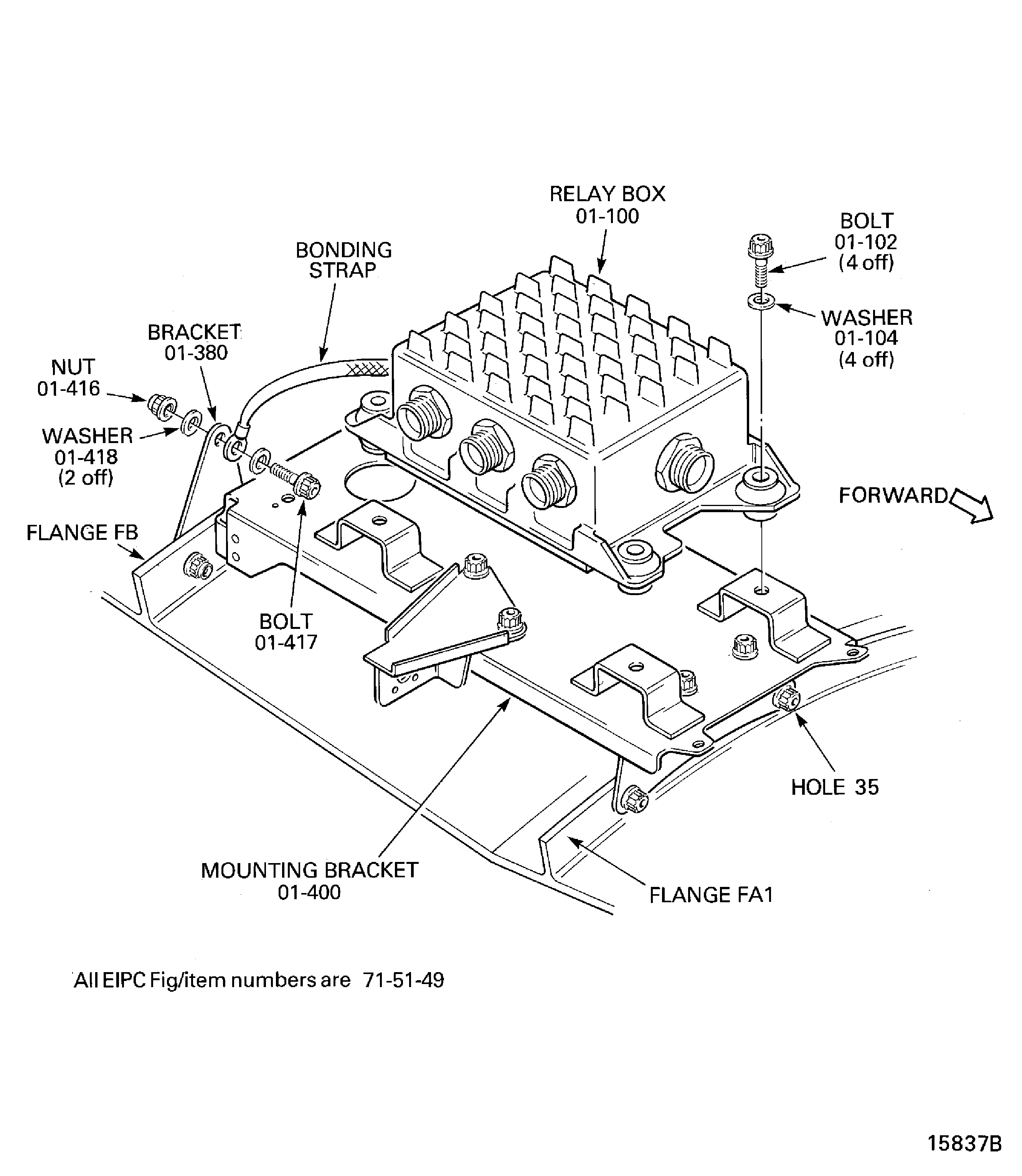
Figure: Remove the Electronic Control Unit (EEC)
Remove the Electronic Control Unit (EEC)
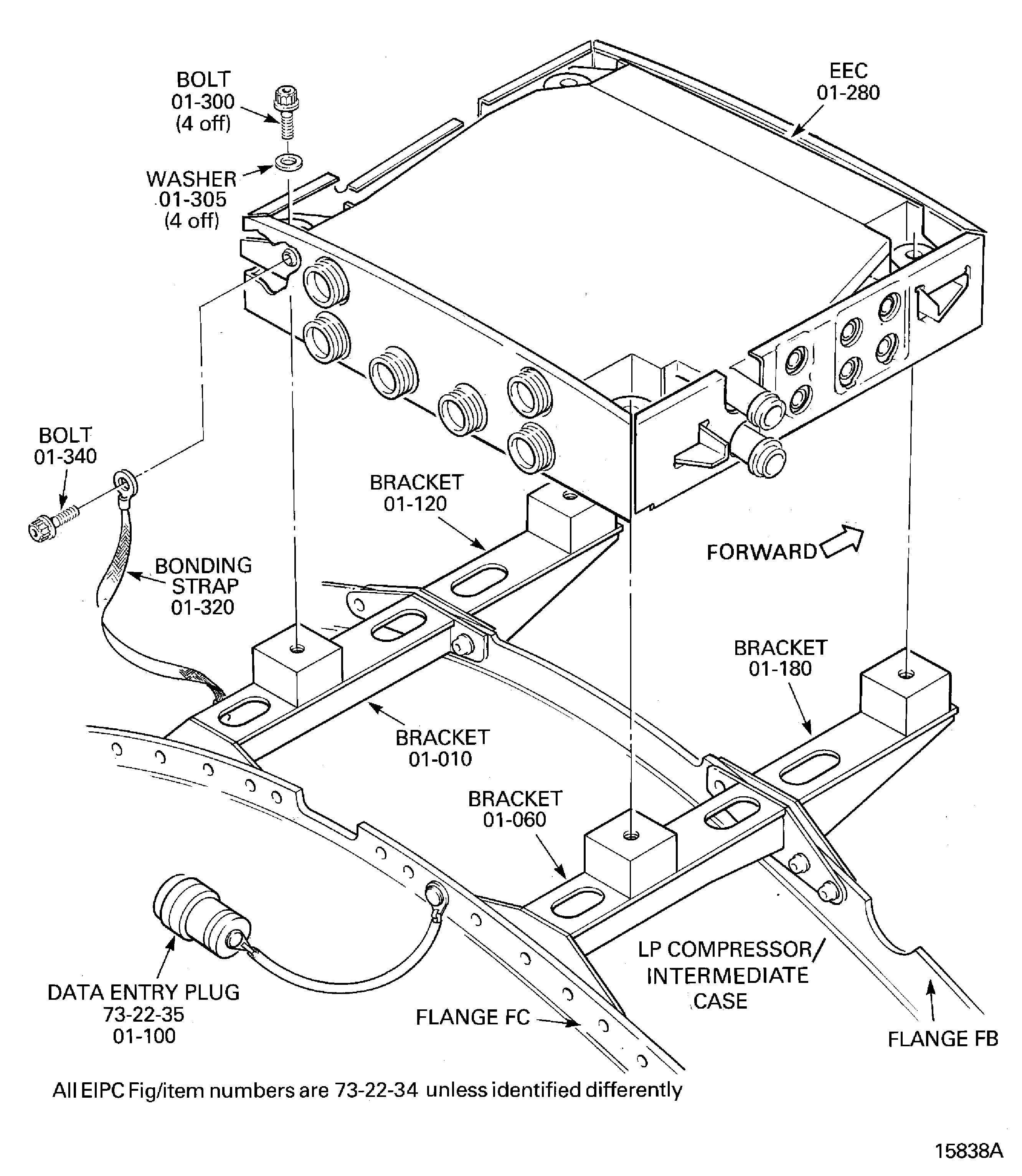
Figure: Remove the No.4 Bearing Pressure Transducer
Remove the No.4 Bearing Pressure Transducer
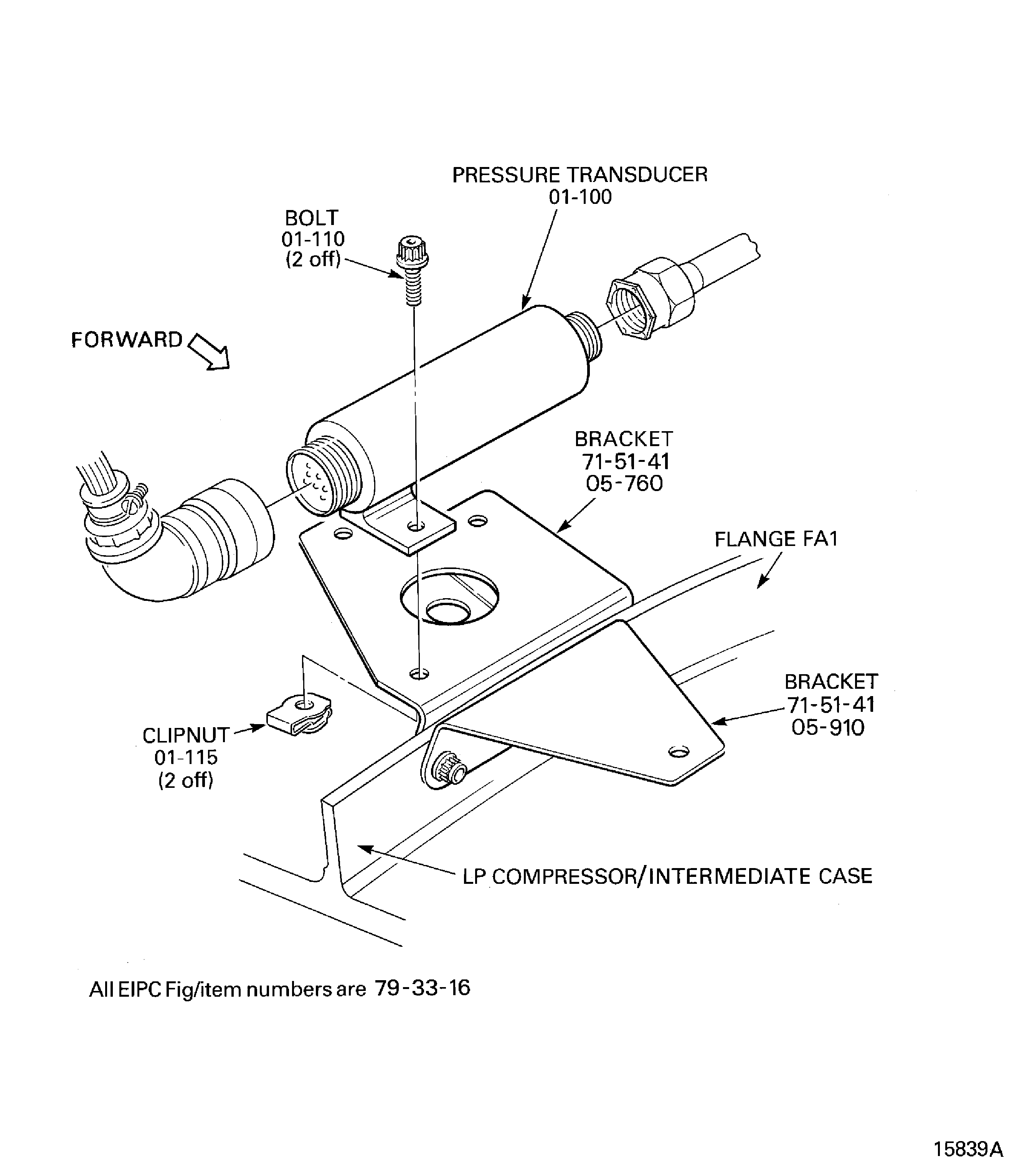
Figure: Remove the Oil Pressure Transmitter and Low Oil Pressure Switch
Remove the Oil Pressure Transmitter and Low Oil Pressure Switch
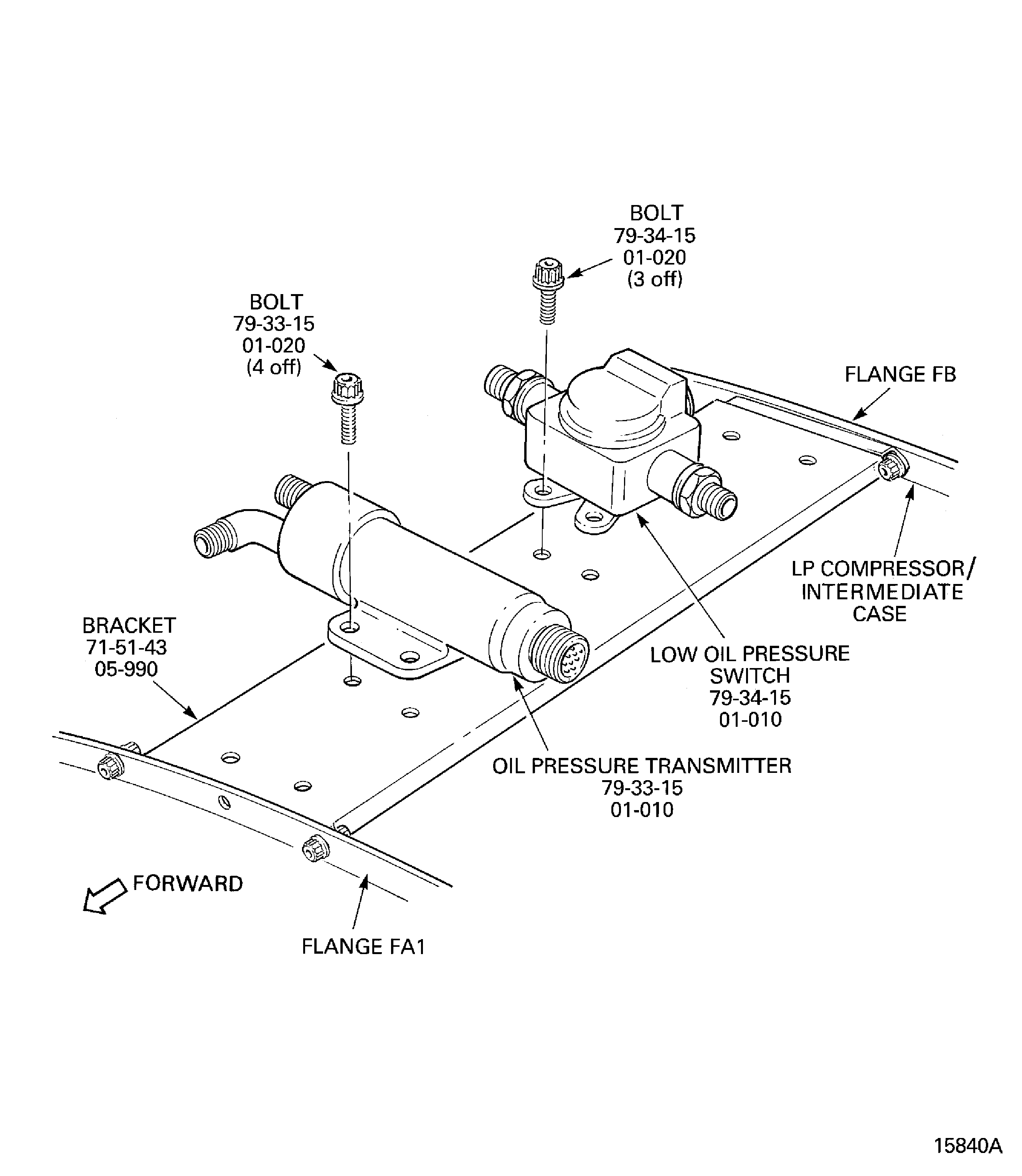
Figure: V2500-A1: Remove the Hydraulic Low Pressure Warning Switch
Sheet 1
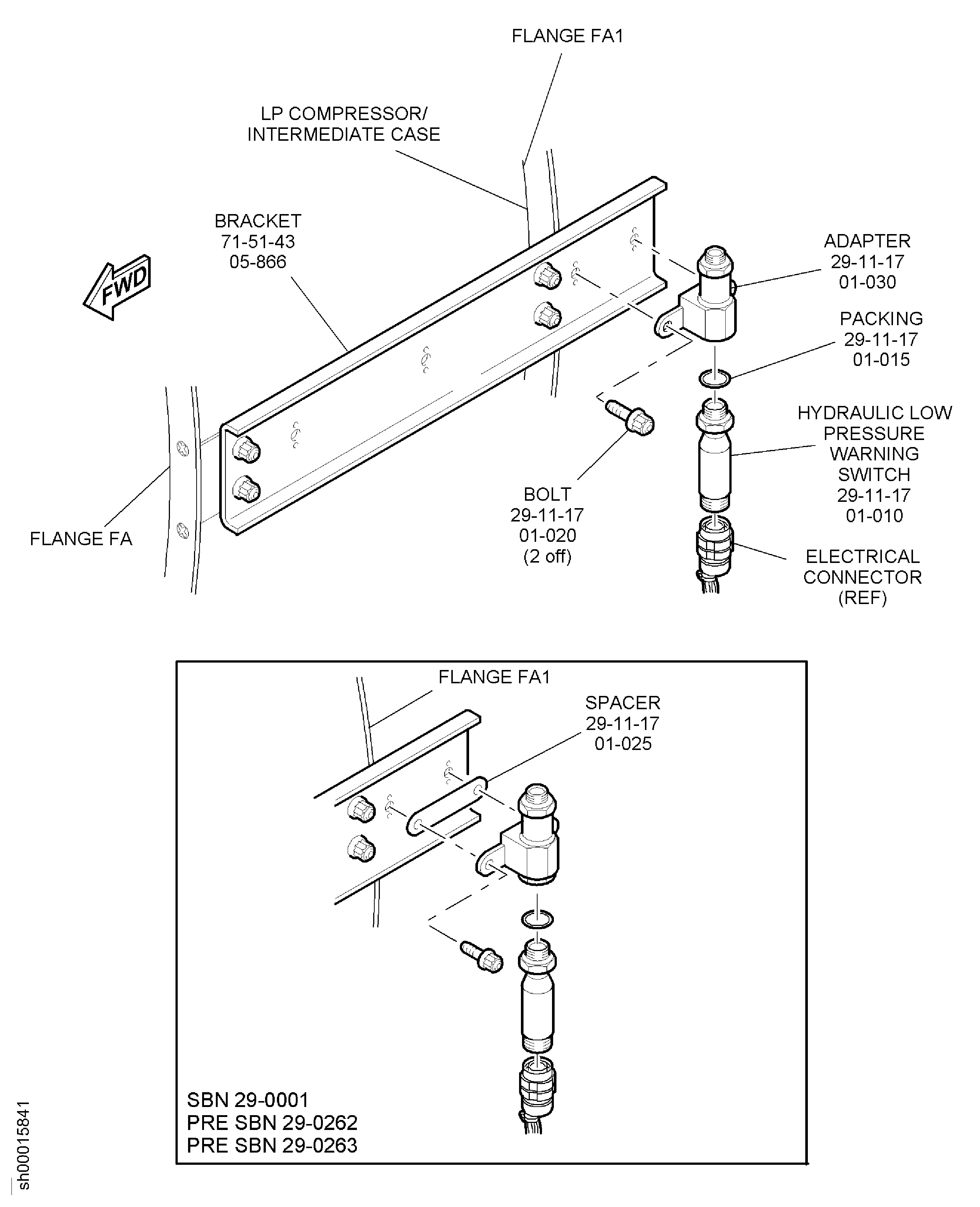
Figure: V2500-A1:Remove the Hydraulic Low Pressure Warning Switch
Sheet 2
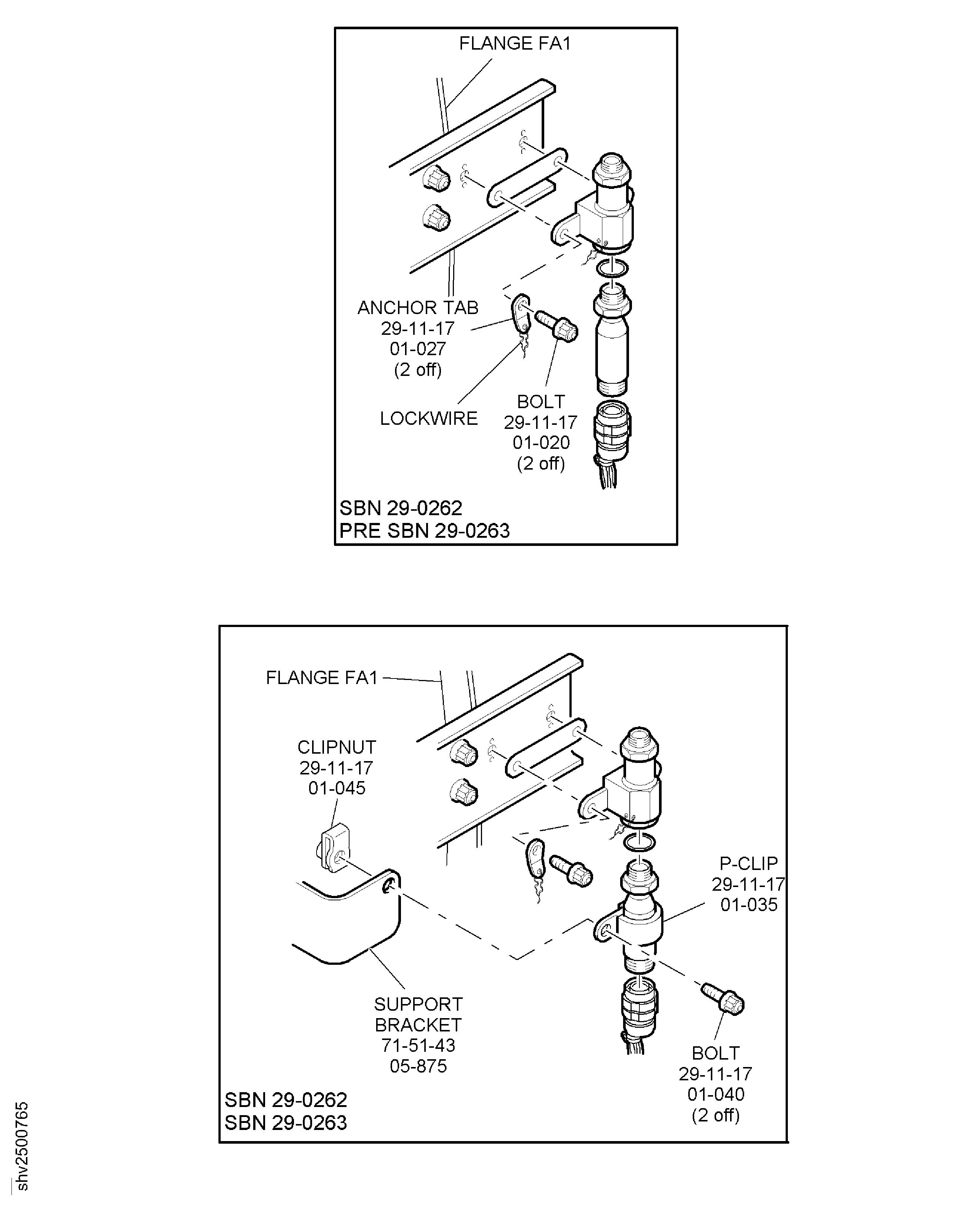
Figure: V2500-A1: Remove the Hydraulic Low Pressure Warning Switch
Sheet 3
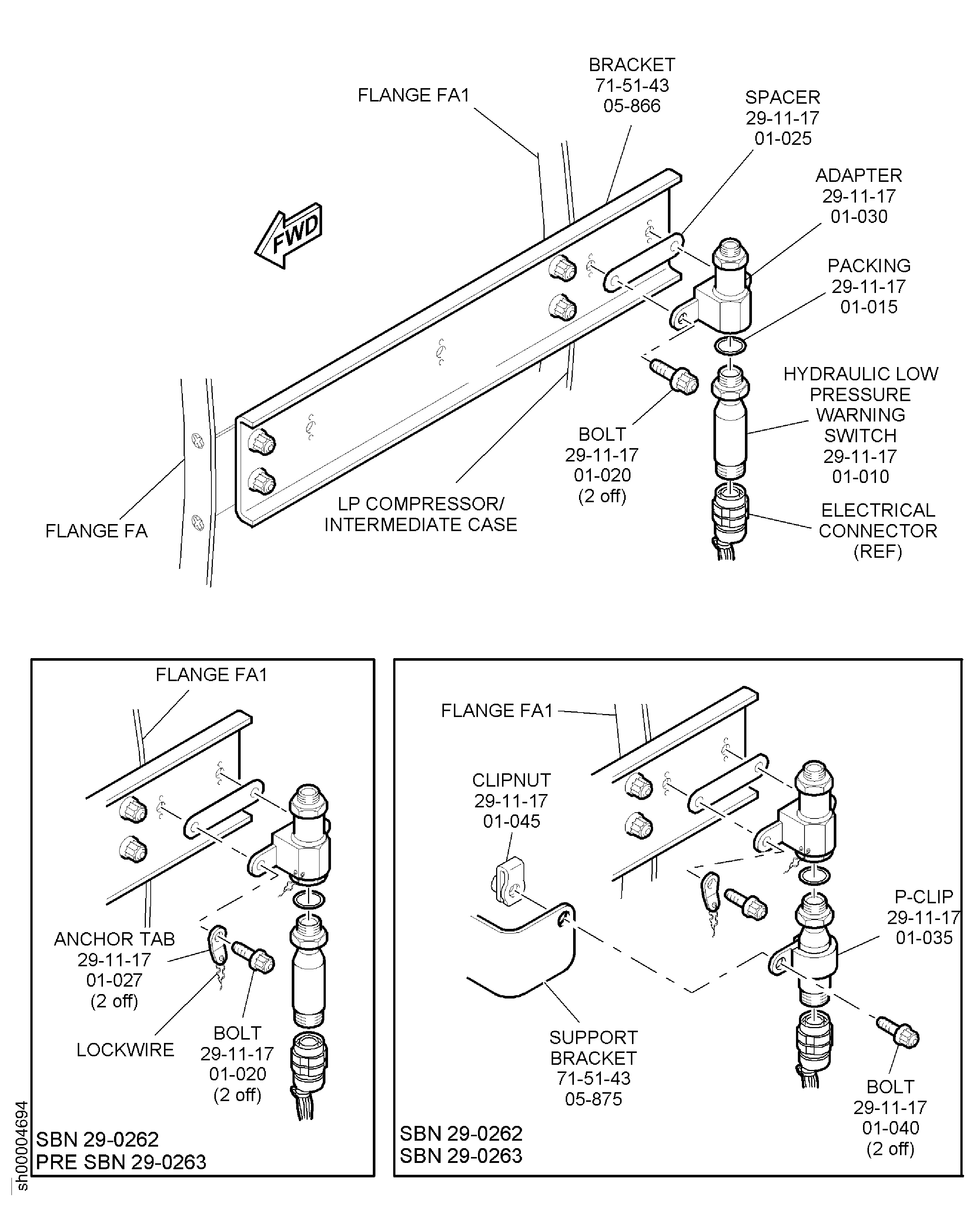
Figure: Remove the Scavenge Filter Differential Pressure Switch
Remove the Scavenge Filter Differential Pressure Switch
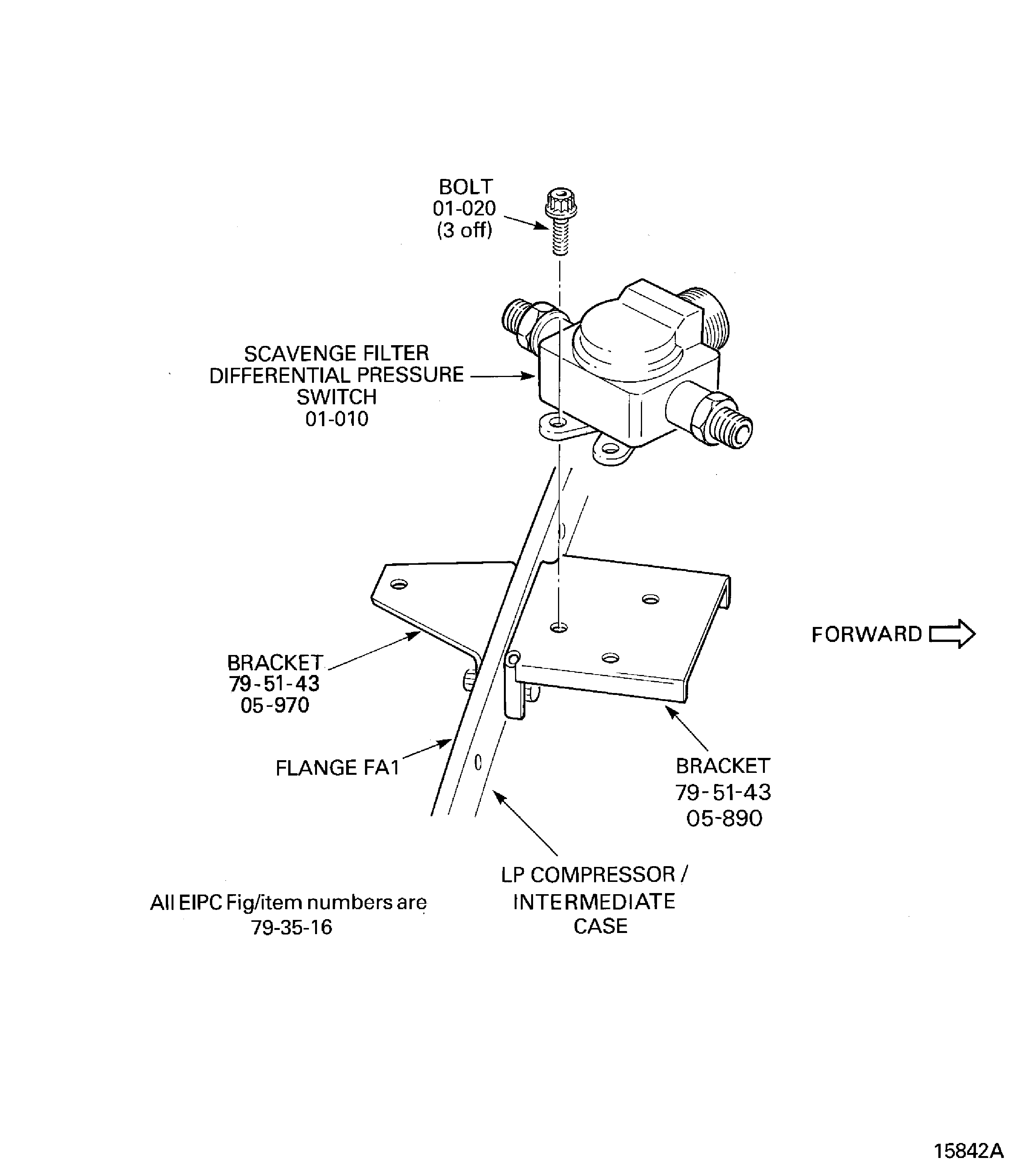
Figure: Remove the Stage 10 HP Compressor Air Solenoid Valves
Remove the Stage 10 HP Compressor Air Solenoid Valves
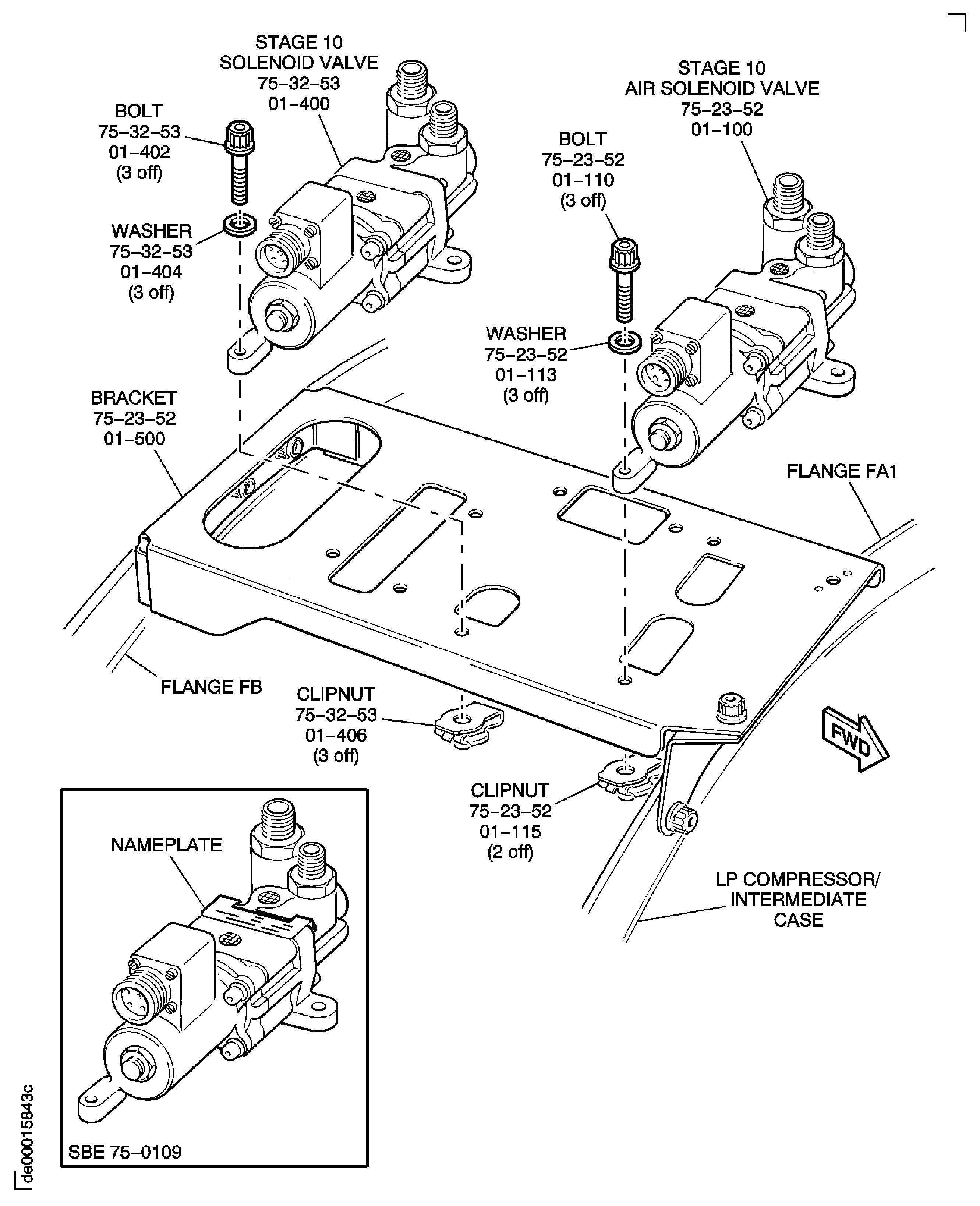
Figure: Pre SBE 75-0047: Remove the Stage 10 Air Solenoid Valve
Sheet 1
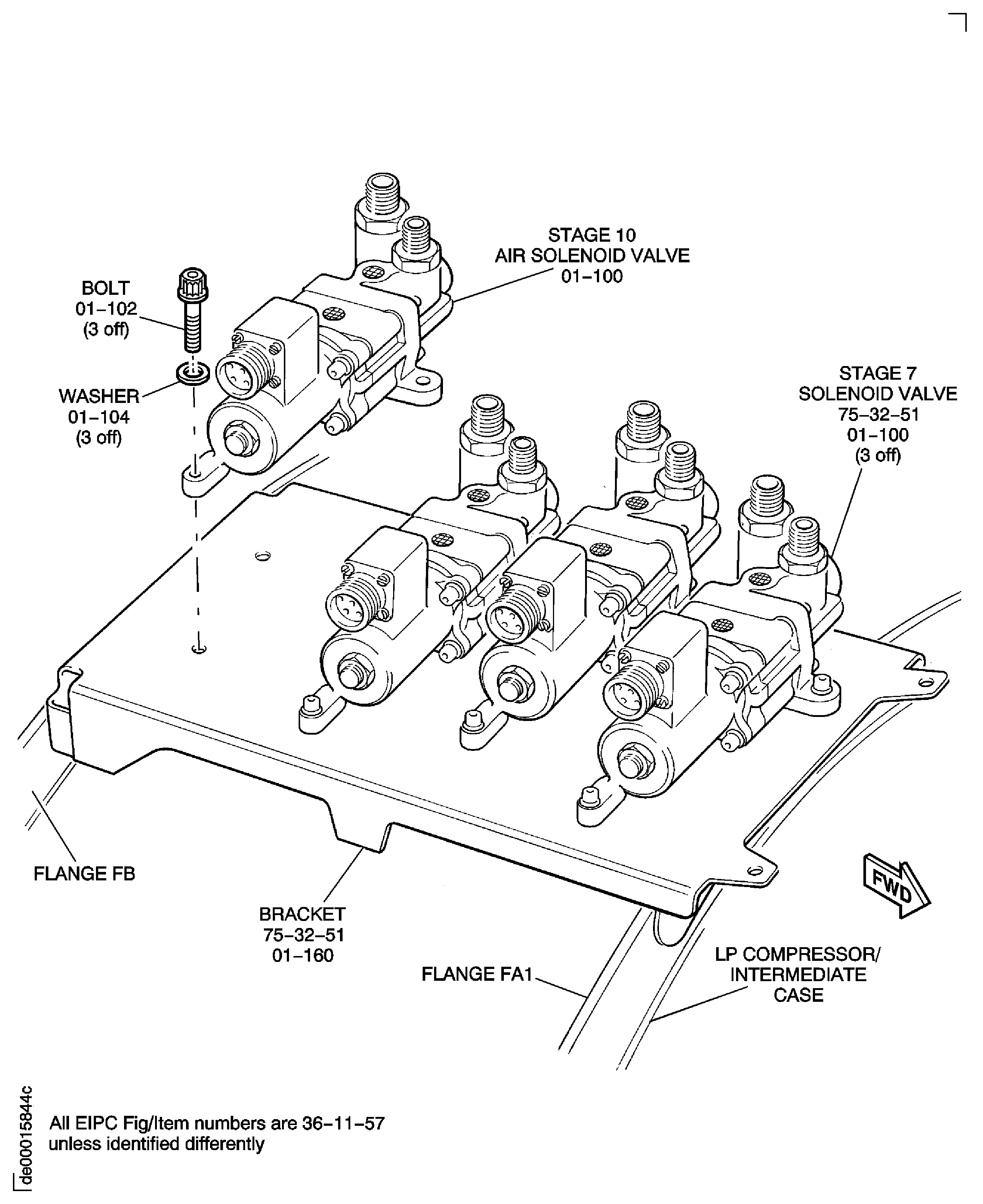
Figure: SBE 75-0047: Remove the Stage 10 Air Solenoid Valve
Sheet 2
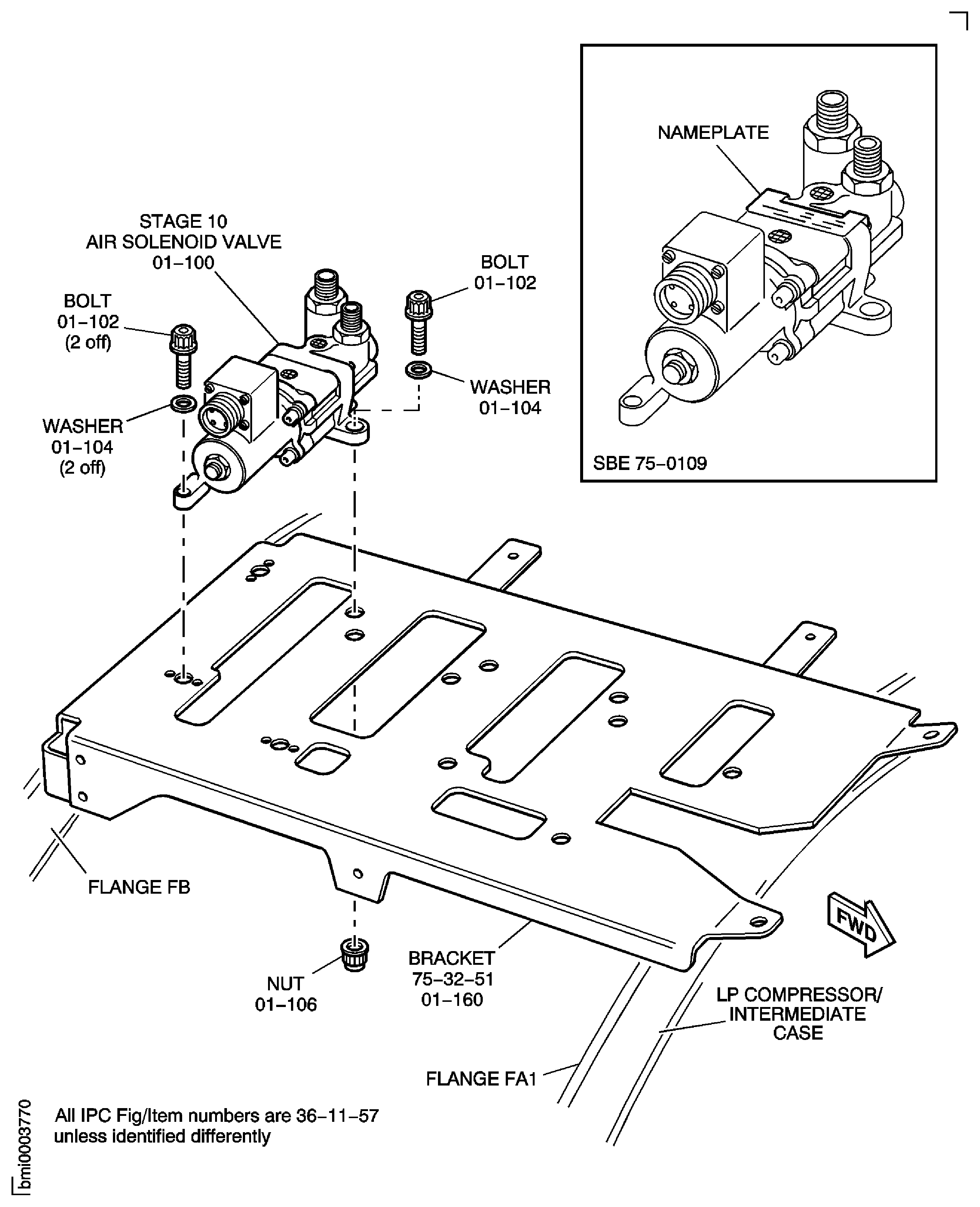
Figure: Remove the Air Modulating Valve
Sheet 1
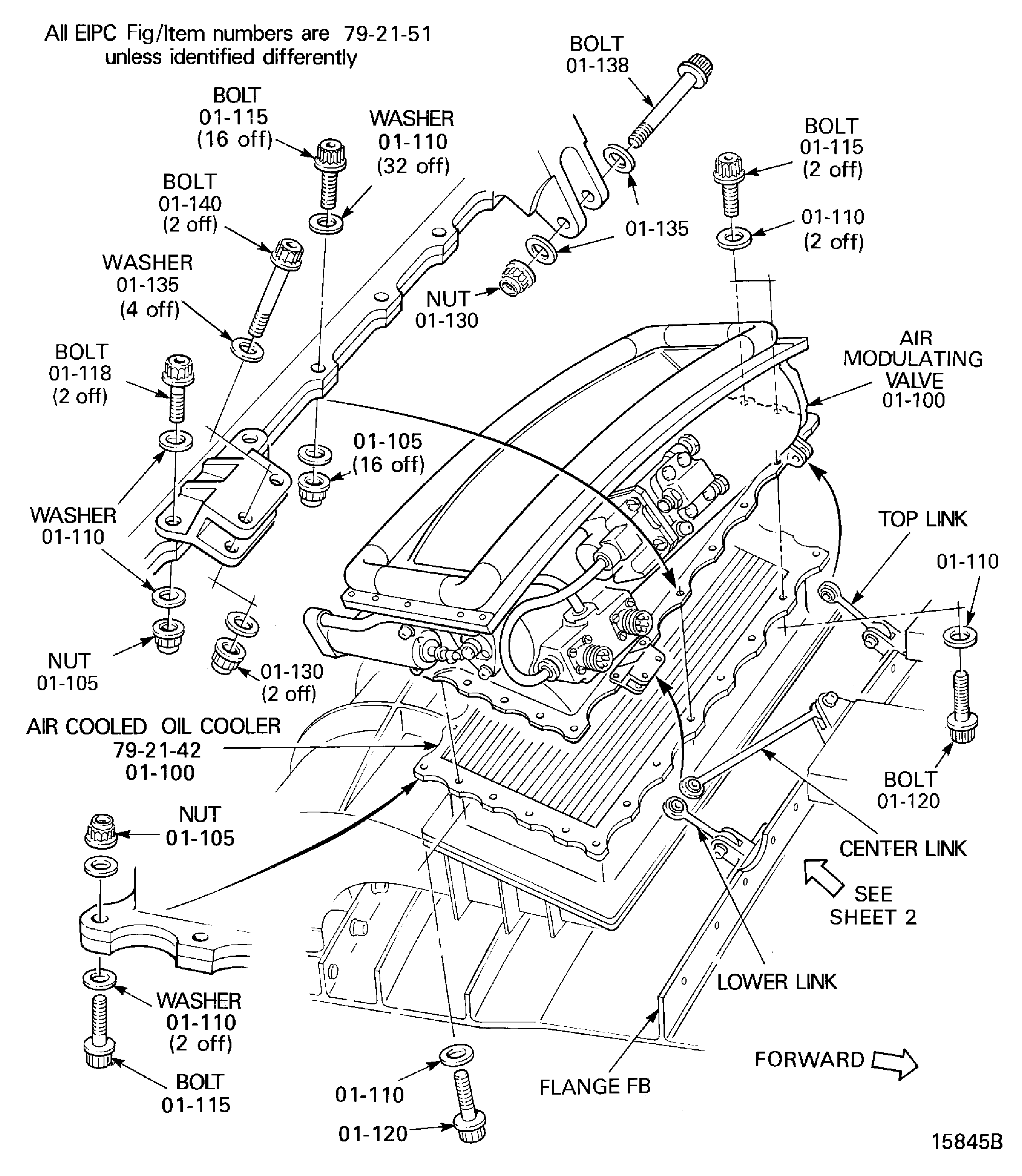
Figure: Remove the Air Modulating Valve
Sheet 2
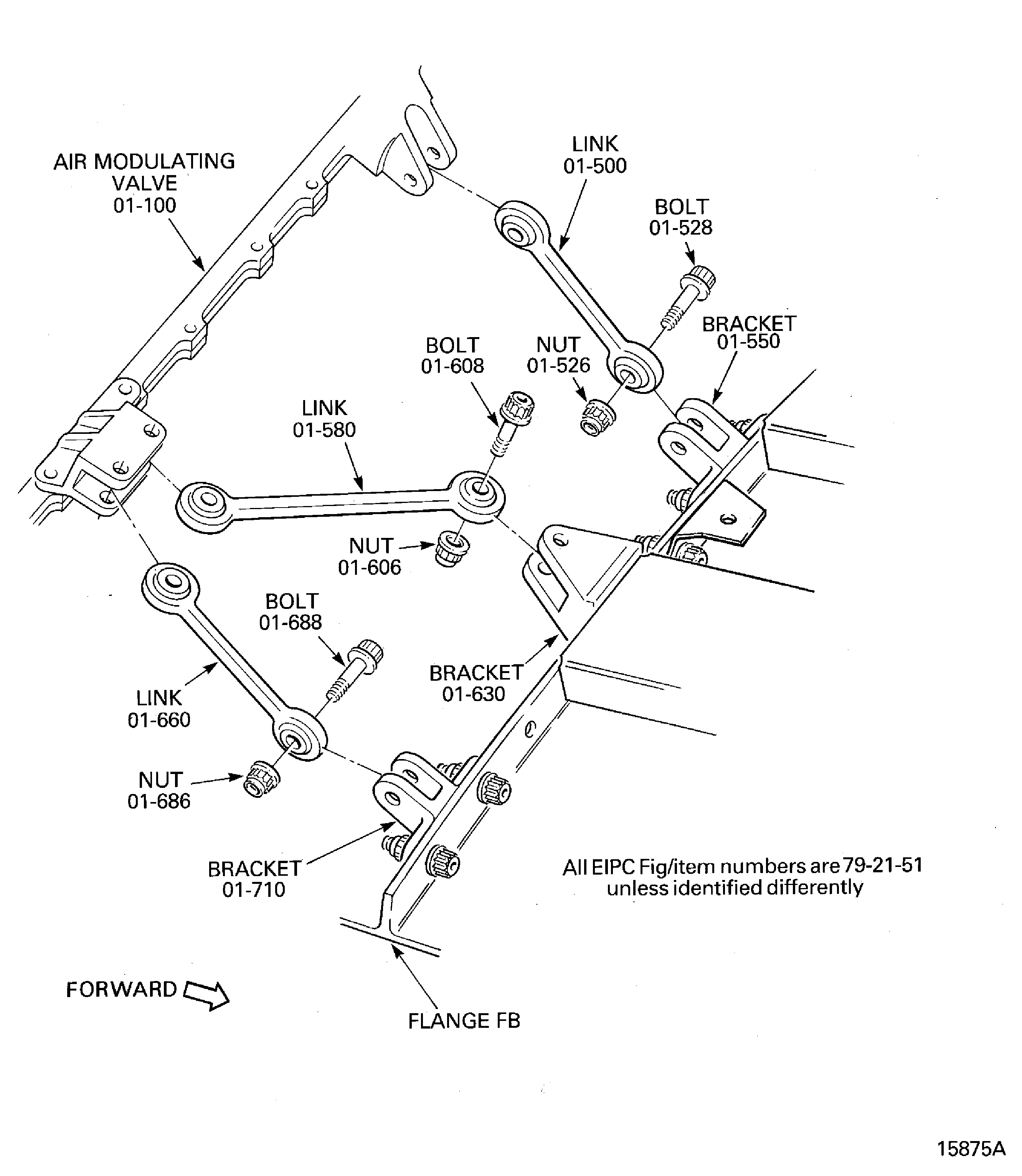
Figure: V2500-A1: Remove the Air Cooled Oil Cooler
Sheet 1
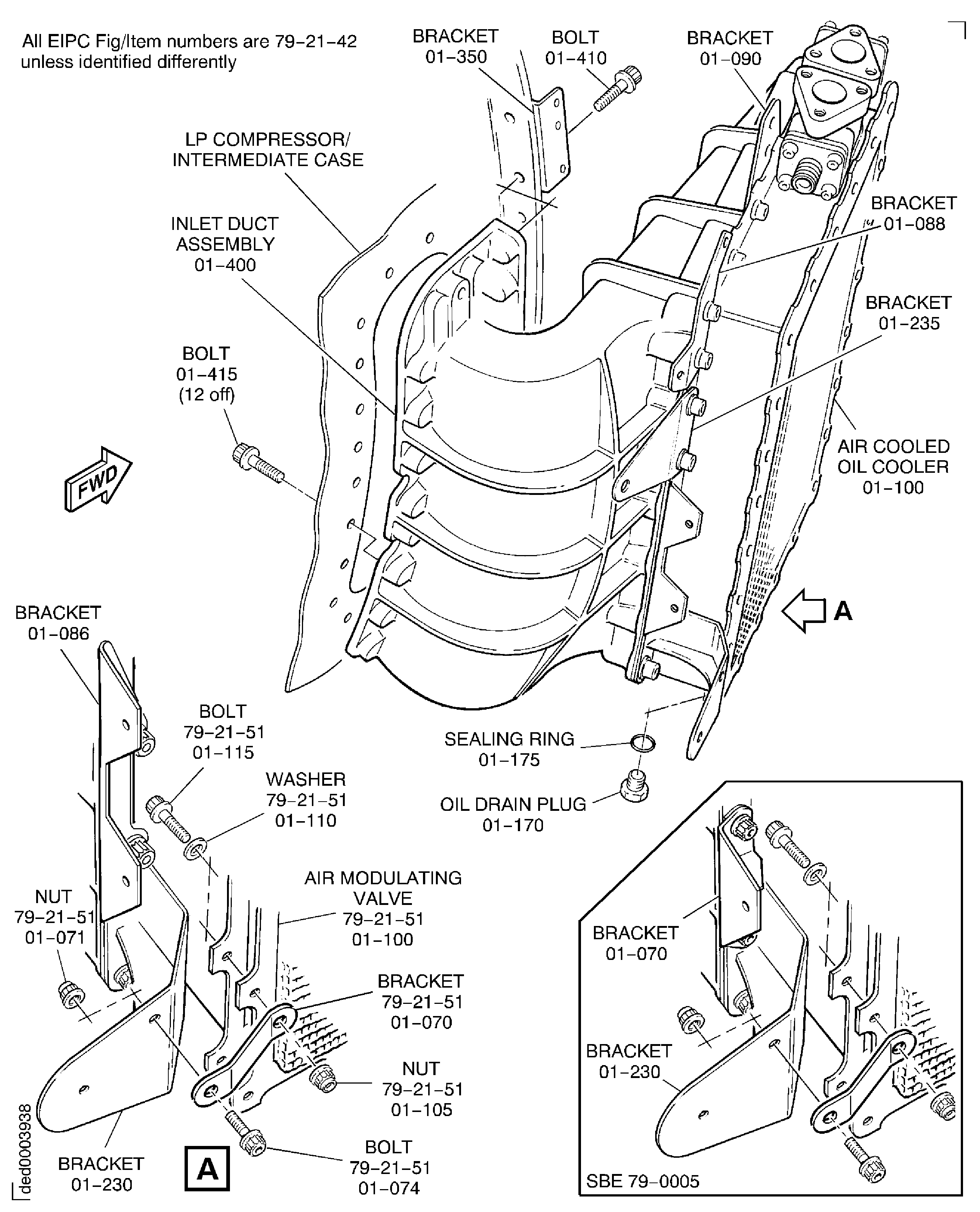
Figure: V2500-A1: Remove the Air Cooled Oil Cooler
Sheet 2
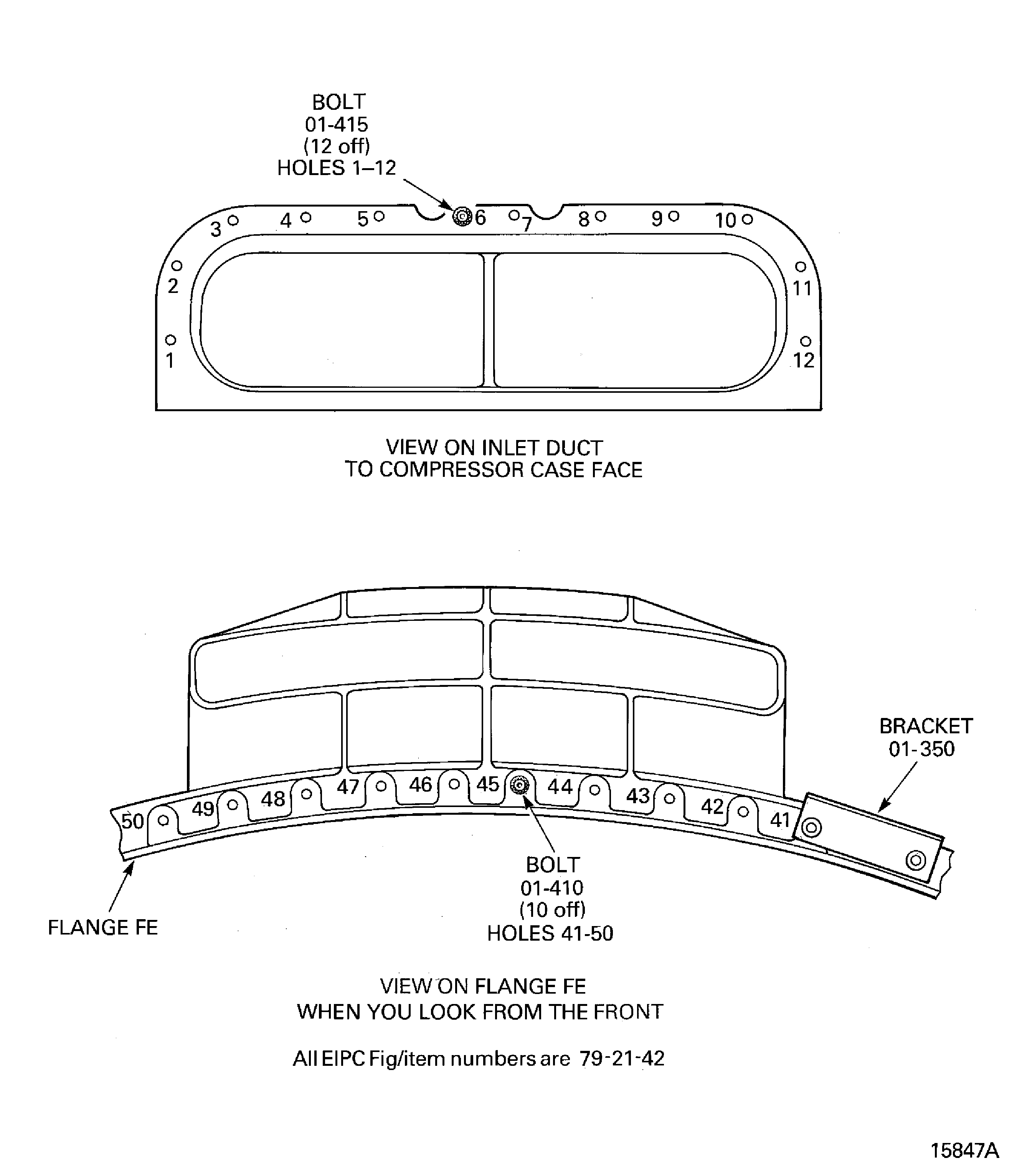
Figure: V2500-A5: Remove the Air Cooled Oil Cooler
Sheet 1
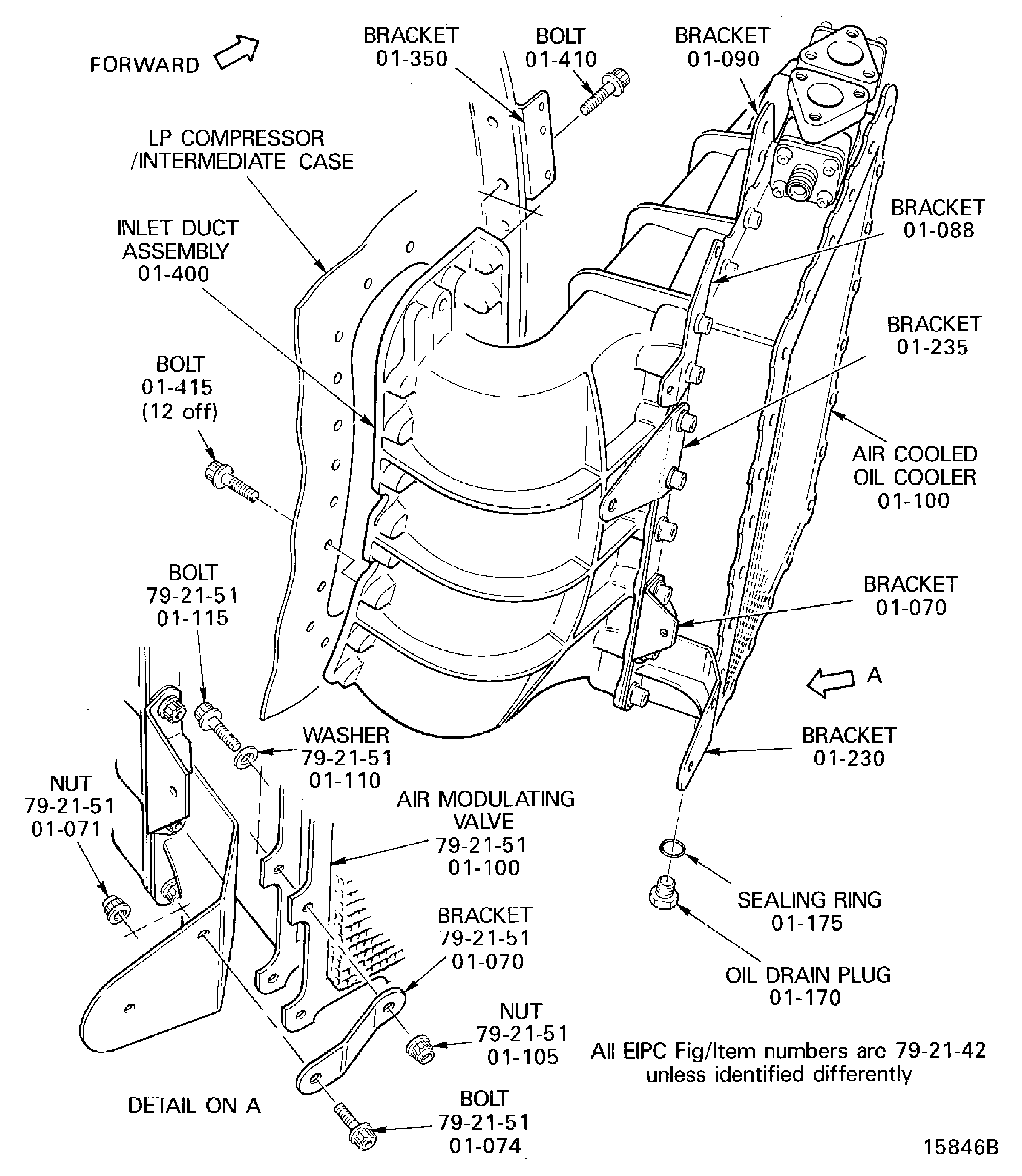
Figure: V2500-A5: Remove the Air Cooled Oil Cooler
Sheet 2
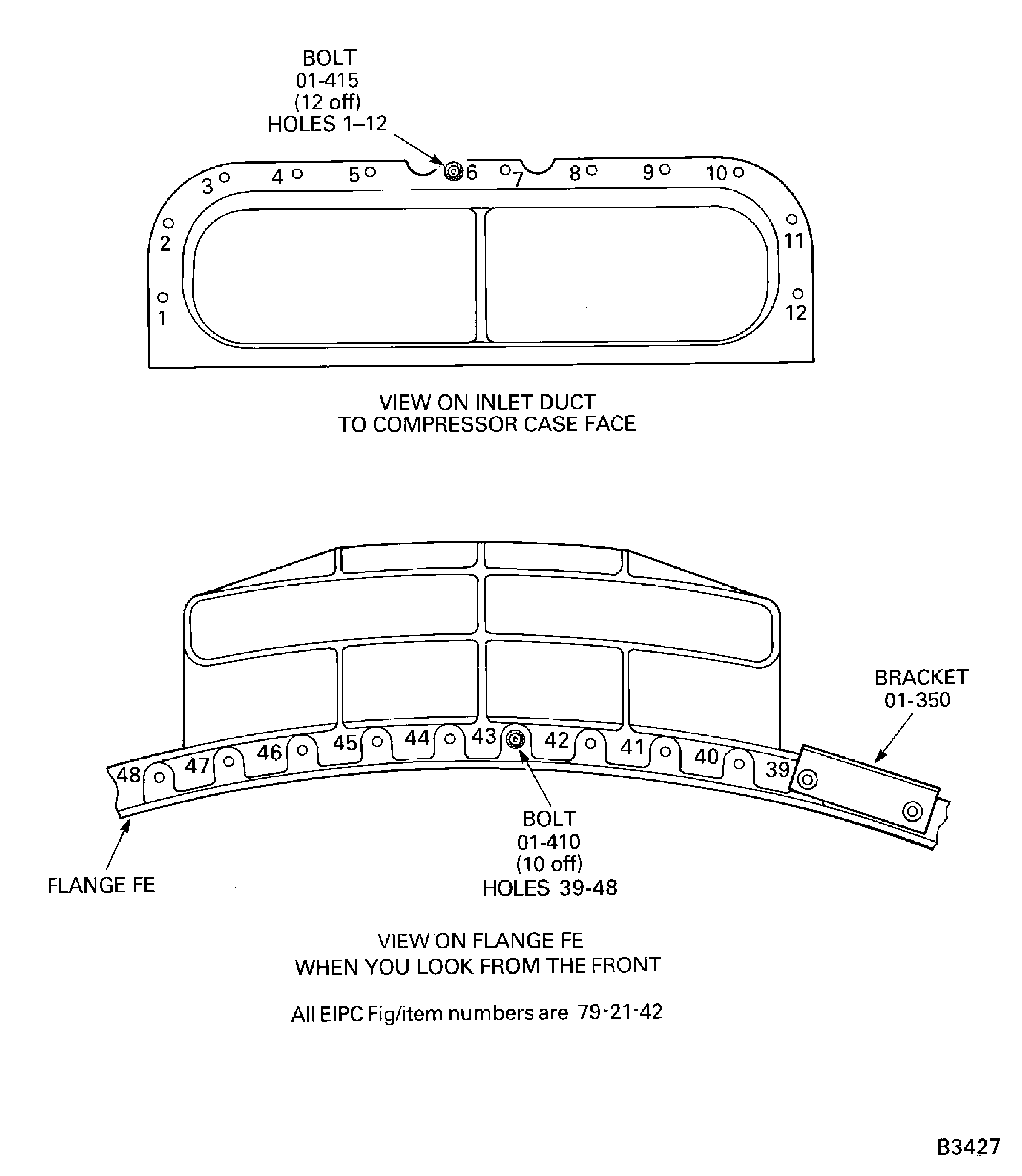
Figure: V2500-A1: Remove the Fuel Cooled IDG Oil Cooler
V2500-A1: Remove the Fuel Cooled IDG Oil Cooler
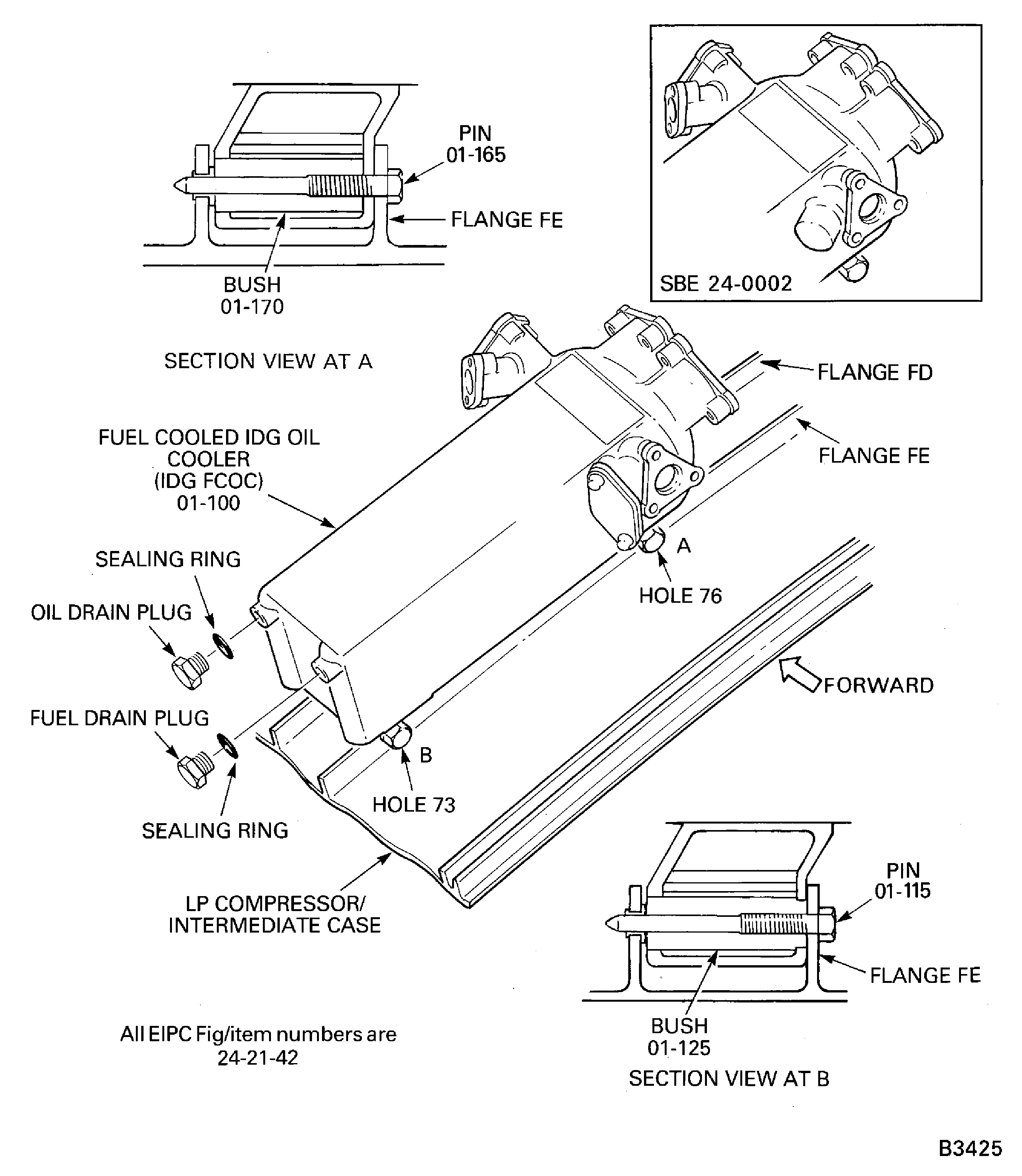
Figure: V2500-A5: Remove the Fuel Cooled IDG Oil Cooler
V2500-A5: Remove the Fuel Cooled IDG Oil Cooler
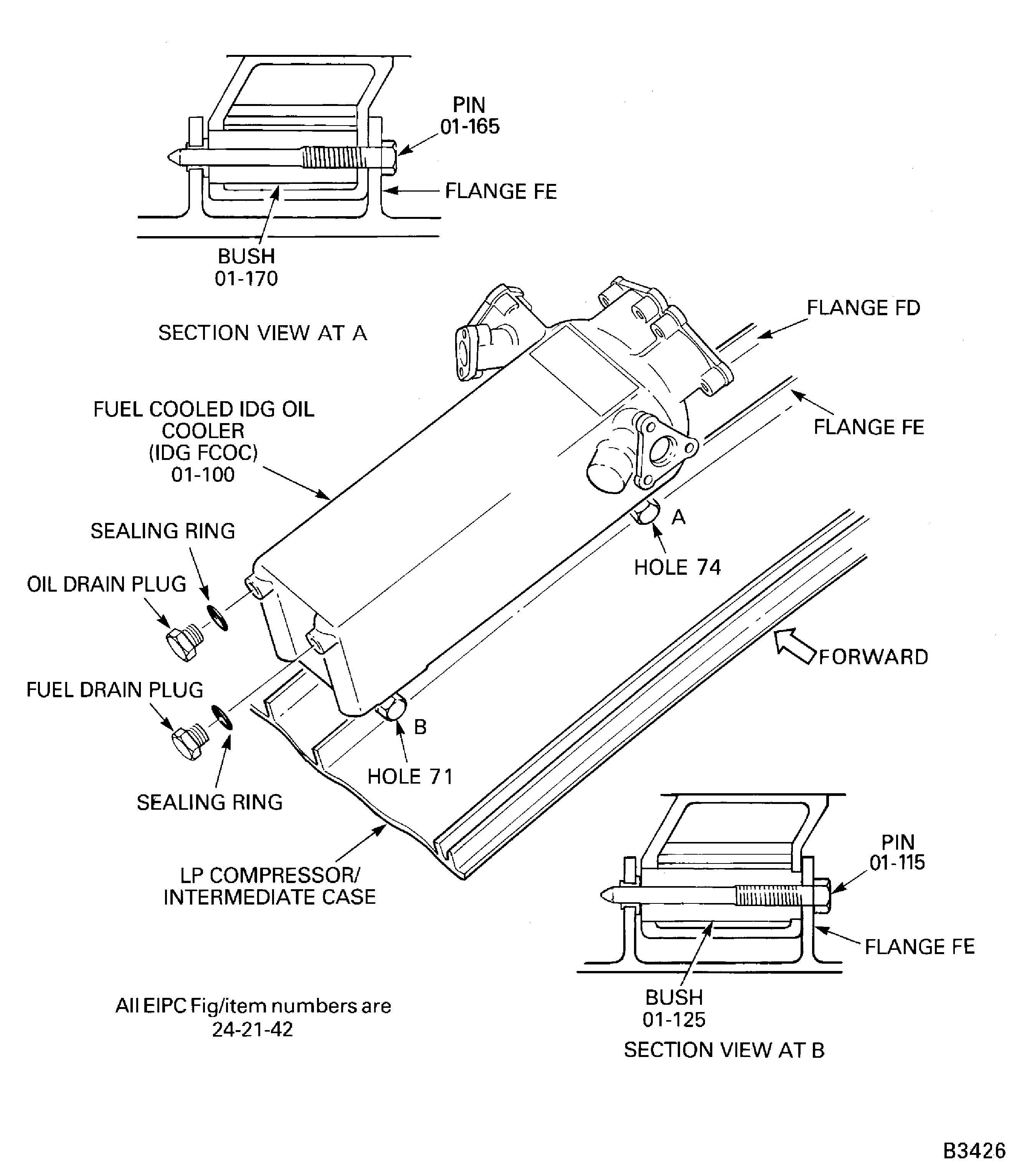
Figure: Remove the Fuel Diverter and Return Valve
Remove the Fuel Diverter and Return Valve
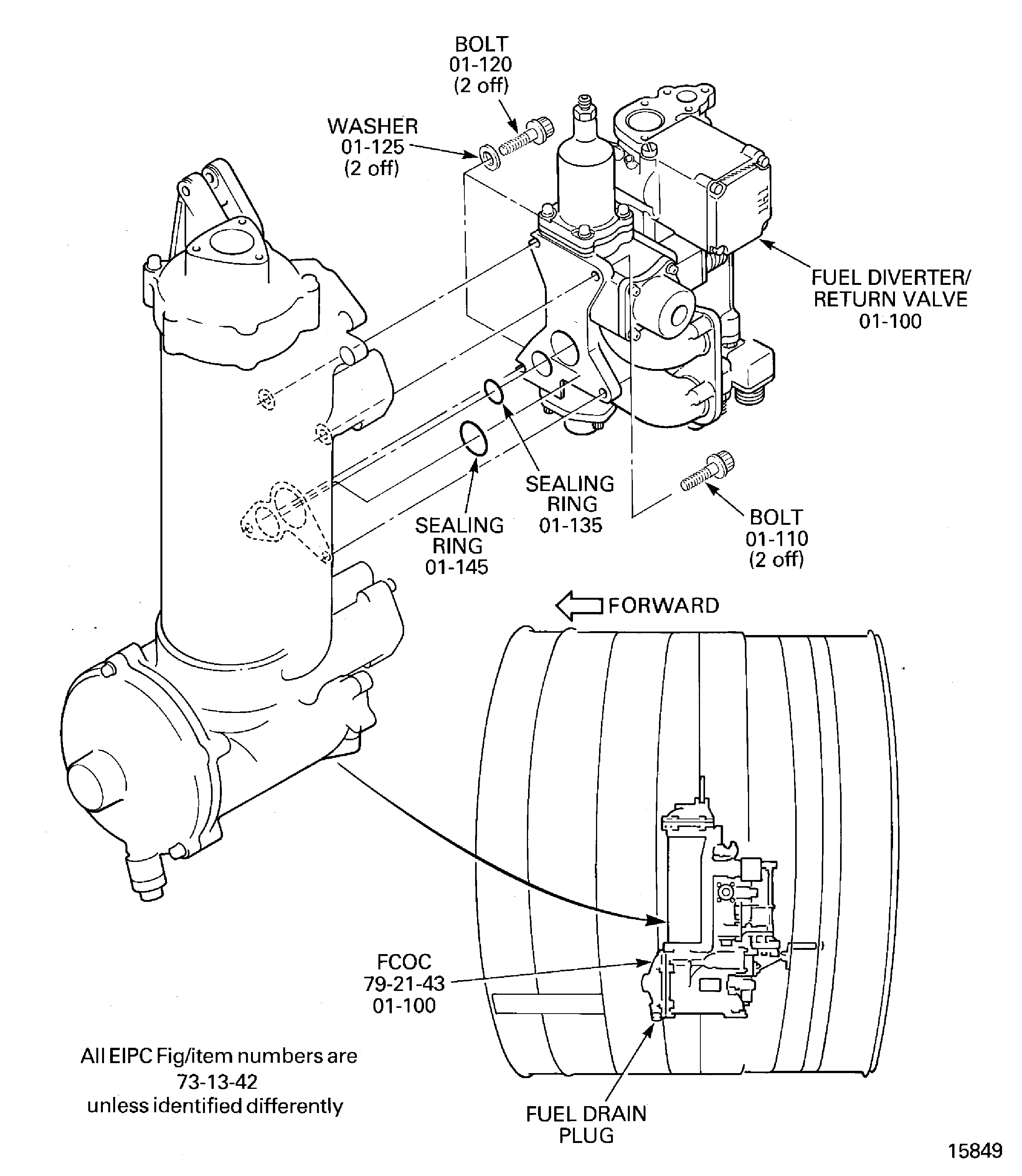
Figure: V2500-A1 Pre SBE 79-0020: Remove the Fuel Cooled Oil Cooler
Sheet 1
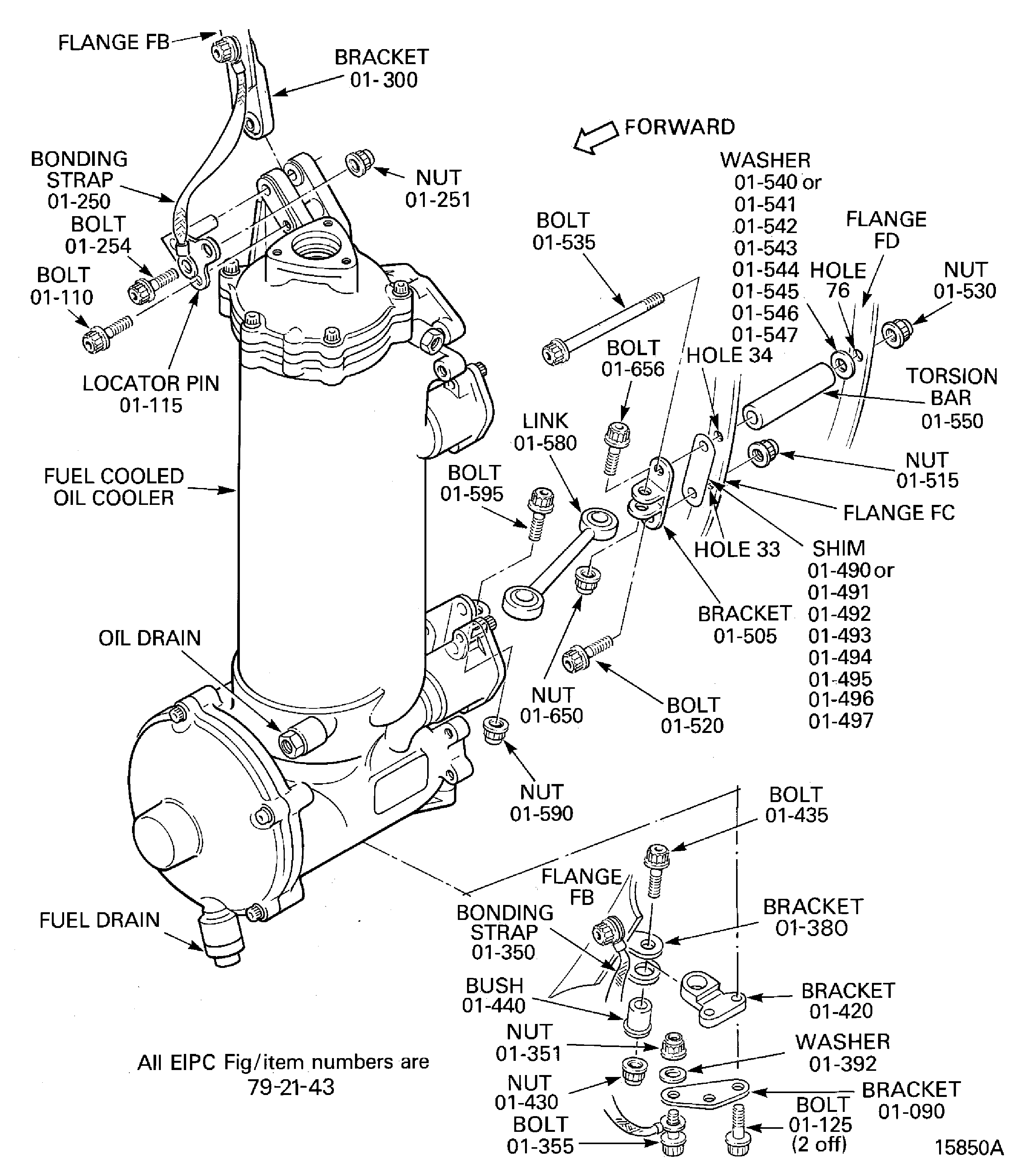
Figure: V2500-A1 SBE 79-0020: Remove the Fuel Cooled Oil Cooler
Sheet 2
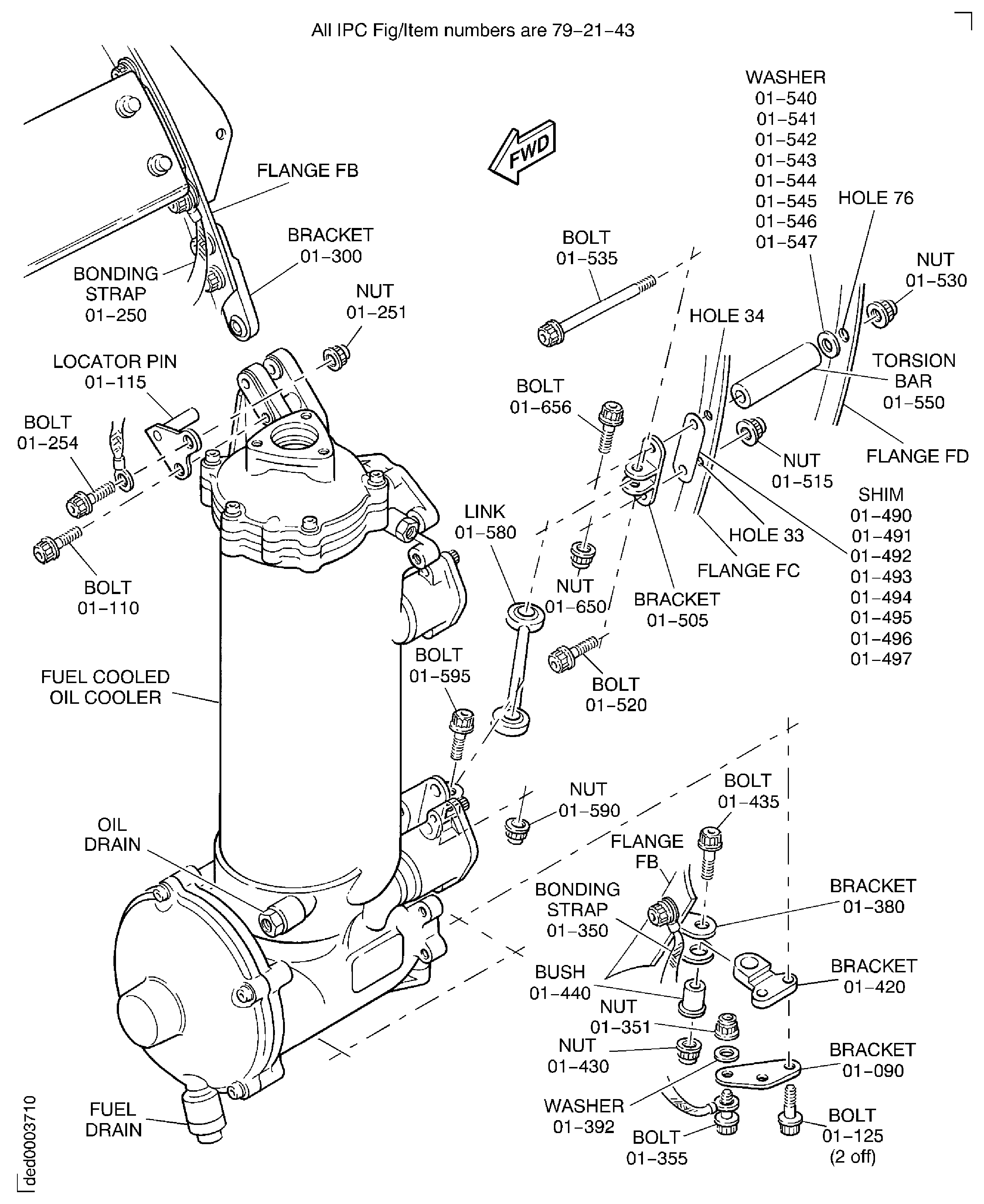
Figure: V2500-A5: Remove the Fuel Cooled Oil Cooler
V2500-A5: Remove the Fuel Cooled Oil Cooler
Figure: V2500-A1 and A5 SBE 79-0075 and 79-0076: Remove the Fuel Cooled Oil Cooler Upper Mount
V2500-A1 and A5 SBE 79-0075 and 79-0076: Remove the Fuel Cooled Oil Cooler Upper Mount
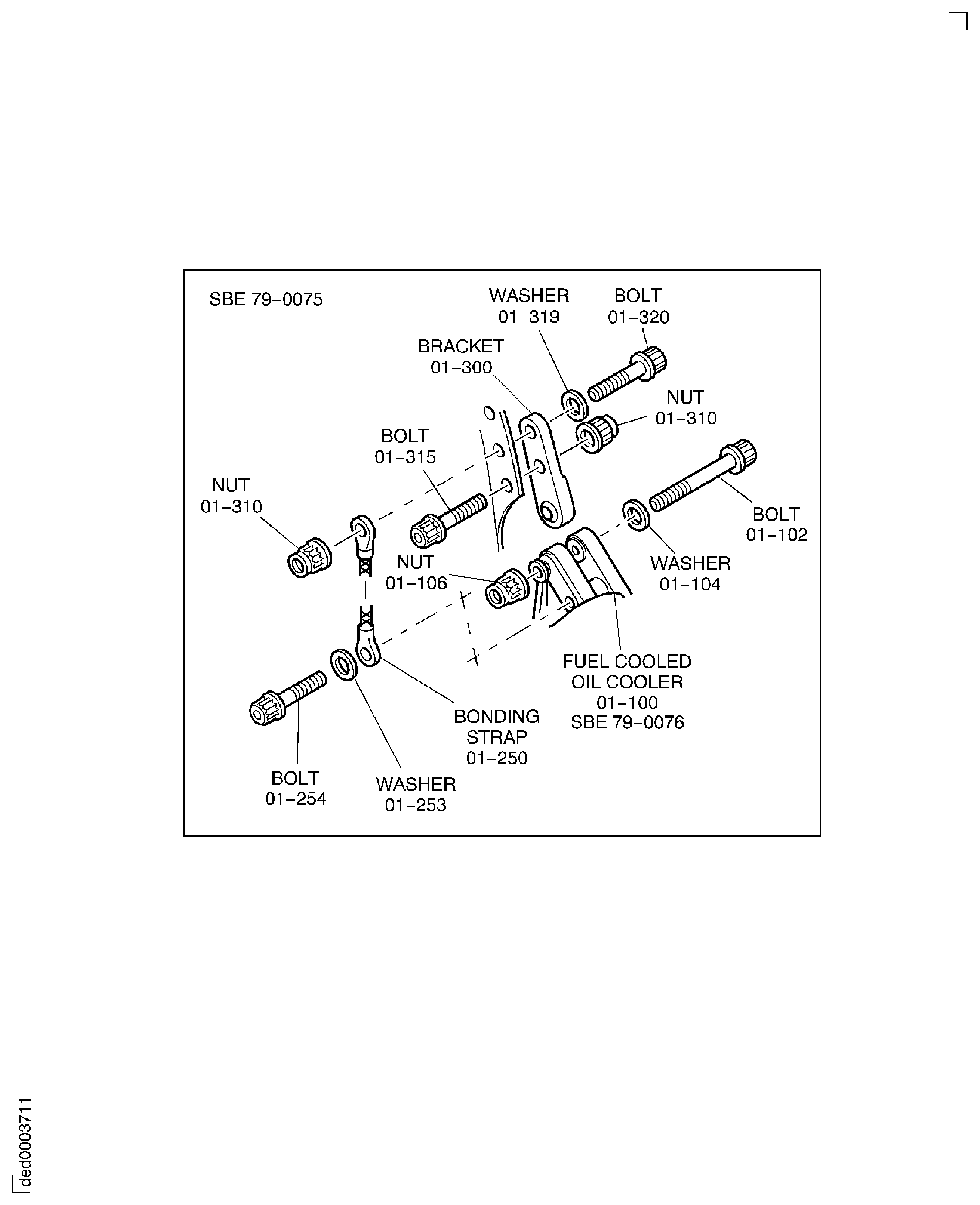
Figure: Remove the Hydraulic Case Drain Filter Assembly
Remove the Hydraulic Case Drain Filter Assembly
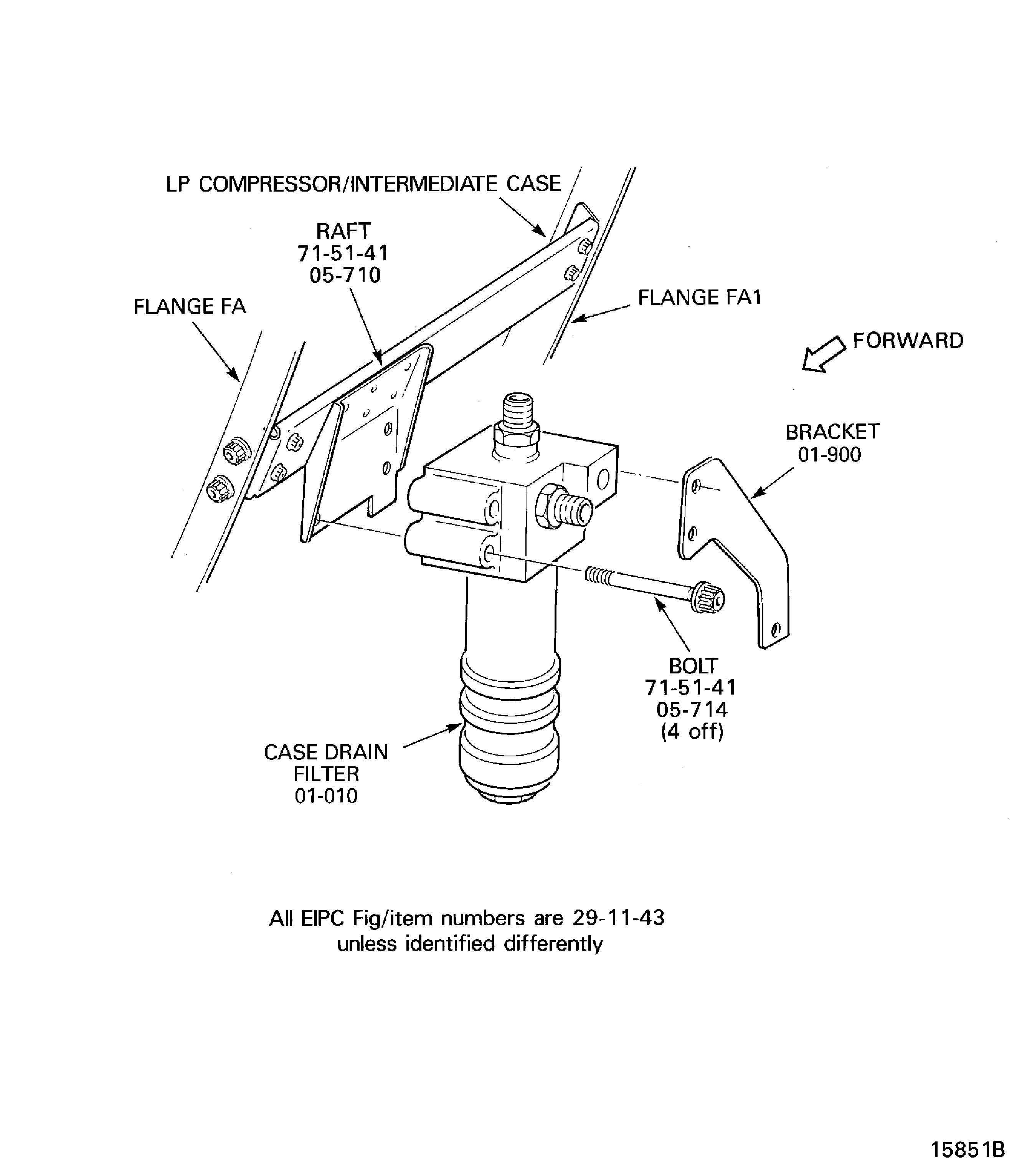
Figure: Pre SBE 75-0047: Remove the Stage 7 Air Solenoid Valves
Sheet 1
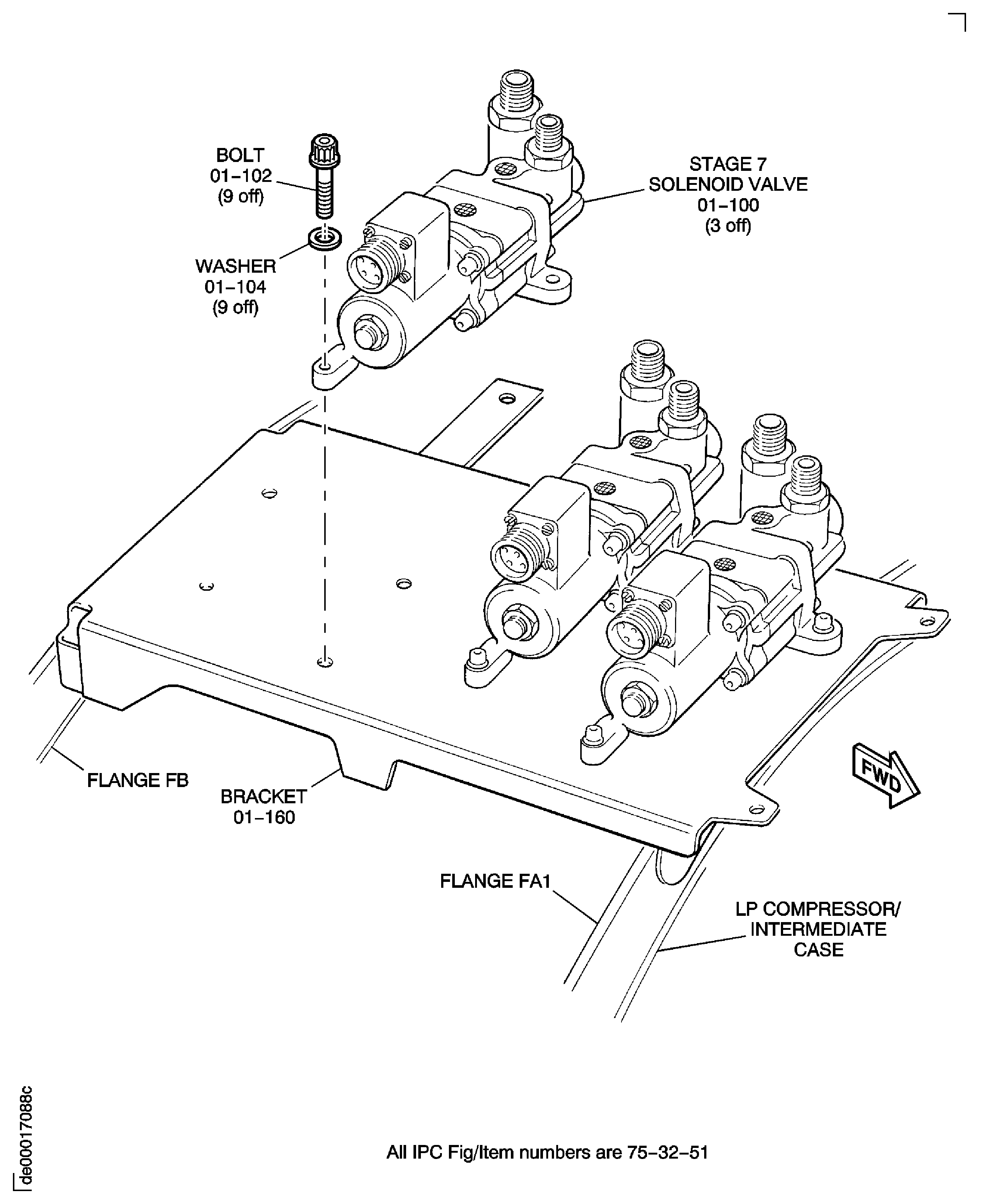
Figure: SBE 75-0047: Remove the Stage 7 Air Solenoid Valves
Sheet 2