Export Control
EAR Export Classification: Not subject to the EAR per 15 C.F.R. Chapter 1, Part 734.3(b)(3), except for the following Service Bulletins which are currently published as EAR Export Classification 9E991: SBE70-0992, SBE72-0483, SBE72-0580, SBE72-0588, SBE72-0640, SBE73-0209, SBE80-0024 and SBE80-0025.Copyright
© IAE International Aero Engines AG (2001, 2014 - 2021) The information contained in this document is the property of © IAE International Aero Engines AG and may not be copied or used for any purpose other than that for which it is supplied without the express written authority of © IAE International Aero Engines AG. (This does not preclude use by engine and aircraft operators for normal instructional, maintenance or overhaul purposes.).Applicability
V2500-A1
Common Information
TASK 72-00-40-420-002-A00 HP System Module - Install The HP System Module (Horizontal), Installation-004
General
This TASK gives the procedure to install the HP system module in the horizontal position. Other related TASKS are:
TASK 72-00-40-560-004 Turn the HP system module from the vertical to the horizontal.
Fig/item numbers in parentheses in the procedure agree with those used in the EIPC. Only the primary Fig/item numbers are used. For the service bulletin alpha variants refer to the EIPC.
For all parts identified in a different Chapter/Section/Subject, the applicable Chapter/Section/Subject comes before the Fig/item number.
For standard torque data and procedures refer to the SPM TASK 70-41-01-400-501 and SPM TASK 70-41-02-400-501.
Special torque data is identified with the symbol * after the torque value.
Special assembly tolerances are included in this procedure.
Lubricate all threads and abutment faces of nuts and bolts with CoMat 10-077 APPROVED ENGINE OILS, unless other lubricants are referred to in the procedure.
After assembly apply CoMat 07-038 AIR DRYING ENAMEL to any damaged surface protection, joint flanges and attach parts. Use the correct color of air drying enamel. Refer to the SPM TASK 70-38-21-380-501.
The number for each radial location must be identified in a clockwise direction. These start at the engine top position when you look from the rear of the engine, unless stated differently in the procedure.
Transportation covers/blanks must be removed immediately before installation.
NOTE
NOTE
Preliminary Requirements
Pre-Conditions
NONESupport Equipment
| Name | Manufacturer | Part Number / Identification | Quantity | Remark |
|---|---|---|---|---|
| IAE 1F10024 Support spacer | 0AM53 | IAE 1F10024 | 1 | |
| IAE 1F10051 Two cable sling | 0AM53 | IAE 1F10051 | 1 | |
| IAE 1F10262 Lift sling | 0AM53 | IAE 1F10262 | 1 | |
| IAE 1P16002 Cradle pedestal | 0AM53 | IAE 1P16002 | 1 | |
| IAE 1P16046 Removal/Installation fixture | 0AM53 | IAE 1P16046 | 1 | |
| IAE 1P16057 Tie-rod adapter | 0AM53 | IAE 1P16057 | 1 | |
| IAE 1P16543 Removal/Installation fixture | 0AM53 | IAE 1P16543 | 1 | |
| IAE 1R18228 Torque spanner | 0AM53 | IAE 1R18228 | 1 | |
| IAE 1R18229 Index unit | 0AM53 | IAE 1R18229 | 1 | |
| IAE 1R18230 Wrench | 0AM53 | IAE 1R18230 | 1 | |
| IAE 1R18236 Alignment tool | 0AM53 | IAE 1R18236 | 1 |
Consumables, Materials and Expendables
| Name | Manufacturer | Part Number / Identification | Quantity | Remark |
|---|---|---|---|---|
| CoMat 01-002 SOLVENT, DELETED. | LOCAL | CoMat 01-002 | ||
| CoMat 07-038 AIR DRYING ENAMEL | k3504 | CoMat 07-038 | ||
| CoMat 10-070 ANTI-SEIZE COMPOUND | LOCAL | CoMat 10-070 | ||
| CoMat 10-077 APPROVED ENGINE OILS | LOCAL | CoMat 10-077 | ||
| CoMat 04-005 JOINTING COMPOUND, MEDIUM GRADE | LOCAL | CoMat 04-005 |
Spares
NONESafety Requirements
NONEProcedure
Refer to Figure.
Reference dimensions at location 5600. If required use the data written as a note in TASK 72-41-31-200-000 and TASK 72-32-00-200-000.
Table 1. Fits and Clearances (all dimensions are in inches) NEW PART
WORN PART
DIMENSIONS
DIMENSIONS
PART IDENT
Size
Clearance
Non-select
REJECT IF
MORE THAN
LOCATION 5600
HP Compressor Front Cases Front Location Hole Bore To LP Compressor/Intermediate Case Module Rear Face Location Dowels Diameter
Location Hole Bore
0.4755
0.4770
0.0019
Location Dowel Diameter
0.4730
0.0039
0.4736
Table 2. Fits and Clearances (all dimensions are in millimeters) NEW PART
WORN PART
DIMENSIONS
DIMENSIONS
PART IDENT
Size
Clearance
Non-select
REJECT IF
MORE THAN
LOCATION 5600
HP Compressor Front Cases Front Location Hole Bore To LP Compressor/Intermediate Case Module Rear Face Location Dowels Diameter
Location Hole Bore
12.080
12.116
0.050
Location Dowel Diameter
12.015
0.101
12.030
SUBTASK 72-00-40-220-071 Reference Fits and Clearances of the HP System Module to the LP Compressor/Intermediate Case Module Interface at Location 5600
Refer to Figure.
Reference dimensions at 5601. If required use the data written as a note in TASK 72-41-31-200-000 and TASK 72-00-40-200-000.
Table 3. Fits and Clearances (all dimensions are in inches) NEW PART
WORN PART
DIMENSIONS
DIMENSIONS
PART IDENT
Size
Clearance
Non-select
REJECT IF
MORE THAN
LOCATION 5601
HP Compressor Front Cases Dowel Pin Hole Bore To Dowel Pin Diameter
Dowel Pin Hole Bore
0.2389
0.2401
0.0018
Dowel Pin Diameter
0.2366
0.0034
0.2371
Table 4. Fits and Clearances (all dimensions are in millimeters) NEW PART
WORN PART
DIMENSIONS
DIMENSIONS
PART IDENT
Size
Clearance
Non-select
REJECT IF
MORE THAN
LOCATION 5601
HP Compressor Front Cases Dowel Pin Hole Bore To Dowel Pin Diameter
Dowel Pin Hole Bore
6.070
6.100
0.046
Dowel Pin Diameter
6.012
0.088
6.024
SUBTASK 72-00-40-220-072 Reference Fits and Clearances of the HP System Module to the LP Compressor/Intermediate Case Module Interface at Location 5601
Refer to Figure.
Reference dimensions at location 5602. If required use the data written as a note in TASK 72-32-00-200-000 and TASK 72-00-40-200-000.
Table 5. Fits and Clearances (all dimensions are in inches) NEW PART
WORN PART
DIMENSIONS
DIMENSIONS
PART IDENT
Size
Clearance
Non-select
REJECT IF
MORE THAN
LOCATION 5602
LP Compressor Rear Flange Dowel Pin Hole Bore To Dowel Pin Diameter
Dowel Pin Hole Bore
0.2389
0.2401
0.0018
Dowel Pin Diameter
0.2366
0.0034
0.2371
Table 6. Fits and Clearances (all dimensions are in millimeters) NEW PART
WORN PART
DIMENSIONS
DIMENSIONS
PART IDENT
Size
Clearance
Non-select
REJECT IF
MORE THAN
LOCATION 5602
LP Compressor Rear Flange Dowel Pin Hole Bore To Dowel Pin Diameter
Dowel Pin Hole Bore
6.070
6.100
0.046
Dowel Pin Diameter
6.012
0.088
6.024
SUBTASK 72-00-40-220-073 Reference Fits and Clearance of the HP System Module to the LP Compressor/Intermediate Case Module Interface at Location 5602

WARNING
WHEN YOU USE COMAT 01-002 INHIBITED AND STABILIZED TRICHLOROETHANE YOU MUST USE THE NECESSARY PROTECTIVE CLOTHING. DO NOT GET THE SOLVENT ON YOUR SKIN OR IN YOUR EYES. YOU MUST NOT SMOKE WHEN YOU USE THE SOLVENT AS THE VAPOR CHANGES AND BECOMES TOXIC.Use a soft brush and apply CoMat 01-002 SOLVENT, DELETED. to the curvic teeth.
Clean the curvic teeth on the No. 3 bearing rotor center and the HP Compressor Stage 3 disk curvic couplings.
Apply CoMat 10-077 APPROVED ENGINE OILS to the threads and mating faces of the curvic bolts.
SUBTASK 72-00-40-420-061 Prepare the Curvic Couplings for Assembly
Refer to Figure.
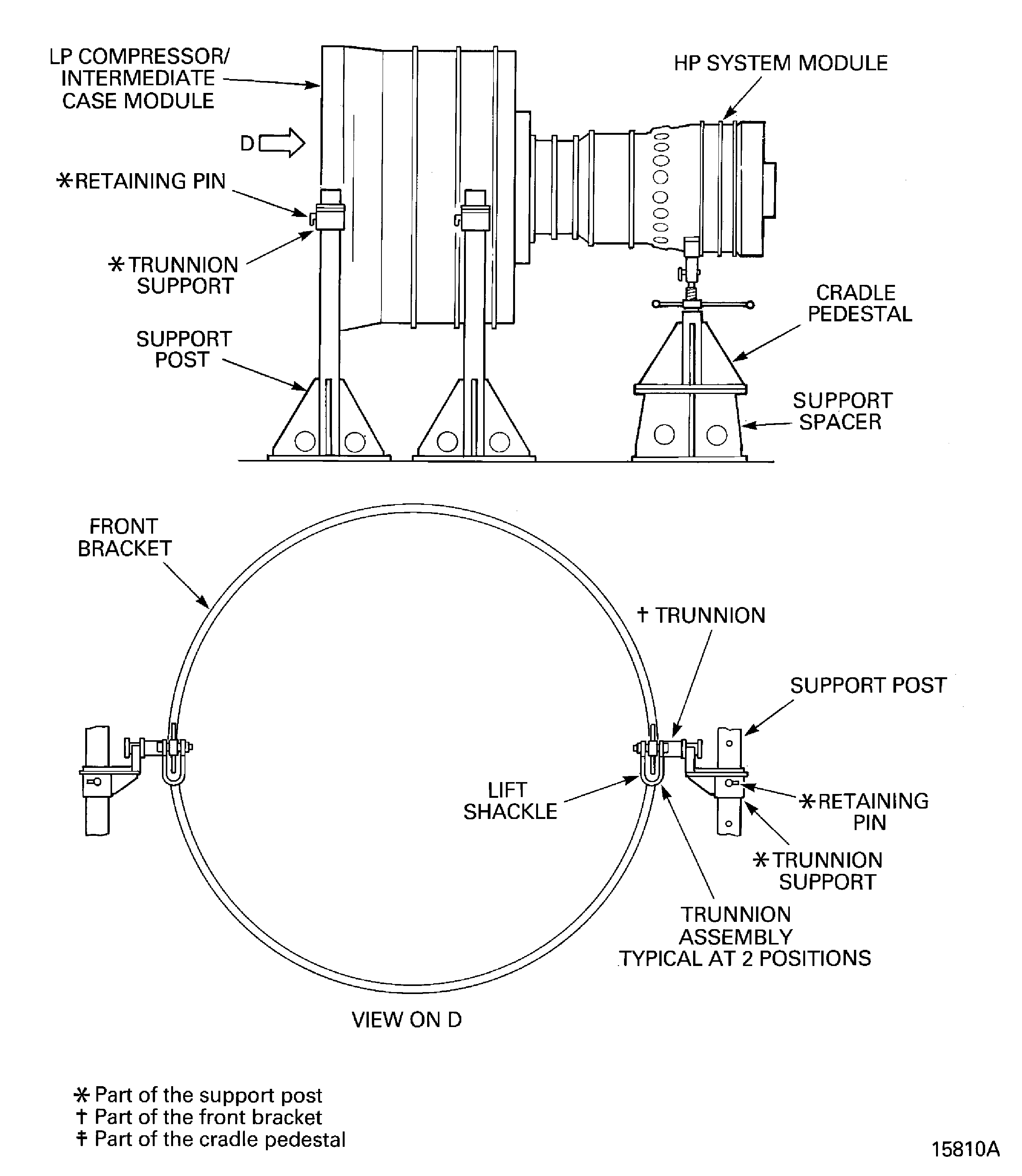
Attach IAE 1P16057 Tie-rod adapter 1 off on to the center ring (part of IAE 1P16046 Removal/Installation fixture or IAE 1P16543 Removal/Installation fixture 1 off).
SUBTASK 72-00-40-420-062 Install the Remove/Install Fixture and the Tie-Rod Adapter on to the HP System Module Rear Flange
Install IAE 1F10262 Lift sling 1 off on to the HP system module.
Install the IAE 1R18236 Alignment tool 1 off on to the HP system module front flange.
Align the HP system module and the LP compressor/intermediate case module curvic couplings.
SUBTASK 72-00-40-420-063 Prepare the HP System Module for Installation
Refer to Figure.
NOTE
There is a countersunk hole in the head of the bolts.Install the four bolts ENGINE-ATTACH PARTS & FITTINGS-HP SYSTEM MODULE (72-00-40, 01-050), the four lock plates ENGINE-ATTACH PARTS & FITTINGS-HP SYSTEM MODULE (72-00-40, 01-080), the four pins ENGINE-ATTACH PARTS & FITTINGS-HP SYSTEM MODULE (72-00-40, 01-082) and the four nuts ENGINE-ATTACH PARTS & FITTINGS-HP SYSTEM MODULE (72-00-40, 01-030) at the position Y.
Install the 37 bolts ENGINE-ATTACH PARTS & FITTINGS-HP SYSTEM MODULE (72-00-40, 01-050), the 37 nuts ENGINE-ATTACH PARTS & FITTINGS-HP SYSTEM MODULE (72-00-40, 01-030).
SUBTASK 72-00-40-420-064-A00 Install the HP System Module (Pre SBE 72-0290)
Refer to Figure.
NOTE
There is no countersunk hole in the head of the bolts.Lubricate the 41 bolts ENGINE-ATTACH PARTS & FITTINGS-HP SYSTEM MODULE (72-00-40, 01-050) with CoMat 10-070 ANTI-SEIZE COMPOUND. SPM TASK 70-41-02-410-501.
Install four of the bolts ENGINE-ATTACH PARTS & FITTINGS-HP SYSTEM MODULE (72-00-40, 01-050) with the four lock plates ENGINE-ATTACH PARTS & FITTINGS-HP SYSTEM MODULE (72-00-40, 01-080), the four pins ENGINE-ATTACH PARTS & FITTINGS-HP SYSTEM MODULE (72-00-40, 01-082) and four of the nuts ENGINE-ATTACH PARTS & FITTINGS-HP SYSTEM MODULE (72-00-40, 01-030) at the position identified Y. Figure.
Torque the 37 nuts and bolts to 315 lbfin (36 Nm) evenly and in the sequence shown. Figure.
Install the remaining 37 bolts ENGINE-ATTACH PARTS & FITTINGS-HP SYSTEM MODULE (72-00-40, 01-050) and the 37 nuts ENGINE-ATTACH PARTS & FITTINGS-HP SYSTEM MODULE (72-00-40, 01-030).
SUBTASK 72-00-40-420-064-B00 Install the HP System Module (SBE 72-0290)
Refer to Figure.
Attach IAE 1P16002 Cradle pedestal 1 off to IAE 1F10024 Support spacer 1 off with the four tool bolts and the four tool nuts.
Make sure that IAE 1P16002 Cradle pedestal 1 off is at its lowest position.
SUBTASK 72-00-40-420-065 Install the Cradle Pedestal to the HP System Module Forward of Diffuser Case Rear Flange
Use IAE 1R18230 Wrench 1 off to engage the 20 bolts ENGINE-ATTACH PARTS & FITTINGS-HP SYSTEM MODULE (72-00-40, 01-010) and tighten them lightly.

CAUTION
WHEN YOU TORQUE, IT IS IMPORTANT THAT THE TORQUE VALUE IS ON THE INCREASE. A NEW BOLT MUST BE INSTALLED IF THE TORQUE VALUE IS CONSTANT OR DECREASES.THE BOLTS MUST NOT BE POWER WRENCHED.Attach IAE 1R18229 Index unit 1 off on to the front face of the LP Stubshaft and Rotor center. Make sure that the hole No. 3 is at the top. Safety the index unit on to the LP Stubshaft and Rotor center with the location pin.
Install IAE 1R18228 Torque spanner 1 off on to the index unit and the curvic bolt. Make sure that the spanner is in the hole No. 1.
SUBTASK 72-00-40-420-066 Torque the No. 3 Bearing Rotor Center and the HP Compressor Stage 3 Disk Curvic Coupling Bolts
Refer to Figure.
Put a thin layer of CoMat 04-005 JOINTING COMPOUND, MEDIUM GRADE on to the bracket where it touches the blank.
Install one of the blanks ENGINE-HP COMPRESSOR SPLIT CASES (72-41-31, 01-120), the bracket ENGINE-HP COMPRESSOR SPLIT CASES (72-41-31, 01-118) and two of the bolts ENGINE-HP COMPRESSOR SPLIT CASES (72-41-31, 01-122) in to the HP compressor at location C.
Put a thin layer of CoMat 04-005 JOINTING COMPOUND, MEDIUM GRADE on the bracket where it touches the blank.
Install one of the blanks ENGINE-HP COMPRESSOR SPLIT CASES (72-41-31, 01-120), the bracket ENGINE-HP COMPRESSOR SPLIT CASES (72-41-31, 01-115) and two of the bolts ENGINE-HP COMPRESSOR SPLIT CASES (72-41-31, 01-122) in the HP compressor at location A.
Install the other blank ENGINE-HP COMPRESSOR SPLIT CASES (72-41-31, 01-120) and the other bolts ENGINE-HP COMPRESSOR SPLIT CASES (72-41-31, 01-122) in to the HP Compressor at location B. Torque the bolts to 85 lbfin to 105 lbfin (10 Nm to 12 Nm).
SUBTASK 72-00-40-420-067 Remove the Support Rods from the HP Compressor
Refer to Figure.
NOTE
Keep the five nuts removed in Step.Remove the five tool bolts and the five nuts ENGINE-SECURING FEATURES-HP COMPRESSOR CASES (72-41-00, 01-302) that safety the right hand trunnion assembly on to the module.
Install the five bolts ENGINE-SECURING FEATURES-HP COMPRESSOR CASES (72-41-00, 01-308) and the five nuts removed in Step and torque to 180 lbfin to 220 lbfin (20 Nm to 25 Nm).
NOTE
Keep the five nuts removed in Step.Remove the five tool bolts and the five nuts ENGINE-SECURING FEATURES-HP COMPRESSOR CASES (72-41-00, 01-302) that safety the left hand trunnion assembly on to the module.
Install the five bolts ENGINE-SECURING FEATURES-HP COMPRESSOR CASES (72-41-00, 01-308) and the five nuts removed in Step and torque to 180 lbfin to 220 lbfin (20 Nm to 25 Nm).
Remove the trunnion assemblies.
SUBTASK 72-00-40-420-068 Remove the Trunnion Assemblies from the HP System Module
Refer to Figure.
SUBTASK 72-00-40-420-069 Remove the Remove/Install Fixture and the Tie-Rod Adapter from the Rear of the Module
Refer to Figure.
Attach IAE 1F10051 Two cable sling 1 off to the trunnion assembly shackles.
Remove the Trunnion assembly.
SUBTASK 72-00-40-420-070 Remove the Forward Support Post and the Trunnion Assembly from the LP Compressor/Intermediate Case Module
Figure: Locations for the Fits and Clearances
Locations for the Fits and Clearances
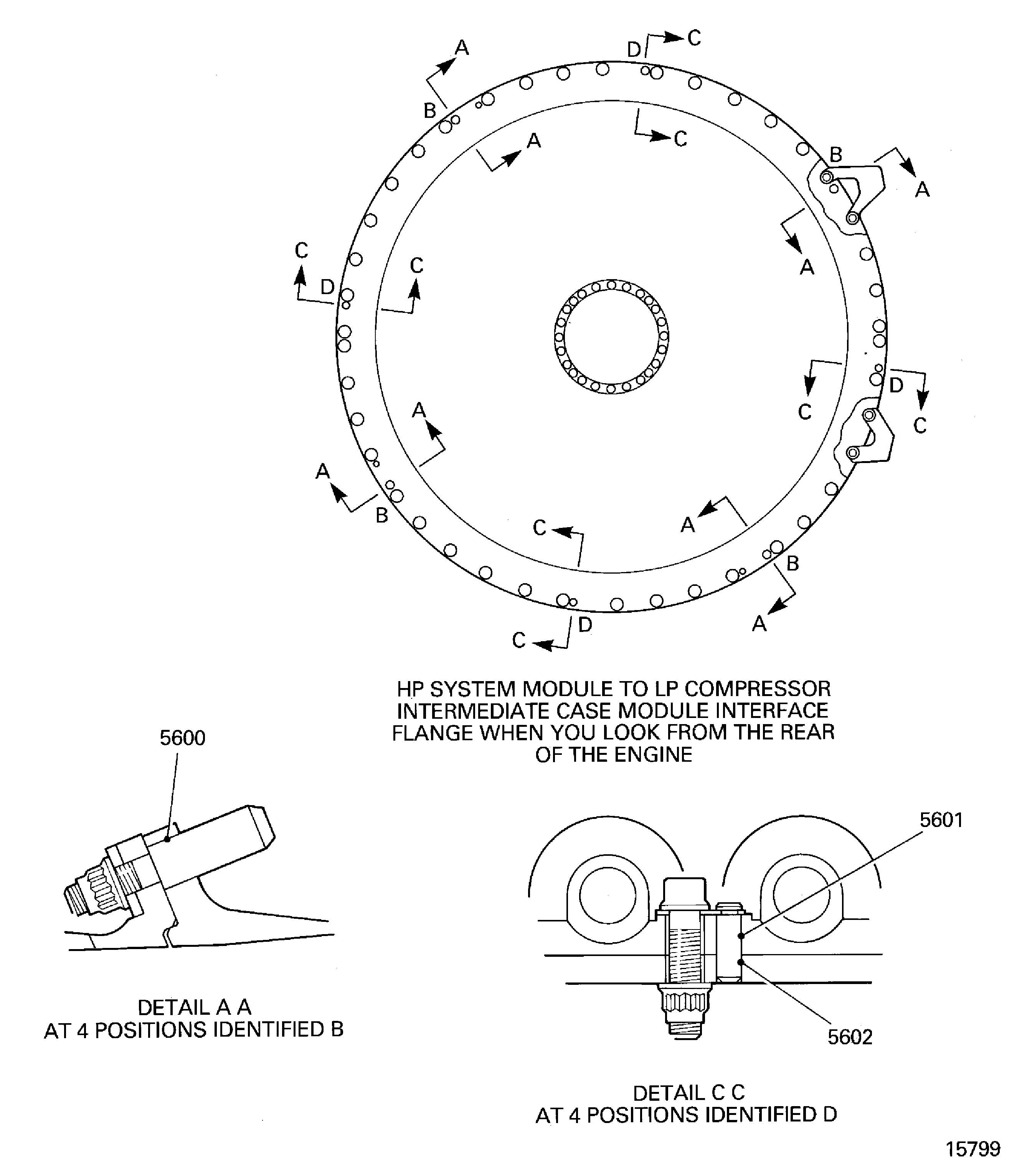
Figure: Install the remove/install fixture and tie-rod adapter to the HP system module rear flange
Install the remove/install fixture and tie-rod adapter to the HP system module rear flange

Figure: Install the support rods in to the HP compressor
Install the support rods in to the HP compressor
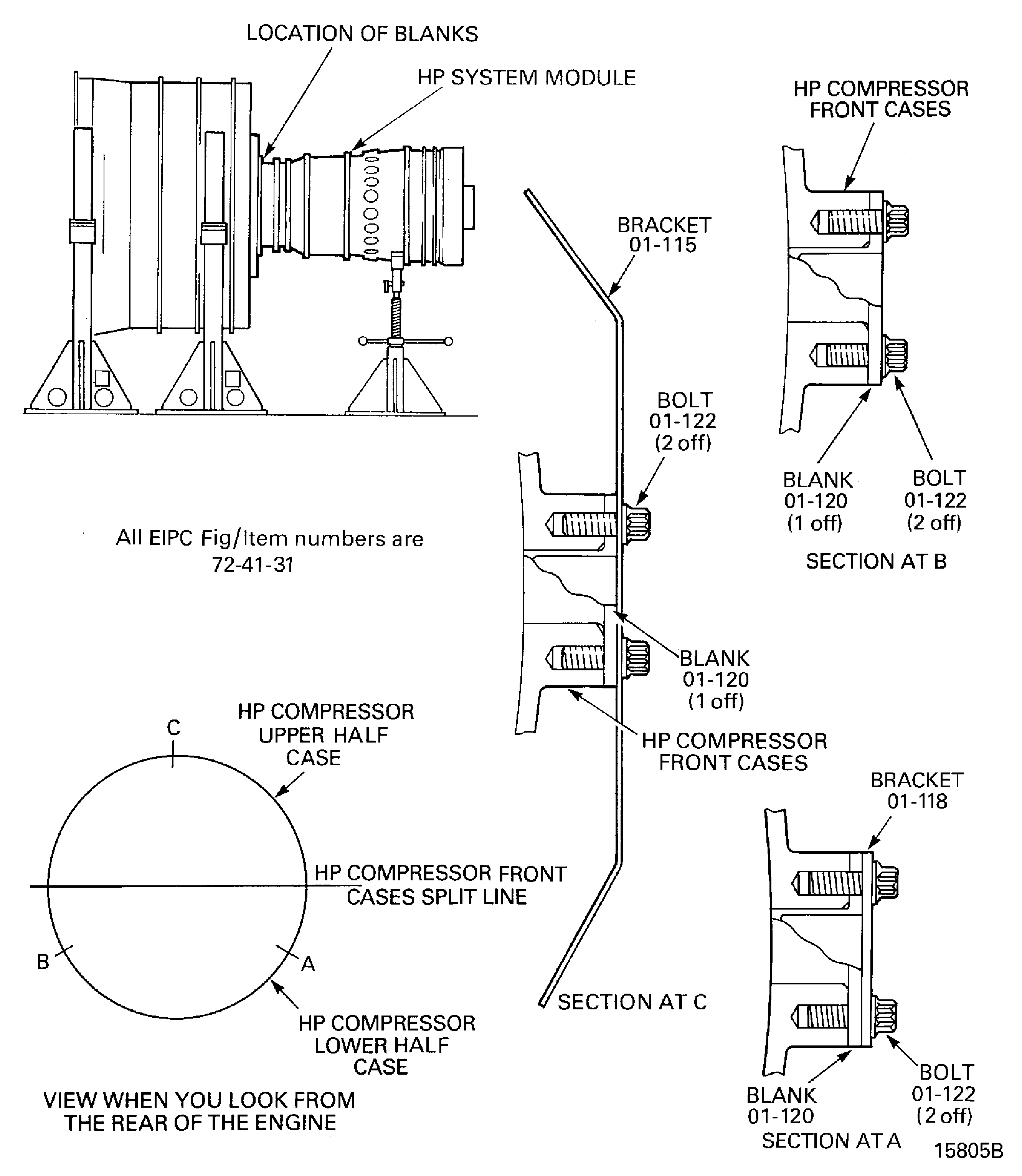
Figure: Install the support rods in the HP compressor
Sheet 2

Figure: Install the HP system module lift sling
Install the HP system module lift sling

Figure: Align the HP system module and LP compressor/intermediate case module curvic couplings
Sheet 1

Figure: Align the HP system module and LP compressor/intermediate case module curvic couplings
Sheet 2

Figure: LP compressor/intermediate case module to HP system module joint flange hole positions and torque sequence
LP compressor/intermediate case module to HP system module joint flange hole positions and torque sequence
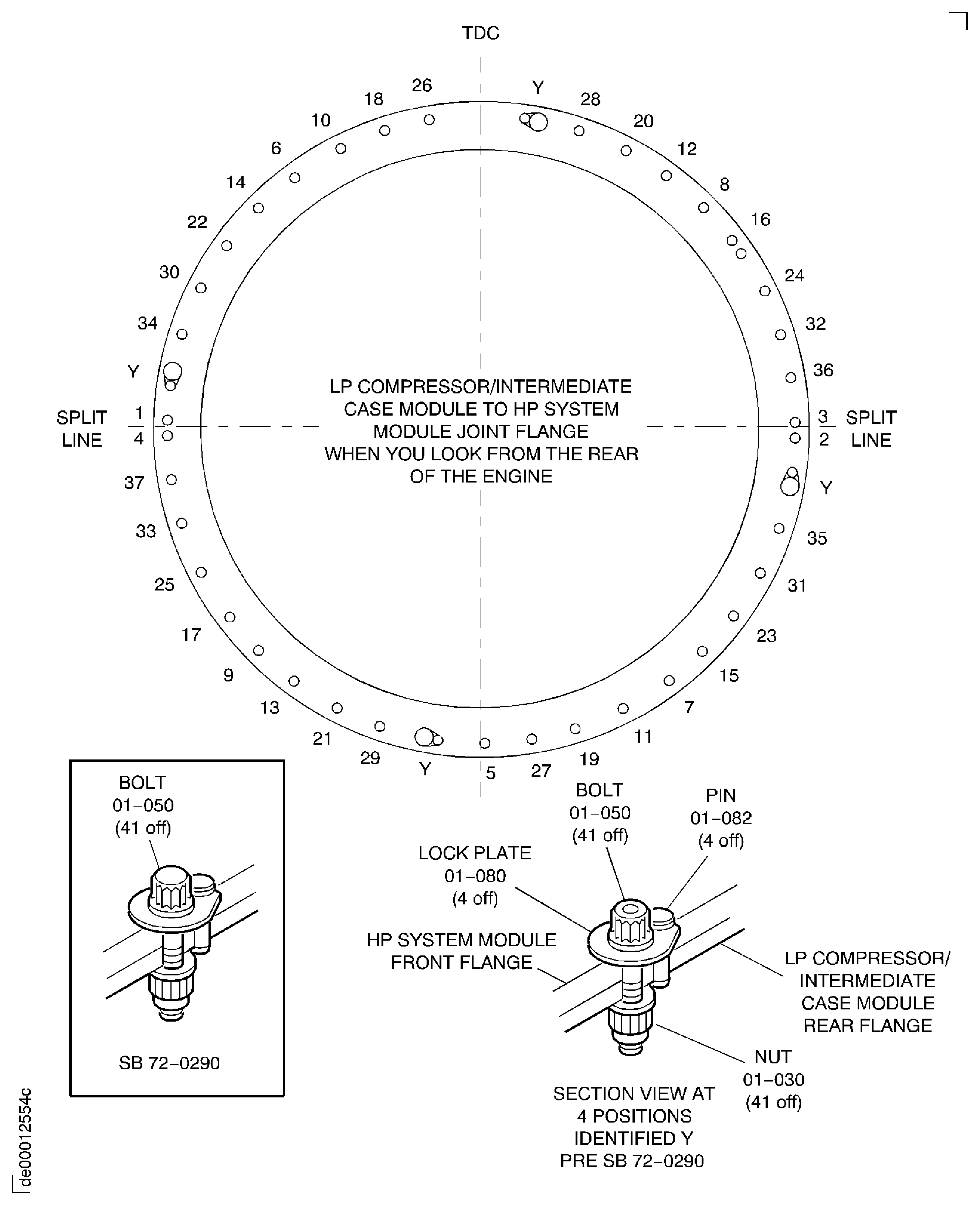
Figure: Install the HP system module to the LP compressor/intermediate case module
Install the HP system module to the LP compressor/intermediate case module

Figure: Lightly tighten the stage 3 compressor curvic bolts
Lightly tighten the stage 3 compressor curvic bolts
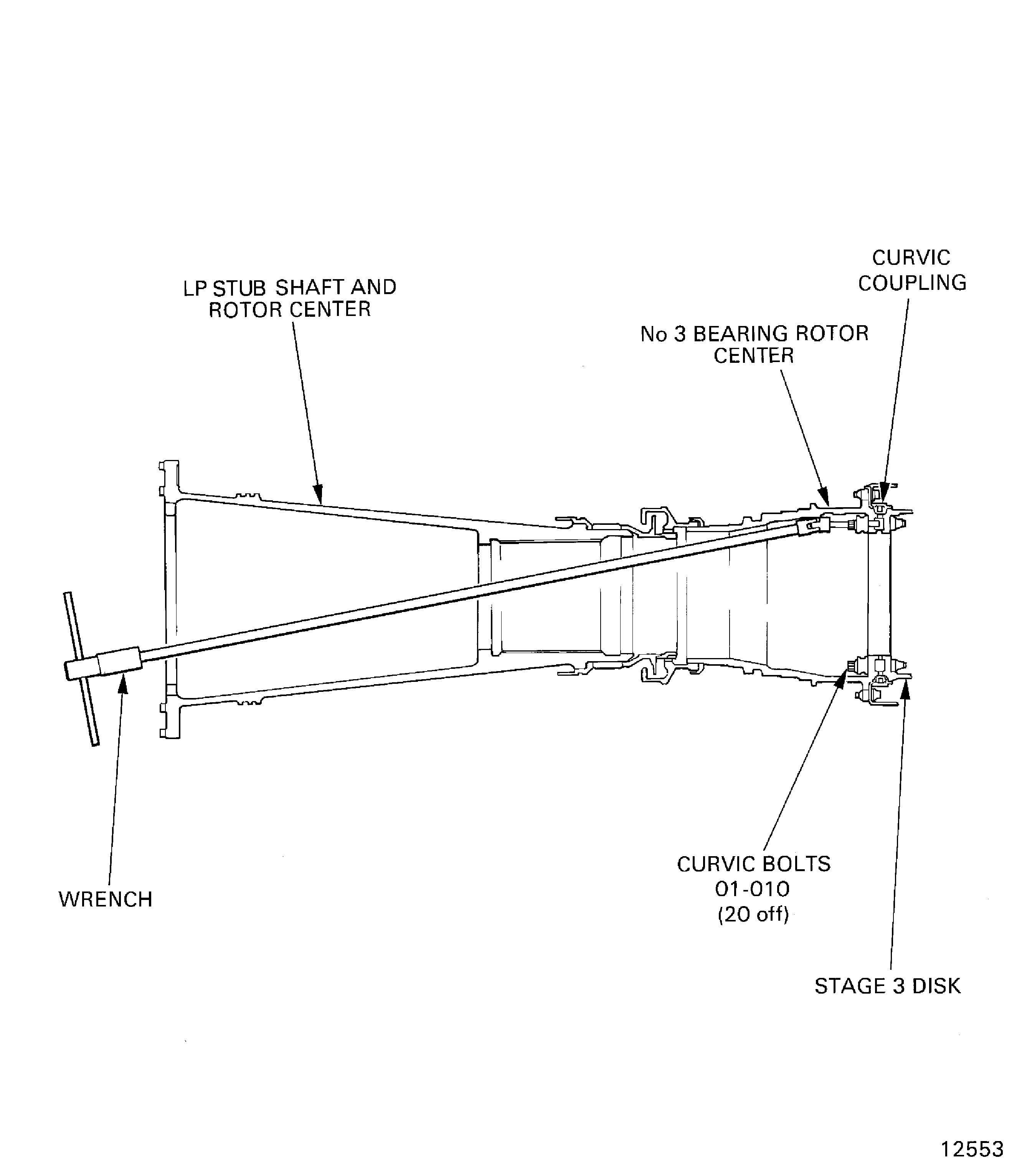
Figure: Torque the stage 3 HP compressor curvic bolts
Torque the stage 3 HP compressor curvic bolts

Figure: Torque sequence for the stage 3 HP compressor curvic bolts
Torque sequence for the stage 3 HP compressor curvic bolts

Figure: Remove the HP compressor trunnions
Remove the HP compressor trunnions

Figure: Remove the front support posts and trunnion assemblies from the LP compressor/intermediate case module
Remove the front support posts and trunnion assemblies from the LP compressor/intermediate case module