Export Control
EAR Export Classification: Not subject to the EAR per 15 C.F.R. Chapter 1, Part 734.3(b)(3), except for the following Service Bulletins which are currently published as EAR Export Classification 9E991: SBE70-0992, SBE72-0483, SBE72-0580, SBE72-0588, SBE72-0640, SBE73-0209, SBE80-0024 and SBE80-0025.Copyright
© IAE International Aero Engines AG (2001, 2014 - 2021) The information contained in this document is the property of © IAE International Aero Engines AG and may not be copied or used for any purpose other than that for which it is supplied without the express written authority of © IAE International Aero Engines AG. (This does not preclude use by engine and aircraft operators for normal instructional, maintenance or overhaul purposes.).Applicability
V2500-A1
Common Information
TASK 72-32-00-030-006-A00 LPC/Intermediate Case Module - Remove The LPC Booster Stage Assembly, Disassembly-006
General
Fig/item numbers in parentheses in the procedure agree with those used in the IPC. Only the primary Fig/item numbers are used. For the service bulletin alpha variants refer to the IPC.
Apply the approved penetrating oil before the removal of threaded parts and parts with an interference fit. Let the parts soak before removal. For the approved penetrating oils and procedures, refer to the SPM TASK 70-64-00-640-501.
This TASK gives the procedure to remove the LP compressor booster stage. For the removal of the other parts of the LP compressor/intermediate case module, refer to TASK 72-32-00-030-000 (DISASSEMBLY-000).
NOTE
Preliminary Requirements
Pre-Conditions
NONESupport Equipment
| Name | Manufacturer | Part Number / Identification | Quantity | Remark |
|---|---|---|---|---|
| IAE 1J12139 Puller bolt set | 0AM53 | IAE 1J12139 | 1 | |
| IAE 1J12188 Puller bolt | 0AM53 | IAE 1J12188 | 1 | |
| IAE 1J12507 Guide pin | 0AM53 | IAE 1J12507 | 1 | |
| IAE 1J13107 Holding support | 0AM53 | IAE 1J13107 | 1 | |
| IAE 1J13111 LPC storage stand | 0AM53 | IAE 1J13111 | 1 | |
| IAE 1J13103 Vertical sling | 0AM53 | IAE 1J13103 | 1 |
Consumables, Materials and Expendables
NONESpares
NONESafety Requirements
NONEProcedure
Refer to Figure.

CAUTION
REMOVE THE BOLTS (01-377) BEFORE YOU REMOVE THE LP COMPRESSOR BOOSTER STAGE ASSEMBLY. THE BOLTS CAN TOUCH THE ASSEMBLY AND CAUSE DAMAGE TO IT.Remove the bolts if they are installed. Refer to TASK 72-32-00-030-004-A00 (DISASSEMBLY-004, CONFIG-001) or TASK 72-32-00-030-004-B00 (DISASSEMBLY-004, CONFIG-002).
Turn the fan frame assembly to the vertical with the front end up. Refer to TASK 72-32-00-030-005-A00 (72-32-00. DISASSEMBLY-005, CONFIG-001).
SUBTASK 72-32-00-030-147-A00 Prepare the Fan Frame Assembly (Pre SBE 72-0094)
Refer to Figure.
NOTE
Removal of the bolts (01-377) is not necessary. The bolts do not prevent removal of the LP compressor booster stage assembly.Make sure that the fan frame assembly is installed vertical, with the front end up, on the turnover stand. Refer to TASK 72-32-00-030-005-A00 (DISASSEMBLY-005, CONFIG-001).
SUBTASK 72-32-00-030-147-B00 Prepare the Fan Frame Assembly (SBE 72-0094)
SBE 72-0094: Shorter FEGV platform bolts
Attach the four holding supports (part of the IAE 1J13107 Holding support 1 off) to the moment weight mounting flange of the LPC assembly, Figure.
Install the four puller bolts (part of the IAE 1J12139 Puller bolt set 1 off) into the four of the eight threaded holes in the rear LP compressor case. The four puller bolts must be installed at 90 degrees apart from each other.
Release the LP compressor booster stage assembly from the LP compressor stage 2.5 vanes, Figure.
Attach the front LP compressor case to the holding supports with the four screws, four nuts and eight washers, Figure. Tighten the screws.
SUBTASK 72-32-00-030-110 Install the Holding Supports to the LP Compressor Booster Stage Assembly (LPC Assembly)
NOTE
Hold the disk to prevent the rotation of it while you turn each bolt.Remove the 24 bolts which attach the disk of the LPC assembly to the rotor center shaft, Figure.
Install the three aligning pins (part of the IAE 1J12507 Guide pin 1 off) into three of the 24 nuts of the rotor center shaft. The three aligning pins must be installed at 120 degrees apart from each other.
Use the three puller bolts (part of IAE 1J12188 Puller bolt 1 off) to release the disk from the rotor center shaft.
Install the IAE 1J13103 Vertical sling 1 off on to the front flange of the disk.
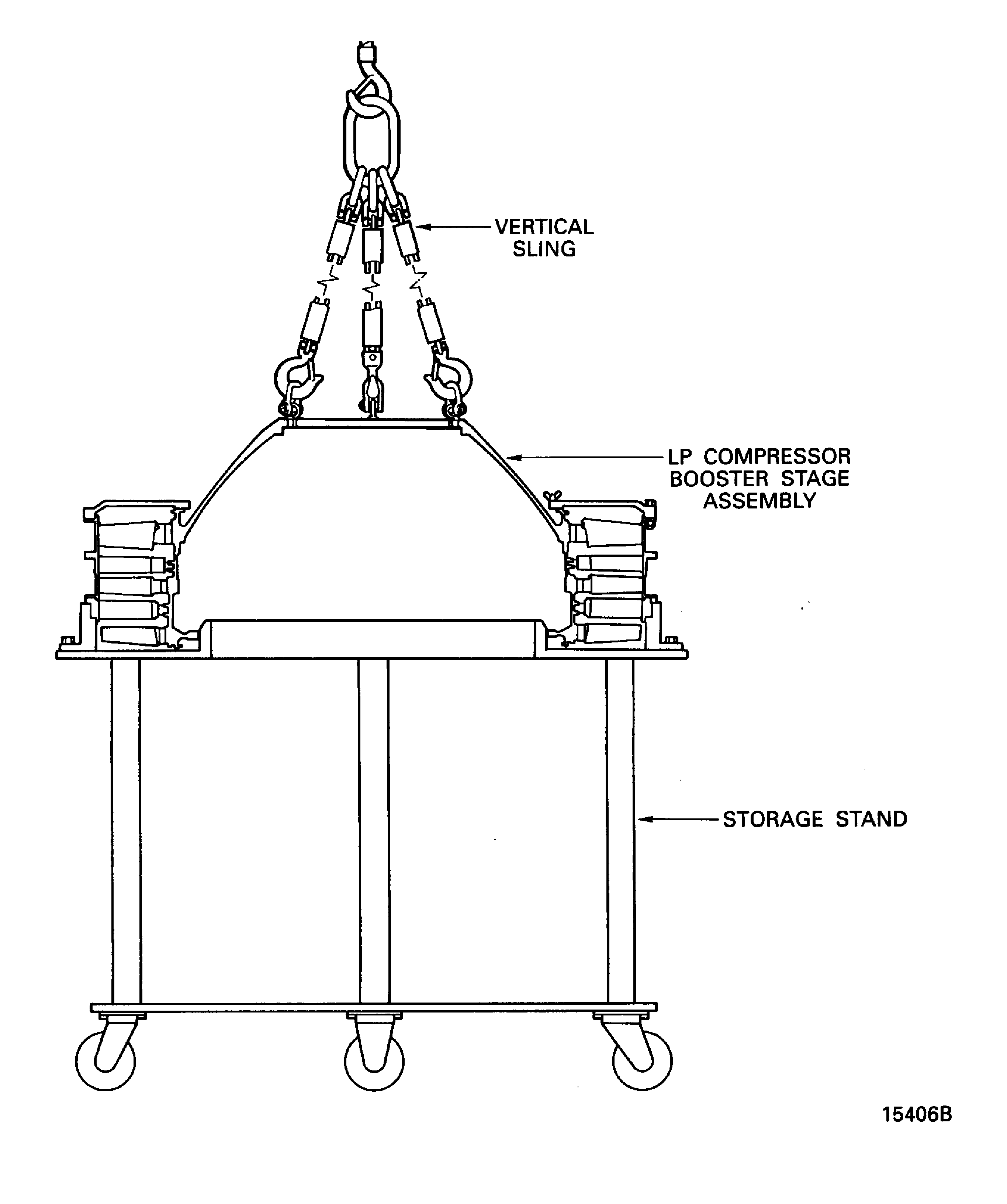
Slowly lift the LPC assembly until it is clear of the rotor center shaft and move it to the IAE 1J13111 LPC storage stand 1 off, Figure.
Remove the three aligning pins from the nuts of the rotor center shaft, Figure.
SUBTASK 72-32-00-030-111 Remove the LP Compressor Booster Stage Assembly (LPC Assembly) from the Rotor Center Shaft
Figure: Make sure that the bolts are removed
Make sure that the bolts are removed
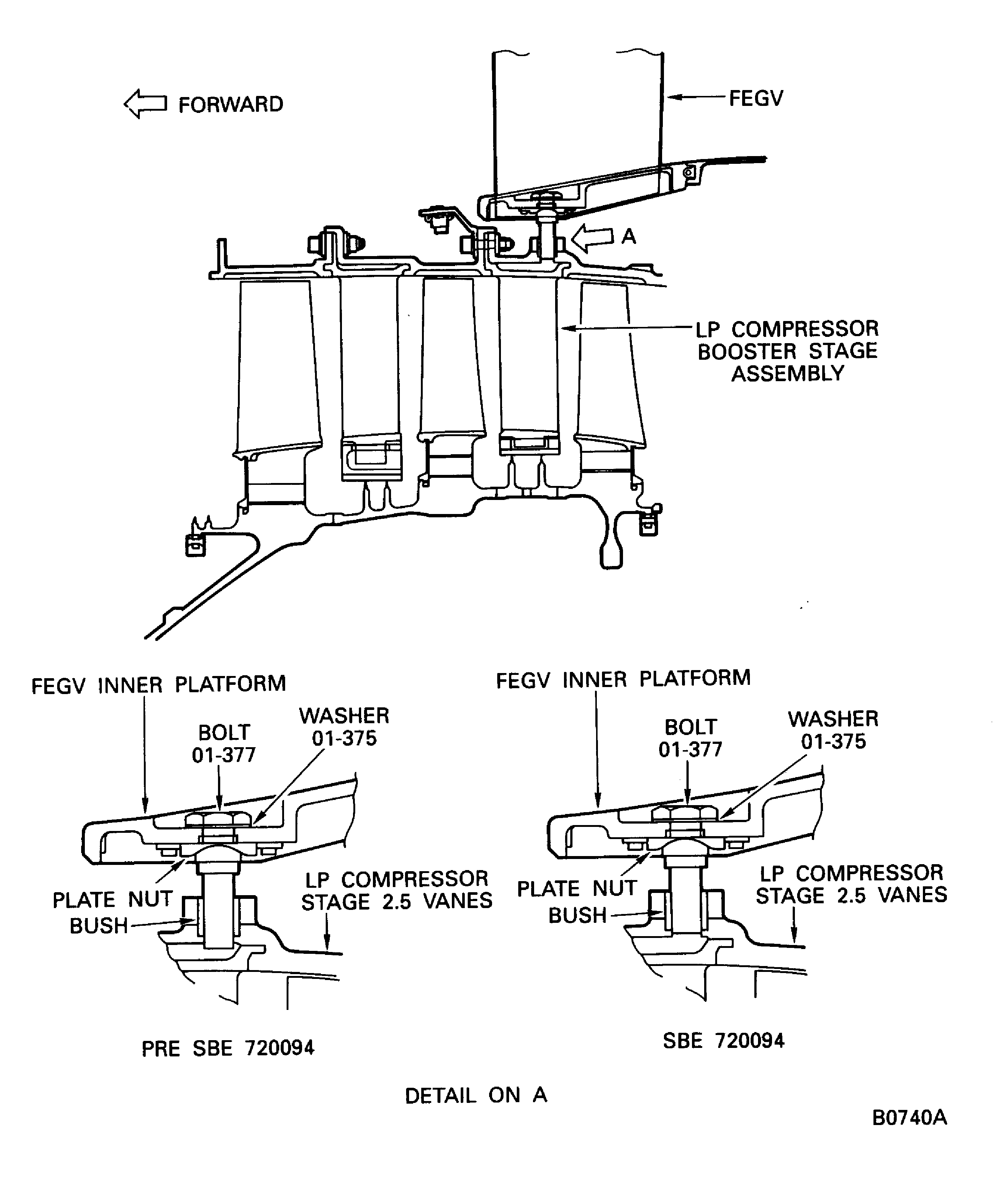
Figure: Install the holding supports to the LP compressor booster stage assembly
Install the holding supports to the LP compressor booster stage assembly

Figure: Remove the LP compressor booster stage assembly from the rotor center shaft and the LP compressor stage 2.5 vanes
Remove the LP compressor booster stage assembly from the rotor center shaft and the LP compressor stage 2.5 vanes
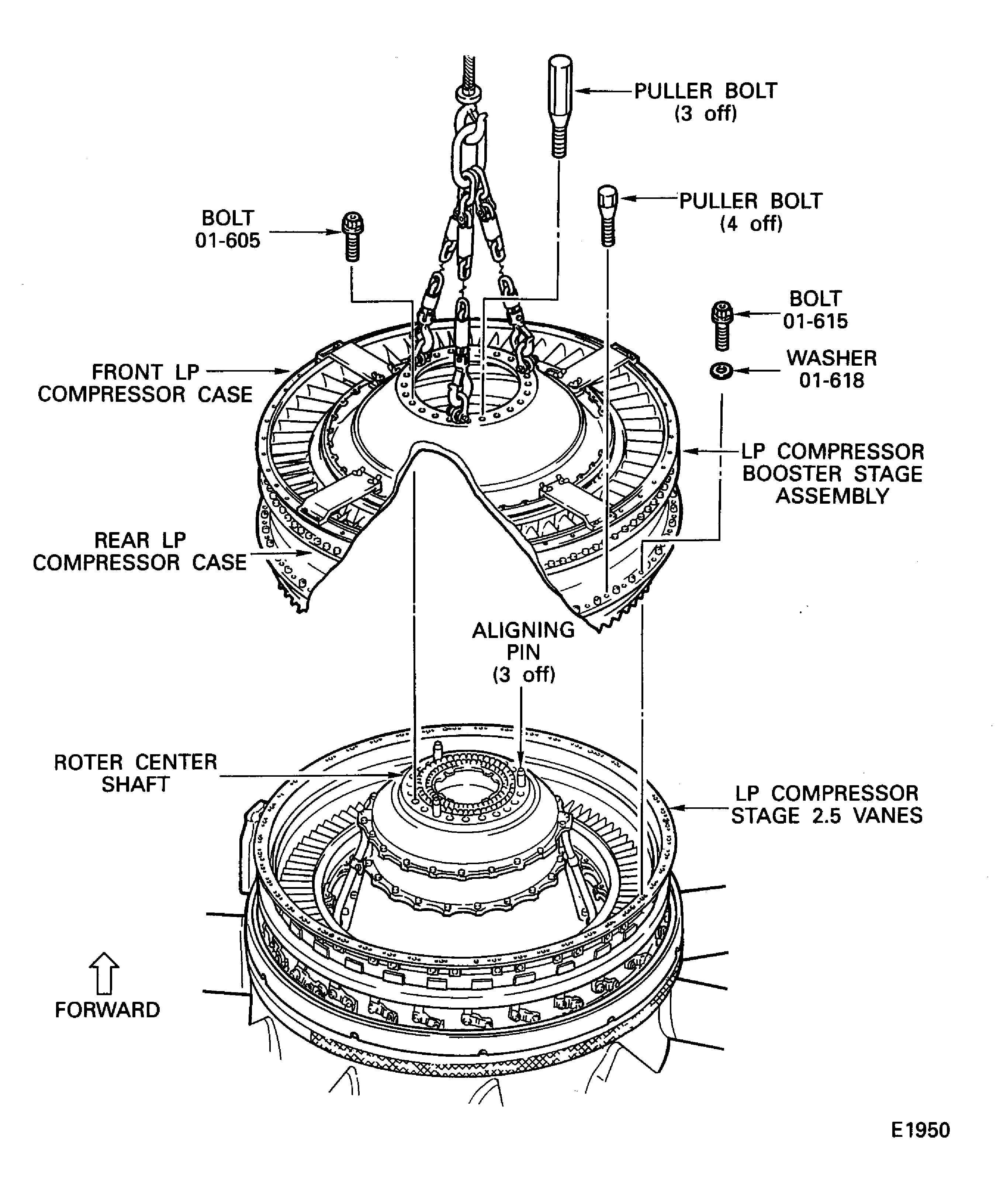
Figure: Install the LP compressor booster stage assembly on to the storage stand
Install the LP compressor booster stage assembly on to the storage stand