
TASK 72-32-80-040-001-B00 LPC Assembly - Disassemble The LPC Cases And Vanes From The Rotor Assembly, Disassembly-001

DMC:V2500-A5-72-32-8000-00A-530A-B|Issue No:002.00|Issue Date:2013-11-01

Export Control

EAR Export Classification: Not subject to the EAR per 15 C.F.R. Chapter 1, Part 734.3(b)(3), except for the following Service Bulletins which are currently published as EAR Export Classification 9E991: SBE70-0992, SBE72-0483, SBE72-0580, SBE72-0588, SBE72-0640, SBE73-0209, SBE80-0024 and SBE80-0025.

Copyright

© IAE International Aero Engines AG (2001, 2014 - 2021) The information contained in this document is the property of © IAE International Aero Engines AG and may not be copied or used for any purpose other than that for which it is supplied without the express written authority of © IAE International Aero Engines AG. (This does not preclude use by engine and aircraft operators for normal instructional, maintenance or overhaul purposes.).

Applicability

V2500-A5

Common Information

TASK 72-32-80-040-001-B00 LPC Assembly - Disassemble The LPC Cases And Vanes From The Rotor Assembly, Disassembly-001

General

Apply the approved penetrating oil before the removal of threaded parts. Let the parts soak before removal. For the approved oils and procedures, refer to the SPM TASK 70-64-00-640-501.

Discard all rubber seal rings and tab washers removed in this procedure.

Refer to TASK 72-32-80-440-001-B00 (ASSEMBLY, CONFIG-002) for the sectional view of the LP compressor booster stage assembly.

The LP compressor booster stage assembly is installed on to IAE 1J12533 Storage stand in TASK 72-32-00-030-006-B00 (DISASSEMBLY-006, CONFIG-002).

NOTE

Special tools are identified in the procedure by the tool primary number.

Preliminary Requirements

Pre-Conditions

NONE

Support Equipment

NameManufacturerPart Number / IdentificationQuantityRemark
BoltLOCALBolt4

.190 - 32 (For engaging and turning them in the press nuts ((72-32-83,02-384) and (72-32-83,02-671))

IAE 1J12542 Long support0AM53IAE 1J12542
IAE 1J12533 Storage stand0AM53IAE 1J12533

Consumables, Materials and Expendables

NONE

Spares

NONE

Safety Requirements

NONE

Procedure

    1. SUBTASK 72-32-80-040-056 Remove the LP Compressor Stage 1.5 Blades

    2. Refer to Figure, Figure, Figure and Figure.

    3. Remove the four holding supports (part of the holding support set) from the balance weight mounting flange of the disk assembly and the front flange of the front case assembly.

    4. Bend back the tangs of the two lock plates.

    5. Push the lock plates inward and press the blades rearward until they are clear of the lock plates.

    6. Prepare and discard the lock plates.

    7. Remove the two blades which are not locked.

    8. CAUTION

      DO NOT USE A HAND TOOL WHEN YOU MOVE THE PLATE. A HAND TOOL CAN CAUSE DAMAGE TO THE PLATE.

      Move the retaining plates around the disk and remove the remaining blades from the space between the retaining plates in turn.

    9. Do step G. until the retaining plates become disengaged from the disk and the blade grooves.

    1. SUBTASK 72-32-80-040-057-A00 Remove the LP Compressor Front Case Assembly, the LP Compressor Stage 1.5 Vane Assembly and the LP Compressor Mid Case Assembly (Pre SBE 70-0419)

    2. Refer to Figure.

    3. Remove the 57 nuts, the 57 washers, the 14 brackets, the 29 washers and the 57 bolts which attach the front case assembly, the stage 1.5 vane assembly and the mid case assembly to the rear case assembly.

    4. NOTE

      Install the standard bolts into four of the six threaded holes in the front case rear flange.

      Release the front case assembly and the stage 1.5 vane assembly from the mid case assembly with the four standard bolts. Remove the front case assembly and the stage 1.5 vane assembly from the mid case assembly.

    5. NOTE

      Install the standard bolts into four of the six threaded holes in the mid case flange.

      Release the mid case assembly from the rear case assembly with the four puller bolts. Remove the mid case assembly from the rear case assembly.

    6. Remove the 57 nuts, washers and screws which attach the stage 1.5 vane assembly to the front case assembly. Remove the stage 1.5 vane assembly from the front case assembly.

    1. SUBTASK 72-32-80-040-057-B00 Remove the LP Compressor Front Case Assembly, the LP Compressor Stage 1.5 Vane Assembly and the LP Compressor Mid Case Assembly (SBE 70-0419)

    2. Refer to Figure.

    3. Remove the 57 nuts, the 19 plate washers, the 14 brackets, the 29 washers and the 57 bolts which attach the front case assembly, the stage 1.5 vane assembly and the mid case assembly to the rear case assembly.

    4. NOTE

      Install the standard bolts into four of the six threaded holes in the front case rear flange.

      Release the front case assembly and the stage 1.5 vane assembly from the mid case assembly with the four standard bolts. Remove the front case assembly and the stage 1.5 vane assembly from the mid case assembly.

    5. NOTE

      Install the standard bolts into four of the six threaded holes in the mid case flange.

      Release the mid case assembly from the rear case assembly with the four puller bolts. Remove the mid case assembly from the rear case assembly.

    6. Remove the 57 nuts, washers and screws which attach the stage 1.5 vane assembly to the front case assembly. Remove the stage 1.5 vane assembly from the front case assembly.

    1. SUBTASK 72-32-80-040-058 Remove the Plug from the LP Compressor Rear Case

    2. Refer to Figure.

    3. Bend back the tangs of the key washer.

    4. Remove the plug and the key washer from the rear case. Discard the key washer.

    1. SUBTASK 72-32-80-040-059 Remove the LP Compressor Stage 2.0 Blades and the LP Compressor Stage 2.0 Vane Assembly

    2. Refer to Figure, Figure and Figure.

    3. Bend back the tangs of the two lock plates.

    4. Push the lock plates inward and press the blades rearward until they are clear of the lock plates.

    5. Remove and discard the lock plates.

    6. Remove the two blades which are not locked.

    7. CAUTION

      DO NOT USE A HAND TOOL WHEN YOU MOVE THE PLATE. A HAND TOOL CAN CAUSE DAMAGE TO THE PLATE.

      Move the retaining plates around the disk and remove the remaining blades in turn from the space between the retaining plates.

    8. Do Step until the retaining plates become disengaged from the disk and the blade grooves.

    9. Remove the stage 2.0 vane assembly.

    10. Remove the counter balance weights from the front face of the disk assembly.

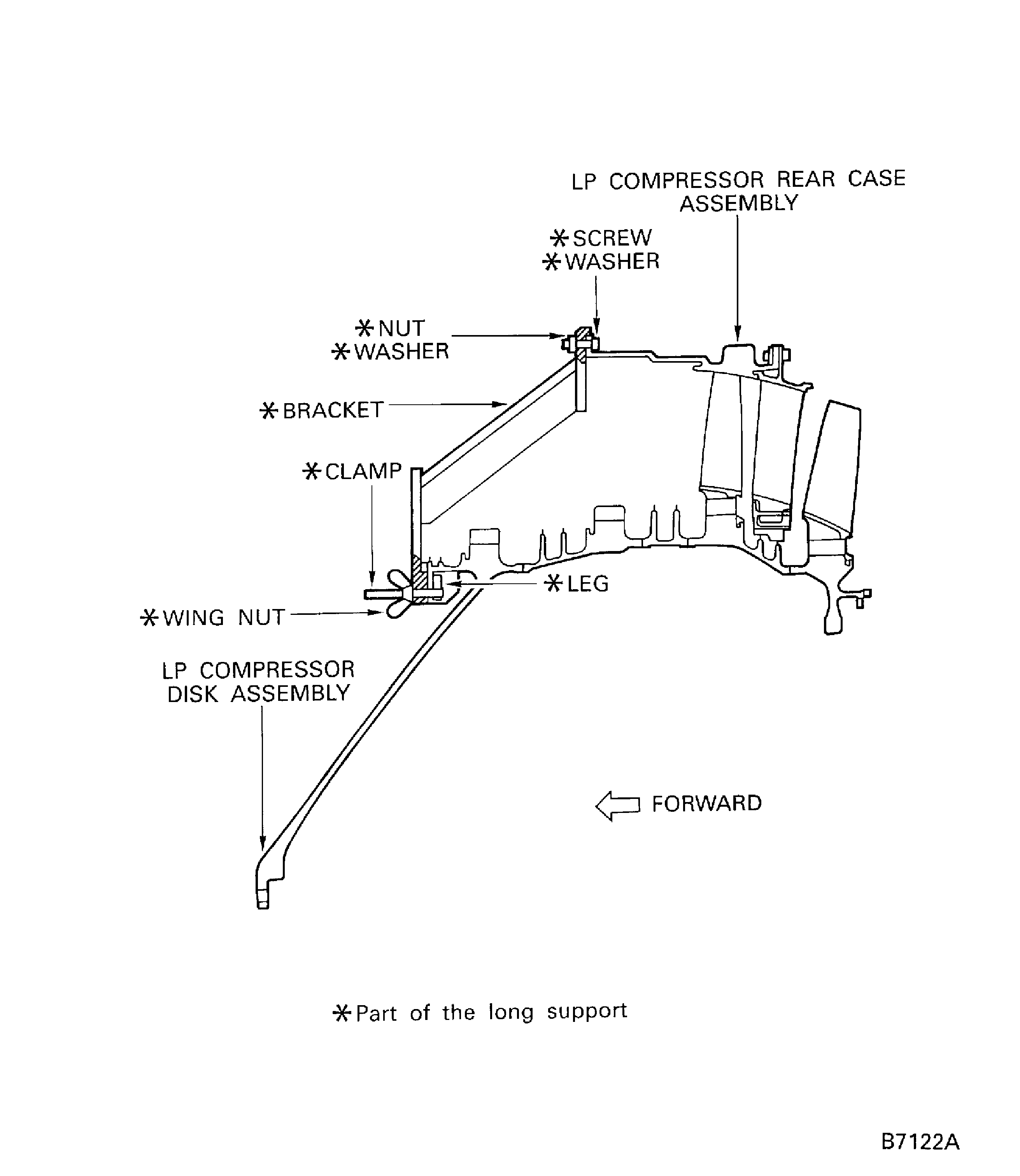
    1. SUBTASK 72-32-80-040-060 Install the Long Support to the LP Compressor Rear Case Assembly and the LP Compressor Disk Assembly

    2. Refer to Figure.

      1. Install the four brackets (part of IAE 1J12542 Long support 1 off) to the rear case and disk assembly.

      2. NOTE

        The four brackets must be attached to the front flange of the rear case at equal intervals.

        Install the two clamps and wing nuts (part of the long support) to each bracket.

      3. Align the two bolt holes in the bracket with the bolt holes in the front flange of the rear case.

      4. Attach each bracket to the front flange of the rear case with the two screws, washers and nuts (part of long support).

      5. Attach each bracket to the disk assembly with the clamps and the wing nuts.

      6. Tighten the two wing nuts for each bracket.

      7. Tighten the two nuts for each bracket.

    1. SUBTASK 72-32-80-040-062 Remove the LP Compressor Stage 2.5 Blades

    2. Refer to Figure, Figure and Figure.

    3. NOTE

      This step needs two persons. Use clean gloves to protect your hands.

      Move the LP compressor disk and stage 2.5 blade assembly to the work bench with the front flange down.

    4. Bend back the tangs of the two lock plates.

    5. Push the lock plates inward and press the blades forward until they are clear of the lock plates.

    6. Remove and discard the lock plates.

    7. Remove the two blades which are not locked.

    8. CAUTION

      DO NOT USE A HAND TOOL WHEN YOU MOVE THE PLATE. A HAND TOOL CAN CAUSE DAMAGE TO THE PLATE.

      Move the retaining plates around the disk and remove the remaining blades in turn from the space between the retaining plates.

    9. Do Step until the retaining plates become disengaged from the disk and the blade grooves.

    1. SUBTASK 72-32-80-040-063 Remove the LP Compressor Stage 2.3 Vane Assembly from the LP Compressor Rear Case Assembly

    2. Refer to Figure.

    3. Remove the 62 screws, washers and nuts from the rear flange of the rear case assembly.

    4. Remove the stage 2.3 vane assembly from the rear case assembly.

    1. SUBTASK 72-32-80-040-064 Remove the LP Compressor Rear Case Assembly from the LP Compressor Disk Assembly

    2. Refer to Figure.

    3. Remove the two nuts, washers and screws (part of the long support) from each bracket (part of the long support).

    4. Remove the rear case assembly from the disk assembly.

    1. SUBTASK 72-32-80-040-065 Remove the LP Compressor Stage 2.3 Blades

    2. Refer to Figure, Figure and Figure.

    3. Bend back the tangs of the two lock plates.

    4. Push the lock plates inward and press the blades forward until they are clear of the lock plates.

    5. Remove and discard the lock plates.

    6. Remove the two blades which are not locked.

    7. CAUTION

      DO NOT USE A HAND TOOL WHEN YOU MOVE THE PLATE. A HAND TOOL CAN CAUSE DAMAGE TO THE PLATE.

      Move the retaining plates around the disk and remove the remaining blades in turn from the space between the retaining plates.

    8. Do Step until the retaining plates become disengaged from the disk and the blade grooves.

    9. Remove the counter balance weights from the rear face of the disk assembly.

  1. Figure: LP Compressor Booster Stage Assembly on to the Storage Stand

    LP Compressor Booster Stage Assembly on to the Storage Stand

    Figure: Remove the LP Compressor Stage 1.5 Blades

    Remove the LP Compressor Stage 1.5 Blades

    Figure: Remove the LP Compressor Front Case Assembly, the Stage 1.5 Vane Assembly and the Mid Case Assembly

    Remove the LP Compressor Front Case Assembly, the Stage 1.5 Vane Assembly and the Mid Case Assembly

    Figure: Remove the Stage 1.5 and Stage 2 Blades

    Sheet 1

    Legend
    Remove the Stage 1.5 and Stage 2 Blades

    Sheet 1

    Close

    Figure: Remove the Stage 1.5 and Stage 2 Blades

    Sheet 2

    Legend
    Remove the Stage 1.5 and Stage 2 Blades

    Sheet 2

    Close

    Figure: Remove the LP Compressor Stage 2.0 Blades and the Stage 2.0 Vane Assembly

    Remove the LP Compressor Stage 2.0 Blades and the Stage 2.0 Vane Assembly

    Figure: Remove the Stage 2.3 and 2.5 Blades

    Sheet 1

    Legend
    Remove the Stage 2.3 and 2.5 Blades

    Sheet 1

    Close

    Figure: Remove the Stage 2.3 and 2.5 Blades

    Sheet 2

    Legend
    Remove the Stage 2.3 and 2.5 Blades

    Sheet 2

    Close

    Figure: Remove the LP Compressor Stage 2.5 Blades
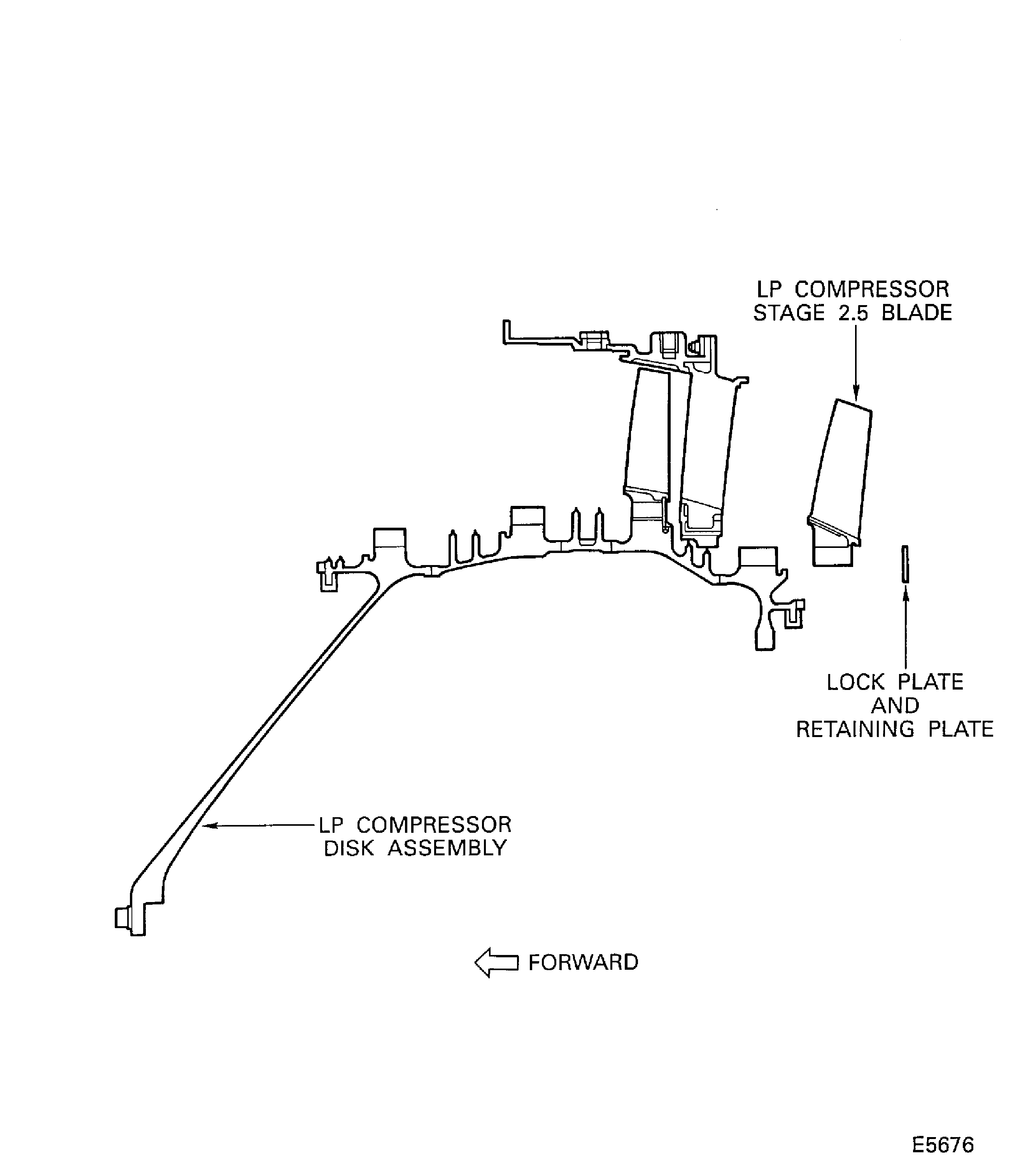
    Remove the LP Compressor Stage 2.5 Blades

    Figure: Remove the LP Compressor Stage 2.3 Vane Assembly

    Remove the LP Compressor Stage 2.3 Vane Assembly
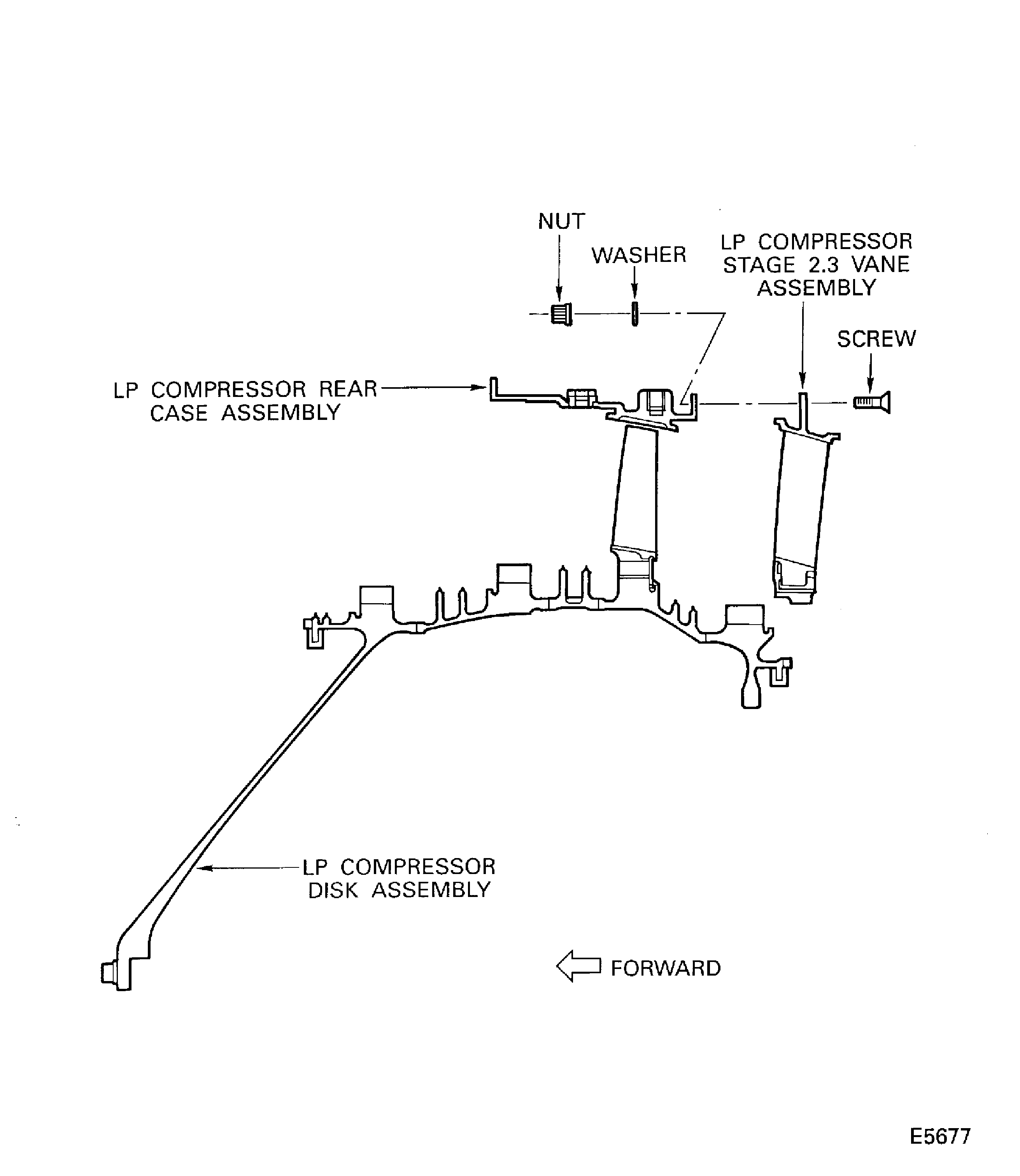
    Figure: Remove the LP Compressor Stage 2.3 Blades

    Remove the LP Compressor Stage 2.3 Blades

    Figure: Install the Long Support

    Install the Long Support
Requirements After Job Completion

Follow-On Conditions

NONE
Change Type:

Editorial correction due to conversion

Manufacturer Code:0AM53
Enterprise Name:IAE INTERNATIONAL AERO ENGINES AG
BU Name:NULL
Building:SUITE 400
Street:628 HEBRON AVENUE
City:GLASTONBURY
State:CT
Zip Code:06033
Country:USA
Manufacturer Code:LOCAL
Enterprise Name:LOCALLY SUPPLIED
Manufacturer Code:LOCAL
Tool Number:Bolt
Tool Name:Bolt
Manufacturer Code:0AM53
Tool Number:IAE 1J12533
Tool Name:IAE 1J12533 Storage stand
Manufacturer Code:0AM53
Tool Number:IAE 1J12542
Tool Name:IAE 1J12542 Long support