Export Control
EAR Export Classification: Not subject to the EAR per 15 C.F.R. Chapter 1, Part 734.3(b)(3), except for the following Service Bulletins which are currently published as EAR Export Classification 9E991: SBE70-0992, SBE72-0483, SBE72-0580, SBE72-0588, SBE72-0640, SBE73-0209, SBE80-0024 and SBE80-0025.Copyright
© IAE International Aero Engines AG (2001, 2014 - 2021) The information contained in this document is the property of © IAE International Aero Engines AG and may not be copied or used for any purpose other than that for which it is supplied without the express written authority of © IAE International Aero Engines AG. (This does not preclude use by engine and aircraft operators for normal instructional, maintenance or overhaul purposes.).Applicability
All
Common Information
TASK 72-31-00-430-001 LP Compressor (LPC) Fan Module - Assemble
General
This TASK gives the procedure to assemble the LP Compressor (Fan) Module.
Fig/item numbers in parentheses in the procedure agree with those used in the IPC. Only the primary Fig/item numbers are used. For the service bulletin alpha variants refer to the IPC.
For all parts identified in a different Chapter/Section/Subject, the applicable Chapter/Section/Subject comes before the Fig/item number.
For standard torque data and procedures, refer to the SPM TASK 70-41-00-400-501, SPM TASK 70-41-00-400-501 and TASK 70-41-01-400-501.
Special torque data and assembly tolerances are included in the procedure.
Lubricate all threads and abutment faces of nuts and bolts with CoMat 10-077 APPROVED ENGINE OILS, unless other lubricants are referred to in the procedure.
To identify, lubricate and install seal rings, refer to the SPM TASK 70-64-02-640-501.
The abbreviation Intf shows an interference or tight fit. This causes REJECT IF MORE THAN to become REJECT IF LESS THAN. The abbreviation clear shows a clearance fit.
Refer to Figure for a sectional view of an LP Compressor (Fan) Module.
NOTE
NOTE
Preliminary Requirements
Pre-Conditions
NONESupport Equipment
| Name | Manufacturer | Part Number / Identification | Quantity | Remark |
|---|---|---|---|---|
| Dynamic balancing machine | LOCAL | Schenck HL-5U | With extended pedestals | |
| IAE 1J12093 Fan blade installation pusher | 0AM53 | IAE 1J12093 | 1 | |
| IAE 1J12101 Vertical sling | 0AM53 | IAE 1J12101 | 1 | |
| IAE 1J12110 Transportation and storage stand | 0AM53 | IAE 1J12110 | 1 | |
| IAE 1J12141 Pusher bolt set | 0AM53 | IAE 1J12141 | 1 | |
| IAE 1J12181 Protection cover | 0AM53 | IAE 1J12181 | 1 | |
| IAE 1J12301 Turnover stand | 0AM53 | IAE 1J12301 | 1 | |
| IAE 1J12128 Turnover stand | 0AM53 | IAE 1J12128 | 1 | |
| IAE 1J12304 Vertical sling | 0AM53 | IAE 1J12304 | 1 | |
| IAE 1J12305 Parking stand | 0AM53 | IAE 1J12305 | 1 | |
| IAE 1J12306 Fan blade distribution program C | 0AM53 | IAE 1J12306 | 1 | |
| IAE 1J12307 Balance arbor | 0AM53 | IAE 1J12307 | 1 | |
| IAE 1J12308 Fan blade distribution program BASIC | 0AM53 | IAE 1J12308 | 1 | |
| IAE 1J12309 Balance cover | 0AM53 | IAE 1J12309 | 1 | |
| IAE 1J12312 Fan blade distribution program | 0AM53 | IAE 1J12312 | ||
| IAE 1J12399 Handling sling | 0AM53 | IAE 1J12399 | 1 |
Consumables, Materials and Expendables
| Name | Manufacturer | Part Number / Identification | Quantity | Remark |
|---|---|---|---|---|
| CoMat 01-124 ISOPROPYL ALCOHOL | LOCAL | CoMat 01-124 | ||
| CoMat 06-069 MARKER | IE207 | CoMat 06-069 | ||
| CoMat 10-038 PETROLEUM JELLY | LOCAL | CoMat 10-038 | ||
| CoMat 10-041 PETROLATUM, WHITE | LOCAL | CoMat 10-041 | ||
| CoMat 10-077 APPROVED ENGINE OILS | LOCAL | CoMat 10-077 |
Spares
NONESafety Requirements
NONEProcedure
Refer to Figure.
Reference dimensions at Location 0103. If required, use the data written as the note in TASK 72-31-12-200-000 and TASK 72-31-13-200-000.
Table 1. Fits and Clearances (all dimensions are in inches) NEW PART
WORN PART
DIMENSIONS
DIMENSIONS
PART IDENT
Size
Clearance
Non-select
REJECT IF
MORE THAN
LOCATION 0103
Stage 1 Fan Disk LPC Fan Disk And Fan Blade Rear Retaining Ring (72-31-12, 01-200)
Front Blade Retaining Ring ENGINE-LP COMPRESSOR BLADES RETAINING RING (72-31-13, 01-160)
Stage 1 Fan Disk Outside Diameter
13.9001
Intf
13.9001
Intf
13.9023
0.0003
13.9023
0.0003
Front Blade Retaining Ring Bore Diameter
13.8977
0.0046
13.8977
0.0046
13.8998
Intf
13.8998
Intf
Table 2. Fits and Clearances (all dimensions are in millimeters) NEW PART
WORN PART
DIMENSIONS
DIMENSIONS
PART IDENT
Size
Clearance
Non-select
REJECT IF
MORE THAN
LOCATION 0103
Stage 1 Fan Disk LPC Fan Disk And Fan Blade Rear Retaining Ring (72-31-12, 01-200)
Front Blade Retaining Ring ENGINE-LP COMPRESSOR BLADES RETAINING RING (72-31-13, 01-160)
Stage 1 Fan Disk Outside Diameter
353.062
Intf
353.062
Intf
353.119
0.005
353.119
0.005
Front Blade Retaining Ring Bore Diameter
353.000
0.119
353.000
0.119
353.057
Intf
353.057
Intf
SUBTASK 72-31-00-220-056 Reference Fits and Clearances of the Stage 1 Fan Disk and the Front Blade Retaining Ring at Location 0103
Refer to Figure.
Lift and move IAE 1J12304 Vertical sling 1 off and IAE 1J12305 Parking stand 1 off to the work area.
SUBTASK 72-31-00-430-051 Attach the Vertical Sling on to the Stage 1 Fan Disk (72-31-12, 01-200) and the Parking Stand
Refer to Figure.
Apply CoMat 10-077 APPROVED ENGINE OILS to the threads and mating faces of the 22 bolts LPC Fan Disk And Fan Blade Rear Retaining Ring (72-31-12, 01-120).
Torque the bolts to 180 lbfin to 220 lbfin (20.00 Nm to 25.00 Nm) in the sequence shown on Figure.
SUBTASK 72-31-00-430-052 Attach the Rear Blade Retaining Ring (72-31-12, 01-100) to the Stage 1 Fan Disk
Refer to Figure.
Install a set of retaining plates, part of the IAE 1J12307 Balance arbor to the opposite face of the curvic teeth of the Stage 1 Fan Disk. Safety the retaining plates with the six retaining bolts, part of the balance arbor.
SUBTASK 72-31-00-430-053 Attach the Guide Pins to the Stage 1 Fan Disk
Refer to Figure.
Lift and move IAE 1J12399 Handling sling 1 off and IAE 1J12307 Balance arbor 1 off to the work area.
Apply CoMat 10-077 APPROVED ENGINE OILS to the threads and mating faces of the 24 curvic coupling bolts, part of the balance arbor.
NOTE
Refer to Figure or the position of the correlation marks on the Stage 1 Fan Disk.The correlation mark of the balance arbor is on the outer diameter of the curvic adapter.Lower the balance arbor in to the Stage 1 Fan Disk. Make sure that the three guide pins are engaged with the holes in the curvic adapter of the balance arbor. Make sure that the correlation marks on the curvic adapter and the Stage 1 Fan Disk are aligned.
SUBTASK 72-31-00-430-054 Attach the Balance Arbor to the Stage 1 Fan Disk Assembly
Refer to Figure.
Move IAE 1J12301 Turnover stand 1 off or IAE 1J12128 Turnover stand 1 off to the work area.
SUBTASK 72-31-00-430-055 Install the Stage 1 Fan Disk, the Rear Blade Retaining Ring and the Balance Arbor Assembly to the Turnover Stand
Refer to Figure.
NOTE
The blade repairs, VRS1064 (repair) and VRS1065 (Aircraft Maintenance Manual) require to moment weigh the fan blades.Make sure that the values of the moment weight marked on the fan blades are the latest ones. If it is not thought that they are the latest, moment weigh the fan blades. Refer to TASK 72-31-11-820-001 (Special Procedures).
Calculate the fan blade distribution sequence. Use the IAE 1J12312 Fan blade distribution program 1 off, IAE 1J12306 Fan blade distribution program C 1 off or IAE 1J12308 Fan blade distribution program BASIC 1 off.
SUBTASK 72-31-00-430-056 Calculate the Stage 1 Fan Blade Distribution Sequence
Weigh each annulus filler and write the weight on the outer surface of each filler with CoMat 06-069 MARKER.
NOTE
If the computor calculated assembly procedure is available, it is better than the heavy-light-heavy procedure.Put the annulus fillers on a work bench, in a heavy-light-heavy sequence. Refer to Figure.
SUBTASK 72-31-00-430-057 Weigh the Annulus Fillers (01-100)
Apply CoMat 10-038 PETROLEUM JELLY or CoMat 10-041 PETROLATUM, WHITE to the bottom faces on the front and the rear chocking pads of the blades.

CAUTION
DO NOT APPLY THE LUBRICANT TO THE BLADE DOVETAIL. UNWANTED MATERIAL CAN TOUCH THE LUBRICANT APPLIED TO THE BLADE DOVETAIL. THE UNWANTED MATERIAL CAN CAUSE DAMAGE TO THE BLADE DOVETAIL AND THE DISK SLOT WHEN YOU INSTALL THE BLADE IN TO THE DISK.Apply CoMat 10-038 PETROLEUM JELLY or CoMat 10-041 PETROLATUM, WHITE to the zone A and the zone B on the disk.
Apply CoMat 10-038 PETROLEUM JELLY or CoMat 10-041 PETROLATUM, WHITE to the slot on the disk.
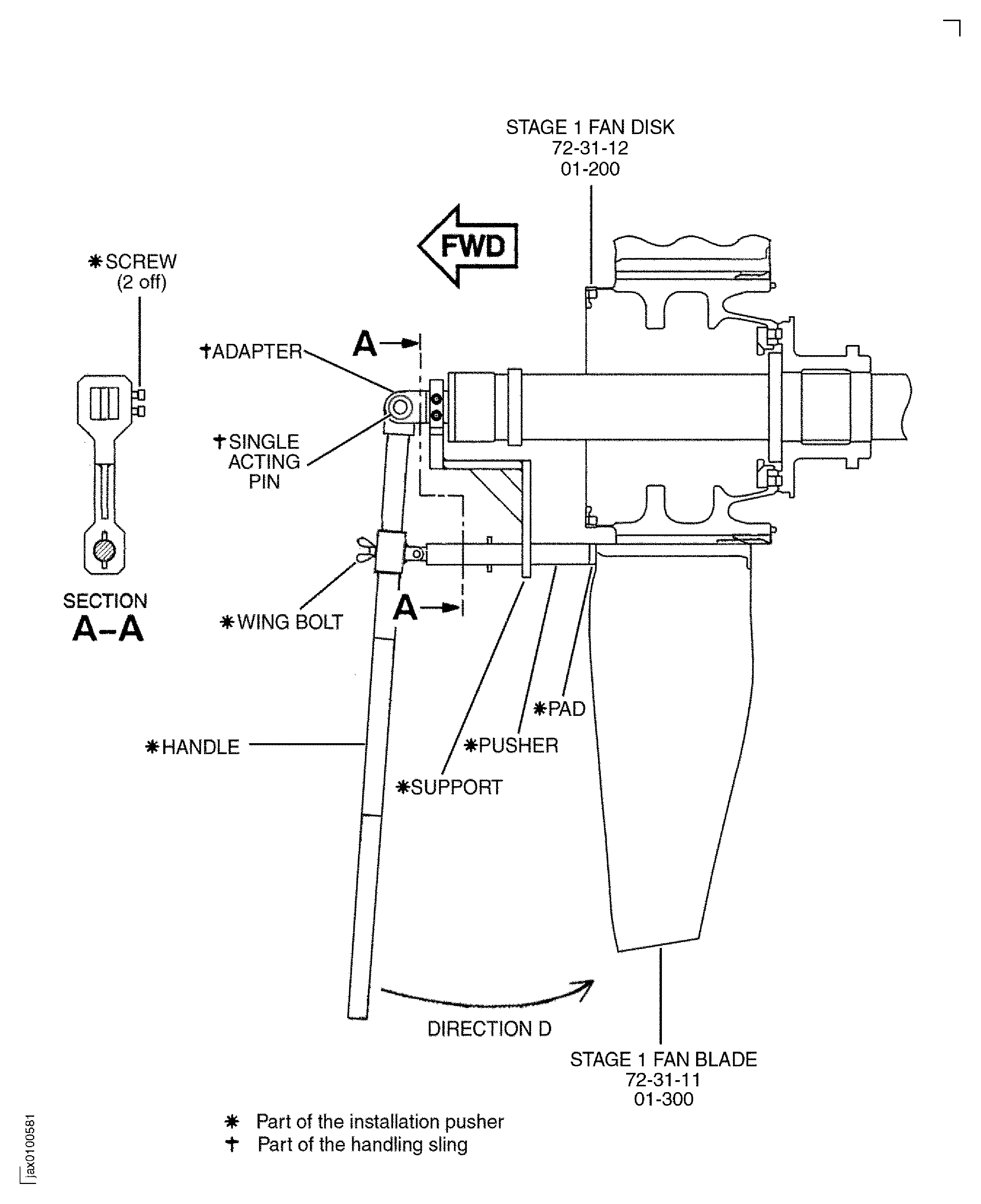
Install IAE 1J12093 Fan blade installation pusher 1 off on the adpater with the single acting pin (part of the handling sling).
SUBTASK 72-31-00-430-058 Install the Stage 1 Fan Blades in to the Stage 1 Fan Disk Assembly
CAUTION
DO NOT MOVE THE BLADE BEFORE YOU INSTALL THE FRONT BLADE RETAINING RING. THE ANNULUS FILLERS WHICH ARE NEAR THE BOTTOM CAN BE RELEASED WHEN THE ADJACENT BLADES ARE MOVED BY THE EXTERNAL FORCE.Apply CoMat 10-038 PETROLEUM JELLY or CoMat 10-041 PETROLATUM, WHITE to the annulus filler rubber seals.
Install the annulus fillers between the blades and hang the rear guide pins to the holes in the rear blade retaining ring. Refer to Figure.or the heavy-light-heavy sequence.
SUBTASK 72-31-00-430-059 Install the Annulus Fillers (72-31-11, 01-100) to the Bladed Disk Assembly
Refer to Figure.
Use the four pusher bolts (part of IAE 1J12141 Pusher bolt set 1 off) to push the front blade retaining ring to the mating face of the Stage 1 Fan Disk.
Use a clean cloth, made moist with CoMat 01-124 ISOPROPYL ALCOHOL, to erase the temporary marks written on the outer surfaces of the annulus fillers.
Apply CoMat 10-077 APPROVED ENGINE OILS to the threads and mating faces of the 36 bolts (01-120).
Torque the 36 bolts to 180 lbfin to 220 lbfin (20.00 Nm to 25.00 Nm) in the sequence shown, refer to Figure.
Apply CoMat 10-077 APPROVED ENGINE OILS to the threads and mating faces of the 22 bolts (01-140).
SUBTASK 72-31-00-430-060-A00 V2500-A1: Install the Front Blade Retaining Ring (72-31-13, 01-160) to the Bladed Disk Assembly
Refer to Figure.
Use the four pusher bolts (part of IAE 1J12141 Pusher bolt set 1 off) to push the front blade retaining ring to the mating face of the Stage 1 Fan Disk.
Use a clean cloth, made moist with CoMat 01-124 ISOPROPYL ALCOHOL, to remove the temporary marks written on the outer surfaces of the annulus fillers.
Apply CoMat 10-077 APPROVED ENGINE OILS to the threads and mating faces of the 36 bolts (01-120).
TORQUE the 36 bolts to between 180 lbfin and 220 lbfin (20.00 Nm and 25.00 Nm) in the sequence shown, refer to Figure.
Apply CoMat 10-077 APPROVED ENGINE OILS to the threads and mating faces of the 22 bolts (01-140).
SUBTASK 72-31-00-430-060-B00 V2500-A5: Install the Front Blade Retaining Ring (72-31-13, 01-160) to the Bladed Disk Assembly
CAUTION
MAKE SURE THAT THE PLASTIC STRIP HAS A SMOOTH SURFACE AND EDGES. IF YOU USE A STRIP WITH A ROUGH SURFACE AND EDGES, DAMAGE TO THE RUBBER SEAL CAN OCCUR.MAKE SURE THAT YOU DO NOT BREAK THE PLASTIC STRIP AND LEAVE PIECES OF IT IN THE FAN. PIECES OF PLASTIC CAN CAUSE DAMAGE TO THE RUBBER SEAL.Refer to Figure.
If you can push the stiff plastic strip easily, the rubber seal is in the correct position. Go to Step.
If you can not push the stiff plastic strip easily, the rubber seal is possibly in an incorrect position. Go to Step.
Push the stiff plastic strip between the annulus filler and the fan blade at the rear end.
If the movement becomes difficult, the rubber seal is in an incorrect position. Go to Step.
CAUTION
DO NOT PUSH THE RUBBER SEAL, THAT IS IN INCORRECT POSITION, FORWARD WITH THE STIFF PLASTIC STRIP. THE STIFF PLASTIC STRIP CAN CAUSE DAMAGE TO THE RUBBER SEAL.Move the stiff plastic strip forward.
SUBTASK 72-31-00-430-066 Put the Annulus Filler Rubber Seal in the Correct Position
Refer to Figure.
Move the LP compressor (fan) module on the turnover stand to the work area. Set the module front side to the dynamic balancing machine drive. Move IAE 1J12309 Balance cover 1 off and IAE 1J12399 Handling sling 2 off to the work area.
NOTE
Do this operation with two persons. One person operates the hoists and the other person adjusts the balance cover and the pedestals.The balancing tools in this TASK are applicable to a Schenck HL-5U dynamic balancing machine with the extended pedestals and the two V rollers.The machine must be operated at a speed between 600 rpm to 800 rpm to agree with the gear ratios available. The direction of the turn is clockwise when you look from the rear of the engine.Set the module on the two V rollers, parts of the balancing machine.
Lift and transfer the module to the balancing machine.
SUBTASK 72-31-00-430-061 Install the LP Compressor (Fan) Module and the Balance Arbor Assembly to the Dynamic Balancing Machine
Refer to Figure.
Location Diameter A - Total indication value 0.005 in. (0.127 mm).
Location Face B - Total indication value 0.005 in. (0.127 mm).
Check the run-out with the dial indicator at the location shown, refer to Figure. The run-out must be in the subsequent limits.
SUBTASK 72-31-00-430-062 Do the LP Compressor (Fan) Module Run-out Check
If the static unbalance is not more than 24.3 oz in (17500 gm mm), go to the Step to check the couple unbalance.
Static unbalance.
If the couple unbalance is not more than 140 oz sqin (2560000 gm sqmm), go to the Step to correct unbalance.
Couple unbalance.
Before any unbalance correction, make sure that four subsequent unbalance indications are in the limit.
SUBTASK 72-31-00-430-063 Balance the LP Compressor Module
Refer to Figure.
Install IAE 1J12399 Handling sling 2 off to the balance arbor.
SUBTASK 72-31-00-430-064 Remove the LP Compressor (Fan) Module and the Balance Arbor from the Balance Machine
Move IAE 1J12101 Vertical sling 1 off, IAE 1J12181 Protection cover 1 off and IAE 1J12110 Transportation and storage stand 1 off to the work area.
SUBTASK 72-31-00-430-065 Remove the Balance Arbor from the LP Compressor (Fan) Module
Figure: Locations for the Fits and Clearances
Locations for the Fits and Clearances
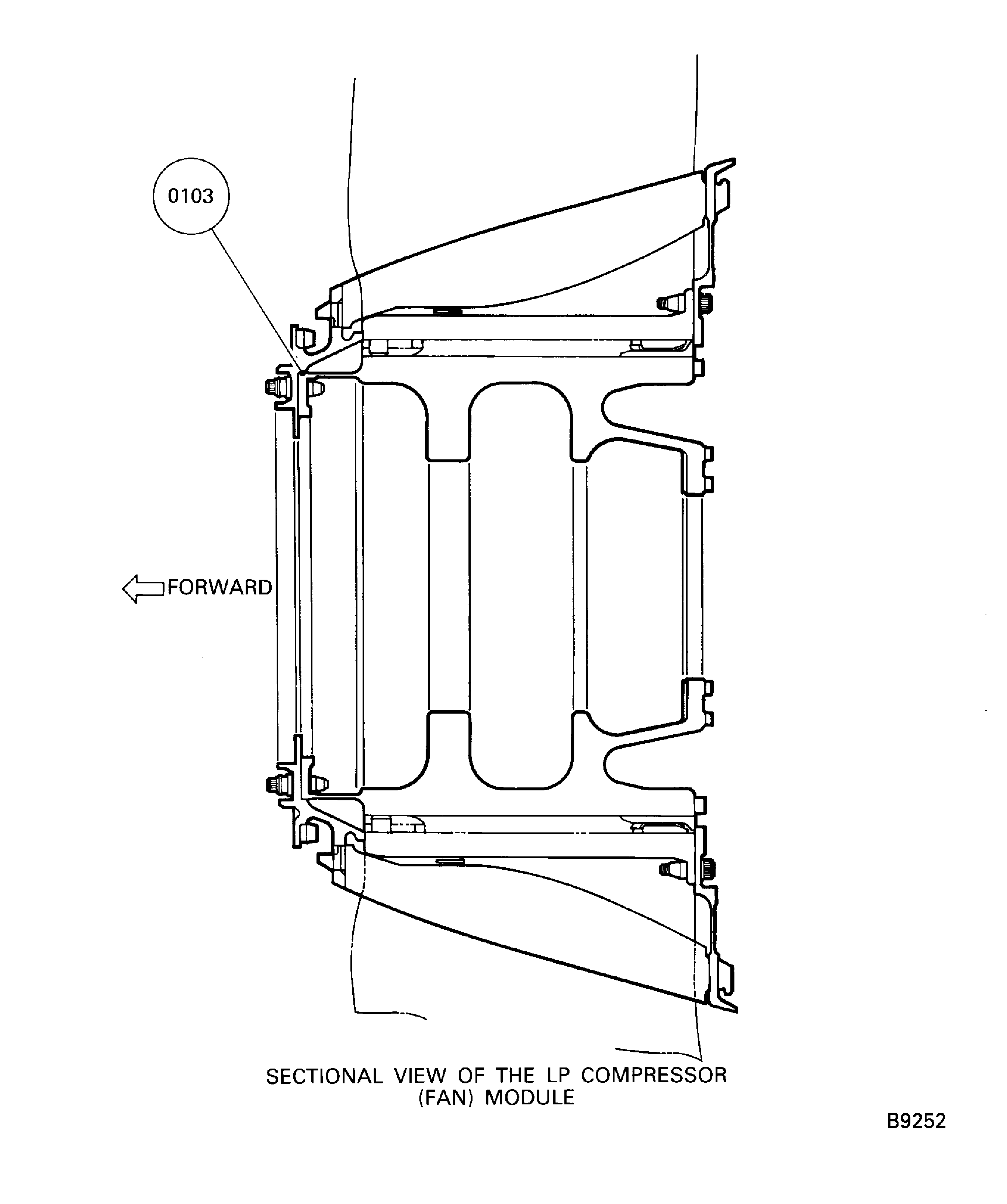
Figure: Sectional View of the LP Compressor (Fan) Module
Sectional View of the LP Compressor (Fan) Module
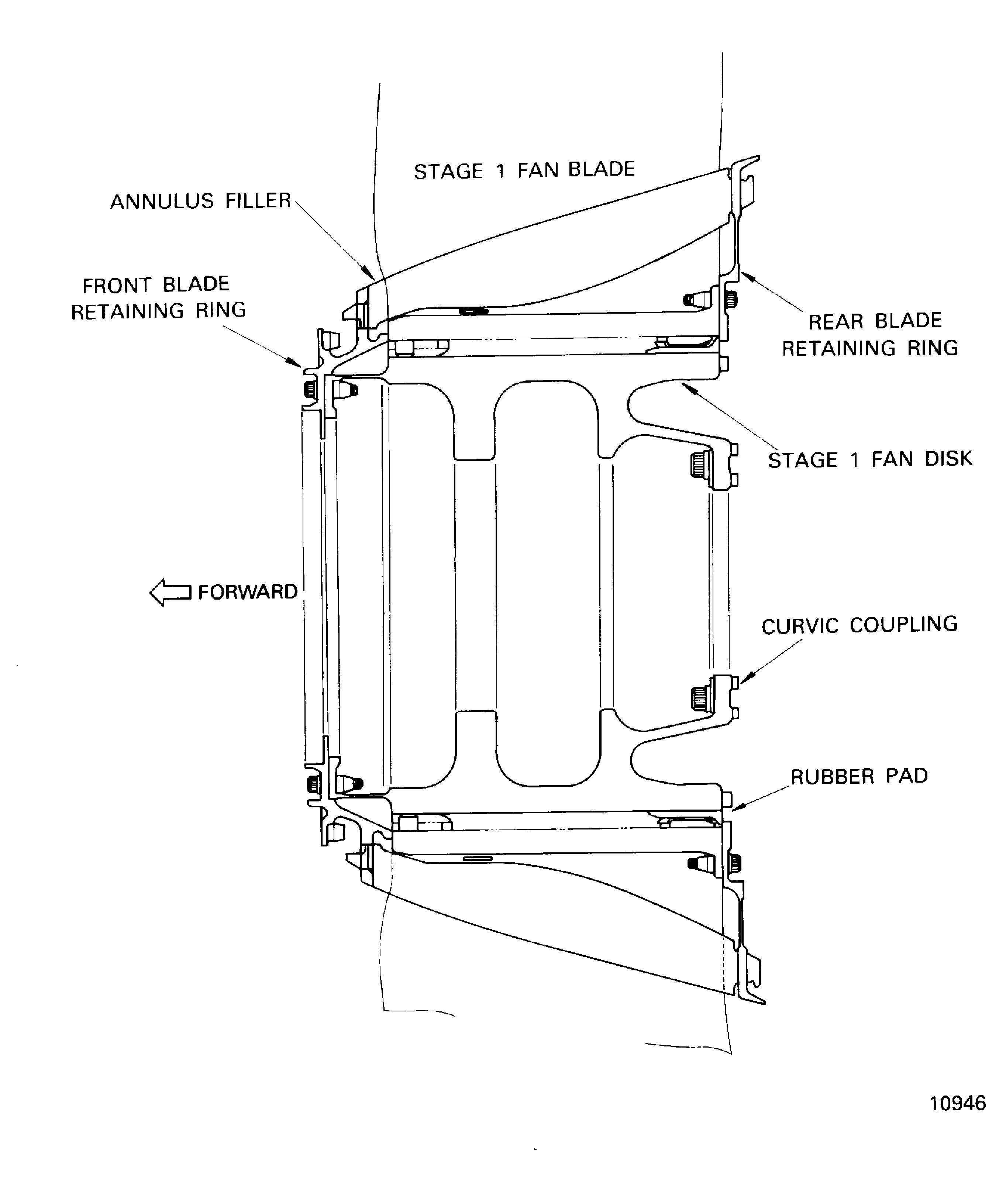
Figure: Install the Vertical Sling on to the Stage 1 Fan Disk
Install the Vertical Sling on to the Stage 1 Fan Disk
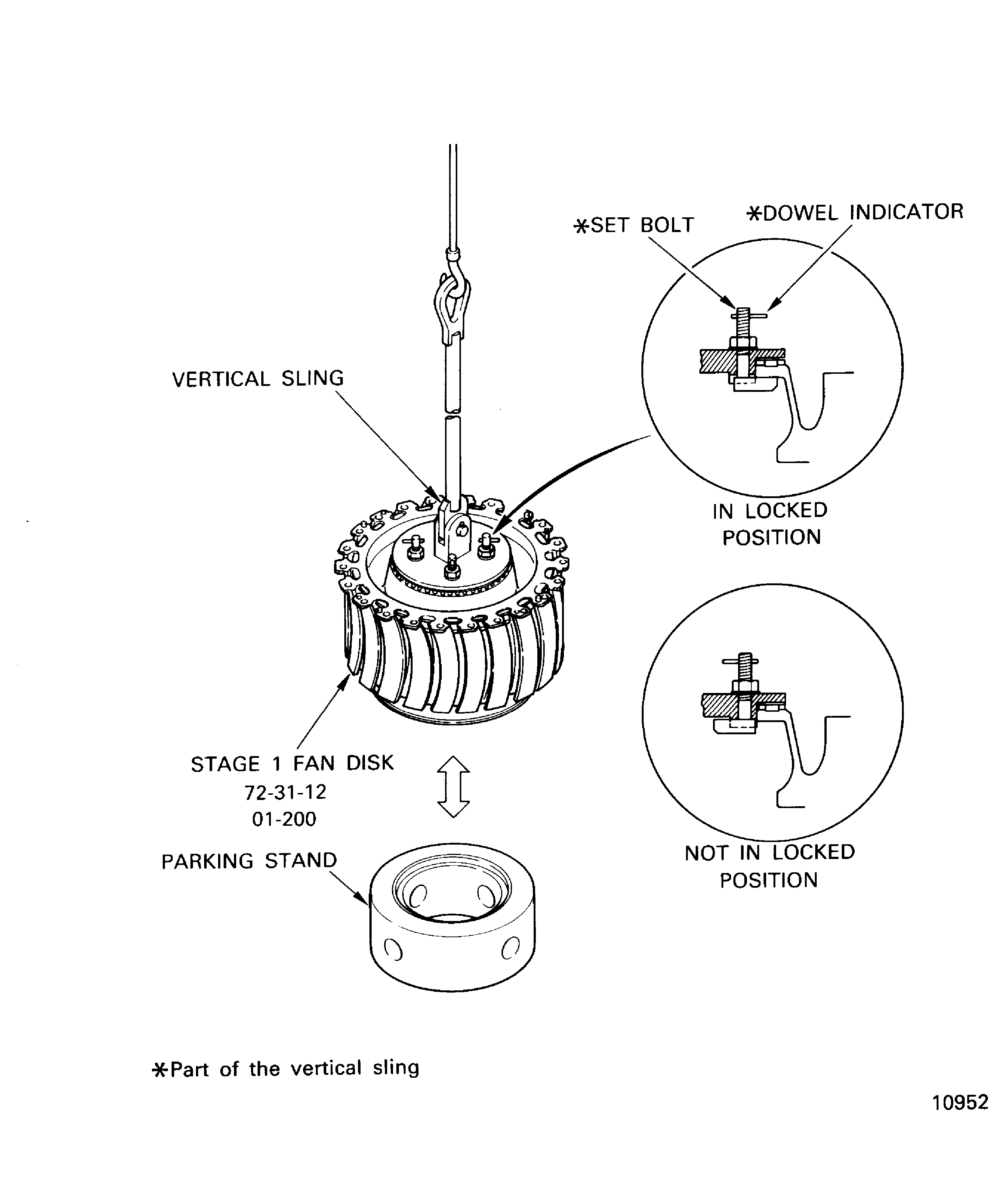
Figure: The Stage 1 Fan Disk and the Rear Blade Retaining Ring - Correlation
The Stage 1 Fan Disk and the Rear Blade Retaining Ring - Correlation
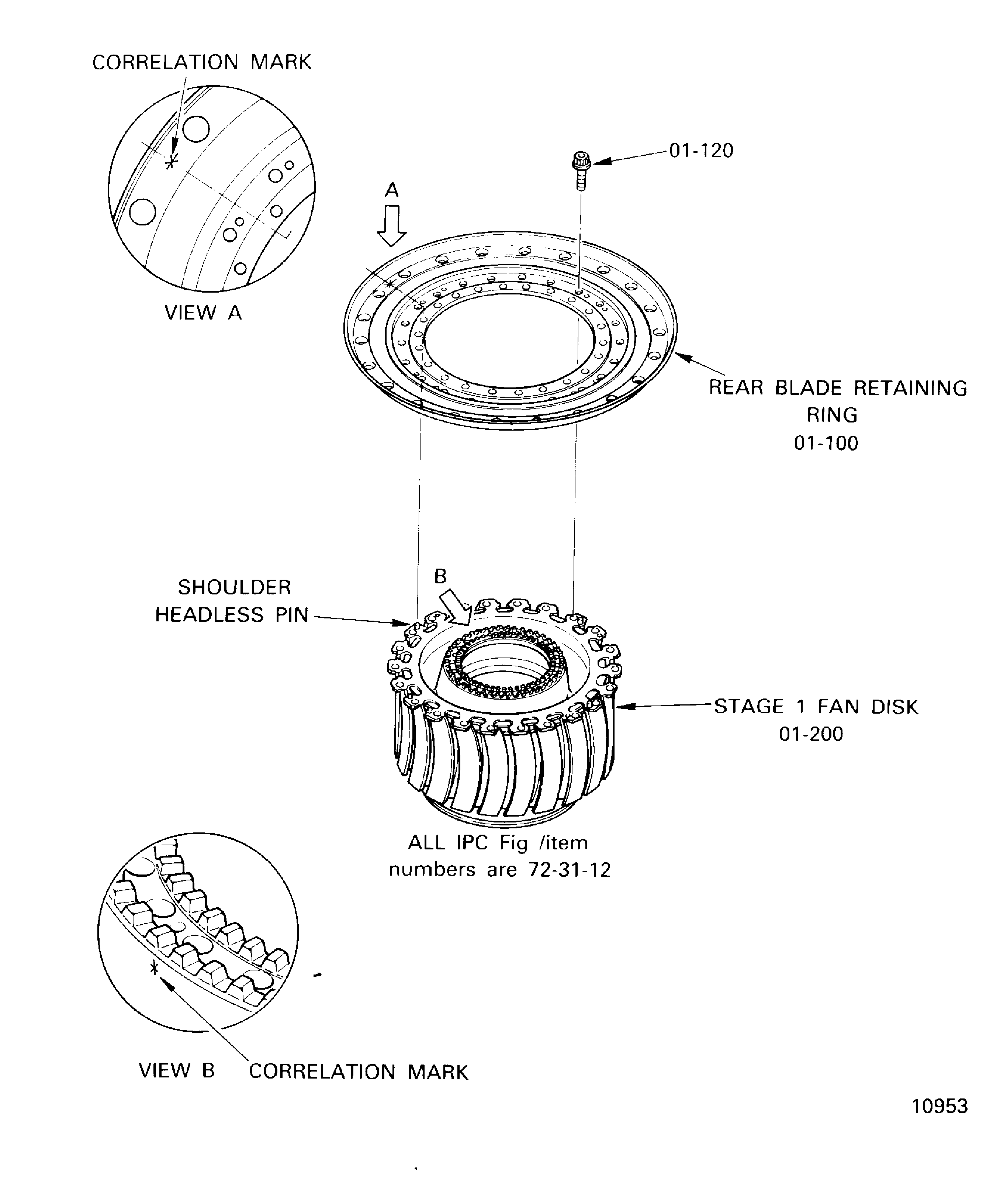
Figure: The Rear Blade Retaining Ring Torque Tightening Sequence Diagram
The Rear Blade Retaining Ring Torque Tightening Sequence Diagram
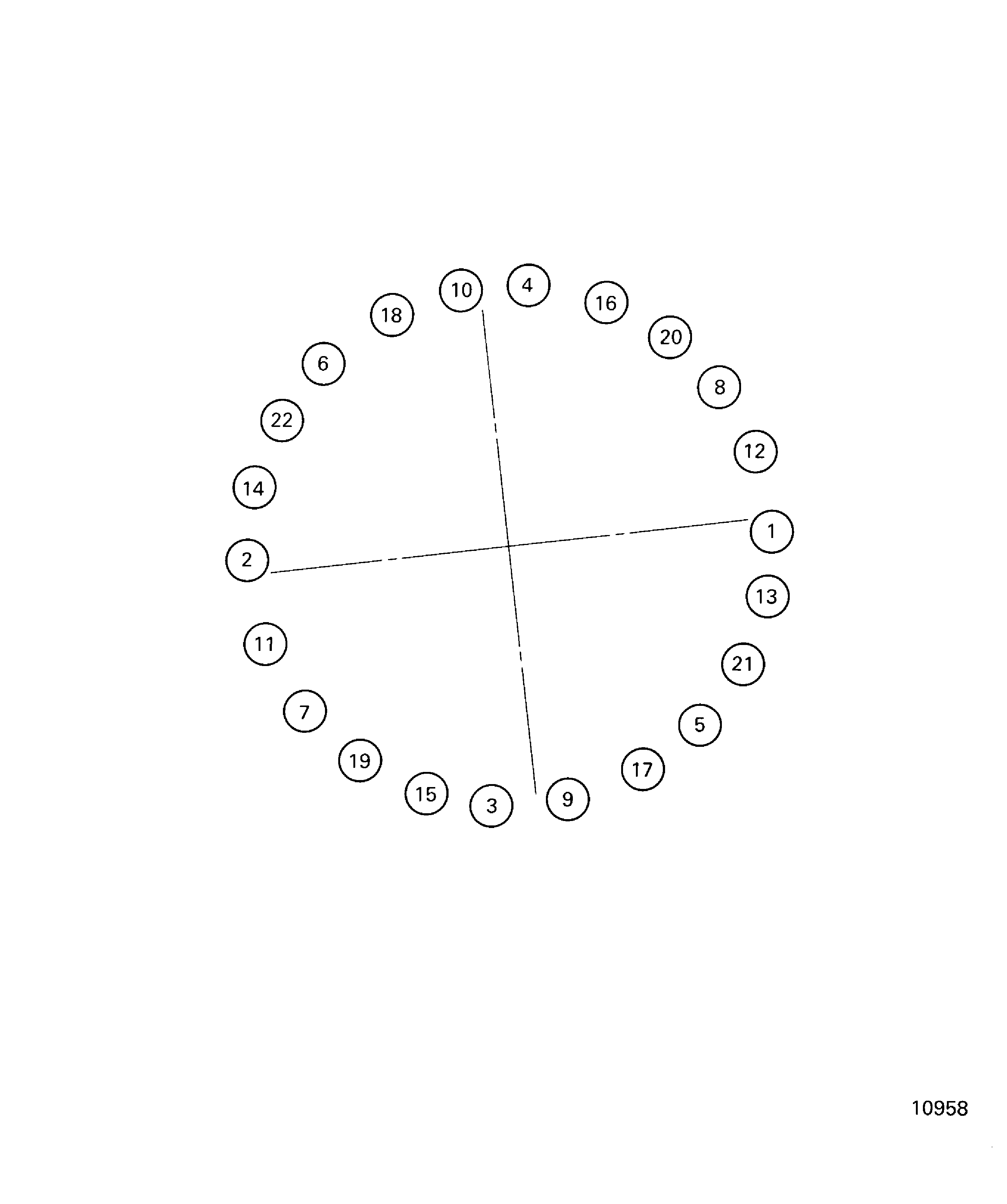
Figure: Attach the Balance Arbor and Handling Sling to the Stage 1 Fan Disk
Attach the Balance Arbor and Handling Sling to the Stage 1 Fan Disk
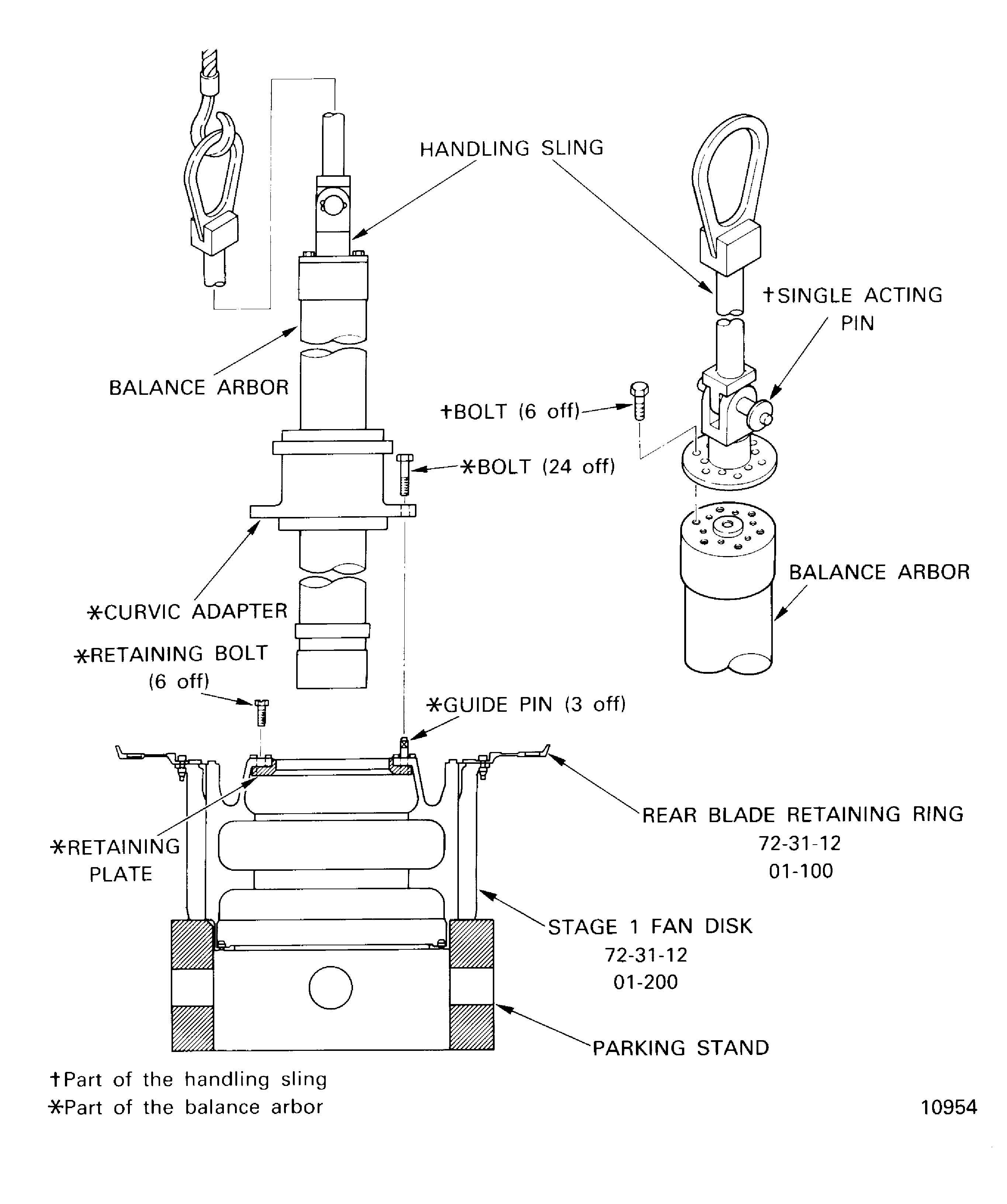
Figure: The Torque Tightening Sequence for the Curvic Coupling Bolts
The Torque Tightening Sequence for the Curvic Coupling Bolts

Figure: Install the Stage 1 Fan Disk and Balance Arbor to the Turnover Stand
Install the Stage 1 Fan Disk and Balance Arbor to the Turnover Stand
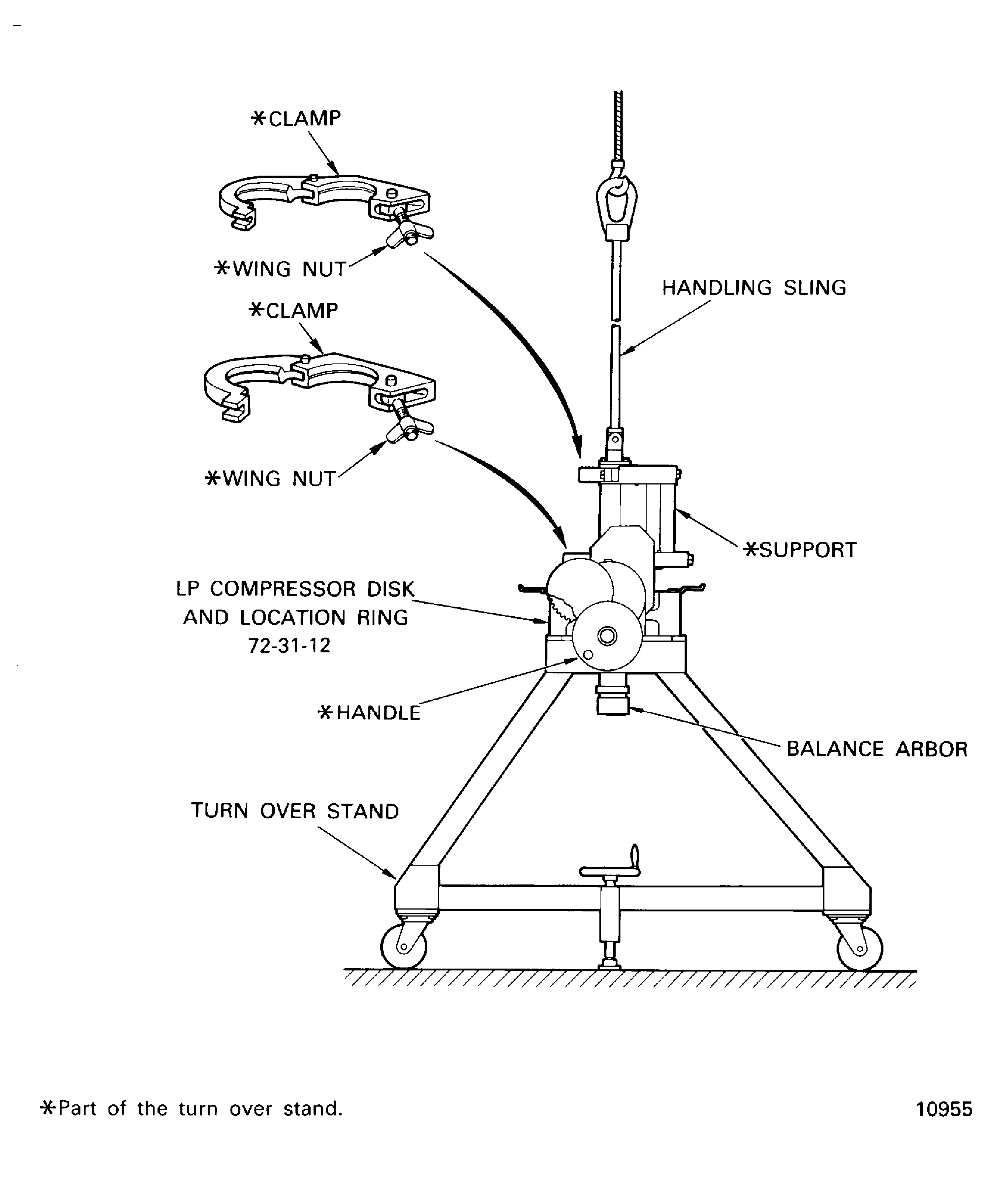
Figure: Moment Weigh LP Compressor Rotor Blade
Moment Weigh LP Compressor Rotor Blade

Figure: Moment Weight Values Marked on the Fan Blade
Moment Weight Values Marked on the Fan Blade
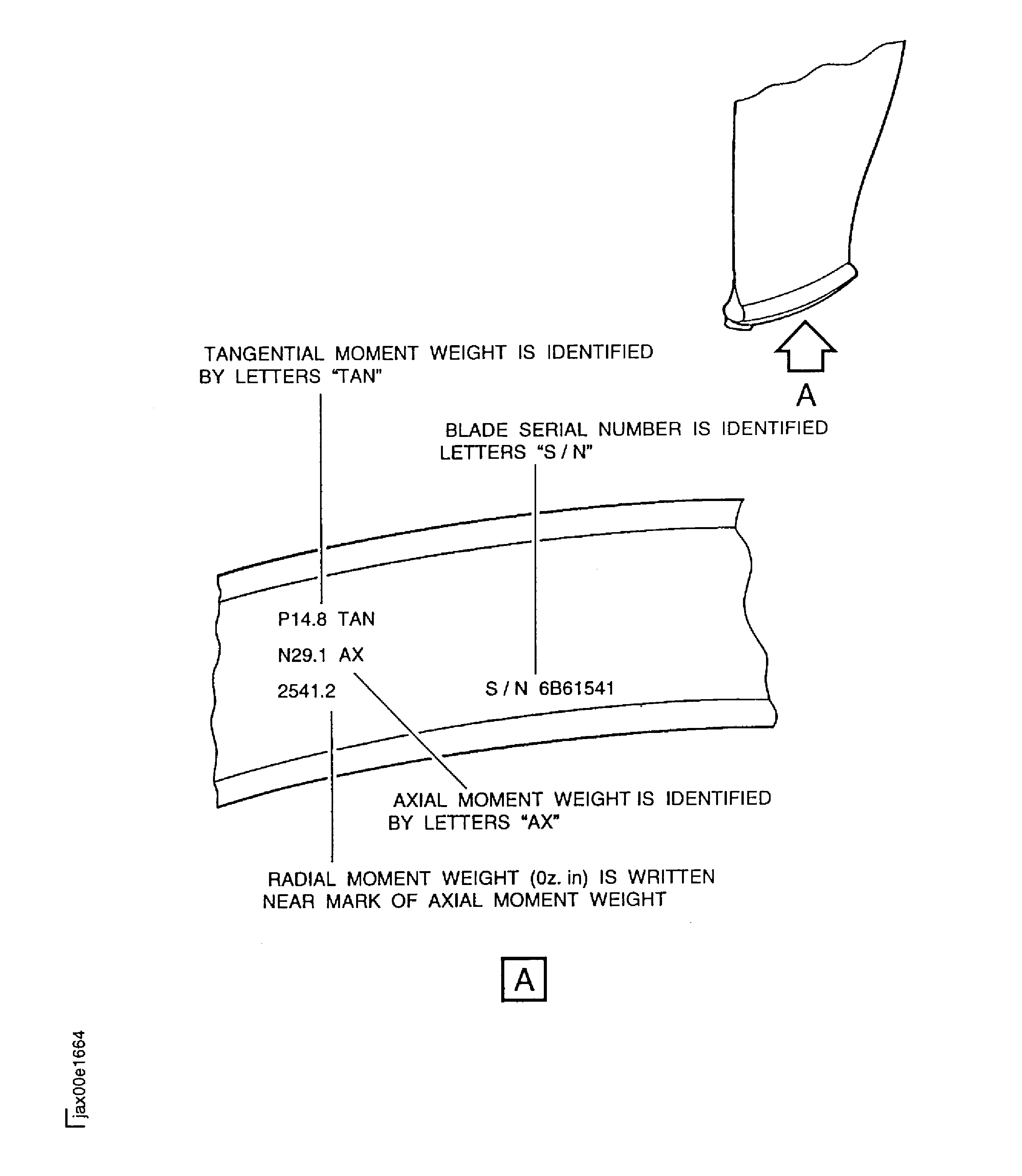
Figure: The Sequence Diagram to Install the Annulus Fillers
The Sequence Diagram to Install the Annulus Fillers
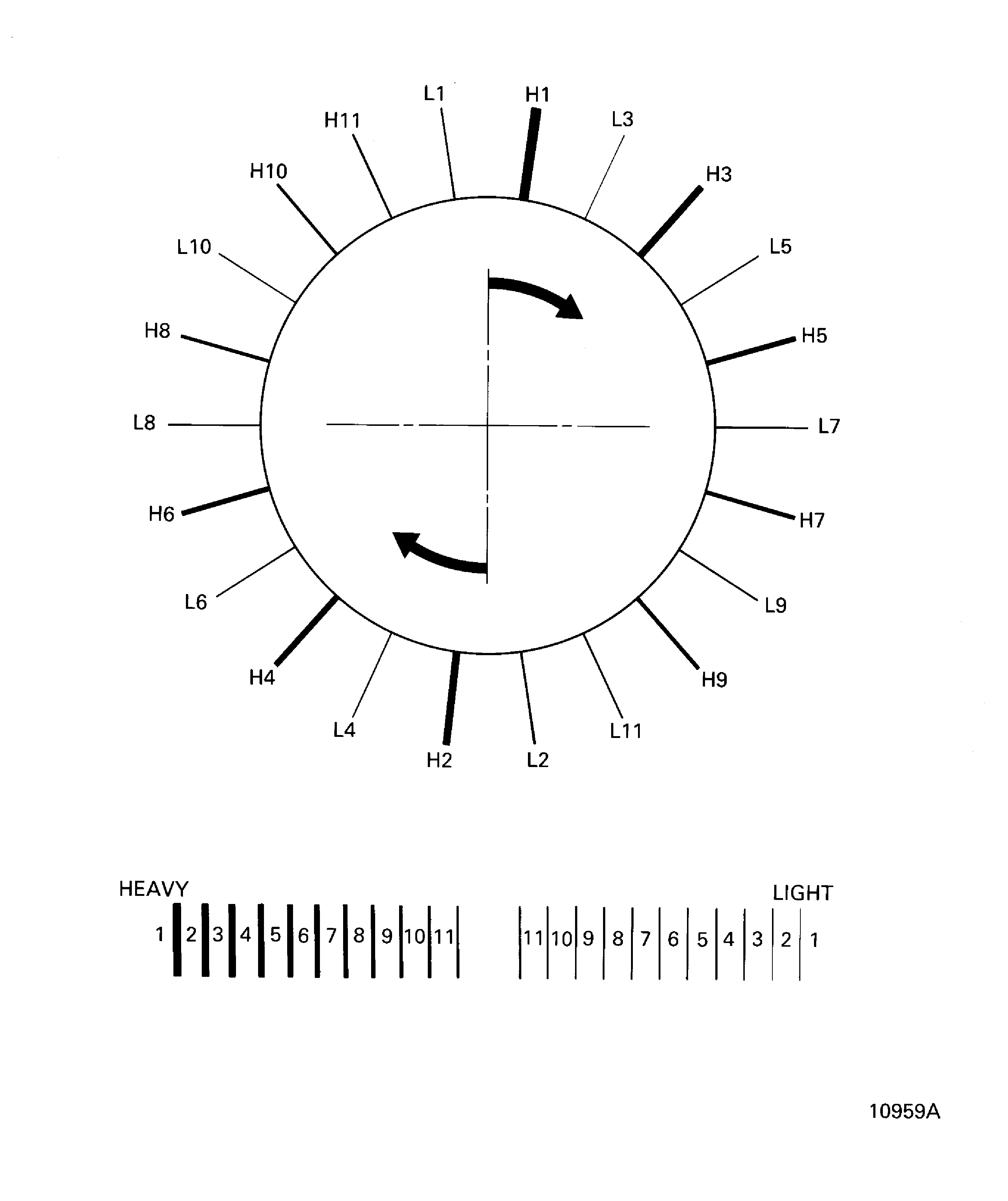
Figure: The Annulus Filler and the Front Blade Retaining Ring Installation
The Annulus Filler and the Front Blade Retaining Ring Installation

Figure: Front Blade Retaining Ring Torque Tightening Sequence Diagram
Front Blade Retaining Ring Torque Tightening Sequence Diagram

Figure: Position of the Annulus Filler Rubber Seal
Position of the Annulus Filler Rubber Seal
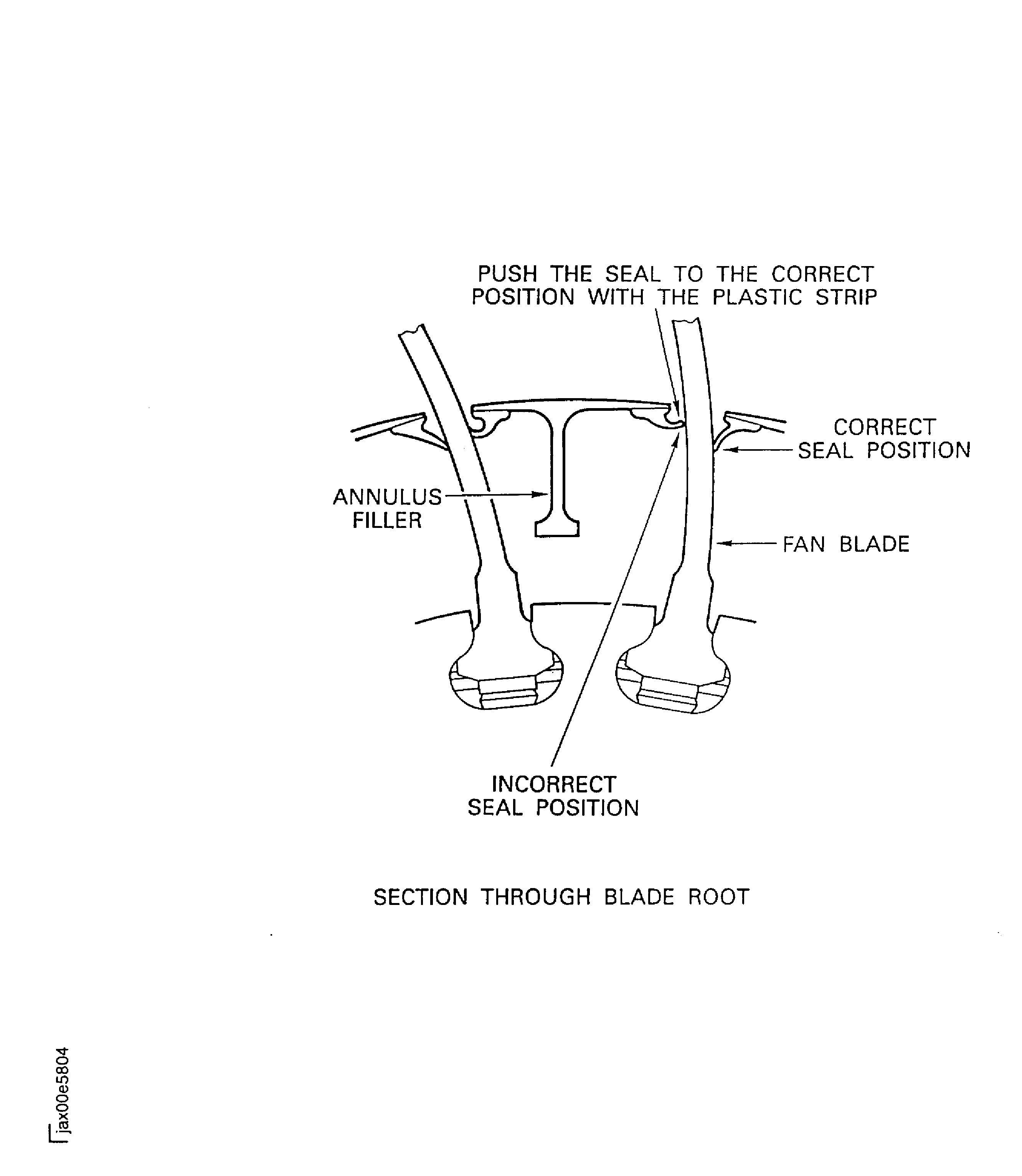
Figure: Install/Remove the LP Compressor (Fan) Module to Balancing Machine
Install/Remove the LP Compressor (Fan) Module to Balancing Machine
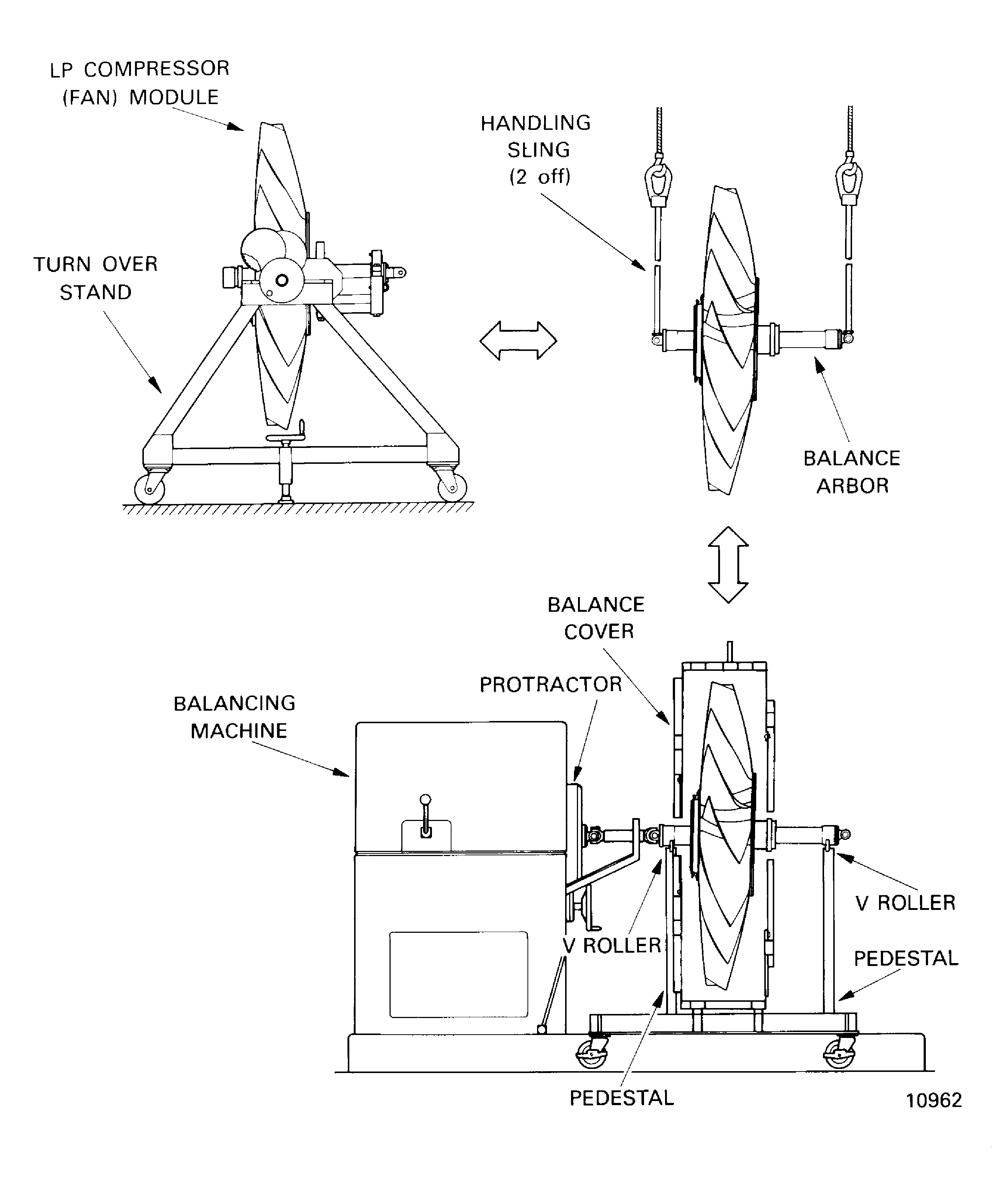
Figure: Set up for Runout Checks and Dynamic Balancing Bladed Disk
Set up for Runout Checks and Dynamic Balancing Bladed Disk
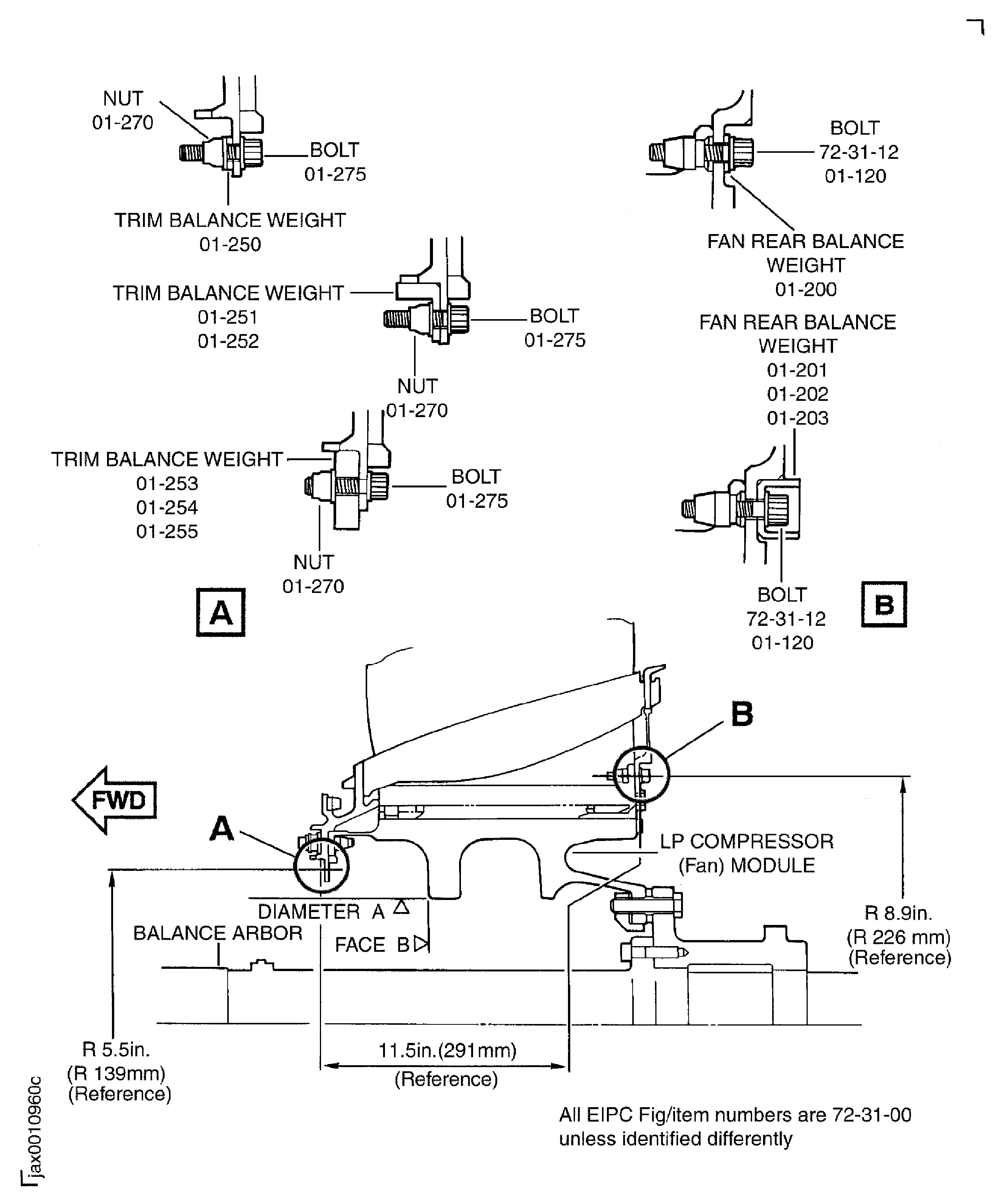
Figure: Install the LP Compressor (Fan) Module to the Storage Stand
Install the LP Compressor (Fan) Module to the Storage Stand

Figure: Install the Protection Cover
Install the Protection Cover

Figure: Apply Lubricant to the Chocking Pads of the Blade
Apply Lubricant to the Chocking Pads of the Blade
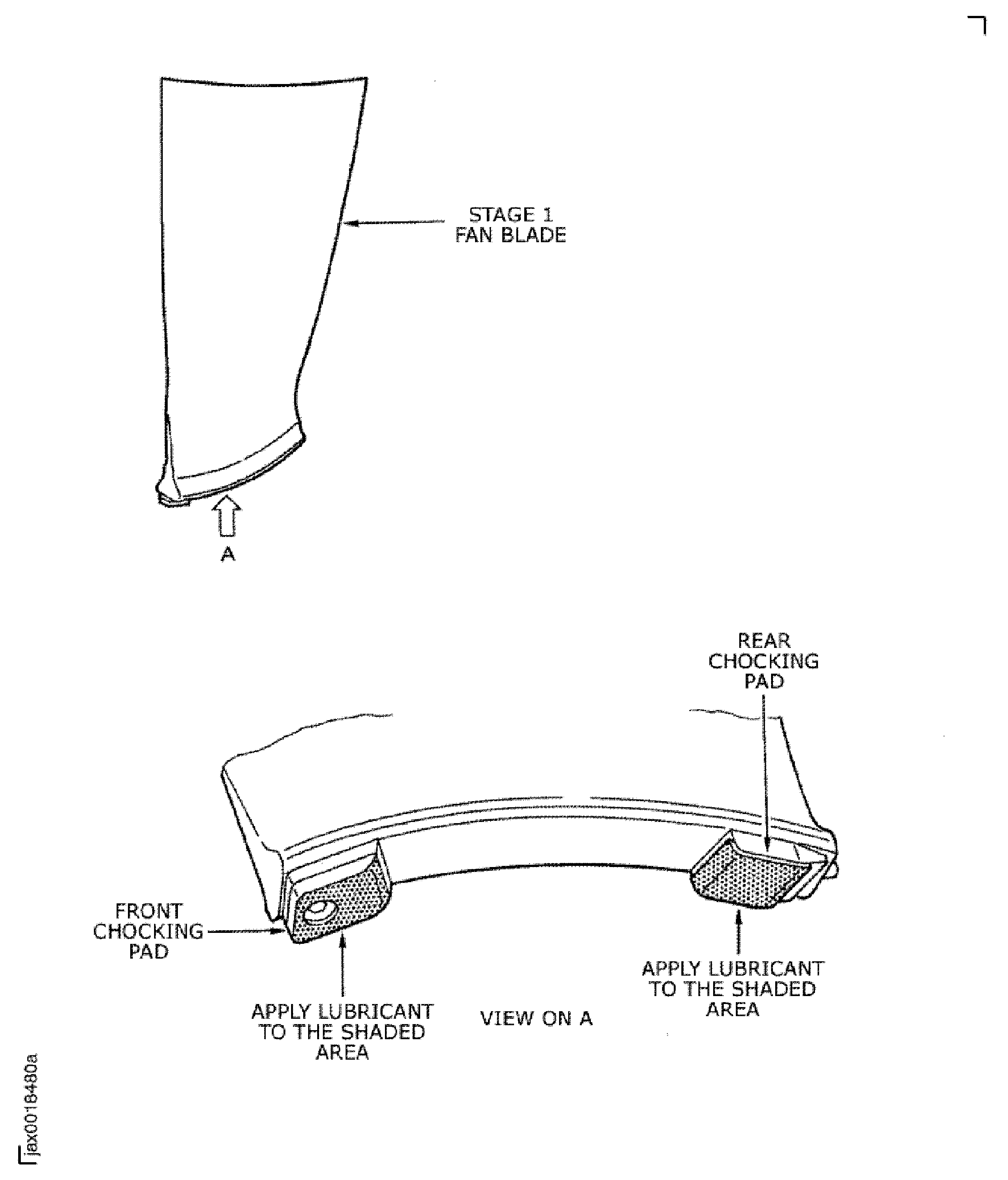
Figure: Apply Lubricant to the Slot Faces and the Rear Ramps of the Stage 1 Fan Disk
Apply Lubricant to the Slot Faces and the Rear Ramps of the Stage 1 Fan Disk
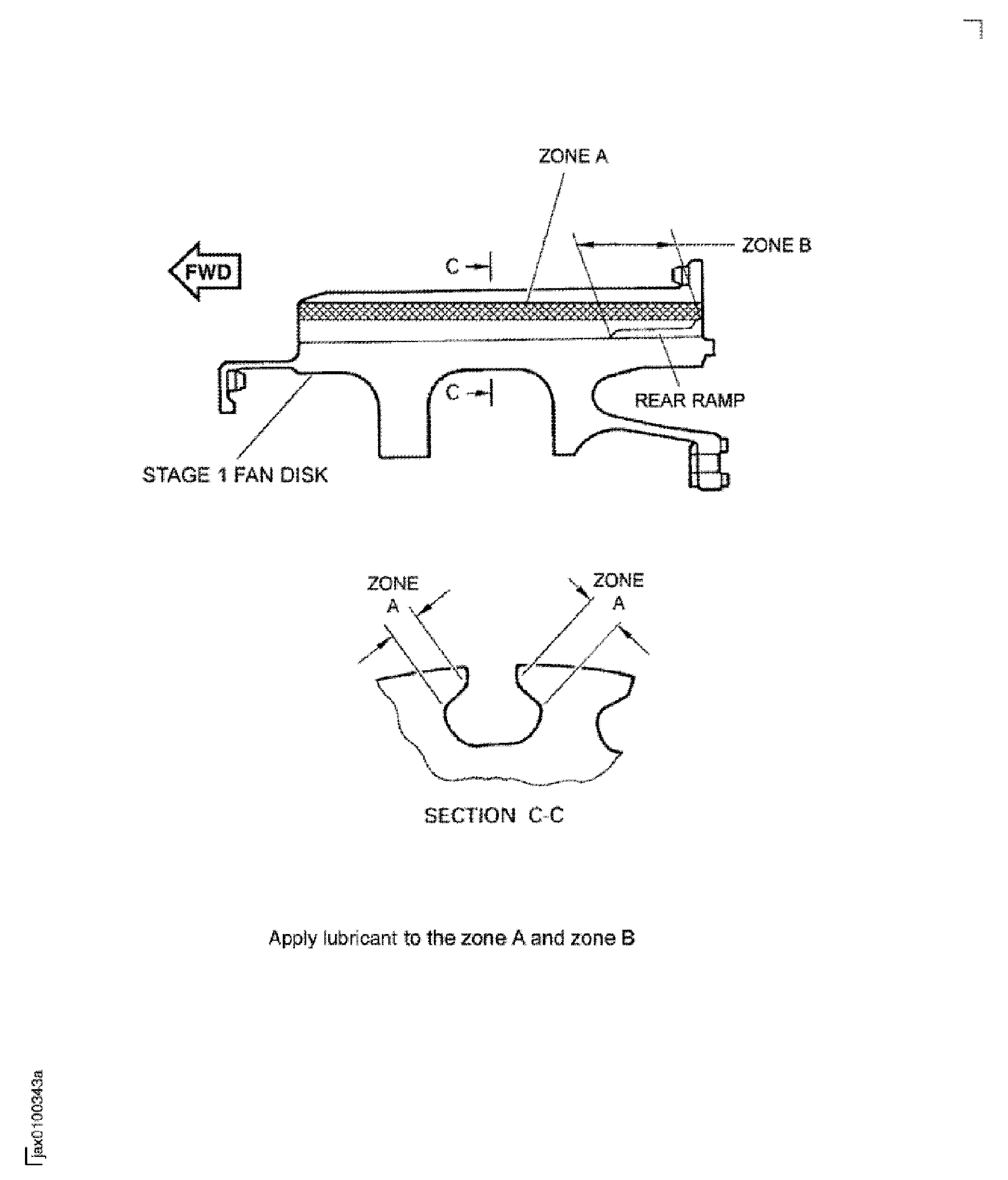
Figure: Balance Weight
Balance Weight
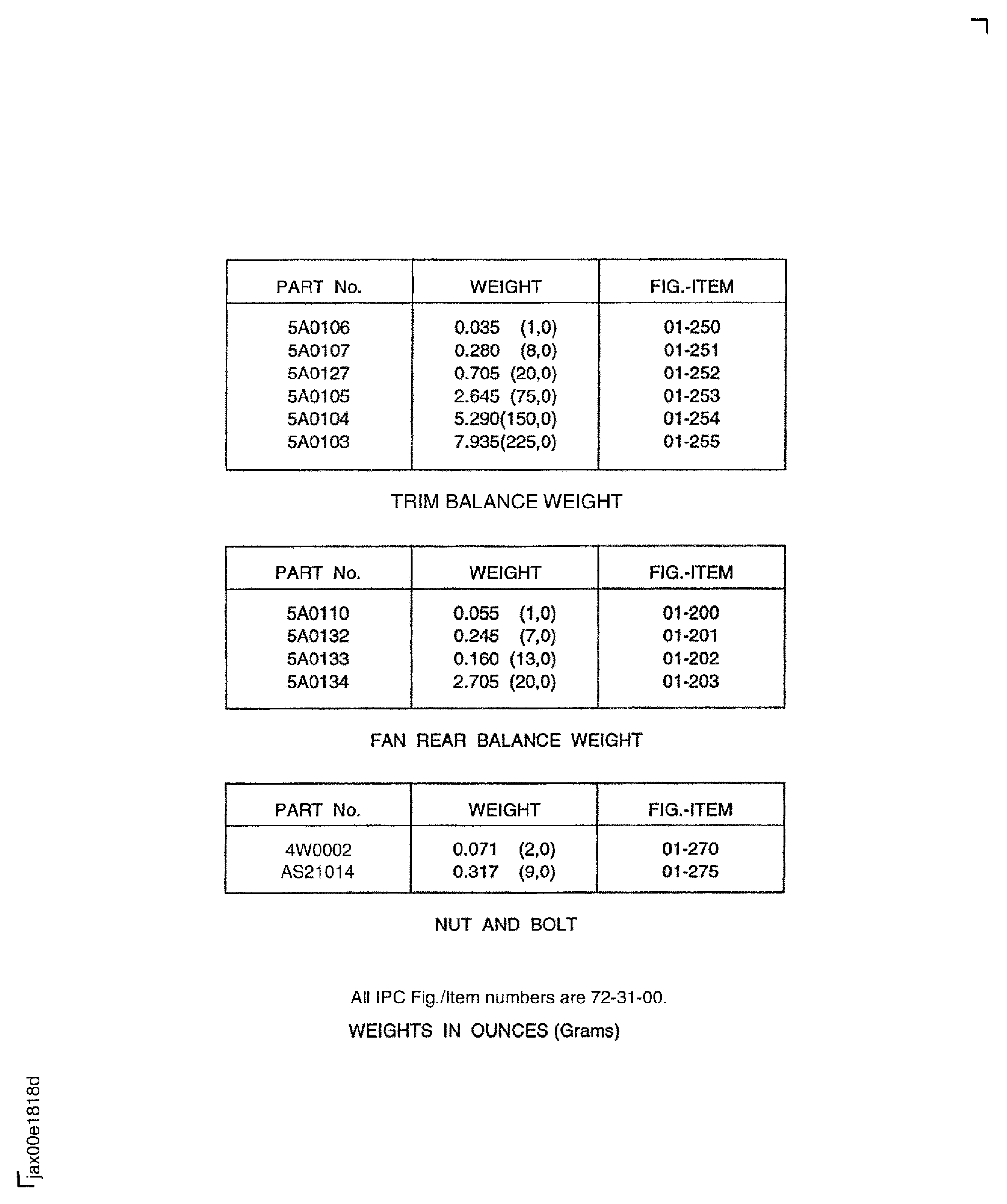
Figure: Install the Stage 1 Fan Blades in to the Stage 1 Fan Disk Assembly
Sheet 1
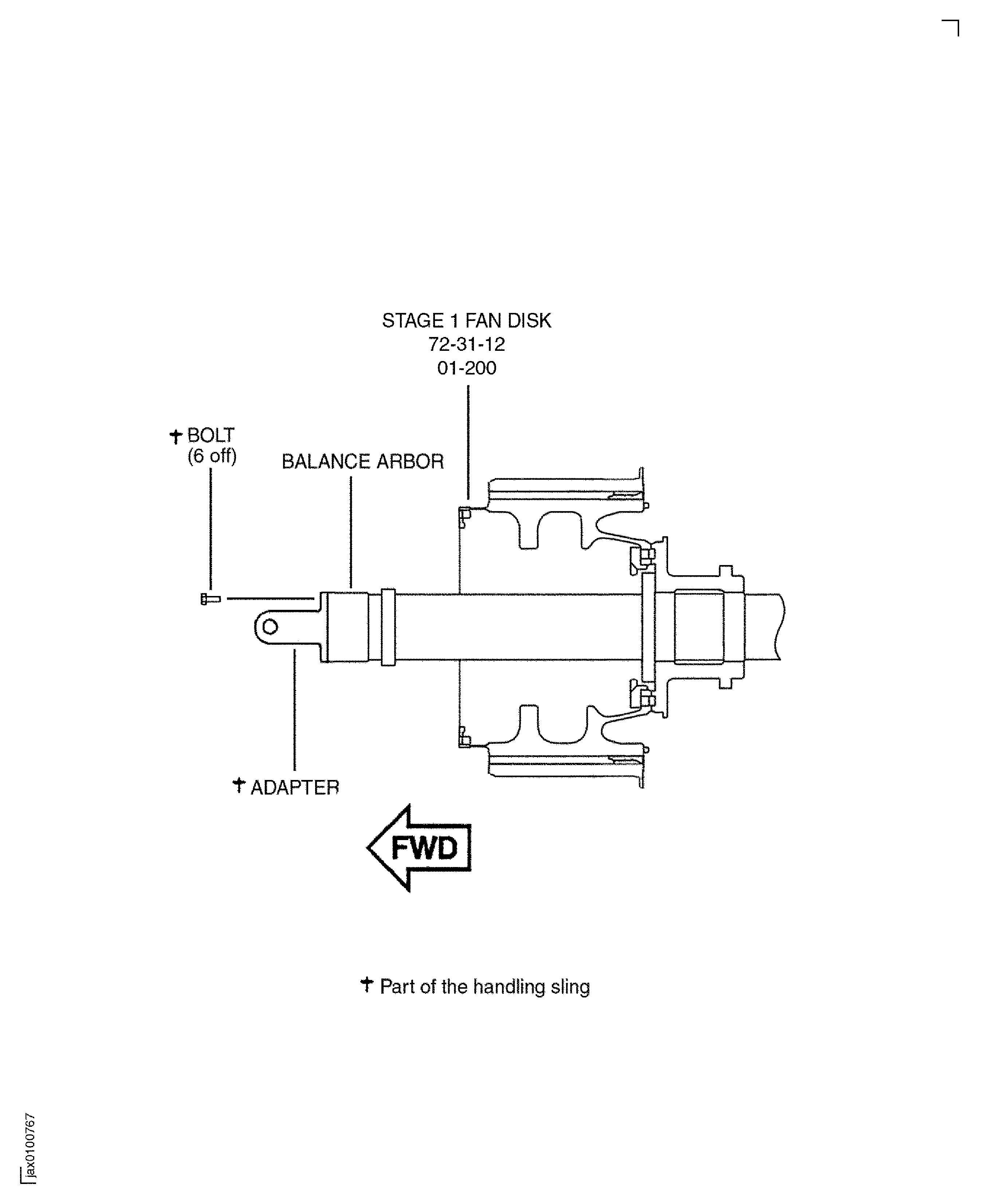
Figure: Install the Stage 1 Fan Blades in to the Stage 1 Fan Disk Assembly
Sheet 2