Export Control
EAR Export Classification: Not subject to the EAR per 15 C.F.R. Chapter 1, Part 734.3(b)(3), except for the following Service Bulletins which are currently published as EAR Export Classification 9E991: SBE70-0992, SBE72-0483, SBE72-0580, SBE72-0588, SBE72-0640, SBE73-0209, SBE80-0024 and SBE80-0025.Copyright
© IAE International Aero Engines AG (2001, 2014 - 2021) The information contained in this document is the property of © IAE International Aero Engines AG and may not be copied or used for any purpose other than that for which it is supplied without the express written authority of © IAE International Aero Engines AG. (This does not preclude use by engine and aircraft operators for normal instructional, maintenance or overhaul purposes.).Applicability
All
Common Information
TASK 72-41-10-440-008-A00 HPC Rotor Assembly - Assemble the HP Compressor Rotor Discs using IAE1R19895
General
This TASK gives the procedure to assemble the HP Compressor Rotor Discs with tool PN IAE1R19895. Refer to the TASKS that follow for other related procedures.
TASK 72-41-10-440-001 (ASSEMBLY-001, CONFIG-001) Measure the HP Compressor Rotor Assembly Parts.
TASK 72-41-10-440-002-A00 (ASSEMBLY-002, CONFIG-001) Assemble The Rotor Assembly.
TASK 72-41-10-440-002-B00 (ASSEMBLY-002, CONFIG-002) Assemble The Rotor Assembly.
TASK 72-41-10-440-003 (ASSEMBLY-003, CONFIG-001) Do a balance check of the HP Compressor Rotor Assembly and install the blades.
TASK 72-41-10-440-004 (ASSEMBLY-004, CONFIG-001) Grind the tips of the HP compressor blades.
TASK 72-41-10-440-005 (ASSEMBLY-005, CONFIG-005) Final balance the HP compressor rotor assembly.
TASK 72-41-10-440-008-B00 (ASSEMBLY-008, CONFIG-002) Assemble the HP Compressor Rotor Discs using IAE1P16616.
Fig./item numbers in parentheses in the procedure agree with those used in the IPC. Only the primary Fig./item numbers are used. For the service bulletin alpha variants refer to the IPC.
For all parts identified in a different Chapter/Section/Subject, the applicable Chapter/Section/Subject comes before the Fig./item number.
Overhaul processes referred to in this procedure by the TASK/SUBTASK number are in the SPM.
For standard torque data and procedures, refer to SPM TASK 70-41-00-400-501, SPM TASK 70-41-01-400-501 and SPM TASK 70-41-02-410-501.
Special assembly tolerances are included in this procedure.
Lubricate all threads and mating faces of nuts and bolts with CoMat 10-077A APPROVED ENGINE OIL unless other lubricants are referred to in the procedure.
After assembly apply CoMat 07-038 AIR DRYING ENAMEL to damaged surface protection, joint flanges and attach parts. Use the correct color of the air drying enamel. Refer to SPM TASK 70-63-02-380-501.
The data found in this procedure, when used during assembly, will permit the rotor assembly to be assembled with all of the parts concentric to specified limits.
NOTE
NOTE
Preliminary Requirements
Pre-Conditions
NONESupport Equipment
| Name | Manufacturer | Part Number / Identification | Quantity | Remark |
|---|---|---|---|---|
| Computer | LOCAL | Computer | ||
| IAE 1R18027 Indexing ring | 0AM53 | IAE 1R18027 | 1 | |
| IAE 1R18400 Protection sleeve | 0AM53 | IAE 1R18400 | 1 | |
| IAE 1R19902 Tool carriage | 0AM53 | IAE 1R19902 | ||
| IAE 1R19901 Rundown unit | 0AM53 | IAE 1R19901 | ||
| IAE 1R19897 Calibration stand | 0AM53 | IAE 1R19897 | ||
| IAE 1R19907 Drive shaft | 0AM53 | IAE 1R19907 | ||
| IAE 1R19904 Torque tool head | 0AM53 | IAE 1R19904 | ||
| IAE 1R19900 Electric nut runner | 0AM53 | IAE 1R19900 | ||
| IAE 1R19911 Calibration transducer with ST analyser (handheld) | 0AM53 | IAE 1R19911 | ||
| IAE 1R19895 HPC rotor kit assembly | 0AM53 | IAE 1R19895 | ||
| IAE 1R19903 Tool head - nut rundown | 0AM53 | IAE 1R19903 |
Consumables, Materials and Expendables
| Name | Manufacturer | Part Number / Identification | Quantity | Remark |
|---|---|---|---|---|
| CoMat 10-142 ANTI-SEIZE PASTE | 71984 | CoMat 10-142 | ||
| CoMat 10-077A APPROVED ENGINE OIL | LOCAL | CoMat 10-077A | ||
| CoMat 07-038 AIR DRYING ENAMEL | k3504 | CoMat 07-038 |
Spares
| Name | Manufacturer | Part Number / Identification | Quantity | Remark |
|---|---|---|---|---|
| NUT - SPLINE, UNCOATED | 0AM53 | U755872 | 34 | (SBE 72-0632) |
| PLATE | 0AM53 | UP10894 | 34 | (SBE 72-0632) |
Safety Requirements
NONEProcedure
Put the IAE 1R19902 Tool carriage into rearward position and tighten with the tommy bar screw.
Lift the IAE 1R19901 Rundown unit into position on the IAE 1R19897 Calibration stand.
Make sure that the IAE 1R19907 Drive shaft is locked in its lowest position with the locking pin to prevent damage to the calibration transducer during the calibration.
Install the IAE 1R19904 Torque tool head to the IAE 1R19907 Drive shaft and make sure that the IAE 1R19904 Torque tool head is engaged correctly to the bottom of the IAE 1R19907 Drive shaft.
Loosen the tommy bar screw (part of IAE 1R19902 Tool carriage).
Turn the IAE 1R19901 Rundown unit to align with the respective location pin hole on the IAE 1R19897 Calibration stand.
Install the location pin that attaches the IAE 1R19901 Rundown unit to the IAE 1R19897 Calibration stand.
Move the IAE 1R19902 Tool carriage to align with the location pin hole in the baseplate of the IAE 1R19902 Tool carriage.
Pull and turn the locking pin to release the IAE 1R19907 Drive shaft from its lowest position.
Move the IAE 1R19904 Torque tool head carefully into position below the calibration transducer spline drive.
NOTE
The IAE 1R19904 Torque tool head will automatically engage on the transducers IAE 1R19907 Drive shaft during the first calibration sequence.Lock the IAE 1R19907 Drive shaft in calibration position.
Make sure that the IAE 1R19900 Electric nut runner can rotate freely and the cable is connected correctly.
Make sure that the IAE 1R19911 Calibration transducer with ST analyser (handheld) is connected to the power supply, ethernet interface and the calibration transducer.

CAUTION
USE THE APPLICABLE CABLE DRUM FOR THE LOCAL AREA. INCORRECT VOLTAGE CAN CAUSE DAMAGE TO THE TOOL.Connect the IAE 1R19895 HPC rotor kit assembly to the power supply.
SUBTASK 72-41-10-440-341 Assemble the Tools Used to Install the Anti-score Plates and Splined Nuts onto the Special Head Bolts
CAUTION
THE TOOLS USED FOR THIS PROCEDURE MUST BE FREE OF SILVER OR SILVER CONTAMINATION. IF YOU DO NOT OBEY, DAMAGE TO THE HP COMPRESSOR ROTOR ASSEMBLY CAN OCCUR.CAUTION
DO NOT USE AN EQUIPMENT WITH THE EXPIRED CALIBRATION.CAUTION
THE STATION SOFTWARE VERSION MUST BE SAME AS THE VERSION SPECIFIED IN THE DRAWING OF THE STATION SOFTWARE.CAUTION
DO NOT CHANGE THE PROGRAMMING OF THE STATION SOFTWARE.NOTE
The sockets must be cleaned before each assembly procedure. All the tool components must be cleaned before each assembly procedure. Cleaned tools cannot be used on other nut standards. The lubricants used in tool heads must be free of silver, copper, cadmium, chloride, fluoride and molybdenum disulfide.If no sticker is present on RBU, software version is IAE1R19913-A.
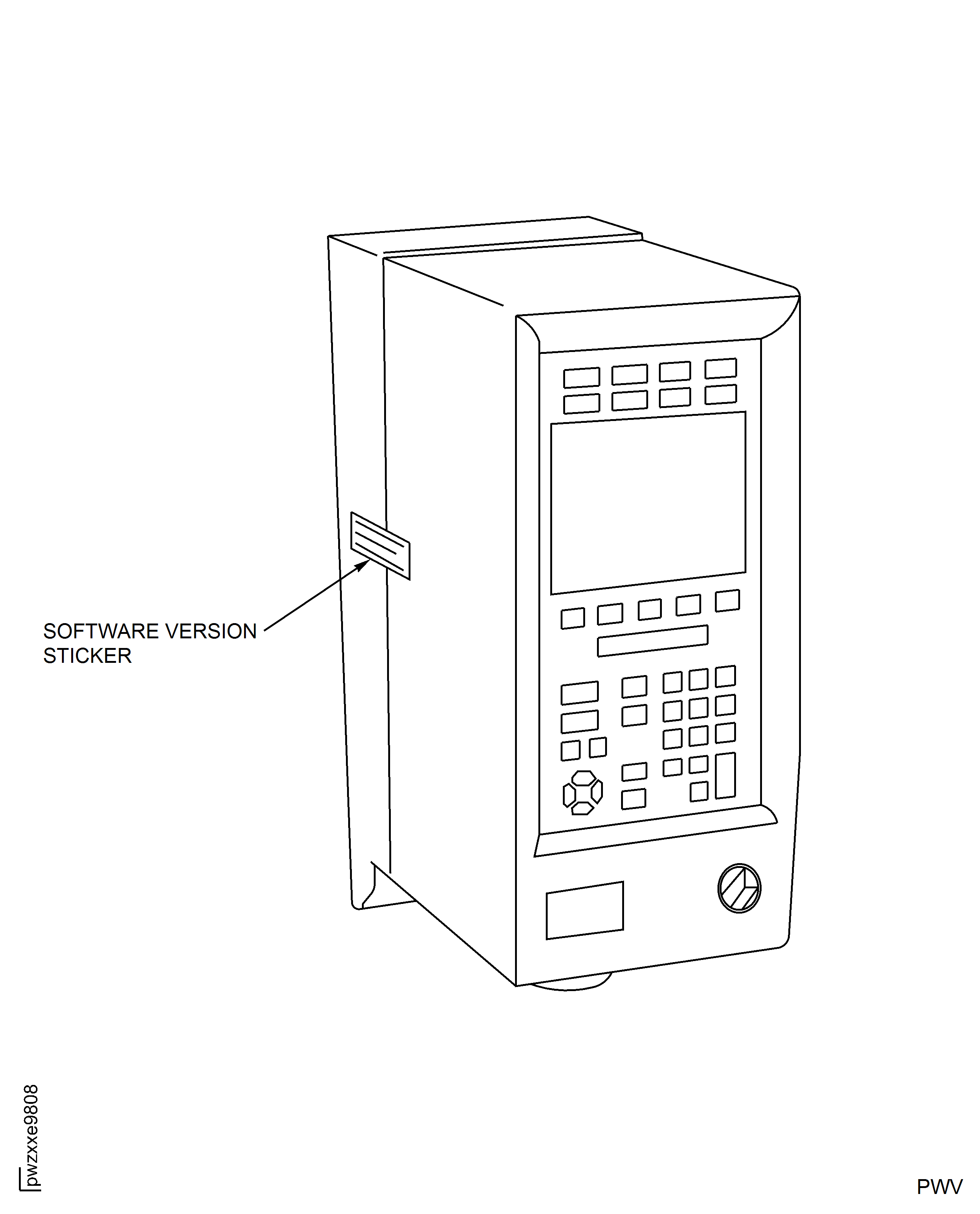
Write down software version on paper adhesive and place across tool controller cover split line.
If software version sticker is missing or broken, open tool controller and read software version from sticker on RBU.
Check software version sticker on tool controller is in place, not broken and indicates IAE1R19913-A or IAE1R19913-B.
Power up the tool controller.
Put the computer to ON position. The station software will start automatically.
NOTE
If there is a communication, the OP and IP box will be indicated in green.Make sure that the tool controller and the ST analyser are communicating with the station software. If there is no communication, check all the connections and start the station software again.
CAUTION
MAKE SURE THE CORRECT PART NUMBER FOR EACH NUT ARE ENTERED CORRECTLY INTO THE STATION SOFTWARE.Enter the HP compressor front drum serial number, rear drum serial number, vortex reducer ring serial number and the necessary splined nuts part number into the station software.
NOTE
The station software will display an error message if the part number of the nut is not correct. Make sure that the part number of the nut is U755872 before you enter the part number again. The station software will give instructions to the user for calibration sequence.Press OK button on the pop up window that is displayed on the computer screen.
NOTE
The direction buttons can be used to navigate through the directories.Select TOOLS option on the IAE 1R19911 Calibration transducer with ST analyser (handheld).
Select ETV SL21-20-B10.
Select Torque Cal 43 lbfin (4.85 Nm).
NOTE
The selected tool and the calibration mode is shown on the top of the ST analyser display.Do a check for the selection in the IAE 1R19911 Calibration transducer with ST analyser (handheld).
NOTE
The stacklight will display green light if the first calibration sequence is correct. After the IAE 1R19900 Electric nut runner stopped operation, the station software monitor will display OK for the ST analyser and the tool controller and increase the batch count. This can take some seconds because of tool communications between the components.The ST analyser will light green on the OK row.The ST analyser will display the measured output torque.The tool controller will display the measured input torque.The station software monitor will display the measured input and output torque.CAUTION
DO NOT RELEASE THE TRIGGER UNTIL YOU GET A REPLY FROM THE STACKLIGHT.Hold down the trigger of the IAE 1R19900 Electric nut runner.
NOTE
The stacklight of the station software will flash red if there is an incorrect value found. If the software flashes red, obey the on-screen instructions displayed in the station software.Do Step again until you complete five calibrations for 43 lbfin (4.85 Nm).
NOTE
The direction buttons can be used to navigate through the directories.Select Torque Cal 7 lbfin (0.79 Nm) on the IAE 1R19911 Calibration transducer with ST analyser (handheld).
NOTE
The selected tool and the calibration mode is shown on the top of the ST analyser display.Do a check for the selection in the IAE 1R19911 Calibration transducer with ST analyser (handheld).
Press OK button in the station software monitor to make sure the selection Torque Cal 7 lbfin (0.79 Nm) is correct.
NOTE
The stacklight will display green light if the first calibration sequence is correct. After the IAE 1R19900 Electric nut runner stopped operation, the station software monitor will display OK for the ST analyser and the tool controller and increase the batch count. This can take some seconds because of tool communications between the components. The ST analyser will light green on the OK row.The ST analyser will display the measured output torque.The tool controller will display the measured input torque.The station software monitor will display the measured input and output torque.CAUTION
DO NOT RELEASE THE TRIGGER UNTIL YOU GET A REPLY FROM THE STACKLIGHT.Hold down the trigger of the IAE 1R19900 Electric nut runner.
NOTE
The stacklight of the station software will flash red if there is an incorrect value found. If the software flashes red, obey the on-screen instructions displayed in the station software.Do Step again until you complete five calibrations for 7 lbfin (0.79 Nm).
Push down the IAE 1R19907 Drive shaft to its lowest position and lock the IAE 1R19907 Drive shaft with the locking pin.
Remove the location pin and move the IAE 1R19902 Tool carriage to its rearward position.
Safety the IAE 1R19902 Tool carriage in its rearward position with the tommy bar screw.
Press the release button on the IAE 1R19904 Torque tool head to remove it from the IAE 1R19907 Drive shaft.
Release and turn the locking pin and pull the spring loaded pin on the IAE 1R19902 Tool carriage.
Move the IAE 1R19907 Drive shaft to its top position until the IAE 1R19907 Drive shaft is locked by the spring loaded pin.
Rotate the IAE 1R19903 Tool head - nut rundown to its loading condition.
Make sure that the IAE 1R19903 Tool head - nut rundown is correctly engaged at the bottom of the IAE 1R19907 Drive shaft vertical shaft.
SUBTASK 72-41-10-440-342 Do the Pre-assembly Calibration of the Tools Used to Install the Anti-score Plates and Splined Nuts onto the Special Head Bolts
Install the IAE 1R18400 Protection sleeve in the inner bore of the stages 9 to 12 HPC Rotor Drum.
Install the IAE 1R18027 Indexing ring on the rear face of the stages 9 to 12 HPC rotor drum.
Lift the IAE 1R19901 Rundown unit onto the IAE 1R18027 Indexing ring which is installed on the rear face of the stages 9 to 12 HPC rotor drum.
Make sure that the IAE 1R19901 Rundown unit is aligned to the center of the IAE 1R18027 Indexing ring.

WARNING
IF FULL ASSEMBLY SEQUENCE IS NOT COMPLETED IN LESS THAN 240 MINUTES ALL NUTS (INSTALLED OR UNINSTALLED) WHICH HAVE HAD CoMat 10-142 ANTI-SEIZE PASTE APPLIED MUST BE REJECTED.WARNING
IF FULL ASSEMBLY SEQUENCE IS NOT COMPLETED IN LESS THAN 240 MINUTES ALL BOLTS WHICH HAVE HAD A NUT INSTALLED MUST BE REJECTED.CAUTION
DO NOT LET LUBRICANT CONTAMINATE THE COMPONENTS OR THE TOOLING. USE GLOVES TO PREVENT CONTAMINATION OF THE WORKSTATION, TOOLING AND ENGINE HARDWARE.CAUTION
THE FULL ASSEMBLY SEQUENCE MUST BE DONE IN LESS THAN 240 MINUTES. OXYGEN CAUSES DEGRADATION OF THE LUBRICANT. THIS CAN CAUSE INSUFFICIENT LUBRICATION PROPERTIES AND CAUSES ASSEMBLY INTERRUPTIONS DUE TO INTERCHANGE OF NUTS.NOTE
Mix the CoMat 10-142 ANTI-SEIZE PASTE fully to get the full lubricant properties.Lubricate the threads of the 34 splined nuts (72-41-12, 01-602) and the nuts mating surface with CoMat 10-142 ANTI-SEIZE PASTE.
Do a visual examination of the lubrication and make sure a smooth film of CoMat 10-142 ANTI-SEIZE PASTE on the full threads of the 34 splined nuts (72-41-12, 01-602) and the nuts mating surface is applied.
Enter the operator name or identification number into the station software.
Make sure that all the nuts (72-41-12, 01-602) are lubricated and select the OK button in the station software.
The nut installation sequence will start automatically. The remaining time for the full assembly sequence will be displayed in the bottom left position in the station software monitor.
Move the IAE 1R19901 Rundown unit into position on the IAE 1R18027 Indexing ring as specified in the station software monitor.
Engage the location pin into the related holes of the IAE 1R18027 Indexing ring and the baseplate of the IAE 1R19901 Rundown unit.
Install a U755872 NUT - SPLINE, UNCOATED (72-41-12,01-602) and an UP10894 PLATE (72-41-12, 01-604) to the socket of the IAE 1R19903 Tool head - nut rundown.
Pull the spring loaded pin and move the IAE 1R19907 Drive shaft to its lowest position.
Lock the IAE 1R19907 Drive shaft with the locking pin.
NOTE
The tool head is correctly folded back to its original position when the mechanical stop is reached.Fold the IAE 1R19903 Tool head - nut rundown to its rundown condition.
Loosen the tommy bar screw.
Remove the location pin from the related holes of the IAE 1R18027 Indexing ring and the baseplate of the IAE 1R19901 Rundown unit.
Move the IAE 1R19902 Tool carriage towards the related hole of the IAE 1R18027 Indexing ring.
Engage the location pin through the IAE 1R19902 Tool carriage, the baseplate of IAE 1R19901 Rundown unit and the IAE 1R18027 Indexing ring.
Make sure that the location pin is correctly engaged in the index position of the IAE 1R18027 Indexing ring as specified in the station software monitor.
Pull and turn the locking pin to release the IAE 1R19907 Drive shaft from its lowest position.
Put the IAE 1R19903 Tool head - nut rundown safely below the bolt (72-41-12, 01-608).
CAUTION
DO NOT RELEASE THE TRIGGER UNTIL YOU GET A REPLY FROM THE STACKLIGHT.NOTE
The stacklight will display green light if the rundown sequence is correct. After the IAE 1R19900 Electric nut runner stopped operation, the station software monitor will display ok, the results and the next position on the IAE 1R18027 Indexing ring to be tightened. The tool controller will display the measured input torque and increase the batch count. The station software monitor will display the measured input torque.Hold down the trigger of the IAE 1R19900 Electric nut runner.
Push down the IAE 1R19907 Drive shaft to its lowest position and lock the IAE 1R19907 Drive shaft with the locking pin.
Remove the location pin and slide the IAE 1R19902 Tool carriage to its rear end position.
NOTE
The tool head is correctly folded when the mechanical stop is reached and the socket is fully seen through the inner bore of the rear drum.Fold the IAE 1R19903 Tool head - nut rundown to its loading condition.
Pull the spring loaded pin and move the IAE 1R19907 Drive shaft to its top position until it is locked by the spring loaded pin.
NOTE
The blue light in addition to the green light will flash on the stacklight when all the nuts are installed. The stacklight of the station software will show red if there is an incorrect nut installation found. If the red is shown, obey the on-screen instructions displayed in the station software.Do the Step thru Step again until all the remaining 33 U755872 NUT - SPLINE, UNCOATED (72-41-12, 01-602) and 33 UP10894 PLATE (72-41- 12, 01-604) are installed.
SUBTASK 72-41-10-440-343 Install the Anti-score Plates and the Splined Nuts onto the Special Head Bolts
Remove the IAE 1R19903 Tool head - nut rundown from the IAE 1R19907 Drive shaft by pushing the spring loaded pin.
CAUTION
YOU MUST BE CAREFUL WHILE REMOVING THE TOOL HEAD. IF THE TOOL HEAD HITS THE DRUM OR IF THERE IS TOOL MOVEMENT AGAINST THE DRUM, DAMAGE TO THE ROTOR DRUM CAN OCCUR.Remove the IAE 1R19903 Tool head - nut rundown from the rotor drum assembly.
Move the IAE 1R19902 Tool carriage towards the indexing holes in the IAE 1R18027 Indexing ring to aid the IAE 1R19904 Torque tool head installation.
Install the IAE 1R19904 Torque tool head to the disc cavity.
Move the IAE 1R19904 Torque tool head towards the IAE 1R19907 Drive shaft until both the tools are aligned.
NOTE
The spring will pull the IAE 1R19907 Drive shaft to its upper position. Push the IAE 1R19907 Drive shaft down to engage with the IAE 1R19904 Torque tool head.Release the IAE 1R19907 Drive shaft.
Push the release button and pull the IAE 1R19904 Torque tool head against the IAE 1R19907 Drive shaft.
Release the release button.
NOTE
The IAE 1R19904 Torque tool head cannot move or rotate on the IAE 1R19907 Drive shaft when it is correctly engaged.Do a check for the correct engagement by pushing the IAE 1R19904 Torque tool head away from the IAE 1R19907 Drive shaft.
Push the IAE 1R19907 Drive shaft to its lowest position and lock the IAE 1R19907 Drive shaft with the locking pin.
CAUTION
THE TORQUE TIGHTENING SEQUENCE STARTS WITH BOLT POSITION 34 TO GET THE EQUAL BEDDING ON THE HP COMPRESSOR FLANGE.NOTE
The torque tightening sequence is divided into two parts, the initial seating sequence and the final tightening sequence.The initial seating sequence will start automatically. The station software will show the sequence on the station software monitor.
Turn the IAE 1R19901 Rundown unit into position on the IAE 1R18027 Indexing ring as specified in the station software monitor.
Engage the location pin into the related holes of the IAE 1R18027 Indexing ring and the baseplate of the IAE 1R19901 Rundown unit.
Make sure that the location pin is correctly engaged in the index position of the IAE 1R18027 Indexing ring as specified in the station software monitor.
Release the IAE 1R19907 Drive shaft from its lowest position and safely position the IAE 1R19904 Torque tool head below the nut (72-41-12, 01-602).
NOTE
The stacklight will display green light if the tightening sequence is correct.After the IAE 1R19900 Electric nut runner stopped operation, the station software monitor will display OK and will display the next position on the IAE 1R18027 Indexing ring to be tightened.The tool controller will display the measured input torque and increase the batch count.The station software monitor will display the measured input torque.CAUTION
DO NOT RELEASE THE TRIGGER UNTIL YOU GET A REPLY FROM THE STACKLIGHT.Hold the trigger of the IAE 1R19900 Electric nut runner.
Push down the IAE 1R19907 Drive shaft to its lowest position and lock the IAE 1R19907 Drive shaft with the locking pin.
Remove the location pin and slide the IAE 1R19902 Tool carriage to its rear end position.
NOTE
The blue light in addition to the green light will flash on the stacklight when all the nuts are tightened. The stacklight of the station software will show red if there is an incorrect nut installation found. If the red is shown, obey the on-screen instructions displayed in the station softwareThe final torque sequence will start automatically. The station software will display the torque tightening sequence in the station software monitor.
Move the IAE 1R19901 Rundown unit into position on the IAE 1R18027 Indexing ring as specified in the station software monitor.
Engage the location pin into the related holes of the IAE 1R18027 Indexing ring and the baseplate of the IAE 1R19901 Rundown unit.
Make sure that the location pin is correctly engaged in the index position of the IAE 1R18027 Indexing ring as specified in the station software monitor.
Release the IAE 1R19907 Drive shaft from its lowest position and safely position the IAE 1R19904 Torque tool head below the nut (72-41-12, 01-602).
CAUTION
DO NOT RELEASE THE TRIGGER UNTIL YOU GET A REPLY FROM THE STACKLIGHT.NOTE
The stacklight will display green light if the tightening sequence is correct.After the IAE 1R19900 Electric nut runner stopped operation, the station software monitor will display OK, the results and the next position on the IAE 1R18027 Indexing ring to be tightened.The tool controller will display the measured input torque and increase the batch count.The station software monitor will display the measured input torque.Hold down the trigger of the IAE 1R19900 Electric nut runner.
Push down the IAE 1R19907 Drive shaft to its lowest position and lock the IAE 1R19907 Drive shaft with the locking pin.
Remove the location pin and slide the IAE 1R19902 Tool carriage to its rear end position.
NOTE
The blue light in addition to the green light will flash on the stacklight when all the nuts are tightened. The stacklight of the station software will show red if there is an incorrect nut installation found. If the red is shown, obey the on-screen instructions displayed in the station software.Safety the IAE 1R19902 Tool carriage in the rear end position with the tommy bar screw.
Push the release button on the IAE 1R19904 Torque tool head and remove the IAE 1R19904 Torque tool head from the IAE 1R19907 Drive shaft.
Lift the IAE 1R19901 Rundown unit onto the IAE 1R19897 Calibration stand.
Remove the IAE 1R18027 Indexing ring from the rear face of the stages 9 to 12 HPC Rotor Drum.
Make sure that the 34 splined nuts (72-41-12, 01-602) are installed.
Do a visual inspection for the damages and equal protrusion of the bolts (72-41-12, 01-608).
Make sure that there is no space between the UP10894 PLATE (72-41-12, 01-604) and the mating surface of the stages 3 to 8 HP Compressor Rotor Drum.
Remove the IAE 1R18400 Protection sleeve from the inner bore of the stages 9 to 12 HPC Rotor Drum.
SUBTASK 72-41-10-440-344 Torque Tighten the Splined Nuts
Make sure that the IAE 1R19907 Drive shaft is locked in its lowest position to prevent damage to the calibration transducer during the calibration.
Install the IAE 1R19904 Torque tool head to the IAE 1R19907 Drive shaft and make sure that the IAE 1R19904 Torque tool head is engaged correctly to the bottom of the IAE 1R19907 Drive shaft.
Loosen the tommy bar screw (part of IAE 1R19902 Tool carriage).
Turn the IAE 1R19901 Rundown unit to align with the respective location pin hole on the IAE 1R19897 Calibration stand.
Install the location pin that attaches the IAE 1R19901 Rundown unit to the IAE 1R19897 Calibration stand.
Move the IAE 1R19902 Tool carriage to align with the location pin hole in the baseplate of the IAE 1R19902 Tool carriage and install the location pin.
Pull and turn the locking pin to release the IAE 1R19907 Drive shaft from its lowest position.
Move the IAE 1R19904 Torque tool head into position below the calibration transducer spline drive.
NOTE
The IAE 1R19904 Torque tool head will automatically engage on the transducers IAE 1R19907 Drive shaft during the first calibration sequence.Lock the IAE 1R19907 Drive shaft in calibration position.
Select Torque Cal 43 lbfin (4.85 Nm) on the ST analyser
NOTE
The selected tool and the calibration mode is shown on the top of the ST analyser display.Do a check for the selection in the IAE 1R19911 Calibration transducer with ST analyser (handheld).
NOTE
The stacklight will display green light if the first calibration sequence is correct. After the IAE 1R19900 Electric nut runner stopped operation, the station software monitor will display OK for the ST analyser and the tool controller and increase the batch count. This can take some seconds because of tool communications between the components. The ST analyser will light green on the OK row. The ST analyser will display the measured output torque. The tool controller will display the measured input torque. The station software monitor will display the measured input and output torque.CAUTION
DO NOT RELEASE THE TRIGGER UNTIL YOU GET A REPLY FROM THE STACKLIGHT.Hold down the trigger of the IAE 1R19900 Electric nut runner.
NOTE
The stacklight will highlight if incorrect value is found during post-assembly calibration check. If errors found, obey the on-screen instructions displayed in the station software.Do Step again until you complete five calibrations for 43 lbfin (4.85 Nm).
NOTE
The direction buttons can be used to navigate through the directories.Select Torque Cal 7 lbfin (0.79 Nm) on the IAE 1R19911 Calibration transducer with ST analyser (handheld).
NOTE
The selected tool and the calibration mode is shown on the top of the ST analyser display.Do a check for the selection in the IAE 1R19911 Calibration transducer with ST analyser (handheld).
Press OK button in the station software monitor to make sure the selection Torque Cal 7 lbfin (0.79 Nm) is correct.
NOTE
After the IAE 1R19900 Electric nut runner stopped operation, the station software monitor will display OK for the ST analyser and the tool controller and increase the batch count. This can take some seconds because of tool communications between the components.The ST analyser will light green on the OK row.The ST analyser will display the measured output torque.The tool controller will display the measured input torque.The station software monitor will display the measured input and output torque.CAUTION
DO NOT RELEASE THE TRIGGER UNTIL YOU GET A REPLY FROM THE STACKLIGHT.Hold down the trigger of the IAE 1R19900 Electric nut runner.
NOTE
The stacklight will display green light with flashing blue light after the post torque calibration sequences are done correctly. The stacklight will highlight if incorrect value is found during the post-assembly tool calibration check. If errors found, obey the on-screen instructions displayed in the station software. The assembly must be rejected if the post-assembly calibration check is not successful after all the procedure specified by the station software are done.Do Step again until you complete five calibrations for 7 lbfin (0.79 Nm).
Push the OK button in the station software monitor.
SUBTASK 72-41-10-440-350 Do the Post-assembly Calibration of the Tools Used to Install the Anti-score Plates and Splined Nuts onto the Special Head Bolts
Figure: Figure 1
Figure 1

Figure: Figure 2
Figure 2

Figure: Figure 3
Figure 3

Figure: Figure 4
Figure 4
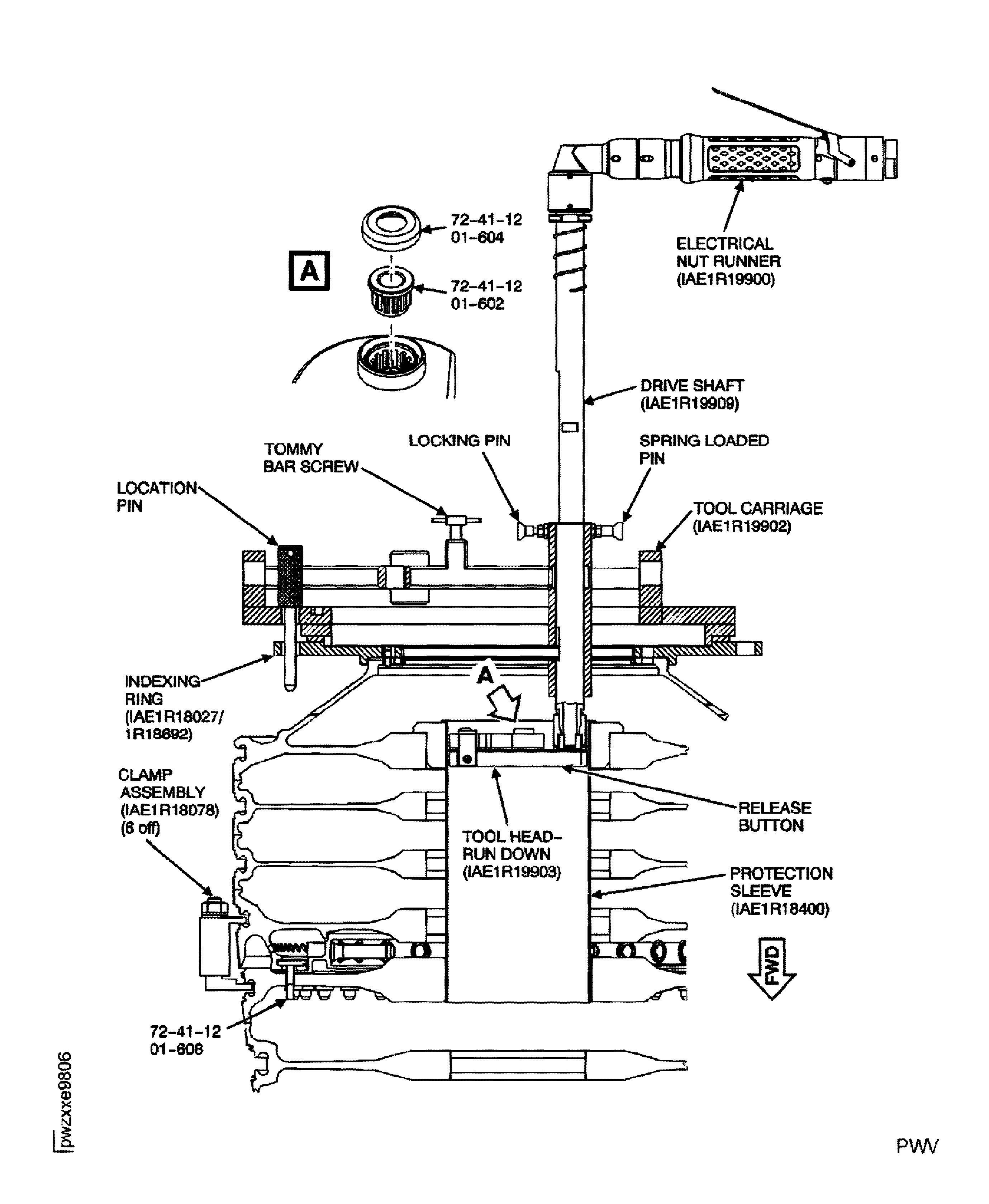
Figure: Figure 5
Figure 5

Figure: Figure 6
Figure 6