Export Control
EAR Export Classification: Not subject to the EAR per 15 C.F.R. Chapter 1, Part 734.3(b)(3), except for the following Service Bulletins which are currently published as EAR Export Classification 9E991: SBE70-0992, SBE72-0483, SBE72-0580, SBE72-0588, SBE72-0640, SBE73-0209, SBE80-0024 and SBE80-0025.Copyright
© IAE International Aero Engines AG (2001, 2014 - 2021) The information contained in this document is the property of © IAE International Aero Engines AG and may not be copied or used for any purpose other than that for which it is supplied without the express written authority of © IAE International Aero Engines AG. (This does not preclude use by engine and aircraft operators for normal instructional, maintenance or overhaul purposes.).Applicability
All
Common Information
TASK 72-41-10-440-008-B00 HPC Rotor Assembly - Assemble the HP Compressor Rotor Discs using IAE1P16616
General
This TASK gives the procedure to assemble the HP compressor rotor discs with tool PN IAE1P16616. Refer to the TASKs that follow for other related procedures.
TASK 72-41-10-440-001 (ASSEMBLY-001, CONFIG-001) Measure the HP compressor rotor assembly parts.
TASK 72-41-10-440-002-A00 (ASSEMBLY-002, CONFIG-001) Assemble The Rotor Assembly.
TASK 72-41-10-440-002-B00 (ASSEMBLY-002, CONFIG-002) Assemble The Rotor Assembly.
TASK 72-41-10-440-003 (ASSEMBLY-003, CONFIG-001) Do a balance check of the HP Compressor Rotor Assembly and install the blades.
TASK 72-41-10-440-004 (ASSEMBLY-004, CONFIG-001) Grind the tips of the HP Compressor Blades.
TASK 72-41-10-440-005 (ASSEMBLY-005, CONFIG-005) Final balance the HP Compressor Rotor Assembly.
TASK 72-41-10-440-008-A00 (ASSEMBLY-008, CONFIG-001) Assemble the HP Compressor Rotor Discs using IAE1R19895.
Fig./item numbers in parentheses in the procedure agree with those used in the IPC. Only the primary Fig./item numbers are used. For the service bulletin alpha variants refer to the IPC.
For all parts identified in a different Chapter/Section/Subject, the applicable Chapter/Section/Subject comes before the Fig./item number.
Overhaul processes referred to in this procedure by the TASK/SUBTASK number are in SPM.
For standard torque data and procedures, refer to
Lubricate all threads and mating faces of nuts and bolts with CoMat 10-077A APPROVED ENGINE OIL unless other lubricants are referred to in the procedure.
After assembly apply CoMat 07-038 AIR DRYING ENAMEL to damaged surface protection, joint flanges and attach parts. Use the correct color of the air drying enamel. Refer to SPM TASK 70-63-02-380-501.
The data found in this procedure, when used during assembly, will permit the rotor assembly to be assembled with all of the parts concentric to specified limits.
Front and Rear Gearboxes which have been calibrated together must be used together for assembly.
NOTE
NOTE
Preliminary Requirements
Pre-Conditions
NONESupport Equipment
| Name | Manufacturer | Part Number / Identification | Quantity | Remark |
|---|---|---|---|---|
| Three point sling | LOCAL | Three point sling | ||
| IAE 1P16616 HP compressor assembly tool | 0AM53 | IAE 1P16616 | AMD-740 | |
| 3/16" Hex key | LOCAL | 3/16" Hex key |
Consumables, Materials and Expendables
| Name | Manufacturer | Part Number / Identification | Quantity | Remark |
|---|---|---|---|---|
| CoMat 10-142 ANTI-SEIZE PASTE | 71984 | CoMat 10-142 | CoMat 10-129A (alternative) | |
| CoMat 10-077A APPROVED ENGINE OIL | LOCAL | CoMat 10-077A | ||
| CoMat 07-038 AIR DRYING ENAMEL | k3504 | CoMat 07-038 |
Spares
| Name | Manufacturer | Part Number / Identification | Quantity | Remark |
|---|---|---|---|---|
| NUT - SPLINE, UNCOATED | 0AM53 | U755872 | 34 | (SBE 72-0632) |
| PLATE | 0AM53 | UP10894 | 34 | (SBE 72-0632) |
Safety Requirements
NONEProcedure

CAUTION
NEVER "FORCE" THE GEARBOX AND OTHER ITEMS INTO POSITION. IF A PART DOES NOT MOVE FREELY, PLEASE INVESTIGATE, AND RECTIFY THE ISSUE BEFORE PROCEEDING WITH AN ENGINE BUILD.CAUTION
MAKE CERTAIN YOU HAVE INSTALLED ANY BLADE OR ENGINE PROTECTORS REQUIRED BEFORE PROCEEDING WITH TOOL INSTALLATION.CAUTION
AFTER TOOL INSTALLATION, MAKE CERTAIN THE TOOL DOES NOT INTERFERE WITH ANY ENGINE FEATURE. IF YOU FEEL "TOOL TO ENGINE" HINDRANCE, STOP IMMEDIATELY AND INVESTIGATE BEFORE PROCEEDING WITH THE ENGINE BUILD.CAUTION
MAKE SURE A CALIBRATED GEARBOX IS IN USE. PLEASE REFER TO YOUR CALIBRATION DEPARTMENT FOR A CALIBRATED GEARBOX.CAUTION
MAKE SURE GEARBOXES CALIBRATED TOGETHER ARE USED DURING THE ASSEMBLY PROCESS.Install the Engine Bore Protector (Figure, Item 7), into the HP Compressor 12th stage disc bore.
Align the pilot pin on the main tool body with the locating hole on the rear flange of the HP Compressor 9-12 Drum.
Rotate the position locator to position #1.
CAUTION
GEARBOXES MUST BE IN CALIBRATION. FAILURE TO DO SO CAN ALLOW FOR IMPROPER ASSEMBLY.Confirm that a calibrated Production Front Gearbox (Figure, Item 3) is installed into the Main Tool Body.
NOTE
It is acceptable to use the Spare Front Gearbox and Spare Rear Gearbox as an alternative to the Production Front Gearbox and Production Rear Gearbox. To use these gearboxes these gearboxes must be in calibration and calibrated together.
Using a Three point sling, carefully lower the Main Tool Body (Figure, Item 1), into the HP Compressor Rotor Assembly.
Set this screw aside for later use.
Remove the "red" hold down screw from the Production Front Gearbox.
Set the Input Block aside for later use.
Using the 3/16" Hex key, loosen the three bolts and remove Input Block (Figure, Item 26) from the Main Tool Body.
Turn nut the Nut Installation/Removal Tool clockwise until a gear tooth is in line with the white stripe on the gearbox.
NOTE
The nut must not remain in the gearbox.
Using the Nut Installation/Removal Tool (Figure, Item 14) install a U755872 NUT - SPLINE, UNCOATED into the socket on the Production Front Gearbox.
Continue to rotate the rack driver counter-clockwise until the 2 arrow position screw holes are aligned with the 2nd row of tapped holes on the slide assembly.
NOTE
Do not allow the slide to move. Only the gearbox should slide.NOTE
A minimum of three tapped holes on the slide must be visible.
Using the 3/8" x 24" Extension (Figure, Item 22), rotate the rack driver on the Production Front Gearbox clockwise until the gearbox socket is in line with the rack driver.
Using the S.H.C.S Installation Tool (Figure, Item 13), install two (2) 10-32 x 3/8" cap screws at the arrow positions on the rear of the Production Front Gearbox.
CAUTION
DO NOT TIGHTEN THE SCREWS. TIGHTENING THE SCREWS WILL PREVENT FURTHER ASSEMBLY.With your hand, push the gearbox forward until the gearbox reaches the "detent" position.
NOTE
This "detent" position will provide additional space for Production Rear Gearbox installation.
Position the Front Gearbox.
Install one (1) 1/4-20 x 1" cap screw into the middle of the calibrated Production Rear Gearbox (Figure, Item 3).
NOTE
Installation of the cap screw will assist in lowering the rear gearbox into the proper position.Using your hand, rotate the gear located at the front of the Production Rear Gearbox until the gear teeth align with the two white stripes.
Install the Production Rear Gearbox into the Main Tool Body so the gear on the Production Front Gearbox installs onto the gear in the rear gearbox.
NOTE
It is acceptable to slightly turn the rack driver to assist in proper alignment.NOTE
The rear gearbox may need to be angled to install the gear into position.NOTE
The gearbox must be installed flush before continuing to next step.CAUTION
IMPROPERLY INSTALLATION OF THE GEAR BOX CAN CAUSE DAMAGE TO THE SYSTEM. INSTALLATION MUST BE CONFIRMED PRIOR TO CONTINUING.Remove the cap screw installed in Step.
Using the extension turn the rack driver to check the system for smooth translation.
CAUTION
DO NOT OVERTIGHTEN THE CAP SCREWS. OVERTIGHTENING CAN DAMAGE THE SYSTEM.Install and tighten the four (4) 10-32 x 3/8" cap screws at the four (4) tapped holes to the front of the Production Rear Gearbox.
Turn the rack driver until four (4) tapped holes with arrows to the front of the Production Rear Gearbox input drive are accessible.
CAUTION
DO NOT OVERTIGHTEN THE CAP SCREWS. OVERTIGHTENING CAN DAMAGE THE SYSTEM.Tighten the cap screws.
Using the extension, turn the rack driver until the cap screws installed in Step are accessible.
Install the Production Rear Gearbox.
NOTE
It is acceptable to use the Spare Front Gearbox and Spare Rear Gearbox as an alternative to the Production Front Gearbox and Production Rear Gearbox. To use these gearboxes these gearboxes must be in calibration and calibrated together.Using the extension turn the rack driver until the gearbox assembly has moved forward to its full travel position.
CAUTION
DO NOT OVERTIGHTEN THE CAP SCREWS. OVERTIGHTENING CAN DAMAGE THE SYSTEM.Install and tighten one (1) 10-32 x 3/8" cap screw to secure position.
Install Left Top "A" Cap to the "A" position on the gearbox assembly.
CAUTION
DO NOT OVERTIGHTEN THE CAP SCREWS. OVERTIGHTENING CAN DAMAGE THE SYSTEM.Install and tighten two (2) 10-32 x 3/8" cap screw to secure position.
Install Right Top "B" Cap to the "B" position on the gearbox assembly.
Final Gearbox assembly.
CAUTION
DO NOT OVERTIGHTEN THE SCREWS. OVERTIGHTENING CAN DAMAGE THE SYSTEM.Re-install the Input Block removed in Step.
Final Tool Assembly.
SUBTASK 72-41-10-440-345 Set up tools used to install nuts onto the special head bolts
Do a visual examination of the lubrication and make sure a smooth film of CoMat 10-142 ANTI-SEIZE PASTE on the full threads of the 34 splined U755872 NUT - SPLINE, UNCOATED and the nuts mating surface is applied.

WARNING
IF FULL ASSEMBLY SEQUENCE IS NOT COMPLETED IN LESS THAN 240 MINUTES ALL NUTS (INSTALLED OR UNINSTALLED) WHICH HAVE HAD COMAT 10-142 APPLIED MUST BE REJECTED.WARNING
IF FULL ASSEMBLY SEQUENCE IS NOT COMPLETED IN LESS THAN 240 MINUTES ALL BOLTS WHICH HAVE HAD A NUT INSTALLED MUST BE REJECTED.CAUTION
DO NOT LET LUBRICANT CONTAMINATE THE COMPONENTS OR THE TOOLING. USE GLOVES TO PREVENT CONTAMINATION OF THE WORKSTATION, TOOLING AND ENGINE HARDWARE.CAUTION
THE FULL ASSEMBLY SEQUENCE MUST BE DONE IN LESS THAN 240 MINUTES. OXYGEN CAUSES DEGRADATION OF THE LUBRICANT. THIS CAN CAUSE INSUFFICIENT LUBRICATION PROPERTIES AND CAUSES ASSEMBLY INTERRUPTIONS DUE TO INTERCHANGE OF NUTS.NOTE
Mix the CoMat 10-142 ANTI-SEIZE PASTE fully to get the full lubricant properties.Lubricate the threads of the 34 splined U755872 NUT - SPLINE, UNCOATED and the nuts mating surface with CoMat 10-142 ANTI-SEIZE PASTE.
Start the nut installation at position #1.
CAUTION
BE CAREFUL NOT TO DISLODGE THE ANTI-SCORE PLATE AND NUT WHEN REMOVING THE NUT INSERTER ASSEMBLY.Using the Nut Installation/Removal Tool (Figure, Item 14), carefully place one nut and washer into the gearbox socket.
Using the extension, turn the rack driver to move the gearbox assembly forward to its full travel position.
Install the Teardown/Nut Runner Assembly (Figure, Item 8) through the Input Block and into the gearbox input drive.
NOTE
Ensure that the torque drive engages with the gearbox input drive before continuing to next step.Engage the nut by lifting the handles on the Main Tool Body.
Using the ratchet, turn the Teardown/Nut Runner Assembly for a minimum of 7 full rotations until the nut has engaged on the bolt.
Push the handles down to disengage the gearbox assembly from the nut.
Remove the Teardown/Nut Runner Assembly from the gearbox input drive and Input Block.
Using the extension, turn the rack driver to move the gearbox assembly rearward to the full travel position.
NOTE
The gearbox socket must be accessible.
SUBTASK 72-41-10-440-346 Install the Anti-score Plates and the Splined Nuts onto the Special Head Bolts
Install two (2) 10-32 x 1" cap screws into the tapped holes on the rear of the Rear Production Gearbox.
NOTE
If a nut change is required, the cap screws installed in Step must be removed.Ensure that the torque drive engages with the gearbox input drive.
Install the Torque Shaft Assembly (Figure, Item 2) through the Input Block.
Install the Torque Multiplier (Figure, Item 15) onto the top of the Torque Shaft Assembly.
Connect the Bolt Locator Cable to the Data Acquisition Console Bolt Connector.
Turn the Main Tool Body position locator to position #1 and engage the gearbox.
SUBTASK 72-41-10-440-347 Set the Tooling for the Seating Nut Sequence
Refer to Figure.
Confirm the minimum software Mod Version 1.10 and minimum Calibration Version 1.20 is installed.
NOTE
Software version is found on the Start Up screen.Initialize the software program and continue to the Bolt Torque Sequence program.
NOTE
The torque and angles appear on-screen. Follow on screen instructions.Disengage the gearbox from position #1.
Torque the nut to 86 lbfin to 94 lbfin (9.716 Nm to 10.620 Nm).
Turn the position locator to position # 34 and engage the gearbox onto the nut.
NOTE
Seating Torque sequence begins at bolt number 34.
Bolt Seating Sequence.
Disengage the gearbox from position #1.
Turn the position locator to position # 34 and engage the gearbox onto the nut.
In the counter clockwise direction, turn the system until the nut rotates - 360 degrees.
CAUTION
A FINAL TORQUE OF 150 LBF.IN. MUST NOT BE EXCEEDED. IF 150 LBF.IN. IS EXCEEDED THE BOLT MUST BE REPLACED.Torque the nut until the prevailing torque is calculated and the system reaches a nut angle between 26 and 30 degrees and the nut is torqued to between 70 lbfin and 150 lbfin (7.90 Nm and 16.94 Nm).
NOTE
If the prevailing torque is below limits, the nut must be replacedDisengage the gearbox and turn the nut locator until it reaches the next sequential position.
Torqueing Sequence
SUBTASK 72-41-10-440-348 Torque the Nuts
Rotate the Main Tool Body position locator to position # 1.
Disconnect the Torque/Angle Cable from the Torque Shaft Assembly and Data Acquisition Console Angle B Connector.
Disconnect the Bolt Locator Cable from the Data Acquisition Console Bolt Connector.
Remove the Torque Multiplier from the Torque Shaft Assembly.
Remove the Torque Shaft Assembly from the Input Block.
Remove the Input block for the Main Tool Body.
Remove the two (2) 10-32 x 1" cap screws installed in the rear of the Production Rear Gearbox.
Remove the Left Top "A" Cap and Right Top "B" Cap from the Gearbox Assembly and Main Tool Body.
Remove the three (3) 10-32 x 3/8" cap screws holding the Left Top "A" Cap and Right Top "B" Cap.
Remove the four (4) 10-32 x 3/8" cap screws installed in the Production Rear Gearbox.
Using the Extension turn the rack driver until the four (4) cap screws on the Production Rear Gearbox are visible.
Remove the two (2) 10-32 x 3/8" cap screws installed in the Production Front Gearbox.
Using the Extension turn the rack driver until the two (2) cap screws on the Production Front Gearbox are visible.
Install a 1/4-20 x 1" cap screw into the middle for the Production Rear Gearbox.
Carefully lift the Production Rear Gearbox out of the Main Tool Body.
Push the gearbox assembly forward until the "detent" position is reached.
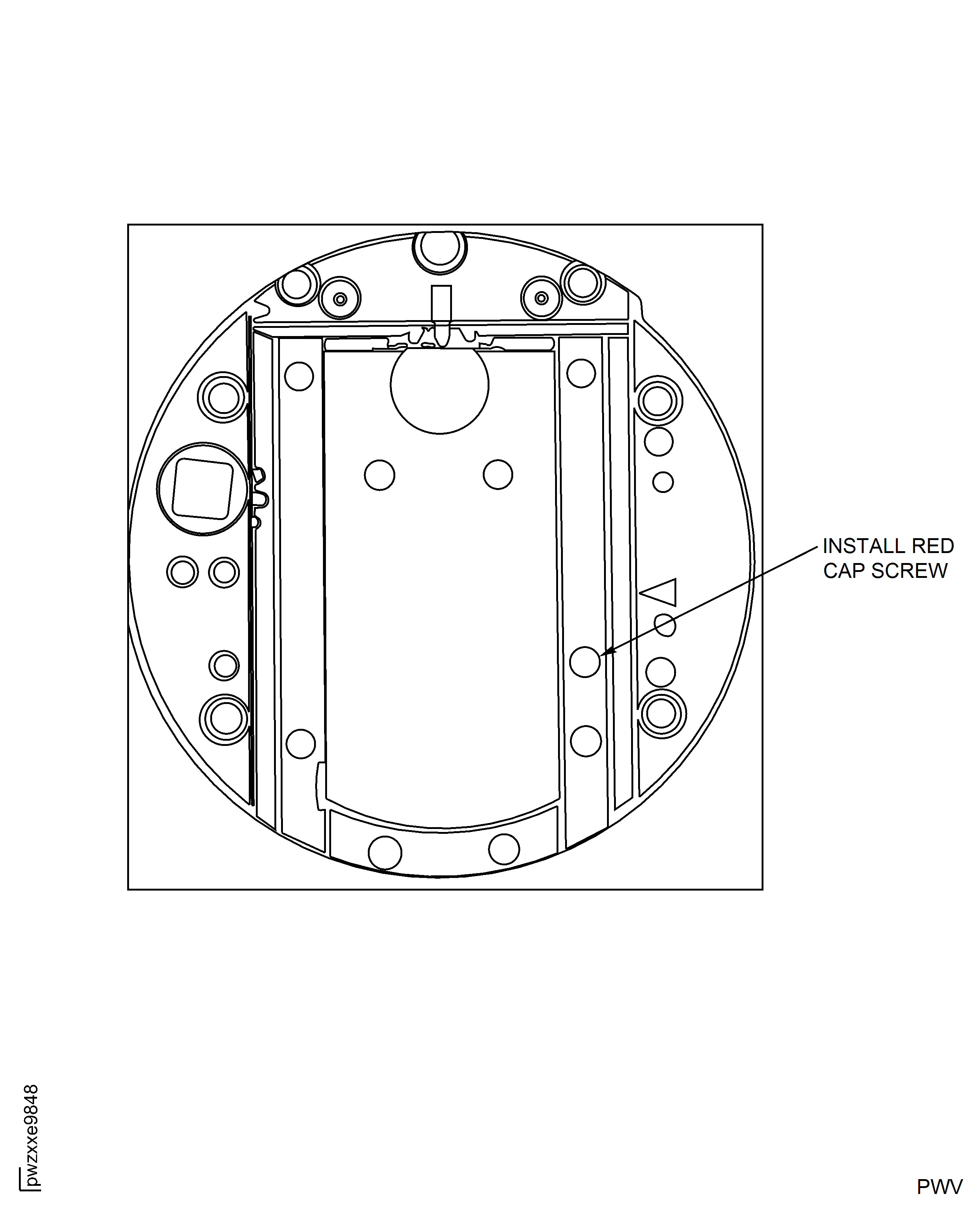
Using your hand, move the gearbox assembly rearward until the Front Gearbox stops against the "red" hold down screw.
NOTE
The extension and rack driver may be used for proper positioning.Remove the "red" hold down screw installed in Step.
WARNING
THE SLIDE MUST NOT MOVE. FAILURE TO HOLD THE SLIDE IN POSITION CAN ALLOW DAMAGE TO THE TOOL OR ROTOR ASSEMBLY.Using the extension and the rack turn the driver until the Production Front Gearbox aligns with the tapped holes on the slide.
Install the "red" hold down screw into Production Front Gearbox position.
NOTE
Do not tighten the red hold down screw.Re-install the Input Block.
Using the Three point sling remove the Main Tool Body from the Engine Bore Protector and the HP Compressor Rotor Assembly.
Remove the Engine Bore Protector from the HP Compressor Rotor Assembly.
SUBTASK 72-41-10-440-349 Disassemble and Remove the Tool from the HP Compressor Rotor Assembly
Figure: HP Compressor Rotor Joint Assembly
HP Compressor Rotor Joint Assembly
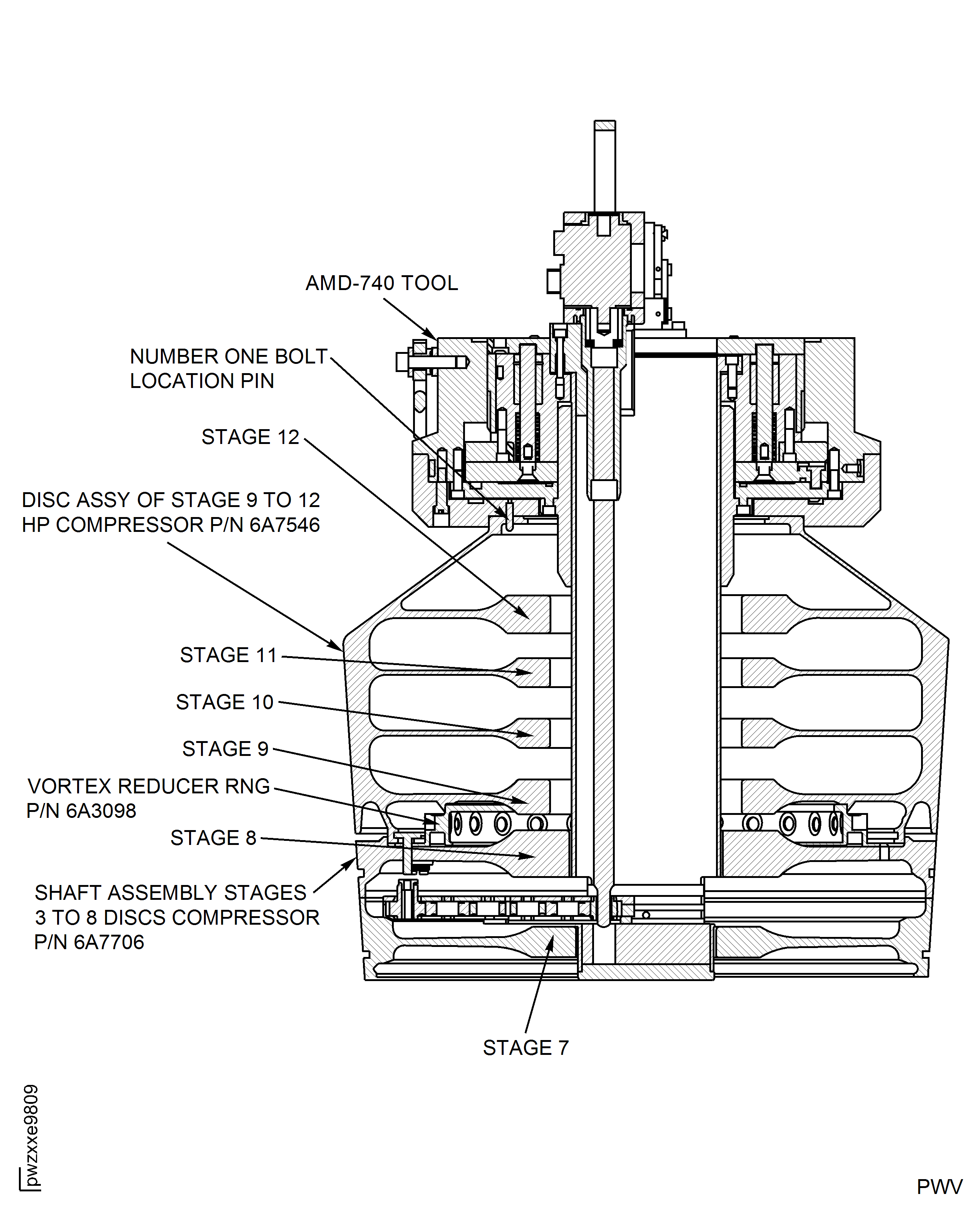
Figure: HP Compressor Rotor Joint Tooling IAE1P16616
HP Compressor Rotor Joint Tooling IAE1P16616
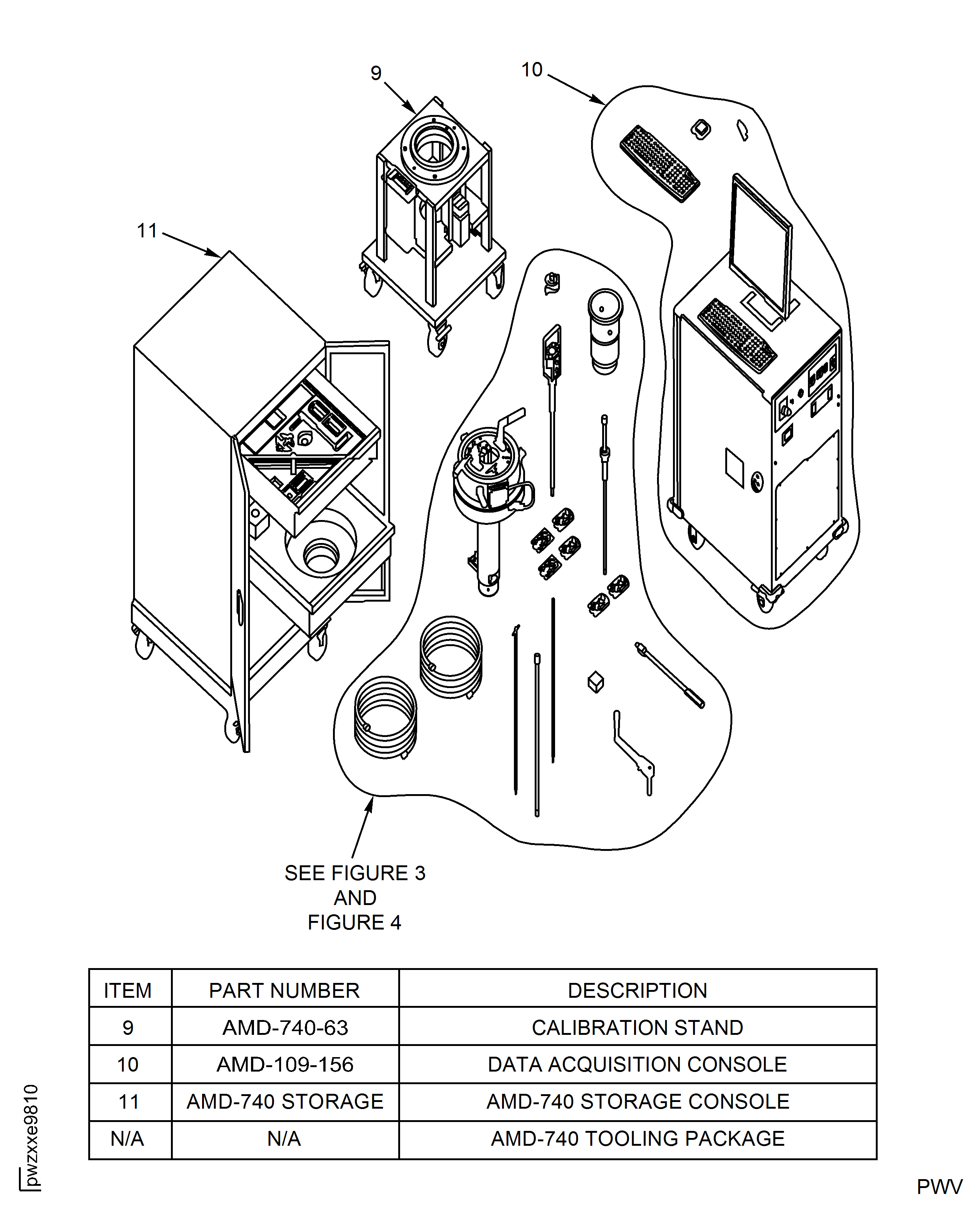
Figure: HP Compressor Rotor Joint Tooling IAE1P16616 (AMD-740 Storage Console Drawer #1)
HP Compressor Rotor Joint Tooling IAE1P16616 (AMD-740 Storage Console Drawer #1)
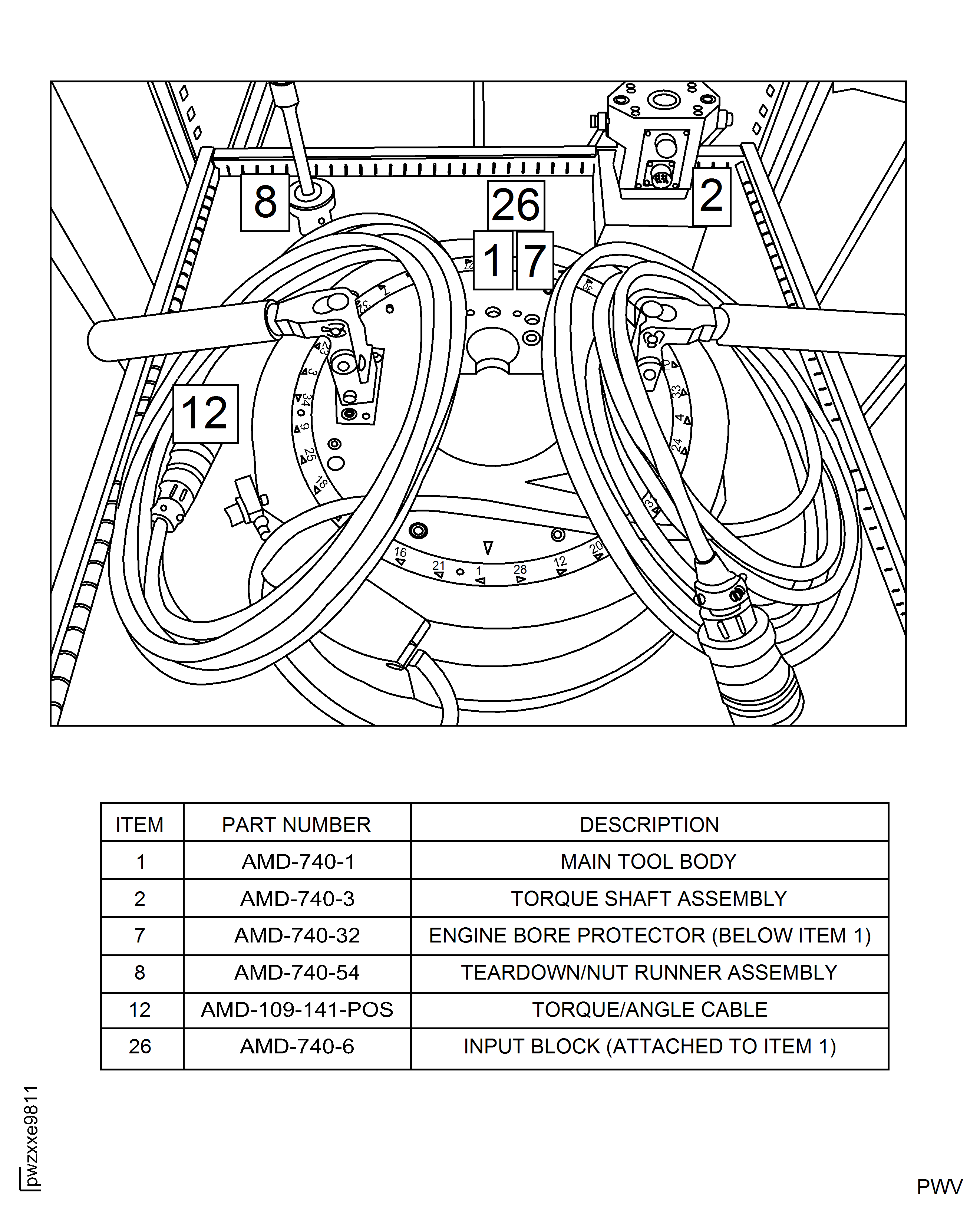
Figure: HP Compressor Rotor Joint Tooling IAE1P16616 (AMD-740 Storage Console Drawer #2)
HP Compressor Rotor Joint Tooling IAE1P16616 (AMD-740 Storage Console Drawer #2)
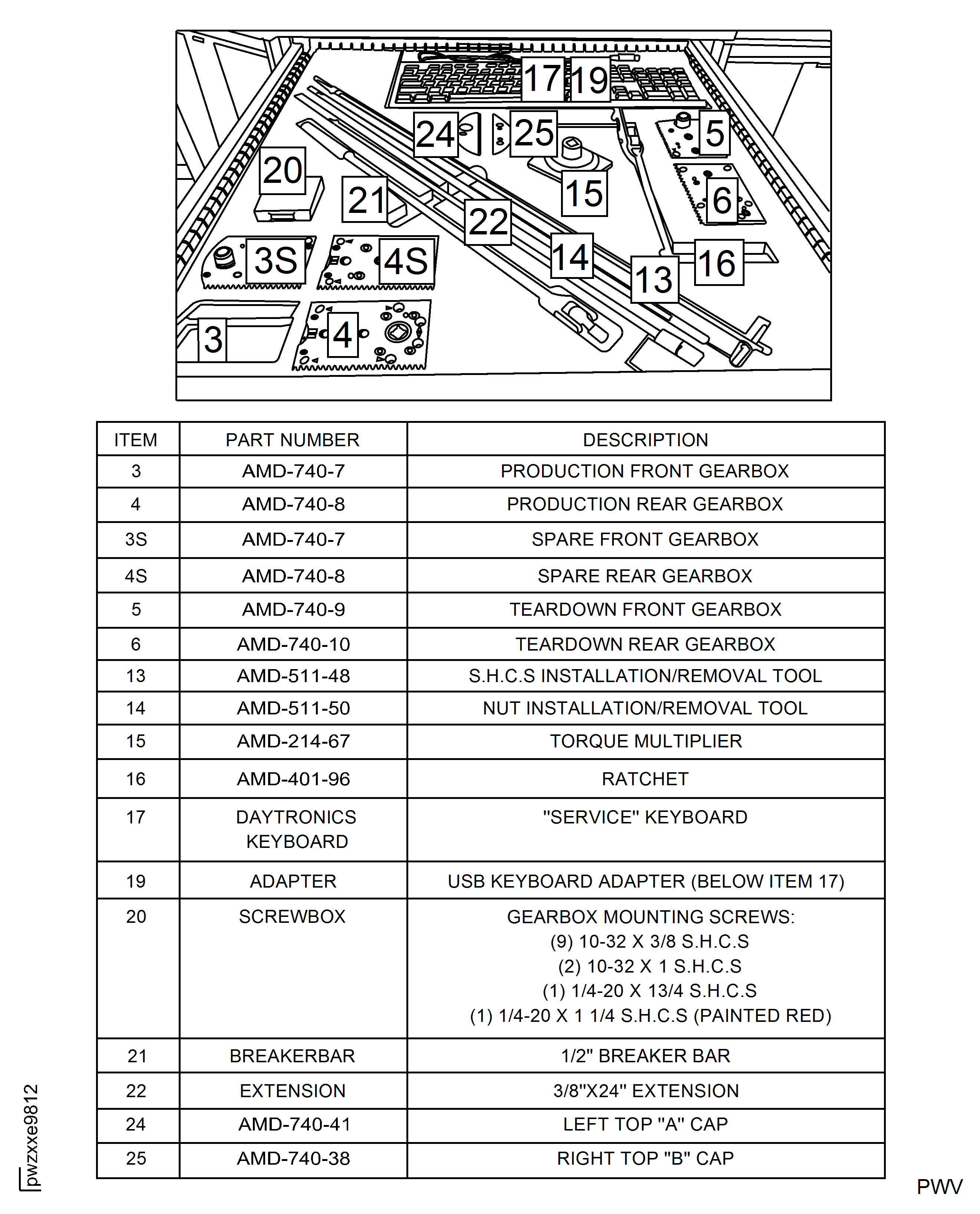
Figure: HP Compressor Rotor Joint Tooling IAE1P16616 (AMD-109-156)
HP Compressor Rotor Joint Tooling IAE1P16616 (AMD-109-156)
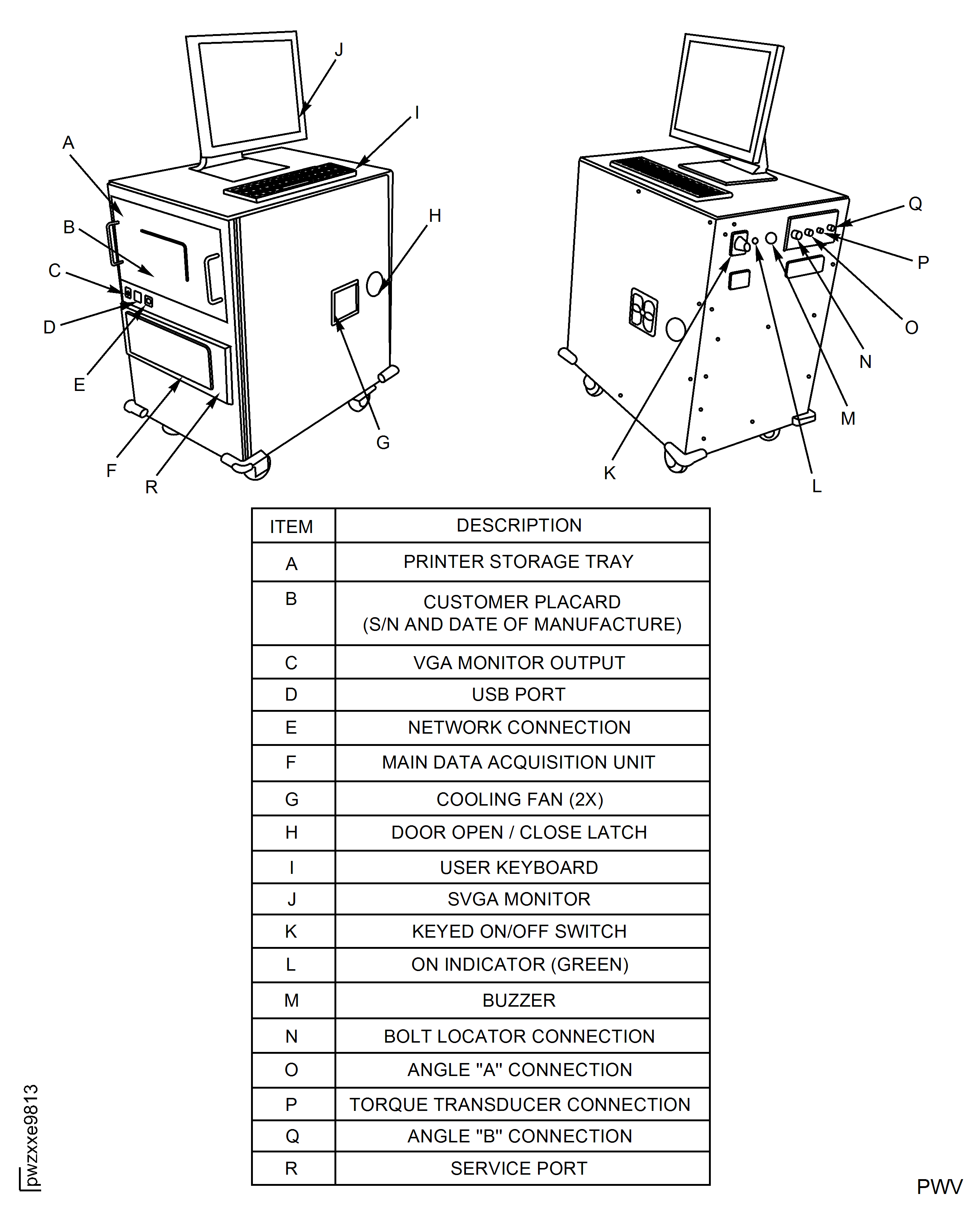
Figure: AMD-740-32 Engine Bore Protector
AMD-740-32 Engine Bore Protector
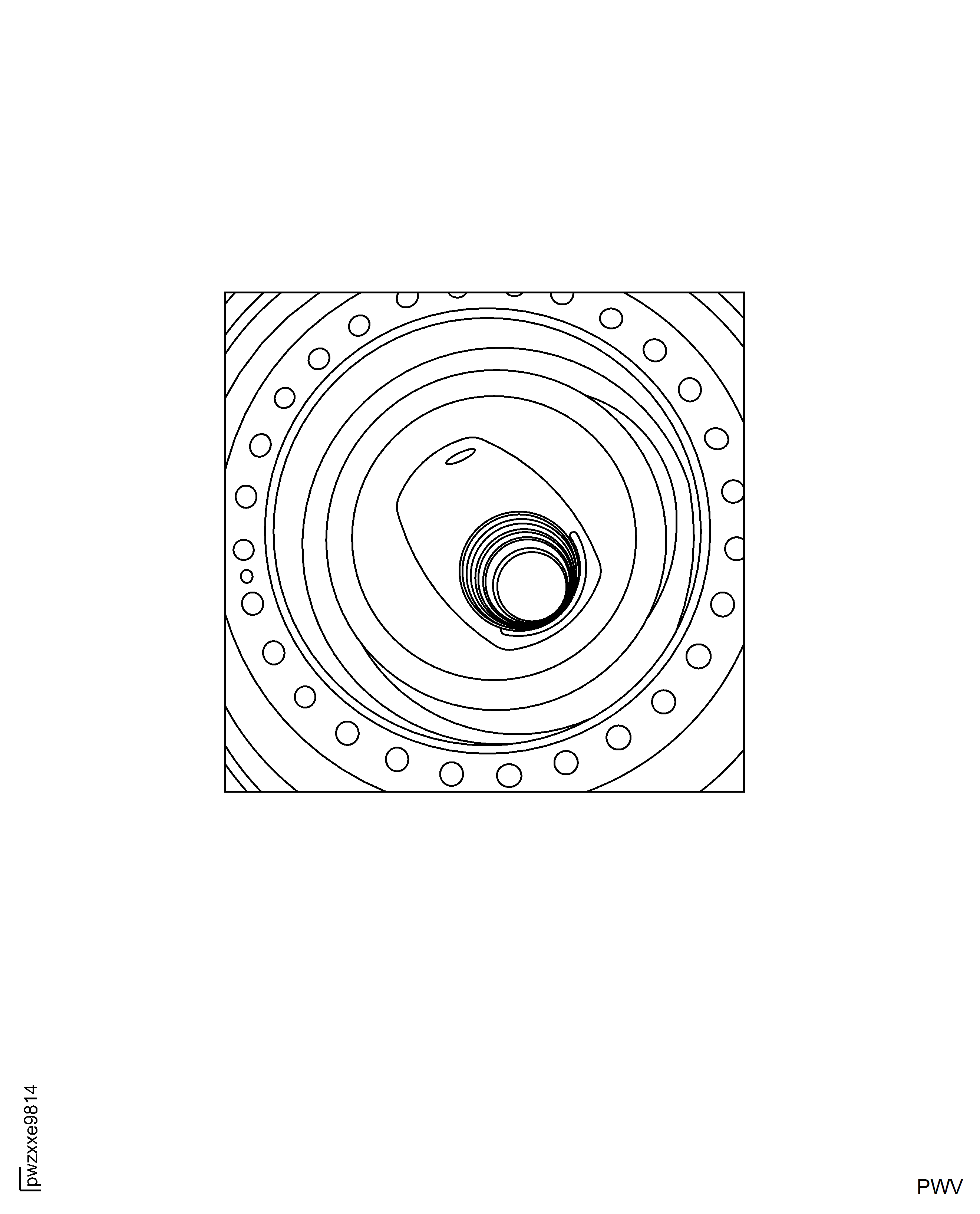
Figure: AMD-740-6 Input Block
AMD-740-6 Input Block
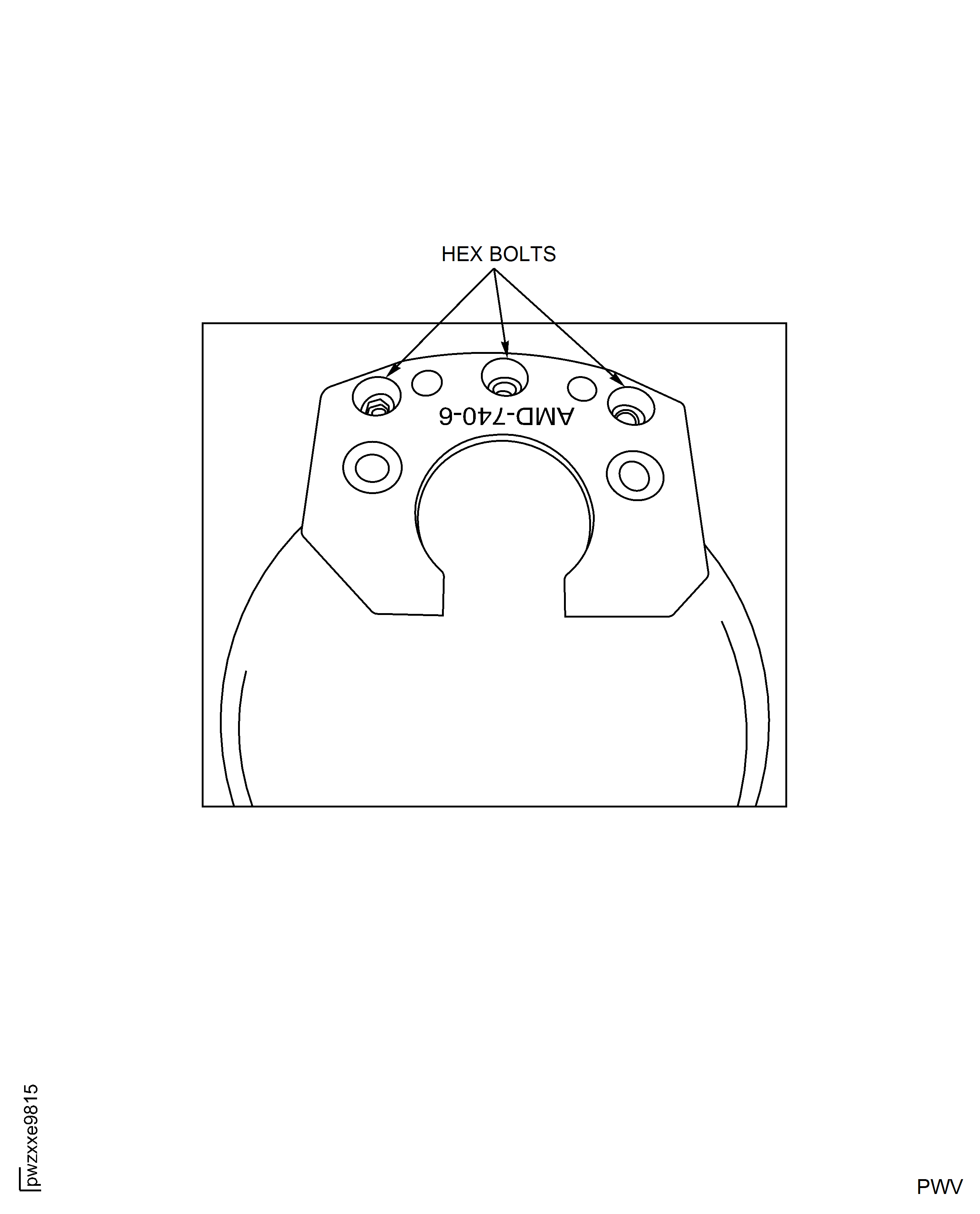
Figure: Production Front Gearbox
Production Front Gearbox
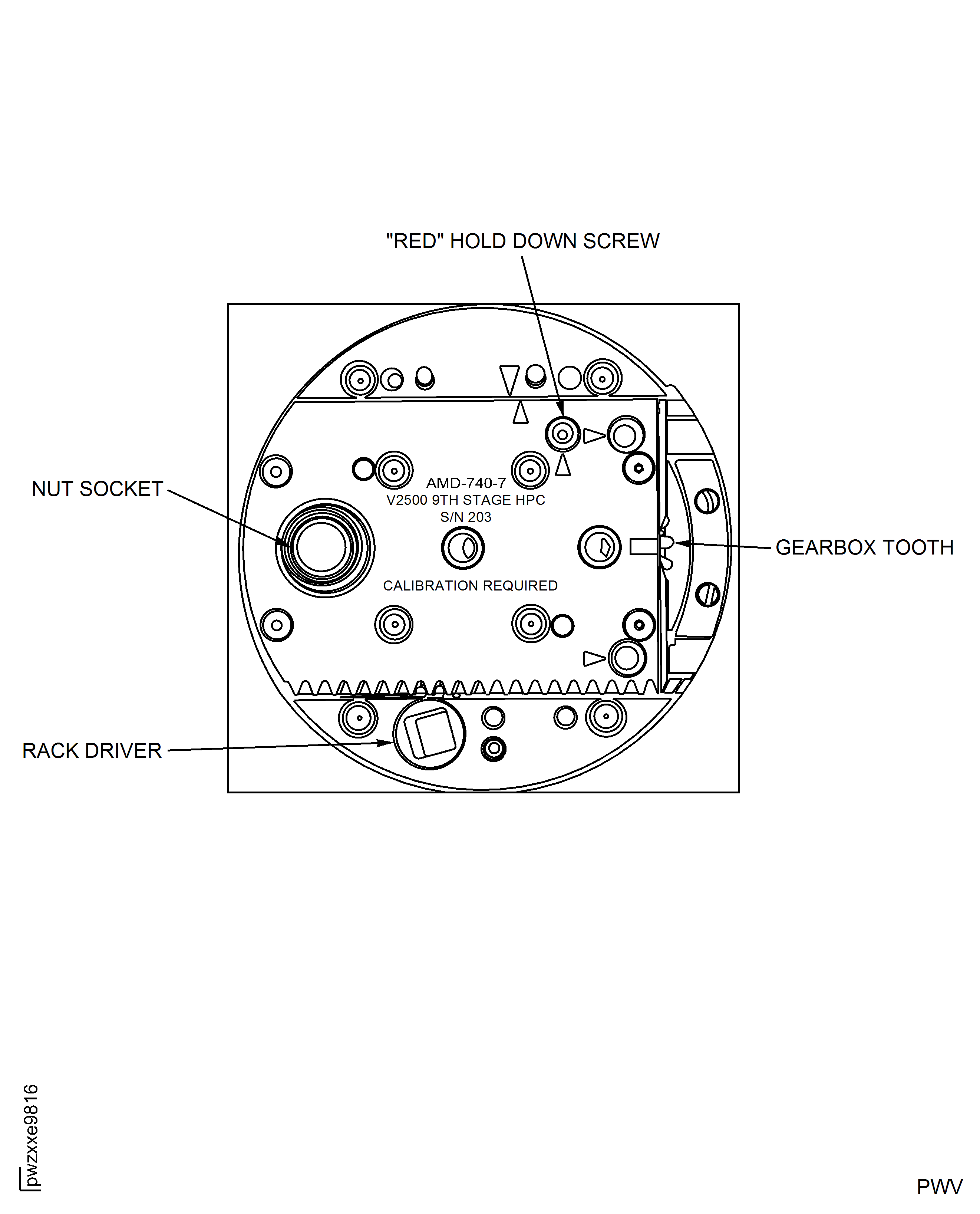
Figure: Align Gearbox Socket and Rack Driver
Align Gearbox Socket and Rack Driver
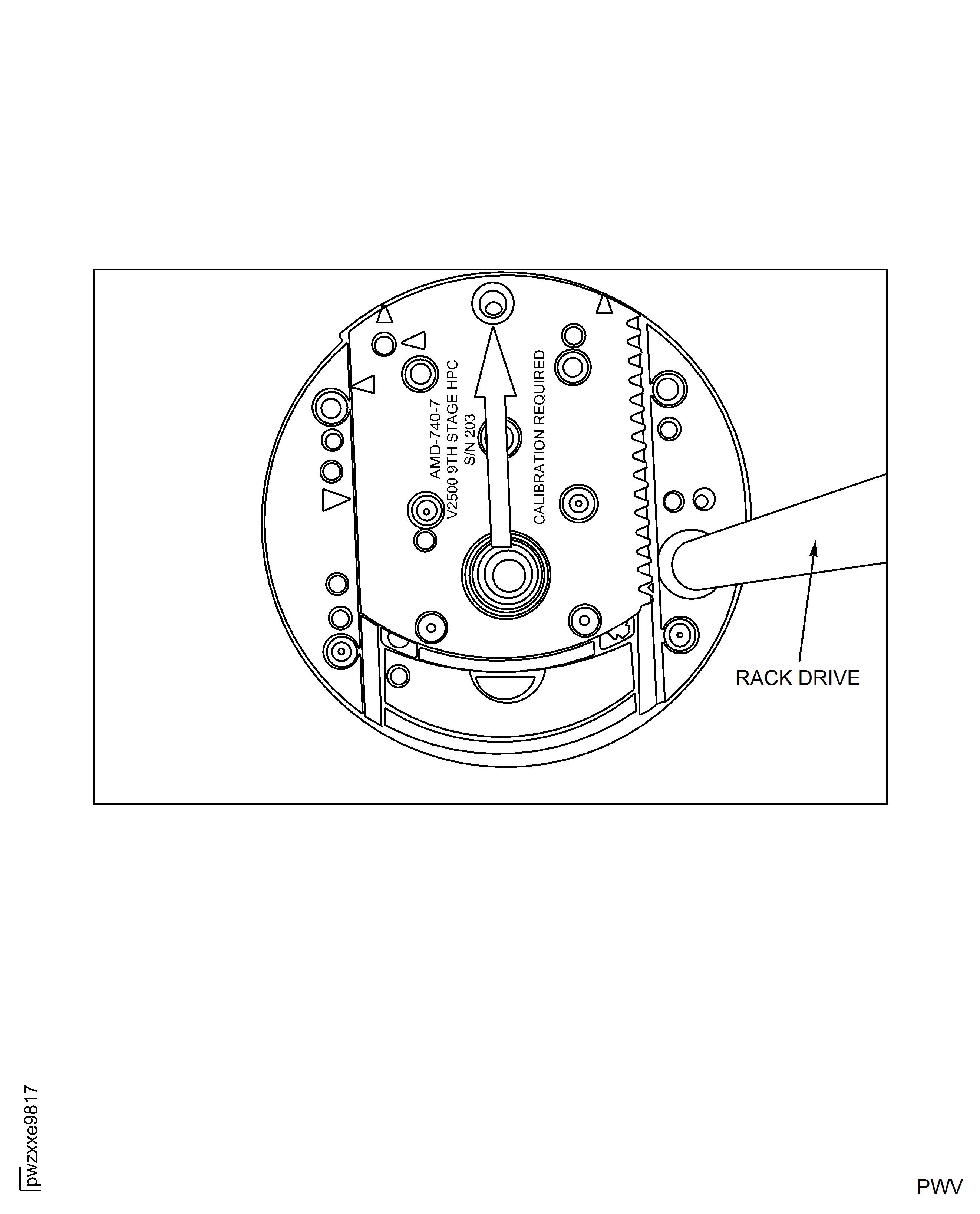
Figure: Production Front Gearbox Cap Screws
Production Front Gearbox Cap Screws
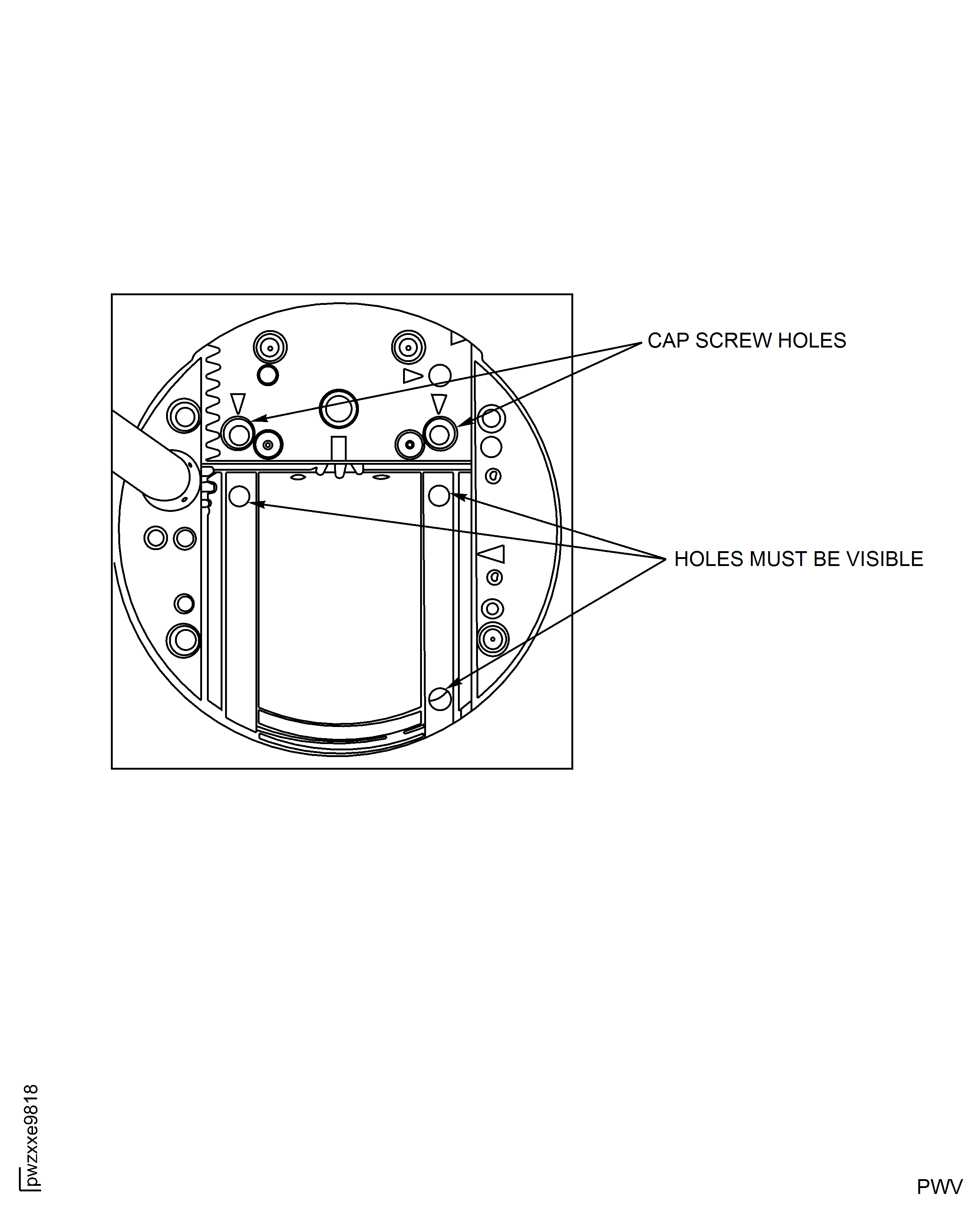
Figure: Production Front Gearbox Detent Position
Production Front Gearbox Detent Position
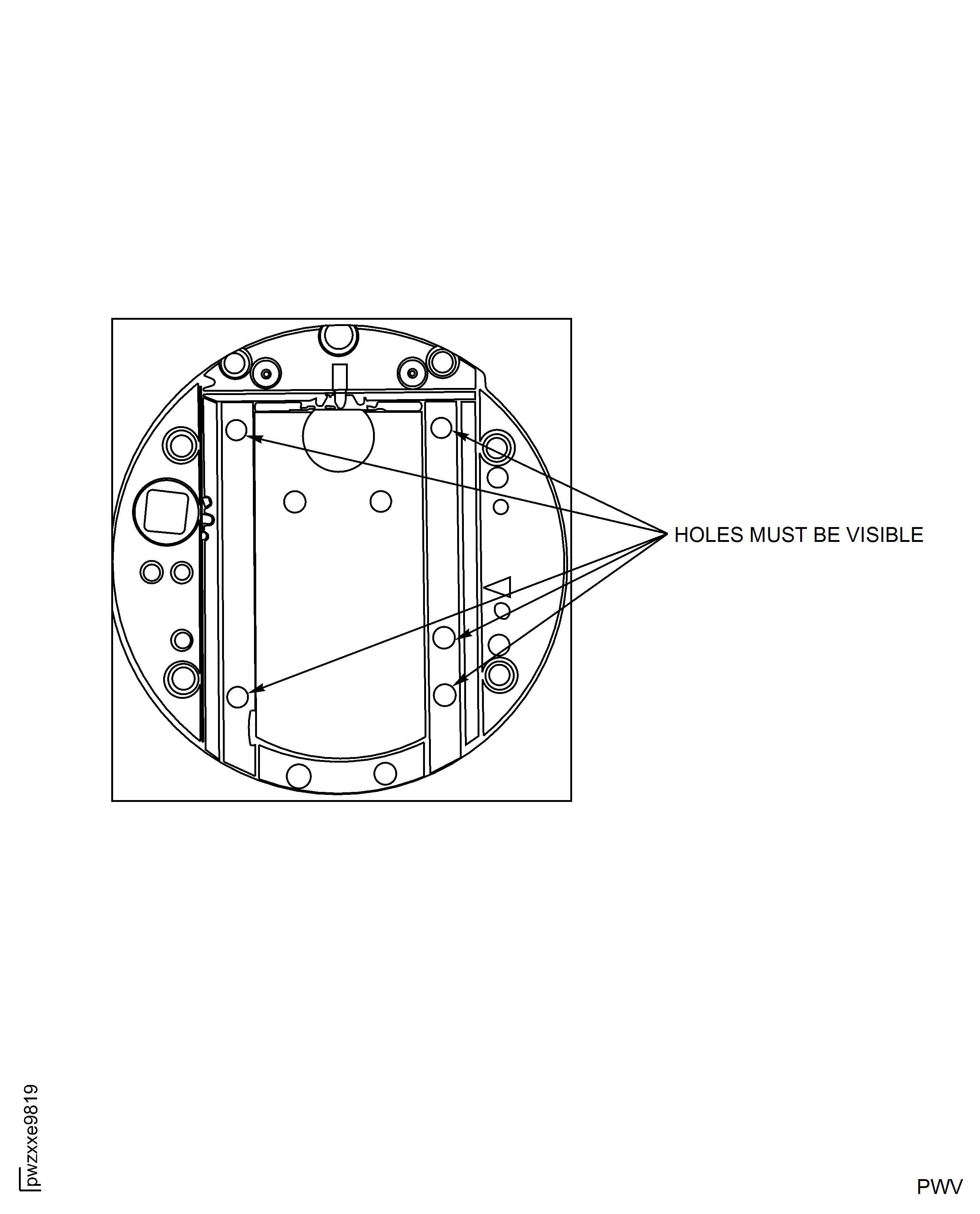
Figure: Production Rear Gearbox with Cap Screw
Production Rear Gearbox with Cap Screw
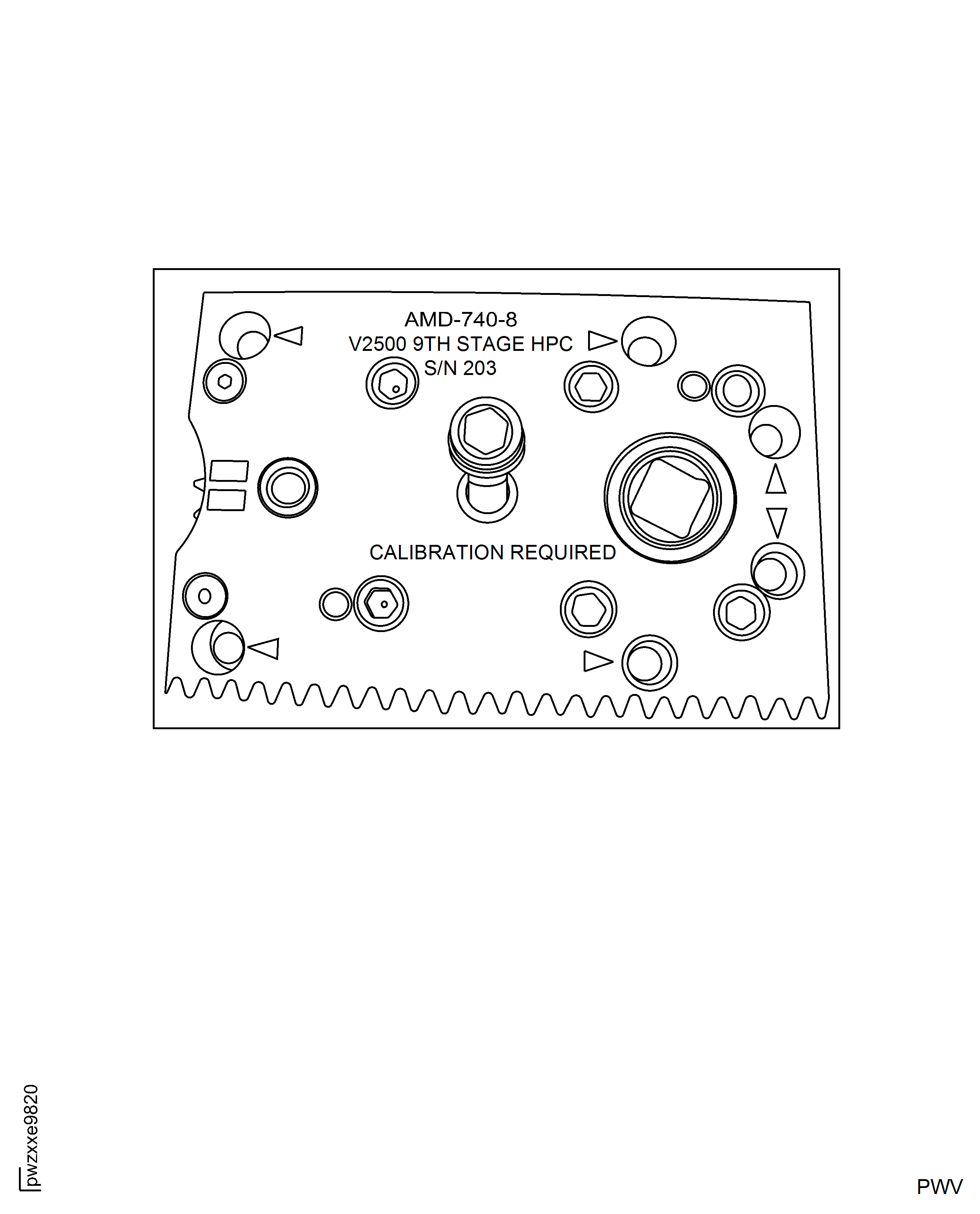
Figure: Production Rear Gearbox Installed in Main Tool Body
Production Rear Gearbox Installed in Main Tool Body
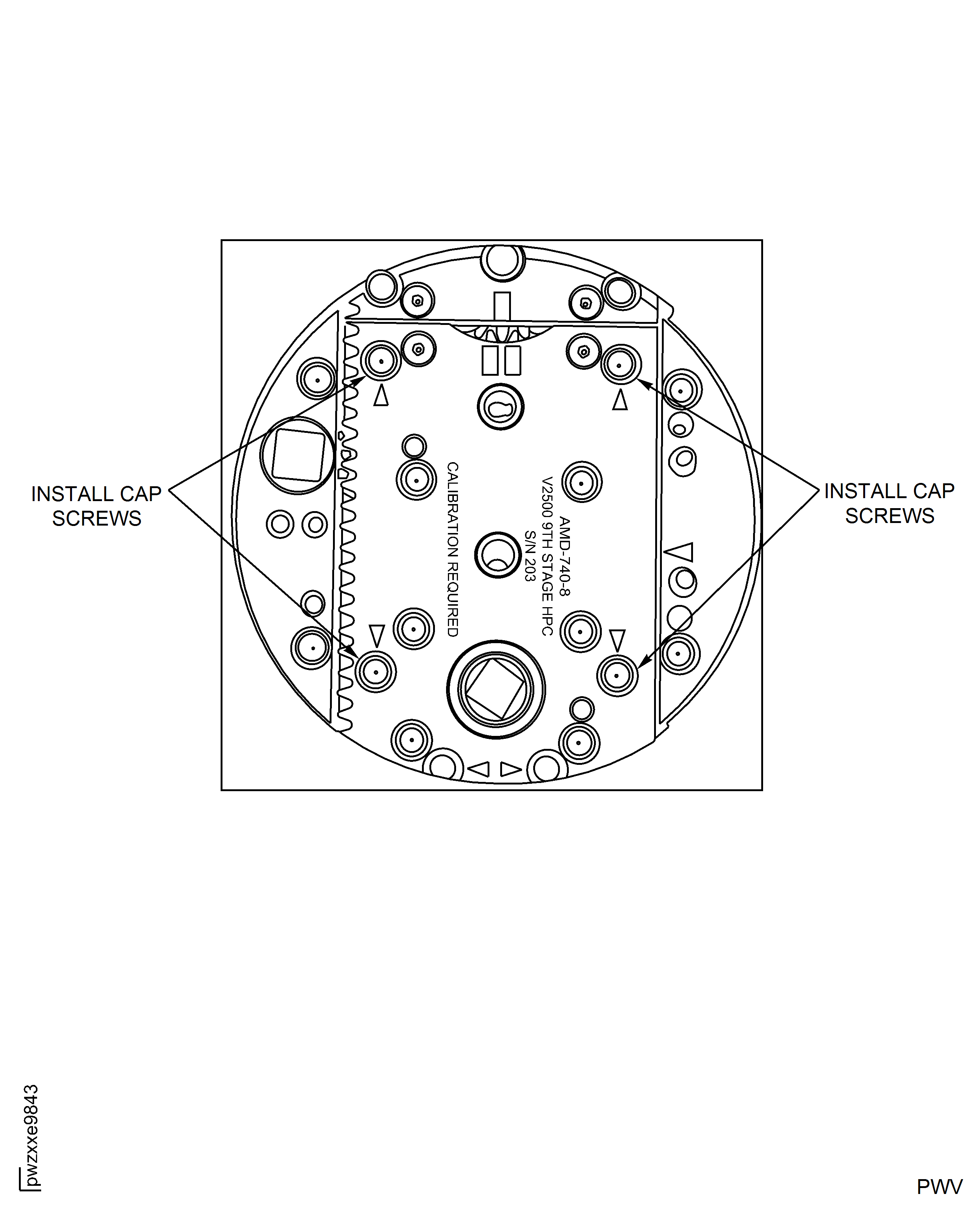
Figure: Production Gearbox Assembly - Full Travel Position
Production Gearbox Assembly - Full Travel Position
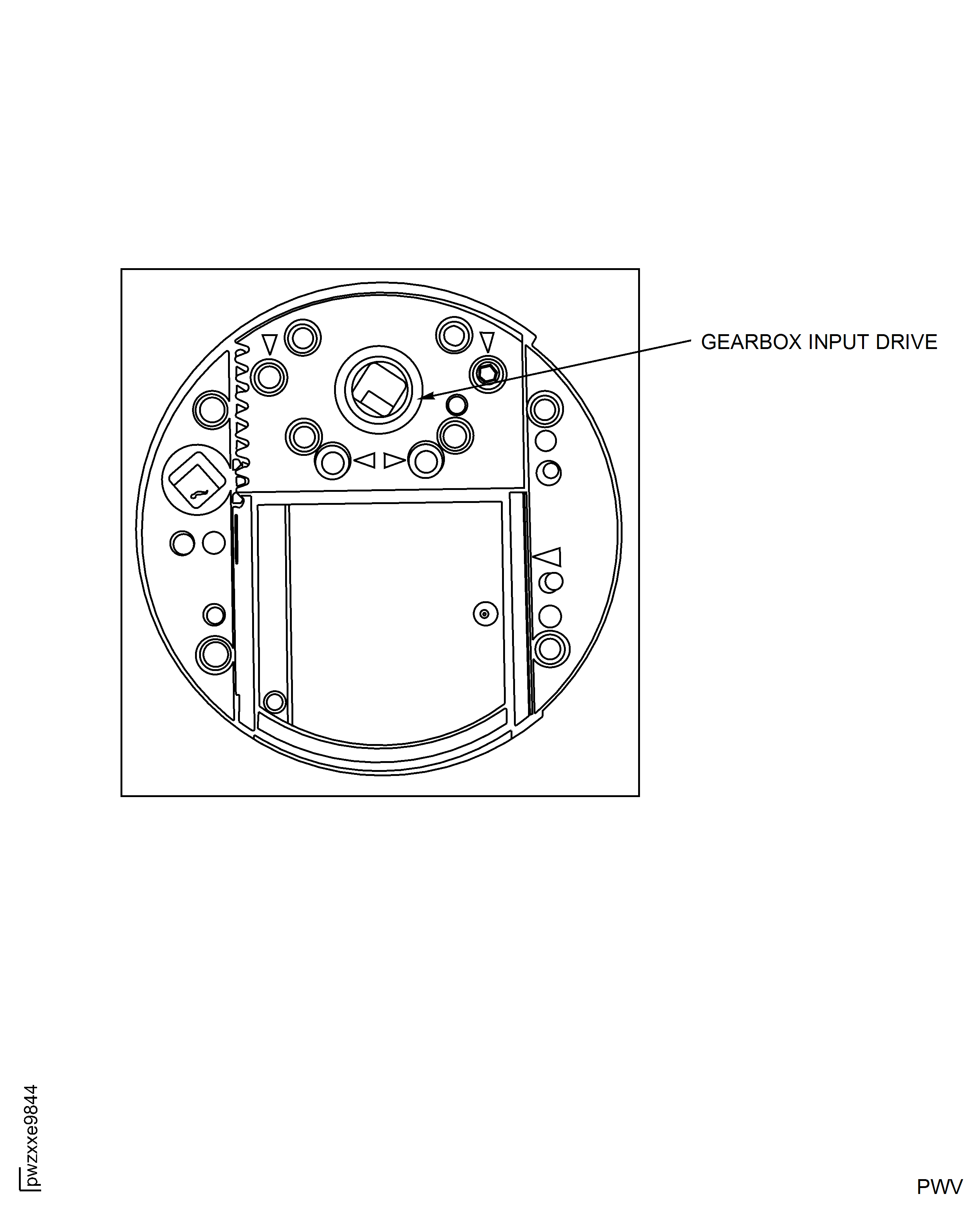
Figure: Top Caps
Top Caps
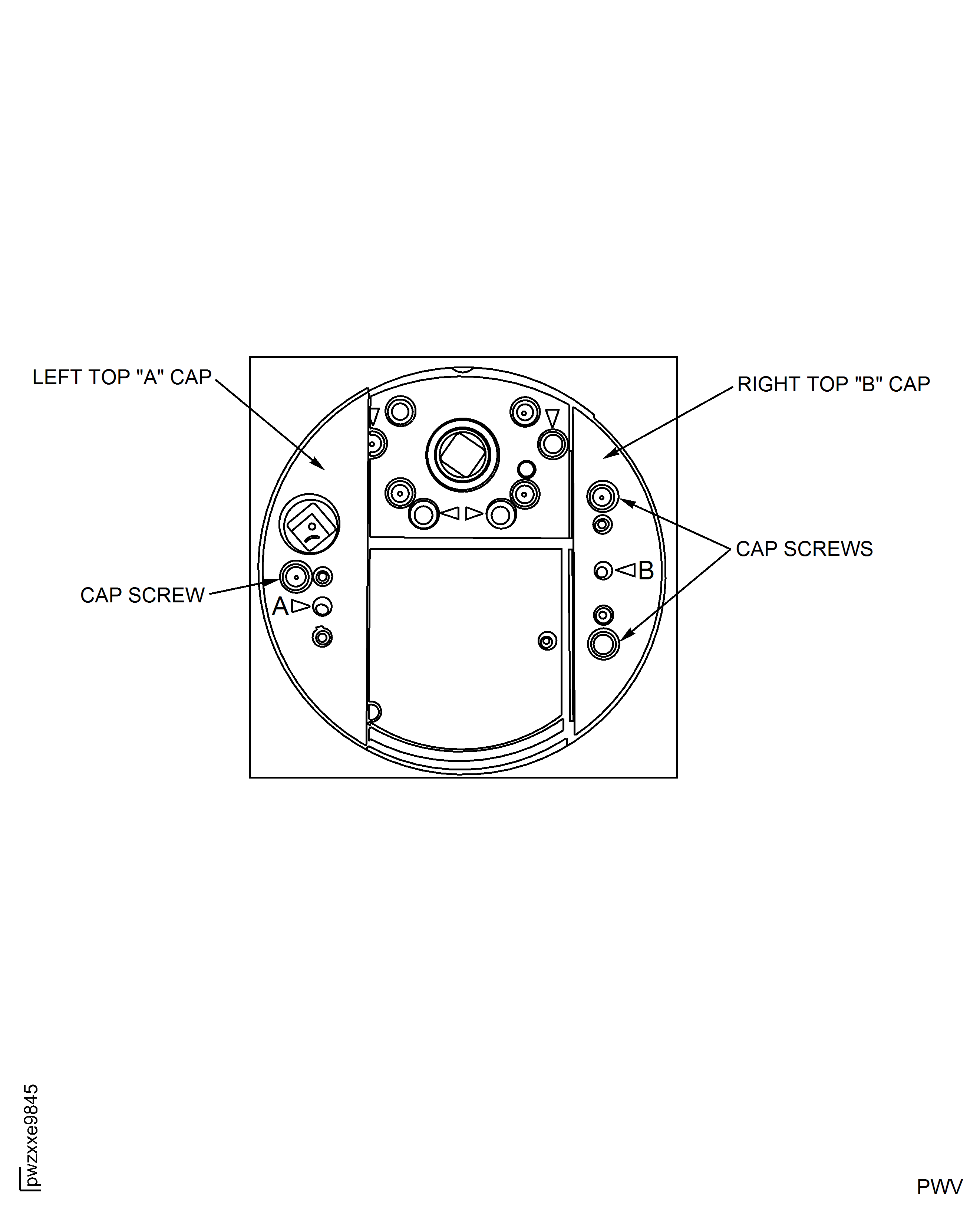
Figure: Final Torque Cap Screws
Final Torque Cap Screws
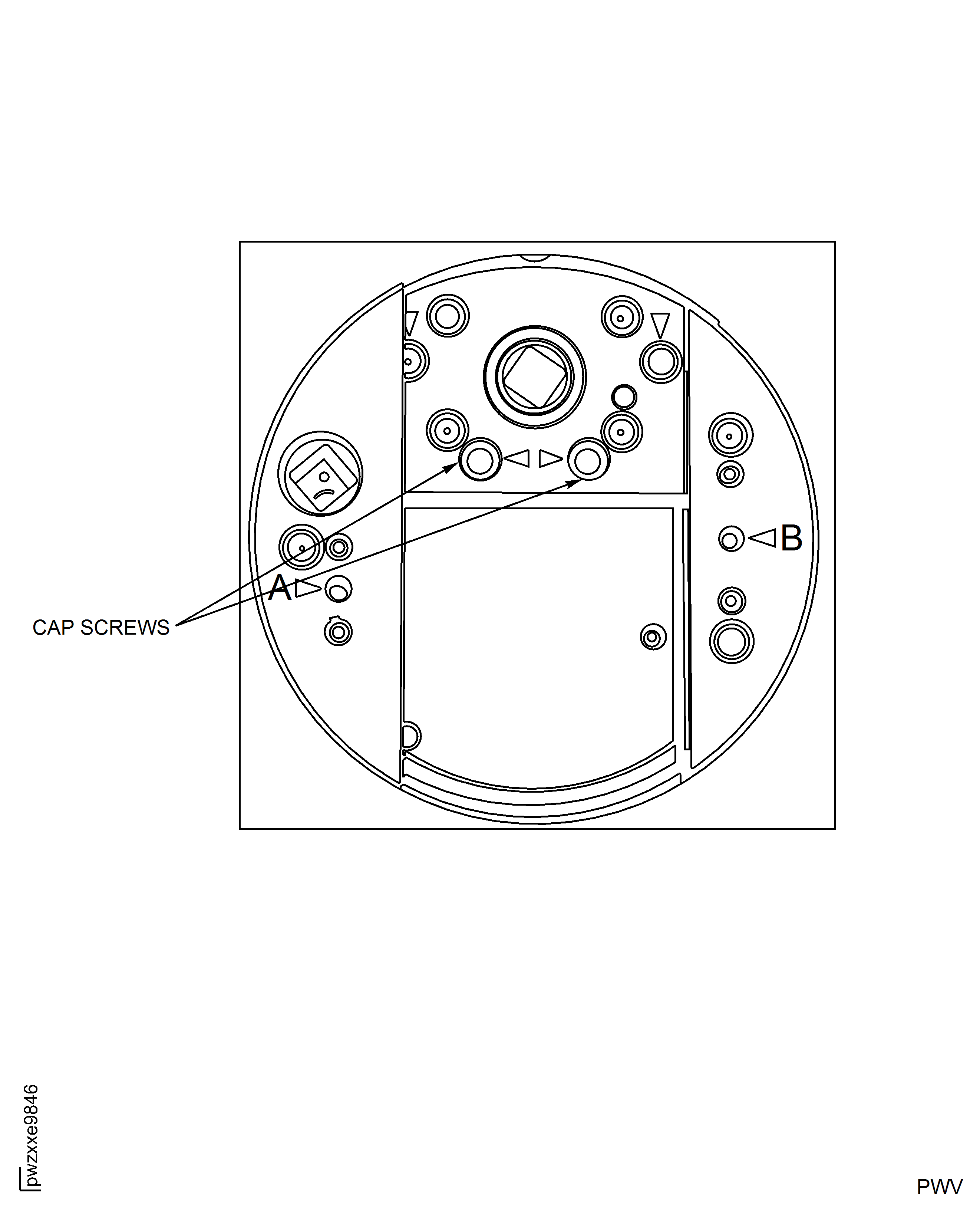
Figure: Main Tool Body Position Indicator
Main Tool Body Position Indicator
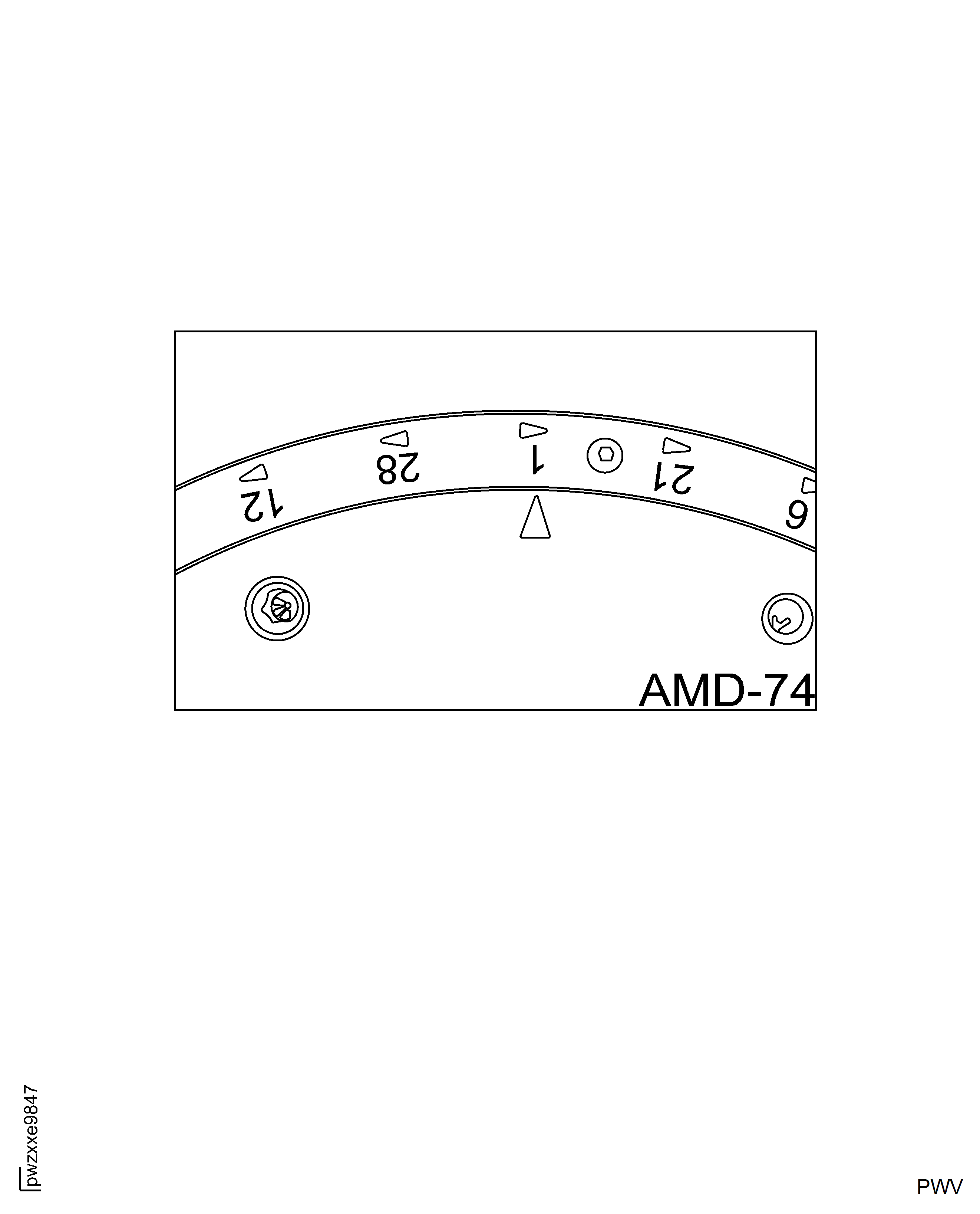
Figure: Dissasembly "Red" Hold Down Screw
Dissasembly "Red" Hold Down Screw