TASK 72-32-80-440-001-A00 LPC Assembly - Assemble The LPC Cases And Vanes To The Rotor Assembly, Assembly-001

DMC:V2500-A1-72-32-8000-00A-710A-B|Issue No:002.00|Issue Date:2013-11-01

Export Control

EAR Export Classification: Not subject to the EAR per 15 C.F.R. Chapter 1, Part 734.3(b)(3), except for the following Service Bulletins which are currently published as EAR Export Classification 9E991: SBE70-0992, SBE72-0483, SBE72-0580, SBE72-0588, SBE72-0640, SBE73-0209, SBE80-0024 and SBE80-0025.

Copyright

© IAE International Aero Engines AG (2001, 2014 - 2021) The information contained in this document is the property of © IAE International Aero Engines AG and may not be copied or used for any purpose other than that for which it is supplied without the express written authority of © IAE International Aero Engines AG. (This does not preclude use by engine and aircraft operators for normal instructional, maintenance or overhaul purposes.).

Applicability

V2500-A1

Common Information

TASK 72-32-80-440-001-A00 LPC Assembly - Assemble The LPC Cases And Vanes To The Rotor Assembly, Assembly-001

General

This TASK gives the procedure to assemble the LP compressor booster stage assembly.

There are two types of the vertical sling in this TASK

- If you use IAE 1J13203 LPC Vertical sling (method 1), select the method 1.

- If you use IAE 1J12213 LPC Vertical sling, select the method 2.

Fig/item numbers in parentheses in the procedure agree with those used in the IPC. Only the primary Fig/item numbers are used. For the service bulletin alpha variants refer to the IPC.

For all parts identified in a different Chapter/Section/Subject, the applicable Chapter/Section/Subject comes before the Fig/item number.

For standard torque data and procedures refer to the SPM TASK 70-41-00-400-501 and SPM TASK 70-41-01-400-501.

Special torque data and assembly tolerances are included in the procedure.

Lubricate all threads and abutment faces of nuts and bolts with CoMat 10-077 APPROVED ENGINE OILS, unless other lubricants are referred to in the procedure.

The number for each radial location must be identified in a clockwise direction. These start at the engine top position when you look from the rear of the engine, unless stated differently in the procedure.

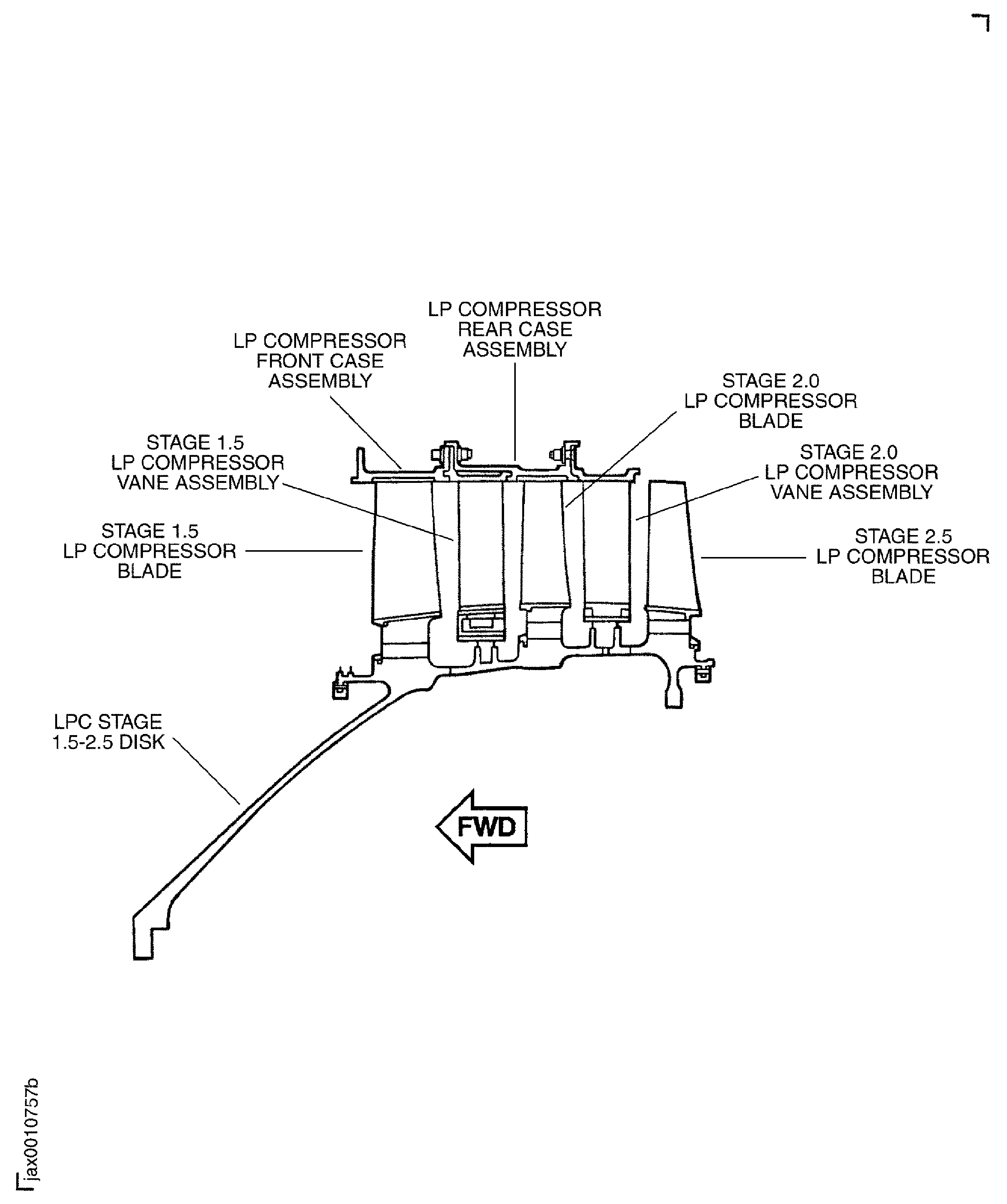
Refer to Figure for the sectional view of an LP compressor (booster) stage assembly.

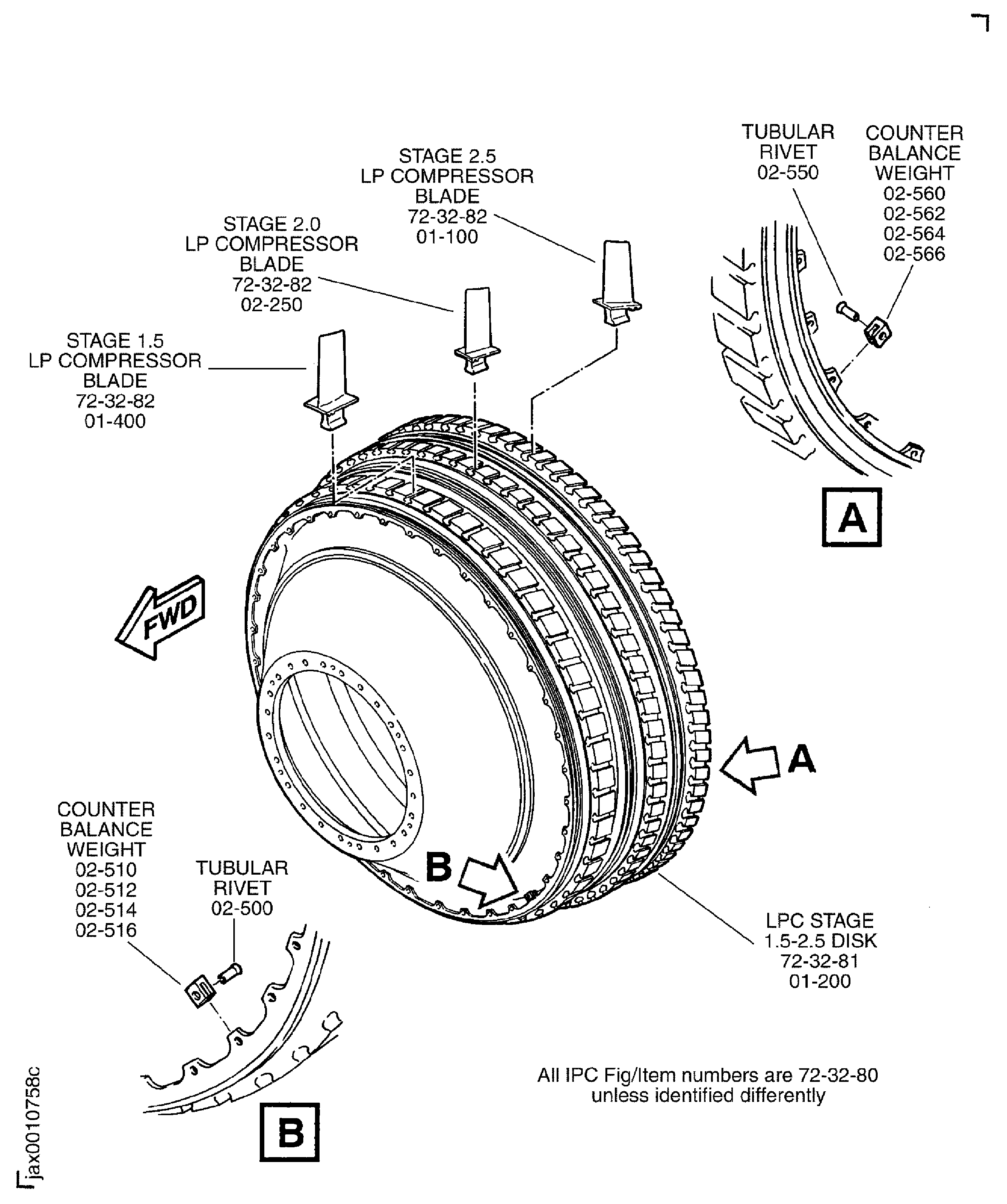
Refer to Figure for the view of the LP compressor stage 1.5, 2 and 2.5 disk and blades.

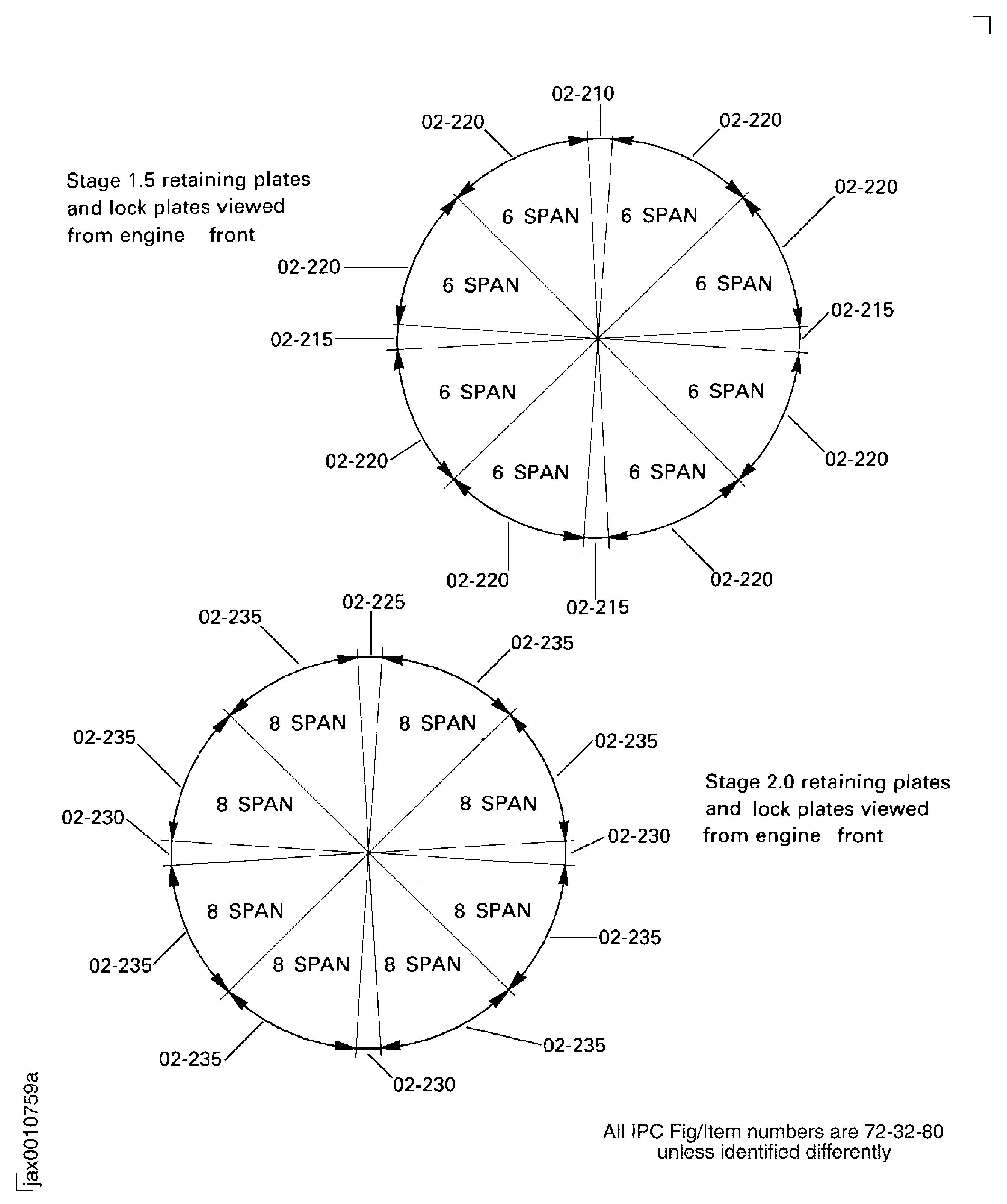
Refer to Figure for positions of the stage 1.5 and 2 retaining plates and locknuts.

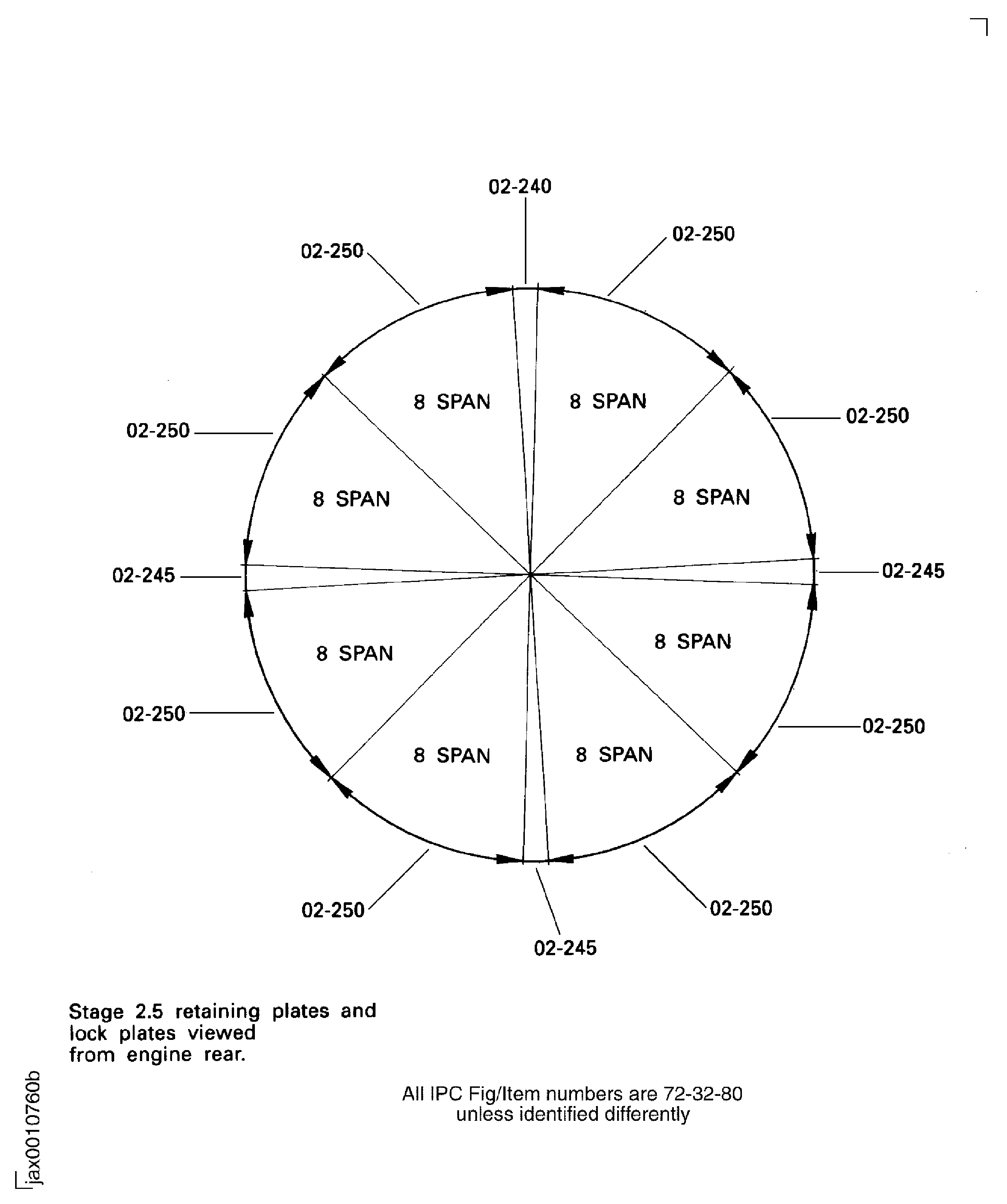
Refer to Figure.or positions of the stage 2.5 retaining plates and lockplates.

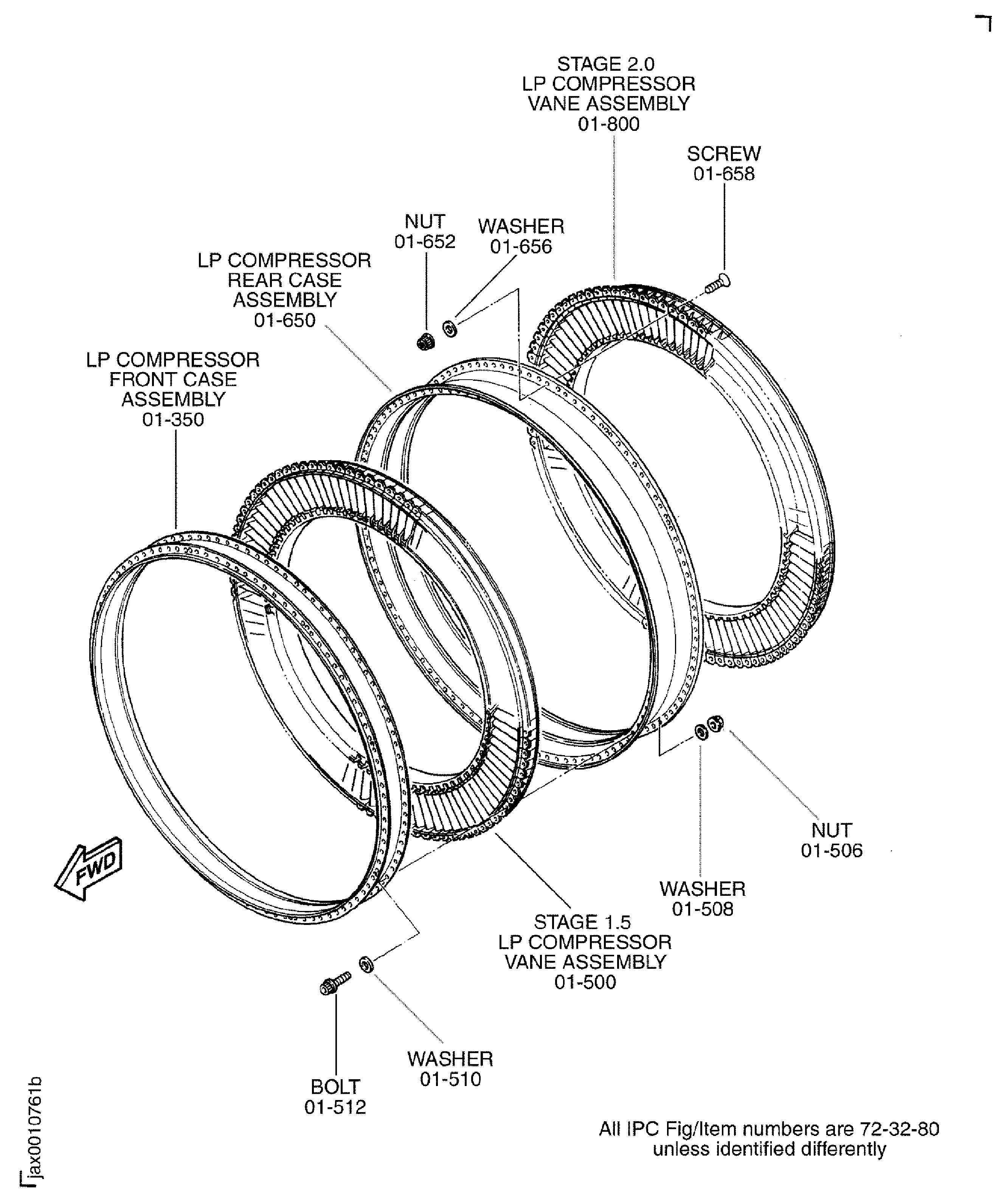
Refer to Figure.or a view of the LP compressor stage 1.5 and 2 vanes.

NOTE

To identify the consumable materials refer to the PCI.

NOTE

Special tools are identified in the procedure by the tool primary number.

Preliminary Requirements

Pre-Conditions

NONE

Support Equipment

NameManufacturerPart Number / IdentificationQuantityRemark
Dynamic balancing machineLOCALSchenck HL-5U

or equivalent

IAE 1J12213 LPC Vertical sling0AM53IAE 1J122131
IAE 1J12399 Handling sling0AM53IAE 1J123991
IAE 1J13107 Holding support0AM53IAE 1J131071
IAE 1J13109 0AM53 heater0AM53IAE 1J131091
IAE 1J13111 LPC storage stand0AM53IAE 1J131111
IAE 1J13103 Vertical sling0AM53IAE 1J131031
IAE 1J13203 LPC Vertical sling (method 1)0AM53IAE 1J132031
IAE 1J13204 Vertical work stand0AM53IAE 1J132041
IAE 1J13205 Balance arbor0AM53IAE 1J132051
IAE 1J13206 Horizontal work stand0AM53IAE 1J132061
IAE 1J13207 Balance cover and fixture0AM53IAE 1J132071
IAE 1J13208 Transport stand0AM53IAE 1J132081
IAE 1J12188 Puller bolt0AM53IAE 1J121881
IAE 1J12507 Guide pin0AM53IAE 1J125071
IAE 1F10052 Two cables sling0AM53IAE 1F100521
IAE 1J13209 Riveter0AM53IAE 1J132091
IAE 1J13210 LPC holding block0AM53IAE 1J132101
IAE 6F10027 Heater control unit0AM53IAE 6F100271

Consumables, Materials and Expendables

NameManufacturerPart Number / IdentificationQuantityRemark
CoMat 01-124 ISOPROPYL ALCOHOLLOCALCoMat 01-124
CoMat 04-004 JOINTING COMPOUND, LIGHT GRADELOCALCoMat 04-004
CoMat 06-069 MARKERIE207CoMat 06-069
CoMat 10-077 APPROVED ENGINE OILSLOCALCoMat 10-077

Spares

NameManufacturerPart Number / IdentificationQuantityRemark
Stage 1.5 single span adjusting lock plate1
Stage 2.0 single span adjusting lock plate1
Stage 2.5 single span adjusting lock plate1
Stage 1.5 single span lock plate3
Stage 2.0 single span lock plate3
Stage 2.5 single span lock plate3

Safety Requirements

NONE

Procedure

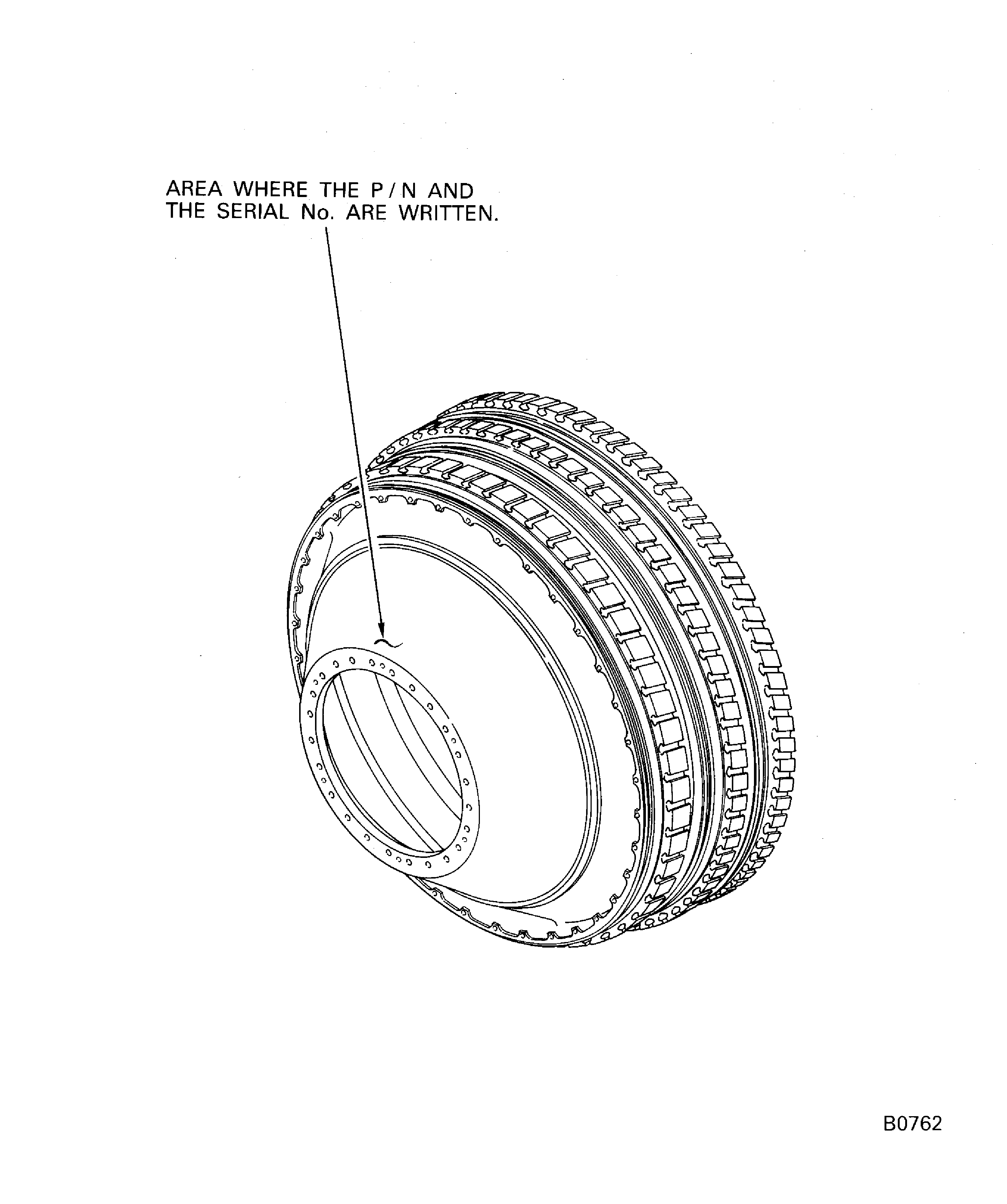
    1. SUBTASK 72-32-80-440-094 Identify the LP Compressor Booster Stage Assembly (Sub-Module)

    2. Refer to Figure.

    3. Find the sub-module number and serial number written on the shaft surface of the LPC stage 1.5, 2 and 2.5 disc assembly.

      NOTE

      The sub-module number follows the letter "SUB-MODULE". The serial number is adjacent to the sub-module number.
    4. Make sure that the assembly (sub-module) is correctly identified with the sub-module number and serial number and is correct for the build procedures.

      1. If the sub-module number and serial number are not written, write them on the specified area on the LP compressor booster stage assembly.

        1. Write the sub-module number and serial number on the specified area with electrochemical etching. Refer to the SPM TASK 70-09-00-400-501 for mark procedure.

        2. Write letters SUB MODULE and the sub-module number. The sub-module number must follow letters SUB MODULE.

        3. Write the serial number adjacent to the sub-module number mark.

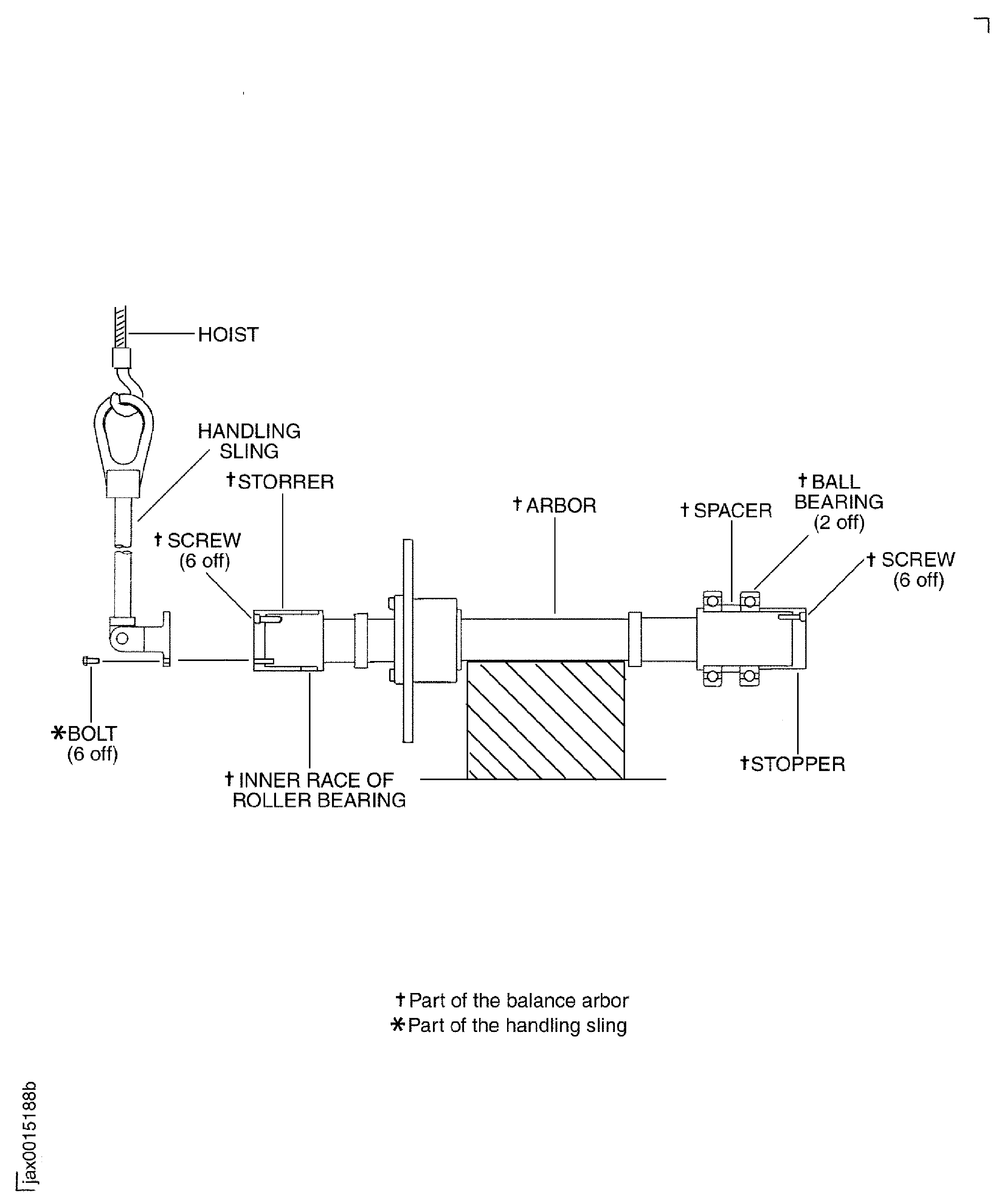
    1. SUBTASK 72-32-80-440-051 Preparation for the Installation of the LP Compressor Stage 1.5, 2 and 2.5 Disk (LPC Disk) (72-32-81,01-200) on to Balance Arbor

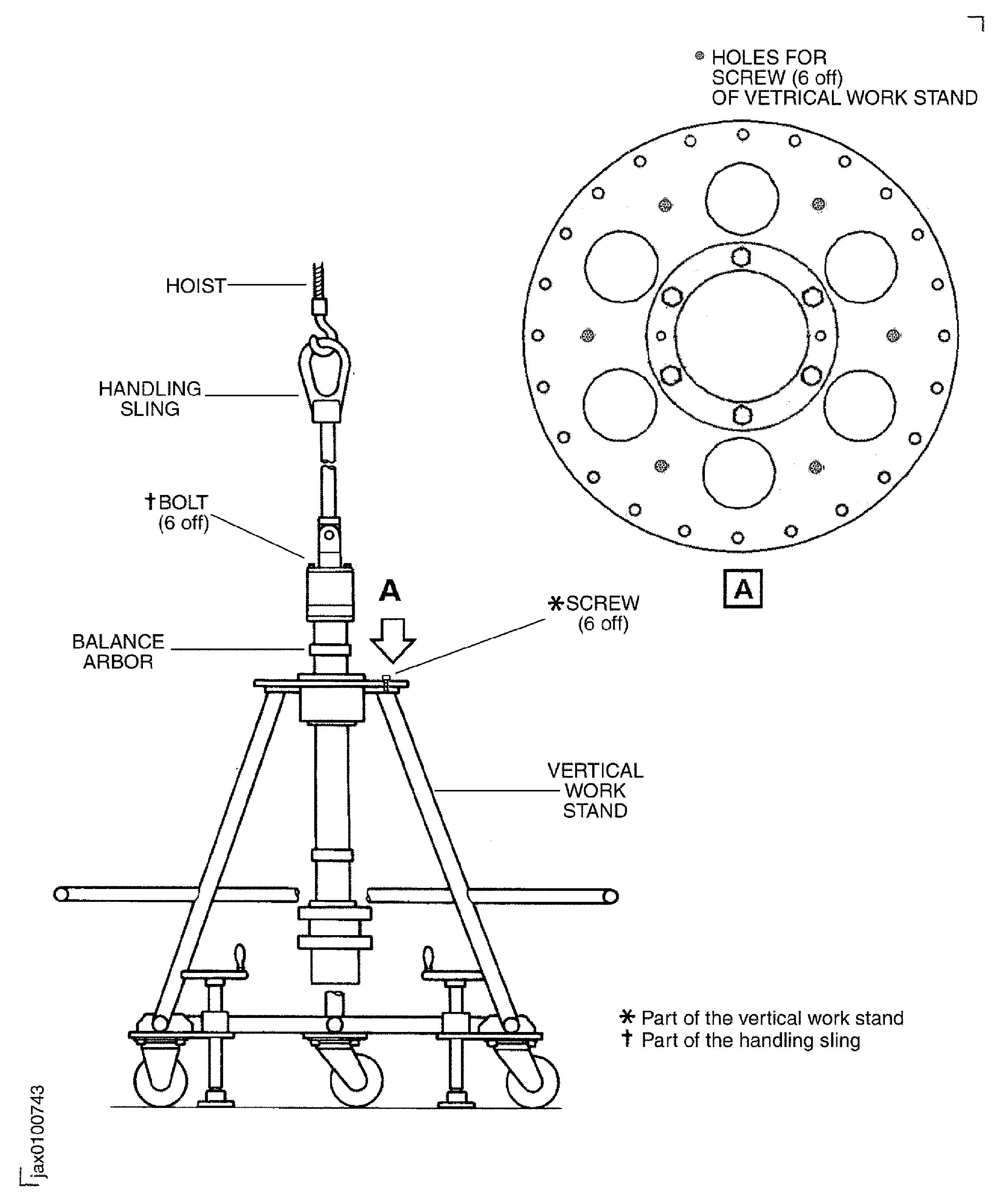
    2. Refer to Figure and Figure.

    3. Increase the temperature of the two ball bearings (part of the balance arbor) and the inner race of the roller bearing (part of the balance arbor) in the oven. Set the temperature of the oven approximately 250 deg F (120 deg C) and keep the bearings for 20 minutes.

    4. Remove the two ball bearings and the inner race of the roller bearing from the oven.

      1. Install the bearings on to the arbor (part of the balance arbor).

      2. Install one of the ball bearings on to the long shaft end of the arbor.

      3. Install the spacer (part of the balance arbor) on to the ball bearing.

      4. Install the other ball bearing on to the spacer.

      5. Install the stopper (part of the balance arbor) on to the bearing.

      6. Safety the stopper with the six screws (part of the balance arbor).

      7. Install the inner race of the roller bearing on to the short shaft end of the arbor.

      8. Install the stopper (part of the balance arbror) on to the bearing.

      9. Safety the stopper with the six screws (part of the balance arbor).

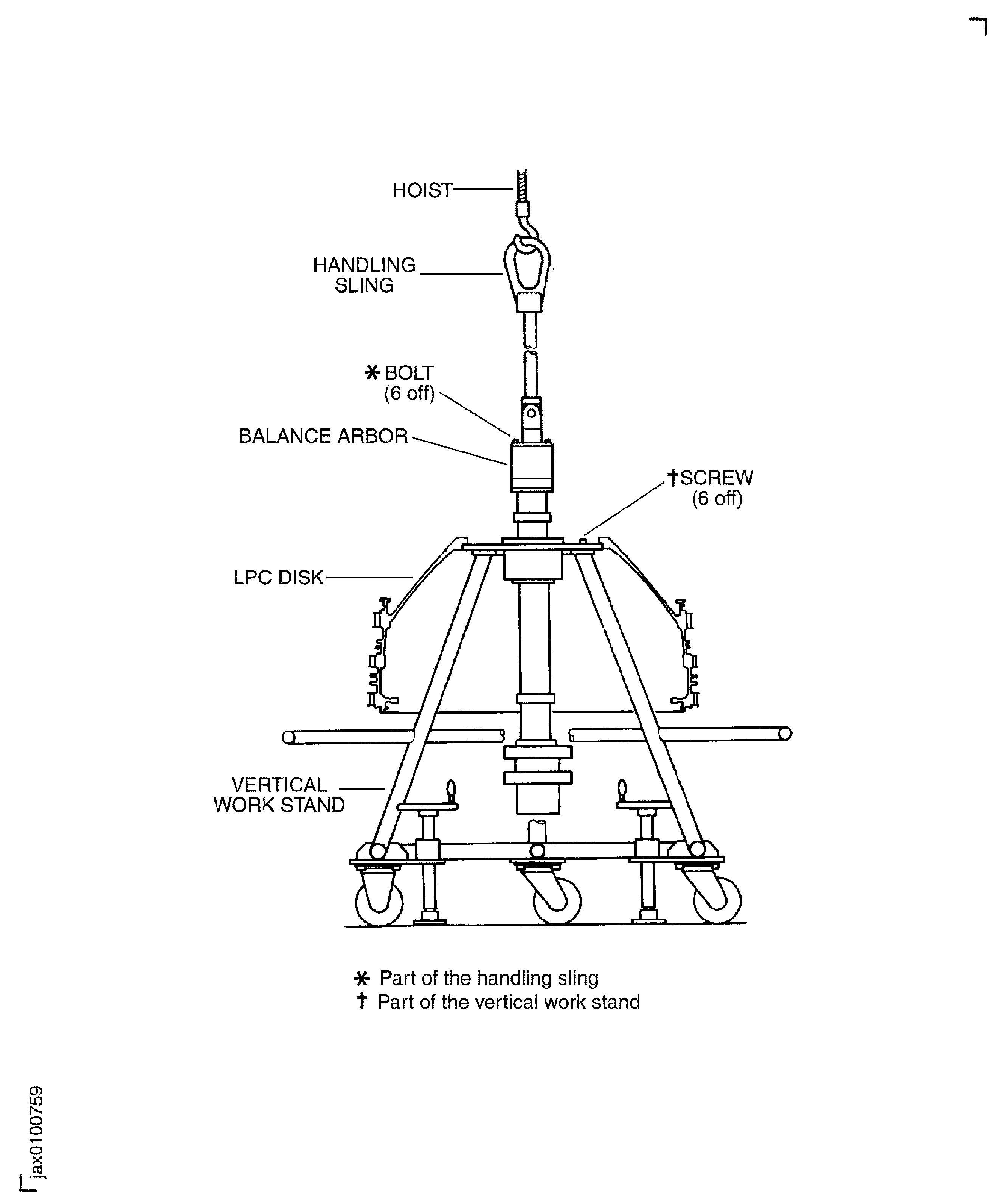
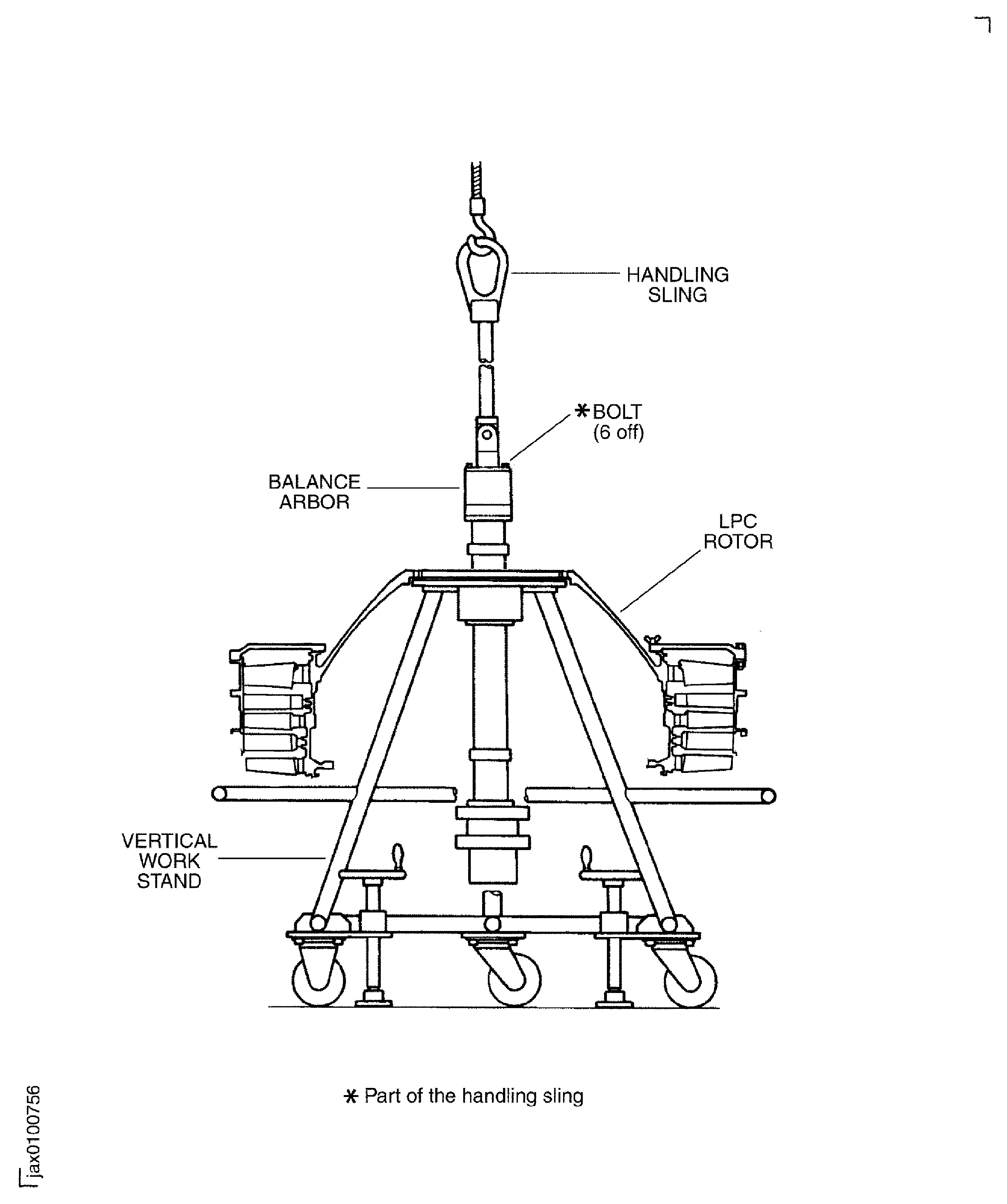
      1. Install the balance arbor to the vertical work stand.

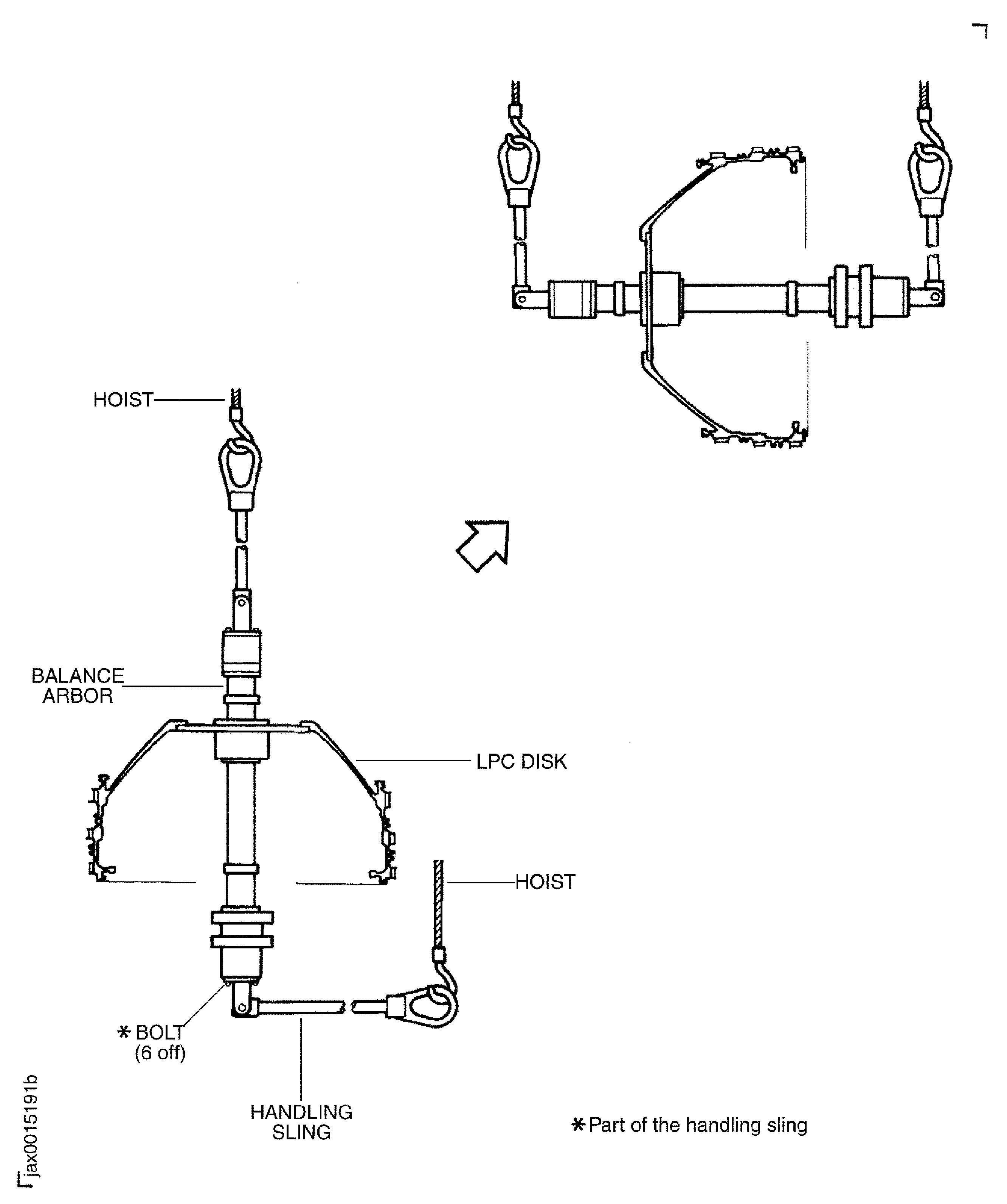
      2. Install the handling sling (part of the handling sling set) on to the short shaft end of the balance arbor and safety with the six bolts (part of the handling sling). Tighten the six bolts.

      3. Attach a hoist to the sling and lift and transfer the balance arbor to the vertical work stand.

      4. Slowly lower the balance arbor.

      5. Install the balance arbor on the vertical work stand with the six screws (part of the vertical work stand).

      6. Remove the six bolts which attach the handling sling to the balance arbor. Remove the handling sling from the balance arbor.

      7. Remove the hoist from the handling sling.

    1. SUBTASK 72-32-80-440-052 Install the LPC Disk on to the Balance Arbor

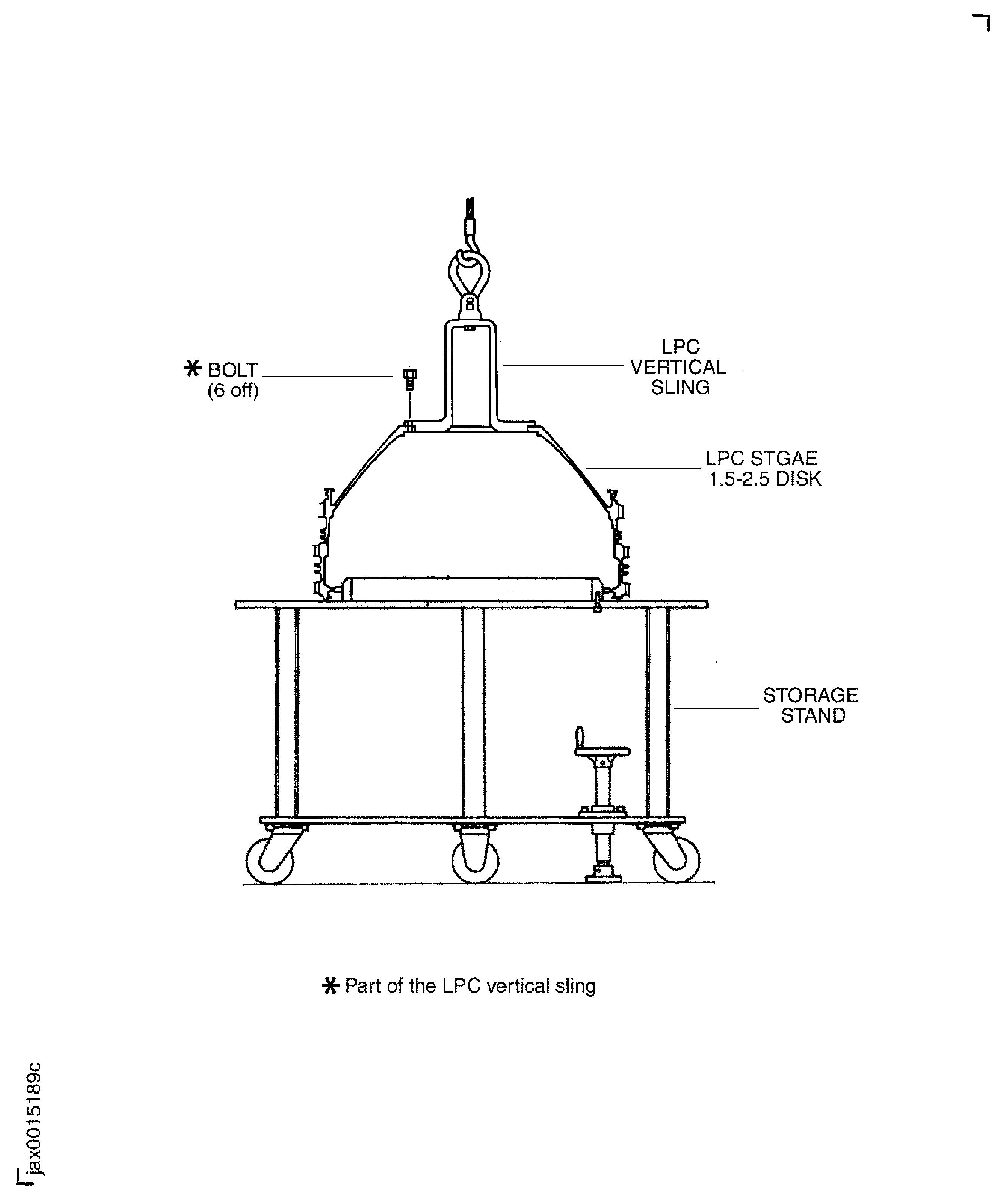
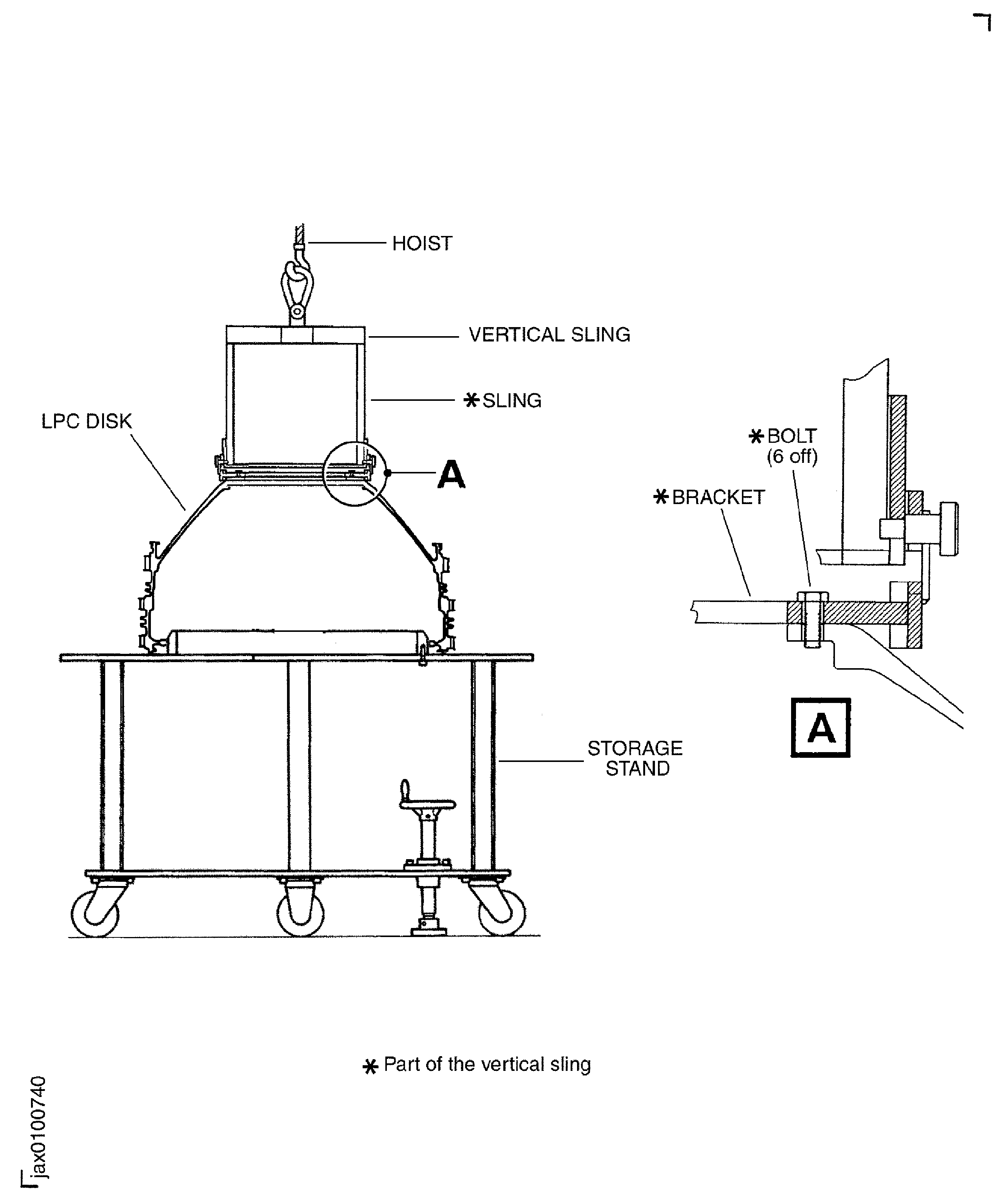
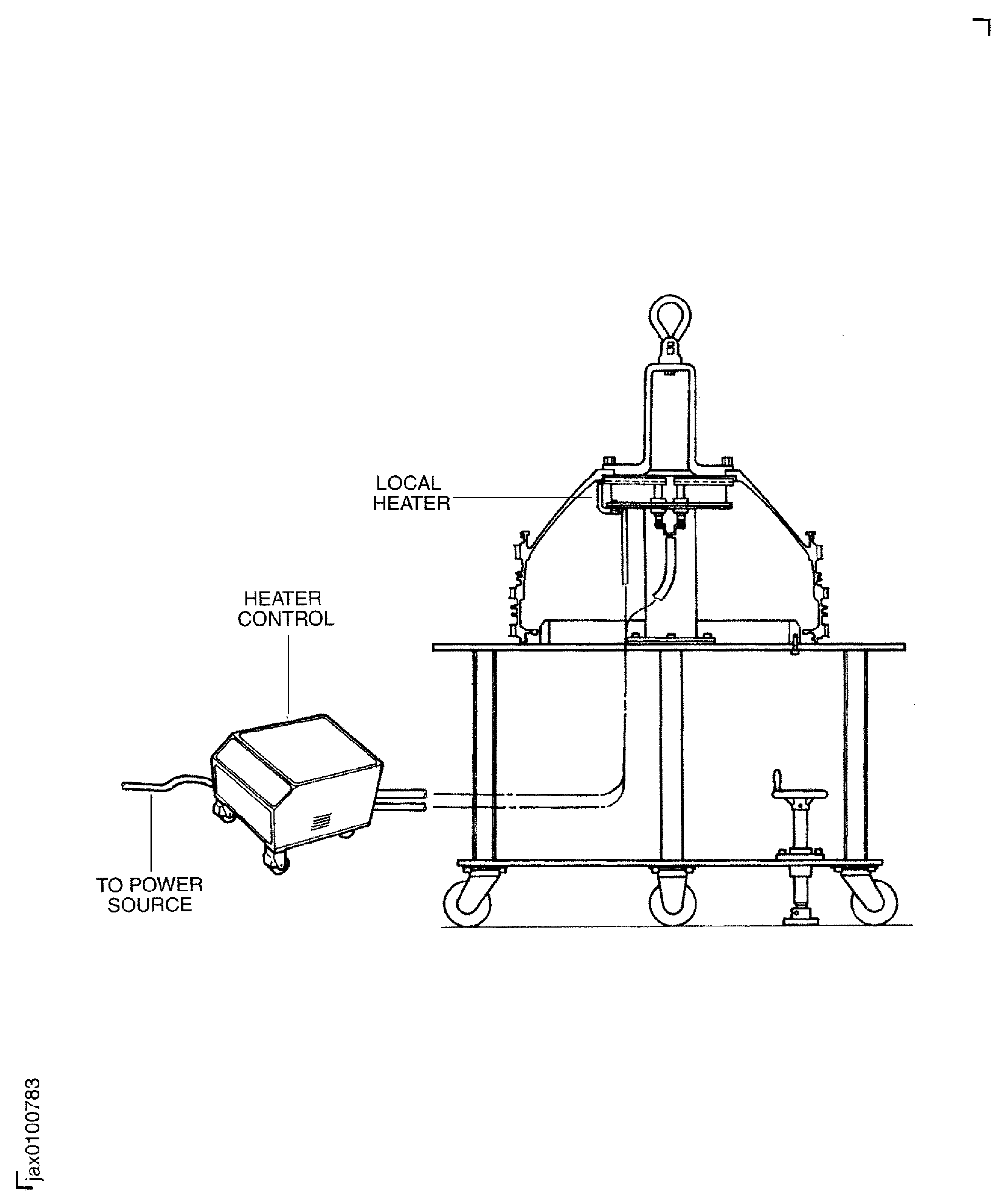
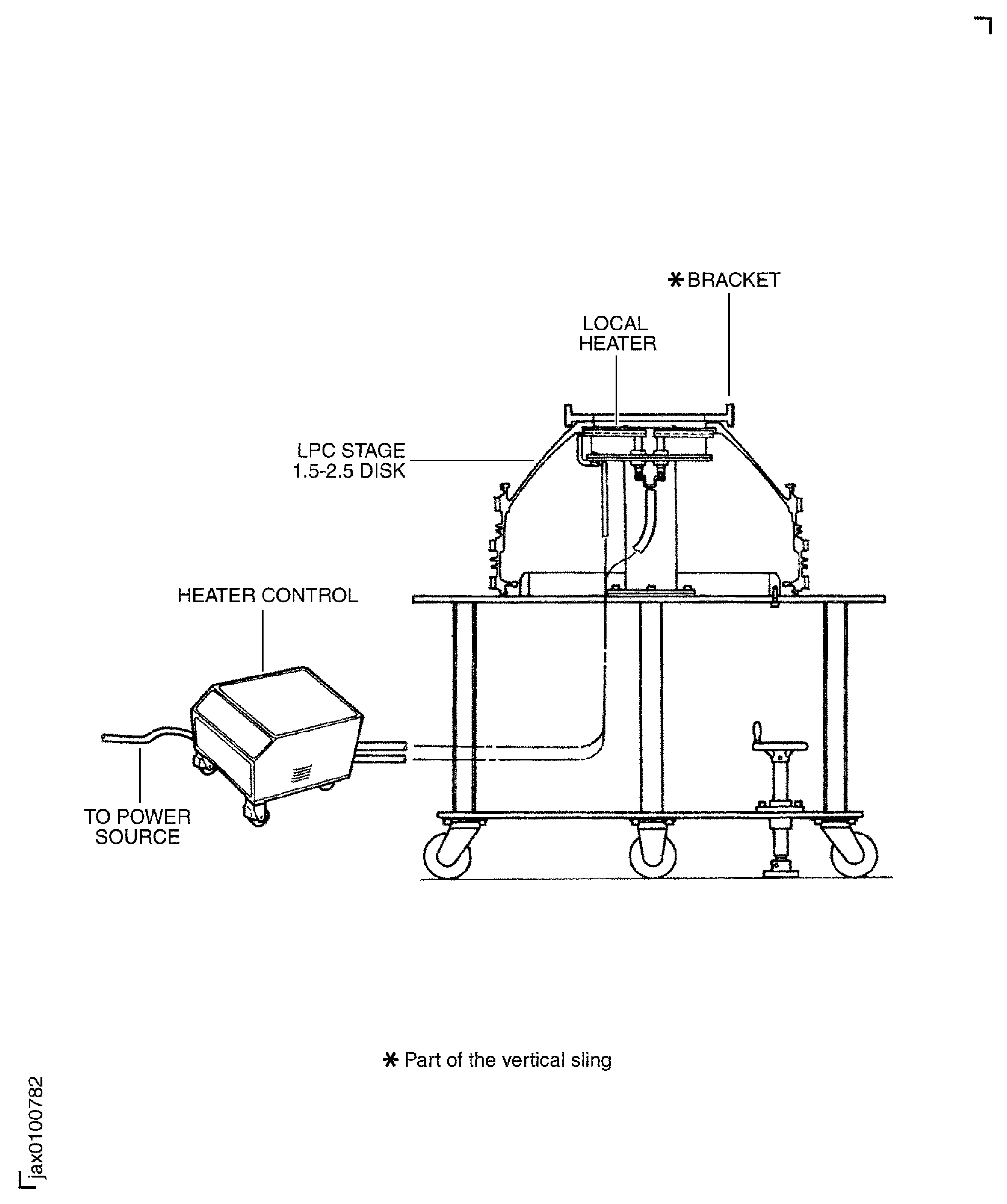
    2. Move IAE 1J13203 LPC Vertical sling (method 1) 1 off or 1J12213 LPC vertical sling 1 off and the IAE 1J13109 0AM53 heater 1 off and the LPC disk on the storage stand to the work area.

    3. Attach a hoist to the LPC vertical sling and lift and move the disk on to the storage stand.

      1. Method 1: Install the LPC vertical sling (IAE 1J13203 LPC Vertical sling (method 1)) to the LPC disk.

      2. Align the six holes on the sling with the threads on the front flange of the disk.

      3. Safety the six bolts (part of the LPC vertical sling). Tighten the bolts.

      1. Method 2: Install the LPC vertical sling (IAE 1J12213 LPC Vertical sling) to the LPC disk.

      2. Install the bracket (part of the LPC vertical sling) on the LPC disk with the six bolts (part of the LPC vertical sling).

      3. Tighten the bolts.

      4. Install the sling (part of the LPC vertical sling) on to the bracket.

      1. Method 1: Lift and move the LPC disk from the storage stand to the local heater.

      2. Lift the LPC disk.

      3. Move the LPC disk from the storage stand to the local heater.

      4. Slowly lower and put the LPC disk on to the heater.

      1. Method 2: Lift and move the LPC disk from the storage stand to the local heater.

      2. Lift the LPC disk.

      3. Move the LPC disk from the storage stand to the local heater.

      4. Slowly lower and put the LPC disk on to the heater.

      5. Remove the sling from the bracket.

    4. Turn on the switch of the heater and increase the temperature of the bore in the front flange of the LPC disk to 250 deg F (120 deg C).

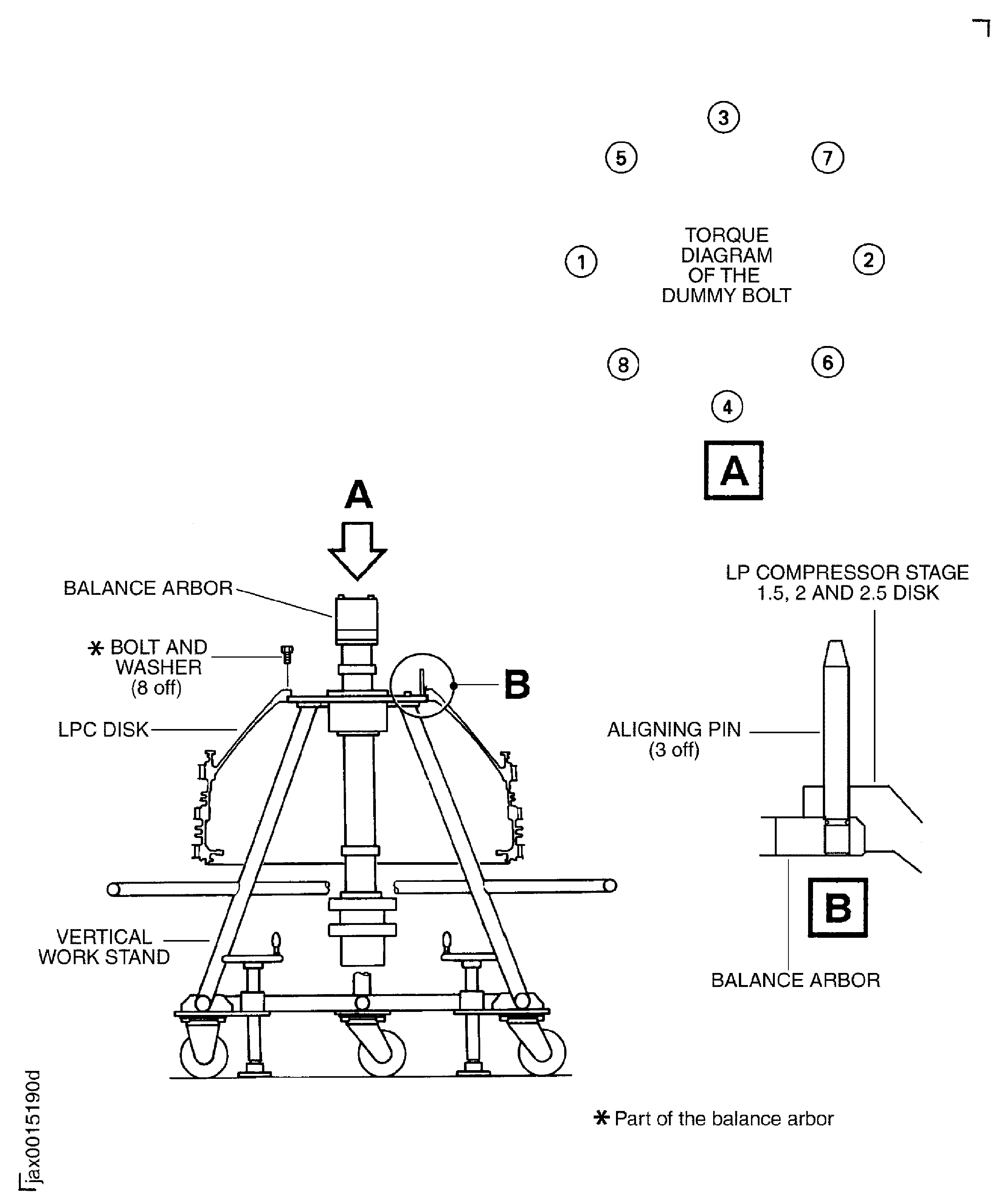
      1. Method 1: Install the LPC disk on to the balance arbor immediately.

      2. Install the three aligning pins (part of IAE 1J12507 Guide pin 1 off) in to three of the 24 screw holes in the flange of the balance arbor. The three aligning pins must be installed approximately 120 degrees apart from each other.

      3. Attach a hoist to the vertical sling again.

      4. Move the LPC disk from the local heater on to the balance arbor.

      5. Align the bolt holes in the front flange of the LPC disk with the three aligning pins on the balance arbor.

      6. WARNING

        THE BRACKET IS HOT. DO NOT TOUCH THE VERTICAL SLING WITH BARE HANDS.

        Remove the six bolts which attach the vertical sling to the LPC disk with approved gloves. Remove the vertical sling from the LPC disk.

      7. Install the LPC disk on to the balance arbor.

      1. Method 2: Install the LPC disk on to the balance arbor immediately.

      2. Install the three aligning pins (part of IAE 1J12507 Guide pin 1 off) in to three of the 24 screw holes in the flange of the balance arbor. The three aligning pins must be installed approximately 120 degrees apart from each other.

      3. Install the sling on to the bracket again.

      4. Attach a hoist to the vertical sling again.

      5. Move the LPC disk from the local heater on to the balance arbor.

      6. Remove the vertical sling from the bracket.

      7. WARNING

        THE BRACKET IS HOT. DO NOT TOUCH THE VERTICAL SLING WITH BARE HANDS.

        Remove the bracket from the LPC disk with approved gloves.

      8. Align the bolt holes in the front flange of the LPC disk with the three aligning pins on the balance arbor.

      9. Install the LPC disk on to the balance arbor.

      1. Safety the LPC disk to the balance arbor with the eight bolts (part of the balance arbor).

      2. Install the first bolt in to one of the 24 holes. Turn it until the mating face of the bolt head touches the LPC disk flange face.

      3. Install the second bolt in to the hole approximately 180 degrees apart from the first bolt. Turn it until the mating face of the bolt head touches the LPC disk flange face.

      4. Install the third bolt in to the hole approximately 90 degrees apart from the first bolt. Turn it until the mating face of the bolt head touches the LPC disk flange face.

      5. Install the fourth bolt in to the hole approximately 270 degrees apart from the first bolt. Turn it until the mating face of the bolt head touches the LPC disk flange face.

      6. Use the other four bolts of the eight bolts, install and turn them in the same sequence as the procedure in the steps (1) through (4) but start from 45 degrees apart from the first bolt.

      7. Torque the four bolts which have been installed in the previous steps to 180 to 220 lbfin (20.0 to 25.0 Nm) in the same sequence as step (1) through (4).

      8. Remove the three aligning pins from the balance arbor.

      9. Install the other four bolts and torque them diagonally to 180 to 220 lbfin (20.0 to 25.0 Nm) after the LPC disk is cool.

      10. Loosen the previous four bolts and torque again to 180 to 220 lbfin (10.0 to 25.0 Nm).

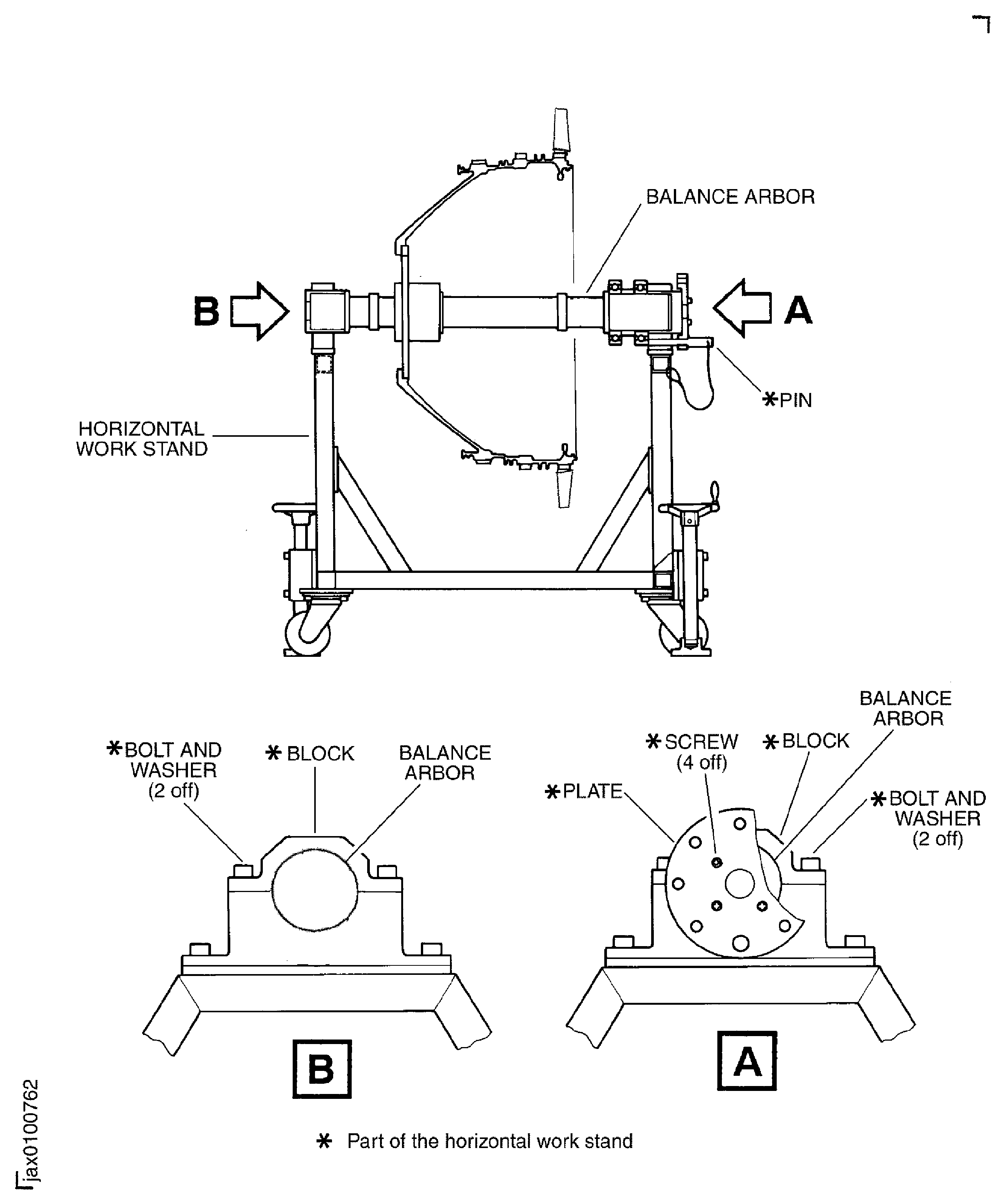
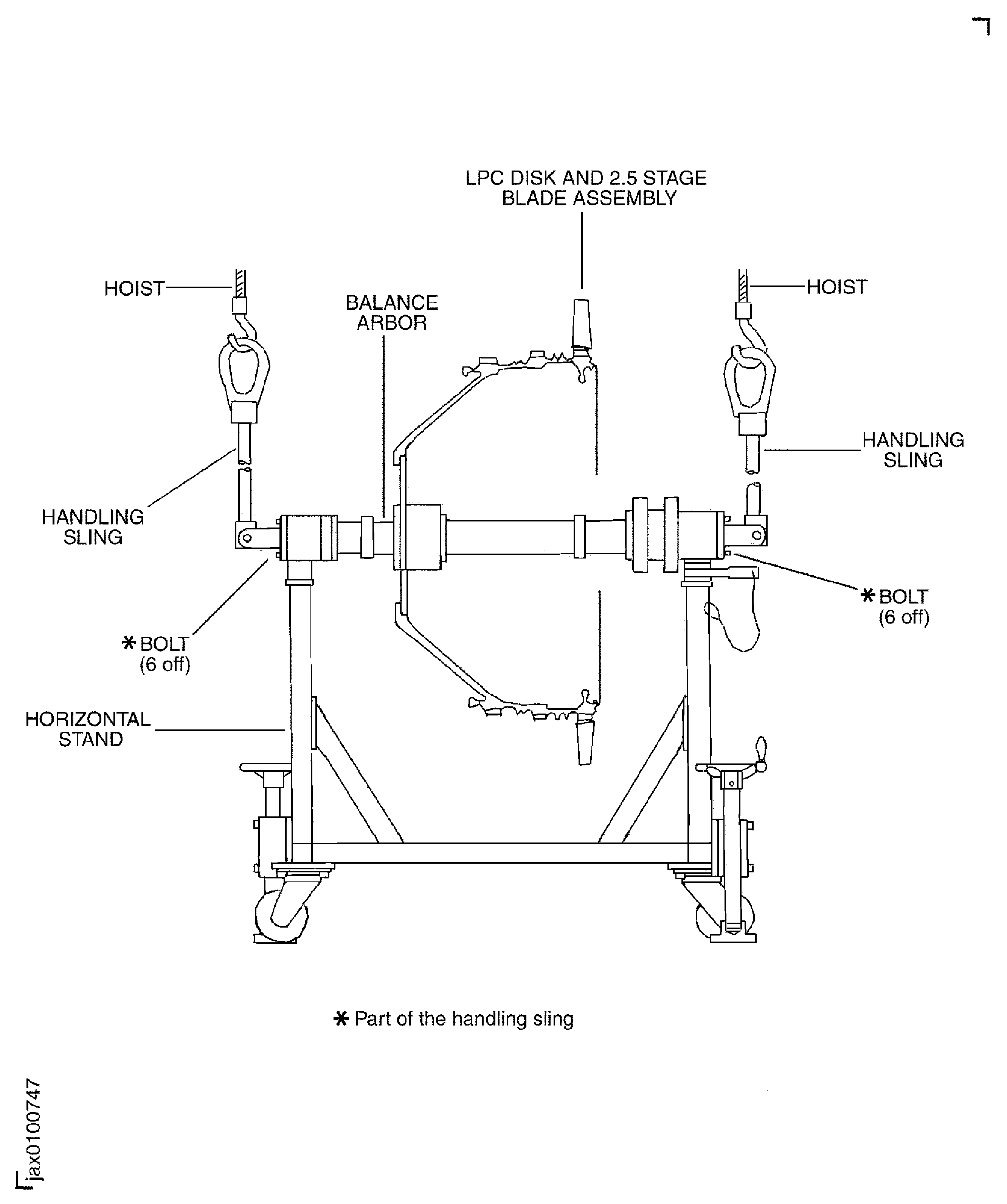
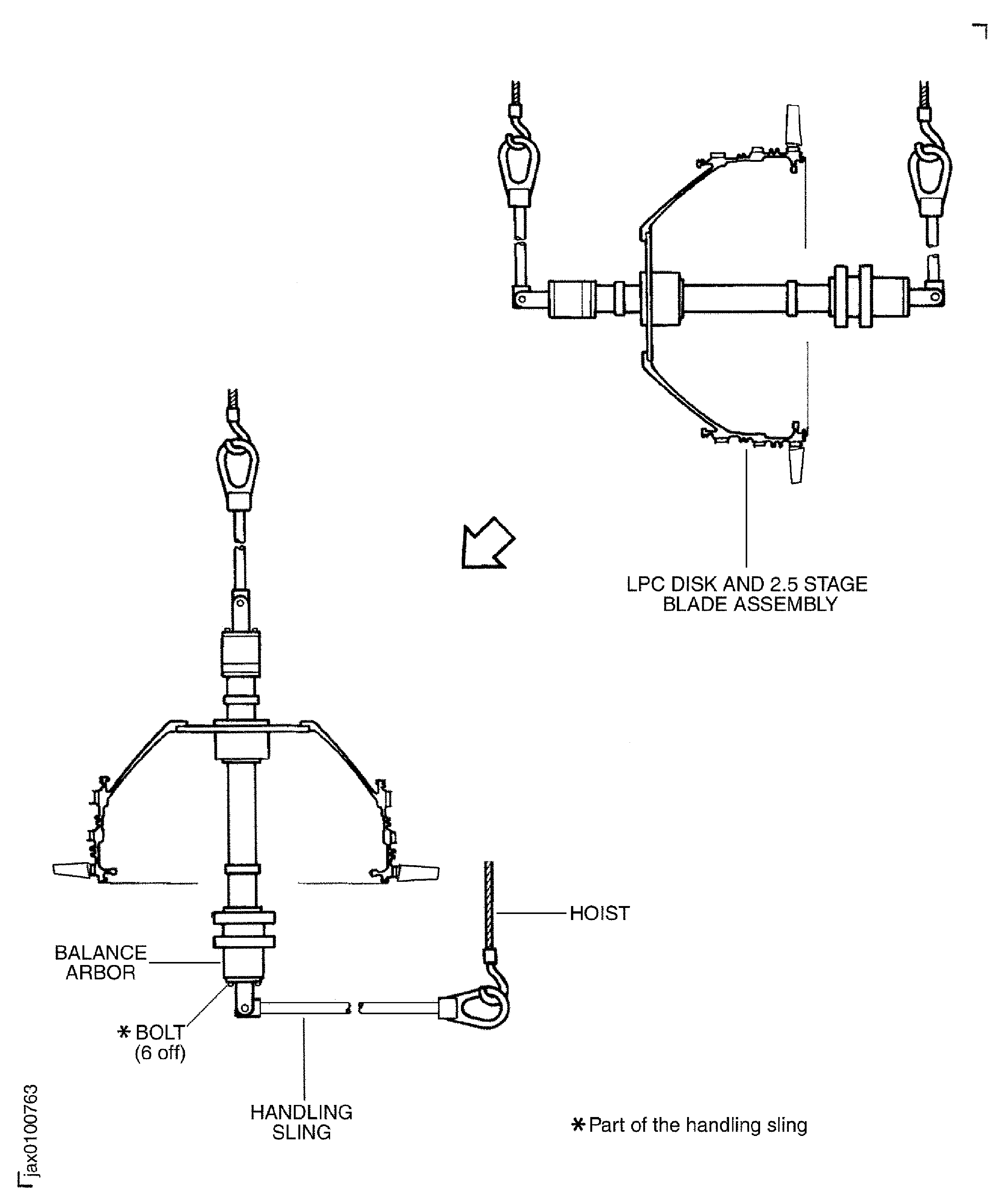
    1. SUBTASK 72-32-80-440-053 Turn the LPC Disk and the Balance Arbor Assembly from the Vertical to the Horizontal for the Stage 2.5 LP Compressor Blades (Stage 2.5 Blade) Assembly

    2. Refer to Figure, Figure, Figure, Figure and Figure.

    3. Move IAE 1J13206 Horizontal work stand 1 off to the work area.

      1. Remove the LPC disk and the balance arbor from the vertical work stand.

      2. Install the handling sling (part of the handling sling set) on to the top end of the balance arbor with the six bolts (part of the handling sling).

      3. Remove the eight bolts and washers which attach the balance arbor to the vertical work stand.

      4. Attach a hoist to the sling.

      5. Lift the LPC disk and balance arbor slowly until they are clear of the vertical work stand.

      1. Turn the LPC disk and balance arbor from the vertical to horizontal.

      2. Attach the other handling sling (part of the handling sling set) on to the bottom end of the balance arbor with the six bolts (part of the handling sling).

      3. Attach another hoist to the handling sling.

      4. Turn the LPC disk and balance arbor to the horizontal position with the two hoists.

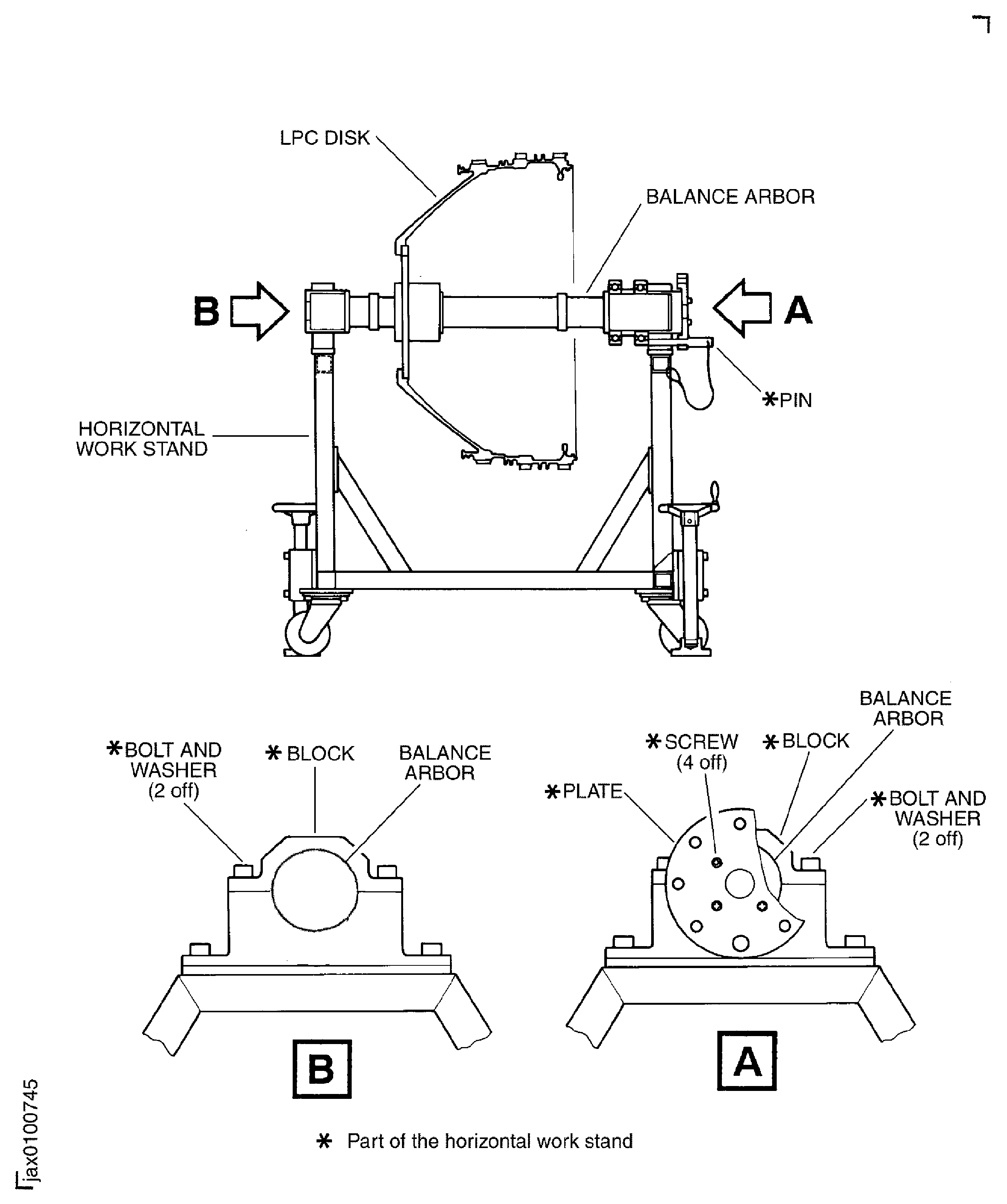
      1. Install the LPC disk and the balance arbor assembly on to the horizontal work stand.

      2. Remove the four bolts (part of the horizontal work stand) and washers (part of the horizontal work stand) which attach the two blocks (part of the horizontal work stand) to the horizontal work stand. Remove the two blocks.

      3. Put the LPC disk and the balance arbor assembly on to the horizontal work stand.

      4. Install the two blocks to the horizontal work stand with four bolts and washers again.

      1. Remove the two handling sling from the balance arbor.

      2. Remove each hoist from two handling slings.

      3. Remove the six bolts which attach the handling sling to the front end of the balance arbor.

      4. Remove the six bolts which attach the handling sling to the rear end of the balance arbor.

    4. Install the plate (part of the horizontal work stand) to the rear of the balance arbor with four screws (part of the horizontal work stand).

    5. Install the pin (part of the horizontal work stand) in to position to lock the LPC disk and the balance arbor assembly.

    1. SUBTASK 72-32-80-440-054 Weigh the Stage 1.5 LP Compressor Blades (Stage 1.5 Blades) (72-32-82,01-400), the Stage 2 LP Compressor Blades (Stage 2.0 Blades) (72-32-82,01-250) and the Stage 2.5 Blades (72-32-82,01-100)

    2. Refer to Figure, Figure and Figure.

    3. Weigh each blade of the stage 1.5, 2 and 2.5 in turn and keep the record of the weight and the blade identification code.

    4. NOTE

      If computer calculated assembly sequence is available, it is better than the heavy-light-heavy sequence.

      Write the weight and the identification code on the blade convex airfoil surface with CoMat 06-069 MARKER.

    5. Put the each stage blades on a work bench in a heavy-light-heavy sequence.

    1. SUBTASK 72-32-80-440-055 Install the Stage 2.5 Blades to the LPC Disk

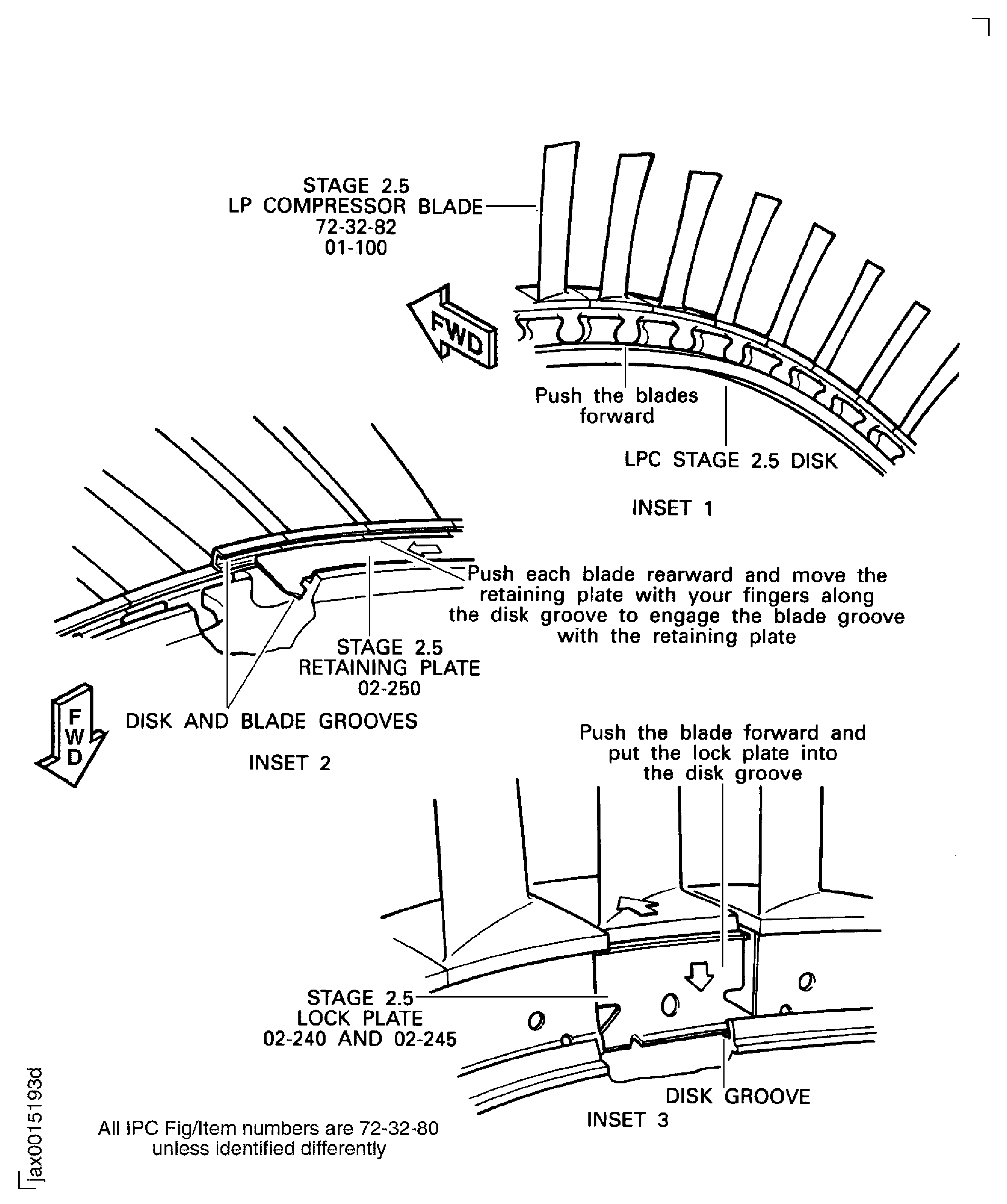
    2. Install the stage 2.5 blades to the disk in the sequence found in Step. Start from the No. 1 blade slot and install the blades in a counterclockwise direction when you look from the rear. The identification number of the No. 1 slot is on the top of the disk tang.

    3. Move forward all the blades as much as half the thickness of the disk rim.

      1. Install the eight stage 2.5 8 span retaining plates "ENGINE-LP COMPRESSOR STAGE 1.5,2 AND 2.5 ASSY (72-32-80, 02-250) between the two grooves on the stage 2.5 blades and disk.

      2. Move rearward the blade at the No. 1 blade position and align the groove of the blade with the groove of the disk.

      3. Install the No. 1, stage 2.5 8 span retaining plate in to the two grooves of the No. 1 blade and the disk.

      4. Align the groove of the next blade with the groove of the disk.

      5. CAUTION

        DO NOT USE A HAND TOOL WHEN YOU MOVE THE PLATE. THE HAND TOOL CAN CAUSE DAMAGE TO THE PLATE.

        Move the plate in to the two grooves of the No. 2 blade and the disk.

      6. Do Step and Step for the remaining blades until the plate is fully in to the grooves of the blades and the disk.

      7. Do the same Step, Step and Step for the installation of the No. 2 through No. 8, stage 2.5 8 span retaining plates into the grooves of the blades and the disk.

      1. Install a new "ENGINE-LP COMPRESSOR STAGE 1.5,2 AND 2.5 ASSY (72-32-80, 02-245) stage 2.5 single span lock plates 3 off in to the grooves of the blades and the disk.

      2. Make space between any two adjacent stage 2.5 8 span retaining plates.

      3. Install the first stage 2.5 single span lock plate in to the disk groove at the space between the stage 2.5 8 span retaining plates temporarily.

      4. Close the two adjacent stage 2.5 8 span retaining plates to the single span lock plate.

      5. Safety the lock plate to the adjacent stage 2.5 8 span retaining plates temporarily with the adhesive tape.

      6. Install the second and the third lock plates in to the spaces between the stage 2.5 8 span retaining plates which locate 90 degrees and 270 degrees apart from the first lock plate. Do the same operations as the Step through Step for the second and the third lock plates.

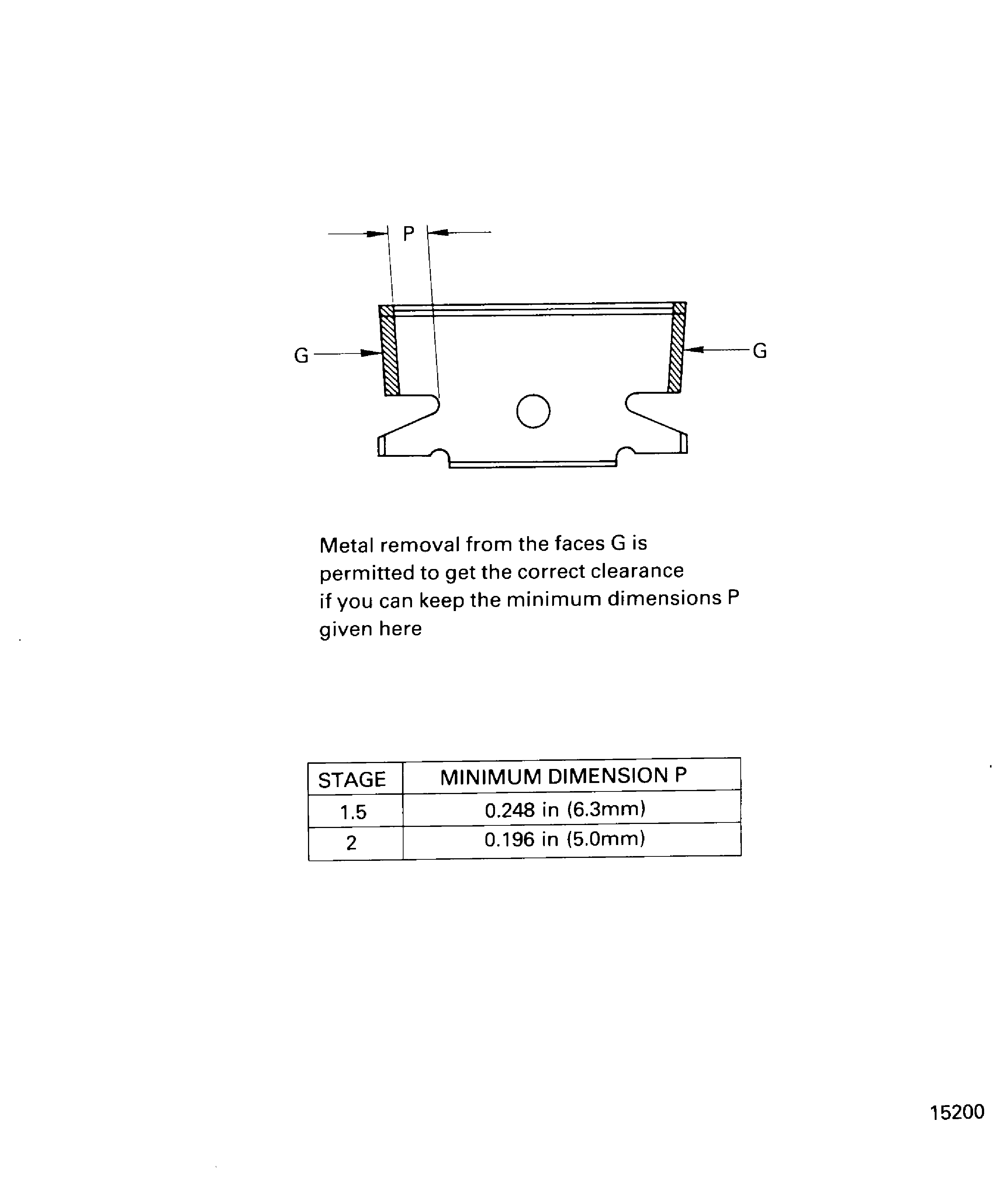
    4. Install a new "ENGINE-LP COMPRESSOR STAGE 1.5,2 AND 2.5 ASSY (72-32-80,02-240) stage 2.5 single span adjusting lock plate 1 off in to the grooves of the blades and the disk. The adjusting lock plate is between the two stage 2.5 8 span retaining plates and 180 degrees apart from the first lock plate.

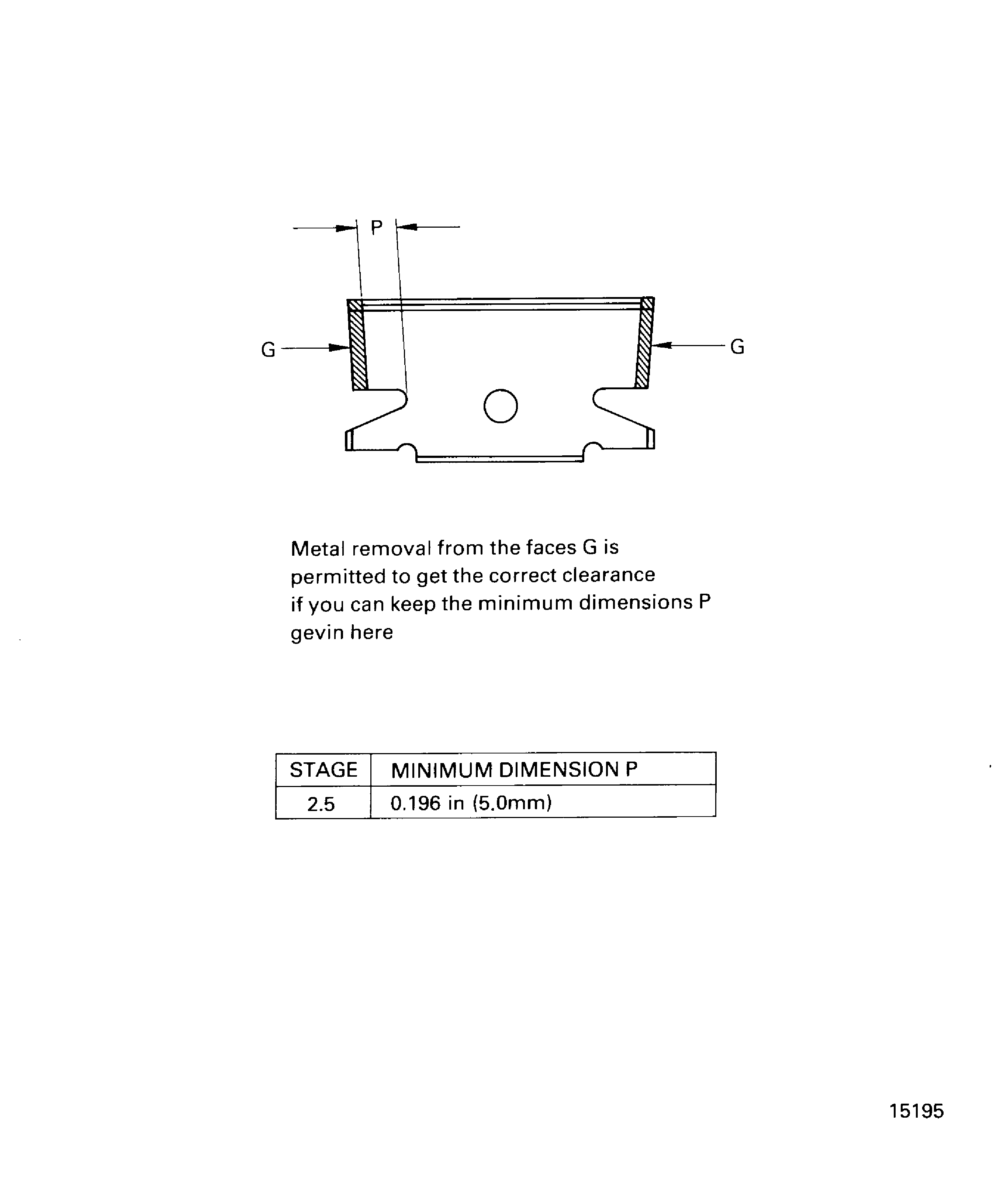
      1. Measure the clearance between the adjusting lock plate and the adjacent retaining plate after collecting all the circular clearance.

      2. The collected clearance must not exceed 0.010 in. (0.25 mm).

      3. Remove metal from the adjusting lock plate with a file to obtain specified clearance if required.

    5. Bend the tabs on the three single span lock plates and on the adjusting lock plate with a pair of pliers. Make sure that the tabs are correctly bent, Figure, Inset 5.

    6. Examine the bend portion with a 10X magnifier and make sure there is no crack.

    7. Try to shake tip of all the blades circumferentially. Make sure that you can shake each blade tip.

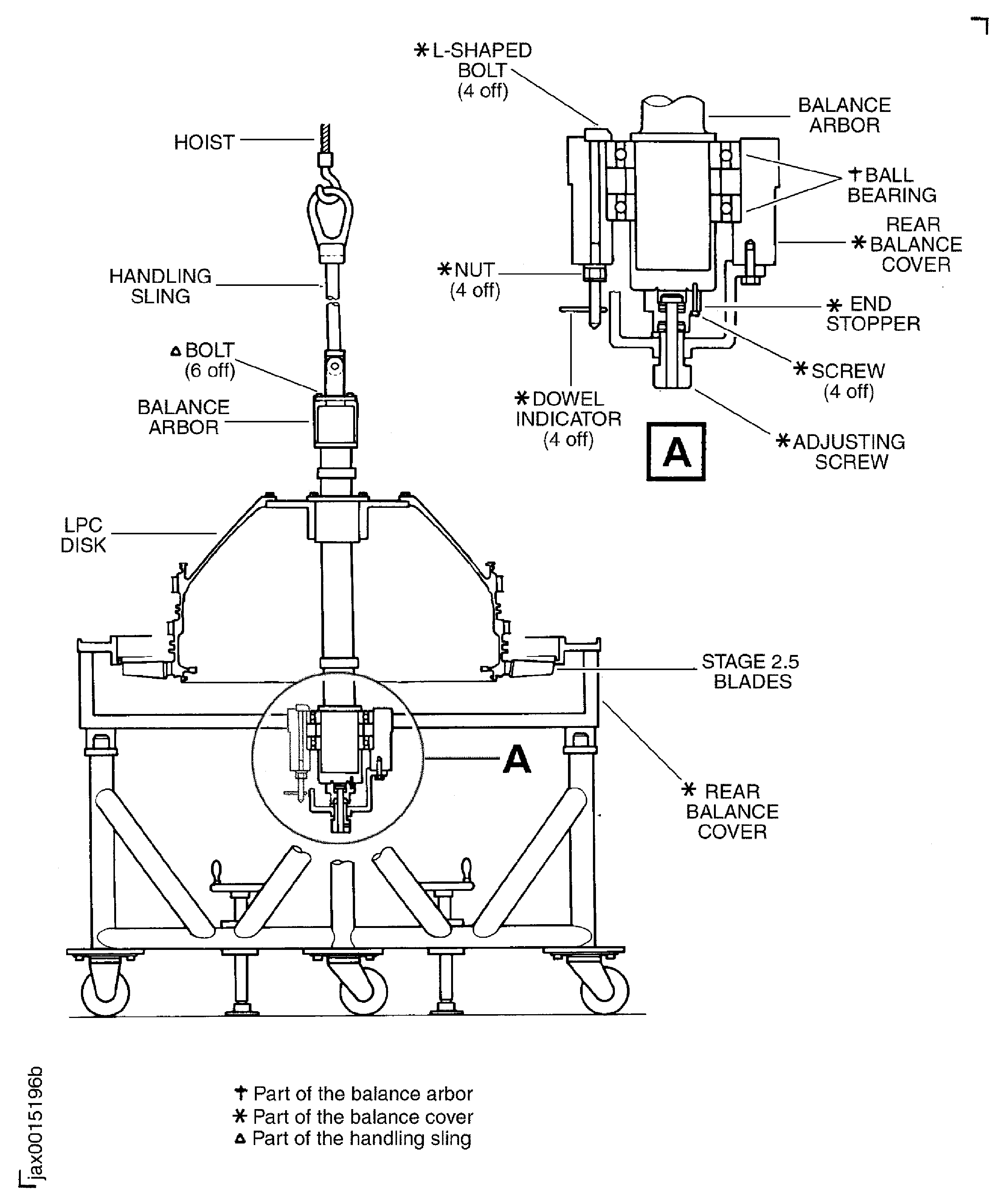
    1. SUBTASK 72-32-80-440-056 Turn the LPC Disk, 2.5 Stage Blades and Arbor Assembly to the Vertical and Install in to the Balance Cover and Fixture

    2. Make sure the balance cover and fixture is on the transport stand with the rear end down.

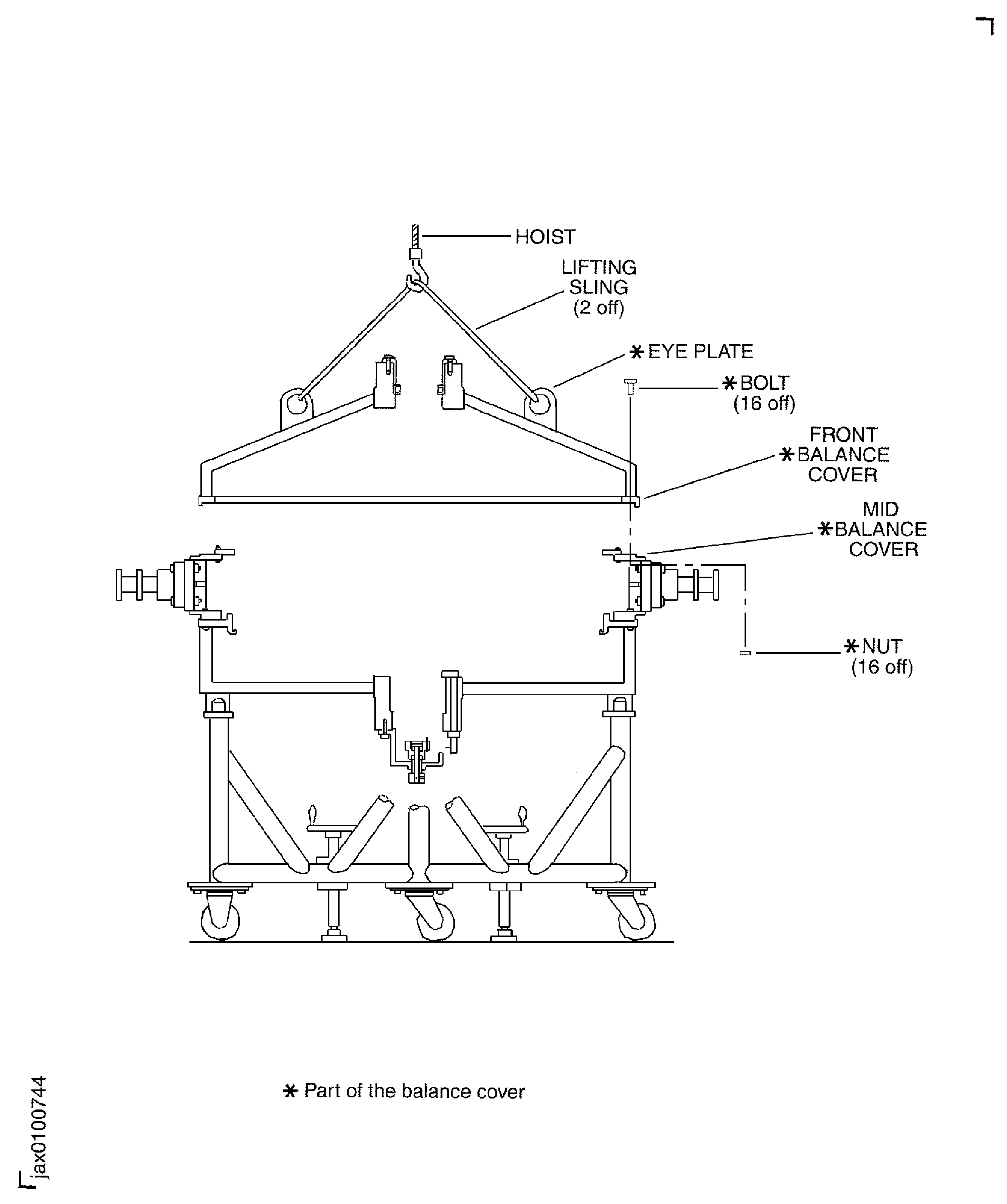
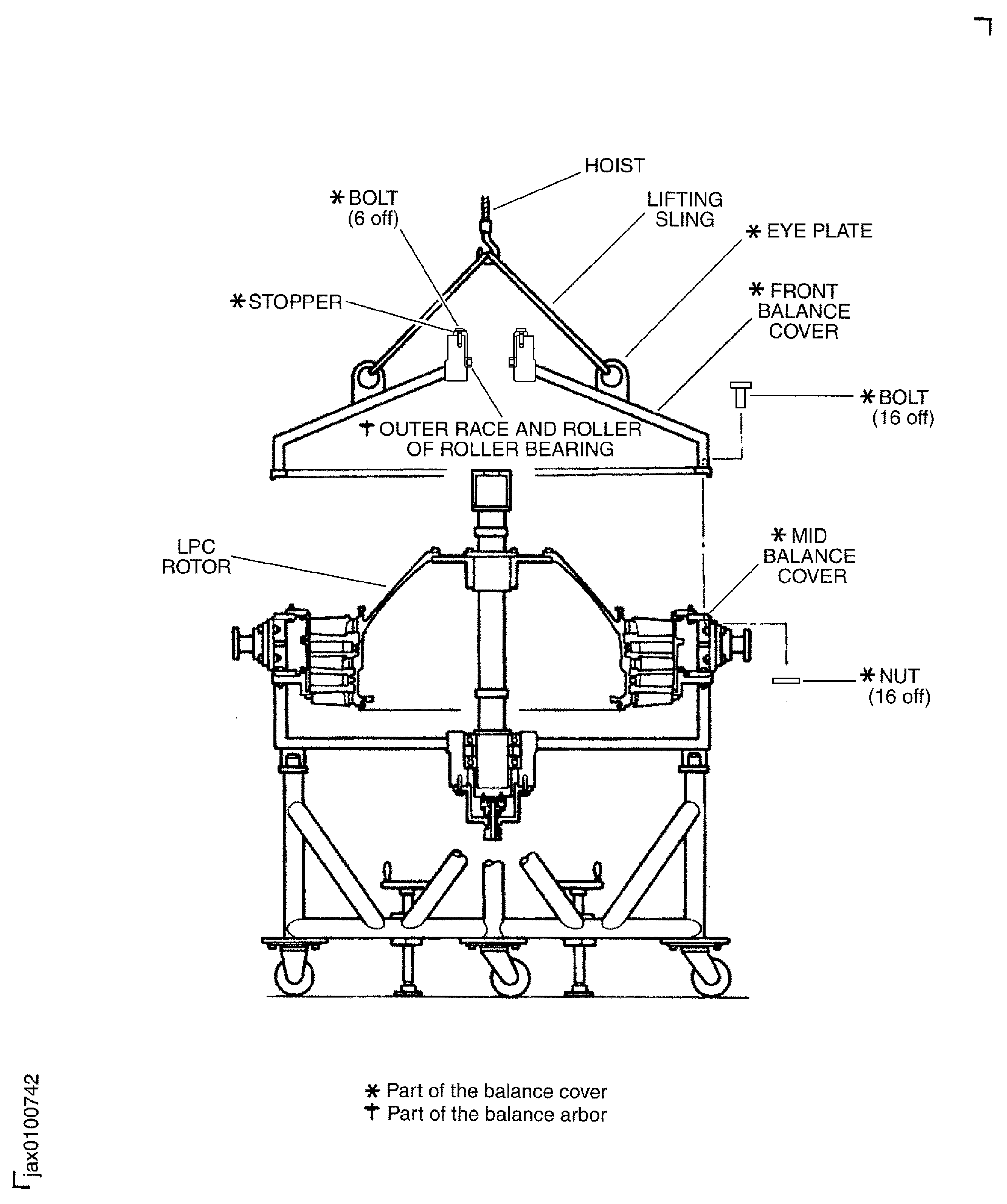
      1. Remove the front balance cover (part of the balance cover and fixture) from the mid balance cover (part of the balance cover and fixture).

      2. Remove the 16 bolts and nuts (part of the balance cover and fixture) which attach the front balance cover to the mid balance cover.

      3. Install the two lifting slings to the eyeplate (part of the balance cover and fixture) on the front balance cover.

      4. Install the hoist to the two lifting slings.

      5. Lift the front balance cover and remove it from the mid balance cover.

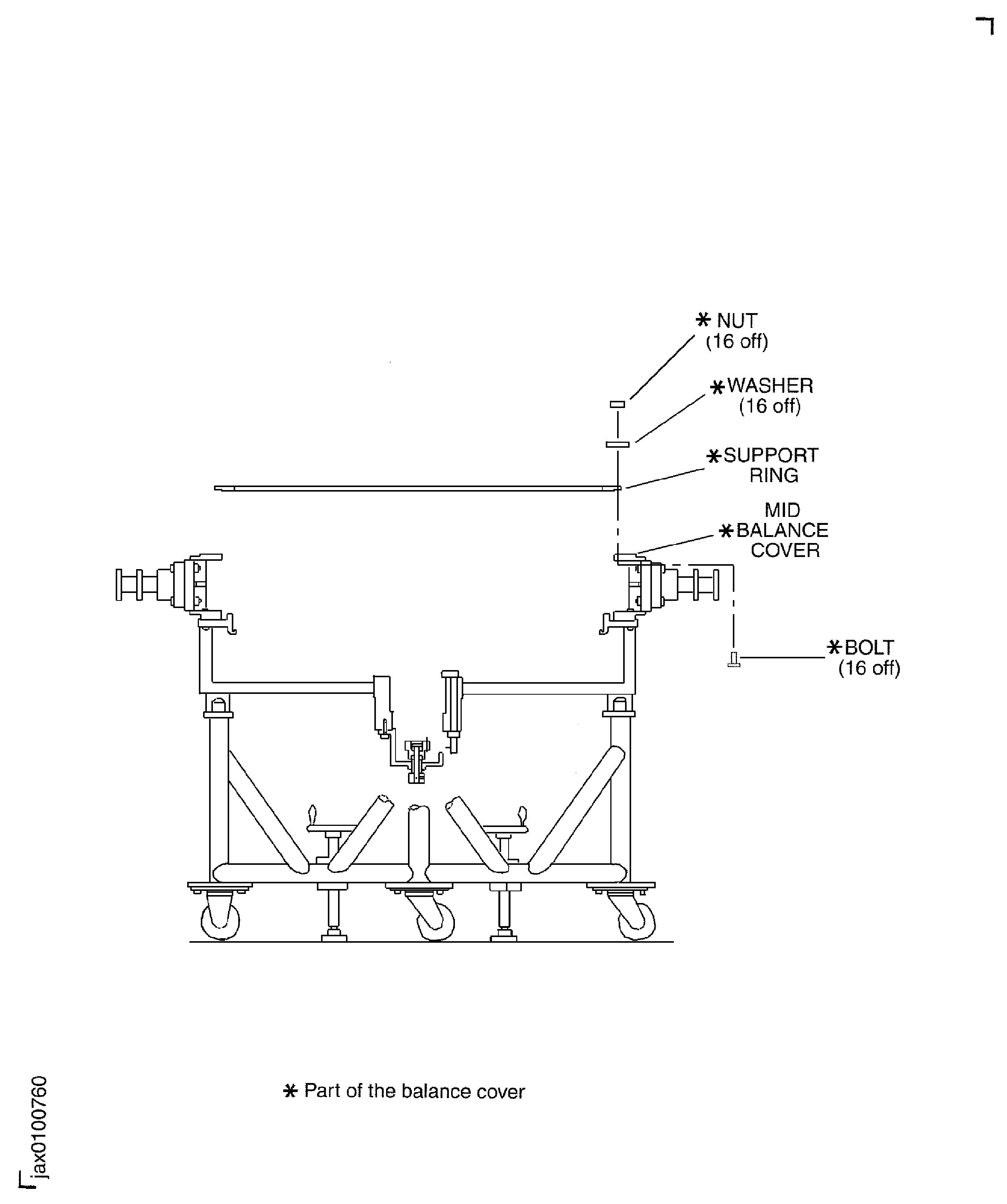
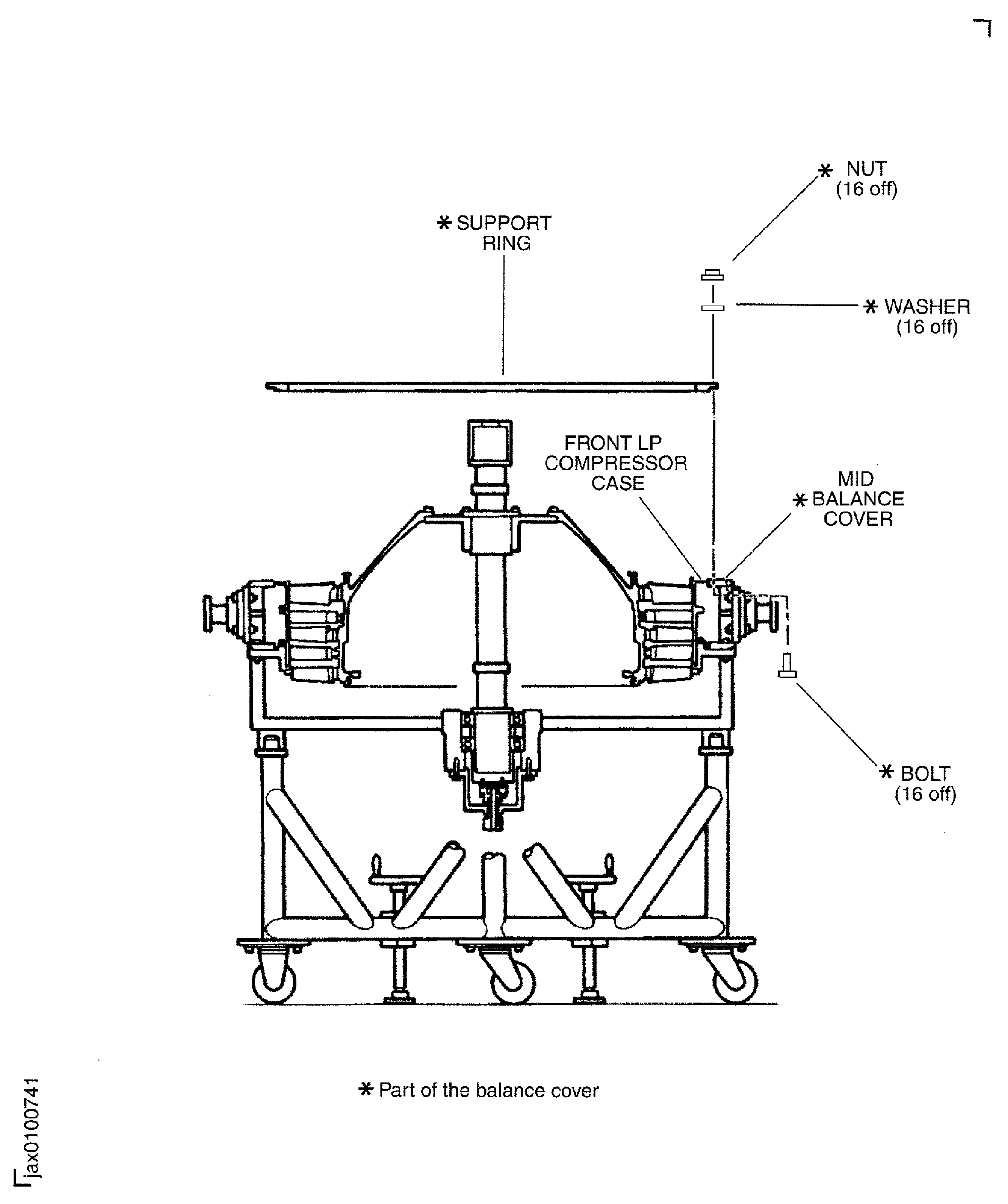
      1. Remove the support ring (part of the balance cover and fixture) from the mid balance cover.

      2. Remove the 16 bolts, washers and nuts (part of the balance cover and fixture) which attach the support ring to the mid balance cover.

      3. Remove the support ring.

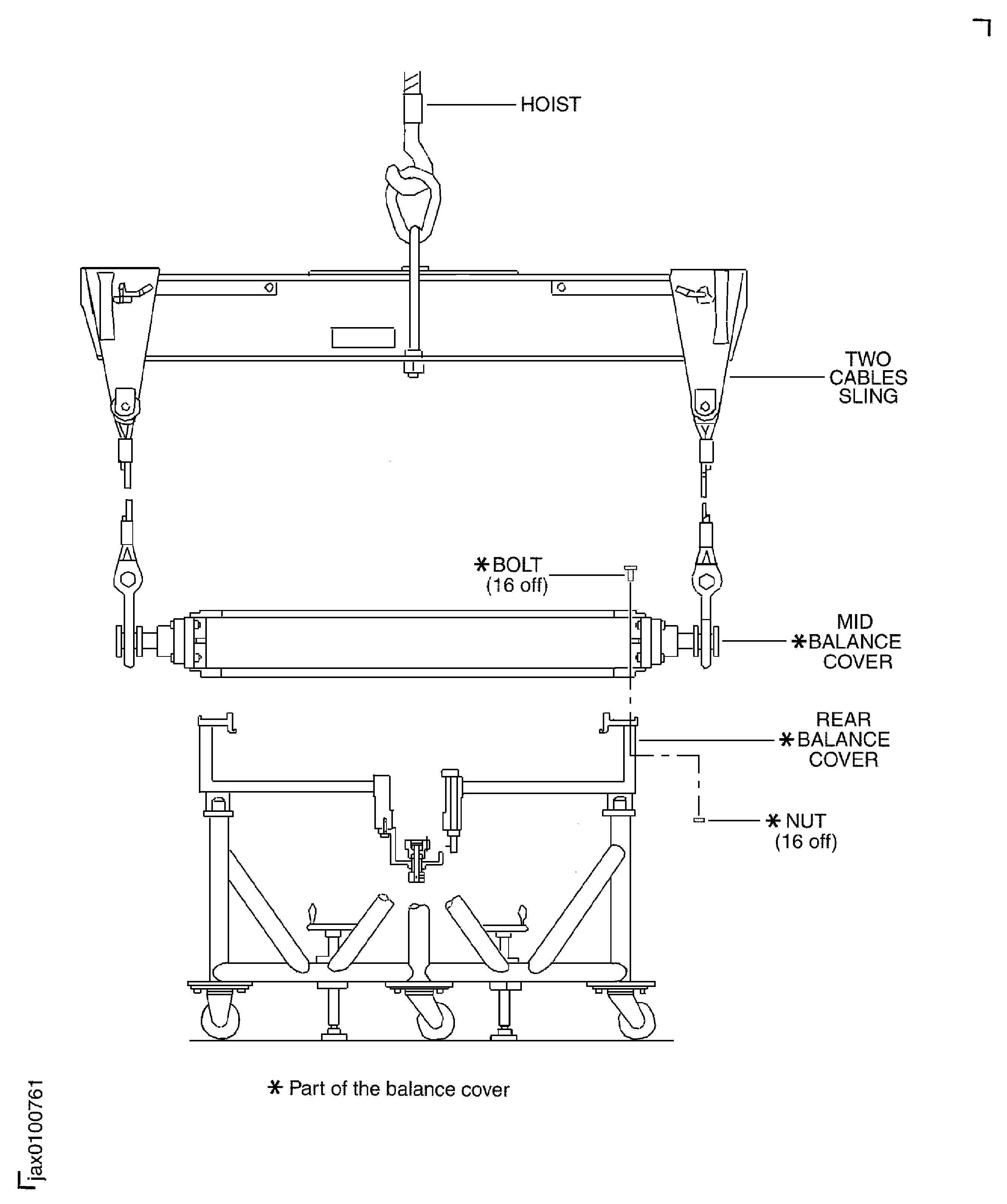
      1. Remove the mid balance cover from the rear balance cover (part of the balance cover and fixture).

      2. Remove the 16 bolts and nuts (part of the balance cover and fixture) which attach the mid balance cover to the rear balance cover.

      3. Remove the support ring.

      4. Install IAE 1F10052 Two cables sling 1 off to the mid balance cover.

      5. Lift the mid balance cover and remove it from the rear balance cover.

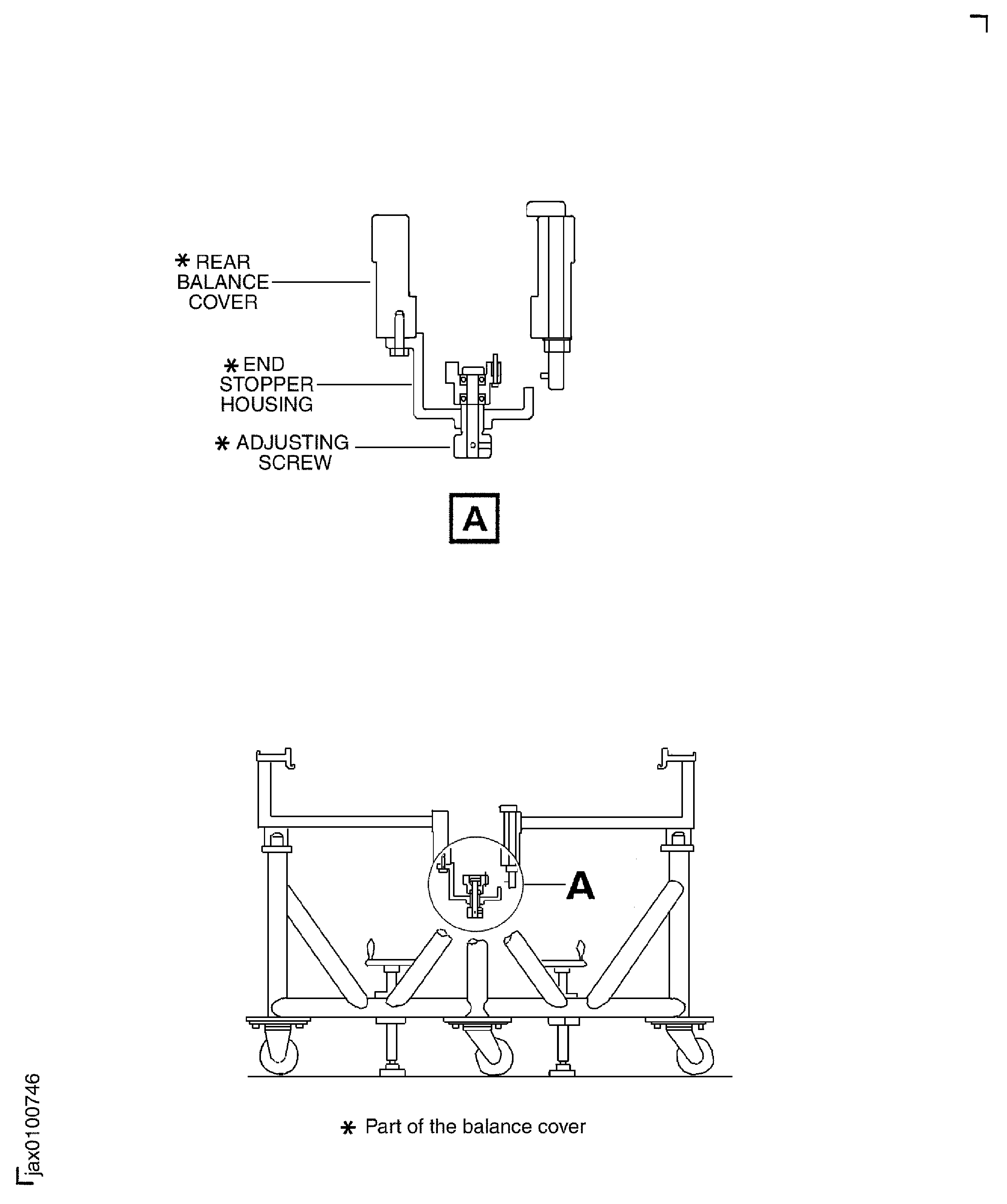
    3. Lower the adjusting screw (part of the balance cover and fixture) in the end stopper housing (part of the balance cover and fixture) at the bottom of the rear balance cover.

      1. Move the LPC disk, stage 2.5 blade and arbor assembly from the horizontal stand to the transport stand.

      2. Release the pin from the balance arbor and the plate.

      3. Remove the four screws which attach the plate to the end of the balance arbor. Remove the plate.

      4. Install the two handling slings on to the both ends of the balance arbor with the 12 bolts.

      5. Attach a hoist to the handling sling.

      6. Remove the four bolts and washers which attach the two blocks to the horizontal work stand. Remove the two blocks.

      7. Lift slowly the LPC disk, stage 2.5 blade and arbor assembly until it clears the horizontal stand.

      8. Turn the LPC disk, stage 2.5 blade and arbor assembly from the horizontal to the front end up.

      9. Remove the six bolts which attach the handling sling to the rear end of the balance arbor.

      10. Remove the handling sling from the rear end of the balance arbor.

      11. Remove the hoist from the handling sling.

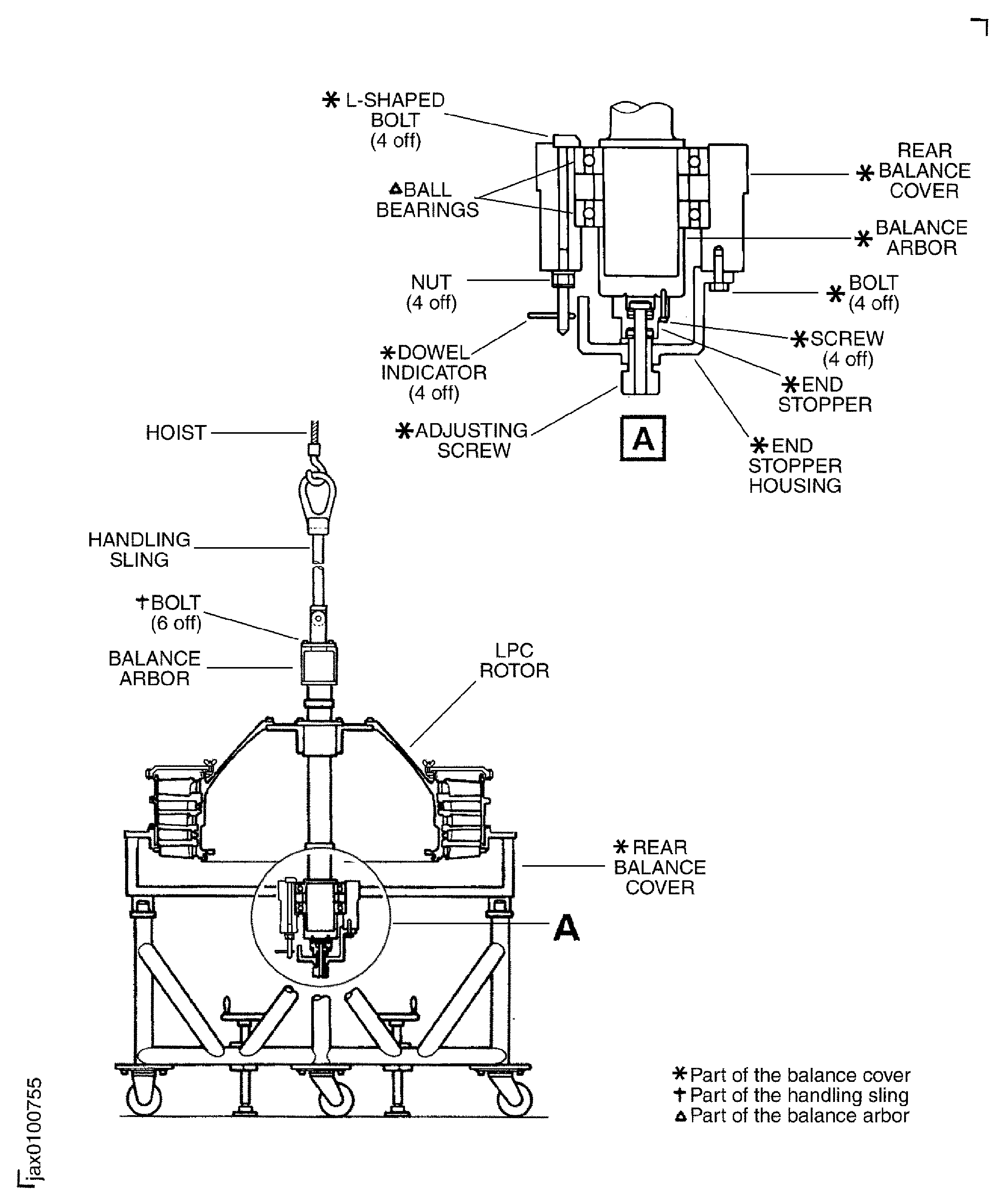
      12. Lower slowly the LPC disk, stage 2.5 blade and arbor assembly on to the rear balance cover. Align the center of the LPC disk, stage 2.5 blade and arbor assembly with the center of the rear balance cover.

      13. Make sure the stage 2.5 blades do not touch the rear balance cover.

      14. Make sure the dowel indicator (part of the balance cover and fixture) of the four L-shaped bolts (part of the balance cover and fixture) in the rear balance cover point to the inside diameter of the rear balance cover. When the dowel indicator points to the outside diameter the L-shaped bolt lock the axial movement of the ball bearing.

      15. Touch fully the outer race of the ball bearing to the rear balance cover.

      16. Remove the handling sling from the balance arbor.

      17. Remove the hoist from the handling sling.

    4. Safety the end stopper (part of the balance dover and fixture) to the bottom of the balance arbor with the four screws (part of the balance cover and fixture).

      1. Lock the ball bearing with the L-shaped bolts.

      2. Loosen the four locknuts of the L-shaped bolts.

      3. Turn the four dowel indicators to the outside diameter of the rear balance cover.

      4. Tighten the four locknuts of the L-shaped bolts.

    5. Turn the adjusting screw and push lightly the LPC disk, stage 2.5 blade and arbor assembly from the bottom.

    1. SUBTASK 72-32-80-440-057 Install the Stage 2.0 LP Compressor Vane (Stage 2.0 Vane) (72-32-83,01-800) in to the LP Compressor Rear Case (Rear Case) (72-32-83,01-650)

    2. Refer to Figure, Figure, Figure, Figure and Figure.

    3. Put the rear case on to the work bench with the front end down.

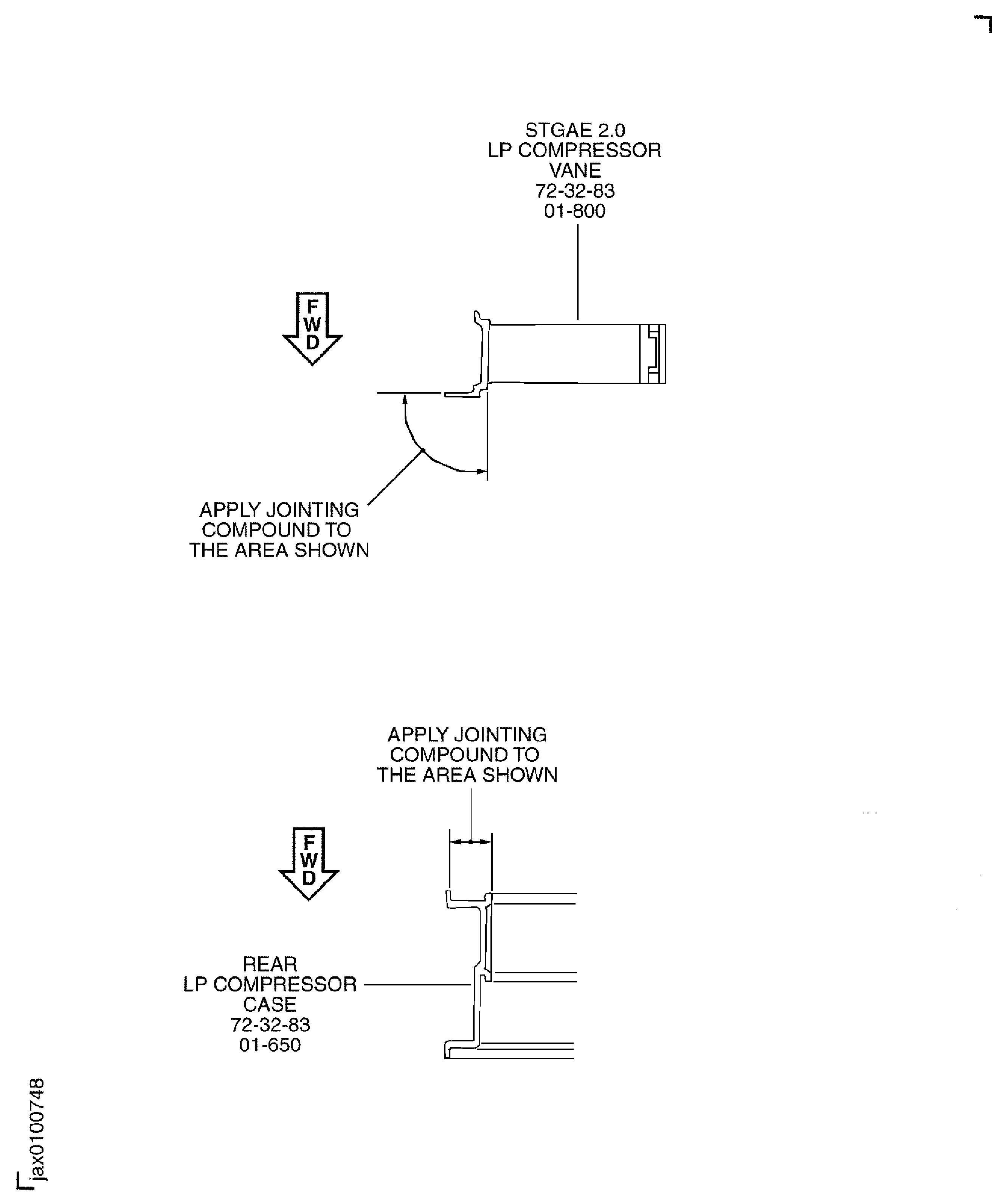
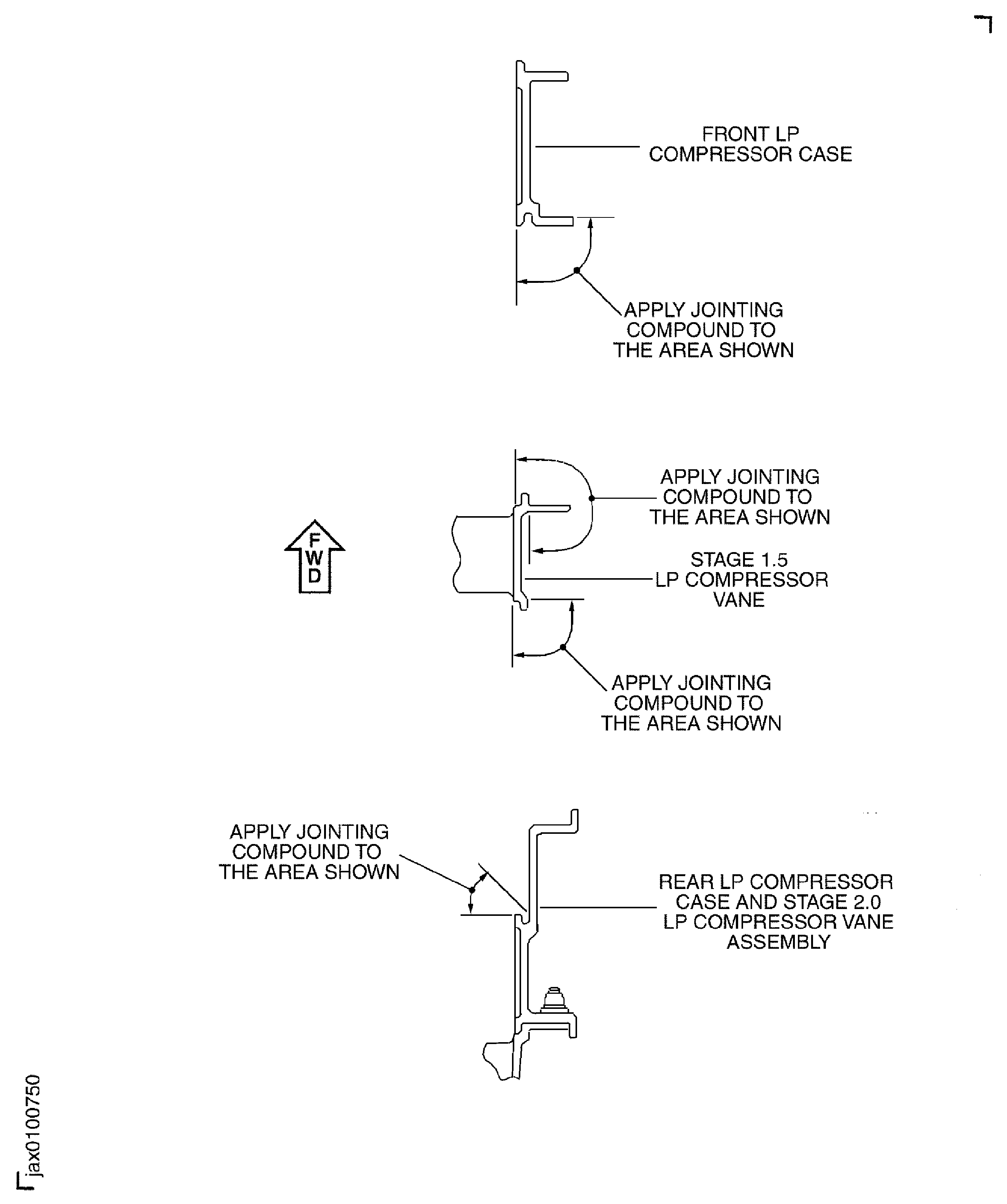
      1. Apply the jointing compound on to the mating faces of the stage 2.0 vane and the rear case.

      2. Clean the mating faces of the stage 2.0 vane and the rear case with CoMat 01-124 ISOPROPYL ALCOHOL.

      3. Apply CoMat 04-004 JOINTING COMPOUND, LIGHT GRADE on to the mating faces of the stage 2.0 vane and the rear case.

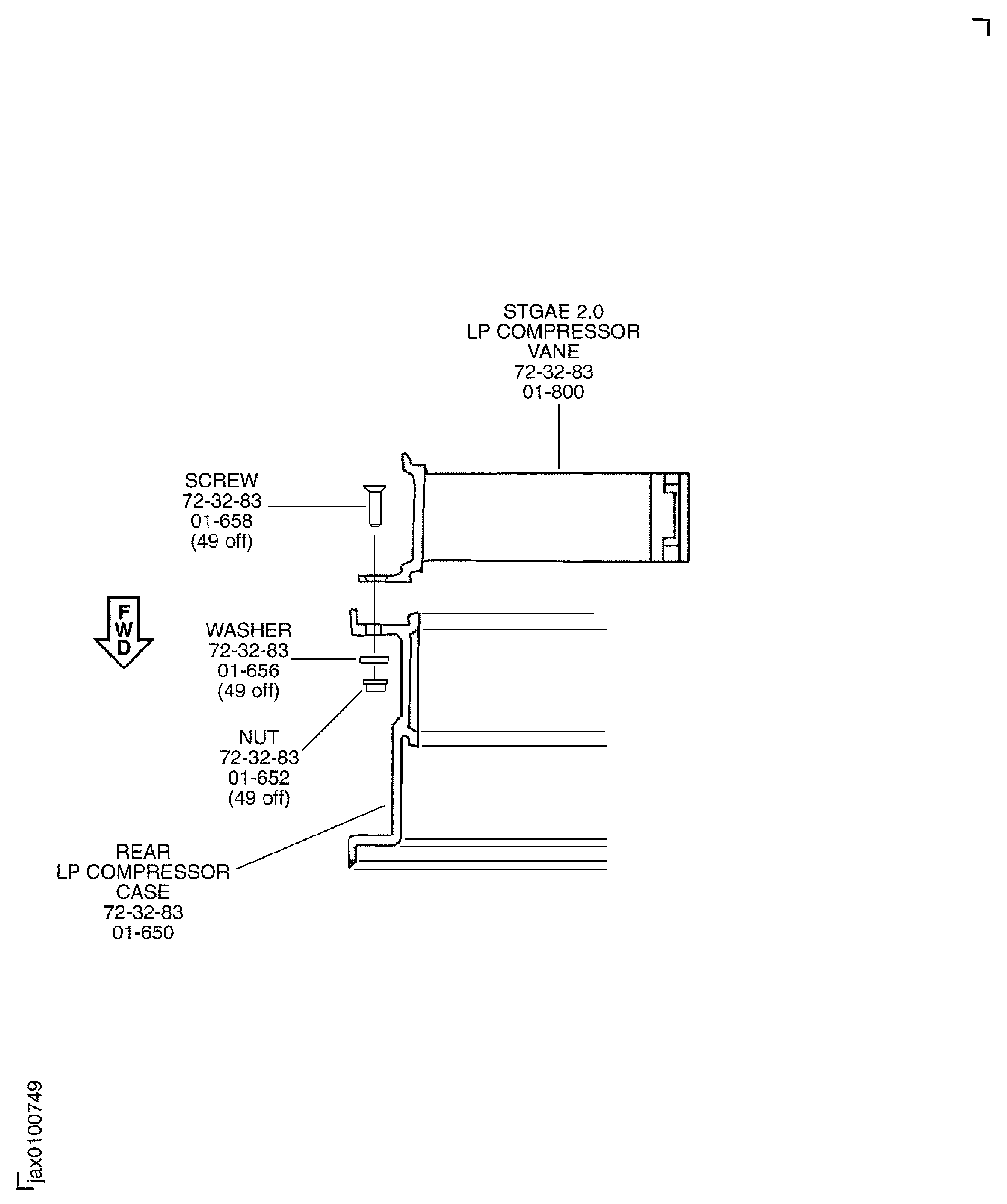
    4. Install the stage 2.0 vane to the rear case with 49 screws ENGINE-LP COMPRESSOR STAGE 1.5 AND 2 VANES (72-32-83, 01-658), washers ENGINE-LP COMPRESSOR STAGE 1.5 AND 2 VANES (72-32-83, 01-656) and nuts ENGINE-LP COMPRESSOR STAGE 1.5 AND 2 VANES (72-32-83, 01-652).

    5. Torque the nuts to 36 to 45 lbfin (4.0 to 5.0 Nm).

    1. SUBTASK 72-32-80-440-058 Install the Stage 2.0 Vane and Rear Case Assembly on to the LP Disk and Rear Balance Cover

    2. Refer to Figure and Figure.

      NOTE

      To hit the knife edge seals on the disk with the vane during installation can easily cause damage of those parts.
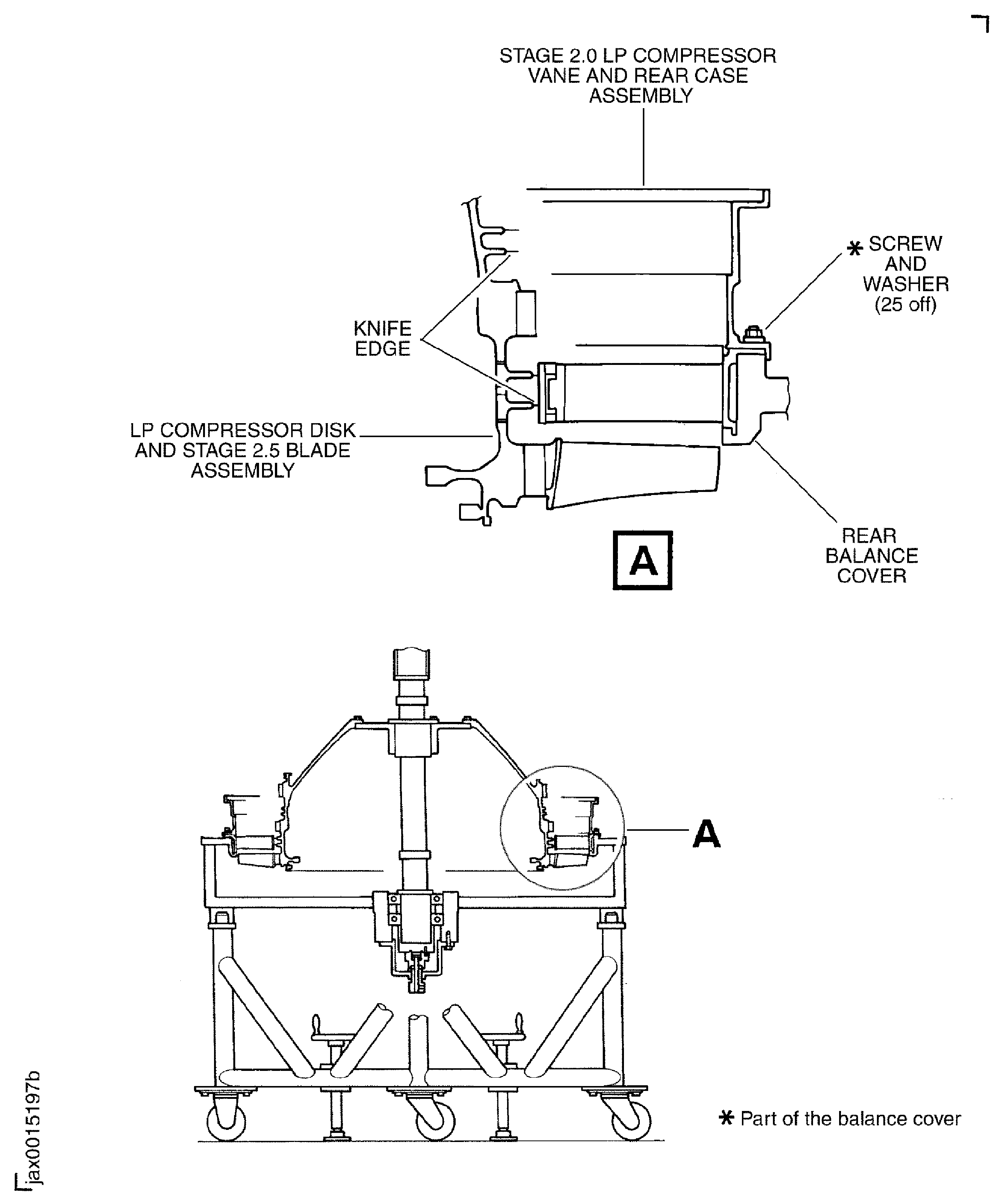
    3. Transfer the stage 2.0 vane and rear case assembly on to the LPC disk and stage 2.5 blade assembly.

    4. Install the stage 2.0 vane and rear case assembly on to the flange of the rear balance cover and safety with the 25 screws and washers (part of the balance cover and fixture). Tighten the bolts.

    1. SUBTASK 72-32-80-440-059 Install the Stage 2.0 Blades to the LPC Disk and Safety with the Retaining Plates

    2. Refer to Figure, Figure, Figure, Figure and Figure.

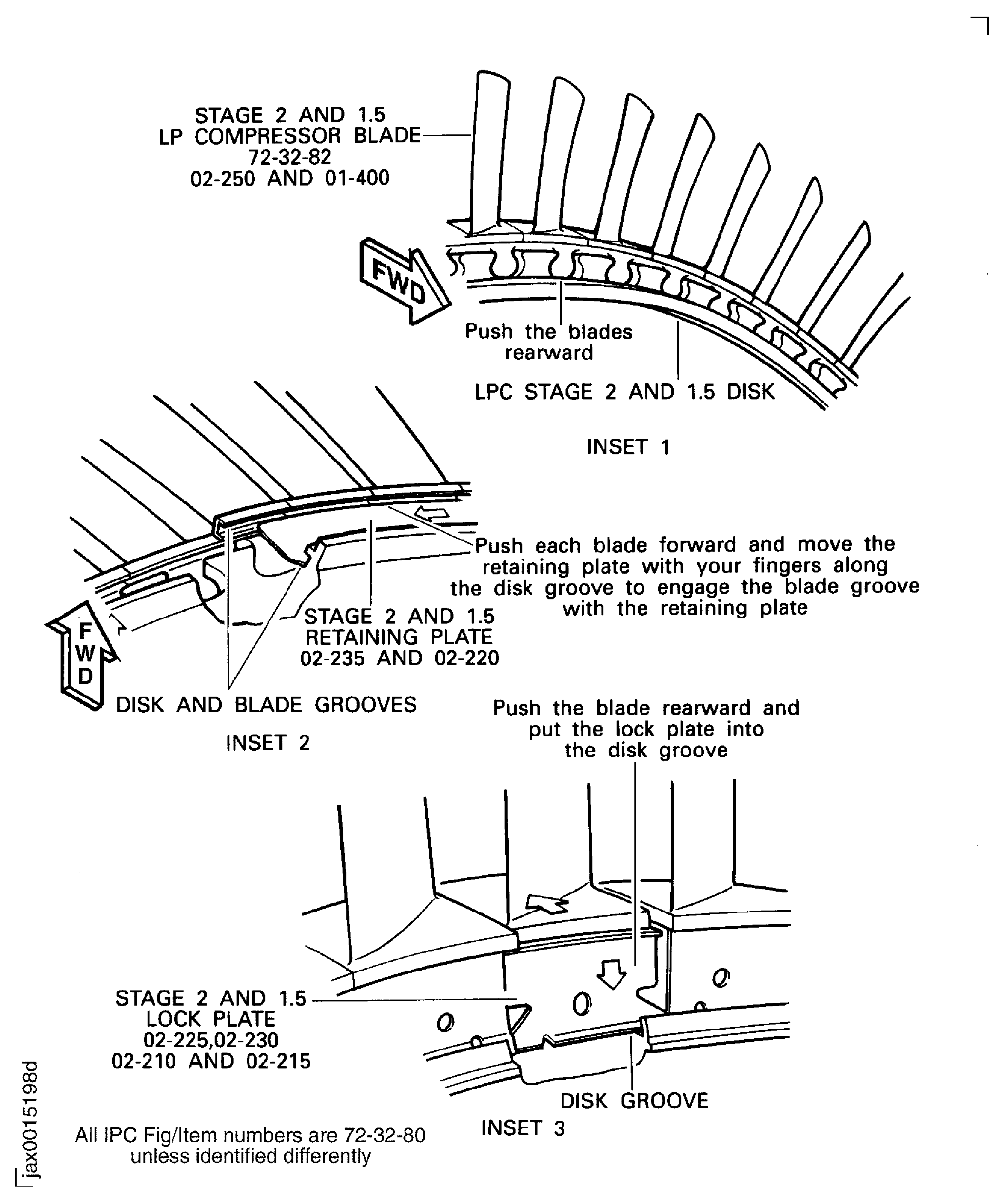
    3. Install the stage 2.0 blades to the disk in the sequence found in the Step. Start from the No. 1 blade slot and install the blades in a counterclockwise direction when you look from the rear. The identification number of the No. 1 slot is on the top of the disk tang.

    4. Move rearward all the blades as much as half the thickness of the disk rim.

      1. Install the eight stage 2.0 8 span retaining plates "ENGINE-LP COMPRESSOR STAGE 1.5,2 AND 2.5 ASSY (72-32-80, 02-235) between the two grooves on the stage 2.0 blades and disk.

      2. Move forward the blade at the No. 1 blade position and align the groove of the blade with the groove of the disk.

      3. Install the No. 1, stage 2.0 8 span retaining plate into the two grooves of the No. 1 blade and the disk.

      4. Align the groove of the next blade with the groove of the disk.

      5. CAUTION

        DO NOT USE A HAND TOOL WHEN YOU MOVE THE PLATE. THE HAND TOOL CAN CAUSE DAMAGE TO THE PLATE.

        Move the plate in to the two grooves of the No. 2 blade and the disk.

      6. Do Step and Step for the remaining blades until the plate is fully into the grooves of the blades and the disk.

      7. Do the same Step, Step and Step for the installation of the No. 2 through No. 8, stage 2.0 8 span retaining plate into the grooves of the blades and the disk.

      1. Install a new "ENGINE-LP COMPRESSOR STAGE 1.5,2 AND 2.5 ASSY (72-32-80, 02-230) stage 2.0 single span lock plates 3 off in to the grooves of the blades and the disk.

      2. Make space between any two adjacent stage 2.0 8 span retaining plates.

      3. Install the first stage 2.0 single span lock plate in to the disk groove at the space between the stage 2.0 8 span retaining plates temporarily.

      4. Close the two adjacent stage 2.0 8 span retaining plates to the single span lock plate.

      5. Safety the lock plate to the adjacent stage 2.0 8 span retaining plates temporarily with the adhesive tape.

      6. Install the second and the third lock plates in to the spaces between the stage 2.0 8 span retaining plates which locate 90 degrees and 270 degrees apart from the first lock plate. Do the same operation as the step (2) through (4) for the second and the third lock plates.

    5. Install a new "ENGINE-LP COMPRESSOR STAGE 1.5,2 AND 2.5 ASSY (72-32-80, 02-225) stage 2.0 single span adjusting lock plate 1 off in to the grooves of the blades and the disk. The adjusting lock plate is between the two stage 2.0 8 span retaining plates and 180 degrees apart from the first lock plate.

      1. Measure the clearance between the adjusting lock plate and the adjacent retaining plate after collecting all the circular clearance.

      2. The collected clearance must not exceed 0.010 in. (0.25 mm).

      3. Remove metal from the adjusting lock plate with a file to obtain specified clearance if required.

    6. Bend the tabs on the three single span lock plates and on the adjusting lock plate with a pair of pliers. Make sure that the tabs are correctly bent, Figure, Inset 5.

    7. Examine the bend portion with a 10X magnifier and make sure there is no crack.

    8. Try to shake tip of all the blades circumferentially. Make sure that you can shake each blade tip.

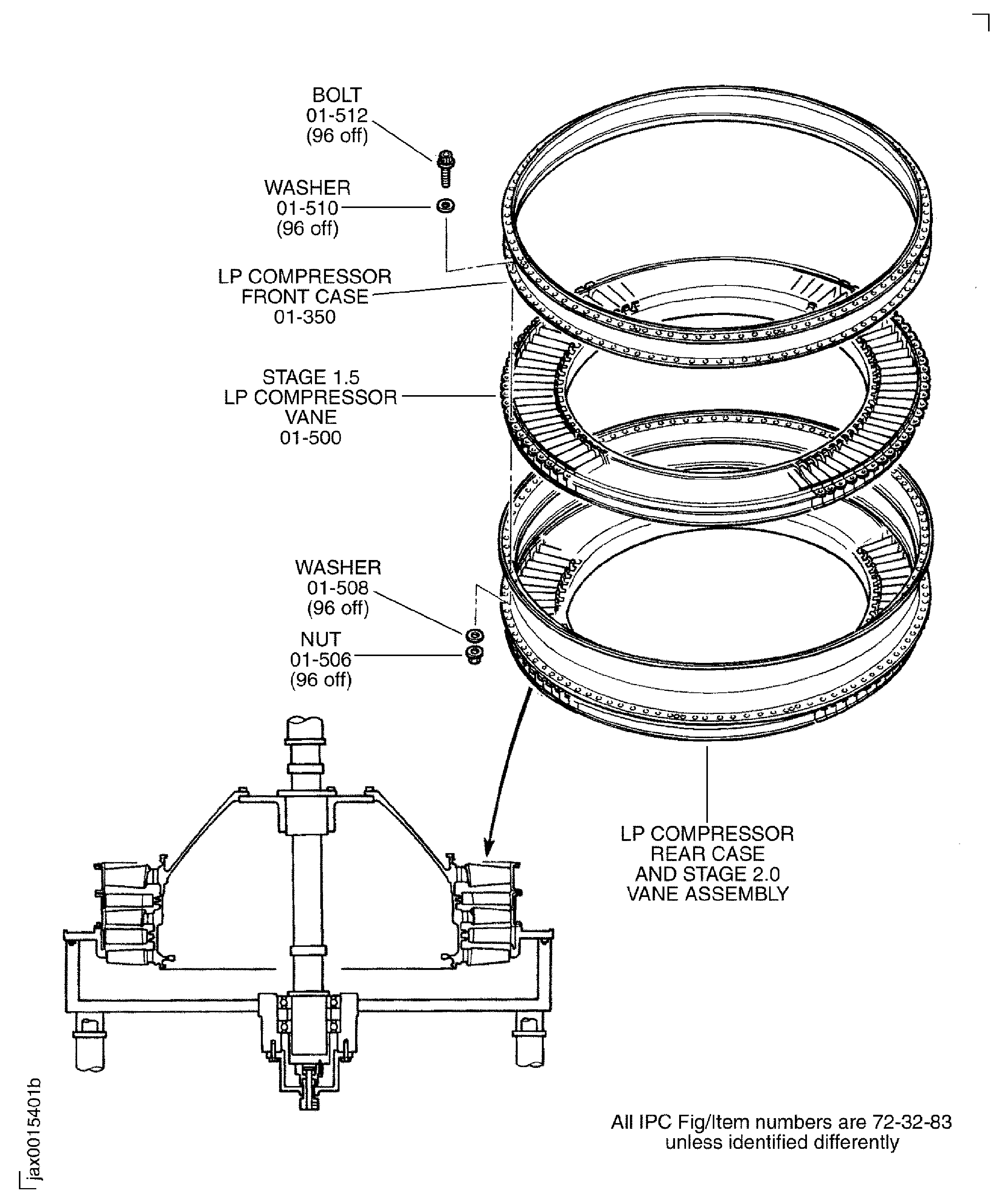
    1. SUBTASK 72-32-80-440-060 Install the Stage 1.5 LP Compressor Vane (Stage 1.5 Vane) (72-32-83,01-500) and the LP Compressor Front Case (Front Case) (72-32-83,01-350) on to the LP Compressor Rear Case (Rear Case) and the Stage 2.0 Vane Assembly

    2. Refer to FigureFigure, Figure and Fig. 72-32-80-990-015.

      NOTE

      To hit the knife edge seals on the disk with the vane during installation can easily cause damage of those parts.
    3. Transfer the stage 1.5 vane on to the rear case and the stage 2.0 vane assembly.

      1. Apply the jointing compound on to the mating faces of the stage 1.5 vane, the front case and the rear case.

      2. Clean the mating faces of the stage 1.5 vane, the front case and the rear case with CoMat 01-124 ISOPROPYL ALCOHOL.

      3. Apply CoMat 04-004 JOINTING COMPOUND, LIGHT GRADE on to the mating faces of the stage 1.5 vane, the front case and the rear case. Dry in the air for five minutes.

    4. Install the stage 1.5 vane on to the front flange of the rear case.

    5. Put the front case on to the stage 1.5 vane.

    6. Install the front case and the stage 1.5 vane to the rear case with the 96 bolts ENGINE-LP COMPRESSOR STAGE 1.5 AND 2 VANES (72-32-83, 01-512), washers ENGINE-LP COMPRESSOR STAGE 1.5 AND 2 VANES (72-32-83, 01-508), washers ENGINE-LP COMPRESSOR STAGE 1.5 AND 2 VANES (72-32-83, 01-510) and nuts ENGINE-LP COMPRESSOR STAGE 1.5 AND 2 VANES (72-32-83, 01-506).

    7. Torque the nuts to 36 to 45 lbfin (4.0 to 5.0 Nm).

    1. SUBTASK 72-32-80-440-061 Install the Stage 1.5 Blades to the LPC Disk and Safety with the Retaining Plates

    2. Refer to Figure, Figure, Figure and Figure.

    3. Push the balance arbor from the bottom with the adjusting screw. Move the LPC rotor up just before the stage 2.0 blade touch the stage 1.5 vanes.

    4. Install the stage 1.5 blades to the LPC disk in the sequence found in the Step. Start from the No. 1 blade slot and install the blades in a counterclockwise direction when you look from the rear. The identification number of the No. 1 slot is on the top of the disk tang.

    5. Move rearward all the blades as much as half the thickness of the disk rim.

      1. Install the eight stage 1.5 6 span retaining plates "ENGINE-LP COMPRESSOR STAGE 1.5,2 AND 2.5 ASSY (72-32-80, 02-220) between the two grooves on the stage 1.5 blades and disk.

      2. Move forward the blade at the No. 1 blade position and align the groove of the blade with the groove of the disk.

      3. Install the No. 1, stage 1.5 6 span retaining plate into the two grooves of the No. 1 blade and the disk.

      4. Align the groove of the next blade with the groove of the disk.

      5. CAUTION

        DO NOT USE A HAND TOOL WHWN YOU MOVE THE PLATE. THE HAND TOOL CAN CAUSE DAMAGED TO THE PLATE.

        Move the plate in to the two grooves of the No. 2 blade and the disk.

      6. Do Step and Step for the remaining blades until the plate is fully into the grooves of the blades and the disk.

      7. Do the same Step, Step and Step for the installation of the No. 2 through No. 8, stage 1.5 6 span retaining plate into the grooves of the blades and the disk.

      1. Install a new "ENGINE-LP COMPRESSOR STAGE 1.5,2 AND 2.5 ASSY (72-32-80, 02-215) stage 1.5 single span lock plates 3 off in to the grooves of the blades and the disk.

      2. Make space between any two adjacent stage 1.5 6 span retaining plates.

      3. Install the first stage 1.5 single span lock plate in to the disk groove at the space between the stage 1.5 6 span retaining plates temporarily.

      4. Close the two adjacent stage 1.5 6 span retaining plates to the single span lock plate.

      5. Safety the lock plate to the adjacent stage 1.5 6 span retaining plates temporarily with the adhesive tape.

      6. Install the second and the third lock plates in to the spaces between the stage 1.5 6 span retaining plates which locate 90 degrees and 270 degrees apart from the first lock plate. Do the same operation as the step (2) through (4) for the second and the third lock plates.

    6. Install a new "ENGINE-LP COMPRESSOR STAGE 1.5,2 AND 2.5 ASSY (72-32-80, 02-210) stage 1.5 single span adjusting lock plate 1 off in to the grooves of the blades and the disk. The adjusting lock plate is between the two stage 1.5 6 span retaining plates and 180 degrees apart from the first lock plate.

      1. Measure the clearance between the adjusting lock plate and the adjacent retaining plate after collecting all the circular clearance.

      2. The collected clearance must not exceed 0.010 in. (0.25 mm).

      3. Remove metal from the adjusting lock plate with a file to obtain specified clearance if required.

    7. Bend the tabs on the three single span lock plates and on the adjusting lock plate with a pair of pliers. Make sure that the tabs are correctly bent, Figure, Inset 5.

    8. Examine the bend portion with a 10X magnifier and make sure there is no crack.

    9. Try to shake tip of all the blades circumferentially. Make sure that you can shake each blade tip.

    1. SUBTASK 72-32-80-440-062 Install the Mid and Front Balance Cover on to the Rear Balance Cover

    2. Refer to Figure, Figure and Figure.

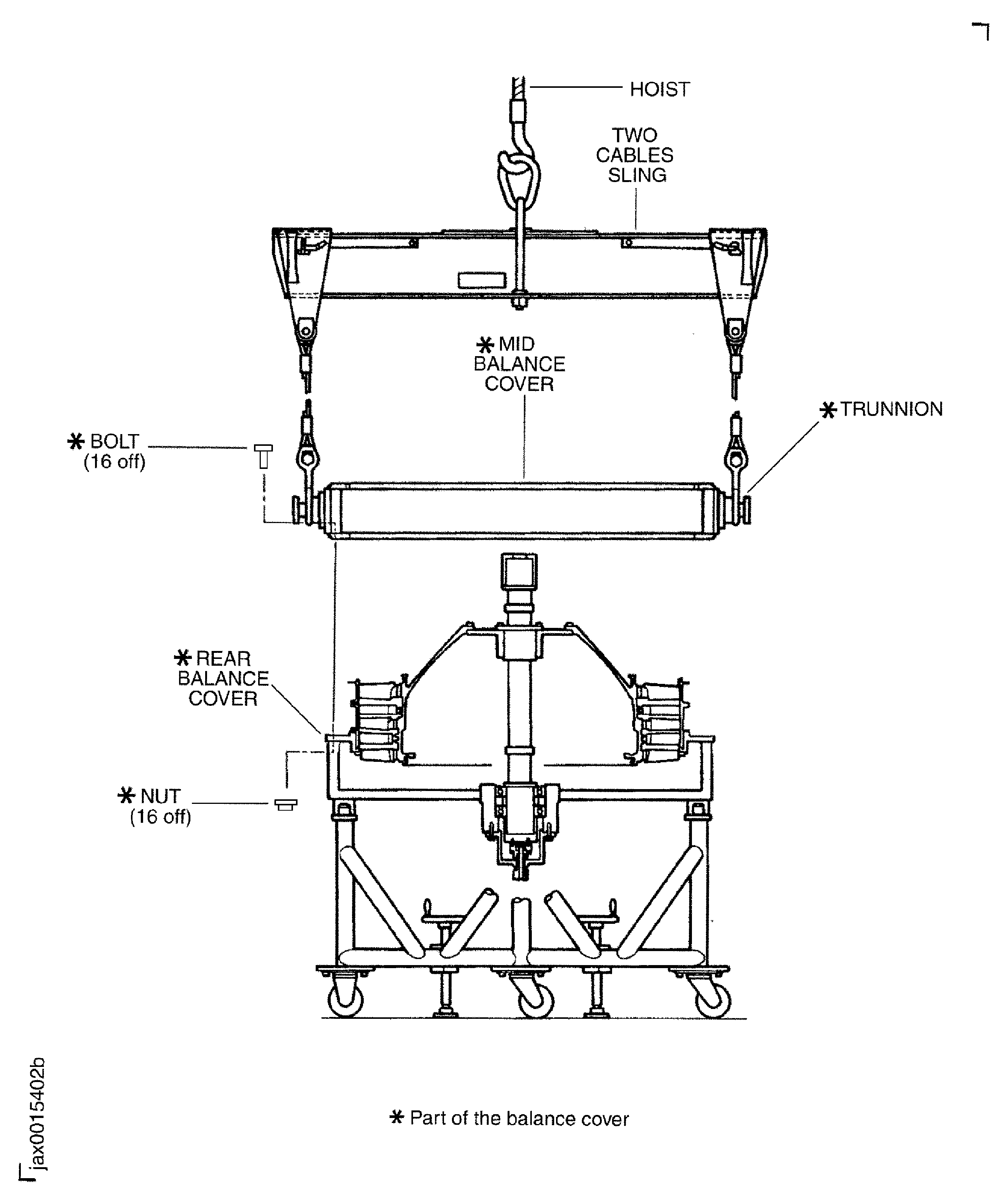
      1. Install the mid balance cover on to the rear balance cover.

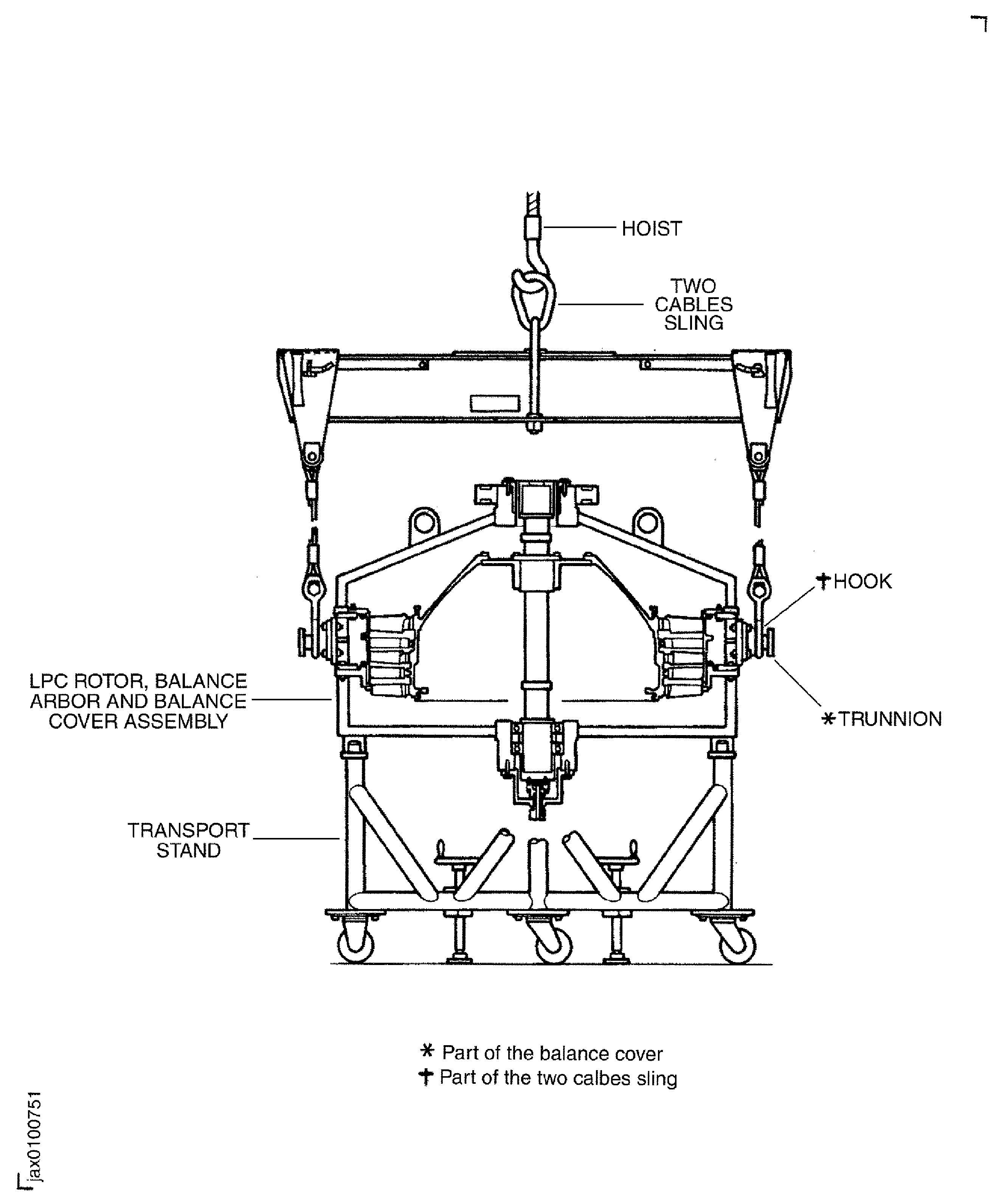
      2. Move the two cables sling 1 off to the work area.

      3. Attach the two cables sling to the two trunnions on the mid balance cover.

      4. Make sure that the shaft portion of the trunnions are fully engaged in to the holes of the hooks of the two cables sling.

      5. Attach a hoist to the two cables sling.

      6. Lift the mid balance cover and make sure, and turn if necessary, that the correlation mark 'F' is up and 'R' is down.

      7. Lower and attach the mid balance cover on to the rear balance cover to align the correlation marks 'TOP'.

      8. Install the 16 bolts (part of the balance cover and fixture) through 16 holes on the flanges of mid and rear balance cover.

      9. Safety the mid balance cover with the 16 nuts (part of the balance cover and fixture). Tighten the nuts.

      1. Install the support ring on to the mid balance cover and front case.

      2. Align the support ring inner diameter with the spigot of the front case front flange.

      3. Install the support ring on to the mid balance cover and the front case front flange.

      4. Make sure that there is no clearance between the mating faces of the two flanges on the support ring and mid balance cover.

      5. Safety the support ring to the mid balance cover with 16 bolts, washers and nuts (part of the balance cover and fixture). Tighten the 16 nuts.

      1. Install the outer race and the roller of the roller bearing on the front balance cover.

      2. Install the outer race and the roller of the roller bearing (part of the balance arbor) on the front balance cover.

      3. Install the stopper (part of the balance cover and fixture) to the outer race and front balance cover and safety the stopper with the six bolts (part of the balance cover and fixture).

      4. Tighten the bolts.

      1. Install the front balance cover on the mid balance cover.

      2. Install the two lifting slings to the eye plates on the front balance cover.

      3. Attach a hoist to the two lifting slings.

      4. Lift and move the front balance cover above the LP compressor stage 1.5, 2 and 2.5 assembly (LPC rotor).

      5. Slowly lower the front balance cover on to the LPC rotor assembly.

      6. Align the roller bearing outer race and the roller on the front balance cover with inner race on the balance arbor.

      7. Install the front balance cover on the mid balance cover with the 16 bolts (part of the balance cover and fixture) and nuts (part of the balance cover and fixture).

      8. Tighten the bolts.

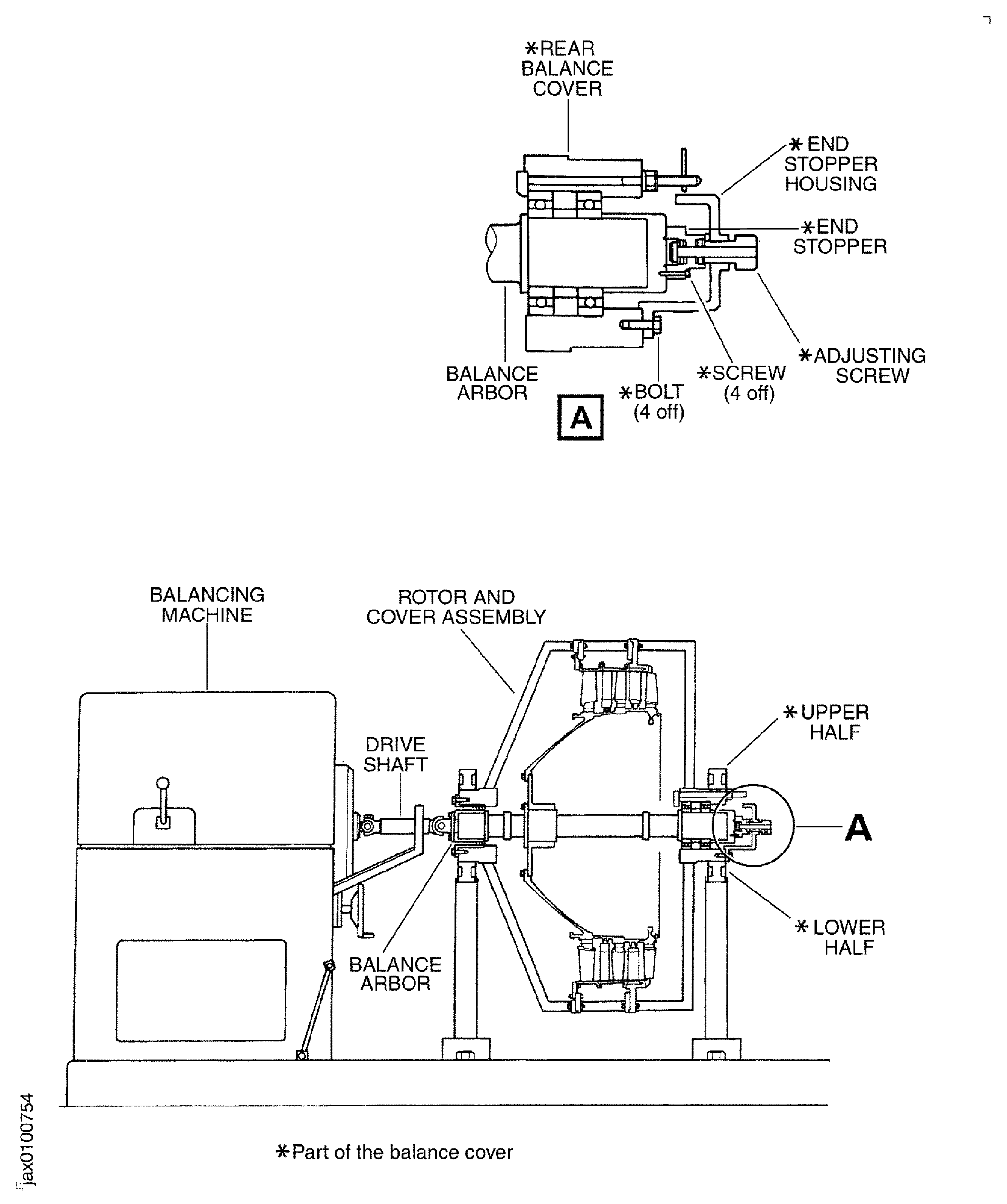
    1. SUBTASK 72-32-80-440-063 Install the LPC Rotor, Balance Arbor and Balance Cover Assembly (LPC Rotor and Balance Cover Assembly) on to the Balancing Machine

    2. Refer to Figure, Figure and Figure.

    3. NOTE

      Balancing tools in this TASK are applicable to a SCHENCK HL5 U horizontal balancing machine and bearing housing.
      Balancing must be operated at a speed between 700 to 900 rpm to agree with the gear ratios available.
      The direction of rotation is clockwise when you look from the rear.

      Move the LPC rotor and balance cover assembly on the transport stand to the balance area.

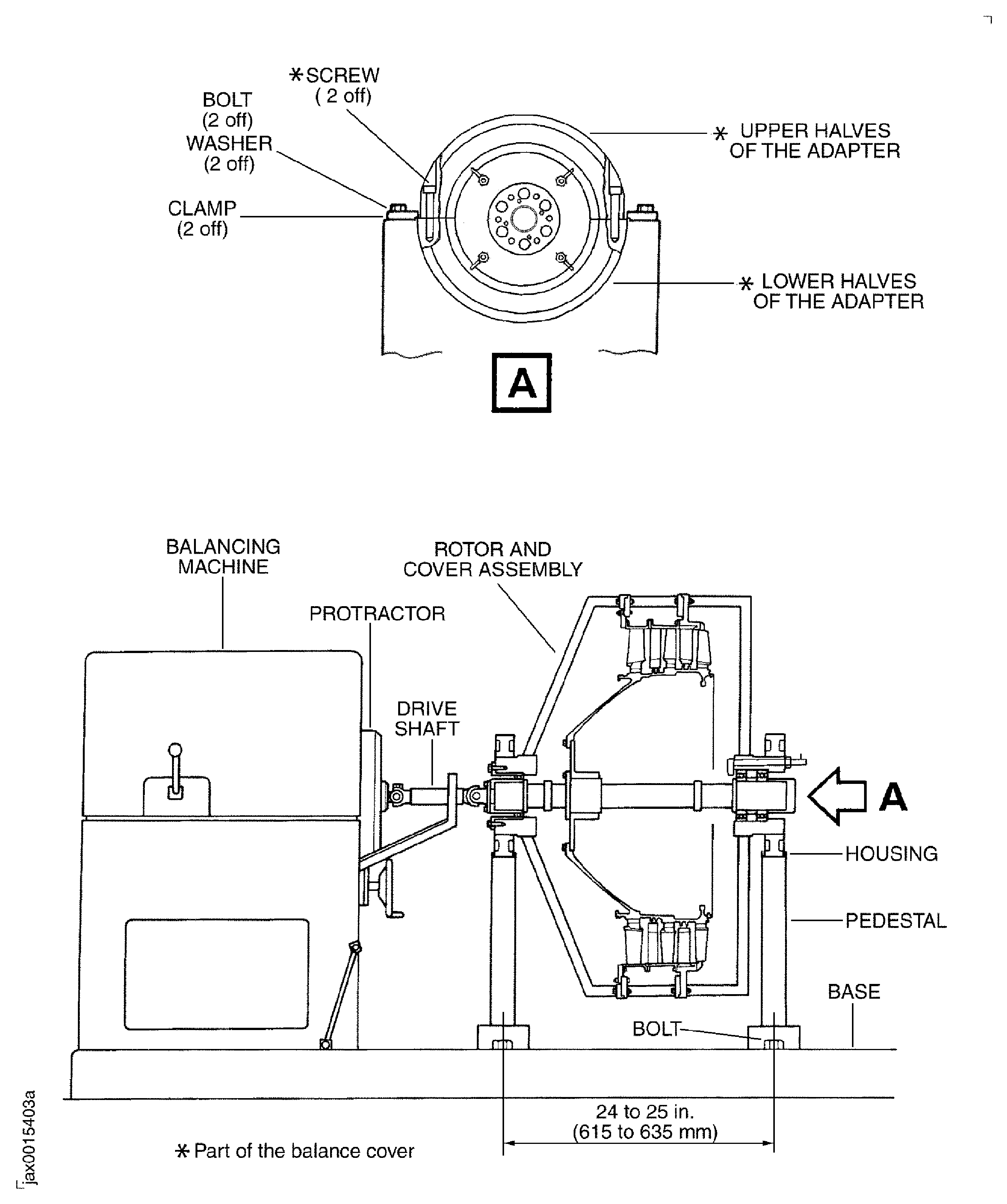
    4. Install the two lower halves of the adapters (part of the balance cover and fixture) in to the housings on the pedestals of the horizontal balancing machine.

    5. Safety the two lower halves of the adapters in to the housings on the pedestals with the four clamps and the four bolts of the balancing machine.

    6. Loose the bolts which safety the two pedestals to the base of the balancing machine and adjust distance between the centerlines of them from 24 to 25 in. (615 to 635 mm).

      1. Install the two cables sling on to the trunnions (part of the balance cover and fixture).

      2. Attach a hoist to the two cables sling and lift it.

      3. Lower the sling and attach the two hooks on to the two trunnions.

      4. Make sure the shaft portion of the trunnions are fully engaged in the holes of the hooks.

    7. Slowly lift LPC rotor and cover the assembly until it is clear of the transport stand.

    8. Turn the LPC rotor and cover assembly from the vertical to the horizontal manually around the trunnions.

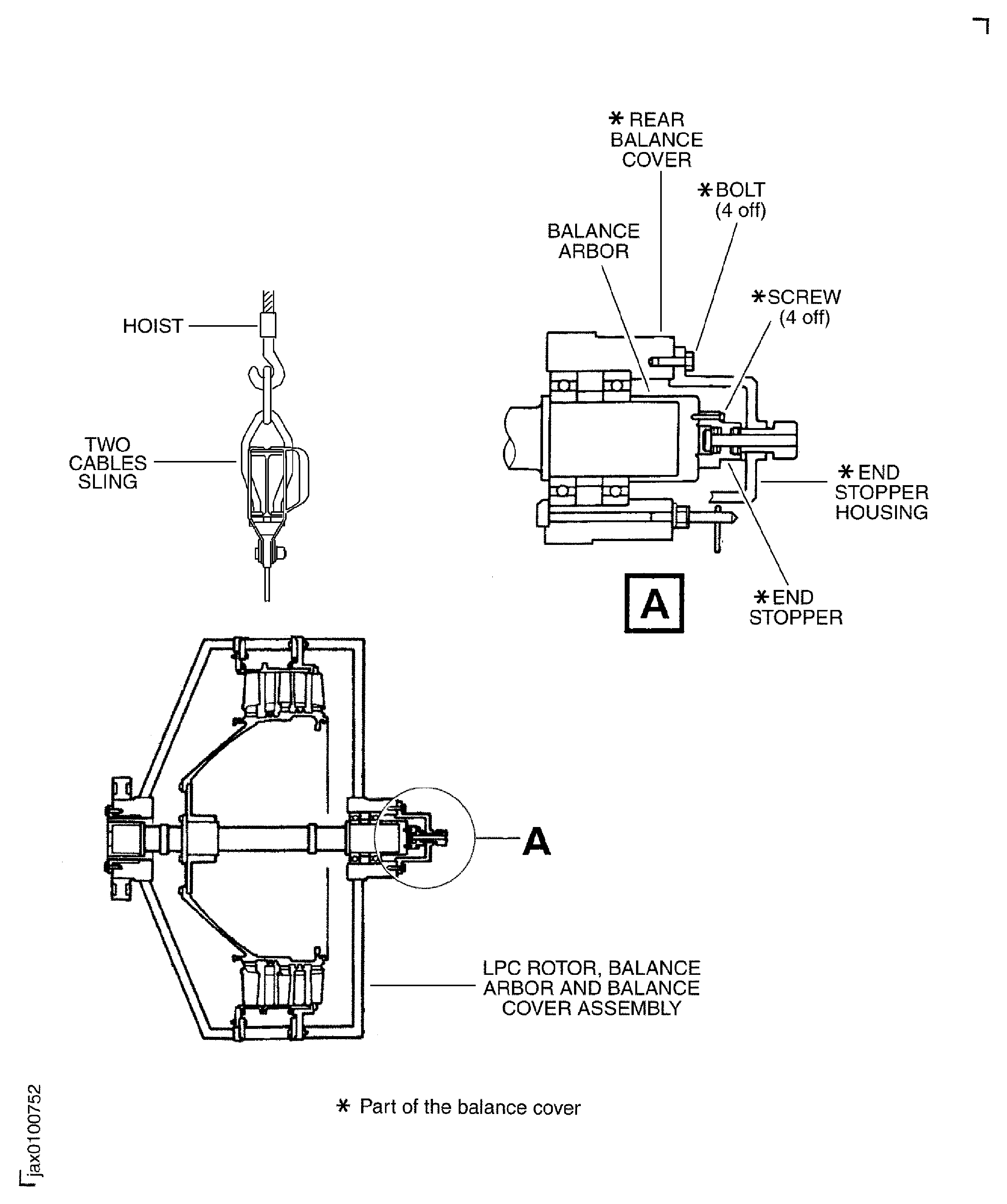
      1. Remove the end stopper housing, the end stopper, the adjusting screw assembly (the end stopper housing assembly) from the rear balance cover and the balance arbor.

      2. Loosen the four screws which safety the end stopper to the balance arbor.

      3. Hold the end stopper housing and remove the four bolts which safety the end stopper housing to the rear balance cover.

      4. Remove the end stopper housing assembly from the rear balance cover.

    9. Transfer the LPC rotor and balance cover assembly with the hoist and set the front side of the LPC rotor and cover assembly to the balancing machine drive shaft. Lower it slowly to the two pedestals of the balancing machine.

    10. Install the two upper halves of the adapter (part of the balance cover and fixture) on to the lower halves.

    11. Safety the two upper halves of the adapter with the four bolts (part of the balance cover and fixture). Tighten the bolts.

    12. Adjust the drive shaft axial position with the adjusting lever of the balancing machine.

    13. Connect the balance arbor to the balancing machine drive shaft with six bolts (part of the balancing machine). Align the correlation mark on the balance arbor with the zero position on the protractor of the balancing machine as much as possible.

    14. Safety the pedestals to the balancing machine base with bolts (part of the balancing machine). Tighten the bolts.

    1. SUBTASK 72-32-80-220-051 Examine the Runout of the LPC Rotor

    2. Refer to Figure.

    3. Seat a dial test indicator to the balancing machine with a magnet base.

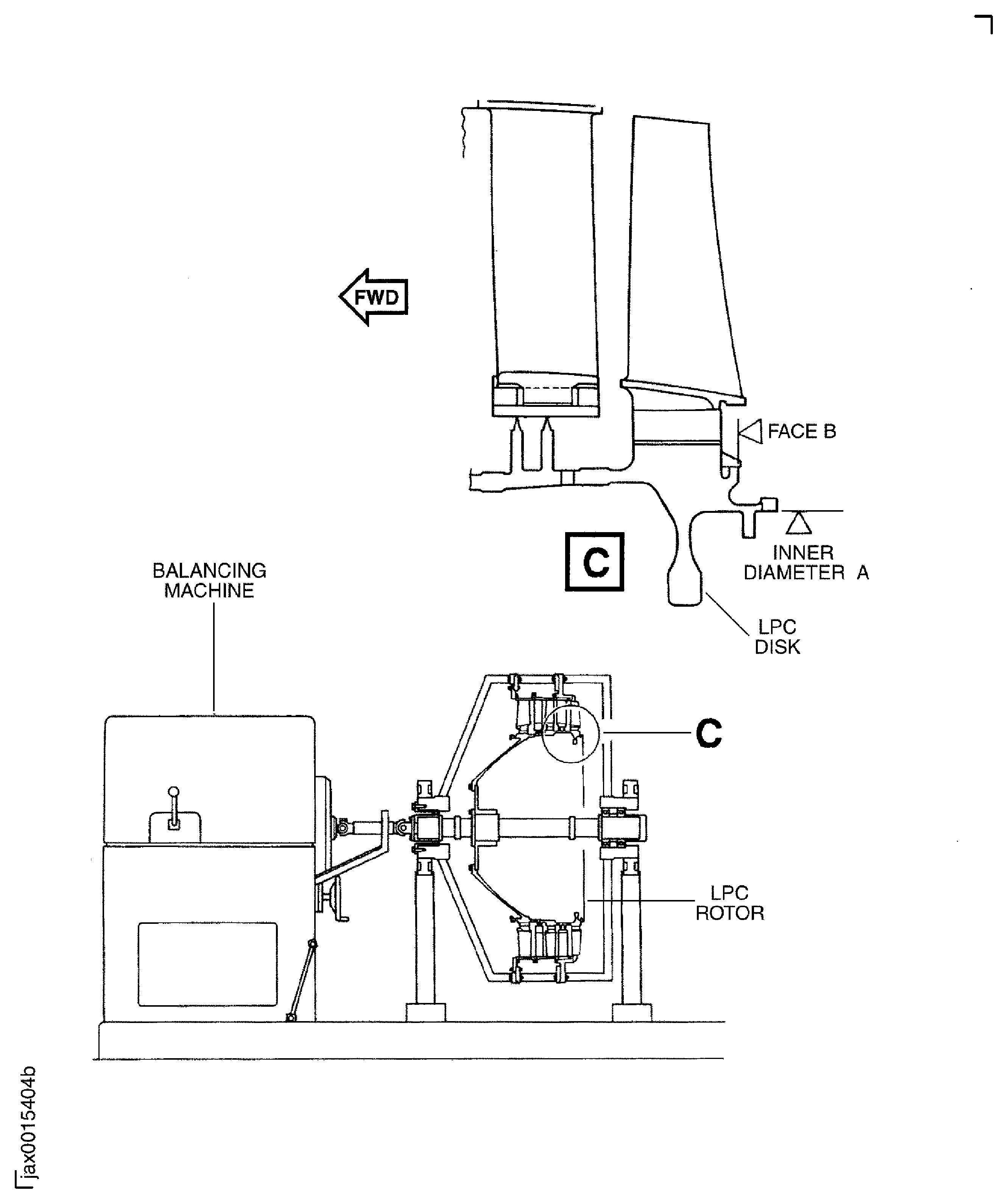
    4. Put the tip of the probe on the dial indicator to the rear face B and inner diameter A of the rear flange on the LPC disk.

    5. Turn the protractor of the balancing machine manually and turn the rotor to examine the runout.

    6. Examine the runout with the dial test indicator. The runout on the two locations must not exceed 0.0023 in. TIR. (0.06 mm TIR.).

    7. If the runout is more than the limits, reject the LPC rotor and do more inspection to find the cause.

    8. Remove the dial test indicator and the magnet base.

    1. SUBTASK 72-32-80-440-064 Examine the Initial Unbalance of the LPC Rotor

    2. Refer to Figure.

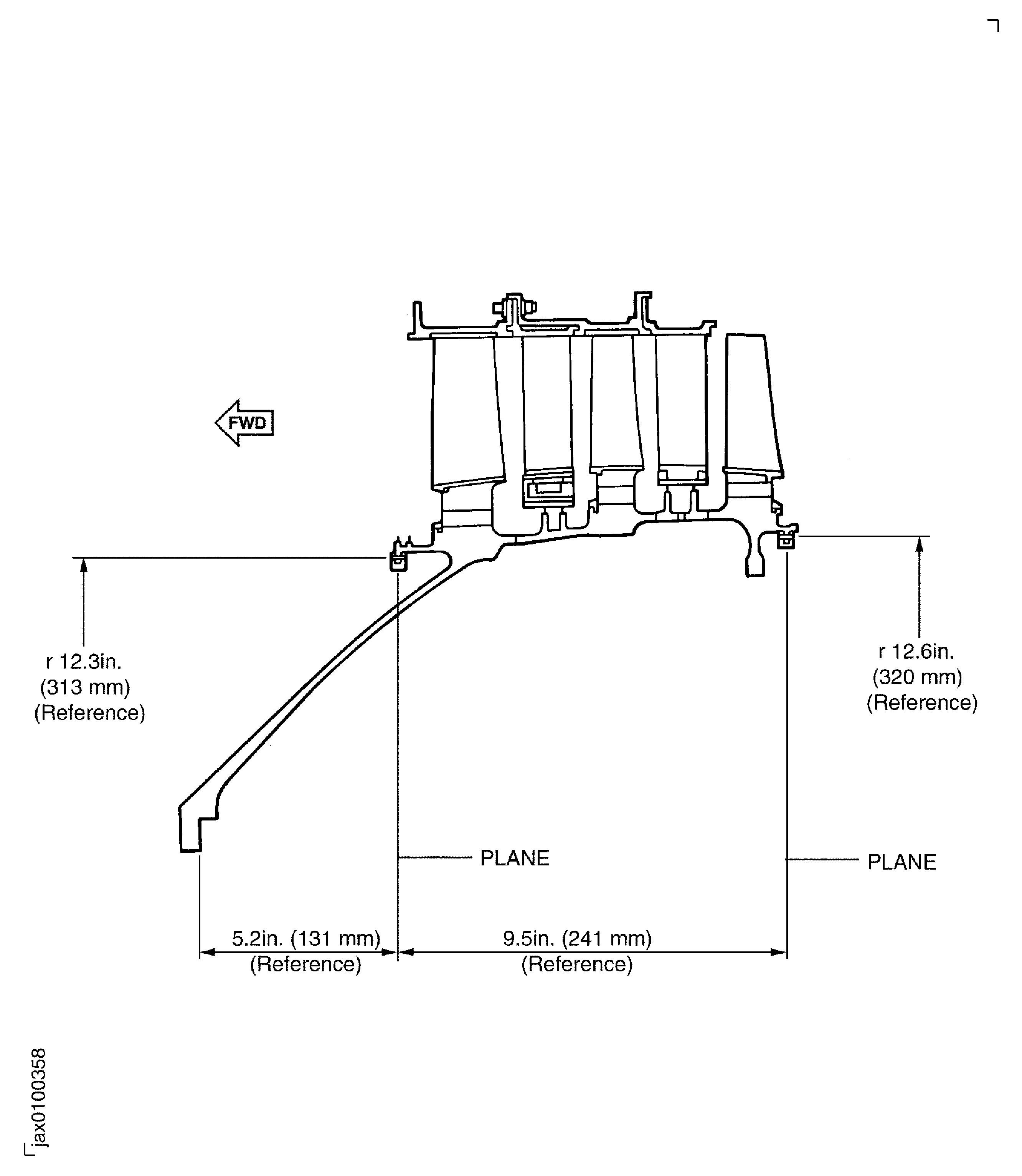
    3. Input the geometrical setting values to the balancing machine. The two planes for balance correction are the front flange of the stage 1.5 LPC disk and the rear flange of the stage 2.5 LPC disk.

      1. Measure and write the magnitude and the angle of the unbalance on each plane.

      2. Run the rotor until the unbalance indication becomes stable.

      3. Measure and write the magnitude and the angle of the unbalance on each plane.

      4. If the magnitude of the unbalance is over 3.4 oz in (2500 gm mm) reject the rotor and do the inspection to find the cause.

    1. SUBTASK 72-32-80-440-065 Correct the Unbalance of the LP Compressor Rotor

    2. Refer to Figure and Figure.

    3. NOTE

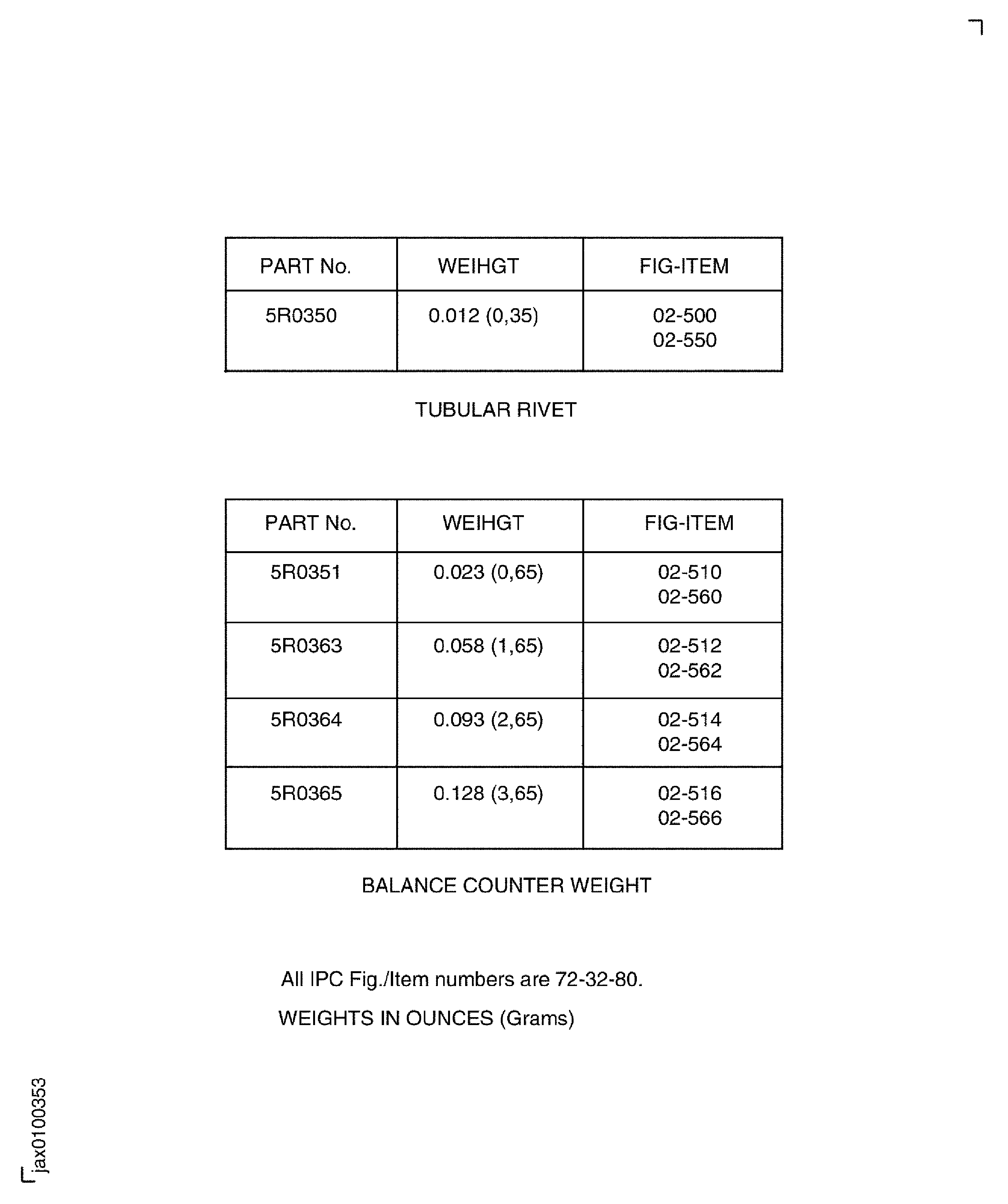
      You can attach more than two balance counter weights if required.
    4. Find the nearest weights from the balance counter weights.

      1. Do the unbalance correction in the subsequent steps.

      2. Release the two clamps and open the windows on the front/rear balance cover.

      3. Turn the protractor by hand and set the lightest position at the center of the window.

      4. Install the balance counter weights and safety them with the tubular rivets. Use IAE 1J13209 Riveter 1 off. Refer to SPM TASK 70-39-03-390-501 for rivet installation.

      5. Close the windows and lock the clamps on the front/rear balance cover.

    5. Run the LPC rotor and examine the remaining unbalance. The remaining unbalance must be less than subsequent limit value, the front flange of the stage 1.5 LPC disk 0.24 oz in (180 gm mm), the rear flange of the stage 2.5 LPC disk 0.24 oz in (180 gm mm).

    1. SUBTASK 72-32-80-440-066 Remove the LPC Rotor and Balance Cover Assembly from the Balancing Machine

    2. Refer to Figure and Figure.

    3. Release the six bolts and disconnect the drive shaft from the balance arbor.

    4. Retract the drive shaft with the adjusting lever.

      1. Install the end stopper assembly (part of the balance cover and fixture).

      2. Install the end stopper housing on the rear balance cover with the four bolts.

      3. Install the end stopper on the balance arbor with the four screws.

    5. Extend the adjusting screw until it attaches to the rear end of the balance arbor.

    6. Remove the four bolts which attach the two upper halves to the two lower halves. Remove the two upper halves.

    7. Attach the hoist to the two cables sling and install the two cables sling on to the trunnion.

    8. Make sure that the shaft portion of the trunnions are fully engaged in the holes in the hooks.

    9. Slowly lift the LPC rotor and balance cover assembly until it is clear of the balance machine.

    10. Turn the LPC rotor and balance cover assembly from the horizontal to the rear end down around the trunnions.

      1. Lower the LPC rotor and balance cover assembly into the transport stand.

      2. Align the four holes in the rear balance cover with the four posts of the transport stand.

      3. Lower the LPC rotor and balance cover assembly into the transport stand.

    11. Remove the two cables sling from the trunnions.

    12. Remove the four bolts and clamps which safety lower adapter to the housings on the pedestals of the balancing machine. Remove the two lower adapter from the two housings on the pedestals.

    1. SUBTASK 72-32-80-440-067 Remove the LPC Rotor from the Balance Cover and Fixture

      1. Remove the front balance cover from the mid balance cover.

      2. Remove the 16 bolts and nuts which attach the front balance cover to the mid balance cover.

      3. Install the two lifting slings to the eyeplate of the front balance cover.

      4. Install the hoist to the two lifting slings.

      5. Lift the front balance cover and remove it from the mid balance cover.

      1. Remove the support ring from the mid balance cover and the front case.

      2. Remove the 16 bolts, washers and nuts which attach the support ring to the mid balance cover and the front case.

      3. Remove the support ring.

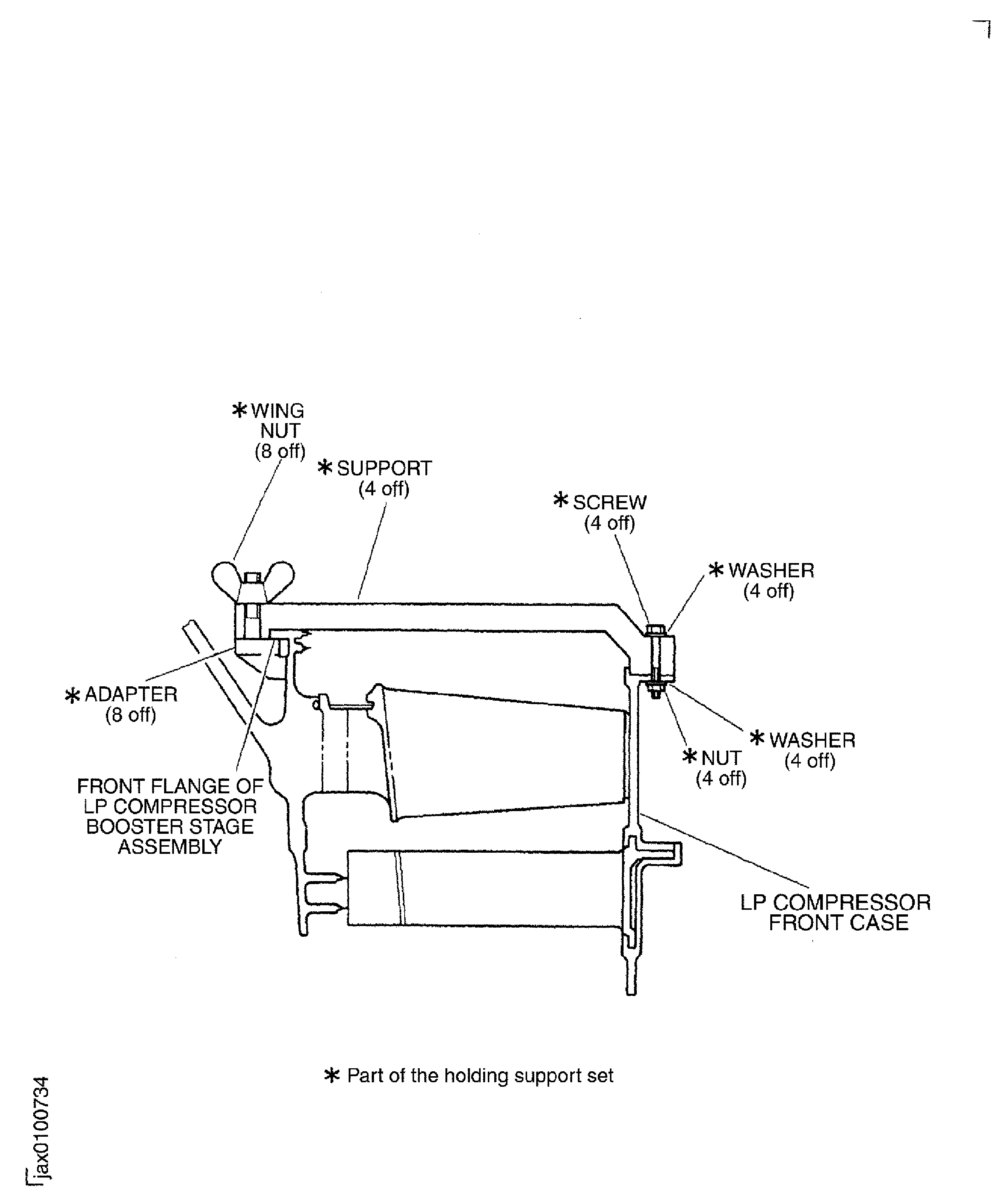
      1. Install IAE 1J13107 Holding support 1 off to the front case and stage 1.5 LPC disk front flange.

      2. Attach each support (part of the holding support) to the moment weight mounting flange with the adapter (part of the holding support) and the two wing nuts (part of the holding support).

      3. Safety the four holding supports to the front case with the four bolts (part of the holding support), nuts (part of the holding support) and eight washers (part of the holding support). Tighten the four bolts.

      4. Tighten the eight wing nuts on the support by hand.

      1. Remove the mid balance cover from the rear balance cover.

      2. Remove the 16 bolts and nuts which attach the mid balance cover to the rear balance cover.

      3. Attach the hoist to the two cables sling.

      4. Install the two cables sling to the trunnion.

      5. Lift and remove the mid balance cover.

      1. Remove the LPC rotor from the rear balance cover.

      2. Remove the 25 screws and washers which attach the stage 2.0 vane and rear case assembly to the rear balance cover.

        1. Release the ball bearing from the rear balance cover.

        2. Loosen the four lock nuts on the L-shaped bolts.

        3. NOTE

          When the dowel indicator points to the outside diameter the L-shaped bolt lock the axial movement of the ball bearing.

          Turn the four dowel indicators to the inside diameter of the rear balance cover.

        1. Remove the end stopper housing assembly from the rear balance cover.

        2. Lower the adjusting screw in the end stopper housing at the bottom of the rear balance cover.

        3. Loosen the four screws which attach the end stopper to the balance arbor.

        4. Hold the end stopper housing and remove the four bolts which safety the end stopper housing to the rear balance cover.

        5. Remove the end stopper housing assembly.

      3. Attach the handling sling to the front end of the balance arbor with the six bolts (part of the handling sling). Tighten the bolts.

      4. Attach a hoist to the sling and slowly lift the LPC rotor until it is clear of the rear balance cover.

      1. Install the LPC rotor to the vertical work stand.

      2. Move the LPC rotor from the transport stand to the vertical work stand.

      3. Slowly lower the LPC rotor on to the vertical work stand.

      4. Remove the six bolts which attach the handling sling to the balance arbor.

      5. Remove the handling sling.

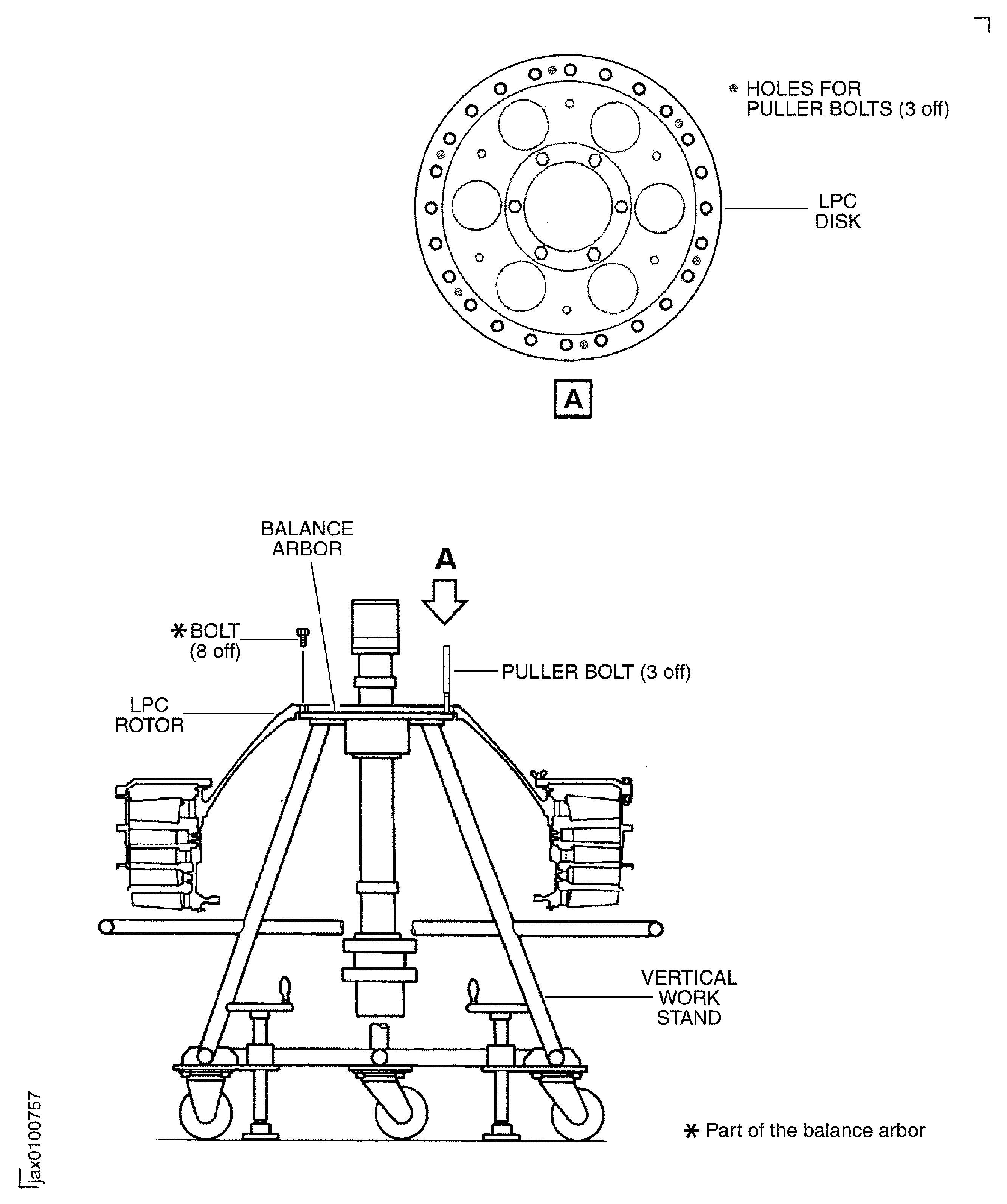
    1. SUBTASK 72-32-80-440-068 Remove the LPC Rotor from the Balance Arbor

    2. Refer to Figure, Figure, Figure and Figure.

    3. Remove the eight bolts which safety the LPC rotor to the balance arbor.

    4. Install three puller bolts (part of IAE 1J12188 Puller bolt 1 off) in to the three threaded holes out of six threaded holes in the LPC disk front flange. The three puller bolts must be installed approximately 120 degrees apart from each other.

    5. Tighten the three puller bolts equally until the LPC rotor is released from the balance arbor.

    6. Remove the puller bolts from the LPC disk.

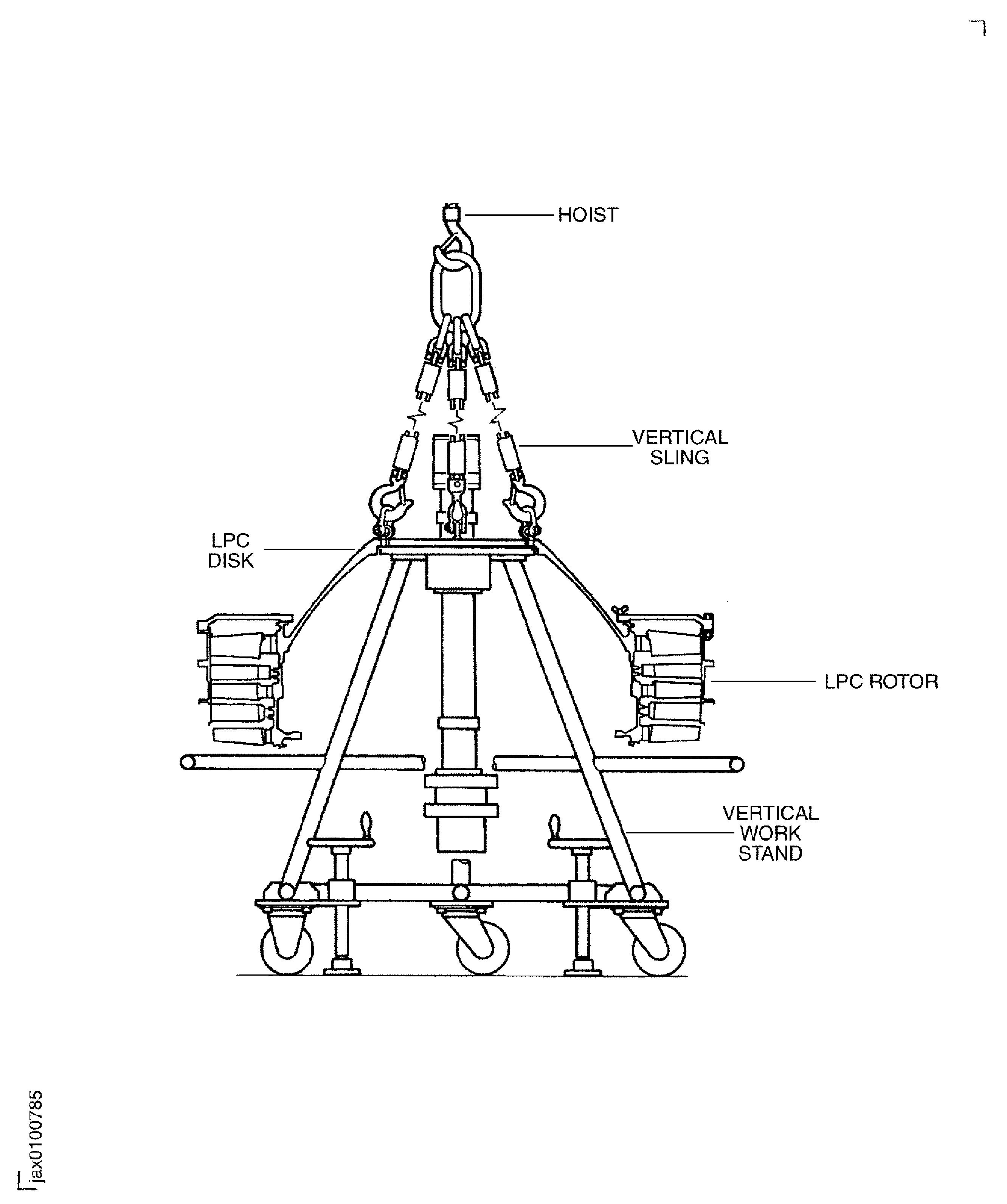
    7. Method 1: Install the vertical sling (IAE 1J13103 Vertical sling) to the LPC disk.

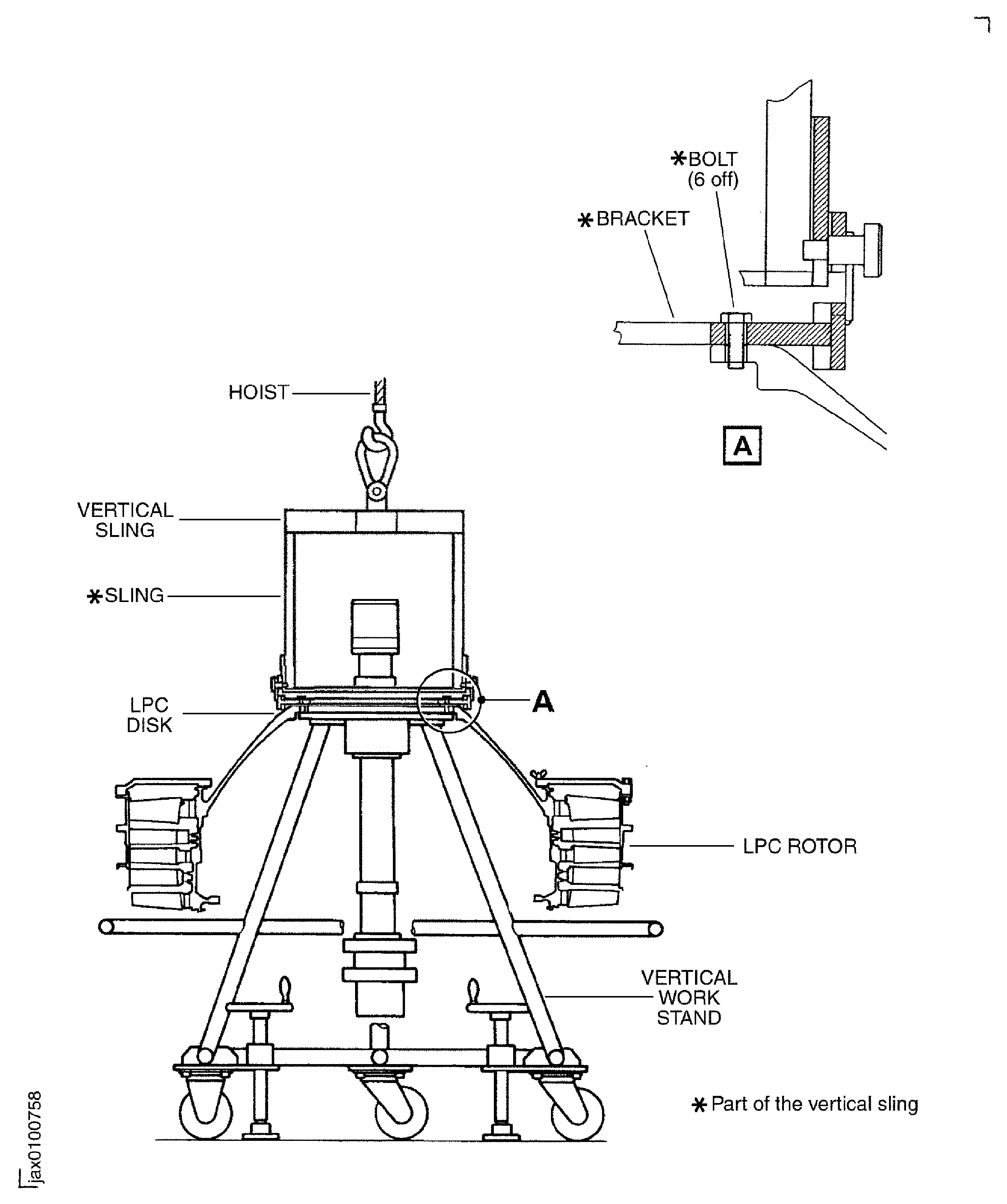
      1. Method 2: Install the vertical sling (IAE 1J12213 LPC Vertical sling) to the LPC disk.

      2. Install the bracket (part of the vertical sling) on the LPC disk with six bolts (part of the vertical sling).

      3. Install the sling (part of the vertical sling) on the bracket.

    8. Attach a hoist to the vertical sling and slowly lift the LPC rotor.

    9. Slowly lower the LPC rotor on to IAE 1J13111 LPC storage stand the storage stand 1 off.

    10. Method 1: Remove the vertical sling (IAE 1J13103 Vertical sling) from the LPC disk.

      1. Method 2: Remove the vertical sling (IAE 1J12213 LPC Vertical sling) from the LPC disk.

      2. Remove the six bolts which attach the vertical sling to the LPC disk.

      3. Remove the sling from the bracket.

    11. Remove the hoist from the vertical sling.

  1. Figure: Sectional View of the LP Compressor Stage 1.5, 2 and 2.5 Assembly

    Sectional View of the LP Compressor Stage 1.5, 2 and 2.5 Assembly

    Figure: View of the LP Compressor Stage 1.5, 2 and 2.5 Disk and Blades

    View of the LP Compressor Stage 1.5, 2 and 2.5 Disk and Blades

    Figure: Positions of the Stage 1.5 and 2 Retaining Plates and Lockplates

    Positions of the Stage 1.5 and 2 Retaining Plates and Lockplates

    Figure: Positions of the Stage 2.5 Retaining Plates and Lockplates

    Positions of the Stage 2.5 Retaining Plates and Lockplates

    Figure: View of the LP Compressor Stage 1.5 and 2 Vanes

    View of the LP Compressor Stage 1.5 and 2 Vanes

    Figure: Preparation for the Installation of the LP Compressor Disk Assembly

    Sheet 1

    Legend
    Preparation for the Installation of the LP Compressor Disk Assembly

    Sheet 1

    Close

    Figure: Preparation for the Installation of the LP Compressor Disk Assembly

    Sheet 2

    Legend
    Preparation for the Installation of the LP Compressor Disk Assembly

    Sheet 2

    Close

    Figure: Method 1: Install the Vertical Sling to LP Compressor Disk Assembly

    Sheet 1

    Legend
    Method 1: Install the Vertical Sling to LP Compressor Disk Assembly

    Sheet 1

    Close

    Figure: Method 2: Install the Vertical Sling to LP Compressor Disk Assembly

    Sheet 2

    Legend
    Method 2: Install the Vertical Sling to LP Compressor Disk Assembly

    Sheet 2

    Close

    Figure: Method 1: Install the LP Compressor Disk Assembly on to the Heater

    Sheet 3

    Legend
    Method 1: Install the LP Compressor Disk Assembly on to the Heater

    Sheet 3

    Close

    Figure: Method 2: Install the LP Compressor Disk Assembly on to the Heater

    Sheet 4

    Legend
    Method 2: Install the LP Compressor Disk Assembly on to the Heater

    Sheet 4

    Close

    Figure: Install the LP Compressor Disk Assembly on to the Balance Arbor

    Sheet 1

    Legend
    Install the LP Compressor Disk Assembly on to the Balance Arbor

    Sheet 1

    Close

    Figure: Install the Handling Sling on to the Balance Arbor

    Sheet 2

    Legend
    Install the Handling Sling on to the Balance Arbor

    Sheet 2

    Close

    Figure: Move the LPC Disk and Balance Arbor Assembly from Vertical Work Stand to the Horizontal Work Stand

    Sheet 1

    Legend
    Move the LPC Disk and Balance Arbor Assembly from Vertical Work Stand to the Horizontal Work Stand

    Sheet 1

    Close

    Figure: Move the LPC Disk and Balance Arbor Assembly from Vertical Work Stand to the Horizontal Work Stand

    Sheet 2

    Legend
    Move the LPC Disk and Balance Arbor Assembly from Vertical Work Stand to the Horizontal Work Stand

    Sheet 2

    Close

    Figure: The Sequence Diagram to Install the LP Compressor Blades

    The Sequence Diagram to Install the LP Compressor Blades

    Figure: Install the LP Compressor Stage 2.5 Blades to the Disk

    Sheet 1

    Legend
    Install the LP Compressor Stage 2.5 Blades to the Disk

    Sheet 1

    Close

    Figure: Install the LP Compressor Stage 2.5 Blades to the Disk

    Sheet 2

    Legend
    Install the LP Compressor Stage 2.5 Blades to the Disk

    Sheet 2

    Close

    Figure: Install the LP Compressor Stage 2.5 Blades to the Disk

    Sheet 3

    Legend
    Install the LP Compressor Stage 2.5 Blades to the Disk

    Sheet 3

    Close

    Figure: Remove the Front Balance Cover from the Mid Balance CoverF

    Sheet 4

    Legend
    Remove the Front Balance Cover from the Mid Balance CoverF

    Sheet 4

    Close

    Figure: Remove the Support Ring from the Mid Balance Cover

    Sheet 5

    Legend
    Remove the Support Ring from the Mid Balance Cover

    Sheet 5

    Close

    Figure: Remove the Mid Balance Cover from the Rear Balance Cover

    Sheet 6

    Legend
    Remove the Mid Balance Cover from the Rear Balance Cover

    Sheet 6

    Close

    Figure: Move the LPC Disk, Stage 2.5 Blades and Arbor Assembly from the Horizontal Work Stand to the Balance Cover

    Sheet 7

    Legend
    Move the LPC Disk, Stage 2.5 Blades and Arbor Assembly from the Horizontal Work Stand to the Balance Cover

    Sheet 7

    Close

    Figure: Install the two Handling Slings to the Balance Arbor

    Sheet 8

    Legend
    Install the two Handling Slings to the Balance Arbor

    Sheet 8

    Close

    Figure: Install the two Handling Slings to the Balance Arbor

    Sheet 9

    Legend
    Install the two Handling Slings to the Balance Arbor

    Sheet 9

    Close

    Figure: Move the LPC Disk, Stage 2.5 Blade and Arbor Assembly from the Horizontal Stand to the Transport Stand

    Sheet 10

    Legend
    Move the LPC Disk, Stage 2.5 Blade and Arbor Assembly from the Horizontal Stand to the Transport Stand

    Sheet 10

    Close

    Figure: Move the LPC Disk, Stage 2.5 Blades and Arbor Assembly from the Horizontal Work Stand to the Balance Cover

    Sheet 1

    Legend
    Move the LPC Disk, Stage 2.5 Blades and Arbor Assembly from the Horizontal Work Stand to the Balance Cover

    Sheet 1

    Close

    Figure: Apply the Jointing Compound on to the Mating Faces of the Stage 2.0 Vane and the Rear LP Compressor Case

    Sheet 2

    Legend
    Apply the Jointing Compound on to the Mating Faces of the Stage 2.0 Vane and the Rear LP Compressor Case

    Sheet 2

    Close

    Figure: Install the Stage 2.0 LP Compressor Vane in to the Rear LP Compressor Case

    Sheet 3

    Legend
    Install the Stage 2.0 LP Compressor Vane in to the Rear LP Compressor Case

    Sheet 3

    Close

    Figure: Install the Stage 2 LP Compressor Vane and Case Assembly on to the LPC Disk and Rear Balance Cover

    Install the Stage 2 LP Compressor Vane and Case Assembly on to the LPC Disk and Rear Balance Cover

    Figure: Install the LP Compressor Stage 2 Blades and the LP Compressor Stage 1.5 Blades to the Disk

    Sheet 1

    Legend
    Install the LP Compressor Stage 2 Blades and the LP Compressor Stage 1.5 Blades to the Disk

    Sheet 1

    Close

    Figure: Install the LP Compressor Stage 2 Blades and the LP Compressor Stage 1.5 Blades to the Disk

    Sheet 2

    Legend
    Install the LP Compressor Stage 2 Blades and the LP Compressor Stage 1.5 Blades to the Disk

    Sheet 2

    Close

    Figure: Install the LP Compressor Stage 2 and 1.5 Blades to the Disk

    Sheet 3

    Legend
    Install the LP Compressor Stage 2 and 1.5 Blades to the Disk

    Sheet 3

    Close

    Figure: Apply the Jointing Compound on to the Mating Faces of the Stage 1.5 Vane, the LP Compressor Front Case and the Rear LP Compressor Case

    Sheet 4

    Legend
    Apply the Jointing Compound on to the Mating Faces of the Stage 1.5 Vane, the LP Compressor Front Case and the Rear LP Compressor Case

    Sheet 4

    Close

    Figure: Install the Stage 1.5 LP Compressor Vane and the Front LP Compressor Case on to the Rear LP Compressor Case and Stage 2.0 LP Compressor

    Install the Stage 1.5 LP Compressor Vane and the Front LP Compressor Case on to the Rear LP Compressor Case and Stage 2.0 LP Compressor

    Figure: Install the Mid Balance Cover on to the Rear Balance Cover

    Sheet 1

    Legend
    Install the Mid Balance Cover on to the Rear Balance Cover

    Sheet 1

    Close

    Figure: Install the Support Ring on to the Mid Balance Cover and Front LP Compressor Case

    Sheet 2

    Legend
    Install the Support Ring on to the Mid Balance Cover and Front LP Compressor Case

    Sheet 2

    Close

    Figure: Install the Front Balance Cover on to the Mid Balance Cover

    Sheet 3

    Legend
    Install the Front Balance Cover on to the Mid Balance Cover

    Sheet 3

    Close

    Figure: Install the two Cables Sling on to the Trunnions

    Sheet 4

    Legend
    Install the two Cables Sling on to the Trunnions

    Sheet 4

    Close

    Figure: Turn the LPC Rotor, Balance Arbor and Balance Cover Assembly from the Vertical to the Horizontal

    Sheet 5

    Legend
    Turn the LPC Rotor, Balance Arbor and Balance Cover Assembly from the Vertical to the Horizontal

    Sheet 5

    Close

    Figure: Install the LPC Rotor, Balance Arbor and Balance Cover Assembly to the Balancing Machine

    Install the LPC Rotor, Balance Arbor and Balance Cover Assembly to the Balancing Machine

    Figure: Set up for Run out Checks and Dynamic Balancing

    Sheet 1

    Legend
    Set up for Run out Checks and Dynamic Balancing

    Sheet 1

    Close

    Figure: Examine the Initial Unbalance of the LPC Rotor

    Sheet 2

    Legend
    Examine the Initial Unbalance of the LPC Rotor

    Sheet 2

    Close

    Figure: Tubular Rivet and Balance Counter Weight

    Sheet 3

    Legend
    Tubular Rivet and Balance Counter Weight

    Sheet 3

    Close

    Figure: Remove the LP Compressor Rotor from the Balancing Machine

    Sheet 4

    Legend
    Remove the LP Compressor Rotor from the Balancing Machine

    Sheet 4

    Close

    Figure: Install the Holding Supports

    Sheet 1

    Legend
    Install the Holding Supports

    Sheet 1

    Close

    Figure: Release the Ball Bearing from the Bear Balance Cover

    Sheet 2

    Legend
    Release the Ball Bearing from the Bear Balance Cover

    Sheet 2

    Close

    Figure: Install the LPC Rotor to the Vertical Work Stand

    Sheet 3

    Legend
    Install the LPC Rotor to the Vertical Work Stand

    Sheet 3

    Close

    Figure: Remove the LPC Rotor from the Balance Arbor

    Sheet 4

    Legend
    Remove the LPC Rotor from the Balance Arbor

    Sheet 4

    Close

    Figure: Method 1: Install the Vertical Sling to the LPC Disk

    Sheet 5

    Legend
    Method 1: Install the Vertical Sling to the LPC Disk

    Sheet 5

    Close

    Figure: Method 2: Install the Vertical Sling to the LPC Disk

    Sheet 6

    Legend
    Method 2: Install the Vertical Sling to the LPC Disk

    Sheet 6

    Close

    Figure: Remove the LP Compressor Stage 1.5, 2 and 2.5 Assembly from the Balance Arbor
    Remove the LP Compressor Stage 1.5, 2 and 2.5 Assembly from the Balance Arbor
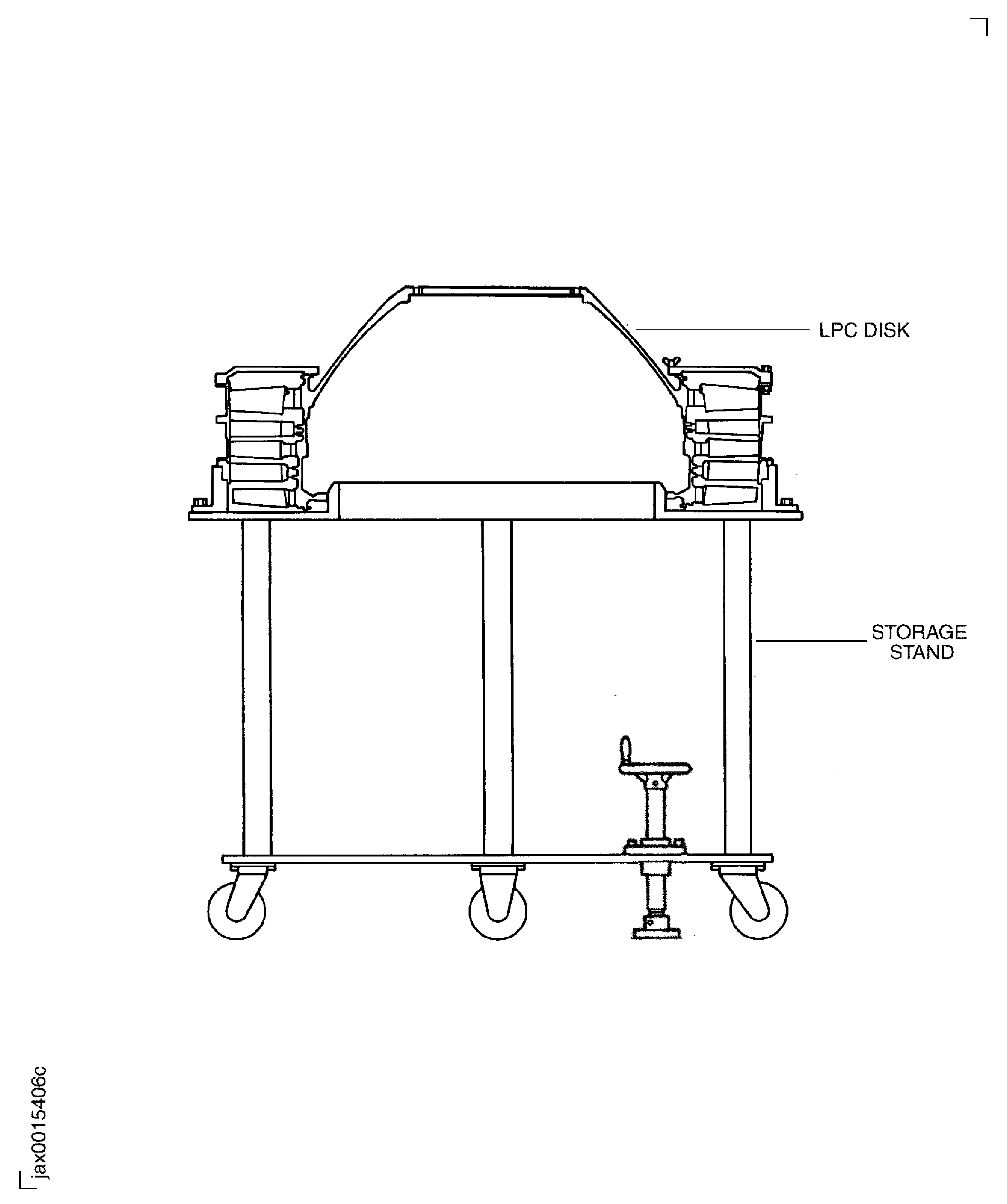
    Figure: Locations of the Sub-Module Serial Number and Sub-Module Number

    Locations of the Sub-Module Serial Number and Sub-Module Number
Requirements After Job Completion

Follow-On Conditions

NONE
Link not Found
Manufacturer Code:0AM53
Enterprise Name:IAE INTERNATIONAL AERO ENGINES AG
BU Name:NULL
Building:SUITE 400
Street:628 HEBRON AVENUE
City:GLASTONBURY
State:CT
Zip Code:06033
Country:USA
Manufacturer Code:IE207
Enterprise Name:DELETED, REFER TO 16956
Manufacturer Code:LOCAL
Enterprise Name:LOCALLY SUPPLIED
Link not Found
Manufacturer Code:LOCAL
Supply Number:CoMat 01-124
Type:sp01
Supply Short Name:CoMat 01-124 ISOPROPYL ALCOHOL
Supply Name:CoMat 01-124 ISOPROPYL ALCOHOL
Specification Groups:
Doc NumberType
OMAT:1/40GPR TECHNICAL GRADE
PMC 9094GPR TECHNICAL GRADE
JCR-011GPR TECHNICAL GRADE
Suppliers:
ManufacturerRemarks
LOCAL
U1185
24853
K6835
Manufacturer Code:LOCAL
Supply Number:CoMat 04-004
Type:sp01
Supply Short Name:CoMat 04-004 JOINTING COMPOUND, LIGHT GRADE
Supply Name:CoMat 04-004 JOINTING COMPOUND, LIGHT GRADE
Specification Groups:
Doc NumberType
OMAT: 4/46 (REF RR)HYLOMAR AEROGRADE (PL32), LIGHT GRADE
JCR-025 (JAEC REF)HYLOMAR AEROGRADE (PL32), LIGHT GRADE
MSRR 9055 (RR REF)HYLOMAR AEROGRADE (PL32), LIGHT GRADE
Suppliers:
ManufacturerRemarks
LOCAL
460Y4
CJ731
K3237
Manufacturer Code:IE207
Supply Number:CoMat 06-069
Type:sp01
Supply Short Name:CoMat 06-069 MARKER
Supply Name:CoMat 06-069 MARKER
Specification Groups:
Doc NumberType
OMAT:262TMARKS-A-LOT
JCR-085MARKS-A-LOT
Suppliers:
ManufacturerRemarks
IE207
Manufacturer Code:X333X
Supply Number:CoMat 10-077
Type:sp01
Supply Short Name:CoMat 10-077 APPROVED ENGINE OILS
Supply Name:CoMat 10-077 APPROVED ENGINE OILS
Specification Groups:
Doc NumberType
For V2500-A1/A5/D5 models - Refer to V2500 Service Bulletin ENG-79-0108
For V2500-E5 model - Refer to Service Bulletin E5-79-0001
Suppliers:
ManufacturerRemarks
X333X
Manufacturer Code:0AM53
Tool Number:IAE 1F10052
Tool Name:IAE 1F10052 Two cables sling
Manufacturer Code:0AM53
Tool Number:IAE 1J12188
Tool Name:IAE 1J12188 Puller bolt
Manufacturer Code:0AM53
Tool Number:IAE 1J12213
Tool Name:IAE 1J12213 LPC Vertical sling
Manufacturer Code:0AM53
Tool Number:IAE 1J12399
Tool Name:IAE 1J12399 Handling sling
Manufacturer Code:0AM53
Tool Number:IAE 1J12507
Tool Name:IAE 1J12507 Guide pin
Manufacturer Code:0AM53
Tool Number:IAE 1J13103
Tool Name:IAE 1J13103 Vertical sling
Manufacturer Code:0AM53
Tool Number:IAE 1J13107
Tool Name:IAE 1J13107 Holding support
Manufacturer Code:0AM53
Tool Number:IAE 1J13109
Tool Name:IAE 1J13109 0AM53 heater
Manufacturer Code:0AM53
Tool Number:IAE 1J13111
Tool Name:IAE 1J13111 LPC storage stand
Manufacturer Code:0AM53
Tool Number:IAE 1J13203
Tool Name:IAE 1J13203 LPC Vertical sling (method 1)
Manufacturer Code:0AM53
Tool Number:IAE 1J13204
Tool Name:IAE 1J13204 Vertical work stand
Manufacturer Code:0AM53
Tool Number:IAE 1J13205
Tool Name:IAE 1J13205 Balance arbor
Manufacturer Code:0AM53
Tool Number:IAE 1J13206
Tool Name:IAE 1J13206 Horizontal work stand
Manufacturer Code:0AM53
Tool Number:IAE 1J13207
Tool Name:IAE 1J13207 Balance cover and fixture
Manufacturer Code:0AM53
Tool Number:IAE 1J13208
Tool Name:IAE 1J13208 Transport stand
Manufacturer Code:0AM53
Tool Number:IAE 1J13209
Tool Name:IAE 1J13209 Riveter
Manufacturer Code:0AM53
Tool Number:IAE 1J13210
Tool Name:IAE 1J13210 LPC holding block
Manufacturer Code:0AM53
Tool Number:IAE 6F10027
Tool Name:IAE 6F10027 Heater control unit
Manufacturer Code:LOCAL
Tool Number:Schenck HL-5U
Tool Name:Dynamic balancing machine