Export Control
EAR Export Classification: Not subject to the EAR per 15 C.F.R. Chapter 1, Part 734.3(b)(3), except for the following Service Bulletins which are currently published as EAR Export Classification 9E991: SBE70-0992, SBE72-0483, SBE72-0580, SBE72-0588, SBE72-0640, SBE73-0209, SBE80-0024 and SBE80-0025.Copyright
© IAE International Aero Engines AG (2001, 2014 - 2021) The information contained in this document is the property of © IAE International Aero Engines AG and may not be copied or used for any purpose other than that for which it is supplied without the express written authority of © IAE International Aero Engines AG. (This does not preclude use by engine and aircraft operators for normal instructional, maintenance or overhaul purposes.).Applicability
V2500-A5
Common Information
TASK 72-00-32-220-003-B00 LPC/Intermediate Case Module - Examine The Module Rear Face At Interface C-32, Inspection-003
General
The word Reject is used after an interface inspection statement to show that a higher level inspection and possible repair to the damaged part is necessary.
Do the higher level inspection procedure as found in the applicable Chapter/Section/Subject of this manual on the damaged part(s). It is not necessary to do the higher level inspection on parts that are serviceable to the interface inspection standard.
Refer to TASK 72-00-00-200-000 (Examine the modular/non-modular interfaces), (INSPECTION-000) before you do this TASK.
The policy that is necessary for inspection is given in the SPM TASK 70-20-01-200-501.
NOTE
Preliminary Requirements
Pre-Conditions
NONESupport Equipment
| Name | Manufacturer | Part Number / Identification | Quantity | Remark |
|---|---|---|---|---|
| Portable Multimeter | LOCAL | Portable Multimeter |
Consumables, Materials and Expendables
| Name | Manufacturer | Part Number / Identification | Quantity | Remark |
|---|---|---|---|---|
| CoMat 05-019 WATERPROOF SILICON CARBIDE | LOCAL | CoMat 05-019 |
Spares
NONESafety Requirements
NONEProcedure
Refer to Figure.
SUBTASK 72-00-32-220-112 Visually Examine the Front Engine Mount Tube at Location 1
Refer to Figure.
SUBTASK 72-00-32-220-113 Visually Examine the Thrust Mount Brackets at Location 2
Refer to Figure.
SUBTASK 72-00-32-220-114 Visually Examine the Oil/Air Transfer Tube Connections at location 3
Refer to Figure.
Other than Step
Loop resistance between terminal number 1 and 2, 3 and 4, 5 and 6.
Other than Step
Loop resistance between terminal number 7 and 8.
NOTE
Polish the measure point of the terminals to remove oxide on the terminals before the loop resistance check is examined. Use CoMat 05-019 WATERPROOF SILICON CARBIDE .Pre SBE 72-0508: Check the resistance.
Other than Step
Loop resistance between terminal number 1 and 2, 3 and 4, 5 and 6.
Other than Step
Loop resistance between terminal number 7 and 8.
NOTE
Polish the measure point of the terminals to remove oxide on the terminals before the loop resistance check is examined. Use CoMat 05-019 WATERPROOF SILICON CARBIDE .SBE 72-0508: Check the resistance.
Do the loop resistance check between terminal number 1 and 2, 3 and 4, 5 and 6, 7 and 8.
SUBTASK 72-00-32-220-115 Examine the Fan Speed/Trim Balance Harness Terminal Block at Location 4 (Pre SBE 72-0508 and SBE 72-0508)
Refer to Figure.
SUBTASK 72-00-32-220-116 Visually Examine the Bleed Valve Actuator Rods at Location 5
Refer to Figure.
SUBTASK 72-00-32-220-117 Visually Examine the Fan Frame Inner Struts at Location 6
Refer to Figure.
SUBTASK 72-00-32-220-118 Visually Examine the Brush Seal at Location 7
Refer to Figure.
SUBTASK 72-00-32-220-119 Visually Examine the HP Compressor Front Shaft Curvic Teeth at Location 8
Repair, VRS1809 TASK 72-32-87-300-003 (REPAIR-003).
If they are cracked, not more than 6 in. (152.4 mm) in length.
Repair, VRS1809 TASK 72-32-87-300-003 (REPAIR-003).
If they have nicks, scores or scratches more than in Step.
Repair, VRS1809 TASK 72-32-87-300-003 (REPAIR-003).
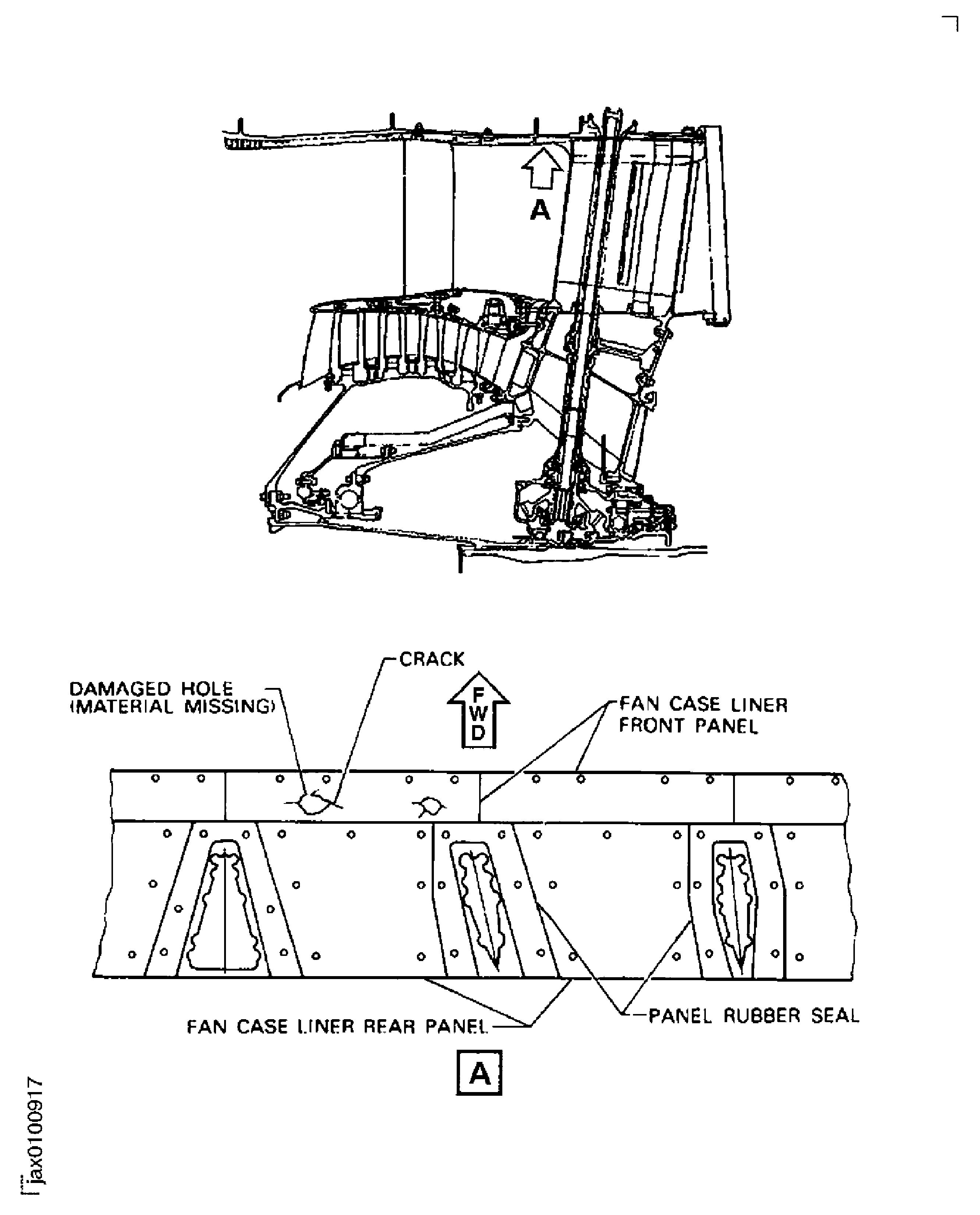
If they have damaged holes (material that is not there), not more than 2.0 in. (50.8 mm) diameter.
Examine the fan case liner panels for cracks, nicks, scores, scratches and damage holes (material that is not there).
Repair, VRS1804 TASK 72-32-87-300-004 (REPAIR-004).
More than in Step.
Examine the inner surface of the fan case liner front panels for erosion.
Repair, VRS1803 TASK 72-32-87-300-005 (REPAIR-005).
More than in Step.
Examine the inner surface of the fan case liner rear panels for erosion.
SUBTASK 72-00-32-220-120 Visually Examine the Fan Case Rear Panel at Location 9
SUBTASK 72-00-32-220-122 Visually Examine the Screen at Location 11

CAUTION
IF THE SCREEN HAS A HOLE IN IT, A PLASTIC COVER MUST BE INSTALLED OVER THE DUCT INLET WHEN MAINTENANCE WORK IS BEING PERFORMED IN THE SURROUNDING AREA. A FLAG MUST BE USED WHEN THE PLASTIC COVER IS USED TO REMIND MAINTENANCE PERSONNEL TO REMOVE THE COVER BEFORE ATTEMPTING TO START THE ENGINE.Refer to Figure.
SUBTASK 72-00-32-220-123 Visually Examine the Mount Tube Stopper at Location 12
Refer to Figure.
Reject.
Corroded.
SUBTASK 72-00-32-220-016 Visually Examine the Thrust Mount Bracket Bolts at Location 14
Figure: Locations at Interface C-32
Sheet 1
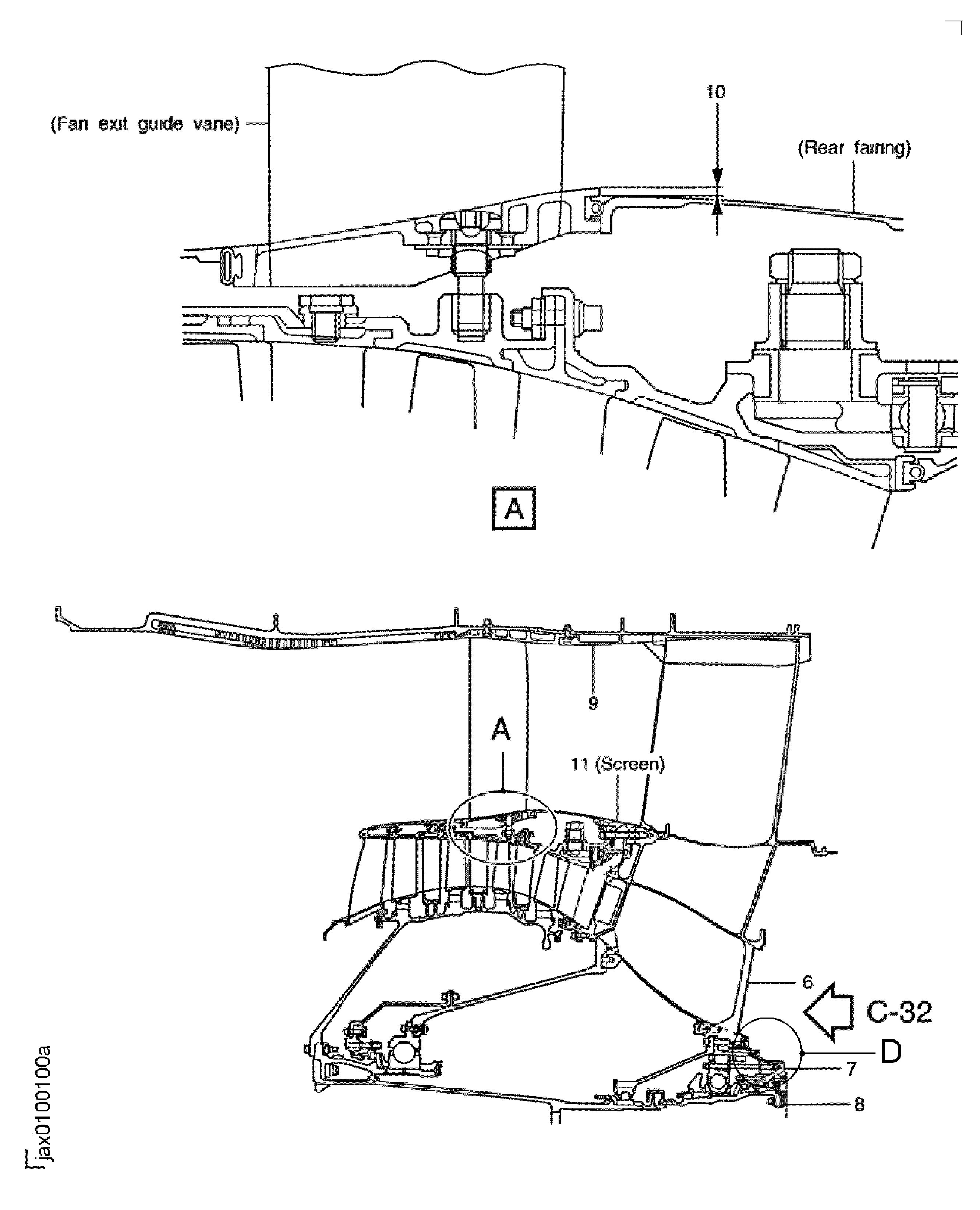
Figure: Locations at Interface C-32
Sheet 2
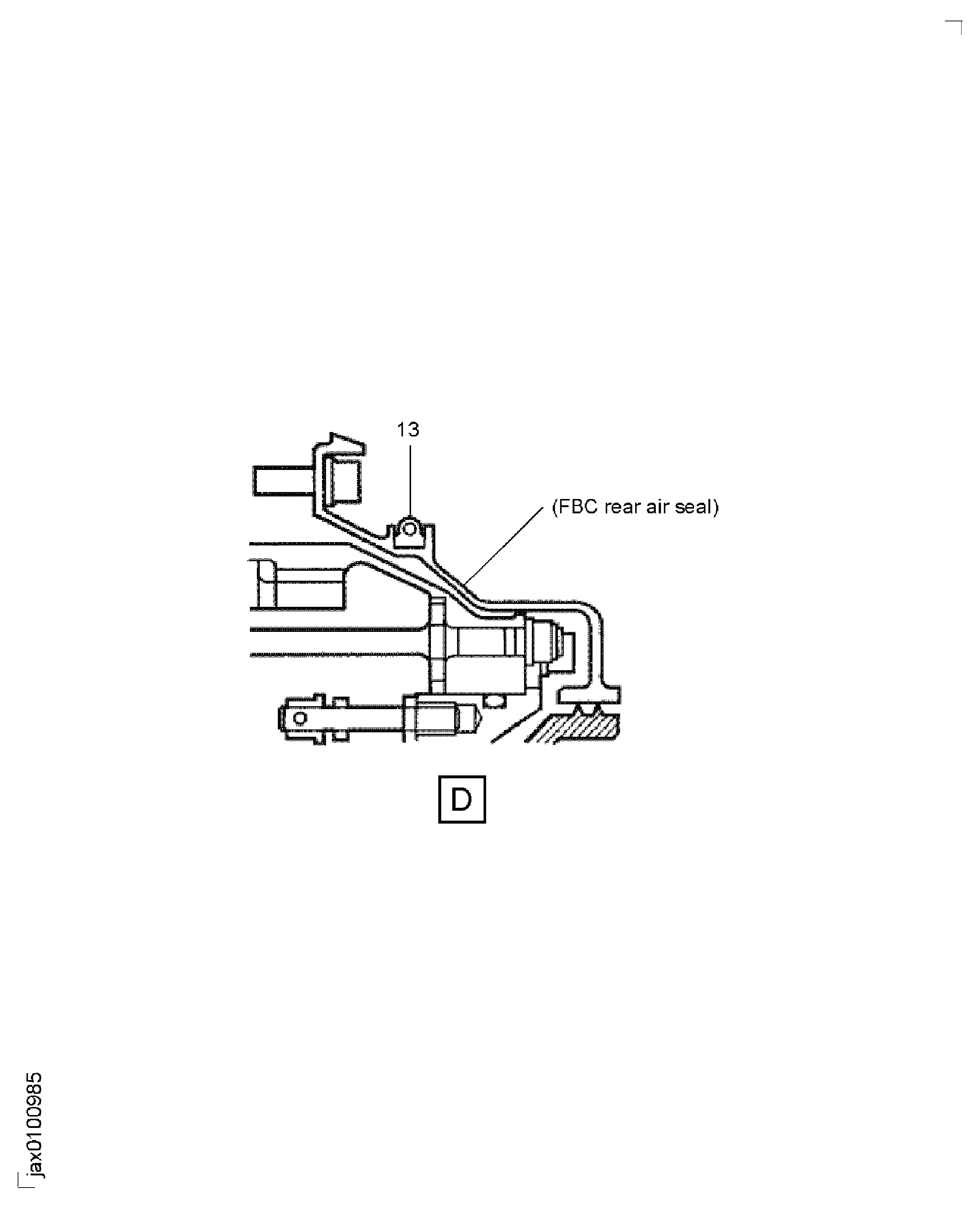
Figure: Locations at Interface C-32
Locations at Interface C-32
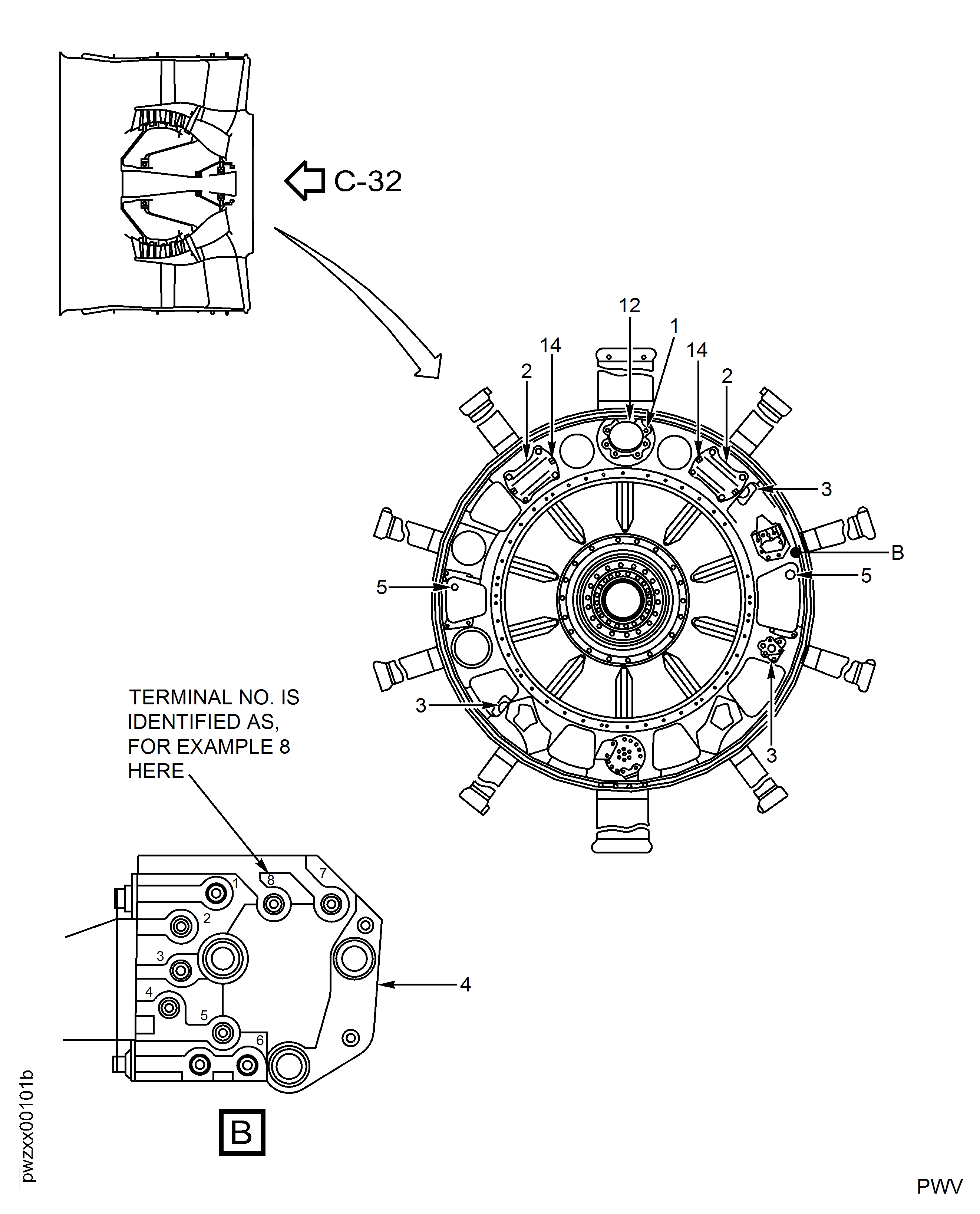
Figure: Inspection of the Screen
Inspection of the Screen
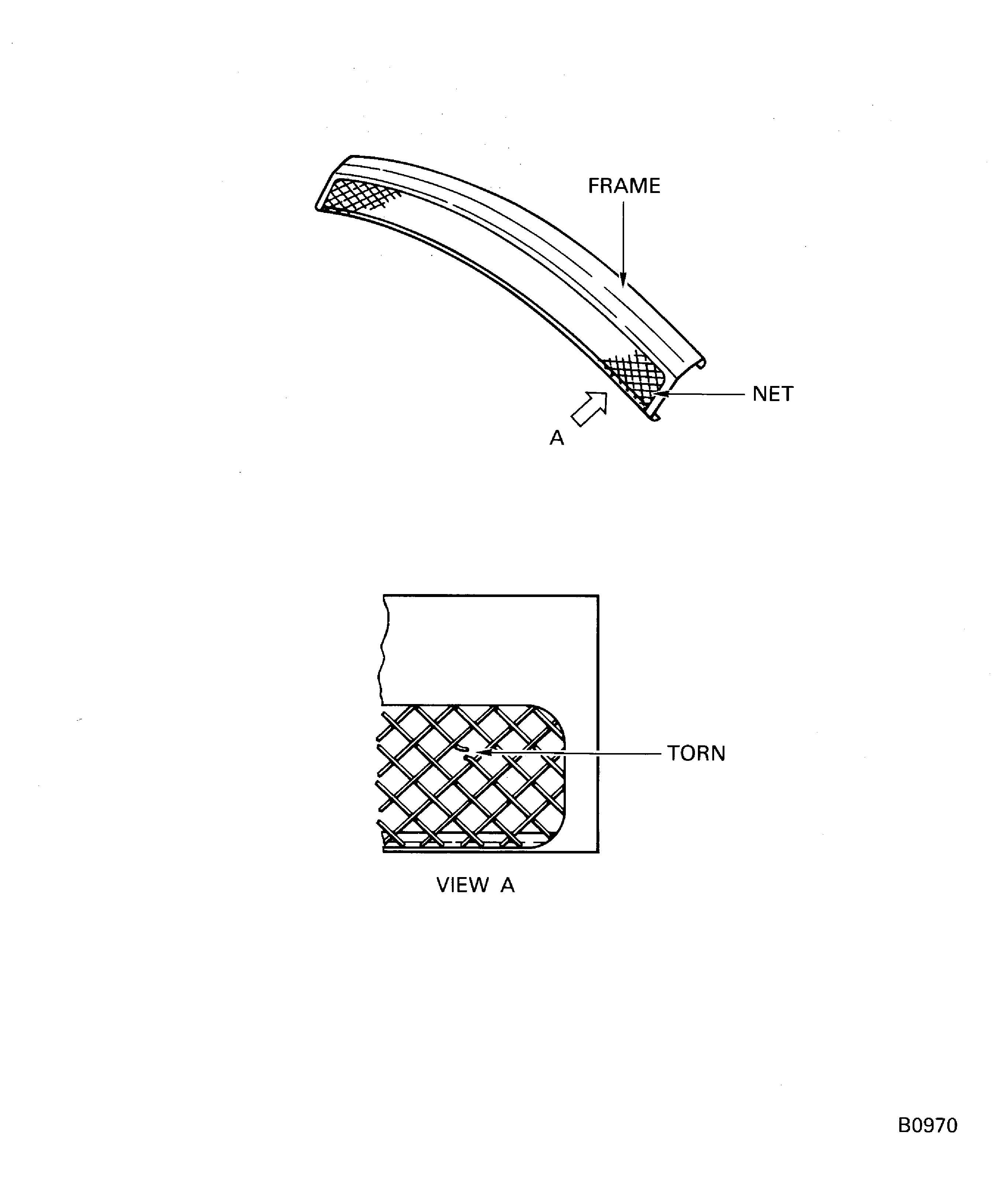
Figure: Fan Case Liner Panel and Panel Rubber Seal
Fan Case Liner Panel and Panel Rubber Seal