Export Control
EAR Export Classification: Not subject to the EAR per 15 C.F.R. Chapter 1, Part 734.3(b)(3), except for the following Service Bulletins which are currently published as EAR Export Classification 9E991: SBE70-0992, SBE72-0483, SBE72-0580, SBE72-0588, SBE72-0640, SBE73-0209, SBE80-0024 and SBE80-0025.Copyright
© IAE International Aero Engines AG (2001, 2014 - 2021) The information contained in this document is the property of © IAE International Aero Engines AG and may not be copied or used for any purpose other than that for which it is supplied without the express written authority of © IAE International Aero Engines AG. (This does not preclude use by engine and aircraft operators for normal instructional, maintenance or overhaul purposes.).Applicability
All
Common Information
TASK 72-41-10-440-005-A00 HPC Rotor Assembly - Final Balance The Rotor Assembly, Assembly-005
General
This TASK gives the procedure to final balance the HP compressor rotor assembly.
The procedure to measure, assemble and balance the HP compressor rotor assembly is given in the subsequent TASKS.
TASK 72-41-10-440-001 (ASSEMBLY-001, CONFIG-001) Measure the HP compressor rotor assembly parts.
TASK 72-41-10-440-002 (ASSEMBLY-002, CONFIG-001) Assemble the HP compressor rotor assembly.
TASK 72-41-10-440-003 (ASSEMBLY-003, CONFIG-001) Do a balance check of the HP compressor rotor assembly and install the blades.
TASK 72-41-10-440-004 (ASSEMBLY-004, CONFIG-001) Grind the tips of the HP compressor blades.
Fig/item numbers in parentheses in the procedure agree with those used in the IPC. Only the primary Fig/item numbers are used. For the service bulletin alpha variants refer to the IPC.
For all parts identified in a different Chapter/Section/Subject, the applicable Chapter/Section/Subject comes before the Fig/item numbers.
Overhaul processes referred to in the procedure by the TASK/SUBTASK number are in SPM.
For standard torque data and procedure refer to SPM TASK 70-41-01-400-501 and SPM TASK 70-41-02-400-501.
Special torque data is identified with the symbol * after the torque value.
Lubricate all threads and mating faces of nuts and bolts with CoMat 10-077 APPROVED ENGINE OILS unless other lubricants are referred to in the procedure.
All the curvic teeth and mating faces must be cleaned with CoMat 01-001 SOLVENT, DELETED or CoMat 01-002 SOLVENT, DELETED. before assembly. Refer to SPM TASK 70-11-01-300-503. They must also be dry assembled unless told differently in the procedure.
All of the temporary marks made in this procedure must be removed after completion of this task.
Data to balance
The tools used in this procedure are used to adapt the HP compressor rotor assembly to the 'Schenck HL5' dynamic balancing machine. A balancing speed between 650 and 1000 rpm that gives stable and repeatable results is recommended. The best speed to use will be different for different machines. The correct RPM will usually agree with the gear ratios available. The balancing machine must turn the HP compressor rotor assembly in a clockwise direction (direction of engine turn) when seen from the rear of the engine.
NOTE
NOTE
Preliminary Requirements
Pre-Conditions
NONESupport Equipment
| Name | Manufacturer | Part Number / Identification | Quantity | Remark |
|---|---|---|---|---|
| Balancing machine | LOCAL | |||
| End drive | LOCAL | Schenk 022748 | ||
| IAE 1R18058 Protective cover | 0AM53 | IAE 1R18058 | 1 | |
| IAE 1R18059 Trolley | 0AM53 | IAE 1R18059 | 1 | |
| IAE 1R18061 Rail | 0AM53 | IAE 1R18061 | 2 | |
| IAE 1R18073 Rear anvil | 0AM53 | IAE 1R18073 | 1 | |
| IAE 1R18074 Front anvil | 0AM53 | IAE 1R18074 | 1 | |
| IAE 1R18075 Support pedestal | 0AM53 | IAE 1R18075 | 1 | |
| IAE 1R18079 Drift | 0AM53 | IAE 1R18079 | 1 | |
| IAE 1R18081 Beam sling | 0AM53 | IAE 1R18081 | 1 | |
| IAE 1R18083 Hydraulic tool | 0AM53 | IAE 1R18083 | 1 | |
| IAE 1R18084 Pliers | 0AM53 | IAE 1R18084 | 1 | |
| IAE 1R18089 Lifting adapter | 0AM53 | IAE 1R18089 | 1 | |
| IAE 1R18090 Safety support stand | 0AM53 | IAE 1R18090 | 1 | |
| IAE 1R18091 Support stand | 0AM53 | IAE 1R18091 | 1 | |
| IAE 1R18095 Universal slinging adapter | 0AM53 | IAE 1R18095 | 2 | |
| IAE 1R18245 Adapter | 0AM53 | IAE 1R18245 | 1 | |
| IAE 1R18629 Protective cover | 0AM53 | IAE 1R18629 | 1 | |
| IAE 1R18076 Slave lock plates | 0AM53 | IAE 1R18076 | ||
| IAE 1R19811 Filing fixture | 0AM53 | IAE 1R19811 | 1 |
Consumables, Materials and Expendables
| Name | Manufacturer | Part Number / Identification | Quantity | Remark |
|---|---|---|---|---|
| CoMat 01-001 SOLVENT, DELETED | LOCAL | CoMat 01-001 | ||
| CoMat 01-002 SOLVENT, DELETED. | LOCAL | CoMat 01-002 | ||
| CoMat 02-121 TEMPORARY MARKER PENCIL/CRAYON | IE304 | CoMat 02-121 | ||
| CoMat 02-122 TEMPORARY MARKER PENCIL/CRAYON | K6835 | CoMat 02-122 | ||
| CoMat 07-075 HIGH-HEAT RESISTING STOVING ENAMEL | k3504 | CoMat 07-075 | ||
| CoMat 08-013 COLD CURING SILICONE COMPOUND | LOCAL | CoMat 08-013 | ||
| CoMat 10-077 APPROVED ENGINE OILS | X333X | CoMat 10-077 |
Spares
| Name | Manufacturer | Part Number / Identification | Quantity | Remark |
|---|---|---|---|---|
| Stage 3 lockplates | Stage 3 lockplates | 9 |
Safety Requirements
NONEProcedure
NOTE
The HP compressor rotor assembly is installed in IAE 1R18059 Trolley.The balancing machine was prepared for use in TASK 72-41-10-440-003 (ASSEMBLY-003, CONFIG-001).
Remove IAE 1R18629 Protective cover from the compressor rotating air seals. Refer to Figure.
Install IAE 1R18081 Beam sling 1 off on to the compressor rotor assembly. Refer to Figure.

CAUTION
YOU MUST NOT LET THE COMPRESSOR ROTOR ASSEMBLY HIT THE BALANCING MACHINE.Carefully lower the compressor rotor assembly onto the balancing machine. Make sure the dummy stub shaft touches the No. 1 pedestal and the bearing location diameter (Diameter A) touches the No. 2 pedestal. Refer to Figure.
Remove the beam sling from the compressor rotor assembly. Refer to Figure.
Remove the universal sling adapters. Refer to Figure.
SUBTASK 72-41-10-440-084 Install the HP Compressor Rotor Assembly into the Balancing Machine
Plane separate and calibrate the balancing machine through planes AB and AC. Measure and record the quantity and angular positions of the unbalance in both planes. Refer to Figure.
Remove the HP compressor rotor assembly from the balancing machine and install it in IAE 1R18059 Trolley. Refer to Step
Install IAE 1R18091 Support stand 1 off onto the top of IAE 1R18090 Safety support stand 1 off. Make sure that the stand adapter is correctly engaged in the safety support stand.
Install the HP compressor rotor assembly into IAE 1R18090 Safety support stand. Refer to Figure.
Remove the front universal sling adapter from the dummy stub shaft. Refer to Figure.
Use the hoist to lift the compressor rotor assembly off the safety support stand and put it above IAE 1R18075 Support pedestal 1 off.
Use CoMat 02-121 TEMPORARY MARKER PENCIL/CRAYON or CoMat 02-122 TEMPORARY MARKER PENCIL/CRAYON to make a mark that identifies the position of the dummy stub shaft in relation to the stage 3 disk curvic coupling. Refer to the SPM TASK 70-09-01-400-501.
Torque all of the bolts in sequence to 18 lbfin (2.034 Nm). Refer to Figure.
Remove the HP compressor rotor assembly from the dummy stub shaft and turn the assembly 180 degrees. Refer to Figure.
Install the HP compressor rotor assembly into IAE 1R18090 Safety support stand. Refer to Figure.
Install IAE 1R18095 Universal slinging adapter 1 off onto the dummy stub shaft. Refer to Figure.
Install the compressor rotor assembly into IAE 1R18059 Trolley. Refer to Figure.
Install the compressor rotor assembly in to the balancing machine. Refer to Step
NOTE
The 180 degree turn of the compressor rotor assembly is necessary so that the unbalance in the tools and balancing machine can be calculated.Install the compressor rotor assembly onto the dummy stub shaft, 180 degrees from the original position.
SUBTASK 72-41-10-440-085 Do a Check Balance of the HP Compressor Rotor Assembly
Find the value of the unbalance in plane AC on the vertical axis. Use the unbalance value which was written down in Step
Example - Unbalance value of 800 gmm.
Find the position (position Z) on the rear of the HP compressor rotating air seal which is 180 degrees opposite the angle of unbalance in plane AC. The angle of unbalance was written down in Step
From the position (position Z) found in Step identify the air seal bolt ENGINE-HP COMPRESSOR ROTATING AIR SEALS (72-41-14, 01-785) which is nearest to the angle found in Step. Do this on each side of position Z.
Example - Identify the nearest bolt to 60 degrees from point Z.
Release and remove the two bolts ENGINE-HP COMPRESSOR ROTATING AIR SEALS (72-41-14, 01-785) identified in Step.
Install a trim balance weight ENGINE-HP COMPRESSOR ROTATING AIR SEALS (72-41-14, 01-792) on to each of the two bolts removed.
If curve X was used to get the angle written down in Step do the steps that follow.
If curve Y was used to get the angle written down in Step do Step thru Step again but install trim balance weights ENGINE-HP COMPRESSOR ROTATING AIR SEALS (72-41-14, 01-790).
NOTE
Trim balance weights must not be installed under bolts ENGINE-HP COMPRESSOR ROTATING AIR SEALS (72-41-14, 01-808).Install the trim balance weights on to the bolts ENGINE-HP COMPRESSOR ROTATING AIR SEALS (72-41-14, 01-785) that safety the HP compressor rotating air seal.
SUBTASK 72-41-10-440-088 Correct the Unbalance of the HP Compressor Rotor Assembly in Plane AC
Remove the nine IAE 1R18076 Slave lock plates from the stage 3 disk.
Find the value of the unbalance in plane AB on the vertical axis. Use the value of the unbalance which was written down in Step
Example - Unbalance value of 600 gmm.
Find the position (position Z) on the stage 3 disk which is 180 degrees opposite the angle of unbalance in plane AB. The angle of unbalance was written down in Step
Use IAE 1R18079 Drift 1 off to move the stage 3 retaining plates around the disk. Continue to move the plates until you can see the blade root holes in the two blades identified.
Fill the blade root holes in the two blades identified with CoMat 08-013 COLD CURING SILICONE COMPOUND.
If curve X was used to get the angle written down in Step do the steps that follow.
Wet assemble two trim balance plugs HPC Rotor Blades (72-41-15, 01-195) with CoMat 08-013 COLD CURING SILICONE COMPOUND in to the two blades identified.
If curve Y was used to get the angle written down in Step do the steps that follow.
Install the trim balance plug and/or CoMat 08-013 COLD CURING SILICONE COMPOUND in to two blade root holes.
SUBTASK 72-41-10-440-086 Correct the Unbalance of the HP Compressor Rotor Assembly in Plane AB
Use IAE 1R18079 Drift 1 off to move the retaining plates around the disk so that the lockplates can be installed. Refer to Figure.
NOTE
The lockplates must be in line with a blade root.Install HPC Rotor Blades (72-41-15, 01-125) stage 3 lockplates 9 off between the retaining plates.
Install a lockplate in to IAE 1R19811 Filing fixture 1 off and use a file to remove metal. The minimum permitted width (dimension Y) of the stage 3 lockplate after filing is 0.315 in. (8.00 mm).
NOTE
Remove metal from the minimum number of lockplates.Remove the metal from the edge opposite the extraction slot.
The total plate clearance (dimension X) must be between 0.000 in. and 0.010 in. (0.00 mm and 0.25 mm). If the plate clearance is not between the limits do the steps that follow.
Apply CoMat 07-075 HIGH-HEAT RESISTING STOVING ENAMEL to the mating surfaces of the disk and the lockplates.
CAUTION
LOCKPLATES THAT ARE DAMAGED IN ANY WAY DURING INSTALLATION, FOR EXAMPLE: OVER BENT, TWISTED OR NICKED SHOULD BE REPLACED WITH NEW PARTS. CORRECT ENGAGEMENT OF THE LOCKPLATES IS ESSENTIAL.NOTE
The lockplates must be in line with a blade root.You must ensure that if Repair, VRS6630 TASK 72-41-11-300-023 (REPAIR-023) has been been carried out, the locking plate is fitted centrally over any area(s) of material removed.Install the lockplates in position. Refer to Figure.
Measure the total plate clearance again and make sure it is between the limits given in Step.
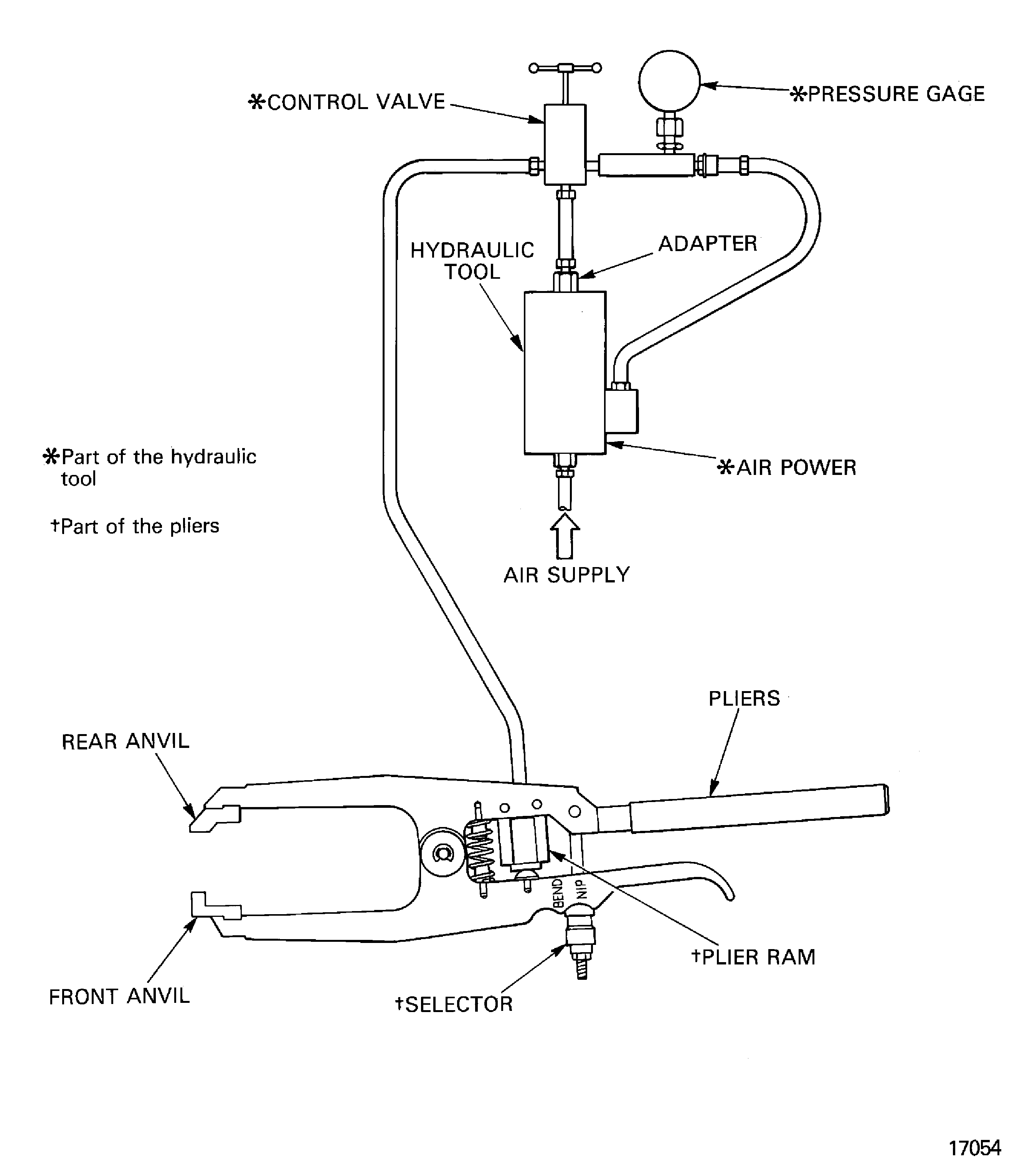
Install IAE 1R18074 Front anvil 1 off and IAE 1R18073 Rear anvil 1 off in to IAE 1R18084 Pliers 1 off.
Install IAE 1R18245 Adapter 1 off between the pressure control valve and the hydraulic tool.
Connect the air supply to IAE 1R18083 Hydraulic tool 1 off and then connect the hose from the pressure control valve to the pliers.
CAUTION
YOU MUST USE THE CORRECT ANVILS AND PLIERS FOR EACH STAGE WHEN LOCKING THE LOCKPLATES.Lock the lockplates in position. Refer to Figure.
SUBTASK 72-41-10-440-087 Install the Stage 3 Lockplates
Put IAE 1R18629 Protective cover 1 off onto the end of the compressor shaft. Move the protector along the compressor shaft until it is adjacent to the No. 2 pedestal.
Install IAE 1R18089 Lifting adapter 1 off onto the end of the compressor shaft. Tighten the lifting adapter.
Attach one of IAE 1R18095 Universal slinging adapter 2 off onto the lifting adapter. Refer to Figure.
Install IAE 1R18081 Beam sling 1 off onto the compressor rotor.
Install IAE 1R18629 Protective cover on to the compressor rotating air seals. Refer to Figure.
Put the compressor rotor assembly above IAE 1R18059 Trolley 1 off. Make sure that the trunnions on the universal sling adapters are above the trunnion supports.
Install the compressor rotor assembly into the trolley. Refer to Figure.
Install IAE 1R18061 Rail 2 off onto the trolley.
SUBTASK 72-41-10-440-090 Install the HP Compressor Rotor Assembly in to the Trolley
Figure: Install the HP compressor rotor assembly into the balancing machine
Install the HP compressor rotor assembly into the balancing machine
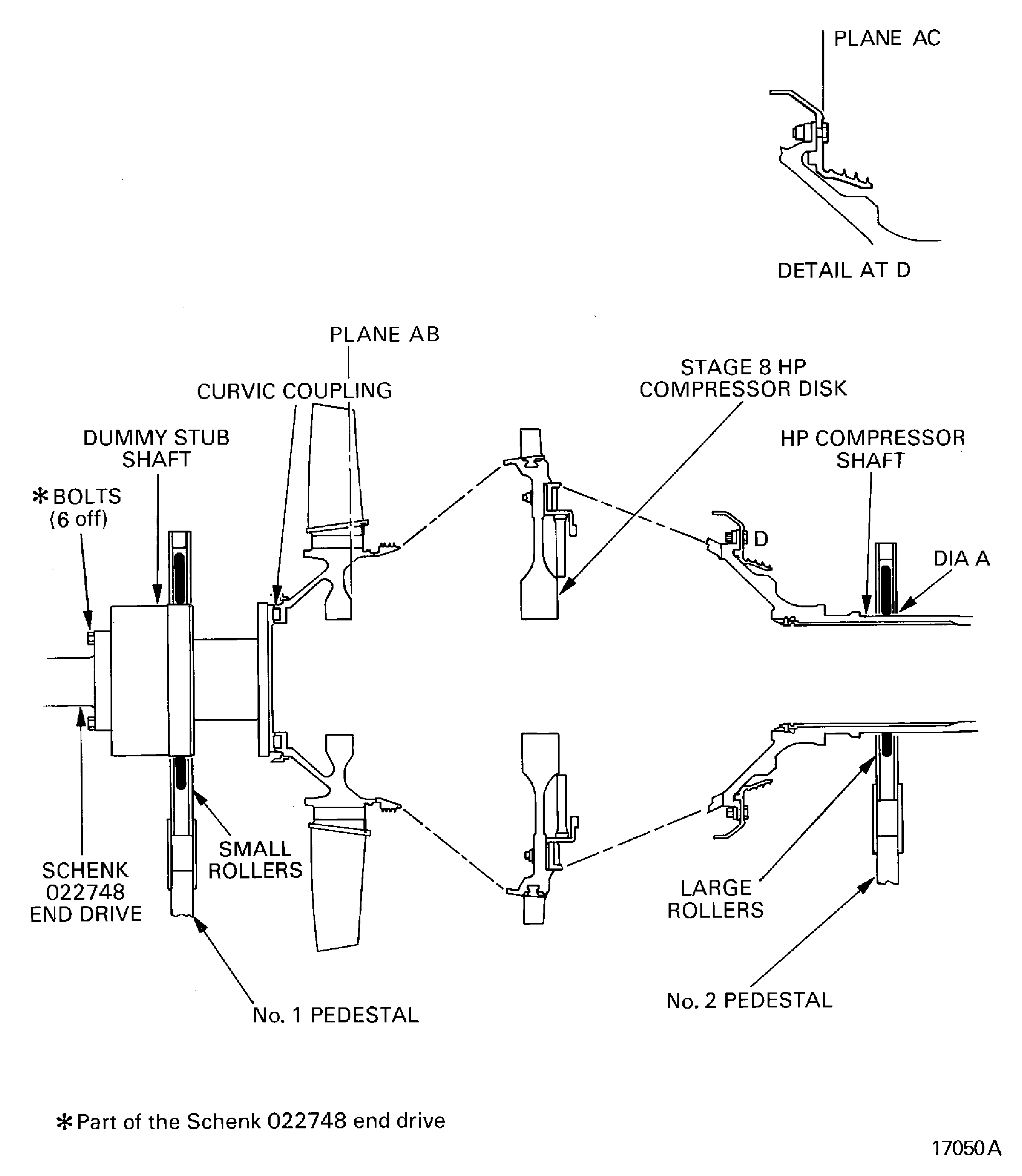
Figure: Remove/install the HP compressor rotating air seal protective cover
Remove/install the HP compressor rotating air seal protective cover
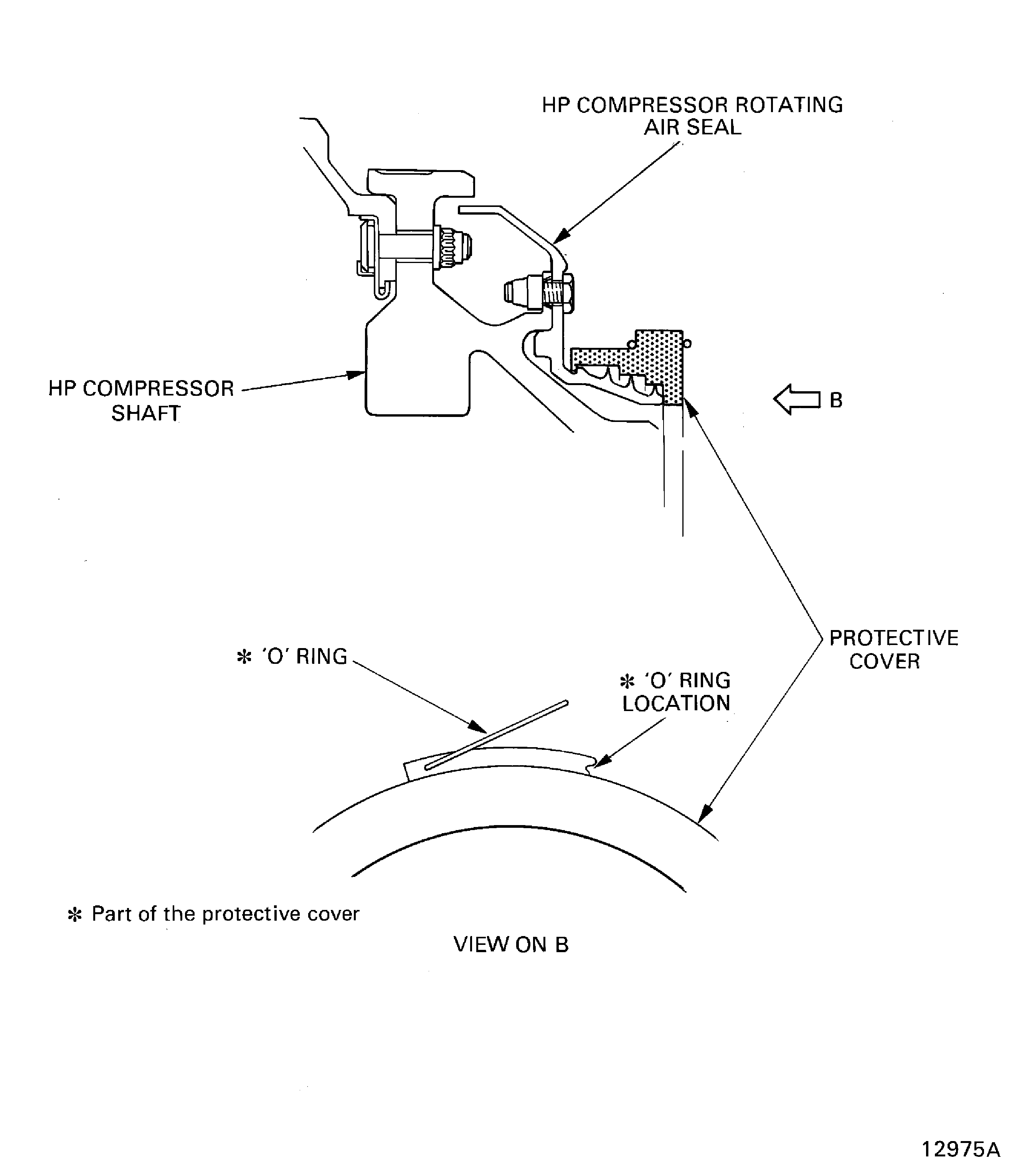
Figure: Install the beam sling on to the HP compressor rotor assembly
Install the beam sling on to the HP compressor rotor assembly
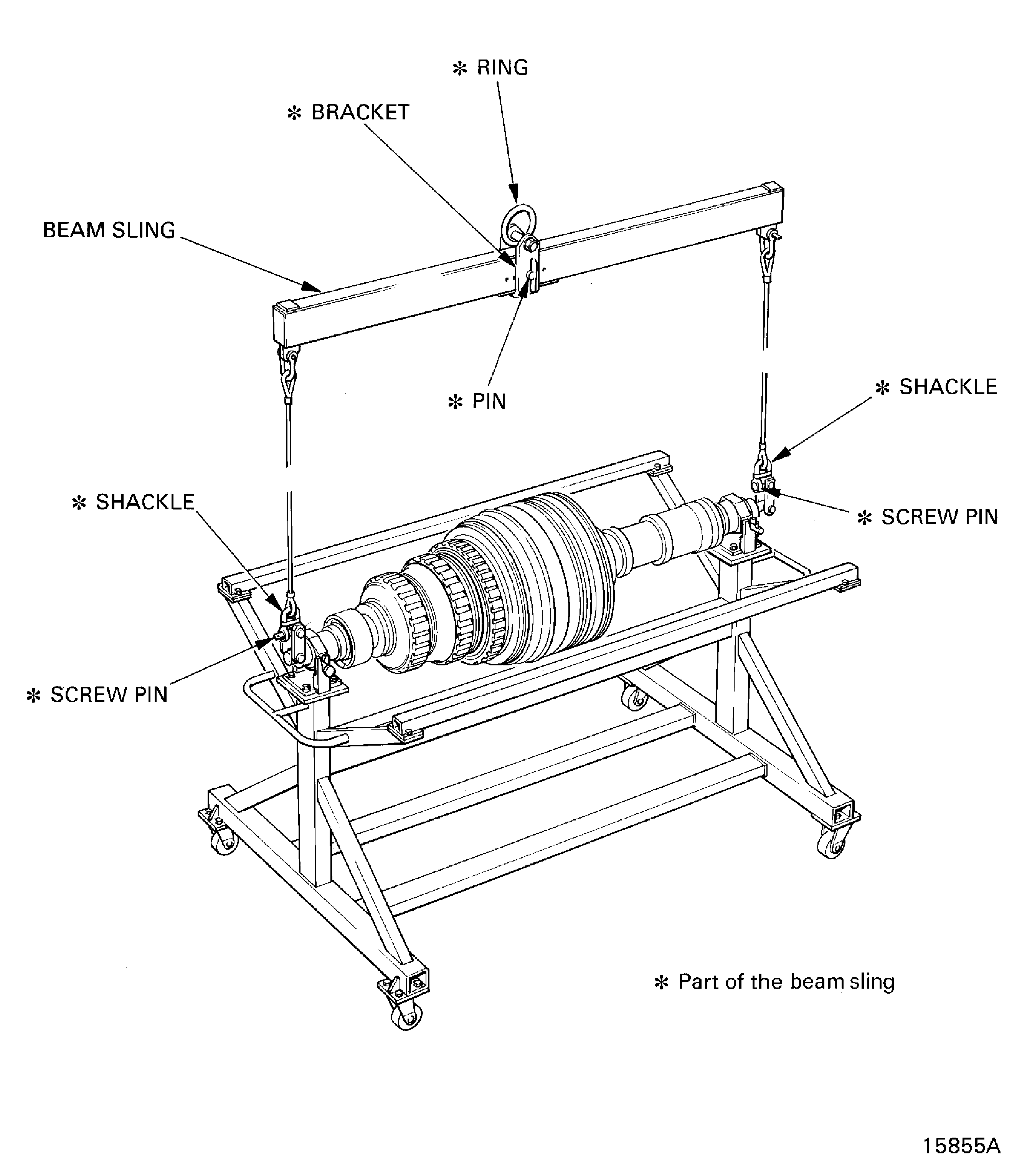
Figure: Remove/install the universal sling adapters
Remove/install the universal sling adapters

Figure: Install the HP compressor rotor assembly in to the safety support stand
Install the HP compressor rotor assembly in to the safety support stand
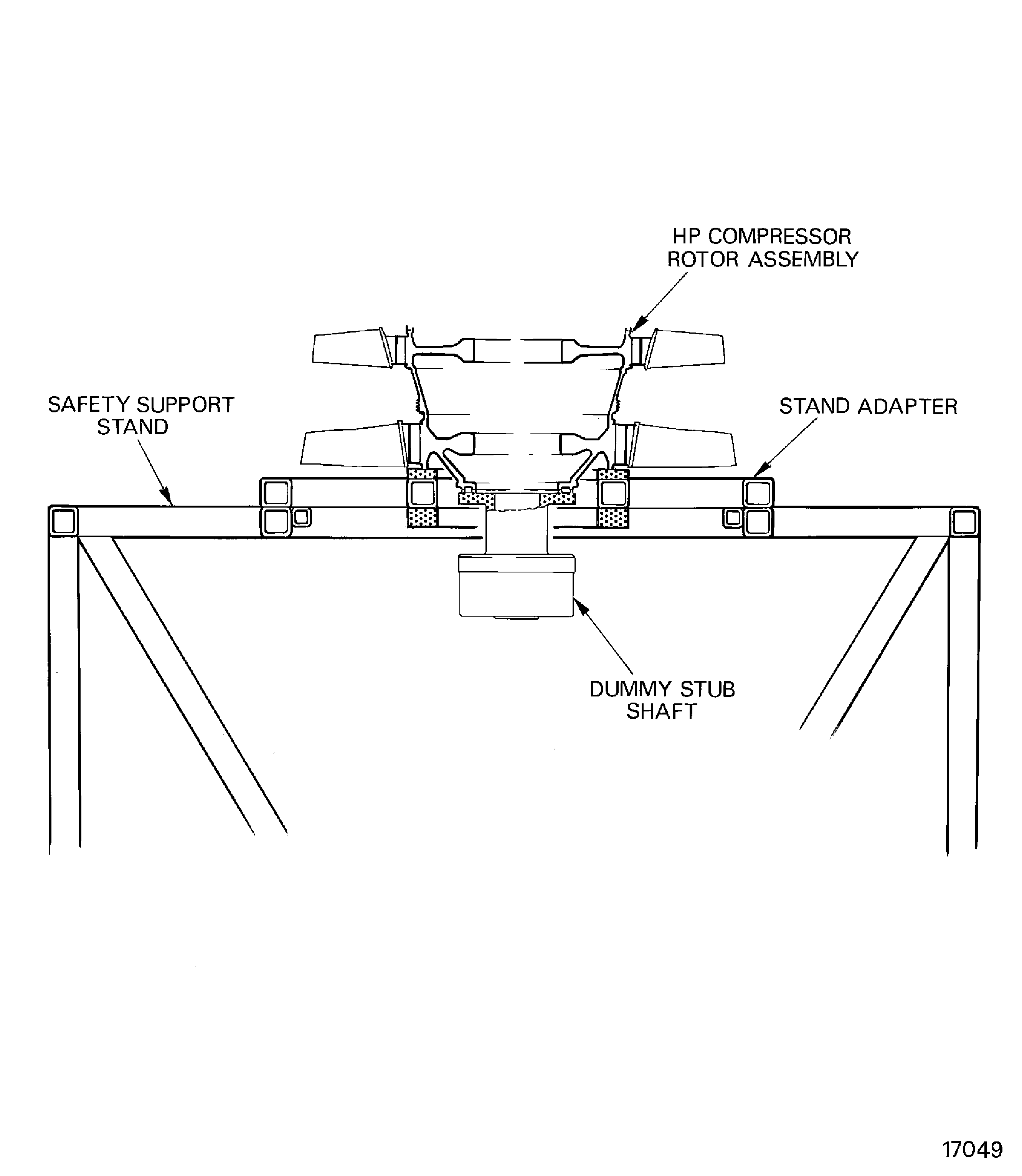
Figure: Remove/install the HP compressor rotor from/to the dummy stub shaft
Remove/install the HP compressor rotor from/to the dummy stub shaft
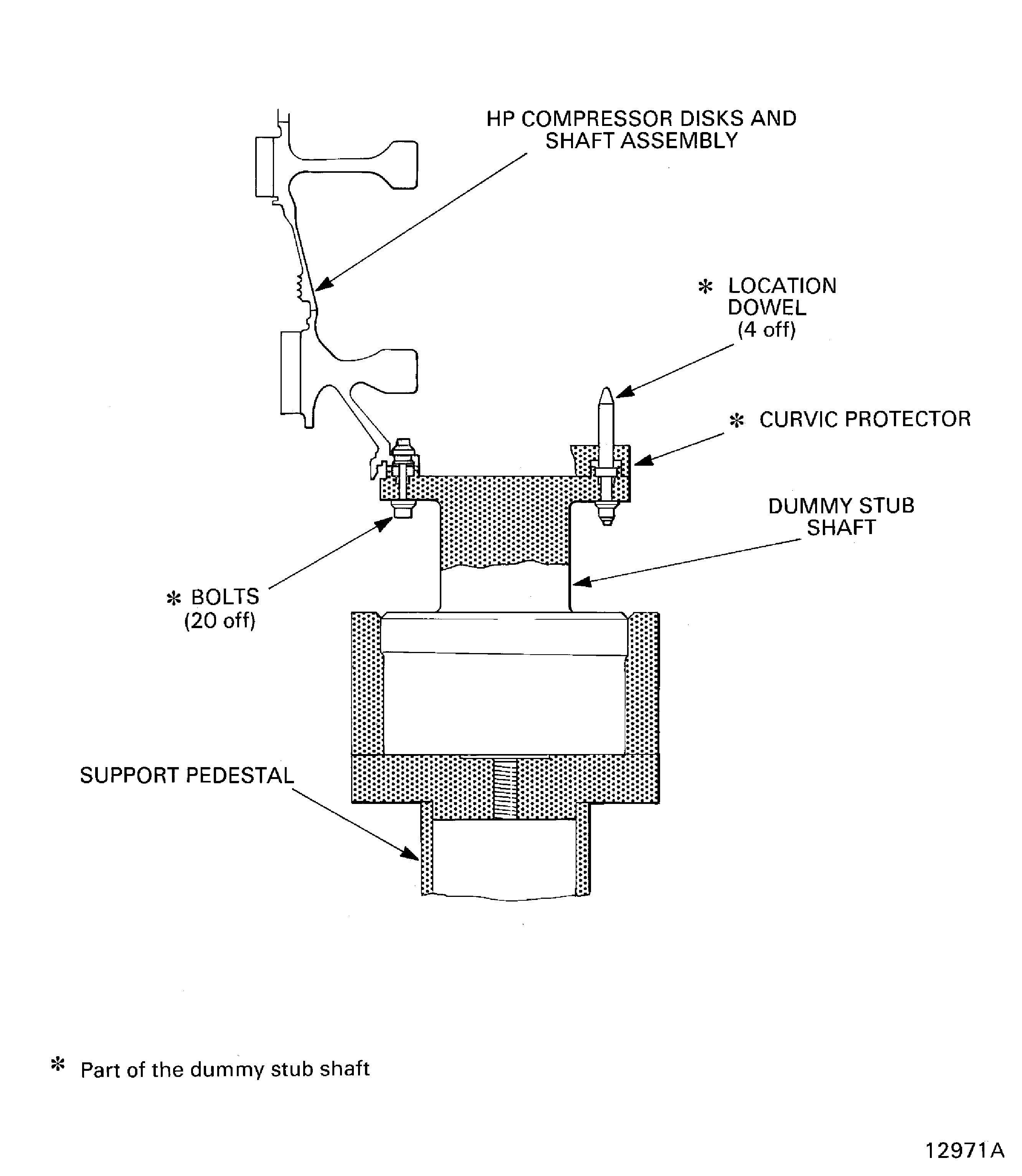
Figure: Stage 3 disk curvic coupling bolt torque sequence
Stage 3 disk curvic coupling bolt torque sequence
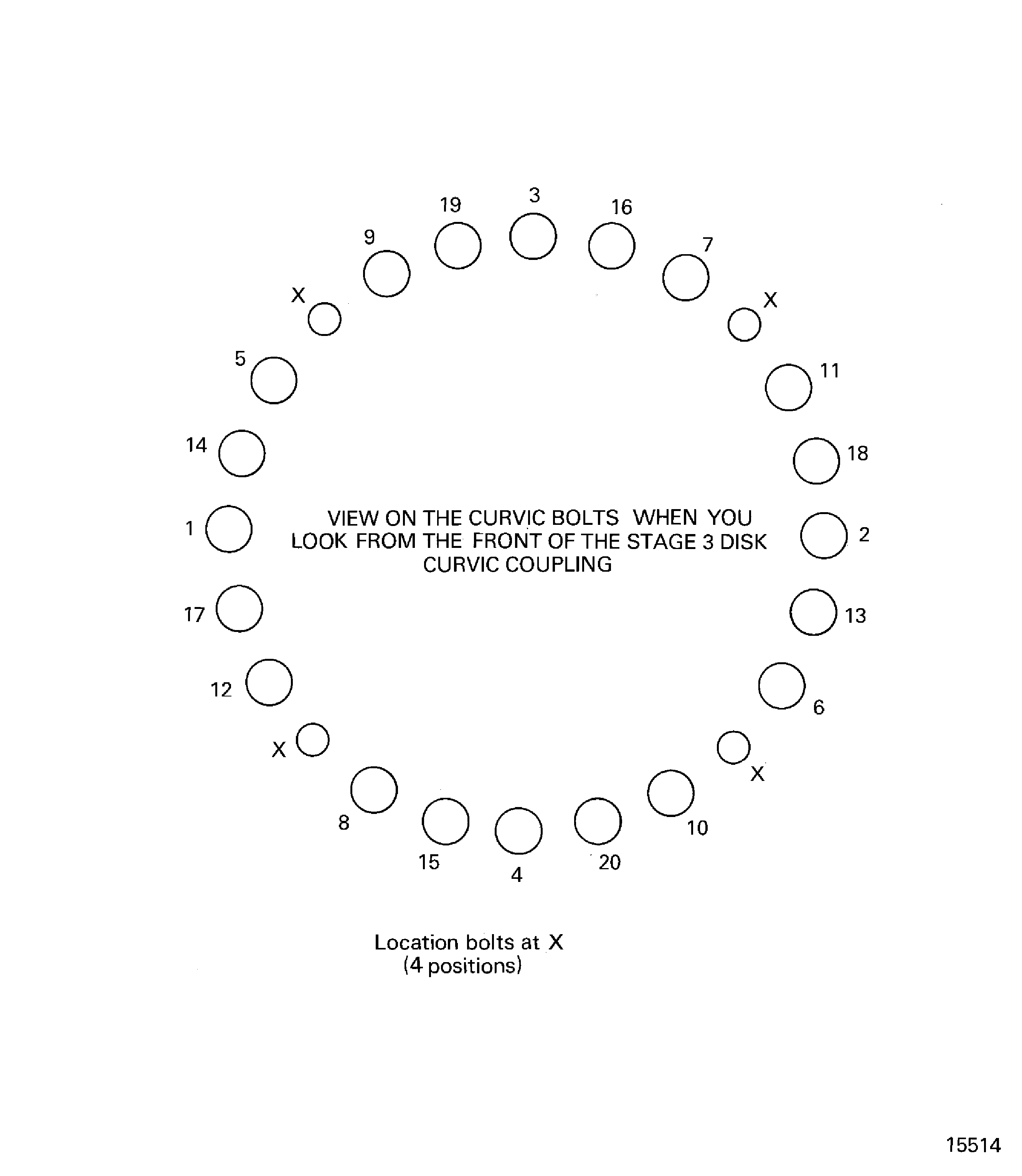
Figure: Remove/install the HP compressor rotor assembly from/to the trolley
Remove/install the HP compressor rotor assembly from/to the trolley
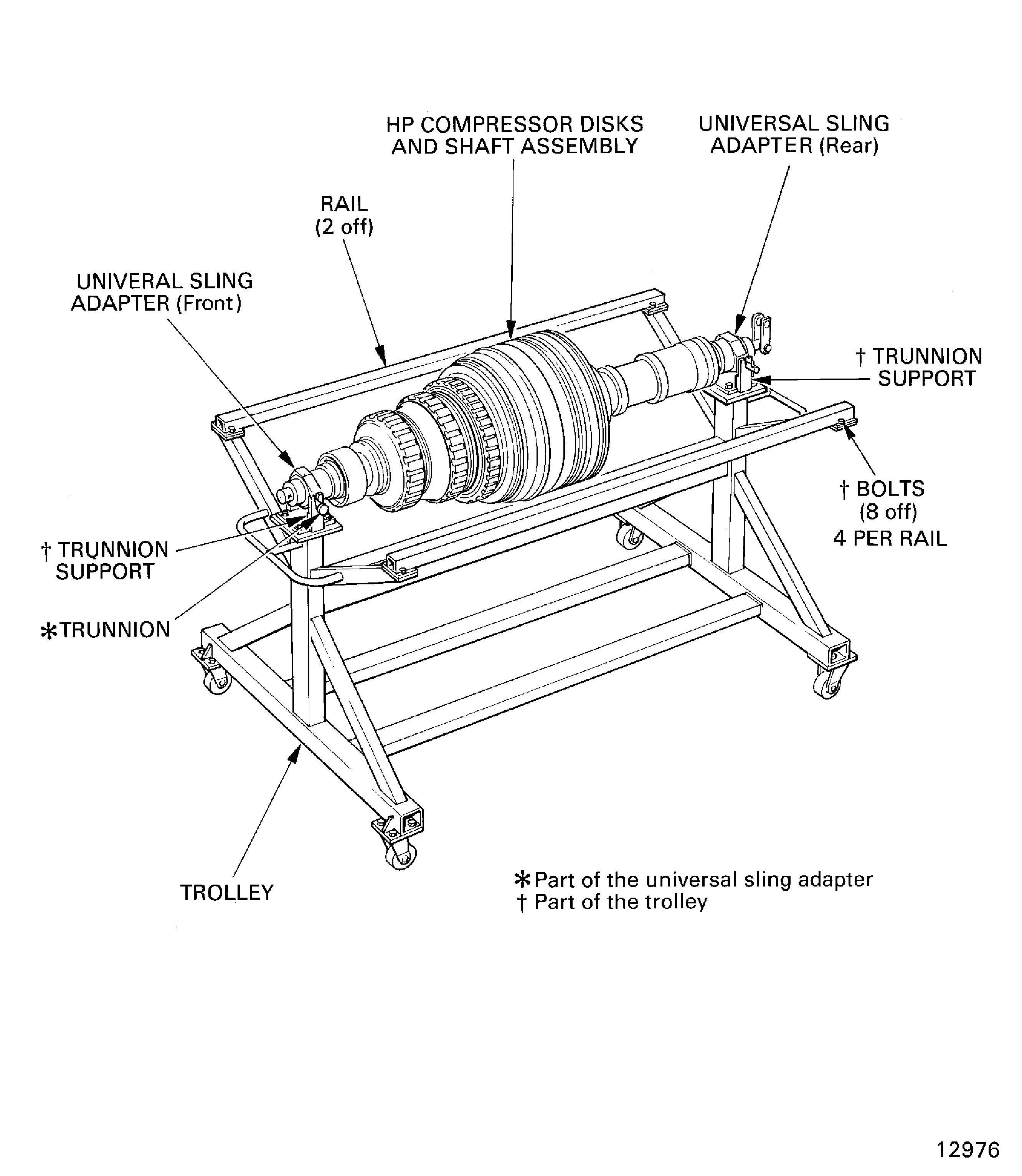
Figure: Find the position to install trim balance weights to correct the unbalance in plane AC
Find the position to install trim balance weights to correct the unbalance in plane AC
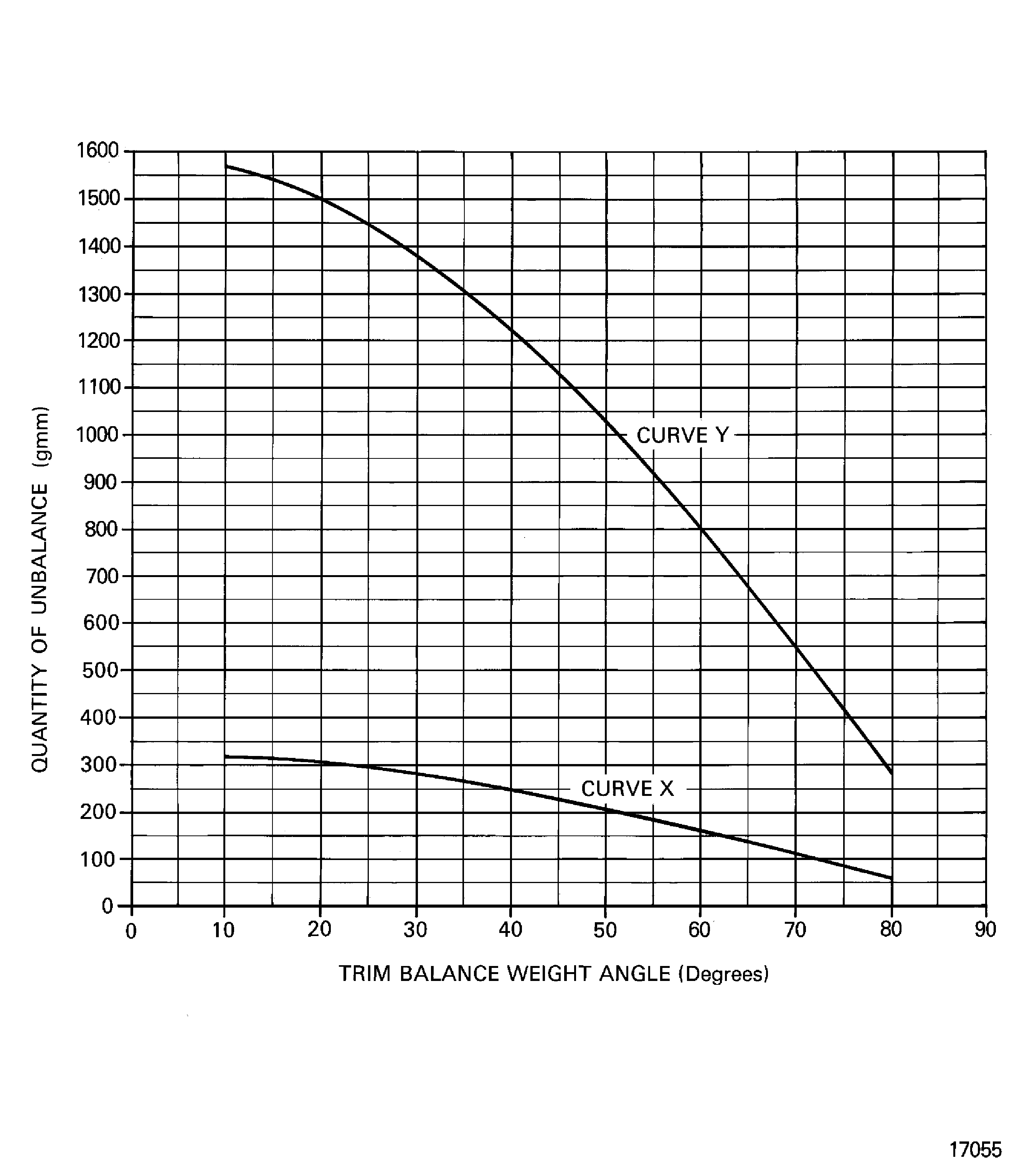
Figure: Find the position to install trim balance weights to correct the unbalance in plane AC
Find the position to install trim balance weights to correct the unbalance in plane AC
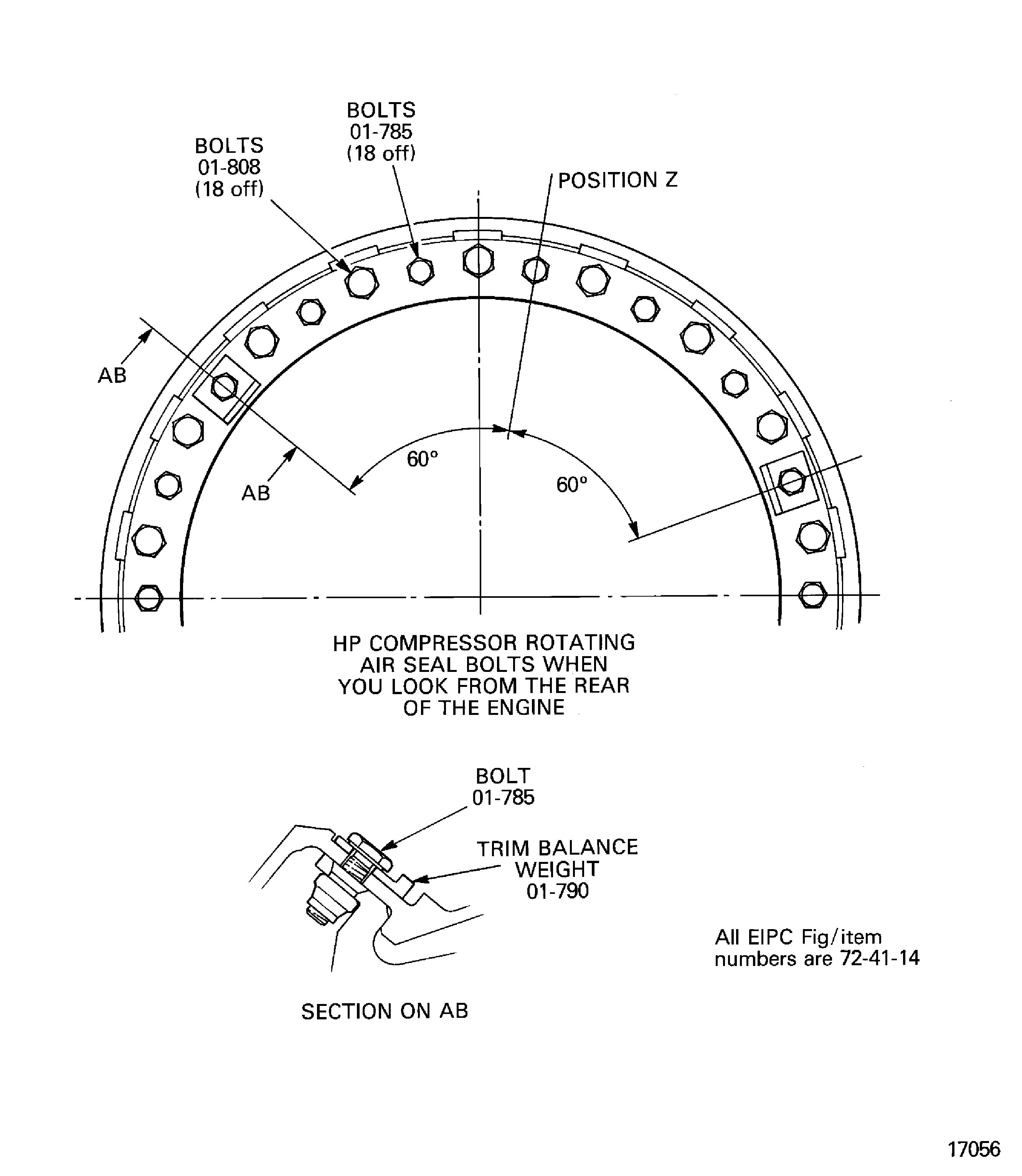
Figure: Find the position to install trim balance weights to correct the unbalance in plane AB
Find the position to install trim balance weights to correct the unbalance in plane AB
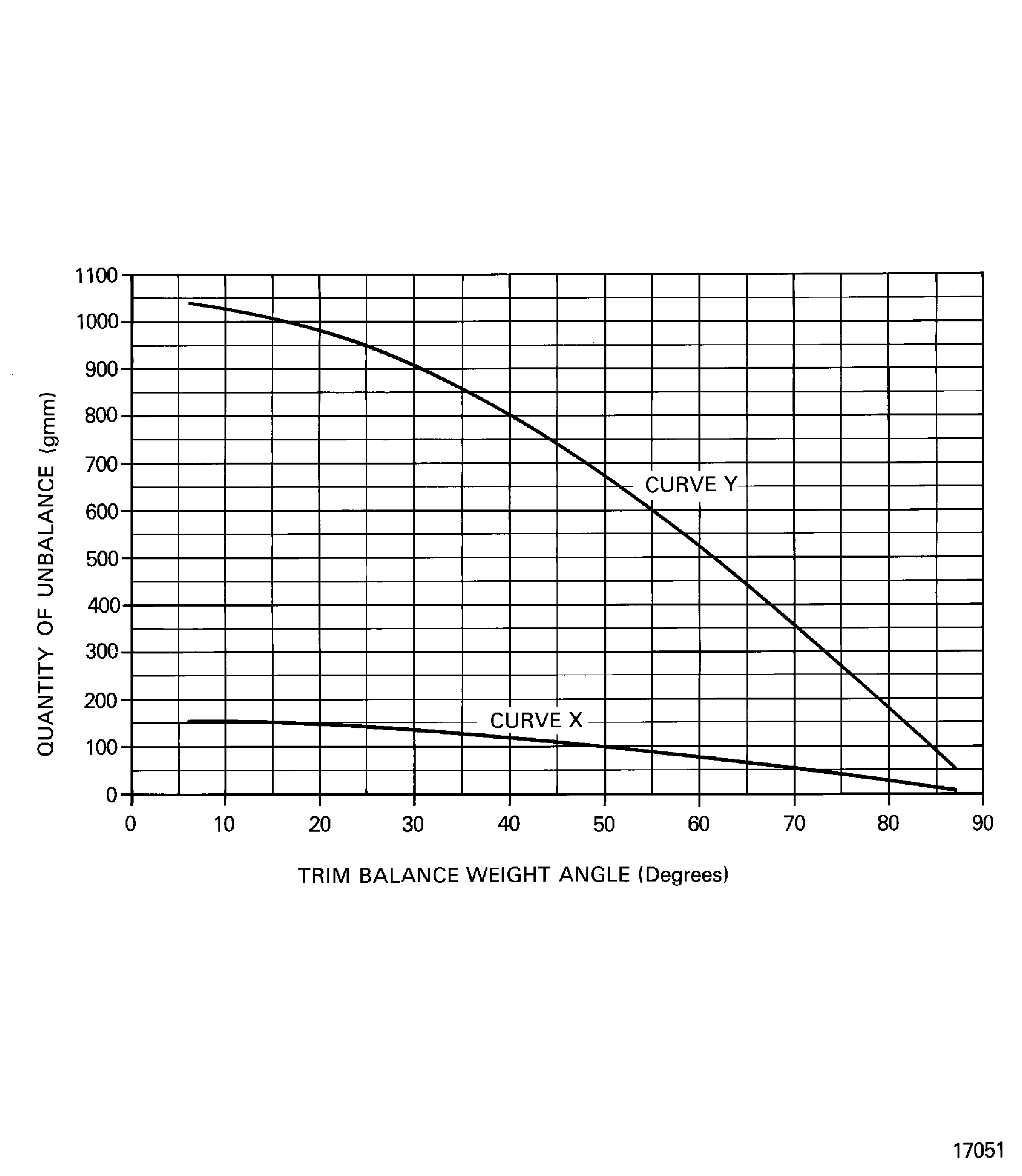
Figure: Find the position to install trim balance weights to correct the unbalance in plane AB
Find the position to install trim balance weights to correct the unbalance in plane AB
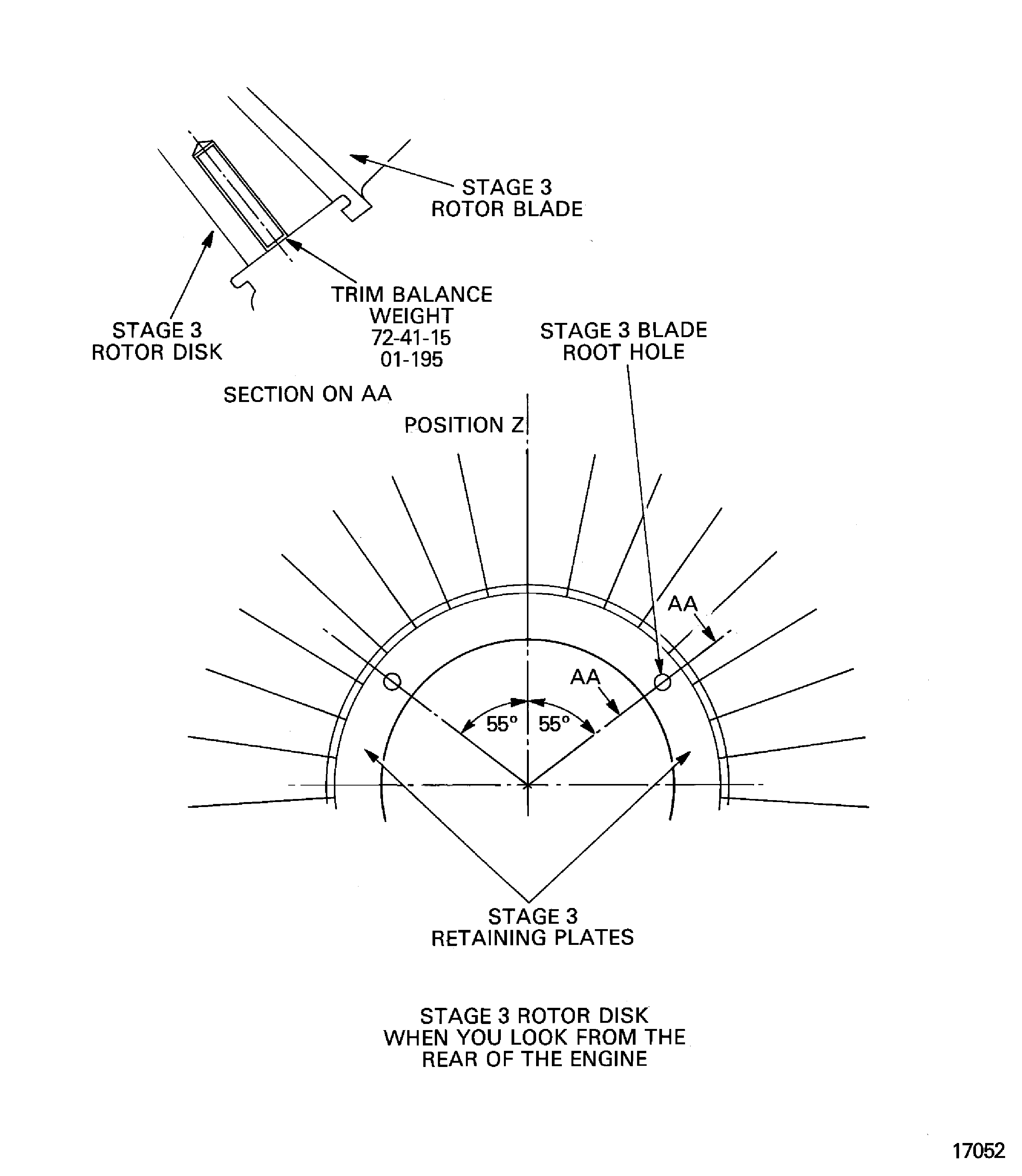
Figure: Install the stage 3 lockplates
Install the stage 3 lockplates
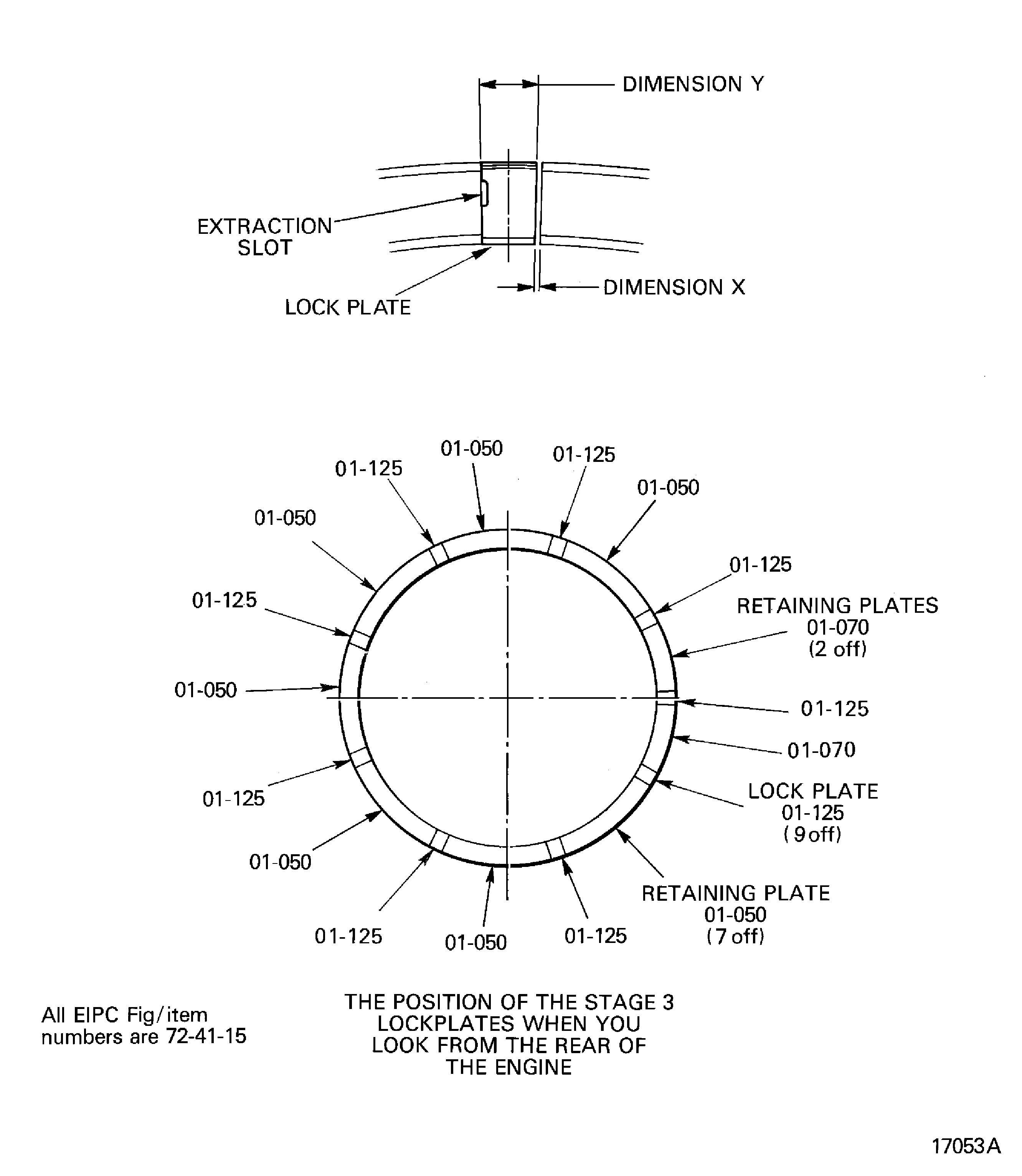
Figure: Lock the stage 3 lockplates in position
Lock the stage 3 lockplates in position