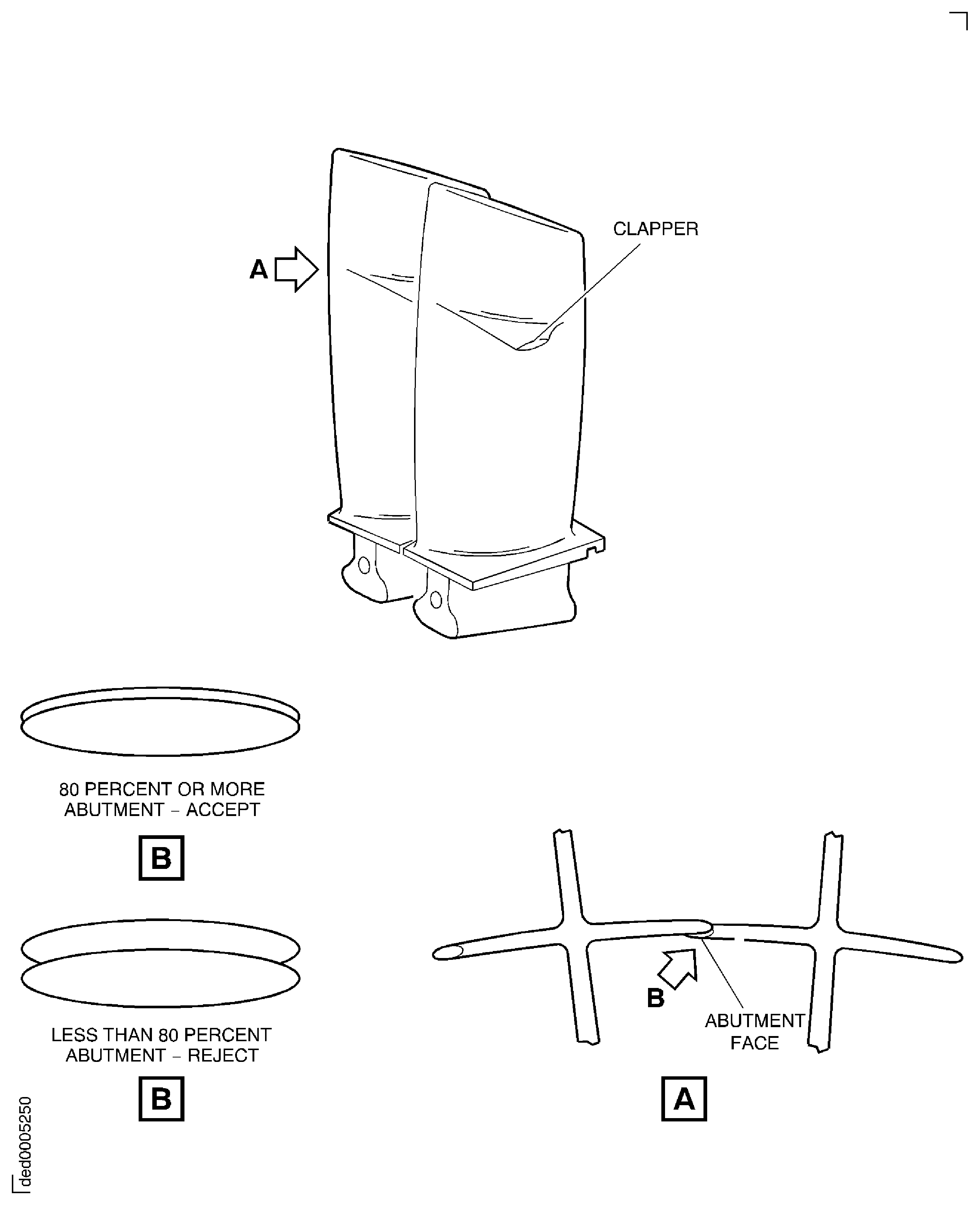
Export Control
EAR Export Classification: Not subject to the EAR per 15 C.F.R. Chapter 1, Part 734.3(b)(3), except for the following Service Bulletins which are currently published as EAR Export Classification 9E991: SBE70-0992, SBE72-0483, SBE72-0580, SBE72-0588, SBE72-0640, SBE73-0209, SBE80-0024 and SBE80-0025.Copyright
© IAE International Aero Engines AG (2001, 2014 - 2021) The information contained in this document is the property of © IAE International Aero Engines AG and may not be copied or used for any purpose other than that for which it is supplied without the express written authority of © IAE International Aero Engines AG. (This does not preclude use by engine and aircraft operators for normal instructional, maintenance or overhaul purposes.).Applicability
V2500-A5 AND Post SBE 72-0304
Common Information
TASK 72-41-10-440-003-F00 HPC Rotor Assembly - Do A Balance Check Of The Rotor Assembly And Install The Blades, Assembly-003 - SBE 72-0304
General
This TASK gives the procedure to do a balance check of the HP compressor rotor assembly (SBE 72-0304 standard) and install the blades.
The procedure to measure, assemble and balance the HP compressor rotor assembly is given in the subsequent TASKs.
TASK 72-41-10-440-001 (ASSEMBLY-001, CONFIG-001) Measure the HP compressor rotor assembly parts.
TASK 72-41-10-440-002 (ASSEMBLY-002, CONFIG-002) Assemble the HP compressor rotor assembly.
TASK 72-41-10-440-004 (ASSEMBLY-004, CONFIG-002) Grind the tips of the HP compressor blades.
TASK 72-41-10-440-005 (ASSEMBLY-005, CONFIG-002) Final balance the HP compressor rotor assembly.
Fig/item numbers in parentheses in the procedure agree with those used in the IPC. Only the primary Fig/item numbers are used. For the service bulletin alpha variants refer to the IPC.
For all parts identified in a different Chapter/Section/Subject, the applicable Chapter/Section/Subject comes before the Fig/item numbers.
Overhaul processes referred to in the procedure by the TASK/SUBTASK number are in SPM.
For standard torque data and procedure refer to SPM TASK 70-41-00-400-501, SPM TASK 70-41-01-400-501 and SPM TASK 70-41-02-410-501.
Special torque data is identified with the symbol * after the torque value.
Special assembly tolerances are included in this procedure.
Lubricate all threads and mating faces of nuts and bolts with CoMat 10-077 APPROVED ENGINE OILS, unless other lubricants are referred to in the procedure.
All the curvic teeth and mating faces must be cleaned with CoMat 01-001 SOLVENT, DELETEDor CoMat 01-002 SOLVENT, DELETED.before assembly. Refer to SPM TASK 70-11-01-300-503. They must also be dry assembled unless told differently in the procedure.
All of the temporary marks made in this procedure must be removed after completion of this task.
When stage 7 and stage 8 blades are installed in the disk, the L shaped stage 7 rear and stage 8 front sealing wires HPC Stage 3 - 8 Drum Disk And Wire Seals (72-41-11, 01-392 and HPC Stage 3 - 8 Drum Disk And Wire Seals72-41-11, 01-394) and stage 7 front and stage 8 rear sealing wires HPC Stage 3 - 8 Drum Disk And Wire Seals (72-41-11, 01-390 and HPC Stage 3 - 8 Drum Disk And Wire Seals72-41-11, 01-396) must be installed during all build procedures, that is gapping, balancing and rotor-tip grind. This is because the height of the wire retainer tip of the drum is decreased so that the L shaped wire can be installed. If the wire is not installed, the amount of movement of the blades is increased.
Data to balance.
The tools used in this procedure are used to adapt the HP compressor rotor assembly to the 'Schenck HL5' dynamic balancing machine. A balancing speed between 650 and 1000 RPM that gives stable and repeatable results is recommended. The best speed to use will be different for different machines. The correct RPM will usually agree with the gear ratios available. The balancing machine must turn the HP compressor rotor assembly in a clockwise direction (direction of engine turn) when seen from the rear of the engine.
Refer to Figure for an example view of the HP compressor rotor assembly.
NOTE
NOTE
Preliminary Requirements
Pre-Conditions
NONESupport Equipment
| Name | Manufacturer | Part Number / Identification | Quantity | Remark |
|---|---|---|---|---|
| Dynamic balancing machine | LOCAL | Schenck HL-5U | ||
| End drive | LOCAL | Schenk 022748 | ||
| IAE 1R18058 Protective cover | 0AM53 | IAE 1R18058 | 1 | |
| IAE 1R18059 Trolley | 0AM53 | IAE 1R18059 | ||
| IAE 1R18060 Mounting foot | 0AM53 | IAE 1R18060 | 4 | |
| IAE 1R18061 Rail | 0AM53 | IAE 1R18061 | ||
| IAE 1R18069 Rear anvil | 0AM53 | IAE 1R18069 | 1 | |
| IAE 1R18070 Front anvil | 0AM53 | IAE 1R18070 | 1 | |
| IAE 1R18071 Rear anvil | 0AM53 | IAE 1R18071 | 1 | |
| IAE 1R18072 Front anvil | 0AM53 | IAE 1R18072 | 1 | |
| IAE 1R18075 Support pedestal | 0AM53 | IAE 1R18075 | 1 | |
| IAE 1R18076 Slave lock plates | 0AM53 | IAE 1R18076 | 3 | |
| IAE 1R18079 Drift | 0AM53 | IAE 1R18079 | 1 | |
| IAE 1R18080 Drift | 0AM53 | IAE 1R18080 | 1 | |
| IAE 1R18081 Beam sling | 0AM53 | IAE 1R18081 | 1 | |
| IAE 1R18082 Pliers | 0AM53 | IAE 1R18082 | 1 | |
| IAE 1R18083 Hydraulic tool | 0AM53 | IAE 1R18083 | 1 | |
| IAE 1R18084 Pliers | 0AM53 | IAE 1R18084 | 1 | |
| IAE 1R18089 Lifting adapter | 0AM53 | IAE 1R18089 | ||
| IAE 1R18090 Safety support stand | 0AM53 | IAE 1R18090 | 1 | |
| IAE 1R18091 Support stand | 0AM53 | IAE 1R18091 | 1 | |
| IAE 1R18095 Universal slinging adapter | 0AM53 | IAE 1R18095 | ||
| IAE 1R18097 Drift | 0AM53 | IAE 1R18097 | 1 | |
| IAE 1R18245 Adapter | 0AM53 | IAE 1R18245 | 1 | |
| IAE 1R18590 Socket end | 0AM53 | IAE 1R18590 | 1 | |
| IAE 1R18683 Caliper adapter | 0AM53 | IAE 1R18683 | 1 | |
| IAE 1R18708 Protection cover | 0AM53 | IAE 1R18708 | ||
| IAE 1R19812 Filing fixture | 0AM53 | IAE 1R19812 | 1 | |
| IAE 1R19813 Filing fixture | 0AM53 | IAE 1R19813 | 1 |
Consumables, Materials and Expendables
| Name | Manufacturer | Part Number / Identification | Quantity | Remark |
|---|---|---|---|---|
| CoMat 01-001 SOLVENT, DELETED | LOCAL | CoMat 01-001 | ||
| CoMat 01-002 SOLVENT, DELETED. | LOCAL | CoMat 01-002 | ||
| CoMat 02-121 TEMPORARY MARKER PENCIL/CRAYON | IE304 | CoMat 02-121 | ||
| CoMat 02-122 TEMPORARY MARKER PENCIL/CRAYON | K6835 | CoMat 02-122 | ||
| CoMat 02-130 POLAR GRAPH PAPER | LOCAL | CoMat 02-130 | ||
| CoMat 02-181 MODELLING CLAY | LOCAL | CoMat 02-181 | ||
| CoMat 07-075 HIGH-HEAT RESISTING STOVING ENAMEL | k3504 | CoMat 07-075 | ||
| CoMat 10-070 ANTI-SEIZE COMPOUND | LOCAL | CoMat 10-070 | ||
| CoMat 10-077 APPROVED ENGINE OILS | X333X | CoMat 10-077 |
Spares
| Name | Manufacturer | Part Number / Identification | Quantity | Remark |
|---|---|---|---|---|
| Lockplates | Lockplates | 3 | ||
| Lockplates | Lockplates | 3 |
Safety Requirements

CAUTION
CAUTION
Procedure
NOTE
The bolts that attach the end drive to the balancing machine must all have the same weight.Attach Schenck 022748 end drive on to the balancing machine. Refer to Figure.

WARNING
MAKE SURE THAT THE PROTECTIVE COVER IS CLOSED AND THE KNOBS ARE IN THE SAFETY POSITION.NOTE
The protective cover must be between the No. 1 and No. 2 pedestals.Lift the protective cover and put it above the mounting feet. Lower the protective cover until it is approximately one inch above the tops of the mounting feet.
Install IAE 1R18060 Mounting foot 4 off and IAE 1R18058 Protective cover 1 off on to the balancing machine. Refer to Figure.
SUBTASK 72-41-10-440-228 Prepare the Balancing Machine for Use
Remove IAE 1R18708 Protection cover protection cover from the compressor rotating air seals. Refer to Figure.
Install IAE 1R18081 Beam sling 1 off on to the compressor rotor assembly. Refer to Figure.
CAUTION
YOU MUST NOT LET THE COMPRESSOR ROTOR ASSEMBLY HIT THE BALANCING MACHINE.Carefully lower the compressor rotor assembly on to the balancing machine. Make sure the dummy stub shaft touches the No. 1 pedestal and the bearing location diameter (Diameter A) touches the No. 2 pedestal. Refer to Figure.
Remove the beam sling from the compressor rotor assembly. Refer to Figure.
Remove the universal sling adapters. Refer to Figure.
SUBTASK 72-41-10-440-229 Install the HP Compressor Rotor Assembly in to the Balancing Machine
NOTE
The HP compressor rotor assembly is installed in IAE 1R18059 Trolley.Plane separate and calibrate the balancing machine to read static unbalance. Measure and record the quantity and angular position of the unbalance. Refer to Figure.
Make a mark on CoMat 02-130 POLAR GRAPH PAPERto show the position and quantity of the unbalance. Identify this point as B1. Refer to Figure.
Use CoMat 02-121 TEMPORARY MARKER PENCIL/CRAYON or CoMat 02-122 TEMPORARY MARKER PENCIL/CRAYON to make a mark that identifies the position of the dummy stub shaft in relation to the balancing machine drive head.
Remove the HP compressor rotor assembly from the balancing machine and install it in IAE 1R18059 Trolley. Refer to Step.
Install IAE 1R18091 Support stand 1 off on to the top of IAE 1R18090 Safety support stand 1 off. Make sure that the stand adapter is correctly engaged in the safety support stand.
Install the HP compressor rotor assembly in to IAE 1R18090 Safety support stand. Refer to Figure.
Remove the front universal sling adapter from the dummy stub shaft. Refer to Figure.
Use the hoist to lift the compressor rotor assembly off the safety support stand and put it above IAE 1R18075 Support pedestal 1 off.
Use CoMat 02-121 TEMPORARY MARKER PENCIL/CRAYONor CoMat 02-122 TEMPORARY MARKER PENCIL/CRAYONto make a mark that identifies the position of the dummy stub shaft in relation to the stage 3 disk curvic coupling. Refer to the SPM TASK 70-09-01-400-501 .
Torque all of the bolts in sequence to 18 lbfin (2.034 Nm). Refer to Figure.
Remove the HP compressor rotor assembly from the dummy stub shaft and turn the assembly 180 degrees. Refer to Figure.
Install the HP compressor rotor assembly in to IAE 1R18090 Safety support stand. Refer to Figure.
Install IAE 1R18095 Universal slinging adapter 1 off on to the dummy stub shaft. Refer to Figure.
Install the compressor rotor assembly in to IAE 1R18059 Trolley. Refer to Figure.
Install the compressor rotor assembly in to the balancing machine. Refer to Step. Make sure that the temporary mark on the dummy stub shaft is aligned with the temporary mark on the balancing machine drive head.
NOTE
The 180 degree turn of the compressor rotor assembly is necessary so that the tool unbalance can be removed (calculated).Install the compressor rotor assembly on to the dummy stub shaft, 180 degrees from the original position.
Make a mark on the polar graph paper to show the position of the unbalance. Identify this as B2. Refer to Figure.
NOTE
The angle and amount of static unbalance can be checked by the temporary addition of CoMat 02-181 MODELLING CLAYon the stage 8 disk. This will move point B2 to point B3.Make a vertical line thru point B3. The angle (angle G) measured clockwise from 0 degrees to B2 indicates the angle of static unbalance in the compressor. Write down this value.
If the static unbalance is more than 5.972 ozin (4300 gmm) then disassemble the compressor rotor assembly (refer to TASK 72-41-10-040-001) and examine the problem.
Calculate the correct unbalance in plane B. Refer to Figure.
SUBTASK 72-41-10-440-230 Do a Check Balance of the HP Compressor Rotor Assembly
NOTE
You must let the balancing machine run for a short time so that it can become stable, before balance values are read.Open IAE 1R18058 Protective cover protective cover.
Put IAE 1R18708 Protection cover 1 off on to the end of the compressor shaft. Move the protection cover along the compressor shaft until it is adjacent to the No. 2 pedestal.
Install IAE 1R18089 Lifting adapter 1 off on to the end of the compressor shaft. Tighten the lifting adapter.
Attach one of IAE 1R18095 Universal slinging adapter 2 off on to the lifting adapter. Refer to Figure.
Install IAE 1R18081 Beam sling 1 off on to the compressor rotor.
Install IAE 1R18708 Protection coveron to the compressor rotating air seals. Refer to Figure.
Put the compressor rotor assembly above IAE 1R18059 Trolley 1 off. Make sure that the trunnions on the universal sling adapters are above the trunnion supports.
Install the compressor rotor assembly in to the trolley. Refer to Figure.
Install IAE 1R18061 Rail 2 off on to the trolley.
SUBTASK 72-41-10-440-231 Install the HP Compressor Rotor Assembly in to the Trolley
Install all of the standard blades in to the disk through the blade loading slot. Use IAE 1R18097 Drift 1 off positioned against the blade roots to move them around the disk in a counterclockwise direction when you look from the rear.
CAUTION
YOU MUST NOT USE THE DRIFT ON THE AIRFOIL SURFACES.Install the blades in to the disk. Refer to Figure.
NOTE
Do not include the LH and RH locking blades.Put the selection of standard and undersize blades on a suitable work surface in a light to heavy sequence. Refer to Figure.
NOTE
Undersize blades must not be installed adjacent to each other on assembly.NOTE
Blades must be evenly distributed around the disk.Use CoMat 02-121 TEMPORARY MARKER PENCIL/CRAYONor CoMat 02-122 TEMPORARY MARKER PENCIL/CRAYONto identify the blades in a light-heavy-light sequence ready for assembly. Refer to Figure for an example of a light-heavy-light sequence.
NOTE
A selection of the 23 standard and the 23 undersize blades is used to get the correct platform build clearance.NOTE
A maximum of 23 undersize blades is permitted.Find the correct selection of stage 6 compressor blades.
A full set of stage 6 compressor blades includes the IPC Fig/item numbers that follow:
2 LH locking blades HPC Rotor Blades (72-41-15, 02-170).
2 RH locking blades HPC Rotor Blades (72-41-15, 02-185).
52 Standard blades HPC Rotor Blades (72-41-15, 02-200).
23 Standard blades HPC Rotor Blades (72-41-15, 02-215).
23 Undersize blades HPC Rotor Blades (72-41-15, 02-217).
SUBTASK 72-41-10-440-232 Find the Correct Selection of Stages 6 Compressor Blades
NOTE
Make sure each jacking screw and locknut assembly is kept as a set.NOTE
Use a CoMat 02-121 TEMPORARY MARKER PENCIL/CRAYON or CoMat 02-122 TEMPORARY MARKER PENCIL/CRAYON to make a mark on the jacking screw and locknut assembly and on the stage 6 thru 12 compressor disks so that they can be installed in the same positions.Refer to: Figure
SBE 72-0304: HP disks - Introduction of a reworked stage 3 to 8 disk assembly with revised L shaped sealing wires
Install the stage 7 front sealing wire HPC Stage 3 - 8 Drum Disk And Wire Seals (72-41-11, 01-390) in the groove in the front of the stage 7 disk. The gap in the sealing wire must be 180 degrees from the blade loading slot.
Install the stage 7 rear sealing wire HPC Stage 3 - 8 Drum Disk And Wire Seals (72-41-11, 01-392) in the groove in the rear of the stage 7 disk. The gap in the sealing wire must be 180 degrees from the blade loading slot.
SUBTASK 72-41-10-440-233 Install the Stage 7 Disk Sealing Wires (SBE 72-0304)
CAUTION
SBE 72-0304 STAGE 3-8 DISKS AND SEALING WIRES HPC Stage 3 - 8 Drum Disk And Wire Seals (72-41-11, 01-392 AND HPC Stage 3 - 8 Drum Disk And Wire Seals72-41-11, 01-394) ARE NOT INTERCHANGEABLE WITH OTHER SERVICE BULLETIN STANDARDS.CAUTION
WHEN INSTALLING THE DAMPER WIRES, POSITION THE DAMPER WIRE SO THAT THE SPLIT LINE IS AS FAR AWAY AS POSSIBLE FROM BOTH THE BLADE LOADING SLOT AND THE LOCATION OF THE MAXIMUM LOCAL WEAR TO THE DAMPER WIRE GROOVE.CAUTION
SBE 72-0304 SEALING WIRES HPC Stage 3 - 8 Drum Disk And Wire Seals (72-41-11, 01-392 AND HPC Stage 3 - 8 Drum Disk And Wire Seals72-41-11, 01-394) MUST BE INSTALLED DURING ALL STAGE 7 AND 8 BLADE BUILD OPERATIONS WHEN THE STAGE 7 AND 8 BLADES ARE INSTALLED IN THE DISK.CAUTION
STAGE 7 FRONT AND STAGE 8 REAR SEALING WIRES HPC Stage 3 - 8 Drum Disk And Wire Seals (72-41-11, 01-390 AND HPC Stage 3 - 8 Drum Disk And Wire Seals72-41-11, 01-396) MUST BE INSTALLED DURING ALL STAGE 7 AND STAGE 8 BLADE BUILD OPERATIONS FOR SBE 72-0304 STANDARD STAGE 3 TO 8 HP COMPRESSOR ROTOR ASSEMBLIES.Make sure each jacking screw and locknut assembly is kept as a set.
CoMat 02-122 TEMPORARY MARKER PENCIL/CRAYON to make a mark on the jacking screw and locknut assembly and on the stage 6 thru 12 compressor disks so that they can be installed in the same positions.
Release and remove the stage 6 thru 12 jacking screw and locknut assemblies from the disks, as given in Step.
A selection of the 26 standard blades and the 26 undersize blades is used to get the correct platform build clearance.
A maximum of 26 undersize blades is permitted.
CAUTION
YOU MUST MAKE SURE THE MEASURED GAP IS NOT MORE THAN 0.236 IN. (6.00 MM) TO MAKE SURE THAT THE STAGE 7 REAR SEALING WIRE HPC Stage 3 - 8 Drum Disk And Wire Seals (72-41-11, 01-392) IS INSTALLED IN THE CORRECT POSITION AND IS NOT INSTALLED IN THE STAGE 8 GROOVE IN THE FRONT OF THE DISK.NOTE
Do not mark the stage 7 blades in a light-heavy-light sequence.Do steps B.(1) thru B.(9) again in Step to get the correct selection of stage 7 blades. During this procedure and before installing the last three blades, measure the gap (dimension C and dimension D) in the stage 7 front and rear sealing wires, refer to Figure. The gap must not be more than 0.236 in. (6.00 mm).
NOTE
Find the correct selection of stage 7 compressor blades.
A full set of stage 7 compressor blades includes the IPC Fig/item numbers that follow:
2 LH locking blades HPC Rotor Blades (72-41-15, 02-270).
2 RH locking blades HPC Rotor Blades (72-41-15, 02-285).
63 Standard blades HPC Rotor Blades (72-41-15, 02-300).
26 Standard blades HPC Rotor Blades (72-41-15, 02-315).
26 Undersize blades HPC Rotor Blades (72-41-15, 02-317).
SUBTASK 72-41-10-440-234 Find the Correct Selection of Stage 7 Compressor Blades
NOTE
Refer to: Figure
SBE 72-0304: HP disks - Introduction of a reworked stage 3 to 8 disk assembly with revised L shaped sealing wires
Install the stage 8 front sealing wire HPC Stage 3 - 8 Drum Disk And Wire Seals (72-41-11, 01-394) in the groove in the front of the stage 8 disk. The gap in the sealing wire must be 180 degrees from the blade loading slot.
Install the stage 8 rear sealing wire HPC Stage 3 - 8 Drum Disk And Wire Seals (72-41-11, 01-396) in the groove in the rear of the stage 8 disk. The gap in the sealing wire must be 180 degrees from the blade loading slot.
SUBTASK 72-41-10-440-235 Install the Stage 8 Disk Sealing Wires (SBE 72-0304)
CAUTION
SBE 72-0304 STAGE 3-8 DISKS AND SEALING WIRES HPC Stage 3 - 8 Drum Disk And Wire Seals (72-41-11, 01-392 AND HPC Stage 3 - 8 Drum Disk And Wire Seals72-41-11, 01-394) ARE NOT INTERCHANGEABLE WITH OTHER SERVICE BULLETIN STANDARDS.CAUTION
WHEN INSTALLING THE DAMPER WIRES, POSITION THE DAMPER WIRE SO THAT THE SPLIT LINE IS AS FAR AWAY AS POSSIBLE FROM BOTH THE BLADE LOADING SLOT AND THE LOCATION OF THE MAXIMUM LOCAL WEAR TO THE DAMPER WIRE GROOVE.CAUTION
SBE 72-0304 SEALING WIRES HPC Stage 3 - 8 Drum Disk And Wire Seals (72-41-11, 01-392 AND HPC Stage 3 - 8 Drum Disk And Wire Seals01-394) MUST BE INSTALLED DURING ALL STAGE 7 AND 8 BLADE BUILD OPERATIONS WHEN THE STAGE 7 AND 8 BLADES ARE INSTALLED IN THE DISK.CAUTION
STAGE 7 FRONT AND STAGE 8 REAR SEALING WIRES HPC Stage 3 - 8 Drum Disk And Wire Seals (72-41-11, 01-390 AND HPC Stage 3 - 8 Drum Disk And Wire Seals72-41-11, 01-396) MUST BE INSTALLED DURING ALL STAGE 7 AND STAGE 8 BLADE BUILD OPERATIONS FOR SBE 72-0304 STANDARD STAGE 3 TO 8 HP COMPRESSOR ROTOR ASSEMBLIES.Make sure each jacking screw and locknut assembly is kept as a set.
or CoMat 02-122 TEMPORARY MARKER PENCIL/CRAYON to make a mark on the jacking screw and locknut assembly and on the stage 6 thru 12 compressor disks so that they can be installed in the same positions.
Release and remove the stage 6 thru 12 jacking screw and locknut assemblies from the disks, as given in Step.
A selection of the 24 standard blades and the 24 undersize blades is used to get the correct platform build clearance.
A maximum of 24 undersize blades is permitted.
CAUTION
YOU MUST MAKE SURE THE MEASURED GAP IS NOT MORE THAN 0.236 IN. (6.00 MM) TO MAKE SURE THAT THE STAGE 7 REAR SEALING WIRE HPC Stage 3 - 8 Drum Disk And Wire Seals (72-41-11, 01-392) IS INSTALLED IN THE CORRECT POSITION AND IS NOT INSTALLED IN THE STAGE 8 GROOVE IN THE FRONT OF THE DISK.Do steps B.(1) thru B.(10) again in Step to get the correct selection of stage 8 blades. During this procedure and before installing the last three blades, measure the gap (dimension C and dimension D) in the stage 7 front and rear sealing wires, refer to Figure. The gap must not be more than 0.236 in. (6.00 mm).
NOTE
Find the correct selection of stage 8 compressor blades.
A full set of stage 8 compressor blades includes the IPC Fig/item numbers that follow:
2 LH locking blades HPC Rotor Blades (72-41-15, 02-370).
2 RH locking blades HPC Rotor Blades (72-41-15, 02-385).
56 Standard blades HPC Rotor Blades (72-41-15, 02-400).
24 Standard blades HPC Rotor Blades (72-41-15, 02-415).
24 Undersize blades HPC Rotor Blades (72-41-15, 02-417).
SUBTASK 72-41-10-440-236 Find the Correct Selection of Stage 8 Compressor Blades
NOTE
Refer to: Figure
CAUTION
WHEN INSTALLING THE DAMPER WIRES, POSITION THE DAMPER WIRE SO THAT THE SPLIT LINE IS AS FAR AWAY AS POSSIBLE FROM BOTH THE BLADE LOADING SLOT AND THE LOCATION OF THE MAXIMUM LOCAL WEAR TO THE DAMPER WIRE GROOVE.Install the stage 6 front sealing wire HPC Stage 3 - 8 Drum Disk And Wire Seals (72-41-11, 01-386) in to the stage 6 disk front groove.
Install the stage 6 rear sealing wire HPC Stage 3 - 8 Drum Disk And Wire Seals (72-41-11, 01-388) in to the stage 6 disk rear groove. The front and rear sealing wire joints must be 180 degrees apart.
SUBTASK 72-41-10-440-237 Install the Stage 6 Disk Sealing Wires
Use CoMat 01-001 SOLVENT, DELETED or CoMat 01-002 SOLVENT, DELETED. and a cloth to clean the threads of the jacking screw and locknut assemblies removed in Step.
Use a brush to apply CoMat 10-070 ANTI-SEIZE COMPOUND to the threads of the stage 6 jacking screw and locknut assemblies.
WARNING
WHEN YOU USE CoMat 01-001 SOLVENT, DELETED OR CoMat 01-002 SOLVENT, DELETED. YOU MUST USE THE NECESSARY PROTECTIVE CLOTHING. DO NOT GET THE SOLVENT ON YOUR SKIN OR IN YOUR EYES. YOU MUST NOT SMOKE WHEN YOU USE THE SOLVENT AS THE VAPOUR CHANGES AND BECOMES TOXIC.Prepare the jacking screw and locknut assembly.
NOTE
A blade platform joint will be in line with the center of the blade loading slot.Continue to move the blades in a clockwise direction until the jacking screw and locknut assemblies are in their correct positions. Refer to Figure.
UseIAE 1R18590 Socket end 1 off to torque the screws to between 4 and 5 lbfin (0.45 and 0.56 Nm) above the locking torque.
Use IAE IAE 1R18683 Caliper adapter 1 off to make sure that the jacking screws are correctly installed. Refer to Figure.
CAUTION
YOU MUST NOT USE THE DRIFT ON THE AIRFOIL SURFACES.NOTE
The jacking screw and locknut assemblies must be installed in the positions that they were removed from. Refer to Step.Install the stage six standard and undersize blades which were selected in Step in to the disk in the identified light-heavy-light sequence. Use IAE 1R18097 Drift 1 off to move the blades around the disk in a counterclockwise direction when you look from the rear.
SUBTASK 72-41-10-440-238 Install the Correct Selection of Stage 6 Blades
The procedure to get the correct selection of stage 9 blades is the same as the procedure for stage 6 blades given in Step.
NOTE
A selection of the 25 standard blades and the 25 undersize blades is used to get the correct platform build clearance.NOTE
A maximum of 25 undersize blades is permitted.Find the correct selection of stage 9 compressor blades.
A full set of stage 9 compressor blades includes the IPC Fig/item numbers that follow:
2 LH locking blades HPC Rotor Blades (72-41-15, 02-470).
2 RH locking blades HPC Rotor Blades (72-41-15, 02-485).
60 Standard blades HPC Rotor Blades (72-41-15, 02-500).
25 Standard blades HPC Rotor Blades (72-41-15, 02-515).
25 Undersize blades HPC Rotor Blades (72-41-15, 02-517).
The procedure to get the correct selection of stage 10 blades is the same as the procedure for stage 6 blades given in Step.
NOTE
A selection of the 24 standard blades and the 24 undersize blades is used to get the correct platform build clearance.NOTE
A maximum of 24 undersize blades is permitted.Find the correct selection of stage 10 compressor blades.
A full set of stage 10 compressor blades includes the IPC Fig/item numbers that follow:
2 LH locking blades HPC Rotor Blades (72-41-15, 02-570).
2 RH locking blades HPC Rotor Blades (72-41-15, 02-585).
57 Standard blades HPC Rotor Blades (72-41-15, 02-600).
24 Standard blades HPC Rotor Blades (72-41-15, 02-615).
24 Undersize blades HPC Rotor Blades (72-41-15, 02-617).
The procedure to get the correct selection of stage 11 blades is the same as the procedure for stage 6 blades given in Step.
NOTE
A selection of the 24 standard blades and the 24 undersize blades is used to get the correct platform build clearance.NOTE
A maximum of 24 undersize blades is permitted.Find the correct selection of stage 11 compressor blades.
A full set of stage 11 compressor blades includes the IPC Fig/item numbers that follow:
2 LH locking blades HPC Rotor Blades (72-41-15, 02-670).
2 RH locking blades HPC Rotor Blades (72-41-15, 02-685).
50 Standard blades HPC Rotor Blades (72-41-15, 02-700).
24 Standard blades HPC Rotor Blades (72-41-15, 02-715).
24 Undersize blades HPC Rotor Blades (72-41-15, 02-717).
The procedure to get the correct selection of stage 12 blades is the same as the procedure for stage 6 blades given in Step.
NOTE
A selection of the 23 standard blades and the 23 undersize blades is used to get the correct platform build clearance.NOTE
A maximum of 23 undersize blades is permitted.Find the correct selection of stage 12 compressor blades.
A full set of stage 12 compressor blades includes the IPC Fig/item numbers that follow:
2 LH locking blades HPC Rotor Blades (72-41-15, 02-770).
2 RH locking blades HPC Rotor Blades (72-41-15, 02-785).
44 Standard blades HPC Rotor Blades (72-41-15, 02-800).
23 Standard blades HPC Rotor Blades (72-41-15, 02-815).
23 Undersize blades HPC Rotor Blades (72-41-15, 02-817).
SUBTASK 72-41-10-440-239 Find the Correct Selection of Stages 9 thru 12 Compressor Blades
Use CoMat 01-001 SOLVENT, DELETEDor CoMat 01-002 SOLVENT, DELETED.and a cloth to clean the threads of the jacking screw and locknut assemblies removed in Step.
Use a brush to apply CoMat 10-070 ANTI-SEIZE COMPOUNDto the threads of the stage 9 jacking screw and locknut assemblies.
WARNING
WHEN YOU USE CoMat 01-001 SOLVENT, DELETED OR CoMat 01-002 SOLVENT, DELETED. INHIBITED AND STABILIZED TRICHLOROETHANE YOU MUST USE THE NECESSARY PROTECTIVE CLOTHING. DO NOT GET THE SOLVENT ON YOUR SKIN OR IN YOUR EYES. YOU MUST NOT SMOKE WHEN YOU USE THE SOLVENT AS THE VAPOR CHANGES AND BECOMES TOXIC.Prepare the jacking screw and locknut assemblies.
NOTE
A blade platform joint will be in line with the center of the blade loading slot.Continue to move the blades in a clockwise direction until the jacking screw and locknut assemblies are in their correct positions. Refer to Figure.
Use IAE 1R18590 Socket end 1 off to torque the screws to between 4 and 5 lbfin (0.45 and 0.56 Nm) above the locking torque.
CAUTION
YOU MUST NOT USE THE DRIFT ON THE AIRFOIL SURFACES.NOTE
The jacking screw and locknut assemblies must be installed in the positions that they were removed from. Refer to Step.Install the stage 9 standard and undersize blades which were selected in Step in to the disk in the identified light-heavy-light sequence. Use IAE 1R18097 Drift 1 off to move the blades around the disk in a counterclockwise direction when you look from the rear.
Use a feeler gage to measure the gap in segment A. Refer to Figure for the correct gap.
NOTE
The feeler gage must go through the full axial length X of both platforms and must span the full radial height Y of both platforms.Use a feeler gage to measure the gap in segment B. Refer to Figure for the correct gap.
Use IAE IAE 1R18683 Caliper adapter 1 off to make sure that the jacking screws are correctly installed. Refer to Figure.
SUBTASK 72-41-10-440-240 Install the Correct Selection of Stage 9 Compressor Blades
Use CoMat 01-001 SOLVENT, DELETEDor CoMat 01-002 SOLVENT, DELETED.and a cloth to clean the threads of the jacking screw and locknut assemblies removed in Step.
Use a brush to apply CoMat 10-070 ANTI-SEIZE COMPOUNDto the threads of the stage 10 jacking screw and locknut assemblies.
WARNING
WHEN YOU USE CoMat 01-001 SOLVENT, DELETED OR CoMat 01-002 SOLVENT, DELETED. YOU MUST USE THE NECESSARY PROTECTIVE CLOTHING. DO NOT GET THE SOLVENT ON YOUR SKIN OR IN YOUR EYES. YOU MUST NOT SMOKE WHEN YOU USE THE SOLVENT AS THE VAPOR CHANGES AND BECOMES TOXIC.Prepare the jacking screw and locknut assemblies.
NOTE
A blade platform joint will be in line with the center of the blade loading slot.Continue to move the blades in a clockwise direction until the jacking screw and locknut assemblies are in their correct positions. Refer to Figure.
Use IAE 1R18590 Socket end 1 off to torque the screws to between 4 and 5 lbfin (0.45 and 0.56 Nm) above the applicable locking torque.
CAUTION
YOU MUST NOT USE THE DRIFT ON THE AIRFOIL SURFACES.NOTE
The jacking screw and locknut assemblies must be installed in the positions that they were removed from. Refer to Step.Install the stage 10 standard and undersize blades which were selected in Step in to the disk in the identified light-heavy-light sequence. Use IAE 1R18097 Drift 1 off to move the blades around the disk in a counterclockwise direction when you look from the rear.
Use a feeler gage to measure the gap in segment A. Refer to Figure for the correct gap.
NOTE
The feeler gage must go through the full axial length X of both platforms and must span the full radial height Y of both platforms.Use a feeler gage to measure the gap in segment B. Refer to Figure for the correct gap.
Use IAE IAE 1R18683 Caliper adapter 1 off to make sure that the jacking screws are correctly installed. Refer to Figure.
SUBTASK 72-41-10-440-241 Install the Correct Selection of Stage 10 Compressor Blades
Use CoMat 01-001 SOLVENT, DELETEDor CoMat 01-002 SOLVENT, DELETED.and a cloth to clean the threads of the jacking screw and locknut assemblies removed in Step.
Use a brush to apply CoMat 10-070 ANTI-SEIZE COMPOUNDto the threads of the stage 11 jacking screw and locknut assemblies.
WARNING
WHEN YOU USE CoMat 01-001 SOLVENT, DELETED OR CoMat 01-002 SOLVENT, DELETED. YOU MUST USE THE NECESSARY PROTECTIVE CLOTHING. DO NOT GET THE SOLVENT ON YOUR SKIN OR IN YOUR EYES. YOU MUST NOT SMOKE WHEN YOU USE THE SOLVENT AS THE VAPOR CHANGES AND BECOMES TOXIC.Prepare the jacking screw and locknut assemblies.
NOTE
A blade platform joint will be in line with the center of the blade loading slot.Continue to move the blades in a clockwise direction until the jacking screw and locknut assemblies are in their correct positions. Refer to Figure.
Use IAE 1R18590 Socket end 1 off to torque the screws to between 4 and 5 lbfin (0.45 and 0.56 Nm) above the applicable locking torque.
CAUTION
YOU MUST NOT USE THE DRIFT ON THE AIRFOIL SURFACES.NOTE
The jacking screw and locknut assemblies must be installed in the positions that they were removed from. Refer to Step.Install the stage 11 standard and undersize blades which were selected in Step in to the disk in the identified light-heavy-light sequence. Use IAE 1R18097 Drift 1 off to move the blades around the disk in a counterclockwise direction when you look from the rear.
Use a feeler gage to measure the gap in segment A. Refer to Figure for the correct gap.
NOTE
The feeler gage must go through the full axial length X of both platforms and must span the full radial height Y of both platforms.Use a feeler gage to measure the gap in segment B. Refer to Figure for the correct gap.
Use IAE IAE 1R18683 Caliper adapter 1 off to make sure that the jacking screws are correctly installed. Refer to Figure.
SUBTASK 72-41-10-440-242 Install the Correct Selection of Stage 11 Blades
Use CoMat 01-001 SOLVENT, DELETEDor CoMat 01-002 SOLVENT, DELETED.and a cloth to clean the threads of the jacking screw and locknut assemblies removed in Step.
Use a brush to apply CoMat 10-070 ANTI-SEIZE COMPOUNDto the threads of the stage 12 jacking screw and locknut assemblies.
WARNING
WHEN YOU USE CoMat 01-001 SOLVENT, DELETED OR CoMat 01-002 SOLVENT, DELETED. YOU MUST USE THE NECESSARY PROTECTIVE CLOTHING. DO NOT GET THE SOLVENT ON YOUR SKIN OR IN YOUR EYES. YOU MUST NOT SMOKE WHEN YOU USE THE SOLVENT AS THE VAPOR CHANGES AND BECOMES TOXIC.Prepare the jacking screw and locknut assemblies.
NOTE
A blade platform joint will be in line with the center of the blade loading slot.Continue to move the blades in a clockwise direction until the jacking screw and locknut assemblies are in their correct positions. Refer to Figure.
Use IAE 1R18590 Socket end 1 off to torque the screws to between 4 and 5 lbfin (0.45 and 0.56 Nm) above the applicable locking torque.
CAUTION
YOU MUST NOT USE THE DRIFT ON THE AIRFOIL SURFACES.NOTE
The jacking screw and locknut assemblies must be installed in the positions that they were removed from. Refer to Step.Install the stage 12 standard and undersize blades which were selected in Step in to the disk in the identified light-heavy-light sequence. Use IAE 1R18097 Drift 1 off to move the blades around the disk in a counterclockwise direction when you look from the rear.
Use a feeler gage to measure the gap in segment A. Refer to Figure for the correct gap.
NOTE
The feeler gage must go through the full axial length X of both platforms and must span the full radial height Y of both platforms.Use a feeler gage to measure the gap in segment B. Refer to Figure for the correct gap.
Use IAE IAE 1R18683 Caliper adapter 1 off to make sure that the jacking screws are correctly installed. Refer to Figure.
SUBTASK 72-41-10-440-243 Install the Correct Selection of Stage 12 Compressor Blades
Refer to: Figure
Use CoMat 02-121 TEMPORARY MARKER PENCIL/CRAYONor CoMat 02-122 TEMPORARY MARKER PENCIL/CRAYONto identify the blades in a light-heavy-light sequence ready for assembly. Refer to Figure for an example of a light-heavy-light sequence.
Weigh the stage 4 compressor blades HPC Rotor Blades (72-41-15, 01-500).
Weigh the stage 5 compressor blades HPC Rotor Blades (72-41-15, 01-800).
Use CoMat 02-121 TEMPORARY MARKER PENCIL/CRAYON or CoMat 02-122 TEMPORARY MARKER PENCIL/CRAYON to identify the plates in a light-heavy-light sequence ready for assembly. Refer to Figure.
Weigh the 9 stage 4 retaining plates HPC Rotor Blades (72-41-15, 01-350).
Weigh the 12 stage 5 retaining plates HPC Rotor Blades (72-41-15, 01-650).
SUBTASK 72-41-10-440-244 Weigh the Stages 4 and 5 Compressor Blades and Retaining Plates
NOTE
Install the heaviest blade at the No. 1 blade slot position.
Install the blades from the front of the disk.
Install the stage 5 blades to the disk in the sequence found in Step. Start from the No. 1 blade slot and install the blades in a clockwise direction when you look from the rear.
Install the stage 5 compressor blades. Refer to Figure.
Apply CoMat 07-075 HIGH-HEAT RESISTING STOVING ENAMEL to the mating surfaces of the retaining plates.
NOTE
You must ensure that if Repair, VRS6630 TASK 72-41-11-300-023 (REPAIR-023) has been carried out, the retaining plate is fitted centrally over any area(s) of material removed.Install one of the plates into the two grooves.
Use IAE 1R18080 Drift 1 off to move the retaining plate around the disk in to the next blade groove.
CAUTION
CARE SHOULD BE TAKEN WHEN INSTALLING NEW STAGE 5 BLADES INTO THE DISK SLOT. IF A PROBLEM IS ENCOUNTERED DO NOT FORCE THE BLADE INTO PLACE, BUT EXCHANGE FOR A REPLACEMENT PART AND CONTACT IAE TECHNICAL SERVICES.Install the stage 5 retaining plates.
NOTE
If the last lockplate overlaps a retaining plate go to Step.Install the three stage 5 lockplates in position between the retaining plates. Refer to Figure. Use IAE 1R18080 Drift to move the lockplates and retaining plates around the disk until they touch. Measure the total clearance (dimension X) between a lockplate and a retaining plate.
Install a lockplate in to IAE 1R19813 Filing fixture 1 off and use a file to remove metal. The minimum permitted width (dimension Y) of the stage 5 lockplate after filing is 0.297 in. (7.64 mm).
NOTE
Remove metal from the minimum number of lockplates.Remove metal from the edge opposite the extraction slot.
If it is necessary to remove metal from a lockplate to get the correct plate clearance do the steps that follow:
Apply CoMat 07-075 HIGH-HEAT RESISTING STOVING ENAMEL to the mating surfaces of the disk and the lockplates.
Install the lockplates in position. Refer to Figure.
NOTE
The lockplates must be in line with a blade root.You must ensure that if Repair, VRS6630 TASK 72-41-11-300-023 (REPAIR-023) has been carried out, the retaining plate is fitted centrally over any area(s) of material removed.
Install HPC Rotor Blades (72-41-15, 01-725) stage 5 lockplates 3 off into the blade and disk grooves. Refer to Figure.
Install IAE 1R18070 Front anvil 1 off and IAE 1R18069 Rear anvil 1 off in to IAE 1R18082 Pliers 1 off.
Install IAE 1R18245 Adapter 1 off between the pressure control valve and IAE 1R18083 Hydraulic tool 1 off.
CAUTION
YOU MUST USE THE CORRECT ANVILS AND PLIERS FOR EACH STAGE WHEN LOCKING THE LOCKPLATES.CAUTION
LOCKPLATES THAT ARE DAMAGED IN ANY WAY DURING INSTALLATION, FOR EXAMPLE: OVER BENT, TWISTED OR NICKED SHOULD BE REPLACED WITH NEW PARTS. CORRECT ENGAGEMENT OF THE LOCKPLATES IS ESSENTIAL.Lock the lockplates in position. Refer to Figure.
Install the stage 4 blades to the disk in the sequence found in Step. Start from the No. 1 blade slot and install the blades in a clockwise direction when you look from the rear.
NOTE
Install the heaviest blade at the No. 1 blade slot position.Install the blades from the front of the disk.
Install the stage 4 compressor blades.
Do the same procedure as given in Step.
Install the stage 4 retaining plates.
Do the procedure given in Step thru Step but use IAE 1R19812 Filing fixture 1 off. The minimum permitted width (dimension Y) of the stage 4 lockplate after filing is 0.402 in. (10.20 mm).
Do Step thru Step again to install the stage 4 lockplates. If it is necessary to remove metal from the lockplate in Step do the step that follows:
Install HPC Rotor Blades (72-41-15, 01-425) stage 4 lockplates 3 off in to the grooves of the blades and the disk.
Install IAE 1R18072 Front anvil 1 off and IAE 1R18071 Rear anvil 1 off in to IAE 1R18084 Pliers 1 off.
CAUTION
YOU MUST USE THE CORRECT ANVILS AND PLIERS FOR EACH STAGE WHEN LOCKING THE LOCKPLATES.CAUTION
LOCKPLATES THAT ARE DAMAGED IN ANY WAY DURING INSTALLATION, FOR EXAMPLE: OVER BENT, TWISTED OR NICKED SHOULD BE REPLACED WITH NEW PARTS. CORRECT ENGAGEMENT OF THE LOCKPLATES IS ESSENTIAL.Lock the stage 4 lockplates in position. Figure.
SUBTASK 72-41-10-440-245 Install the Stages 4 and 5 Compressor Blades in the Disk Assembly
Refer to Figure
Install the compressor rotor assembly in to the balancing machine. Refer to Step.
Do a check balance of the HP compressor rotor. Refer to Step. Make a record of the quantity and angle of static unbalance in plane B.
Remove the blades. Refer to TASK 72-41-10-040-001-B00 (DISASSEMBLY, CONFIG-002).
If the static unbalance is more than 5.000 ozin (3600 gmm) do the steps that follow:
Install the compressor rotor in to the trolley. Refer to Step.
SUBTASK 72-41-10-440-246 Do a Check Balance of the HP Compressor Rotor Assembly
SBE 72-0304: HP disks - Introduction of a reworked stage 3 to 8 disk assembly with revised L shaped sealing wires
Make sure the stage 8 front sealing wire HPC Stage 3 - 8 Drum Disk And Wire Seals (72-41-11, 01-394) is correctly installed in the groove in the front of the stage 8 disk. The gap in the sealing wire must be 180 degrees from the blade loading slot.
Make sure the stage 8 rear sealing wire HPC Stage 3 - 8 Drum Disk And Wire Seals (72-41-11, 01-396) is correctly installed in the groove in the rear of the stage 8 disk. The gap in the sealing wire must be 180 degrees from the blade loading slot.
CAUTION
SBE 72-0304 STAGE 3-8 DISKS AND SEALING WIRES HPC Stage 3 - 8 Drum Disk And Wire Seals (72-41-11, 01-392 AND HPC Stage 3 - 8 Drum Disk And Wire Seals72-41-11, 01-394) ARE NOT INTERCHANGEABLE WITH OTHER SERVICE BULLETIN STANDARDS.CAUTION
WHEN INSTALLING THE DAMPER WIRES, POSITION THE DAMPER WIRE SO THAT THE SPLIT LINE IS AS FAR AWAY AS POSSIBLE FROM BOTH THE BLADE LOADING SLOT AND THE LOCATION OF THE MAXIMUM LOCAL WEAR TO THE DAMPER WIRE GROOVE.CAUTION
SBE 72-0304 SEALING WIRES HPC Stage 3 - 8 Drum Disk And Wire Seals (72-41-11, 01-392 AND HPC Stage 3 - 8 Drum Disk And Wire Seals72-41-11, 01-394) MUST BE INSTALLED DURING ALL STAGE 7 AND 8 BLADE BUILD OPERATIONS WHEN THE STAGE 7 AND 8 BLADES ARE INSTALLED IN THE DISK.CAUTION
STAGE 7 FRONT AND STAGE 8 REAR SEALING WIRES HPC Stage 3 - 8 Drum Disk And Wire Seals (72-41-11, 01-390 AND HPC Stage 3 - 8 Drum Disk And Wire Seals72-41-11, 01-396) MUST BE INSTALLED DURING ALL STAGE 7 AND STAGE 8 BLADE BUILD OPERATIONS FOR SBE 72-0304 STANDARD STAGE 3 TO 8 HP COMPRESSOR ROTOR ASSEMBLIES.Make sure the stage 8 sealing wires are correctly installed.
WARNING
WHEN YOU USE CoMat 01-001 SOLVENT, DELETED OR CoMat 01-002 SOLVENT, DELETED. YOU MUST USE THE NECESSARY PROTECTIVE CLOTHING. DO NOT GET THE SOLVENT ON YOUR SKIN OR IN YOUR EYES. YOU MUST NOT SMOKE WHEN YOU USE THE SOLVENT AS THE VAPOR CHANGES AND BECOMES TOXIC.Use CoMat 01-001 SOLVENT, DELETED or CoMat 01-002 SOLVENT, DELETED. and a cloth to clean the threads of the jacking screw and locknut assemblies removed in Step.
Use a brush to apply CoMat 10-070 ANTI-SEIZE COMPOUND to the threads of the stage 8 jacking screw and locknut assemblies.
Prepare the jacking screw and locknut assemblies.
CAUTION
YOU MUST MAKE SURE THE MEASURED GAP IS NOT MORE THAN 0.236 IN. (6.00 MM) TO MAKE SURE THAT THE STAGE 7 REAR SEALING WIRE HPC Stage 3 - 8 Drum Disk And Wire Seals (72-41-11, 01-392) IS INSTALLED IN THE CORRECT POSITION AND IS NOT INSTALLED IN THE STAGE 8 GROOVE IN THE FRONT OF THE DISK.Measure the gaps in the sealing wires. The gaps must not be more than 0.236 in. (6,00 mm.) in each sealing wire. Refer to dimension C and dimension D on Figure.
NOTE
A blade platform joint will be in line with the center of the blade loading slot.Continue to move the blades in a clockwise direction until the jacking screw and locknut assemblies are in their correction positions. Refer to Figure.
Use the IAE 1R18590 Socket end socket end 1 off to torque the screws to 4 to 5 lbfin (0,45 to 0.56 Nm) above the applicable locking torque.
CAUTION
YOU MUST NOT USE THE DRIFT ON THE AIRFOIL SURFACES.Install the stage 8 standard and undersize blades which were identified in Step into the disk in the light-heavy-light sequence. Refer to Figure for an example of the light-heavy-light sequence.
Use the IAE 1R18097 Drift drift 1 off to move the blades around the disk in a counterclockwise direction when you look from the rear.
Use a feeler gage to measure the gap in segment A. Refer to Figure or the correct gap.
NOTE
The feeler gage must go through the full axial length X of both platforms and must span the full radial height Y of both platforms.Use a feeler gage to measure the gap in segment B. Refer to Figure for the correct gap.
Use IAE IAE 1R18683 Caliper adapter 1 off to make sure that the jacking screws are correctly installed. Refer to Figure.
Make sure the stage 7 front sealing wire HPC Stage 3 - 8 Drum Disk And Wire Seals (72-41-11, 01-390) is correctly installed in the groove in the front of the stage 7 disk. The gap in the sealing wire must be 180 degrees from the blade loading slot.
Make sure the stage 7 rear sealing wire HPC Stage 3 - 8 Drum Disk And Wire Seals (72-41-11, 01-392) is correctly installed in the groove in the rear of the stage 7 disk. The gap in the sealing wire must be 180 degrees from the blade loading slot.
CAUTION
SBE 72-0304 STAGE 3-8 DISKS AND SEALING WIRES HPC Stage 3 - 8 Drum Disk And Wire Seals (72-41-11, 01-392 AND HPC Stage 3 - 8 Drum Disk And Wire Seals72-41-11, 01-394) ARE NOT INTERCHANGEABLE WITH OTHER SERVICE BULLETIN STANDARDS.CAUTION
WHEN INSTALLING THE DAMPER WIRES, POSITION THE DAMPER WIRE SO THAT THE SPLIT LINE IS AS FAR AWAY AS POSSIBLE FROM BOTH THE BLADE LOADING SLOT AND THE LOCATION OF THE MAXIMUM LOCAL WEAR TO THE DAMPER WIRE GROOVE.CAUTION
SBE 72-0304 SEALING WIRES HPC Stage 3 - 8 Drum Disk And Wire Seals (72-41-11, 01-392 AND HPC Stage 3 - 8 Drum Disk And Wire Seals72-41-11, 01-394) MUST BE INSTALLED DURING ALL STAGE 7 AND 8 BLADE BUILD OPERATIONS WHEN THE STAGE 7 AND 8 BLADES ARE INSTALLED IN THE DISK.CAUTION
STAGE 7 FRONT AND STAGE 8 REAR SEALING WIRES HPC Stage 3 - 8 Drum Disk And Wire Seals (72-41-11, 01-390 AND HPC Stage 3 - 8 Drum Disk And Wire Seals72-41-11, 01-396) MUST BE INSTALLED DURING ALL STAGE 7 AND STAGE 8 BLADE BUILD OPERATIONS FOR SBE 72-0304 STANDARD STAGE 3 TO 8 HP COMPRESSOR ROTOR ASSEMBLIES.Make sure the stage 7 sealing wires are correctly installed.
CAUTION
DO NOT USE THE DRIFT ON THE AIRFOIL SURFACES.Install the stage 7 compressor blades that were identified in Step. Use the drift to move the blades around the disk in a counterclockwise direction when you look from the rear.
NOTE
It is possible to correct up to approximately 2.500 ozin (1800 gmm) of the rotor static unbalance if you get the correct installation sequence of the blades.Install the stage 7 blades into the disk in a sequence that will get the static unbalance aimpoint. The static unbalance aimpoint is 50 per cent of the value recorded in Step and is at the same angle that was recorded.
Install the stage 7 compressor blades.
WARNING
WHEN YOU USE CoMat 01-001 SOLVENT, DELETED OR CoMat 01-002 SOLVENT, DELETED. INHIBITED AND STABILIZED TRICHLOROETHANE YOU MUST USE THE NECESSARY PROTECTIVE CLOTHING. DO NOT GET THE SOLVENT ON YOUR SKIN OR IN YOUR EYES. YOU MUST NOT SMOKE WHEN YOU USE THE SOLVENT AS THE VAPOR CHANGES AND BECOMES TOXIC.Use CoMat 01-001 SOLVENT, DELETED or CoMat 01-002 SOLVENT, DELETED. and a cloth to clean the threads of the jacking screw and locknut assemblies removed in Step.
Use a brush to apply CoMat 10-070 ANTI-SEIZE COMPOUND to the threads of the stage 7 jacking screw and locknut assemblies.
Prepare the jacking screw and locknut assemblies.
CAUTION
YOU MUST MAKE SURE THE MEASURED GAP IS NOT MORE THAN 0.236 IN. (6.00 MM) TO MAKE SURE THAT THE STAGE 7 REAR SEALING WIRE HPC Stage 3 - 8 Drum Disk And Wire Seals (72-41-11, 01-392) IS INSTALLED IN THE CORRECT POSITION AND IS NOT INSTALLED IN THE STAGE 8 GROOVE IN THE FRONT OF THE DISK.Measure the gaps in the sealing wires. The gaps must not be more than 0.236 in. (6.00 mm) in each sealing wire. Refer to dimension C and dimension D on Figure.
NOTE
A blade platform joint will be in line with the center of the blade loading slot.Continue to move the blades in a clockwise direction until the jacking screw and locknut assemblies are in their correction positions. Refer to Figure.
Use the IAE 1R18590 Socket end socket end 1 off to torque the screws to 4 to 5 lbfin (0,45 to 0.56 Nm) above the applicable locking torque.
Use IAE IAE 1R18683 Caliper adapter 1 off to make sure that the jacking screws are correctly installed. Refer to Figure.
Install the LH and RH locking blades and lock assemblies.
SUBTASK 72-41-10-440-247 Install the Stages 7 and 8 Rotor Blades and Sealing Wires in to the Disks (SBE 72-0304)
Refer to: Figure
Plane separate and calibrate the balancing machine through planes AB and AC. Measure and record the quantity and angular positions of the unbalance in both planes. Refer to Figure.
Install the compressor rotor assembly on to the dummy stub shaft, 180 degrees from the original position. Refer to Step.
Install the compressor rotor in to the trolley. Refer to Step.
SUBTASK 72-41-10-440-249 Dynamic Balance the HP Compressor Rotor Assembly
NOTE
You must let the balancing machine run for a short time so that it can become stable, before balance values are read.Weigh the stage 3 compressor blades HPC Rotor Blades (72-41-15, 01-200).
Use CoMat 02-121 TEMPORARY MARKER PENCIL/CRAYONor CoMat 02-122 TEMPORARY MARKER PENCIL/CRAYONto identify the retaining plates HPC Rotor Blades (72-41-15, 01-050) in a light-heavy-light sequence ready for assembly. Refer to Figure.
Weigh the stage 3 retaining plates HPC Rotor Blades (72-41-15, 01-050 and HPC Rotor Blades72-41-15, 01-070).
SUBTASK 72-41-10-440-250 Weigh the Stage 3 Compressor Blades and Retaining Plates
CAUTION
DAMAGE TO THE BLADES CAN OCCUR IF YOU DO NOT MAKE SURE THAT THE CORRECT MIXTURE OF BLADES ARE INSTALLED. REFER TO THE APPLICABLE SERVICE BULLETINS.NOTE
Install the blades from the front of the disk.Install the stage 3 blades to the disk in a sequence to correct as much of the unbalance in plane AB as possible. The unbalance in plane AB was recorded in Step. Start at the No. 1 blade slot and install the blades in a clockwise direction when you look from the rear.
Apply CoMat 07-075 HIGH-HEAT RESISTING STOVING ENAMEL to the mating surfaces of the retaining plates.
Install one of the plates HPC Rotor Blades (72-41-15, 01-050) in to the two grooves.
Use IAE 1R18079 Drift 1 off to move the retaining plate around the disk in to the next blade groove.
Do steps B.(4) thru B.(7) to install the remaining plates in to the disk and blades grooves. The retaining plates HPC Rotor Blades (72-41-15, 01-050) must be installed in the light-heavy-light sequence identified in Step. The 2 retaining plates HPC Rotor Blades (72-41-15, 01-070) must be installed after the larger retaining plates and in the sequence shown in Figure.
Install the stage 3 retaining plates.
SUBTASK 72-41-10-440-251 Install the Stage 3 Compressor Blades in to the Disk Assembly
Install the slave lockplates in position between the retaining plates at equal distances around the disk. Refer to Figurefor an example of the slave lockplates positions.
Install IAE 1R18076 Slave lock plates 9 off in to the grooves of the disk and blades.
SUBTASK 72-41-10-440-298 Install the Stage 3 Compressor Blade Lockplates
Figure: Example view of the HP compressor rotor assembly
Example view of the HP compressor rotor assembly
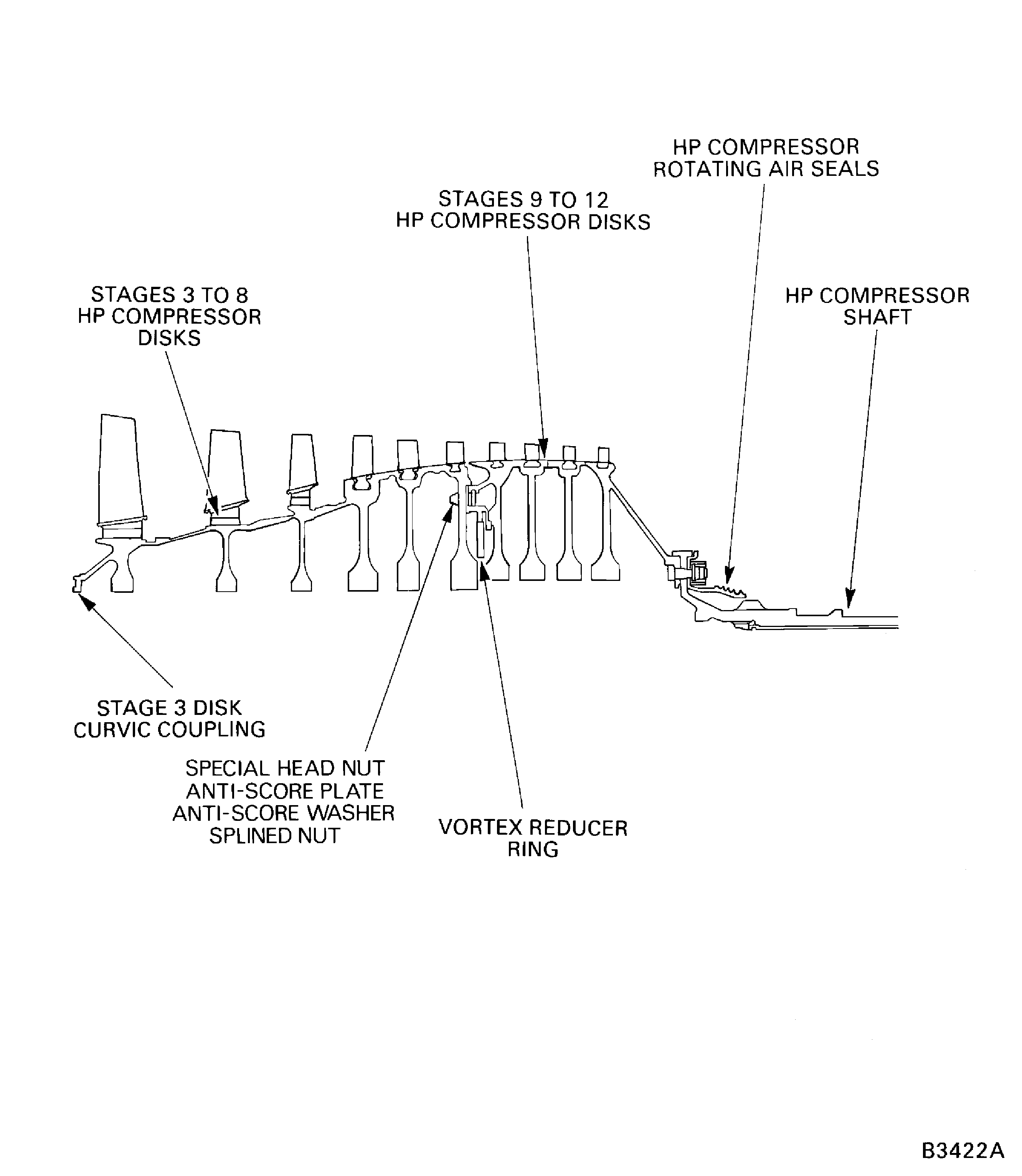
Figure: Measure the stage 6 sealing wires overlap
Measure the stage 6 sealing wires overlap
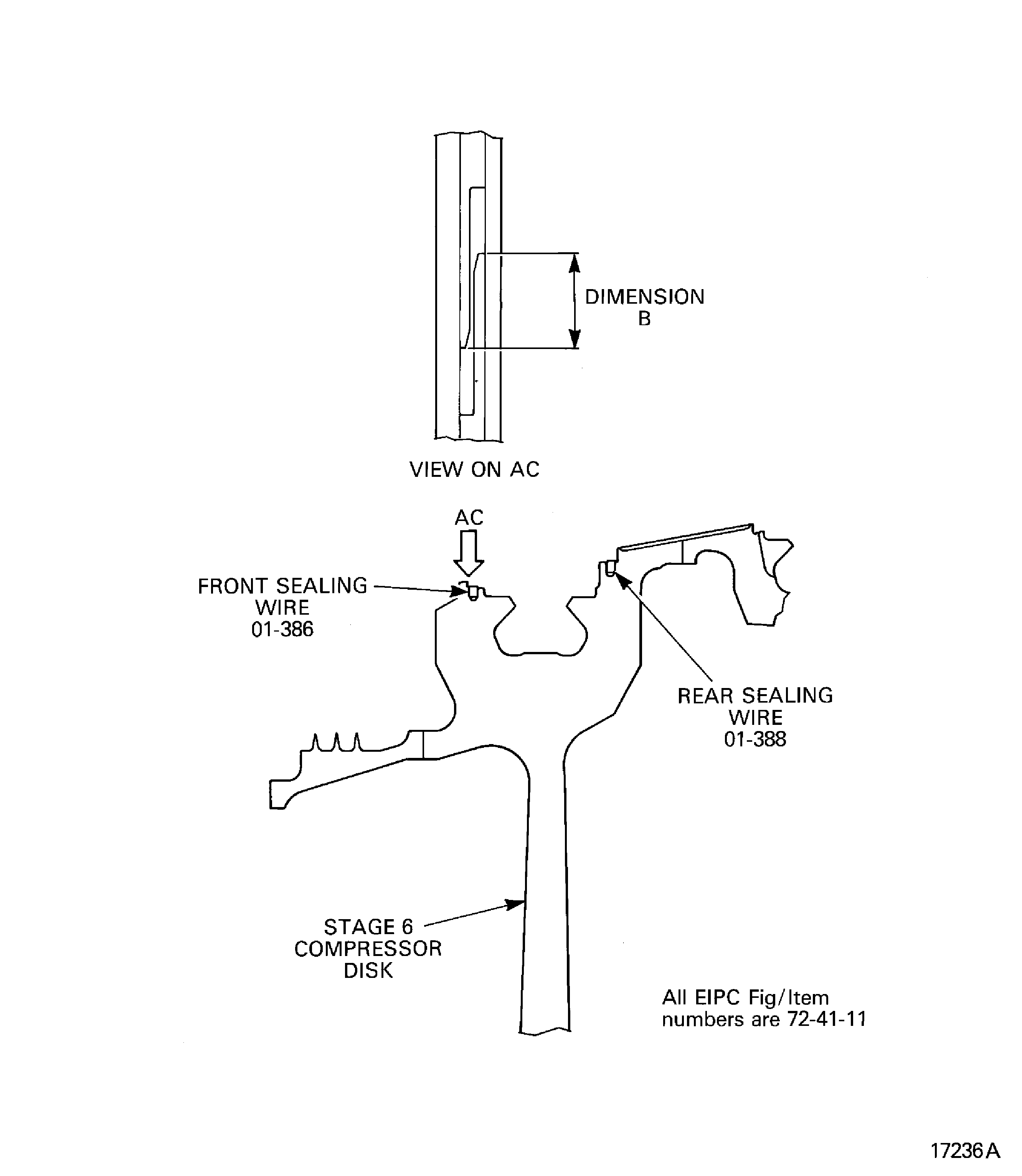
Figure: Measure the stage 7 and 8 sealing wire gaps
Measure the stage 7 and 8 sealing wire gaps
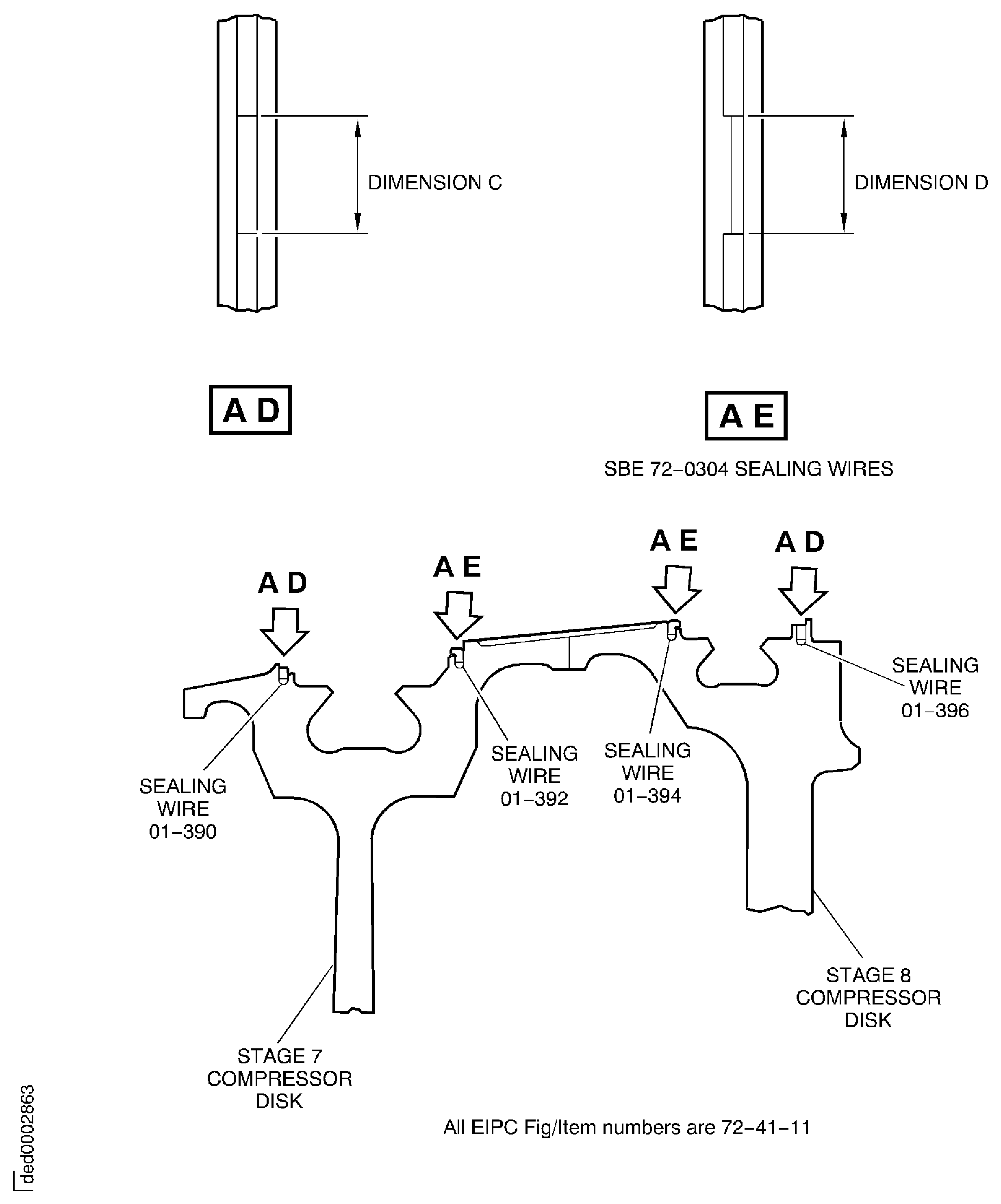
Figure: Install the HP compressor rotor assembly in to the balancing machine
Install the HP compressor rotor assembly in to the balancing machine
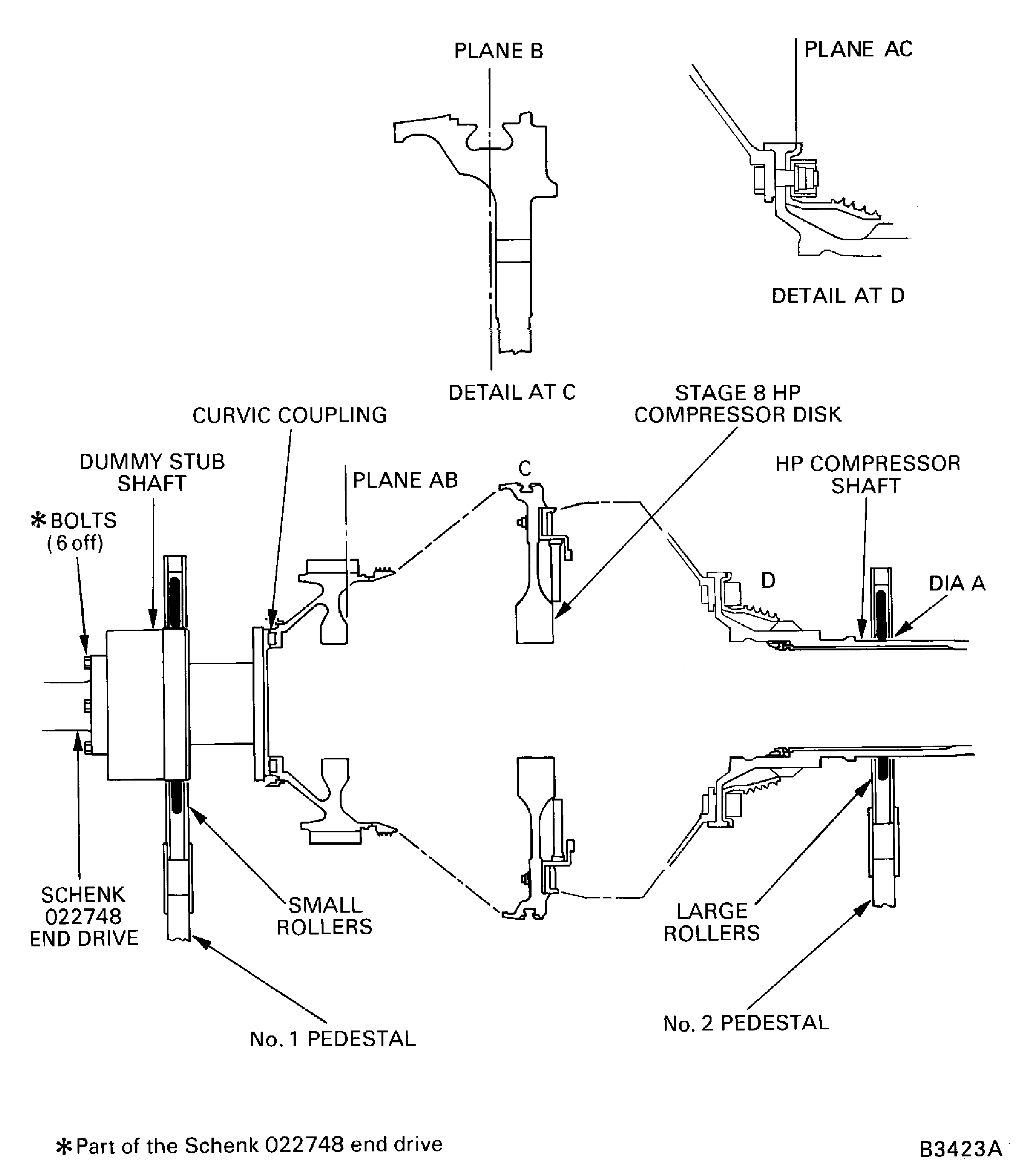
Figure: Install the protective cover
Install the protective cover
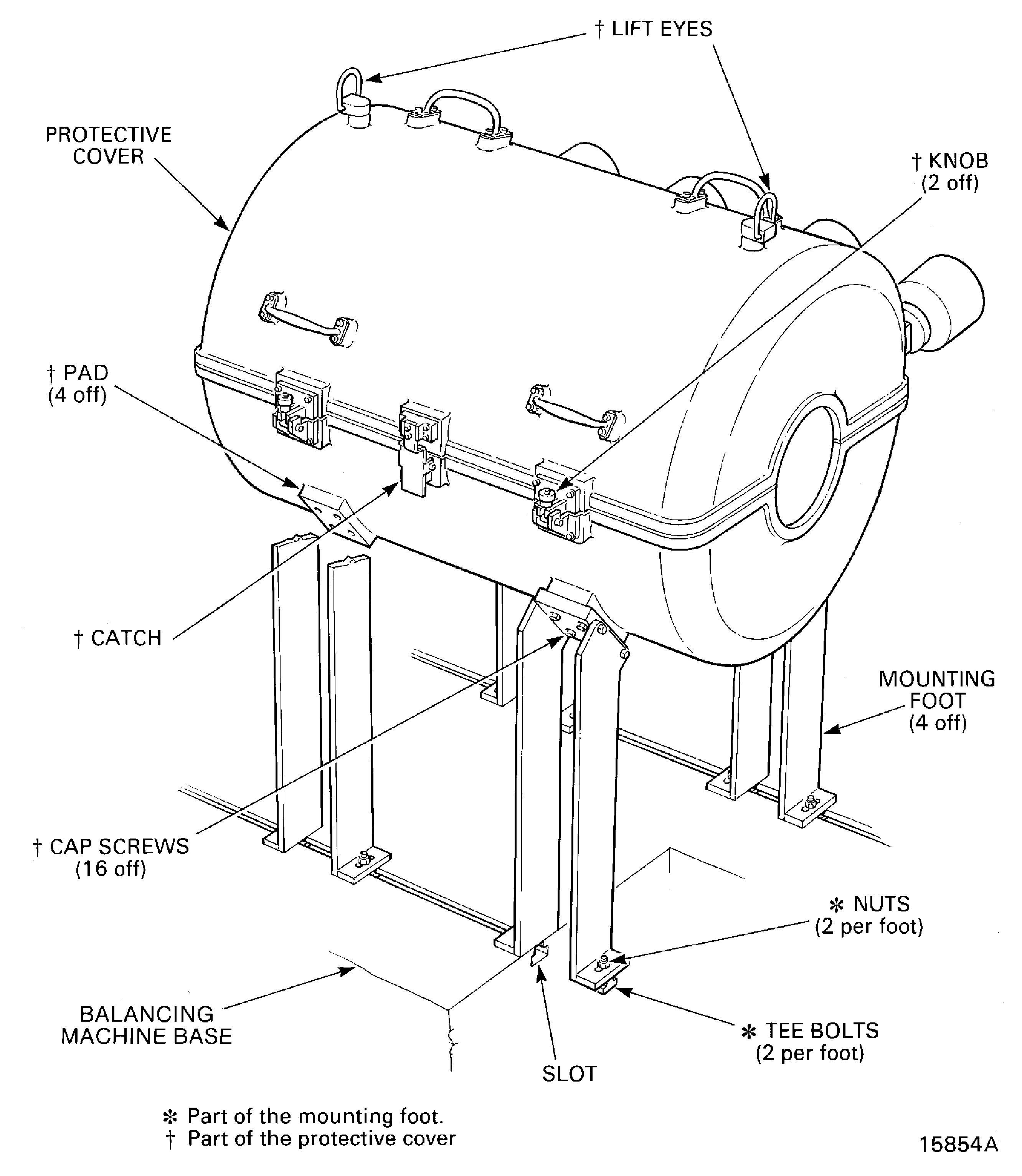
Figure: Remove/Install the HP compressor rotating air seal protective cover
Remove/Install the HP compressor rotating air seal protective cover
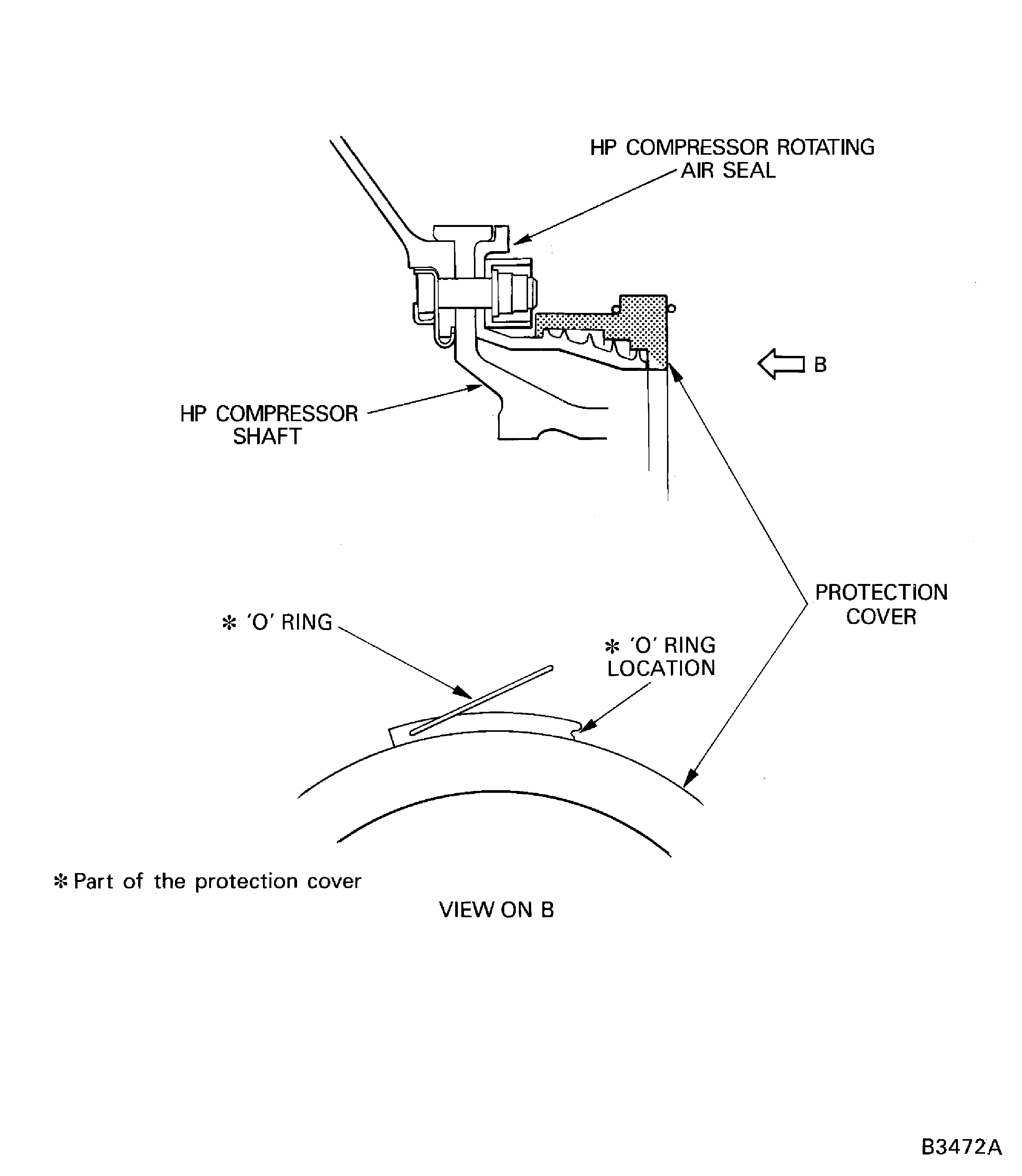
Figure: Install the beam sling on to the HP compressor rotor assembly
Install the beam sling on to the HP compressor rotor assembly
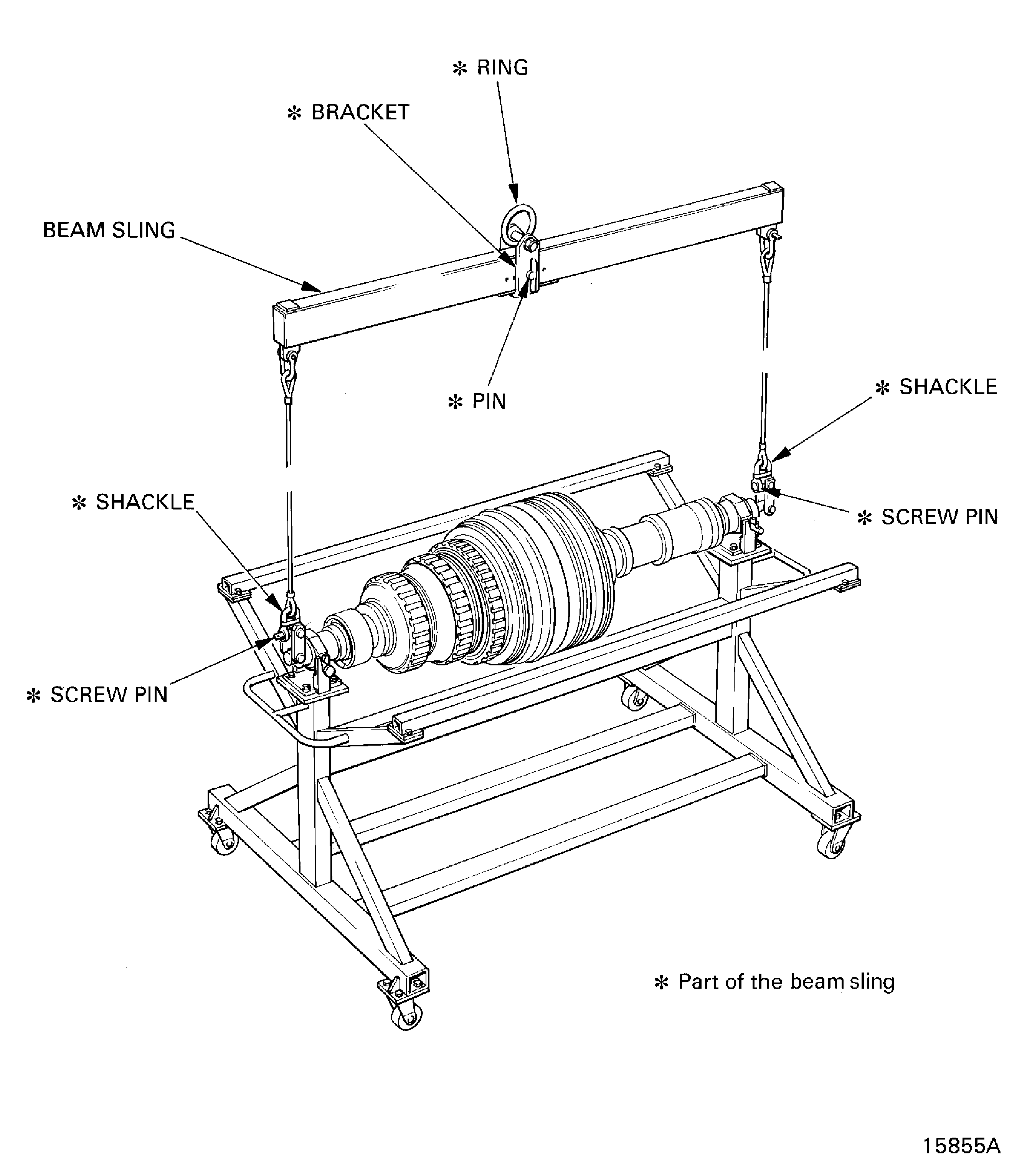
Figure: Remove/Install the universal sling adapters
Remove/Install the universal sling adapters

Figure: Calculate the static unbalance
Calculate the static unbalance
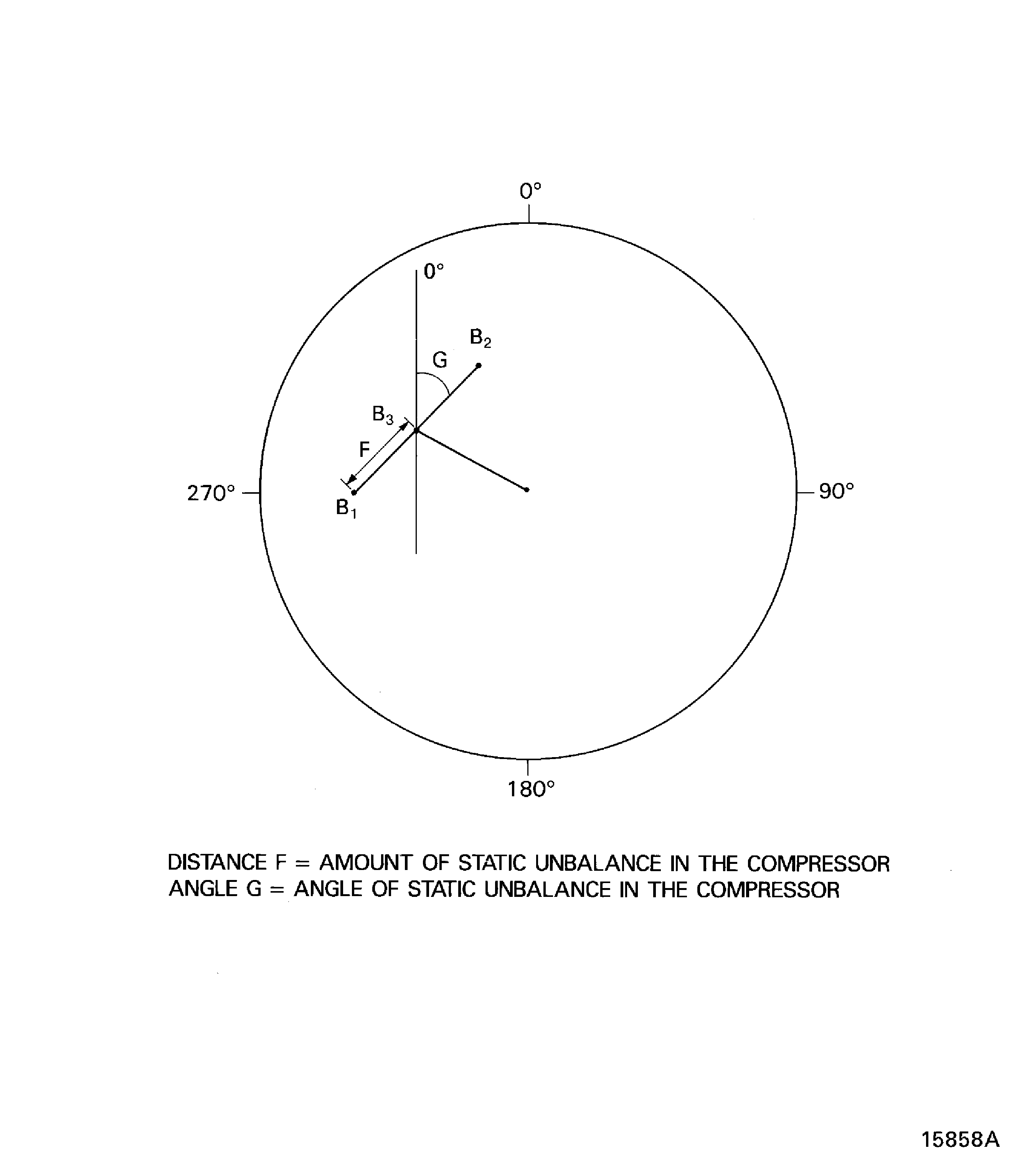
Figure: Install the HP compressor rotor assembly in to the safety support stand
Install the HP compressor rotor assembly in to the safety support stand
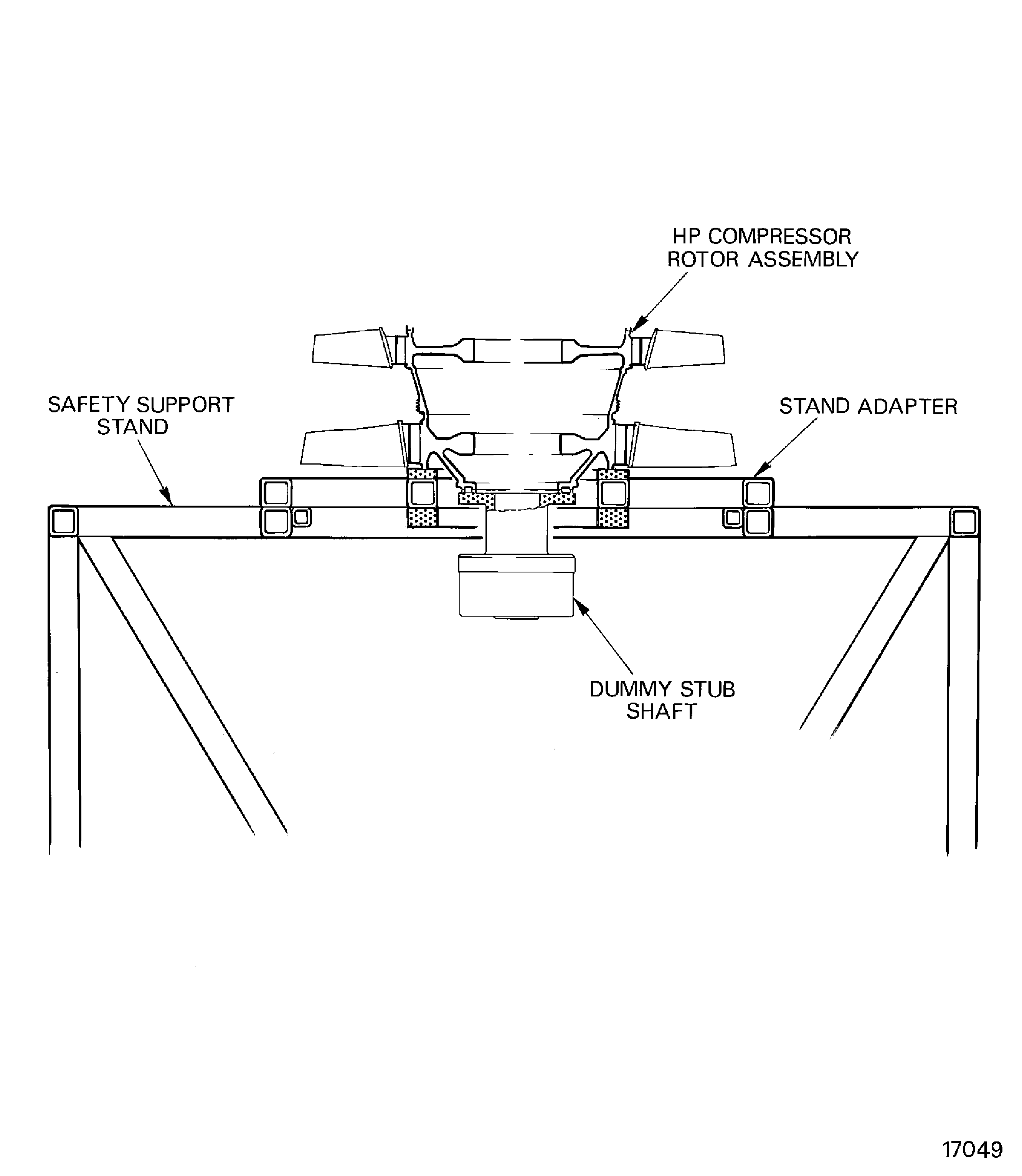
Figure: Remove/Install the dummy stub shaft
Remove/Install the dummy stub shaft
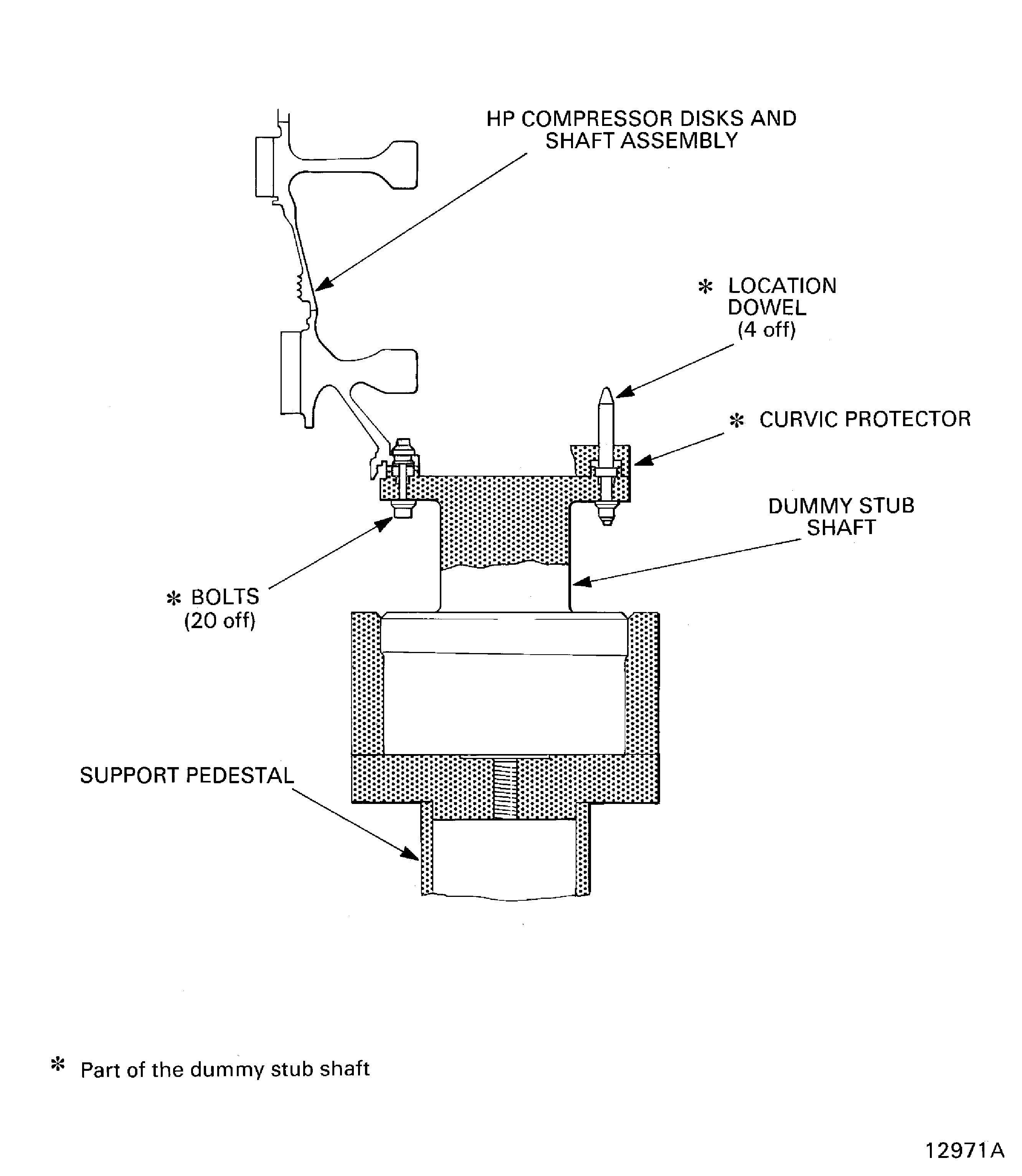
Figure: Stage 3 disk curvic coupling bolt torque sequence
Stage 3 disk curvic coupling bolt torque sequence
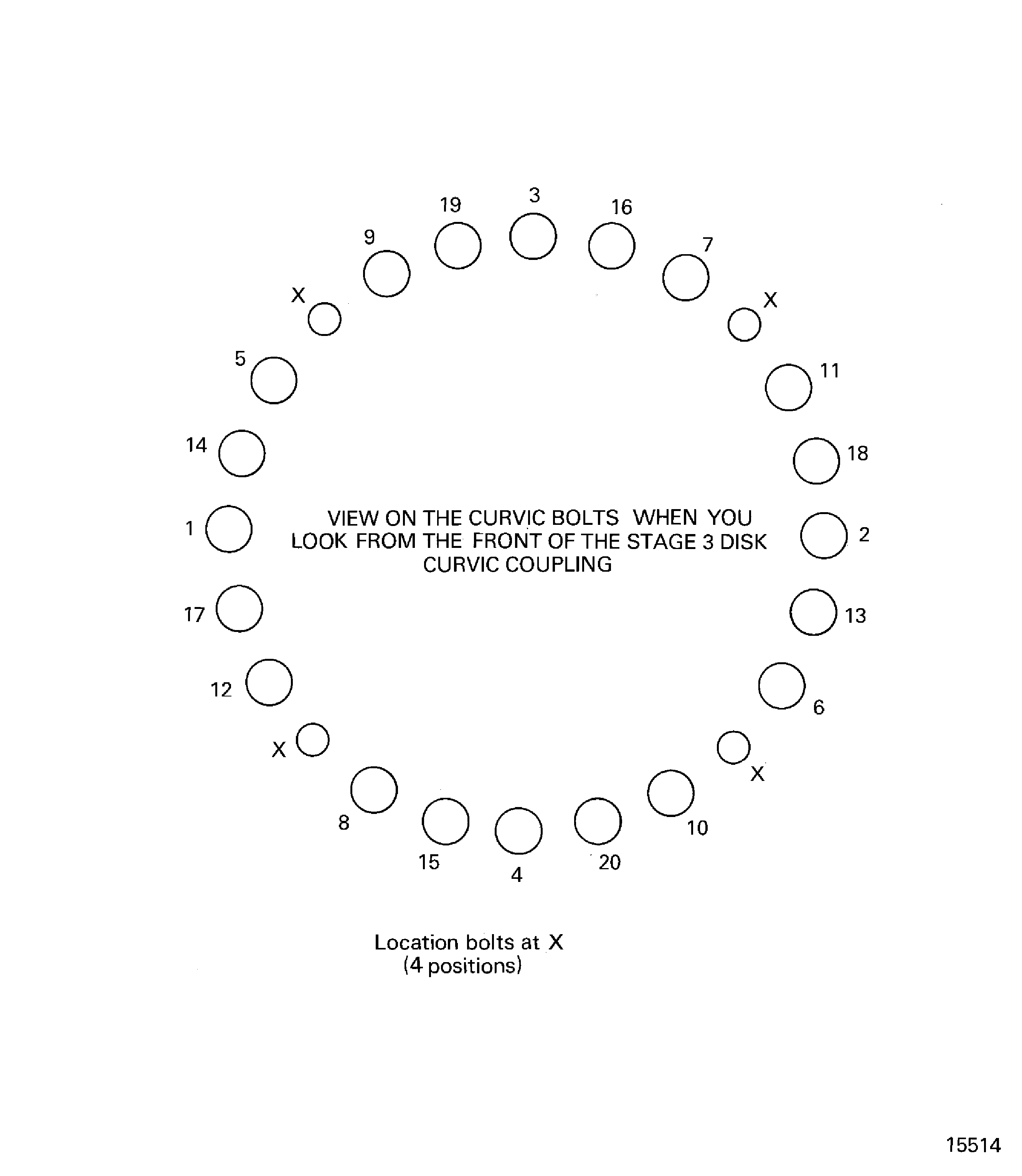
Figure: Remove/Install the HP compressor rotor assembly from/to the trolley
Remove/Install the HP compressor rotor assembly from/to the trolley
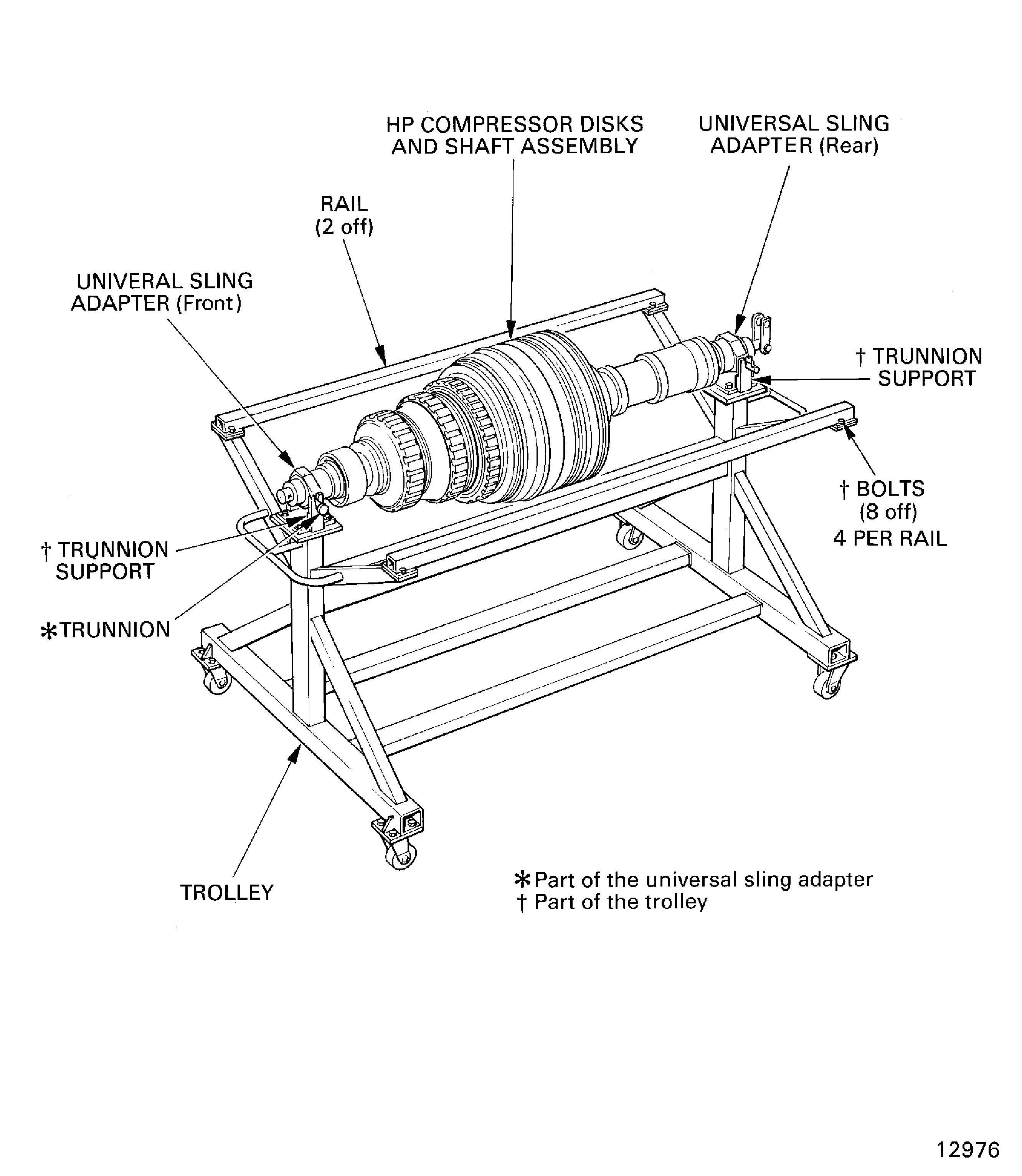
Figure: Example of stages 6 thru 12 blade loading slot and locknut slots
Example of stages 6 thru 12 blade loading slot and locknut slots
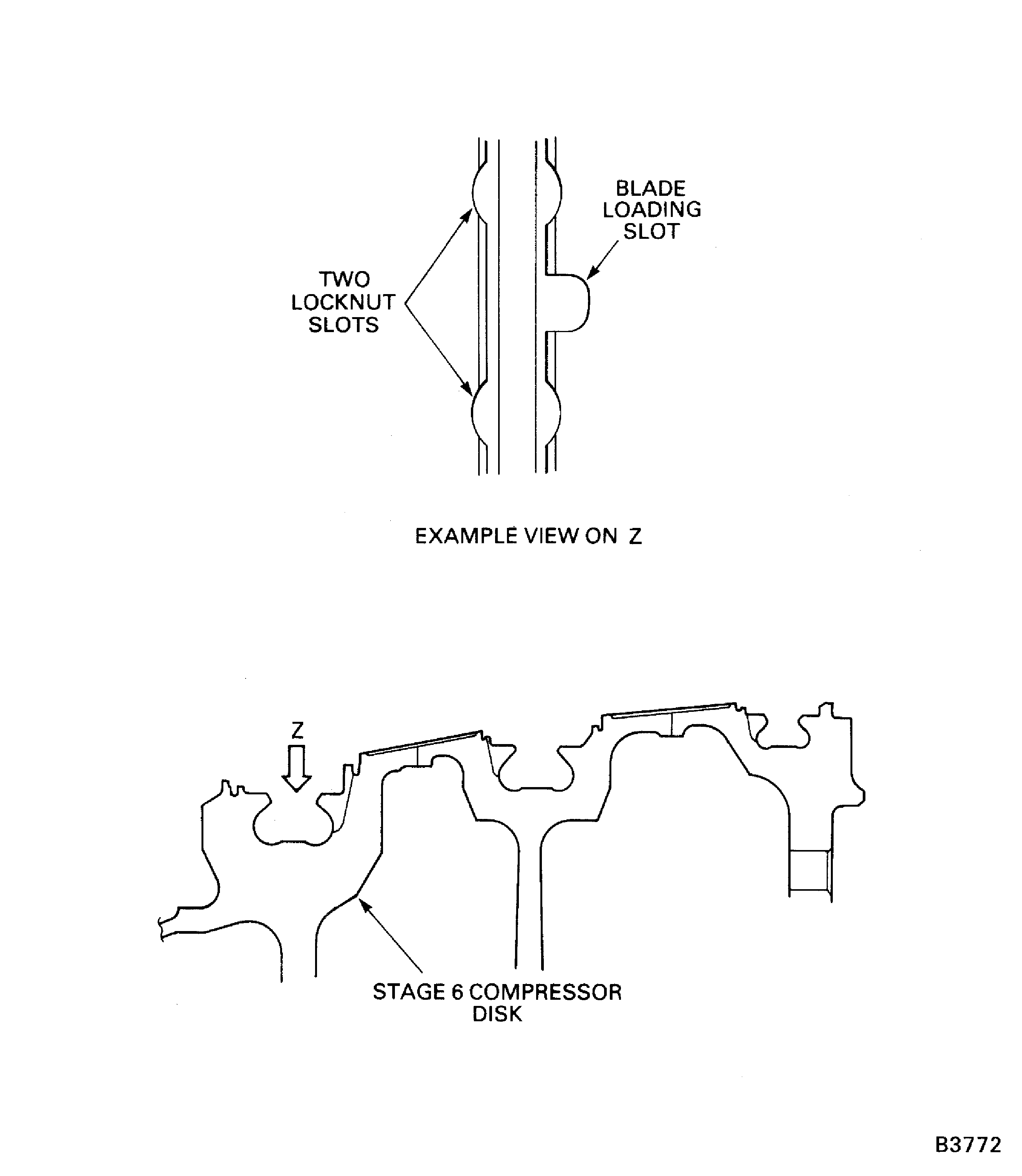
Figure: Measure the Stages 6 thru 12 Platform Build Clearance
Sheet 1
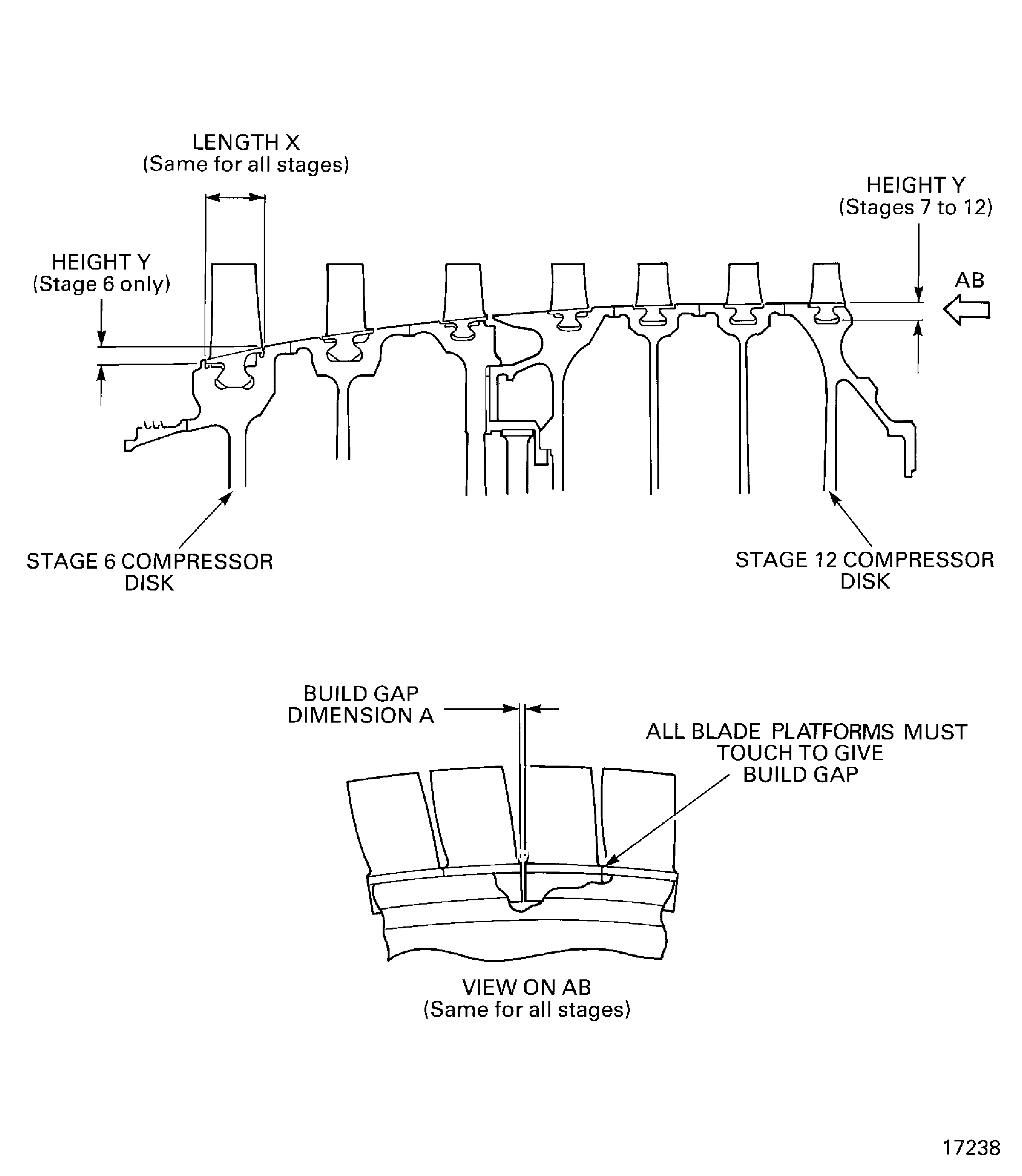
Figure: Measure the Stages 6 thru 12 Platform Build Clearances
Sheet 2
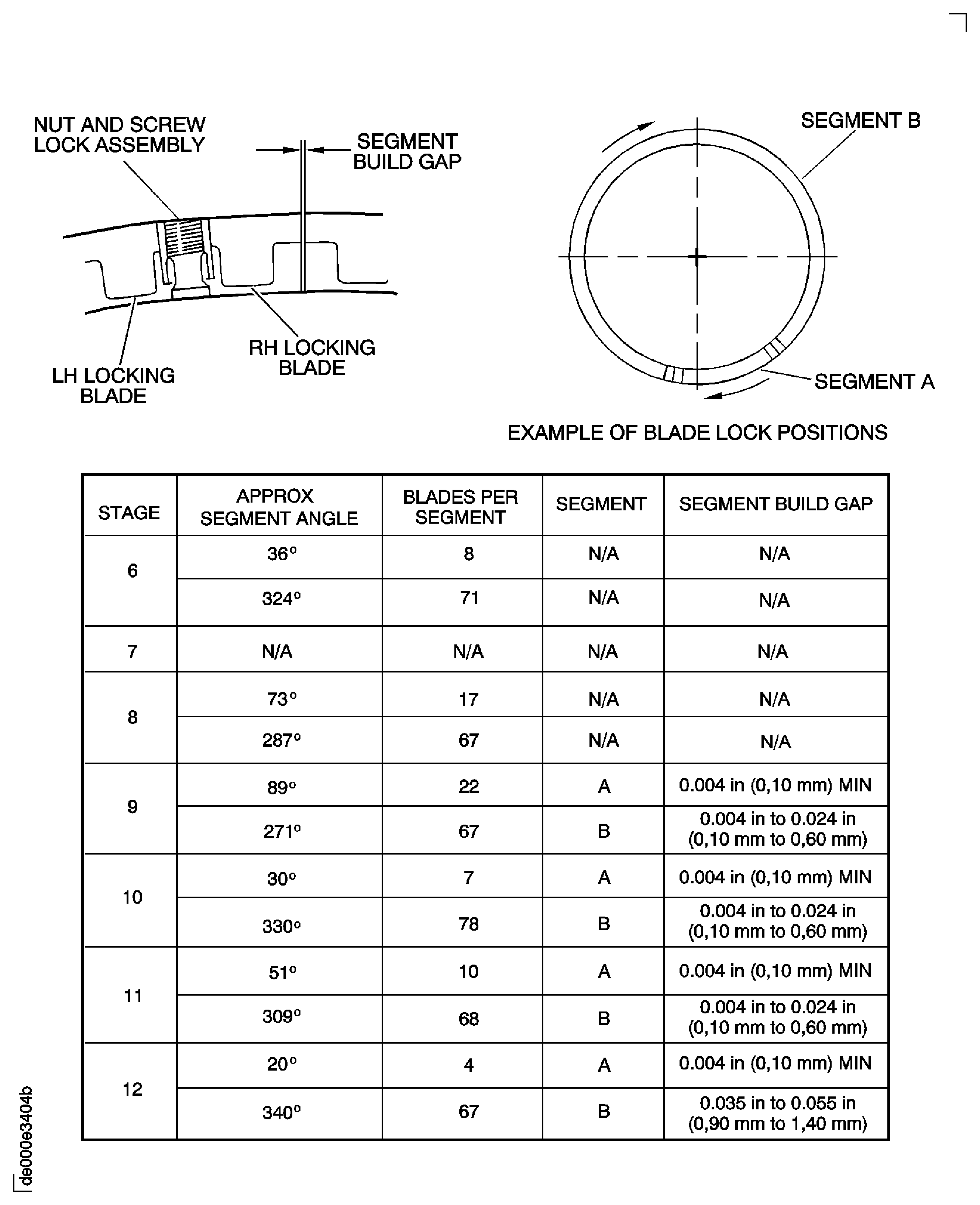
Figure: Example of a light-heavy-light sequence
Example of a light-heavy-light sequence
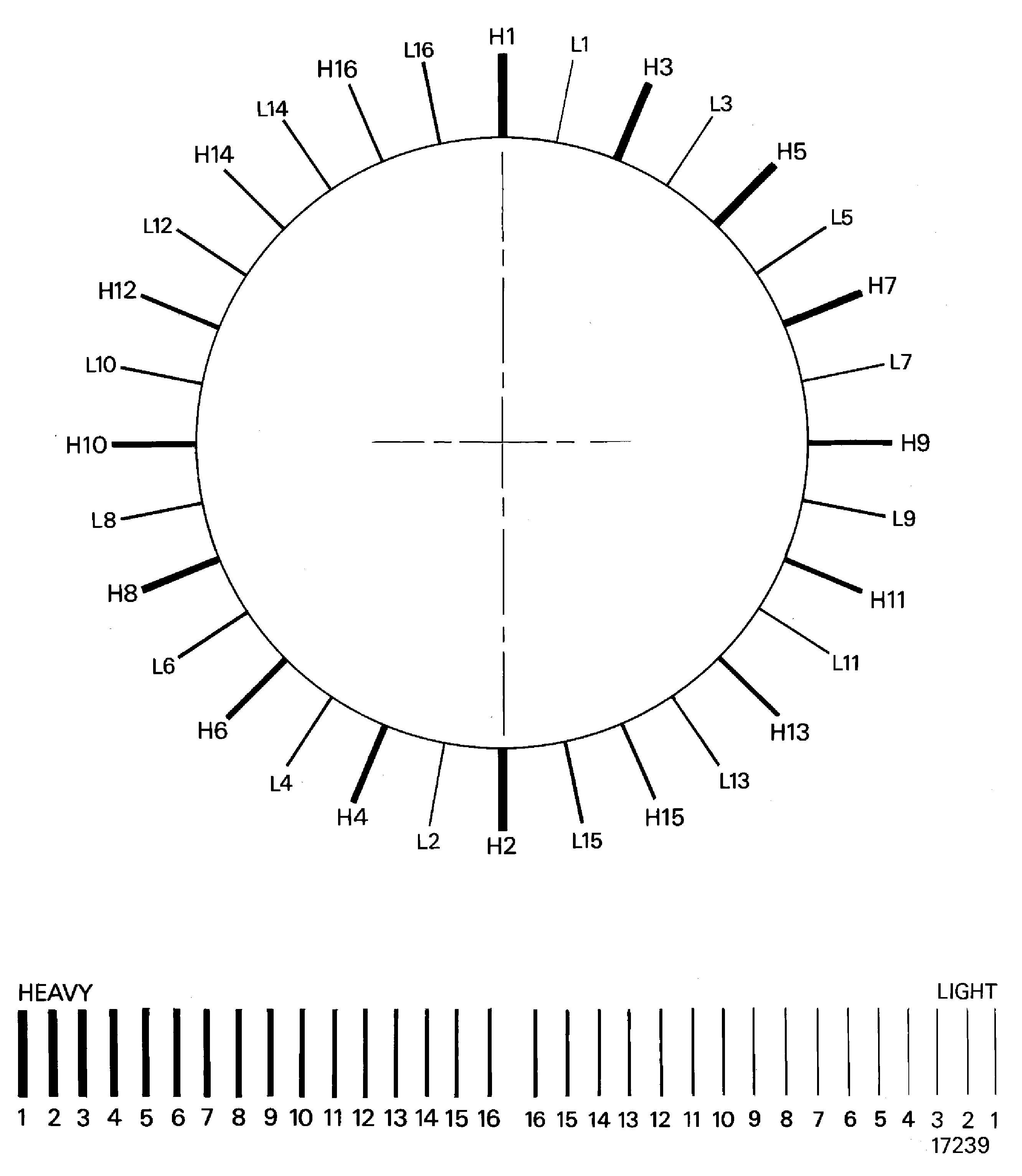
Figure: Install the jacking screw and locknut assemblies in to the stages 6 thru 12 disks
Install the jacking screw and locknut assemblies in to the stages 6 thru 12 disks
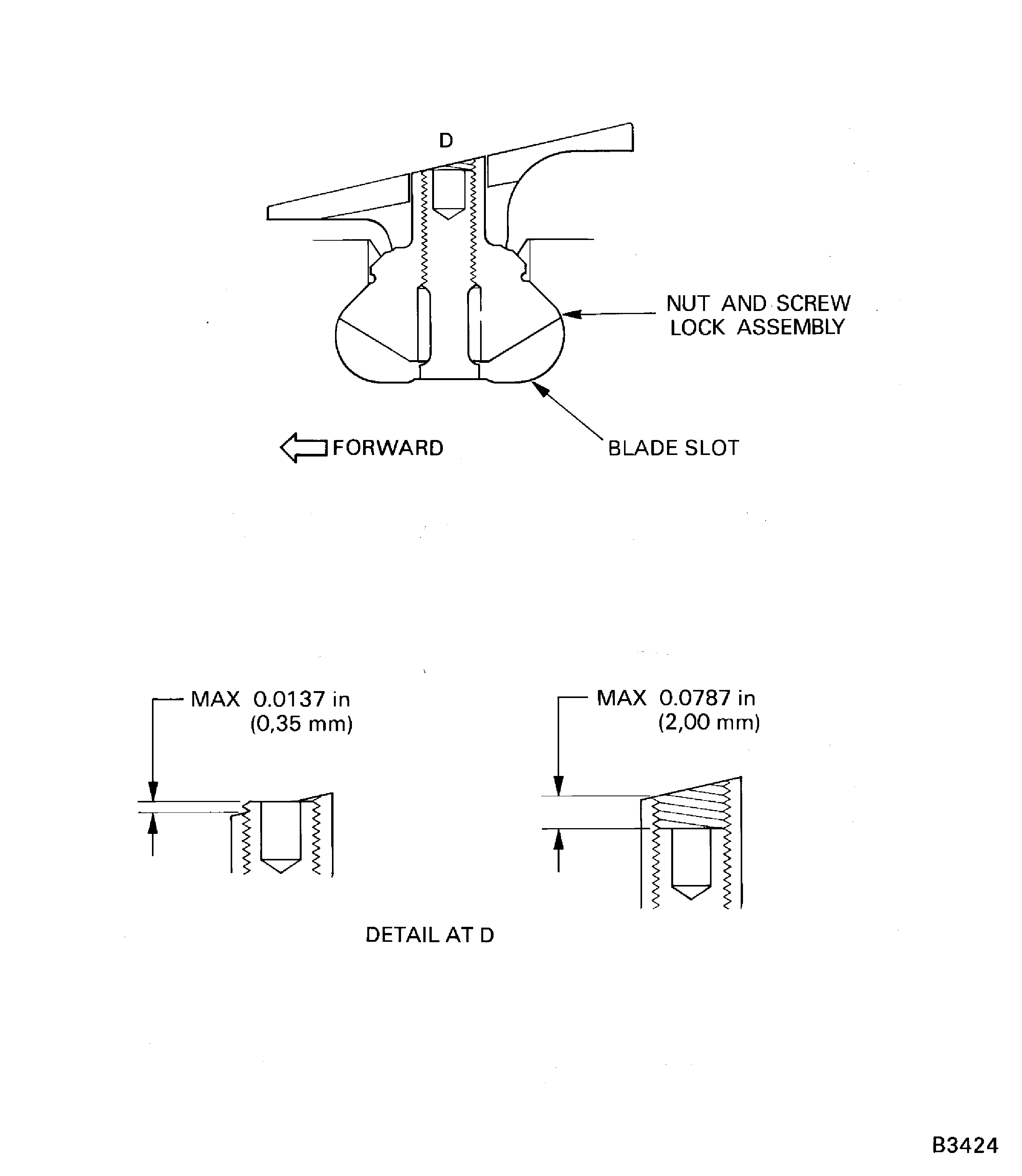
Figure: Install the Stage 3 Retaining Plates and Lockplates
Sheet 1
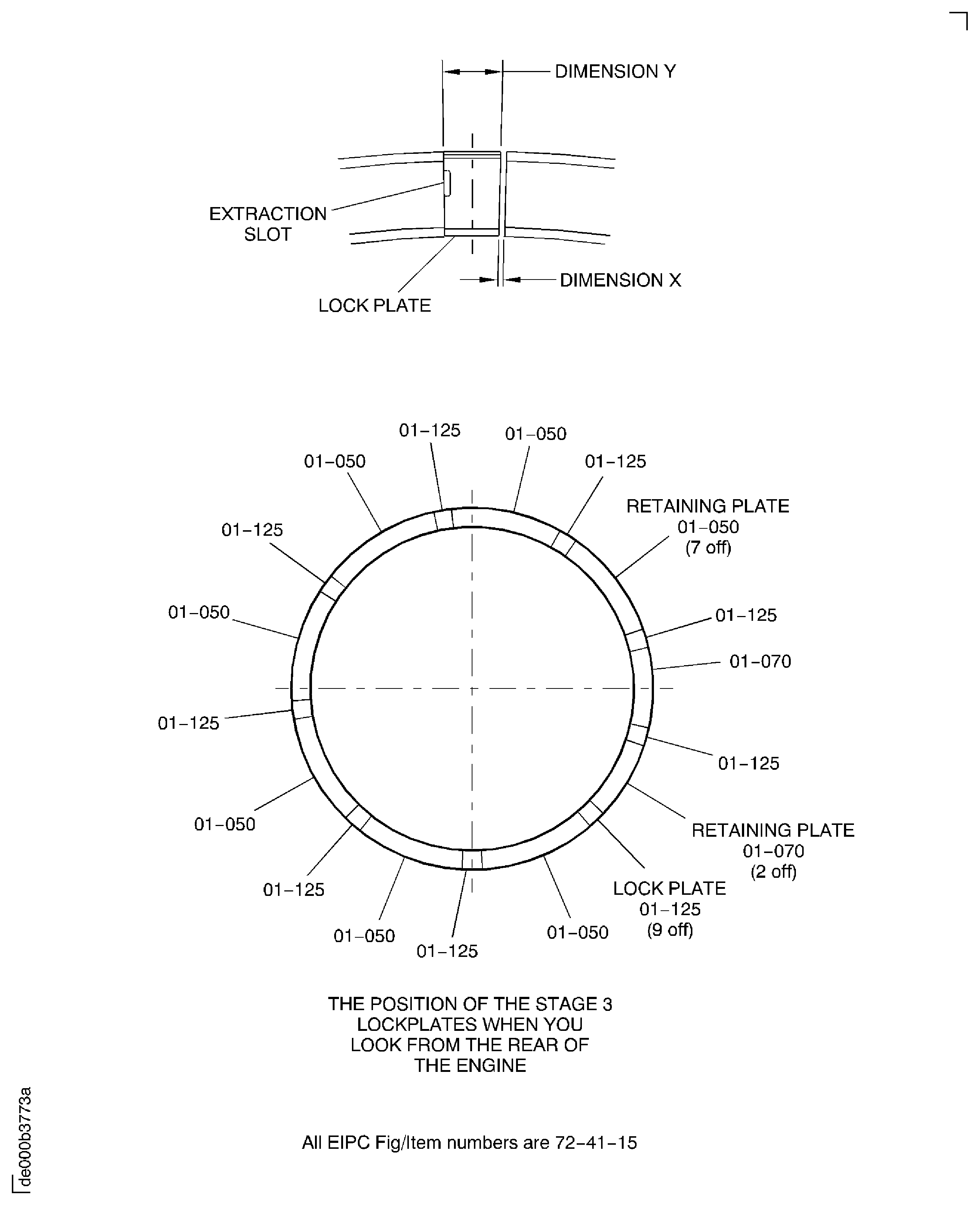
Figure: Install the Stages 4 and 5 Retaining Plates and Lockplates
Sheet 2
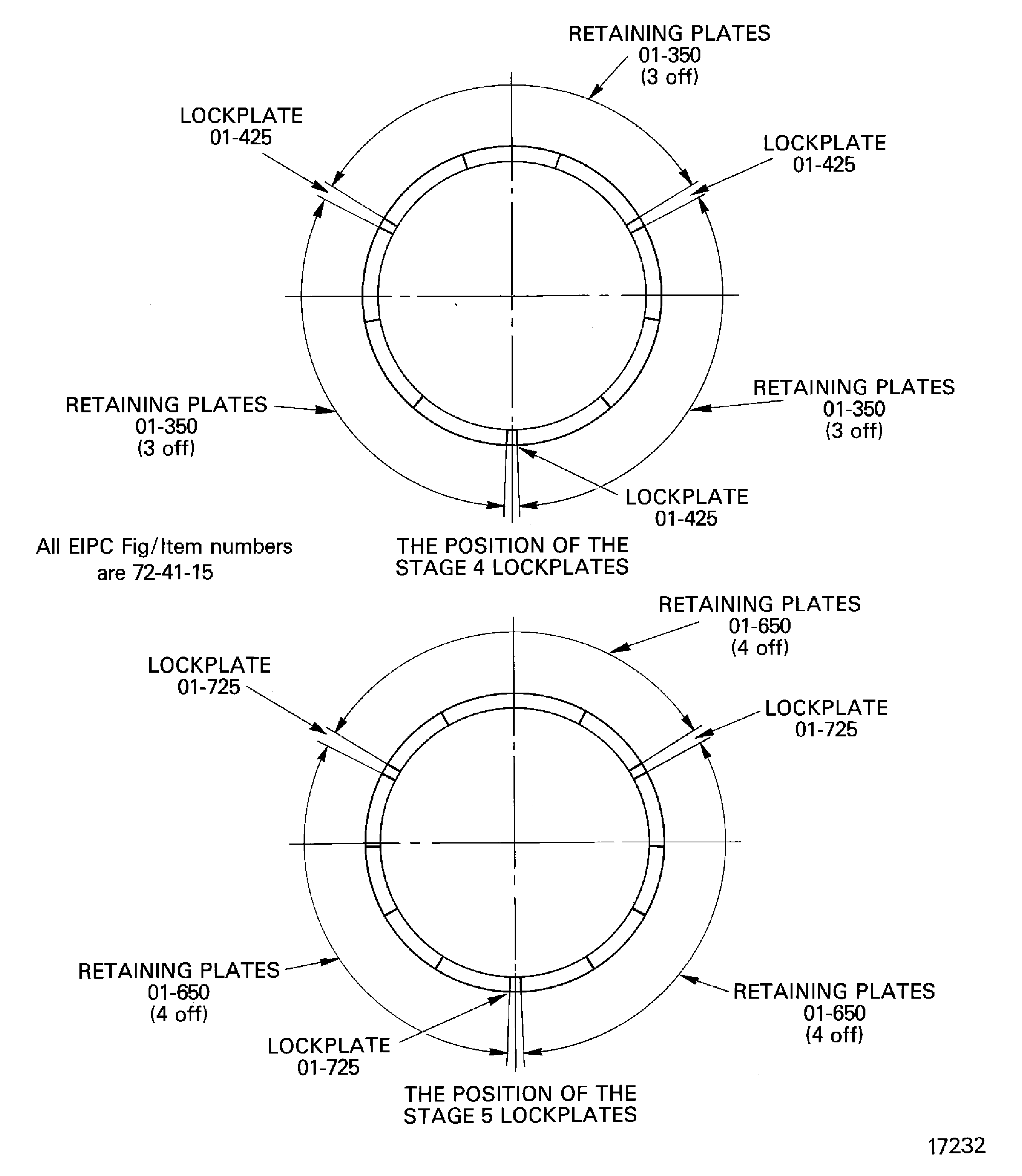
Figure: Lock the lockplates in position
Lock the lockplates in position
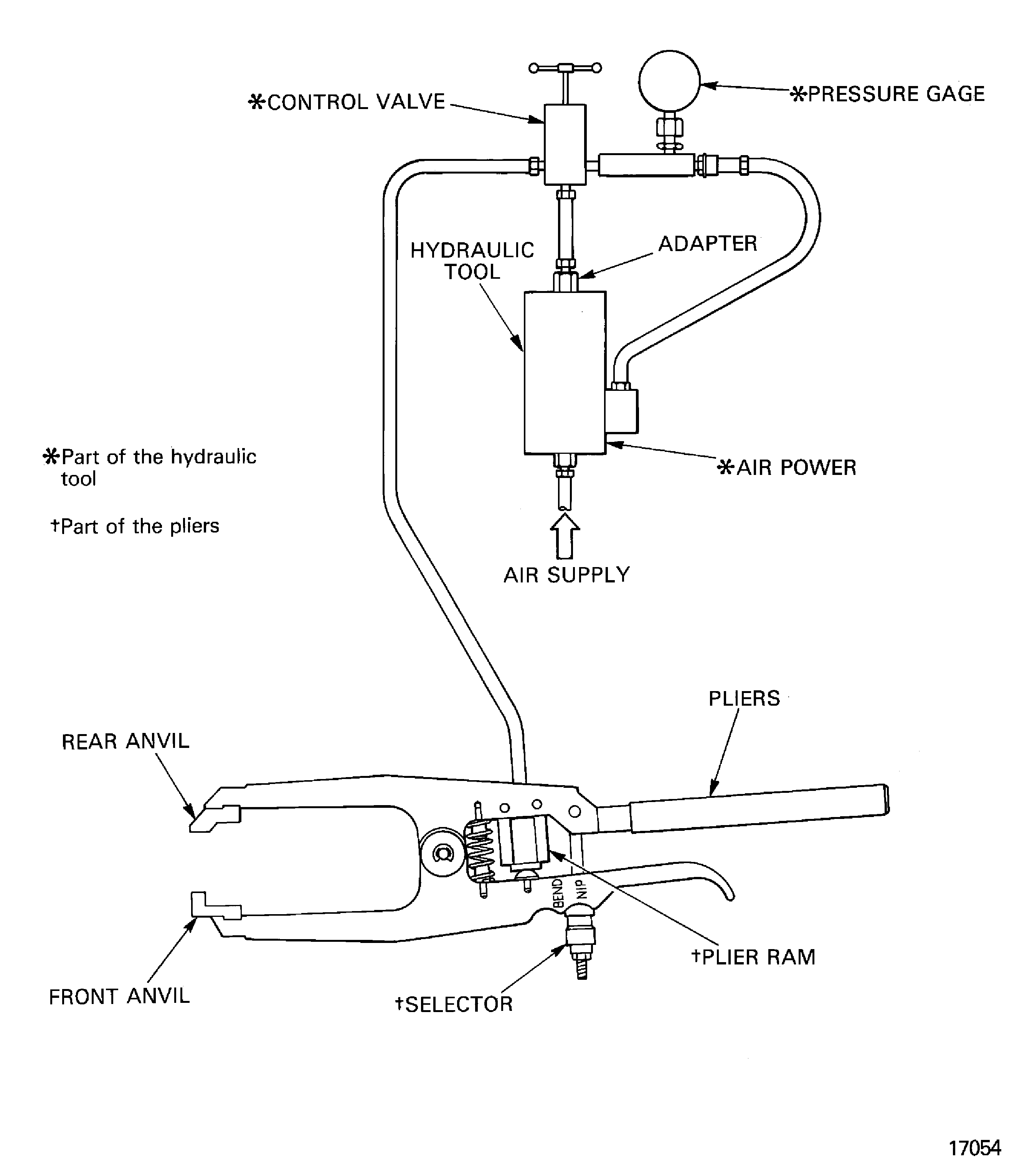
Figure: Examine the clapper abutment faces
Examine the clapper abutment faces