Export Control
EAR Export Classification: Not subject to the EAR per 15 C.F.R. Chapter 1, Part 734.3(b)(3), except for the following Service Bulletins which are currently published as EAR Export Classification 9E991: SBE70-0992, SBE72-0483, SBE72-0580, SBE72-0588, SBE72-0640, SBE73-0209, SBE80-0024 and SBE80-0025.Copyright
© IAE International Aero Engines AG (2001, 2014 - 2021) The information contained in this document is the property of © IAE International Aero Engines AG and may not be copied or used for any purpose other than that for which it is supplied without the express written authority of © IAE International Aero Engines AG. (This does not preclude use by engine and aircraft operators for normal instructional, maintenance or overhaul purposes.).Applicability
All
Common Information
TASK 72-41-20-440-003-C00 HPC Rear Cases And Vanes Assembly - Assemble The HPC Stage 9 Stator Vanes To The Cases, Assembly-003, SBE 72-0627
General
Fig/item numbers in parentheses in the procedure agree with those used in the IPC. Only the primary Fig/item numbers are used. For the Service Bulletin alpha variants refer to the IPC.
For all parts identified in a different Chapter/Section/Subject, the applicable Chapter/Section/Subject comes before the Fig/item number.
For standard torque data and procedures refer to SPM TASK 70-41-00-400-501, SPM TASK 70-41-01-400-501 and SPM TASK 70-41-02-400-501.
Special torque data and assembly tolerances are included in the procedure.
Lubricate all threads and abutment faces of nuts and bolts with CoMat 10-077 APPROVED ENGINE OILS, unless other lubricants are referred to in the procedure.
After assembly apply CoMat 07-038 AIR DRYING ENAMEL to any damaged surface protection, joint flanges and parts used to attach. Use the correct color of the air drying enamel. Refer to SPM TASK 70-63-02-380-501.
The number for each radial location must be identified in a clockwise direction. These start at the engine top position when you look from the rear of the engine, unless stated differently in the procedure.
Refer to Figure for a sectional view of the HP compressor rear cases and vanes.
Make sure all the flange faces and tool faces that touch are very clean.
The Fits and Clearances, NEW PART DIMENSIONS and REJECT IF MORE THAN columns will be used by most operators. This permits the full use of the maximum wear allowance and a reduction in the number of parts which are rejected, is possible.
The column WORN PART DIMENSIONS (Non-select) is included for operators who want to have full interchangeability. If this column is used an increase in the number of parts which are rejected is possible.
After the part has been in service for some time the REJECT IF MORE THAN and WORN PART DIMENSIONS could be changed. The operator must tell IAE and if agreed the manual will be changed.
The abbreviation lntf shows an interference or tight fit. This causes REJECT IF MORE THAN to become REJECT IF LESS THAN.
The abbreviation clear shows a clearance fit.
This TASK gives the procedures to assemble the HP Compressor Stage 9 Cases, vanes, liners and stator vane stops. The subsequent TASKS give the procedures to assemble the remaining HP compressor rear cases and vanes.
Assemble the HP Compressor Stage 7 Cases and Stator Vanes by TASK 72-41-20-440-001-C00 (ASSEMBLY-001).
Assemble the HP Compressor Stage 8 Stator Vanes by TASK 72-41-20-440-002-C00 (ASSEMBLY-002).
Assemble the HP Compressor Stage 10 Stator Vanes by TASK 72-41-20-440-004-C00 (ASSEMBLY-004).
Assemble the HP Compressor Stage 11 Stator Vanes by TASK 72-41-20-440-005-C00 (ASSEMBLY-005).
Machine the Stator Vane Tips and the Rotor Path Ring Liners by TASK 72-41-20-440-006-C00 (ASSEMBLY-006).
Disassemble the HP Compressor Rear Cases and Vanes by TASK 72-41-20-440-007-C00 (ASSEMBLY-007).
NOTE
NOTE
Preliminary Requirements
Pre-Conditions
NONESupport Equipment
| Name | Manufacturer | Part Number / Identification | Quantity | Remark |
|---|---|---|---|---|
| Heating blanket | LOCAL | |||
| IAE 1R18213 Alignment checking pin | 0AM53 | IAE 1R18213 | 1 | |
| IAE 1R18501 Stop alignment tool | 0AM53 | IAE 1R18501 | 1 | |
| IAE 1R18827 Extractor | 0AM53 | IAE 1R18827 | 1 | |
| IAE 1R19685 Assembly tool | 0AM53 | IAE 1R19685 | 1 | |
| IAE 1R19689 Assembly tool | 0AM53 | IAE 1R19689 | 1 | |
| IAE 1R19690 Assembly tool | 0AM53 | IAE 1R19690 | 1 | |
| IAE 1R19691 Assembly tool | 0AM53 | IAE 1R19691 | 1 |
Consumables, Materials and Expendables
| Name | Manufacturer | Part Number / Identification | Quantity | Remark |
|---|---|---|---|---|
| CoMat 07-038 AIR DRYING ENAMEL | k3504 | CoMat 07-038 | ||
| CoMat 10-077 APPROVED ENGINE OILS | X333X | CoMat 10-077 |
Spares
NONESafety Requirements
NONEProcedure
Refer to Figure.
Reference dimensions at Location 1177. If required use the data written as a Note in TASK 72-41-21-200-000.
Table 1. Fits and Clearances (all dimensions are in inches) NEW PART
WORN PART
DIMENSIONS
DIMENSIONS
PART IDENT
Size
Clearance
(Non-select)
REJECT IF
MORE THAN
LOCATION 1177
Stage 10 Rotor Path Case Assembly HPC Ring Cases And Related Parts HPC Ring Cases And Related Parts (72-41-21, 03-800)
Location With The Stage 9 Rotor Path Case Assembly HPC Ring Cases And Related Parts HPC Ring Cases And Related Parts (72-41-21, 03-650)
Stage 10 Rotor Path Case Assembly Front Inner Bore
21.3437
lntf
21.3484
0.0020
Stage 9 Rotor Path Case Assembly Rear Flange Outer Diameter
21.3504
0.0114
21.3551
lntf
Table 2. Fits and Clearances (all dimensions are in millimeters) NEW PART
WORN PART
DIMENSIONS
DIMENSIONS
PART IDENT
Size
Clearance
(Non-select)
REJECT IF
MORE THAN
LOCATION 1177
Stage 10 Rotor Path Case Assembly HPC Ring Cases And Related Parts HPC Ring Cases And Related Parts (72-41-21, 03-800)
Location With The Stage 9 Rotor Path Case Assembly HPC Ring Cases And Related Parts HPC Ring Cases And Related Parts (72-41-21, 03-650)
Stage 10 Rotor Path Case Assembly Front Inner Bore
542.13
lntf
542.25
0.050
Stage 9 Rotor Path Case Assembly Rear Flange Outer Diameter
542.30
0.290
542.42
lntf
SUBTASK 72-41-20-220-223-001 Reference Fits and Clearances of the HP Compressor Rear Cases and Vanes at Location 1177
Refer to Figure.
Reference dimensions at Location 1193. If required use the data written as a Note in TASK 72-41-21-200-000.
Table 3. Fits and Clearances (all dimensions are in inches) NEW PART
WORN PART
DIMENSIONS
DIMENSIONS
PART IDENT
Size
Clearance
(Non-select)
REJECT IF
MORE THAN
LOCATION 1193
Stage 10 Rotor Path Case Assembly HPC Ring Cases And Related Parts HPC Ring Cases And Related Parts (72-41-21, 03-800)
Location With The Stage 9 Rotor Path Case Assembly Location Pin HPC Ring Cases And Related Parts HPC Ring Cases And Related Parts (72-41-21, 03-677)
Stage 10 Rotor Path Case Assembly Location Hole Bore
0.1638
Clear
0.1709
0.0054
Stage 9 Rotor Path Case Assembly Location Pin Outer Diameter
0.1580
0.0130
0.1584
Clear
Table 4. Fits and Clearances (all dimensions are in inches) NEW PART
WORN PART
DIMENSIONS
DIMENSIONS
PART IDENT
Size
Clearance
(Non-select)
REJECT IF
MORE THAN
LOCATION 1193
Stage 10 Rotor Path Case Assembly HPC Ring Cases And Related Parts HPC Ring Cases And Related Parts (72-41-21, 03-800)
Location With The Stage 9 Rotor Path Case Assembly Location Pin HPC Ring Cases And Related Parts HPC Ring Cases And Related Parts (72-41-21, 03-677)
Stage 10 Rotor Path Case Assembly Location Hole Bore
4.160
Clear
4.340
0.136
Stage 9 Rotor Path Case Assembly Location Pin Outer Diameter
4.012
0.328
4.024
Clear
SUBTASK 72-41-20-220-223-002 Reference Fits and Clearances of the HP Compressor Rear Cases and Vanes at Location 1193
Refer to Figure.
Put the Stage 9 rotor path case front flange down on to a clean work surface.
Use IAE 1R19689 Assembly tool 1 off to install the Stage 9 front liner. Make sure the liner touches the Stage 9 rotor path case rear face.
Measure and write down a record of the Stage 9 front liner split line clearance. The split line clearance must be 0.169 in. to 0.201 in. (4.30 mm to 5.10 mm).
Install the new HPC Ring Cases and Related Parts HPC Ring Cases And Related Parts (72-41-21, 03-740) Stage 9 front liner 1 off, in to the slot in the rear of the Stage 9 rotor path case.
Put the Stage 10 rotor path case rear flange down on a clean work surface.
Use IAE 1R19685 Assembly tool 1 off to install the Stage 9 rear liner. Make sure the liner touches the Stage 10 rotor path case front face at Location A. Refer to Figure.
Measure and write down a record of the Stage 9 rear liner split line clearance. The split line clearance must be 0.047 in. to 0.079 in. (1.20 mm to 2.00 mm).
Install the new HPC Ring Cases And Related Parts HPC Ring Cases And Related Parts (72-41-21, 04-280) Stage 9 rear liner 1 off in to the slot in the front of the HPC Ring Cases And Related Parts HPC Ring Cases And Related Parts (72-41-21, 03-800).
SUBTASK 72-41-20-440-278-001 Install the Liners in the Stage 10 Rotor Path Cases
Refer to Figure.
Use the IAE 1R18501 Stop alignment tool 1 off and align the Stage 9 stator vane stop in the Stage 10 Rotor Path Case Assembly.
Install a washer HPC Ring Cases And Related Parts HPC Ring Cases And Related Parts (72-41-21, 03-789) and a nut HPC Ring Cases And Related Parts HPC Ring Cases And Related Parts (72-41-21, 03-788) on to the Stage 9 stator vane stop.
Torque the nut to 85 lbfin to 105 lbfin (10.00 Nm to 12.00 Nm).
Install the Stage 9 stator vane stops HPC Ring Cases And Related Parts HPC Ring Cases And Related Parts (72-41-21, 03-790) in the Stage 10 Rotor Path Case Assembly HPC Ring Cases And Related Parts HPC Ring Cases And Related Parts (72-41-21, 03-800).
SUBTASK 72-41-20-440-278-002 Install the Stator Vane Stops in the Stage 10 Rotor Path Case Assembly
Refer to Figure.
Install the eight Stage 9 stop vanes in to the Stage 10 Rotor Path Case Assembly, at the Stage 9 stator vane stops HPC Ring Cases And Related Parts HPC Ring Cases And Related Parts (72-41-21, 03-790). Engage the vanes in the Stage 10 Rotor Path Case Assembly. Install two Stage 9 stop vanes at each of the stage stator vane stops.
Push each of the Stage 9 stop vanes forward until the vane platform touches the Stage 9 rear liner HPC Ring Cases And Related Parts HPC Ring Cases And Related Parts (72-41-21, 03-800).
Install the Stage 9 stop vanes HPC Stator Vanes HPC Stator Vanes (72-41-22, 04-350).
Install the vanes in a clockwise direction. Engage each of the vanes in the Stage 10 Rotor Path Case Assembly. Make sure the platform of the first vane that is installed touches the platform of the Stage 9 stop vane. Push each subsequent vane clockwise as it is installed until the vane platforms touch.
Push each vane forward until the vane platform touches the Stage 9 rear liner.
Install five Stage 9 stator vanes HPC Stator Vanes HPC Stator Vanes (72-41-22, 04-400).
Install one Stage 9 undersize stator vane HPC Stator Vanes HPC Stator Vanes (72-41-22, 04-450).
Install five Stage 9 stator vanes HPC Stator Vanes HPC Stator Vanes (72-41-22, 04-400).
Install one Stage 9 stator vane HPC Stator Vanes HPC Stator Vanes (72-41-22, 04-448).
Install one Stage 9 undersize stator vane HPC Stator Vanes HPC Stator Vanes (72-41-22, 04-450).
Install five Stage 9 stator vanes HPC Stator Vanes HPC Stator Vanes (72-41-22, 04-400).
Install one Stage 9 stator vane HPC Stator Vanes HPC Stator Vanes (72-41-22, 04-448).
Install one Stage 9 undersize stator Vane HPC Stator Vanes HPC Stator Vanes (72-41-22, 04-450).
Install four Stage 9 stator vanes HPC Stator Vanes HPC Stator Vanes (72-41-22, 04-400).
Install the Stage 9 stator vanes between the two Stage 9 stop vanes adjacent to the 12 o'clock and 3 o'clock positions. Use the subsequent sequence.
Install two Stage 9 stator vanes HPC Stator Vanes HPC Stator Vanes (72-41-22, 04-400).
Install the Stage 9 LH intrascope vane HPC Stator Vanes HPC Stator Vanes (72-41-22, 04-200).
NOTE
Make sure the borescope access hole in the Stage 9 case and intrascope vanes hole are aligned.Install the Stage 9 RH intrascope vane HPC Stator Vanes HPC Stator Vanes (72-41-22, 04-250).
Install four Stage 9 stator vanes HPC Stator Vanes HPC Stator Vanes (72-41-22, 04-400).
Install one Stage 9 undersize stator vane HPC Stator Vanes HPC Stator Vanes (72-41-22, 04-450).
Install four Stage 9 stator vanes HPC Stator Vanes HPC Stator Vanes (72-41-22, 04-400).
Install one Stage 9 stator vane HPC Stator Vanes HPC Stator Vanes (72-41-22, 04-448).
Install one Stage 9 undersize stator vane HPC Stator Vanes HPC Stator Vanes (72-41-22, 04-450).
Install four Stage 9 stator vanes HPC Stator Vanes HPC Stator Vanes (72-41-22, 04-400).
Install one Stage 9 stator vanes HPC Stator Vanes HPC Stator Vanes (72-41-22, 04-448).
Install one Stage 9 undersize stator vane HPC Stator Vanes HPC Stator Vanes (72-41-22, 04-450).
Install three Stage 9 stator vanes HPC Stator Vanes HPC Stator Vanes (72-41-22, 04-400).
Install the Stage 9 stator vanes between the two Stage 9 stop vanes adjacent to the 3 o'clock and 6 o'clock positions. Use the subsequent sequence.
lnstall IAE 1R18213 Alignment checking pin 1 off through the Stage 10 case borescope access hole. Make sure the checking pin easily goes in to the intrascope vanes holes.
Install the Stage 9 stator vanes.
SUBTASK 72-41-20-440-278-003 Install the Stage 9 Stator Vanes
Put the Stage 10 Rotor Path Case Assembly HPC Ring Cases And Related Parts HPC Ring Cases And Related Parts (72-41-21, 03-800) front flange down on to a clean work bench.
Install the heating blanket on the front face of the Stage 10 Rotor Path Case Assembly.
Heat the Stage 10 Rotor Path Case Assembly to 167 deg F to 212 deg F (75 deg C to 100 deg C).
Remove the heating blanket.

WARNING
YOU MUST PUT ON THE CORRECT PROTECTIVE GLOVES BEFORE YOU TOUCH THE STAGE 10 ROTOR PATH CASE ASSEMBLY.Install the Stage 10 Rotor Path Case Assembly to the Stage 9 Rotor Path Case Assembly. Align the pin hole in the Stage 10 Rotor Path Case Assembly Front Flange with the location pin in the Stage 9 Rotor Path Case Assembly.
Install eight slave nuts and bolts through the assembly joint flange. Space them at equal distances around the flange. Install the bolts from the Stage 10 Rotor Path Case Assembly front flange.
Tighten the nuts in the correct sequence to pull the Stage 10 Rotor Path Case Assembly on to the Stage 9 Rotor Path Case Assembly.
Let the assembly become cool then remove the eight slave nuts and bolts.
Install the 47 bolts HPC Assembly HPC Assembly (72-41-00, 01-592) and nuts HPC Assembly HPC Assembly (72-41-00, 01-590) to attach the Stage 10 Rotor Path Case Assembly to the Stage 9 Rotor Path Case Assembly. Install the bolts from the Stage 9 to Stage 10 Rotor Path Case Assembly Front Flange. Torque the 47 nuts in the correct sequence to 36 lbfin to 45 lbfin (4.00 Nm to 5.00 Nm).
SUBTASK 72-41-20-440-278-004 Install the Stage 10 Rotor Path Case Assembly
Refer to Figure.
Push the Stage 9 stator stop vane (which is installed adjacent to the stator vane stop) in a clockwise direction.
NOTE
If the interplatform clearances are not correct continue with Step.Measure and write down a record of the clearance between the stop vane and the stator vane platforms, Dimension B. The dimension must be 0.083 in. to 0.098 in. (2.10 mm to 2.50 mm). Measure all four clearances at the same time, use four feeler gauges.
Measure and write down a record of the interplatform clearances at the Stage 9 stop vanes. Measure all four clearances at the same time.
SUBTASK 72-41-20-440-278-005 Measure the lnterplatform Clearances
NOTE
To get the specified interplatform clearance at the four Stage 9 stop vanes HPC Stator Vanes HPC Stator Vanes (72-41-22, 04-350) use Stage 9 undersize stator vanes.NOTE
HPC Stator Vanes HPC Stator Vanes (72-41-22, 04-450) or Stage 9 stator vanes.NOTE
HPC Stator Vanes HPC Stator Vanes (72-41-22, 04-448) as necessary.NOTE
A maximum of eight undersize vanes can be used between the two adjacent stop vanes. These must be set at equal distances between the stop vanes.Remove the 47 nuts and bolts which attach the Stage 9 Rotor Path Assembly HPC Ring Cases And Related Parts HPC Ring Cases And Related Parts (72-41-21, 03-650) to the Stage 10 Rotor Path Case Assembly HPC Ring Cases And Related Parts HPC Ring Cases And Related Parts (72-41-21, 03-800).
Install the Heating blanket around the Stage 10 case.
Heat the Stage 9 case to 167 deg F to 212 deg F (75 deg C to 100 deg C).
Remove the Heating blanket.
WARNING
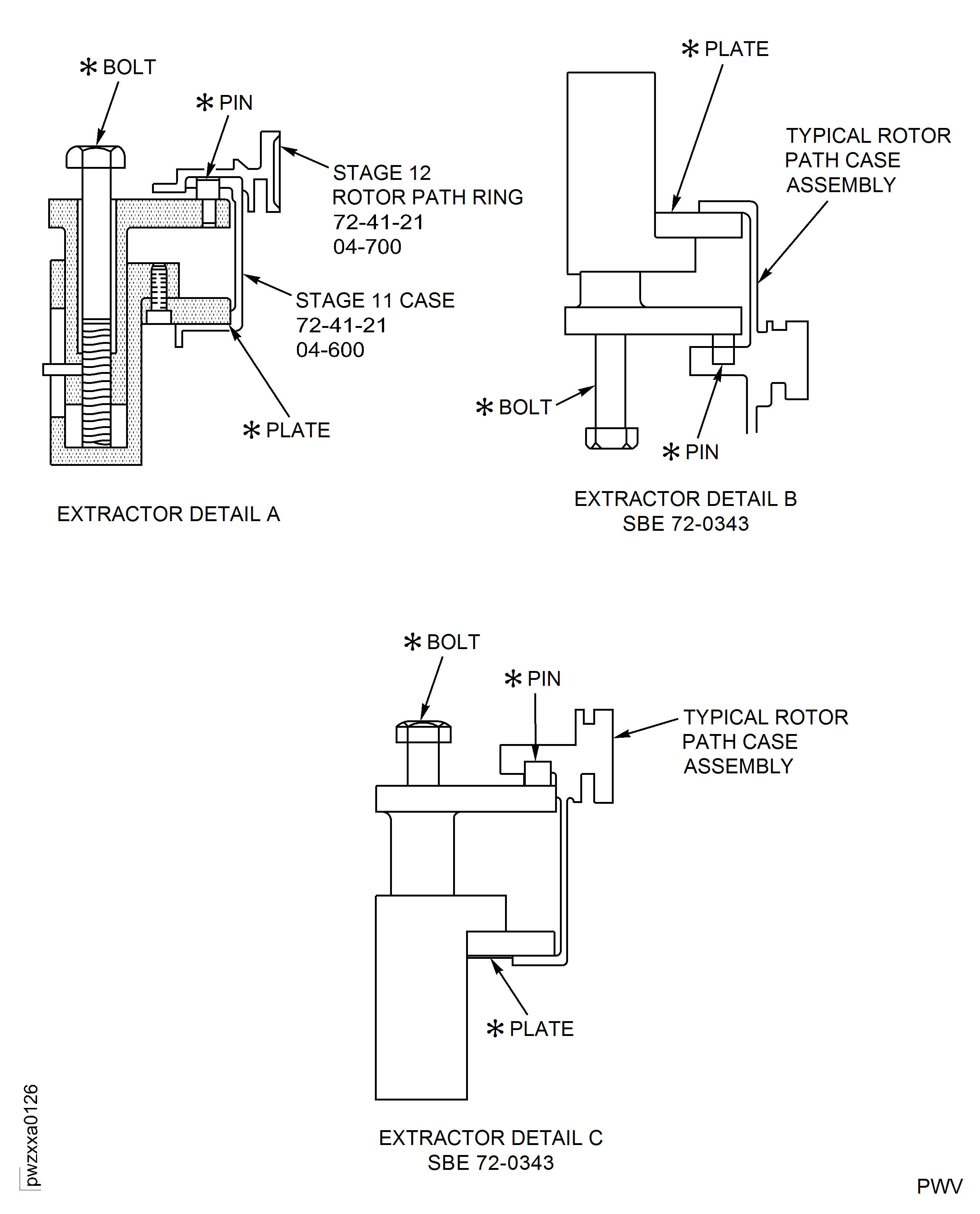
YOU MUST PUT ON THE CORRECT PROTECTIVE GLOVES BEFORE YOU TOUCH THE STAGE 10 ROTOR PATH RING.Install the plates of IAE 1R18827 Extractor 3 off on the front flange of the Stage 10 case. Refer to extractor Detail C on Figure.
Adjust the bolts of the extractors to engage the pins in the extraction holes in the rear flange of the Stage 9 case.
Continue to turn the bolts to remove the Stage 10 rotor path case. Equally turn the bolts by a small quantity.
Remove the Stage 10 rotor path ring.

CAUTION
UNDERSIZE VANES MUST NOT BE INSTALLED ADJACENT TO THE STOP VANES, INTRASCOPE VANES OR OTHER UNDERSIZE VANES.CAUTION
UNDERSIZE VANES MUST NOT BE INSTALLED BETWEEN THE STAGE 9 INTRASCOPE VANES AND THE STAGE 9 STOP VANE ADJACENT TO THE 6 O'CLOCK POSITION.Remove the Stage 9 stator vanes HPC Stator Vanes HPC Stator Vanes (72-41-22, 04-448) and install the Stage 9 vanes as necessary. One Stage 9 undersize vane will give an increase or decrease in the interplatform clearance of 0.016 in. (0.40 mm).
Install the Stage 10 Rotor Path Case Assembly as given in Step.
Measure and write down a record of the interplatform clearances at the Stage 9 stop vanes as given in Step.
SUBTASK 72-41-20-440-278-006 Install the Stage 9 Undersize Stator Vanes
Figure: View through the HP Compressor Rear Cases and Vanes
View through the HP Compressor Rear Cases and Vanes
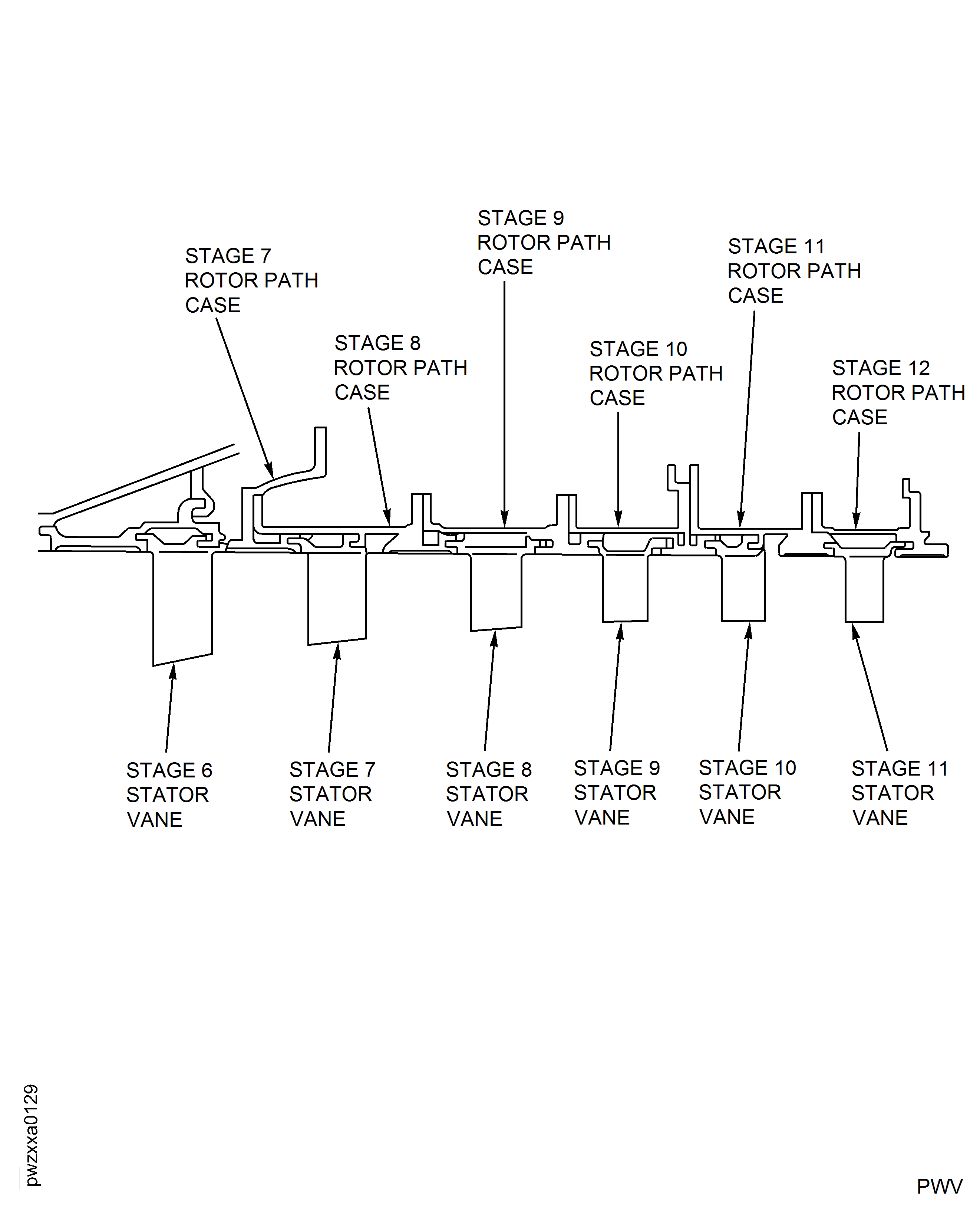
Figure: Locations for the Fits and Clearances
Locations for the Fits and Clearances
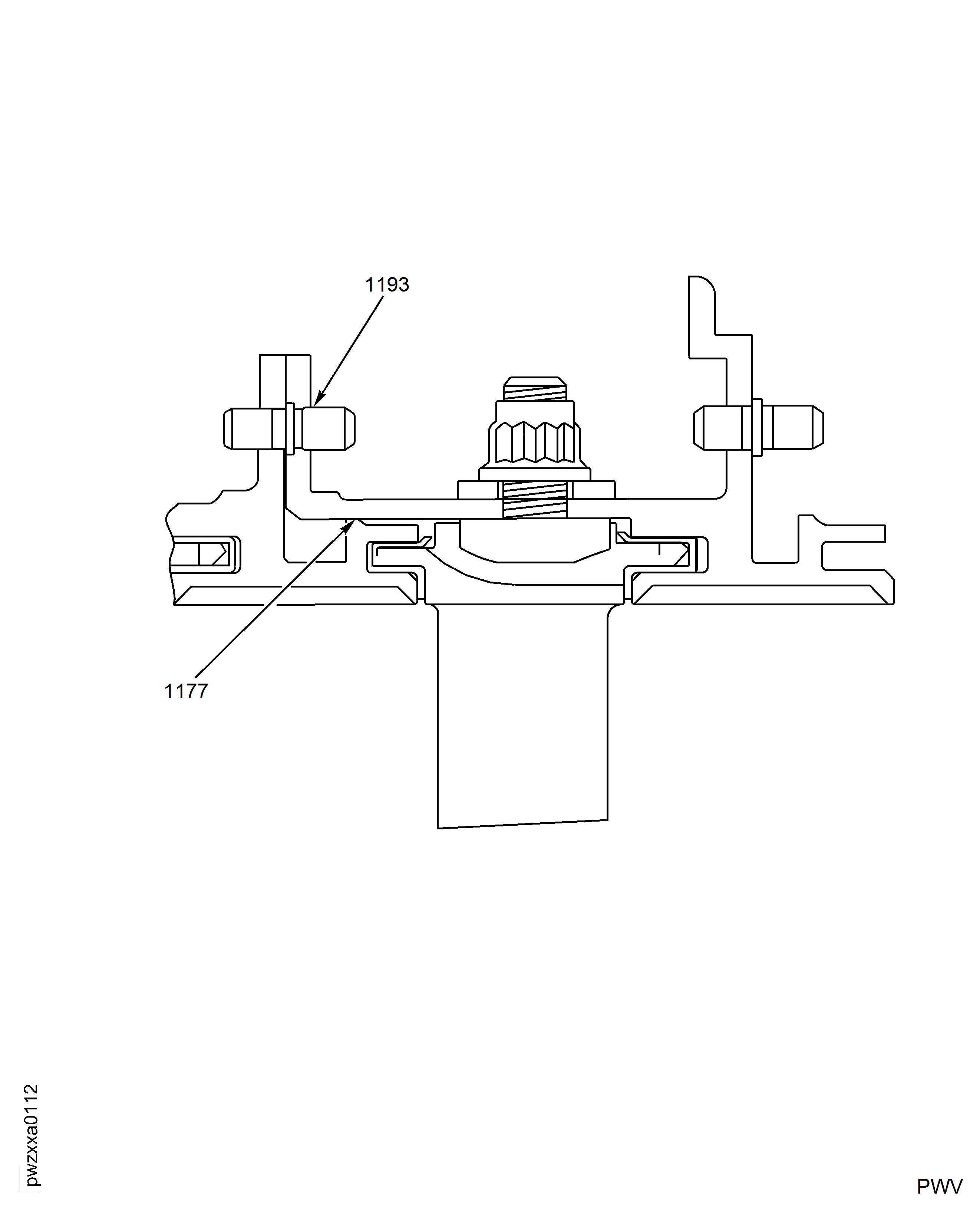
Figure: Install the Stage 9 Stator Vane Front and Rear Liners
Install the Stage 9 Stator Vane Front and Rear Liners
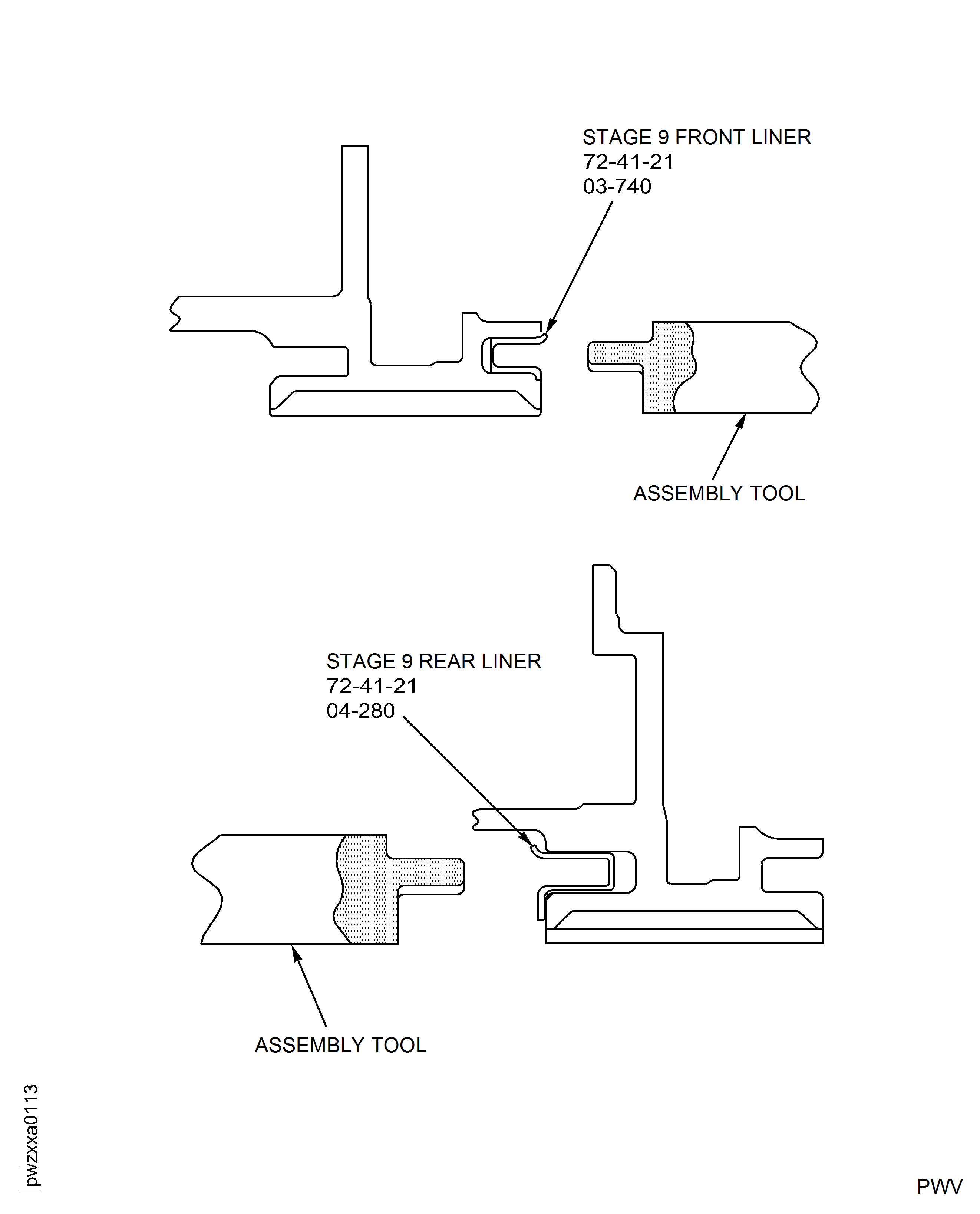
Figure: Install the Stage 9 Stator Vane Stops
Install the Stage 9 Stator Vane Stops
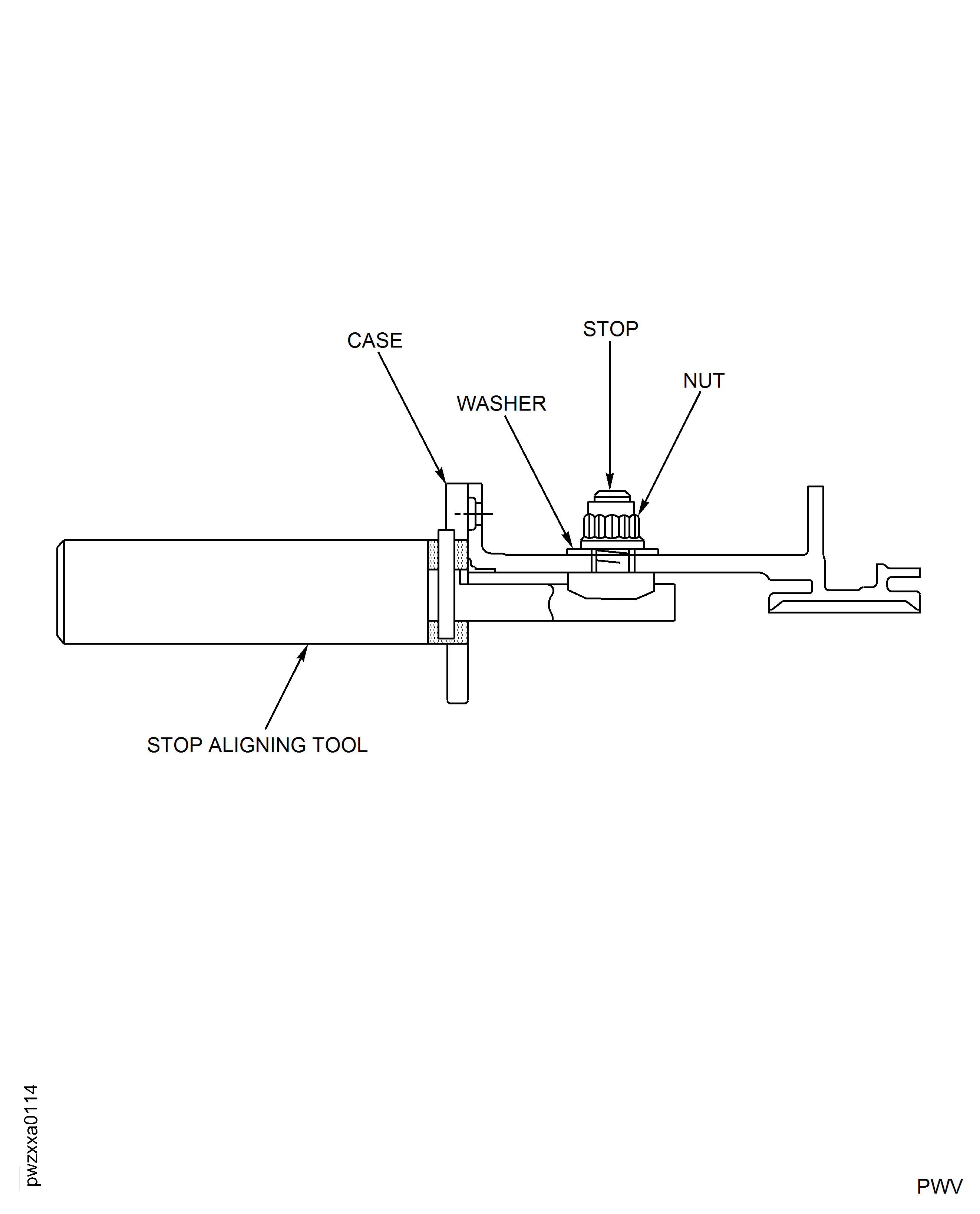
Figure: Install the Stage 9 Stator Vanes
Install the Stage 9 Stator Vanes
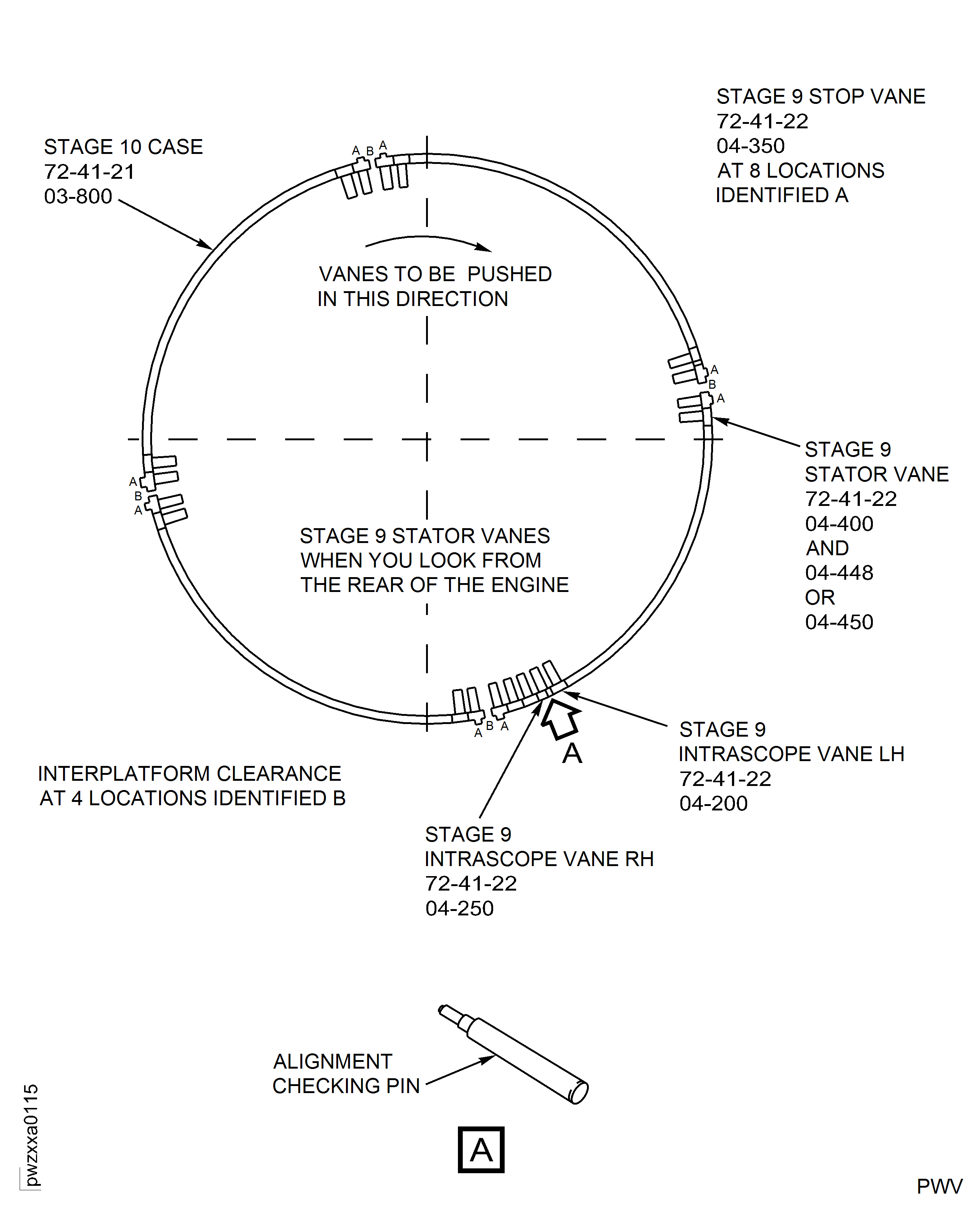
Figure: Stator Vane Interplatform Clearance
Stator Vane Interplatform Clearance
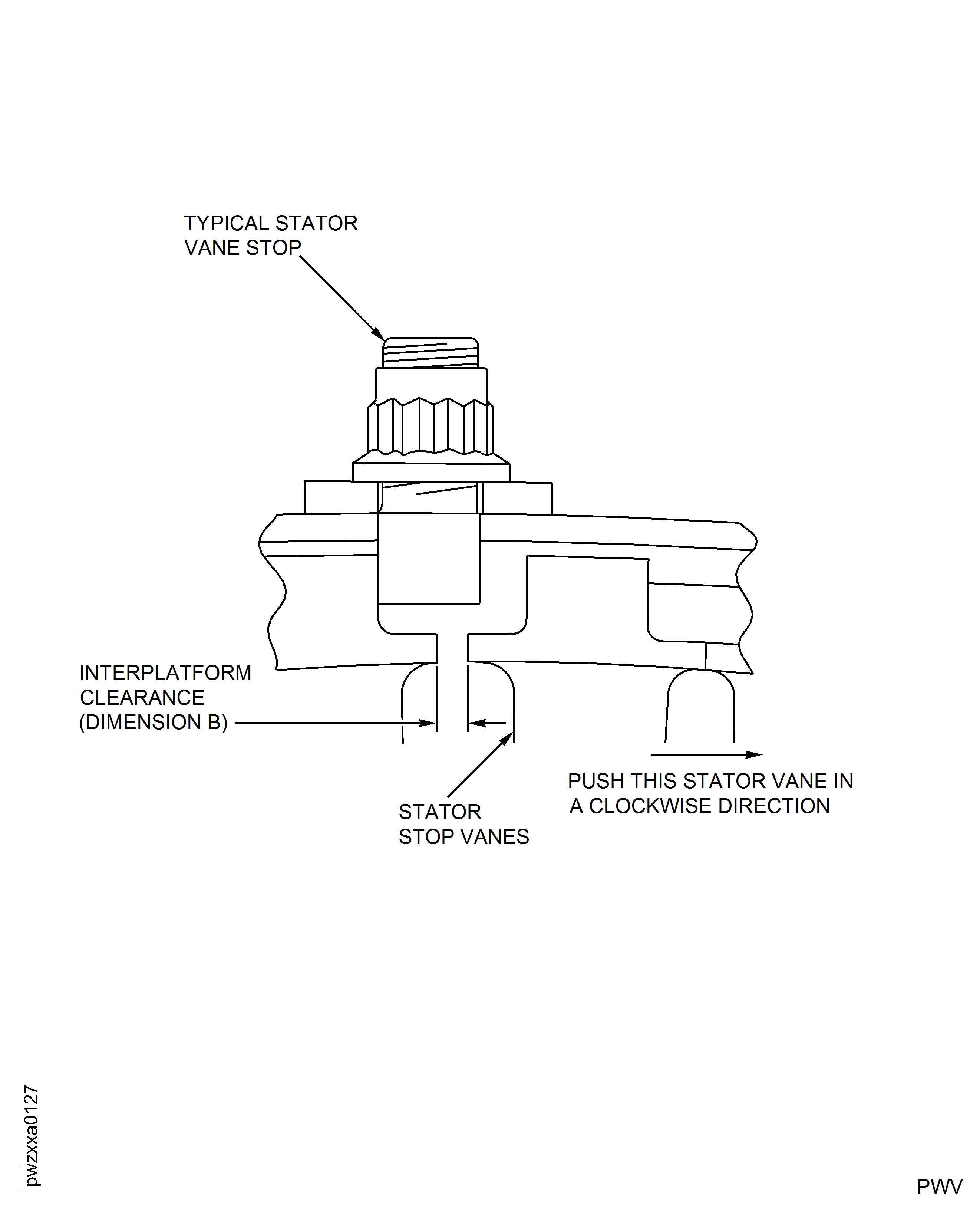
Figure: Remove the Stage 10 Rotor Path Case
Remove the Stage 10 Rotor Path Case