Export Control
EAR Export Classification: Not subject to the EAR per 15 C.F.R. Chapter 1, Part 734.3(b)(3), except for the following Service Bulletins which are currently published as EAR Export Classification 9E991: SBE70-0992, SBE72-0483, SBE72-0580, SBE72-0588, SBE72-0640, SBE73-0209, SBE80-0024 and SBE80-0025.Copyright
© IAE International Aero Engines AG (2001, 2014 - 2021) The information contained in this document is the property of © IAE International Aero Engines AG and may not be copied or used for any purpose other than that for which it is supplied without the express written authority of © IAE International Aero Engines AG. (This does not preclude use by engine and aircraft operators for normal instructional, maintenance or overhaul purposes.).Applicability
V2500-A5
Common Information
TASK 72-32-00-430-014-B00 LPC/Intermediate Case Module - Install The Splitter Fairing, No. 1 And No. 6 Strut Fairing Panels, Fan Exit Pressure Boss, Block, Front Liner Panels, Fan Exit Guide Vanes, And Rear Fairing, Assembly-014
General
This TASK gives the procedure to install the splitter fairing, the No.1 and No.6 strut fairing panels, the fan exit pressure boss, the block, the front liner panels, the fan exit guide vanes and the rear fairing.
Fig/item numbers in parentheses in the procedure agree with those used in the IPC. Only the primary Fig/item numbers are used. For the service bulletin alpha variants refer to the IPC.
For all parts identified in a different Chapter/Section/Subject, the applicable Chapter/Section/Subject comes before the Fig/item number.
For standard torque data and procedures, refer to the SPM TASK 70-41-00-400-501 and SPM TASK 70-41-02-410-501 .
Special torque data and assembly tolerances are included in the procedure.
Special torque data is identified with the symbol * after the torque value.
Lubricate all threads and abutment faces of nuts and bolts with the CoMat 10-077 APPROVED ENGINE OILS, unless other lubricants are referred to in the procedure.
To install lockwire, refer to the SPM TASK 70-42-05-400-501.
The abbreviation Intf shows an interference or tight fit. This causes REJECT IF MORE THAN to become REJECT IF LESS THAN. The abbreviation Clear shows a clearance fit.
The number for each radial location must be identified in a clockwise direction. These start at the engine top position when you look from the rear of the engine, unless stated differently in the procedure.
The No. 1 strut, which is the top position strut of the fan frame, is identified by the five pressure tubes on the No. 1 strut leading edge.
NOTE
NOTE
Preliminary Requirements
Pre-Conditions
NONESupport Equipment
| Name | Manufacturer | Part Number / Identification | Quantity | Remark |
|---|---|---|---|---|
| Sealant dispenser | LOCAL | Sealant dispenser | ||
| IAE 1J12508 Measuring stretch | 0AM53 | IAE 1J12508 | 1 |
Consumables, Materials and Expendables
| Name | Manufacturer | Part Number / Identification | Quantity | Remark |
|---|---|---|---|---|
| CoMat 01-124 ISOPROPYL ALCOHOL | LOCAL | CoMat 01-124 | ||
| CoMat 01-031 ACETONE (CH3)2CO | LOCAL | CoMat 01-031 | ||
| CoMat 02-119 LOCKWIRE | LOCAL | CoMat 02-119 | ||
| CoMat 04-004 JOINTING COMPOUND, LIGHT GRADE | LOCAL | CoMat 04-004 | ||
| CoMat 08-013 COLD CURING SILICONE COMPOUND | LOCAL | CoMat 08-013 | ||
| CoMat 08-014 PRIMER, SILICONE ADHESIVE/SEALANT | 0AM53 | CoMat 08-014 | ||
| CoMat 08-045 SILICONE RUBBER COMPOUND | LOCAL | CoMat 08-045 | ||
| CoMat 10-077 APPROVED ENGINE OILS | LOCAL | CoMat 10-077 |
Spares
NONESafety Requirements
NONEProcedure
Attach the rear fairing Intermediate Structure Rear Fairing (72-32-86, 01-100) to the LP compressor bleed duct with the 18 screws (02-852).
Make a clean cloth or a soft brush moist with CoMat 01-031 ACETONE (CH3)2CO or CoMat 01-124 ISOPROPYL ALCOHOL. Clean the screw holes surface of No. 6 and No. 16 positions on the rear fairing.
NOTE
Apply the primer in less than eight hours after the surface is cleaned.Apply a thin layer of CoMat 08-014 PRIMER, SILICONE ADHESIVE/SEALANT with a soft brush to the two screw holes. Air dry for 30 minutes minimum.
Use the compound tube to fill and press CoMat 08-013 COLD CURING SILICONE COMPOUND or CoMat 08-045 SILICONE RUBBER COMPOUND into the two holes.
Fill the holes No. 6 and No. 16 with compound.
SUBTASK 72-32-00-430-334-A00 Install the Rear Fairing on to the LP Compressor Bleed Duct (Pre SBE 72-0155)

CAUTION
CAREFULLY INSTALL THE REAR FAIRING TO PREVENT DAMAGE TO THE SCREEN.Attach the rear fairing Intermediate Structure Rear Fairing (72-32-86, 01-100) to the LP compressor bleed duct with the 20 screws (02-852).
SUBTASK 72-32-00-430-334-B00 Install the Rear Fairing on to the LP Compressor Bleed Duct (SBE 72-0155)
SBE 72-0155: A new LPC bleed duct assembly with improved durability feature.
Install the 20 washers LP Compressor (LPC) - Intermediate Structure Module (72-32-00, 01-337) and bolts LP Compressor (LPC) - Intermediate Structure Module (72-32-00, 01-335) which attach the FEGVs to the fan case. Tighten the bolts lightly.
Attach the 20 FEGVs Fan Exit Guide Vane (72-32-88, 06-100), Fan Exit Guide Vane (72-32-88, 06-300), Fan Exit Guide Vane (72-32-88, 06-500), Fan Exit Guide Vane (72-32-88, 06-700), Fan Exit Guide Vane (72-32-88, 07-100), Fan Exit Guide Vane (72-32-88, 07-300), Fan Exit Guide Vane (72-32-88, 07-500), Fan Exit Guide Vane (72-32-88, 07-700), Fan Exit Guide Vane (72-32-88, 08-100), Fan Exit Guide Vane (72-32-88, 08-300), Fan Exit Guide Vane (72-32-88, 08-500), Fan Exit Guide Vane (72-32-88, 08-700), Fan Exit Guide Vane (72-32-88, 09-100), Fan Exit Guide Vane (72-32-88, 09-300), Fan Exit Guide Vane (72-32-88, 09-500), Fan Exit Guide Vane (72-32-88, 09-700), Fan Exit Guide Vane (72-32-88, 10-100), Fan Exit Guide Vane (72-32-88, 10-300), Fan Exit Guide Vane (72-32-88, 10-500) and Fan Exit Guide Vane (72-32-88, 10-700) to the inner faces of the fan case.
NOTE
(Pre SBE 70-0257) Make sure of the part numbers of the washers LP Compressor (LPC) - Intermediate Structure Module (72-32-00,01-375) and LP Compressor (LPC) - Intermediate Structure Module (72-32-00, 01-376) and the installed positions. Incorrect installation makes unwanted step between the washer upper face and FEGV because the configurations of those part numbers are different.Put the 20 washers LP Compressor (LPC) - Intermediate Structure Module (72-32-00, 01-375), the 20 washers LP Compressor (LPC) - Intermediate Structure Module (72-32-00, 01-376) and the bolts into position and tighten the bolts lightly.
Install the 40 bolts LP Compressor (LPC) - Intermediate Structure Module (72-32-00, 01-377) into the bushes of the LP compressor stage 2.5 vanes through the plate nuts of the FEGVs.
Install the 30 screws LP Compressor (LPC) - Intermediate Structure Module (72-32-00, 02-805) and the 40 bolts LP Compressor (LPC) - Intermediate Structure Module (72-32-00, 01-370) which attach the front liner panels, the rear liner panels, the middle liner panel and the FEGVs to the fan case. Tighten the screws and the bolts lightly.
Attach the 10 front liner panels Fan Case Liner Panels And Related Parts (72-32-87, 03-100), Fan Case Liner Panels And Related Parts (72-32-87, 03-150), Fan Case Liner Panels And Related Parts (72-32-87, 03-200), Fan Case Liner Panels And Related Parts (72-32-87, 03-250), Fan Case Liner Panels And Related Parts (72-32-87, 03-300), Fan Case Liner Panels And Related Parts (72-32-87, 03-350), Fan Case Liner Panels And Related Parts (72-32-87, 03-400), Fan Case Liner Panels And Related Parts (72-32-87, 03-450), Fan Case Liner Panels And Related Parts(72-32-87, 03-500) and Fan Case Liner Panels And Related Parts (72-32-87, 03-550) to the rear liner panels, the middle liner panel and the FEGVs of the fan case.
Torque the screws LP Compressor (LPC) - Intermediate Structure Module (72-32-00, 02-805) to 75 to 85* lbfin (8.48 to 9.61 Nm).
Torque the bolts LP Compressor (LPC) - Intermediate Structure Module (72-32-00, 01-370) to 85 to 105 lbfin (10.00 to 12.00 Nm).
Torque the bolts LP Compressor (LPC) - Intermediate Structure Module (72-32-00, 01-335) to 85 to 105 lbfin (10.00 to 12.00 Nm).
Torque the bolts LP Compressor (LPC) - Intermediate Structure Module (72-32-00, 01-377) to 160 to 200* lbfin (17.50 to 22.50 Nm).
SUBTASK 72-32-00-430-335-A00 Install the 20 FEGVs and the 10 Front Liner Panels to the Fan Case (Pre SBE 70-0377)
Install the 20 bolts LP Compressor (LPC) - Intermediate Structure Module (72-32-00, 01-335) which attach the FEGVs to the fan case. Tighten the bolts lightly.
Attach the 20 FEGVs Fan Exit Guide Vane (72-32-88,06-100), Fan Exit Guide Vane (72-32-88, 06-300), Fan Exit Guide Vane (72-32-88, 06-500), Fan Exit Guide Vane (72-32-88, 06-700), Fan Exit Guide Vane (72-32-88, 07-100), Fan Exit Guide Vane (72-32-88, 07-300), Fan Exit Guide Vane (72-32-88, 07-500), Fan Exit Guide Vane (72-32-88, 07-700), Fan Exit Guide Vane (72-32-88, 08-100), Fan Exit Guide Vane (72-32-88, 08-300), Fan Exit Guide Vane (72-32-88, 08-500), Fan Exit Guide Vane (72-32-88, 08-700), Fan Exit Guide Vane (72-32-88, 09-100), Fan Exit Guide Vane (72-32-88, 09-300), Fan Exit Guide Vane (72-32-88, 09-500), Fan Exit Guide Vane (72-32-88, 09-700), Fan Exit Guide Vane (72-32-88, 10-100), Fan Exit Guide Vane (72-32-88, 10-300), Fan Exit Guide Vane (72-32-88, 10-500) and Fan Exit Guide Vane (72-32-88, 10-700) to the inner faces of the fan case.
NOTE
(Pre SBE 70-0257) Make sure of the part numbers of the washers LP Compressor (LPC) - Intermediate Structure Module (72-32-00, 01-375) and LP Compressor (LPC) - Intermediate Structure Module (72-32-00, 01-376) and the installed positions. Incorrect installation makes unwanted step between the washer upper face and FEGV because the configurations of those part numbers are different.Put the 20 washers LP Compressor (LPC) - Intermediate Structure Module (72-32-00, 01-375), the 20 washers LP Compressor (LPC) - Intermediate Structure Module (72-32-00, 01-376) and the bolts into position and tighten the bolts lightly.
Install the 40 bolts LP Compressor (LPC) - Intermediate Structure Module (72-32-00, 01-377) into the bushes of the LP compressor stage 2.5 vanes through the plate nuts of the FEGVs.
Install the 30 screws LP Compressor (LPC) - Intermediate Structure Module (72-32-00, 02-805) and the 40 bolts LP Compressor (LPC) - Intermediate Structure Module (72-32-00, 01-370) which attach the front liner panels, the rear liner panels, the middle liner panel and the FEGVs to the fan case.
Attach the 10 front liner panels Fan Case Liner Panels And Related Parts (72-32-87, 03-100), Fan Case Liner Panels And Related Parts (72-32-87, 03-150), Fan Case Liner Panels And Related Parts (72-32-87, 03-200), Fan Case Liner Panels And Related Parts (72-32-87, 03-250), Fan Case Liner Panels And Related Parts (72-32-87, 03-300), Fan Case Liner Panels And Related Parts (72-32-87, 03-350), Fan Case Liner Panels And Related Parts (72-32-87, 03-400), Fan Case Liner Panels And Related Parts (72-32-87, 03-450), Fan Case Liner Panels And Related Parts (72-32-87, 03-500) and Fan Case Liner Panels And Related Parts (72-32-87, 03-550) to the rear liner panels, the middle liner panels and the FEGVs of the fan case.
Torque the screws LP Compressor (LPC) - Intermediate Structure Module (72-32-00, 02-805) to 75 to 85* lbfin (8.48 to 9.61 Nm).
Torque the bolts LP Compressor (LPC) - Intermediate Structure Module (72-32-00, 01-370) to 85 to 105 lbfin (10.00 to 12.00 Nm).
Torque the bolts LP Compressor (LPC) - Intermediate Structure Module (72-32-00, 01-335) to 85 to 105 lbfin (10.00 to 12.00 Nm).
Torque the bolts LP Compressor (LPC) - Intermediate Structure Module (72-32-00, 01-377) to 160 to 200* lbfin (17.50 to 22.50 Nm).
SUBTASK 72-32-00-430-335-B00 Install the 20 FEGVs and the 10 Front Liner Panels to the Fan Case (SBE 70-0377)
SBE 70-0377: New fan exit guide vanes with outer platforms of reduced weight material
Refer to Figure.
Make sure that the work mat is in position in the fan case. Refer to TASK 72-32-00-430-012-C00 (ASSEMBLY-012, CONFIG-003).
Make a clean cloth moist with CoMat 01-124 ISOPROPYL ALCOHOL to clean the mating faces on the splitter fairing.
Apply CoMat 04-004 JOINTING COMPOUND, LIGHT GRADE with a stiff brush to the mating faces on the splitter fairing.
SUBTASK 72-32-00-430-225 Apply the Jointing Compound to the Mating Faces on the Splitter Fairing
Attach the splitter fairing V2500-A5-72-32-93-01A-941A-D (72-32-93, 01-200) with the 14 screws (01-210) to the 14 brackets on the LP compressor front case Figure. Tighten the screws lightly.
Make sure that the axial clearances between the splitter fairing and the inlet guide vane are 0 to 0.019 in. (0 to 0,5 mm). Adjust the position of the splitter fairing if necessary Figure.
SUBTASK 72-32-00-430-226 Install the Splitter Fairing on to the LP Compressor Assembly
Refer to Figure.
Read the tool dimension L marked on IAE 1J12508 Measuring stretch 1 off.
NOTE
No. 1 bearing axial play causes the LP stub shaft to be moveable if the module is horizontal. The LP stub shaft must be at the rear position in the movement range for correct measurement of J1. The LP stub shaft moves correctly to the rear end position if you push it by sufficient force.Measure the dimension J1 with depth micrometer.
Measure the dimension J1 at 12 and 6 o' clock positions.
SUBTASK 72-32-00-430-227-A00 Measure the Module Interface Dimension for the Installation of the HP System Module (Pre SBE 72-0391)
Refer to Figure.
Read the tool dimension L marked on IAE 1J12508 Measuring stretch 1 off.
Apply force of 33 lbs (15 Kg) or more to push the LP stub shaft rearwards by hand until its movement stops. Continue pushing to keep the LP stub shaft in position until Step is completed.
NOTE
No. 1 bearing axial play causes the LP stub shaft to be moveable if the module is horizontal. The LP stub shaft must be at the rear position in the movement range for correct measurement of J1. The LP stub shaft moves correctly to the rear end position if you push it by sufficient force.Measure the dimension J1 with depth micrometer.
Measure the dimension J1 at 12 and 6 o' clock positions.
Do Step to install the blocks and the measuring stretch at 3 and 9 o'clock positions.
Measure the dimensions J1 and L1 and make sure of the dimensions AB and AD at 3 and 9 o'clock positions.
SUBTASK 72-32-00-430-227-B00 Measure the Module Interface Dimension for the installation of the HP System Module (SBE 72-0391)
SBE 72-0391: New separate type No. 1 bearing support assembly
Refer to Figure.
Install the pin Fan Case And Related Parts (72-32-85, 02-320) into the aligned holes and safety with the stopper Fan Case And Related Parts (72-32-85, 02-300).
Install the block Fan Case And Related Parts (72-32-85, 02-330).
SUBTASK 72-32-00-430-321 Install the Pressure Boss and the Block onto the Fan Case
Refer to Figure.
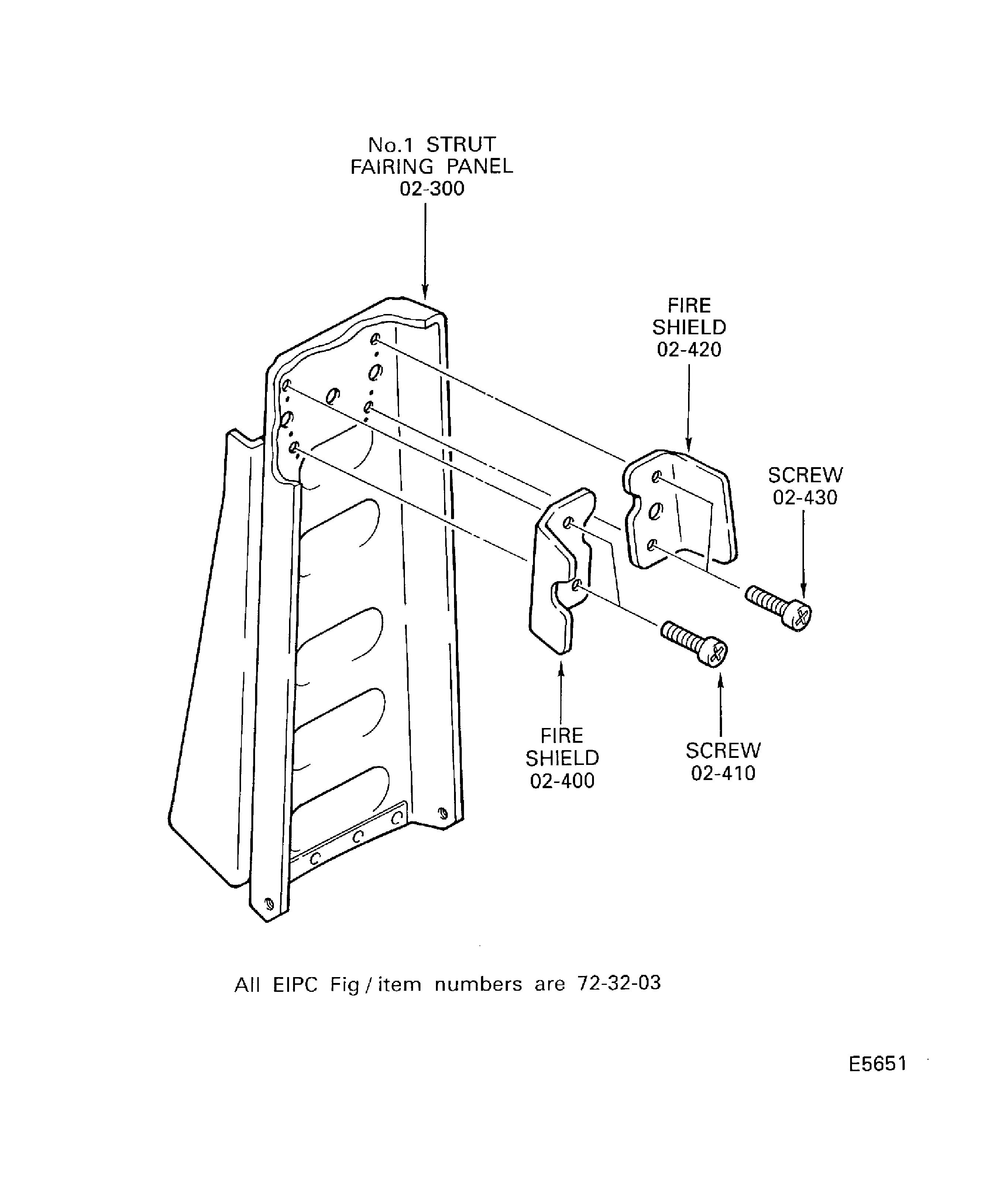
Install the shield Fan Frame Assembly And Related Parts (72-32-03, 02-400) on the No. 1 strut fairing panel Fan Frame Assembly And Related Parts (72-32-03, 02-300) with the two screws Fan Frame Assembly And Related Parts (72-32-03, 02-410), washers Fan Frame Assembly And Related Parts (72-32-03, 02-407) and nuts Fan Frame Assembly And Related Parts (72-32-03, 02-405).
Install the shield Fan Frame Assembly And Related Parts (72-32-03, 02-420) on the No. 1 strut fairing panel Fan Frame Assembly And Related Parts (72-32-03, 02-300) with the two screws Fan Frame Assembly And Related Parts (72-32-03, 02-430), washers Fan Frame Assembly And Related Parts (72-32-03, 02-427) and nuts Fan Frame Assembly And Related Parts (72-32-03, 02-425).
Install the two shields on the No.1 strut fairing panel.
SUBTASK 72-32-00-430-288-A00 Install the Fire Shields on the No.1 Strut Fairing Panel (Pre SBE 72-0216)
Refer to Figure.
Install the shield Fan Frame Assembly And Related Parts (72-32-03, 2-400) on the No. 1 strut fairing panel Fan Frame Assembly And Related Parts (72-32-03, 02-300) with the two screws Fan Frame Assembly And Related Parts (72-32-03, 02-410).
Install the shield Fan Frame Assembly And Related Parts (72-32-03, 02-420) on the No. 1 strut fairing panel Fan Frame Assembly And Related Parts (72-32-03, 02-300) with the two screws Fan Frame Assembly And Related Parts (72-32-03, 02-430).
Install the two shields on the No. 1 strut fairing panel.
SUBTASK 72-32-00-430-288-B00 Install the Fire Shields on the No. 1 Strut Fairing Panel (SBE 72-0216 and Pre SBE 72-0230)
SBE 72-0216: Additional plate nut on the No. 1 strut fairing panel.
Refer to Figure.
Make a clean cloth moist CoMat 01-124 ISOPROPYL ALCOHOL to clean the mating faces on the two panel supporting brackets Fan Frame Assembly And Related Parts (72-32-03, 02-500 and Fan Frame Assembly And Related Parts 02-550).
NOTE
Install the panel supporting brackets to the fan case before the jointing compound becomes dry.Apply CoMat 04-004 JOINTING COMPOUND, LIGHT GRADE with a stiff brush to the mating faces.
SUBTASK 72-32-00-430-322 Apply Jointing Compound to the Mating Faces on the Panel Supporting Brackets
Refer to Figure.
Put the panel supporting bracket Fan Frame Assembly And Related Parts (72-32-03, 02-550) on the fan case at the 12 o'clock position.
Attach with the two washers Fan Frame Assembly And Related Parts (72-32-03, 02-570), bolts Fan Frame Assembly And Related Parts (72-32-03, 02-560) and nuts Fan Frame Assembly And Related Parts (72-32-03, 02-580). Torque the bolts to 85 to 105 lbfin (10.00 to 12.00 Nm).
Attach the panel supporting brackets to the fan case.
Install the three spring washers Fan Frame Assembly And Related Parts (72-32-03, 02-315), bolts Fan Frame Assembly And Related Parts (72-32-03, 02-310), washers Fan Frame Assembly And Related Parts (72-32-03, 02-307) and nuts Fan Frame Assembly And Related Parts (72-32-03, 02-305) which attach the panel to the bracket. Tighten the bolts lightly.
Install the four washers Fan Frame Assembly And Related Parts (72-32-03, 02-320) and bolts Fan Frame Assembly And Related Parts (72-32-03, 02-330) which attach the panel to the fan frame. Tighten the bolts lightly.
Torque the bolts Fan Frame Assembly And Related Parts (72-32-03, 02-310) to 85 to 105 lbfin (10.00 to 12.00 Nm).
Torque the bolts Fan Frame Assembly And Related Parts (72-32-03, 02-330) to 36 to 45 lbfin (4.00 to 5.00 Nm).
Safety the bolts Fan Frame Assembly And Related Parts (72-32-03,02-330) with CoMat 02-119 LOCKWIRE, Figure .
Attach the No.1 strut fairing panel Fan Frame Assembly And Related Parts (72-32-03, 02-300) to the fan frame and the bracket, Figure .
SUBTASK 72-32-00-430-229 Install the No. 1 Strut Fairing Panel on to the Fan Frame and the Fan Case
Put the panel supporting bracket Fan Frame Assembly And Related Parts (72-32-03, 02-500) onto the fan case at 6 o'clock position.
Safety with the two washers Fan Frame Assembly And Related Parts (72-32-03, 02-530), the bolts Fan Frame Assembly And Related Parts (72-32-03, 02-520) and the nuts Fan Frame Assembly And Related Parts (72-32-03, 02-510).
Torque the bolts to 85 to 105 lbfin (10.00 to 12.00 Nm).
Attach the panel supporting bracket to the fan case.
Install the bolts Fan Frame Assembly And Related Parts (72-32-03, 02-130), the two bolts Fan Frame Assembly And Related Parts (72-32-03, 02-132), the washers Fan Frame Assembly And Related Parts (72-32-03, 02-120) and the nuts Fan Frame Assembly And Related Parts (72-32-03, 02-110) which attach the panel to the bracket. Tighten the bolts lightly.
Install the drain pipe Fan Frame Assembly And Related Parts (72-32-03, 02-080), the four washers Fan Frame Assembly And Related Parts (72-32-03, 02-140) and the bolts Fan Frame Assembly And Related Parts (72-32-03, 02-150) which attach the panel to the fan frame. Tighten the bolts lightly.
Torque the bolt Fan Frame Assembly And Related Parts (72-32-03, 02-130) and the two bolts Fan Frame Assembly And Related Parts (72-32-03, 02-132) to 85 to 105 lbfin (10.00 to 12.00 Nm).
Torque the bolts Fan Frame Assembly And Related Parts (72-32-03, 02-150) to 85 to 105 lbfin (10.00 to 12.00 Nm).
Safety the bolts Fan Frame Assembly And Related Parts (72-32-03, 02-150) with CoMat 02-119 LOCKWIRE.
Attach the No. 6 strut fairing panel Fan Frame Assembly And Related Parts (72-32-03, 02-100) to the fan frame and the panel supporting bracket.
SUBTASK 72-32-00-430-323-A00 Install the No. 6 Strut Fairing Panel onto the Fan Frame Assembly and the Fan Case (SBE 72-0175 and Pre SBE 72-0435)
SBE 72-0175: Provide longer attaching bolts for the open latch indicator bracket.
Put the panel supporting bracket Fan Frame Assembly And Related Parts (72-32-03, 02-500) onto the fan case at the 6 o'clock position.
Safety with the two washers Fan Frame Assembly And Related Parts (72-32-03, 02-530), bolts Fan Frame Assembly And Related Parts (72-32-03, 02-520) and nuts Fan Frame Assembly And Related Parts (72-32-03, 02-510). Torque the bolts to 85 to 105 lbfin (10.00 to 12.00 Nm).
Attach the panel supporting bracket to the fan case.
Install the two bolts Fan Frame Assembly And Related Parts (72-32-03, 02-132), washers Fan Frame Assembly And Related Parts (72-32-03, 02-120) and nuts Fan Frame Assembly And Related Parts (72-32-03, 02-110) which attach the panel to the bracket. Tighten the bolts lightly.
Install the drain pipe Fan Frame Assembly And Related Parts (72-32-03, 02-080), the four washers Fan Frame Assembly And Related Parts (72-32-03, 02-140) and bolts Fan Frame Assembly And Related Parts (72-32-03, 02-150) which attach the panel to the fan frame assembly. Tighten the bolts lightly.
Torque the bolts Fan Frame Assembly And Related Parts (72-32-03, 02-132) to 85 to 105 lbfin (10.00 to 12.00 Nm).
Torque the bolts Fan Frame Assembly And Related Parts (72-32-03, 02-150) to 85 to 105 lbfin (10.00 to 12.00 Nm).
Safety the bolts Fan Frame Assembly And Related Parts (72-32-03, 02-150) with CoMat 02-119 LOCKWIRE.
Attach the No. 6 strut fairing panel Fan Frame Assembly And Related Parts (72-32-03, 02-100) to the fan frame and the panel supporting bracket.
SUBTASK 72-32-00-430-323-B00 Install the No. 6 Strut Fairing Panel onto the Fan Frame Assembly and the Fan Case (SBE 72-0175 and SBE 72-0435)
SBE 72-0435: Fan case panel and bracket scalloped for No.4 scavenge tube reroute
SBE 72-0175: Provide longer attaching bolts for the open latch indicator bracket
Refer to Figure.
Install the stopper Fan Frame Assembly And Related Parts (72-32-03, 02-450) with the two screws Fan Frame Assembly And Related Parts (72-32-03, 02-454) and nuts Fan Frame Assembly And Related Parts (72-32-03, 02-451).
SUBTASK 72-32-00-430-230 Install the Stopper on the Fan Frame
Refer to Figure.
the LH corner strut filler Fan Frame Assembly And Related Parts (72-32-03, 01-700).
the RH corner strut filler Fan Frame Assembly And Related Parts (72-32-03, 01-750).
the LH corner strut filler Fan Frame Assembly And Related Parts (72-32-03, 01-850).
the RH corner strut filler Fan Frame Assembly And Related Parts (72-32-03, 01-800).
Make a clean cloth or a soft brush moist with CoMat 01-031 ACETONE (CH3)2CO or CoMat 01-124 ISOPROPYL ALCOHOL to clean the mating faces on these parts:
NOTE
Apply the primer in less than eight hours after the mating faces are cleaned.Apply a thin layer of CoMat 08-014 PRIMER, SILICONE ADHESIVE/SEALANT with a soft brush to the mating faces. Air dry for 30 minutes minimum.
Apply CoMat 08-045 SILICONE RUBBER COMPOUND from the nozzle of the sealant tube to the mating faces.
SUBTASK 72-32-00-430-231 Apply Sealant to the Mating Faces on the Corner Fillers
Refer to Figure.
Attach the LH corner strut filler with the screw Fan Frame Assembly And Related Parts (72-32-03, 01-340), the washer Fan Frame Assembly And Related Parts (72-32-03, 01-320) and the nut Fan Frame Assembly And Related Parts (72-32-03, 01-310). Torque the nut to 36 to 45 lbfin (4.00 to 5.00 Nm).
Attach the RH corner strut filler with the screw Fan Frame Assembly And Related Parts (72-32-03, 01-440), the washer Fan Frame Assembly And Related Parts (72-32-03, 01-420) and the nut Fan Frame Assembly And Related Parts (72-32-03, 01-410). Torque the nut to 36 to 45 lbfin (4.00 to 5.00 Nm).
Install the LH corner strut filler Fan Frame Assembly And Related Parts (72-32-03, 01-300) and the RH corner strut filler Fan Frame Assembly And Related Parts (72-32-03, 01-400) on the No. 1 strut.
Attach the LH corner strut filler with the screw Fan Frame Assembly And Related Parts (72-32-03, 01-240), the washer Fan Frame Assembly And Related Parts (72-32-03, 01-220) and nut Fan Frame Assembly And Related Parts (72-32-03, 01-210). Torque the nut to 36 to 45 lbfin (4.00 to 5.00 Nm).
Attach the RH Corner strut filler with the screw Fan Frame Assembly And Related Parts (72-32-03, 01-140), the washer Fan Frame Assembly And Related Parts (72-32-03, 01-120) and nut Fan Frame Assembly And Related Parts (72-32-03, 01-110). Torque the nut to 36 to 45 lbfin (4.00 to 5.00 Nm).
Install the LH corner strut filler Fan Frame Assembly And Related Parts (72-32-03, 02-200) and the RH corner strut filler Fan Frame Assembly And Related Parts (72-32-03, 01-100) on the No. 6 strut.
Attach the LH panel corner filler with the two washers Fan Frame Assembly And Related Parts (72-32-03, 01-704 and Fan Frame Assembly And Related Parts 01-708) and bolts Fan Frame Assembly And Related Parts (72-32-03, 01-702 and Fan Frame Assembly And Related Parts 01-706). Torque the bolts to 36 to 45 lbfin (4.00 to 5.00 Nm).
Attach the RH panel corner filler with the two washers Fan Frame Assembly And Related Parts (72-32-03, 01-754 and Fan Frame Assembly And Related Parts 01-758) and bolts Fan Frame Assembly And Related Parts (72-32-03, 01-752 and Fan Frame Assembly And Related Parts 01-756). Torque the bolts to 36 to 45 lbfin (4.00 to 5.00 Nm).
Install the LH panel corner filler with the two washers Fan Frame Assembly And Related Parts (72-32-03, 01-700) and the RH panel corner filler Fan Frame Assembly And Related Parts (72-32-03, 01-750) on the No. 1 strut fairing panel.
Attach the LH panel corner filler with the two washers Fan Frame Assembly And Related Parts (72-32-03, 01-854 and Fan Frame Assembly And Related Parts 01-858) and bolts Fan Frame Assembly And Related Parts (72-32-03, 01-852 and Fan Frame Assembly And Related Parts 01-856). Torque the bolts to 36 to 45 lbfin (4.00 to 5.00 Nm).
Attach the RH panel corner filler with the two washers Fan Frame Assembly And Related Parts (72-32-03, 01-804 and Fan Frame Assembly And Related Parts 01-808) and bolts Fan Frame Assembly And Related Parts (72-32-03, 01-802 and Fan Frame Assembly And Related Parts 01-806). Torque the bolts to 36 to 45 lbfin (4.00 to 5.00 Nm).
Install the LH panel corner filler Fan Frame Assembly And Related Parts (72-32-03, 01-850) and the RH panel corner filler Fan Frame Assembly And Related Parts (72-32-03, 01-800) on the No. 6 strut fairing panel.
SUBTASK 72-32-00-430-232 Install the Corner Strut Fillers and the Panel Corner Fillers on the Struts and the Strut Fairing Panels
Refer to Figure.
Make a soft brush moist with CoMat 01-031 ACETONE (CH3)2CO or CoMat 01-124 ISOPROPYL ALCOHOL to clean the surfaces of the recesses.
NOTE
Apply the primer in less than eight hours after the cleaning of the mating faces.Apply a thin layer of CoMat 08-014 PRIMER, SILICONE ADHESIVE/SEALANT with a soft brush to the surfaces. Air dry for 30 minutes minimum.
Fill CoMat 08-045 SILICONE RUBBER COMPOUND from the nozzle of the sealant tube into the recesses.
SUBTASK 72-32-00-430-233 Fill the Recesses in the Corner Strut Fillers with Sealant
Refer to Figure.
SUBTASK 72-32-00-430-235 Turn the LP Compressor/Intermediate Case Module Vertical with the Rear End Up
Refer to Figure.
NOTE
The bolts are tightened to the specified torque value after the installation of the brackets in TASK 71-00-21-400-001 (INSTALLATION).Install the six bolts (01-540) through the fan case holes into the six threaded holes in the No.5 and No.7 struts. Tighten the bolts lightly.
SUBTASK 72-32-00-430-236 Install the Six Bolts into the Threaded Holes in the No.5 and No.7 Struts
Figure: Pre SBE 72-0155: Install the Rear Fairing on the LP Compressor Bleed Duct
Sheet 1
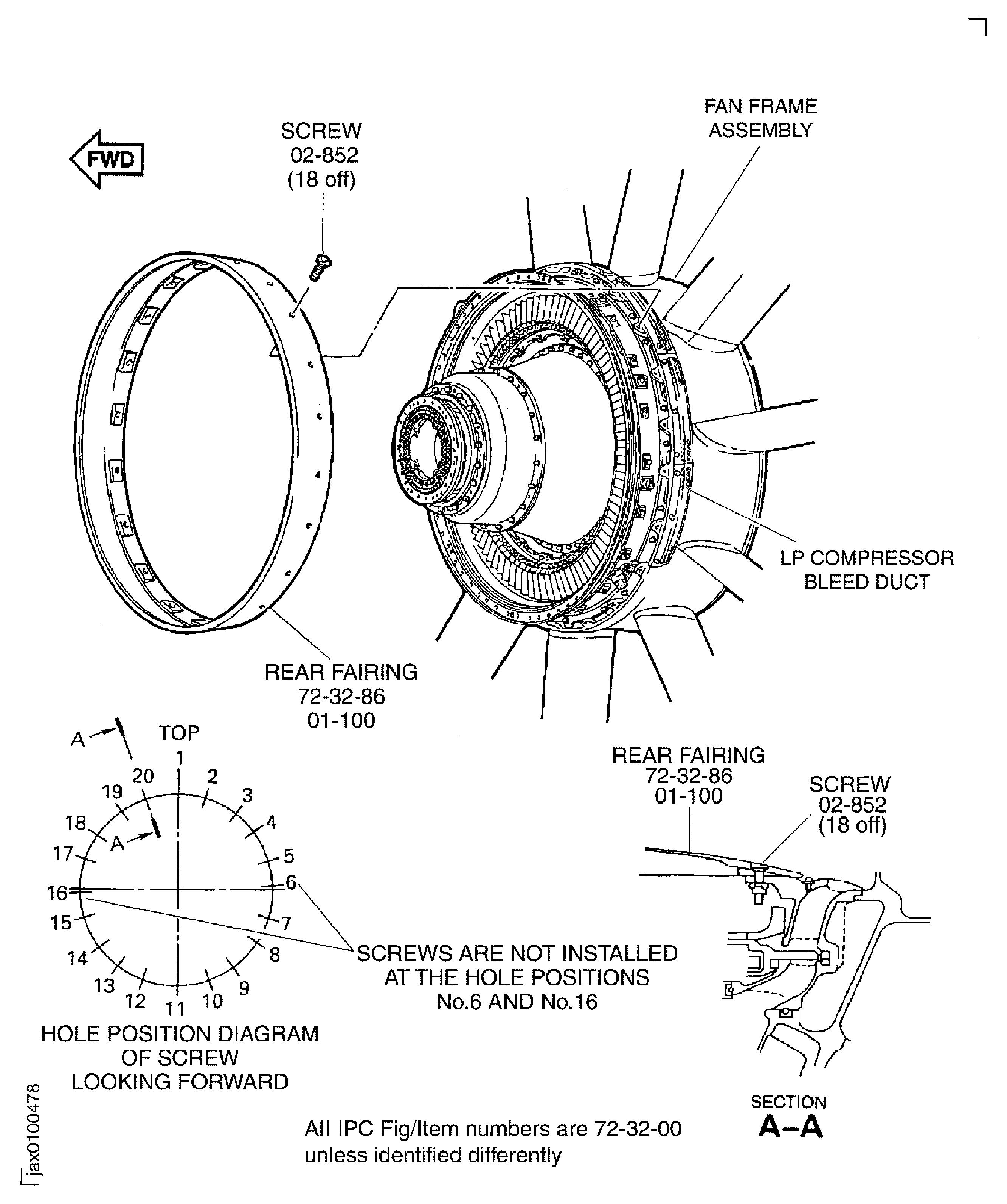
Figure: Pre SBE 72-0155: Install the Rear Fairing on the LP Compressor Bleed Duct
Sheet 2
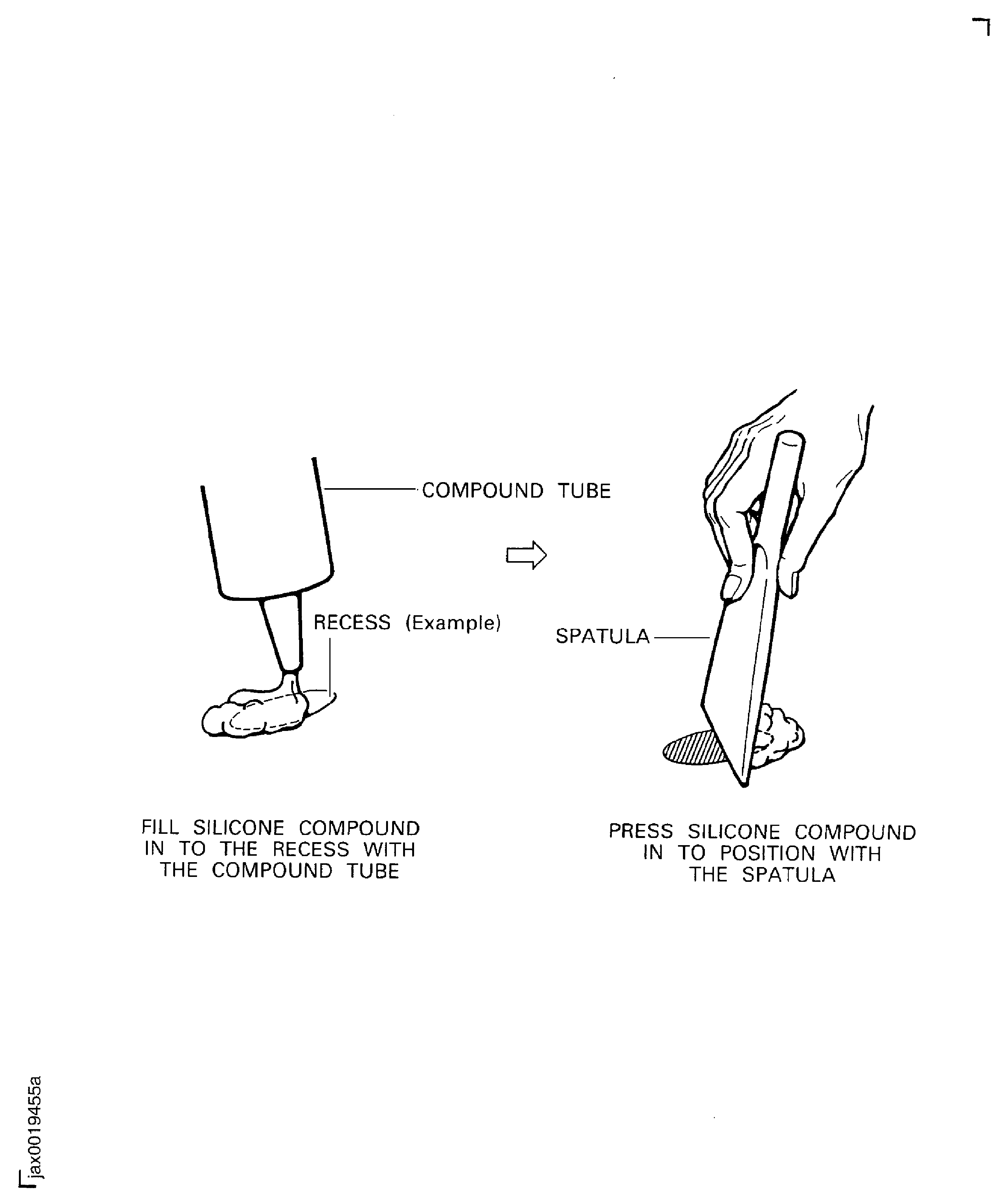
Figure: SBE 72-0155: Install the Rear Fairing on the LP Compressor Bleed Duct
SBE 72-0155: Install the Rear Fairing on the LP Compressor Bleed Duct

Figure: Install the FEGVs on the Fan Case
Install the FEGVs on the Fan Case

Figure: Install the Front Liner Panels on the Fan Case
Sheet 1
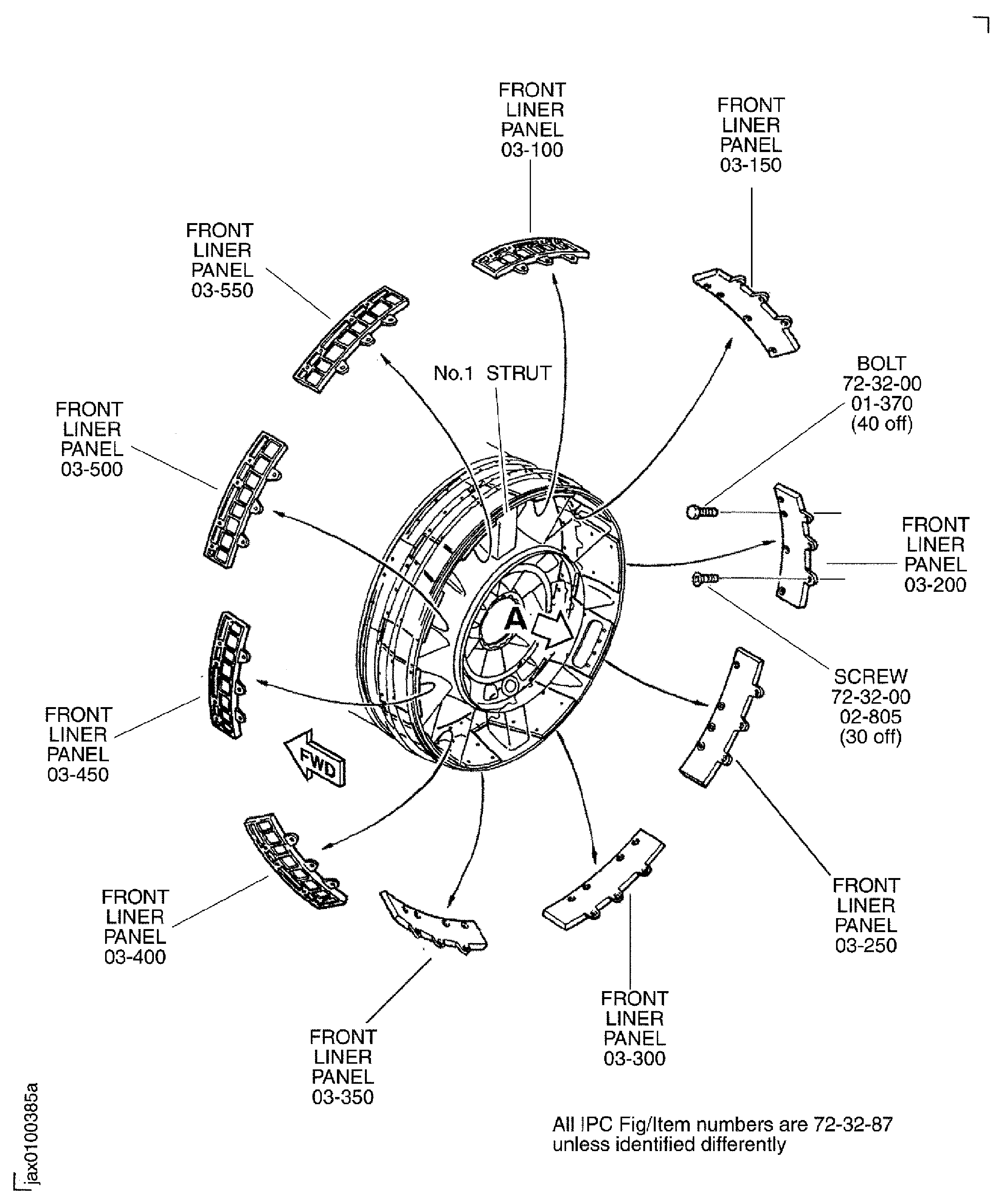
Figure: Install the Front Liner Panels on the Fan Case
Sheet 2
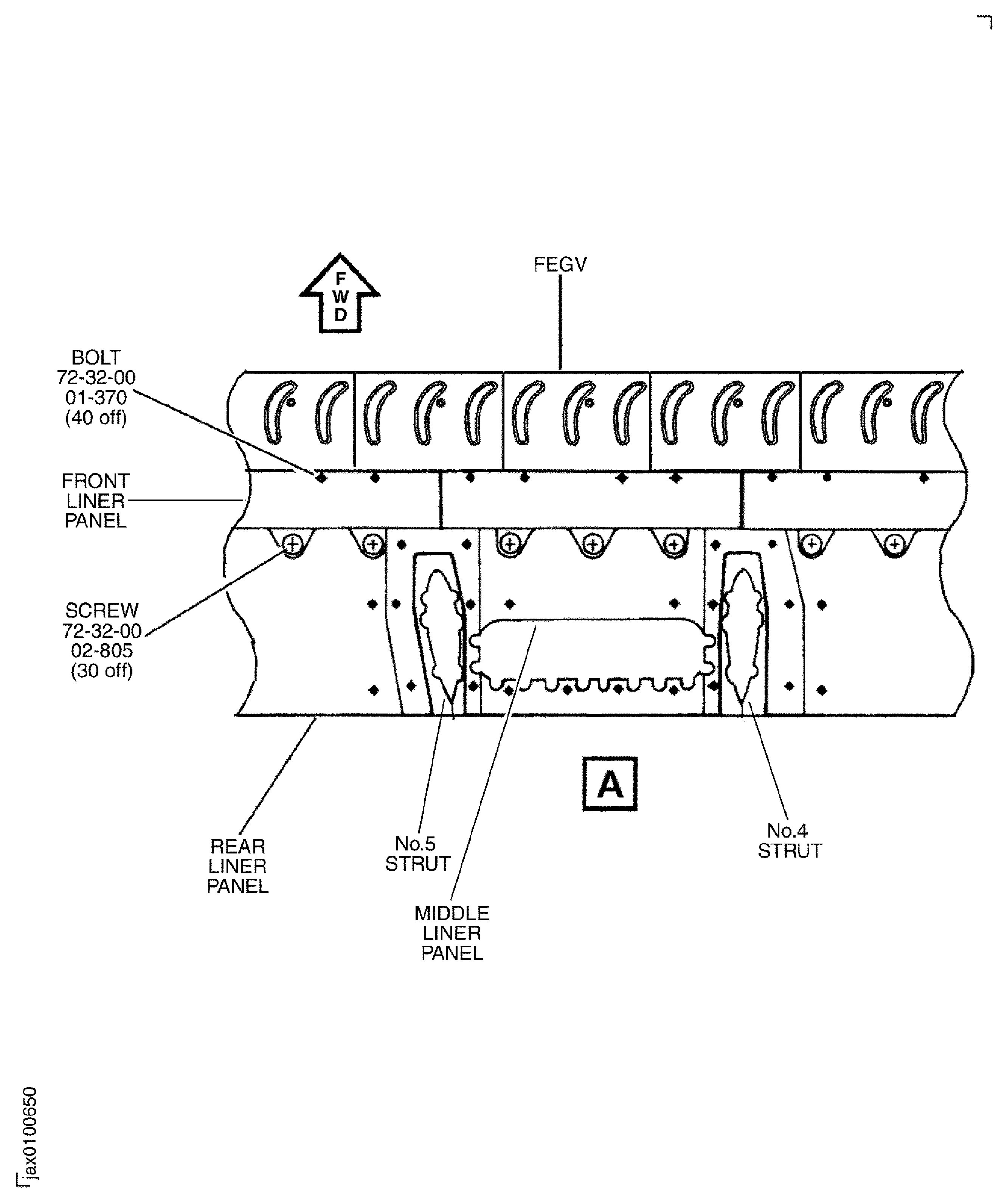
Figure: Apply Jointing Compound to the Mating Faces on the Splitter Fairings
Apply Jointing Compound to the Mating Faces on the Splitter Fairings

Figure: Install the Splitter Fairing on the Brackets
Sheet 1
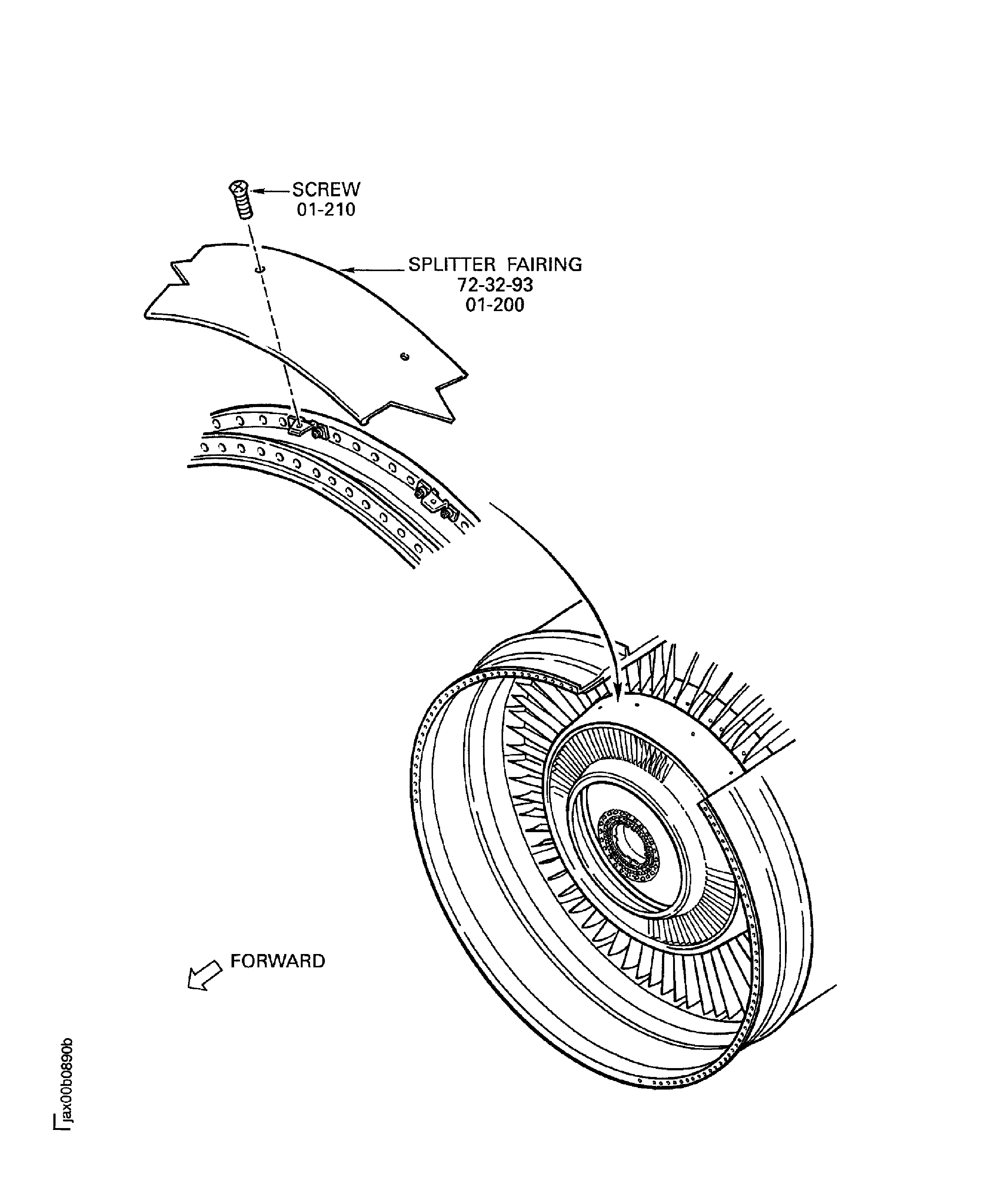
Figure: Install the Splitter Fairing on the Brackets
Sheet 2

Figure: Measure the Module Interface Dimensions for the Installation of the HP System Module
Measure the Module Interface Dimensions for the Installation of the HP System Module
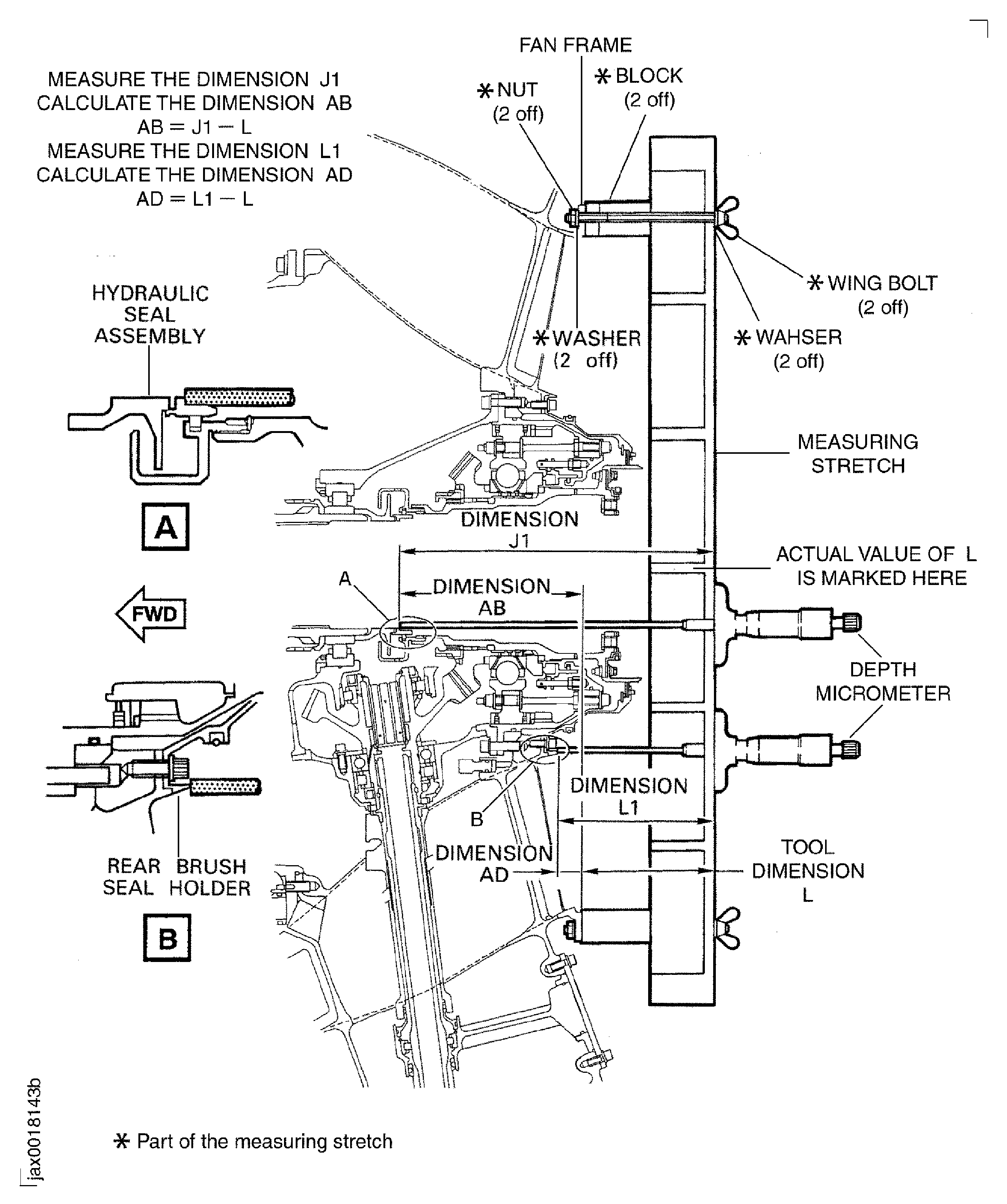
Figure: Apply Jointing Compound to the Panel Supporting Brackets
Apply Jointing Compound to the Panel Supporting Brackets
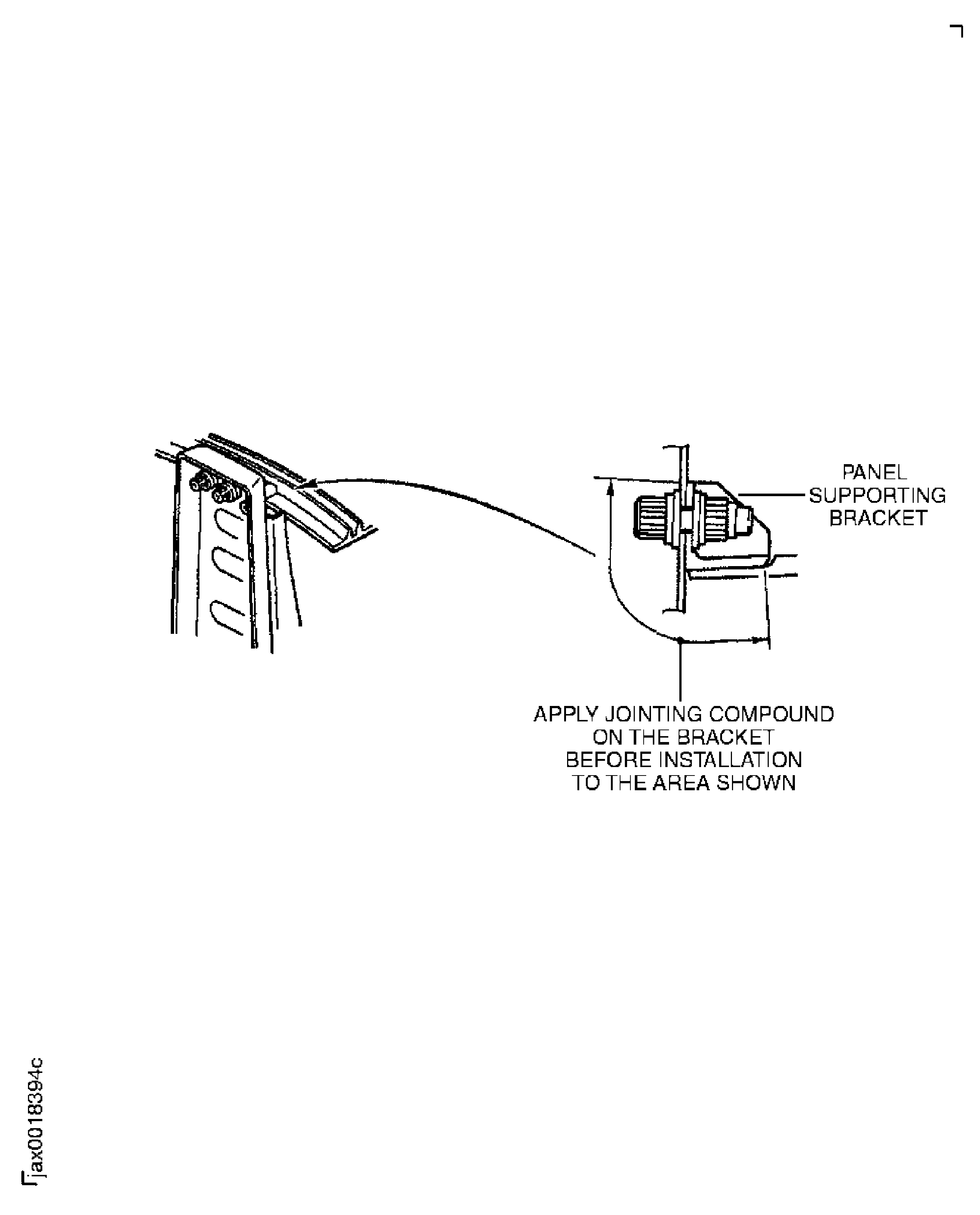
Figure: Install the No.1 Strut Fairing Panel on the Fan Frame and the Fan Case
Install the No.1 Strut Fairing Panel on the Fan Frame and the Fan Case
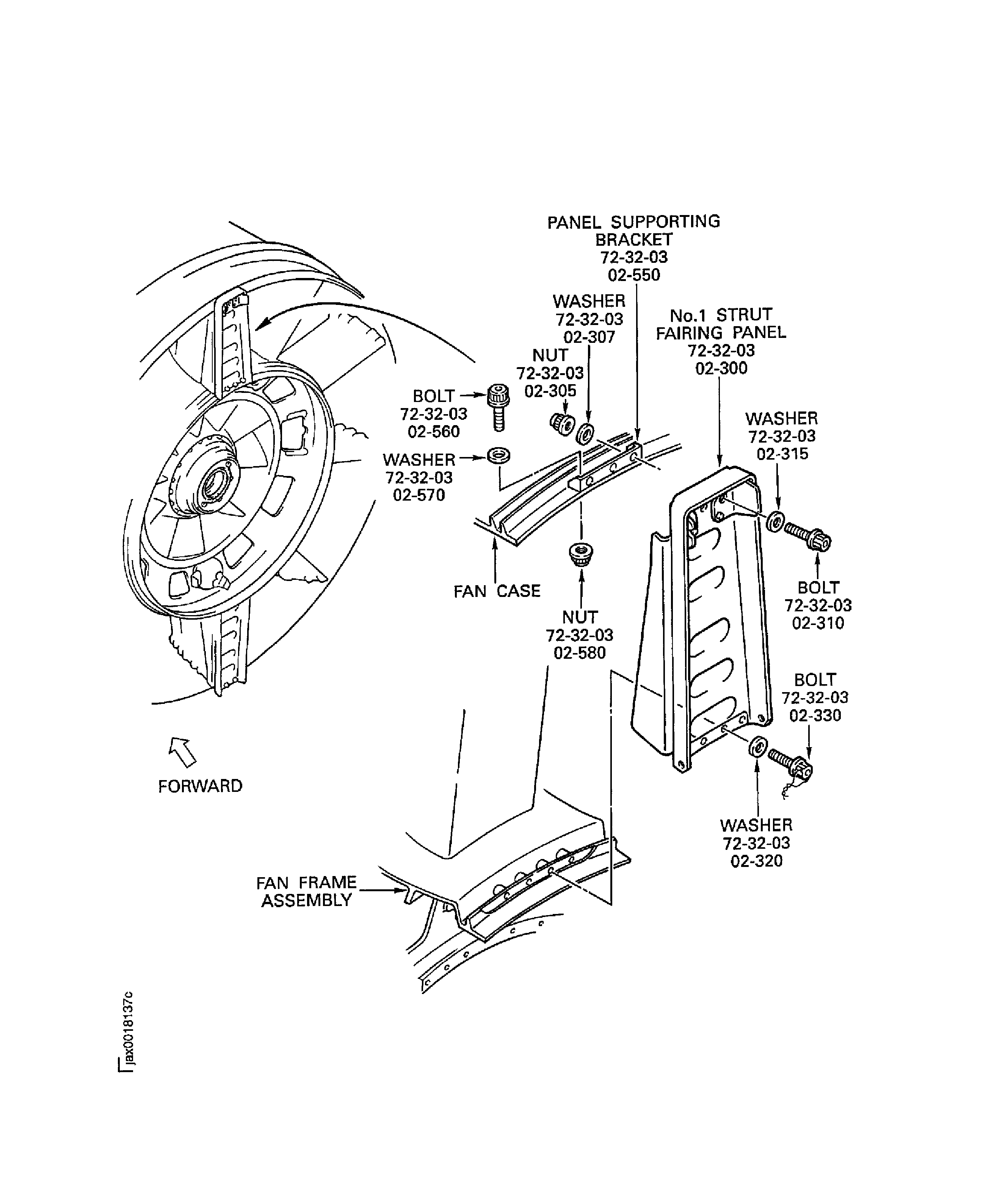
Figure: Pre SBE 72-0175: Install the No.6 Strut Fairing Panel on the Fan Case
Sheet 1

Figure: SBE 72-0175: Install the No. 6 Strut Fairing Panel on the Fan Case
Sheet 2
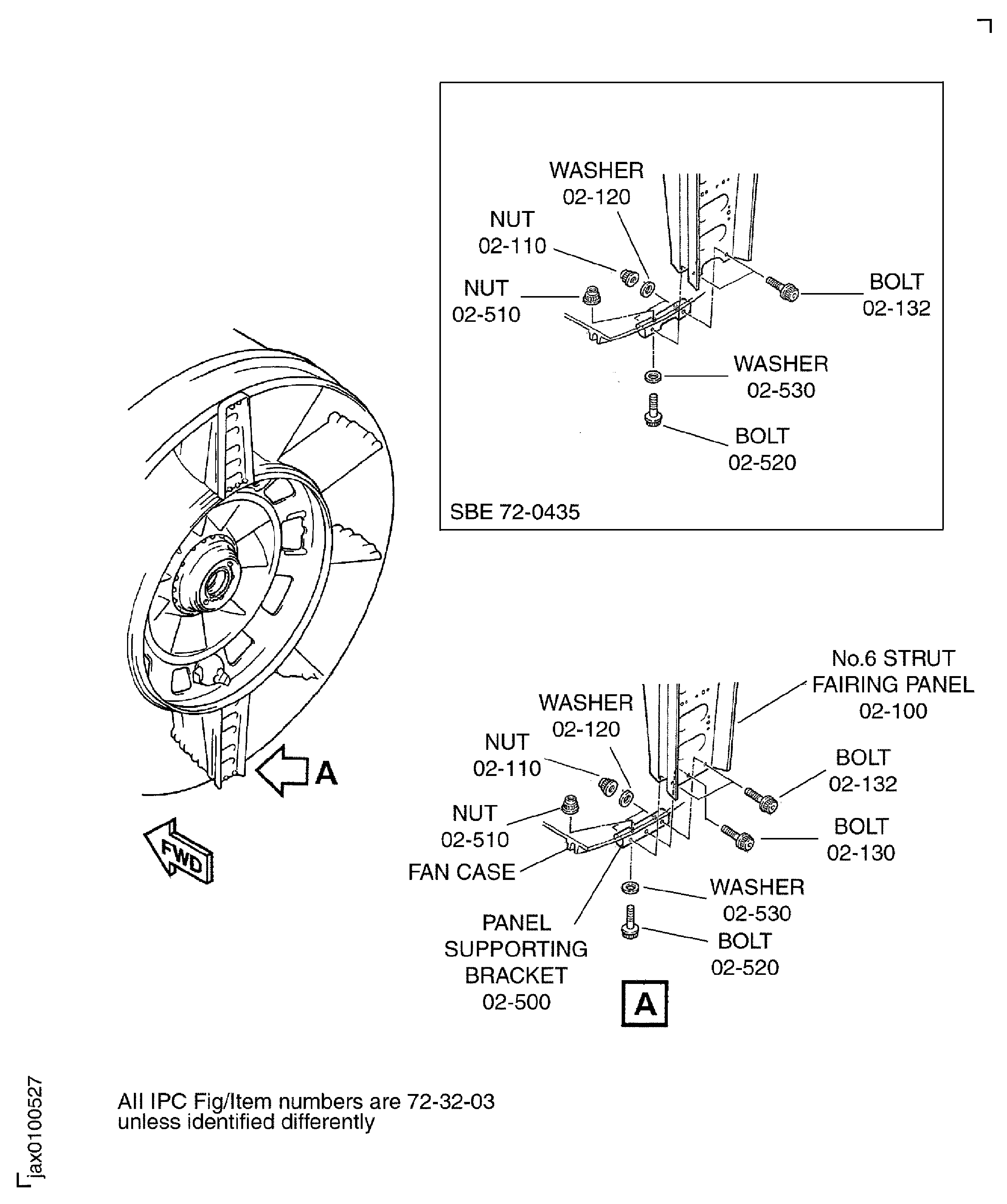
Figure: Install the No.6 Strut Fairing Panel on the Fan Frame Assembly
Install the No.6 Strut Fairing Panel on the Fan Frame Assembly
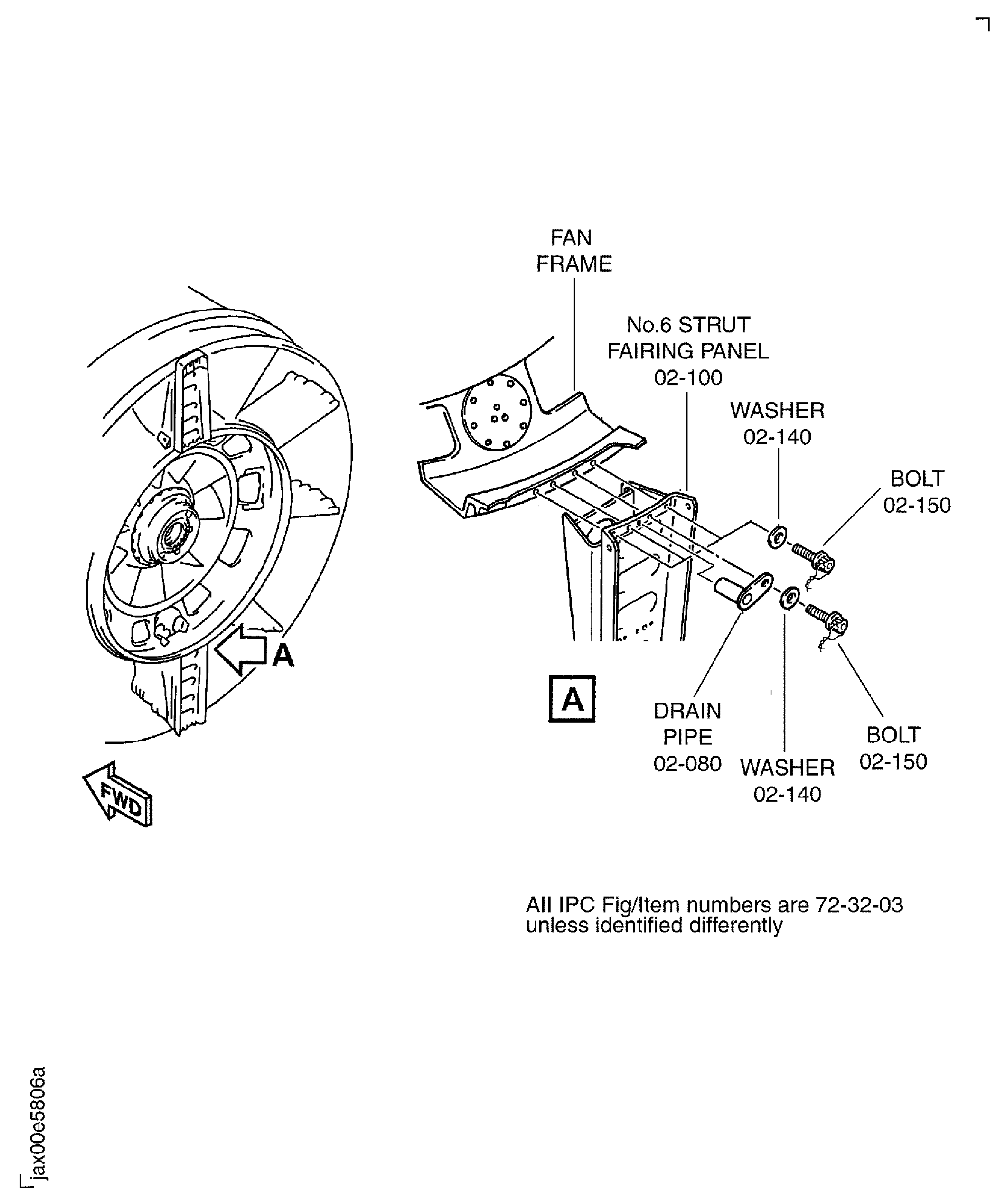
Figure: Install the Stopper on the Fan Frame Assembly
Install the Stopper on the Fan Frame Assembly

Figure: Apply Silicone Rubber Compound to the Corner Strut Fillers and the Panel Corner Fillers
Apply Silicone Rubber Compound to the Corner Strut Fillers and the Panel Corner Fillers
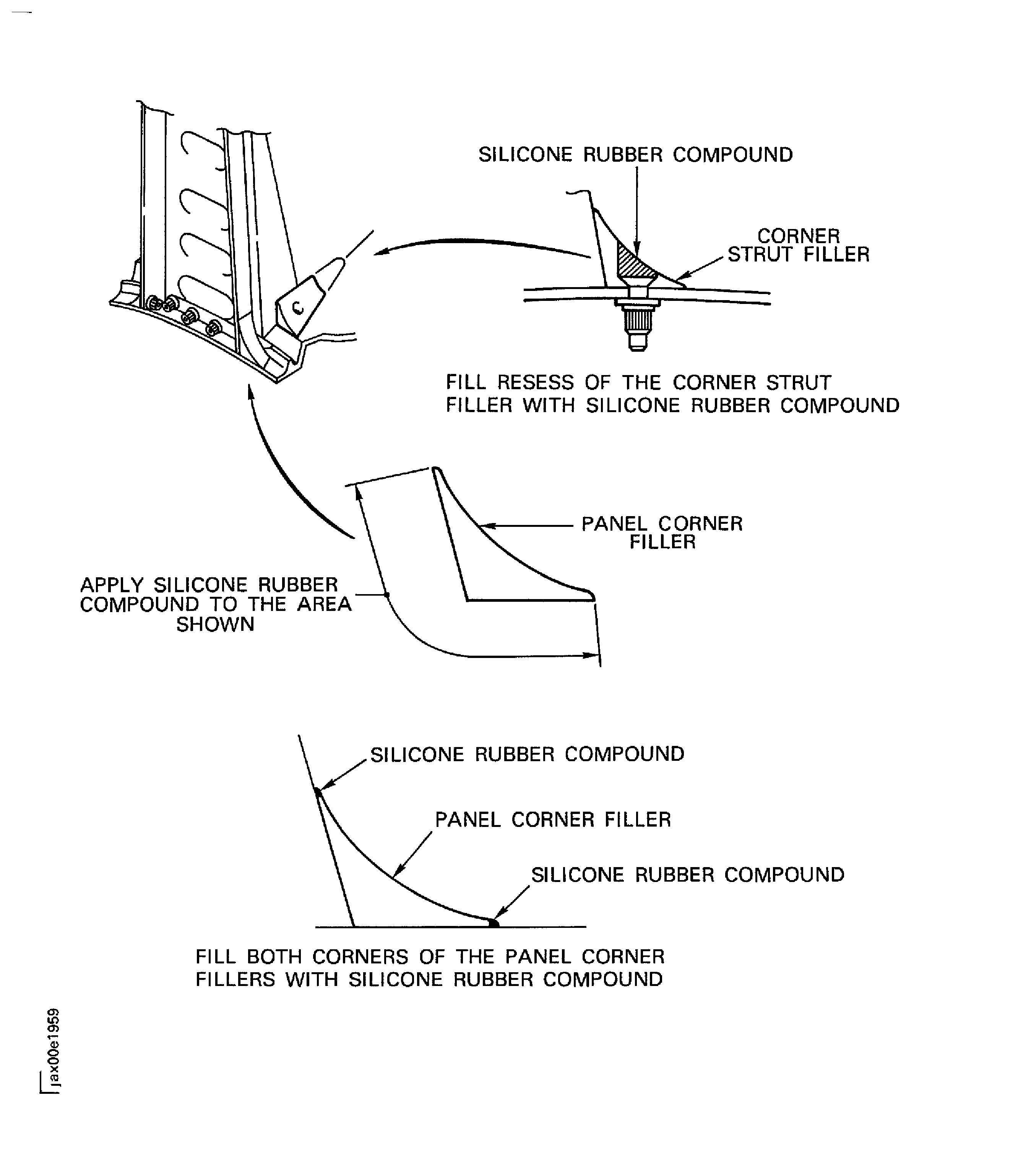
Figure: Install the Panel Corner Fillers and the Corner Strut Fillers on the Fan Frame
Sheet 1

Figure: Install the Panel Corner Fillers and the Corner Strut Fillers on the Fan Frame
Sheet 2

Figure: Install the Fan Exit Pressure Boss and the Block on the Fan Case
Install the Fan Exit Pressure Boss and the Block on the Fan Case
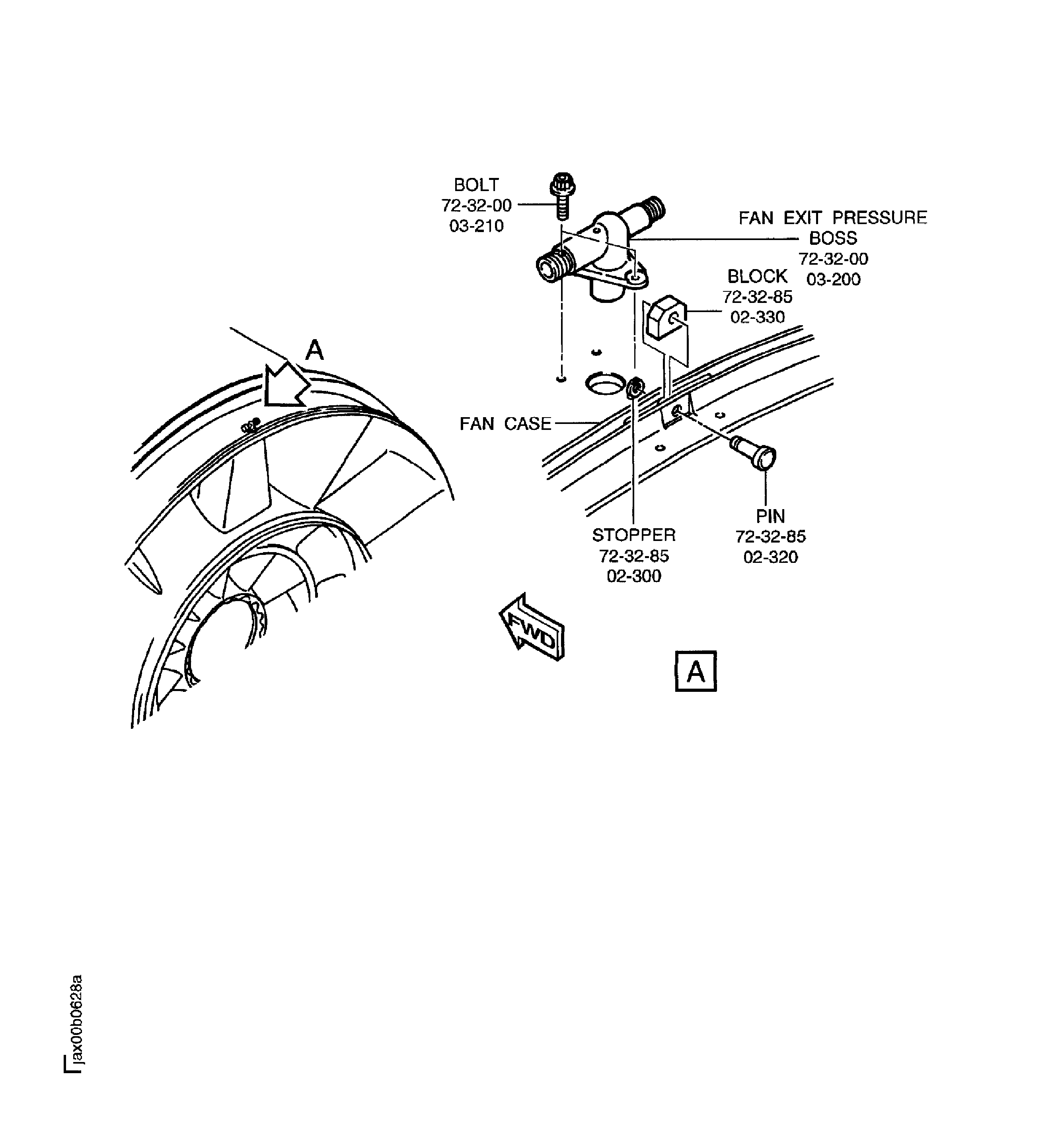
Figure: Remove the Stopper and Release the Lock Pin to Turn the Fan Frame and Fan Case Assembly from Horizontal to Vertical
Remove the Stopper and Release the Lock Pin to Turn the Fan Frame and Fan Case Assembly from Horizontal to Vertical
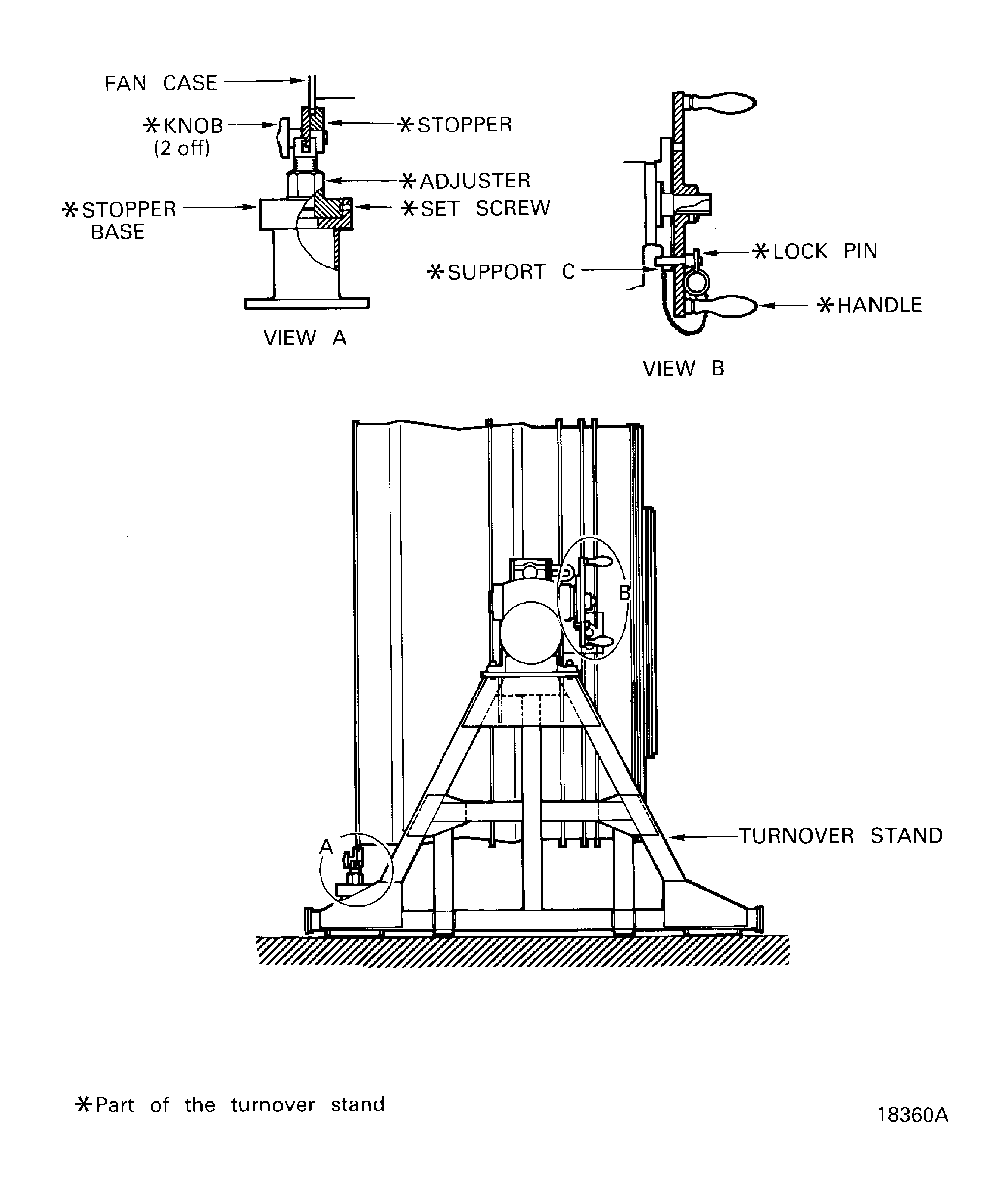
Figure: Install the Six Bolts into the Threaded Holes in the No. 5 and No. 7 Struts
Install the Six Bolts into the Threaded Holes in the No. 5 and No. 7 Struts
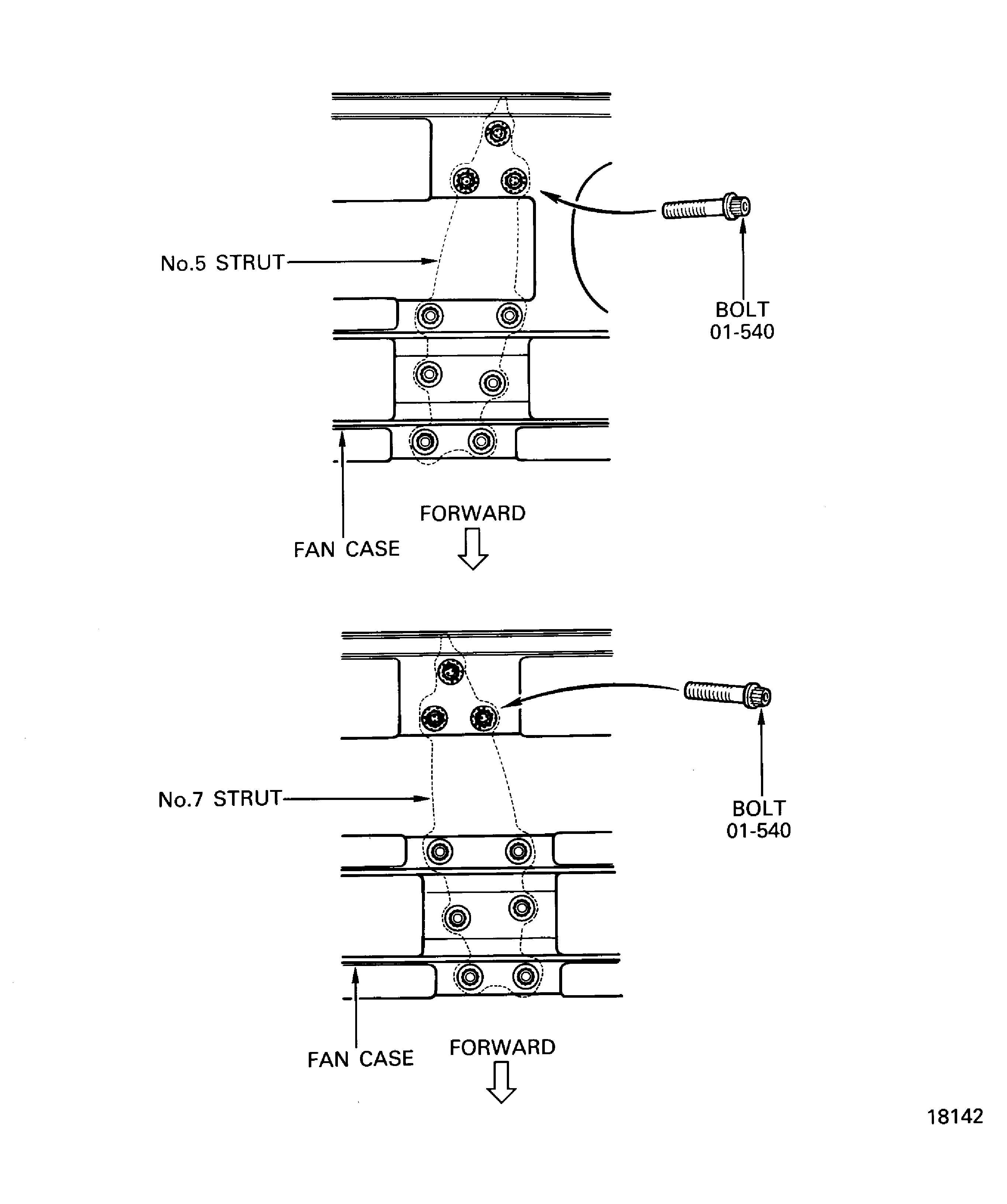
Figure: Pre SBE 72-0216: Install the Shields on the No. 1 Strut Fairing Panel
Sheet 1
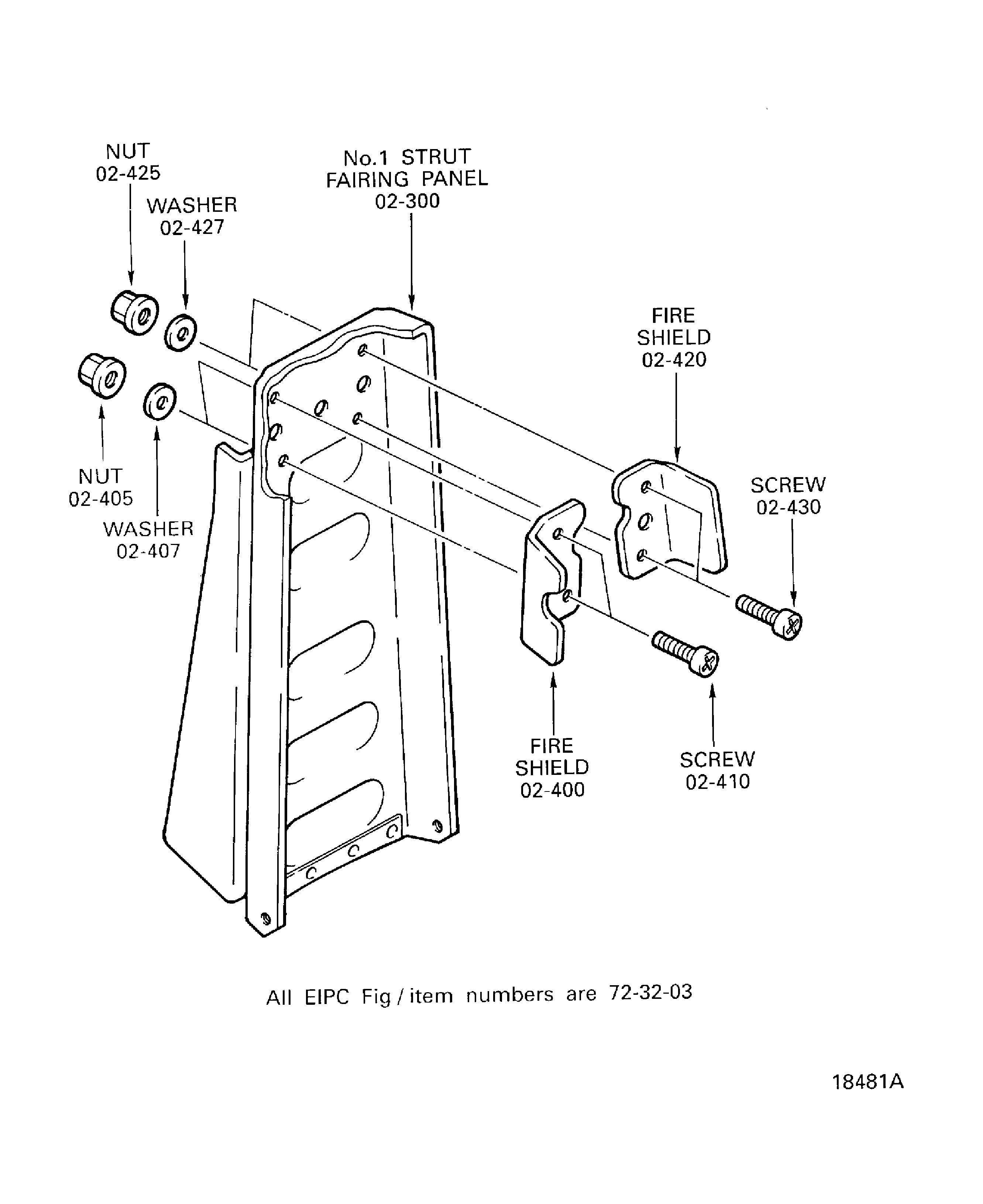
Figure: SBE 72-0216 and Pre SBE 72-0230: Install the Shields on the No. 1 Strut Fairing Panel
Sheet 2