Export Control
EAR Export Classification: Not subject to the EAR per 15 C.F.R. Chapter 1, Part 734.3(b)(3), except for the following Service Bulletins which are currently published as EAR Export Classification 9E991: SBE70-0992, SBE72-0483, SBE72-0580, SBE72-0588, SBE72-0640, SBE73-0209, SBE80-0024 and SBE80-0025.Copyright
© IAE International Aero Engines AG (2001, 2014 - 2021) The information contained in this document is the property of © IAE International Aero Engines AG and may not be copied or used for any purpose other than that for which it is supplied without the express written authority of © IAE International Aero Engines AG. (This does not preclude use by engine and aircraft operators for normal instructional, maintenance or overhaul purposes.).Applicability
Post SBE 72-0564 (SELECTONE PRODUCTION STANDARD)
Common Information
TASK 72-41-00-440-005-C00 HPC Assembly - Assemble The HPC Front Cases To The HPC Rotor Assembly, Assembly-005 - SBE 72-0564 (SelectOne Production Standard)
General
This TASK gives the procedure to assemble the HP compressor front cases on to the HP compressor rotor assembly only for engines, which have SBE 72-0564, SBE 72-0571 and SBE 72-0573 (SelectOne(TM) Production Standard) incorporated.
TASK 72-41-00-440-001-D00 (ASSEMBLY-001, CONFIG-003) gives the procedure to install the HP compressor rear cases and vanes on to the HP compressor rotor assembly.
Fig/item numbers in parentheses in the procedure agree with those used in the IPC. Only the primary Fig/item numbers are used. For the service bulletin alpha variants refer to the IPC.
For all parts identified in a different Chapter/Section/Subject, the applicable Chapter/Section/Subject comes before the Fig/item numbers.
For standard torque data and procedures refer to the SPM TASK 70-41-00-400-501, SPM TASK 70-41-01-400-501 and SPM TASK 70-41-02-400-501.
Special torque data and assembly tolerances are included in this procedure.
Lubricate all threads and abutment faces of nuts and bolts with CoMat 10-077 APPROVED ENGINE OILS, unless other lubricants are referred to in the procedure.
To identify, lubricate and install seal rings, refer to the SPM TASK 70-44-01-400-501.
For lockwire data and procedures refer to the SPM TASK 70-42-05-400-501.
For safety cable data and procedures refer to SPM TASK 70-42-08-400-501.
Safety the threaded fasteners in the ATA Chapter/Section/Subject 72-41-34 as applicable with CoMat 02-274 SAFETY CABLE KIT or CoMat 02-275 SAFETY CABLE KIT.
After assembly apply CoMat 07-038 AIR DRYING ENAMEL to any damaged surface protection, joint flange and attach parts. Use the correct color of the air drying enamel. Refer to the SPM TASK 70-63-02-380-501.
The number for each radial location must be identified in a clockwise direction. These start at the engine top position when you look from the rear of the engine, unless stated differently in the procedure.
Refer to Figure for a sectional view of the HP compressor assembly.
For practices and processes referred to in the procedure by the TASK number are in the SPM.
NOTE
NOTE
NOTE
NOTE
Preliminary Requirements
Pre-Conditions
NONESupport Equipment
| Name | Manufacturer | Part Number / Identification | Quantity | Remark |
|---|---|---|---|---|
| IAE 1R18090 Safety support stand | 0AM53 | IAE 1R18090 | 1 | |
| IAE 1R18214 Build stand | 0AM53 | IAE 1R18214 | 1 | |
| IAE 1R18217 Lift fixture | 0AM53 | IAE 1R18217 | 1 | |
| IAE 1R18220 Holding fixture | 0AM53 | IAE 1R18220 | 1 | |
| IAE 1R18222 Support rod | 0AM53 | IAE 1R18222 | 2 | |
| IAE 1R18251 Axial measuring fixture | 0AM53 | IAE 1R18251 | 1 | |
| IAE 1R18252 Protective cover | 0AM53 | IAE 1R18252 | 1 | |
| IAE 1R18254 Rigging pin | 0AM53 | IAE 1R18254 | 1 | |
| IAE 1R18294 Clock holder | 0AM53 | IAE 1R18294 | 1 | |
| IAE 1R18423 Rigging pin | 0AM53 | IAE 1R18423 | 18 | |
| IAE 1R18892 Rigging pin | 0AM53 | IAE 1R18892 | 6 | |
| IAE 1R18893 Riggingpin | 0AM53 | IAE 1R18893 | 6 | |
| IAE 1R18894 Rigging pin | 0AM53 | IAE 1R18894 | 6 | |
| IAE 1R18895 Rigging pin | 0AM53 | IAE 1R18895 | 6 | |
| IAE 1R18441 Lifting adapter | 0AM53 | IAE 1R18441 | 1 | |
| IAE 1R19633 Split ring assembly | 0AM53 | IAE 1R19633 | 1 | |
| IAE 1R18219 Support ring | 0AM53 | IAE 1R18219 | ||
| IAE 1R18401 Support stand | 0AM53 | IAE 1R18401 |
Consumables, Materials and Expendables
| Name | Manufacturer | Part Number / Identification | Quantity | Remark |
|---|---|---|---|---|
| CoMat 02-126 LOCKWIRE | LOCAL | CoMat 02-126 | ||
| CoMat 02-274 SAFETY CABLE KIT | LOCAL | CoMat 02-274 | ||
| CoMat 02-275 SAFETY CABLE KIT | LOCAL | CoMat 02-275 | ||
| CoMat 07-038 AIR DRYING ENAMEL | K3504 | CoMat 07-038 | ||
| CoMat 08-013 COLD CURING SILICONE COMPOUND | LOCAL | CoMat 08-013 | ||
| CoMat 10-077 APPROVED ENGINE OILS | LOCAL | CoMat 10-077 | ||
| CoMat 10-108 HIGH PERFORMANCE PENETRATING LUBRICANT WITH TEFLON (R) | LOCAL | CoMat 10-108 |
Safety Requirements
NONEProcedure
Refer to Figure.
Install IAE 1R18220 Holding fixture 1 off on to the compressor rear outer case and the HP compressor rear shaft.
SUBTASK 72-41-00-440-290 Install the Holding Fixture on to the Compressor Rear Outer Case and the HP Compressor Rear Shaft
Adjust the position of IAE 1R18220 Holding fixture 1 off.
Remove IAE 1R18219 Support ring and IAE 1R18401 Support stand from IAE 1R18214 Build stand.
Install IAE 1R18222 Support rod 2 off on to the build stand.
SUBTASK 72-41-00-440-291 Install the Support Ring on the Build Stand
Install the two sealing strips HP COMPRESSOR SPLIT CASE (72-41-31,01-678) at the stage 4 rotor path ring HP COMPRESSOR SPLIT CASE (72-41-31,01-690). Install the sealing strips at the opposite split line flanges.
Install the two sealing strips HP COMPRESSOR SPLIT CASE (72-41-31,01-679) at the stage 5 rotor path ring HP COMPRESSOR SPLIT CASE (72-41-31,01-695). Install the sealing strips at the opposite split line flanges.
Install the two sealing strips HP COMPRESSOR SPLIT CASE (72-41-31,01-680) at the stage 6 rotor path ring HP COMPRESSOR SPLIT CASE (72-41-31,01-700). Install the sealing strips at the opposite split line flanges.
Install the stage 4, 5 and 6 sealing strips.
Install the upper and lower half HP compressor front case HP COMPRESSOR SPLIT CASE (72-41-31,01-400).

CAUTION
THE BOLTS ARE A CLOSE TOLERANCE FIT. THEY MUST NOT BE TURNED WHEN BEING INSTALLED. IF YOU DO NOT DO THIS IT WILL DAMAGE THE HP COMPRESSOR FRONT CASE SPLIT LINE FLANGE.NOTE
Do not install bolts, nuts and spacers at the bolt positions 8, 12, 30 and 32.Install the 28 bolts HPC Assembly (72-41-00,01-108), the 28 spacers HPC Assembly (72-41-00,01-104) and the 28 nuts HPC Assembly (72-41-00,01-102) at the split line flanges.
Install the four bolts HPC Assembly (72-41-00,01-112) through the upper and lower support brackets and the split line flange.
Install the four nuts HPC Assembly (72-41-00,01-101) on to the bolts.
At the bolt positions 8, 12, 30 and 32 install the upper and lower support brackets (HPC Assembly (72-41-00,04-600), HPC Assembly (72-41-00,04-650), HPC Assembly (72-41-00,04-620) and HPC Assembly (72-41-00,04-670)).
Install the four stage 4 actuating levers HPC Variable Stator Vane Actuation System (72-41-34,04-100) to positions 50, 1, 25 and 26 and the four bolts HPC Variable Stator Vane Actuation System (72-41-34,04-102) to the actuating levers.
Install the four stage 5 actuating levers HPC Variable Stator Vane Actuation System (72-41-34,05-140) to positions 64, 1, 32 and 33 and the four bolts HPC Variable Stator Vane Actuation System (72-41-34,05-142) to the actuating levers.
The steps that follow are optional:
CAUTION
MAKE SURE THAT THE VANE SPINDLE IS FULLY ENGAGED INTO THE LEVER. THIS WILL HELP TO PREVENT DAMAGE TO THE ENGINE.Install the stage 4 levers at positions 50, 1, 25, 26 and the stage 5 levers at positions 64, 1, 32 and 33 to the spindles.
Install the HP compressor front case split line flange bolts, spacers and nuts.
SUBTASK 72-41-00-440-292 Install the HP Compressor Front Cases
Install the 10 pins HPC Assembly (72-41-00,01-322) and the 10 lock plates HPC Assembly (72-41-00,01-320) together with 10 bolts HPC Assembly (72-41-00,01-308) and the 10 nuts HPC Assembly (72-41-00,01-302). Lightly tighten the nuts at the positions B and D.
Install the two bolts HPC Assembly (72-41-00,01-308) and the two nuts HPC Assembly (72-41-00,01-302) to attach the bracket to the flange.
Install the bracket HPC Assembly (72-41-00,03-780).
Install the two bolts HPC Assembly (72-41-00,01-308) and the two nuts HPC Assembly (72-41-00,01-302) to attach the bracket to the flange.
Install the bracket HPC Assembly (72-41-00,03-240).
Install the two bolts HPC Assembly (72-41-00,01-308) and the two nuts HPC Assembly (72-41-00,01-302) to attach the bracket to the flange.
Install the bracket HPC Assembly (72-41-00,03-260).
Apply CoMat 08-013 COLD CURING SILICONE COMPOUND to the identification plate HPC Assembly (72-41-00,03-010) and bond the plate to the bracket HPC Assembly (72-41-00,03-020). Refer to the SPM TASK 70-36-02-360-501, SUBTASK 70-36-02-360-020.
Attach the plate to the bracket with the two bolts HPC Assembly (72-41-00,03-014) the two washers HPC Assembly (72-41-00,03-013) and the two nuts HPC Assembly (72-41-00,03-012). Torque tighten the nuts to 36 to 45 lbfin (4 to 5 Nm.).
Install the two bolts HPC Assembly (72-41-00,01-308) and the two nuts HPC Assembly (72-41-00,01-302) to attach the assembly to the flange rear face.
Install the HP system module serial number identification plate HPC Assembly (72-41-00,03-010) and bracket HPC Assembly (72-41-00,03-020).
Install the two bolts HPC Assembly (72-41-00,01-308) and the two nuts HPC Assembly (72-41-00,01-302) to attach the bracket to the flange.
Install the bracket HPC Assembly (72-41-00,03-320).
Install the actuator rear bracket HPC Assembly (72-41-00,03-380) into position on the HP compressor front case rear flange at the bolt positions 21 and 22.
Install the bolt HPC Assembly (72-41-00,01-308) and the nut HPC Assembly (72-41-00,01-302) at the position 21 to attach the bracket HPC Assembly (72-41-00,03-380) to the flange.
Install the bracket HPC Assembly (72-41-00,03-575) into position on the HP compressor rear case front flange at the bolt positions 22 and 23.
Install the bolt HPC Assembly (72-41-00,01-314) and the nut HPC Assembly (72-41-00,01-302) at the position 22 to attach the brackets HPC Assembly (72-41-00,03-380) and HPC Assembly (72-41-00,03-575) to the flange.
Install the bolt HPC Assembly (72-41-00,01-308) and the nut HPC Assembly (72-41-00,01-302) at the position 23 to attach the bracket HPC Assembly (72-41-00,03-575) to the flange.
Install the actuator rear bracket HPC Assembly (72-41-00,03-380) and the bracket HPC Assembly (72-41-00,03-575).
Install the two bolts HPC Assembly (72-41-00,01-308) and the two nuts HPC Assembly (72-41-00,01-302) to attach the bracket to the flange.
Install the bracket HPC Assembly (72-41-00,03-360).
Install the two bolts HPC Assembly (72-41-00,01-308) and the two nuts HPC Assembly (72-41-00,01-302) to attach the bracket to the flange.
Install the bracket HPC Assembly (72-41-00,03-510).
Install the two bolts HPC Assembly (72-41-00,01-308) and the two nuts HPC Assembly (72-41-00,01-302) to attach the bracket to the flange.
Install the bracket HPC Assembly (72-41-00,03-530).
Install the two bolts HPC Assembly (72-41-00,01-308) and the two nuts HPC Assembly (72-41-00,01-302) to attach the bracket to the flange.
Install the bracket HPC Assembly (72-41-00,03-550).
Install the two bolts HPC Assembly (72-41-00,01-308) and the two nuts HPC Assembly (72-41-00,01-302) to attach the bracket to the flange.
Install the bracket HPC Assembly (72-41-00,03-720).
Put the bracket HPC Assembly (72-41-00,03-760) into position on the compressor rear outer case front flange at the bolt holes 45 and 46.
Install one bolt HPC Assembly (72-41-00,01-308) and one nut HPC Assembly (72-41-00,01-302) at bolt hole 45 to attach the bracket HPC Assembly (72-41-00,03-760) to the flange.
Put the bracket HPC Assembly (72-41-00,03-840) into position on the compressor front case rear flange at the bolt holes 46 and 47.
Install the two bolts HPC Assembly (72-41-00,01-308) and the two nuts HPC Assembly (72-41-00,01-302) to attach the bracket HPC Assembly (72-41-00,03-760) and the bracket HPC Assembly (72-41-00,03-840) to the flange.
Install the bracket HPC Assembly (72-41-00,03-760) and the bracket HPC Assembly (72-41-00,03-840).
Put the bracket HPC Assembly (72-41-00,03-850) into position on the compressor front case rear flange at the bolt holes 50 and 51.
Install the two bolts HPC Assembly (72-41-00,01-308) and the two nuts HPC Assembly (72-41-00,01-302) to attach the bracket to the flange.
Install the bracket HPC Assembly (72-41-00,03-850).
Install the two bolts HPC Assembly (72-41-00,01-314) and the two nuts HPC Assembly (72-41-00,01-302) to attach the bracket to the flange.
Install the bracket HPC Assembly (72-41-00,03-770).
Install the two bolts HPC Assembly (72-41-00,01-308) and the two nuts HPC Assembly (72-41-00,01-302) to attach the bracket to the flange.
Install the bracket HPC Assembly (72-41-00,03-790).
Install the remaining bolts HPC Assembly (72-41-00,01-308) and the nuts HPC Assembly (72-41-00,01-302) at the remaining bolt holes.
Remove the IAE 1R18220 Holding fixture 1 off.
SUBTASK 72-41-00-440-293 Install the HP Compressor Front Case Rear Flange Attach Parts
Make sure that six of IAE 1R18423 Rigging pin 6 off or IAE 1R18892 Rigging pin 6 off are installed through the VIGV upper and lower actuating rings HPC Variable Stator Vane Actuation System (72-41-34,02-440) and HPC Variable Stator Vane Actuation System (72-41-34,02-540) to the HP compressor front case at positions D.
Put the front bridging piece HPC Variable Stator Vane Actuation System (72-41-34,02-200) and the rear bridging piece HPC Variable Stator Vane Actuation System (72-41-34,02-201) into position on the upper and lower actuating rings.
Install the four bolts HPC Variable Stator Vane Actuation System (72-41-34,02-202) and the four self locking nuts HPC Variable Stator Vane Actuation System (72-41-34,02-204) which attach the front and rear bridging pieces to the upper and lower actuating rings.
Install the left hand bridging pieces on to the VIGV upper and lower actuating rings HPC Variable Stator Vane Actuation System (72-41-34,02-440) and HPC Variable Stator Vane Actuation System (72-41-34,02-540).
SUBTASK 72-41-00-440-294 Install the VIGV Bridging Pieces
Make sure that six of IAE 1R18423 Rigging pin 6 off or IAE 1R18893 Riggingpin 6 off are installed through the stage 3 upper and lower actuating rings HPC Variable Stator Vane Actuation System (72-41-34,03-440) and HPC Variable Stator Vane Actuation System (72-41-34,03-540) to the HP compressor front case at positions D.
Put the front bridging piece HPC Variable Stator Vane Actuation System (72-41-34,03-200) and the rear bridging piece HPC Variable Stator Vane Actuation System (72-41-34,03-201) into position on the upper and lower actuating rings.
Install the four bolts HPC Variable Stator Vane Actuation System (72-41-34,03-202) and the four self locking nuts HPC Variable Stator Vane Actuation System (72-41-34,03-204) which attach the front and rear bridging pieces to the upper and lower actuating rings.
Install the left hand bridging pieces on to the stage 3 upper and lower actuating rings HPC Variable Stator Vane Actuation System (72-41-34,03-440) and HPC Variable Stator Vane Actuation System (72-41-34,03-540).
SUBTASK 72-41-00-440-295 Install the Stage 3 Bridging Pieces
Make sure that six of IAE 1R18423 Rigging pin 6 off or IAE 1R18894 Rigging pin 6 off are installed through the stage 4 upper and lower actuating rings HPC Variable Stator Vane Actuation System (72-41-34,04-440) and HPC Variable Stator Vane Actuation System (72-41-34,04-540) to the HP compressor front case at positions C.
Put the front bridging piece HPC Variable Stator Vane Actuation System (72-41-34,04-200) and the rear bridging piece HPC Variable Stator Vane Actuation System (72-41-34,04-201) into position on the upper and lower actuating rings.
Install the four bolts HPC Variable Stator Vane Actuation System (72-41-34,04-202) and the four self locking nuts HPC Variable Stator Vane Actuation System (72-41-34,04-203) which attach the front and rear bridging pieces to the upper and lower actuating rings.
Install the left hand bridging pieces on to the stage 4 upper and lower actuating rings HPC Variable Stator Vane Actuation System (72-41-34,04-440) and HPC Variable Stator Vane Actuation System (72-41-34,04-540).
SUBTASK 72-41-00-440-296 Install the Stage 4 Bridging Pieces
Make sure that six of IAE 1R18423 Rigging pin 6 off or IAE 1R18895 Rigging pin 6 off are installed through the stage 5 upper and lower actuating rings HPC Variable Stator Vane Actuation System (72-41-34,05-440) and HPC Variable Stator Vane Actuation System (72-41-34,05-540) to the HP compressor front case at positions C.
Put the front bridging piece HPC Variable Stator Vane Actuation System (72-41-34,05-200) and the rear bridging piece HPC Variable Stator Vane Actuation System (72-41-34,05-201) into position on the upper and lower actuating rings.
Install the four bolts HPC Variable Stator Vane Actuation System (72-41-34,05-202) and the four self locking nuts HPC Variable Stator Vane Actuation System (72-41-34,05-203) which attach the front and rear bridging pieces to the upper and lower actuating rings.
Install the left hand bridging pieces on to the stage 5 upper and lower actuating rings HPC Variable Stator Vane Actuation System (72-41-34,05-440) and HPC Variable Stator Vane Actuation System (72-41-34,05-540).
SUBTASK 72-41-00-440-297 Install the Stage 5 Bridging Pieces
Make sure that six of IAE 1R18423 Rigging pin 6 off or IAE 1R18892 Rigging pin 6 off are installed through the VIGV actuating ring to the HP compressor front case at the positions D.
Loosen the six self locking nuts HPC Variable Stator Vane Actuation System (72-41-34,02-689) which attach the centralizer support assemblies HPC Variable Stator Vane Actuation System (72-41-34,02-680) to the actuating ring.
NOTE
The maximum clearance is necessary under each centralizer support assembly.Loosen the four self locking nuts HPC Variable Stator Vane Actuation System (72-41-34,02-743) which attach the centralizer support assemblies HPC Variable Stator Vane Actuation System (72-41-34,02-730) to the actuating ring.
Torque the self locking nut HPC Variable Stator Vane Actuation System (72-41-34,02-689) to 85 to 105 lbfin (10.00 to 12.00 Nm).
NOTE
The upper limit is recommended.
Measure the gap between the centralizer support assemblies and the actuating ring. Start with the centralizer position marked 1. Refer to Figure.
Do the steps (3)(a) thru (e) again for the centralizer positions marked 2 to 4. Obey the sequence on Figure.
Torque the self locking nuts HPC Variable Stator Vane Actuation System (72-41-34,02-743) to 36 to 45 lbfin (4.00 to 5.00 Nm).
NOTE
The upper limit is recommended.
Measure the gap between the centralizer support assembly and the actuating ring for the centralizer positions marked 5 and 6. Obey the sequence on Figure.
Torque the self locking nut HPC Variable Stator Vane Actuation System (72-41-34,02-689) to 85 to 105 lbfin (10.00 to 12.00 Nm).
NOTE
The upper limit is recommended.
Measure the gap between the centralizer support assembly and the actuating ring for the centralizer positions marked 7 and 8. Obey the sequence on Figure.
Install the centralizer adjusting shims HPC Variable Stator Vane Actuation System (72-41-34,02-654) thru HPC Variable Stator Vane Actuation System (72-41-34,02-670).
NOTE
The maximum clearance is necessary under each centralizer support assembly.
SUBTASK 72-41-00-440-330 Adjust the VIGV Centralizer Gap
Make sure that six of IAE 1R18423 Rigging pin rigging pin 6 off or IAE 1R18893 Riggingpin rigging pin 6 off are installed through the VIGV actuating ring to the HP compressor front case at the positions D.
Loosen the two self locking nuts HPC Variable Stator Vane Actuation System (72-41-34,03-698) which attach the centralizer support assemblies HPC Variable Stator Vane Actuation System (72-41-34,03-680) to the actuating ring.
NOTE
The maximum clearance is necessary under each centralizer support assembly.Loosen the 12 self locking nuts HPC Variable Stator Vane Actuation System (72-41-34,03-734) which attach the centralizer support assemblies HPC Variable Stator Vane Actuation System (72-41-34,03-730) to the actuating ring.
Torque the self locking nuts HPC Variable Stator Vane Actuation System (72-41-34,03-734) to 36 to 45 lbfin (4.00 to 5.00 Nm).
NOTE
The upper limit is recommended.
Measure the gap between the centralizer support assemblies and the actuating ring. Start with the centralizer position marked 1. Refer to Figure.
Do the steps (3) (a) thru (e) again for the centralizer positions marked 2 to 6. Obey the sequence on Figure.
Torque the self locking nut HPC Variable Stator Vane Actuation System (72-41-34,03-698) to 85 to 105 lbfin (10.00 to 12.00 Nm).
NOTE
The upper limit is recommended.
Measure the gap between the centralizer support assembly and the actuating ring for the centralizer positions marked 7 and 8. Obey the sequence on Figure.
Install the centralizer adjusting shims HPC Variable Stator Vane Actuation System (72-41-34,03-654) thru HPC Variable Stator Vane Actuation System (72-41-34,03-670).
NOTE
The maximum clearance is necessary under each centralizer support assembly.
SUBTASK 72-41-00-440-331 Adjust the Stage 3 Centralizer Gap
Make sure that six of IAE 1R18423 Rigging pin 6 off or IAE 1R18894 Rigging pin 6 off are installed through the VIGV actuating ring to the HP compressor front case at the positions C.
Loosen the 16 self locking nuts HPC Variable Stator Vane Actuation System (72-41-34,04-698) which attach the centralizer support assemblies HPC Variable Stator Vane Actuation System (72-41-34,04-680) to the actuating ring.
Torque the self locking nuts HPC Variable Stator Vane Actuation System (72-41-34,04-698) to 36 to 45 lbfin (4.00 to 5.00 Nm).
NOTE
The upper limit is recommended.
Measure the gap between the centralizer support assemblies and the actuating ring. Start with the centralizer position marked 1. Refer to Figure.
Do the steps (2) (a) thru (e) again for the centralizer positions marked 2 to 8. Obey the sequence on Figure.
Install the centralizer adjusting shims HPC Variable Stator Vane Actuation System (72-41-34,04-654) thru HPC Variable Stator Vane Actuation System (72-41-34,04-670).
NOTE
The maximum clearance is necessary under each centralizer support assembly.
SUBTASK 72-41-00-440-332 Adjust the Stage 4 Centralizer Gap
Make sure that six of IAE 1R18423 Rigging pin 6 off or IAE 1R18895 Rigging pin 6 off are installed through the VIGV actuating ring to the HP compressor front case at the positions C.
Loosen the 16 self locking nuts HPC Variable Stator Vane Actuation System (72-41-34,05-698) which attach the centralizer support assemblies HPC Variable Stator Vane Actuation System (72-41-34,05-680) to the actuating ring.
Torque the self locking nuts HPC Variable Stator Vane Actuation System (72-41-34,05-698) to 36 to 45 lbfin (4.00 to 5.00 Nm).
NOTE
The upper limit is recommended.
Measure the gap between the centralizer support assemblies and the actuating ring. Start with the centralizer position marked 1. Refer to Figure.
Do the steps (2) (a) thru (e) again for the centralizer positions marked 2 to 8. Obey the sequence on Figure.
Install the centralizer adjusting shims HPC Variable Stator Vane Actuation System (72-41-34,05-654) thru HPC Variable Stator Vane Actuation System (72-41-34,05-670).
NOTE
The maximum clearance is necessary under each centralizer support assembly.
SUBTASK 72-41-00-440-333 Adjust the Stage 5 Centralizer Gap
Install IAE 1R18217 Lift fixture 1 off on to the HP compressor assembly.
Install IAE 1R18441 Lifting adapter 1 off on to the compressor shaft.
SUBTASK 72-41-00-440-298 Install the Lift Fixture and the Lifter on to the HP Compressor Assembly
Refer to Figure.
Install the HP compressor assembly on IAE 1R18090 Safety support stand 1 off. Only lower the HP compressor assembly sufficiently until it is on the safety support stand.
SUBTASK 72-41-00-440-299 Install the HP Compressor Assembly on the Safety Support Stand
Refer to Figure.
Remove the two halves of the IAE 1R19633 Split ring assembly. Make sure the 40 one piece bushes are attached to the stator vanes.
Make sure that CoMat 10-108 HIGH PERFORMANCE PENETRATING LUBRICANT WITH TEFLON (R) is applied on the inner vane spindles and mating faces of the 40 inner bushes HPC Variable Stator Vane Shrouds And Related Part (72-41-33,01-190).
NOTE
The inlet guide vane rear upper half shroud has four location pins.
The inlet guide vane rear lower half shroud has three location pins.
Install the 20 bolts HPC Variable Stator Vane Shrouds And Related Part (72-41-33,01-138), the 40 dee-headed washers HPC Variable Stator Vane Shrouds And Related Part (72-41-33,01-134) and the 20 nuts HPC Variable Stator Vane Shrouds And Related Part (72-41-33,01-130). These attach the two halves of the inlet guide vane front shroud.
Install the variable inlet guide vane front half shroud HPC Variable Stator Vane Shrouds And Related Part (72-41-33,01-200).
SUBTASK 72-41-00-440-300 Install the Variable Inlet Guide Vane Front Half Shroud
Use the hoist installed in Step and lift the HP compressor assembly from the safety support stand.
Install the HP compressor assembly on to IAE 1R18214 Build stand 1 off.
SUBTASK 72-41-00-440-301 Install the HP Compressor Assembly in the Build Stand
Install IAE 1R18252 Protective cover 1 off on to the HP compressor assembly. Make sure the protective cover is correctly installed on the compressor rear outer case rear flange.
SUBTASK 72-41-00-440-303 Install the Protective Cover on to the HP Compressor Assembly
Locate the right hand bearing HPC Variable Stator Vane Actuation System (72-41-34,01-195) in the VIGV position on the crankshaft.
Install the bolt HPC Variable Stator Vane Actuation System (72-41-34,01-184), the two spacers HPC Variable Stator Vane Actuation System (72-41-34,01-179, the spacer (72-41-34,01-183) and the nut HPC Variable Stator Vane Actuation System (72-41-34,01-182) to attach right hand bearing to the crankshaft.
Torque the nut HPC Variable Stator Vane Actuation System (72-41-34,01-182) to 170 to 210 lbfin (19 to 24 Nm). Install the cotter pin HPC Variable Stator Vane Actuation System (72-41-34,01-181) through the nut and bolt to safety the assembly. Follow the procedure given in Step to install the cotter pin.
Install the VIGV control rod assembly HPC Variable Stator Vane Actuation System (72-41-34,01-200).
Locate the right hand bearing HPC Variable Stator Vane Actuation System (72-41-34,01-245) in the stage 3 position on the crankshaft.
Install the bolt HPC Variable Stator Vane Actuation System (72-41-34,01-234), the two spacers HPC Variable Stator Vane Actuation System (72-41-34,01-237), the spacer HPC Variable Stator Vane Actuation System (72-41-34,01-233) and the nut HPC Variable Stator Vane Actuation System (72-41-34,01-230).
Torque the nut to 170 to 210 lbfin (19 to 24 Nm). Install the cotter pin HPC Variable Stator Vane Actuation System (72-41-34,01-228). Follow the procedure given in Step to install the cotter pin.
Install the stage 3 control rod assembly HPC Variable Stator Vane Actuation System (72-41-34,01-250).
Locate the right hand bearing HPC Variable Stator Vane Actuation System (72-41-34,01-295) on the stage 4 position on the crankshaft.
Install the bolt HPC Variable Stator Vane Actuation System (72-41-34,01-284), the two spacers HPC Variable Stator Vane Actuation System (72-41-34,01-281), the spacer HPC Variable Stator Vane Actuation System (72-41-34,01-283) and the nut HPC Variable Stator Vane Actuation System (72-41-34,01-280).
Torque the nut to 170 to 210 lbfin (19 to 24 Nm). Install the cotter pin HPC Variable Stator Vane Actuation System (72-41-34,01-278) through the nut and bolt. Follow the procedure given in Step to install the cotter pin.
Install the stage 4 control rod HPC Variable Stator Vane Actuation System (72-41-34,01-300).
Locate the right hand bearing HPC Variable Stator Vane Actuation System (72-41-34,01-345) on the stage 5 position on the crankshaft.
Install the retaining pin HPC Variable Stator Vane Actuation System (72-41-34,01-370), the two spacers HPC Variable Stator Vane Actuation System (72-41-34,01-333). Install the bolt HPC Variable Stator Vane Actuation System (72-41-34,01-372) and the washer HPC Variable Stator Vane Actuation System (72-41-34,01-374) to attach the retaining pin to the crankshaft.
Install the stage 5 control rod HPC Variable Stator Vane Actuation System (72-41-34,01-350).
Locate the right hand bearing ACTUATING MECHANISM HP COMPRESSOR VARIABLE VANES (72-41-34,07-095) on the actuator control rod position on the crankshaft.
Install the bolt ACTUATING MECHANISM HP COMPRESSOR VARIABLE VANES (72-41-34,07-081), the washer ACTUATING MECHANISM HP COMPRESSOR VARIABLE VANES (72-41-34,07-080) and the nut ACTUATING MECHANISM HP COMPRESSOR VARIABLE VANES (72-41-34,07-082).
Install the actuator control rod ACTUATING MECHANISM HP COMPRESSOR VARIABLE VANES (72-41-34,07-100).
Install the control rods.
SUBTASK 72-41-00-440-334 Install the Control Rods to the Crankshaft
Refer to Figure.
Install the rear bearing housing HPC Variable Stator Vane Actuation System (72-41-34,01-760) on to the crankshaft assembly HPC Variable Stator Vane Actuation System (72-41-34,01-600).
Install the two bolts HPC Variable Stator Vane Actuation System (72-41-34,01-762) to attach the rear bearing housing to the HP compressor front case.
Install the two bolts HPC Variable Stator Vane Actuation System (72-41-34,01-604) and the bracket HPC Variable Stator Vane Actuation System (72-41-34,01-720) to attach the front bearing housing to the HP compressor front case.
Install the two bolts HPC Variable Stator Vane Actuation System (72-41-34,01-472) and the two nuts HPC Variable Stator Vane Actuation System (72-41-34,01-474) to attach the bracket to the front bearing housing.
Install the two bolts HPC Variable Stator Vane Actuation System (72-41-34,01-475) and the two washers HPC Variable Stator Vane Actuation System (72-41-34,01-476) to attach the bracket to the rear bearing housing.
Install the bearing housing support bracket HPC Variable Stator Vane Actuation System (72-41-34,01-470) on to the front and rear bearing housings.
Torque the four bolts HPC Variable Stator Vane Actuation System (72-41-34,01-762) and HPC Variable Stator Vane Actuation System (72-41-34,01-604) to 180 to 220 lbfin (20.00 to 25.00 Nm).
Torque the two nuts HPC Variable Stator Vane Actuation System (72-41-34,01-474) to 85 to 105 lbfin (10.00 to 12.00 Nm).
Torque the two bolts HPC Variable Stator Vane Actuation System (72-41-34,01-475) to 85 to 105 lbfin (10.00 to 12.00 Nm).
Install the crankshaft assembly on the HP compressor front case HP COMPRESSOR SPLIT CASE (72-41-31,01-400).
SUBTASK 72-41-00-440-304 Install the Crankshaft Assembly on the Compressor Front Case
Install the spacer HPC Variable Stator Vane Actuation System (72-41-34,01-185) on to the bolt HPC Variable Stator Vane Actuation System (72-41-34,01-187).
Adjust the length of the tie rod until the bolt HPC Variable Stator Vane Actuation System (72-41-34,01-187) with the spacer HPC Variable Stator Vane Actuation System (72-41-34,01-185) can be installed easily into the actuating ring hole. Do not let the bearing turn as you turn the control rod.
Install the bolt HPC Variable Stator Vane Actuation System (72-41-34,01-187) with the spacer HPC Variable Stator Vane Actuation System (72-41-34,01-185) and the nut HPC Variable Stator Vane Actuation System (72-41-34,01-180) to the VIGV actuating ring. Torque the nut to 180 to 220 lbfin (20 to 25 Nm).
Install IAE 1R18254 Rigging pin 1 off through the front bearing housing in to the crankshaft assembly HPC Variable Stator Vane Actuation System (72-41-34,01-600). This will set the crankshaft in the high speed position.
Install the IAE 1R18423 Rigging pin 1 off or IAE 1R18892 Rigging pin 1 off. Install the rigging pin in the high speed position.
Torque the locknut HP COMPRESSOR SPLIT CASE (72-41-31,01-189) to 290 to 370 lbfin (33 to 42 Nm).
Torque the locknut HP COMPRESSOR SPLIT CASE (72-41-31,01-194) to 180 to 220 lbfin (20 to 25 Nm).
Tighten the two locking nuts.
Examine the spherical bearings for angular allowance. Refer to view A on Figure.
Install the VIGV actuating rigging pin in the low speed rigging pin position and mating front case hole. Install the IAE 1R18423 Rigging pin 1 off or IAE 1R18892 Rigging pin 1 off.
Install IAE 1R18254 Rigging pin 1 off through the front bearing housing in to the crankshaft assembly HPC Variable Stator Vane Actuation System (72-41-34,01-600).
Make sure that you can install the VIGV actuating rigging pin in the high speed rigging pin position and mating front case hole easily. Install the IAE 1R18423 Rigging pin 1 off or IAE 1R18892 Rigging pin 1 off.
If satisfactory do the steps that follow:
Do a check for full angular vane movement.
Safety the two locknuts with CoMat 02-126 LOCKWIRE. One of the two locking nuts has a left hand thread.
Attach the VIGV control rod HPC Variable Stator Vane Actuation System (72-41-34,01-200).
Examine the spherical bearings for angular allowance. Refer to view A on Figure.
Safety the two locknuts with CoMat 02-126 LOCKWIRE. One of the two locking nuts has a left hand thread.
Procedure to adjust the length of a control rod for VSV stages 3 to 5.
Make sure the IAE 1R18254 Rigging pin rigging pin 1 off is installed through the front bearing housing in to the crankshaft assembly HPC Variable Stator Vane Actuation System (72-41-34,01-600).
Locate the left hand bearing HPC Variable Stator Vane Actuation System (72-41-34,01-240) between the drive brackets on the lower stage 3 actuating ring HPC Variable Stator Vane Actuation System (72-41-34,03-540).
Install the bolt HPC Variable Stator Vane Actuation System (72-41-34,01-236), the two spacers HPC Variable Stator Vane Actuation System (72-41-34,01-229) and the nut HPC Variable Stator Vane Actuation System (72-41-34,01-232) to attach the control rod to the drive brackets.
Torque the nut HPC Variable Stator Vane Actuation System (72-41-34,01-232) to 180 to 220 lbfin (20 to 25 Nm).
Make sure that you can install the stage 3 actuating rigging pin in the high speed rigging pin position and mating front case hole easily. Install the IAE 1R18423 Rigging pin 1 off or IAE 1R18893 Riggingpin 1 off.
Install the stage 3 actuating rigging pin in the low speed rigging pin position and mating front case hole. Install the IAE 1R18423 Rigging pin 1 off or IAE 1R18893 Riggingpin 1 off.
Install IAE 1R18254 Rigging pin 1 off through the front bearing housing in to the crankshaft assembly HPC Variable Stator Vane Actuation System (72-41-34,01-600).
Make sure that you can install the stage 3 actuating rigging pin in the high speed rigging pin position and mating front case hole easily. Install the IAE 1R18423 Rigging pin 1 off or IAE 1R18893 Riggingpin 1 off.
If satisfactory do the steps that follow:
Do a check for full angular vane movement.
Make sure the two locknuts are safetied with CoMat 02-126 LOCKWIRE. One of the two locking nuts has a left hand thread.
Attach the stage 3 control rod HPC Variable Stator Vane Actuation System (72-41-34,01-250).
NOTE
The lock wire tab washers assembled on the tie rod point outwards.Make sure the IAE 1R18254 Rigging pin 1 off is installed through the front bearing housing in to the crankshaft assembly HPC Variable Stator Vane Actuation System (72-41-34,01-600).
Locate the left hand bearing HPC Variable Stator Vane Actuation System (72-41-34,01-290) between the drive brackets on the lower stage 4 actuating ring HPC Variable Stator Vane Actuation System (72-41-34,04-540).
Install the bolt HPC Variable Stator Vane Actuation System (72-41-34,01-286), the two spacers HPC Variable Stator Vane Actuation System (72-41-34,01-287) and the nut HPC Variable Stator Vane Actuation System (72-41-34,01-282) to attach the control rod to the drive brackets.
Torque the nut HPC Variable Stator Vane Actuation System (72-41-34,01-282) to 180 to 220 lbfin (20 to 25 Nm).
Make sure that you can install the stage 4 actuating rigging pin in the high speed rigging pin position and mating front case hole easily. Install the IAE 1R18423 Rigging pin 1 off or IAE 1R18894 Rigging pin 1 off.
Install the stage 4 actuating rigging pin in the low speed rigging pin position and mating front case hole. Install the IAE 1R18423 Rigging pin rigging pin 1 off or IAE 1R18894 Rigging pin rigging pin 1 off.
Install IAE 1R18254 Rigging pin 1 off through the front bearing housing in to the crankshaft assembly HPC Variable Stator Vane Actuation System (72-41-34,01-600).
Make sure that you can install the stage 4 actuating rigging pin in the high speed rigging pin position and mating front case hole easily. Install the IAE 1R18423 Rigging pin 1 off or IAE 1R18894 Rigging pin 1 off.
If satisfactory do the steps that follow:
Do a check for full angular vane movement.
Make sure the two locknuts are safetied with CoMat 02-126 LOCKWIRE. One of the two locking nuts has a left hand thread.
Attach the stage 4 control rod HPC Variable Stator Vane Actuation System (72-41-34,01-300).
NOTE
The lock wire tab washers assembled on the tie rod point outwards.Make sure the IAE 1R18254 Rigging pin 1 off is installed through the front bearing housing in to the crankshaft assembly HPC Variable Stator Vane Actuation System (72-41-34,01-600).
Locate the left hand bearing HPC Variable Stator Vane Actuation System (72-41-34,01-340) between the drive brackets on the lower stage 5 actuating ring HPC Variable Stator Vane Actuation System (72-41-34,05-540).
Install the bolt HPC Variable Stator Vane Actuation System (72-41-34,01-334), the two spacers HPC Variable Stator Vane Actuation System (72-41-34,01-329) and the nut HPC Variable Stator Vane Actuation System (72-41-34,01-332) to attach the control rod to the drive brackets.
Torque the nut HPC Variable Stator Vane Actuation System (72-41-34,01-332) to 180 to 220 lbfin (20 to 25 Nm).
Make sure that you can install the stage 5 actuating rigging pin in the high speed rigging pin position and mating front case hole easily. Install the IAE 1R18423 Rigging pin 1 off or IAE 1R18895 Rigging pin 1 off.
Install the stage 5 actuating rigging pin in the low speed rigging pin position and mating front case hole. Install the IAE 1R18423 Rigging pin 1 off or IAE 1R18895 Rigging pin 1 off.
Install IAE 1R18254 Rigging pin rigging pin 1 off through the front bearing housing in to the crankshaft assembly HPC Variable Stator Vane Actuation System (72-41-34,01-600).
Make sure that you can install the stage 5 actuating rigging pin in the high speed rigging pin position and mating front case hole easily. Install the IAE 1R18423 Rigging pin rigging pin 1 off or IAE 1R18895 Rigging pin rigging pin 1 off.
If satisfactory do the steps that follow:
Do a check for full angular vane movement.
Make sure the two locknuts are safetied with CoMat 02-126 LOCKWIRE. One of the two locking nuts has a left hand thread.
Attach the stage 5 control rod HPC Variable Stator Vane Actuation System (72-41-34,01-350).
NOTE
The lock wire tab washers assembled on the tie rod point outwards.Remove the IAE 1R18254 Rigging pin 1 off from the crankshaft assembly HPC Variable Stator Vane Actuation System (72-41-34,01-600).
SUBTASK 72-41-00-440-306 Attach the Control Rods to the Actuating Rings
Refer to Figure.
SUBTASK 72-41-00-440-307 Install a Split Cotter Pin
CAUTION
DO NOT TIGHTEN THE NUT MORE THAN THE MAXIMUM SPECIFIED TORQUE LOAD. IF YOU TIGHTEN MORE THAN THE SPECIFIED LIMIT IT CAN DAMAGE THE PARTS.CAUTION
DO NOT LOOSEN THE NUT TO ALIGN THE SPLIT COTTER PIN HOLE WITH THE NUT SLOT.Remove IAE 1R18252 Protective cover from the HP compressor assembly.
SUBTASK 72-41-00-440-309 Remove the Protective Cover from the HP Compressor Assembly
Refer to Figure.
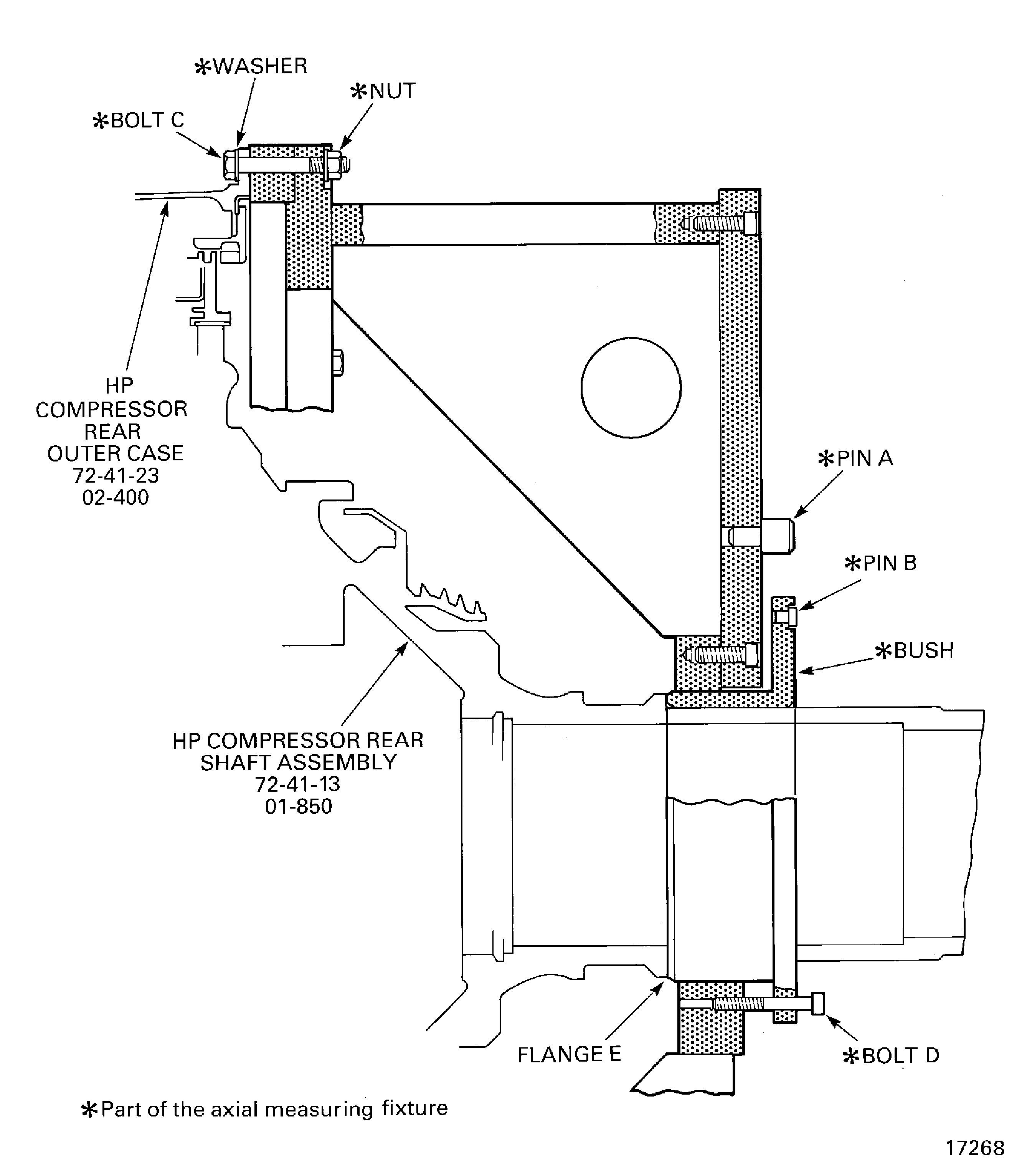
Install the IAE 1R18251 Axial measuring fixture 1 off on to the HP compressor assembly.
Install the IAE 1R18294 Clock holder 1 off on to the axial measuring fixture at pin A.
Measure the gap between the pins A and B.
SUBTASK 72-41-00-440-310 Measure the Position of the HP Compressor Rear Shaft
Figure: View Through the HP Compressor Assembly
View Through the HP Compressor Assembly
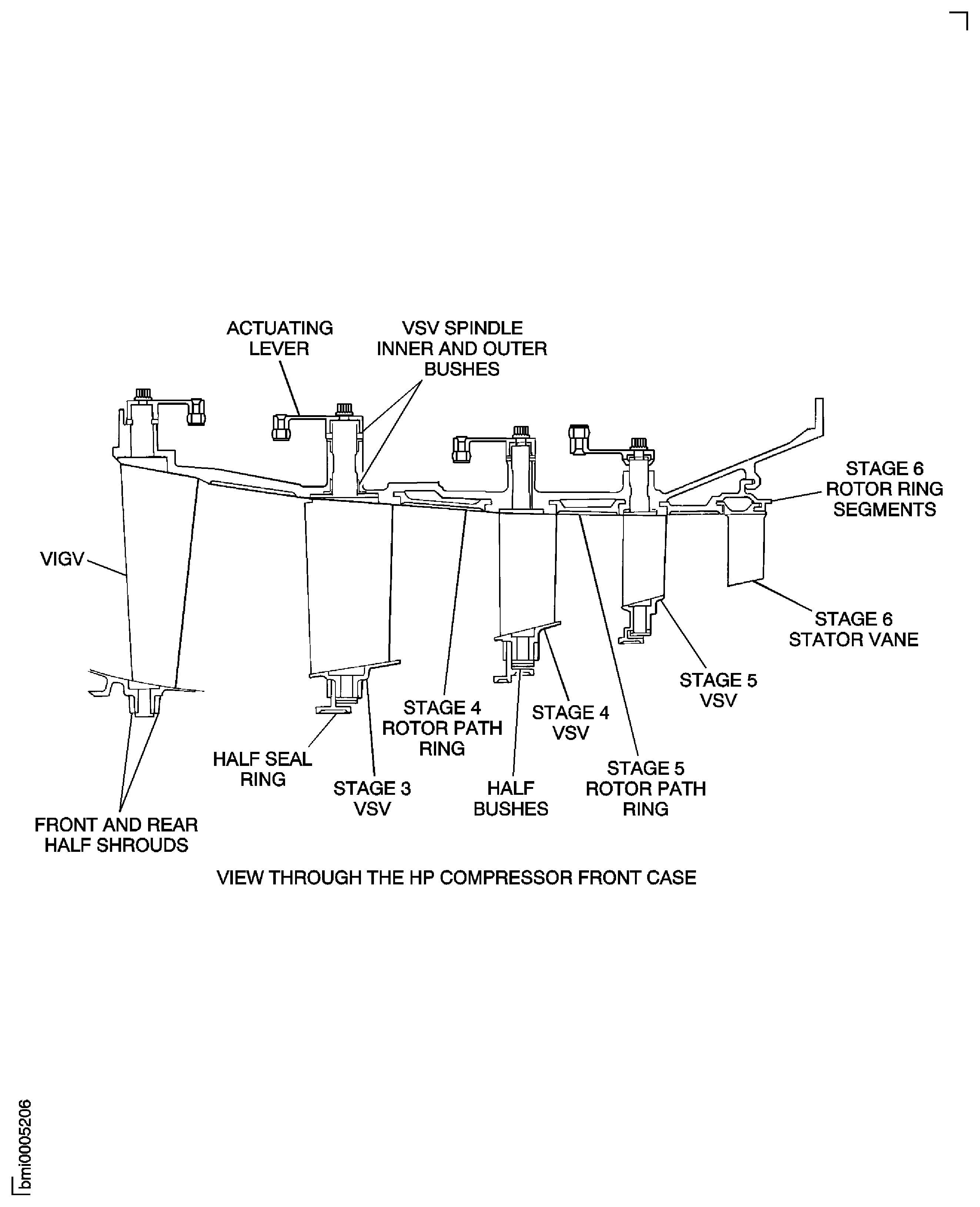
Figure: Install the Holding Fixture on the HP Compressor Assembly
Install the Holding Fixture on the HP Compressor Assembly
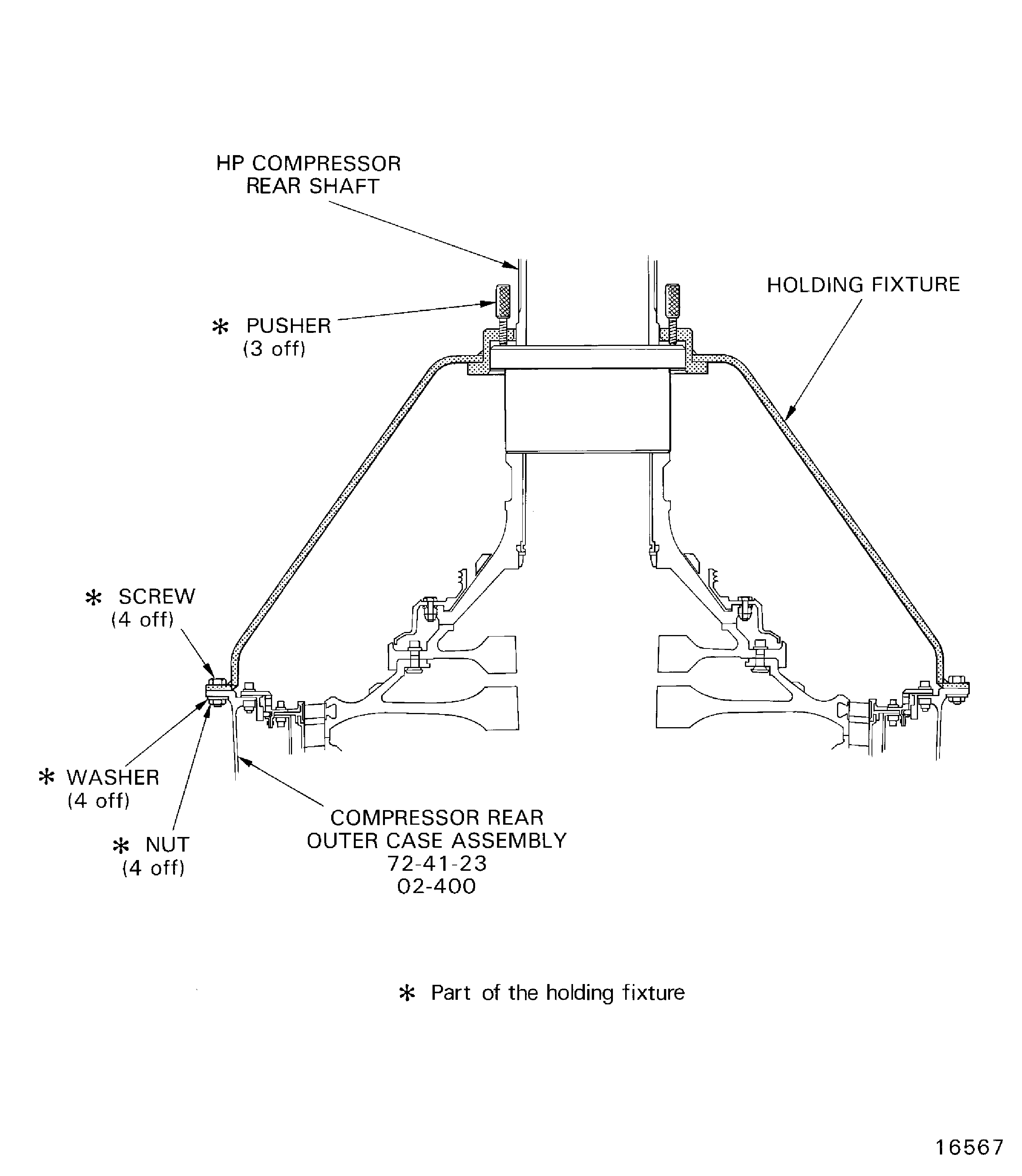
Figure: Remove the Support Stand and the Support Ring
Remove the Support Stand and the Support Ring
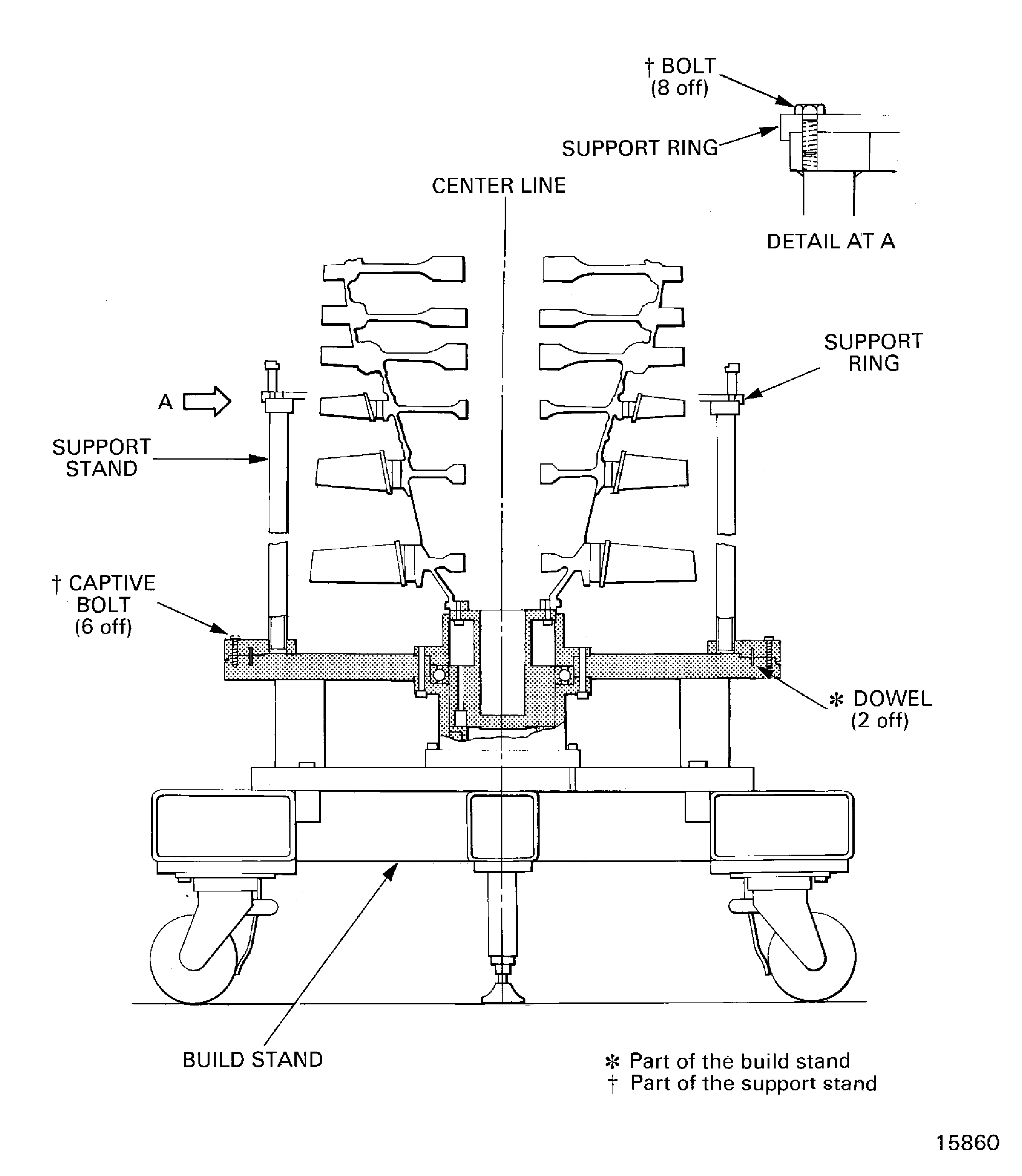
Figure: Install the Support Ring
Sheet 1

Figure: Install the Support Ring
Sheet 2
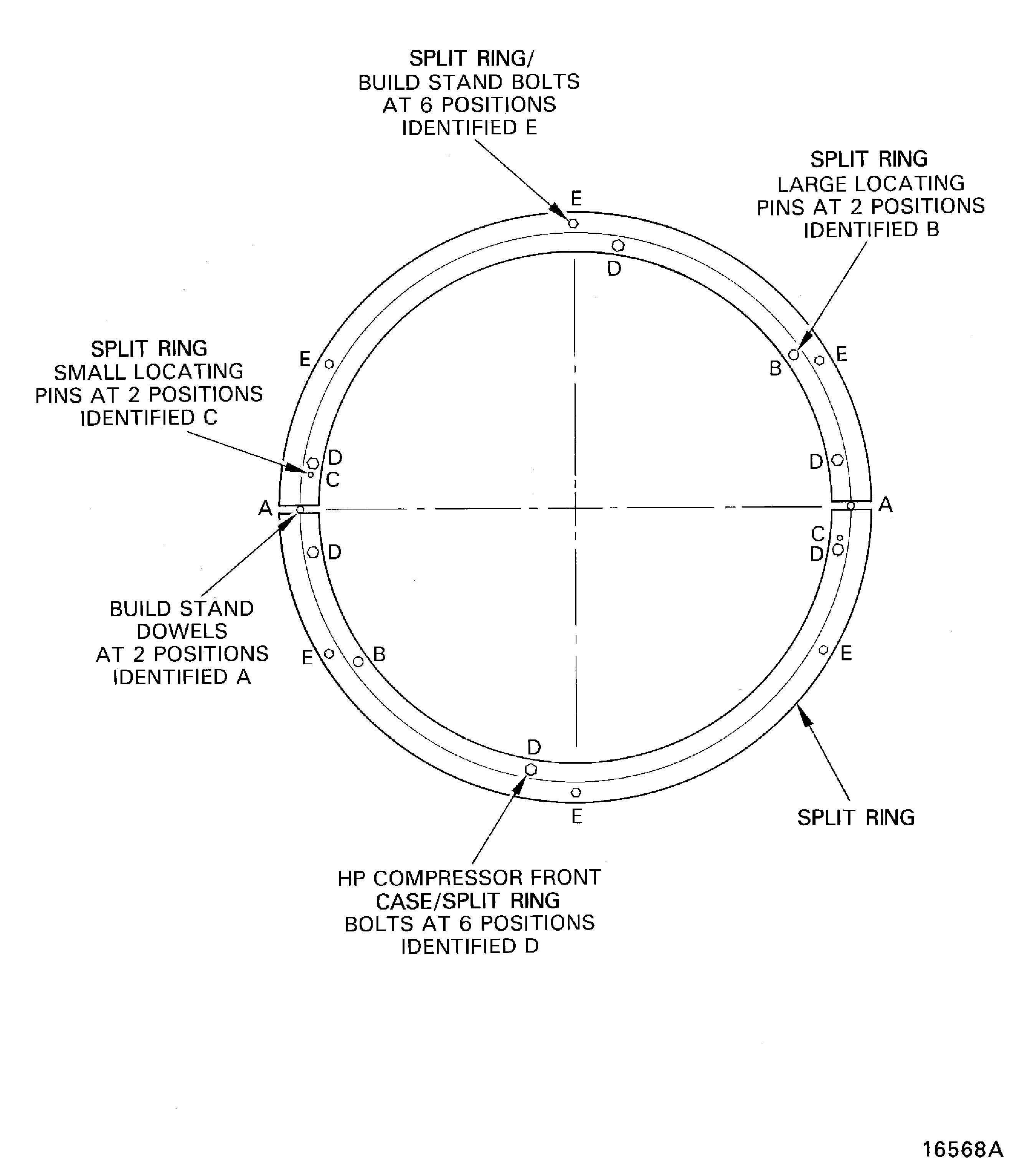
Figure: Install the HP Compressor Front Case Split Line Flange Bolts
Sheet 1
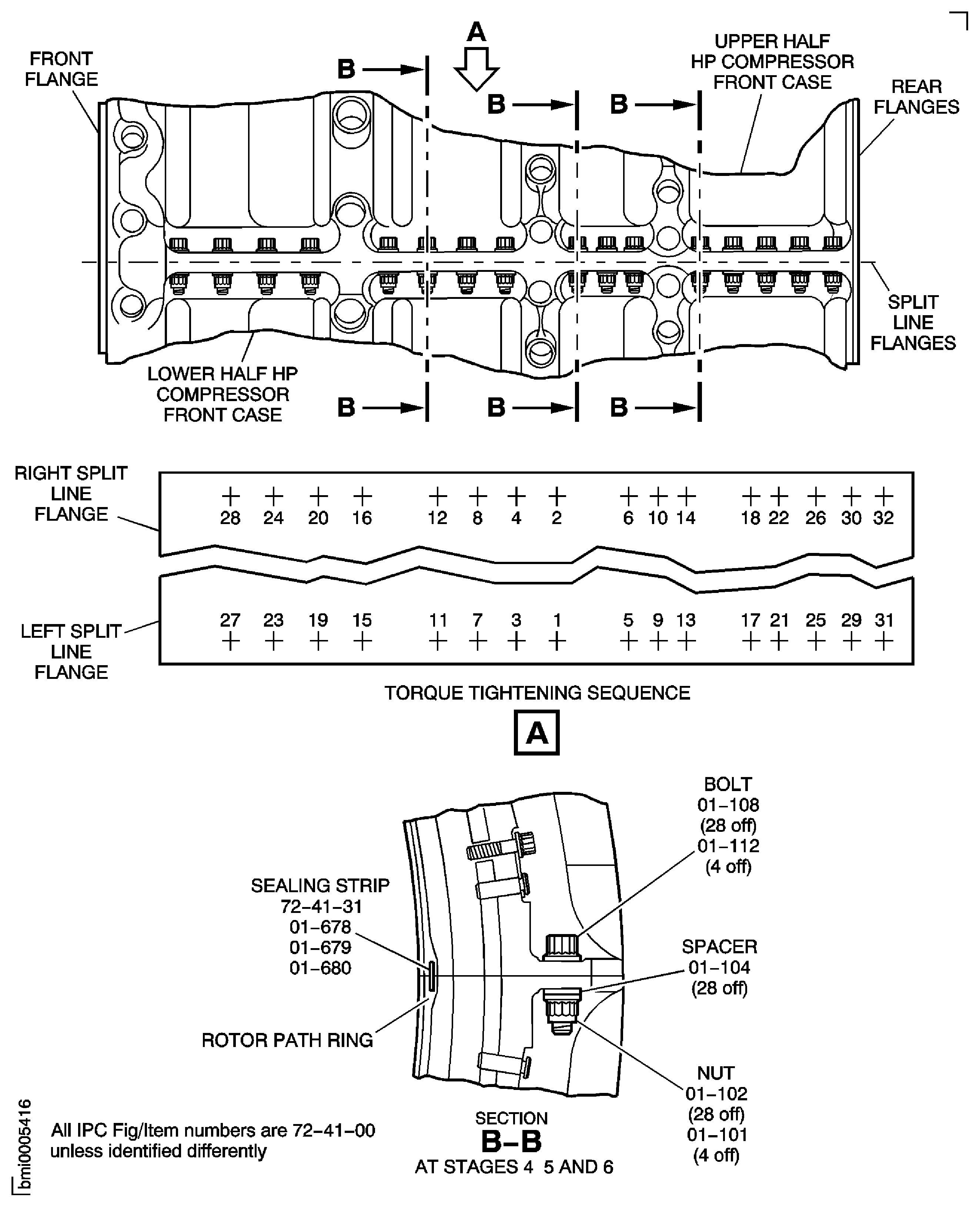
Figure: Install the HP Compressor Front Case Split Line Flange Bolts
Sheet 2
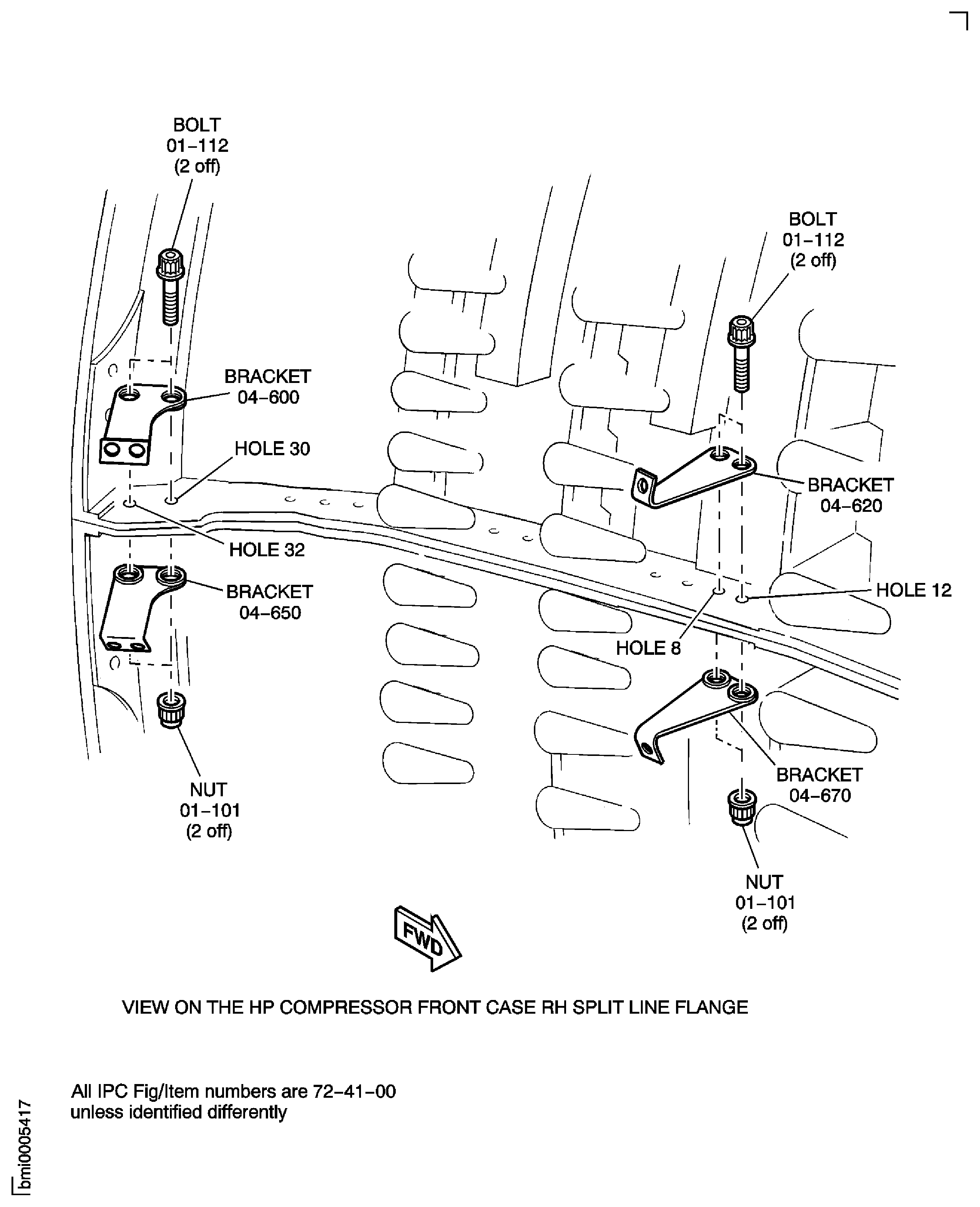
Figure: Install the HP Compressor Front Case Split Line Flange Bolts
Sheet 3
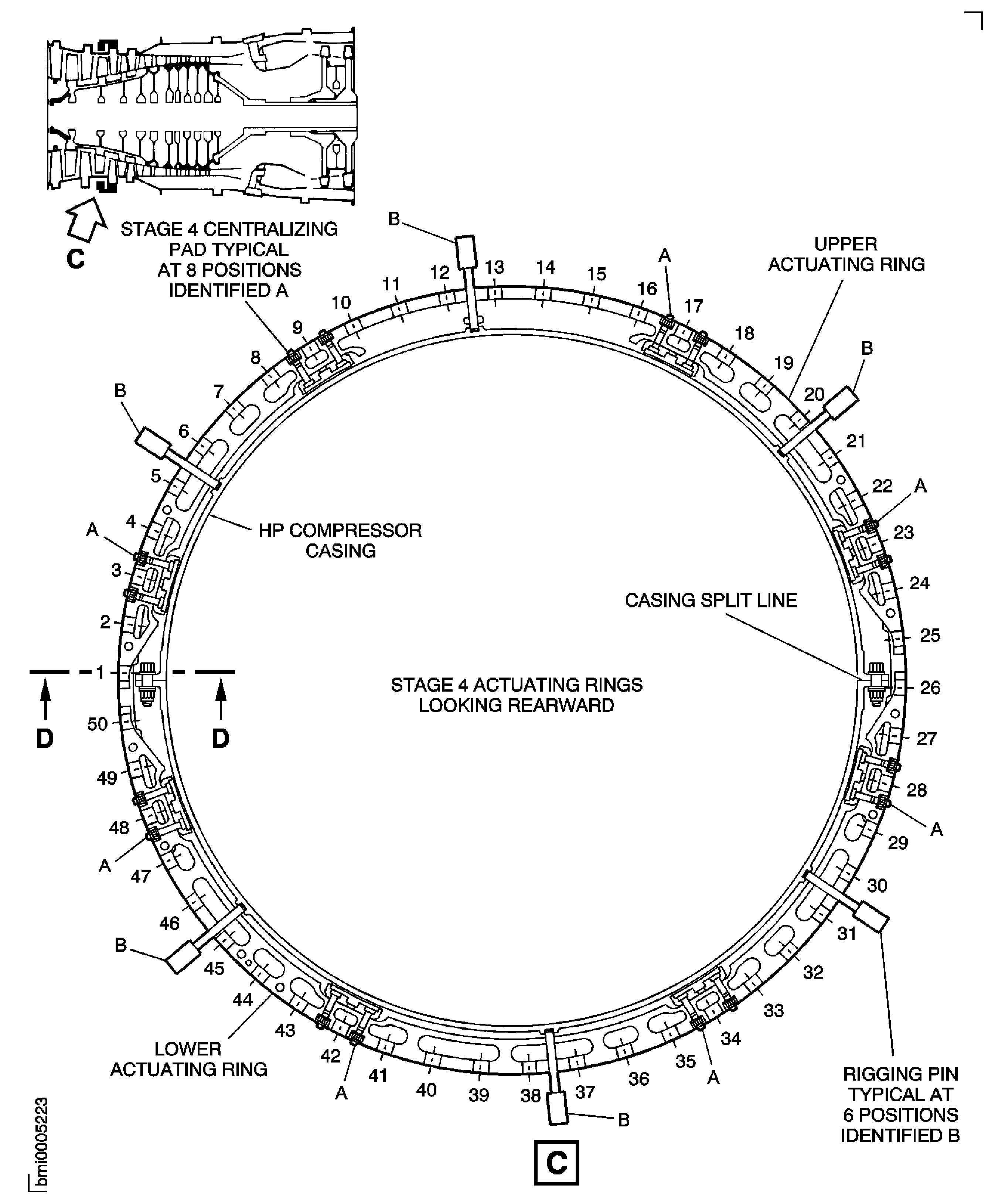
Figure: Install the HP Compressor Front Case Split Line Flange Bolts
Sheet 4
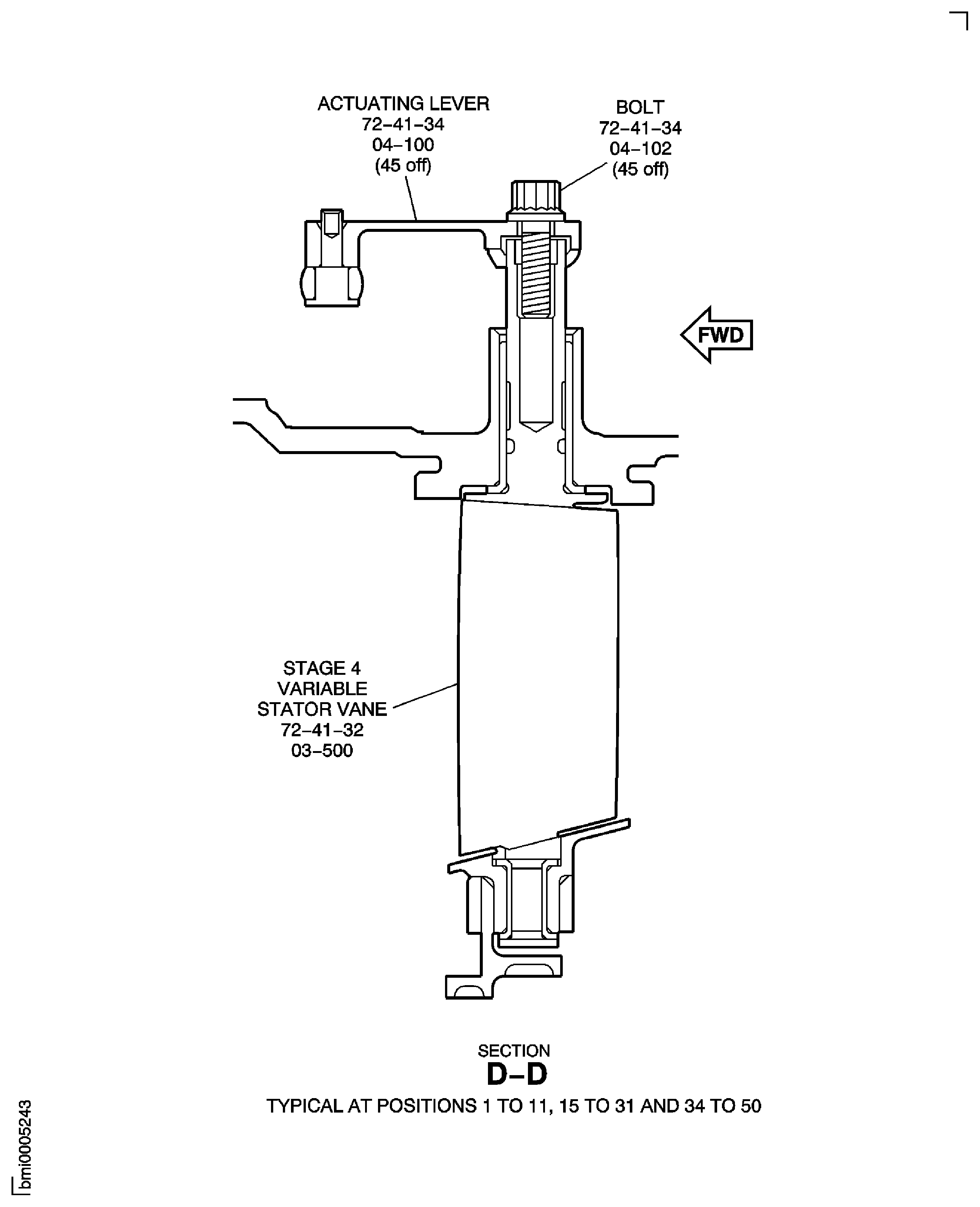
Figure: Install the HP Compressor Front Case Split Line Flange Bolts
Sheet 5
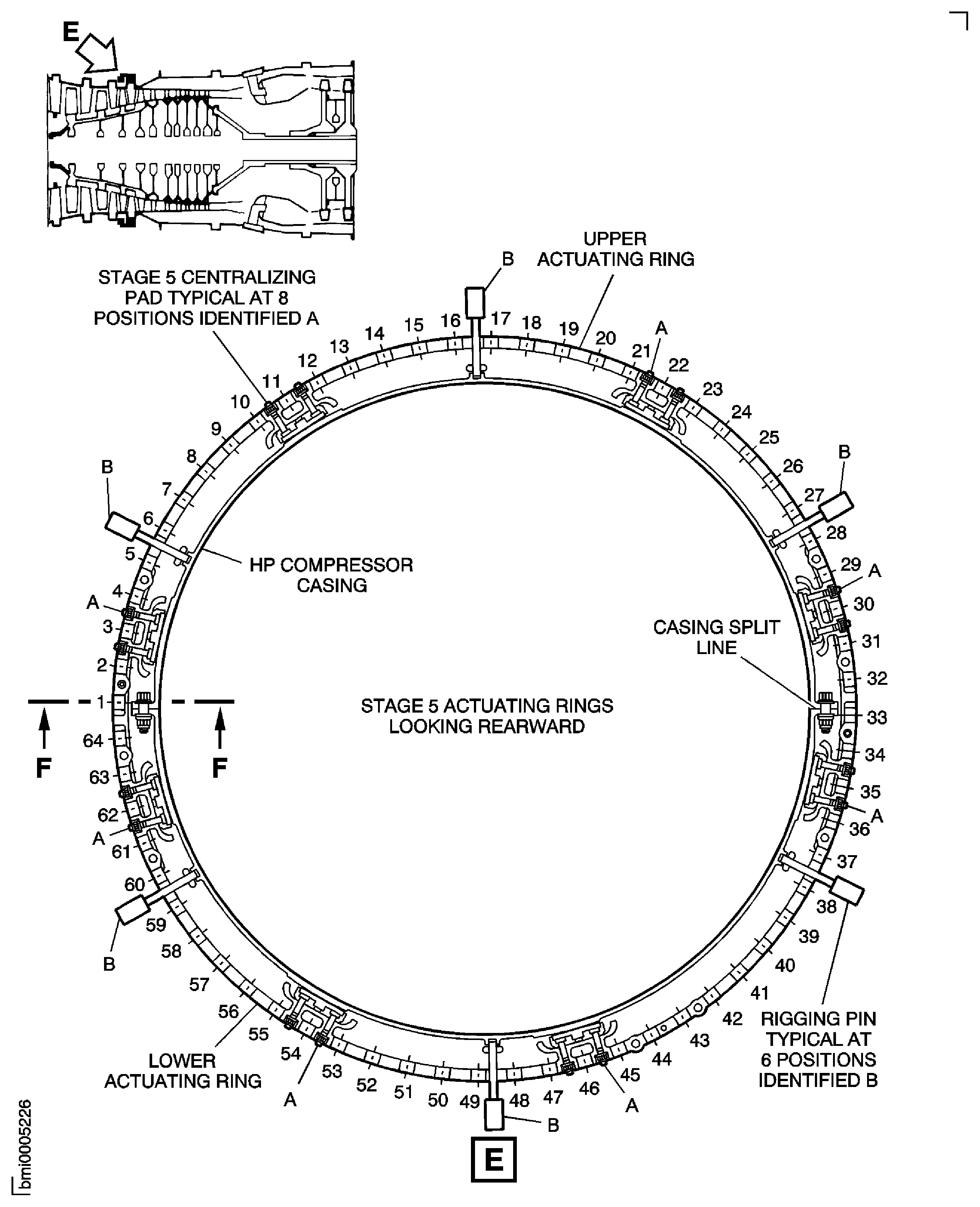
Figure: Install the HP Compressor Front Case Split Line Flange Bolts
Sheet 6
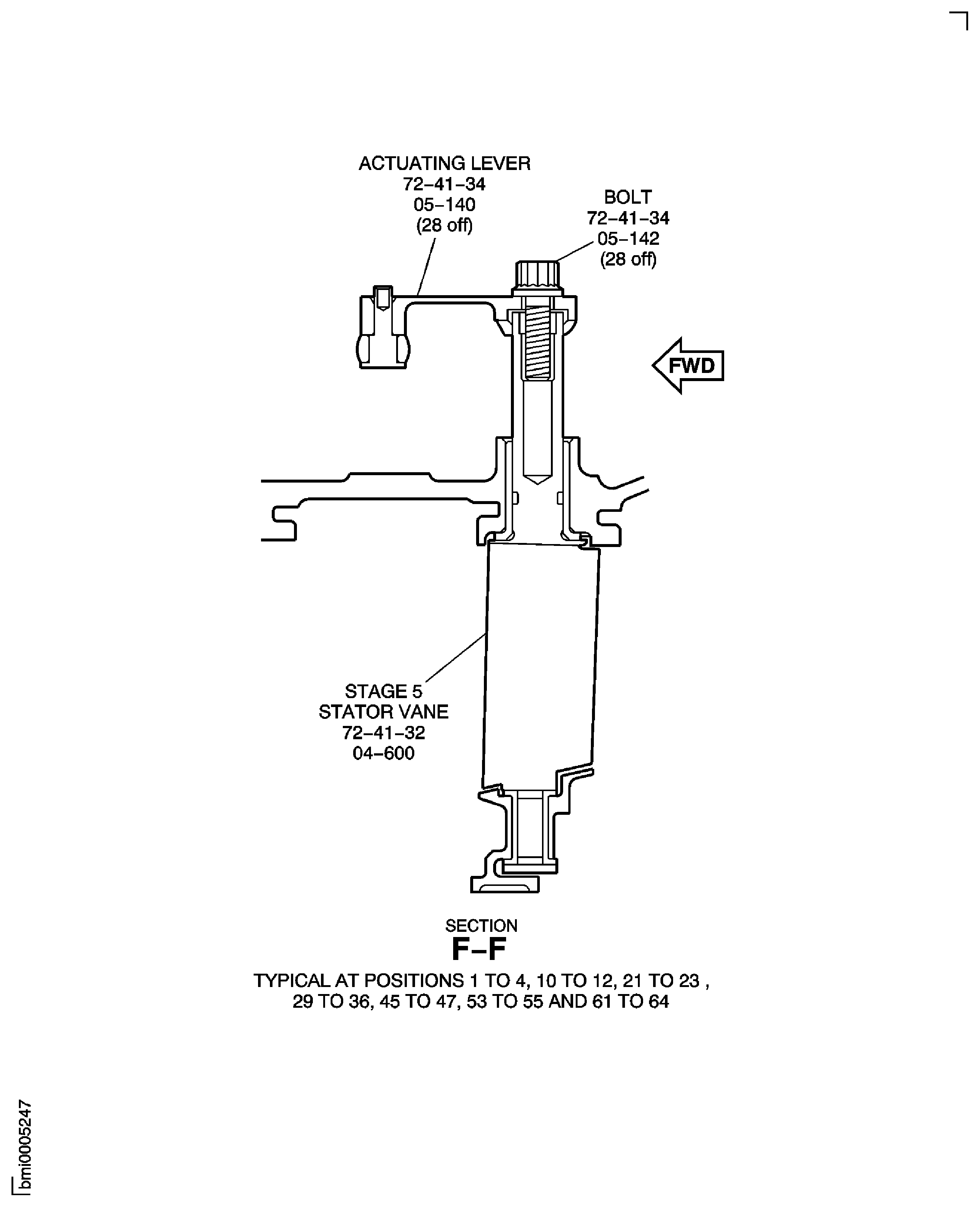
Figure: Install the Brackets, the Pins, the Bolts and the Nuts at the HP Compressor Front Case to the Compressor Rear Outer Case Flange
Sheet 1
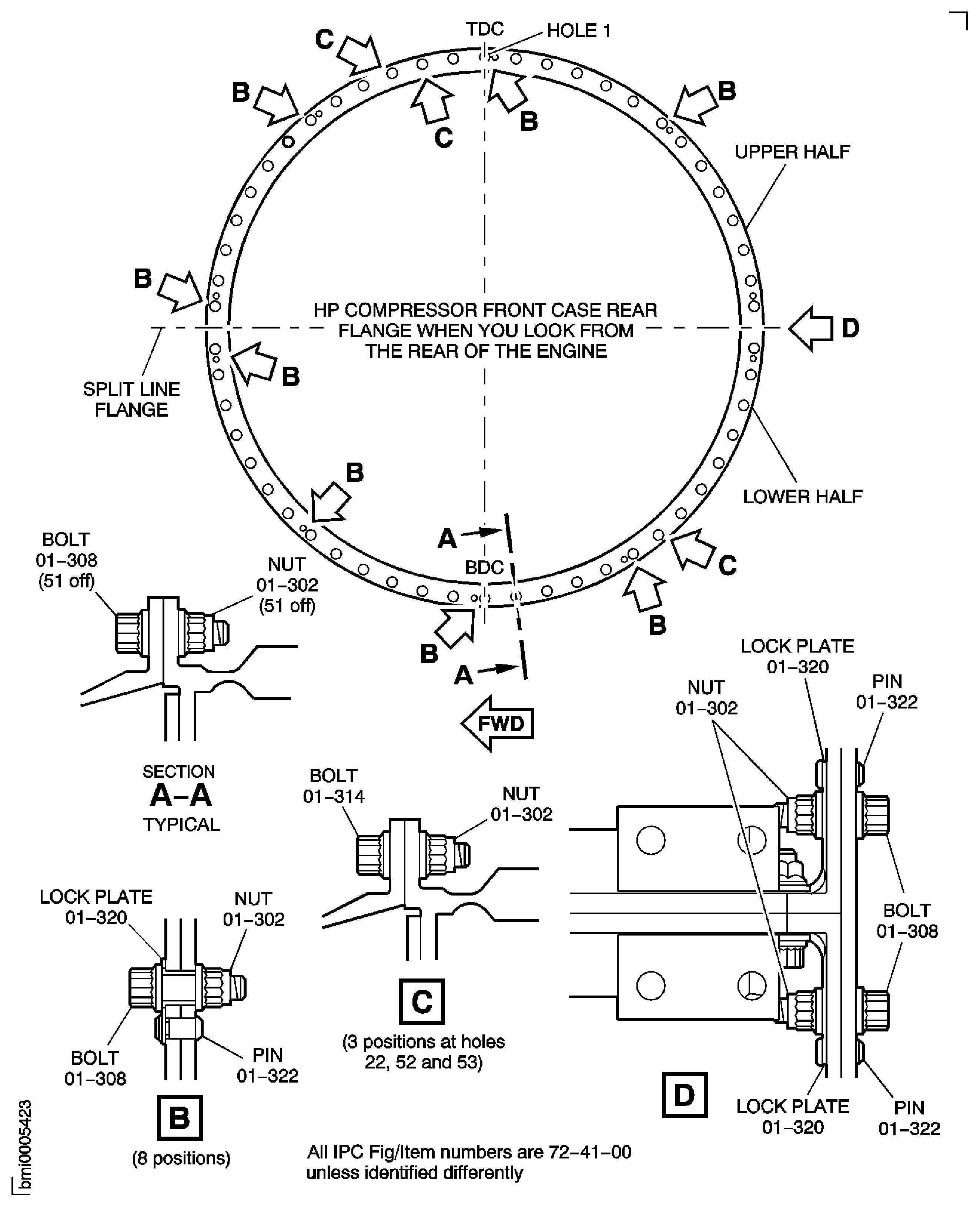
Figure: Install the Brackets, the Pins, the Bolts and the Nuts at the HP Compressor Front Case to the Compressor Rear Outer Case Flange
Sheet 2
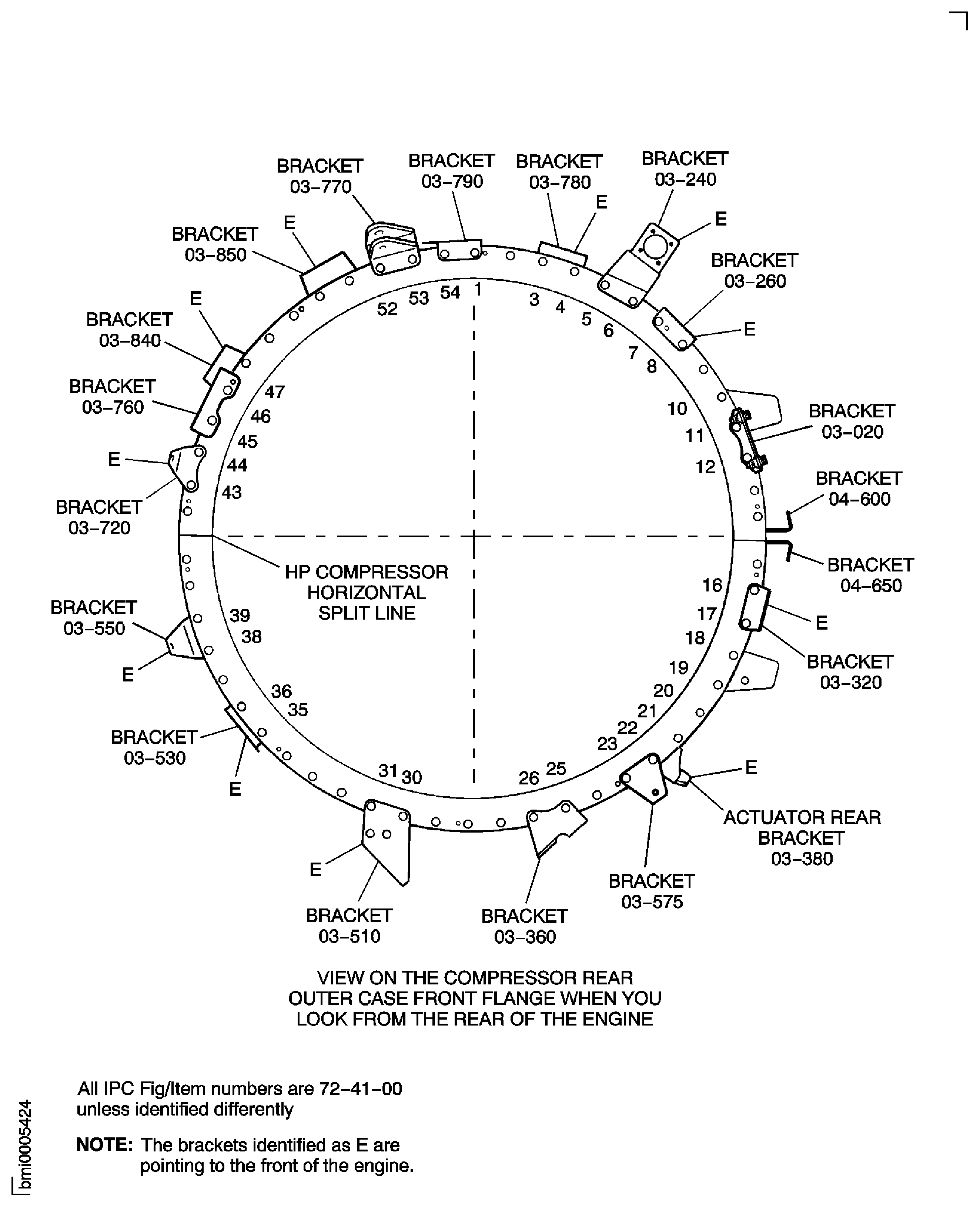
Figure: Install the Inlet Guide Vane Bridging Pieces and Centralizer Adjusting Shims
Sheet 1
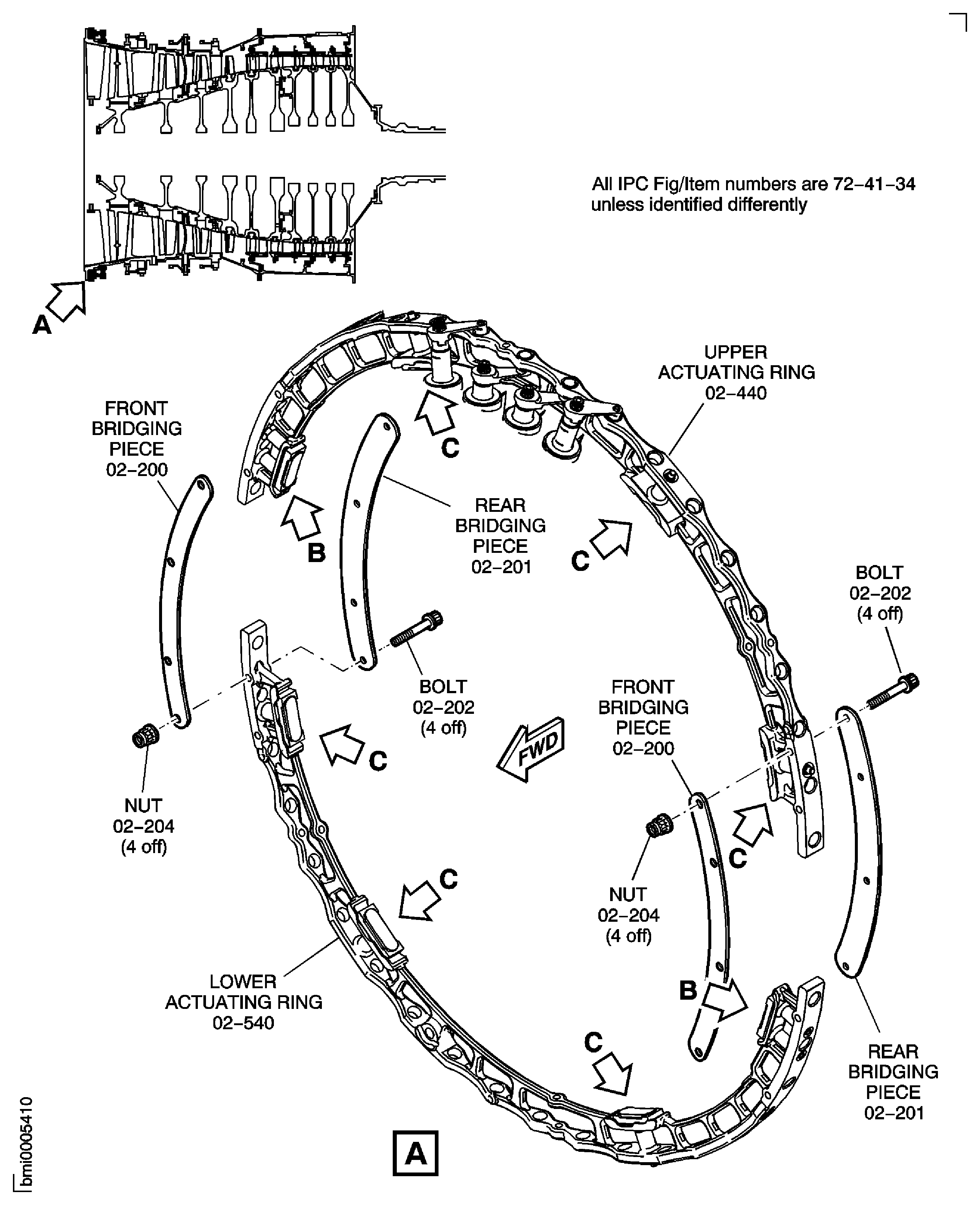
Figure: Install the Inlet Guide Vane Bridging Pieces and Centralizer Adjusting Shims
Sheet 2
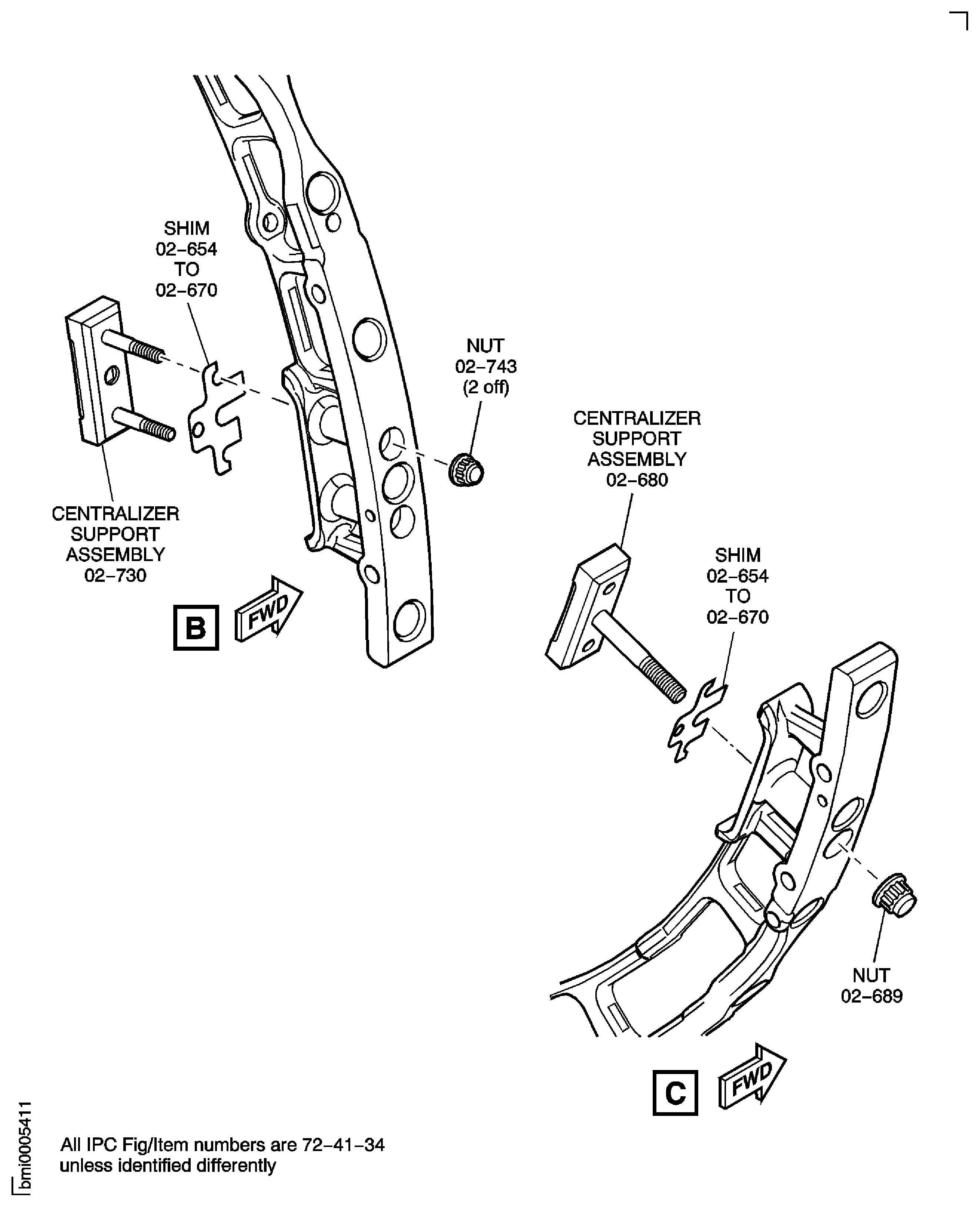
Figure: Install the Inlet Guide Vane Bridging Pieces and Centralizer Adjusting Shims
Sheet 3
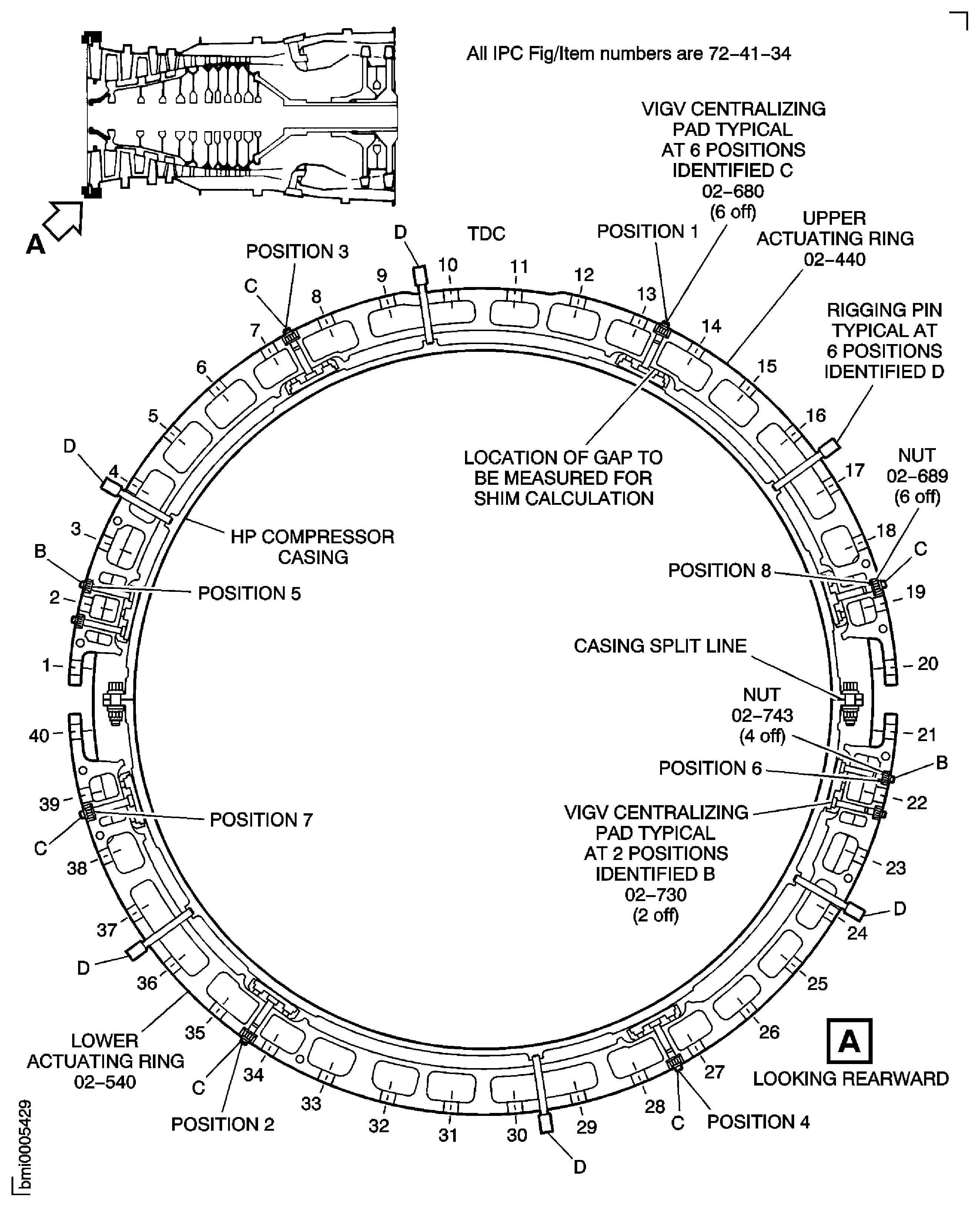
Figure: Install the Stage 3 Bridging Pieces and Centralizer Adjusting Shims
Sheet 1
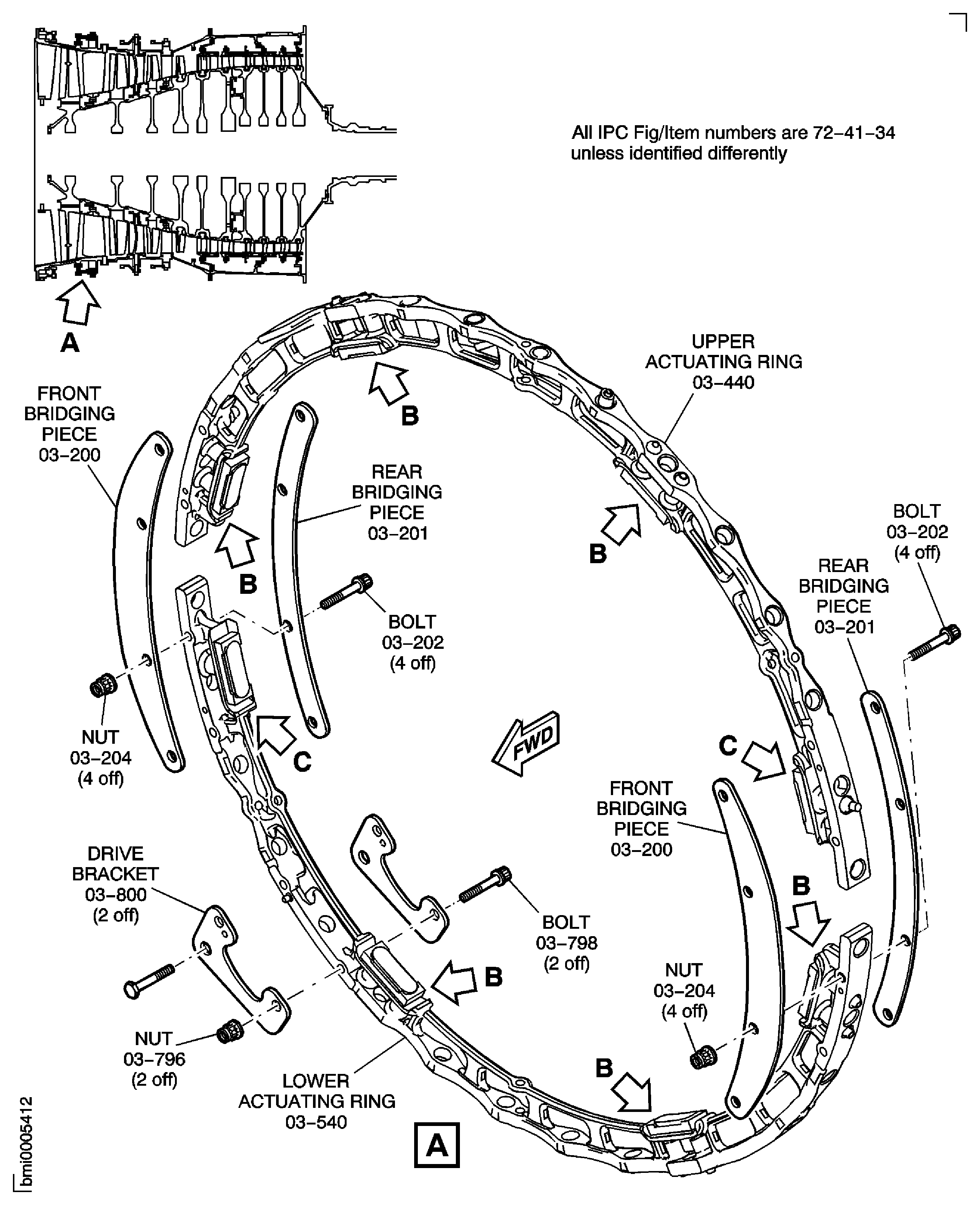
Figure: Install the Stage 3 Bridging Pieces and Centralizer Adjusting Shims
Sheet 2
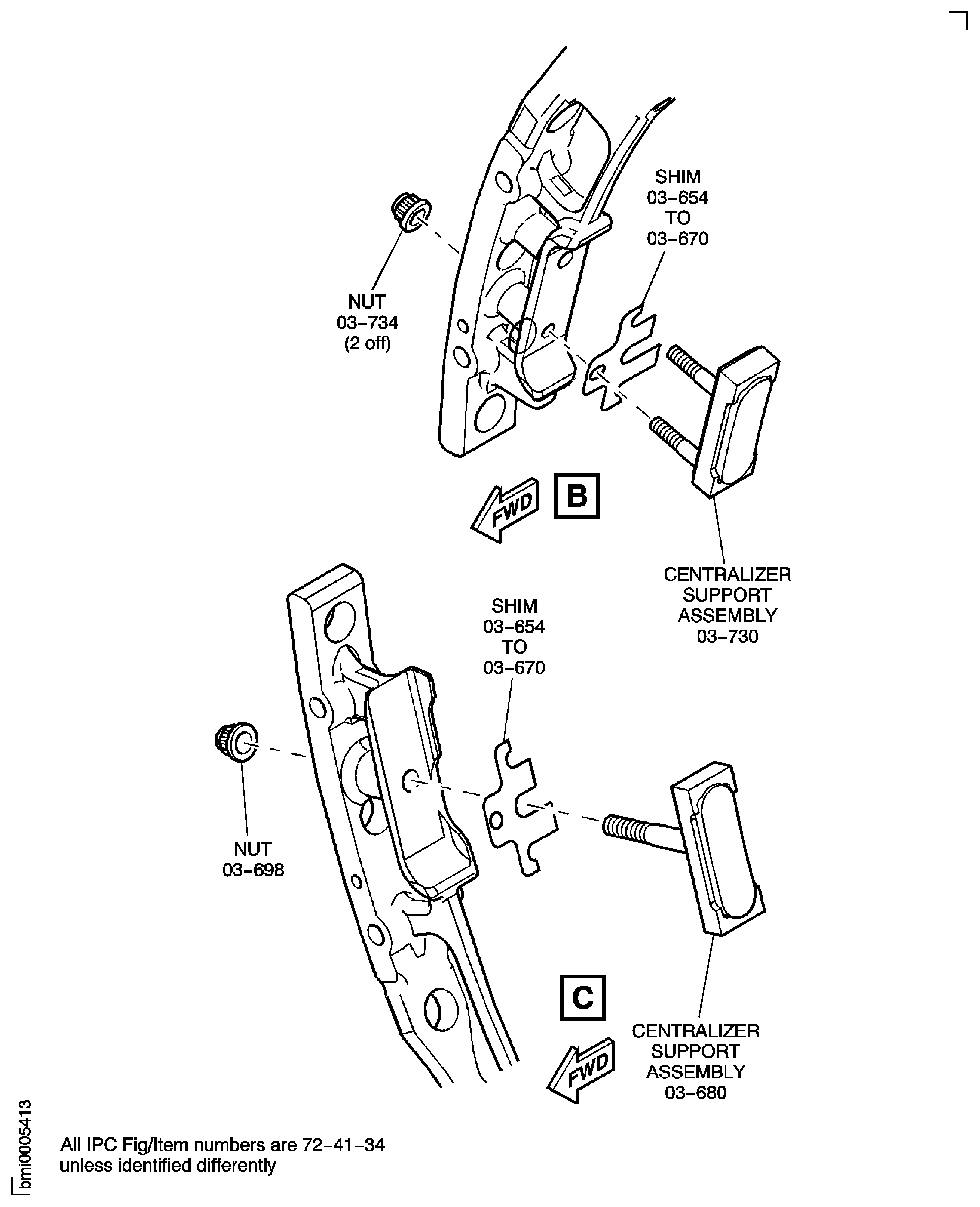
Figure: Install the Stage 3 Bridging Pieces and Centralizer Adjusting Shims
Sheet 3
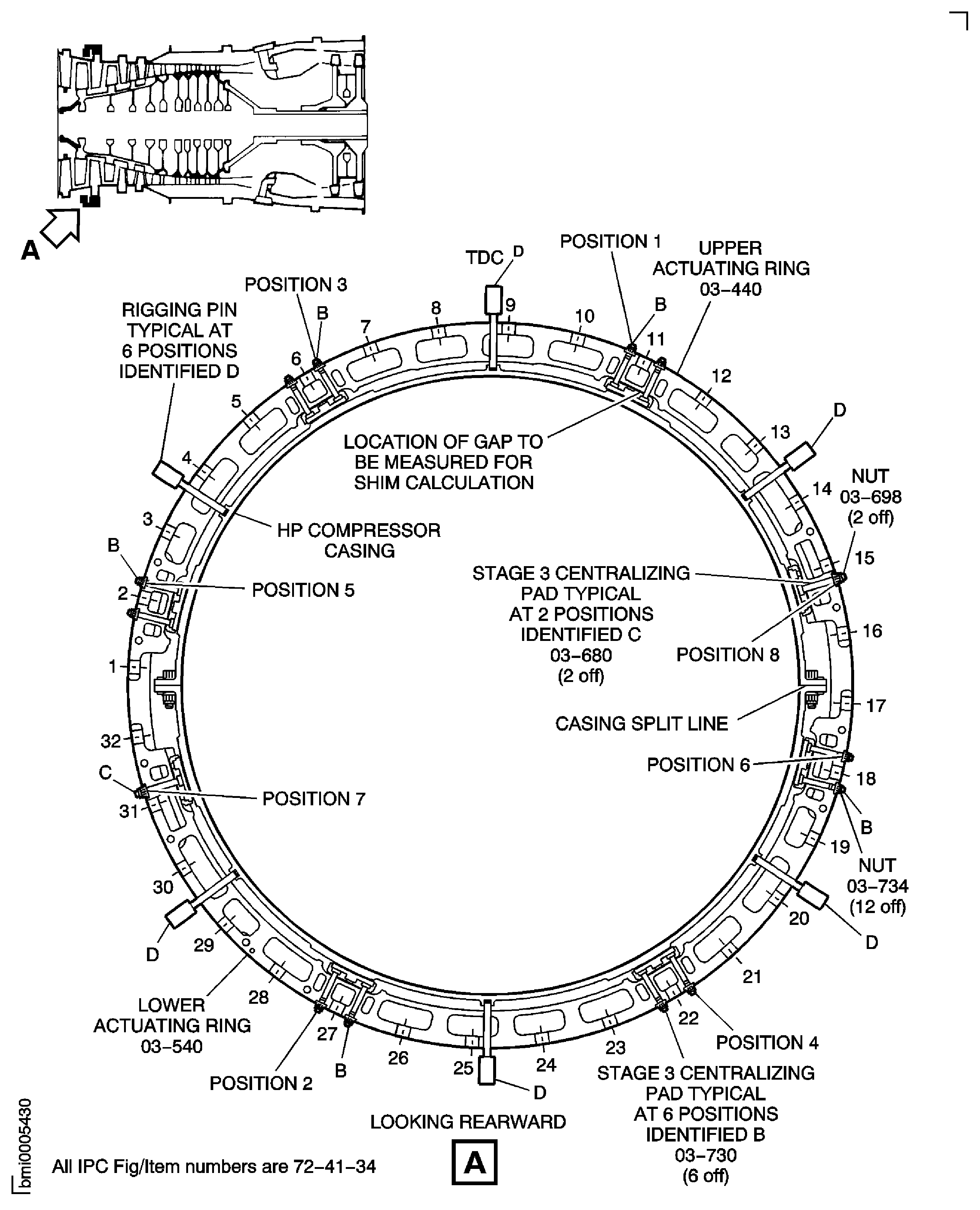
Figure: Install the Stage 4 Bridging Pieces and Centralizer Adjusting Shims
Sheet 1
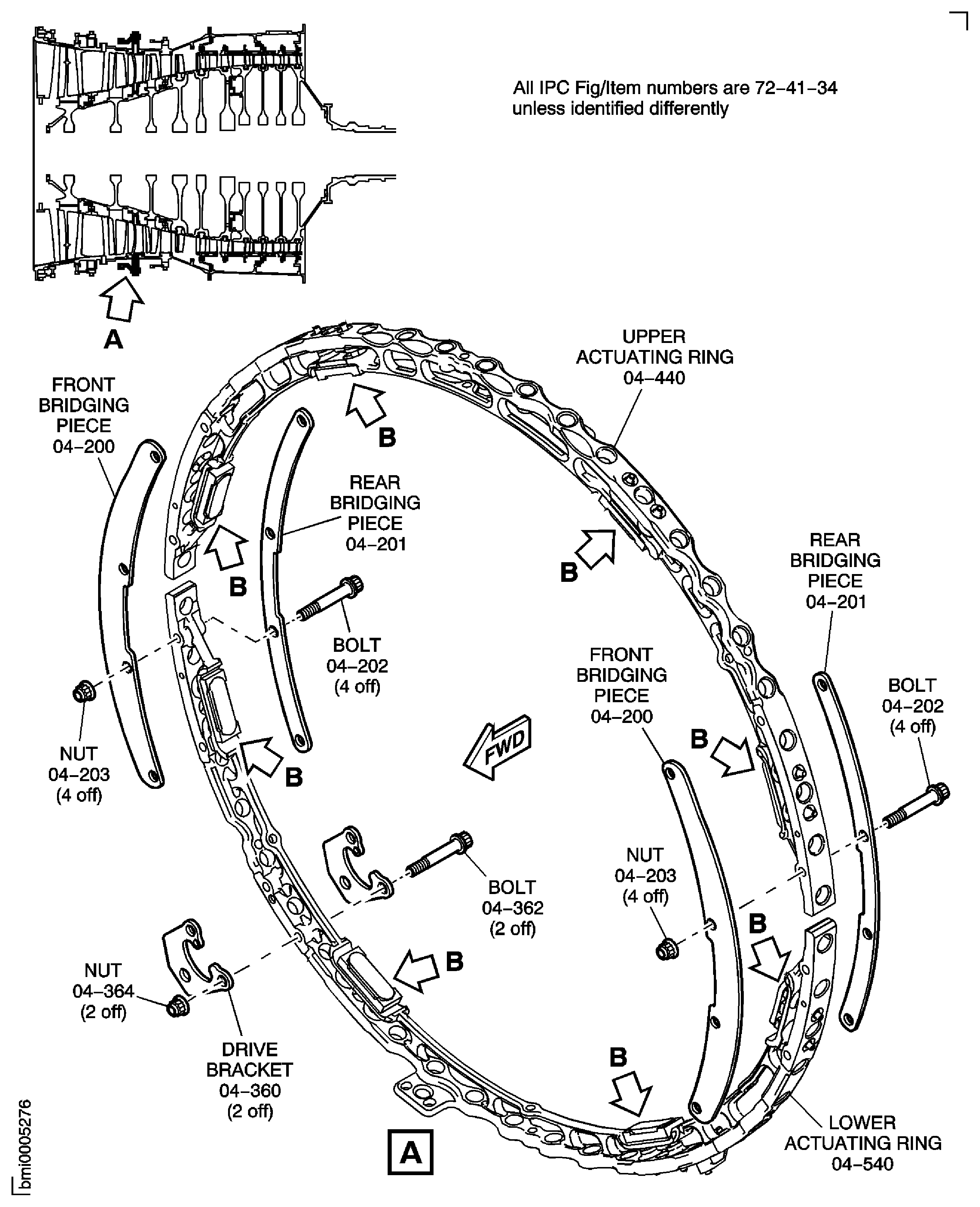
Figure: Install the Stage 4 Bridging Pieces and Centralizer Adjusting Shims
Sheet 2
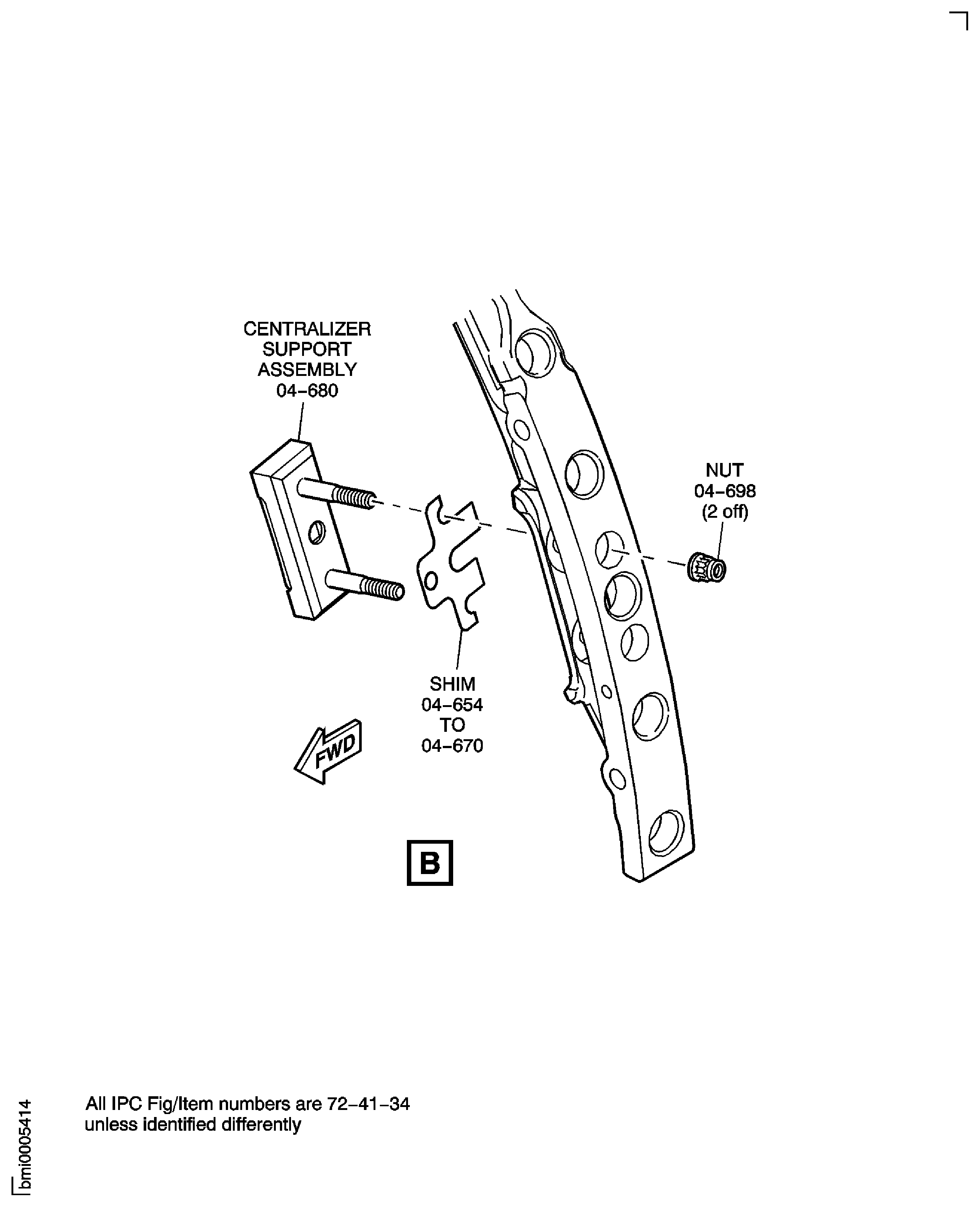
Figure: Install the Stage 4 Bridging Pieces and Centralizer Adjusting Shims
Sheet 3
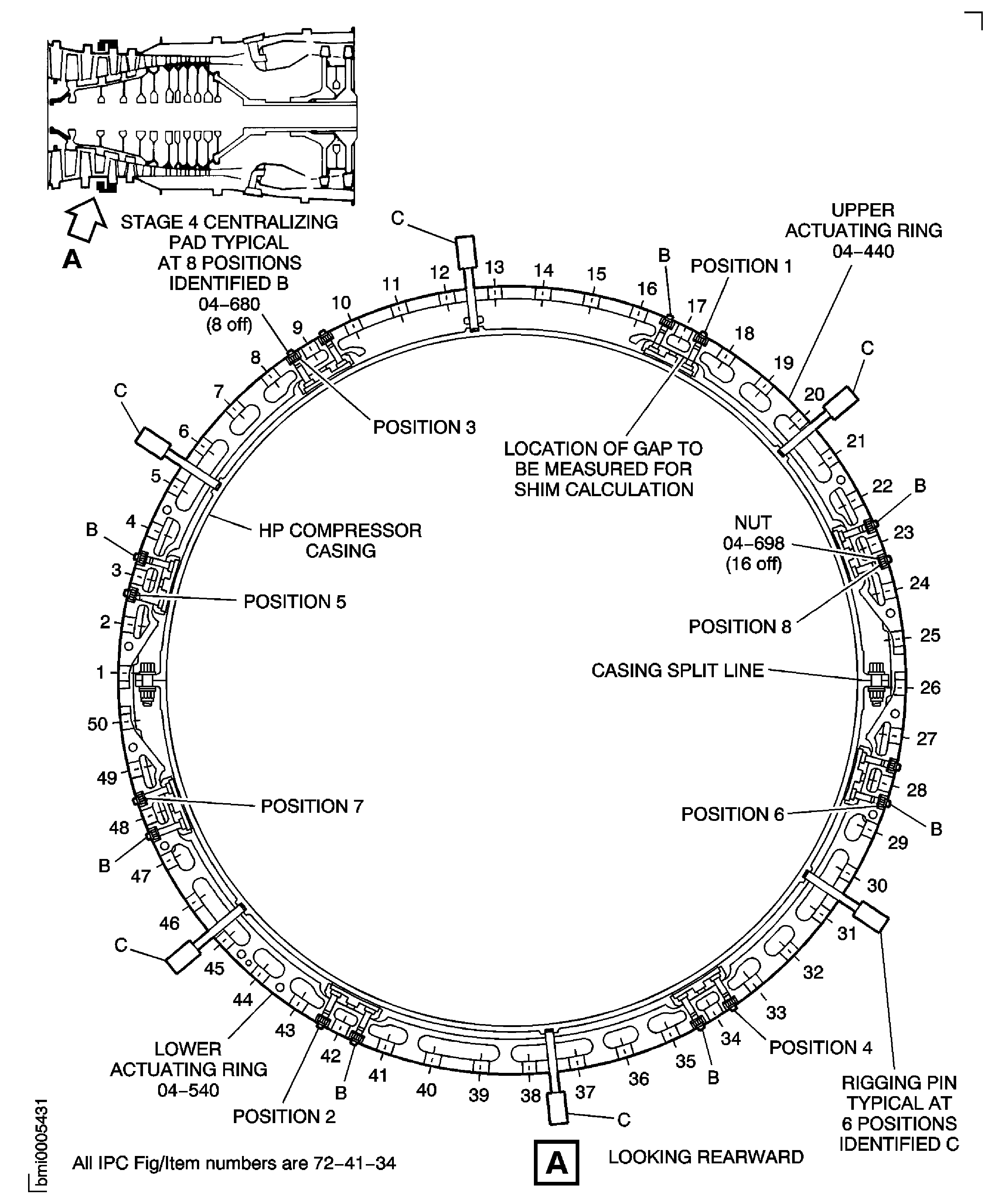
Figure: Install the Stage 5 Bridging Pieces and Centralizer Adjusting Shims
Sheet 1
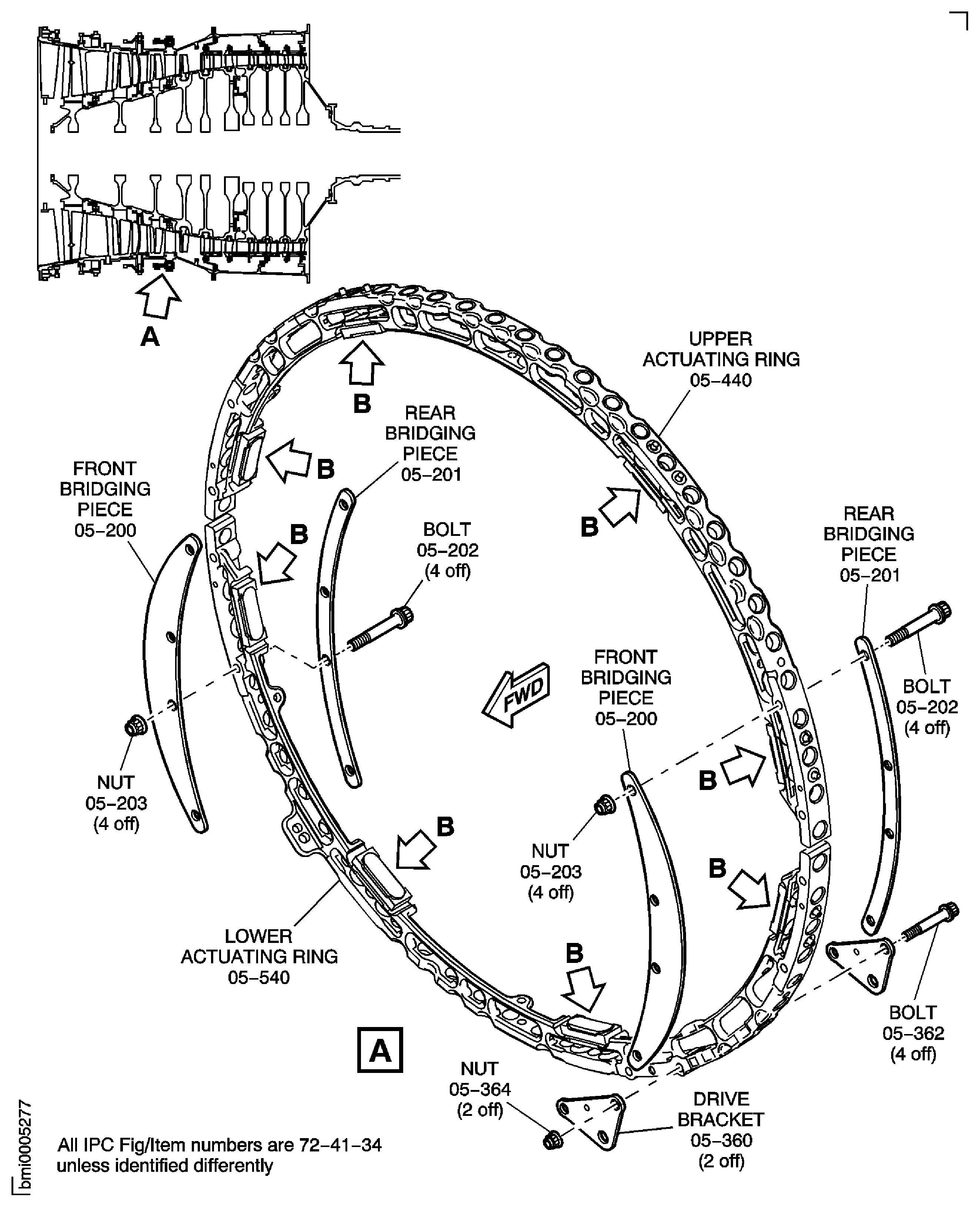
Figure: Install the Stage 5 Bridging Pieces and Centralizer Adjusting Shims
Sheet 2
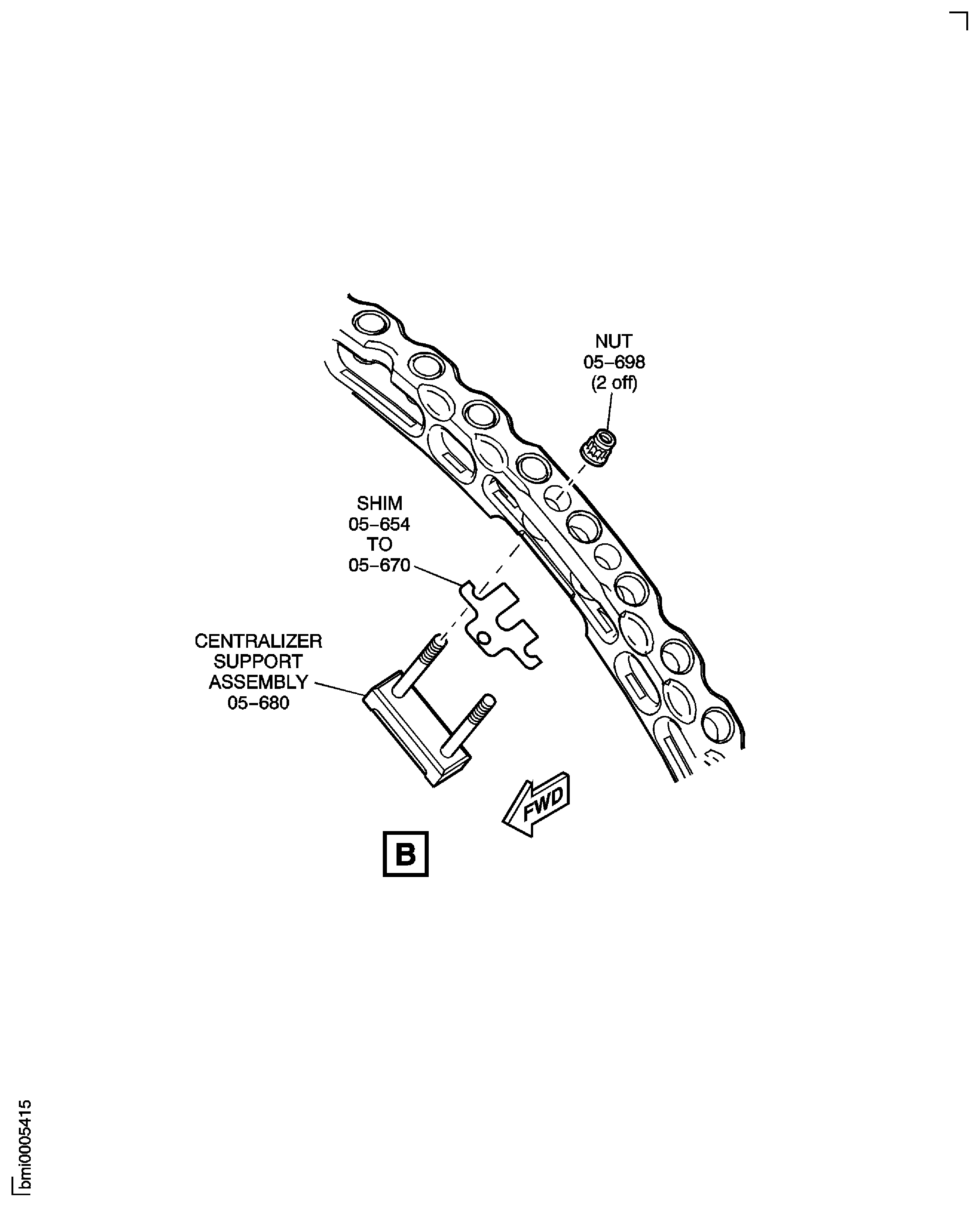
Figure: Install the Stage 5 Bridging Pieces and Centralizer Adjusting Shims
Sheet 3
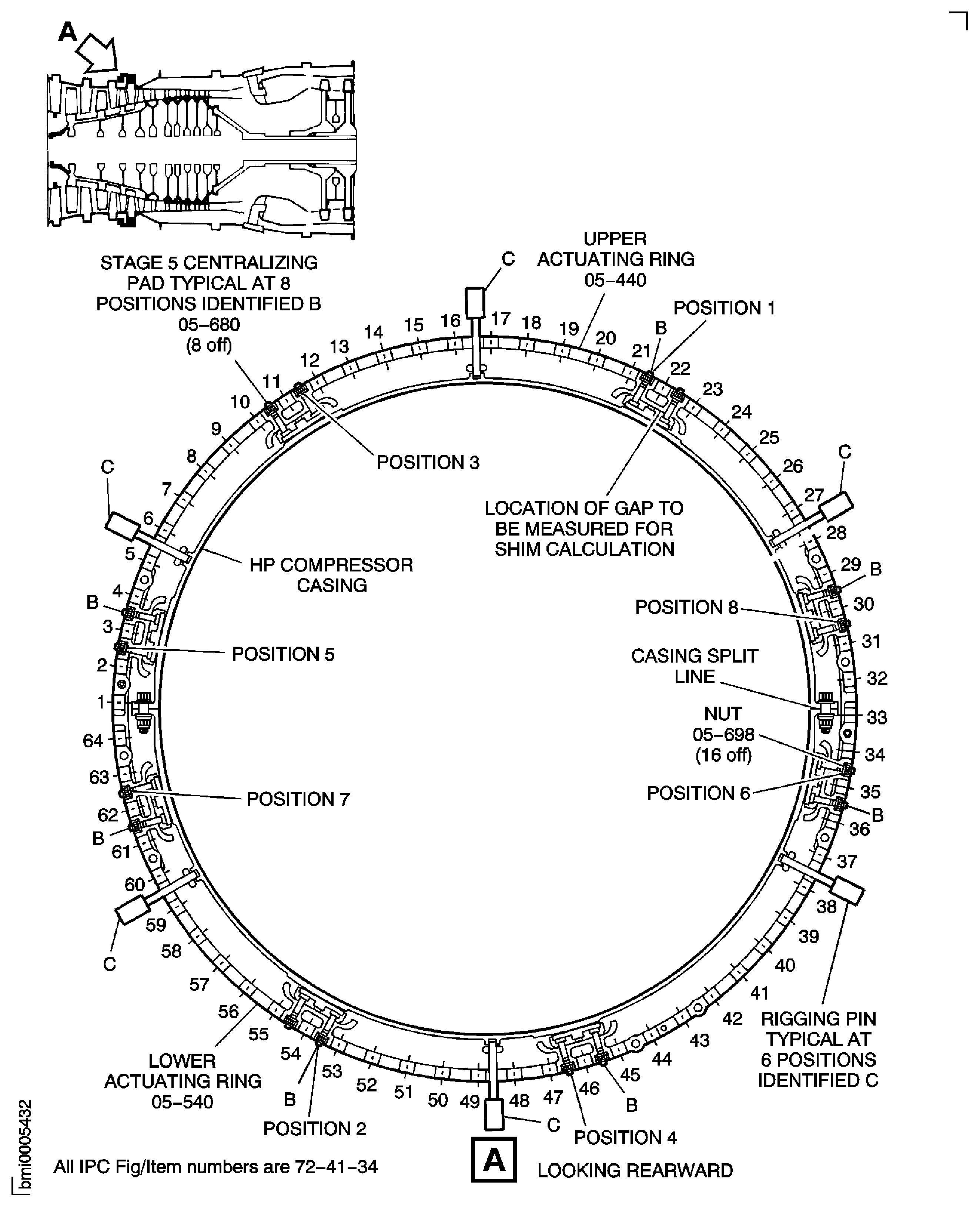
Figure: Bend over the Centralizer Adjusting Shim Tab
Bend over the Centralizer Adjusting Shim Tab
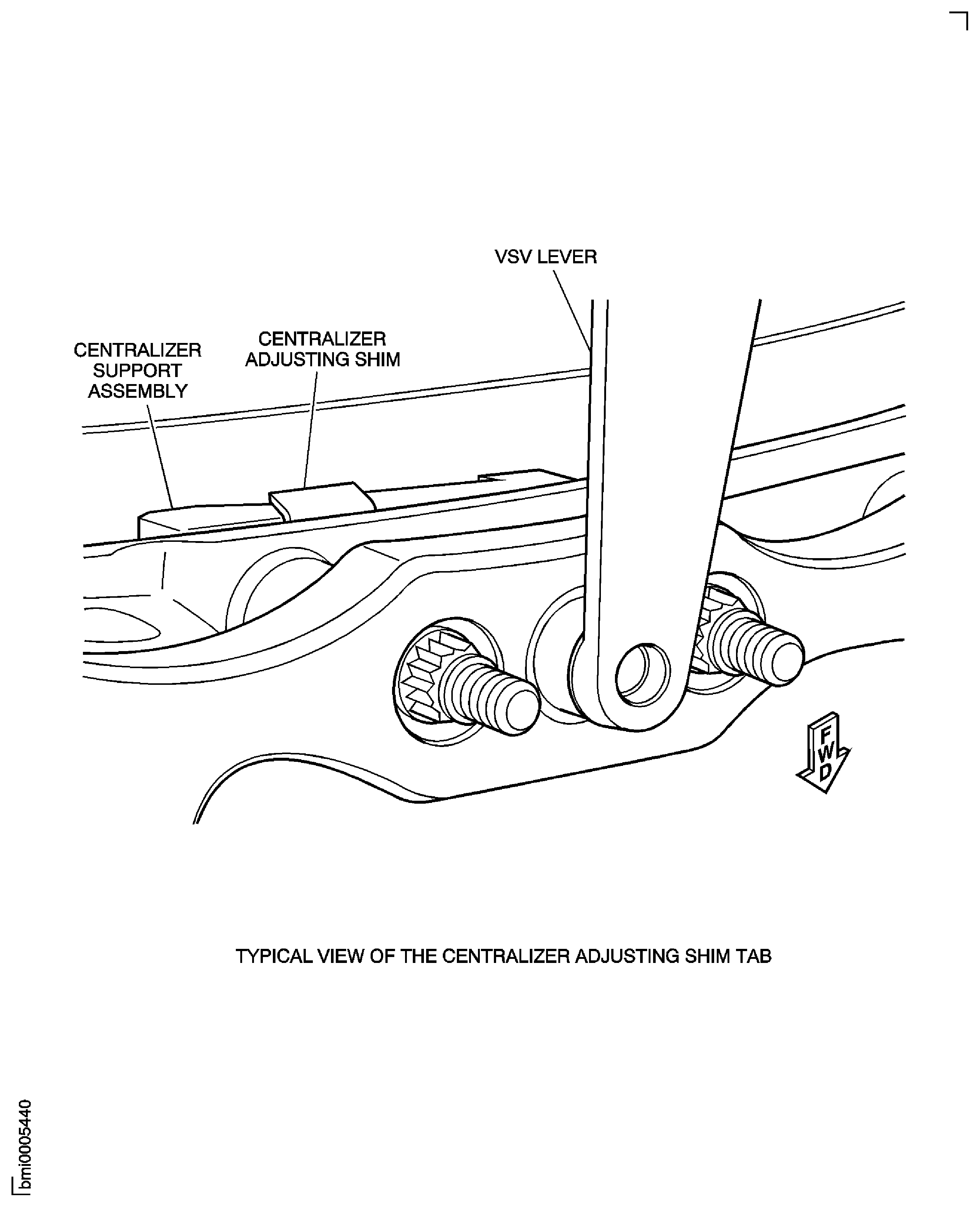
Figure: Install the Feeler Gauges
Install the Feeler Gauges
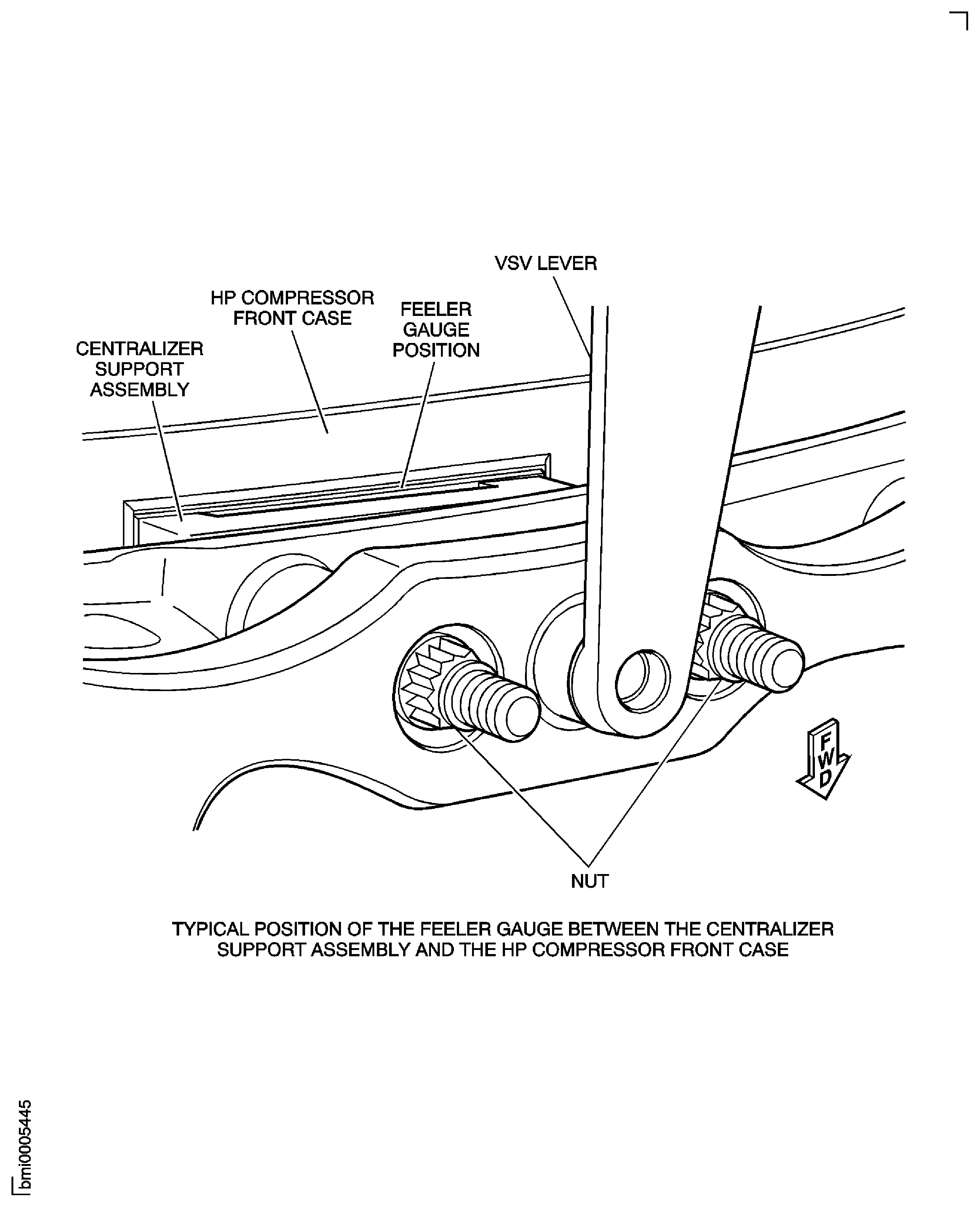
Figure: Install the Lift Fixture and the Lifter on to the HP Compressor Assembly
Sheet 1

Figure: Install the Lift Fixture and the Lifter on to the HP Compressor Assembly
Sheet 2
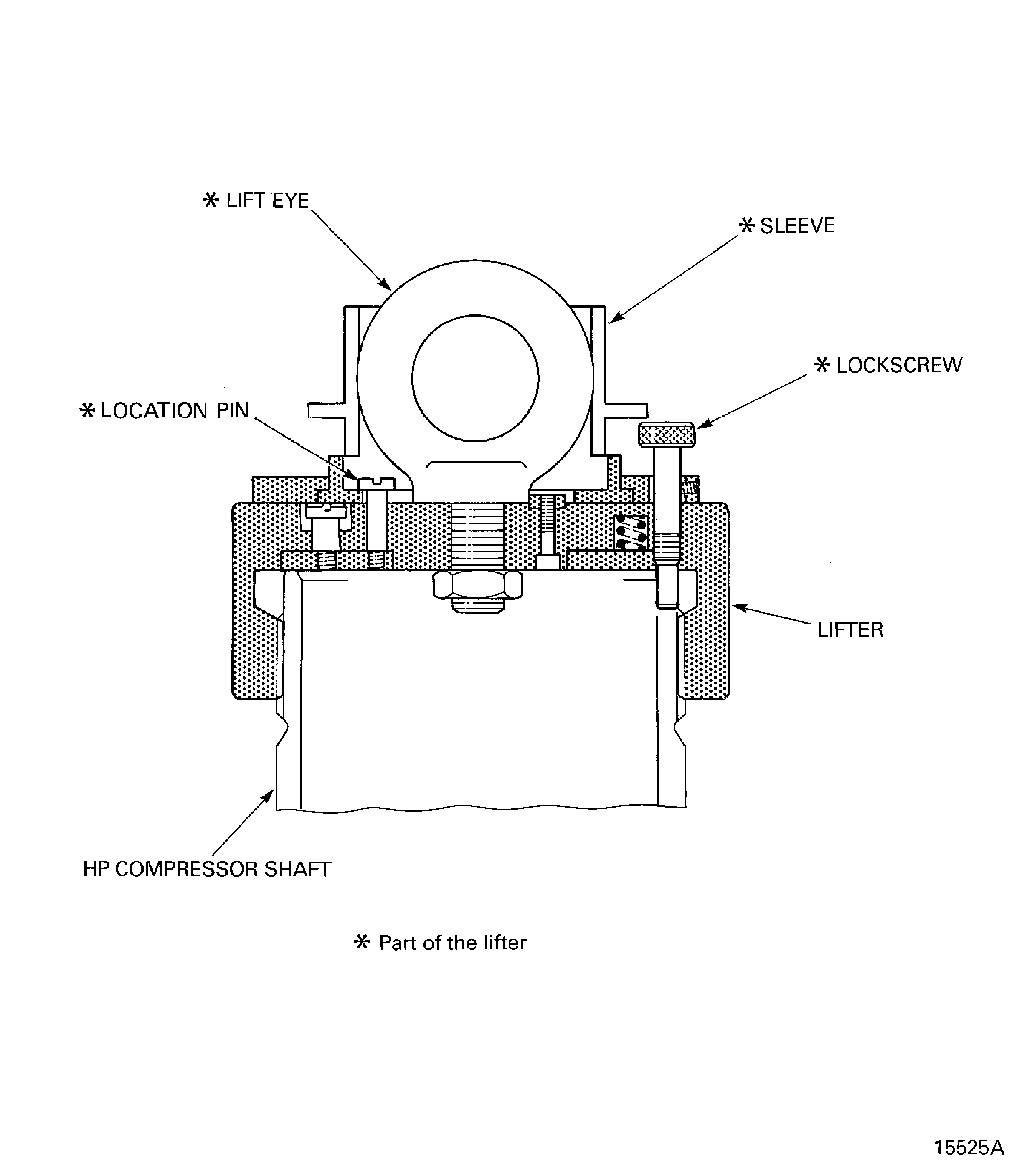
Figure: Install the HP Compressor Assembly on to the Safety Support Stand
Install the HP Compressor Assembly on to the Safety Support Stand
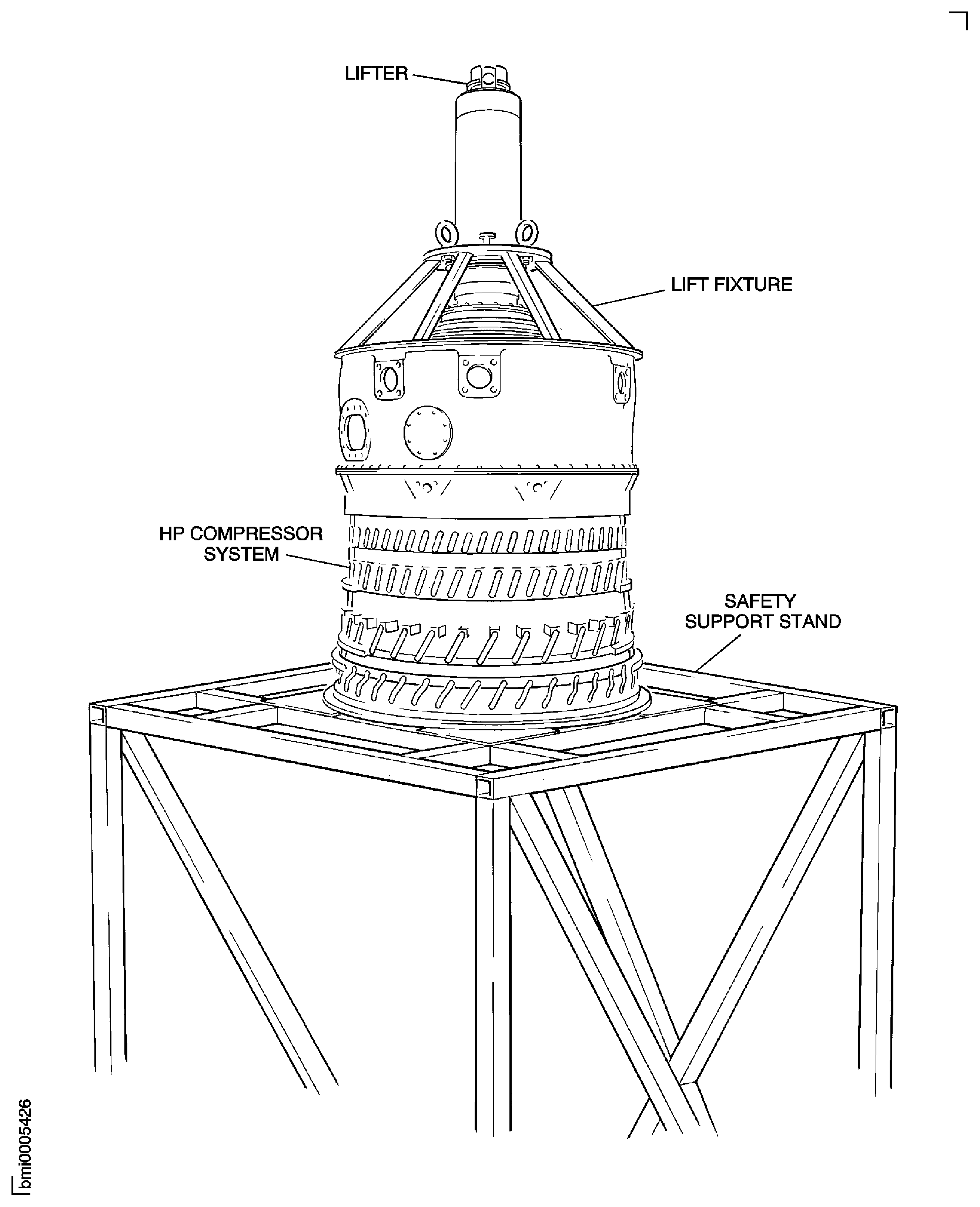
Figure: Install the Inlet Guide Vane Front Shroud
Install the Inlet Guide Vane Front Shroud
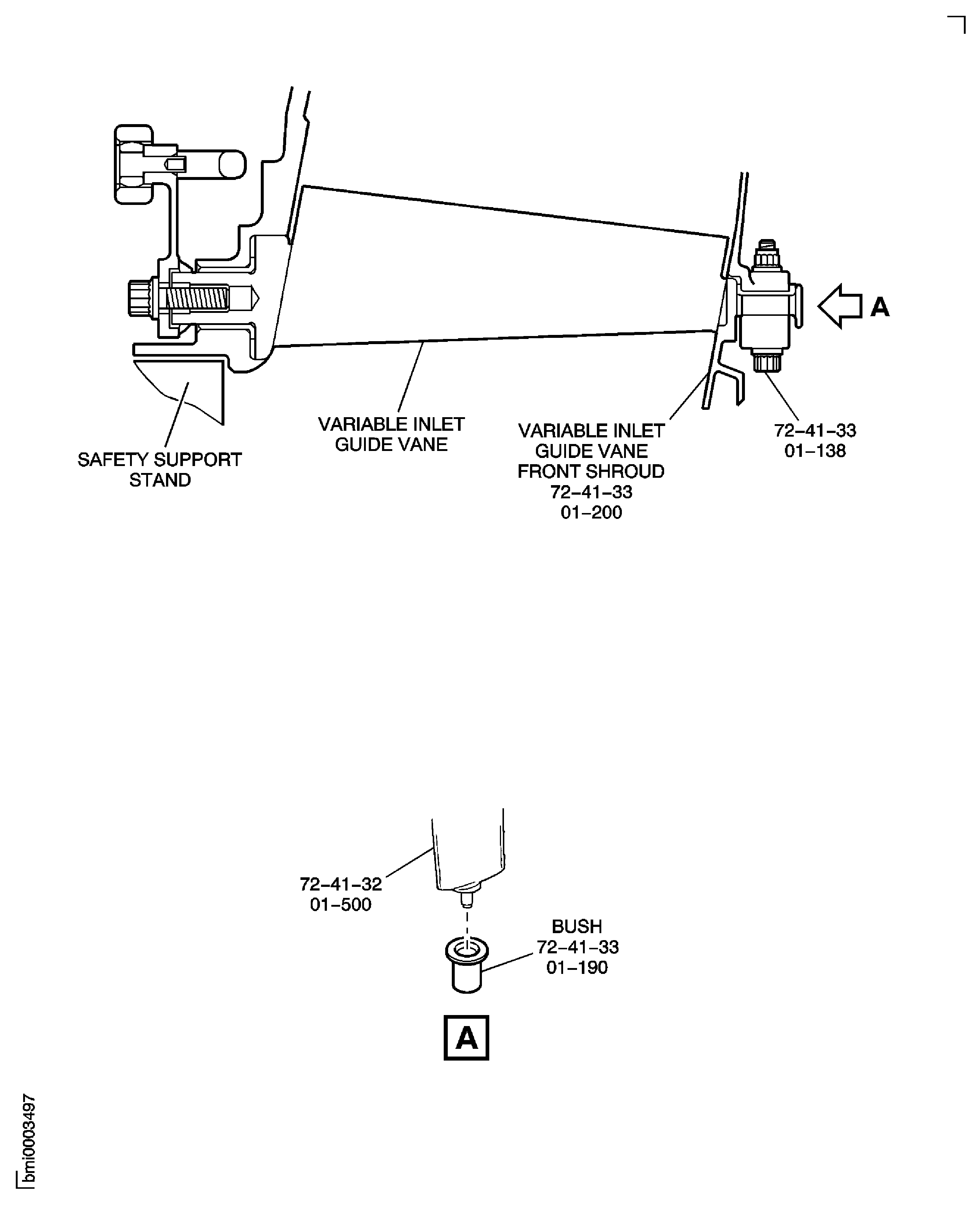
Figure: Install the Crankshaft Assembly
Install the Crankshaft Assembly
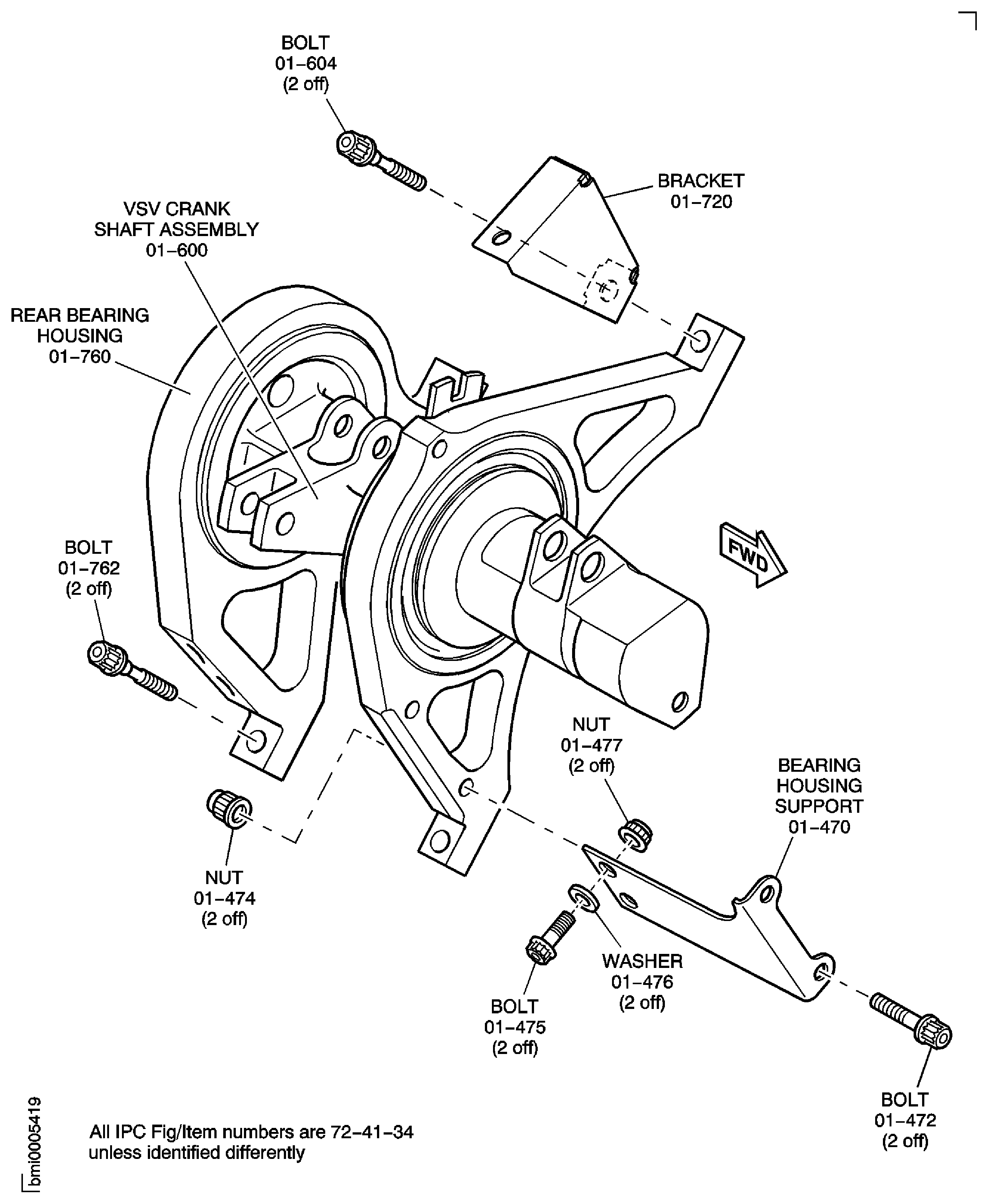
Figure: Install the Variable Stator Vanes
Install the Variable Stator Vanes
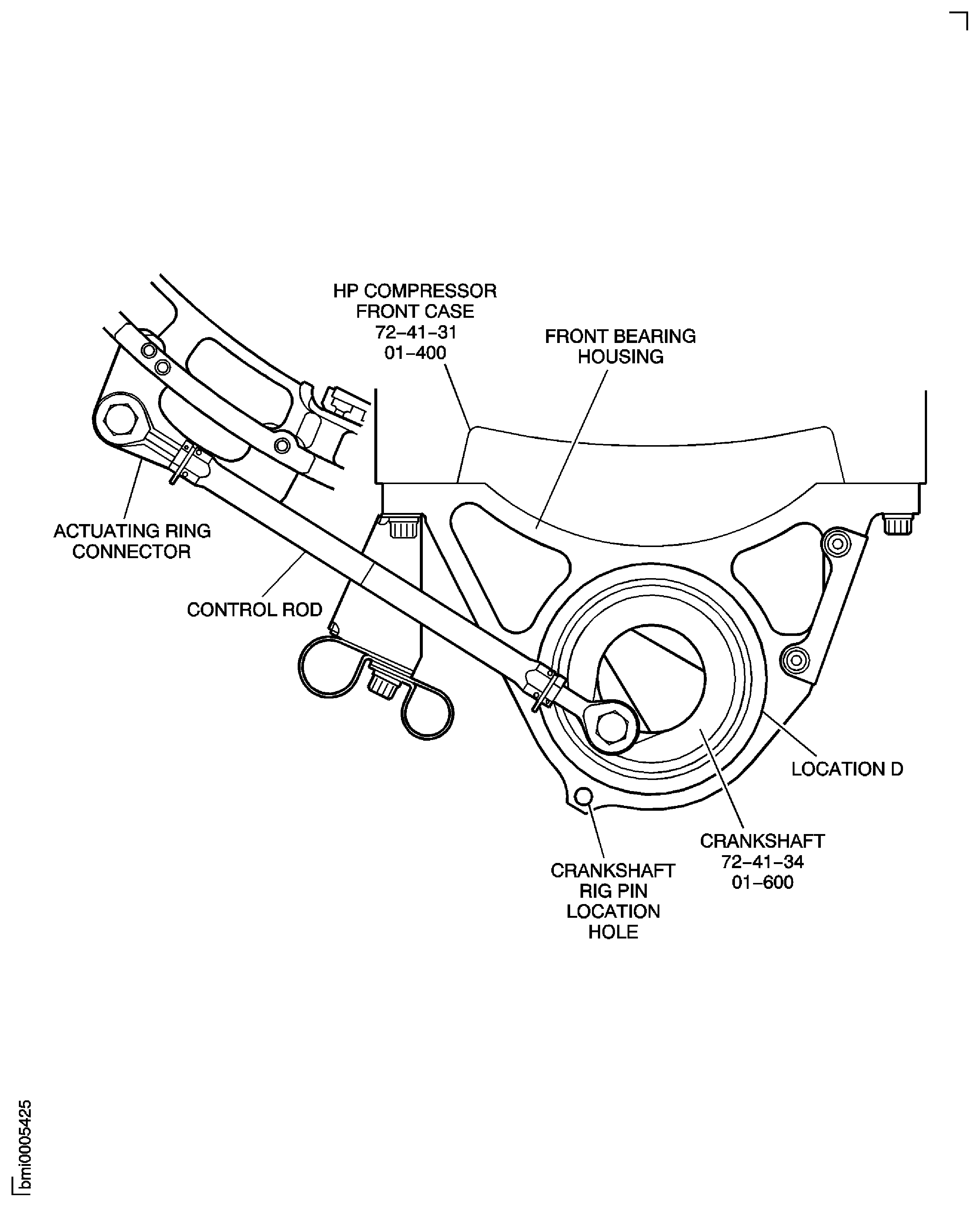
Figure: Install the Rigging Pins
Install the Rigging Pins
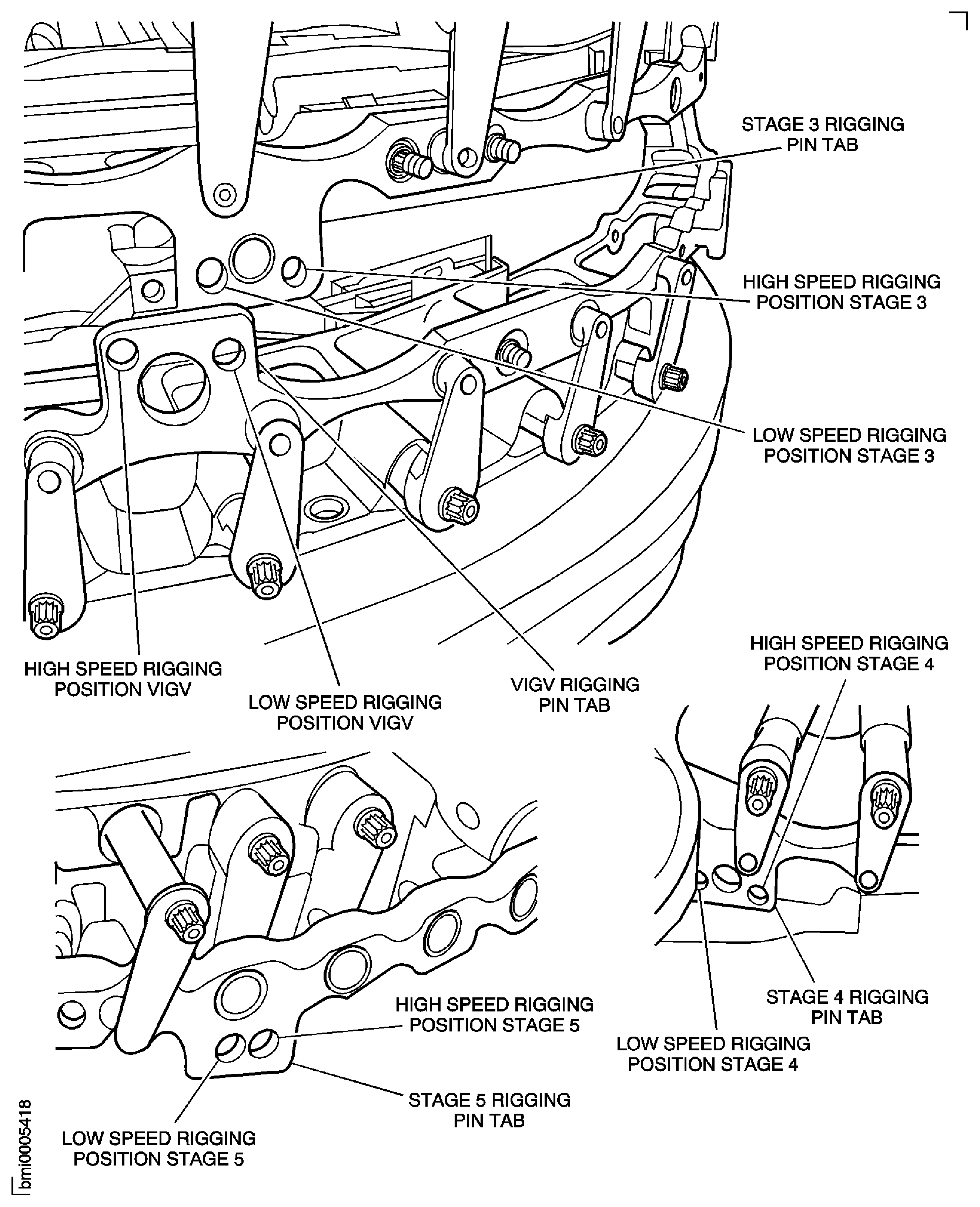
Figure: Assemble the Control Rods
Sheet 1
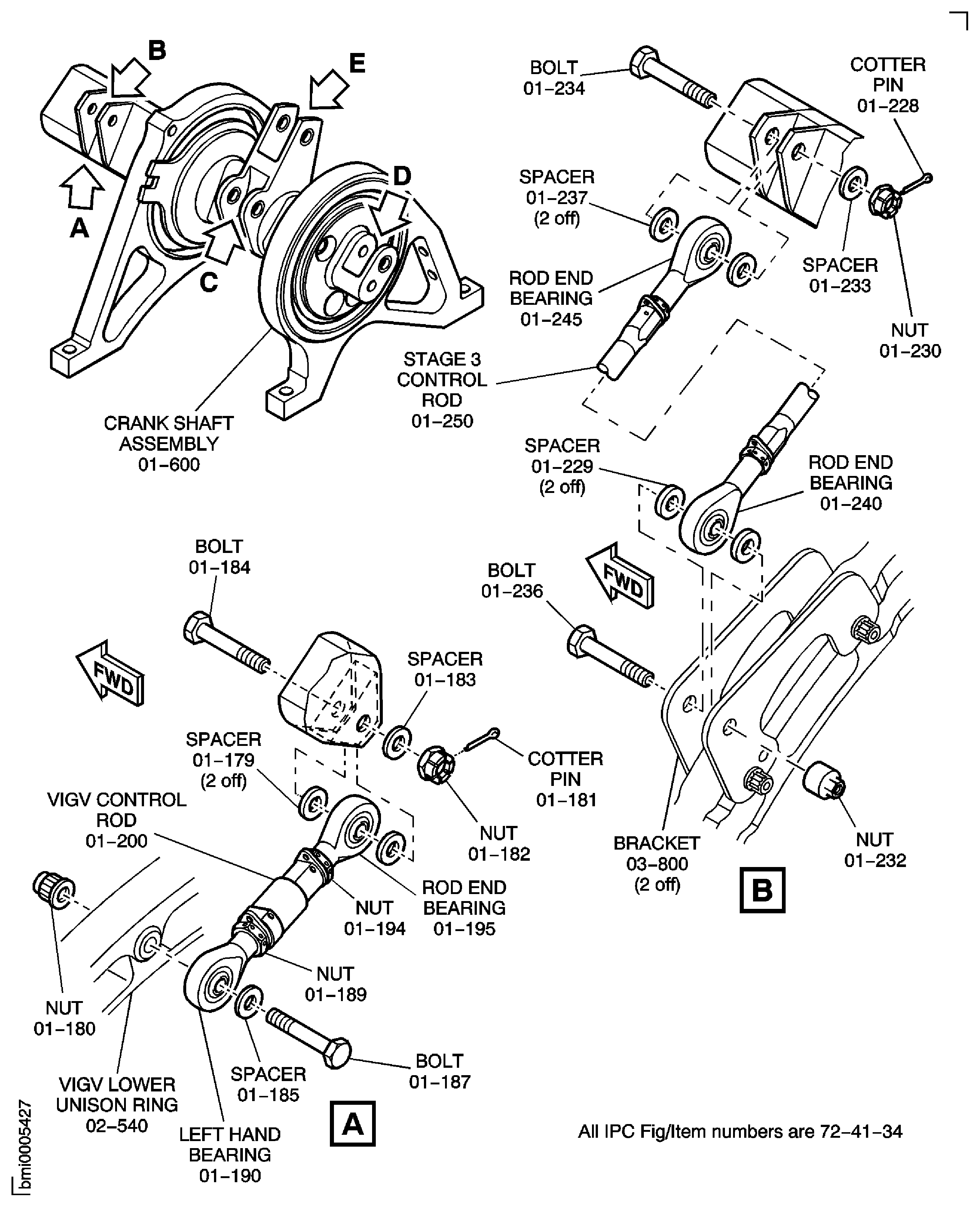
Figure: Assemble the Control Rods
Sheet 2
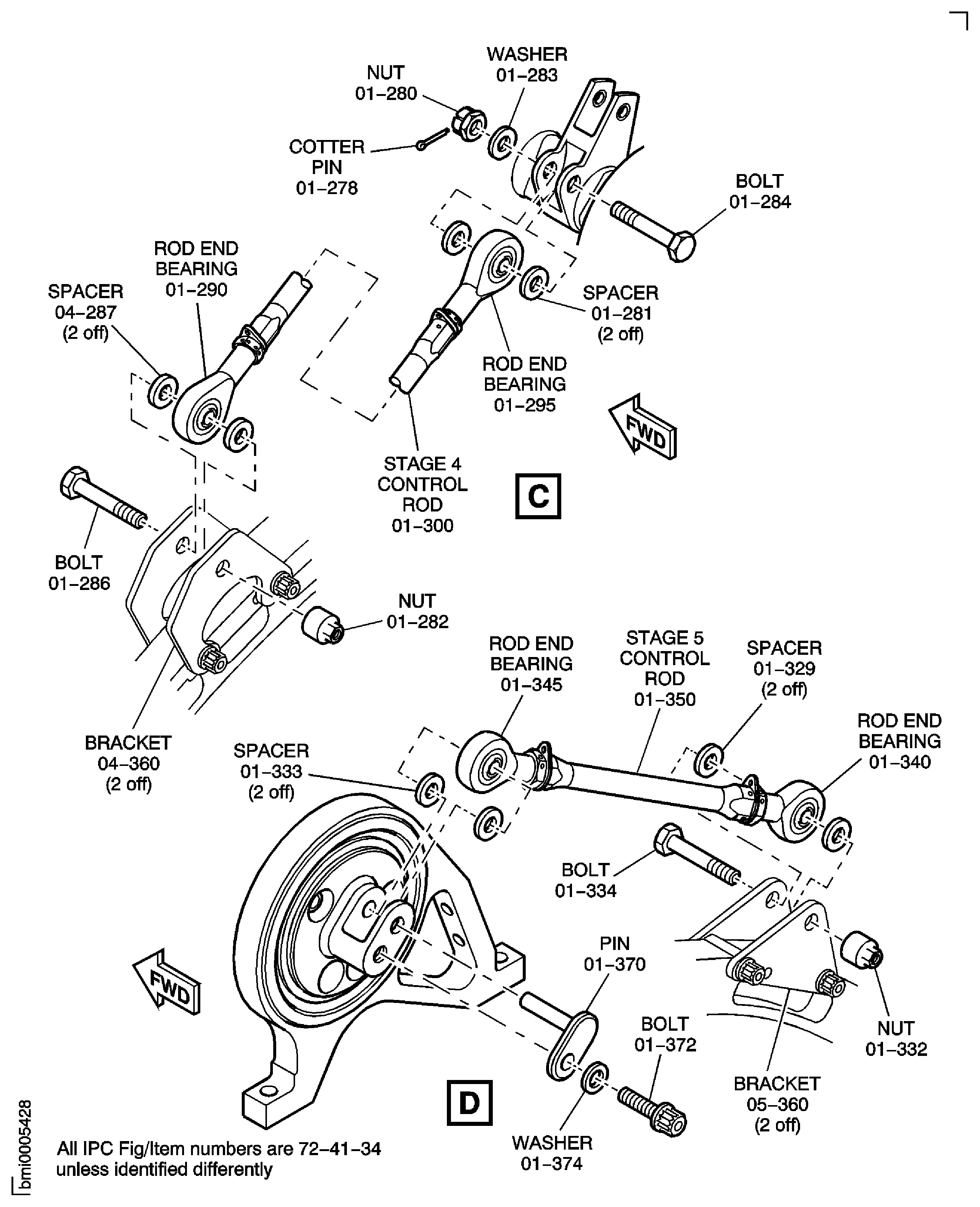
Figure: Assemble the Control Rods
Sheet 3
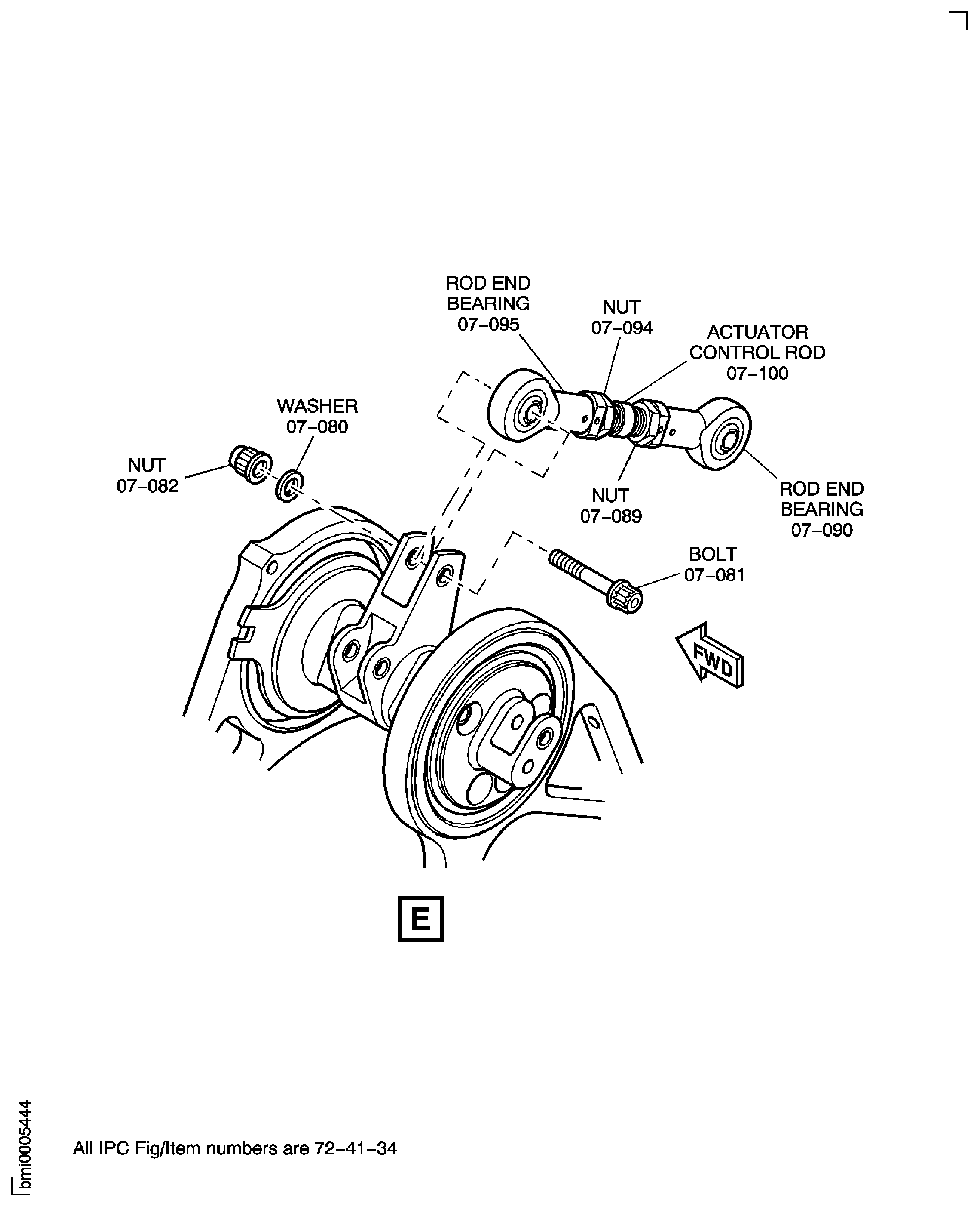
Figure: Assemble the Control Rods
Assemble the Control Rods
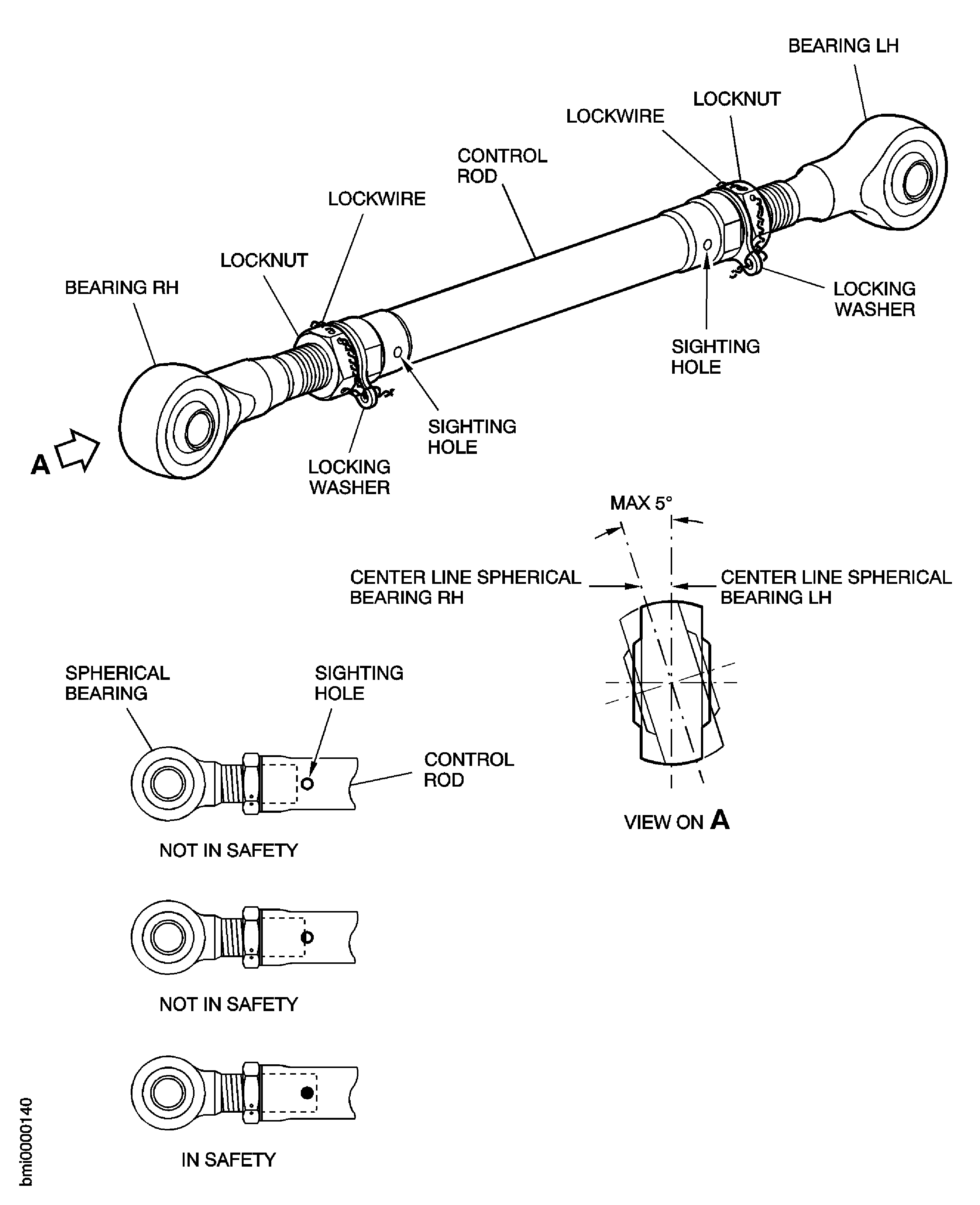
Figure: Install a Split Cotter Pin
Install a Split Cotter Pin

Figure: Measure the Axial Clearance
Measure the Axial Clearance