Export Control
EAR Export Classification: Not subject to the EAR per 15 C.F.R. Chapter 1, Part 734.3(b)(3), except for the following Service Bulletins which are currently published as EAR Export Classification 9E991: SBE70-0992, SBE72-0483, SBE72-0580, SBE72-0588, SBE72-0640, SBE73-0209, SBE80-0024 and SBE80-0025.Copyright
© IAE International Aero Engines AG (2001, 2014 - 2021) The information contained in this document is the property of © IAE International Aero Engines AG and may not be copied or used for any purpose other than that for which it is supplied without the express written authority of © IAE International Aero Engines AG. (This does not preclude use by engine and aircraft operators for normal instructional, maintenance or overhaul purposes.).Applicability
Post SBE 72-0564 AND Post SBE 72-0571 (SELECT ONE PRODUCTION STANDARD)
Common Information
TASK 72-41-00-040-002-C00 HPC Assembly - Remove The HPC Front Cases For Access To Stage 3 Through 6 (HPC Surgical Strike Procedure), Special Procedure-002 - SBE 72-0564 And SBE 72-0571 (SelectOne Production Standard)
General
This TASK gives the procedure to remove the HP compressor front cases to gain access to stages 3 to 6 rotor blades (HPC Surgical strike) only for engines, which have SBE 72-0564 and SBE 72-0571 (SelectOne Production Standard) incorporated. This procedure uses a method that does not require separation of the HP compressor module from the combustor and HP turbine modules.
If the front half casings cannot be removed using the procedure in Step then strip the module using the procedures in TASK 72-41-00-040-001-D00 and inform IAE Technical Services.
Fig/item numbers in parentheses in the procedure agree with those used in the IPC. Only the primary Fig/item numbers are used. For the service bulletin alpha variants refer to the IPC.
Apply the approved CoMat 10-058 PENETRATING OIL before the removal of threaded parts and parts with an interference fit. Let the parts soak before removal.
Discard all rubber seal rings, cotter pins and keywashers removed in this procedure.
Remove and discard the CoMat 02-126 LOCKWIRE before any part is disconnected or removed.
As each item is removed it must be identified with its position on the mini-module.
NOTE
NOTE
NOTE
NOTE
Preliminary Requirements
Pre-Conditions
NONESupport Equipment
| Name | Manufacturer | Part Number / Identification | Quantity | Remark |
|---|---|---|---|---|
| Dial indicator | LOCAL | Dial indicator | 6 | |
| Dial test indicator stands/blocks and associated equipment | LOCAL | Dial test indicator stands/blocks and associated equipment | ||
| Feeler gage | LOCAL | Feeler gage | ||
| IAE 1F10028 Support Pedestal | 0AM53 | IAE 1F10028 | 2 | |
| IAE 1F10052 Two cables sling | 0AM53 | IAE 1F10052 | 2 | |
| IAE 1P16002 Cradle pedestal | 0AM53 | IAE 1P16002 | 1 | |
| IAE 1P16046 Removal/Installation fixture | 0AM53 | IAE 1P16046 | 1 | |
| IAE 1P16088 Leak check adapter | 0AM53 | IAE 1P16088 | 1 | |
| IAE 1P16089 Leak check cap | 0AM53 | IAE 1P16089 | 1 | |
| IAE 1P16285 Tie-rod adapter | 0AM53 | IAE 1P16285 | 1 | |
| IAE 1P16543 Removal/Installation fixture | 0AM53 | IAE 1P16543 | 1 | |
| IAE 1R18234 Support rod | 0AM53 | IAE 1R18234 | 3 | |
| IAE 1R18325 Trunnion assembly | 0AM53 | IAE 1R18325 | 2 | |
| IAE 1R18673 Dummy stub shaft | 0AM53 | IAE 1R18673 | 1 | |
| IAE 1R19463 Stand - Surgical strike | 0AM53 | IAE 1R19463 | 1 | |
| IAE 1R19633 Split ring assembly | 0AM53 | IAE 1R19633 | 1 | |
| IAE 6F10030 Vacuum test cart | 0AM53 | IAE 6F10030 | 1 |
Consumables, Materials and Expendables
| Name | Manufacturer | Part Number / Identification | Quantity | Remark |
|---|---|---|---|---|
| CoMat 01-002 SOLVENT, DELETED. | LOCAL | CoMat 01-002 | ||
| CoMat 04-005 JOINTING COMPOUND, MEDIUM GRADE | LOCAL | CoMat 04-005 | ||
| CoMat 10-058 PENETRATING OIL | LOCAL | CoMat 10-058 | ||
| CoMat 02-126 LOCKWIRE | LOCAL | CoMat 02-126 |
Spares
NONESafety Requirements
NONEProcedure
Refer to Figure.
Install the IAE 1P16089 Leak check cap 1 off in the coupling nut of the pressure tube.
Install the IAE 1P16088 Leak check adapter 1 off in the scavenge tube.
Connect the IAE 6F10030 Vacuum test cart 1 off to the adapter.
Adjust the vacuum on the cart to 20 in. HG and evacuate the bearing compartment. Based on the ambient pressure, refer to the table below for the vacuum pressure in psia.
Ambient Pressure of the Day (psia)
Vacuum Pressure (psia)
14.7
4.9
14.5
4.7
14.3
4.5
14.1
4.3
13.9
4.1
13.7
3.9
13.5
3.7
13.3
3.5
13.1
3.3
Vacuum pressure (psia) = Ambient pressure of the day (psia) - 9.8 psia
Check the air flow on the No.4 front and rear bearing compartment. The air flow must not be more than 17 pph (7.71 Kgph). Make a record of the reading. Keep the reading as it will be needed during the vacuum check in TASK 72-41-00-440-002-D00.
SUBTASK 72-41-00-720-005 Do a Check of the No.4 Front and Rear Bearing Compartment for Leaks
Remove the components, the external harnesses and the tubes from the LP turbine module. Refer to TASK 72-00-50-020-001.
Remove the LP turbine module. Refer to TASK 72-00-50-020-002.
Turn the LP turbine module from horizontal to vertical. Refer to TASK 72-00-50-560-001.
Remove the components, the external harnesses and the tubes from the HP system module sufficient to remove the HP compressor front cases. Refer to TASK 72-00-40-020-001-B00, TASK 72-00-40-020-002-C00, TASK 72-00-40-020-003-B00, TASK 72-00-40-020-004 and associated TASKS.
Remove the HP system module (horizontal). Refer to TASK 72-00-40-020-006-B00.
Remove the HP stack and stow vertically in the build stand as follows :
SUBTASK 72-41-00-020-003 Remove Modules for Access
Refer to Figure.
Attach IAE 1P16285 Tie-rod adapter 1 off on to the center ring (part of IAE 1P16046 Removal/Installation fixture or IAE 1P16543 Removal/Installation fixture 1 off).
SUBTASK 72-41-00-560-021 Install the IAE 1P16046 or IAE 1P16543 Remove/Install Fixture and Tie-Rod Adapter on to the HP System Module Rear Flange
Refer to Figure.
Remove the curvic protector from IAE 1R18673 Dummy stub shaft 1 off.

WARNING
WHEN YOU USE CoMat 01-002 SOLVENT, DELETED., YOU MUST USE THE NECESSARY PROTECTIVE CLOTHING. DO NOT GET THE SOLVENT ON YOUR SKIN OR IN YOUR EYES. YOU MUST NOT SMOKE WHEN YOU USE THE SOLVENT AS THE VAPOR CHANGES AND BECOMES TOXIC.Use a soft brush and apply CoMat 01-002 SOLVENT, DELETED. to the curvic teeth.
Clean the curvic teeth of the dummy stub shaft and the stage 3 disk.
SUBTASK 72-41-00-560-022 Install the Dummy Stub Shaft on to the Stage 3 Disk Curvic Coupling
Refer to Figure.
Attach a hoist to the lift eye on each IAE 1F10052 Two cables sling 2 off.
SUBTASK 72-41-00-560-023 Prepare for the Lift and Turn of the HP System Module
Install IAE 1R19633 Split ring assembly 1 off.
SUBTASK 72-41-00-560-024 Lift and Turn the HP System Module and Prepare the Module for Installation into IAE 1R19643 Stand (Surgical Strike Stand)
Remove the 6 bolts, nuts and washers at positions 1,8,9,17,18 and 25 from the IAE 1P16046 Removal/Installation fixture or IAE 1P16543 Removal/Installation fixture and the HP turbine case.
Install the three support plates (detail 4) to the remove/install fixture IAE 1P16046 Removal/Installation fixture or IAE 1P16543 Removal/Installation fixture and module rear flange with the 6 bolts (detail 17). Tighten the 6 bolts (detail 17).
Make sure that the remove/install fixture lifting eyes (part of IAE 1P16046 Removal/Installation fixture or IAE 1P16543 Removal/Installation fixture) are stowed securely so as not to interfere with the surgical strike tooling when the HP module is lowered into the stand.
Assemble and install the three retaining clamp plates (detail 5), the heel pin (detail 15), the three studs (detail 14), the three plain washers, pins and hand knobs (details 16, 27 and 22). Move the three retaining clamp plates outwards so the three jacking screws (detail 12) can be adjusted.
NOTE
The retaining plate assembly is made secure after the module axial movement (in relation to the stand) is set in Step.

CAUTION
YOU MUST KEEP THE WEIGHT OF THE MODULE ON THE HOIST UNTIL THE SLIDE IN-RIGGERS ARE POSITIONED AND SECURED. THIS IS TO PREVENT DAMAGE TO MODULE COMPONENTS.Lower and position the module into the stand and make sure the front half casing split line is in the correct orientation, 90 degrees to the TDC marked on the in-rigger (detail 6).
Install the HP compressor assembly on IAE 1R19463 Stand - Surgical strike 1 off.
SUBTASK 72-41-00-040-216 Install the Module into the Surgical Strike Build Stand IAE 1R19463
Put a thin layer of CoMat 04-005 JOINTING COMPOUND, MEDIUM GRADE on to the bracket where it touches the blank.
Install one of the blanks HP COMPRESSOR SPLIT CASE (72-41-31,01-120), the bracket HP COMPRESSOR SPLIT CASE (72-41-31,01-118) and two of the bolts HP COMPRESSOR SPLIT CASE (72-41-31,01-122) in to the HP compressor at location C.
Put a thin layer of CoMat 04-005 JOINTING COMPOUND, MEDIUM GRADE on the bracket where it touches the blank.
Install one of the blanks HP COMPRESSOR SPLIT CASE (72-41-31,01-120), the bracket HP COMPRESSOR SPLIT CASE (72-41-31,01-115) and two of the bolts HP COMPRESSOR SPLIT CASE (72-41-31,01-122) in the HP compressor at location A.
Install the other blank HP COMPRESSOR SPLIT CASE (72-41-31,01-120) and the other bolts HP COMPRESSOR SPLIT CASE (72-41-31,01-122) in to the HP compressor at location B. Torque the bolts to 85 to 105 lbfin (10 to 12 Nm).
Remove the support rods.
Remove the five tool bolts and the five nuts HPC Assembly (72-41-00,01-302) that safety the right hand trunnion on to the module.
NOTE
Keep the five nuts removed in step C.(1).Install the five bolts HPC Assembly (72-41-00,01-308) and the five nuts removed in step C.(1) and torque to 180 to 220 lbfin (20 to 25 Nm).
Install the five bolts HPC Assembly (72-41-00,01-308) and the five nuts removed in step C.(4) and torque to 180 lbfin to 220 lbfin (20 Nm to 25 Nm).
Remove the HP compressor trunnion assemblies.
SUBTASK 72-41-00-560-025 Remove the Lift Equipment from the HP System Module
Refer to Figure.
SUBTASK 72-41-00-040-217 Disconnect the Stage 3 VSV Control Rod
Refer to Figure.
SUBTASK 72-41-00-040-219 Remove the Stage 3 Actuating Ring Bridging Pieces
Refer to Figure.
SUBTASK 72-41-00-040-220 Remove the Stage 4 Actuating Ring Bridging Pieces
Refer to Figure.
SUBTASK 72-41-00-040-221 Remove the Stage 5 Actuating Ring Bridging Pieces
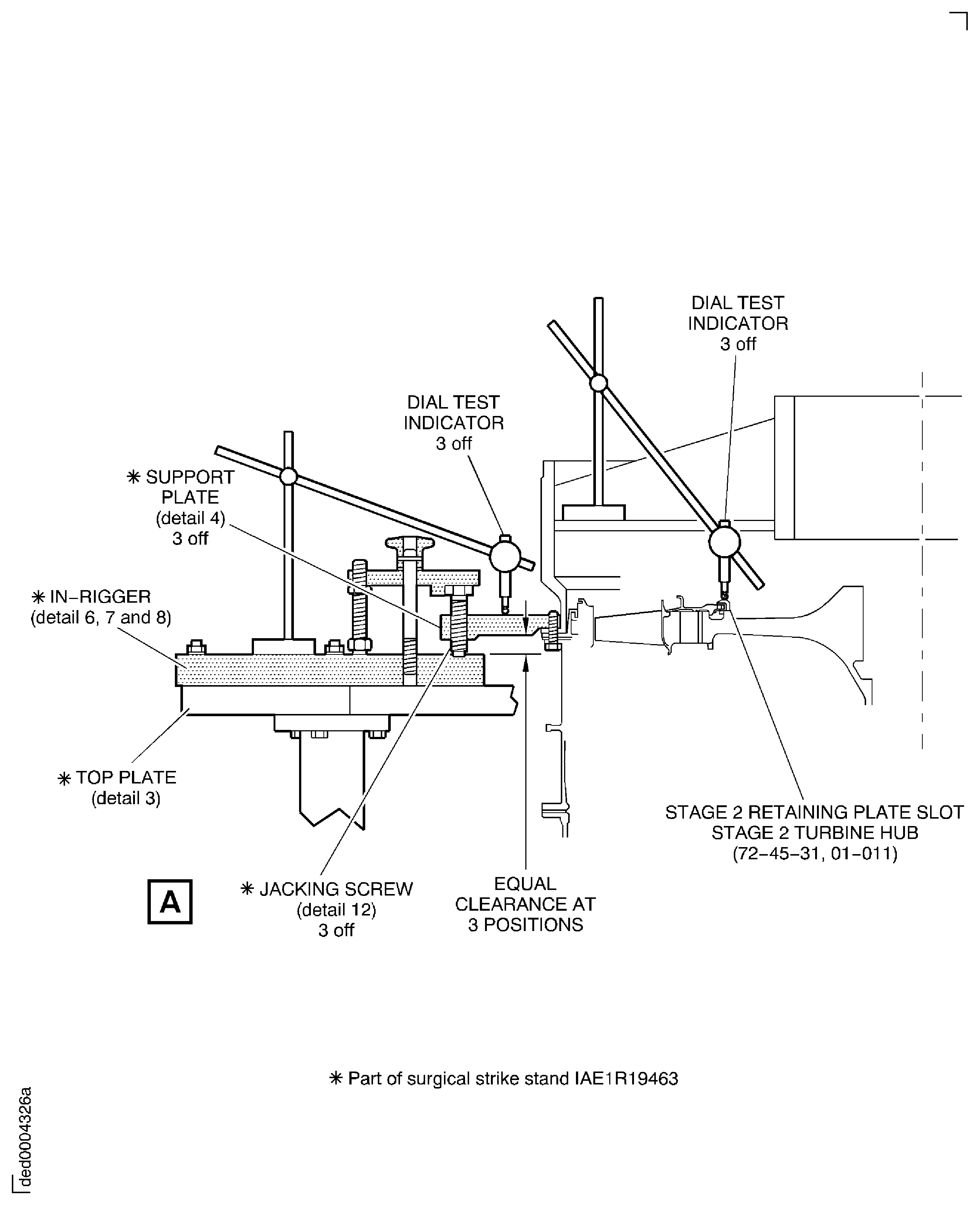
Put three dial test indicators, spaced equally, on the IAE 1P16046 Removal/Installation fixture or IAE 1P16543 Removal/Installation fixture so each dial indicator button contacts the rear surface of the stage 2 retaining plate slot on the stage 2 turbine hub ENGINE-STAGE 2 TURBINE HUB (72-45-31,01-011). Pre-load and zero the instrumentation.
NOTE
This instrumentation will monitor the true relative movement of the HP rotating components and the static components. This is the critical dimension to be monitored and recorded.
Set the true axial displacement of the HP module cases and stage 2 HP turbine and the IAE 1R19463 Stand - Surgical strike.
Position the six dial test indicators or equivalent instrumentation measuring devices as follows.
Adjust the three jacking screws (detail 12) in a clockwise direction to move the HP rear case rearwards (the rear case moves in a direction towards the top of the build stand). Make each adjustment in incremental steps of not more than 0.020 in. (0.50 mm) each time until the split casings can be released. There must not be a difference of 0.020 in. (0.50 mm) between the readings of each of the dial test indicators. After each adjustment is made check and make a record of the reading at each of the three support plates (detail 4). Make a record of the true axial movement seen on the three dial test indicators on the stage 2 HP turbine position.
CAUTION
YOU MUST MAKE A RECORD OF THE DIAL TEST INDICATOR READINGS AFTER EACH INCREMENTAL MOVEMENT MADE.CAUTION
THE RELATIVE AXIAL MOVEMENT MUST NOT BE MORE THAN 0.160 IN. (4 MM) IN TOTAL AS MEASURED ON THE DIAL TEST INDICATORS MOUNTED ON THE IAE 1P16046 Removal/Installation fixture OR IAE 1P16543 Removal/Installation fixture AND THE REAR FACE OF THE STAGE 2 HP TURBINE DISK. IF THE MOVEMENT IS MORE THAN THIS MAXIMUM LIMIT THEN DAMAGE WILL OCCUR TO CRITICAL COMPONENTS IN THE HP MODULE.CAUTION
THERE MUST NOT BE A DIFFERENCE OF MORE THAN 0.020 IN. (0.5 MM) BETWEEN THE READINGS OF EACH OF THE DIAL TEST INDICATORS. IF THE DIFFERENCE IS MORE THAN THIS LIMIT THEN DAMAGE MAY OCCUR TO HP MODULE COMPONENTS.CAUTION
DURING THE REMOVAL AND INSTALLATION OF THE HP COMPRESSOR FRONT HALF CASES TAKE CARE NOT TO DAMAGE THE HP COMPRESSOR ROTOR BLADES. DO NOT USE EXCESSIVE OR MORE FORCE THAN IS NECESSARY.Release the front half split casings. If the front split casings will not release from the module then make an adjustment to the axial position of the static components relative to the rotating components. The total axial movement must not be more than 0.160 in. (4 mm).
Support the half casings on detail 10 half rings when the casings are released and clear of the module. Use detail 10 half rings and carefully move the casings away from the module.
NOTE
The retaining clamp plate assembly will need to be released and moved clear of the jacking screws before the axial settings can be adjusted.Move the retaining clamp plate assembly into position to make contact with the three jacking screws (detail 12). Adjust and tighten the locknut on the heel pin (detail 15) but do not fully torque the lock nut. Tighten the hand knob (detail 22) to hold the assembly firmly.
Release the HP compressor front split half casings.
The module is now prepared for the necessary work in relation to the surgical strike procedure, refer to TASK 72-41-00-440-001-D00.
SUBTASK 72-41-00-040-223 Remove the HP Front Split Cases
Figure: Check the No.4 Front and Rear Bearing Compartment for Leaks
Check the No.4 Front and Rear Bearing Compartment for Leaks

Figure: Install the Remove/Install Fixture and Tie-Rod Adapter on to the HP System Module
Install the Remove/Install Fixture and Tie-Rod Adapter on to the HP System Module

Figure: Install the Dummy Stub Shaft on to the Stage 3 Disk Curvic Coupling
Install the Dummy Stub Shaft on to the Stage 3 Disk Curvic Coupling
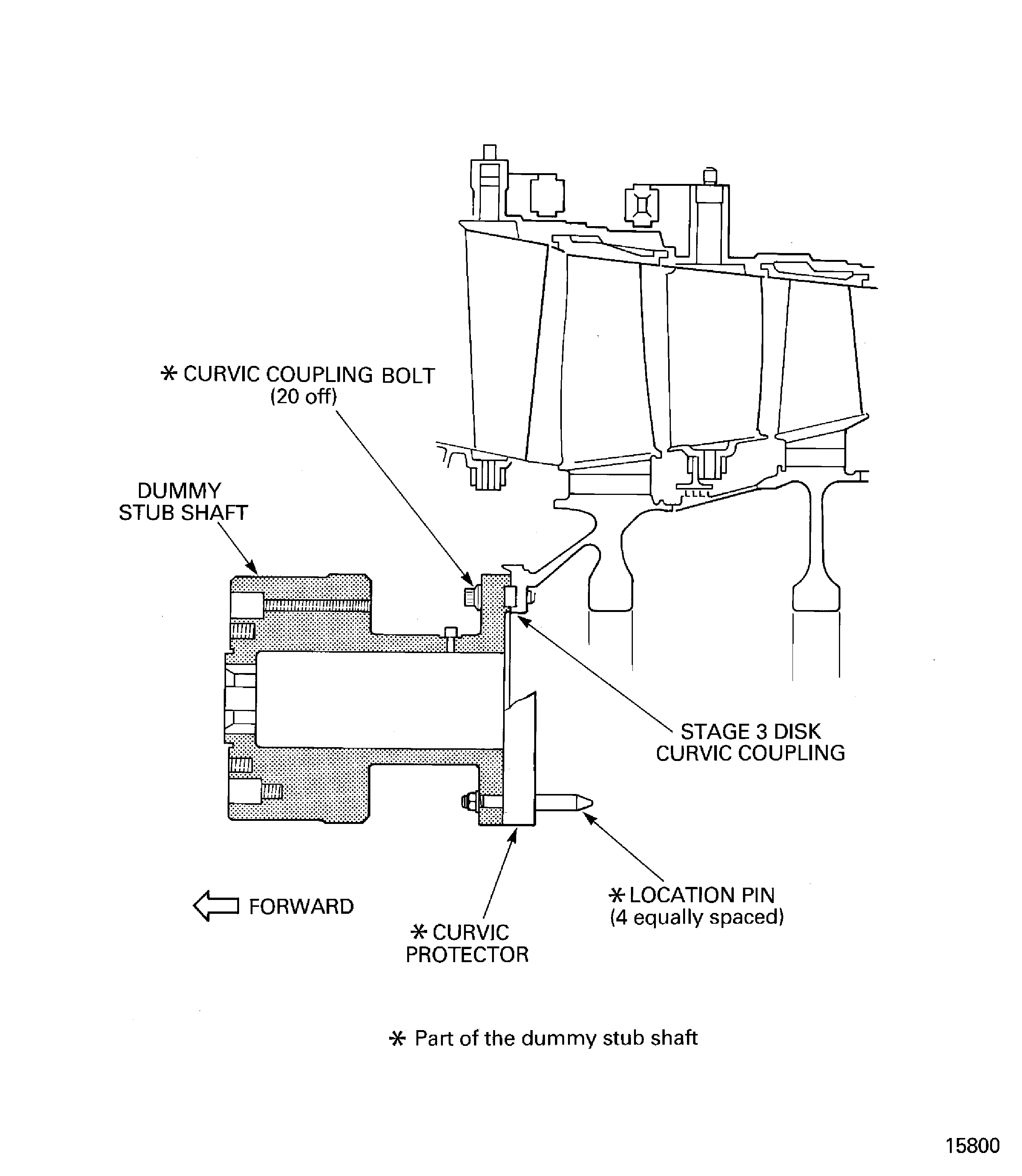
Figure: Install the Lift Slings on to the Trunnions
Install the Lift Slings on to the Trunnions

Figure: Remove the Forward Lift Sling from the HP Compressor Trunnions
Remove the Forward Lift Sling from the HP Compressor Trunnions

Figure: Remove the Variable Inlet Guide Vane Front Shroud
Remove the Variable Inlet Guide Vane Front Shroud
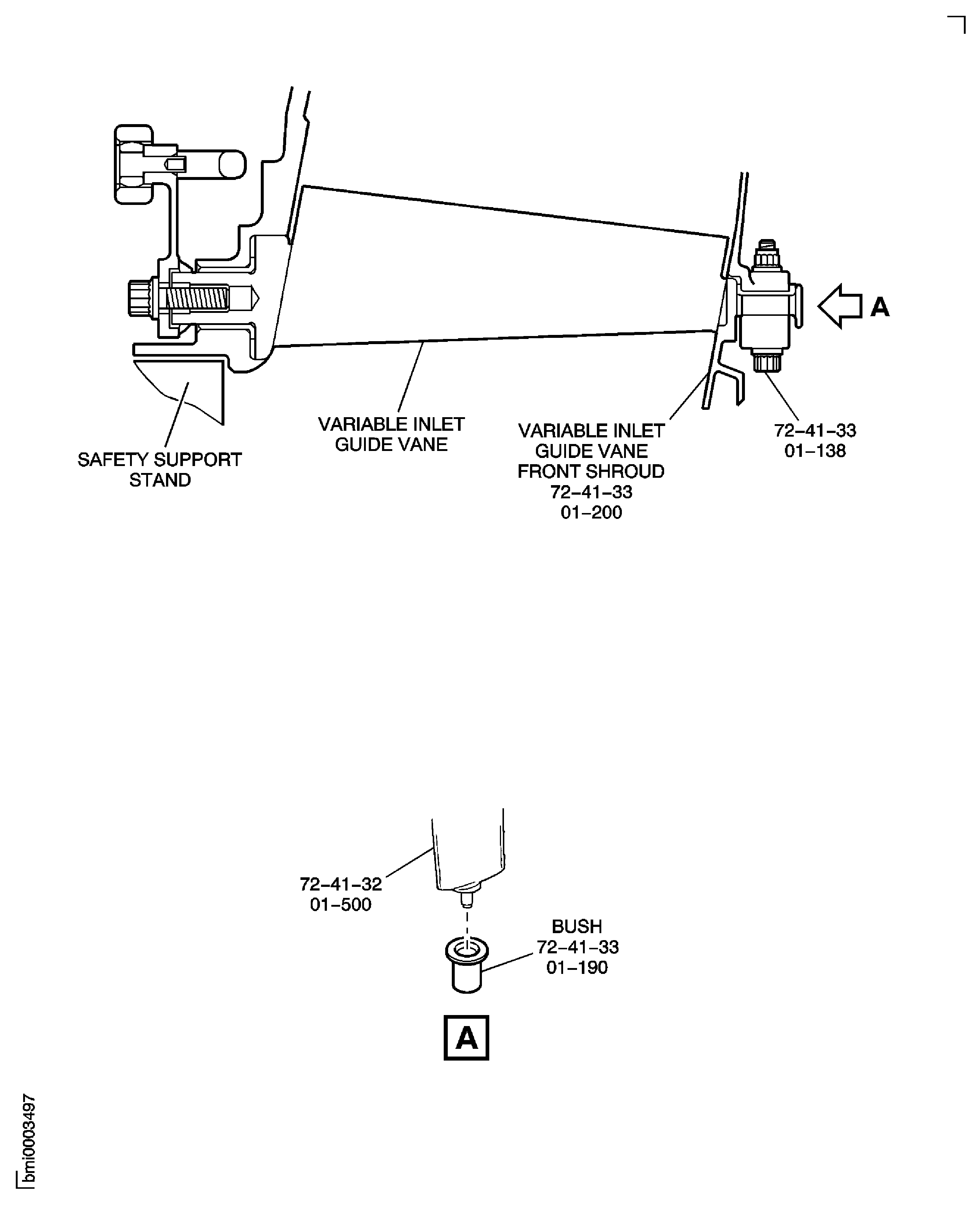
Figure: Install the HP Compressor Assembly in the Build Stand IAE 1R19643
Sheet 1
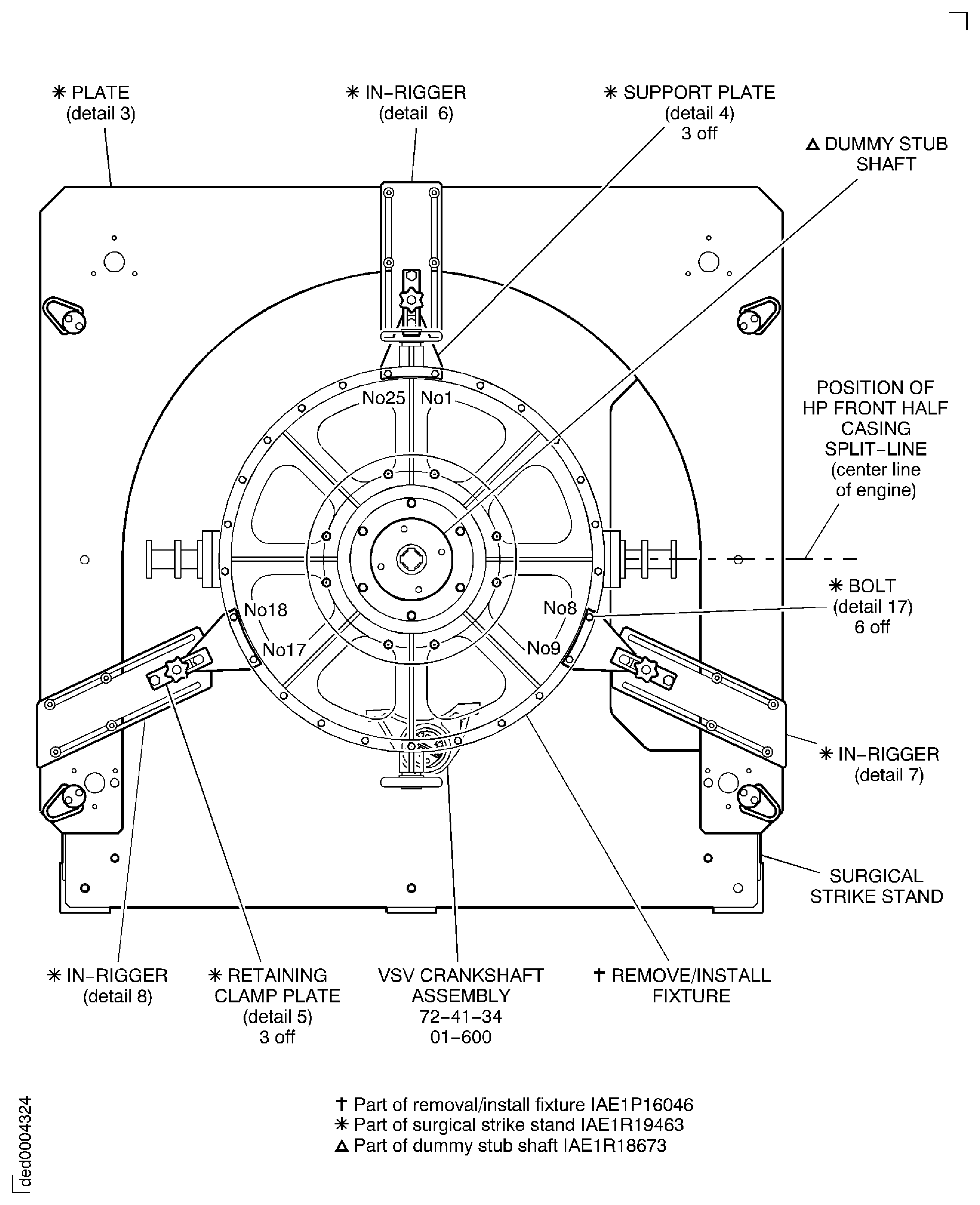
Figure: Install the HP Compressor Assembly in the Build Stand IAE 1R19643
Sheet 2
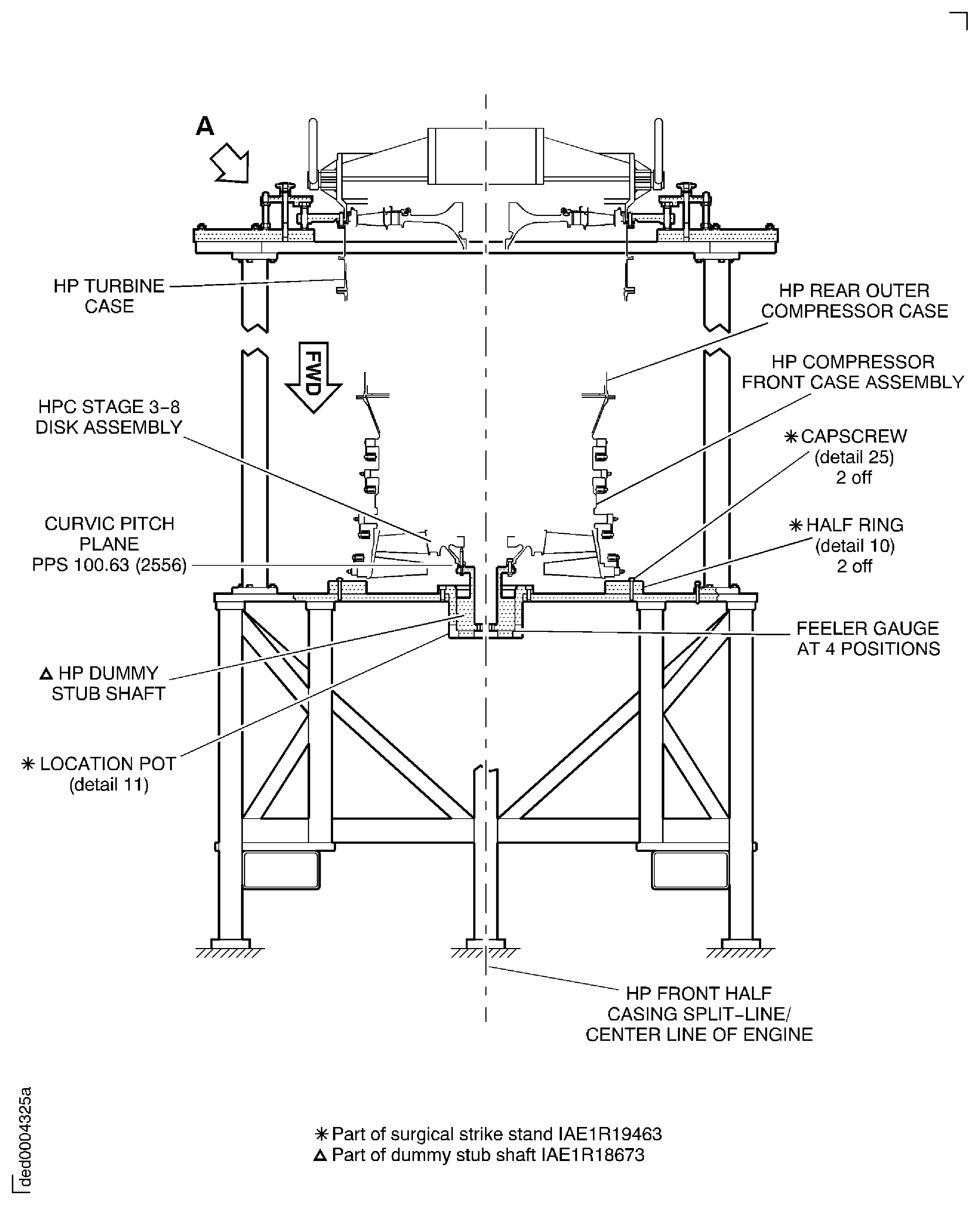
Figure: Install the HP Compressor Assembly in the Build Stand IAE 1R19643
Sheet 3
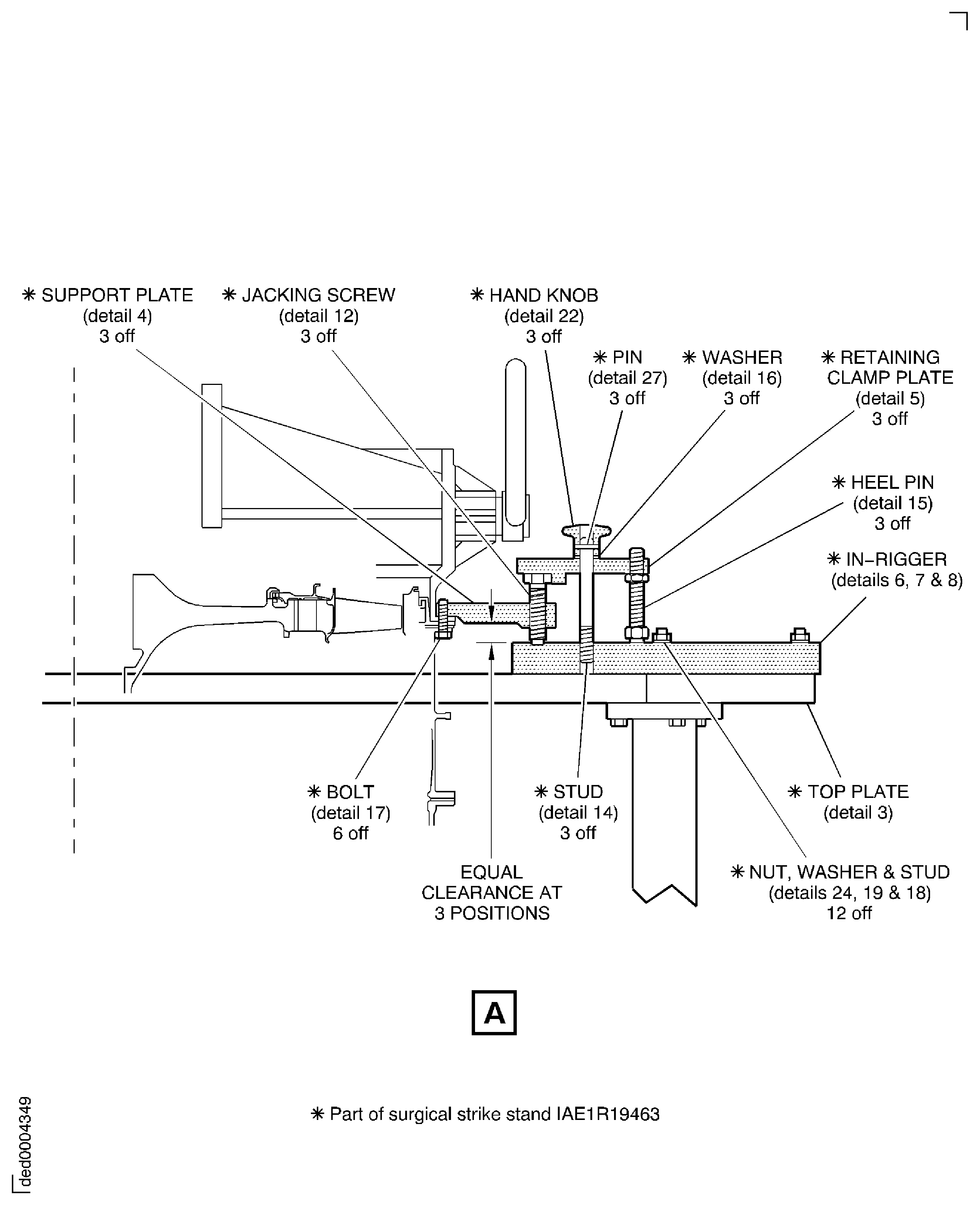
Figure: Remove the HP Compressor Support Rods
Sheet 1

Figure: Remove the HP Compressor Support Rods
Sheet 2
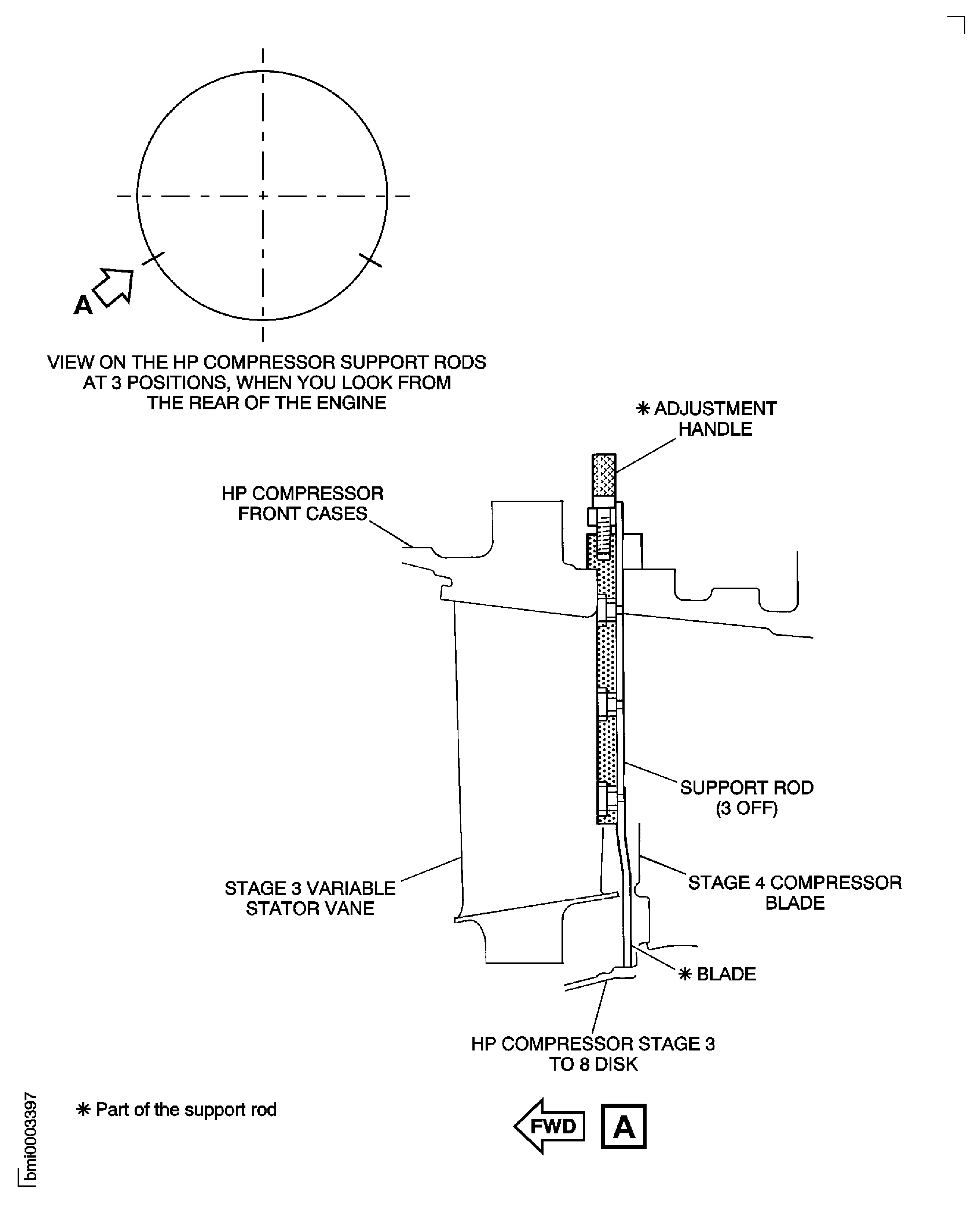
Figure: Remove the HP Compressor Trunnions
Remove the HP Compressor Trunnions

Figure: VSV Crankshaft and Unison Rings - Disconnect Stage 3 Control Rod
VSV Crankshaft and Unison Rings - Disconnect Stage 3 Control Rod
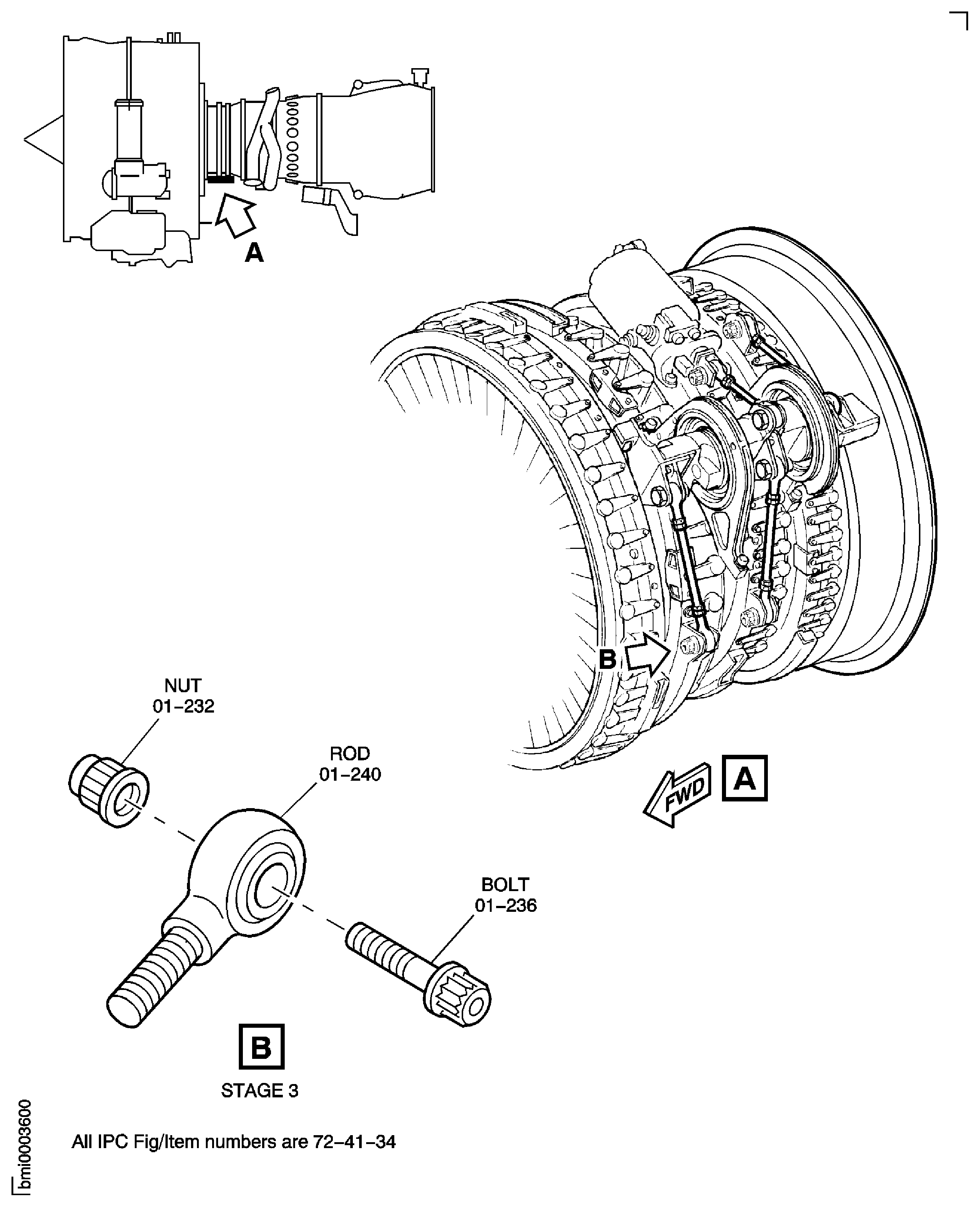
Figure: Remove the VIGV Actuating Ring Bridging Pieces
Sheet 1
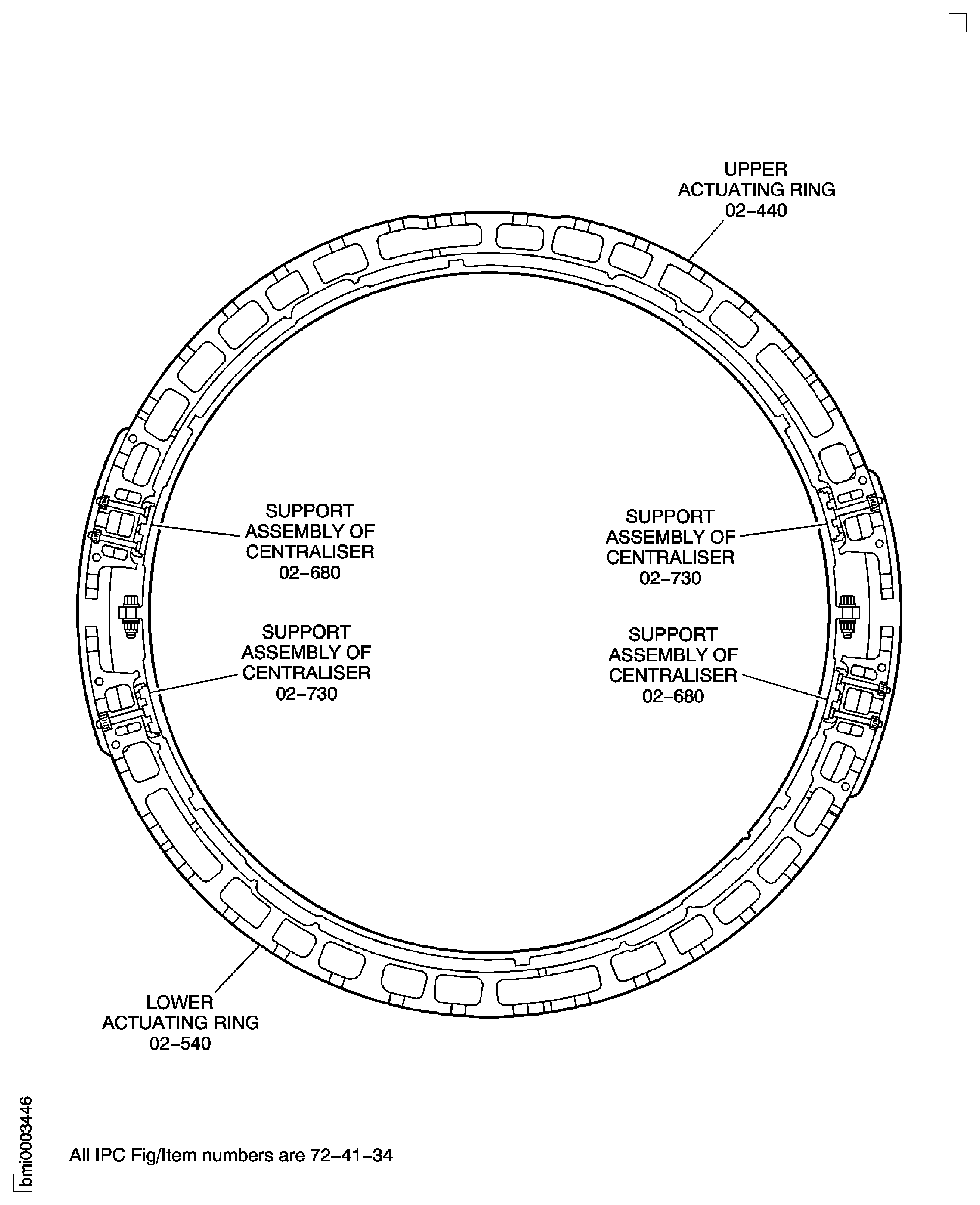
Figure: Remove the VIGV Actuating Ring Bridging Pieces
Sheet 2
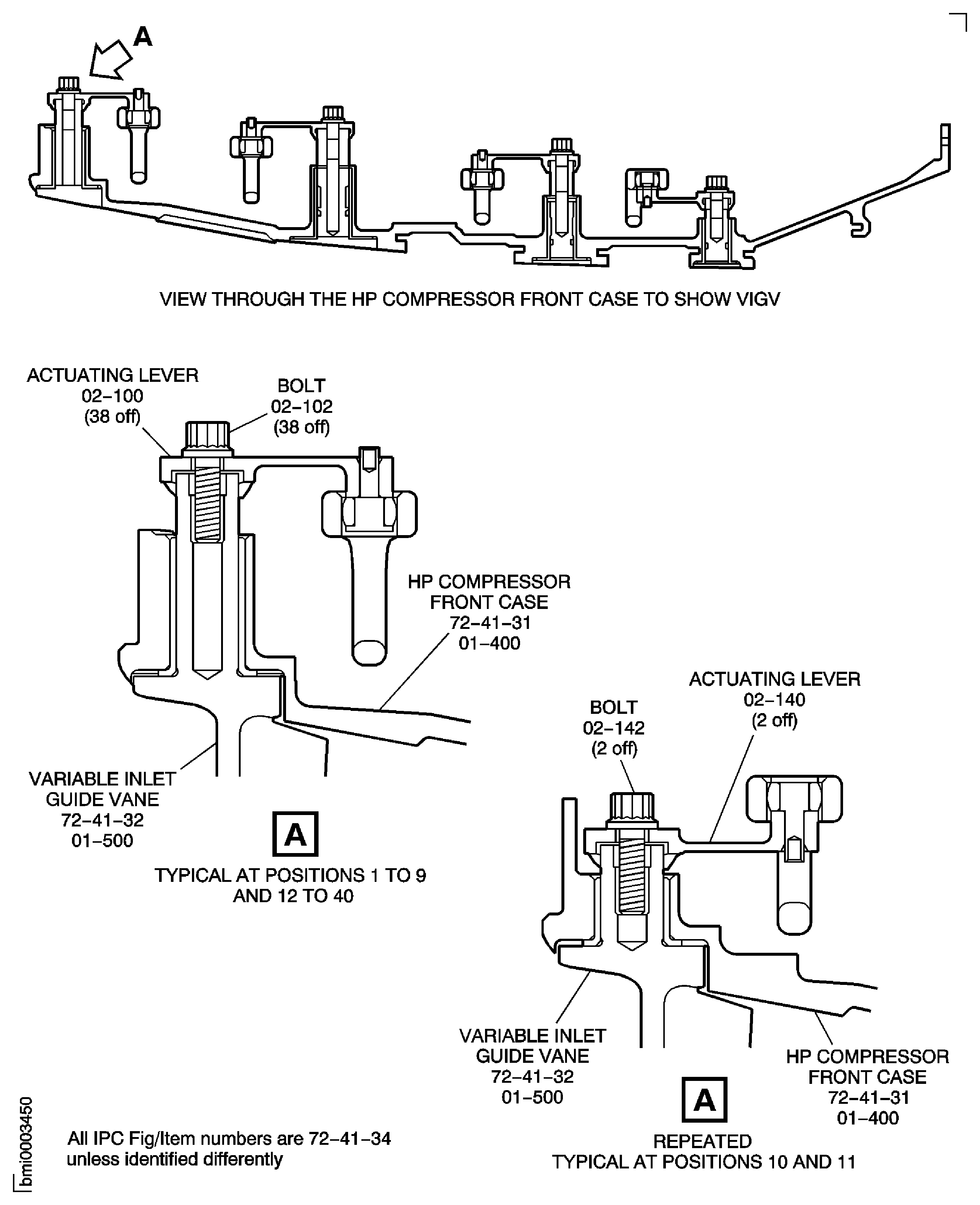
Figure: Remove the Stage 3 Actuating Ring Bridging Pieces
Remove the Stage 3 Actuating Ring Bridging Pieces
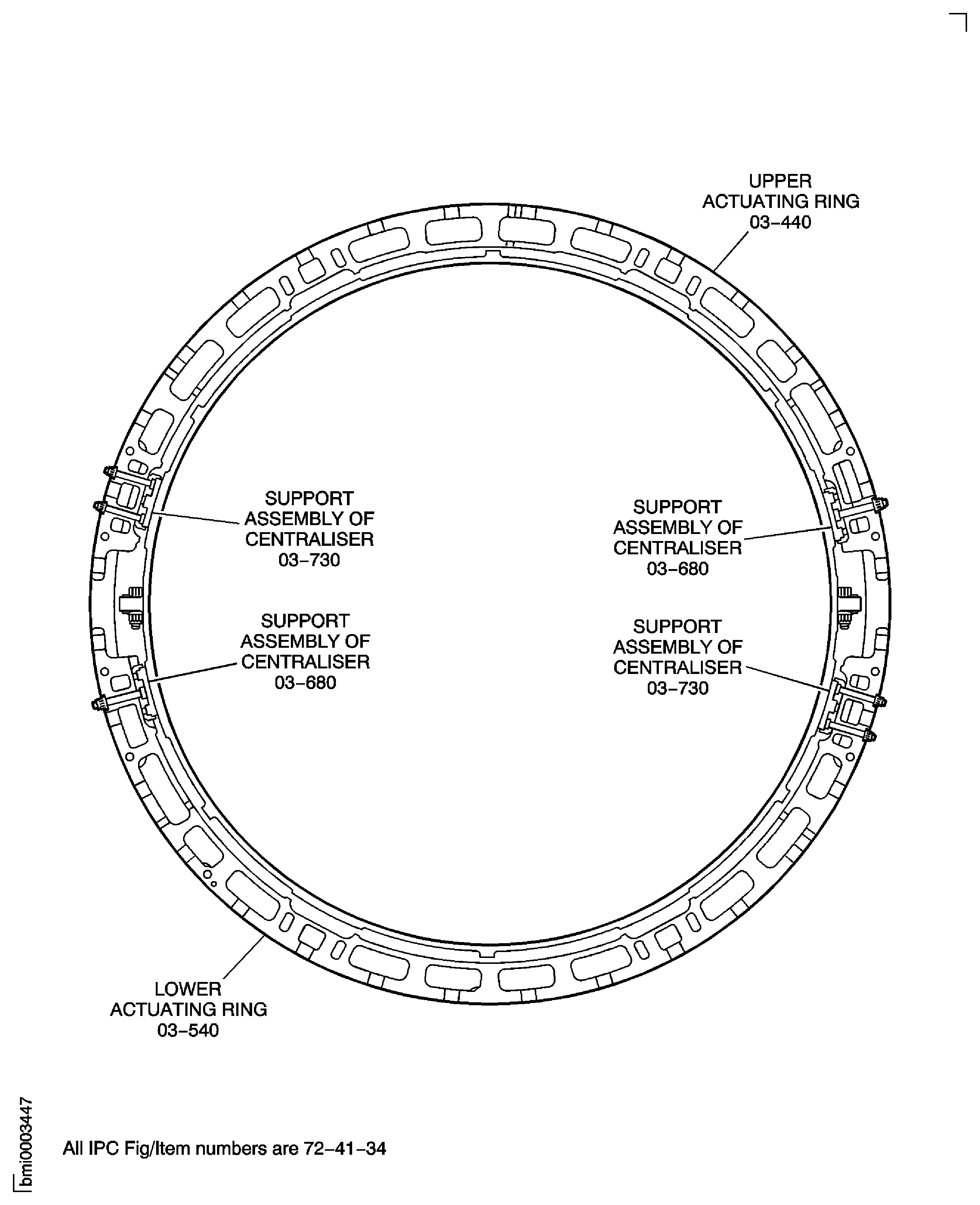
Figure: Remove the Stage 4 Actuating Ring Bridging Pieces
Remove the Stage 4 Actuating Ring Bridging Pieces
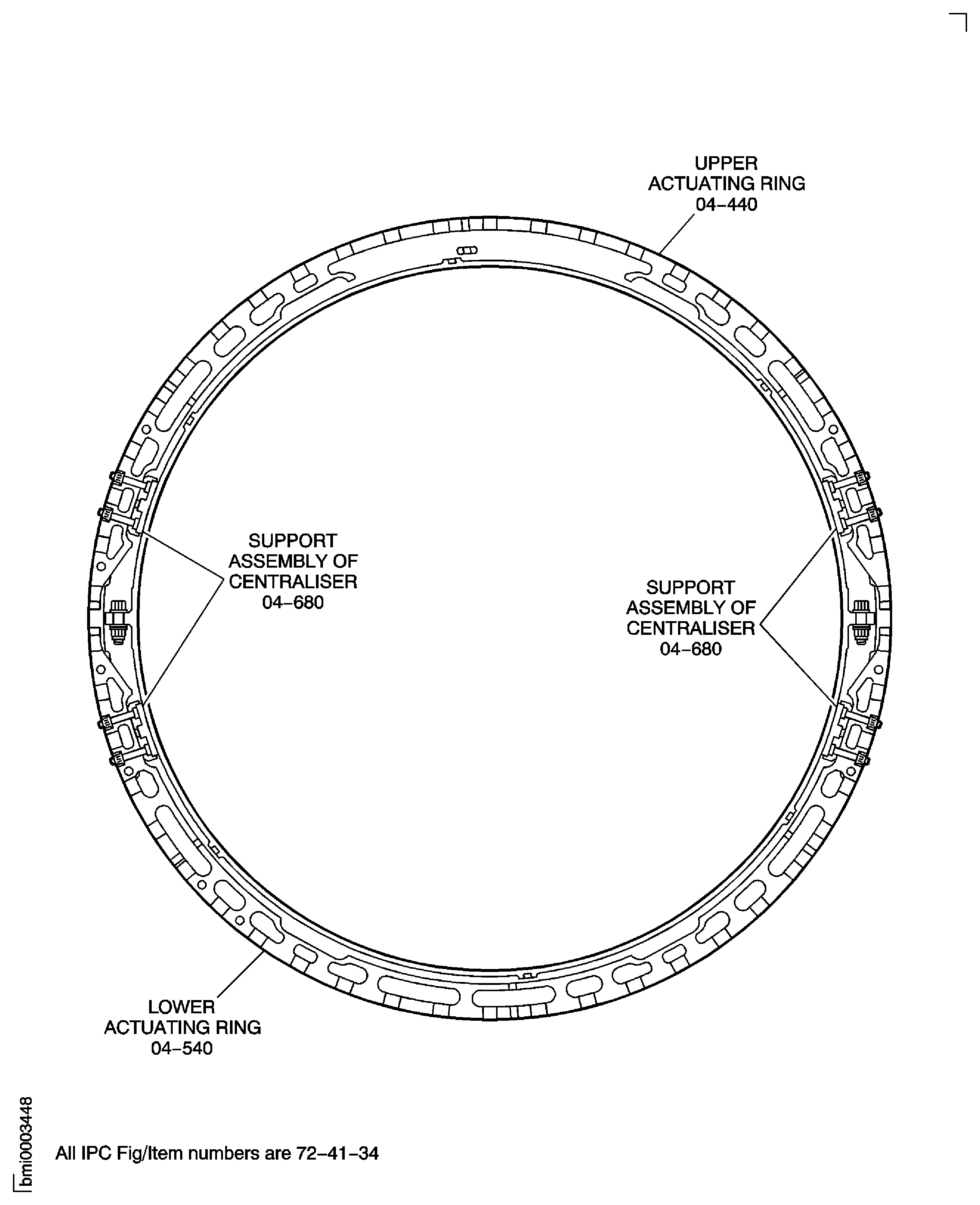
Figure: Remove the Stage 5 Actuating Ring Bridging Pieces
Remove the Stage 5 Actuating Ring Bridging Pieces
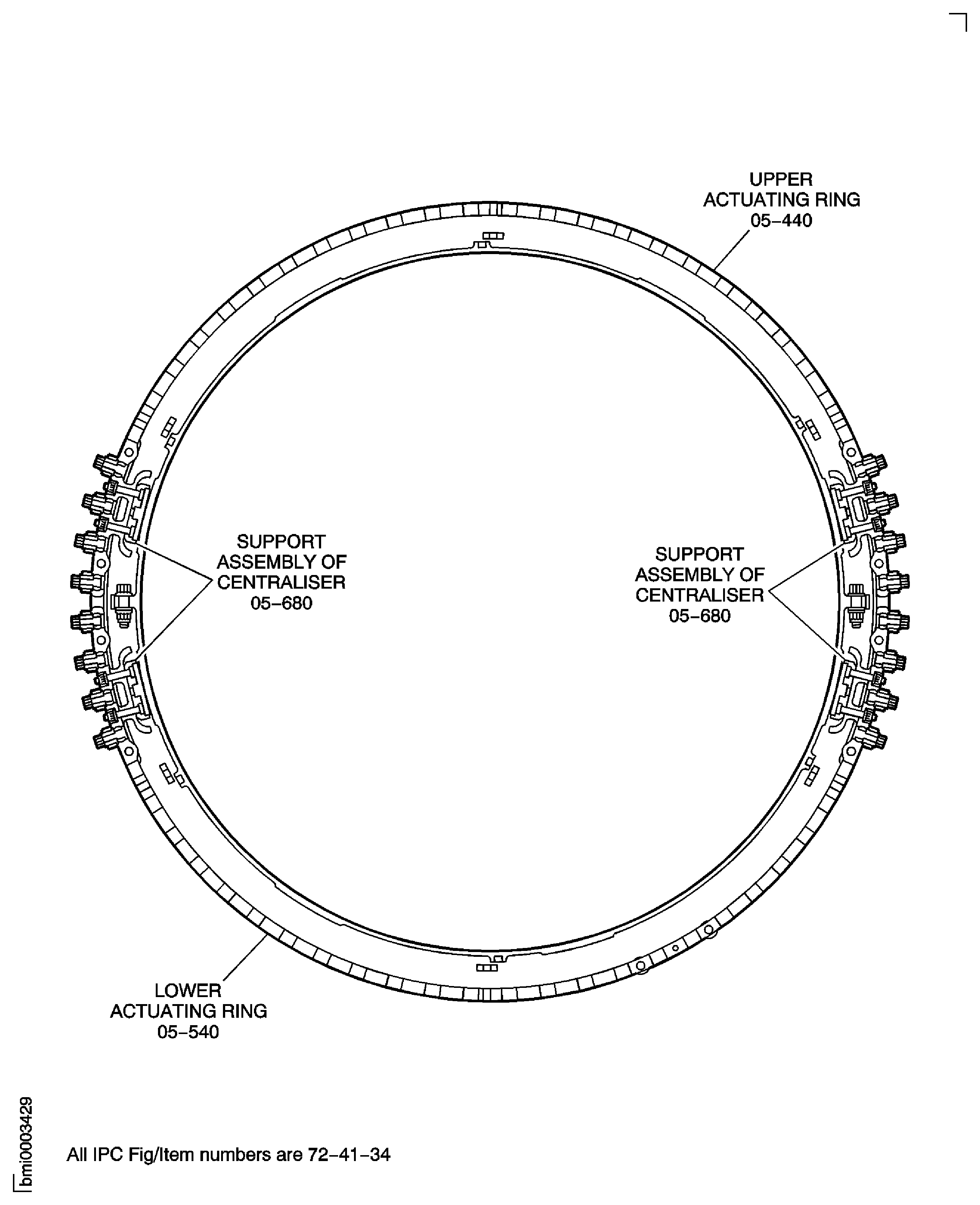
Figure: Remove the HP Compressor Front Case Split Line and Rear Flange Nuts, Bolts and Brackets
Sheet 1
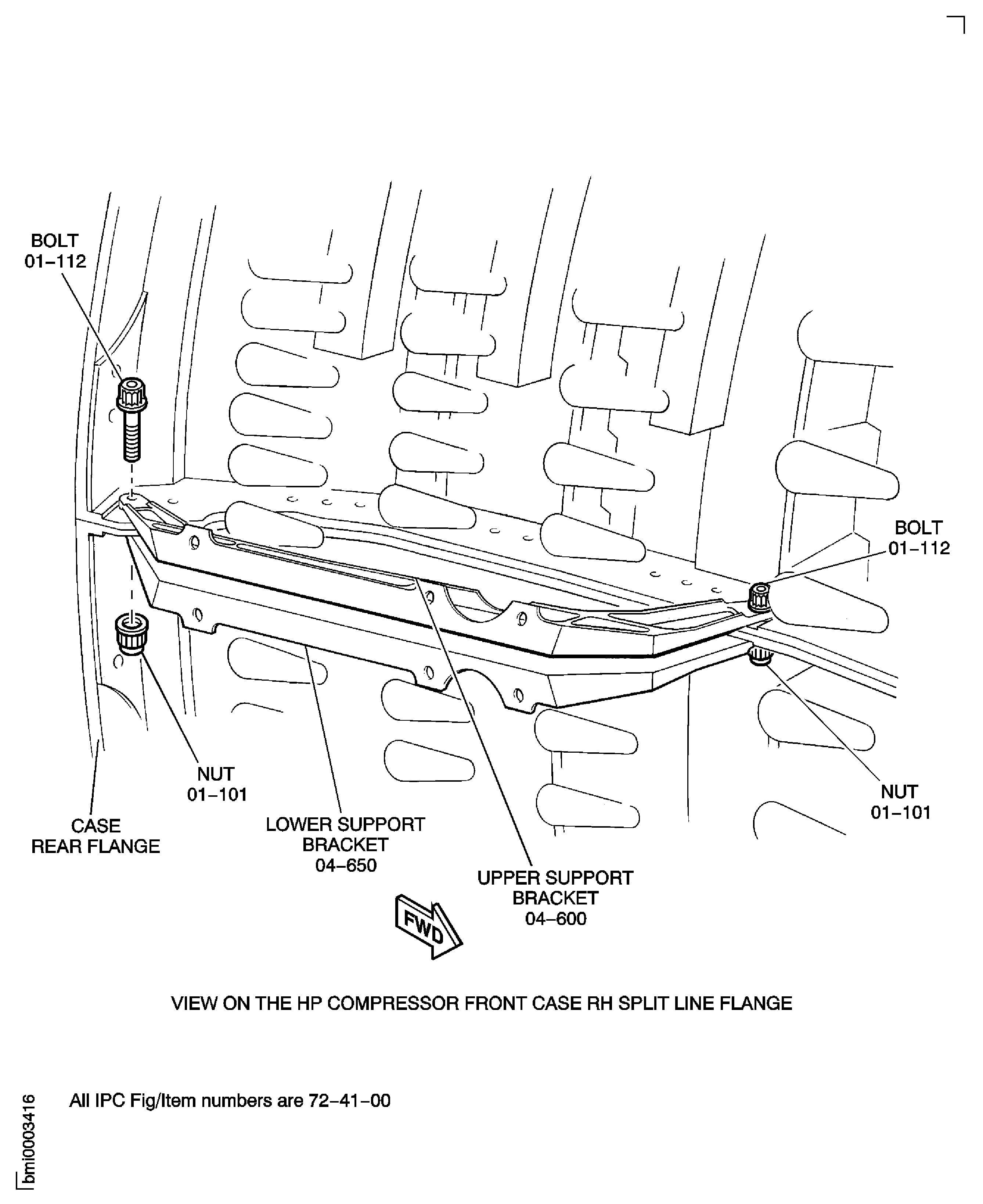
Figure: Remove the HP Compressor Front Case Split Line and Rear Flange Nuts, Bolts and Brackets
Sheet 2
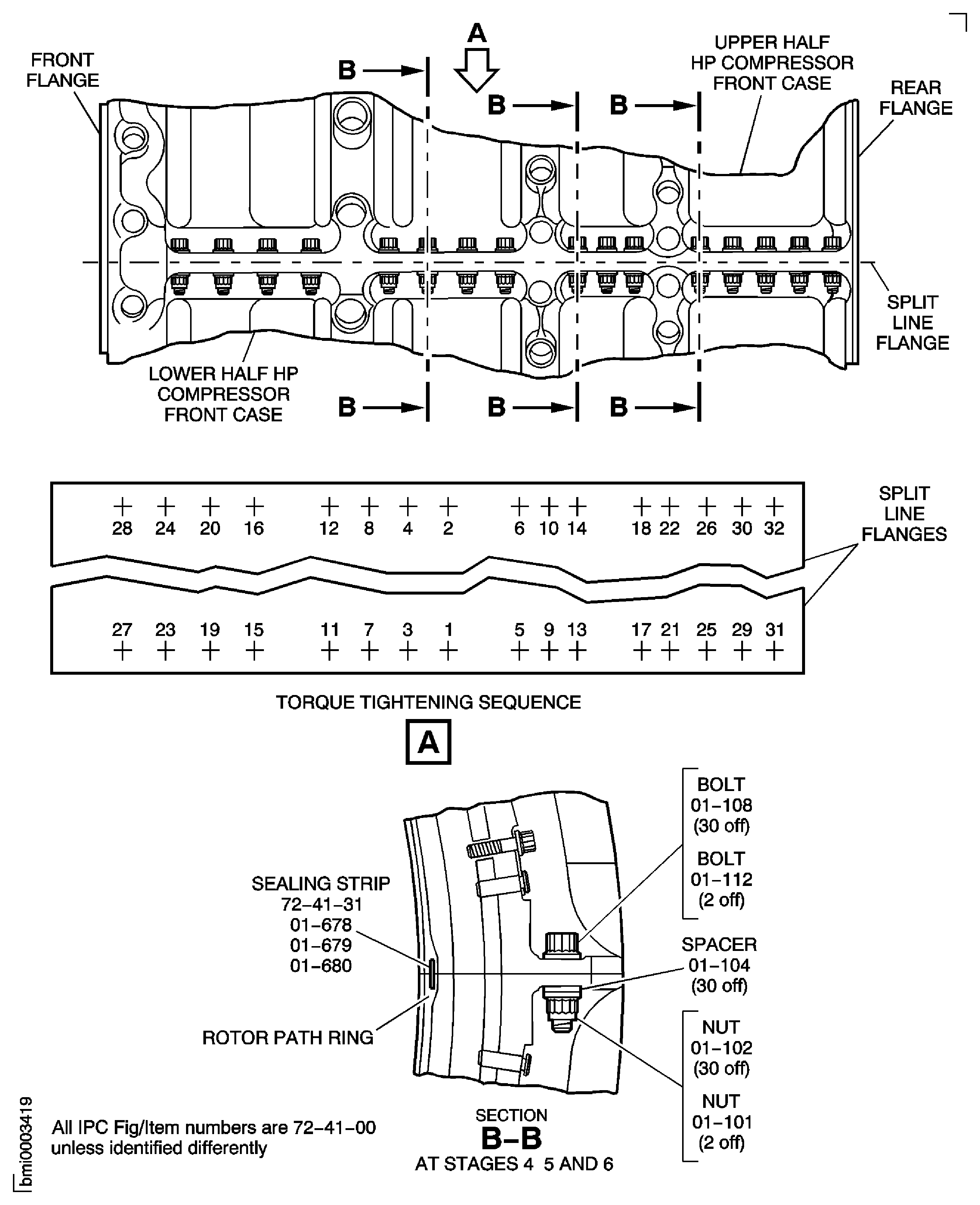
Figure: Remove the HP Compressor Front Case Split Line and Rear Flange Nuts, Bolts and Brackets
Sheet 3
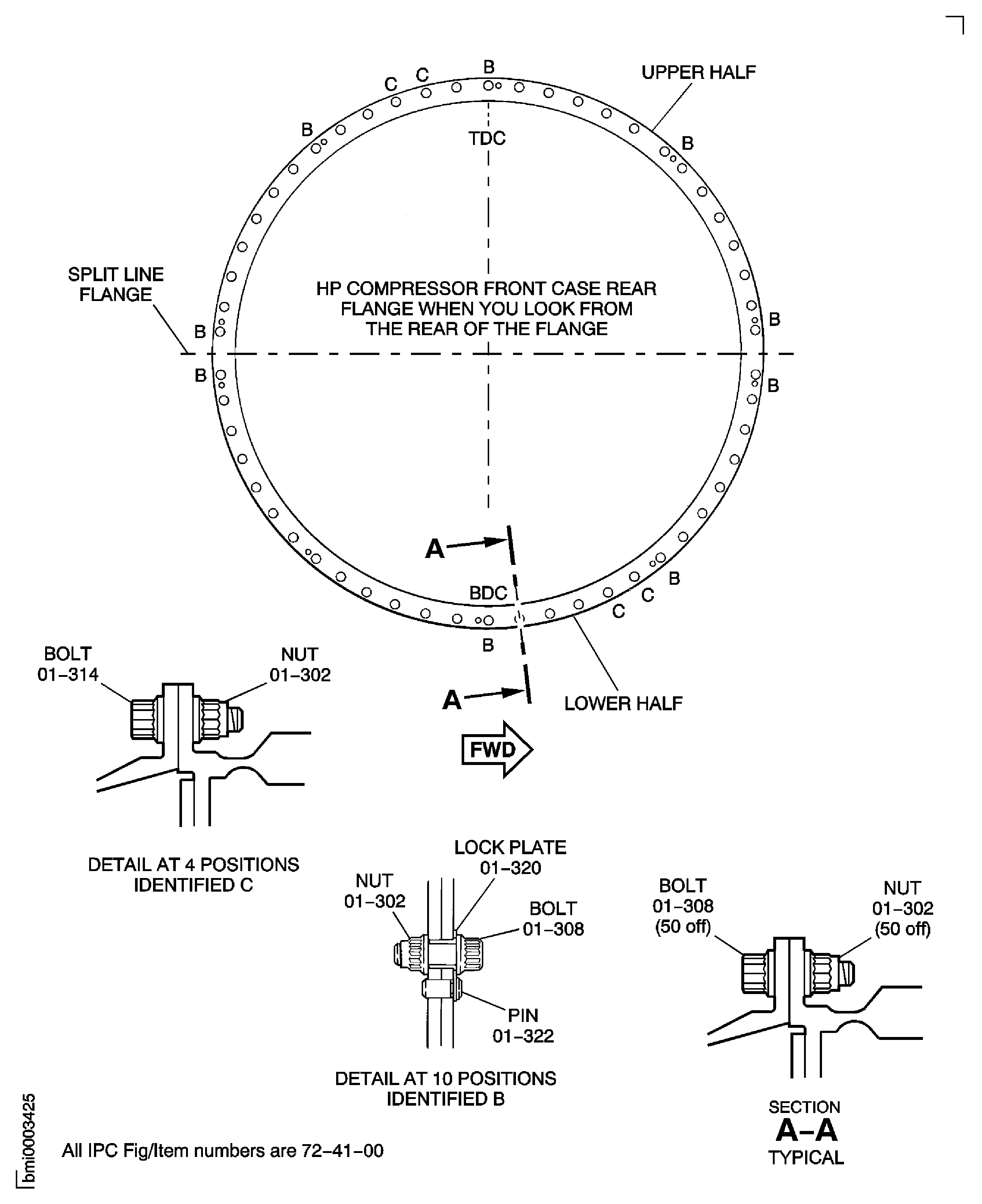
Figure: Remove the HP Compressor Front Case Split Line and Rear Flange Nuts, Bolts and Brackets
Sheet 4
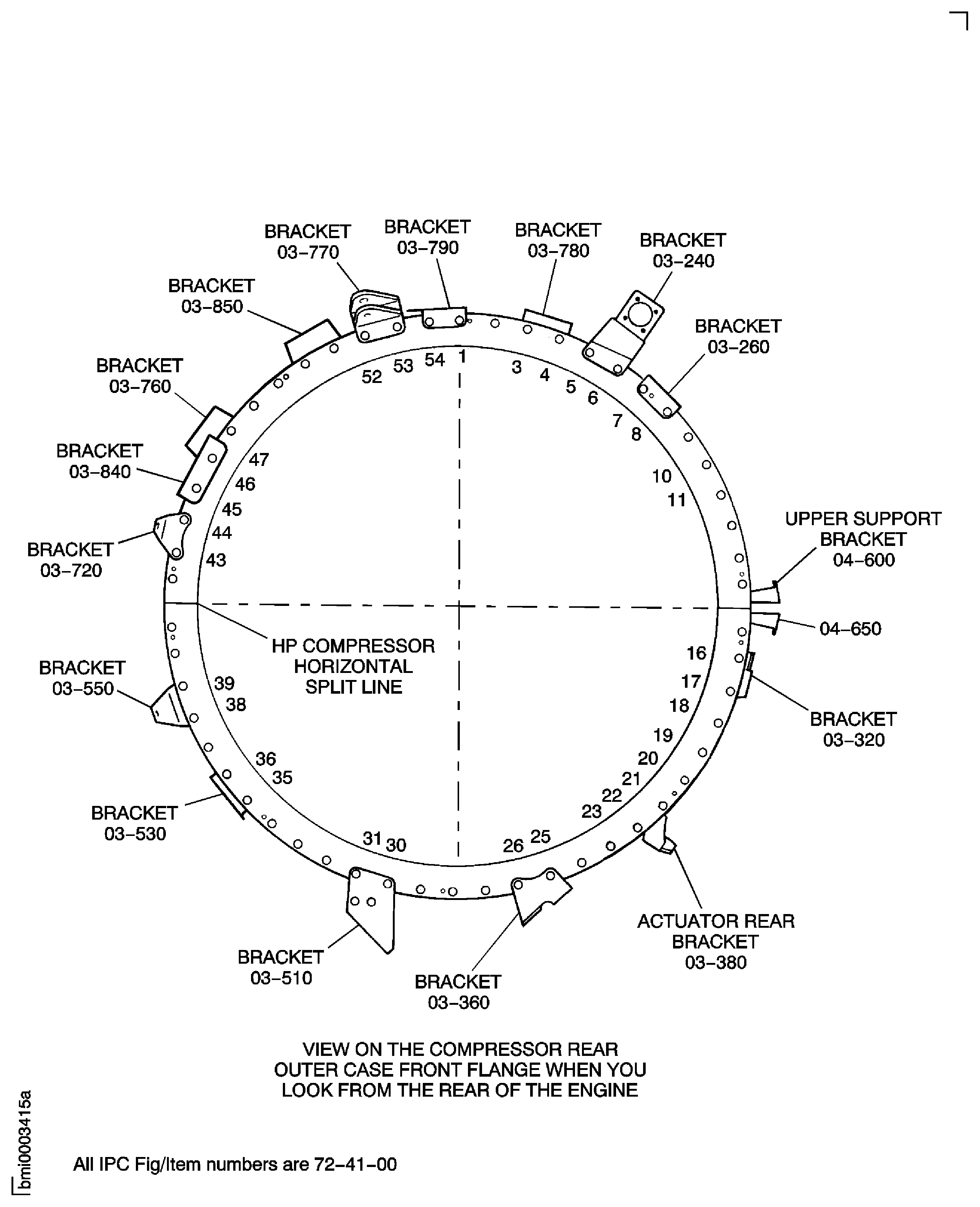
Figure: Set the True Axial Displacement of the HP Module Cases and Stage 2 HP Turbine
Set the True Axial Displacement of the HP Module Cases and Stage 2 HP Turbine