
Export Control
EAR Export Classification: Not subject to the EAR per 15 C.F.R. Chapter 1, Part 734.3(b)(3), except for the following Service Bulletins which are currently published as EAR Export Classification 9E991: SBE70-0992, SBE72-0483, SBE72-0580, SBE72-0588, SBE72-0640, SBE73-0209, SBE80-0024 and SBE80-0025.Copyright
© IAE International Aero Engines AG (2001, 2014 - 2021) The information contained in this document is the property of © IAE International Aero Engines AG and may not be copied or used for any purpose other than that for which it is supplied without the express written authority of © IAE International Aero Engines AG. (This does not preclude use by engine and aircraft operators for normal instructional, maintenance or overhaul purposes.).Applicability
Post SBE 72-0564 (SELECTONE PRODUCTION STANDARD)
Common Information
TASK 72-41-30-440-009-C00 HPC Front Case And Vane Assembly - Measure The HPC Front Cases, Assembly-009 - SBE 72-0564 (SelectOne Production Standard)
General
This TASK gives the procedure to measure the HP compressor front cases. The subsequent TASKS give the procedure to assemble the HP compressor front case only for engines, which have SBE 72-0564 (SelectOne Production Standard) incorporated.
TASK 72-41-30-440-001-C00 (ASSEMBLY-001, CONFIG-003) Install the HP Compressor Stage 4 and 5 Rotor Path Rings and Stage 6 Rotor Ring Segments
TASK 72-41-30-440-002-B00 (ASSEMBLY-002, CONFIG-002) Measure and then Machine the Stage 6 Stator Vanes and the Stage 4, 5 and 6 Rotor Path Rings.
TASK 72-41-30-440-003-C00 (ASSEMBLY-003, CONFIG-003) Install the Inlet Guide Vanes.
TASK 72-41-30-440-004-C00 (ASSEMBLY-004, CONFIG-003) Install the Stage 3 VSV.
TASK 72-41-30-440-005-C00 (ASSEMBLY-005, CONFIG-003) Install the Stage 4 VSV.
TASK 72-41-30-440-006-C00 (ASSEMBLY-006, CONFIG-003) Install the Stage 5 VSV.
TASK 72-41-30-440-007-B00 (ASSEMBLY-007, CONFIG-002) Install the Stage 6 Stator Vanes.
TASK 72-41-30-440-008-C00 (ASSEMBLY-008, CONFIG-003) Install the Inlet Guide Vane and the Stage 3 to 5 Bridge Pieces.
TASK 72-41-30-440-010-C00 (ASSEMBLY-010, CONFIG-003) Disassemble the HP Compressor Front Cases.
TASK 72-41-30-440-011-C00 (ASSEMBLY-011, CONFIG-003) Check and Set VSV System with Optimized Build and Setting Clearances.
Fig/item numbers in parentheses in the procedure agree with those used in the EIPC. Only the primary Fig/item numbers are used. For the service bulletin alpha variants refer to the EIPC.
For all parts identified in a different Chapter/Section/Subject, the applicable Chapter/Section/Subject comes before the Fig/item number.
For standard torque data and procedures, refer to the SPM TASK 70-41-00-400-501, SPM TASK 70-41-01-400-501 and SPM TASK 70-41-02-400-501.
Special torque data and assembly tolerances are included in the procedure.
Lubricate all threads and touch faces of nuts and bolts with CoMat 10-077 APPROVED ENGINE OILS, unless other lubricants are referred to in the procedure.
To identify, lubricate and install seal rings, refer to the SPM TASK 70-44-01-400-501.
After assembly apply CoMat 07-038 AIR DRYING ENAMEL to any damaged surface protection, joint flanges and parts used to attach. Use the correct color of the air drying enamel. Refer to the SPM TASK 70-63-02-380-501.
The number for each radial location must be identified in a clockwise direction. These start at the engine top position when you look from the rear of the engine, unless stated differently in the procedure.
Refer to Figure for a sectional view of the HP compressor front case.
NOTE
NOTE
Preliminary Requirements
Pre-Conditions
NONESupport Equipment
| Name | Manufacturer | Part Number / Identification | Quantity | Remark |
|---|---|---|---|---|
| IAE 1R18031 Checking fixture | 0AM53 | IAE 1R18031 | 1 | |
| IAE 1R18032 Transducer carrier | 0AM53 | IAE 1R18032 | 1 | |
| IAE 1R18033 Gage mounting plate | 0AM53 | IAE 1R18033 | 1 | |
| IAE 1R18034 Roller anil | 0AM53 | IAE 1R18034 | 1 | |
| IAE 1R18040 Setting button | 0AM53 | IAE 1R18040 | 1 | |
| IAE 1R18042 Transducer carrier | 0AM53 | IAE 1R18042 | 1 | |
| IAE 1R18202 Support stand | 0AM53 | IAE 1R18202 | 1 | |
| IAE 1R18205 Lifting tool | 0AM53 | IAE 1R18205 | 1 | |
| IAE 1R18233 Foot support | 0AM53 | IAE 1R18233 | 1 | |
| IAE 1R18531 Measuring sleeve | 0AM53 | IAE 1R18531 | 1 | |
| IAE 1R18533 Setting base | 0AM53 | IAE 1R18533 | 1 | |
| IAE 1R18701 Indexing plate | 0AM53 | IAE 1R18701 | 1 | |
| IAE 1R18702 Set up drawing | 0AM53 | IAE 1R18702 | 1 | |
| IAE 1R18722 Setting button | 0AM53 | IAE 1R18722 | 1 | |
| IAE 1R18777 Distance sleeve | 0AM53 | IAE 1R18777 | 1 | |
| IAE 1R18778 Distance sleeve | 0AM53 | IAE 1R18778 | 1 | |
| IAE 1R18779 Distance sleeve | 0AM53 | IAE 1R18779 | 1 | |
| IAE 1R18780 Distance sleeve | 0AM53 | IAE 1R18780 | 1 | |
| IAE 1R18781 Distance sleeve | 0AM53 | IAE 1R18781 | 1 |
Consumables, Materials and Expendables
| Name | Manufacturer | Part Number / Identification | Quantity | Remark |
|---|---|---|---|---|
| CoMat 07-038 AIR DRYING ENAMEL | K3504 | CoMat 07-038 | ||
| CoMat 10-077 APPROVED ENGINE OILS | LOCAL | CoMat 10-077 |
Spares
NONESafety Requirements
NONEProcedure
Refer to Figure.
Put the stage 4 drive bracket into position on the stage 4 lower actuating ring HPC Variable Stator Vane Actuation System (72-41-34,04-540).
Install the two bolts HPC Variable Stator Vane Actuation System (72-41-34,04-362) to attach the stage 4 drive bracket to the stage 4 lower actuating ring.
Install the stage 4 drive bracket HPC Variable Stator Vane Actuation System (72-41-34,04-360).
Put the stage 5 drive bracket into position on the stage 5 lower actuating ring HPC Variable Stator Vane Actuation System (72-41-34,05-540).
Install the two bolts HPC Variable Stator Vane Actuation System (72-41-34,05-362) to attach the stage 5 drive bracket to the stage 5 lower actuating ring.
Install the stage 5 drive bracket HPC Variable Stator Vane Actuation System (72-41-34,05-360).
SUBTASK 72-41-30-440-238 Install the Stage 4 and Stage 5 Actuating Control Rod Connectors
Refer to Figure.
Put IAE 1R18202 Support stand 1 off, on to the IAE 1R18233 Foot support 1 off. Install the attachment pin to attach the support stand to the foot support.
Attach a suitable hoist to the lifting eyes on IAE 1R18031 Checking fixture 1 off.
SUBTASK 72-41-30-440-239 Assemble the Checking Fixture, the Support Stand and the Foot Support
Install IAE 1R18205 Lifting tool 1 off, on to the HP compressor front case rear flange.
SUBTASK 72-41-30-440-240 Install the HP Compressor Front Case on to the Checking Fixture

CAUTION
MAKE SURE THE TOOL FACES AND COMPONENT FACES THAT TOUCH ARE CLEAN AND ARE NOT DAMAGED. DIRTY OR DAMAGED SURFACES CAN CAUSE INCORRECT INDICATIONS AND CAN DAMAGE COMPONENTS.Refer to Figure.
Install IAE 1R18034 Roller anil 1 off in to the transducer, part of IAE 1R18032 Transducer carrier 1 off.
Install the transducer carrier in IAE 1R18033 Gage mounting plate 1 off.
Install IAE 1R18701 Indexing plate 1 off in to its location in IAE 1R18533 Setting base 1 off.
Install IAE 1R18722 Setting button 1 off through the stage 3 rotor path hole in the indexing plate and in to the setting button slot in the setting base.
SUBTASK 72-41-30-440-241 Assemble the Tools to Measure the Rotor Path Radii
CAUTION
MAKE SURE THE TOOL FACES AND COMPONENT FACES THAT TOUCH ARE CLEAN AND ARE NOT DAMAGED. DIRTY OR DAMAGED SURFACES CAN CAUSE INCORRECT INDICATIONS AND CAN DAMAGE COMPONENTS.Install IAE 1R18777 Distance sleeve 1 off on to the pillar of IAE 1R18031 Checking fixture 1 off.
Remove IAE 1R18033 Gage mounting plate 1 off and IAE 1R18032 Transducer carrier 1 off from IAE 1R18533 Setting base 1 off.
Install the gage mounting plate and the transducer carrier on to the pillar of the checking fixture. Refer to IAE 1R18702 Set up drawing 1 off.
SUBTASK 72-41-30-220-459 Dimensionally Measure the Stage 3 Rotor Path Radius
CAUTION
MAKE SURE THE TOOL FACES AND COMPONENT FACES THAT TOUCH ARE CLEAN AND ARE NOT DAMAGED. DIRTY OR DAMAGED SURFACES CAN CAUSE INCORRECT INDICATIONS AND CAN DAMAGE TOOL FACES.Refer to Figure.
Remove IAE 1R18722 Setting button 1 off from the setting button location in IAE 1R18533 Setting base 1 off.
Turn IAE 1R18701 Indexing plate 1 off and align the stage 4 rotor path hole with the setting button location in the setting base.
Install IAE 1R18033 Gage mounting plate 1 off and IAE 1R18032 Transducer carrier 1 off on to the pillar of the setting base.
SUBTASK 72-41-30-440-242 Set the Tools to Measure the Stage 4 Rotor Path Ring Radius
CAUTION
MAKE SURE THE TOOL FACES AND COMPONENT FACES THAT TOUCH ARE CLEAN AND ARE NOT DAMAGED. DIRTY OR DAMAGED SURFACES CAN CAUSE INCORRECT INDICATIONS AND CAN DAMAGE TOOL FACES.Install IAE 1R18778 Distance sleeve 1 off on to the pillar of IAE 1R18031 Checking fixture 1 off.
Remove IAE 1R18033 Gage mounting plate 1 off and IAE 1R18032 Transducer carrier 1 off from the IAE 1R18533 Setting base 1 off.
Install the gage mounting plate and the transducer carrier on to the pillar of the checking fixture. Refer to IAE 1R18702 Set up drawing 1 off.
SUBTASK 72-41-30-220-460 Dimensionally Measure the Stage 4 Rotor Path Ring Radius
CAUTION
MAKE SURE THE TOOL FACES AND COMPONENT FACES THAT TOUCH ARE CLEAN AND ARE NOT DAMAGED. DIRTY OR DAMAGED SURFACES CAN CAUSE INCORRECT INDICATIONS AND CAN DAMAGE TOOL FACES.Refer to Figure.
Remove IAE 1R18722 Setting button 1 off from the setting button location in IAE 1R18533 Setting base 1 off.
Turn IAE 1R18701 Indexing plate 1 off and align the stage 5 rotor path hole with the setting button location in the setting base.
Install IAE 1R18033 Gage mounting plate 1 off and IAE 1R18032 Transducer carrier 1 off on to the pillar of the setting base.
SUBTASK 72-41-30-440-243 Set the Tools to Measure the Stage 5 Rotor Path Ring Radius
CAUTION
MAKE SURE THE TOOL FACES AND COMPONENT FACES THAT TOUCH ARE CLEAN AND ARE NOT DAMAGED. DIRTY OR DAMAGED SURFACES CAN CAUSE INCORRECT INDICATIONS AND CAN DAMAGE TOOL FACES.Install IAE 1R18779 Distance sleeve 1 off on to the pillar of IAE 1R18031 Checking fixture 1 off.
Remove IAE 1R18033 Gage mounting plate 1 off and IAE 1R18032 Transducer carrier 1 off from the IAE 1R18533 Setting base 1 off.
Install the gage mounting plate and the transducer carrier on to the pillar of the checking fixture. Refer to IAE 1R18702 Set up drawing 1 off.
SUBTASK 72-41-30-220-461 Dimensionally Measure the Stage 5 Rotor Path Ring Radius
CAUTION
MAKE SURE THE TOOL FACES AND COMPONENT FACES THAT TOUCH ARE CLEAN AND ARE NOT DAMAGED. DIRTY OR DAMAGED SURFACES CAN CAUSE INCORRECT INDICATIONS AND CAN DAMAGE TOOL FACES.Refer to Figure.
Remove IAE 1R18722 Setting button 1 off from the setting button location in IAE 1R18533 Setting base 1 off.
Turn IAE 1R18701 Indexing plate 1 off and align the stage 6 rotor path hole with the setting button location in the setting base.
Install IAE 1R18033 Gage mounting plate 1 off and IAE 1R18032 Transducer carrier 1 off on to the pillar of the setting base.
SUBTASK 72-41-30-440-244 Set the Tools to Measure the Stage 6 Rotor Path Ring Radius
CAUTION
MAKE SURE THE TOOL FACES AND COMPONENT FACES THAT TOUCH ARE CLEAN AND ARE NOT DAMAGED. DIRTY OR DAMAGED SURFACES CAN CAUSE INCORRECT INDICATIONS AND CAN DAMAGE TOOL FACES.Install IAE 1R18780 Distance sleeve 1 off on to the pillar of IAE 1R18031 Checking fixture 1 off.
Remove IAE 1R18033 Gage mounting plate 1 off and IAE 1R18032 Transducer carrier 1 off from the IAE 1R18533 Setting base 1 off.
Install the gage mounting plate and the transducer carrier on to the pillar of the checking fixture. Refer to IAE 1R18702 Set up drawing 1 off.
Remove the IAE 1R18722 Setting button from the indexing plate and the setting base.
SUBTASK 72-41-30-220-462 Dimensionally Measure the Stage 6 Rotor Path Ring Radius
CAUTION
MAKE SURE THE TOOL FACES AND COMPONENT FACES THAT TOUCH ARE CLEAN AND ARE NOT DAMAGED. DIRTY OR DAMAGED SURFACES CAN CAUSE INCORRECT INDICATIONS AND CAN DAMAGE TOOL FACES.Refer to Figure.
Turn the IAE 1R18701 Indexing plate 1 off and align the stage 6 stator vane tip hole in the indexing plate with the setting button location in the IAE 1R18533 Setting base 1 off.
Install IAE 1R18040 Setting button 1 off through the stage 6 stator vane tip hole in the indexing plate and into the setting button location in the setting base.
Install IAE 1R18531 Measuring sleeve 1 off onto the pillar of the setting base.
Put IAE 1R18042 Transducer carrier 1 off on to the pillar of the setting base.
Set the transducer.
SUBTASK 72-41-30-440-245 Set the Tools to Measure the Stage 6 Stator Vane Tip Radius
CAUTION
MAKE SURE THE TOOL FACES AND COMPONENT FACES THAT TOUCH ARE CLEAN AND ARE NOT DAMAGED. DIRTY OR DAMAGED SURFACES CAN CAUSE INCORRECT INDICATIONS AND CAN DAMAGE TOOL FACES.Install IAE 1R18781 Distance sleeve 1 off on to the pillar of IAE 1R18031 Checking fixture 1 off.
Remove IAE 1R18042 Transducer carrier 1 off from the setting base.
Install the transducer carrier on to the pillar and distance sleeve on the checking fixture. Refer to IAE 1R18702 Set up drawing 1 off.
Assemble the tools to measure the stage 6 stator vane tip radius.
Calculate the stage 6 stator vane tip radius as given in TASK 72-41-30-440-002-B00.
Calculate the measuring instrument value to be read as follows:
Instrument value = A-B
where, A = Tool setting radius = 8.6398 in. (219.450 mm)
B = Stator vane tip radius (calculated in step C.)
Example 1, where B = 8.6396 in.
Instrument value = 8.6398 - 8.6396
= 0.002 in.
Example 2, where B = 8.6401 in.
Instrument value = 8.6398 - 8.6401
= -0.003 in.
Use the value found in step C. to calculate the value to be read on the measuring instrument. Zero on the measuring instrument gives a radius of 8.6398 in. (219.450 mm), this is the tool setting radius.
SUBTASK 72-41-30-220-463 Measure the Stage 6 Stator Vane Tip Radius
Refer to Figure.
Measure the HP compressor stage 4 rotor path ring HP COMPRESSOR SPLIT CASE (72-41-31,01-690) split line clearances. The split line clearance (DIM A) must not be less than 0.0063 in. (0.161 mm).
Measure the HP compressor stage 5 rotor path ring HP COMPRESSOR SPLIT CASE (72-41-31,01-695) split line clearances. The split line clearance (DIM B) must not be less than 0.0084 in. (0.213 mm).
Measure the HP compressor stage 6 rotor path ring HP COMPRESSOR SPLIT CASE (72-41-31,01-705) split line clearances. The split line clearance (DIM C) must not be less than 0.0109 in. (0.277 mm).
SUBTASK 72-41-30-220-464 Measure the Clearances between the Rotor Path Ring Segments at the Split Line Flange
Figure: View through the HP Compressor Front Case
View through the HP Compressor Front Case
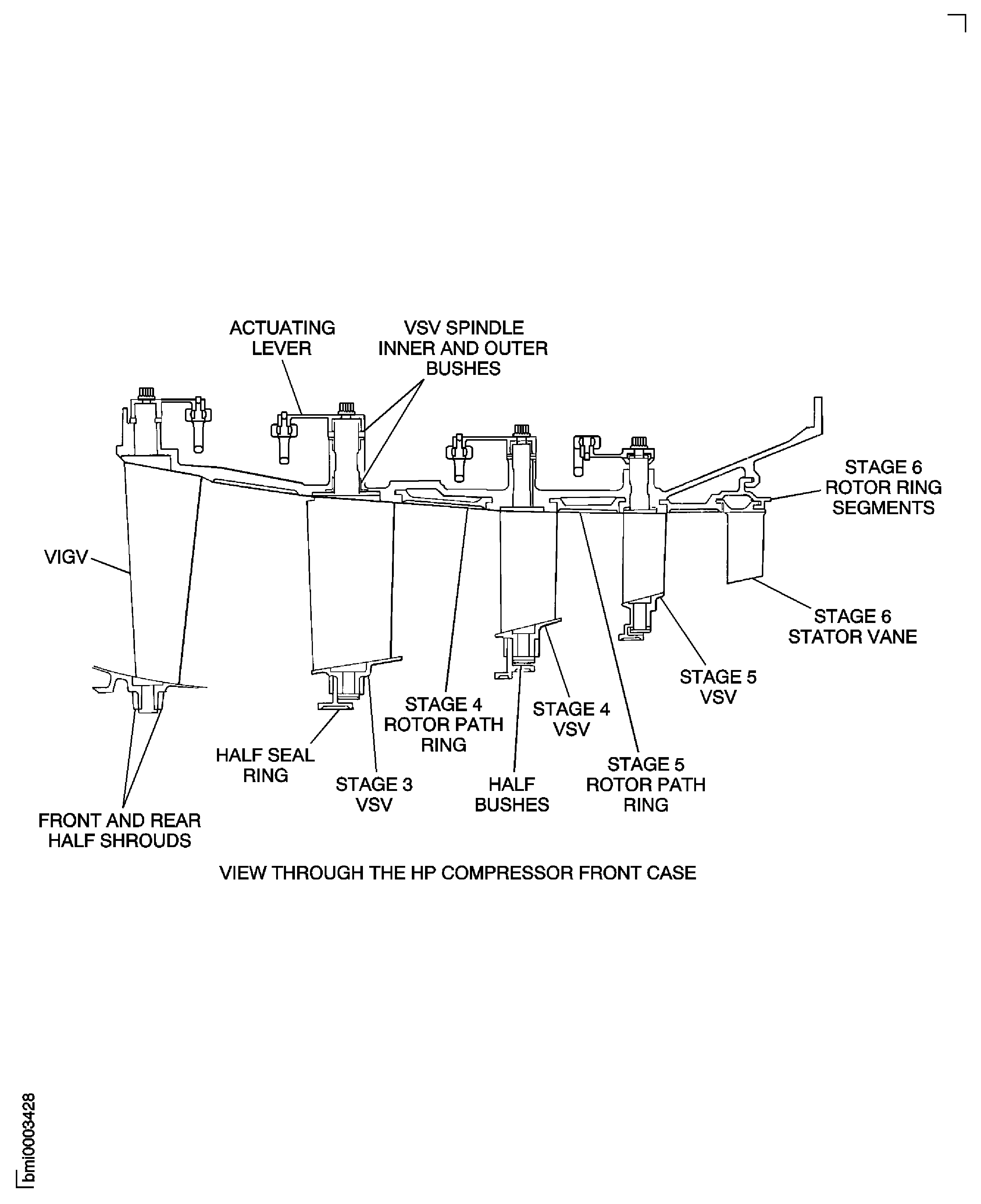
Figure: Install the Stage 4 and Stage 5 Drive Brackets
Install the Stage 4 and Stage 5 Drive Brackets
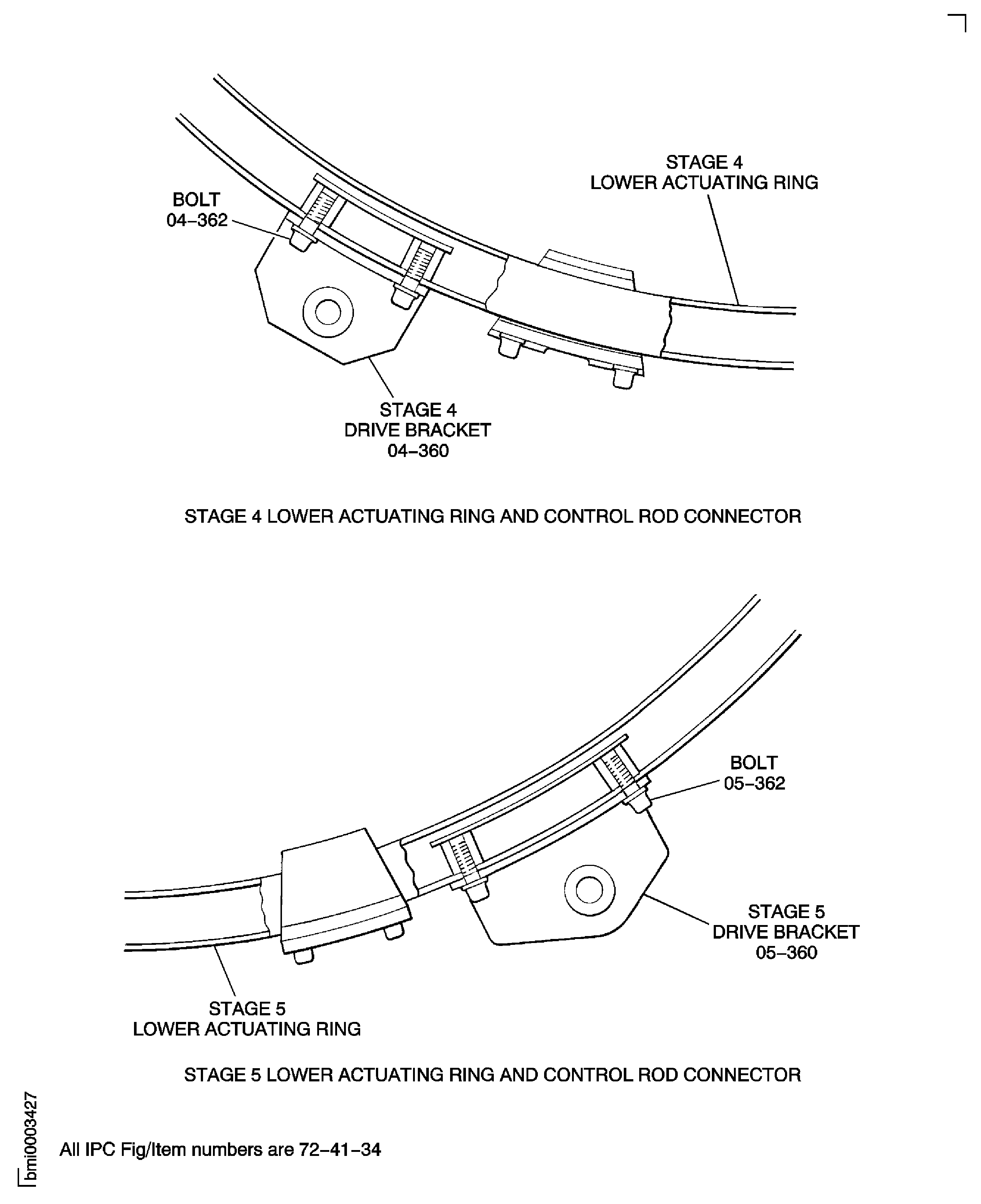
Figure: Assemble the Checking Fixture, the Support Stand and the Foot Support
Assemble the Checking Fixture, the Support Stand and the Foot Support
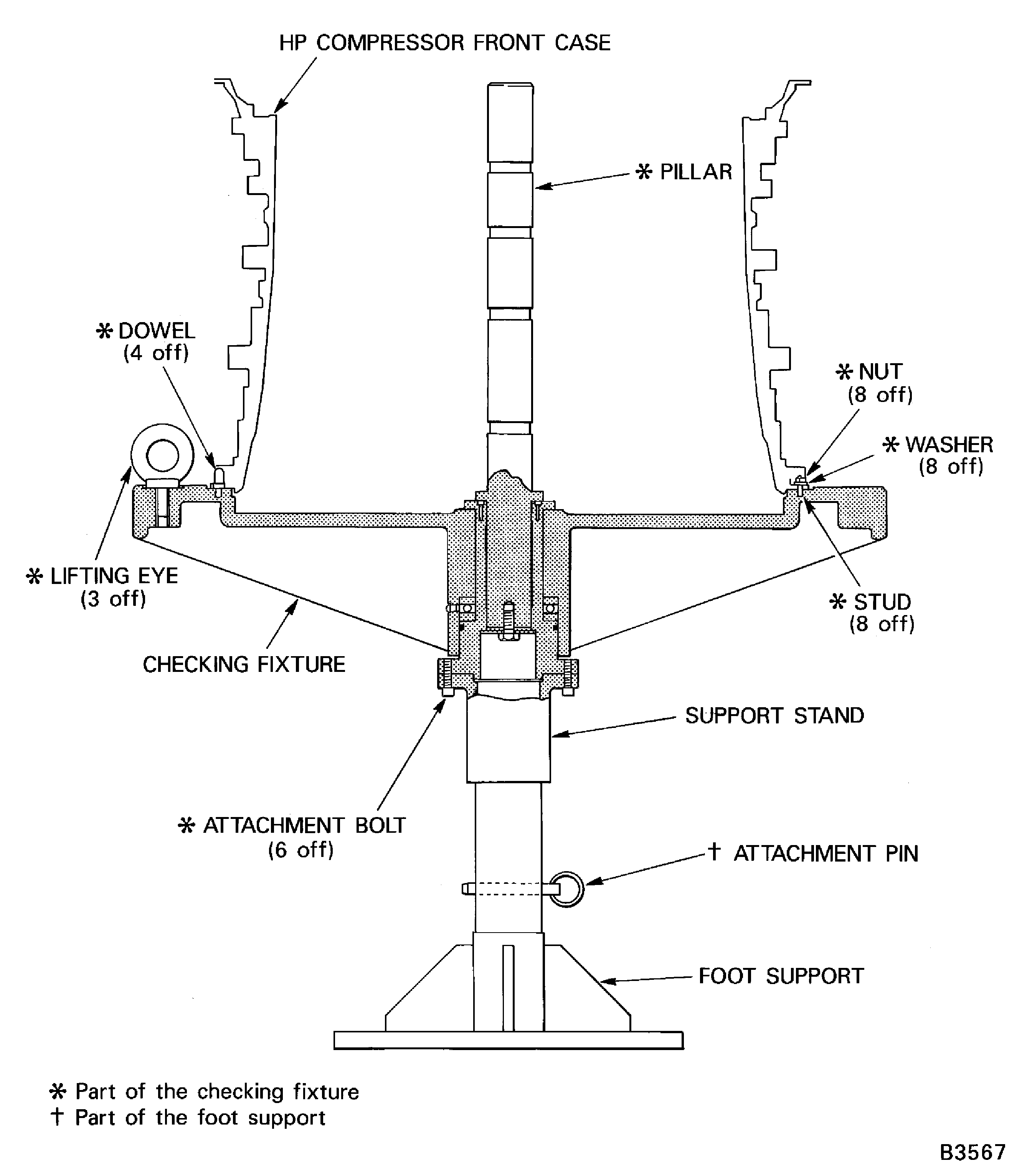
Figure: Install the HP Compressor Front Cases on the Checking Fixture
Sheet 1
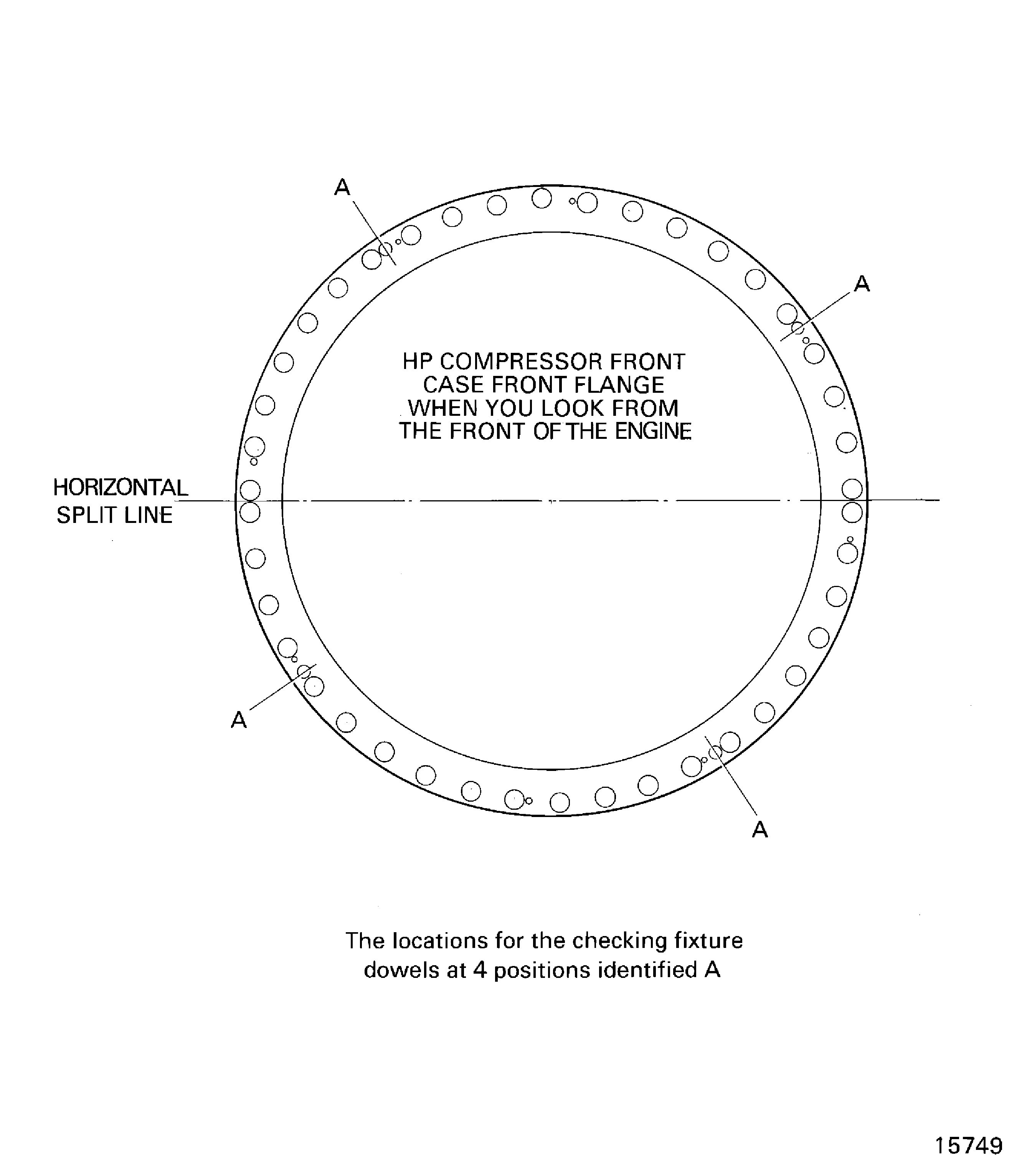
Figure: Install the HP Compressor Front Cases on the Checking Fixture
Sheet 2

Figure: Assemble the Tools to Measure the Rotor Path Radii
Assemble the Tools to Measure the Rotor Path Radii
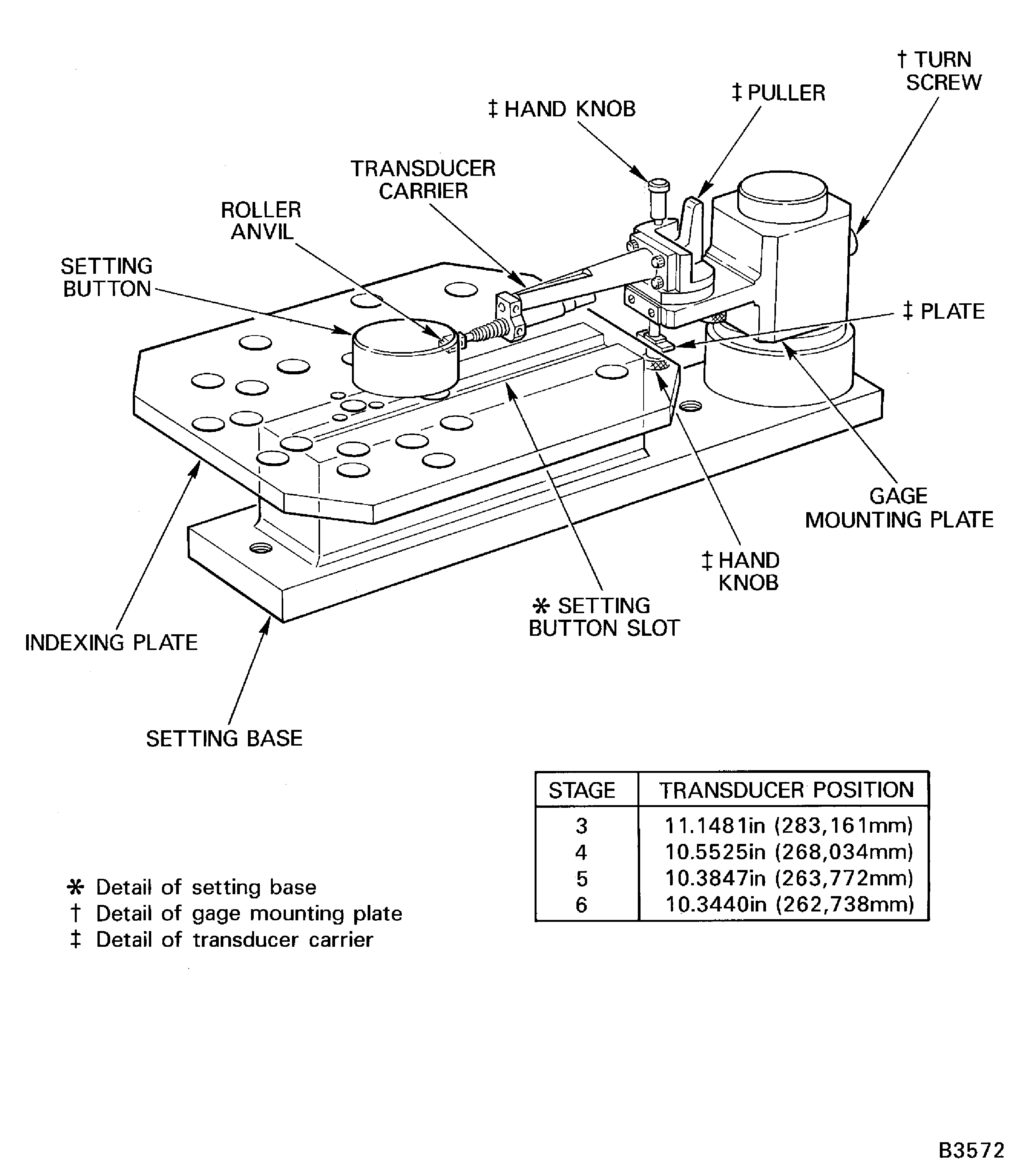
Figure: Measure the Rotor Path Radii
Measure the Rotor Path Radii

Figure: Assemble the Tools to Measure the Stage 6 Stator Vane Tip Radius
Assemble the Tools to Measure the Stage 6 Stator Vane Tip Radius

Figure: Measure the Stage 6 Stator Vane Tip Radius
Measure the Stage 6 Stator Vane Tip Radius

Figure: Measure the Rotor Path Ring Split Line Clearances
Measure the Rotor Path Ring Split Line Clearances
