Export Control
EAR Export Classification: Not subject to the EAR per 15 C.F.R. Chapter 1, Part 734.3(b)(3), except for the following Service Bulletins which are currently published as EAR Export Classification 9E991: SBE70-0992, SBE72-0483, SBE72-0580, SBE72-0588, SBE72-0640, SBE73-0209, SBE80-0024 and SBE80-0025.Copyright
© IAE International Aero Engines AG (2001, 2014 - 2021) The information contained in this document is the property of © IAE International Aero Engines AG and may not be copied or used for any purpose other than that for which it is supplied without the express written authority of © IAE International Aero Engines AG. (This does not preclude use by engine and aircraft operators for normal instructional, maintenance or overhaul purposes.).Applicability
Post SBE 72-0564 AND Post SBE 72-0571 (SELECTONE PRODUCTION STANDARD)
Common Information
TASK 72-41-30-440-008-C00 HPC Front Case And Vane Assembly - Install The Variable Inlet Guide Vane And The Stage 3 To 5 Connectors, Assembly-008 -SBE 72-0564 And SBE 72-0571 (SelectOne Production Standard)
General
This TASK gives the procedure to install the VIGV and stage 3 to 5 bridging pieces only for engines, which have SBE 72-0564, SBE 72-0571 and SBE 72-0573 (SelectOne(TM) Production Standard). The subsequent TASK gives the procedure to assemble the HP compressor front cases.
The subsequent TASK gives the procedure to assemble the HP compressor front cases.
TASK 72-41-30-440-001-C00 (ASSEMBLY-001, CONFIG-003) Install the HP Compressor Stage 4 and 5 Rotor Path Rings and Stage 6 Rotor Ring Segments.
TASK 72-41-30-440-002-B00 (ASSEMBLY-002, CONFIG-002) Measure and then Machine the Stage 6 Stator Vanes and the Stage 4, 5 and 6 Rotor Path Rings.
TASK 72-41-30-440-003-C00 (ASSEMBLY-003, CONFIG-003) Install the Variable Inlet Guide Vanes.
TASK 72-41-30-440-004-C00 (ASSEMBLY-004, CONFIG-003) Install the Stage 3 Stator Vanes.
TASK 72-41-30-440-005-C00 (ASSEMBLY-005, CONFIG-003) Install the Stage 4 Stator Vanes.
TASK 72-41-30-440-006-C00 (ASSEMBLY-006, CONFIG-003) Install the Stage 5 Stator Vanes.
TASK 72-41-30-440-007-B00 (ASSEMBLY-007, CONFIG-002) Install the Stage 6 Stator Vanes.
TASK 72-41-30-440-009-C00 (ASSEMBLY-009, CONFIG-003) Measure the HP Compressor Front Cases.
TASK 72-41-30-440-010-C00 (ASSEMBLY-010, CONFIG-003) Disassemble the HP Compressor Front Cases.
TASK 72-41-30-440-011-C00 (ASSEMBLY-011, CONFIG-003) Check and Set VSV System with Optimised Build and Setting Clearances.
Fig/item numbers in parentheses in the procedure agree with those used in the EIPC. Only the primary Fig/item numbers are used. For the service bulletin alpha variants refer to the EIPC.
For all parts identified in a different Chapter/Section/Subject, the applicable Chapter/Section/Subject comes before the Fig/item number.
For standard torque data and procedures, refer to the SPM TASK 70-41-01-400-501 and SPM TASK 70-41-02-400-501.
Special torque data and assembly tolerances are included in the procedure.
Lubricate all threads and touch faces of nuts and bolts with CoMat 10-077 APPROVED ENGINE OILS unless other lubricants are referred to in the procedure.
To identify, lubricate and install seal rings, refer to the SPM TASK 70-44-01-400-501.
For lockwire data and procedures refer to the SPM TASK 70-42-05-400-501.
After assembly apply CoMat 07-038 AIR DRYING ENAMEL to any damaged surface protection, joint flanges and parts used to attach. Use the correct color of the air drying enamel. Refer to the SPM TASK 70-63-02-380-501.
The number for each radial location must be identified in a clockwise direction. These start at the engine top position when you look from the rear of the engine, unless stated differently in the procedure.
Refer to Figure for a sectional view of the HP compressor front case.
NOTE
NOTE
NOTE
For accomplishment instructions that contain the content of SBE 72-0564 standard only, please refer to IAE Technical Services.
This task contains also the procedures to adjust the centralizer gap of the VIGV and the VSV stages three to five. We recommend that you do the adjustment of the centralizer gap after the HP Compressor Front Cases are assembled to the HP Compressor Rotor Assembly. Refer to TASK 72-41-00-440-005-C00.
Preliminary Requirements
Pre-Conditions
NONESupport Equipment
| Name | Manufacturer | Part Number / Identification | Quantity | Remark |
|---|---|---|---|---|
| Inspection table | LOCAL | Inspection table | ||
| IAE 1R18205 Lifting tool | 0AM53 | IAE 1R18205 | 1 | |
| IAE 1R18207 Support stand | 0AM53 | IAE 1R18207 | 1 | |
| IAE 1R19284 Lifting fixture | 0AM53 | IAE 1R19284 | ||
| IAE 1R18423 Rigging pin | 0AM53 | IAE 1R18423 | 6 | |
| IAE 1R18892 Rigging pin | 0AM53 | IAE 1R18892 | 6 | |
| IAE 1R18423 Rigging pin | 0AM53 | IAE 1R18423 | 6 per stage | |
| IAE 1R18893 Riggingpin | 0AM53 | IAE 1R18893 | 6 | |
| IAE 1R18894 Rigging pin | 0AM53 | IAE 1R18894 | 6 | |
| IAE 1R18895 Rigging pin | 0AM53 | IAE 1R18895 | 6 |
Consumables, Materials and Expendables
| Name | Manufacturer | Part Number / Identification | Quantity | Remark |
|---|---|---|---|---|
| CoMat 07-038 AIR DRYING ENAMEL | 00BB6 | CoMat 07-038 | ||
| CoMat 10-077 APPROVED ENGINE OILS | X333X | CoMat 10-077 |
Spares
NONESafety Requirements
NONEProcedure
Install the IAE 1R19284 Lifting fixture 2 off on to the HP compressor upper and lower half front cases rear flanges.
Install the two stage 4 sealing strips HP COMPRESSOR SPLIT CASE (72-41-31,01-678) in to the slots in the stage 4 rotor path ring at the split line flanges.
Install the two stage 5 sealing strips HP COMPRESSOR SPLIT CASE (72-41-31,01-679) in to the slots in the stage 5 rotor path ring at the split line flanges.
Install the two stage 6 sealing strips HP COMPRESSOR SPLIT CASE (72-41-31,01-680) in to the slots in the stage 6 rotor path ring at the split line flanges.
Install the four bolts HPC Assembly (72-41-00,01-112) and the four nuts HPC Assembly (72-41-00,01-101) at the split line flange positions 8, 12, 30 and 32 . Install the 28 bolts HPC Assembly (72-41-00,01-108), the 28 spacers HPC Assembly (72-41-00,01-104) and the 28 nuts HPC Assembly (72-41-00,01-102) at the remaining split line flange positions.
Install IAE 1R18205 Lifting tool 1 off on the HP compressor front case rear flange.
Lower the HP compressor front case on to IAE 1R18207 Support stand 1 off.
SUBTASK 72-41-30-440-256 Install the Front Cases Split Line Nuts, Bolts and Spacers
Make sure that six of IAE 1R18423 Rigging pin 6 off or IAE 1R18892 Rigging pin 6 off are installed through the VIGV upper and lower actuating rings HPC Variable Stator Vane Actuation System (72-41-34,02-440) and HPC Variable Stator Vane Actuation System (72-41-34,02-540) to the HP compressor front case at positions D.
Put the front bridging piece HPC Variable Stator Vane Actuation System (72-41-34,02-200) and the rear bridging piece HPC Variable Stator Vane Actuation System (72-41-34,02-201) into position on the upper and lower actuating rings.
Install the four bolts HPC Variable Stator Vane Actuation System (72-41-34,02-202) and the four self locking nuts HPC Variable Stator Vane Actuation System (72-41-34,02-204) which attach the front and rear bridging pieces to the upper and lower actuating rings.
Install the left hand bridging pieces on to the VIGV upper and lower actuating rings HPC Variable Stator Vane Actuation System (72-41-34,02-440) and HPC Variable Stator Vane Actuation System (72-41-34,02-540).
SUBTASK 72-41-30-440-257 Install the VIGV Bridging Pieces
Make sure that six of IAE 1R18423 Rigging pin 6 off or IAE 1R18893 Riggingpin 6 off are installed through the stage 3 upper and lower actuating rings HPC Variable Stator Vane Actuation System (72-41-34,03-440) and HPC Variable Stator Vane Actuation System (72-41-34,03-540) to the HP compressor front case at positions D.
Put the front bridging piece HPC Variable Stator Vane Actuation System (72-41-34,03-200) and the rear bridging piece HPC Variable Stator Vane Actuation System (72-41-34,03-201) into position on the upper and lower actuating rings.
Install the four bolts HPC Variable Stator Vane Actuation System (72-41-34,03-202) and the four self locking nuts HPC Variable Stator Vane Actuation System (72-41-34,03-204) which attach the front and rear bridging pieces to the upper and lower actuating rings.
Install the left hand bridging pieces on to the stage 3 upper and lower actuating rings HPC Variable Stator Vane Actuation System (72-41-34,03-440) and HPC Variable Stator Vane Actuation System (72-41-34,03-540).
SUBTASK 72-41-30-440-258 Install the Stage 3 Bridging Pieces
Make sure that six of IAE 1R18423 Rigging pin 6 off or IAE 1R18894 Rigging pin 6 off are installed through the stage 4 upper and lower actuating rings HPC Variable Stator Vane Actuation System (72-41-34,04-440) and HPC Variable Stator Vane Actuation System (72-41-34,04-540) to the HP compressor front case at positions C.
Put the front bridging piece HPC Variable Stator Vane Actuation System (72-41-34,04-200) and the rear bridging piece HPC Variable Stator Vane Actuation System (72-41-34,04-201) into position on the upper and lower actuating rings.
Install the four bolts HPC Variable Stator Vane Actuation System (72-41-34,04-202) and the four self locking nuts HPC Variable Stator Vane Actuation System (72-41-34,04-203) which attach the front and rear bridging pieces to the upper and lower actuating rings.
Install the left hand bridging pieces on to the stage 4 upper and lower actuating rings HPC Variable Stator Vane Actuation System (72-41-34,04-440) and HPC Variable Stator Vane Actuation System (72-41-34,04-540).
SUBTASK 72-41-30-440-259 Install the Stage 4 Bridging Pieces
Make sure that six of IAE 1R18423 Rigging pin 6 off or IAE 1R18895 Rigging pin 6 off are installed through the stage 5 upper and lower actuating rings HPC Variable Stator Vane Actuation System (72-41-34,05-440) and HPC Variable Stator Vane Actuation System (72-41-34,05-540) to the HP compressor front case at positions C.
Put the front bridging piece HPC Variable Stator Vane Actuation System (72-41-34,05-200) and the rear bridging piece HPC Variable Stator Vane Actuation System (72-41-34,05-201) into position on the upper and lower actuating rings.
Install the four bolts HPC Variable Stator Vane Actuation System (72-41-34,05-202) and the four self locking nuts HPC Variable Stator Vane Actuation System (72-41-34,05-203) which attach the front and rear bridging pieces to the upper and lower actuating rings.
Install the left hand bridging pieces on to the stage 5 upper and lower actuating rings HPC Variable Stator Vane Actuation System (72-41-34,05-440) and HPC Variable Stator Vane Actuation System (72-41-34,05-540).
SUBTASK 72-41-30-440-260 Install the Stage 5 Bridging Pieces
Make sure that six of IAE 1R18423 Rigging pin 6 off or IAE 1R18892 Rigging pin 6 off are installed through the VIGV actuating ring to the HP compressor front case at the positions D.
Loosen the six self locking nuts HPC Variable Stator Vane Actuation System (72-41-34,02-689) which attach the centralizer support assemblies HPC Variable Stator Vane Actuation System (72-41-34,02-680) to the actuating ring.
NOTE
The maximum clearance is necessary under each centralizer support assembly.Loosen the four self locking nuts HPC Variable Stator Vane Actuation System (72-41-34,02-743) which attach the centralizer support assemblies HPC Variable Stator Vane Actuation System (72-41-34,02-730) to the actuating ring.
Torque the self locking nut HPC Variable Stator Vane Actuation System (72-41-34,02-689) to 85 to 105 lbfin (10.00 to 12.00 Nm).
NOTE
The upper limit is recommended.
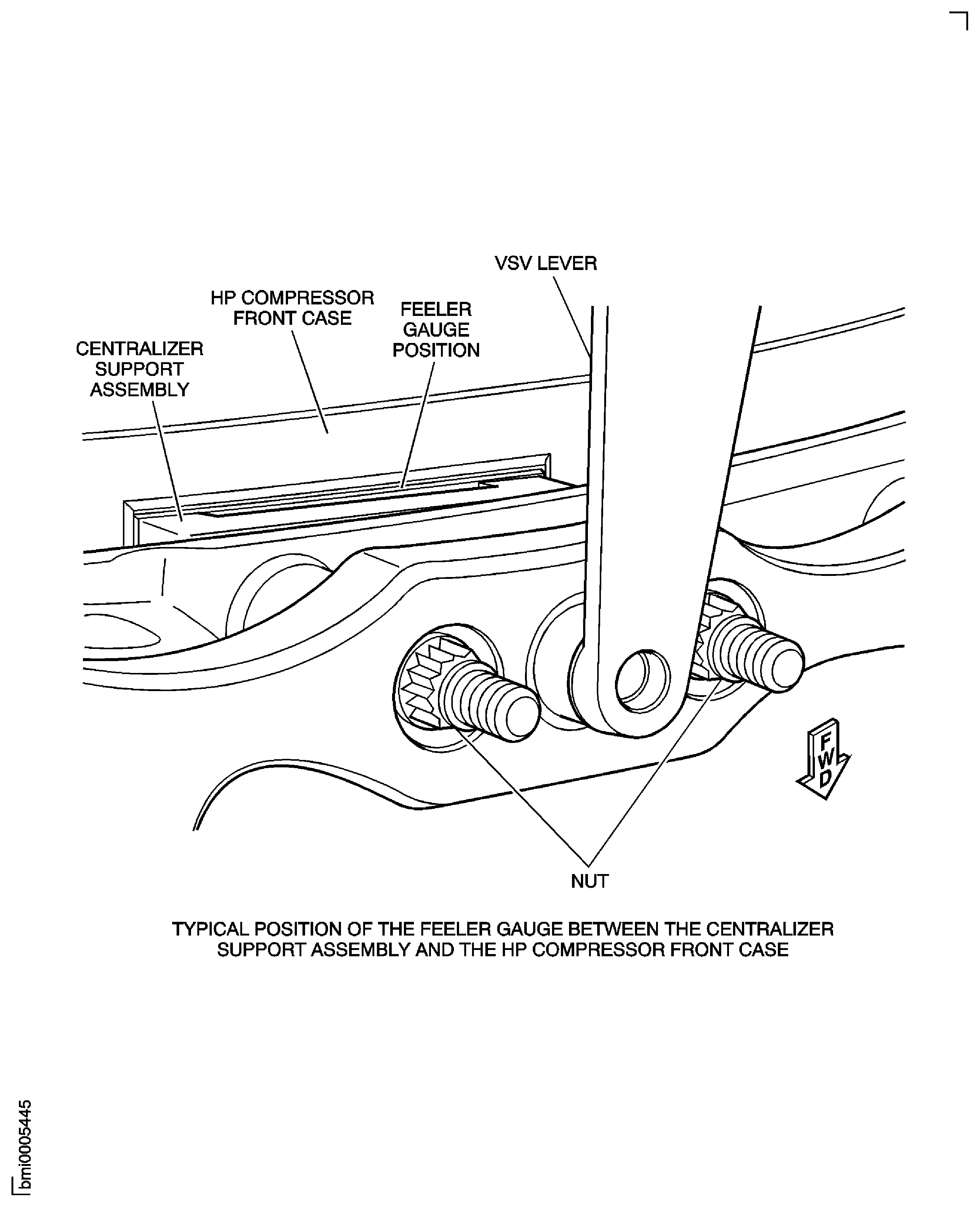
Measure the gap between the centralizer support assemblies and the actuating ring. Start with the centralizer position marked 1. Refer to Figure.
Do the steps (3)(a) thru (e) again for the centralizer positions marked 2 to 4. Obey the sequence on Figure.
Torque the self locking nuts HPC Variable Stator Vane Actuation System (72-41-34,02-743) to 36 to 45 lbfin (4.00 to 5.00 Nm).
NOTE
The upper limit is recommended.
Measure the gap between the centralizer support assembly and the actuating ring for the centralizer positions marked 5 and 6. Obey the sequence on Figure.
Torque the self locking nut HPC Variable Stator Vane Actuation System (72-41-34,02-689) to 85 to 105 lbfin (10.00 to 12.00 Nm).
NOTE
The upper limit is recommended.
Measure the gap between the centralizer support assembly and the actuating ring for the centralizer positions marked 7 and 8. Obey the sequence on Figure.
Install the centralizer adjusting shims HPC Variable Stator Vane Actuation System (72-41-34,02-654) thru HPC Variable Stator Vane Actuation System (72-41-34,02-670).
NOTE
The maximum clearance is necessary under each centralizer support assembly.
SUBTASK 72-41-30-440-261 Adjust the VIGV Centralizer Gap
Make sure that six of IAE 1R18423 Rigging pin 6 off or IAE 1R18893 Riggingpin 6 off are installed through the VIGV actuating ring to the HP compressor front case at the positions D.
Loosen the two self locking nuts HPC Variable Stator Vane Actuation System (72-41-34,03-698) which attach the centralizer support assemblies HPC Variable Stator Vane Actuation System (72-41-34,03-680) to the actuating ring.
NOTE
The maximum clearance is necessary under each centralizer support assembly.Loosen the 12 self locking nuts HPC Variable Stator Vane Actuation System (72-41-34,03-734) which attach the centralizer support assemblies HPC Variable Stator Vane Actuation System (72-41-34,03-730) to the actuating ring.
Torque the self locking nuts HPC Variable Stator Vane Actuation System (72-41-34,03-734) to 36 to 45 lbfin (4.00 to 5.00 Nm).
NOTE
The upper limit is recommended.
Measure the gap between the centralizer support assemblies and the actuating ring. Start with the centralizer position marked 1. Refer to Figure.
Do the steps (3) (a) thru (e) again for the centralizer positions marked 2 to 6. Obey the sequence on Figure.
Torque the self locking nut HPC Variable Stator Vane Actuation System (72-41-34,03-698) to 85 to 105 lbfin (10.00 to 12.00 Nm).
NOTE
The upper limit is recommended.
Measure the gap between the centralizer support assembly and the actuating ring for the centralizer positions marked 7 and 8. Obey the sequence on Figure.
Install the centralizer adjusting shims HPC Variable Stator Vane Actuation System (72-41-34,03-654) thru HPC Variable Stator Vane Actuation System (72-41-34,03-670).
NOTE
The maximum clearance is necessary under each centralizer support assembly.
SUBTASK 72-41-30-440-262 Adjust the Stage 3 Centralizer Gap
Make sure that six of IAE 1R18423 Rigging pin 6 off or IAE 1R18894 Rigging pin 6 off are installed through the VIGV actuating ring to the HP compressor front case at the positions C.
Loosen the 16 self locking nuts HPC Variable Stator Vane Actuation System (72-41-34,04-698) which attach the centralizer support assemblies HPC Variable Stator Vane Actuation System (72-41-34,04-680) to the actuating ring.
Torque the self locking nuts HPC Variable Stator Vane Actuation System (72-41-34,04-698) to 36 to 45 lbfin (4.00 to 5.00 Nm).
NOTE
The upper limit is recommended.
Measure the gap between the centralizer support assemblies and the actuating ring. Start with the centralizer position marked 1. Refer to Figure.
Do the steps (2) (a) thru (e) again for the centralizer positions marked 2 to 8. Obey the sequence on Figure.
Install the centralizer adjusting shims HPC Variable Stator Vane Actuation System (72-41-34,04-654) thru HPC Variable Stator Vane Actuation System (72-41-34,04-670).
NOTE
The maximum clearance is necessary under each centralizer support assembly.
SUBTASK 72-41-30-440-263 Adjust the Stage 4 Centralizer Gap
Make sure that six of IAE 1R18423 Rigging pin 6 off or IAE 1R18895 Rigging pin 6 off are installed through the VIGV actuating ring to the HP compressor front case at the positions C.
Loosen the 16 self locking nuts HPC Variable Stator Vane Actuation System (72-41-34,05-698) which attach the centralizer support assemblies HPC Variable Stator Vane Actuation System (72-41-34,05-680) to the actuating ring.
Torque the self locking nuts HPC Variable Stator Vane Actuation System (72-41-34,05-698) to 36 to 45 lbfin (4.00 to 5.00 Nm).
NOTE
The upper limit is recommended.
Measure the gap between the centralizer support assemblies and the actuating ring. Start with the centralizer position marked 1. Refer to Figure.
Do the steps (2) (a) thru (e) again for the centralizer positions marked 2 to 8. Obey the sequence on Figure.
Install the centralizer adjusting shims HPC Variable Stator Vane Actuation System (72-41-34,05-654) thru HPC Variable Stator Vane Actuation System (72-41-34,05-670).
NOTE
The maximum clearance is necessary under each centralizer support assembly.
SUBTASK 72-41-30-440-264 Adjust the Stage 5 Centralizer Gap

Figure: General View through the HP Compressor Front Cases
General View through the HP Compressor Front Cases

Figure: Install the HP Compressor Front Case Split Line Bolts, Nuts and Spacers
Sheet 1
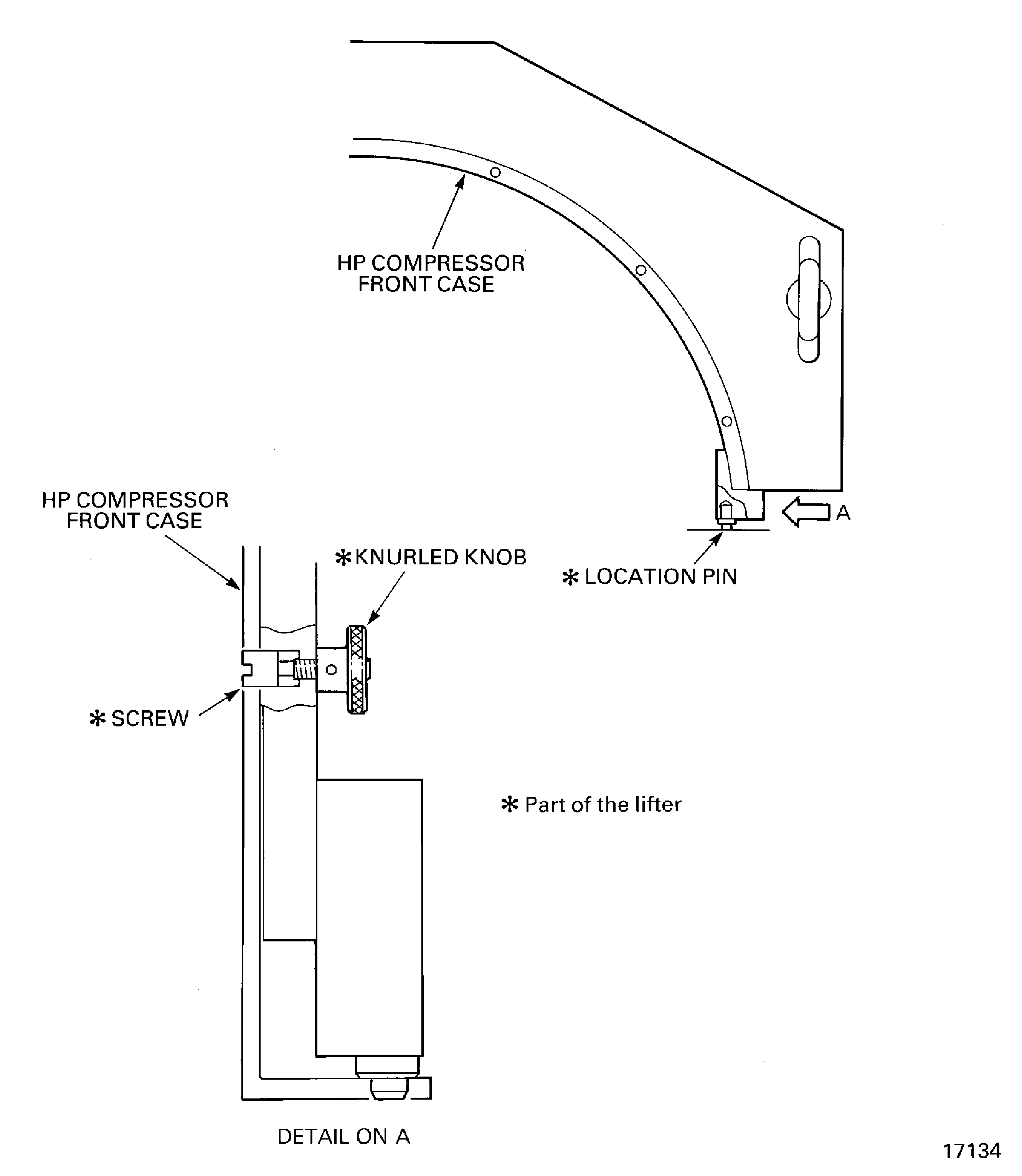
Figure: Install the HP Compressor Front Case Split Line Bolts, Nuts and Spacers
Sheet 2
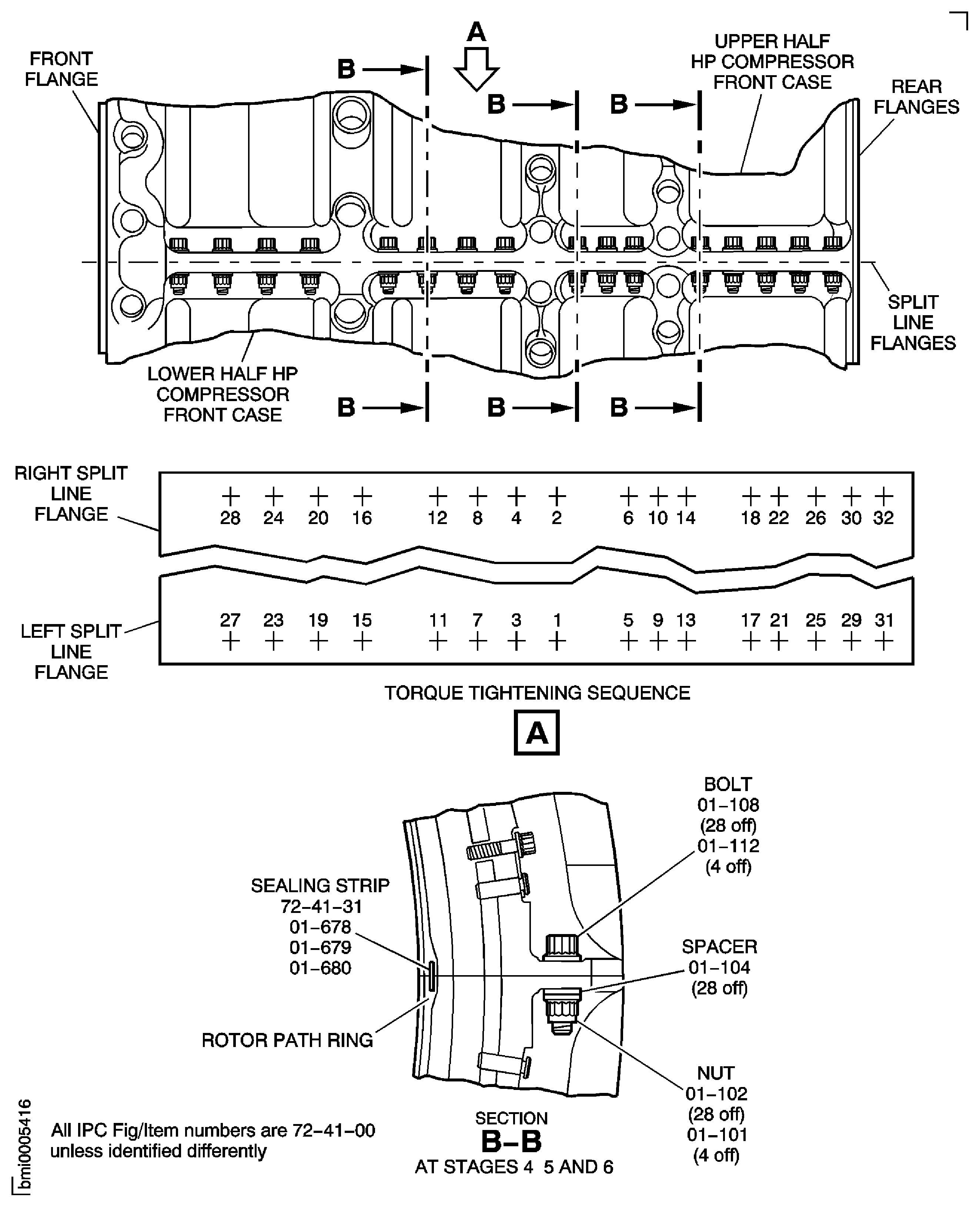
Figure: Install the HP Compressor Front Case Split Line Bolts, Nuts and Spacers
Sheet 3
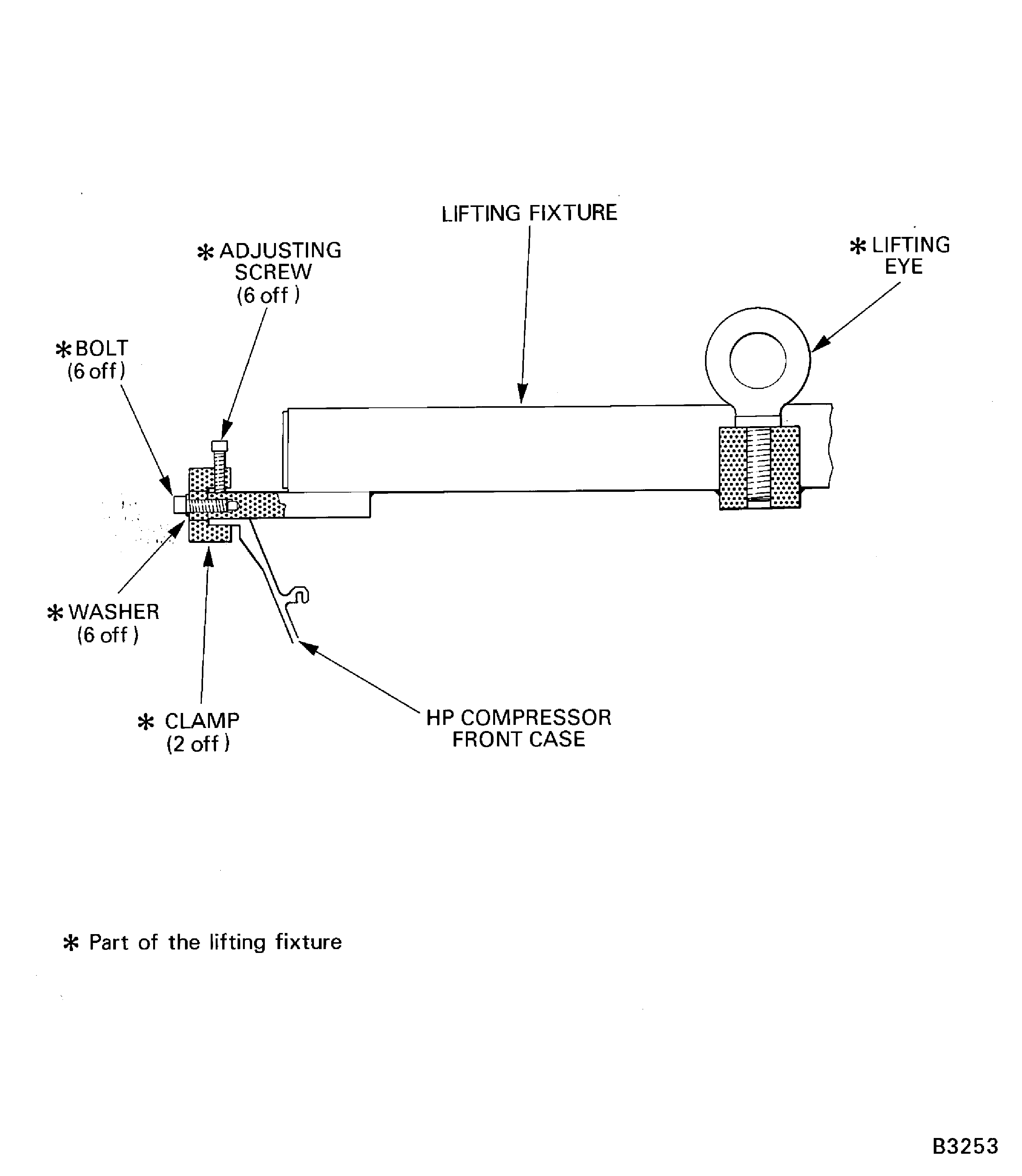
Figure: Install the Inlet Guide Vane Bridging Pieces and Centralizer Adjusting Shims
Sheet 1
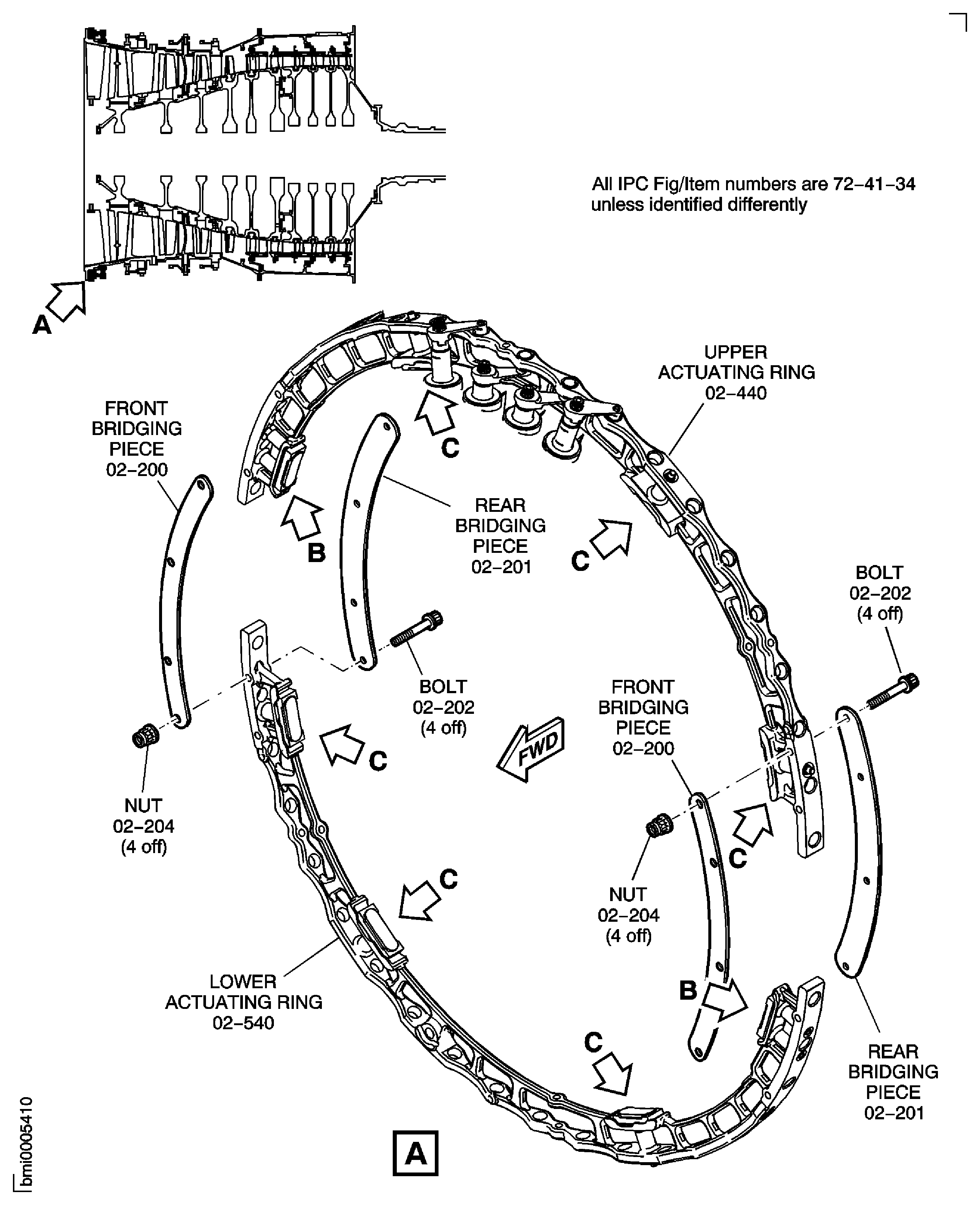
Figure: Install the Inlet Guide Vane Bridging Pieces and Centralizer Adjusting Shims
Sheet 2
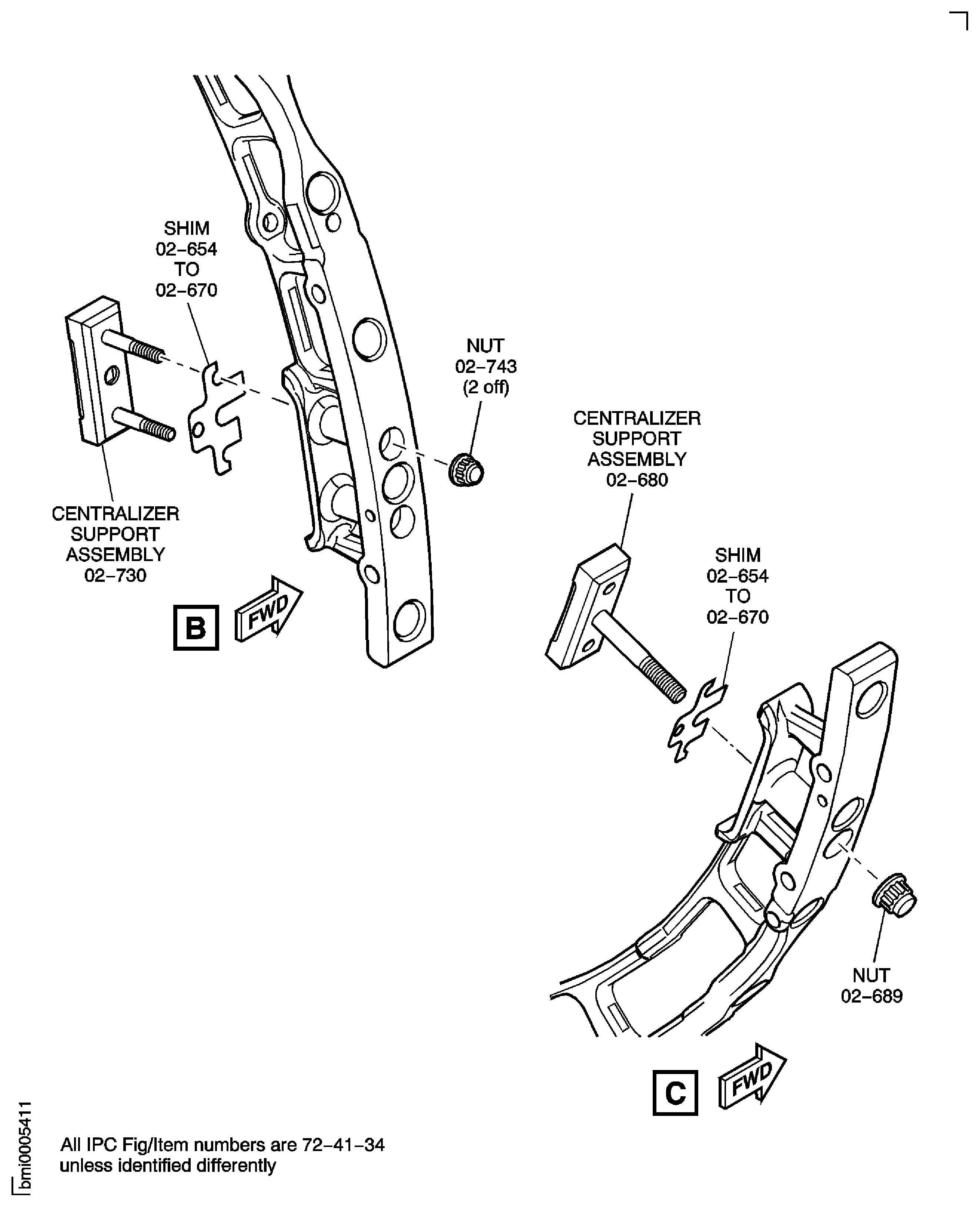
Figure: Install the Inlet Guide Vane Bridging Pieces and Centralizer Adjusting Shims
Sheet 3
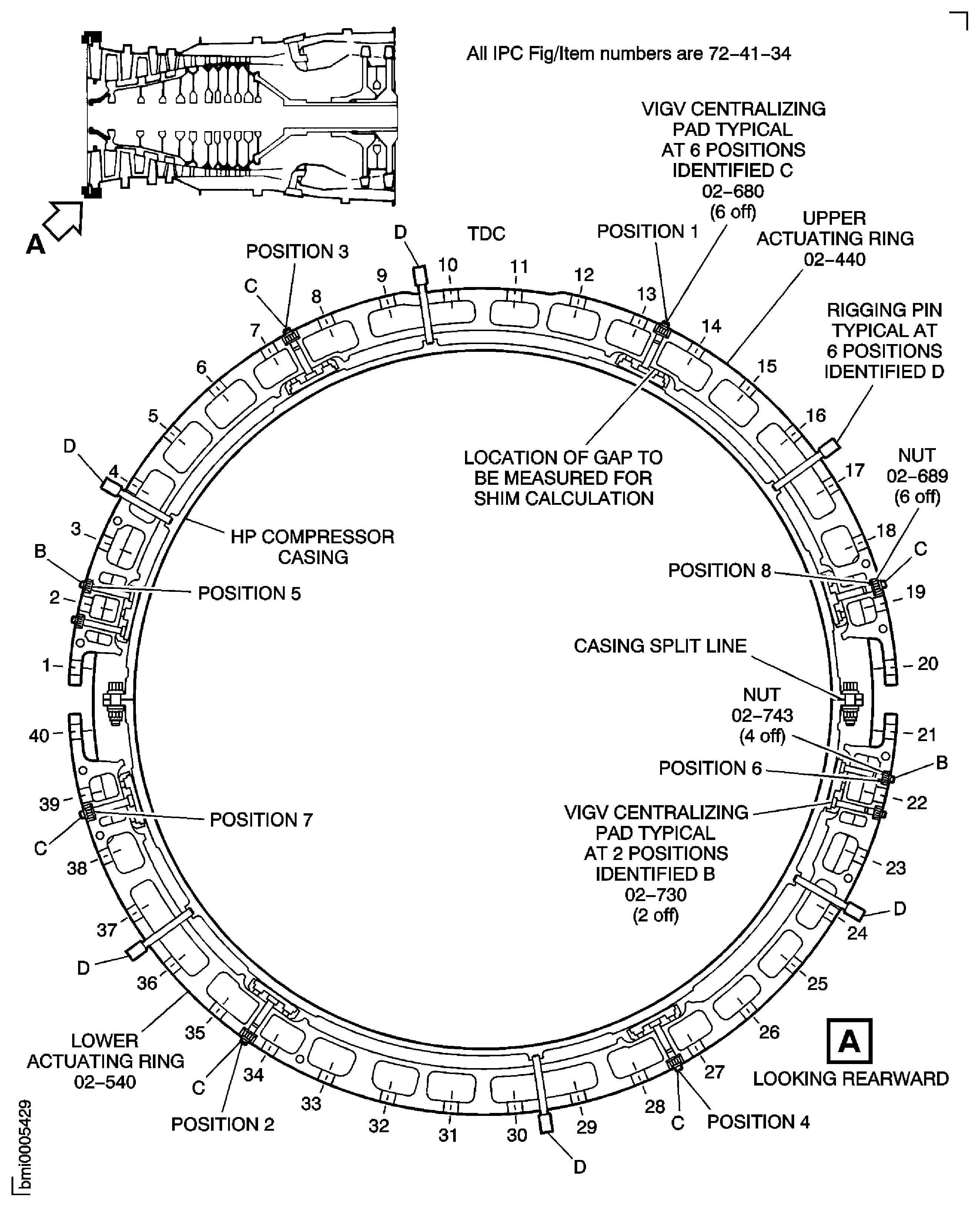
Figure: Install the Stage 3 Bridging Pieces and Centralizer Adjusting Shims
Sheet 1
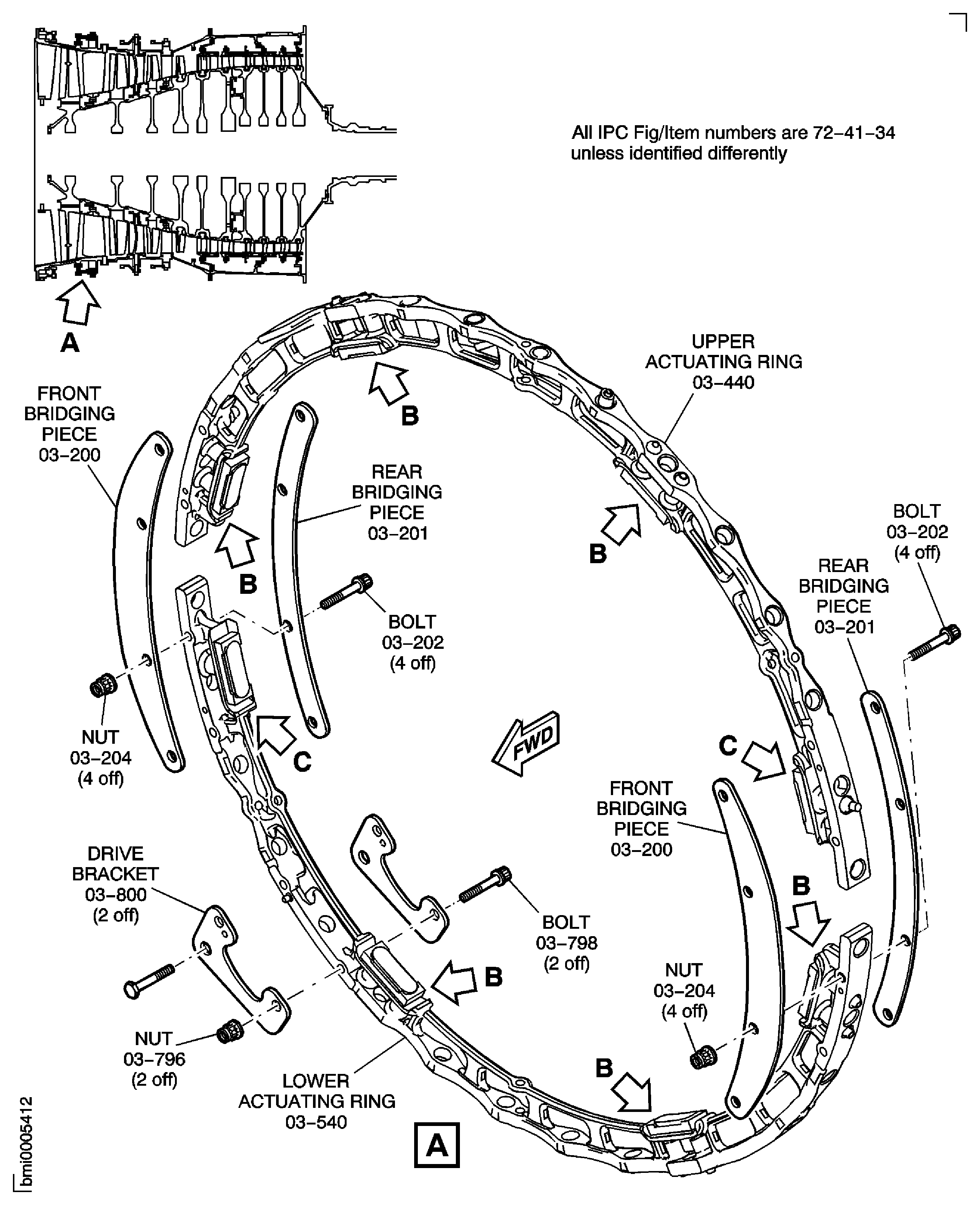
Figure: Install the Stage 3 Bridging Pieces and Centralizer Adjusting Shims
Sheet 2
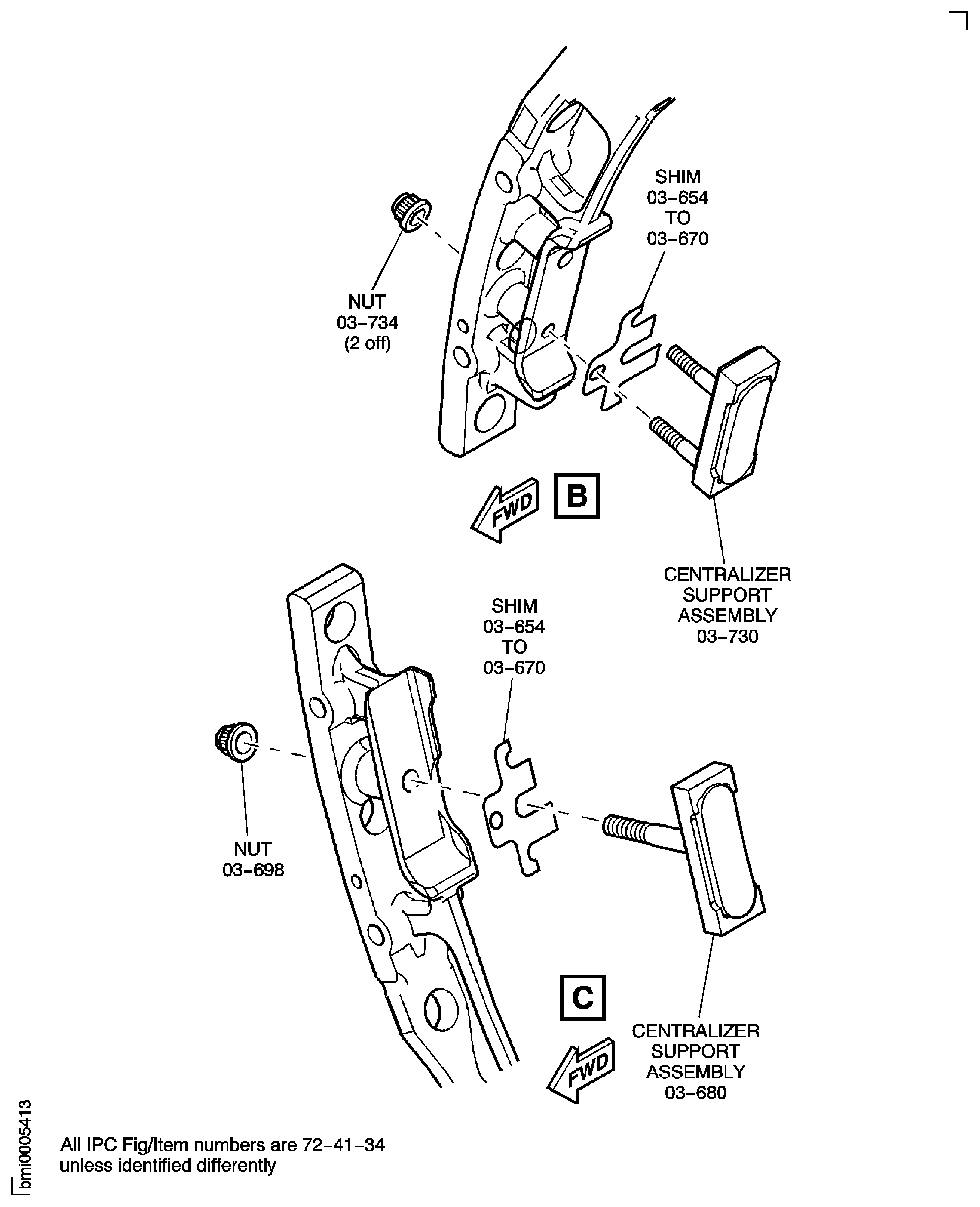
Figure: Install the Stage 3 Bridging Pieces and Centralizer Adjusting Shims
Sheet 3
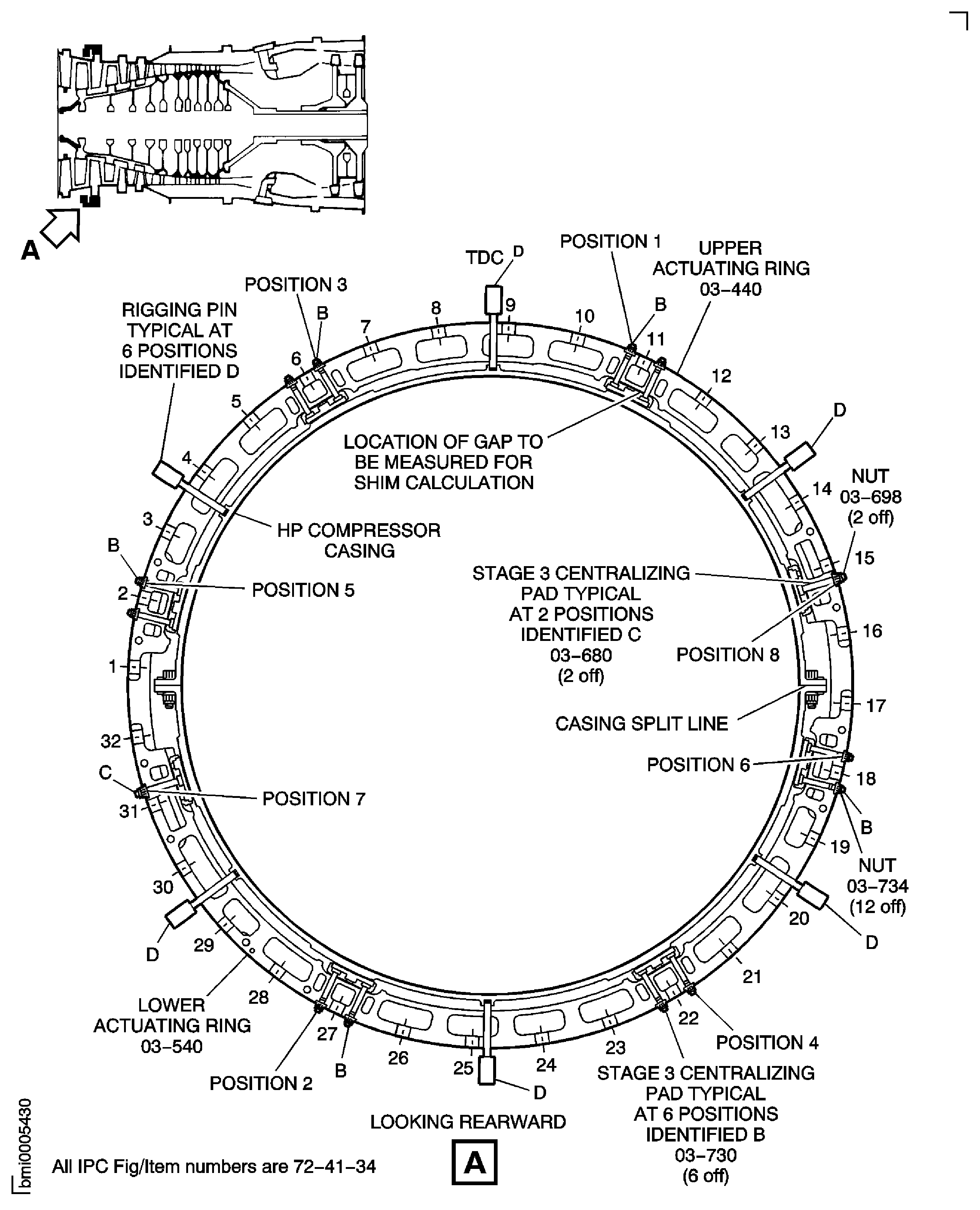
Figure: Install the Stage 4 Bridging Pieces and Centralizer Adjusting Shims
Sheet 1
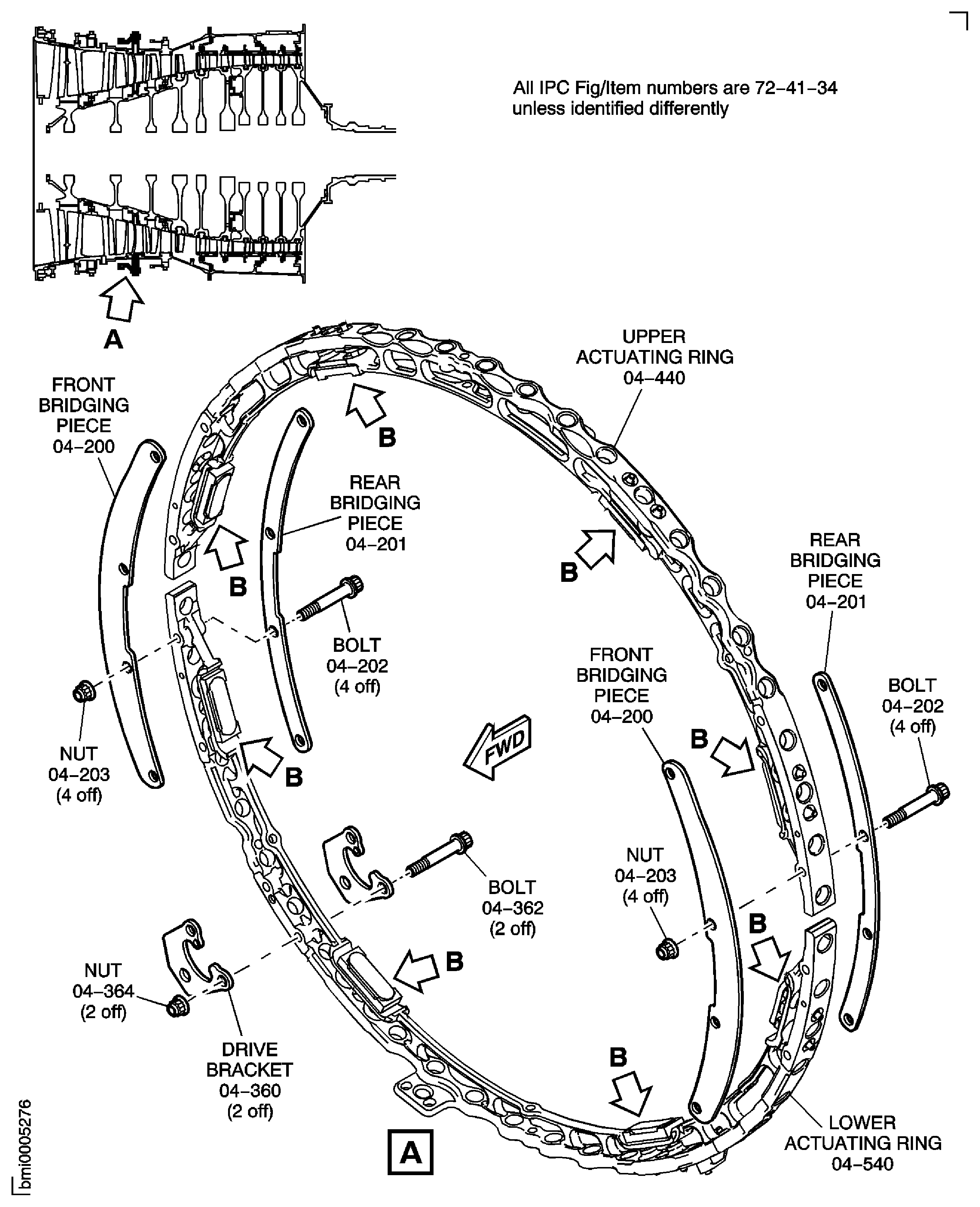
Figure: Install the Stage 4 Bridging Pieces and Centralizer Adjusting Shims
Sheet 2
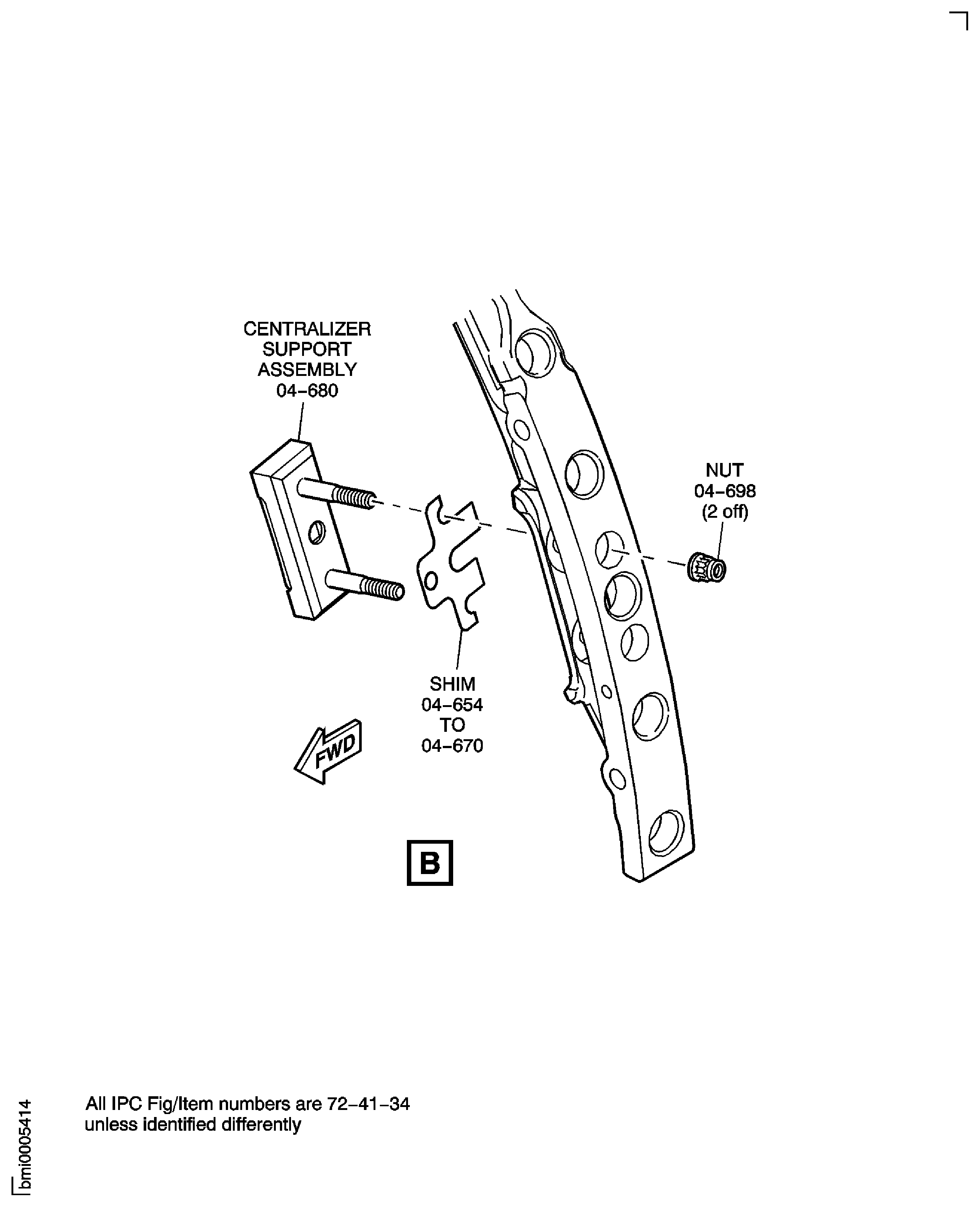
Figure: Install the Stage 4 Bridging Pieces and Centralizer Adjusting Shims
Sheet 3
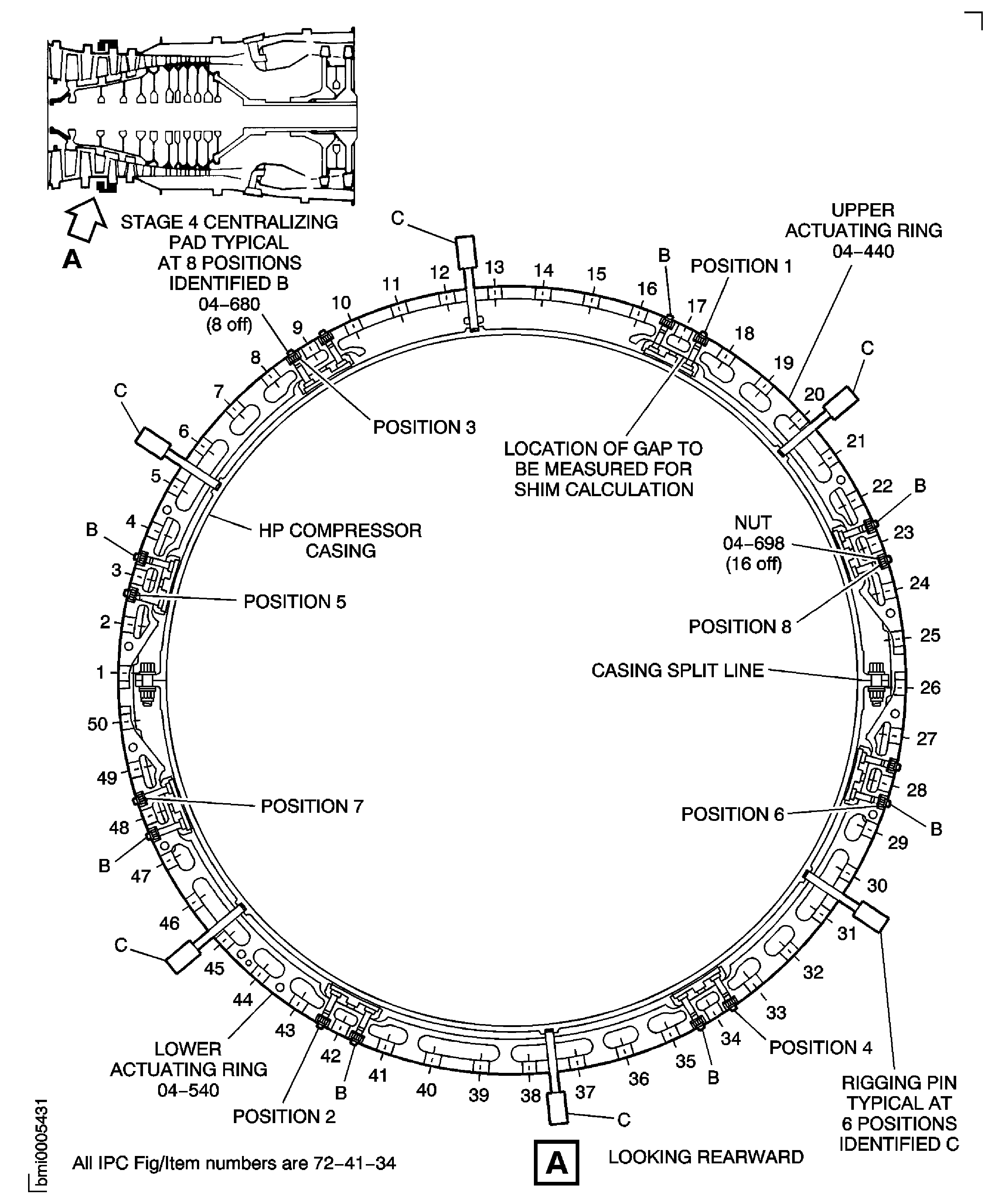
Figure: Install the Stage 5 Bridging Pieces and Centralizer Adjusting Shims
Sheet 1
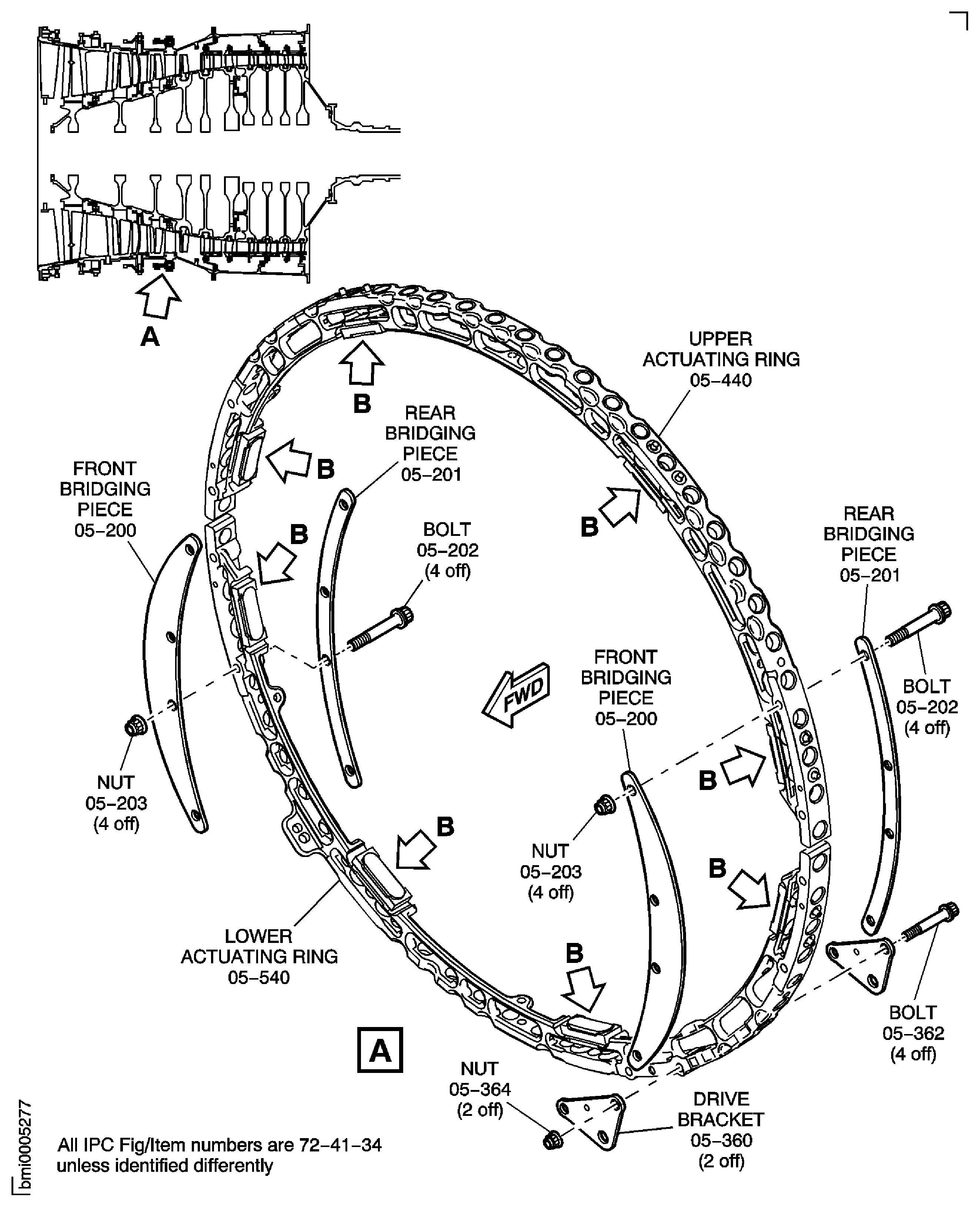
Figure: Install the Stage 5 Bridging Pieces and Centralizer Adjusting Shims
Sheet 2
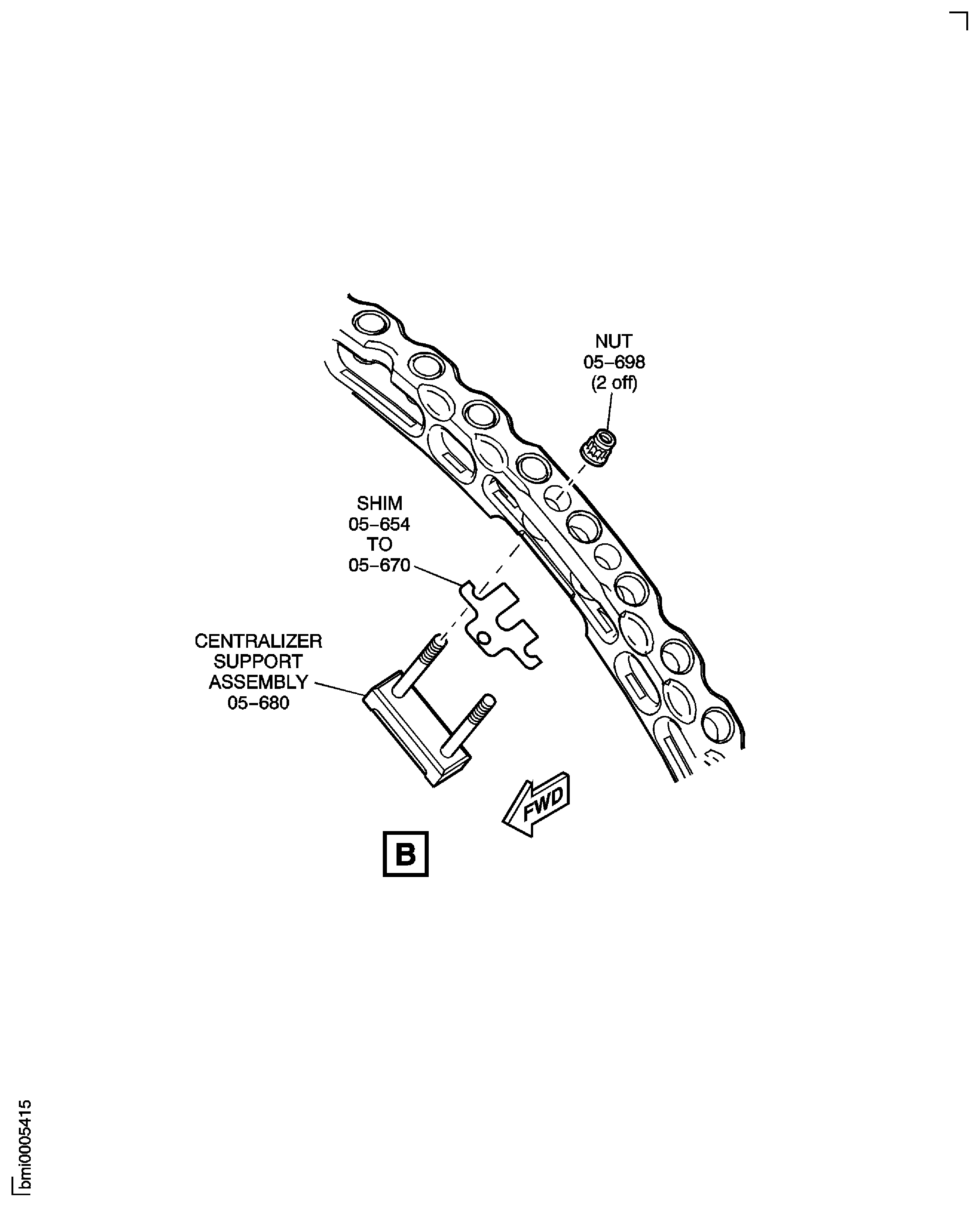
Figure: Install the Stage 5 Bridging Pieces and Centralizer Adjusting Shims
Sheet 3
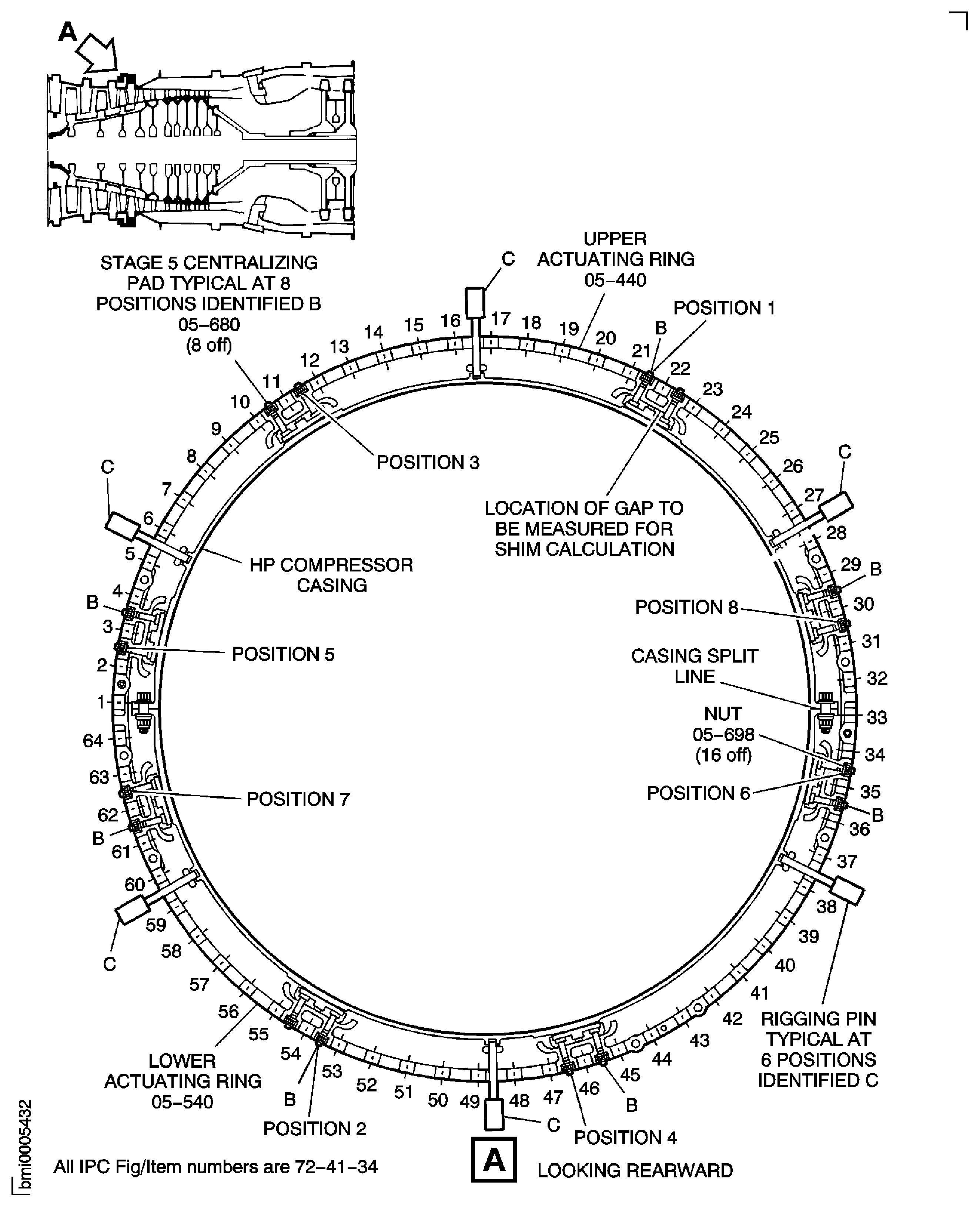
Figure: Bend over the Centralizer Adjusting Shim Tab
Bend over the Centralizer Adjusting Shim Tab
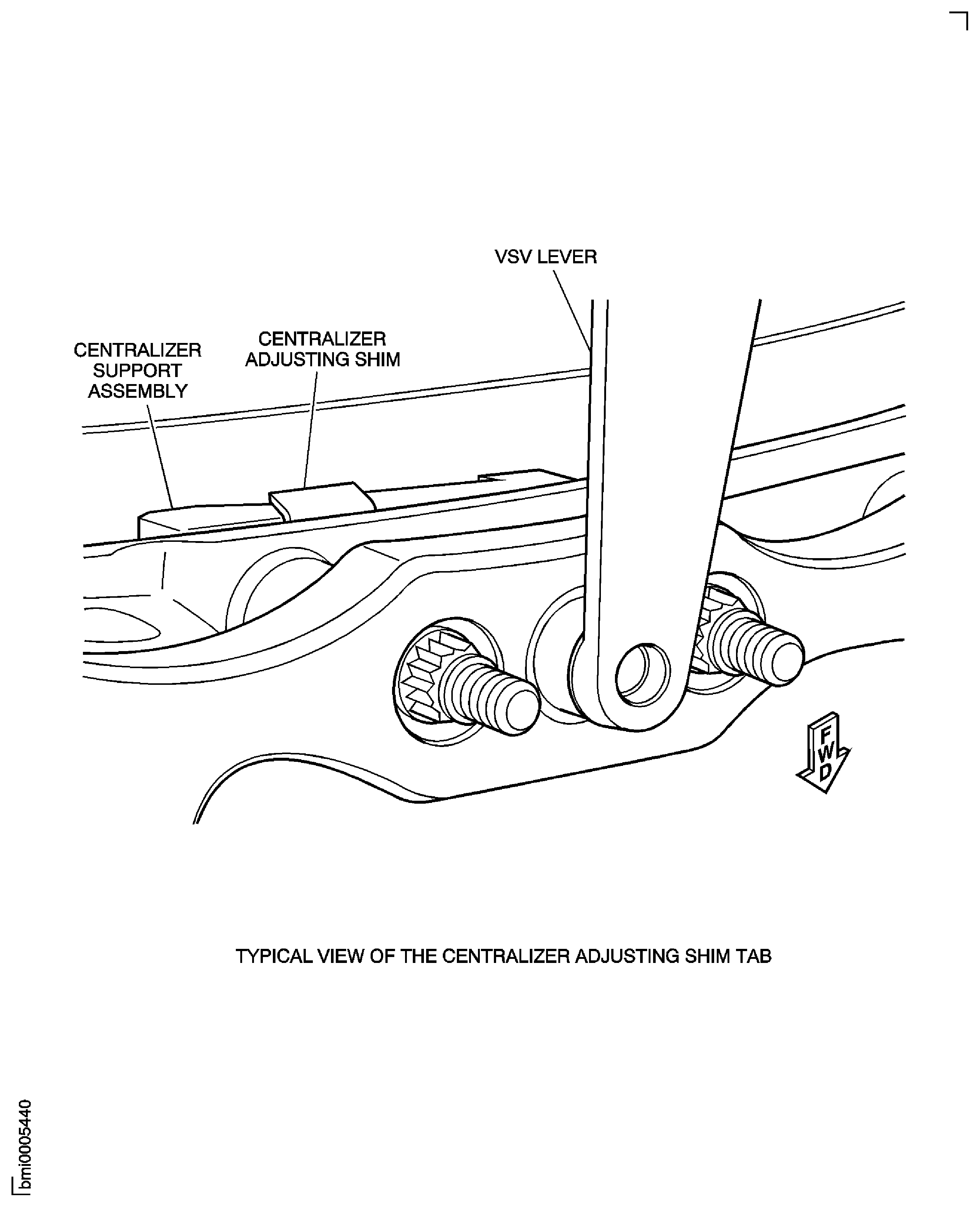
Figure: Install the Feeler Gauges
Install the Feeler Gauges