
Export Control
EAR Export Classification: Not subject to the EAR per 15 C.F.R. Chapter 1, Part 734.3(b)(3), except for the following Service Bulletins which are currently published as EAR Export Classification 9E991: SBE70-0992, SBE72-0483, SBE72-0580, SBE72-0588, SBE72-0640, SBE73-0209, SBE80-0024 and SBE80-0025.Copyright
© IAE International Aero Engines AG (2001, 2014 - 2021) The information contained in this document is the property of © IAE International Aero Engines AG and may not be copied or used for any purpose other than that for which it is supplied without the express written authority of © IAE International Aero Engines AG. (This does not preclude use by engine and aircraft operators for normal instructional, maintenance or overhaul purposes.).Applicability
V2500-A5
Common Information
TASK 72-41-00-440-001-B00 HPC Assembly - Assemble The HPC Cases And Vanes To The Rotor Assembly, Assembly-001
General
Fig./item numbers in parentheses in the procedure agree with those used in the IPC. Only the primary Fig./item numbers are used. For the Service Bulletin alpha variants refer to the IPC.
For all parts identified in a different Chapter/Section/Subject, the applicable Chapter/Section/Subject comes before the Fig./item numbers.
For standard torque data and procedures refer to SPM TASK 70-41-00-400-501, SPM TASK 70-41-01-400-501 and SPM TASK 70-41-02-410-501.
Special torque data and assembly tolerances are included in this procedure.
Lubricate all threads and abutment faces of nuts and bolts with CoMat 10-077 APPROVED ENGINE OILS unless other lubricants are referred to in the procedure.
To identify, lubricate and install seal rings, refer to SPM TASK 70-44-01-400-501.
After assembly apply CoMat 07-038 AIR DRYING ENAMEL to any damaged surface protection, joint flanged and attach parts. Use the correct color of the air drying enamel. Refer to the SPM TASK 70-63-02-380-501.
The number for each circumferential location must be identified in a clockwise direction. These start at the engine top position when you look from the rear of the engine, unless stated differently in the procedure.
This TASK gives the procedure to assemble the HP compressor rear cases and vanes on to the HP compressor rotor assembly. The procedure to install the HP compressor front cases on to the HP compressor rotor assembly by TASK 72-41-00-440-002-B00 (ASSEMBLY-002).
The practices and processes referred to in the procedure by the TASK/SUBTASK number are in SPM.
NOTE
NOTE
Preliminary Requirements
Pre-Conditions
NONESupport Equipment
| Name | Manufacturer | Part Number / Identification | Quantity | Remark |
|---|---|---|---|---|
| Heating blanket | LOCAL | Heating blanket | ||
| Heat protection gloves | LOCAL | Heat protection gloves | ||
| IAE 1R18090 Safety support stand | 0AM53 | IAE 1R18090 | 1 | |
| IAE 1R18091 Support stand | 0AM53 | IAE 1R18091 | 1 | |
| IAE 1R18213 Alignment checking pin | 0AM53 | IAE 1R18213 | 1 | |
| IAE 1R18214 Build stand | 0AM53 | IAE 1R18214 | 1 | |
| IAE 1R18217 Lift fixture | 0AM53 | IAE 1R18217 | 1 | |
| IAE 1R18401 Support stand | 0AM53 | IAE 1R18401 | 1 | |
| IAE 1R18635 Spanner wrench | 0AM53 | IAE 1R18635 | 1 | |
| IAE 1R18636 Spanner Wrench | 0AM53 | IAE 1R18636 | 1 | |
| IAE 1R18637 Spanner Wrench | 0AM53 | IAE 1R18637 | 1 | |
| IAE 1R18693 Support ring | 0AM53 | IAE 1R18693 | 1 | |
| IAE 1R18831 Support ring | 0AM53 | IAE 1R18831 | 1 |
Consumables, Materials and Expendables
| Name | Manufacturer | Part Number / Identification | Quantity | Remark |
|---|---|---|---|---|
| CoMat 01-002 SOLVENT, DELETED. | X111X | CoMat 01-002 | ||
| DELETED | LOCAL | DELETED | ||
| CoMat 02-271 ADHESIVE TAPE (DOUBLE SIDED) | LOCAL | CoMat 02-271 | ||
| CoMat 04-011 JOINTING COMPOUND | LOCAL | CoMat 04-011 | ||
| CoMat 07-038 AIR DRYING ENAMEL | k3504 | CoMat 07-038 | ||
| CoMat 08-013 COLD CURING SILICONE COMPOUND | X222X | CoMat 08-013 | ||
| CoMat 10-070 ANTI-SEIZE COMPOUND | LOCAL | CoMat 10-070 | ||
| CoMat 10-072 ANTISEIZE COMPOUND (MoDISULFIDE) | K6835 | CoMat 10-072 | ||
| CoMat 10-077 APPROVED ENGINE OILS | X333X | CoMat 10-077 |
Spares
| Name | Manufacturer | Part Number / Identification | Quantity | Remark |
|---|---|---|---|---|
| Corrujoint gasket | 3 | |||
| Corrujoint gasket | 1 |
Safety Requirements

CAUTION
Procedure
Install IAE 1R18091 Support stand 1 off on to the IAE 1R18090 Safety support stand 1 off. Refer to Figure.
Remove the front universal sling adapter from dummy stub shaft. Refer to Figure.
Use the hoist installed in Step and vertically lift the HP compressor rotor assembly from the support stand.
Install the HP compressor rotor assembly in the IAE 1R18214 Build stand 1 off. Refer to Figure.
Remove the rear universal sling adapter. Refer to Figure.
SUBTASK 72-41-00-440-095 Install the HP Compressor Rotor Assembly in the Build Stand
Refer to Figure.
Install the two halves of IAE 1R18401 Support stand 1 off.
Install support ring IAE 1R18831 Support ring or IAE 1R18693 Support ring, 1 off on to the support stand.
SUBTASK 72-41-00-440-096 Prepare the Tools to Assemble the HP Compressor Assembly
Refer to Figure.
Assemble the support cone stiffening ring HPC Ring Cases And Related Parts (72-41-21, 03-350) and the front support cone HPC Ring Cases And Related Parts (72-41-21, 03-300).
Install the stage 7 rotor path ring HPC Ring Cases And Related Parts (72-41-21, 03-450) on to the front support cone. Align the location hole in the stage 7 rotor path ring with the location dowel in the front support cone.
SUBTASK 72-41-00-440-097 Install the Front Support Cone Stiffening Ring, the Front Support Cone Assembly and the Stage 7 Rotor Path Ring on to the Support Ring (Pre SBE 72-0296 and SBE 72-0296)
Pre SBE 72-0296: Install the four stage 7 stop vanes in to the stage 7 rotor path ring HPC Ring Cases And Related Parts (72-41-21, 03-450) at the four stage 7 vane stops HPC Ring Cases And Related Parts (72-41-21, 03-480) positions. Engage the vanes in the stage 7 front liner HPC Ring Cases And Related Parts (72-41-21, 03-440). Make sure the four stop vanes are at the correct positions.
SBE 72-0296: Install the four stage 7 stop vanes in to the stage 7 cone and rotor path assembly HPC Ring Cases And Related Parts (72-41-21, 03-300) at the four stage 7 vane stops HPC Ring Cases And Related Parts (72-41-21, 03-480) positions. Engage the vanes in the stage 7 front liner HPC Ring Cases And Related Parts (72-41-21, 03-440). Make sure the four stop vanes are at the correct positions.
Install the stage 7 stop vanes HPC Stator Vanes (72-41-22, 02-350).
Install the other stage 7 stator vanes (HPC Stator Vanes (72-41-22, 02-150) (Pre SBE 72-0441), HPC Stator Vanes (72-41-22, 02-400) and HPC Stator Vanes (72-41-22,02-448) or HPC Stator Vanes (72-41-22, 02-450).

WARNING
WHEN YOU USE CoMat 01-002 SOLVENT, DELETED. YOU MUST USE THE NECESSARY PROTECTIVE CLOTHING. DO NOT GET THE SOLVENT ON YOUR SKIN OR IN YOUR EYES. YOU MUST NOT SMOKE WHEN YOU USE THE SOLVENT AS THE VAPOR CHANGES AND BECOMES TOXIC.Clean the stator vane outer platforms with CoMat 01-002 SOLVENT, DELETED..
NOTE
Use only CoMat 02-271 ADHESIVE TAPE (DOUBLE SIDED) to attach the insulation strips of SBE 72-0612 standard to the HP compressor vanes.Apply a thin layer of CoMat 08-013 COLD CURING SILICONE COMPOUND to the stator vane platforms.
Install the insulation strips HPC Ring Cases And Related Parts (72-41-21, 03-210).
SUBTASK 72-41-00-440-098 Install the Stage 7 Stator Vanes (Pre SBE 72-0441, SBE 72-0441, SBE 72-0612PRE and SBE 72-0612)
Install the stage 7 case HPC Ring Cases And Related Parts (72-41-21, 03-500).
Install the 37 bolts HPC Assembly (72-41-00, 01-552) and nuts HPC Assembly (72-41-00, 01-550) to attach the stage 7 case and rotor path ring to the front support cone and stiffening ring. Refer to detail identified at A.
Install the 10 bolts HPC Assembly (72-41-00, 01-544) and nuts HPC Assembly (72-41-00, 01-540) to attach stage 7 front heatshield.
Install the stage 7 front heatshield HPC Ring Cases And Related Parts (72-41-21, 03-180).
SUBTASK 72-41-00-440-099 Install the Stage 7 Case and Front Heatshield (Pre SBE 72-0296)
SBE 72-0296: Engine-HP Compressor-Introduction of Integrel Front Support Cone/Stage 7 Rotor Path and Revised Heatshield and Fastener Configuration.
SBE 72-0343: Engine - HP Compressor ring cases - Introduction of integral HP Compressor cases and rotor paths.
Install the heating blanket on to the stage 8 rotor path case assembly HPC Ring Cases And Related Parts (72-41-21, 03-500) front flange.
WARNING
YOU MUST PUT ON THE CORRECT PROTECTIVE GLOVES BEFORE YOU TOUCH THE STAGE 8 ROTOR PATH CASE ASSEMBLY.Align the location dowel in the stage 7 cone and rotor path assembly HPC Ring Cases And Related Parts (72-41-21,03-300) with the location dowel hole in the stage 8 rotor path case assembly front flange.
Remove the eight slave bolts installed in Step.
Install the 47 bolts HPC Assembly (72-41-00, 01-552) and nuts HPC Assembly (72-41-00, 01-550) to attach the stage 8 rotor path case assembly to the stage 7 cone and rotor path assembly. Install the bolts from the front of the stage 7 cone and rotor path assembly. Refer to detail A and B on Fig. 72-41-20-990-116-002 for the position of the bolts.
SUBTASK 72-41-00-440-212 Install the Stage 7 Cone and Rotor path Assembly to the Stage 8 Rotor path Case Assembly (SBE 72-0296 and SBE 72-0343)
Refer to Figure.
Align the location dowel hole in the stage 8 rotor path ring with the location dowel in the stage 7 case assembly HPC Ring Cases And Related Parts (72-41-21, 03-500).
Install the stage 8 rotor path ring HPC Ring Cases And Related Parts (72-41-21, 03-600).
SUBTASK 72-41-00-440-100 Install the Stage 8 Rotor Path Ring (Pre SBE 72-0343)
Pre SBE 72-0343: Install the four stage 8 stop vanes in to the stage 8 rotor path ring HPC Ring Cases And Related Parts (72-41-21, 03-600) at the four stage 8 stator vane stop HPC Ring Cases And Related Parts (72-41-21, 03-640) positions. Engage the vanes in the stage 8 front liner HPC Ring Cases And Related Parts (72-41-21, 03-590). Make sure the four stop vanes are at the correct positions.
SBE 72-0343: Install the four stage 8 stop vanes in to the stage 8 rotor path case assembly HPC Ring Cases And Related Parts (72-41-21, 03-500) at the four stage 8 stator vane stop HPC Ring Cases And Related Parts (72-41-21, 03-640) positions. Engage the vanes in the stage 8 front liner HPC Ring Cases And Related Parts (72-41-21, 03-590). Make sure the four stop vanes are at the correct positions.
Install the stage 8 stop vanes HPC Stator Vanes (72-41-22, 03-350).
Install the vanes referred to in steps (3) to (6), in a clockwise direction. Engage each of the vanes in the stage 8 front liner. Make sure the platform of the first vane that is installed touches the platform of the stage 8 stop vane. Push each subsequent vane clockwise as it is installed until the vane platforms touch.
Install the 22 stage 8 stator vanes (HPC Stator Vanes (72-41-22, 03-150) (Pre SBE 72-0441)), HPC Stator Vanes (72-41-22, 03-400) and HPC Stator Vanes (72-41-22, 03-448) or HPC Stator Vanes (72-41-22, 03-450) between the two stage 8 stop vanes at the positions 12 o'clock and 3 o'clock.
Between the two stage 8 stop vanes at the positions 3 o'clock and 6 o'clock. Install 20 stage 8 stator vanes (HPC Stator Vanes (72-41-22, 03-150) (Pre SBE 72-0441)), HPC Stator Vanes (72-41-22, 03-400) and HPC Stator Vanes (72-41-22, 03-448) or HPC Stator Vanes (72-41-22, 03-450) and the two stage 8 LH and RH intrascope vanes HPC Stator Vanes (72-41-22, 03-200) and HPC Stator Vanes (72-41-22, 03-250).
Install the 22 stage 8 stator vanes (HPC Stator Vanes (72-41-22, 03-150) (Pre SBE 72-0441)), HPC Stator Vanes (72-41-22, 03-400) and HPC Stator Vanes (72-41-22, 03-448) or HPC Stator Vanes (72-41-22, 03-450) between the two stage 8 stop vanes at the positions 6 o'clock and 9 o'clock.
Install the 22 stage 8 stator vanes (HPC Stator Vanes (72-41-22, 03-150) (Pre SBE 72-0441)), HPC Stator Vanes (72-41-22, 03-400) and HPC Stator Vanes (72-41-22, 03-448) or HPC Stator Vanes (72-41-22, 03-450) between the two stage 8 stop vanes at the positions 9 o'clock and 12 o'clock.
Install the stage 8 stator vanes.
WARNING
WHEN YOU USE CoMat 01-002 SOLVENT, DELETED. YOU MUST USE THE NECESSARY PROTECTIVE CLOTHING. DO NOT GET THE SOLVENT ON YOUR SKIN OR IN YOUR EYES. YOU MUST NOT SMOKE WHEN YOU USE THE SOLVENT AS THE VAPOR CHANGES AND BECOMES TOXIC.Clean the stator vane outer platforms with CoMat 01-002 SOLVENT, DELETED..
NOTE
Use only CoMat 02-271 ADHESIVE TAPE (DOUBLE SIDED) to attach the insulation strips of SBE 72-0612 standard to the HP compressor vanes.Apply a thin layer of CoMat 08-013 COLD CURING SILICONE COMPOUND to the stator vane outer platforms.
Install the insulation strips HPC Ring Cases And Related Parts (72-41-21, 03-154), HPC Ring Cases And Related Parts (72-41-21, 03-156) and HPC Ring Cases And Related Parts (72-41-21, 03-158).
SUBTASK 72-41-00-440-101 Install the Stage 8 Stator Vanes (Pre SBE 72-0343, SBE 72-0343, Pre SBE 72-0441, SBE 72-0441, Pre SBE 72-0612 and SBE 72-0612)
Install IAE 1R18213 Alignment checking pin 1 off through the stage 8 case assembly borescope hole. Make sure the alignment checking pin easily goes in to the intrascope vanes hole.
Install the stage 8 case HPC Ring Cases And Related Parts (72-41-21, 03-650).
Install the 28 bolts HPC Assembly (72-41-00, 01-572) and nuts HPC Assembly (72-41-00, 01-570) to attach the stage 8 case to the stage 8 rotor path ring and stage 7 case. Refer to detail identified A at Figure. Make sure the bolts are correctly located on the stage 7 case.
Install the 10 bolts HPC Assembly (72-41-00, 01-564) to attach the stage 7 rear heatshield to the stage 7 case.
Install the stage 7 rear heatshield HPC Ring Cases And Related Parts (72-41-21, 03-880).
SUBTASK 72-41-00-440-102-A00 Install the Stage 8 Case and the Stage 7 Rear Heatshield (Pre SBE 72-0343)
SBE 72-0343: Engine - HP Compressor ring cases - Introduction of integral HP Compressor cases and rotor paths.
Install the stage 9 rotor path case assembly on to the stage 8 rotor path case assembly. Engage the stage 8 stator vanes rear platform in the liner in the stage 9 rotor path case assembly. Align the four stage 8 stator stops with the four stage 8 stop vanes. Align the dowel hole in the stage 9 rotor path case assembly front flange with the location dowel in the stage 8 rotor path case assembly.
Install IAE 1R18213 Alignment checking pin 1 off through the stage 8 case assembly borescope hole. Make sure the alignment checking pin easily goes in to the intrascope vanes hole.
Install the stage 9 rotor path case assembly HPC Ring Cases And Related Parts (72-41-21, 03-650).
Install the 28 bolts HPC Assembly (72-41-00, 01-572) and nuts HPC Assembly (72-41-00, 01-570) to attach the stage 9 rotor path case assembly and the stage 8 rotor path case assembly. Refer to detail identified A at Figure. Make sure the bolts are correctly located on the stage 8 rotor path case assembly.
Install the 10 bolts HPC Assembly (72-41-00, 01-564) and 10 washers HPC Assembly (72-41-00, 01-565) to attach the stage 7 rear heatshield to the stage 8 rotor path case assembly.
Install the stage 7 rear heatshield HPC Ring Cases And Related Parts (72-41-21, 03-880).
SUBTASK 72-41-00-440-102-B00 Install the Stage 9 Rotor Path Case Assembly and the Stage 7 Rear Heatshield (SBE 72-0343)
Install the stage 9 rotor path ring HPC Ring Cases And Related Parts (72-41-21, 03-750).
SUBTASK 72-41-00-440-103 Install the Stage 9 Rotor Path Ring (Pre SBE 72-0343)
Pre SBE 72-0343: Install the eight stage 9 stop vanes in to the stage 9 rotor path ring HPC Ring Cases And Related Parts (72-41-21, 03-750) at the four stage 9 stator vane stops HPC Ring Cases And Related Parts (72-41-21, 03-790) positions. Engage the vanes in the stage 9 front liner HPC Ring Cases And Related Parts (72-41-21, 03-740). Make sure the four stop vanes are at the correct positions.
SBE 72-0343: Install the eight stage 9 stop vanes in to the stage 9 rotor path case assembly, at the stage 9 stator vane stops HPC Ring Cases And Related Parts (72-41-21, 03-790). Engage the vanes in the stage 9 rotor path case assembly. Install two stage 9 stop vanes at each of the stage stator vane stops.
Install the stage 9 stop vanes HPC Stator Vanes (72-41-22, 04-350).
Install the vanes referred to in steps (3) to (6), in a clockwise direction. Engage each of the vanes in the stage 9 front liner. Make sure the platform of the first vane that is installed touches the platform of the stage 9 stop vane. Push each subsequent vane clockwise as it is installed until the vane platforms touch.
Install the 24 stage 9 stator vanes HPC Stator Vanes (72-41-22,04-400) and HPC Stator Vanes (72-41-22,04-448) or HPC Stator Vanes (72-41-22,04-450) between the two stage 9 stop vanes adjacent to the positions 12 o'clock and 3 o'clock.
Between the two stage 9 stop vanes adjacent to the positions 3 o'clock and 6 o'clock. Install 22 stage 9 stator vanes HPC Stator Vanes (72-41-22,04-400) and HPC Stator Vanes (72-41-22,04-448) or HPC Stator Vanes (72-41-22,04-450) and the two stage 9 LH and RH intrascope vanes HPC Stator Vanes (72-41-22,04-200) and HPC Stator Vanes (72-41-22,04-250).
Install the 24 stage 9 stator vanes HPC Stator Vanes (72-41-22,04-400) and HPC Stator Vanes (72-41-22,04-448) or HPC Stator Vanes (72-41-22,04-450) between the two stage 9 stop vanes adjacent to the positions 6 o'clock and 9 o'clock.
Install the 24 stage 9 stator vanes HPC Stator Vanes (72-41-22,04-400) and HPC Stator Vanes (72-41-22,04-448) or HPC Stator Vanes (72-41-22,04-450) between the two stage 9 stop vanes adjacent to the positions 9 o'clock and 12 o'clock.
Install the stage 9 stator vanes.
WARNING
WHEN YOU USE CoMat 01-002 SOLVENT, DELETED. YOU MUST USE THE NECESSARY PROTECTIVE CLOTHING. DO NOT GET THE SOLVENT ON YOUR SKIN OR IN YOUR EYES. YOU MUST NOT SMOKE WHEN YOU USE THE SOLVENT AS THE VAPOR CHANGES AND BECOMES TOXIC.Clean the stator vane outer platforms with CoMat 01-002 SOLVENT, DELETED..
NOTE
Use only CoMat 02-271 ADHESIVE TAPE (DOUBLE SIDED) to attach the insulation strips of SBE 72-0612 standard to the HP compressor vanes.Apply a thin layer of CoMat 08-013 COLD CURING SILICONE COMPOUND to the stator vane platforms.
Install the insulation strips HPC Ring Cases And Related Parts (72-41-21,03-094), HPC Ring Cases And Related Parts (72-41-21,03-096) and HPC Ring Cases And Related Parts (72-41-21,03-098).
SUBTASK 72-41-00-440-104 Install the Stage 9 Stator Vanes (Pre SBE 72-0343, SBE 72-0343, Pre SBE 72-0612 and SBE 72-0612)
Install IAE 1R18213 Alignment checking pin 1 off through the stage 9 case assembly borescope hole. Make sure the alignment checking pin easily goes in to the intrascope vanes hole.
Install the stage 9 case HPC Ring Cases And Related Parts (72-41-21,03-800).
Install the 37 bolts HPC Assembly (72-41-00,01-592) and nuts HPC Assembly (72-41-00,01-590) which attach the stage 9 case to the stage 9 rotor path ring and the stage 8 case. Refer to Figure detail identified at A. Make sure the bolts are correctly located on the stage 9 case.
Install the flange nuts and bolts.
Install the stage 8 heatshield on to the stage 8 case HPC Ring Cases And Related Parts (72-41-21,03-650).
Install the stage 8 heatshield HPC Ring Cases And Related Parts (72-41-21,03-900).
Install the 10 bolts HPC Assembly (72-41-00,01-584) to attach the stage 9 front heatshield to the stage 9 case.
Install the stage 9 front heatshield HPC Ring Cases And Related Parts (72-41-21,03-920).
SUBTASK 72-41-00-440-105-A00 Install the Stage 8 Heatshield, Stage 9 Case and the Stage 9 Front Heatshield (Pre SBE 72-0343 and Pre SBE 72-0477)
SBE 72-0343: Engine - HP compressor ring cases - Introduction of integral HP compressor cases and rotor paths.
Install IAE 1R18213 Alignment checking pin alignment checking pin 1 off through the stage 9 case assembly borescope hole. Make sure the alignment checking pin easily goes in to the intrascope vanes hole.
Install the stage 10 rotor path case assembly HPC Ring Cases And Related Parts (72-41-21,03-800).
Install the 37 dee headed bolts HPC Assembly (72-41-00,01-592) and nuts HPC Assembly (72-41-00,01-590) to attach the stage 10 rotor path case assembly to the stage 9 rotor path case assembly. Refer to Figure detail identified at A. Make sure the bolts are correctly located on the stage 10 rotor path case assembly.
Install the flange nuts and bolts.
Install the stage 8 heatshield on to the stage 9 rotor path case assembly HPC Ring Cases And Related Parts (72-41-21,03-650).
Install the stage 8 heatshield HPC Ring Cases And Related Parts (72-41-21,03-900).
Install the 10 bolts HPC Assembly (72-41-00,01-584) to attach the stage 9 front heatshield to the stage 10 rotor path case assembly.
Install the stage 9 front heatshield HPC Ring Cases And Related Parts (72-41-21,03-920).
SUBTASK 72-41-00-440-105-B00 Install the Stage 8 Heatshield, Stage 10 Rotor Path Case Assembly and the Stage 9 Front Heatshield (SBE 72-0343 and Pre SBE 72-0477)
SBE 72-0477: Engine - HP compressor ring cases - Deletion of stage 8 to 11 heatshields.
Install IAE 1R18213 Alignment checking pin 1 off through the stage 9 case assembly borescope hole. Make sure the alignment checking pin easily goes in to the intrascope vanes hole.
Install the stage 9 case HPC Ring Cases And Related Parts (72-41-21,03-800).
Install the 37 bolts HPC Assembly (72-41-00,01-592) and nuts HPC Assembly (72-41-00,01-590) which attach the stage 9 case to the stage 9 rotor path ring and the stage 8 case. Refer to Figure detail identified at A. Make sure the bolts are correctly located on the stage 9 case.
Install the flange nuts and bolts.
SUBTASK 72-41-00-440-105-C00 Install the Stage Stage 9 Case (Pre SBE 72-0343 and SBE 72-0477)
SBE 72-0343: Engine - HP compressor ring cases - Introduction of integral HP compressor cases and rotor paths.
SBE 72-0477: Engine - HP compressor ring cases - Deletion of stage 8 to 11 heatshields.
Install IAE 1R18213 Alignment checking pin 1 off through the stage 9 case assembly borescope hole. Make sure the alignment checking pin easily goes in to the intrascope vanes hole.
Install the stage 10 rotor path case assembly HPC Ring Cases And Related Parts (72-41-21,03-800).
Install the 37 dee headed bolts HPC Assembly (72-41-00,01-592) and nuts HPC Assembly (72-41-00,01-590) to attach the stage 10 rotor path case assembly to the stage 9 rotor path case assembly. Refer to Figure detail identified at A. Make sure the bolts are correctly located on the stage 10 rotor path case assembly.
Install the flange nuts and bolts.
SUBTASK 72-41-00-440-105-D00 Install the Stage 10 Rotor Path Case Assembly (SBE 72-0343 and SBE 72-0477)
Install the stage 10 rotor path ring HPC Ring Cases And Related Parts (72-41-21,04-300).
SUBTASK 72-41-00-440-106 Install the Stage 10 Rotor Path Ring (Pre SBE 72-0343)
Pre SBE 72-0343: Install the four stage 10 stop vanes in to the stage 10 rotor path ring HPC Ring Cases And Related Parts (72-41-21,04-300) at the four stage 10 stator vane stops HPC Ring Cases And Related Parts (72-41-21,04-330) positions. Engage the vanes in the stage 10 front liner HPC Ring Cases And Related Parts (72-41-21,04-290). Make sure the four stop vanes are at the correct positions.
SBE 72-0343: Install the four stage 10 stop vanes in to the stage 10 rotor path case assembly at the stage 10 stator vane stops. Engage the vanes in the stage 10 front liner HPC Ring Cases And Related Parts (72-41-21,04-290). Make sure the stage 10 stator vane stops are engaged in the slots in the stage 10 stop vanes.
Install the stage 10 stop vanes HPC Stator Vanes (72-41-22,05-350).
Install the vanes referred to in step (3), in a clockwise direction. Engage each of the vanes in the stage 10 front liner. Make sure the platform of the first vane that is installed touches the platform of the stage 10 stop vane. Push each subsequent vane clockwise as it is installed until the vane platforms touch.
Install the stage 10 stator vanes HPC Stator Vanes (72-41-22,05-400) and HPC Stator Vanes (72-41-22,05-448) or HPC Stator Vanes (72-41-22,05-450).
WARNING
WHEN YOU USE CoMat 01-002 SOLVENT, DELETED. INHIBITED AND STABILIZED TRICHLOROETHANEYOU MUST USE THE NECESSARY PROTECTIVE CLOTHING. DO NOT GET THE SOLVENT ON YOUR SKIN OR IN YOUR EYES. YOU MUST NOT SMOKE WHEN YOU USE THE SOLVENT AS THE VAPOR CHANGES AND BECOMES TOXIC.Clean the stator vane outer platforms with CoMat 01-002 SOLVENT, DELETED..
NOTE
Use only CoMat 02-271 ADHESIVE TAPE (DOUBLE SIDED) to attach the insulation strips of SBE 72-0612 standard to the HP compressor vanes.Apply a thin layer of CoMat 08-013 COLD CURING SILICONE COMPOUND to the stator platforms.
Install the insulation strips HPC Ring Cases And Related Parts (72-41-21,04-150).
SUBTASK 72-41-00-440-107 Install the Stage 10 Stator Vanes (Pre SBE 72-0343, SBE 72-0343, Pre SBE 72-0612 and SBE 72-0612)
Install the stage 10 case HPC Ring Cases And Related Parts (72-41-21,04-350).
Install the 37 bolts HPC Assembly (72-41-00,01-612) and nuts HPC Assembly (72-41-00,01-610) which attach the stage 10 case to the stage 10 rotor path ring and stage 9 case. Refer to Figure detail at A. Make sure the bolts are correctly located on the stage 10 case flange.
Use IAE 1R18636 Spanner Wrench1 off or IAE 1R18635 Spanner wrench off to tighten the nuts.
Use IAE 1R18637 Spanner Wrench w 1 off to torque the nuts in the correct sequence to 36 lbfin to 45 lbfin (4 Nm to 5 Nm).
Install the flange nuts and bolts.
Install the 10 bolts HPC Assembly (72-41-00,01-604) and nuts HPC Assembly (72-41-00,01-600) to attach the stage 10 front heatshield to the stage 10 case. Use the tools detailed in step C.(2) to tighten the nuts.
Install the stage 10 front heatshield HPC Ring Cases And Related Parts (72-41-21,04-500). Refer to Figure detail at B.
SUBTASK 72-41-00-440-108-A00 Install the Stage 10 Case and Front Heatshield (Pre SBE 72-0343 and Pre SBE 72-0477)
SBE 72-0343: Engine - HP compressor ring cases - Introduction of integral HP compressor cases and rotor paths.
Put the stage 11 rotor path case assembly HPC Ring Cases And Related Parts (72-41-21,04-350) front flange down on to a clean work surface.
Install eight slave nuts and bolts through the assembly joint flange. Space them at equal distances around the flange. Install the bolts from the stage 11 rotor path case assembly flange. Tighten the nuts in the correct sequence to pull the stage 11 rotor path case assembly on to the stage 10 rotor path case assembly.
Install the stage 11 rotor path case assembly HPC Ring Cases And Related Parts (72-41-21,04-350).
Install the 37 bolts HPC Assembly (72-41-00,01-612) and nuts HPC Assembly (72-41-00,01-610) which attach the stage 11 rotor path case assembly to the stage 10 rotor path case assembly. Refer to Figure detail at A. Make sure the bolts are correctly located on the stage 10 case flange.
Use IAE 1R18636 Spanner Wrench 1 off or IAE 1R18635 Spanner wrench spanner 1 off to tighten the nuts.
Use IAE 1R18637 Spanner Wrench 1 off to torque the nuts in the correct sequence to 36 lbfin to 45 lbfin (4 Nm to 5 Nm).
Install the flange nuts and bolts.
Install the 10 bolts HPC Assembly (72-41-00,01-604) and nuts HPC Assembly (72-41-00,01-600) to attach the stage 10 front heatshield to the stage 11 rotor path case assembly. Use the tools detailed in step C.(2) to tighten the nuts.
Install the stage 10 front heatshield HPC Ring Cases And Related Parts (72-41-21,04-500). Refer to Figure detail at B.
SUBTASK 72-41-00-440-108-B00 Install the Stage 11 Rotor Path Case Assembly and Stage 10 Front Heatshield (SBE 72-0343 and Pre SBE 72-0477)
SBE 72-0477: Engine - HP compressor ring cases - Deletion of stage 8 to 11 heatshields.
Install the stage 10 case HPC Ring Cases And Related Parts (72-41-21,04-350).
Install the 37 bolts HPC Assembly (72-41-00,01-612) and nuts HPC Assembly (72-41-00,01-610) which attach the stage 10 case to the stage 10 rotor path ring and stage 9 case. Refer to Figure detail at A. Make sure the bolts are correctly located on the stage 10 case flange.
Use IAE 1R18636 Spanner Wrench 1 off or IAE 1R18635 Spanner wrench spanner 1 off to tighten the nuts.
Use IAE 1R18637 Spanner Wrench 1 off to torque the nuts in the correct sequence to 36 to 45 lbfin (4 Nm to 5 Nm).
Install the flange nuts and bolts.
SUBTASK 72-41-00-440-108-C00 Install the Stage 10 Case (Pre SBE 72-0343 and SBE 72-0477)
SBE 72-0343: Engine - HP compressor ring cases - Introduction of integral HP compressor cases and rotor paths.
SBE 72-0477: Engine - HP compressor ring cases - Deletion of stage 8 to 11 heatshields.
Refer to Figure.
Put the stage 11 rotor path case assembly HPC Ring Cases And Related Parts (72-41-21,04-350) front flange down on to a clean work surface.
Install eight slave nuts and bolts through the assembly joint flange. Space them at equal distances around the flange. Install the bolts from the stage 11 rotor path case assembly flange. Tighten the nuts in the correct sequence to pull the stage 11 rotor path case assembly on to the stage 10 rotor path case assembly.
Install the stage 11 rotor path case assembly HPC Ring Cases And Related Parts (72-41-21,04-350).
Install the 37 bolts HPC Assembly (72-41-00,01-612) and nuts HPC Assembly (72-41-00,01-610) which attach the stage 11 rotor path case assembly to the stage 10 rotor path case assembly. Refer to Figure detail at A. Make sure the bolts are correctly located on the stage 10 case flange.
Use IAE 1R18636 Spanner Wrench 1 off or IAE 1R18635 Spanner wrench 1 off to tighten the nuts.
Use IAE 1R18637 Spanner Wrench 1 off to torque the nuts in the correct sequence to 36 lbfin to 45 lbfin (4 Nm to 5 Nm).
Install the flange nuts and bolts.
SUBTASK 72-41-00-440-108-D00 Install the Stage 11 Rotor Path Case Assembly (SBE 72-0343 and SBE 72-0477)
Refer to Figure.
Install the stage 11 rotor path ring HPC Ring Cases And Related Parts (72-41-21, 04-550).
SUBTASK 72-41-00-440-109 Install the Stage 11 Rotor Path Ring (Pre SBE 72-0343)
Pre SBE 72-0343: Install the four stage 11 stop vanes in to the stage 11 rotor path ring HPC Ring Cases And Related Parts (72-41-21, 04-550) at the four stage 11 stator vane stops HPC Ring Cases And Related Parts (72-41-21, 04-590) positions. Engage the vanes in the stage 11 front liner HPC Ring Cases And Related Parts (72-41-21, 04-540). Make sure the four stop vanes are at the correct positions.
SBE 72-0343: Install the four stage 11 stop vanes in to the stage 11 rotor path case assembly HPC Ring Cases And Related Parts (72-41-21, 04-350) at the stage 11 stator vane stops HPC Ring Cases And Related Parts (72-41-21, 04-590). Engage the vanes in the stage 11 rotor path case assembly. Make sure the stage 11 stator vane stops are engaged in the slots in the stage 11 stop vanes.
Install the stage 11 stop vanes HPC Stator Vanes (72-41-22, 06-350).
Install the vanes referred to in steps (3) to (6), in a clockwise direction. Engage each of the vanes in the stage 11 front liner. Make sure the platform of the first vane that is installed touches the platform of the stage 11 stop vane. Push each subsequent vane clockwise as it is installed until the vane platforms touch.
Install the 26 stage 11 stator vanes (HPC Stator Vanes (72-41-22, 06-150) (Pre SBE 72-0441)), HPC Stator Vanes (72-41-22, 06-400) and HPC Stator Vanes (72-41-22, 06-448) or HPC Stator Vanes (72-41-22, 06-450) between the two stage 11 stop vanes adjacent to the positions 12 o'clock and 3 o'clock.
Between the two stage 11 stop vanes adjacent to the positions 3 o'clock and 6 o'clock, install 24 stage 11 stator vanes (HPC Stator Vanes (72-41-22, 06-150) (Pre SBE 72-0441)), HPC Stator Vanes (72-41-22, 06-400) and HPC Stator Vanes (72-41-22, 06-448) or HPC Stator Vanes (72-41-22, 06-450) and the two stage 11 LH and RH intrascope vanes HPC Stator Vanes (72-41-22, 06-200) and HPC Stator Vanes (72-41-22, 06-250).
Install the 26 stage 11 stator vanes (HPC Stator Vanes (72-41-22, 06-150) (Pre SBE 72-0441)), HPC Stator Vanes (72-41-22, 06-400) and HPC Stator Vanes (72-41-22, 06-448) or HPC Stator Vanes (72-41-22, 06-450) between the two stage 11 stop vanes adjacent to the positions 6 o'clock and 9 o'clock.
Install the 26 stage 11 stator vanes (HPC Stator Vanes (72-41-22, 06-150) (Pre SBE 72-0441)), HPC Stator Vanes (72-41-22, 06-400) and HPC Stator Vanes (72-41-22, 06-448) or HPC Stator Vanes (72-41-22, 06-450) between the two stage 11 stop vanes adjacent to the positions 9 o'clock and 12 o'clock.
Install the stage 11 stator vanes.
WARNING
WHEN YOU USE CoMat 01-002 SOLVENT, DELETED. YOU MUST USE THE NECESSARY PROTECTIVE CLOTHING. DO NOT GET THE SOLVENT ON YOUR SKIN OR IN YOUR EYES. YOU MUST NOT SMOKE WHEN YOU USE THE SOLVENT AS THE VAPOR CHANGES AND BECOMES TOXIC.NOTE
Use only CoMat 02-271 ADHESIVE TAPE (DOUBLE SIDED) to attach the insulation strips of SBE 72-0612 standard to the HP compressor vanes.Clean the stator vanes outer platform with CoMat 01-002 SOLVENT, DELETED..
Apply a thin layer of CoMat 08-013 COLD CURING SILICONE COMPOUND to the stator vane platform.
Install the insulation strips HPC Ring Cases And Related Parts (72-41-21, 04-094), HPC Ring Cases And Related Parts (72-41-21, 04-096) and HPC Ring Cases And Related Parts (72-41-21, 04-098).
SUBTASK 72-41-00-440-110 Install the Stage 11 Stator Vanes (Pre SBE 72-0343, SBE 72-0343, Pre SBE 72-0441, SBE 72-0441, Pre SBE 72-0612 and SBE 72-0612)
Install IAE 1R18213 Alignment checking pin 1 off through the stage 11 case assembly borescope hole. Make sure the alignment checking pin easily goes into the intrascope vanes hole.
Install the stage 11 case HPC Ring Cases And Related Parts (72-41-21, 04-600).
Install the 37 bolts HPC Assembly (72-41-00, 01-632) and nuts HPC Assembly (72-41-00, 01-630) which attach the stage 11 case to the stage 11 rotor path ring and stage 10 case. Make sure the bolts are correctly located on the stage 10 case rear flange. Refer to Figure detail A.
Install the flange nuts and bolts.
Install the 10 bolts HPC Assembly (72-41-00, 01-624) to attach the stage 10 rear heatshields to the stage 10 case.
Install the stage 10 rear heatshield HPC Ring Cases And Related Parts (72-41-21, 04-450).
Install the stage 11 heatshield on to the stage 11 case HPC Ring Cases And Related Parts (72-41-21,04-600).
Install the stage 11 heatshield HPC Ring Cases And Related Parts (72-41-21, 04-520).
SUBTASK 72-41-00-440-111-A00 Install the Stage 11 Case, Stage 10 Rear Heatshield and the Stage 11 Heatshield (Pre SBE 72-0343 and Pre SBE 72-0477)
SBE 72-0343: Engine - HP compressor ring cases - Introduction of integral HP compressor cases and rotor paths.
Install eight slave nuts and bolts through the assembly joint flange. Space them at equal distances around the flange. Install the bolts from the stage 11 rotor path case assembly flange. Tighten the nuts in the correct sequence to pull the stage 12 rotor path case assembly on to the stage 11 rotor path case assembly.
Install IAE 1R18213 Alignment checking pin 1 off through the stage 12 rotor path case assembly borescope hole. Make sure the alignment checking pin easily goes into the intrascope vanes hole.
Install the stage 12 rotor path case assembly HPC Ring Cases And Related Parts (72-41-21, 04-600).
Install the 37 bolts HPC Assembly (72-41-00, 01-632) and nuts HPC Assembly (72-41-00, 01-630) which attach the stage 12 rotor path case assembly to the stage 11 rotor path case assembly. Make sure the bolts are correctly located on the stage 11 rotor path case assembly rear flange. Refer to Figure detail A.
Install the flange nuts and bolts.
Install the 10 bolts HPC Assembly (72-41-00, 01-624) to attach the stage 10 rear heatshields to the stage 11 rotor path case assembly.
Install the stage 10 rear heatshield HPC Ring Cases And Related Parts (72-41-21, 04-450).
Install the stage 11 heatshield on to the stage 12 rotor path case assembly HPC Ring Cases And Related Parts (72-41-21, 04-600).
Install the stage 11 heatshield HPC Ring Cases And Related Parts (72-41-21,04-520).
SUBTASK 72-41-00-440-111-B00 Install the Stage 12 Rotor Path Case Assembly, Stage 10 Rear Heatshield and the Stage 11 Heatshield (SBE 72-0343 and Pre SBE 72-0477)
SBE 72-0477: Engine - HP compressor ring cases - Deletion of stage 8 to 11 heatshields.
Install IAE 1R18213 Alignment checking pin 1 off through the stage 11 case assembly borescope hole. Make sure the alignment checking pin easily goes into the intrascope vanes hole.
Install the stage 11 case HPC Ring Cases And Related Parts (72-41-21, 04-600).
Install the 37 bolts HPC Assembly (72-41-00, 01-632) and nuts HPC Assembly (72-41-00, 01-630) which attach the stage 11 case to the stage 11 rotor path ring and stage 10 case. Make sure the bolts are correctly located on the stage 10 case rear flange. Refer to Figure detail A.
Install the flange nuts and bolts.
SUBTASK 72-41-00-440-111-C00 Install the Stage 11 Case (Pre SBE 72-0343 and SBE 72-0477)
SBE 72-0343: Engine - HP compressor ring cases - Introduction of integral HP compressor cases and rotor paths.
SBE 72-0477: Engine - HP compressor ring cases - Deletion of stage 8 to 11 heatshields.
Install eight slave nuts and bolts through the assembly joint flange. Space them at equal distances around the flange. Install the bolts from the stage 11 rotor path case assembly flange. Tighten the nuts in the correct sequence to pull the stage 12 rotor path case assembly on to the stage 11 rotor path case assembly.
Install IAE 1R18213 Alignment checking pin 1 off through the stage 12 rotor path case assembly borescope hole. Make sure the alignment checking pin easily goes into the intrascope vanes hole.
Install the stage 12 rotor path case assembly HPC Ring Cases And Related Parts (72-41-21, 04-600).
Install the 37 bolts HPC Assembly (72-41-00, 01-632) and nuts HPC Assembly (72-41-00, 01-630) which attach the stage 12 rotor path case assembly to the stage 11 rotor path case assembly. Make sure the bolts are correctly located on the stage 11 rotor path case assembly rear flange. Refer to Figure detail A.
Install the flange nuts and bolts.
SUBTASK 72-41-00-440-111-D00 Install the Stage 12 Rotor Path Case Assembly (SBE 72-0343 and SBE 72-0477)
Install the stage 12 rotor path ring HPC Ring Cases And Related Parts (72-41-21, 04-700).
Install the ring HPC Ring Cases And Related Parts (72-41-21, 04-745) on to the flange of the stage 12 rotor path ring.
Install the cross key location ring HPC Ring Cases And Related Parts (72-41-21, 04-750).
Install the stage 12 rotor path LH heat shield on to the rear face of the cross key location ring. Make sure the lug on the stage 12 rotor path RH heatshield goes behind the stage 12 rotor path LH heatshield. Make sure the lug on the stage 12 rotor path LH heatshield goes behind the stage 12 rotor path RH heatshield.
Install the stage 12 rotor path RH and LH heatshields HPC Ring Cases And Related Parts (72-41-21, 04-820) and HPC Ring Cases And Related Parts (72-41-21, 04-800).
Install the 47 bolts HPC Assembly (72-41-00, 01-644) through the stage 11 case, stage 12 rotor path ring, cross key location seal carrier assembly and the two stage 12 rotor path heatshields.
Install the flange bolts.
SUBTASK 72-41-00-440-112-A00 Install the Stage 12 Rotor Path Ring, The Cross Key Location Ring Assembly and the Stage 12 Rotor Path Heatshields (Pre SBE 72-0280 and Pre SBE 72-0343)
SBE 72-0280: Engine HP Compressor ring cases - Introduction of HPC system with stage 12 heatshields deleted.
SBE 72-0343: Engine - HP Compressor ring cases - Introduction of integral HP Compressor cases and rotor paths.
Refer to Figure.
Install the stage 12 rotor path case assembly HPC Ring Cases And Related Parts (72-41-21, 04-600).
Install the ring HPC Ring Cases And Related Parts (72-41-21, 04-745) on to the flange of the stage 12 rotor path case assembly.
Install the cross key location ring HPC Ring Cases And Related Parts (72-41-21, 04-750).
Install the 47 bolts HPC Assembly (72-41-00, 01-644) and the washers HPC Assembly (72-41-00, 01-646) through the stage 12 rotor path case assembly and the cross key location seal carrier assembly.
Install the flange bolts.
SUBTASK 72-41-00-440-112-B00 Install the Stage 12 Rotor Path Case Assembly and The Cross Key Location Ring Assembly (SBE 72-0280 and SBE 72-0343)
Install IAE 1R18217 Lift fixture 1 off on to the compressor rear outer case assembly HPC Rear Outer Case And Related Parts (72-41-23, 02-400).
CAUTION
YOU MUST MAKE SURE THERE IS NO RESISTANCE WHEN YOU LOWER THE HP COMPRESSOR REAR OUTER CASE ASSEMBLY ONTO THE HP COMPRESSOR REAR CASES OR YOU WILL DAMAGE THE INTERNAL COMPONENTS. IF THERE IS RESISTANCE REMOVE THE REAR OUTER CASE ASSEMBLY AND FIND THE CAUSE. DO STEP A. AGAIN, IF NECESSARY.Carefully lower the compressor rear outer case assembly on to the HP compressor rear cases.
Install the compressor rear outer case assembly on to the HP compressor rear cases while it is hot.
SUBTASK 72-41-00-440-113-001 Install the Compressor Rear Outer Case Assembly on to the HP Compressor Rear Cases
WARNING
WHEN YOU USE CoMat 01-002 SOLVENT, DELETED. YOU MUST USE THE NECESSARY PROTECTIVE CLOTHING. DO NOT GET THE SOLVENT ON YOUR SKIN OR IN YOUR EYES. YOU MUST NOT SMOKE WHEN YOU USE THE SOLVENT AS THE VAPOR CHANGES AND BECOMES TOXIC.Put the HP compressor rear outer case in a tank of CoMat 01-002 SOLVENT, DELETED. heated to 158 deg F to 175 deg F (70 deg C to 80 deg C) for 15 minutes.
Install IAE 1R18217 Lift fixture 1 off on to the compressor rear outer case assembly HPC Rear Outer Case And Related Parts (72-41-23, 02-400).
CAUTION
YOU MUST MAKE SURE THERE IS NO RESISTANCE WHEN YOU LOWER THE HP COMPRESSOR REAR OUTER CASE ASSEMBLY ONTO THE HP COMPRESSOR REAR CASES OR YOU WILL DAMAGE THE INTERNAL COMPONENTS. IF THERE IS RESISTANCE REMOVE THE REAR OUTER CASE ASSEMBLY AND FIND THE CAUSE. DO STEP A. AGAIN, IF NECESSARY.Carefully lower the compressor rear outer case assembly on to the HP compressor rear cases.
Install the compressor rear outer case assembly on to the HP compressor rear cases, while it is hot.
SUBTASK 72-41-00-440-113-002 Install the Compressor Rear Outer Case Assembly on to the HP Compressor Rear Cases
Refer to Figure.
Install the rear seal housing HPC Rear Outer Case And Related Parts (72-41-23, 02-250) on to the rear inner face of the compressor rear outer case assembly HPC Rear Outer Case And Related Parts (72-41-23, 02-400). Align the bolt holes.
Install the 12 bolts HPC Assembly (72-41-00, 01-364) at the positions identified B.
SUBTASK 72-41-00-440-114 Install the Rear Seal Housing on to the Compressor Rear Outer Case (Pre SBE 72-0263)
Refer to Figure.
Install the 12 cross key location segments HPC Rear Outer Case And Related Parts (72-41-23, 02-220) on the rear seal housing HPC Rear Outer Case And Related Parts (72-41-23, 02-250) and the cross key location ring HPC Ring Cases And Related Parts (72-41-21, 04-750).
Torque the 12 bolts (01-364), installed in Step, to 85 lbfin to 100 lbfin (10 Nm to 12 Nm).
SUBTASK 72-41-00-440-115-A00 Install the Cross Key Location Segments (Pre SBE 72-0263)
Refer to Figure.
SBE 72-0263: Engine - HP Compressor rear outer case - Introduction of revised case with integral rear seal land.
Install the 6 cross key location segments HPC Rear Outer Case And Related Parts (72-41-23, 02-220) on the compressor rear outer case assembly HPC Rear Outer Case And Related Parts (72-41-23, 02-400).
SUBTASK 72-41-00-440-115-B00 Install the Cross Key Location Segments (SBE 72-0263)
Apply CoMat 10-072 ANTISEIZE COMPOUND (MoDISULFIDE) or CoMat 10-070 ANTI-SEIZE COMPOUND to the three bolts HPC Rear Outer Case And Related Parts (72-41-23, 02-102) which hold the borescope access port cover onto the compressor rear outer case.
Install the borescope access port cover on the compressor rear outer case HPC Rear Outer Case And Related Parts (72-41-23, 02-400) with the HPC Rear Outer Case And Related Parts (72-41-23, 02-108) corrujoint gasket 1 off and the three bolts HPC Rear Outer Case And Related Parts (72-41-23, 02-102).
Install the stage 7 borescope access blank cover HPC Rear Outer Case And Related Parts (72-41-23, 02-100).
Apply CoMat 10-072 ANTISEIZE COMPOUND (MoDISULFIDE) or CoMat 10-070 ANTI-SEIZE COMPOUND to the three bolts ENGINE-SECURING FEATURES-HP COMPRESSOR CASES (72-41-00, 02-102) which hold the blanking plug to the compressor rear outer case.
Install one of the blanking plugs on the compressor rear outer case with the ENGINE-SECURING FEATURES-HP COMPRESSOR CASES (72-41-00, 02-108) corrujoint gasket 1 off and the three bolts ENGINE-SECURING FEATURES-HP COMPRESSOR CASES (72-41-00, 02-102).
Install the stage 8, 9 and 11 borescope access blanking plugs ENGINE-SECURING FEATURES-HP COMPRESSOR CASES (72-41-00, 02-102).
SUBTASK 72-41-00-440-116 Install the Borescope Access Blank Plugs and Cover TASK 72-41-00-990-132
Figure: View through the HP compressor assembly
View through the HP compressor assembly

Figure: View through the HP compressor assembly
View through the HP compressor assembly

Figure: SBE 72-0343 and 72-0296: View through the HP compressor assembly
SBE 72-0343 and 72-0296: View through the HP compressor assembly

Figure: HP compressor rotor assembly installed in the support stand
HP compressor rotor assembly installed in the support stand

Figure: HP compressor rotor installed in the transport trolley
HP compressor rotor installed in the transport trolley

Figure: Remove and install the lifting adapter and the universal sling adapter
Remove and install the lifting adapter and the universal sling adapter

Figure: Prepare the Tools to Assemble the HP Compressor Assembly
Prepare the Tools to Assemble the HP Compressor Assembly

Figure: Pre SBE 72-0296 and SBE 72-0296: Assemble the Parts on the Support Ring
Pre SBE 72-0296 and SBE 72-0296: Assemble the Parts on the Support Ring
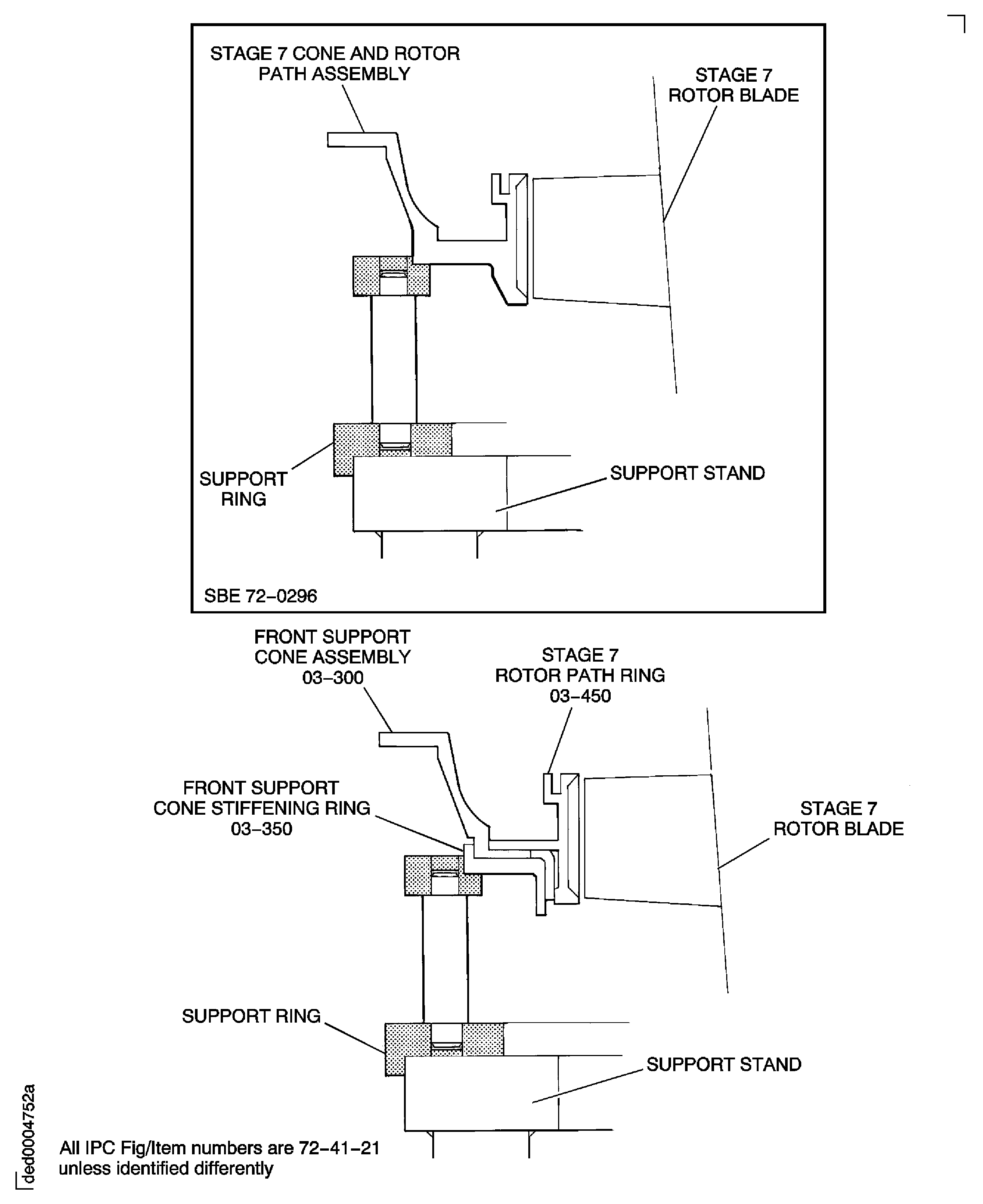
Figure: Install the stage 7 stator vanes
Install the stage 7 stator vanes
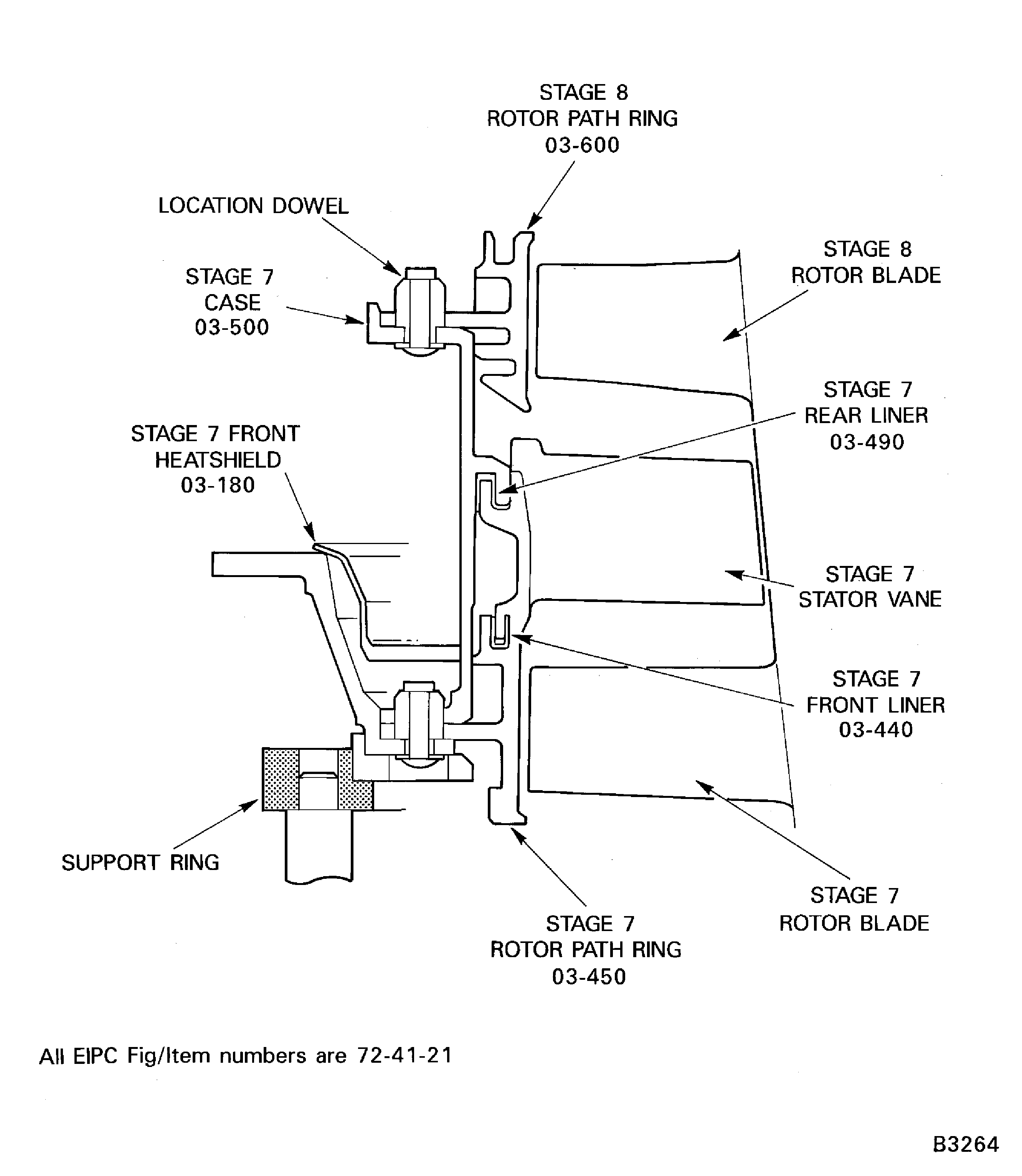
Figure: Install the stage 7 stator vanes
Install the stage 7 stator vanes
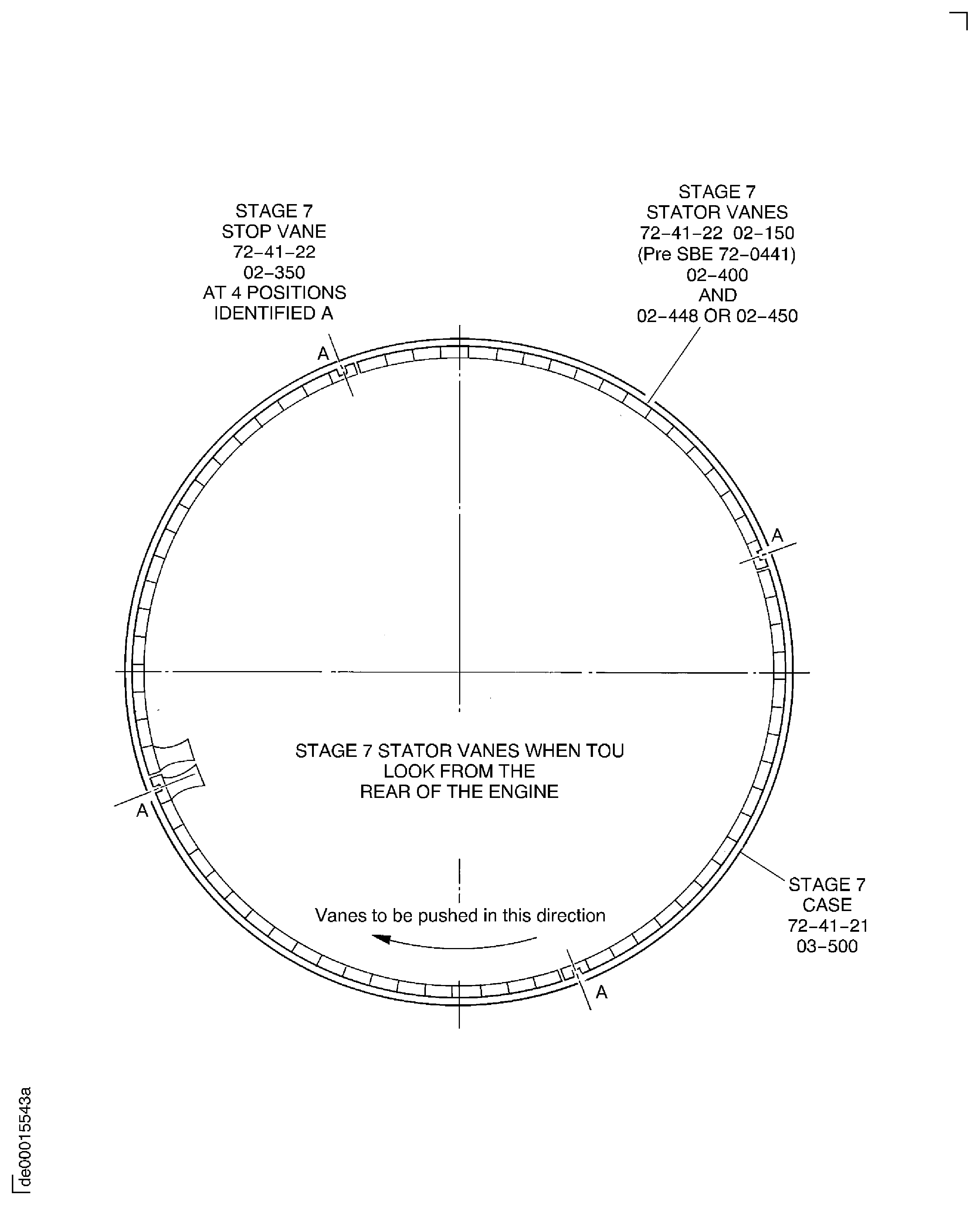
Figure: Install the stage 7 stator vanes
Install the stage 7 stator vanes
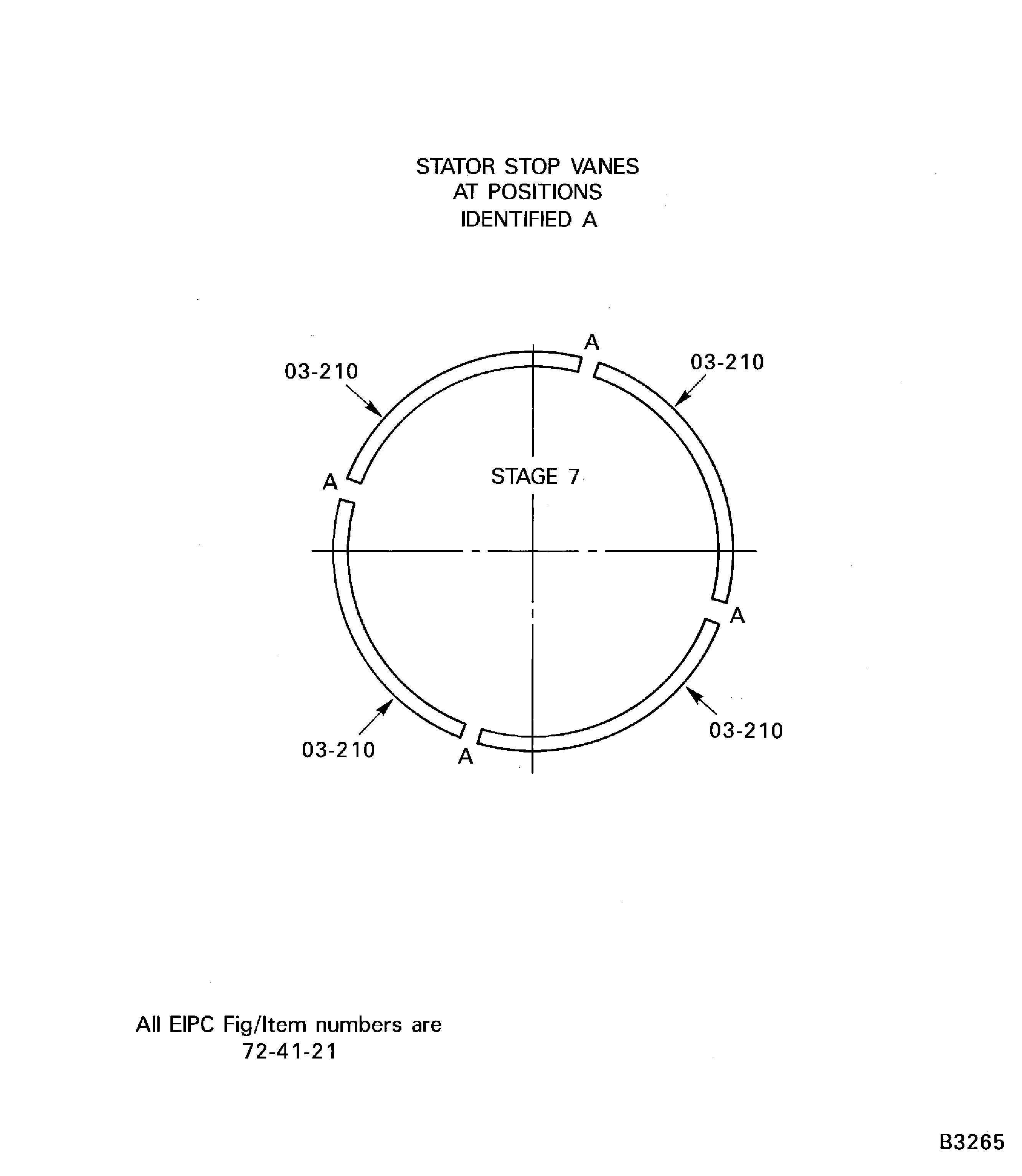
Figure: Pre SBE 72-0296 and SBE 72-0296: Install the Stage 7 Flange Parts
Pre SBE 72-0296 and SBE 72-0296: Install the Stage 7 Flange Parts
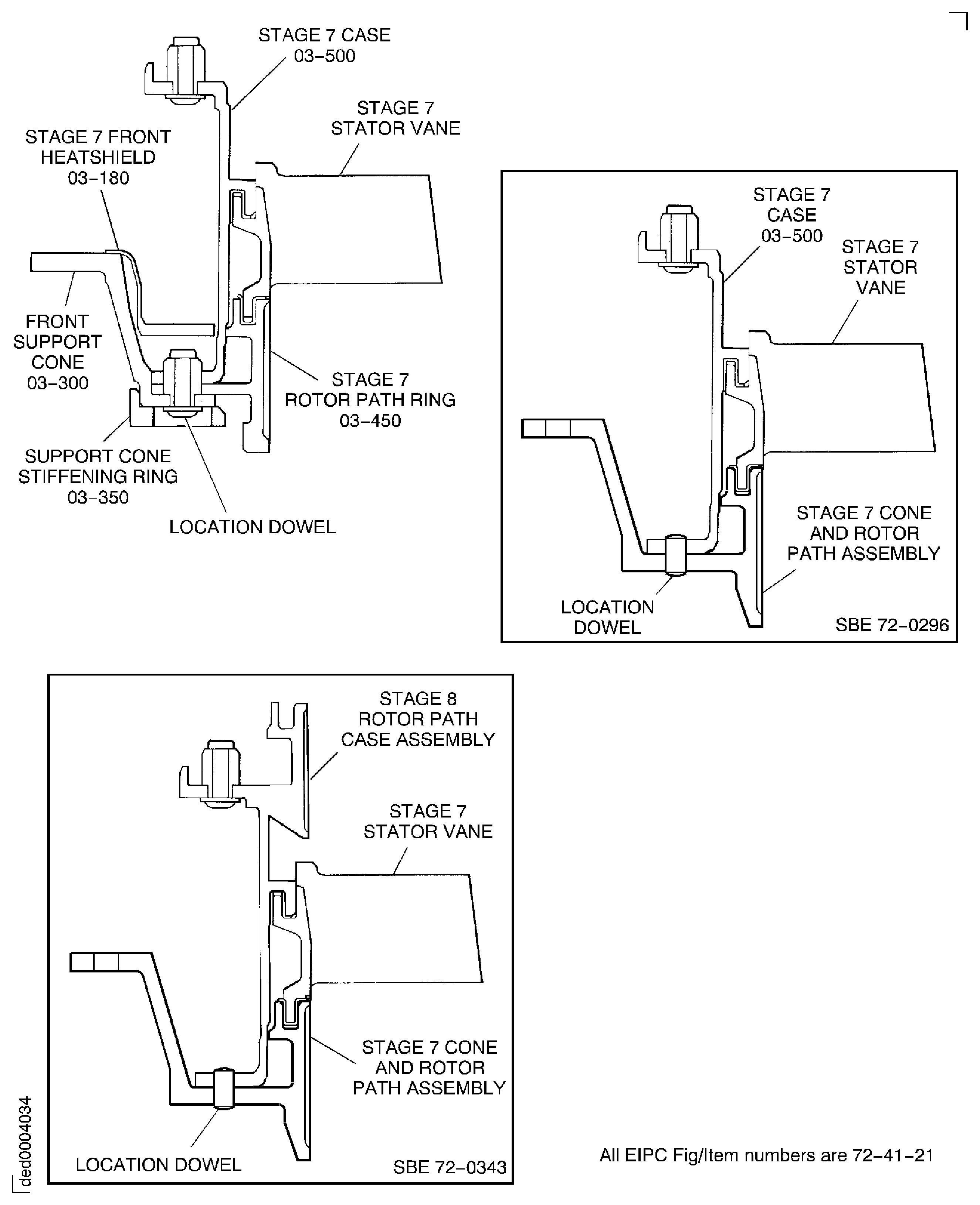
Figure: Install the Stage 7 Flange Parts
Install the Stage 7 Flange Parts

Figure: Pre SBE 72-0343, SBE 72-0343 and Pre SBE 72-0477: Install the Stage 8 Stator Vanes
Pre SBE 72-0343, SBE 72-0343 and Pre SBE 72-0477: Install the Stage 8 Stator Vanes
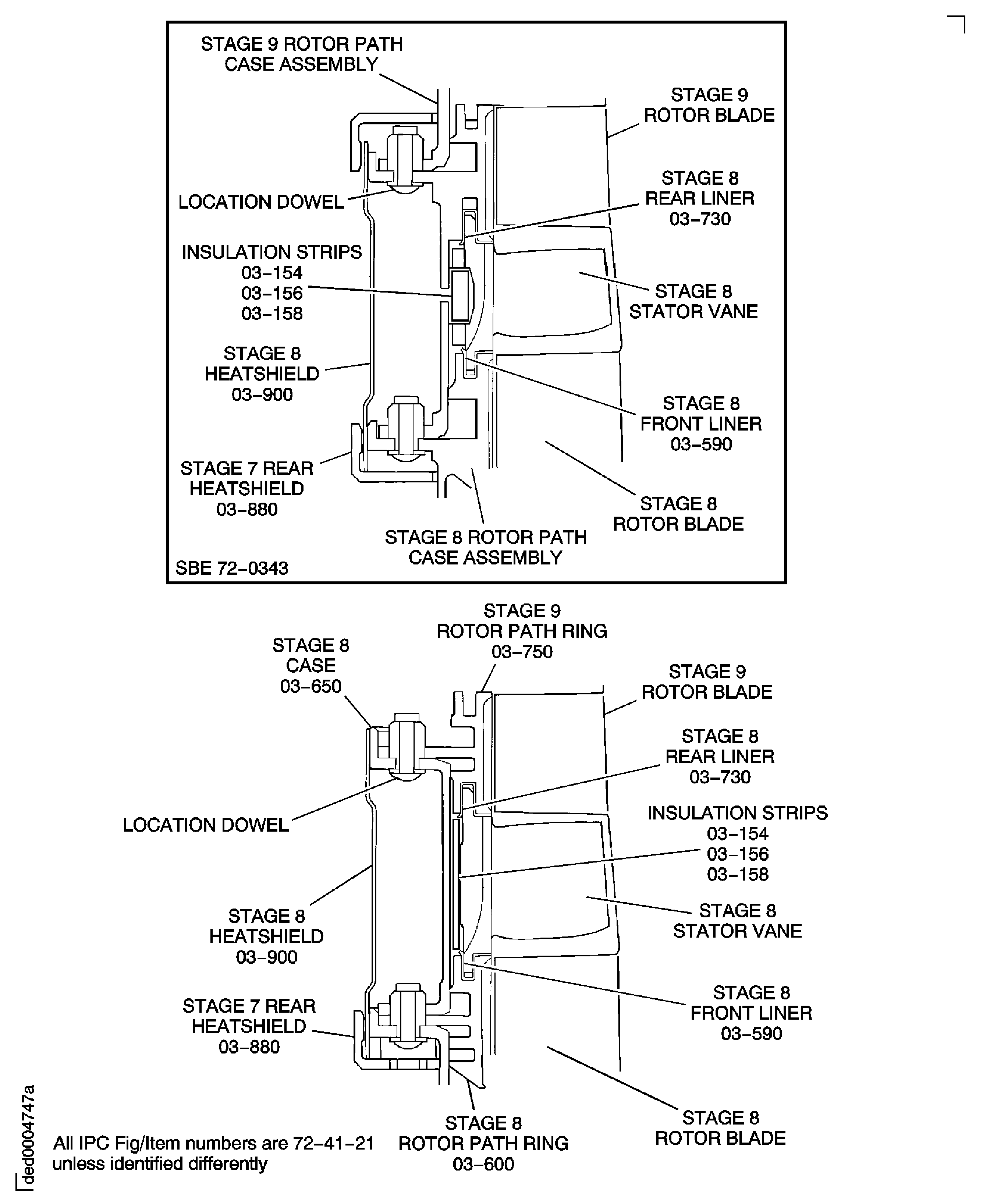
Figure: Pre SBE 72-0343, SBE 72-0343 and SBE 72-0477: Install the Stage 8 Stator Vanes
Pre SBE 72-0343, SBE 72-0343 and SBE 72-0477: Install the Stage 8 Stator Vanes

Figure: Install the Stage 8 Stator Vanes
Install the Stage 8 Stator Vanes
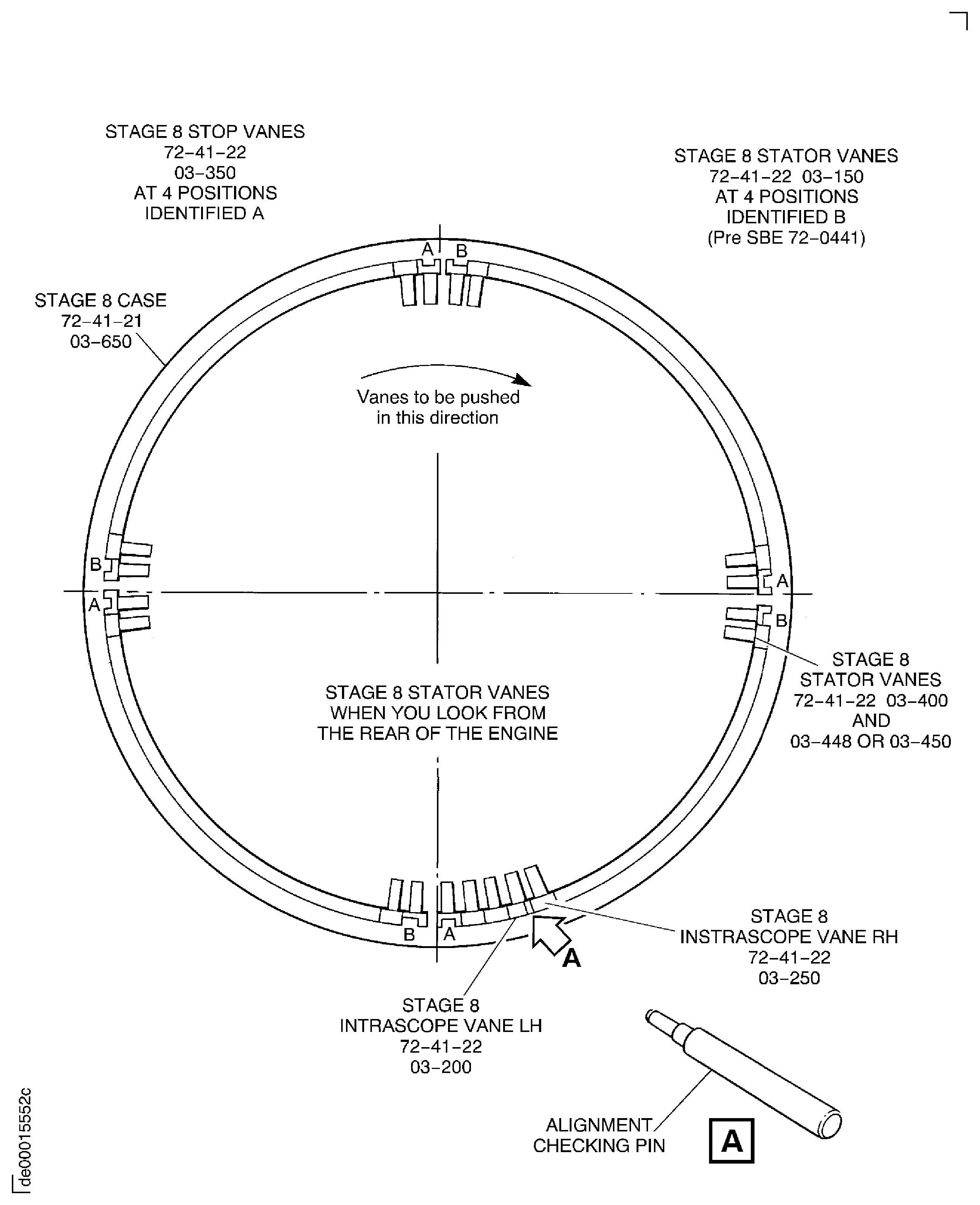
Figure: Install the insulation strips
Install the insulation strips

Figure: Pre SBE 72-0343 and SBE 72-0343: Install the Stage 8 Flange Parts
Pre SBE 72-0343 and SBE 72-0343: Install the Stage 8 Flange Parts
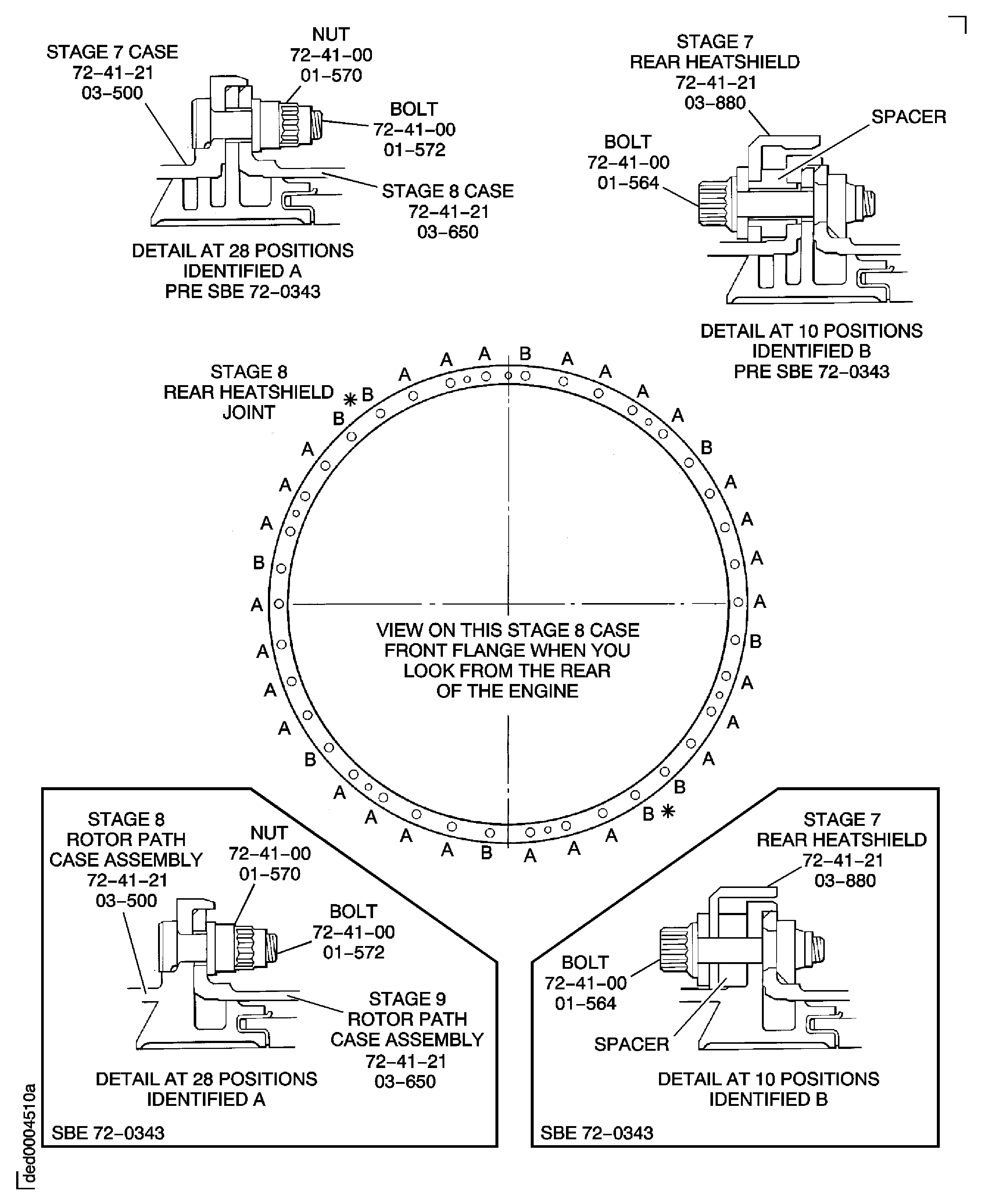
Figure: Pre SBE 72-0343, SBE 72-0343 and Pre SBE 72-0477: Install the Stage 9 Stator Vanes
Pre SBE 72-0343, SBE 72-0343 and Pre SBE 72-0477: Install the Stage 9 Stator Vanes
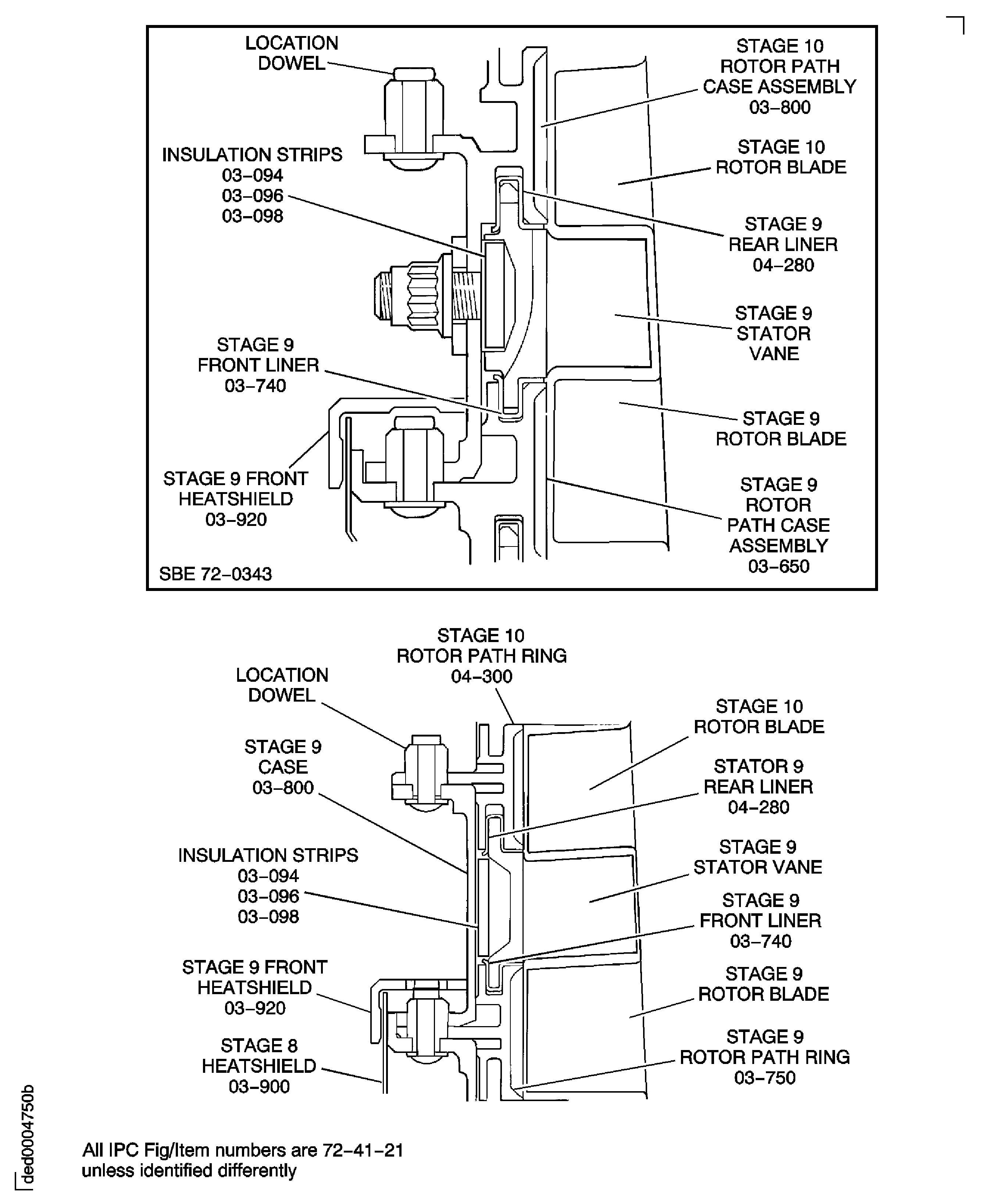
Figure: Pre SBE 72-0343, SBE 72-0343 and SBE 72-0477: Install the Stage 9 Stator Vanes
Pre SBE 72-0343, SBE 72-0343 and SBE 72-0477: Install the Stage 9 Stator Vanes

Figure: Install the Stage 9 Stator Vanes
Install the Stage 9 Stator Vanes

Figure: Pre SBE 72-0343, SBE 72-0343 and Pre SBE 72-0477: Install the Stage 9 Flange Parts
Pre SBE 72-0343, SBE 72-0343 and Pre SBE 72-0477: Install the Stage 9 Flange Parts
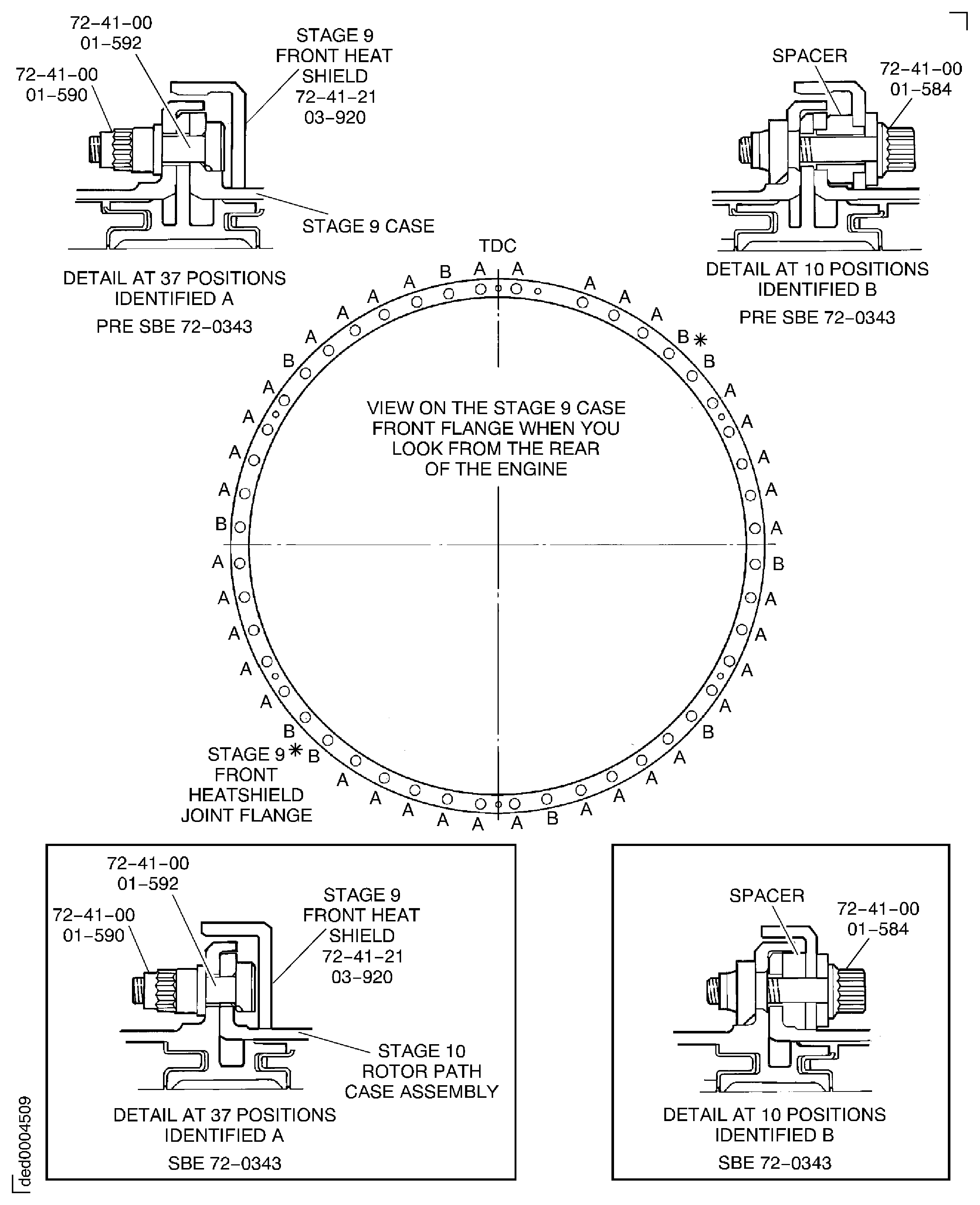
Figure: Pre SBE 72-0343, SBE 72-0343 and SBE 72-0477: Install the Stage 9 Flange Parts
Pre SBE 72-0343, SBE 72-0343 and SBE 72-0477: Install the Stage 9 Flange Parts

Figure: Pre SBE 72-0343, SBE 72-0343 and Pre SBE 72-0477: Install the Stage 10 Stator Vanes
Pre SBE 72-0343, SBE 72-0343 and Pre SBE 72-0477: Install the Stage 10 Stator Vanes
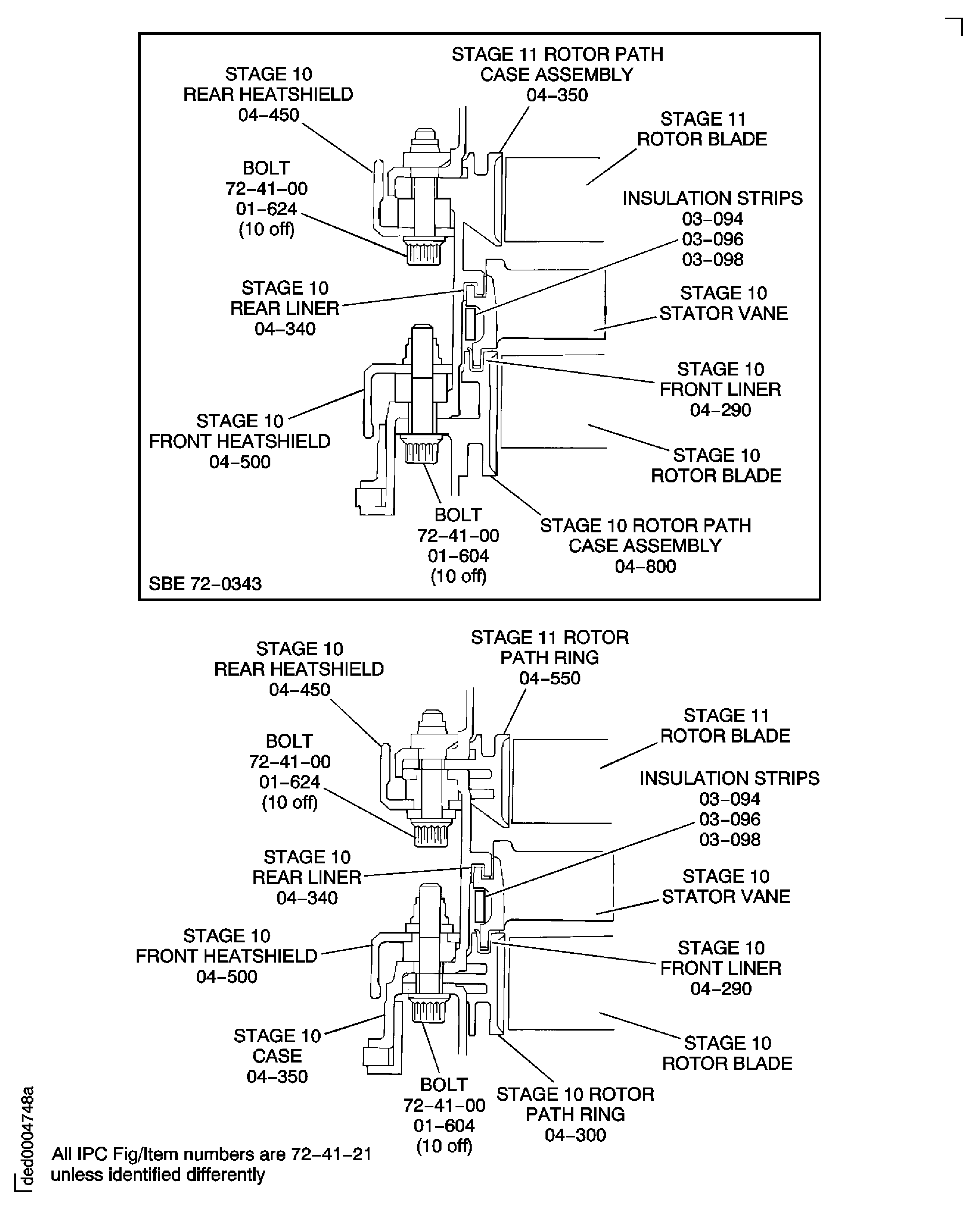
Figure: Pre SBE 72-0343, SBE 72-0343 and SBE 72-0477: Install the Stage 10 Stator Vanes
Pre SBE 72-0343, SBE 72-0343 and SBE 72-0477: Install the Stage 10 Stator Vanes
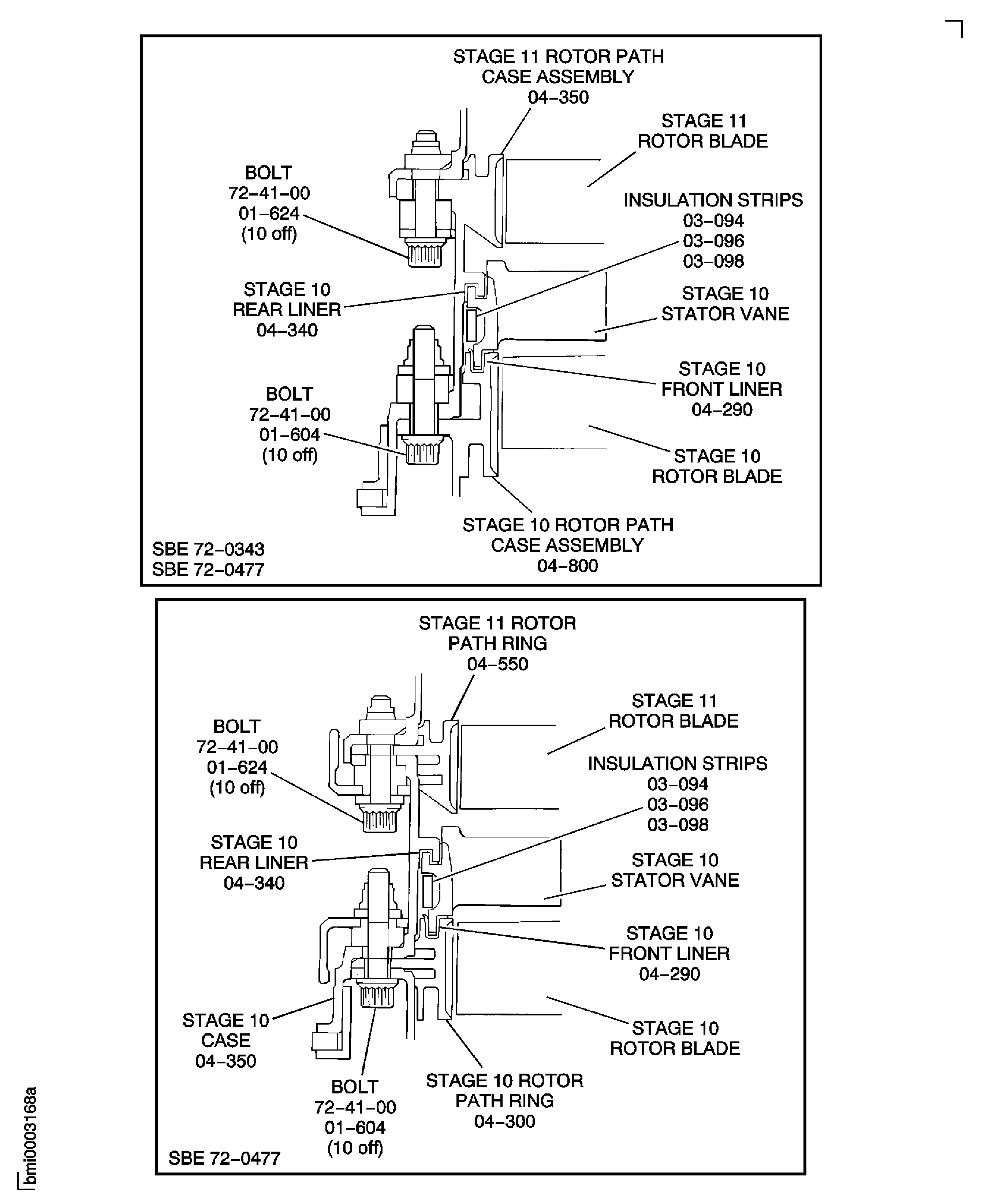
Figure: Install the Stage 10 Stator Vanes
Install the Stage 10 Stator Vanes
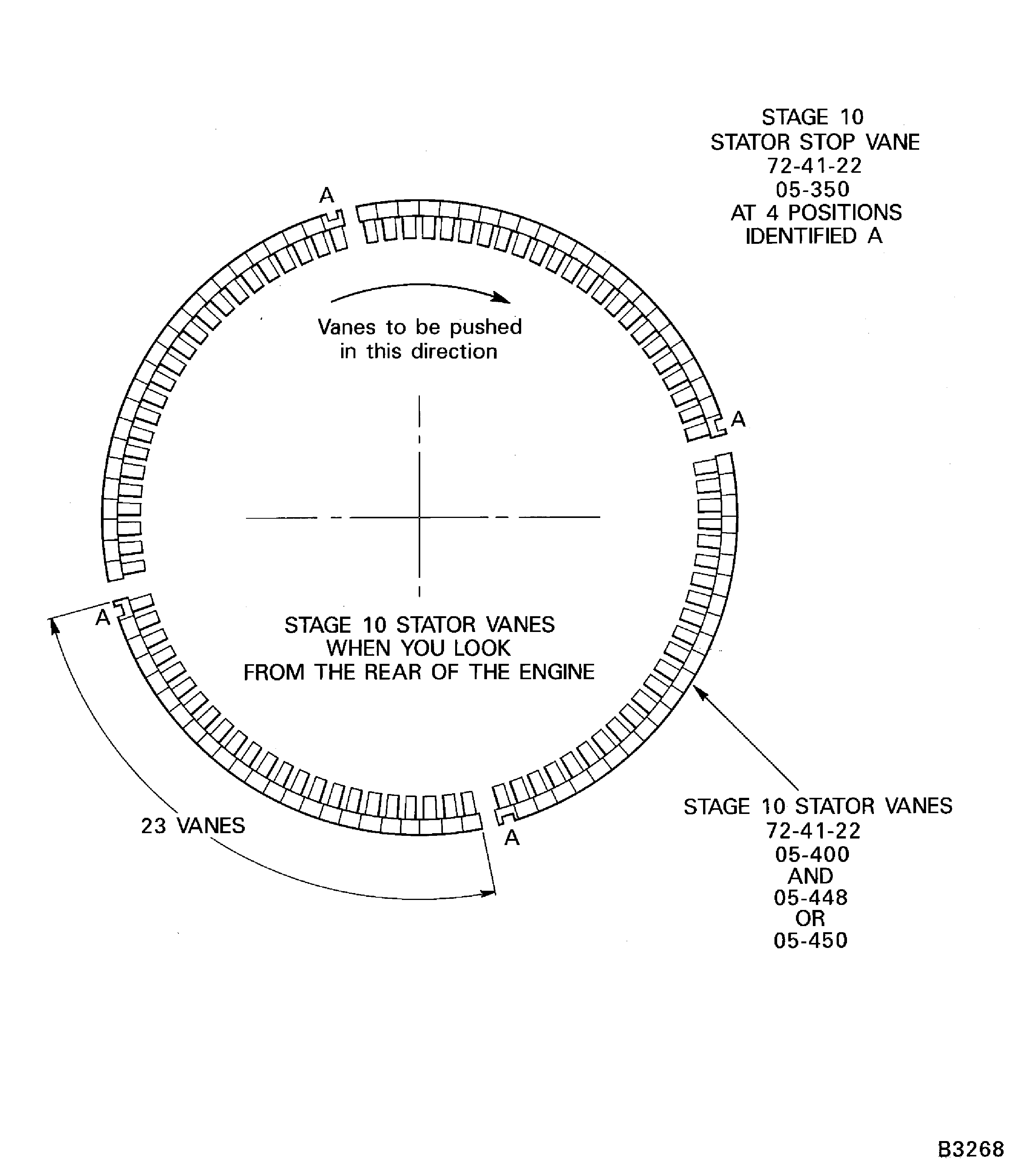
Figure: Pre SBE 72-0343, SBE 72-0343 and Pre SBE 72-0477: Install the Stage 10 Flange Parts
Pre SBE 72-0343, SBE 72-0343 and Pre SBE 72-0477: Install the Stage 10 Flange Parts
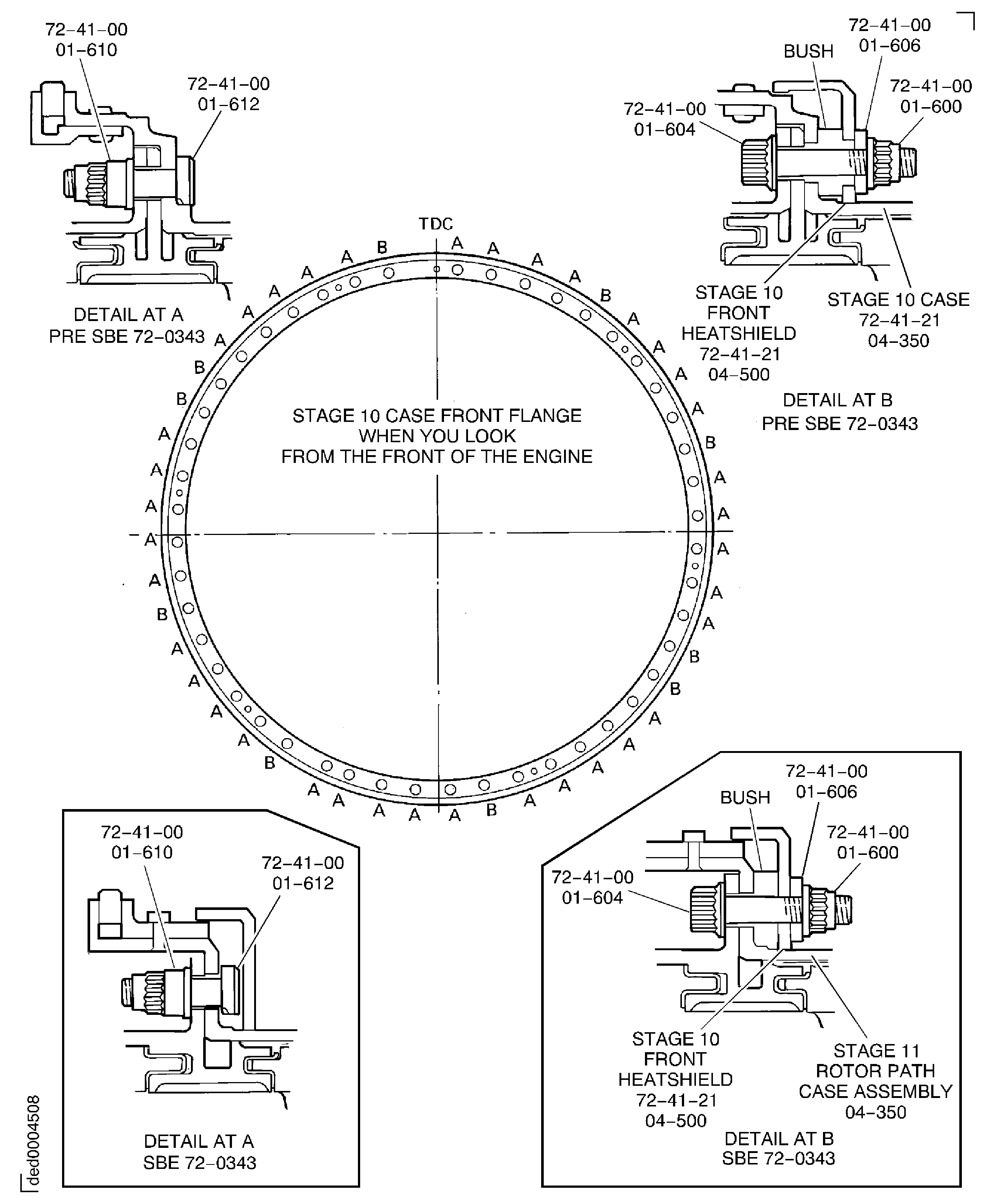
Figure: Pre SBE 72-0343, SBE 72-0343 and SBE 72-0477: Install the Stage 10 Flange Parts
Pre SBE 72-0343, SBE 72-0343 and SBE 72-0477: Install the Stage 10 Flange Parts

Figure: Pre SBE 72-0280, SBE 72-0280, Pre SBE 72-0343, SBE 72-0343 and Pre SBE 72-0477: Install the Stage 11 Stator Vanes
Pre SBE 72-0280, SBE 72-0280, Pre SBE 72-0343, SBE 72-0343 and Pre SBE 72-0477: Install the Stage 11 Stator Vanes
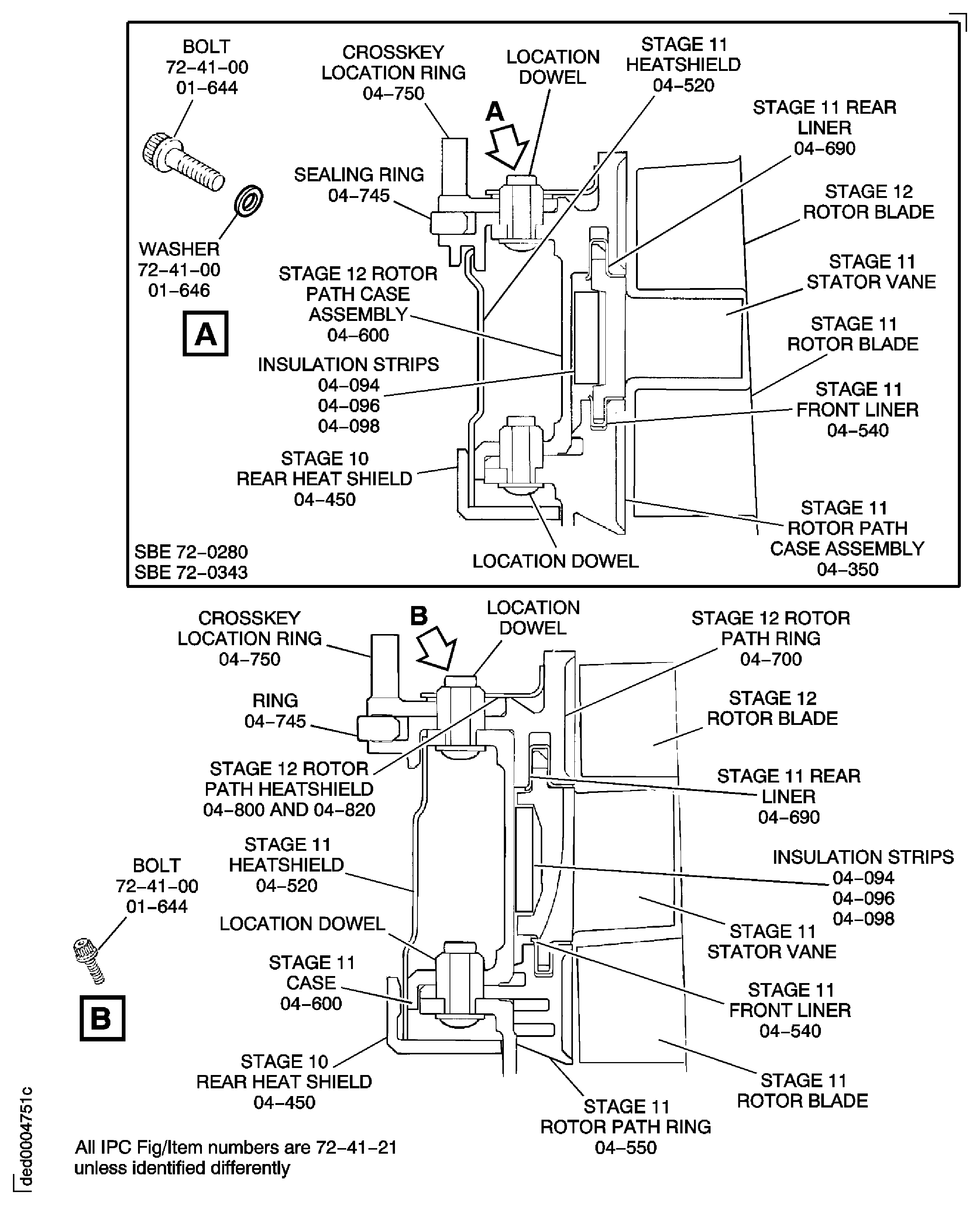
Figure: Pre SBE 72-0280, SBE 72-0280, Pre SBE 72-0343, SBE 72-0343 and SBE 72-0477: Install the Stage 11 Stator Vanes
Pre SBE 72-0280, SBE 72-0280, Pre SBE 72-0343, SBE 72-0343 and SBE 72-0477: Install the Stage 11 Stator Vanes
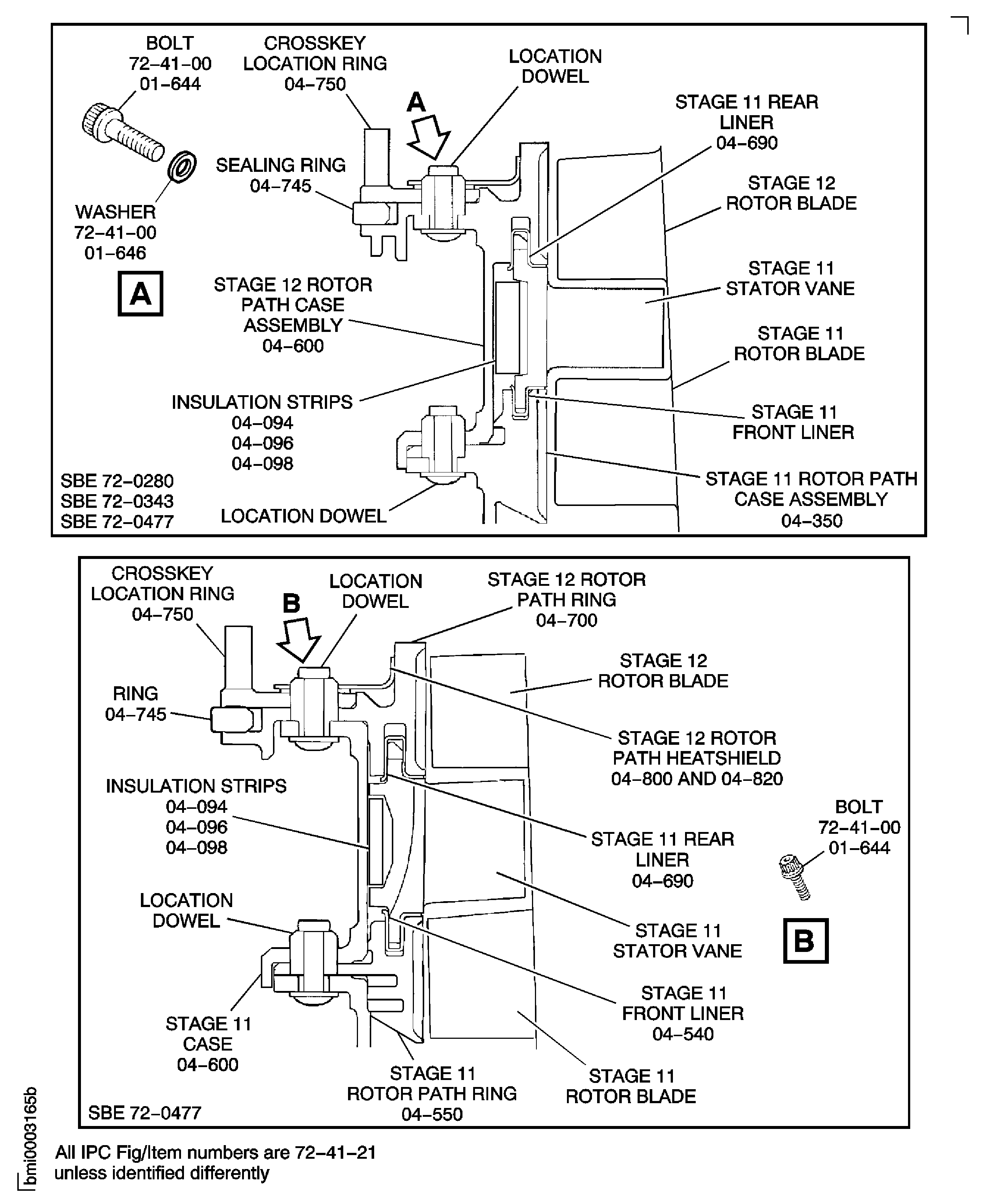
Figure: Install the Stage 11 Stator Vanes
Install the Stage 11 Stator Vanes
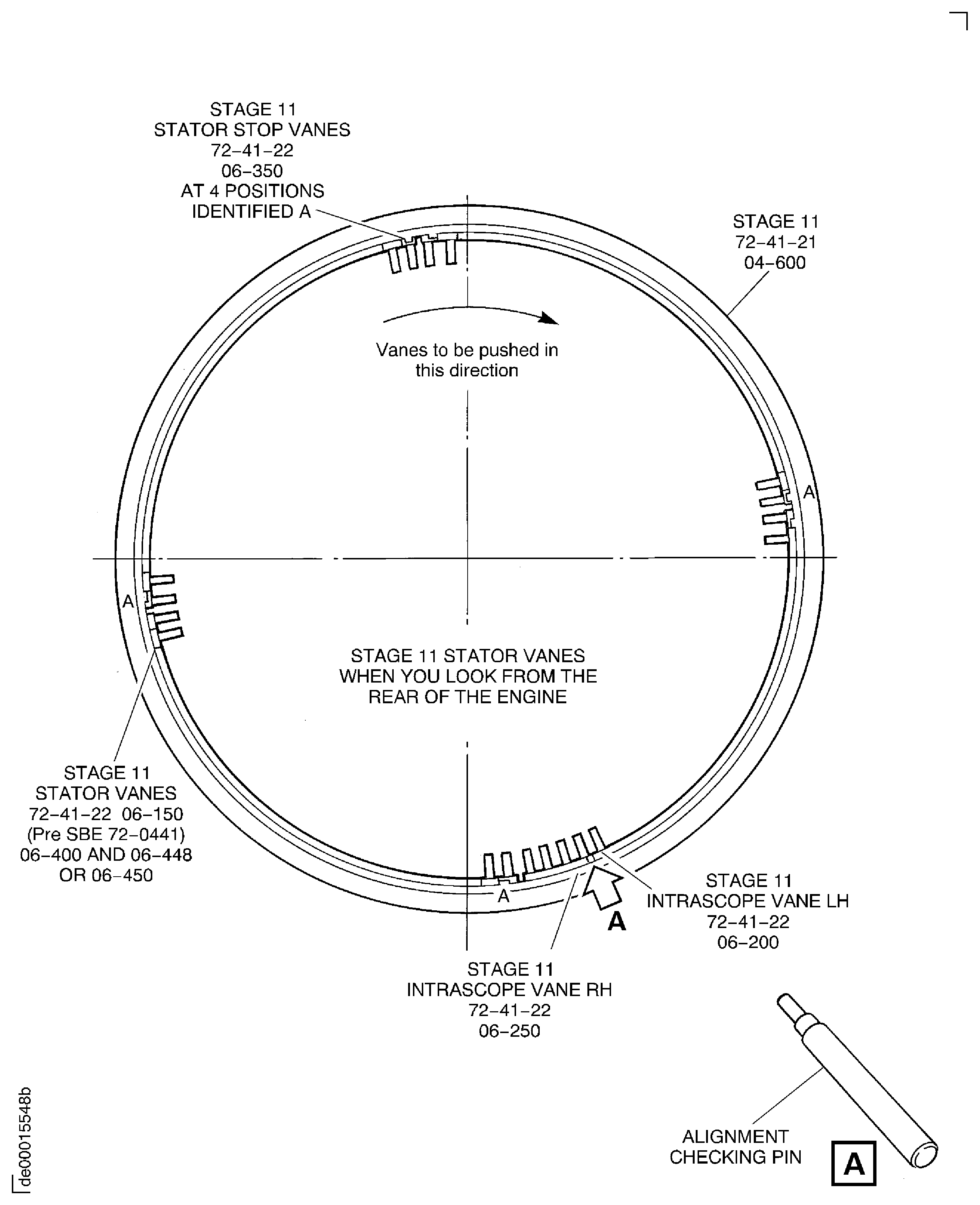
Figure: Pre SBE 72-0343, SBE 72-0343 and Pre SBE 72-0477: Install the Stage 11 Flange Parts
Pre SBE 72-0343, SBE 72-0343 and Pre SBE 72-0477: Install the Stage 11 Flange Parts
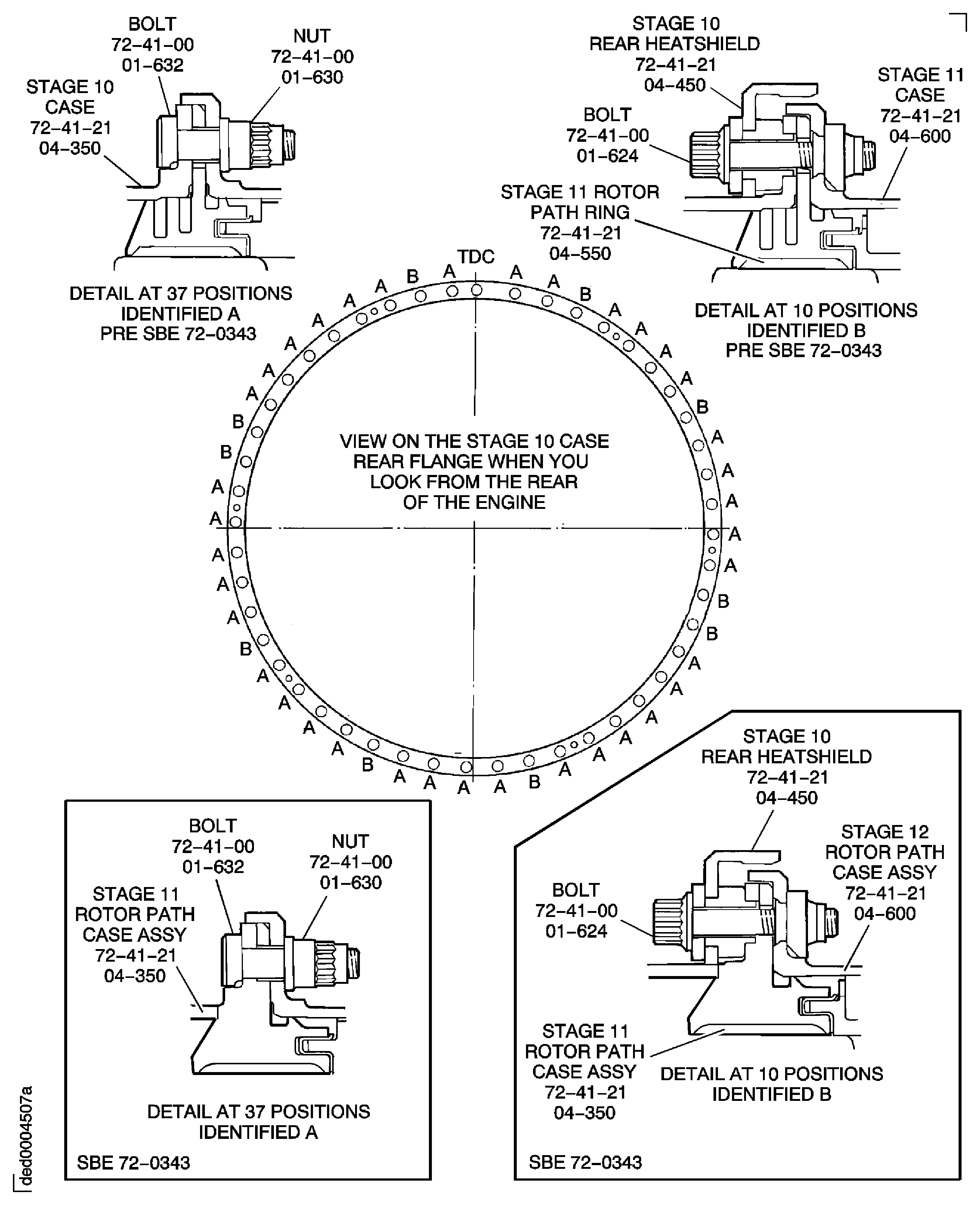
Figure: Pre SBE 72-0343, SBE 72-0343 and SBE 72-0477: Install the Stage 11 Flange Parts
Pre SBE 72-0343, SBE 72-0343 and SBE 72-0477: Install the Stage 11 Flange Parts

Figure: Pre SBE 72-0280: Install the Stage 12 Rotor Path Heatshields
Pre SBE 72-0280: Install the Stage 12 Rotor Path Heatshields
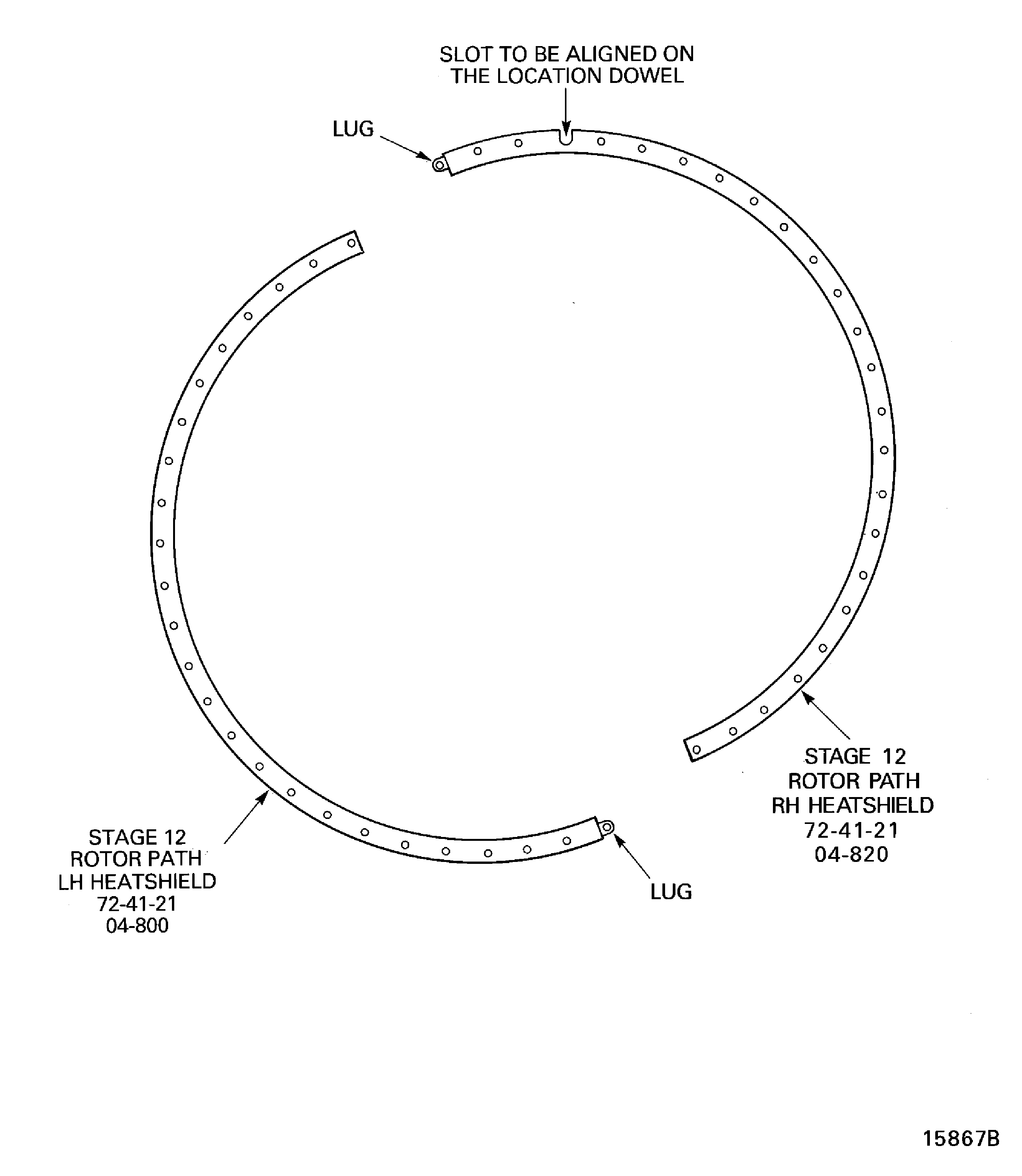
Figure: Install the Lift Fixture on the Compressor Rear Outer Case Assembly
Install the Lift Fixture on the Compressor Rear Outer Case Assembly

Figure: Install the Compressor Rear Outer Case Assembly
Install the Compressor Rear Outer Case Assembly

Figure: Install the Compressor Rear Outer Case Assembly
Install the Compressor Rear Outer Case Assembly

Figure: Install the Rear Seal Housing and the Cross Key Location Segments
Install the Rear Seal Housing and the Cross Key Location Segments

Figure: Install the Rear Seal Housing and the Cross Key Location Segments
Install the Rear Seal Housing and the Cross Key Location Segments
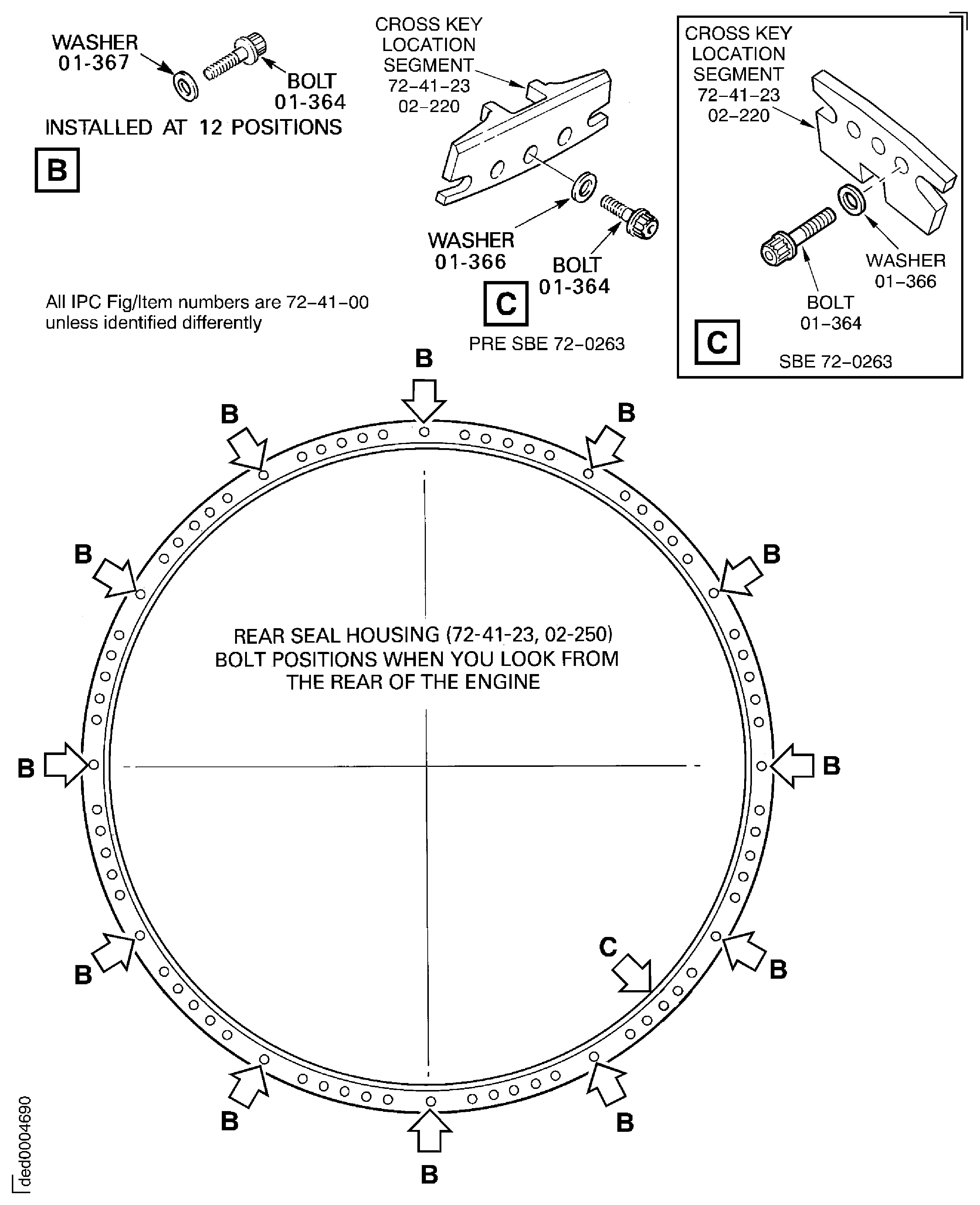
Figure: Install the Borescope Access Blank Plugs and the Cover
Install the Borescope Access Blank Plugs and the Cover
