Export Control
EAR Export Classification: Not subject to the EAR per 15 C.F.R. Chapter 1, Part 734.3(b)(3), except for the following Service Bulletins which are currently published as EAR Export Classification 9E991: SBE70-0992, SBE72-0483, SBE72-0580, SBE72-0588, SBE72-0640, SBE73-0209, SBE80-0024 and SBE80-0025.Copyright
© IAE International Aero Engines AG (2001, 2014 - 2021) The information contained in this document is the property of © IAE International Aero Engines AG and may not be copied or used for any purpose other than that for which it is supplied without the express written authority of © IAE International Aero Engines AG. (This does not preclude use by engine and aircraft operators for normal instructional, maintenance or overhaul purposes.).Applicability
All
Common Information
TASK 72-41-00-040-001-B00 HPC Assembly - Disassemble The HPC Cases And Vanes From The Rotor Assembly, Disassembly-001
General
Fig/item numbers in parentheses in the procedure agree with those used in the IPC. Only the primary Fig/item numbers are used. For the service bulletin alpha variants refer to the IPC.
Apply the approved CoMat 10-058 PENETRATING OIL before the removal of threaded parts and parts with an interference fit. Let the parts soak before removal.
Discard all rubber seal rings, cotter pins and keywashers removed in this procedure.
Remove and discard the CoMat 02-126 LOCKWIRE before any part is disconnected or removed.
Refer to Figure for a sectional view of the HP compressor assembly.
As each item is removed it must be identified with its position on the mini-module.
As each rotor path ring and case is removed it must be put in to IAE 1R18281 Storage rack 1 off.
NOTE
NOTE
Preliminary Requirements
Pre-Conditions
NONESupport Equipment
| Name | Manufacturer | Part Number / Identification | Quantity | Remark |
|---|---|---|---|---|
| IAE 1R18031 Checking fixture | 0AM53 | IAE 1R18031 | 1 | |
| IAE 1R18032 Transducer carrier | 0AM53 | IAE 1R18032 | 1 | |
| IAE 1R18033 Gage mounting plate | 0AM53 | IAE 1R18033 | 1 | |
| IAE 1R18040 Setting button | 0AM53 | IAE 1R18040 | 1 | |
| IAE 1R18042 Transducer carrier | 0AM53 | IAE 1R18042 | 1 | |
| IAE 1R18090 Safety support stand | 0AM53 | IAE 1R18090 | 1 | |
| IAE 1R18214 Build stand | 0AM53 | IAE 1R18214 | 1 | |
| IAE 1R18217 Lift fixture | 0AM53 | IAE 1R18217 | 1 | |
| IAE 1R18220 Holding fixture | 0AM53 | IAE 1R18220 | 1 | |
| IAE 1R18221 Puller extractor | 0AM53 | IAE 1R18221 | 1 | |
| IAE 1R18242 Extractor | 0AM53 | IAE 1R18242 | 3 | |
| IAE 1R18243 Extractor | 0AM53 | IAE 1R18243 | 3 | |
| IAE 1R18250 Split ring assembly | 0AM53 | IAE 1R18250 | 1 | |
| IAE 1R18281 Storage rack | 0AM53 | IAE 1R18281 | 1 | |
| IAE 1R18401 Support stand | 0AM53 | IAE 1R18401 | 1 | |
| IAE 1R18434 Case extractor | 0AM53 | IAE 1R18434 | 3 | |
| IAE 1R18441 Lifting adapter | 0AM53 | IAE 1R18441 | 1 | |
| IAE 1R18514 Measuring sleeve | 0AM53 | IAE 1R18514 | 1 | |
| IAE 1R18515 Measuring sleeve | 0AM53 | IAE 1R18515 | 1 | |
| IAE 1R18516 Measuring sleeve | 0AM53 | IAE 1R18516 | 1 | |
| IAE 1R18517 Measuring sleeve | 0AM53 | IAE 1R18517 | 1 | |
| IAE 1R18531 Measuring sleeve | 0AM53 | IAE 1R18531 | 1 | |
| IAE 1R18533 Setting base | 0AM53 | IAE 1R18533 | 1 | |
| IAE 1R18534 Location ring | 0AM53 | IAE 1R18534 | 1 | |
| IAE 1R18538 Transducer carrier | 0AM53 | IAE 1R18538 | 1 | |
| IAE 1R18539 Transducer carrier | 0AM53 | IAE 1R18539 | 1 | |
| IAE 1R18635 Spanner wrench | 0AM53 | IAE 1R18635 | 1 | |
| IAE 1R18684 Case extractor | 0AM53 | IAE 1R18684 | 1 | |
| IAE 1R18693 Support ring | 0AM53 | IAE 1R18693 | 1 | |
| IAE 1R18701 Indexing plate | 0AM53 | IAE 1R18701 | 1 | |
| IAE 1R18722 Setting button | 0AM53 | IAE 1R18722 | 1 | |
| IAE 1R18777 Distance sleeve | 0AM53 | IAE 1R18777 | 1 | |
| IAE 1R18778 Distance sleeve | 0AM53 | IAE 1R18778 | 1 | |
| IAE 1R18779 Distance sleeve | 0AM53 | IAE 1R18779 | 1 | |
| IAE 1R18780 Distance sleeve | 0AM53 | IAE 1R18780 | 1 | |
| IAE 1R18781 Distance sleeve | 0AM53 | IAE 1R18781 | 1 | |
| IAE 1R18782 Measuring sleeve | 0AM53 | IAE 1R18782 | 1 | |
| IAE 1R18783 Measuring sleeve | 0AM53 | IAE 1R18783 | 1 | |
| IAE 1R18784 Measuring sleeve | 0AM53 | IAE 1R18784 | 1 | |
| IAE 1R18785 Measuring sleeve | 0AM53 | IAE 1R18785 | 1 | |
| IAE 1R18786 Distance sleeve | 0AM53 | IAE 1R18786 | 1 | |
| IAE 1R18787 Measuring sleeve | 0AM53 | IAE 1R18787 | 1 | |
| IAE 1R18788 Measuring sleeve | 0AM53 | IAE 1R18788 | 1 | |
| IAE 1R18789 Measuring sleeve | 0AM53 | IAE 1R18789 | 1 | |
| IAE 1R18790 Measuring sleeve | 0AM53 | IAE 1R18790 | 1 | |
| IAE 1R18791 Measuring sleeve | 0AM53 | IAE 1R18791 | 1 | |
| IAE 1R18792 Measuring sleeve | 0AM53 | IAE 1R18792 | 1 | |
| IAE 1R18827 Extractor | 0AM53 | IAE 1R18827 | 3 | |
| IAE 1R18831 Support ring | 0AM53 | IAE 1R18831 | 1 | |
| IAE 1R19406 Extractor | 0AM53 | IAE 1R19406 | 6 | |
| IAE 1R19407 Extractor | 0AM53 | IAE 1R19407 | 3 | |
| IAE 1R19633 Split ring assembly | 0AM53 | IAE 1R19633 | 1 | |
| IAE 1R19633 Split ring assembly | 0AM53 | IAE 1R19633 | ||
| Three legged sling | LOCAL | Three legged sling |
Consumables, Materials and Expendables
| Name | Manufacturer | Part Number / Identification | Quantity | Remark |
|---|---|---|---|---|
| CoMat 02-126 LOCKWIRE | K6835 | CoMat 02-126 | ||
| CoMat 10-058 PENETRATING OIL | X222X | CoMat 10-058 |
Spares
NONESafety Requirements
NONEProcedure
Remove nut, washer, and bolt which attach the control rod to the crankshaft.
Remove nut, washer, and bolt which attach the control rod to the actuator arm.
Remove the control rod.
Remove the actuating control rod.
SUBTASK 72-41-00-040-107-A00 Remove the Crankshaft Assembly from the HP Compressor Front Case (Pre SBE 72-0366)
SBE 72-0366: Actuating mechanism HPC variable vanes - introduction of a revised crankshaft assembly
Remove nut, washer, and bolt which attach the control rod to the crankshaft.
Remove nut, washer, and bolt which attach the control rod to the actuator arm.
Remove the control rod.
Remove the actuating control rod.
SUBTASK 72-41-00-040-107-B00 Remove the Crankshaft Assembly from the HP Compressor Front Case (SBE 72-0366)
Remove nut, washer, and bolt which attach the control rod to the crankshaft.
Remove nut, washer, and bolt which attach the control rod to the actuator arm.
Remove the control rod.
Remove the actuating control rod.
SUBTASK 72-41-00-040-107-C00 Remove the Crankshaft Assembly from the HP Compressor Front Case (SBE 72-0406 and SBE 72-0426)
SBE 72-0406: Actuating mechanism HPC variable vanes - introduction of a fully machined from bar crankshaft assembly.
SBE 72-0426: Actuating mechanism HPC variable vanes - introduction of a revised crankshaft assembly with reduced front bearing in interference.
Remove the nut, spacer and bolt which attach the control rod to the VIGV lower actuating ring.
Remove the cotter pin, nut, three spacers and bolt which attach the control rod to the crankshaft.
Remove the control rod.
Remove the VIGV control rod.
Remove the nut, two spacers and bolt which attach the control rod to the drive brackets on the lower stage 3 actuating ring.
Remove the cotter pin, nut, bolt and three spacers which attach the control rod to the crankshaft.
Remove the control rod.
Remove the stage 3 control rod.
Remove the nut, two spacers and bolt which attach the control rod to the drive brackets on the lower stage 4 actuating ring.
Remove the cotter pin, nut, bolt, washer and two spacers which attach the control rod to the crankshaft.
Remove the control rod.
Remove the stage 4 control rod.
Remove the nut, two spacers and bolt which attach the control rod to the drive brackets on the lower stage 5 actuating ring.
Remove the bolt, washer, two spacers and retaining pin which attach the control rod to the crankshaft.
Remove the control rod.
Remove the stage 5 control rod.
Remove nut, washer and bolt which attach the control rod to the crankshaft.
Remove nut, washer and bolt which attach the control rod to the actuator arm.
Remove the control rod.
Remove the Actuating control rod.
Remove the two bolts and two nuts which attach the bearing housing support to the front bearing housing.
Remove the two bolts, two washers and two nuts which attach the bearing housing support to the rear bearing housing.
Remove the bearing housing support.
Remove the bearing housing support.
Remove the two bolts and bracket which attach to the front bearing housing and HP compressor front case.
Remove the two bolts which attach the rear bearing housing and HP compressor front case.
Remove the crankshaft from HP compressor front.
Remove the rear bearing housing from the crankshaft.
Remove the crankshaft.
Disassemble the control rods.
NOTE
One of the two locknuts has a left hand thread.
SUBTASK 72-41-00-040-107-D00 Remove the Crankshaft Assembly from the HP Compressor Front Case (SBE 72-0564)
SBE 72-0564: V2500 Selectone Production - Introduction Of Redesigned Variable Stator Vane (VSV) System.
SBE 72-0385 or SBE 72-0416: Introduction of revised actuation ring connectors and unison ring assemblies.
Pre SBE 72-0385 or SBE 72-0416: Remove the four bolts and the four hollow dowels which attach the right hand connector to the upper and lower actuating rings.
SBE 72-0385 or SBE 72-0416: Remove the four bolts and washers which attach the right hand connector to the upper and lower actuating rings.
Remove the four actuating levers from the four inlet guide vanes.
Remove the VIGV actuating ring left hand and right hand connectors.
SUBTASK 72-41-00-040-108 Remove the VIGV Actuation Ring Connectors (Pre SBE 72-0385 or SBE 72-0416 and SBE 72-0385 or SBE 72-0416)
Install IAE 1R18217 Lift fixture 1 off or IAE 1R18221 Puller extractor 1 off on the HP compressor assembly.
Install IAE IAE 1R18441 Lifting adapter 1 off on the compressor shaft.
SUBTASK 72-41-00-040-109 Install the Lift Fixture and the Lifting Adaptor on to the HP Compressor Assembly
Refer to Figure.
Remove the six bolts which attach the HP compressor assembly to the support ring on the IAE IAE 1R18214 Build stand 1 off.
Install the HP compressor assembly on IAE 1R18090 Safety support stand 1 off. Only lower the HP compressor assembly sufficiently until it is on the safety support stand.
SUBTASK 72-41-00-040-110 Install the HP Compressor Assembly on the Safety Support Stand
SBE 72-0410: HP compressor variable inner shrouds - Introduction of revised one piece bushes.
Pre SBE 72-0410: Install IAE 1R18250 Split ring assembly 1 off.
SBE 72-0410: Install IAE 1R19633 Split ring assembly 1 off.
Remove the VIGV front shroud.
SUBTASK 72-41-00-040-111 Remove the VIGV Front Shroud (Pre SBE 72-0410 and SBE 72-0410)
Use the hoist installed in Step and lift the HP compressor assembly from the safety support stand.
Install the HP compressor assembly on IAE 1R18214 Build stand 1 off.
SUBTASK 72-41-00-040-112 Install the HP Compressor Assembly in the Build Stand
SBE 72-0385 or SBE 72-0416: Introduction of revised actuation ring connectors and unison ring assemblies.
Refer to Figure.
Pre SBE 72-0385 or SBE 72-0416: Remove the five bolts and the five hollow dowels which attach the right hand connector to the upper and lower actuating rings.
SBE 72-0385 or SBE 72-0416: Remove the five bolts and washers which attach the right hand connector to the upper and lower actuating rings.
Pre SBE 72-0385 or SBE 72-0416: Remove the four bolts and the four hollow dowels which attach the left hand connector to the upper and lower actuating rings.
SBE 72-0385 or SBE 72-0416: Remove the four bolts and washers which attach the left hand connector to the upper and lower actuating rings.
Remove the right hand connector.
Remove the stage 3 actuating ring left hand and right hand connector.
SUBTASK 72-41-00-040-114 Remove the Stage 3 Actuating Ring Connectors (Pre SBE 72-0385 or SBE 72-0416: and SBE 72-0385 or SBE 72-0416:)
SBE 72-0348: Introduction of revised actuation ring connectors.
SBE 72-0385or SBE 72-0416: Introduction of revised actuation ring connectors and unison ring assemblies.
Refer to Figure.
Pre SBE 72-0348: Remove the four bolts and the four hollow dowels which attach the right hand connector to the upper and lower actuating rings.
Pre SBE 72-0385 or SBE 72-0416: Remove the four bolts and the four washers which attach the right hand connector to the upper and lower actuating rings.
SBE 72-0348: Remove the four bolts and four washers which attach the right hand connector to the upper and lower actuating rings.
SBE 72-0385 or SBE 72-0416: Remove the four bolts and two washers which attach the right hand connector to the upper and lower actuating rings.
Remove the stage 4 actuating ring left hand and right hand connector.
SUBTASK 72-41-00-040-115 Remove the Stage 4 Actuating Ring Connector (Pre SBE 72-0348, Pre SBE 72-0385 or SBE 72-0416:, SBE 72-0348 and SBE 72-0385 or SBE 72-0416:)
SBE 72-0348: Introduction of revised actuation ring connectors.
SBE 72-0385or SBE 72-0416: Introduction of revised actuation ring connectors and unison ring assemblies.
Refer to Figure.
Pre SBE 72-0348: Remove the four bolts and the four hollow dowels which attach the right hand connector to the upper and lower actuating rings.
Pre SBE 72-0385 or SBE 72-0416: Remove the four bolts and the four washers which attach the right hand connector to the upper and lower actuating rings.
SBE 72-0348: Remove the four bolts and four washers which attach the right hand connector to the upper and lower actuating rings.
SBE 72-0385 or SBE 72-0416: Remove the four bolts and two washers which attach the right hand connector to the upper and lower actuating rings.
Remove the stage 5 actuating ring left hand and right hand connectors.
SUBTASK 72-41-00-040-116 Remove the Stage 5 Actuating Ring Connectors (Pre SBE 72-0348, Pre SBE 72-0385or SBE 72-0416:, SBE 72-0348 and SBE 72-0385or SBE 72-0416:)
Refer to Figure.
Put IAE 1R18220 Holding fixture 1 off on the compressor rear outer case and the HP compressor shaft.
SUBTASK 72-41-00-040-117 Install the Holding Fixture on the Compressor Rear Outer Case
SUBTASK 72-41-00-040-118-A00 Remove the HP Compressor Front Case Split Line and Rear Flange Nuts, Bolts and Brackets (Pre SBE 74-0001)
SBE 74-0001: Ignition - Introduce new ignition exciter mounting brackets.
SUBTASK 72-41-00-040-118-B00 Remove the HP Compressor Front Case Split Line and Rear Flange Nuts, Bolts and Brackets (SBE 74-0001)
Install IAE 1R18401 Support stand 1 off and IAE 1R18693 Support ring or IAE 1R18831 Support ring, 1 off on the build stand.
SUBTASK 72-41-00-040-119 Remove the HP Compressor Front Case
Refer to Figure.
SUBTASK 72-41-00-040-120-A00 Remove the Cross Key Location Segments and the Rear Seal Housing (Pre SBE 72-0263)
SBE 72-0263: Engine - HP Compressor rear outer case - Introduction of revised case with integral rear seal land.
Refer to Figure.
SUBTASK 72-41-00-040-120-B00 Remove the Cross Key Location Segments (SBE 72-0263)
Refer to Figure.
SUBTASK 72-41-00-040-121 Remove the Stages 7, 8, 9 and 11 Borescope Access Blanking Plugs and Cover
Refer to Figure.
Install IAE 1R18217 Lift fixture 1 off on the compressor rear outer case.
SUBTASK 72-41-00-040-122 Remove the Compressor Rear Outer Case
Pre SBE 72-0343: Remove the 47 bolts which attach the stage 12 left hand and right hand rotor path heatshields to the cross key location ring.
SBE 72-0343: Remove the 47 bolts and washers which attach the stage 12 left hand and right hand rotor path heatshields to the cross key location ring.
SUBTASK 72-41-00-040-123 Remove the Stage 12 Rotor Path Heatshields and the Cross Key Location (Pre SBE 72-0343 and SBE 72-0343)
SBE 72-0343: Engine - HP Compressor ring cases - Introduction of integral HP Compressor cases and rotor paths.
Remove the 10 nuts, bolts and washers which attach the stage 10 front heatshield to the stage 10 case. Remove the two halves of the stage 10 front heatshield. Use IAE 1R18635 Spanner wrench 1 off to hold the bolts.
Use IAE 1R18827 Extractor 3 off or IAE 1R19407 Extractor 3 off. Install the three extractors at equal distances around the stage 11 case.
Remove the stage 12 rotor path ring. Refer to detail A on Figure.
Use IAE 1R18827 Extractor 3 off or IAE 1R19407 Extractor 3 off. Install the three extractors at equal distances around the stage 11 case.
Remove the stage 11 case. Refer to detail B on Figure.
SUBTASK 72-41-00-040-124-A00 Remove the Stage 12 Rotor Path Ring, the Stage 11 Case, Stator Vanes and Rotor Path Ring (Pre SBE 72-0343 and Pre SBE 72-0477)
SBE 72-0343: Engine - HP compressor ring cases - Introduction of integral HP compressor cases and rotor paths.
Remove the 10 nuts, bolts and washers which attach the stage 10 front heatshield to the stage 11 rotor path case assembly. Remove the two halves of the stage 10 front heatshield. Use IAE 1R18635 Spanner wrench 1 off to hold the bolts.
Use IAE 1R18827 Extractor 3 off. Install the three extractors at equal distances around the stage 11 case.
Remove stage 12 rotor path case assembly. Refer to detail B on Figure.
SUBTASK 72-41-00-040-124-B00 Remove the Stage 12 Rotor Path Case Assembly, the Stage 11 Stator Vanes (SBE 72-0343 and Pre SBE 72-0477)
SBE 72-0477: Engine - HP compressor ring cases - Deletion of stage 8 to 11 heatshields.
Use IAE 1R18827 Extractor 3 off. Install the three extractors at equal distances around the stage 11 case.
Remove the stage 12 rotor path ring. Refer to detail A on Figure.
Use IAE 1R18827 Extractor 3 off or IAE 1R19407 Extractor 3 off. Install the three extractors at equal distances around the stage 11 case.
Remove the stage 11 case. Refer to detail B on Figure.
SUBTASK 72-41-00-040-124-C00 Remove the Stage 12 Rotor Path Ring, the Stage 11 Case, Stator Vanes and Rotor Path Ring (Pre SBE 72-0343 and SBE 72-0477)
SBE 72-0343: Engine - HP compressor ring cases - Introduction of integral HP compressor cases and rotor paths.
SBE 72-0477: Engine - HP compressor ring cases - Deletion of stage 8 to 11 heatshields.
Use IAE 1R18827 Extractor 3 off. Install the three extractors at equal distances around the stage 11 case.
Remove the stage 12 rotor path case assembly. Refer to detail B on Figure.
SUBTASK 72-41-00-040-124-D00 Remove the Stage 12 Rotor Path Case Assembly, the Stage 11 Stator Vanes (SBE 72-0343 and SBE 72-0477)
Remove the 37 nuts and bolts which attach the stage 10 case and rotor path ring to the stage 9 case. Use IAE 1R18635 Spanner wrench 1 off to remove the nuts.
Use IAE 1R18827 Extractor 3 off or IAE 1R19407 Extractor 3 off to remove the stage 10 case.
Remove the stage 10 case. Refer to detail B on Figure.
SUBTASK 72-41-00-040-125-A00 Remove the Stage 10 Case, Stator Vanes and Rotor Path Ring (Pre SBE 72-0343)
SBE 72-0343: Engine - HP Compressor ring cases - Introduction of integral HP Compressor cases and rotor paths.
Remove the 37 nuts and bolts which attach the stage 11 rotor path case assembly to the stage 10 rotor path case assembly. Use IAE 1R18635 Spanner wrench 1 off to remove the nuts.
Use IAE 1R18827 Extractor 3 off or IAE 1R19407 Extractor 3 off to remove the stage 11 rotor path case assembly.
Remove the stage 11 rotor path case assembly. Refer to detail B on Figure.
SUBTASK 72-41-00-040-125-B00 Remove the Stage 11 Rotor Path Case Assembly and the Stage 10 Stator Vanes (SBE 72-0343)
Use IAE 1R19407 Extractor 3 off to remove the stage 9 case.
Remove the stage 9 case. Refer to detail B on Figure.
Remove the stage 9 rotor path ring. Refer to detail C on Figure.
SUBTASK 72-41-00-040-126-A00 Remove the Stage 9 Case, Rotor Path Ring and Stator Vanes (Pre SBE 72-0343 and Pre SBE 72-0477)
SBE 72-0343: Engine - HP Compressor ring cases - Introduction of integral HP Compressor cases and rotor paths.
Use IAE 1R18827 Extractor 3 off or IAE 1R19407 Extractor 3 off to remove the stage 10 rotor path case assembly.
Remove the stage 10 rotor path case assembly. Refer to detail B on Figure.
SUBTASK 72-41-00-040-126-B00 Remove the Stage 10 Rotor Path Case Assembly and Stage 9 Stator Vanes (SBE 72-0343 and Pre SBE 72-0477)
SBE 72-0477: Engine - HP compressor ring cases - Deletion of stage 8 to 11 heatshield.
Use IAE 1R19407 Extractor 3 off to remove the stage 9 case.
Remove the stage 9 case. Refer to detail B on Figure.
Remove the stage 9 rotor path ring. Refer to detail C on Figure.
SUBTASK 72-41-00-040-126-C00 Remove the Stage 9 Case, Rotor Path Ring and Stator Vanes (Pre SBE 72-0343 and SBE 72-0477)
SBE 72-0343: Engine - HP compressor ring cases - Introduction of integral HP compressor cases and rotor paths.
SBE 72-0477: Engine - HP compressor ring cases - Deletion of stage 8 to 11 heatsheilds.
Use IAE 1R19407 Extractor 3 off to remove the stage 10 rotor path case assembly.
Do Step again until the stage 10 rotor path case assembly is removed.
Remove the stage 10 rotor path case assembly. Refer to detail B on Figure.
SUBTASK 72-41-00-040-126-D00 Remove the Stage 10 Rotor Path Case Assembly and Stage 9 Stator Vanes (SBE 72-0343 and SBE 72-0477)
Use IAE 1R19407 Extractor 3 off to remove the stage 8 case.
Do Step again until the stage 8 case is removed.
Remove the stage 8 case. Refer to detail B on Figure.
Use the IAE 1R18684 Case extractor 1 off to remove the stage 8 rotor path ring.
Install the keeper ring on the split ring with the three bolts. Refer to detail A on Figure.
Install the six extractor bolts through the keeper ring and split ring. Make sure the bolts go into the holes in the ring assembly. Refer to detail B on Figure.
Remove the stage 8 rotor path ring.
Use the extractor IAE 1R18684 Case extractor or IAE 1R18434 Case extractor, 3 off or IAE 1R19406 Extractor, 6 off.
Do Step again until the stage 7 case is removed.
Remove the stage 7 case.
SUBTASK 72-41-00-040-127-A00 Remove the Stage 8 Case, Rotor Path Ring, Stator Vanes and the Stage 7 Case (Pre SBE 72-0296 and Pre SBE 72-0343)
Use IAE 1R19407 Extractor 3 off to remove the stage 9 rotor path case assembly.
Do Step again until the stage 9 rotor path case assembly is removed.
Remove the stage 9 rotor path case assembly. Refer to detail B on Figure.
Use the extractor IAE 1R18684 Case extractor or IAE 1R18434 Case extractor, 3 off or IAE 1R19406 Extractor, 6 off.
Do Step again until the stage 8 rotor path case assembly is removed.
Remove the stage 8 rotor path case assembly.
SUBTASK 72-41-00-040-127-B00 Remove the Stage 9 Rotor Path Case Assembly and the Stage 8 Stator Vanes (SBE 72-0296 and SBE 72-0343)
Use IAE 1R18242 Extractor 3 off to remove the stage 7 rotor path ring.
Do Step until the stage 7 rotor path ring is removed.
Remove the stage 7 rotor path ring. Refer to detail A on Figure.
SUBTASK 72-41-00-040-128 Remove the Stage 7 Stator Vanes and Rotor Path Ring (Pre SBE 72-0296 and SBE 72-0296)
Use IAE 1R18243 Extractor 3 off to remove the front support cone.
Do Step until the front support cone is removed.
Pre SBE 72-0296: Remove the front support cone stiffening ring from the support ring.
Remove the three extractors from the front support cone.
Remove the front support cone. Refer to detail C on Figure.
SUBTASK 72-41-00-040-129 Remove the Front Support Cone and the Front Support Cone Stiffening Ring (Pre SBE 72-0296 and SBE 72-0296)
Refer to Figure.
SUBTASK 72-41-00-040-130 Remove the Support Ring and the Support Stand from the Build Stand
Assemble the HP compressor rear cases and vanes as given in TASK 72-41-20-440-001-B00, TASK 72-41-20-440-002-B00, TASK 72-41-20-440-003-B00, TASK 72-41-20-440-004-B00, TASK 72-41-20-440-005-B00 (ASSEMBLY-001 thru -005, CONFIG-002). Assemble the assembly with the support cone stiffening ring front flange down on a clean work surface.
SUBTASK 72-41-00-040-131 Assemble the HP Compressor Rear Cases and Vanes
Install the compressor rear outer case as given in TASK 72-41-00-440-001-B00 (ASSEMBLY-001, CONFIG-002).
Install the seal housing and cross key location ring as given in TASK 72-41-00-440-001-B00 (ASSEMBLY-001, CONFIG-002).
SUBTASK 72-41-00-040-132 Install the Compressor Rear Outer Case on the HP Compressor Rear Cases and Vanes
Refer to Figure.
Use a suitable hoist and lift the IAE 1R18217 Lift fixture 1 off to the HP compressor rear outer case.
SUBTASK 72-41-00-040-133 Install the Lift Fixture on the HP Compressor Rear Outer Case
Refer to Figure.
NOTE
Optional procedure to measure the HP compressor rear case rotor path linings is to use a 3 axis measurement machine.Install IAE 1R18534 Location ring 1 off on the IAE 1R18031 Checking fixture 1 off.
SUBTASK 72-41-00-040-134 Install the HP Compressor Rear Cases and Vanes in the Checking Fixture
Refer to Figure.
Install IAE 1R18701 Indexing plate 1 off on the IAE 1R18533 Setting base 1 off.
Install the IAE 1R18722 Setting button 1 off in the setting plate and setting base. Locate the setting button in the stage 12 rotor path ring location in the setting plate. Align the setting button and setting plate with the slot in the setting base. The tools are correctly set when the setting button goes through the setting plate in to the slot in the setting base.
Install the IAE 1R18033 Gage mounting plate 1 off on the pillar of the setting base.
Install the IAE 1R18032 Transducer carrier 1 off on the gage mounting plate.
SUBTASK 72-41-00-040-135 Assemble and set the Tools to Measure the Rotor Path Ring Radius
Refer to Figure.
Install the IAE 1R18787 Measuring sleeve 1 off on the pillar of IAE 1R18031 Checking fixture 1 off.
Remove IAE 1R18033 Gage mounting plate 1 off and the IAE 1R18032 Transducer carrier 1 off from the setting base.
Set the tool to measure the stage 12 rotor path ring radius.
Turn the HP compressor rear cases smoothly in a clockwise direction.
NOTE
Refer to TASK 72-41-21-200-014-B00 (INSPECTION/CHECK-014, CONFIG-002).
Measure the stage 12 rotor path ring radius.
SUBTASK 72-41-00-040-136 Measure the Stage 12 Rotor Path Ring Radius
Refer to Figure.
Locate the IAE 1R18722 Setting button 1 off through the correct location in IAE 1R18701 Indexing plate 1 off on the IAE 1R18533 Setting base 1 off.
Install the IAE 1R18032 Transducer carrier 1 off and IAE 1R18033 Gage mounting plate 1 off on the setting base.
Use the procedure in Step to set the tools to the correct value.
Install the IAE 1R18786 Distance sleeve 1 off on the IAE 1R18031 Checking fixture 1 off.
Install the transducer carrier and gage mounting plate on the distance sleeve on the checking fixture. Refer to the procedure given in Step.
Turn the HP compressor rear cases smoothly in a clockwise direction.
NOTE
Refer to TASK 72-41-21-200-012-B00, SUBTASK 72-41-21-220-200 (INSPECTION/CHECK-012, CONFIG-002).Calculate and write down the eight values of the stage 11 rotor path ring radius.
Radius = A - B
where A = tool setting radius = 10.302 in. (261.66 mm)
B = Measuring instrument values
Refer to Step for examples to calculate the radius
Measure the stage 11 rotor path ring radius.
SUBTASK 72-41-00-040-137 Measure the Stage 11 Rotor Path Ring Radius
Refer to Figure.
Locate the IAE 1R18722 Setting button 1 off through the correct location in the IAE 1R18701 Indexing plate 1 off on the IAE 1R18533 Setting base 1 off.
Install the IAE 1R18032 Transducer carrier 1 off and IAE 1R18033 Gage mounting plate 1 off on the setting base.
Use the procedure given in Step to set the tools to the correct value.
Install the IAE 1R18785 Measuring sleeve 1 off on the IAE 1R18031 Checking fixture 1 off.
Install the transducer carrier and gage mounting plate on the measuring sleeve on the checking fixture. Refer to Step for the procedure.
Turn the HP compressor rear cases smoothly in a clockwise direction.
NOTE
Refer to TASK 72-41-21-200-009-B00, SUBTASK 72-41-21-220-318 SUBTASK 72-41-21-220-318 (INSPECTION/CHECK-009, CONFIG-002).Calculate and write down the eight values of the stage 10 rotor path ring radius.
Radius = A - B
where A = tool setting radius = 10.325 in. (262.25 mm)
B = Measuring instrument values
Refer to Step for examples to calculate the radius
Measure the stage 10 rotor path ring radius.
SUBTASK 72-41-00-040-138 Measure the Stage 10 Rotor Path Ring Radius
Refer to Figure.
Locate the IAE 1R18722 Setting button 1 off through the correct location in the IAE 1R18701 Indexing plate 1 off on the IAE 1R18533 Setting base 1 off.
Install the IAE 1R18032 Transducer carrier 1 off and IAE 1R18033 Gage mounting plate 1 off on the setting base.
Use the procedure given in Step to set the tools to the correct value.
Install the IAE 1R18784 Measuring sleeve 1 off on the IAE 1R18031 Checking fixture 1 off.
Install the transducer carrier and gage mounting plate on the measuring sleeve on the checking fixture. Refer to Step for the procedure.
Turn the HP compressor rear cases smoothly in a clockwise direction.
NOTE
Refer to TASK 72-41-21-200-008-B00, SUBTASK 72-41-21-220-312 (INSPECTION/CHECK-008, CONFIG-002).Calculate and write down the eight values of the stage 9 rotor path ring radius.
Radius = A - B
Where A = Tool setting ring radius = 10.329 in. (262.35 mm)
B = Measuring instrument values
Refer to Step for examples to calculate the radius
Measure the stage 9 rotor path ring radius.
SUBTASK 72-41-00-040-139 Measure the Stage 9 Rotor Path Ring Radius
Refer to Figure.
Locate the IAE 1R18722 Setting button 1 off through the correct location in the IAE 1R18701 Indexing plate 1 off on the IAE 1R18533 Setting base 1 off.
Install the IAE 1R18032 Transducer carrier 1 off and IAE 1R18033 Gage mounting plate 1 off on the setting base.
Use the procedure given in Step to set the tools to the correct values.
Install the IAE 1R18783 Measuring sleeve 1 off on the IAE 1R18031 Checking fixture 1 off.
Install the transducer carrier and gage mounting plate on the measuring sleeve on the checking fixture. Refer to Step for the procedure.
Turn the HP compressor rear cases smoothly in a clockwise direction.
NOTE
Refer to TASK 72-41-21-200-002-B00, SUBTASK 72-41-21-220-341 (INSPECTION/CHECK-002, CONFIG-002).Calculate and write down the eight values of the stage 8 rotor path ring radius.
Radius = A - B
where A = Tool setting radius = 10.329 in. (262.35 mm)
B = Measuring instrument values
Refer to Step for examples to calculate the radius
Measure the stage 8 rotor path ring radius.
SUBTASK 72-41-00-040-140 Measure the Stage 8 Rotor Path Ring Radius
Refer to Figure.
Locate the IAE 1R18722 Setting button 1 off through the correct location in the IAE 1R18701 Indexing plate 1 off on the IAE 1R18533 Setting base 1 off.
Install the IAE 1R18032 Transducer carrier 1 off and IAE 1R18033 Gage mounting plate 1 off on the setting base.
Use the procedure given in Step to set the tools to the correct values.
Install the IAE 1R18782 Measuring sleeve 1 off on the IAE 1R18031 Checking fixture 1 off.
Install the transducer carrier and gage mounting plate on the measuring sleeve on the checking fixture. Refer to Step for the procedure.
Turn the HP compressor rear cases smoothly in a clockwise direction.
NOTE
Refer to TASK 72-41-21-200-001-B00, SUBTASK 72-41-21-220-294 (INSPECTION/CHECK-001, CONFIG-002).Calculate and write down the eight values of the stage 7 rotor path ring radius.
Radius = A - B
where A = Tool setting radius = 10.327 in. (262.30 mm)
B = Measuring instrument values
Refer to Step for examples to calculate the radius
Measure the stage 7 rotor path ring radius.
SUBTASK 72-41-00-040-141 Measure the Stage 7 Rotor Path Ring Radius
Refer to Figure.
Use the IAE 1R18533 Setting base 1 off, IAE 1R18701 Indexing plate 1 off and IAE 1R18040 Setting button 1 off assembled in Step.
Install the IAE 1R18538 Transducer carrier 1 off on the setting base.
Set the tools to measure the stage 11 stator vane radius. Refer to the procedure in Step for the procedure to set the tools.
SUBTASK 72-41-00-040-142 Assemble and Set the Tools to Measure the Stator Vane Tip Radii
Refer to Figure.
Install IAE 1R18792 Measuring sleeve 1 off on the IAE 1R18031 Checking fixture 1 off.
Remove the IAE 1R18538 Transducer carrier 1 off from the setting base.
Calculate and write down the stage 11 stator vane tip radius.
Radius = A - B
where A = Tool setting radius = 9.356 in. (237.64 mm)
B = Measuring instrument values
Refer to Step for examples to calculate the radius
All stage 11 stator vanes with a radius of more than 9.360 in. (237.74 mm) must be placed in a separate container. Identify each of the vanes with its radius. Refer to the SPM TASK 70-09-01-400-501.
SUBTASK 72-41-00-040-143 Measure the Stage 11 Stator Vane Tip Radius
Refer to Figure.
Locate the IAE 1R18040 Setting button 1 off through the correct location in the IAE 1R18701 Indexing plate 1 off on the IAE 1R18533 Setting base 1 off.
Install the IAE 1R18538 Transducer carrier 1 off on the setting base.
Set the tools to measure the stage 10 stator vane tip radius. Use the procedure given in Step.
Install the IAE 1R18791 Measuring sleeve 1 off on the IAE 1R18031 Checking fixture 1 off.
Calculate and write down the stage 10 stator vane tip radius.
Radius = A - B
where A = Tool setting radius = 9.353 in. (237.55 mm)
B = Measuring instrument values
Refer to Step for examples to calculate the radius
All the stage 10 stator vanes with a radius of more than 9.358 in. (237.70 mm) must be placed in a separate container. Identify each of the vanes with its radius. Refer to the SPM TASK 70-09-01-400-501.
SUBTASK 72-41-00-040-144 Measure the Stage 10 Stator Vane Tip Radius
Refer to Figure.
Locate the IAE 1R18040 Setting button 1 off through the correct location in the IAE 1R18701 Indexing plate 1 off on the IAE 1R18533 Setting base 1 off.
Install the IAE 1R18538 Transducer carrier 1 off on the setting base.
Set the tools to measure the stage 9 stator vane tip radius. Use the procedure given in Step.
Install the IAE 1R18790 Measuring sleeve 1 off on the IAE 1R18031 Checking fixture 1 off.
Calculate and write down the stage 9 stator vane tip radius.
Radius = A - B
where A = Tool setting radius = 9.334 in. (237.08 mm)
B = Measuring instrument values
Refer to Step for examples to calculate the radius
All the stage 9 stator vanes with a radius of more than 9.337 in. (237.16 mm) must be placed in a separate container. Identify each of the vanes with its radius. Refer to the SPM TASK 70-09-01-400-501.
SUBTASK 72-41-00-040-145 Measure the Stage 9 Stator Vane Tip Radius
Refer to Figure.
Locate the IAE 1R18040 Setting button 1 off through the correct location in the IAE 1R18701 Indexing plate 1 off on the IAE 1R18533 Setting base 1 off.
Install the IAE 1R18538 Transducer carrier 1 off on the setting base.
Set the tools to measure the stage 8 stator vane tip radius. Use the procedure given in Step.
Install the IAE 1R18789 Measuring sleeve 1 off on the IAE 1R18031 Checking fixture 1 off.
Calculate and write down the stage 8 stator vane tip radius.
Radius = A - B
where A = Tool setting radius = 9.200 in. (233.68 mm)
B = Measuring instrument values
Refer to Step for examples to calculate the radius
All the stage 8 stator vanes with a radius of more than 9.203 in. (233.76 mm) must be placed in a separate container. Identify each of the vanes with its radius. Refer to SPM TASK 70-09-01-400-501.
SUBTASK 72-41-00-040-146 Measure the Stage 8 Stator Vane Tip Radius
Refer to Figure.
Locate the IAE 1R18040 Setting button 1 off through the correct location in the IAE 1R18701 Indexing plate 1 off in the IAE 1R18533 Setting base 1 off.
Install the IAE 1R18538 Transducer carrier 1 off on the setting base.
Set the tools to measure the stage 7 stator vane tip radius. Use the procedure given in Step.
Install the IAE 1R18788 Measuring sleeve 1 off on the IAE 1R18031 Checking fixture 1 off.
Calculate and write down the stage 7 stator vane tip radius.
Radius = A - B
where A = Tool setting radius = 8.968 in. (227.78 mm)
B = Measuring instrument values
Refer to Step for examples to calculate the radius
All the stage 7 stator vanes with a radius of more than 8.971 in. (227.88 mm) must be placed in a separate container. Identify each of the vanes with its radius. Refer to SPM TASK 70-09-01-400-501.
SUBTASK 72-41-00-040-147 Measure the Stage 7 Stator Vane Tip Radius
Install the IAE 1R18217 Lift fixture 1 off on the HP compressor rear cases and vanes as given in Step.
SUBTASK 72-41-00-040-148 Remove the HP Compressor Rear Cases and Vanes from the Checking Fixture
Disassemble the HP compressor rear cases and vanes as given in TASK 72-41-00-040-001-B00 (DISASSEMBLY, CONFIG-002) and TASK 72-41-20-040-001 (DISASSEMBLY).
SUBTASK 72-41-00-040-149 Disassemble the HP Compressor Rear Cases and Vanes
Assemble the HP compressor front cases as given in TASK 72-41-30-440-001-C00 (ASSEMBLY-001, CONFIG-003) and TASK 72-41-30-440-002 to TASK 72-41-30-440-009 (ASSEMBLY-001 to -008, CONFIG-002).
SUBTASK 72-41-00-040-150 Assemble the HP Compressor Front Cases
Install the HP compressor front cases in the IAE 1R18031 Checking fixture 1 off as given in TASK 72-41-30-440-009-B00 (ASSEMBLY-009, CONFIG-002).
NOTE
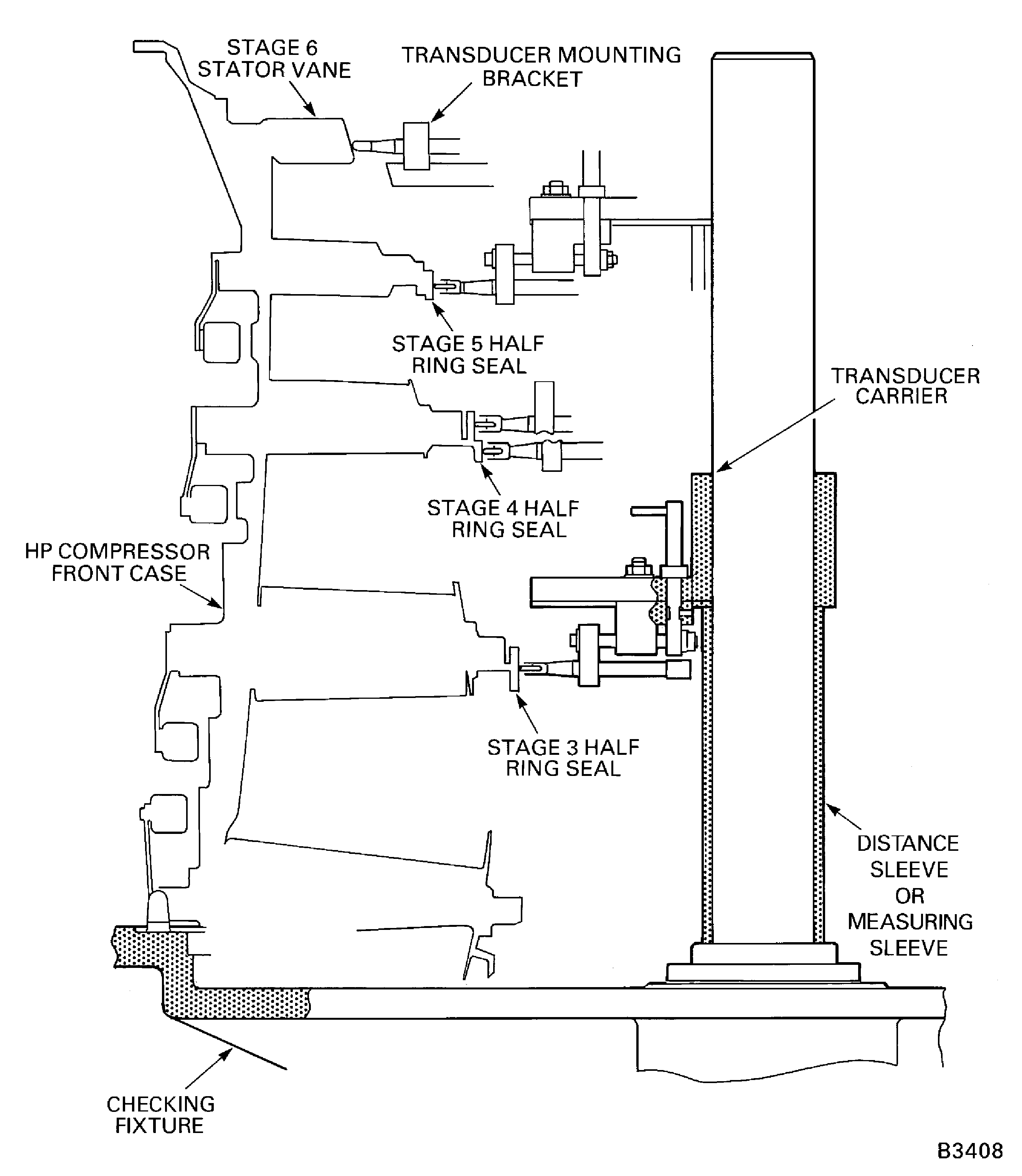
Optional procedure to measure the HP compressor forward case rotor path linings, stage 3, 4 and 5 inner stator rings, and stage 6 stator vane tip radius, is to use a 3 axis measurement machine.
SUBTASK 72-41-00-040-151 Install the HP Compressor Front Cases in the Checking Fixture
Refer to Figure.
Install IAE 1R18701 Indexing plate 1 off on the IAE 1R18533 Setting base 1 off.
Install the IAE 1R18722 Setting button 1 off through the stage 6 location in the setting plate. Make sure the setting button goes in the correct location in the setting base.
Install the IAE 1R18033 Gage mounting plate 1 off with the IAE 1R18032 Transducer carrier 1 off on the setting base.
Set the tools to measure the stage 6 rotor path ring radius. Use the procedure given in Step.
SUBTASK 72-41-00-040-152 Assemble and Set the Tools to Measure the Rotor Path Ring Radius
Refer to Figure.
Install IAE 1R18780 Distance sleeve 1 off on the pillar of the checking fixture.
Install the IAE 1R18033 Gage mounting plate 1 off and IAE 1R18032 Transducer carrier 1 off on the measuring sleeve installed in step A.
Turn the HP compressor front cases smoothly in a clockwise direction.
NOTE
Refer to TASK 72-41-31-200-005-C00, SUBTASK 72-41-31-220-172 (INSPECTION/CHECK-005, CONFIG-003).Calculate and write down the eight values of the stage 6 rotor path ring radius.
Radius = A - B
where A = Tool setting radius = 10.344 in. (262.74 mm)
B = Measuring instrument values
Refer to Step for examples to calculate the radius
Measure the stage 6 rotor path ring radius.
SUBTASK 72-41-00-040-153 Measure the Stage 6 Rotor Path Ring Radius
Refer to Figure.
Locate the IAE 1R18722 Setting button 1 off through the stage 5 location in the IAE 1R18701 Indexing plate 1 off on the IAE 1R18533 Setting base 1 off.
Install the IAE 1R18033 Gage mounting plate 1 off with the IAE 1R18032 Transducer carrier 1 off on the setting base.
Set the tools to measure the stage 5 rotor path ring radius. Use the procedure given in Step.
Install the IAE 1R18779 Distance sleeve 1 off on the pillar of the IAE 1R18031 Checking fixture 1 off.
Install the transducer carrier and gage mounting plate on the distance sleeve on the checking fixture. Refer to Step for the procedure.
Turn the HP compressor front cases smoothly in a clockwise direction.
NOTE
Refer to TASK 72-41-31-200-004-B00, SUBTASK 72-41-31-220-167 (INSPECTION/CHECK-004, CONFIG-002).Calculate and write down the eight values of the stage 5 rotor path ring radius.
Radius = A - B
where A = Tool setting radius = 10.385 in. (263.77 mm)
B = Measuring instrument values
Refer to Step for examples to calculate the radius
Measure the stage 5 rotor path ring radius.
SUBTASK 72-41-00-040-154 Measure the Stage 5 Rotor Path Ring Radius
Refer to Figure.
Locate the IAE 1R18722 Setting button 1 off through the stage 4 location in the IAE 1R18701 Indexing plate 1 off on the IAE 1R18533 Setting base 1 off.
Install the IAE 1R18033 Gage mounting plate 1 off with the IAE 1R18032 Transducer carrier 1 off on the setting base.
Set the tools to measure the stage 4 rotor path ring radius. Use the procedure given in Step.
Install the IAE 1R18778 Distance sleeve 1 off on the pillar of the IAE 1R18031 Checking fixture 1 off.
Install the transducer carrier and gage mounting plate on the measuring sleeve on the checking fixture. Refer to Step for the procedure.
Turn the HP compressor front cases smoothly in a clockwise direction.
NOTE
Refer to TASK 72-41-31-200-003-B00, SUBTASK 72-41-31-220-163 (INSPECTION/CHECK-003, CONFIG-002).Calculate and write down the eight values of the stage 4 rotor path ring radius.
Radius = A - B
where A = Tool setting radius = 10.553 in. (268.03 mm)
B = Measuring instrument values
Refer to Step for examples to calculate the radius
Measure the stage 4 rotor path ring radius.
SUBTASK 72-41-00-040-155 Measure the Stage 4 Rotor Path Ring Radius
Refer to Figure.
Locate the IAE 1R18722 Setting button 1 off through the stage 3 location in the IAE 1R18701 Indexing plate 1 off on the IAE 1R18533 Setting base 1 off.
Install the IAE 1R18033 Gage mounting plate 1 off with the IAE 1R18032 Transducer carrier 1 off on the setting base.
Set the tools to measure the stage 3 rotor path radius. Use the procedure given in Step.
Install the IAE 1R18777 Distance sleeve 1 off on the pillar of the IAE 1R18031 Checking fixture 1 off.
Install the transducer carrier and gage mounting plate on the distance sleeve on the checking fixture. Refer to Step for the procedure.
Turn the HP compressor front cases smoothly in a clockwise direction.
NOTE
Refer to TASK 72-41-31-200-002-B00, SUBTASK 72-41-31-220-193 (INSPECTION/CHECK-002, CONFIG-002).Calculate and write down the eight values of the stage 3 rotor path radius.
Radius = A - B
where A = Tool setting radius = 11.148 in. (283.16 mm)
B = Measuring instrument values
Refer to Step for examples to calculate the radius
Measure the stage 3 rotor path radius.
SUBTASK 72-41-00-040-156 Measure the Stage 3 Rotor Path Radius
Refer to Figure.
Locate the IAE 1R18040 Setting button 1 off through the correct location in the IAE 1R18701 Indexing plate 1 off on the IAE 1R18533 Setting base 1 off.
Install the IAE 1R18539 Transducer carrier 1 off on the setting base.
Set the tools to measure the stage 3 half ring seal radius. Use the procedure in Step.
Install the IAE 1R18514 Measuring sleeve 1 off on the IAE 1R18031 Checking fixture 1 off.
Align the transducer on the stage 3 half ring seal. Refer to Step for the procedure.
Turn the HP compressor front cases smoothly in a clockwise direction.
NOTE
Refer to TASK 72-41-33-200-002, SUBTASK 72-41-33-220-061 (INSPECTION/CHECK-002, CONFIG-001).Calculate and write down the eight values of the stage 3 half ring seal radius.
Radius = A - B
where A = Tool setting radius = 5.178 in. (131.52 mm)
B = Measuring instrument values
Refer to Step for examples to calculate the radius
Measure the stage 3 half seal ring radius.
SUBTASK 72-41-00-040-157 Measure the Stage 3 Half Ring Seal Radius
Refer to Figure.
Locate the IAE 1R18040 Setting button 1 off through the stage 4 lower location in the IAE 1R18701 Indexing plate 1 off on the IAE 1R18533 Setting base 1 off.
Install the IAE 1R18539 Transducer carrier 1 off on the setting base.
Set the tools to measure the stage 4 lower (small diameter) half ring seal radius. Use the procedure given in Step.
Install IAE 1R18515 Measuring sleeve 1 off on the IAE 1R18031 Checking fixture 1 off.
Align the transducer on the stage 4 lower (small diameter) half ring seal. Refer to Step for the procedure.
Turn the HP compressor front cases smoothly in a clockwise direction.
NOTE
Refer to TASK 72-41-33-200-004, SUBTASK 72-41-33-220-074 (INSPECTION/CHECK-004, CONFIG-001).Calculate and write down the eight values of the stage 4 lower half ring seal radius.
Radius = A - B
where A = Tool setting radius = 5.952 in. (151.18 mm)
B = Measuring instrument values
Refer to Step for examples to calculate the radius
Measure the stage 4 lower (small diameter) half ring seal radius.
Measure the stage 4 upper (large diameter) half seal ring radius. Use the procedure given in steps A. thru F. Use IAE 1R18516 Measuring sleeve 1 off on the checking fixture.
Turn the HP compressor front cases smoothly in a clockwise direction.
NOTE
Refer to TASK 72-41-33-200-004, SUBTASK 72-41-33-220-074 (INSPECTION/CHECK-004, CONFIG-001).Calculate and write down the eight values of the stage 4 upper half ring seal radius.
Radius = A - B
where A = Tool setting radius = 6.141 in. (155.98 mm)
B = Measuring instrument values
Refer to Step for examples to calculate the radius
Measure the stage 4 upper half seal ring radius.
SUBTASK 72-41-00-040-158 Measure the Stage 4 Half Ring Seal Radius
Refer to Figure.
Locate the IAE 1R18040 Setting button 1 off through the stage 5 seal ring location in the IAE 1R18701 Indexing plate 1 off on the IAE 1R18533 Setting base 1 off.
Install the IAE 1R18539 Transducer carrier 1 off on the setting base.
Set the tools to measure the stage 5 half ring seal radius. Refer to the procedure given in Step.
Install IAE 1R18517 Measuring sleeve 1 off on the IAE 1R18031 Checking fixture 1 off.
Align the transducer on the stage 5 half ring seal radius. Refer to Step for the procedure.
Turn the HP compressor front cases assembly in a clockwise direction.
NOTE
Refer to TASK 72-41-33-200-006, SUBTASK 72-41-33-220-094 (INSPECTION/CHECK-006, CONFIG-001).Calculate and write down the eight values of the stage 5 half ring seal radius.
Radius = A - B
where A = Tool setting radius = 6.964 in. (176.89 mm)
B = Measuring instrument values
Refer to Step for examples to calculate the radius
Measure the stage 5 half ring seal radius.
SUBTASK 72-41-00-040-159 Measure the Stage 5 Half Ring Seal Radius
Refer to Figure.
Locate the IAE 1R18040 Setting button 1 off through the stage 6 stator vane location in the IAE 1R18701 Indexing plate 1 off on the IAE 1R18533 Setting base 1 off.
Install the IAE 1R18042 Transducer carrier 1 off and IAE 1R18531 Measuring sleeve 1 off on the setting base.
Set the tools to measure the stage 6 stator vane tip radius. Refer to the procedure given in Step.
Install the IAE 1R18781 Distance sleeve 1 off on the IAE 1R18031 Checking fixture 1 off.
Calculate and write down the stage 6 stator vane tip radius.
Radius = A - B
where A = Tool setting radius = 8.640 in. (219.45 mm)
B = Measuring instrument values
Refer to Step for examples to calculate the radius
Measure the stage 6 stator vane tip radius.
All the stage 6 stator vanes with a radius of more than 8.645 in. (219.60 mm) must be placed in a separate container. Identify each of the vanes with its radius. Refer to SPM TASK 70-09-01-400-501.
SUBTASK 72-41-00-040-160 Measure the Stage 6 Stator Vane Tip Radius
Remove the HP compressor front cases from the checking fixture as given in TASK 72-41-30-440-010-B00 (ASSEMBLY-010, CONFIG-002).
SUBTASK 72-41-00-040-161 Remove the HP Compressor Front Cases from the Checking Fixture
Disassemble the HP compressor front cases as given in TASK 72-41-00-040-001-B00 (DISASSEMBLY, CONFIG-002) and TASK 72-41-30-440-010-B00 (ASSEMBLY-010, CONFIG-002).
SUBTASK 72-41-00-040-162 Disassemble the HP Compressor Front Cases

Figure: View through the HP System Module on the Build Stand
View through the HP System Module on the Build Stand
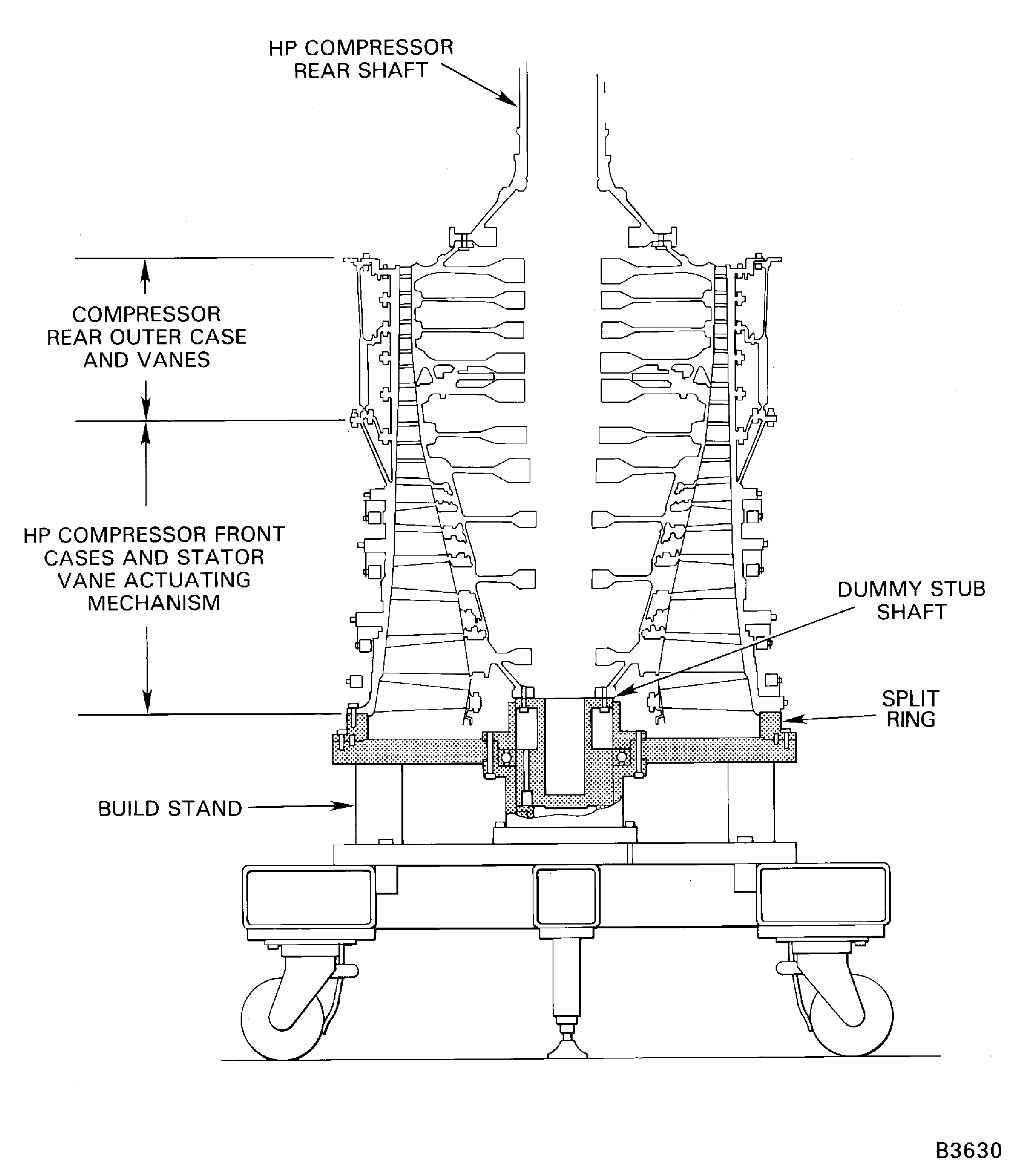
Figure: Pre SBE 72-0366, Pre SBE 72-0406, And Pre SBE 72-0538: Remove The VSV Crankshaft Remove The Control Rods
Pre SBE 72-0366, Pre SBE 72-0406, And Pre SBE 72-0538: Remove The VSV Crankshaft Remove The Control Rods
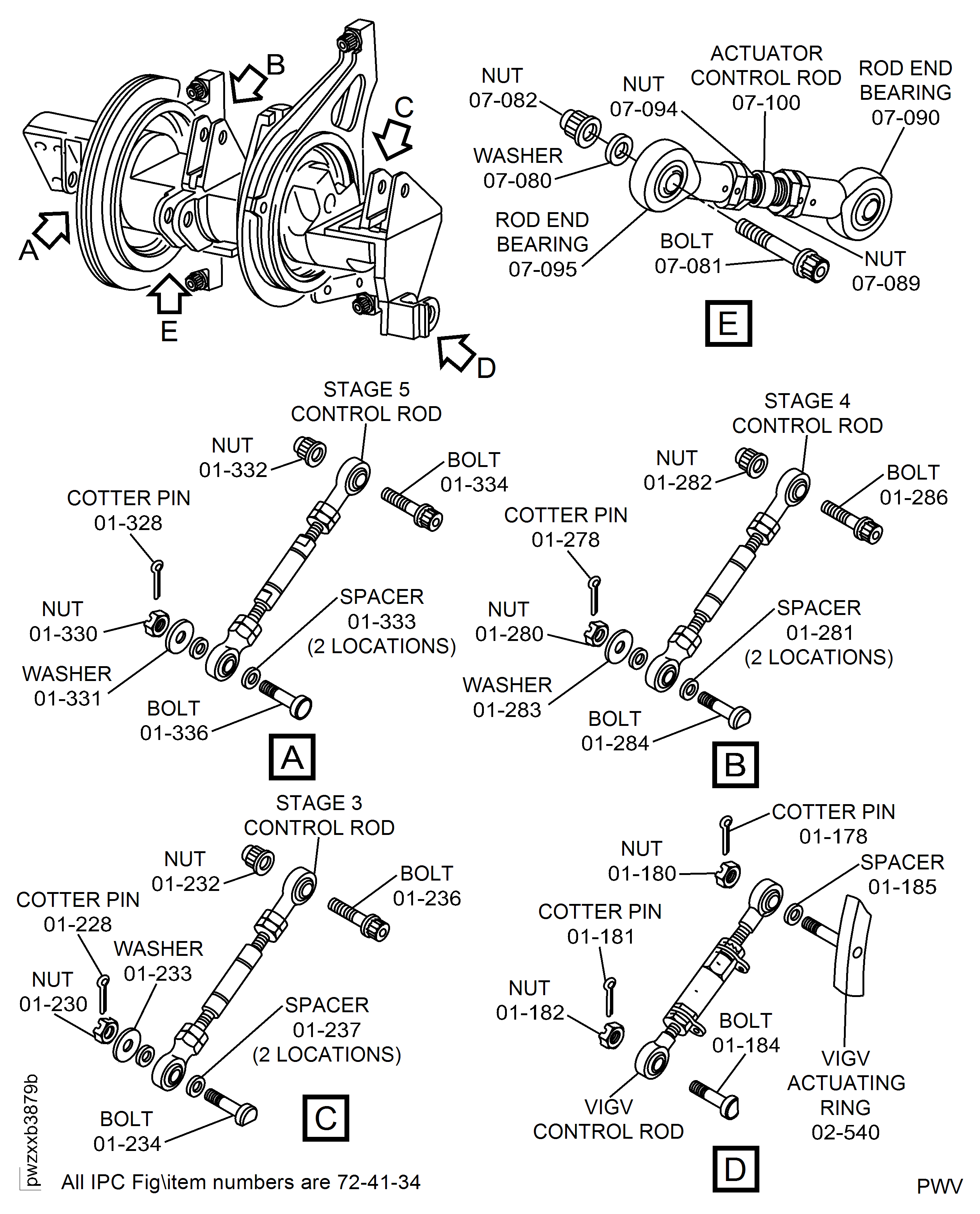
Figure: Pre SBE 72-0366, Pre SBE 72-0406, And SBE 72-0538: Remove The VSV Crankshaft Remove The Control Rods
Pre SBE 72-0366, Pre SBE 72-0406, And SBE 72-0538: Remove The VSV Crankshaft Remove The Control Rods
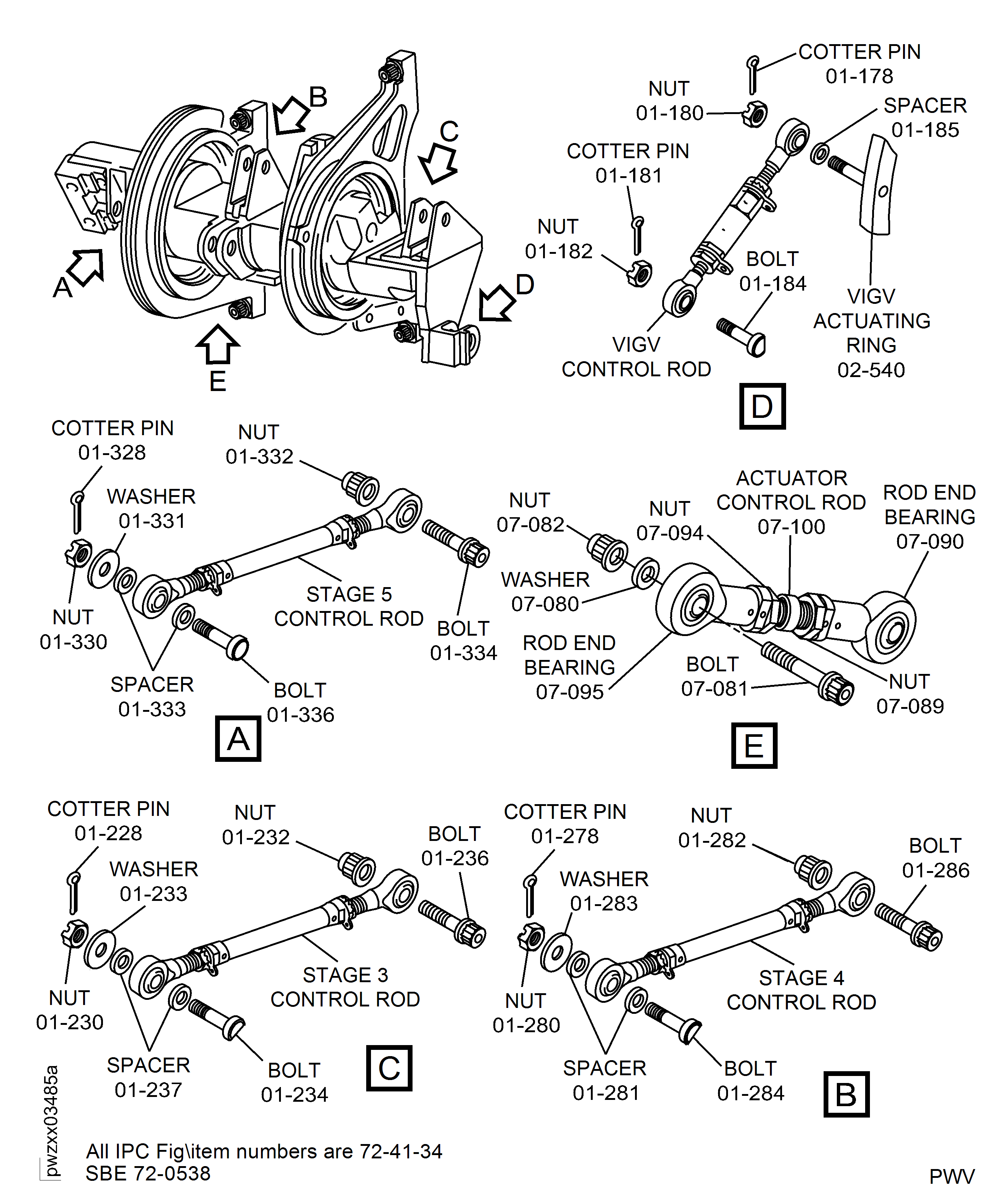
Figure: Pre SBE 72-0366 and Pre SBE 72-0406: Remove the VSV Crankshaft
Pre SBE 72-0366 and Pre SBE 72-0406: Remove the VSV Crankshaft
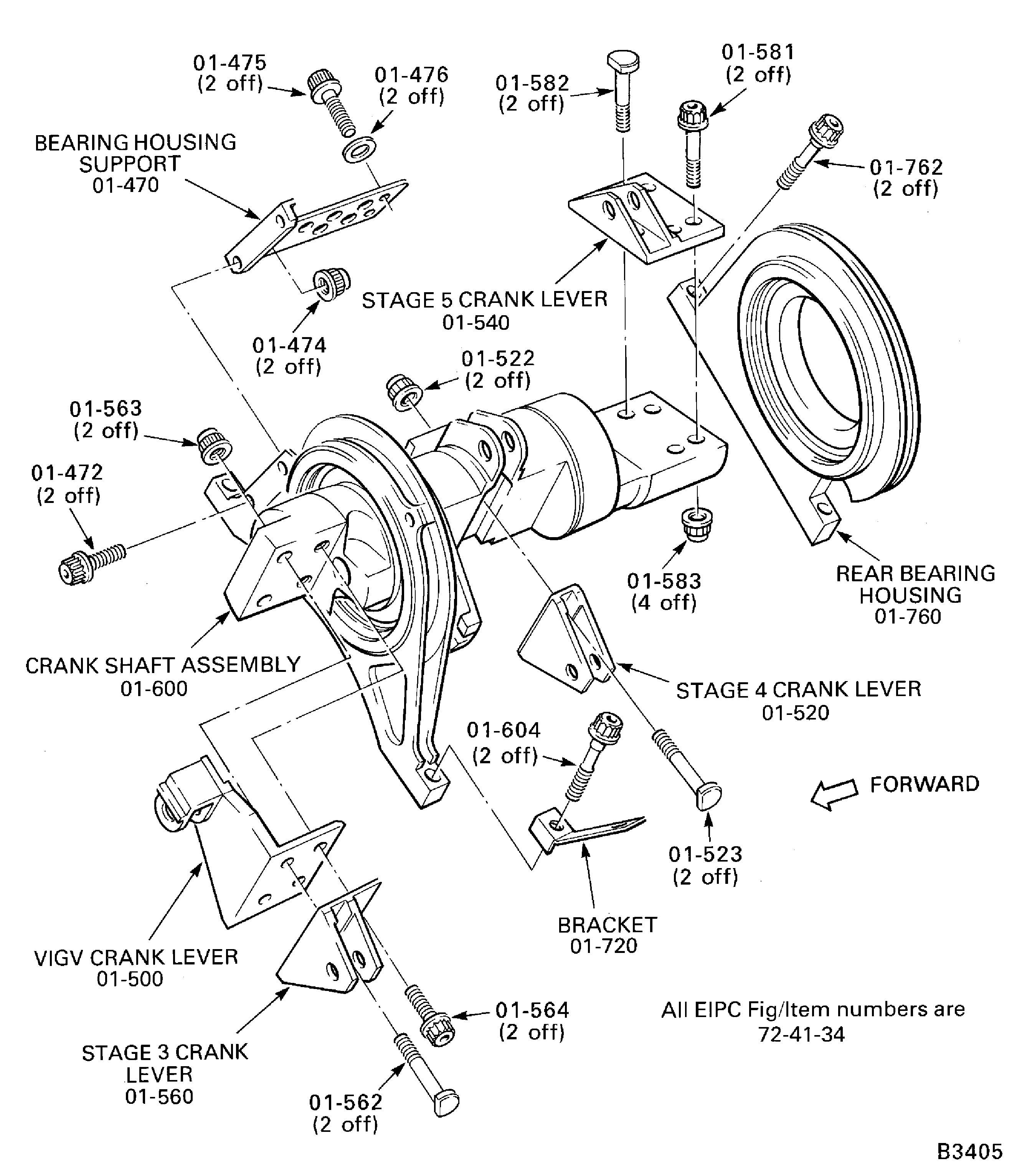
Figure: SBE 72-0366: Remove the VSV crankshaft
SBE 72-0366: Remove the VSV crankshaft
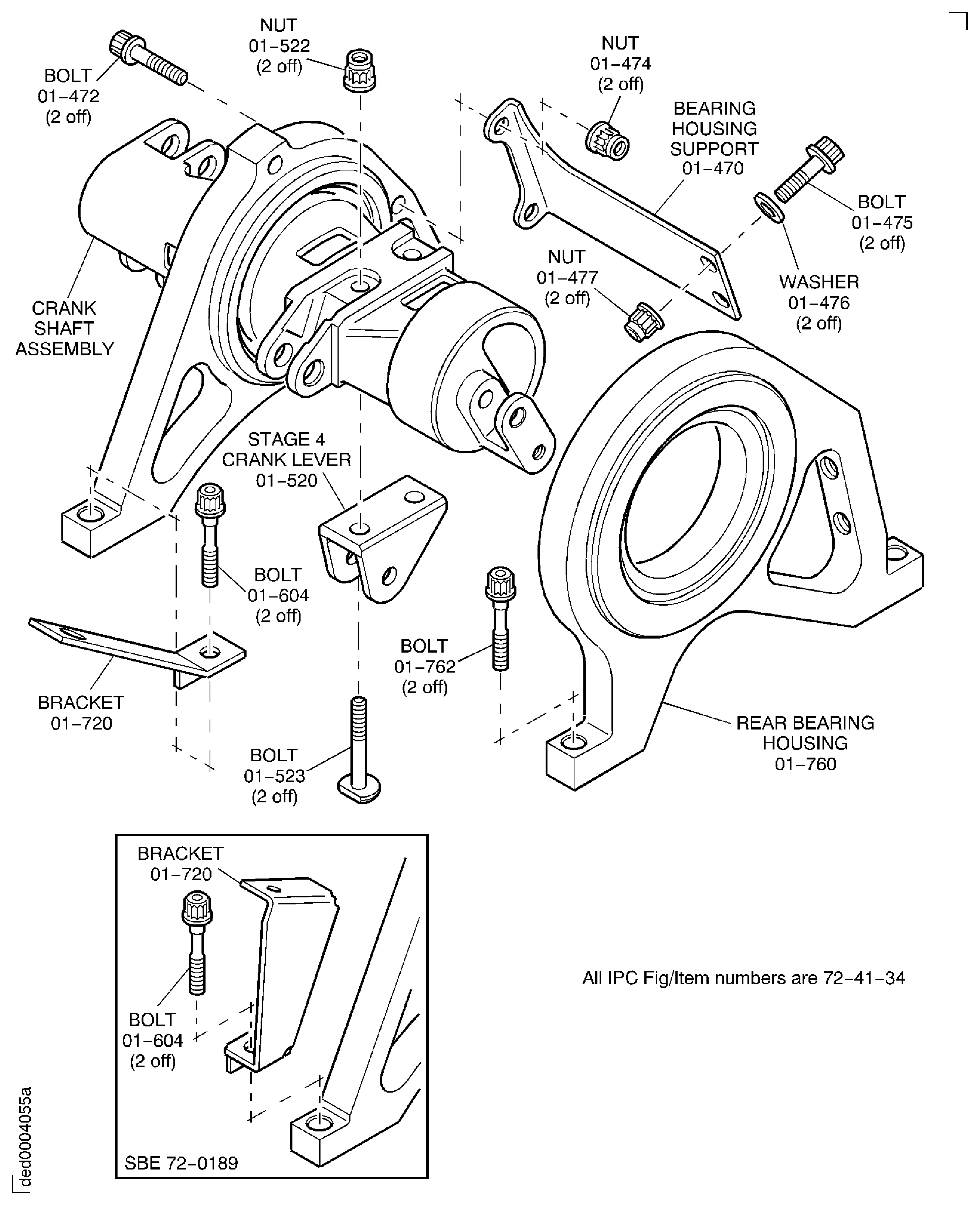
Figure: SBE 72-0366 And Pre SBE 72-0538: Remove The VSV Crankshaft Remove The Control Rods
SBE 72-0366 And Pre SBE 72-0538: Remove The VSV Crankshaft Remove The Control Rods
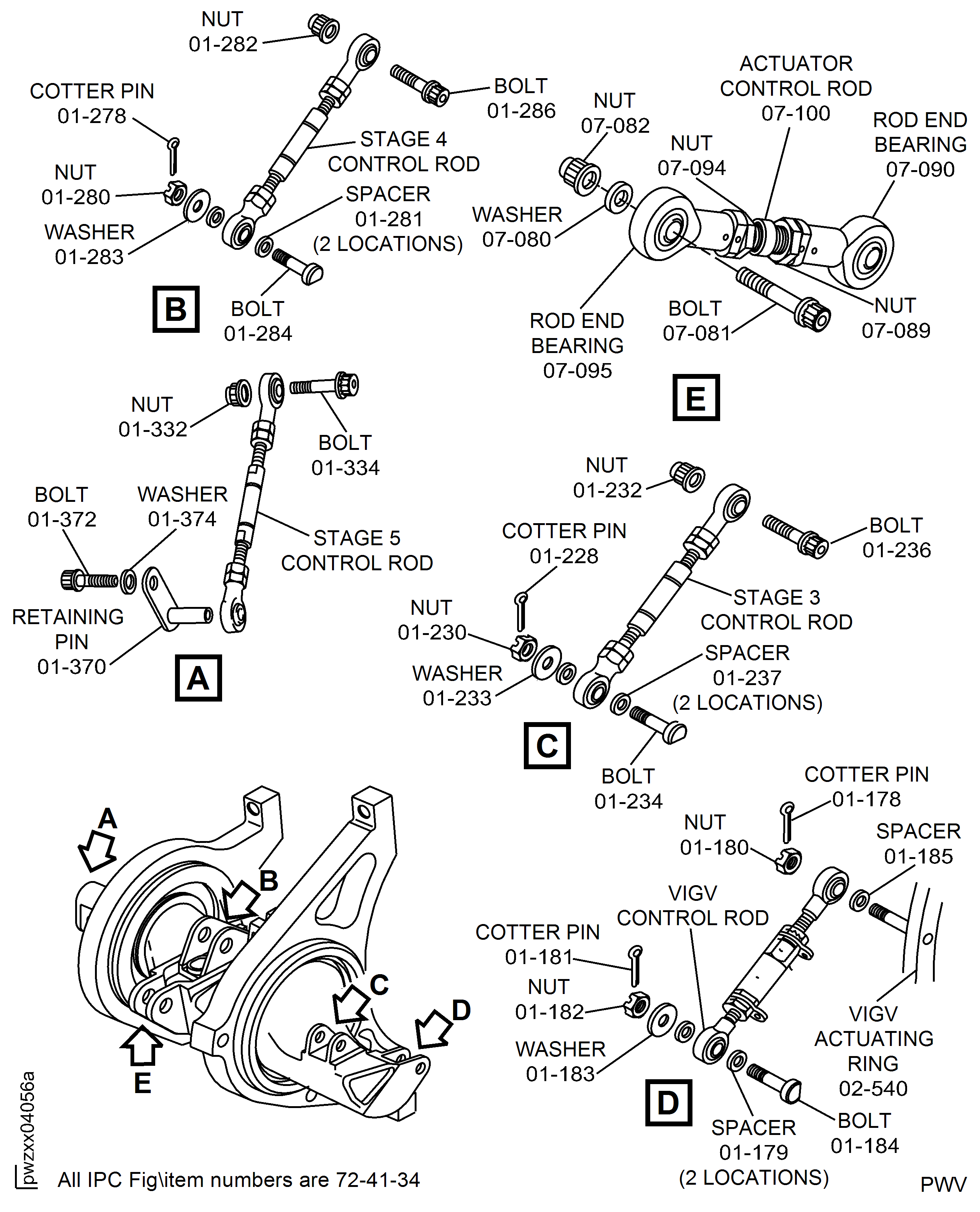
Figure: SBE 72-0366 And SBE 72-0538: Remove The VSV Crankshaft Remove The Control Rods
SBE 72-0366 And SBE 72-0538: Remove The VSV Crankshaft Remove The Control Rods
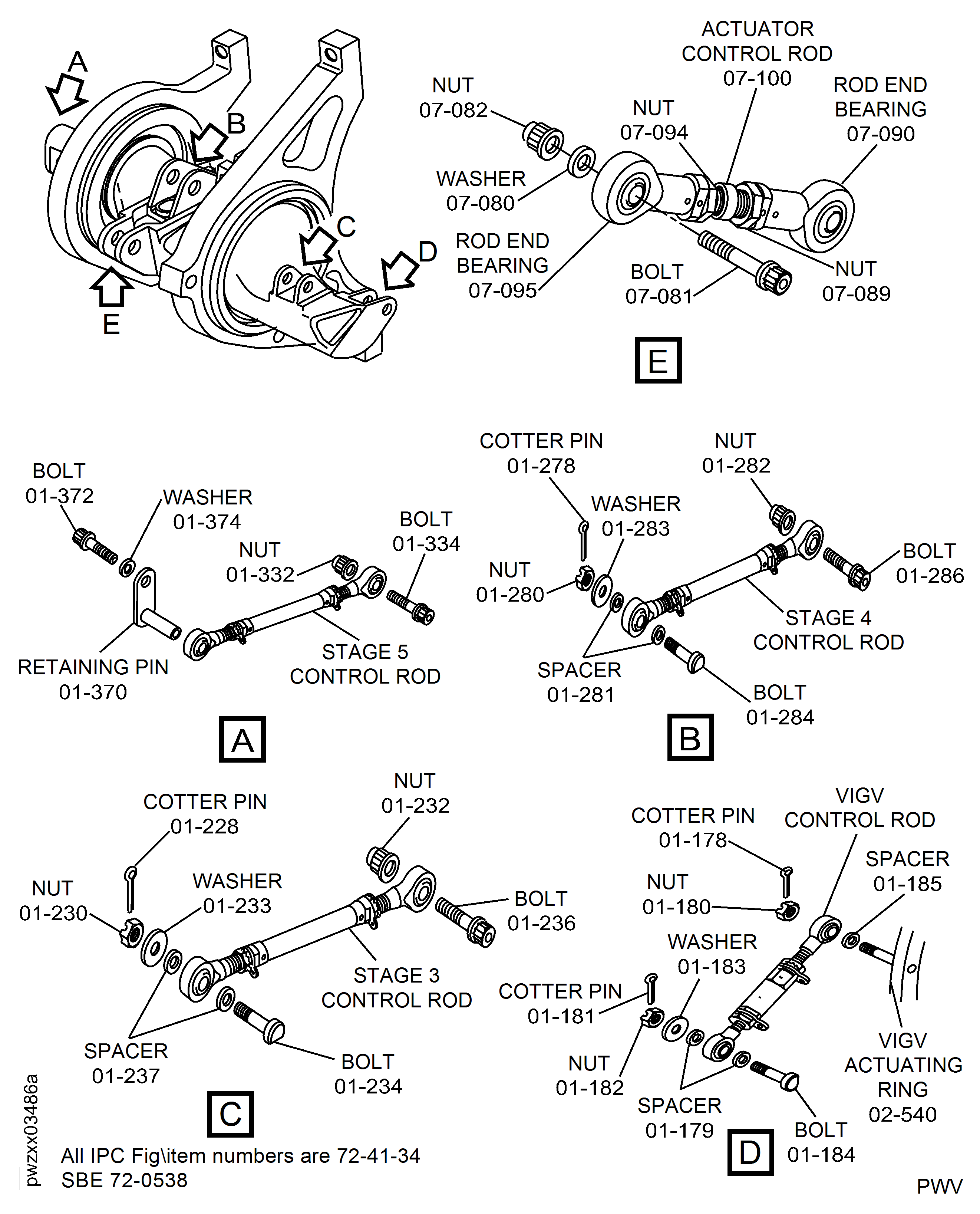
Figure: SBE 72-0406: Remove the VSV crankshaft
SBE 72-0406: Remove the VSV crankshaft
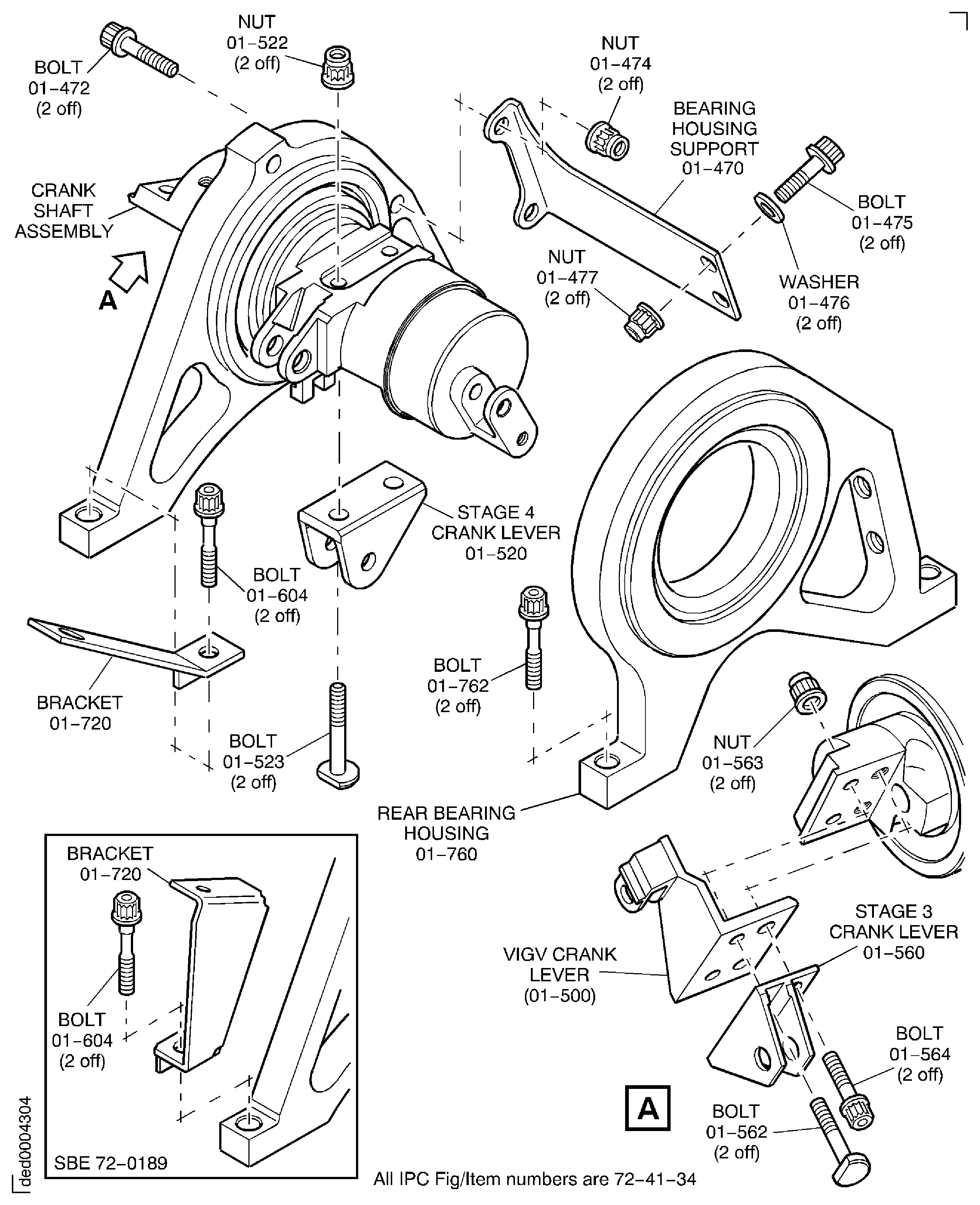
Figure: SBE 72-0406 And Pre SBE 72-0538: Remove The VSV Crankshaft Remove The Control Rods
SBE 72-0406 And Pre SBE 72-0538: Remove The VSV Crankshaft Remove The Control Rods
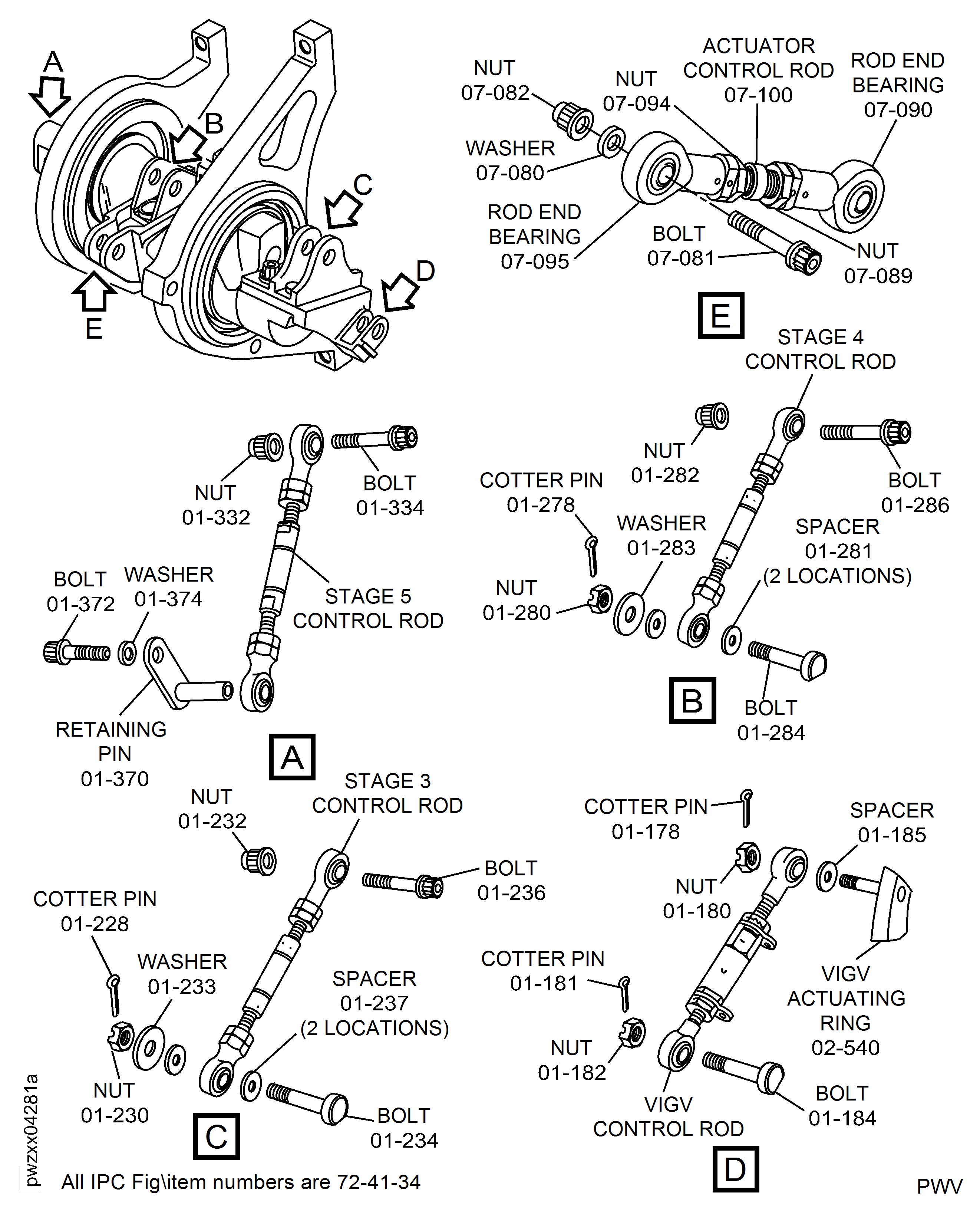
Figure: SBE 72-0406 And SBE 72-0538: Remove The VSV Crankshaft Remove The Control Rods
SBE 72-0406 And SBE 72-0538: Remove The VSV Crankshaft Remove The Control Rods
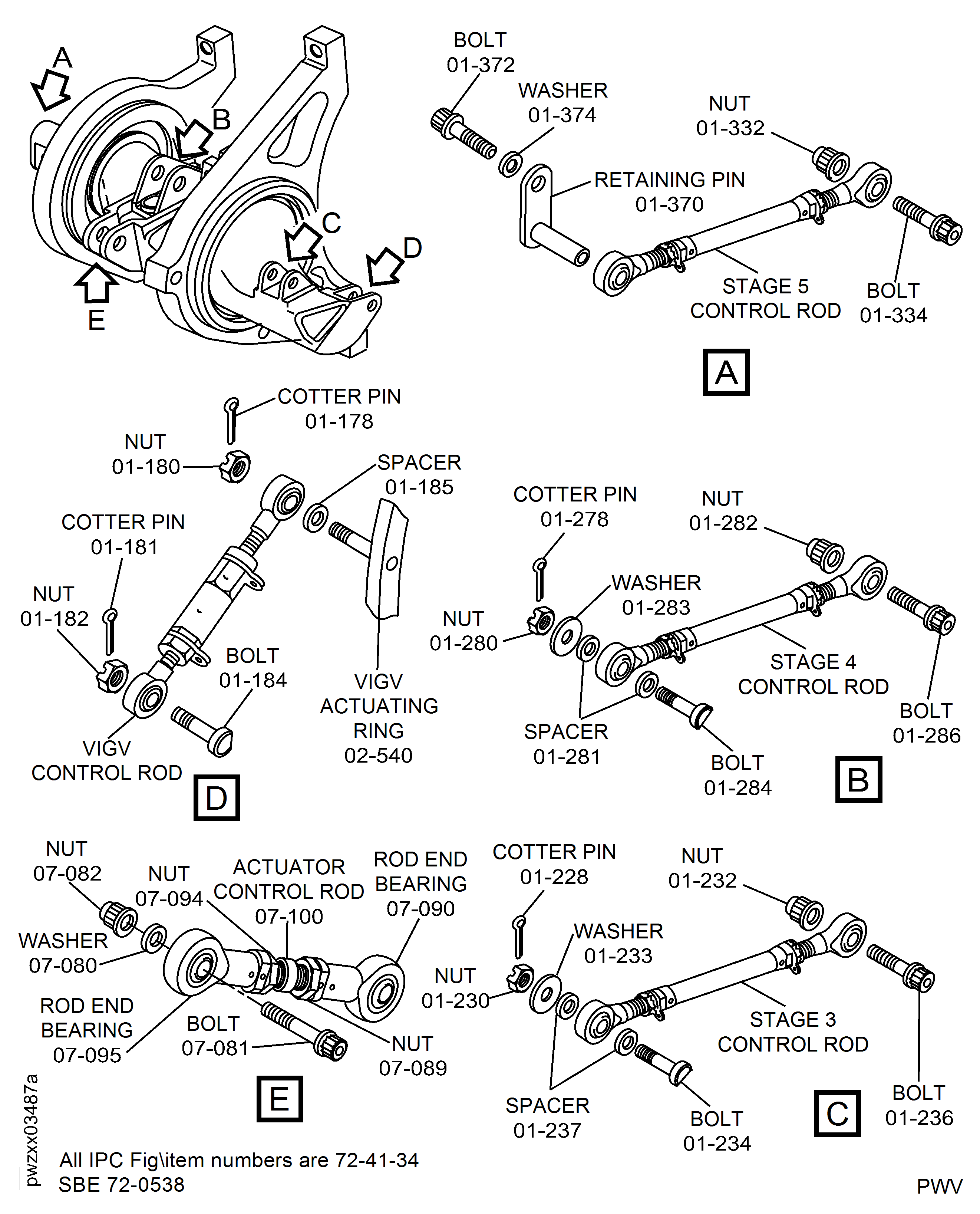
Figure: Repair Details and Dimensions
Repair Details and Dimensions
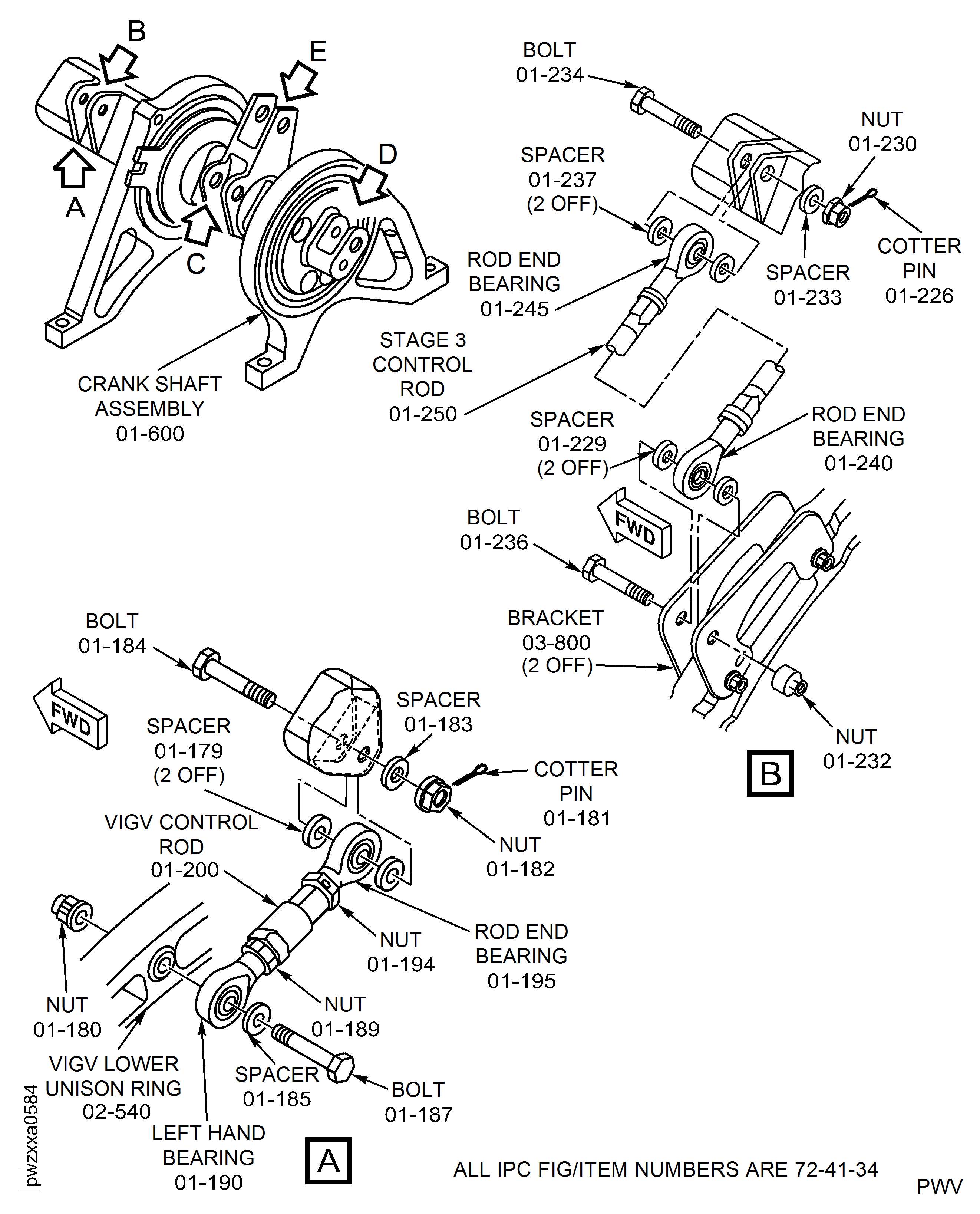
Figure: Repair Details and Dimensions
Repair Details and Dimensions
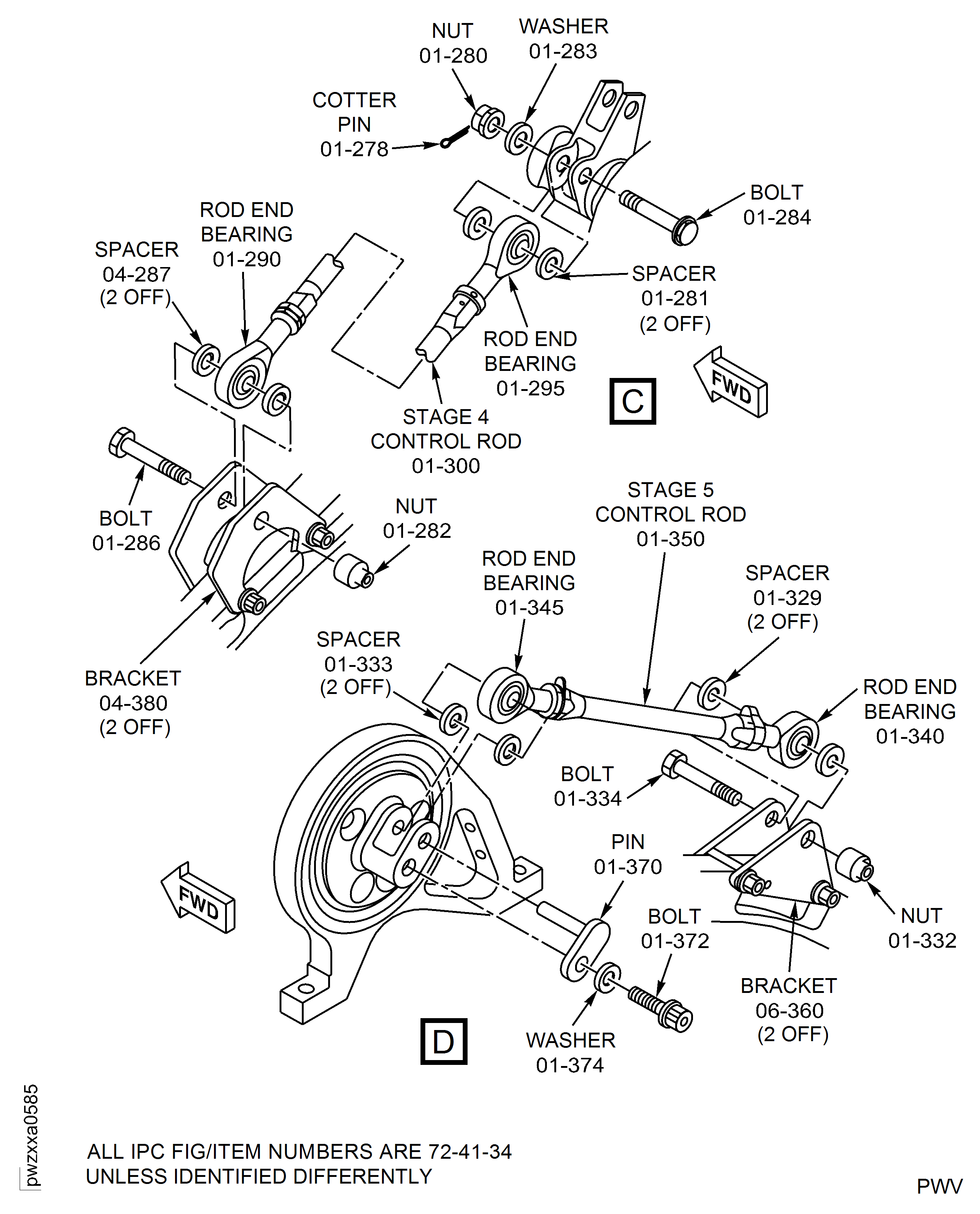
Figure: Repair Details and Dimensions
Repair Details and Dimensions
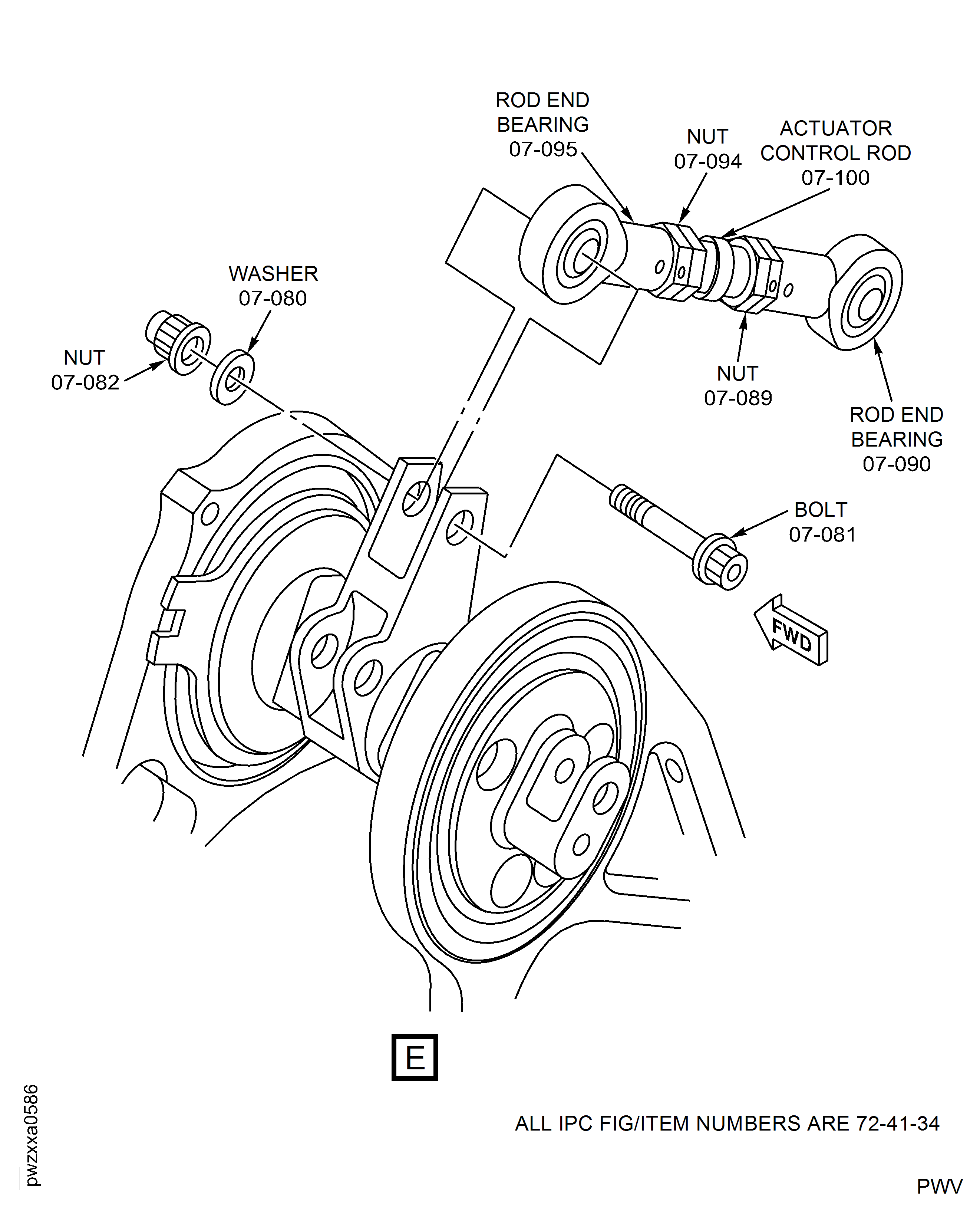
Figure: Repair Details and Dimensions
Repair Details and Dimensions
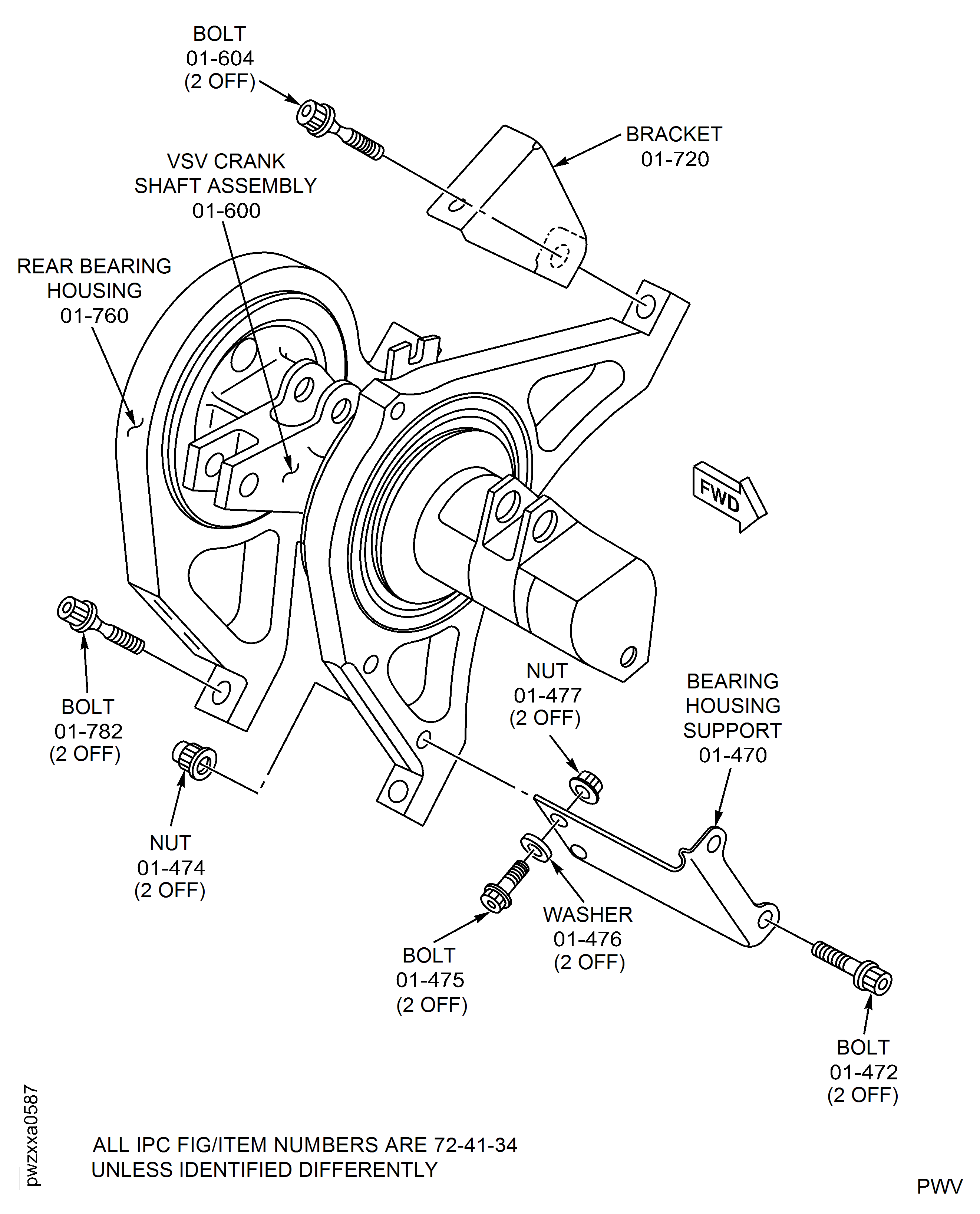
Figure: Remove the VIGV actuating ring connectors
Remove the VIGV actuating ring connectors
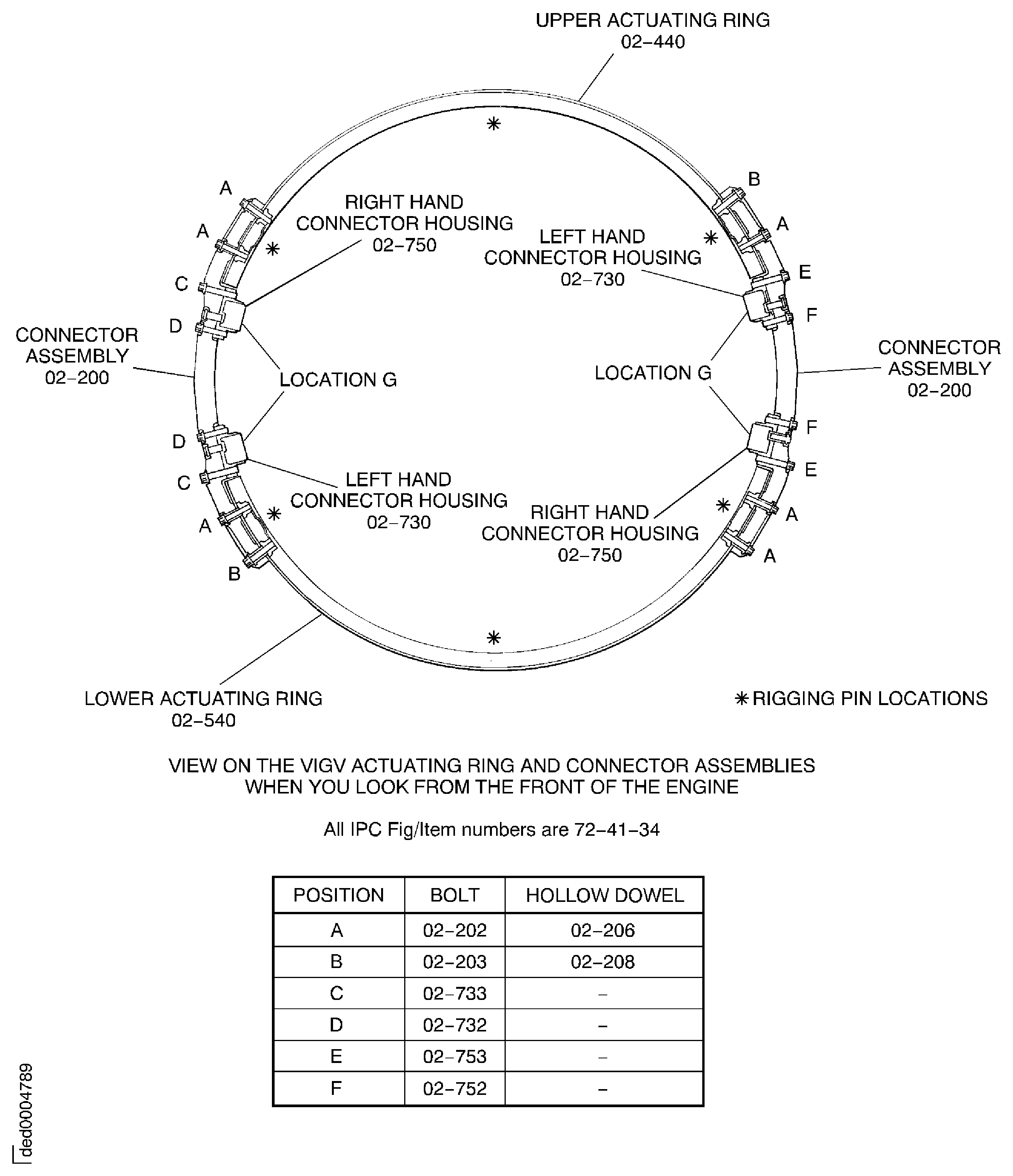
Figure: Remove the VIGV actuating ring connectors
Remove the VIGV actuating ring connectors
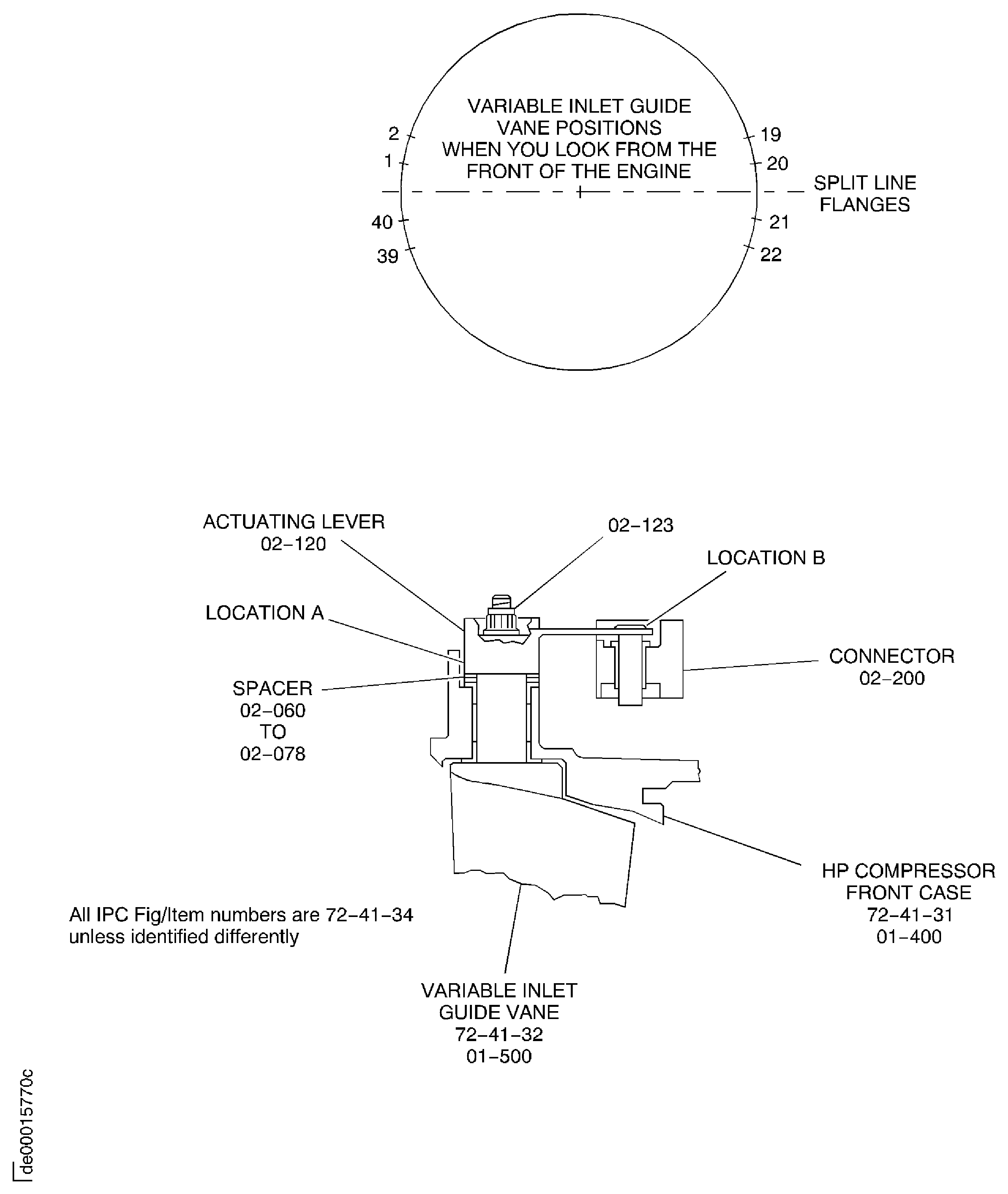
Figure: Install the lifter on the HP compressor assembly
Install the lifter on the HP compressor assembly
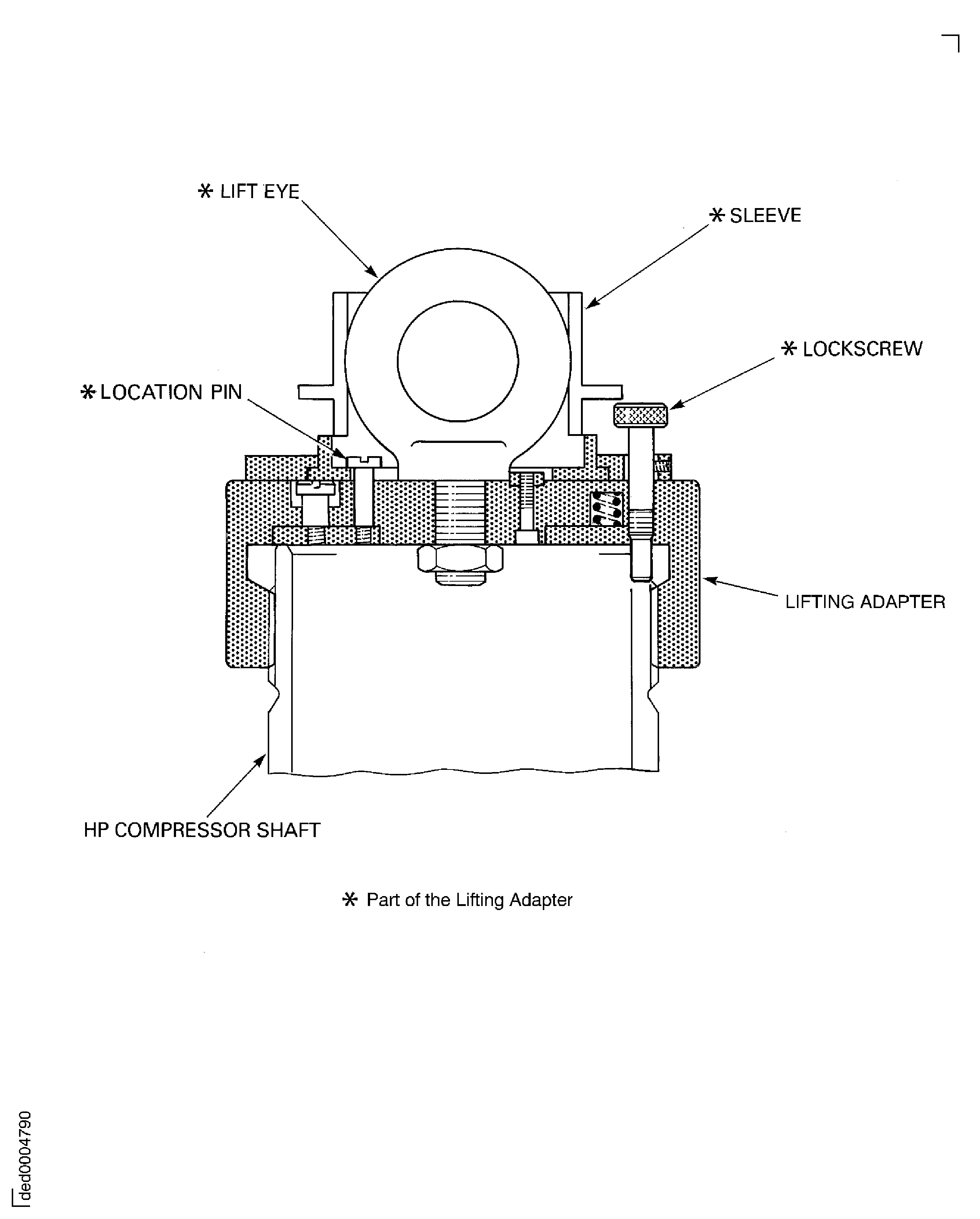
Figure: Install the HP compressor assembly on the safety support stand
Install the HP compressor assembly on the safety support stand
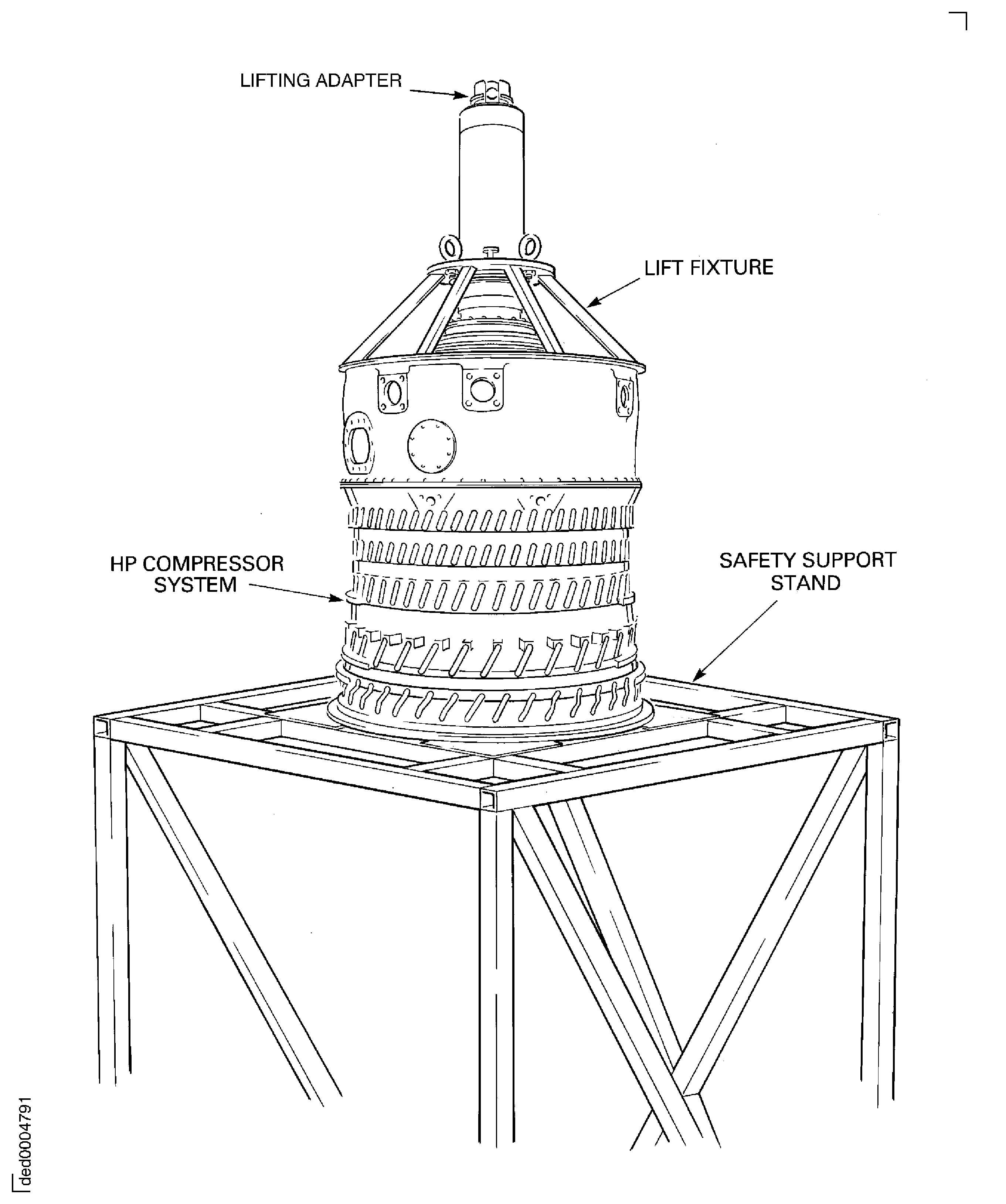
Figure: Remove the variable inlet guide vane front shroud
Remove the variable inlet guide vane front shroud
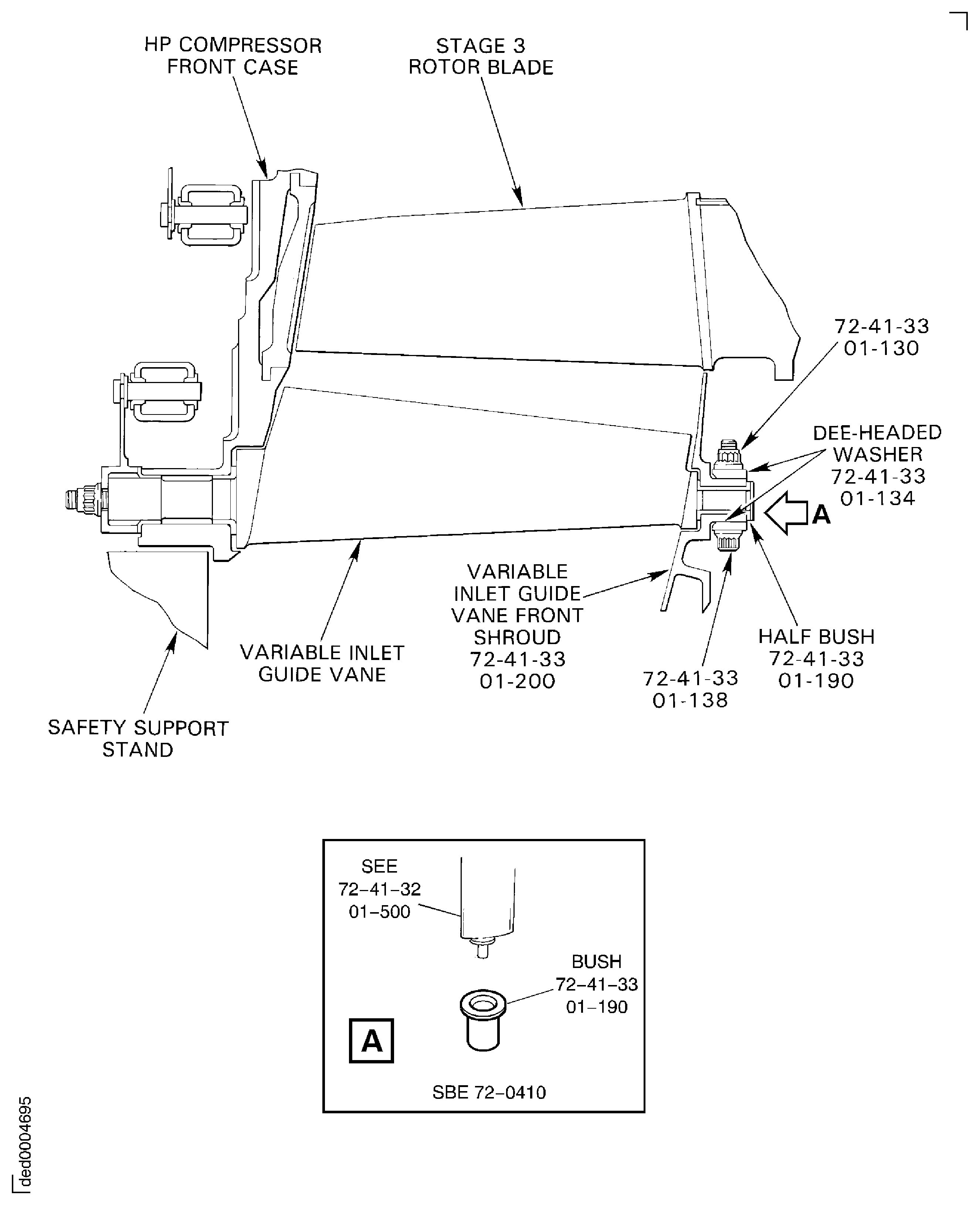
Figure: Install the HP compressor assembly in the build stand
Install the HP compressor assembly in the build stand

Figure: Install the HP compressor assembly in the build stand
Install the HP compressor assembly in the build stand
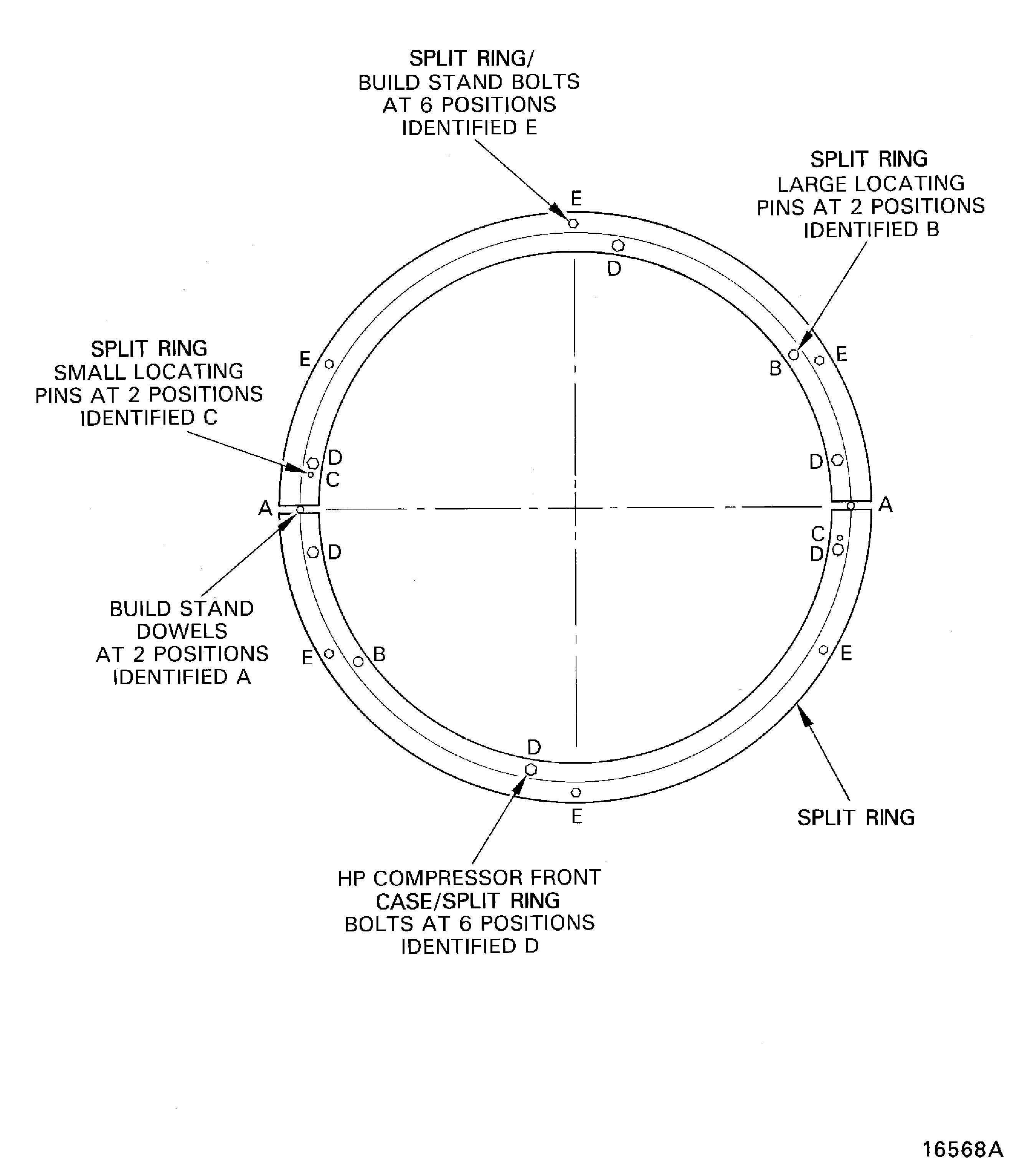
Figure: Remove the stage 3 actuating ring connectors
Remove the stage 3 actuating ring connectors
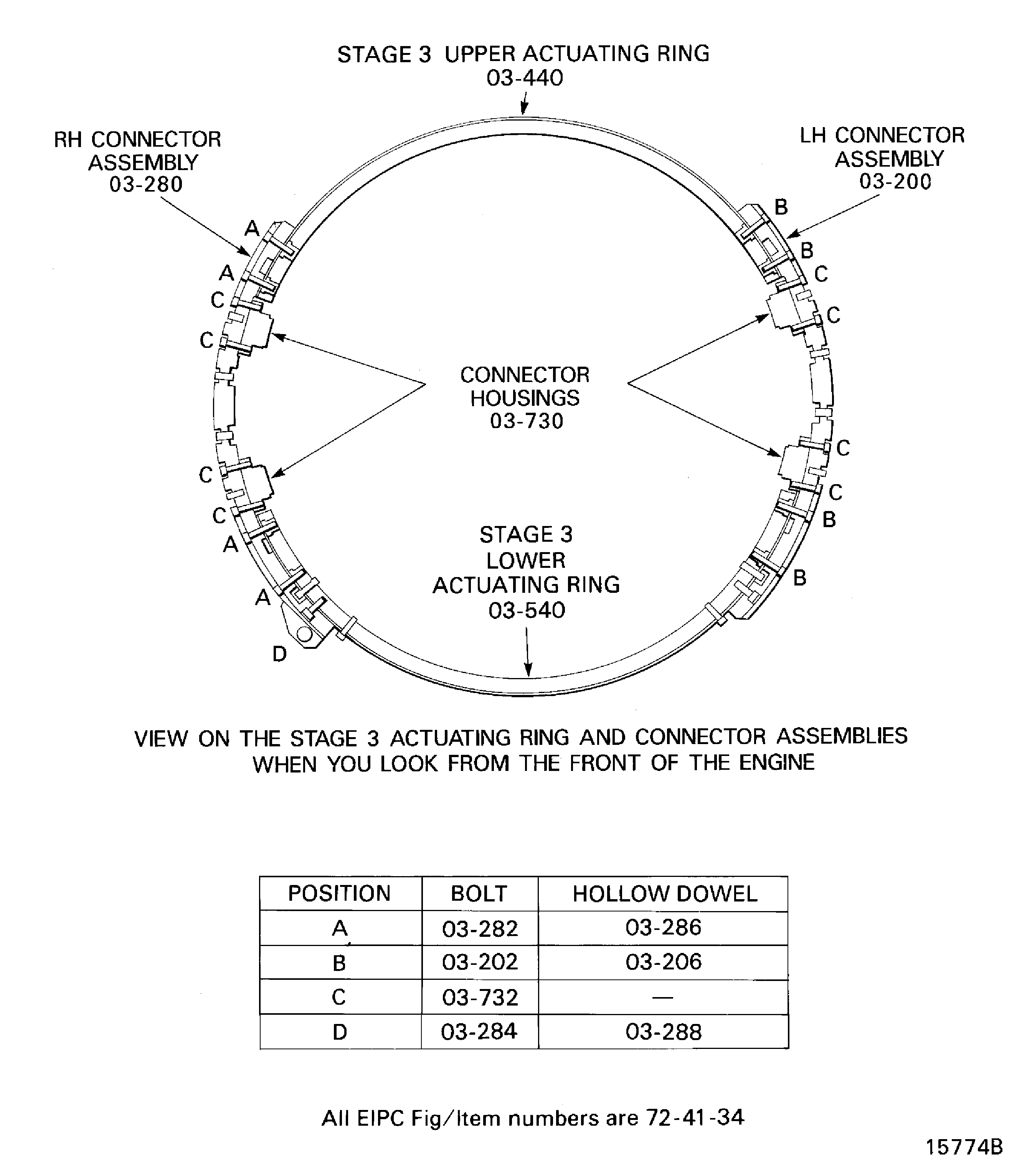
Figure: Remove the stage 4 actuating ring connectors
Remove the stage 4 actuating ring connectors
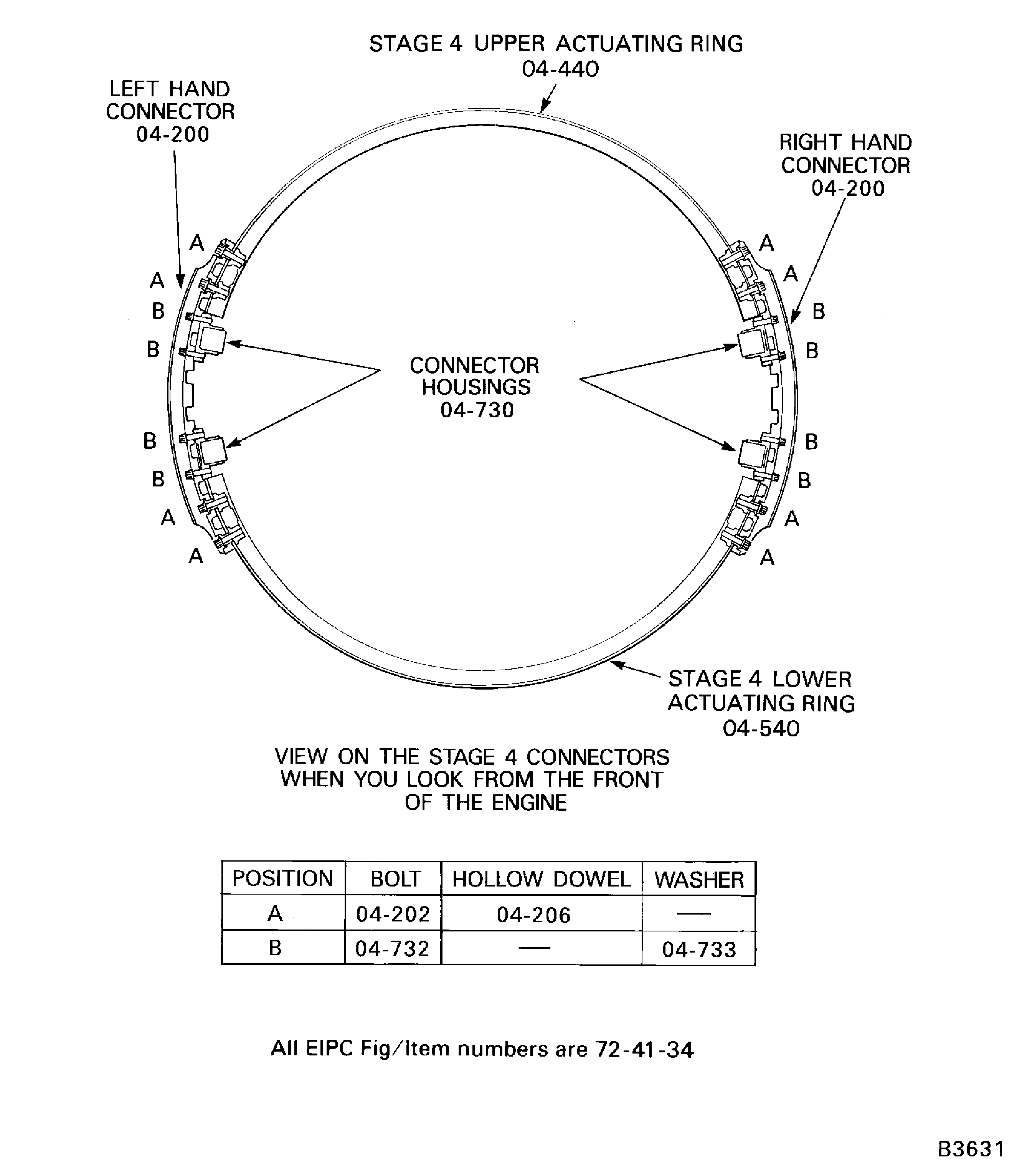
Figure: Remove the stage 5 actuating ring connectors
Remove the stage 5 actuating ring connectors
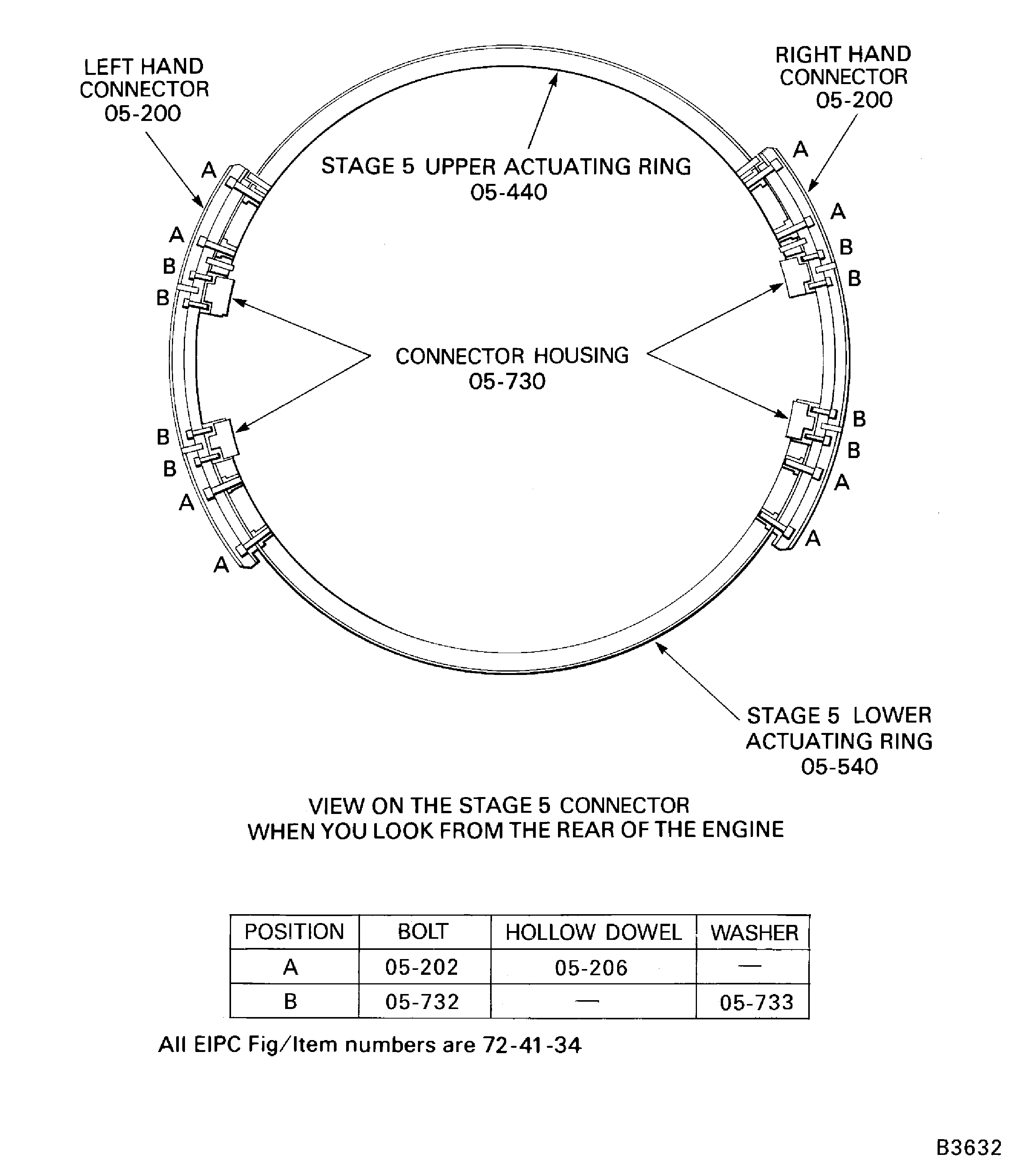
Figure: Install the Holding Fixture
Install the Holding Fixture
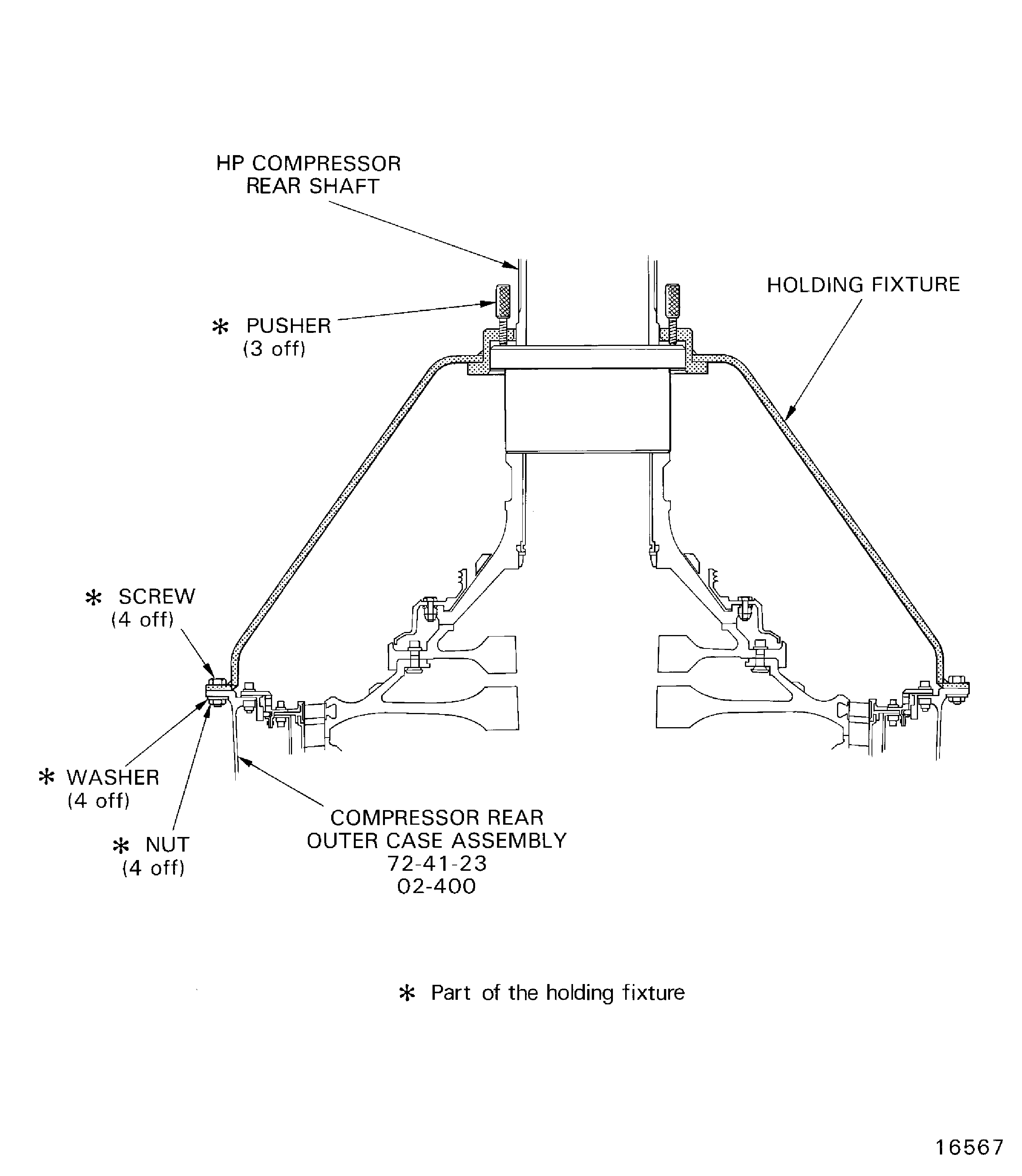
Figure: Remove the HP compressor front case split line and rear flange nuts, bolts and brackets
Remove the HP compressor front case split line and rear flange nuts, bolts and brackets
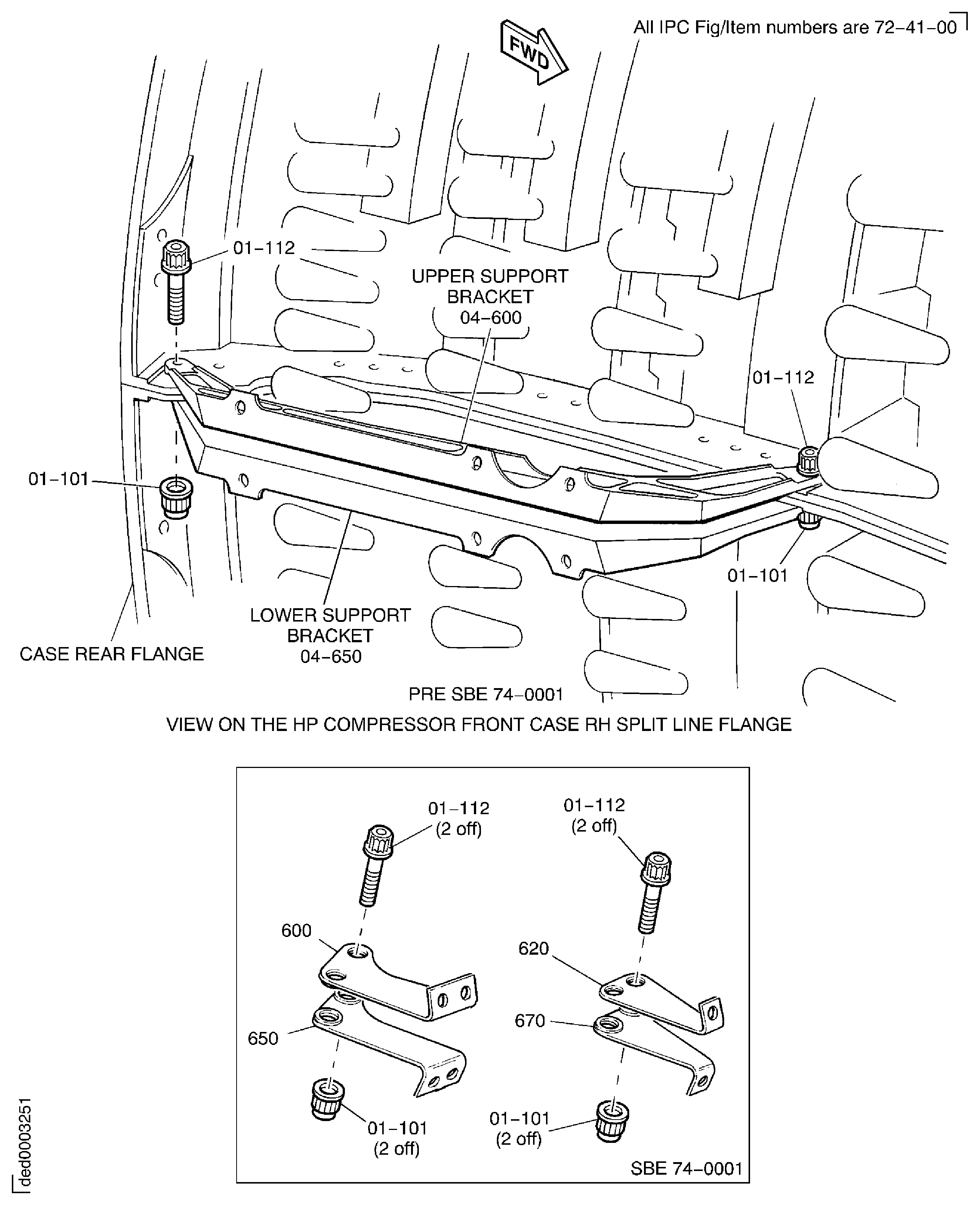
Figure: Remove the HP compressor front case split line and rear flange nuts, bolts and brackets
Remove the HP compressor front case split line and rear flange nuts, bolts and brackets
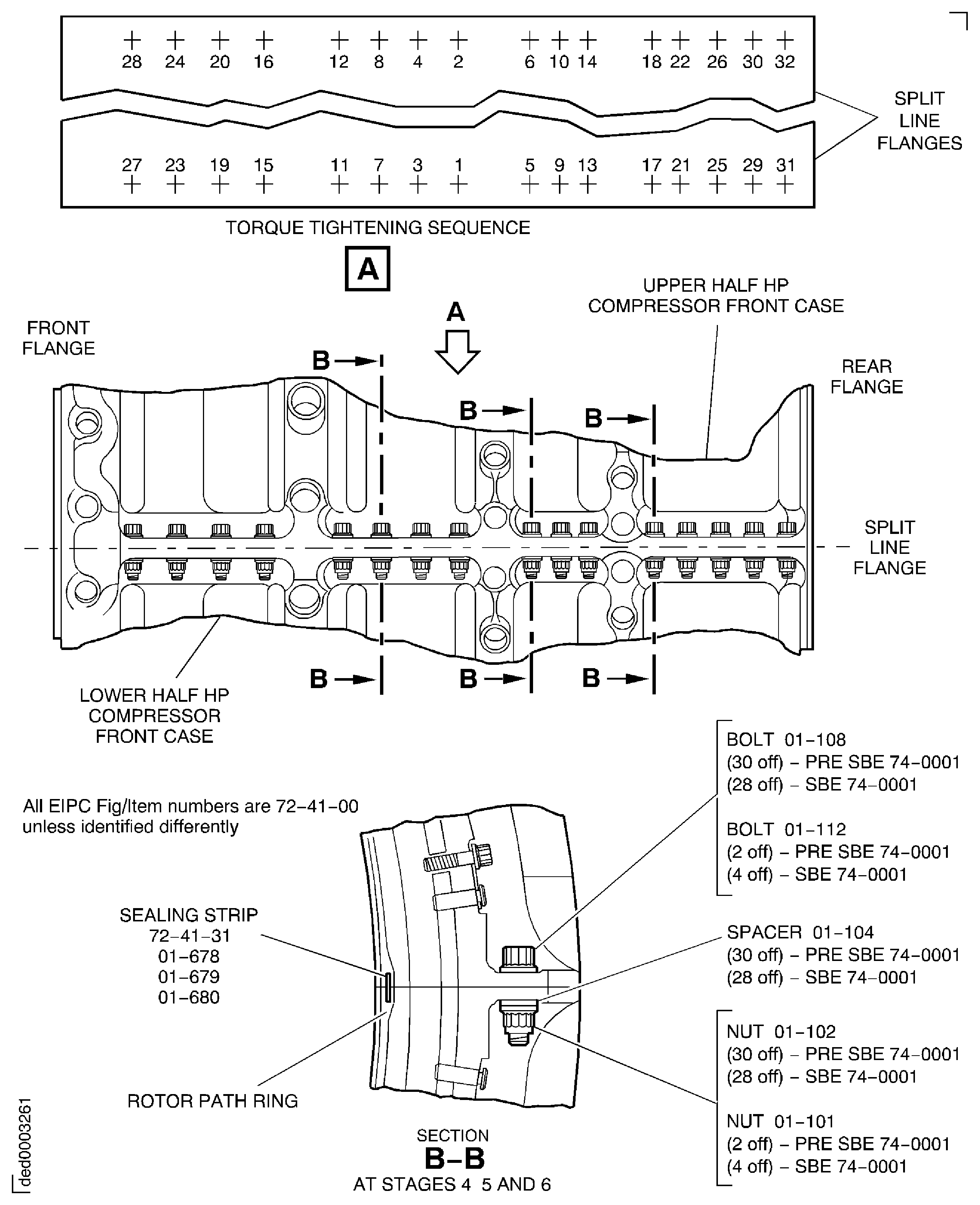
Figure: Remove the HP compressor front case split line and rear flange nuts, bolts and brackets
Remove the HP compressor front case split line and rear flange nuts, bolts and brackets
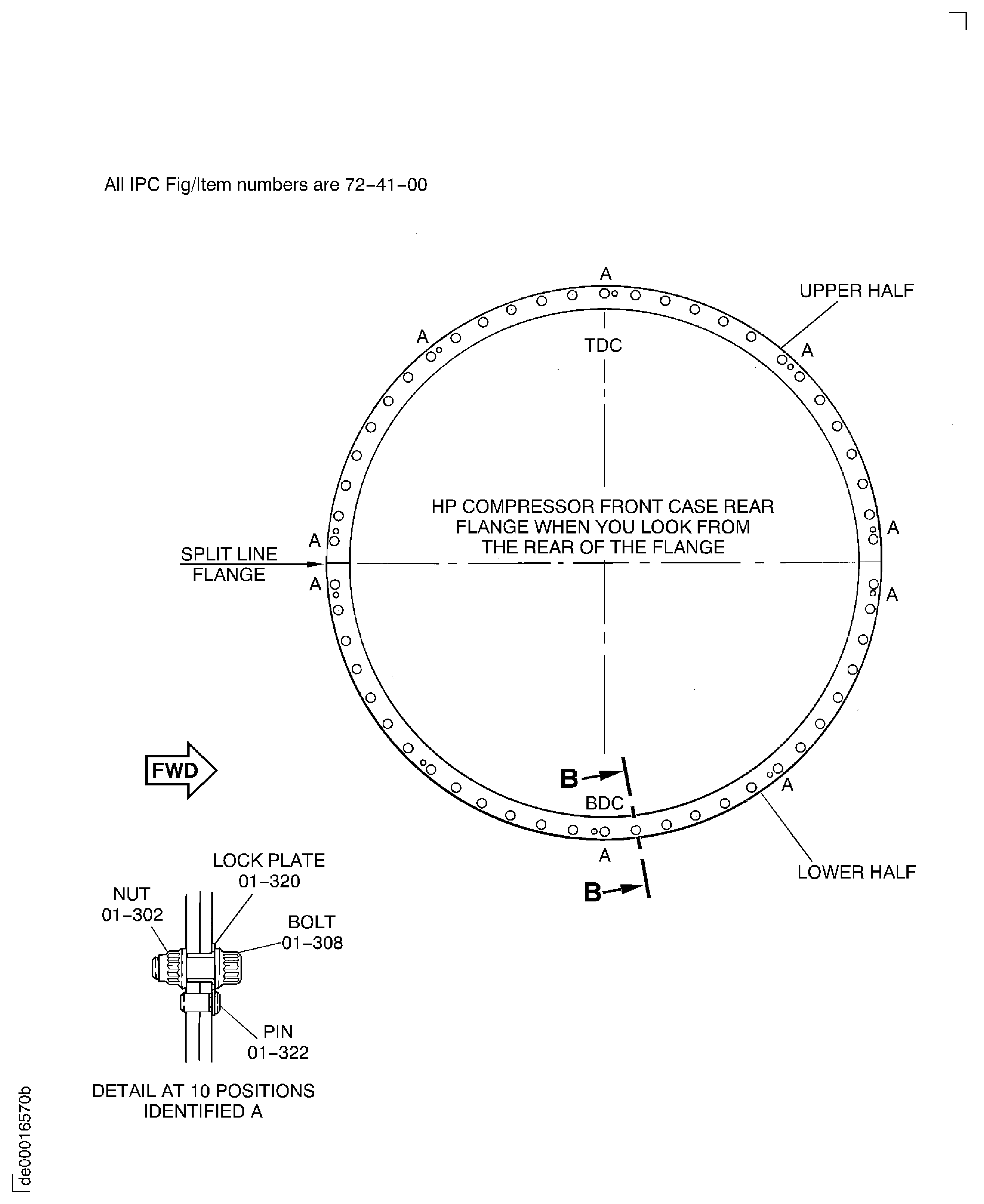
Figure: Remove the HP Compressor Front Case Split Line and Rear Flange Nuts, Bolts and Brackets
Remove the HP Compressor Front Case Split Line and Rear Flange Nuts, Bolts and Brackets
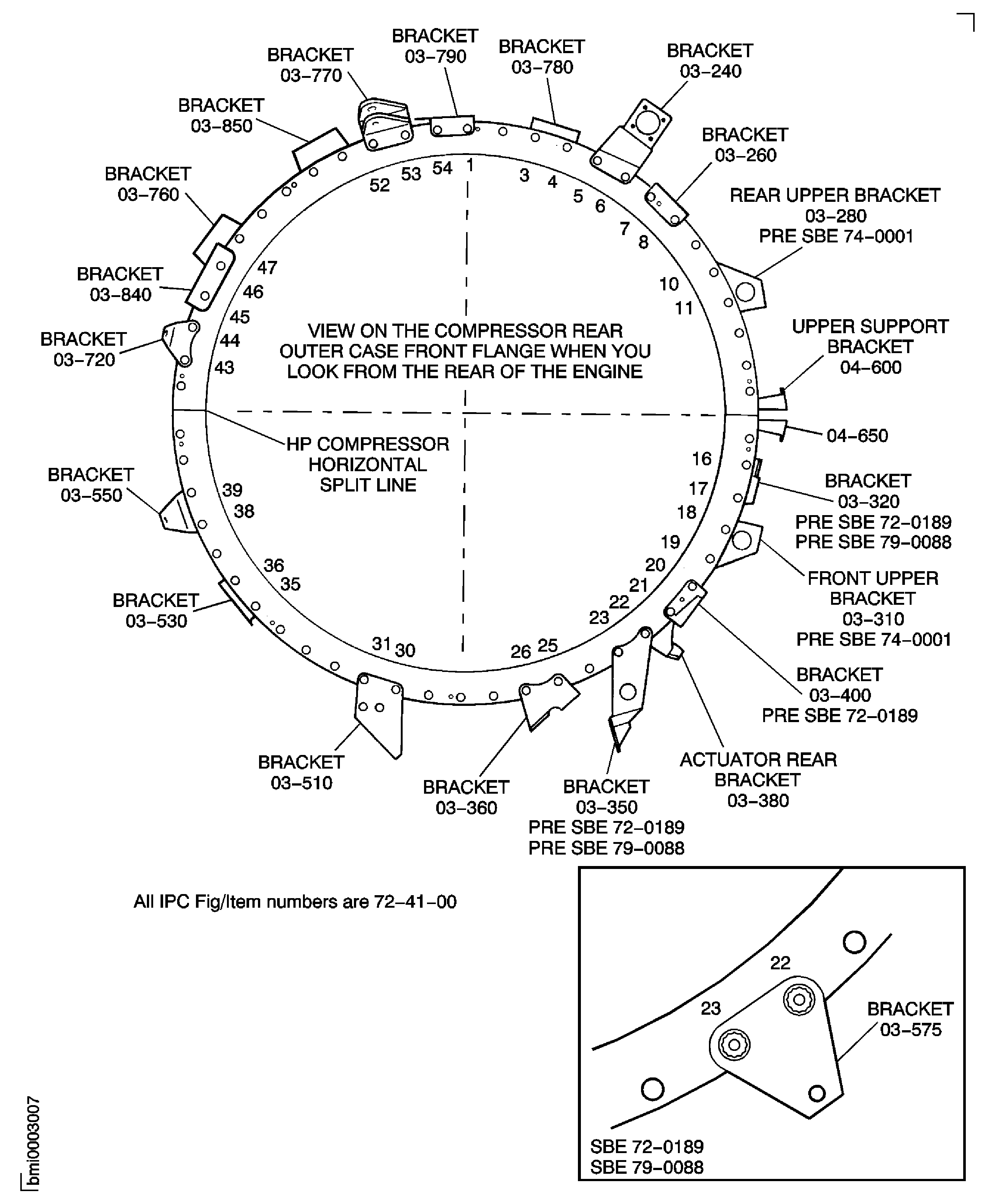
Figure: Pre SBE 72-0189 and SBE 79-0088: Remove the HP Compressor Front Case Split Line and Rear Flange Nuts, Bolts and Brackets
Pre SBE 72-0189 and SBE 79-0088: Remove the HP Compressor Front Case Split Line and Rear Flange Nuts, Bolts and Brackets
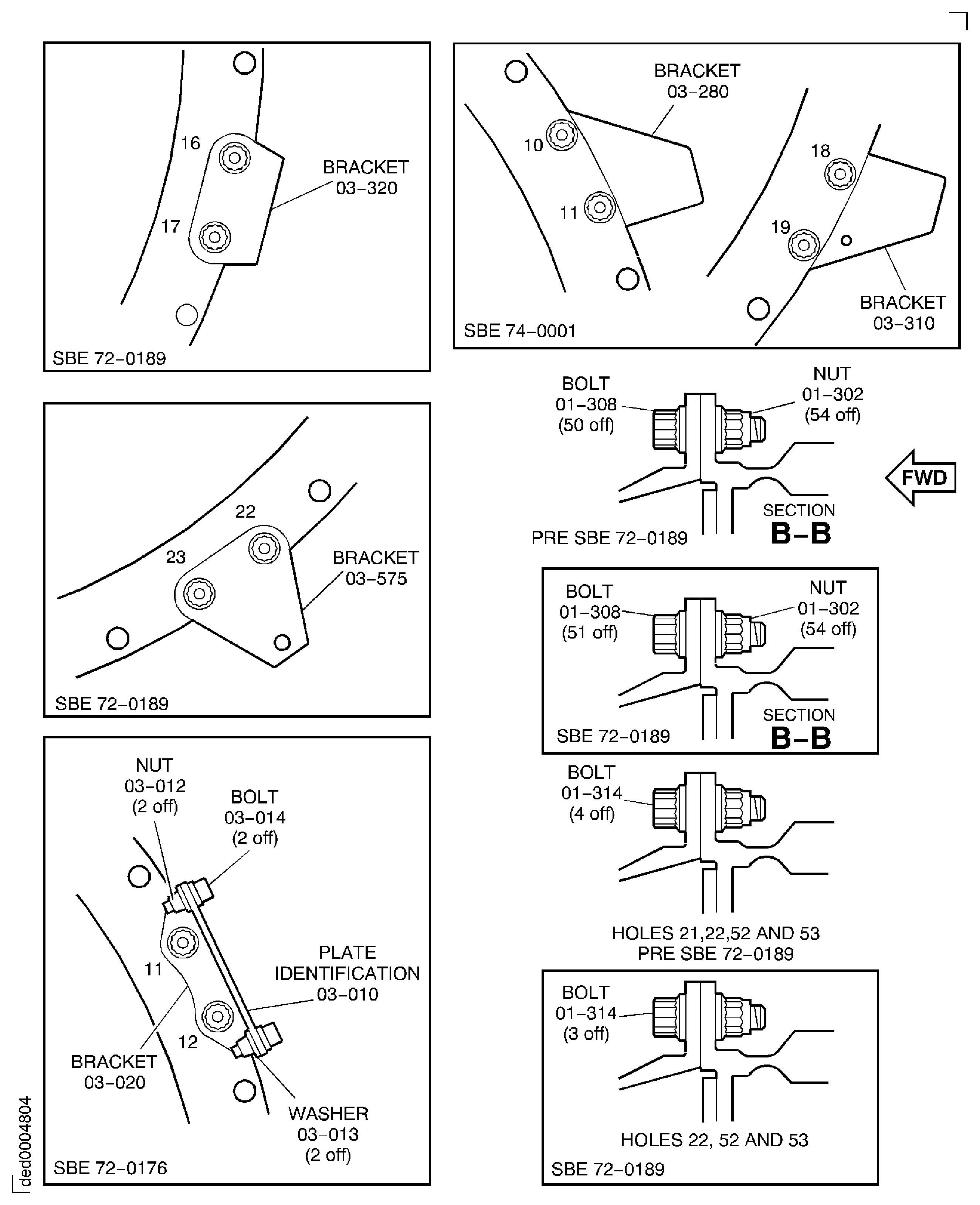
Figure: Pre SBE 72-0189 and SBE 79-0088: Remove the HP Compressor Front Case Split Line and Rear Flange Nuts, Bolts and Brackets
Pre SBE 72-0189 and SBE 79-0088: Remove the HP Compressor Front Case Split Line and Rear Flange Nuts, Bolts and Brackets
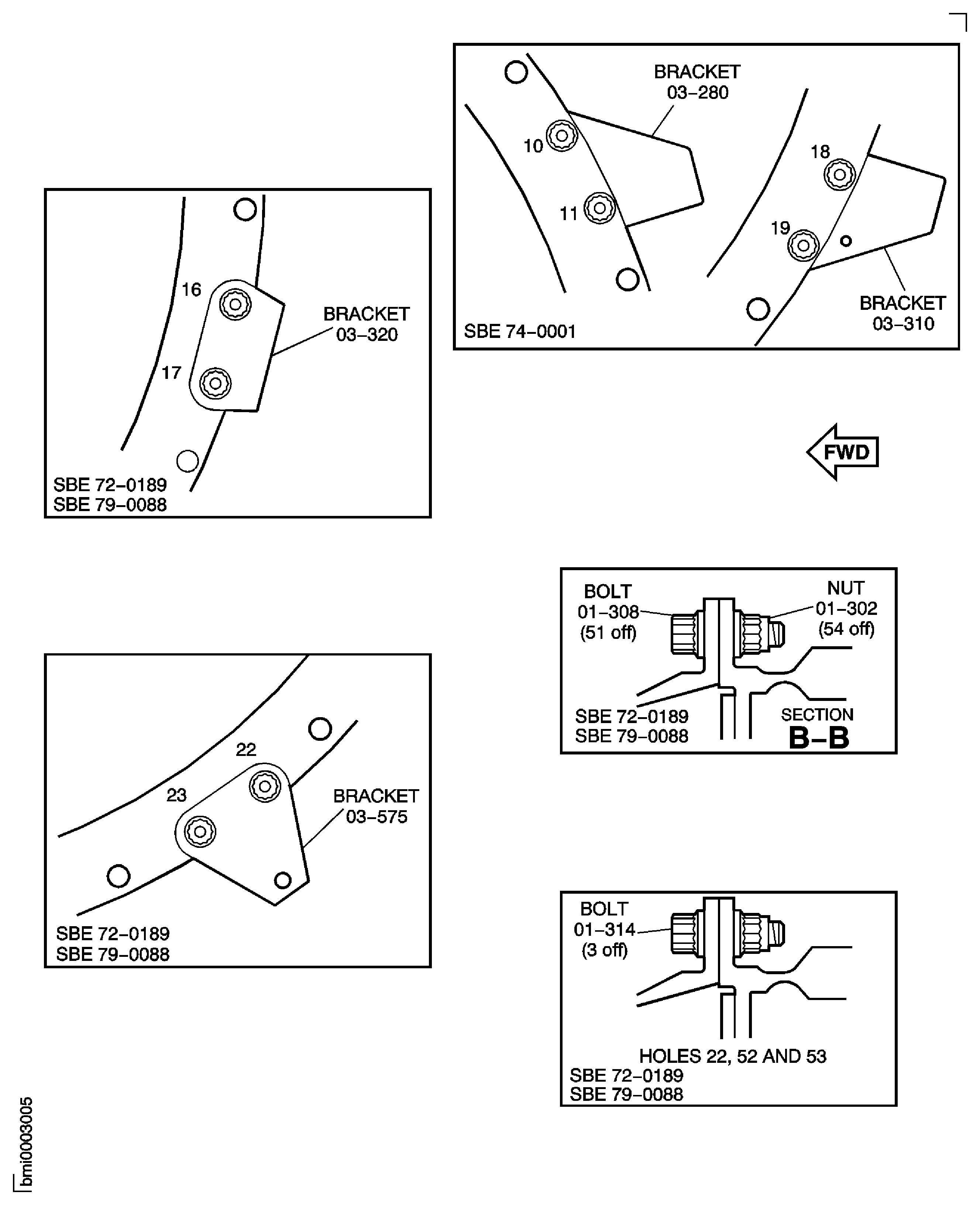
Figure: Remove the HP Compressor Front Case
Remove the HP Compressor Front Case
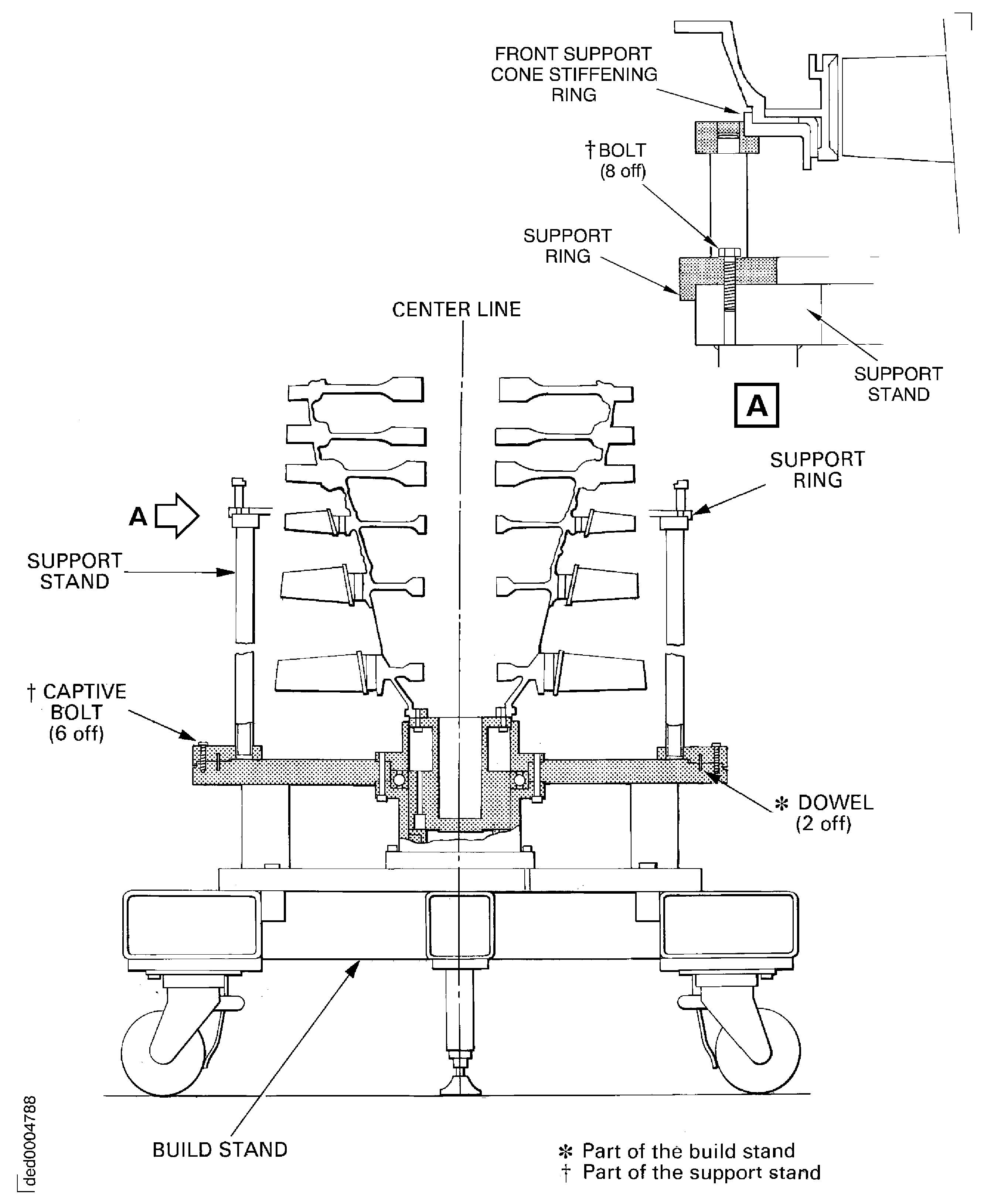
Figure: Remove the cross key location segments and the rear seal housing
Remove the cross key location segments and the rear seal housing
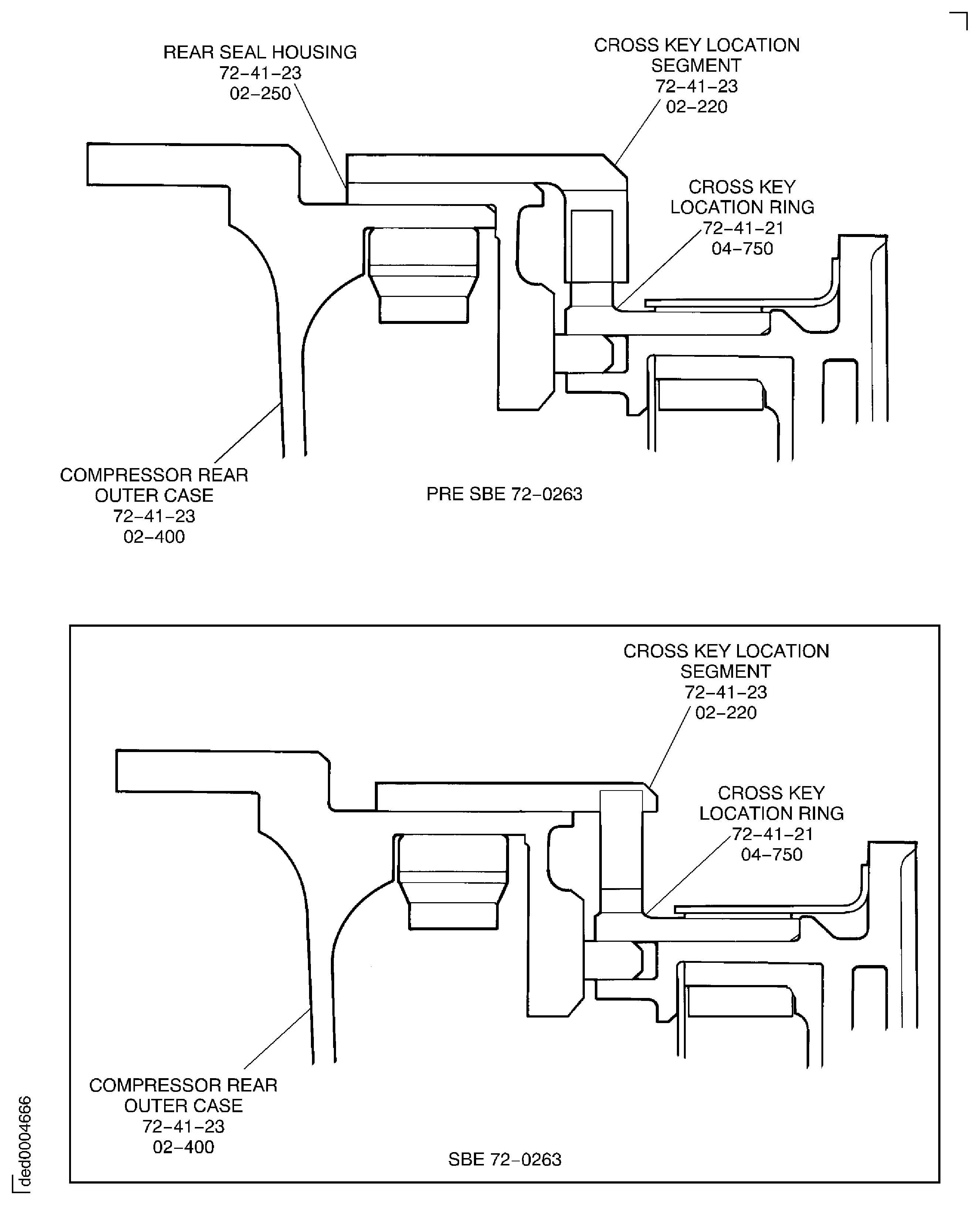
Figure: Remove the borescope access blank plugs and the cover
Remove the borescope access blank plugs and the cover
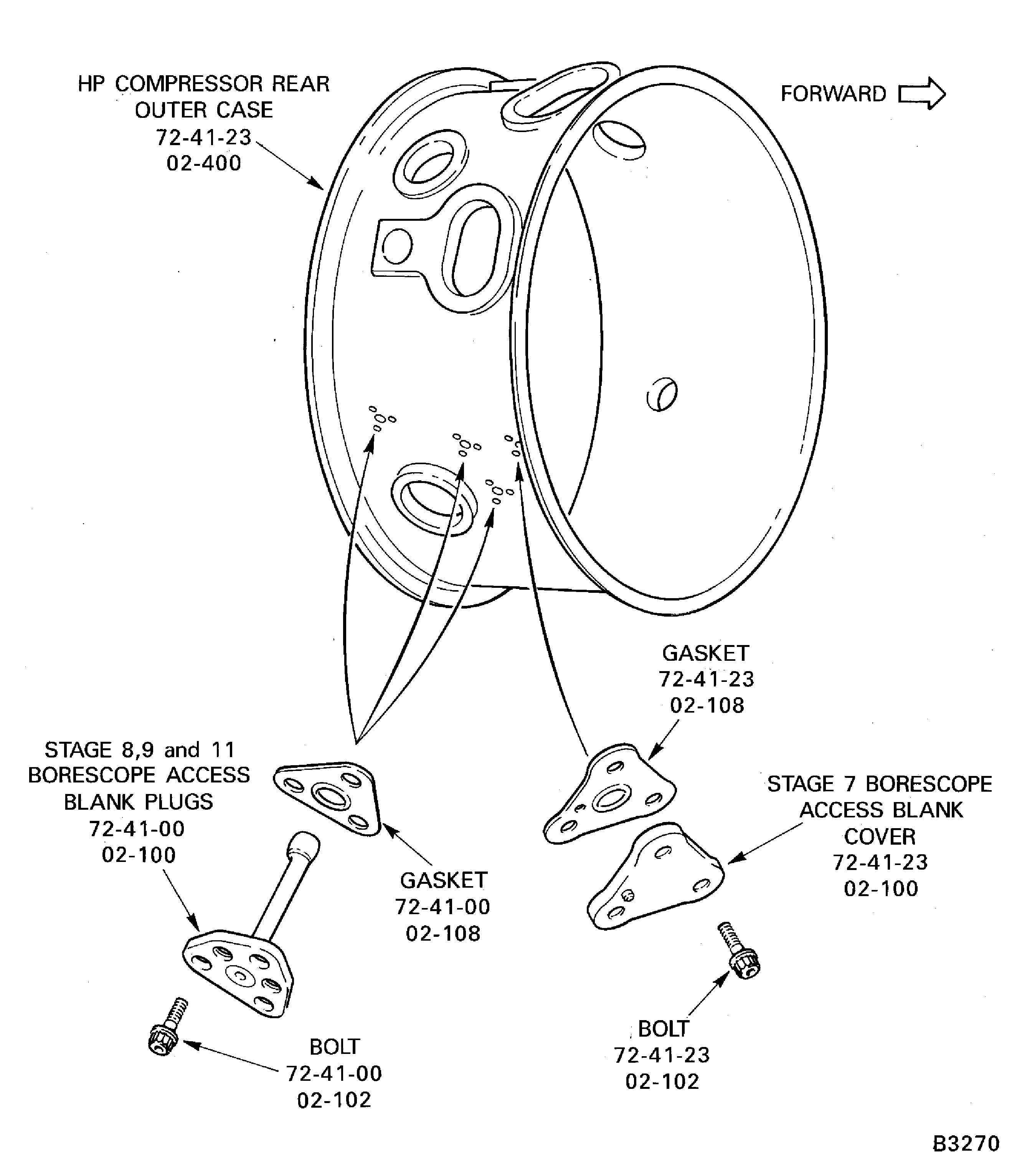
Figure: Remove the compressor rear outer case
Remove the compressor rear outer case
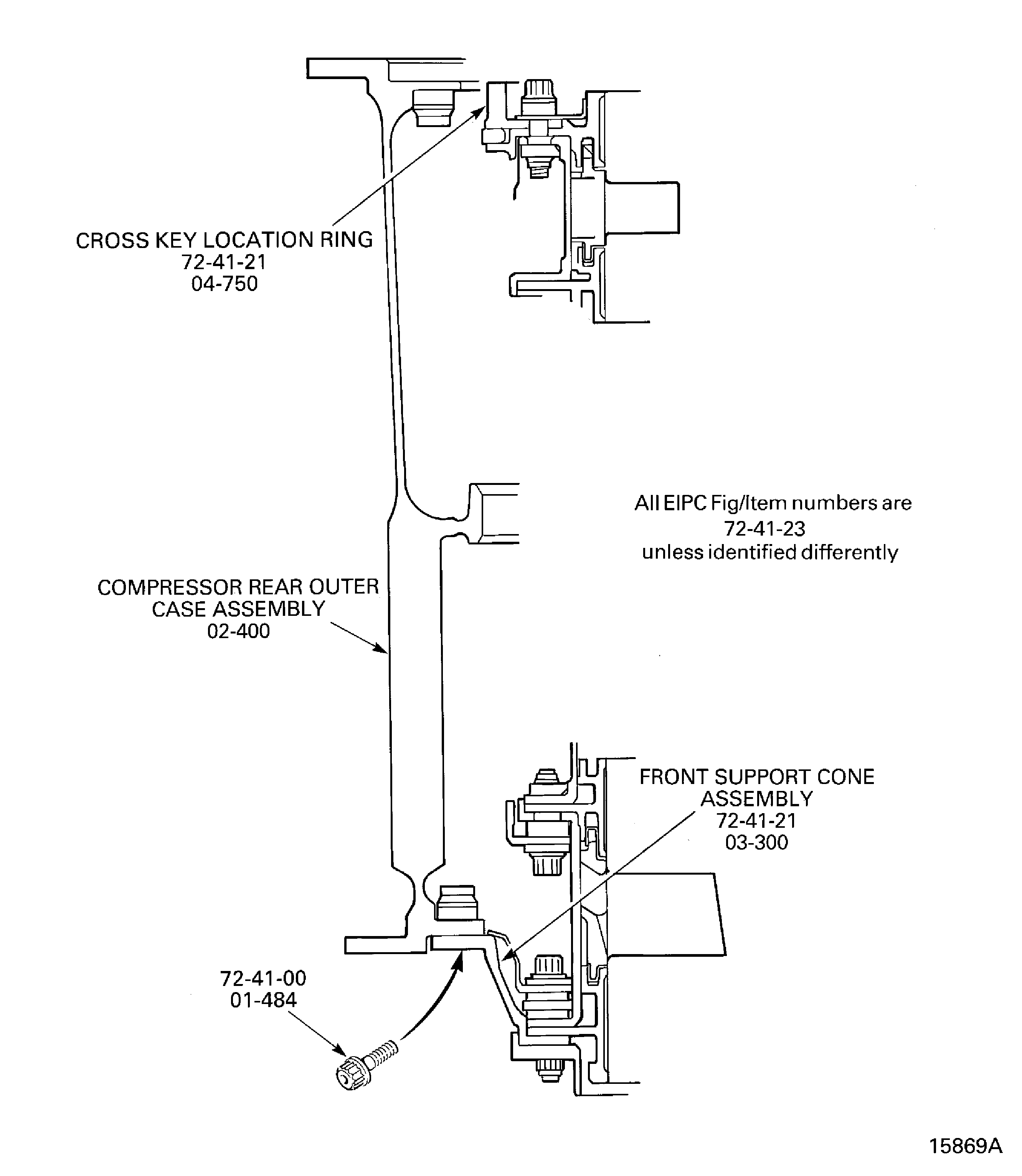
Figure: SBE 72-0280, Pre SBE 72-0343 and SBE 72-0343 : Remove the Stage 12 Rotor Path Heatshields and the Cross Key Location Seal Carrier and the Stage 11 Stator Vanes
SBE 72-0280, Pre SBE 72-0343 and SBE 72-0343 : Remove the Stage 12 Rotor Path Heatshields and the Cross Key Location Seal Carrier and the Stage 11 Stator Vanes
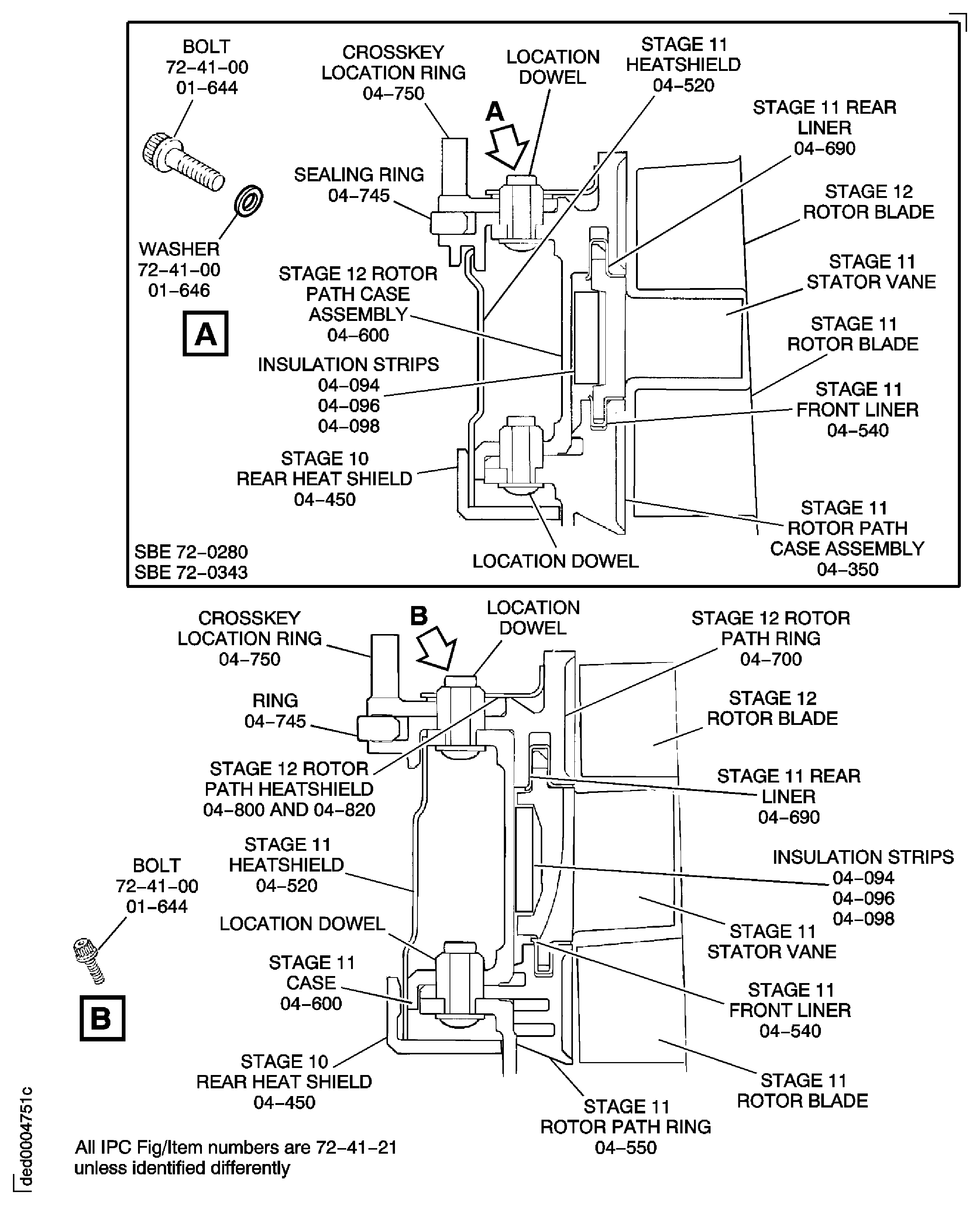
Figure: SBE 72-0280, Pre SBE 72-0343, SBE 72-0343 and SBE 72-0477: Remove the Stage 12 Rotor Path Heatshields and the Cross Key Location Seal Carrier and the Stage 11 Stator Vanes
SBE 72-0280, Pre SBE 72-0343, SBE 72-0343 and SBE 72-0477: Remove the Stage 12 Rotor Path Heatshields and the Cross Key Location Seal Carrier and the Stage 11 Stator Vanes
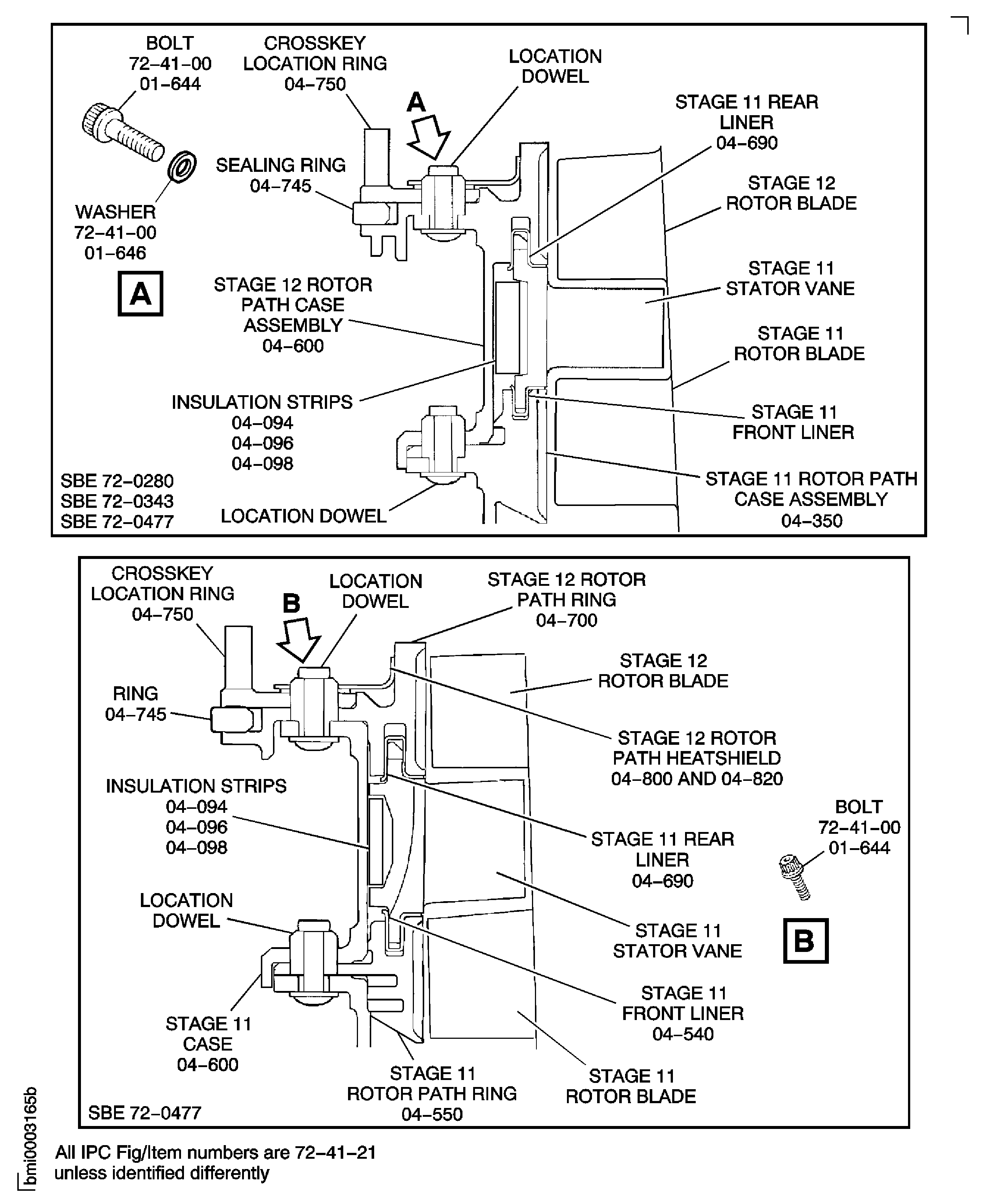
Figure: Tools to Remove the Rotor Path Rings and Cases
Tools to Remove the Rotor Path Rings and Cases
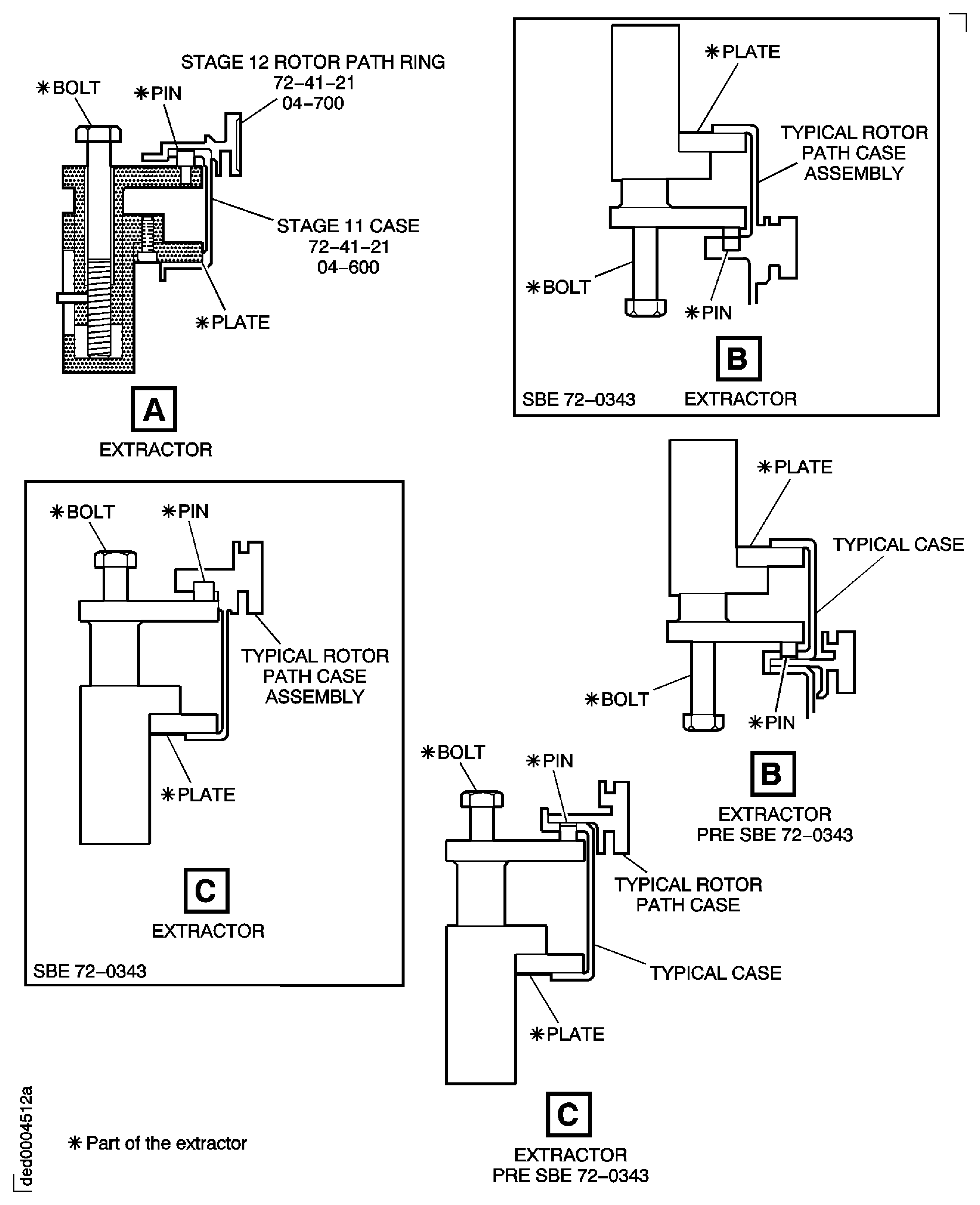
Figure: Pre SBE 72-0343, SBE 72-0343 and Pre SBE 72-0477: Remove the Stage 10 Case, Stator Vanes and Rotor Path Ring
Pre SBE 72-0343, SBE 72-0343 and Pre SBE 72-0477: Remove the Stage 10 Case, Stator Vanes and Rotor Path Ring
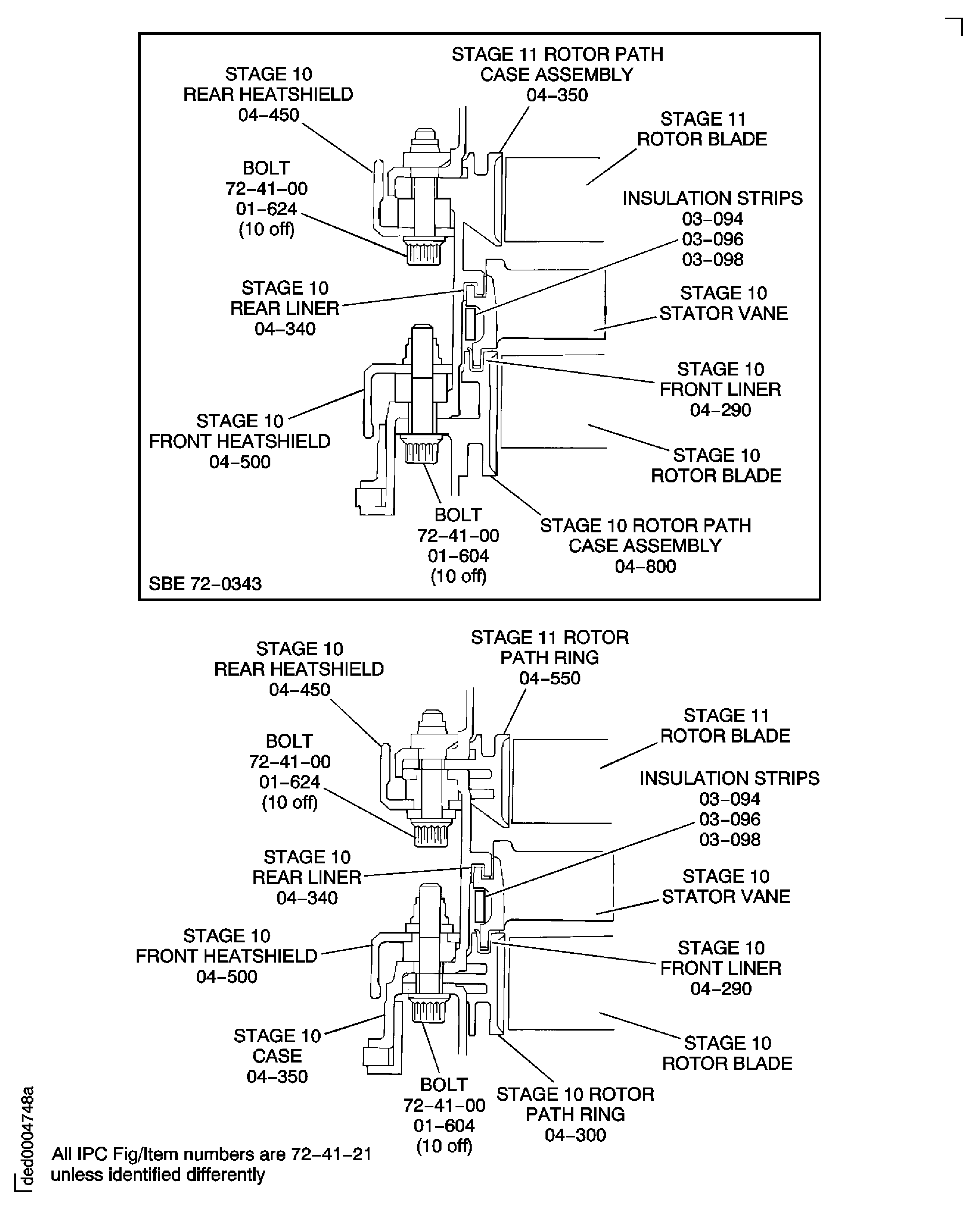
Figure: Pre SBE 72-0343, SBE 72-0343 and SBE 72-0477: Remove the Stage 10 Case, Stator Vanes and Rotor Path Ring
Pre SBE 72-0343, SBE 72-0343 and SBE 72-0477: Remove the Stage 10 Case, Stator Vanes and Rotor Path Ring
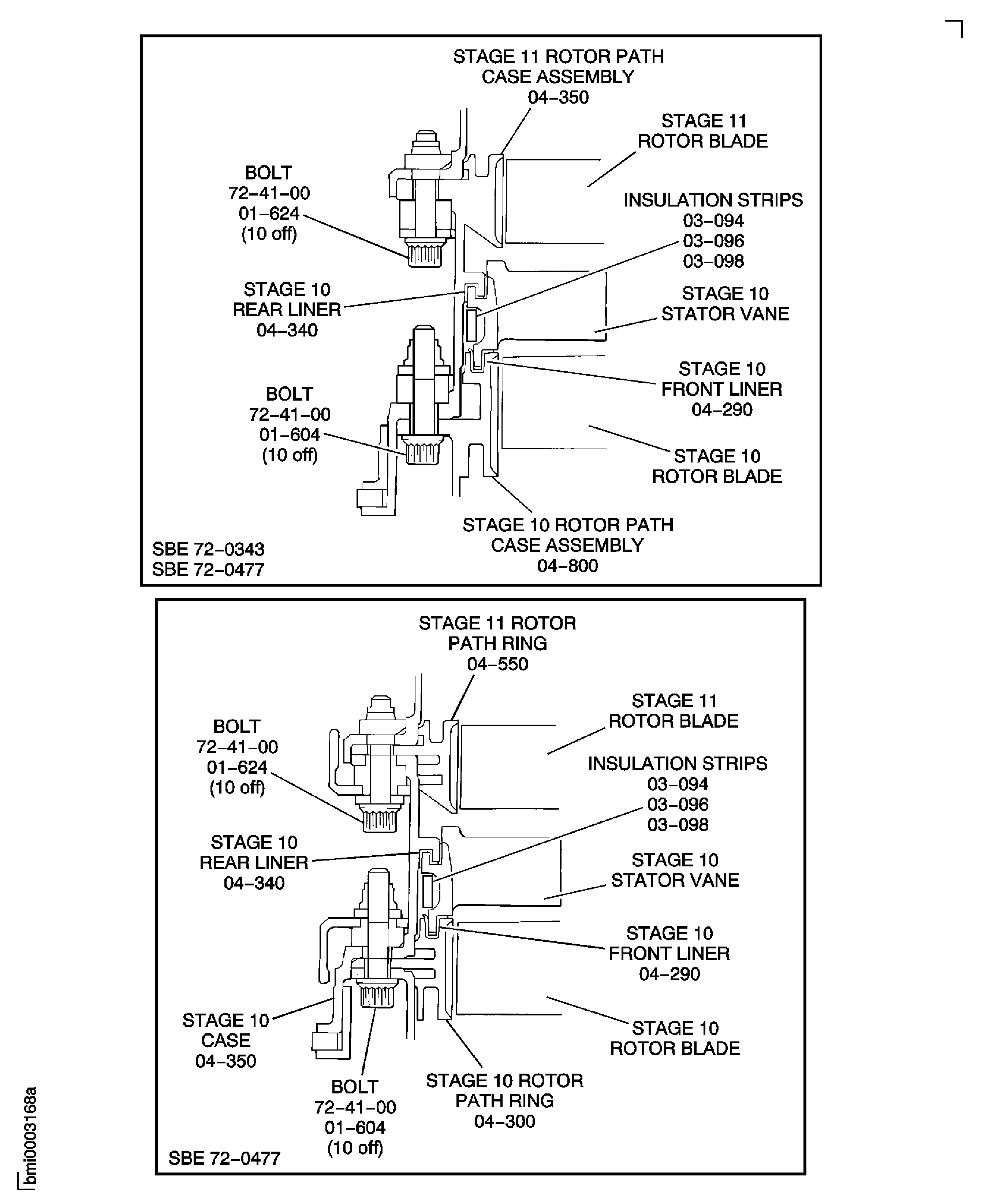
Figure: Pre SBE 72-0343, SBE 72-0343 and Pre SBE 72-0477: Remove the Stage 9 Case, Rotor Path Ring and Stator Vanes
Pre SBE 72-0343, SBE 72-0343 and Pre SBE 72-0477: Remove the Stage 9 Case, Rotor Path Ring and Stator Vanes
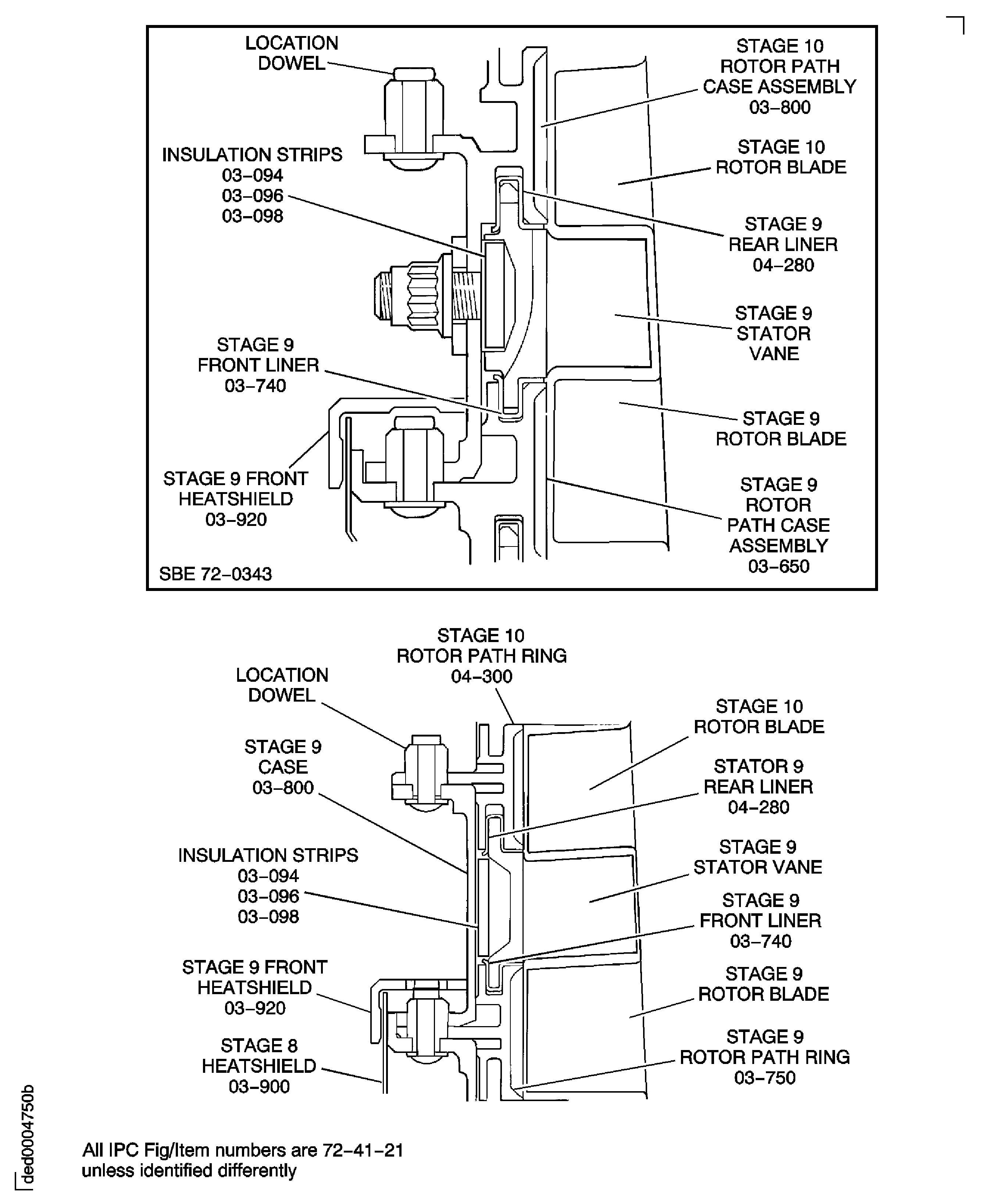
Figure: Pre SBE 72-0343, SBE 72-0343 and SBE 72-0477: Remove the Stage 9 Case, Rotor Path Ring and Stator Vanes
Pre SBE 72-0343, SBE 72-0343 and SBE 72-0477: Remove the Stage 9 Case, Rotor Path Ring and Stator Vanes

Figure: Pre SBE 72-0343, SBE 72-0343 and Pre SBE 72-0477: Remove the Stage 8 Case, Rotor Path Ring, Stator Vanes and the Stage 7 Case
Pre SBE 72-0343, SBE 72-0343 and Pre SBE 72-0477: Remove the Stage 8 Case, Rotor Path Ring, Stator Vanes and the Stage 7 Case
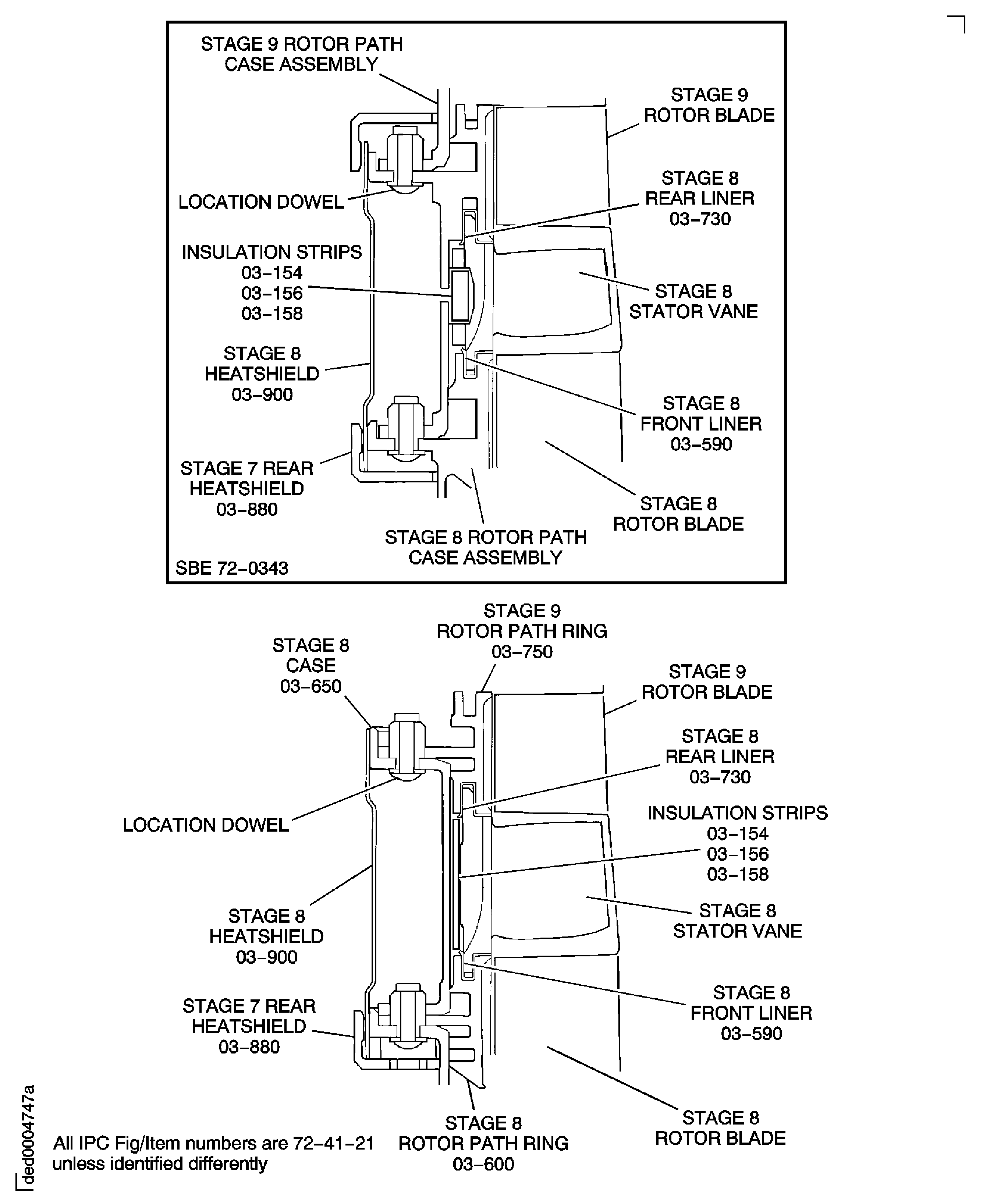
Figure: Pre SBE 72-0343, SBE 72-0343 and SBE 72-0477: Remove the Stage 8 Case, Rotor Path Ring, Stator Vanes and the Stage 7 Case
Pre SBE 72-0343, SBE 72-0343 and SBE 72-0477: Remove the Stage 8 Case, Rotor Path Ring, Stator Vanes and the Stage 7 Case

Figure: SBE 72-0280, Pre SBE 72-0296, SBE 72-0296, Pre SBE 72-0343 and SBE 72-0343: Remove the Stage 8 Case, Rotor Path Ring, Stator Vanes and the Stage 7 Case
SBE 72-0280, Pre SBE 72-0296, SBE 72-0296, Pre SBE 72-0343 and SBE 72-0343: Remove the Stage 8 Case, Rotor Path Ring, Stator Vanes and the Stage 7 Case
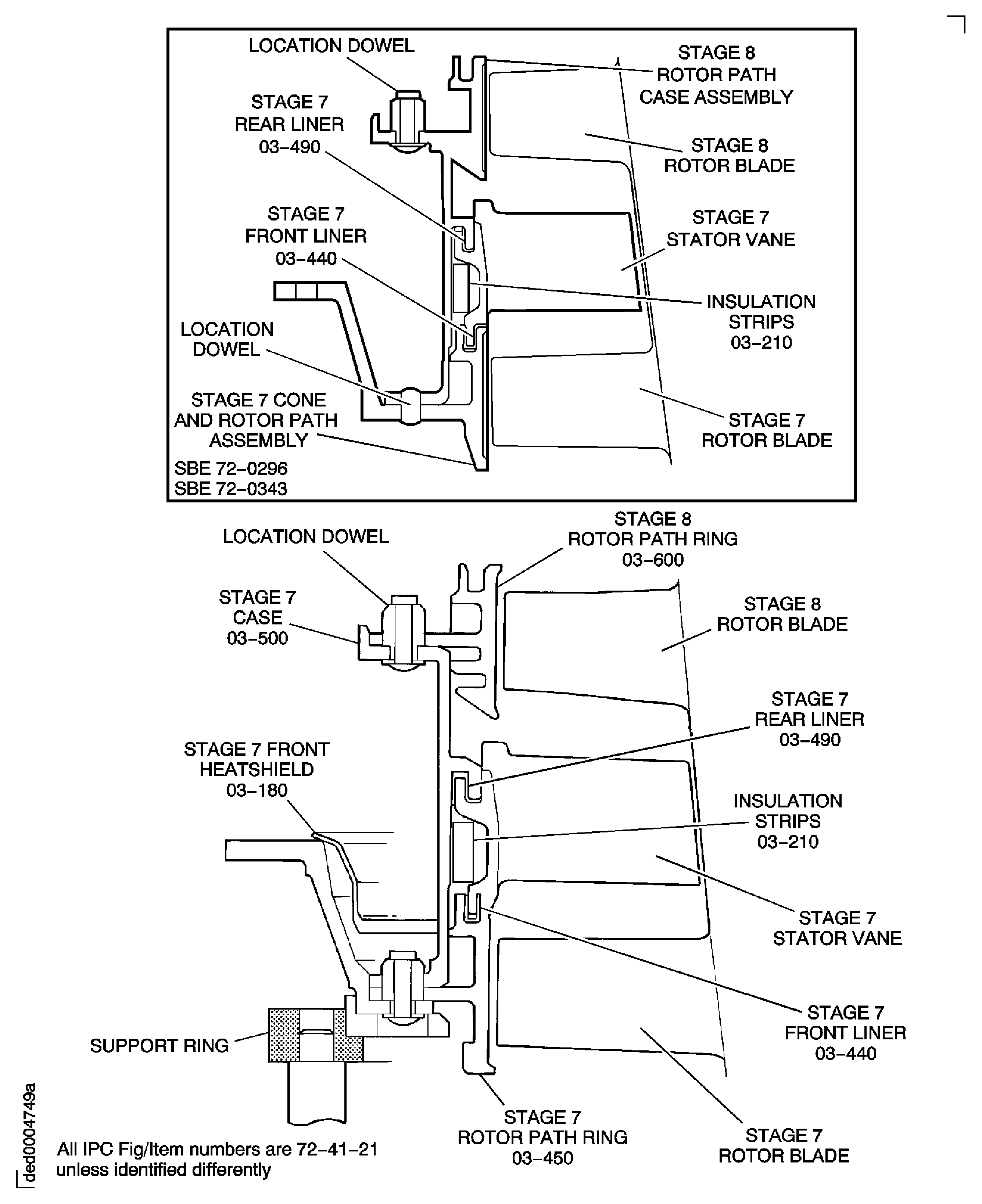
Figure: Pre SBE 72-0296: Tools to Remove the Rotor Path Rings and Cases
Pre SBE 72-0296: Tools to Remove the Rotor Path Rings and Cases
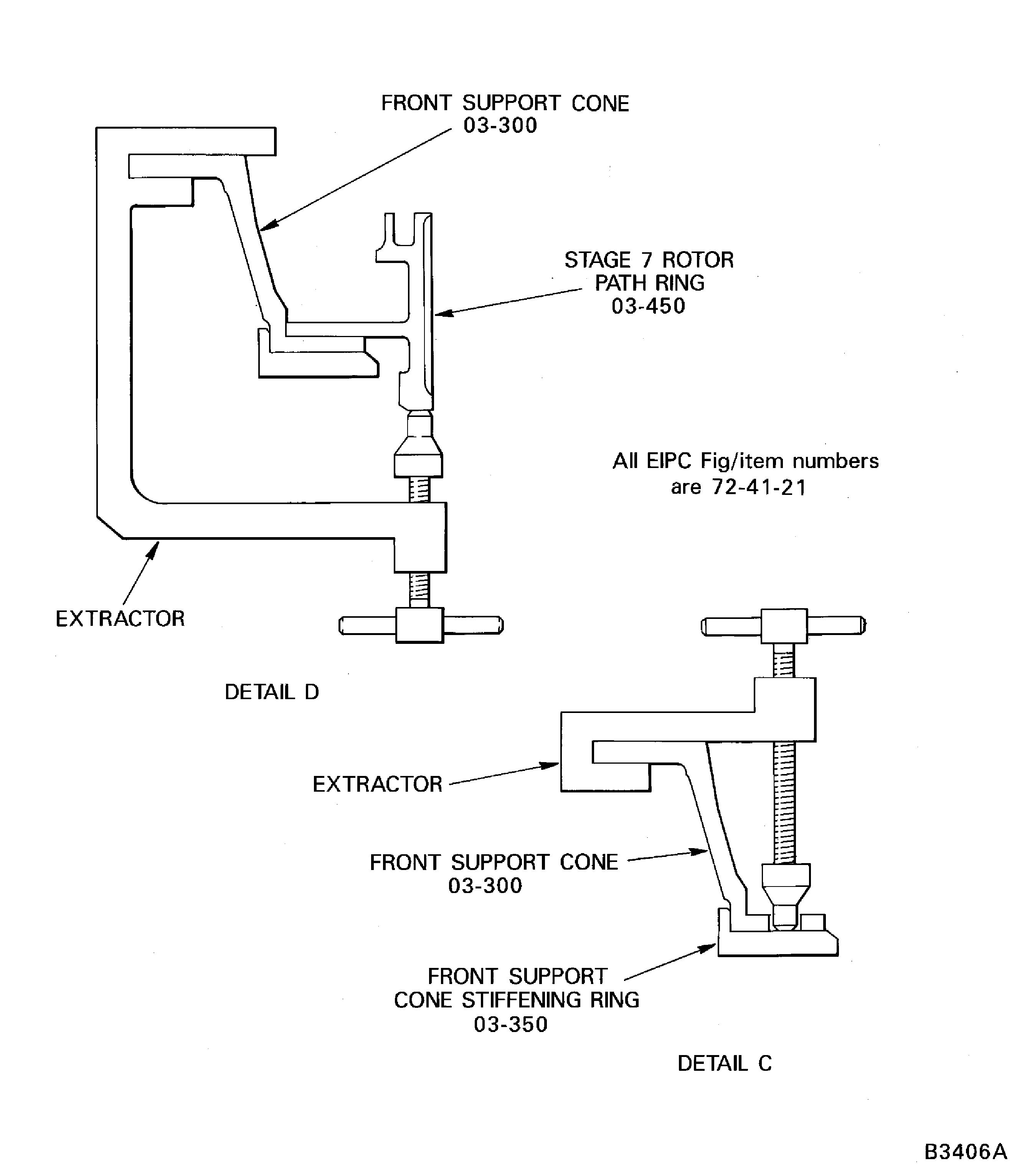
Figure: Pre SBE 72-0296, SBE 72-0296, Pre SBE 72-0343 and SBE 72-0343: Tools to Remove the Rotor Path Rings and Cases
Pre SBE 72-0296, SBE 72-0296, Pre SBE 72-0343 and SBE 72-0343: Tools to Remove the Rotor Path Rings and Cases
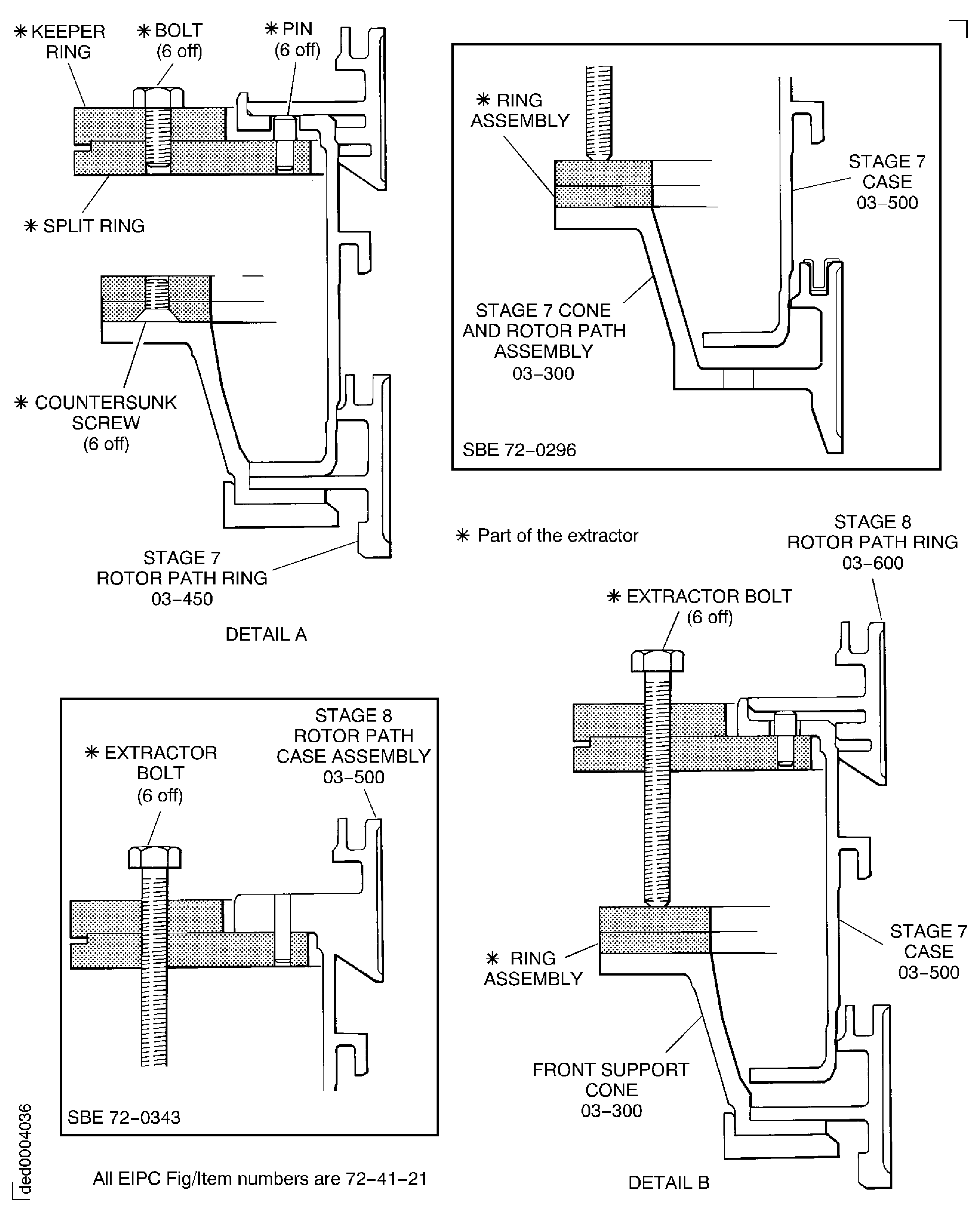
Figure: Pre SBE 72-0296, SBE 72-0296, Pre SBE 72-0343, SBE 72-0343 and SBE 72-0358: Tools to Remove the Rotor Path Rings and Cases
Pre SBE 72-0296, SBE 72-0296, Pre SBE 72-0343, SBE 72-0343 and SBE 72-0358: Tools to Remove the Rotor Path Rings and Cases
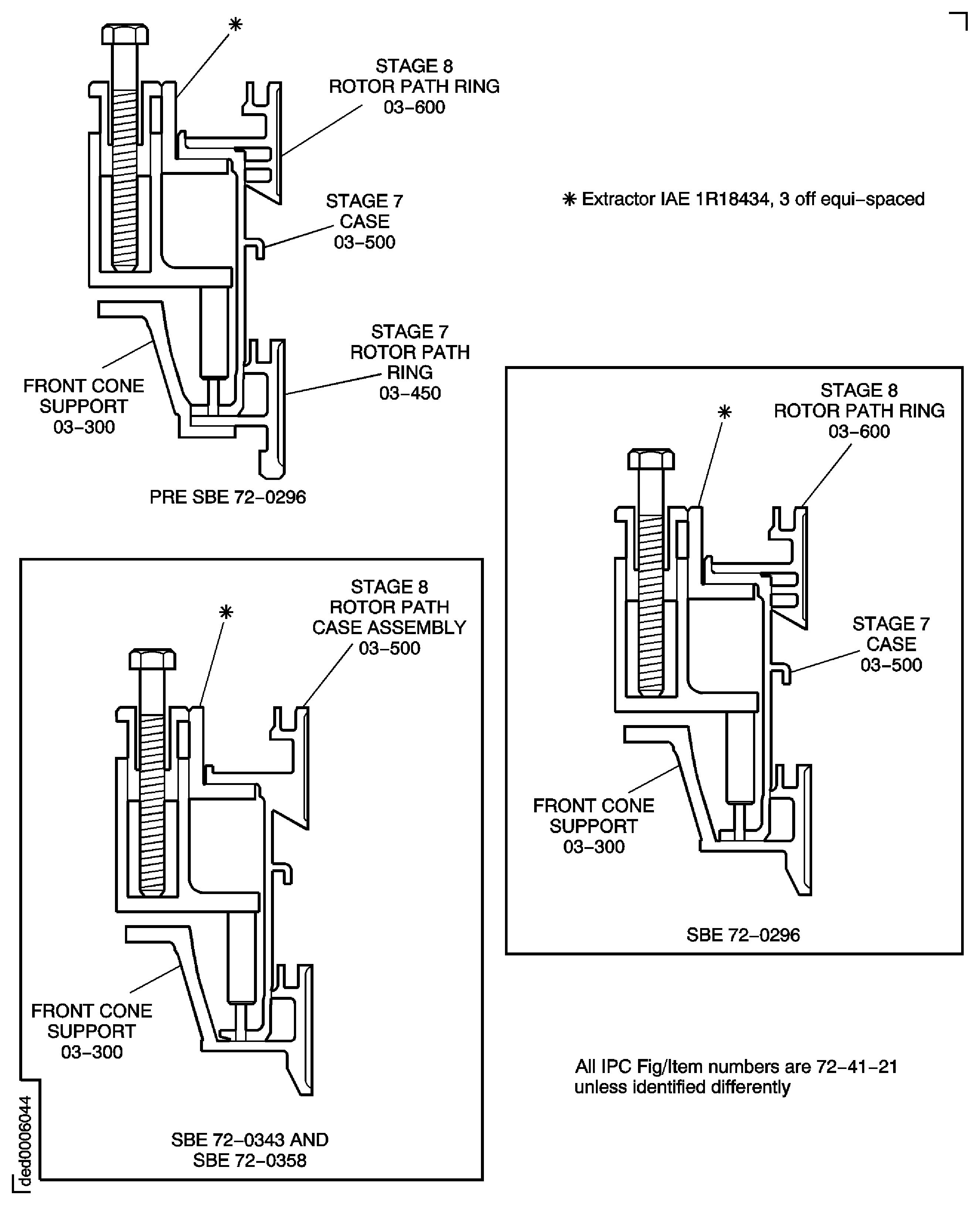
Figure: Tools to Remove the Rotor Path Rings and Cases
Tools to Remove the Rotor Path Rings and Cases

Figure: Tools to Remove the Rotor Path Rings and Cases
Tools to Remove the Rotor Path Rings and Cases

Figure: Pre SBE 72-0296 and SBE 72-0296: Remove the Stage 7 Stator Vanes, Rotor Path Ring and the Front Support Cone
Pre SBE 72-0296 and SBE 72-0296: Remove the Stage 7 Stator Vanes, Rotor Path Ring and the Front Support Cone
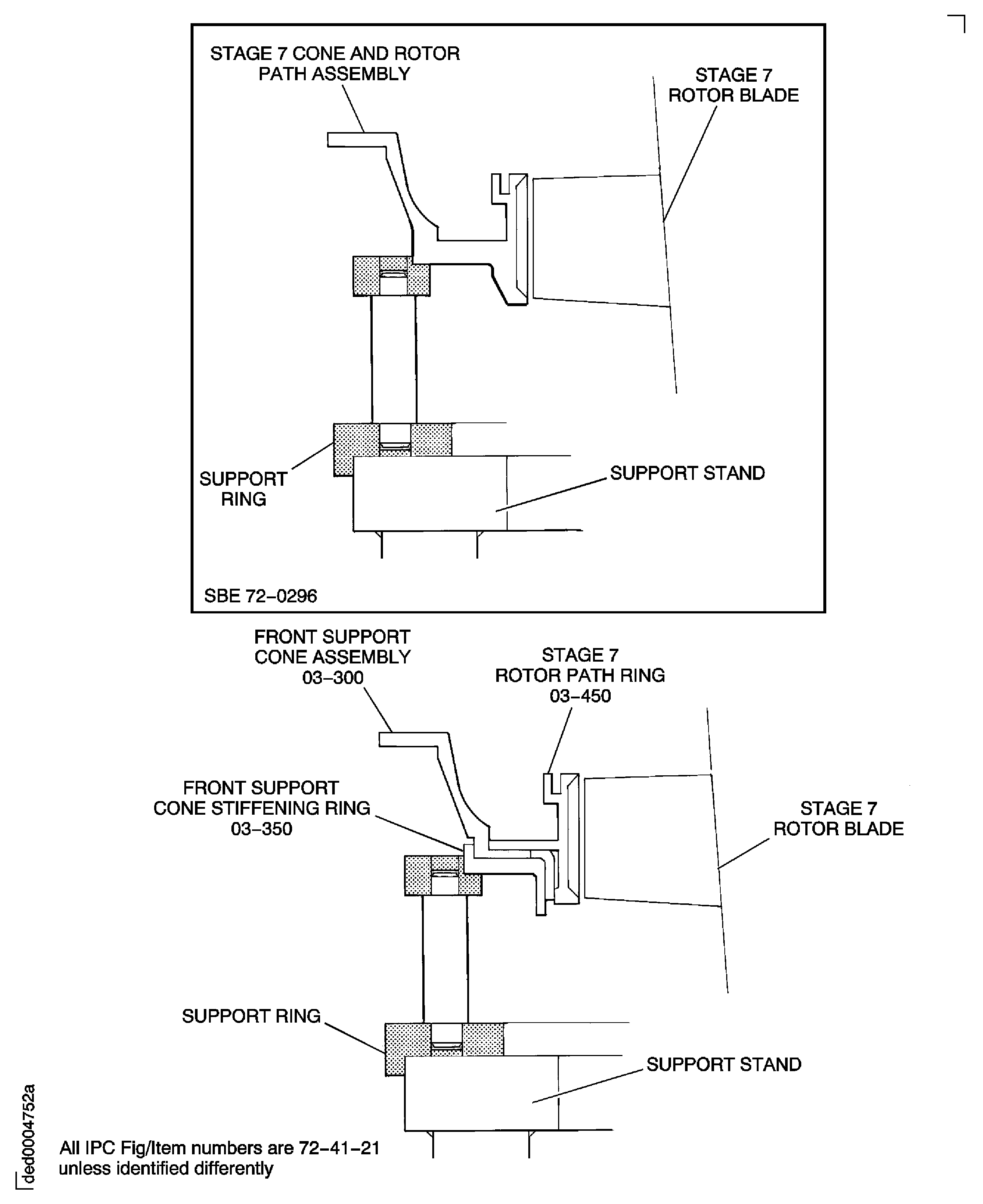
Figure: Install the lift fixture
Install the lift fixture
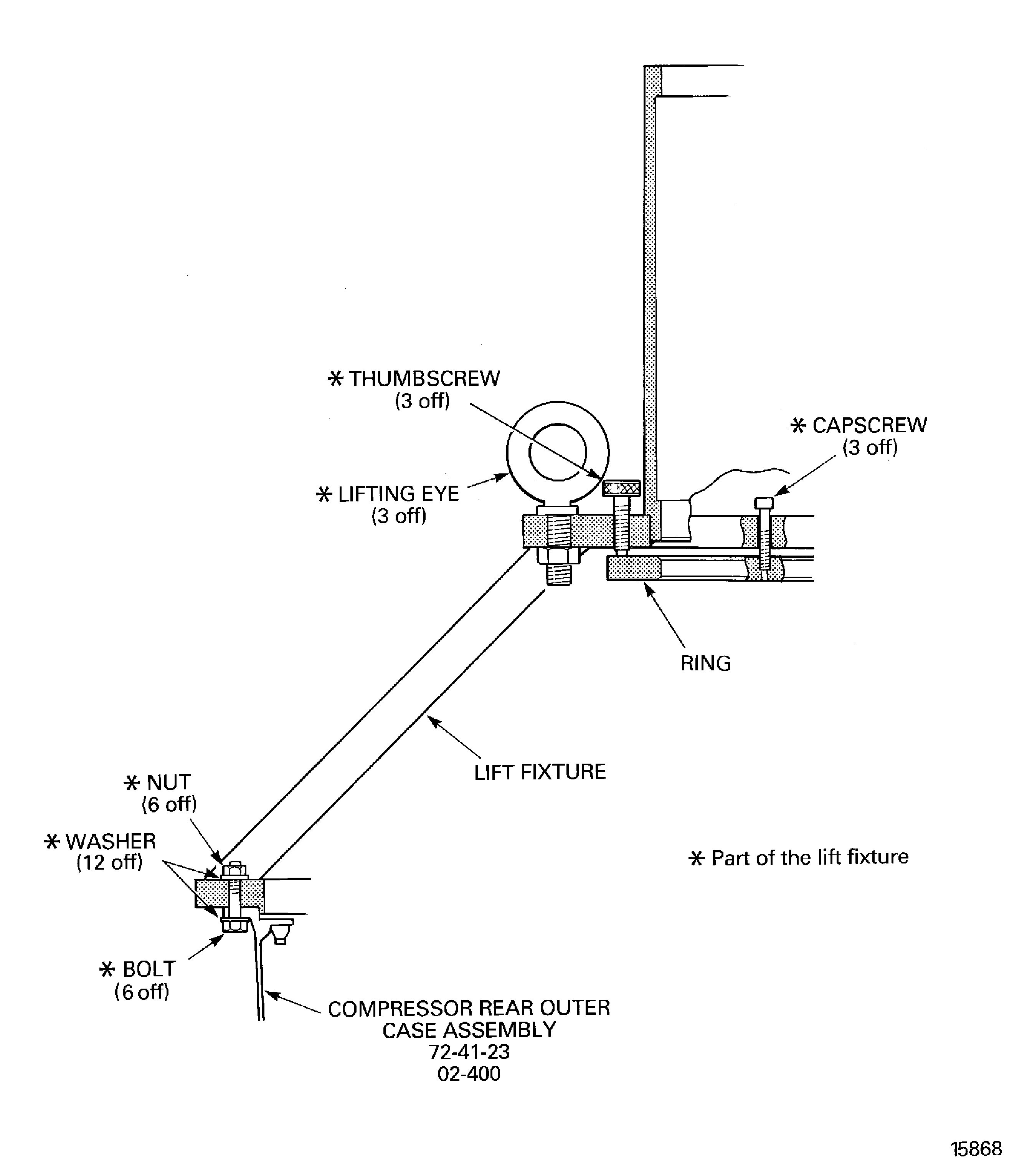
Figure: Measure the stage 7 to 11 rotor path ring radius
Measure the stage 7 to 11 rotor path ring radius
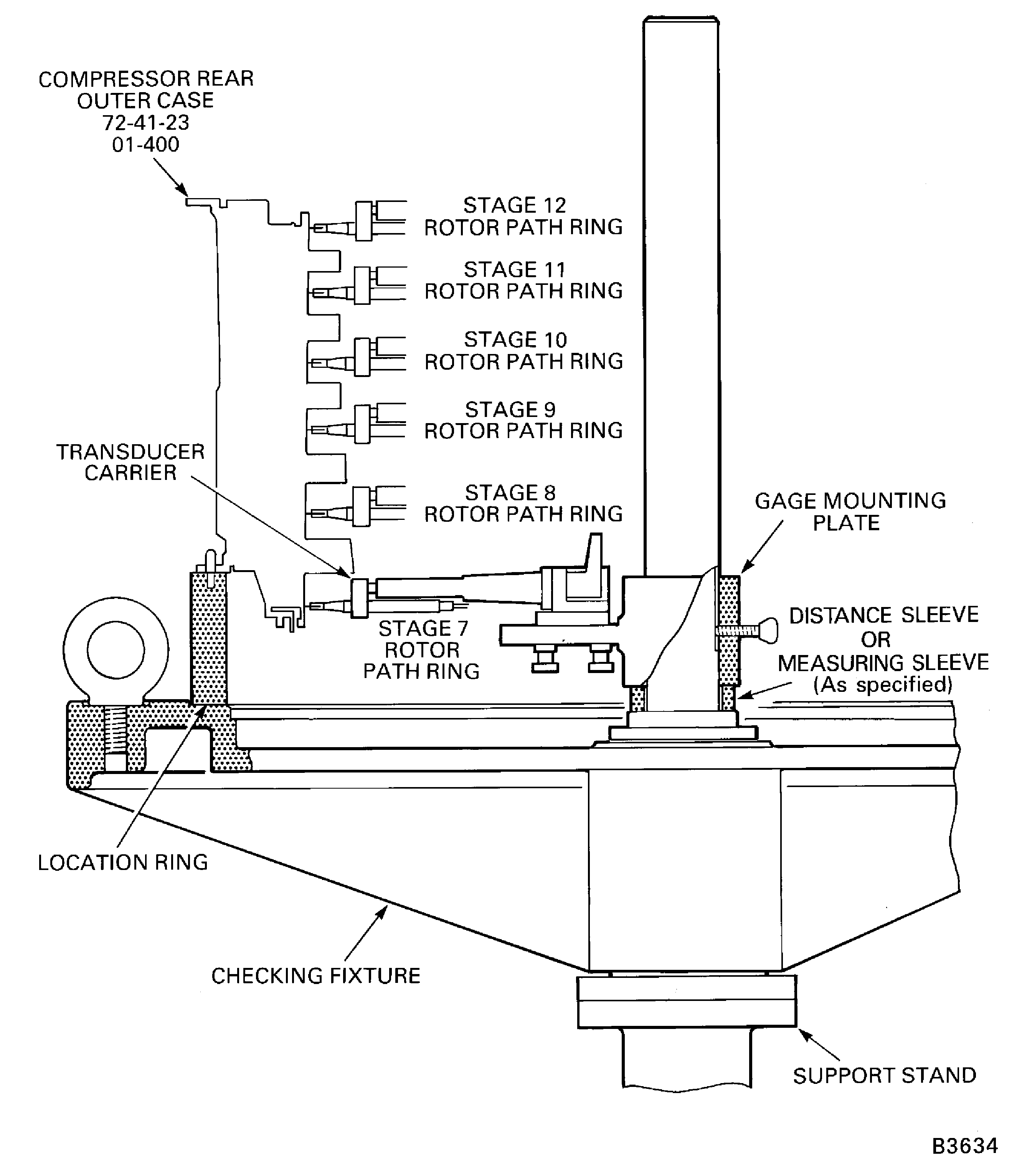
Figure: Set the tools to measure the cases
Set the tools to measure the cases
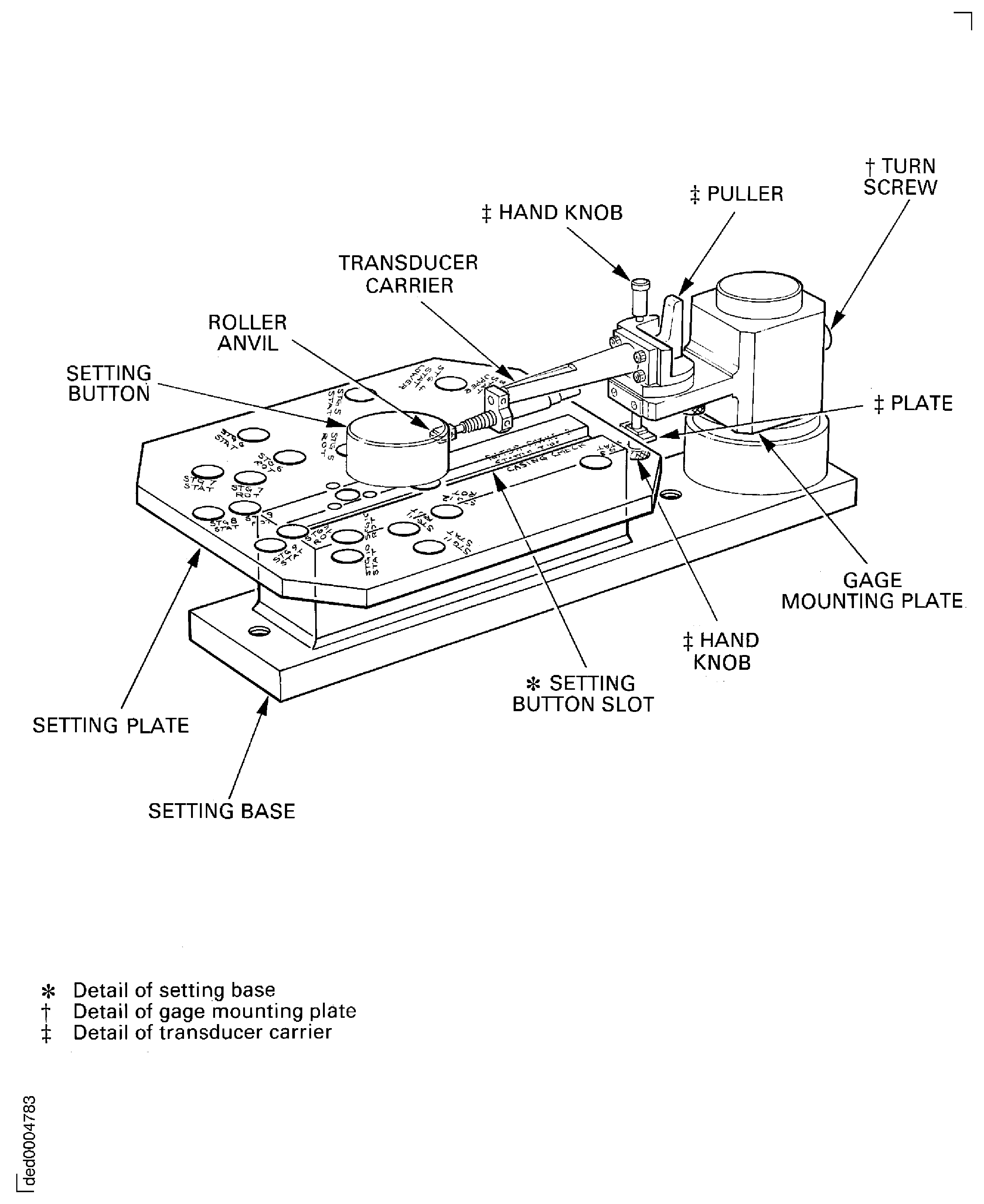
Figure: Measure the stage 7 to 11 stator vane tip radius
Measure the stage 7 to 11 stator vane tip radius
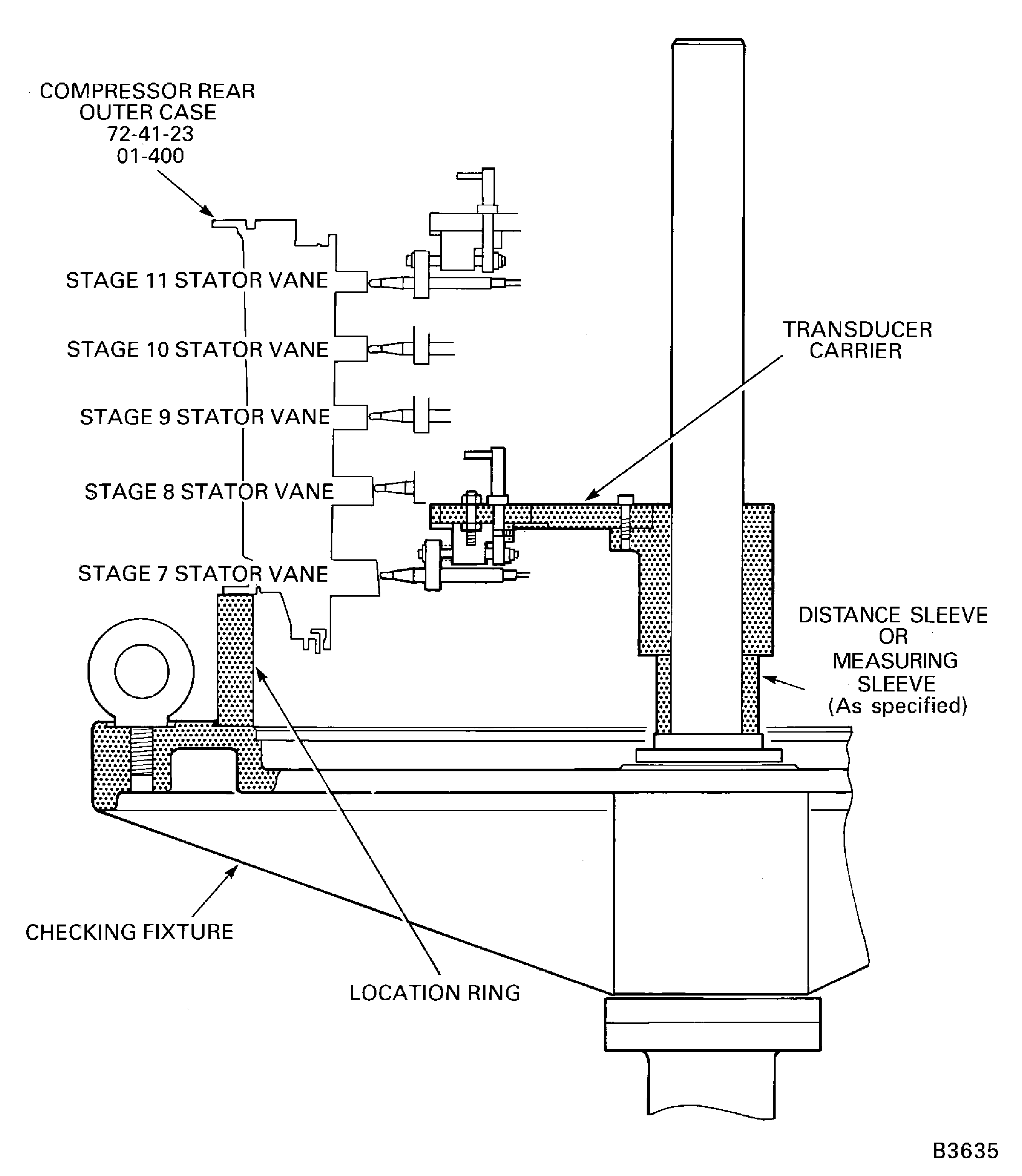
Figure: Measure the stage 3 to 6 rotor path radius
Measure the stage 3 to 6 rotor path radius
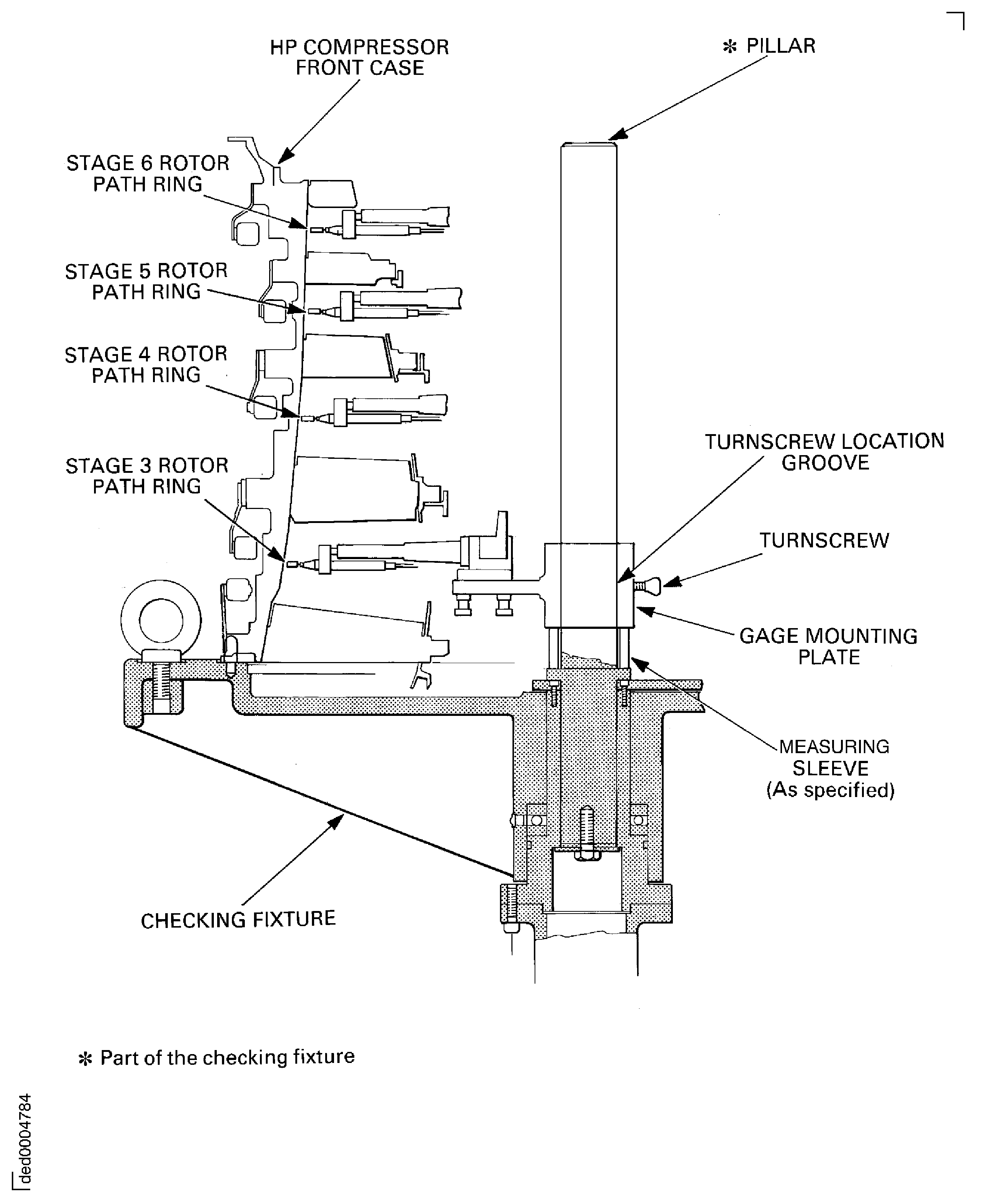
Figure: Measure the stator vane tip radius
Measure the stator vane tip radius