
Export Control
EAR Export Classification: Not subject to the EAR per 15 C.F.R. Chapter 1, Part 734.3(b)(3), except for the following Service Bulletins which are currently published as EAR Export Classification 9E991: SBE70-0992, SBE72-0483, SBE72-0580, SBE72-0588, SBE72-0640, SBE73-0209, SBE80-0024 and SBE80-0025.Copyright
© IAE International Aero Engines AG (2001, 2014 - 2021) The information contained in this document is the property of © IAE International Aero Engines AG and may not be copied or used for any purpose other than that for which it is supplied without the express written authority of © IAE International Aero Engines AG. (This does not preclude use by engine and aircraft operators for normal instructional, maintenance or overhaul purposes.).Applicability
Post SBE 72-0564 AND Post SBE 72-0571 (SELECTONE PRODUCTION STANDARD)
Common Information
TASK 72-41-00-440-004-C00 HPC Assembly - Install The HPC Front Cases (Post HPC Surgical Strike Procedure), Special Procedure-004 - SBE 72-0564 And SBE 72-0571 (SelectOne Production Standard)
Standard equipment
Dial test indicators - 6 off
Dial test indicator stands/blocks and associated equipment
Torch
Consumable materials
Lockwire | |
Lockwire | |
Safety cable | |
Safety cable | |
Silicone grease | |
Air drying enamel | |
Cold curing silicone compound | |
Approved engine oils | |
Teflon based lubricant | |
Special tools
Support Pedestal | 2 off | |
Lift Sling | 2 off | |
Vacuum test cart | 1 off | |
Cradle pedestal | 1 off | |
Fixture - remove/install | 1 off | |
Leak check adapter | 1 off | |
Leak check cap | 1 off | |
Tie-rod adapter | 1 off | |
Support rod | 3 off | |
Rigging pin | 1 off | |
Trunnion assembly | 2 off | |
Dummy stub shaft | 1 off | |
Stand - surgical strike | 1 off | |
Split ring assembly | 1 off | |
Expendable parts - none
General
This TASK gives the procedure to install the HP compressor front cases on to the HP compressor rotor assembly after the HP Surgical Strike workscope only for engines, which have SBE 72-0564 and SBE 72-0571 (SelectOne Production Standard) incorporated.
Fig/item numbers in parentheses in the procedure agree with those used in the IPC. Only the primary Fig/item numbers are used. For the service bulletin alpha variants refer to the IPC.
For all parts identified in a different Chapter/Section/Subject, the applicable Chapter/Section/Subject comes before the Fig/item numbers.
For standard torque data and procedures refer to the SPM TASK 70-41-00-400-501, SPM TASK 70-41-01-400-501 and SPM TASK 70-41-02-400-501.
Special torque data and assembly tolerances are included in this procedure.
Special limits for the No. 4 bearing compartment are given in this procedure. These limits will apply only to those engines designated for the HPC Surgical Strike Procedure if all Engine Functional Test requirements are maintained as given in Section 71-00-00, including a No. 4 Compartment Scavenge Pressure limit of 145 psig. Test data indicates that engines with a No. 4 compartment vacuum pressure of 17 pph and less will not fail pass off test requirements for P4Scav of 145 psig. Findings that are not in the limits given in this procedure will be cause for engine rejection.
For lockwire data and procedures refer to the SPM TASK 70-42-05-400-501.
For safety cable data and procedures refer to the SPM TASK 70-42-08-400-501.
Lubricate all threads and abutment faces of nuts and bolts with CoMat 10-077 APPROVED ENGINE OILS, unless other lubricants are referred to in the procedure.
During the assembly procedure lubricate the applicable areas of the VSV mechanism for each stage with a thin layer of CoMat 10-108 HIGH PERFORMANCE PENETRATING LUBRICANT WITH TEFLON (R). The following SUBTASK reference is in TASK 72-41-30-440-011-C00 (ASSEMBLY-011, CONFIG-003) refer to SUBTASK 72-41-30-440-255.
To identify, lubricate and install seal rings, refer to the SPM TASK 70-44-01-400-501.
After assembly apply CoMat 07-038 AIR DRYING ENAMELto damaged surface protection, joint flange and attach parts. Use the correct color of the air drying enamel. Refer to the SPM TASK 70-63-02-380-501.
The number for each radial location must be identified in a clockwise direction. These start at the engine top position when you look from the rear of the engine, unless stated differently in the procedure.
For practices and processes referred to in the procedure by the TASK number are in the SPM.
NOTE
NOTE
Preliminary Requirements
Pre-Conditions
NONESupport Equipment
| Name | Manufacturer | Part Number / Identification | Quantity | Remark |
|---|---|---|---|---|
| IAE 1F10028 Support Pedestal | 0AM53 | IAE 1F10028 | ||
| IAE 1F10052 Two cables sling | 0AM53 | IAE 1F10052 | ||
| IAE 6F10030 Vacuum test cart | 0AM53 | IAE 6F10030 | ||
| IAE 1P16002 Cradle pedestal | 0AM53 | IAE 1P16002 | ||
| IAE 1P16046 Removal/Installation fixture | 0AM53 | IAE 1P16046 | ||
| IAE 1P16088 Leak check adapter | 0AM53 | IAE 1P16088 | ||
| IAE 1P16089 Leak check cap | 0AM53 | IAE 1P16089 | ||
| IAE 1P16285 Tie-rod adapter | 0AM53 | IAE 1P16285 | ||
| IAE 1P16543 Removal/Installation fixture | 0AM53 | IAE 1P16543 | ||
| IAE 1R18234 Support rod | 0AM53 | IAE 1R18234 | ||
| IAE 1R18247 Rigging pin | 0AM53 | IAE 1R18247 | ||
| IAE 1R18325 Trunnion assembly | 0AM53 | IAE 1R18325 | ||
| IAE 1R18673 Dummy stub shaft | 0AM53 | IAE 1R18673 | ||
| IAE 1R19633 Split ring assembly | 0AM53 | IAE 1R19633 | ||
| IAE 1R19463 Stand - Surgical strike | 0AM53 | IAE 1R19463 |
Consumables, Materials and Expendables
| Name | Manufacturer | Part Number / Identification | Quantity | Remark |
|---|---|---|---|---|
| CoMat 04-007 SILICONE GREASE | LOCAL | CoMat 04-007 | ||
| CoMat 02-123 LAY-OUT FLUID | K6835 | CoMat 02-123 | ||
| CoMat 02-126 LOCKWIRE | LOCAL | CoMat 02-126 | ||
| CoMat 02-274 SAFETY CABLE KIT | LOCAL | CoMat 02-274 | ||
| CoMat 02-275 SAFETY CABLE KIT | LOCAL | CoMat 02-275 | ||
| CoMat 07-038 AIR DRYING ENAMEL | k3504 | CoMat 07-038 | ||
| CoMat 08-013 COLD CURING SILICONE COMPOUND | LOCAL | CoMat 08-013 | ||
| CoMat 10-077 APPROVED ENGINE OILS | LOCAL | CoMat 10-077 | ||
| CoMat 10-108 HIGH PERFORMANCE PENETRATING LUBRICANT WITH TEFLON (R) | LOCAL | CoMat 10-108 |
Spares
NONESafety Requirements
NONEProcedure
NOTE
The retaining clamp plate assembly will need to be released and moved clear of the jacking screws if the axial settings need to be adjusted.Loosen the locknut on the heel pin (detail 15). Release the hand knob (detail 22) and move the retaining clamp plate assembly clear of the three jacking screws (detail 12).
NOTE
This instrumentation will monitor the true relative movement of the HP rotating components and the static components. This is the critical dimension to be monitored.Put three dial test indicators, spaced equally, on the IAE 1P16046 Removal/Installation fixture or IAE 1P16543 Removal/Installation fixture tooling structure so each dial indicator button contacts the rear surface of the stage 2 retaining plate slot on the stage 2 turbine hub ENGINE-STAGE 2 TURBINE HUB (72-45-31,01-011).
Position the six dial test indicators or equivalent instrumentation measuring devices as follows.
Refer to the record of the readings taken at the six positions with the front half casings removed, refer to TASK 72-41-00-040-001-D00.
Take the readings on the three dial test indicators in contact with each of the three support plates (detail 4). These readings should be the same as the final readings taken during TASK 72-41-00-040-001-D00.
NOTE
This is to make sure that the relative reverse movement during installation is the same as that recorded during the removal of the cases.Take the readings on the three dial test indicators in contact with the rear surface of the stage 2 retaining plate slot on the stage 2 turbine hub ENGINE-STAGE 2 TURBINE HUB (72-45-31,01-011). These readings should be the same as the final readings taken during TASK 72-41-00-040-001-D00. These readings must not be more than 0.020 in. (0.50 mm) of the readings taken at the three support plates.
Confirm the true axial displacement of the HP module cases and stage 2 HP turbine and the IAE 1R19463 Stand - Surgical strike Surgical Strike Stand 1 off.

CAUTION
THESE READINGS ARE THE MAXIMUM PERMITTED TOTAL MOVEMENT TO RETURN TO THE DATUM POSITION. YOU MUST NOT EXCEED THESE READINGS OR DAMAGE TO ENGINE COMPONENTS WILL OCCUR.Make sure the dial test indicator readings agree with the final readings taken in TASK 72-41-00-040-001-D00.
CAUTION
DO NOT USE TOO MUCH FORCE THAN IS NECESSARY DURING THE REMOVAL AND INSTALLATION OF THE HP COMPRESSOR FRONT HALF CASES. TOO MUCH FORCE CAN DAMAGE THE HP COMPRESSOR ROTOR BLADES.Support the split casings on detail 10 half rings. Move the cases carefully into position on detail 10 and then install and fully locate the split casings around the HP compressor assembly. Make sure that the casings do not touch and damage the HP compressor rotor blades.
CAUTION
THERE MUST NOT BE A DIFFERENCE OF MORE THAN 0.020 IN. (0.50 MM) BETWEEN THE READINGS OF EACH OF THE DIAL TEST INDICATORS. IF THE DIFFERENCE IS MORE THAN THIS LIMIT THEN DAMAGE MAY OCCUR TO HP MODULE COMPONENTS.CAUTION
YOU MUST MAKE A RECORD OF THE DIAL TEST INDICATOR READINGS AFTER EACH INCREMENTAL MOVEMENT MADE.Refer to the readings taken in TASK 72-41-00-040-001-D00. During installation use the readings in a series of incremental steps to reverse and match those taken during the Disassembly procedure.
Adjust the three jacking screws (detail 12) to make adjustments to the axial movement of the static components relative to the rotating components. Turn the jacking screws in an anti-clockwise direction to move the HP compressor rear cases forward (the rear cases move in a direction towards the base of the build stand). Make each adjustment so each of the dial test indicator readings are no more than 0.020 in. (0.50 mm) for each increment adjustment.
The readings at stage 2 HP turbine position is the critical dimension to be monitored and represents the true axial movement between the static and rotating assemblies. The final reading must agree with that taken during Disassembly to make sure that the original axial displacement is correctly restored.
Install the HP compressor front split half casings as given in Step at the same time as the procedure in this SUBTASK.
SUBTASK 72-41-00-440-257 Install the HP Front Split Cases
Do this assembly procedure in conjunction with Step.
Install the two sealing strips HP COMPRESSOR SPLIT CASE (72-41-31,01-678) at the stage 4 rotor path ring HP COMPRESSOR SPLIT CASE (72-41-31,01-690). Install the sealing strips at the opposite split line flanges.
Install the two sealing strips HP COMPRESSOR SPLIT CASE (72-41-31,01-679) at the stage 5 rotor path ring HP COMPRESSOR SPLIT CASE (72-41-31,01-695). Install the sealing strips at the opposite split line flanges.
Install the two sealing strips HP COMPRESSOR SPLIT CASE (72-41-31,01-680) at the stage 6 rotor path ring HP COMPRESSOR SPLIT CASE (72-41-31,01-705). Install the sealing strips at the opposite split line flanges.
Install the stage 4, 5 and 6 sealing strips.
Install the upper and lower half HP compressor front case HP COMPRESSOR SPLIT CASE (72-41-31,01-400).
Make sure that the procedure to confirm the axial movement of the static and rotating parts as given in Step is completed before the front case split line bolts are installed.
NOTE
Do not install bolts, nuts and spacers at the bolt positions 11 and 31.Install the 30 bolts HPC Assembly (72-41-00,01-108) the 30 spacers HPC Assembly (72-41-00,01-104) and the 30 nuts HPC Assembly (72-41-00,01-102) at the split line flanges.
Install the two bolts HPC Assembly (72-41-00,01-112) through the upper and lower support brackets and the split line flange.
Install the two nuts HPC Assembly (72-41-00,01-101) on to the bolts.
At the bolt positions 11 and 31 install the upper and lower support brackets HPC Assembly (72-41-00,04-600) and HPC Assembly (72-41-00,04-650).
Install the four bolts HPC Assembly (72-41-00,01-112) through the upper and lower support brackets and the split line flange.
Install the four nuts HPC Assembly (72-41-00,01-101) on to the bolts.
At the bolt positions 27, 23, 29 and 31 install the upper and lower support brackets HPC Assembly (72-41-00,04-600), HPC Assembly (72-41-00,04-650), HPC Assembly (72-41-00,04-620) and HPC Assembly (72-41-00,04-670).
CAUTION
THE BOLTS ARE A CLOSE TOLERANCE FIT. THEY MUST NOT BE TURNED WHEN BEING INSTALLED. IF YOU DO NOT DO THIS, IT WILL DAMAGE THE HP COMPRESSOR FRONT CASE SPLIT LINE FLANGE.Install the HP compressor front case split line flange bolts, spacers and nuts.
SUBTASK 72-41-00-440-258 Install the HP Compressor Front Cases
Install the 10 pins HPC Assembly (72-41-00,01-322) and the 10 lock plates HPC Assembly (72-41-00,01-320) together with 10 bolts HPC Assembly (72-41-00,01-308) and the 10 nuts HPC Assembly (72-41-00,01-302). Lightly tighten the nuts at the positions B.
Install the two bolts HPC Assembly (72-41-00,01-308) and the two nuts HPC Assembly (72-41-00,01-302) to attach the bracket to the flange.
Install the bracket HPC Assembly (72-41-00,03-780).
Install the two bolts HPC Assembly (72-41-00,01-308) and the two nuts HPC Assembly (72-41-00,01-302) to attach the bracket to the flange.
Install the bracket HPC Assembly (72-41-00,03-240).
Install the two bolts HPC Assembly (72-41-00,01-308) and the two nuts HPC Assembly (72-41-00,01-302) to attach the bracket to the flange.
Install the bracket HPC Assembly (72-41-00,03-260).
Install the two bolts HPC Assembly (72-41-00,01-308) and the two nuts HPC Assembly (72-41-00,01-302) to attach the bracket to the flange.
Install the bracket HPC Assembly (72-41-00,03-320).
Install the actuator rear bracket HPC Assembly (72-41-00,03-380) into position on the HP compressor front case rear flange at the bolt positions 21 and 22.
Install the bolt HPC Assembly (72-41-00,01-314) and the nut HPC Assembly (72-41-00,01-302) at the position 22 to attach the bracket HPC Assembly (72-41-00,03-380) and the bracket HPC Assembly (72-41-00,03-350) to the flange.
Install the bolt HPC Assembly (72-41-00,01-308) and the nut HPC Assembly (72-41-00,01-302) at the position 23.
Install the bracket HPC Assembly (72-41-00,03-380).
Install the two bolts HPC Assembly (72-41-00,01-308) and the two nuts HPC Assembly (72-41-00,01-302) to attach the bracket to the flange.
Install the bracket HPC Assembly (72-41-00,03-360).
Install the two bolts HPC Assembly (72-41-00,01-308) and the two nuts HPC Assembly (72-41-00,01-302) to attach the bracket to the flange.
Install the bracket HPC Assembly (72-41-00,03-510).
Install the two bolts HPC Assembly (72-41-00,01-308) and the two nuts HPC Assembly (72-41-00,01-302) to attach the bracket to the flange.
Install the bracket HPC Assembly (72-41-00,03-530).
Install the two bolts HPC Assembly (72-41-00,01-308) and the two nuts HPC Assembly (72-41-00,01-302) to attach the bracket to the flange.
Install the bracket HPC Assembly (72-41-00,03-550).
Install the two bolts HPC Assembly (72-41-00,01-308) and the two nuts HPC Assembly (72-41-00,01-302) to attach the bracket to the flange.
Install the bracket HPC Assembly (72-41-00,03-720).
Put the bracket into position on the compressor rear outer case front flange at the bolt holes 45 and 46. Bracket HPC Assembly (72-41-00,03-760).
Install the two bolts HPC Assembly (72-41-00,01-308) and the two nuts HPC Assembly (72-41-00,01-302) to attach the brackets to the flange.
Install the bracket HPC Assembly (72-41-00,03-760).
Install the two bolts HPC Assembly (72-41-00,01-314) and the two nuts HPC Assembly (72-41-00,01-302) to attach the bracket to the flange.
Install the bracket HPC Assembly (72-41-00,03-770).
Install the two bolts HPC Assembly (72-41-00,01-308) and the two nuts HPC Assembly (72-41-00,01-302) to attach the bracket to the flange.
Install the bracket HPC Assembly (72-41-00,03-790).
Install the remaining bolts HPC Assembly (72-41-00,01-308) and the nuts HPC Assembly (72-41-00,01-302) at the remaining bolt holes.
SUBTASK 72-41-00-440-259 Install the HP Compressor Front Case Rear Flange Attach Parts
Remove the four bolts HPC Variable Stator Vane Actuation System (72-41-34,02-102) and the four actuating levers HPC Variable Stator Vane Actuation System (72-41-34,02-100) from the inlet guide vanes at the positions 1, 2, 39 and 40.
Install the four bolts HPC Variable Stator Vane Actuation System (72-41-34,02-202) and four self locking nuts HPC Variable Stator Vane Actuation System (72-41-34,02-204) which attach the left hand VIGV bridging pieces to the upper and lower actuating rings. Torque the bolts to 85 to 105 lbfin (10.00 to 12.00 Nm).
Install the variable inlet guide vane bridging pieces (HPC Variable Stator Vane Actuation System (72-41-34,02-200) and HPC Variable Stator Vane Actuation System (72-41-34,02-201)).
SUBTASK 72-41-00-440-260 Install the Variable Inlet Guide Vane Bridging Pieces
Put the right hand bridging pieces (HPC Variable Stator Vane Actuation System (72-41-34,03-200) and HPC Variable Stator Vane Actuation System (72-41-34,03-201)) into position on the upper and lower actuating rings adjacent to the stator vanes at the positions 1, 2, 31 and 32. Engage the bridging pieces on the pins of the stator vanes actuating levers. Make sure the actuating levers pins are correctly engaged in the bridging pieces.
Install the four bolts HPC Variable Stator Vane Actuation System (72-41-34,03-202) and four self locking nuts HPC Variable Stator Vane Actuation System (72-41-34,03-204). These attach the bridging pieces to the actuating rings.
Install the left hand bridging pieces (HPC Variable Stator Vane Actuation System (72-41-34,03-200) and HPC Variable Stator Vane Actuation System (72-41-34,03-201)) on to the actuating rings adjacent to the stage 3 stator vanes at the positions 15 to 18 as given in steps B.(2) to (3).
Install the two bridging pieces (HPC Variable Stator Vane Actuation System (72-41-34,03-200) and HPC Variable Stator Vane Actuation System (72-41-34,03-201)).
SUBTASK 72-41-00-440-261 Install the Stage 3 Actuating Ring Bridging Pieces
Put the right hand bridging pieces (HPC Variable Stator Vane Actuation System (72-41-34,03-200) and HPC Variable Stator Vane Actuation System (72-41-34,03-201)) into position on the upper and lower actuating rings adjacent to the stator vanes at the positions 1, 2, 49 and 50. Engage the bridging pieces on the pins of the stator vanes actuating levers. Make sure the actuating lever pins are correctly engaged in the bridging pieces.
Install the four bolts HPC Variable Stator Vane Actuation System (72-41-34,04-202) and four self locking nuts HPC Variable Stator Vane Actuation System (72-41-34,04-203), which attach the right hand stage 4 bridging pieces and centraliser support assemblies to the stage 4 upper and lower actuating rings.
Install the left hand bridging pieces (HPC Variable Stator Vane Actuation System (72-41-34,03-200) and HPC Variable Stator Vane Actuation System (72-41-34,03-201)) on to the actuating rings adjacent to the stage 4 stator vanes at the positions 24 to 27 as given in steps B.(2) to (3).
Install the two bridging pieces (HPC Variable Stator Vane Actuation System (72-41-34,04-200) and HPC Variable Stator Vane Actuation System (72-41-34,04-201)).
SUBTASK 72-41-00-440-262 Install the Stage 4 Actuating Ring Bridging Pieces
Put the right hand bridging pieces (HPC Variable Stator Vane Actuation System (72-41-34,03-200) and HPC Variable Stator Vane Actuation System (72-41-34,03-201)) into position on the upper and lower actuating rings adjacent to the stator vanes at the positions 1 to 3 and 62 to 64. Engage the bridging pieces on the pins of the stator vanes actuating levers. Make sure the actuating lever pins are correctly engaged in the bridging pieces.
Install the four bolts HPC Variable Stator Vane Actuation System (72-41-34,05-202) and the four self locking nuts HPC Variable Stator Vane Actuation System (72-41-34,05-203), which attach the right hand stage 5 bridging pieces and centraliser support assemblies to the stage 5 upper and lower actuating ring.
Install the left hand bridging pieces (HPC Variable Stator Vane Actuation System (72-41-34,03-200) and HPC Variable Stator Vane Actuation System (72-41-34,03-201)) on to the actuating rings adjacent to the stage 5 stator vanes at the positions 30 thru 35 as given in steps B.(2) to (3).
Install the two bridging pieces (HPC Variable Stator Vane Actuation System (72-41-34,05-200) and HPC Variable Stator Vane Actuation System (72-41-34,05-201)).
SUBTASK 72-41-00-440-263 Install the Stage 5 Actuating Ring Bridging Pieces
Refer to Figure.
Locate the left hand bearing (72-41-34,01-240) in the drive bracket on the lower stage 3 actuating ring HPC Variable Stator Vane Actuation System (72-41-34,03-540).
Install the stage 3 control rod assembly (72-41-34,01-250).
SUBTASK 72-41-00-440-264 Connect the Stage 3 VSV Control Rod
Install IAE 1R18247 Rigging pin rigging pin 1 off through the bracket and into the HP compressor cases to lock the VSV's.
Remove the six bolts HP COMPRESSOR SPLIT CASE (72-41-31,01-122), the two brackets (HP COMPRESSOR SPLIT CASE (72-41-31,01-115) and HP COMPRESSOR SPLIT CASE (72-41-31,01-118)) and the three blanks HP COMPRESSOR SPLIT CASE (72-41-31,01-120) from the HP compressor front cases.
Install IAE 1R18234 Support rod support rod 3 off into the holes in the split cases.
SUBTASK 72-41-00-560-026 Install the HP Compressor Support Rods
NOTE
Keep the 10 nuts removed in step B. so that they can be used to install the trunnion assemblies.Remove the 10 nuts and the 10 bolts from the HP compressor front and rear cases split line at the No. 8, 10, 16, 17, 19, 35, 37, 38, 44 and 46 positions. The No. 1 hole position is to the right of TDC.
Install IAE 1R18325 Trunnion assembly 2 off.
SUBTASK 72-41-00-560-027 Install the Trunnion Assemblies on to the HP System Module
Attach a hoist to the lift eye on IAE 1F10052 Two cables sling 1 off.
CAUTION
YOU MUST KEEP THE WEIGHT OF THE MODULE ON THE HOIST WHEN THE SLIDE IN-RIGGERS ARE LOOSENED AND MOVED FROM THEIR SECURING POSITIONS. THE HP CASES COULD MOVE RELATIVE TO THE HP ROTOR AND CAUSE DAMAGE TO ENGINE COMPONENTS.Take up the weight of the module on the hoist and slightly loosen the 12 nuts (detail 24) which secure the three in-riggers, remove the three jacking screws (detail 12) from through the three support plates (detail 4). Slide the in-riggers (detail 6, 7 and 8) outwards from their positions.
Remove the six bolts (detail 17) at positions 1, 8, 9, 17, 18 and 25 which secure the three support plates (detail 4) to the IAE 1P16046 Removal/Installation fixture or IAE 1P16543 Removal/Installation fixture and module rear flange. Remove the three support plates.
SUBTASK 72-41-00-440-265 Remove the HP Compressor Assembly from the Build Stand IAE 1R19463
Refer to Figure.
Remove the two halves of the split ring assembly IAE 1R19633 Split ring assembly. Make sure the 40 one piece bushes are attached to the stator vanes.
Apply a thin layer of CoMat 04-007 SILICONE GREASE to the 40 bushes HPC Variable Stator Vane Shrouds And Related Part (72-41-33,01-190) outer surface.
Install the 20 bolts HPC Variable Stator Vane Shrouds And Related Part (72-41-33,01-138), the 20 nuts HPC Variable Stator Vane Shrouds And Related Part (72-41-33,01-130) and the 40 dee-headed washers HPC Variable Stator Vane Shrouds And Related Part (72-41-33,01-134). These attach the two halves of the inlet guide vane front shroud.
Install the Variable inlet guide vane front shroud HPC Variable Stator Vane Shrouds And Related Part (72-41-33,01-200).
SUBTASK 72-41-00-440-266 Install the Variable Inlet Guide Vane Front Shroud
Attach a hoist to the lift eye on a second IAE 1F10052 Two cables sling 1 off.
Make sure that the trunnion support brackets, part of IAE 1F10028 Support Pedestal 2 off are at their lowest position.
Put IAE 1P16002 Cradle pedestal 1 off under the HP system module with the support bracket slightly forward of the diffuser case rear flange. Make sure that the large face of the support bracket is forward.
CAUTION
YOU MUST MAKE SURE THAT THE HEIGHT OF THE MODULE IS SUFFICIENT FOR THE CRADLE PEDESTAL TO BE INSTALLED. IF THE HEIGHT IS NOT SUFFICIENT THE MODULE CAN BE DAMAGED.Install the HP system module on to the support posts and cradle pedestal.
SUBTASK 72-41-00-560-028 Turn the HP System Module and Install on to the Support Posts and Cradle Pedestal
Refer to Figure.
NOTE
If continuing with TASK 72-00-40-420-002-B00, Install the HP system module (horizontal) then the remove/install fixture need not be removed.Attach a hoist to the lift eye on the remove/install fixture and adjust the hoist to hold the remove/install fixture.
SUBTASK 72-41-00-560-029 Remove the Remove/Install Fixture and the Tie-Rod Adapter from the Rear of the HP System Module
Refer to Figure.
SUBTASK 72-41-00-220-210 Examine the HPC Rear Shaft for Surface Damage
Refer to Figure.
SUBTASK 72-41-00-560-030 Remove the Dummy Stub Shaft from the HP System Module
Install the HP system module (horizontal). Refer to TASK 72-00-40-420-002-B00.
Install the components, the external harnesses and the tubes to the HP system module. Refer to TASK 72-00-40-420-005-B00, TASK 72-00-40-420-006-B00, TASK 72-00-40-420-007-B00, TASK 72-00-40-420-004 and associated TASKS.
Turn the LP turbine module from vertical to horizontal. Refer to TASK 72-00-50-560-002.
Install the LP turbine module. Refer to TASK 72-00-50-420-001.
Install the components, the external harnesses and the tubes to the LP turbine module. Refer to TASK 72-00-50-420-005-B00.
Install the HP stack.
SUBTASK 72-41-00-440-267 Install the Modules
Refer to Figure.
Install the IAE 1P16089 Leak check cap 1 off in the coupling nut of the pressure tube.
Install the IAE 1P16088 Leak check adapter 1 off in the scavenge tube.
Connect the IAE 6F10030 Vacuum test cart 1 off to the adapter.
Adjust the vacuum on the cart to 20 in. HG and evacuate the bearing compartment. Based on the ambient pressure, refer to the table below for the vacuum pressure in psia.
Ambient Pressure of the Day (psia)
Vacuum Pressure (psia)
14.7
4.9
14.5
4.7
14.3
4.5
14.1
4.3
13.9
4.1
13.7
3.9
13.5
3.7
13.3
3.5
13.1
3.3
Vacuum pressure (psia) = Ambient pressure of the day (psia) - 9.8 psia
Check the air flow on the No. 4 front and rear bearing compartment. The air flow must be no more than 17 pph (7.71 Kgph). Make a record of the reading. The reading must agree with the vacuum check in TASK 72-41-00-040-001-D00.
SUBTASK 72-41-00-720-006 Do a Check of the No. 4 Front and Rear Bearing Compartment for Leaks
Figure: Set the True Axial Displacement of the HP Module Cases and Stage 2 HP Turbine
Set the True Axial Displacement of the HP Module Cases and Stage 2 HP Turbine
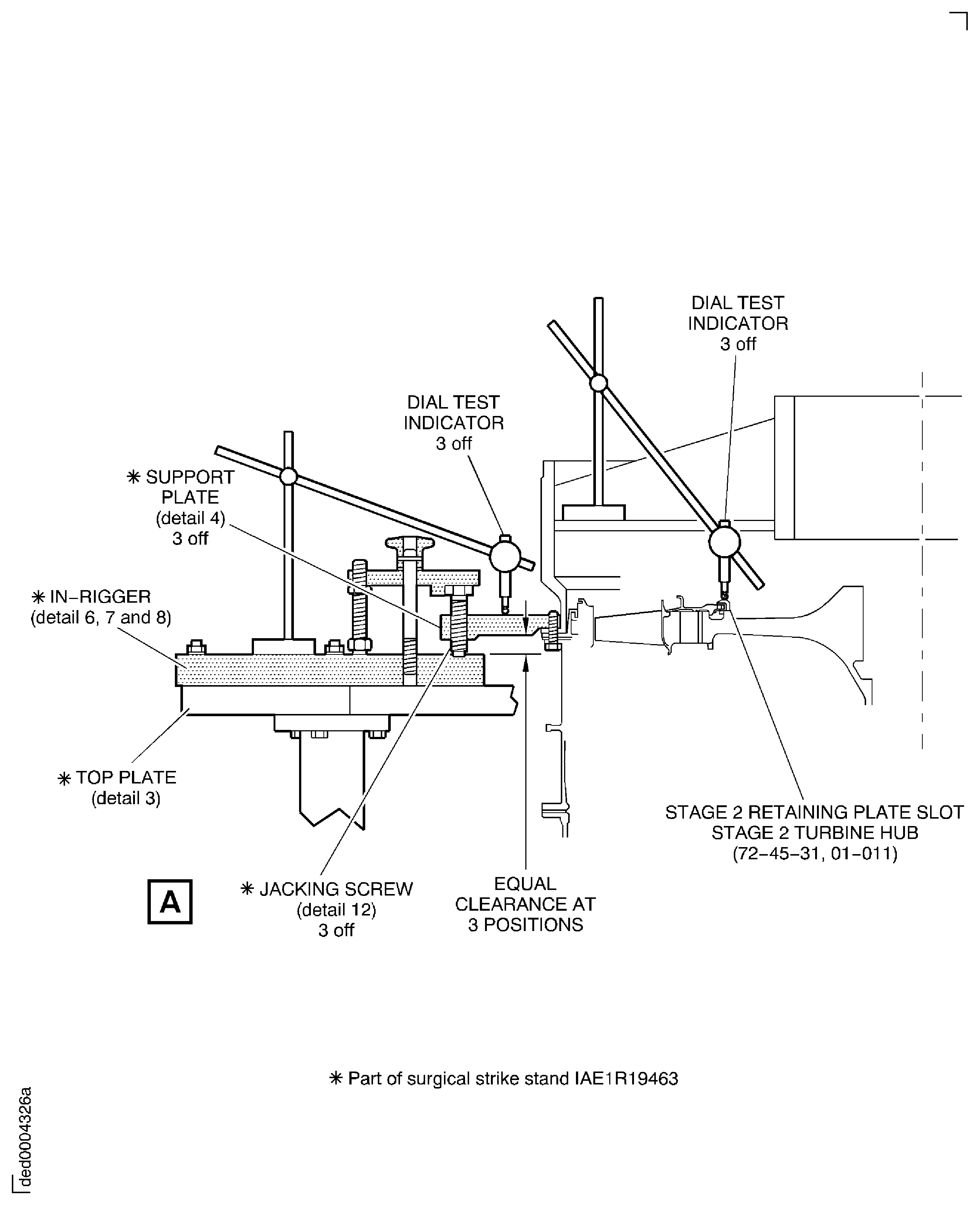
Figure: Install the HP Compressor Front Case Split Line Flange Bolts
Sheet 1
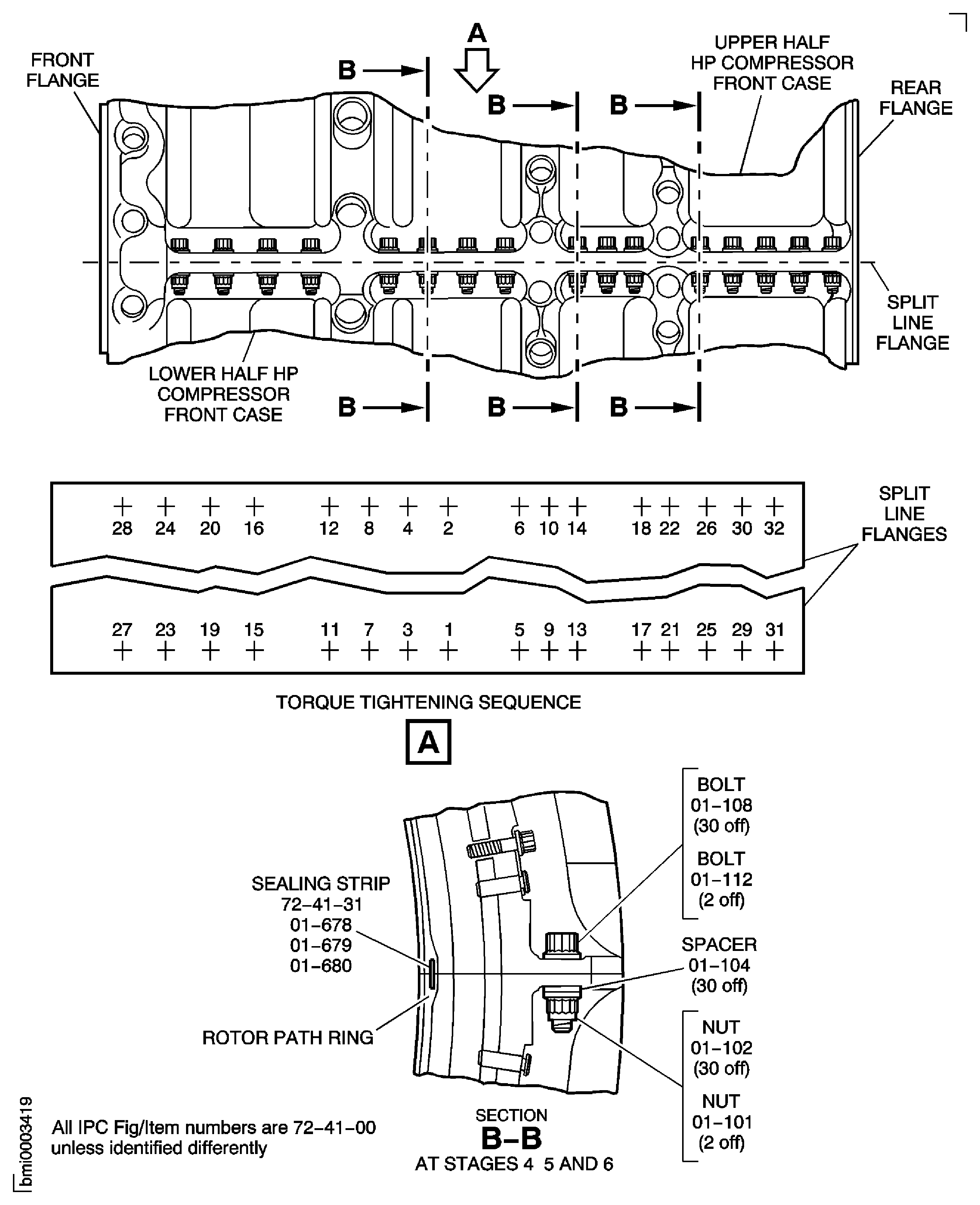
Figure: Install the HP Compressor Front Case Split Line Flange Bolts
Sheet 2
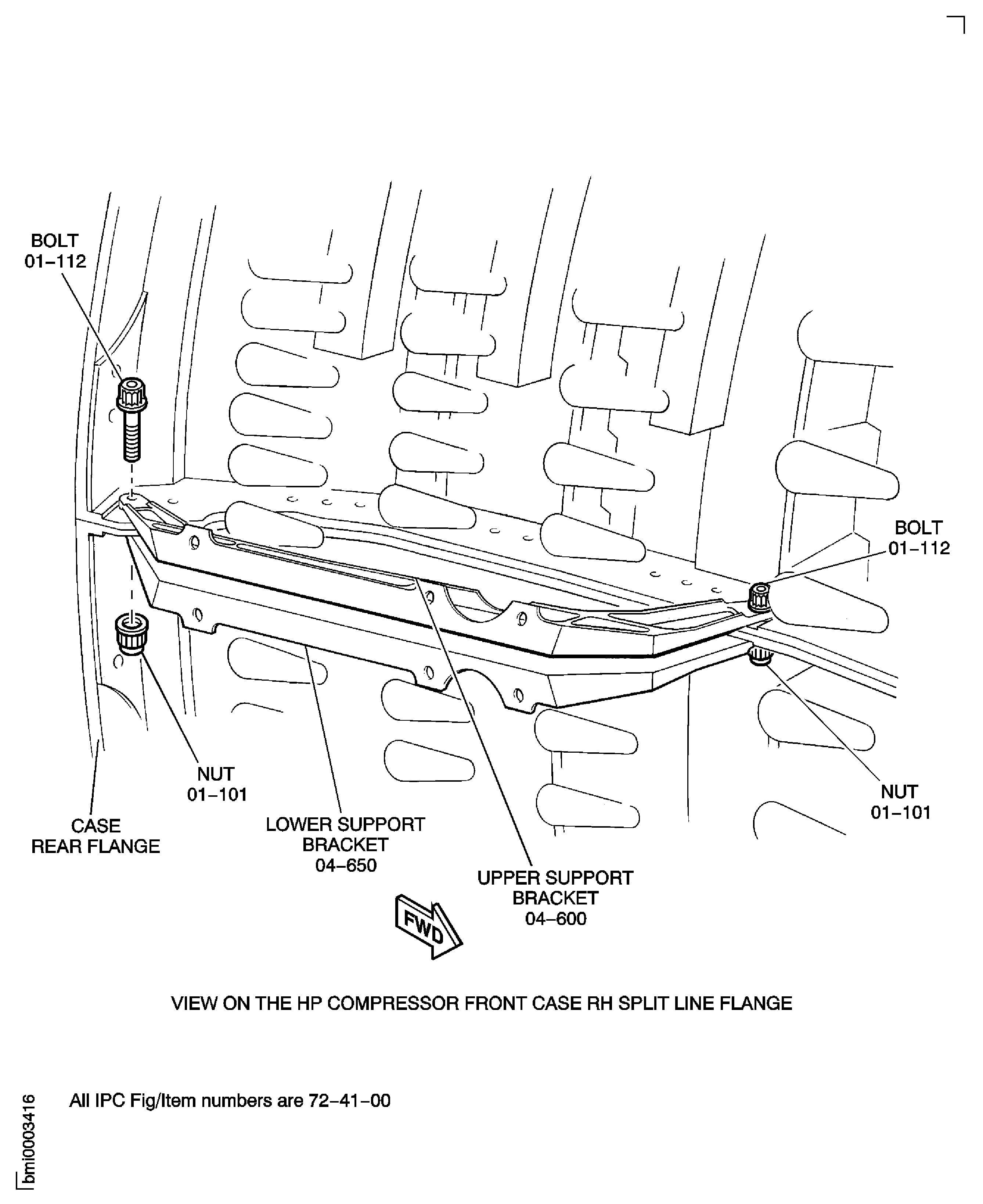
Figure: Install the Brackets, the Pins, the Bolts and the Nuts at the HP Compressor Front Case to the Compressor Rear Outer Case Flange
Sheet 1
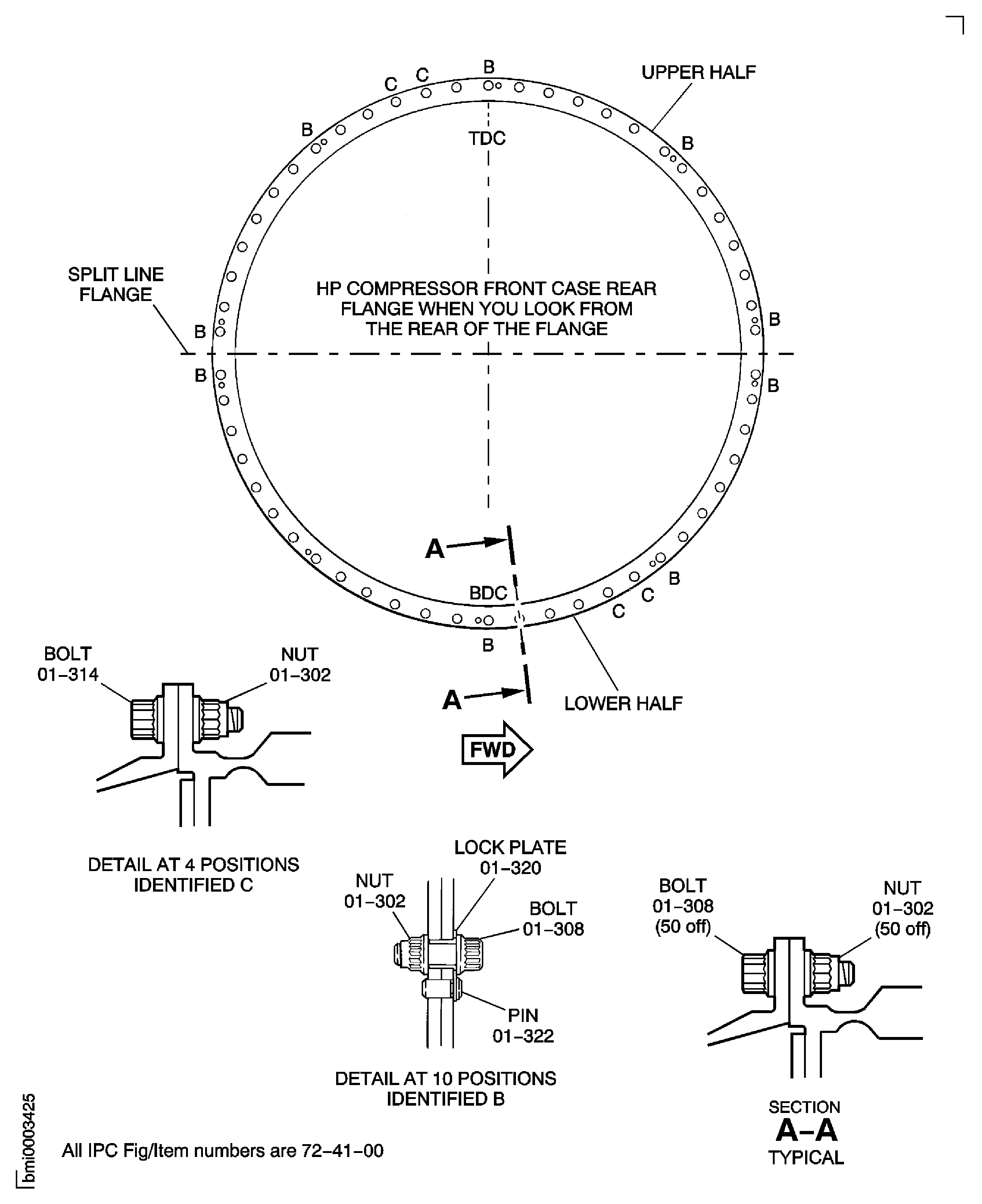
Figure: Install the Brackets, the Pins, the Bolts and the Nuts at the HP Compressor Front Case to the Compressor Rear Outer Case Flange
Sheet 2
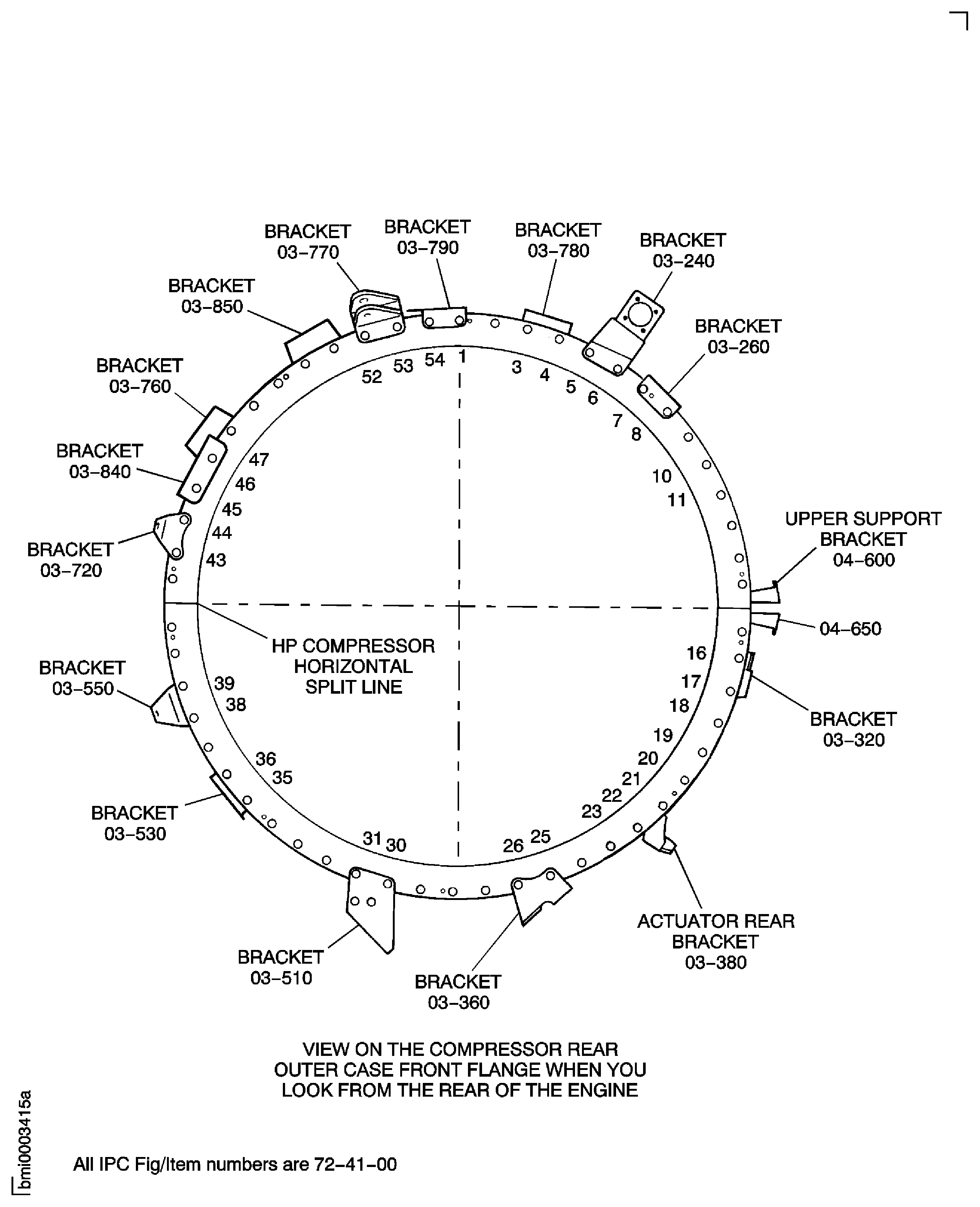
Figure: Install the Inlet Guide Vane Bridging Pieces
Sheet 1
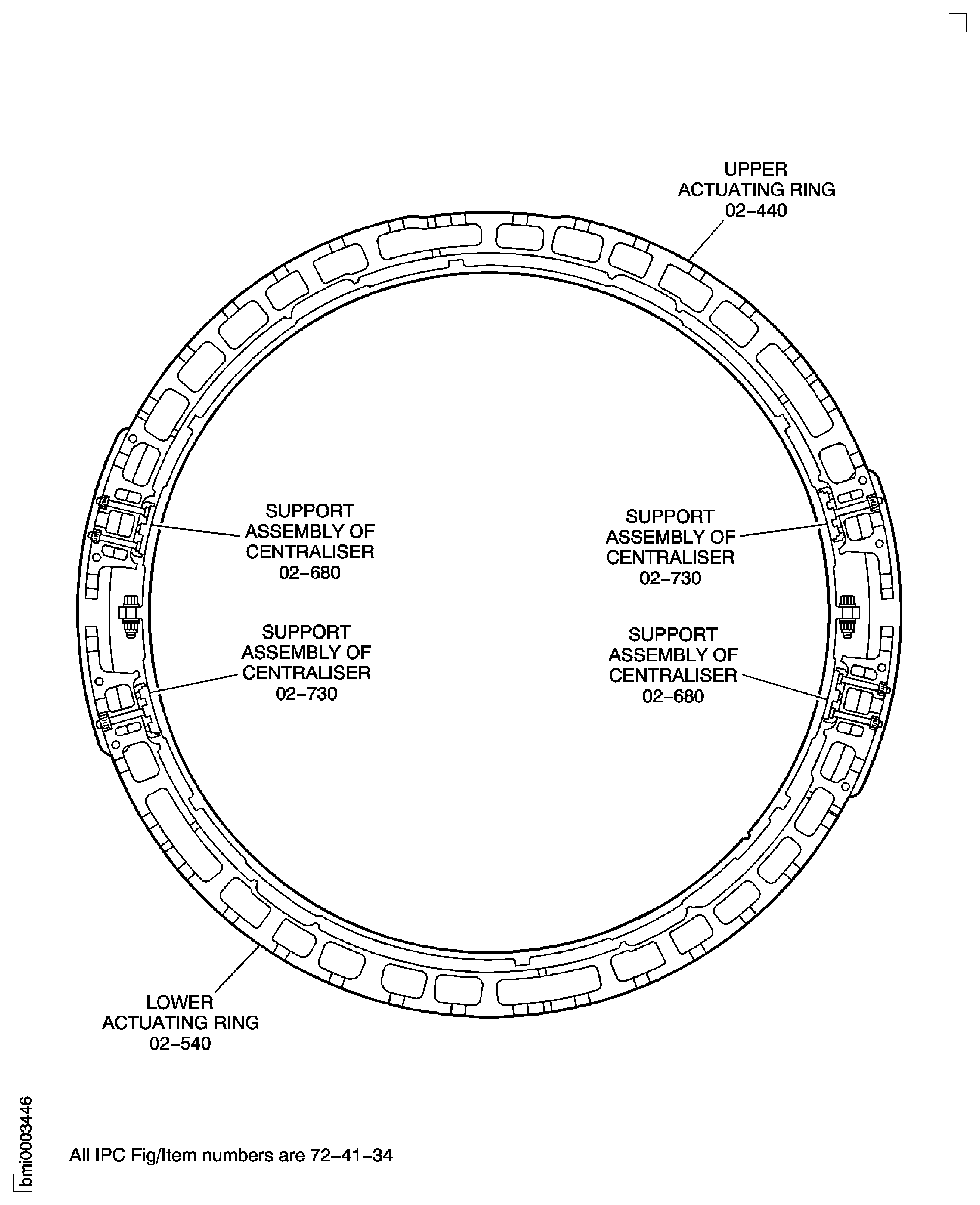
Figure: Install the Inlet Guide Vane Bridging Pieces
Sheet 2
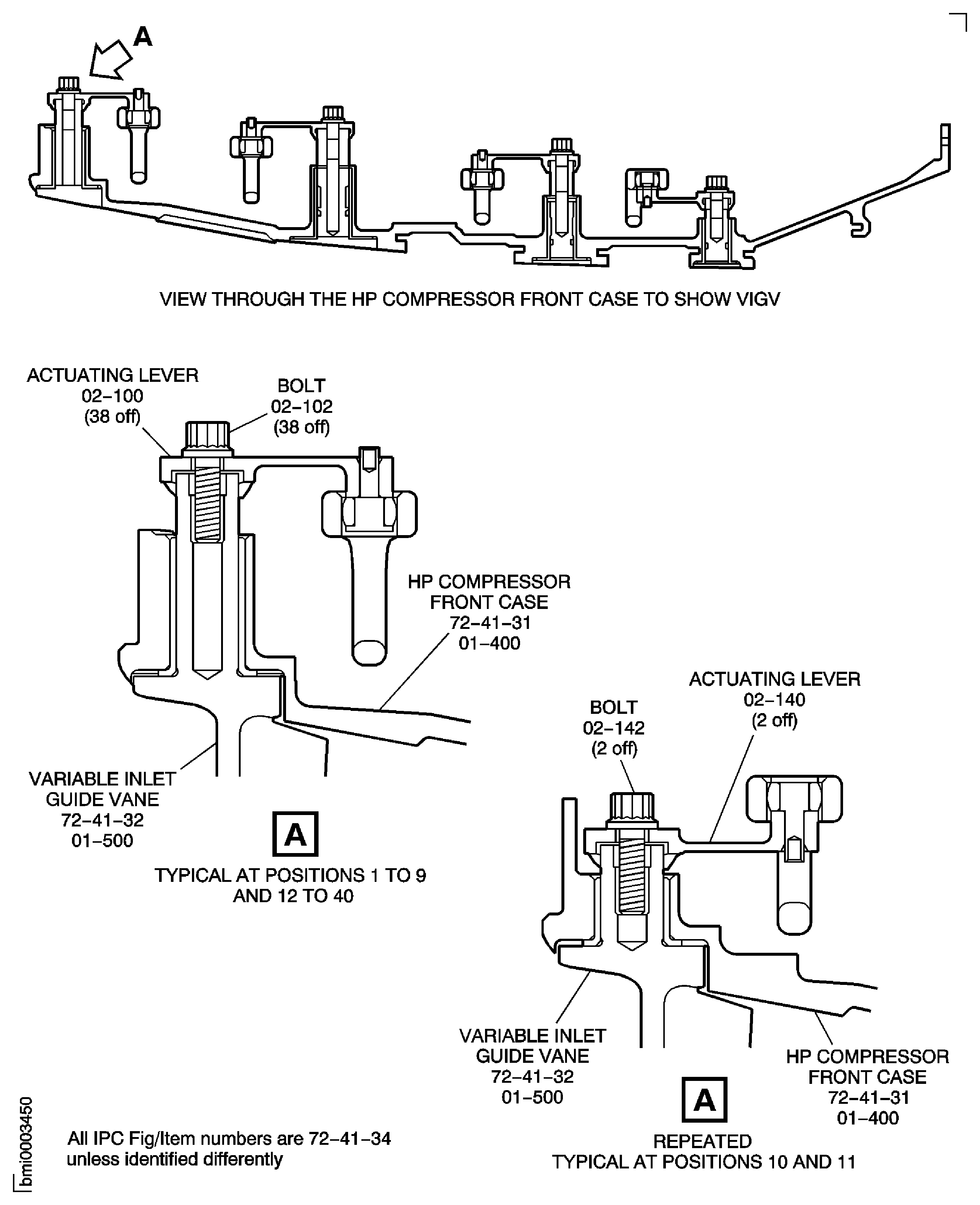
Figure: Install the Stage 3 Actuating Ring Bridging Pieces
Sheet 1
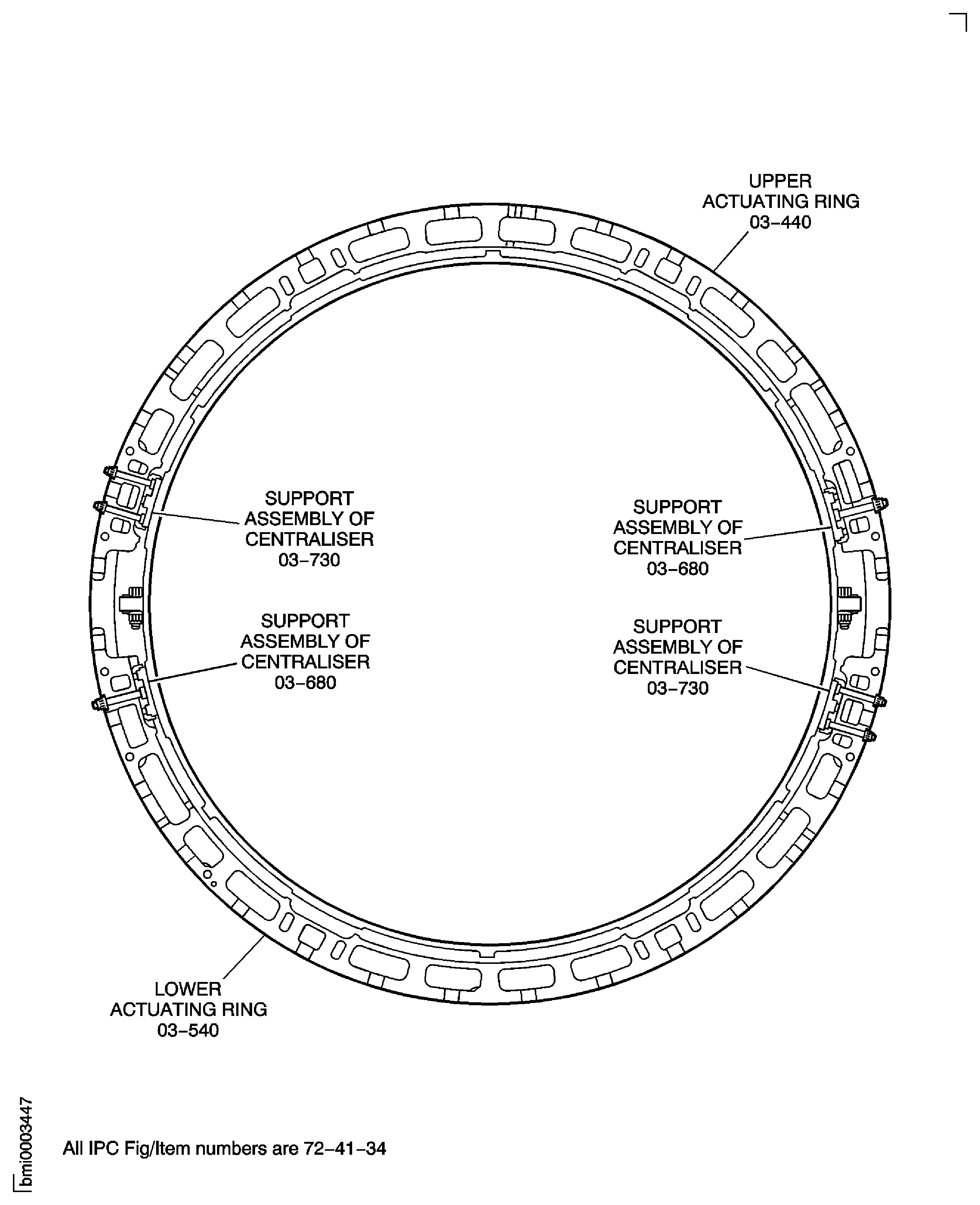
Figure: Install the Stage 3 Actuating Ring Bridging Pieces
Sheet 2
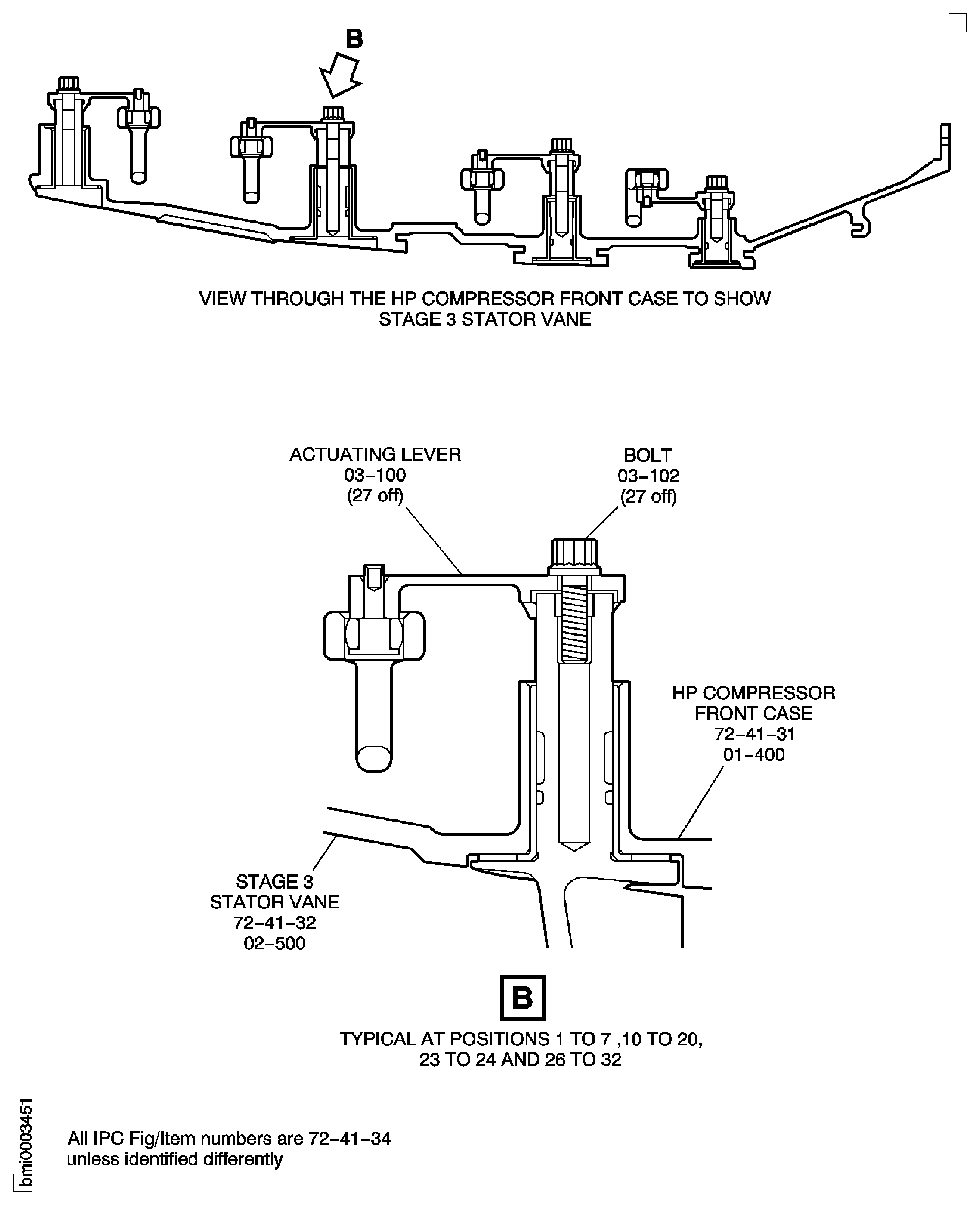
Figure: Install the Stage 3 Actuating Ring Bridging Pieces
Sheet 3
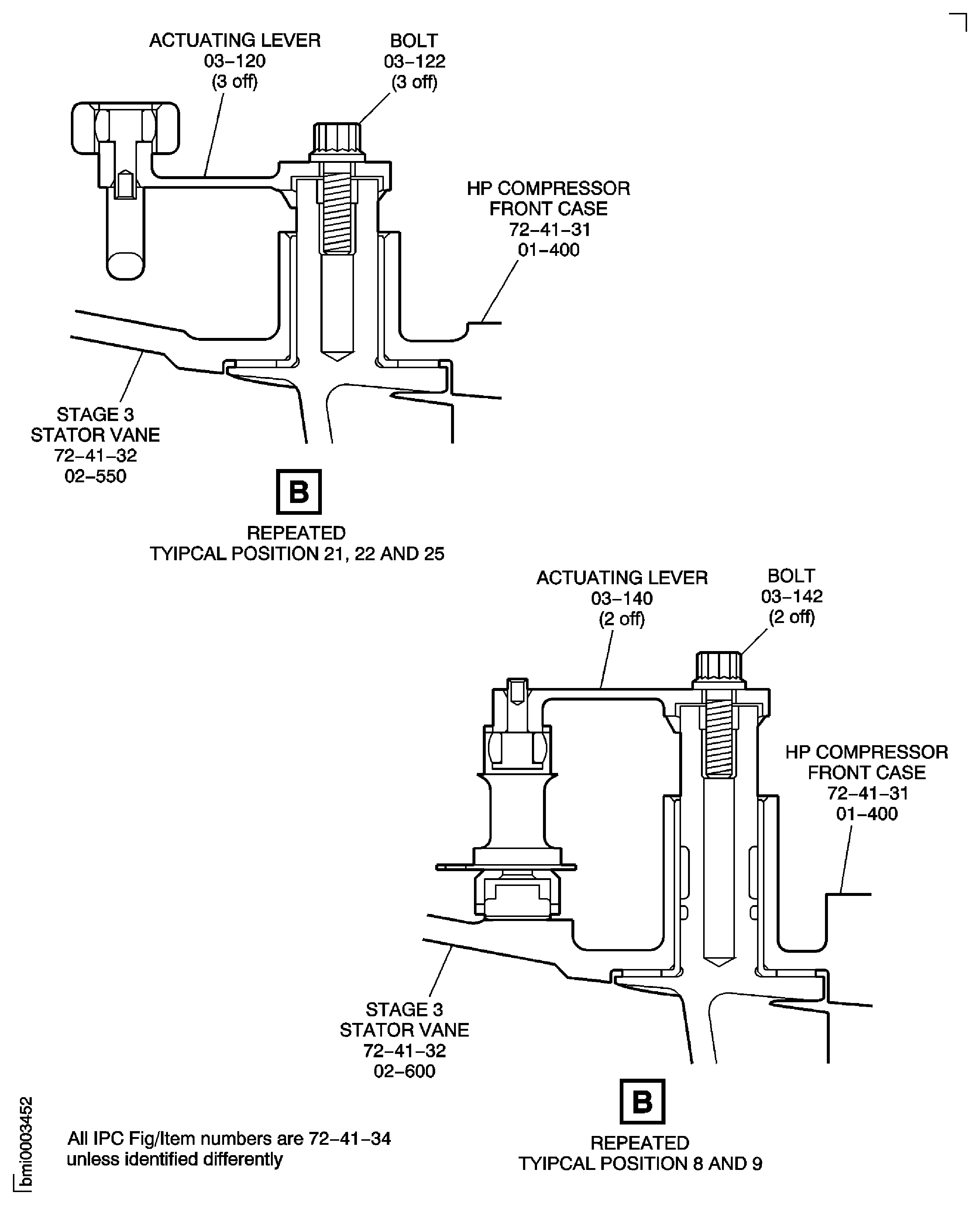
Figure: Install the Stage 4 Actuating Ring Bridging Pieces
Sheet 1
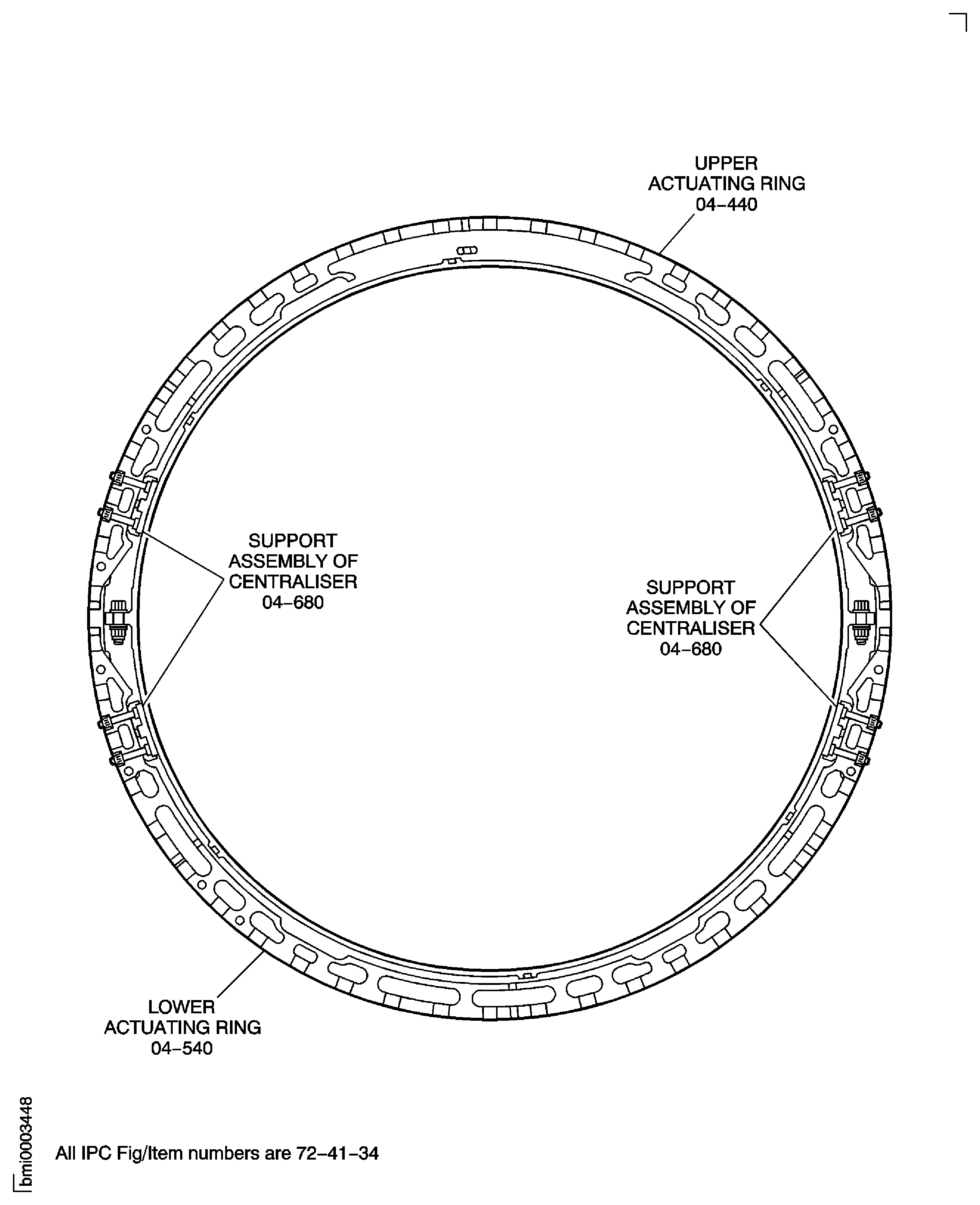
Figure: Install the Stage 4 Actuating Ring Bridging Pieces
Sheet 2
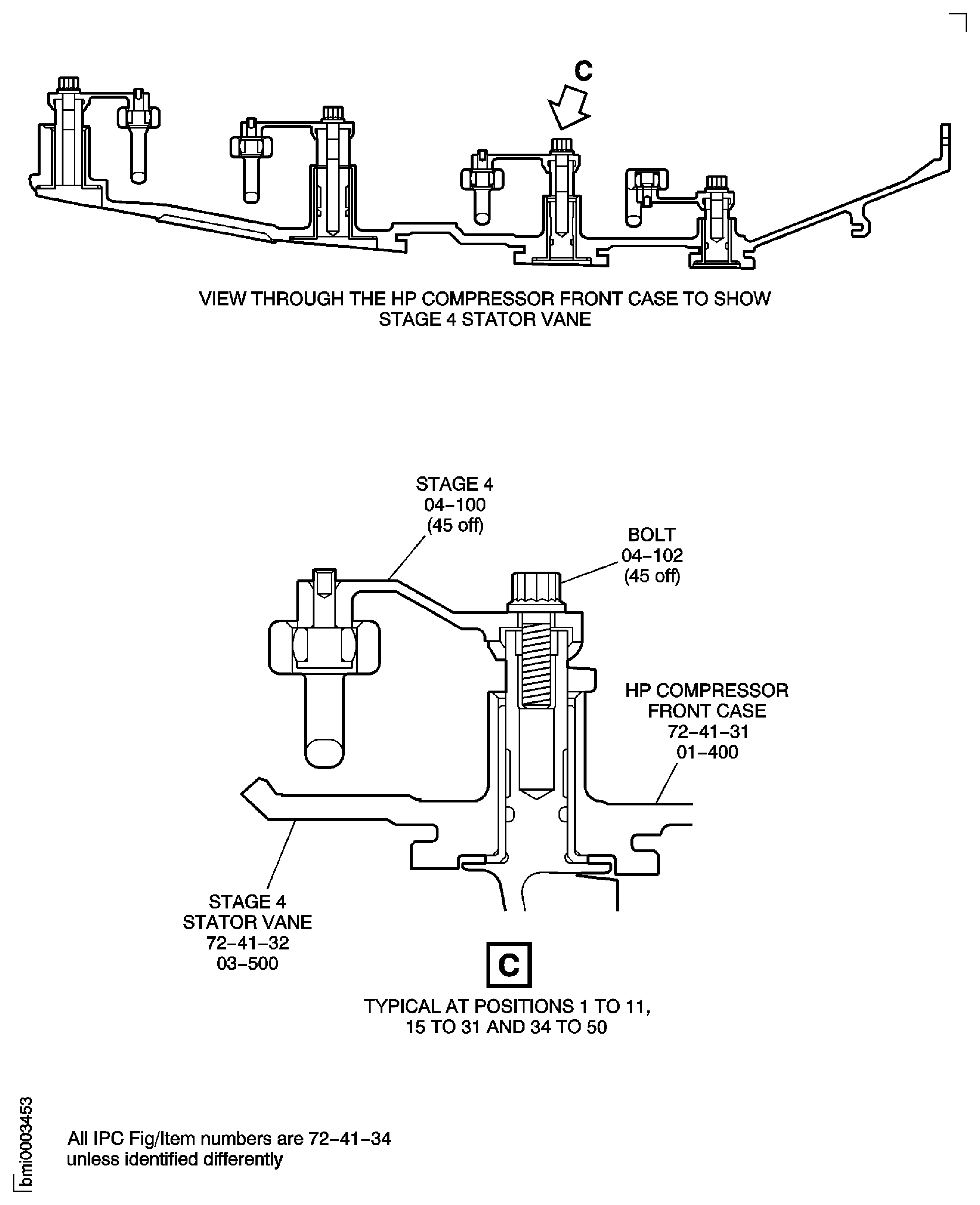
Figure: Install the Stage 4 Actuating Ring Bridging Pieces
Sheet 3
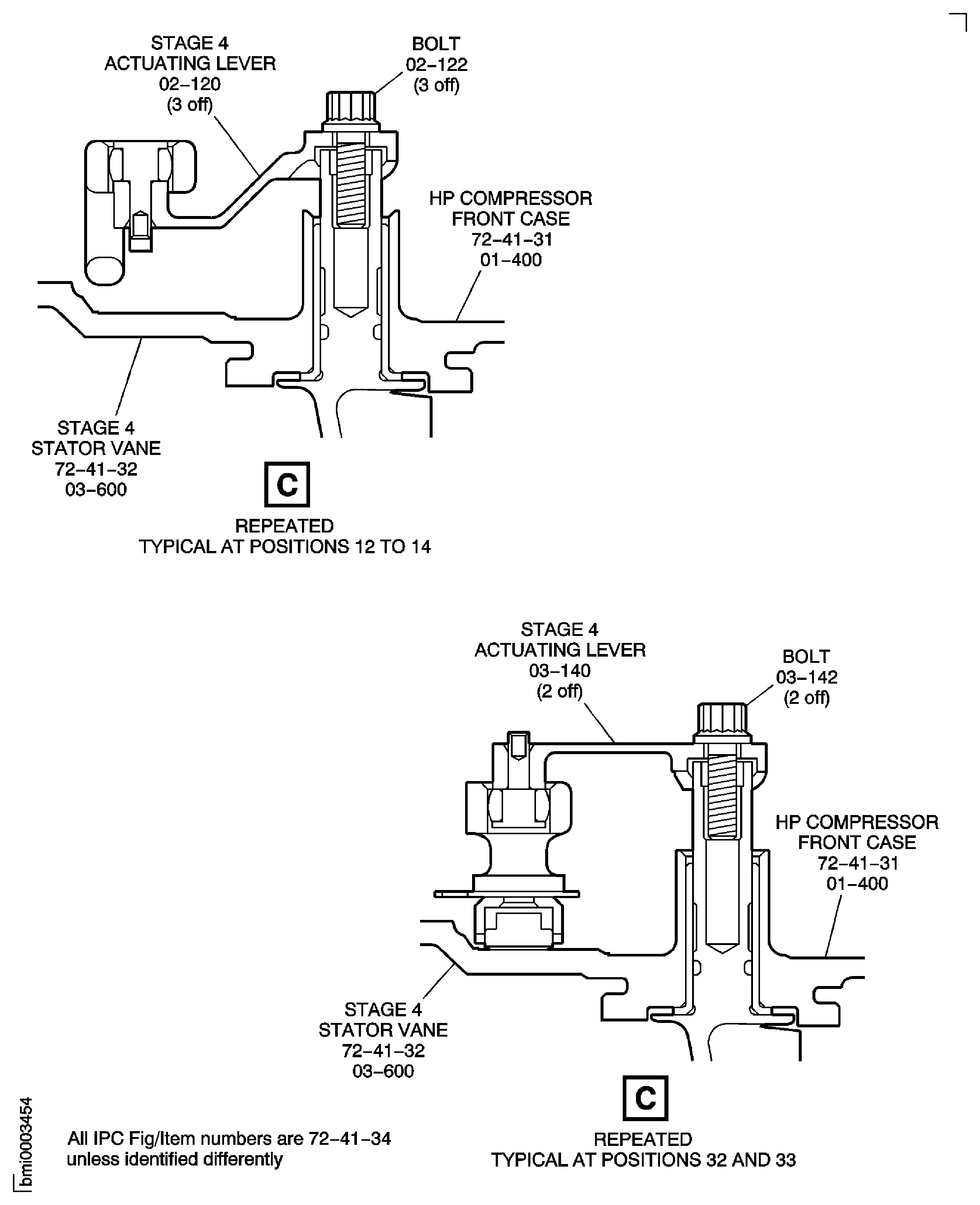
Figure: Install the Stage 5 Actuating Ring Bridging Pieces
Sheet 1
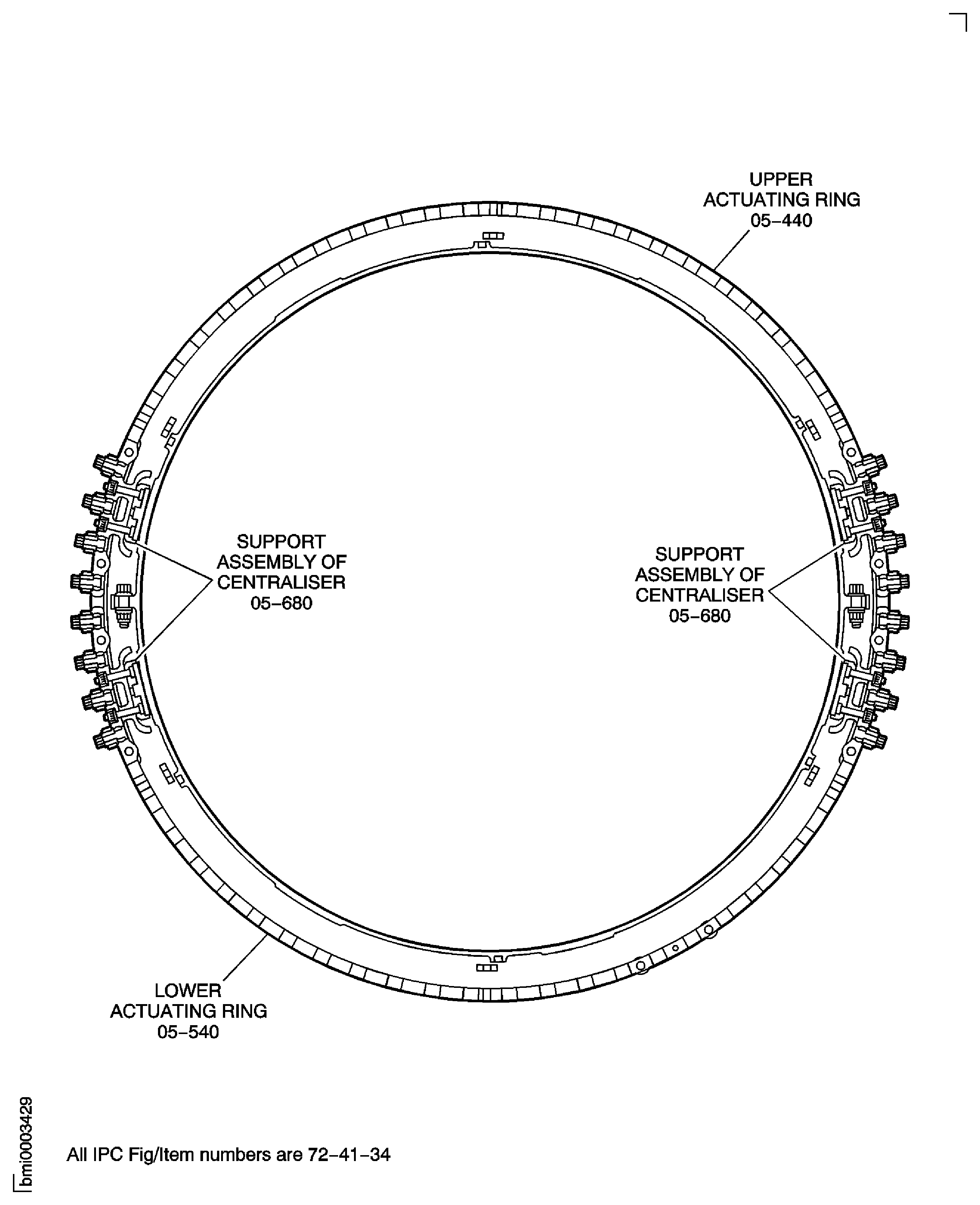
Figure: Install the Stage 5 Actuating Ring Bridging Pieces
Sheet 2
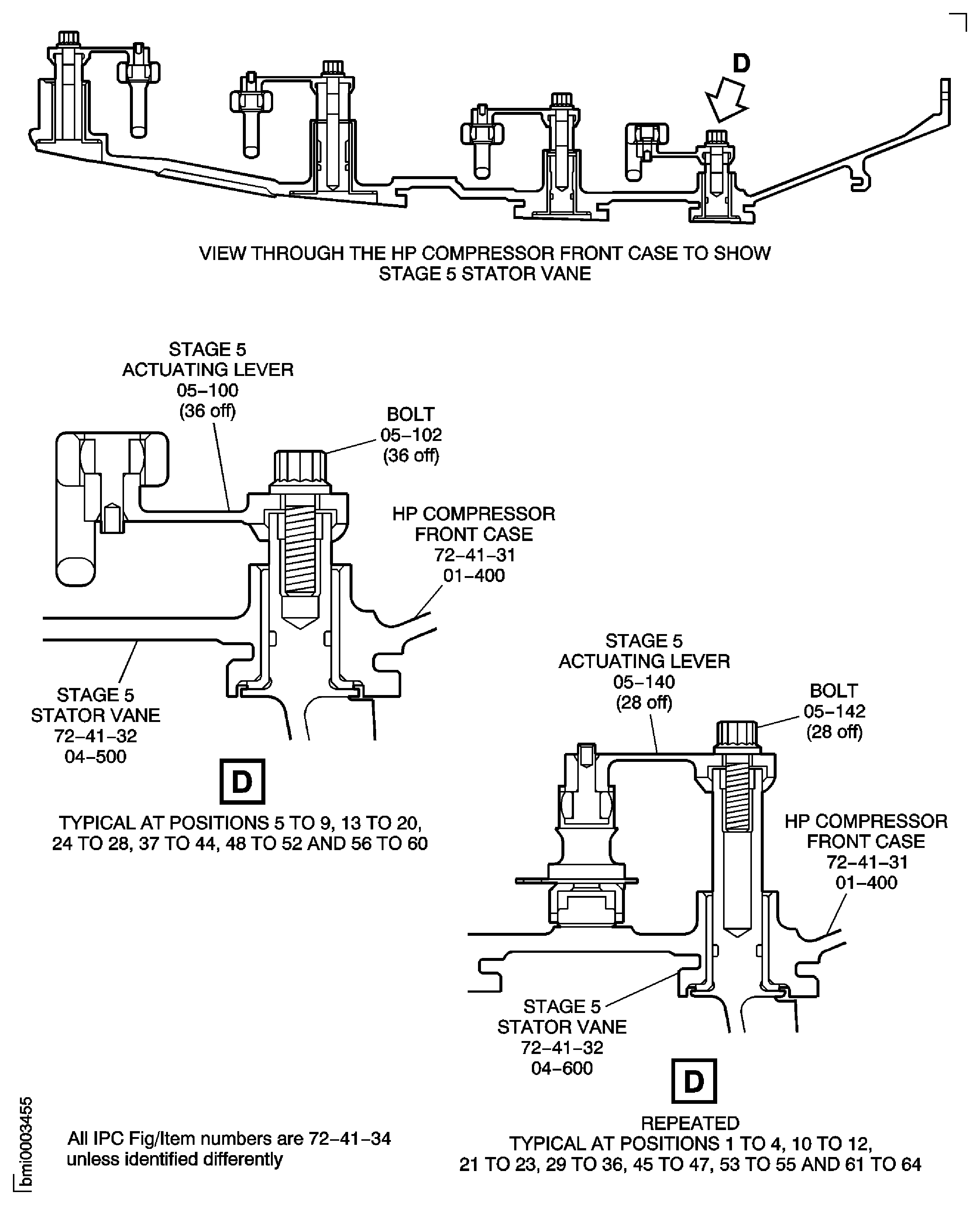
Figure: VSV Crankshaft and Unison Rings - Connect Stage 3 Control Rod
VSV Crankshaft and Unison Rings - Connect Stage 3 Control Rod
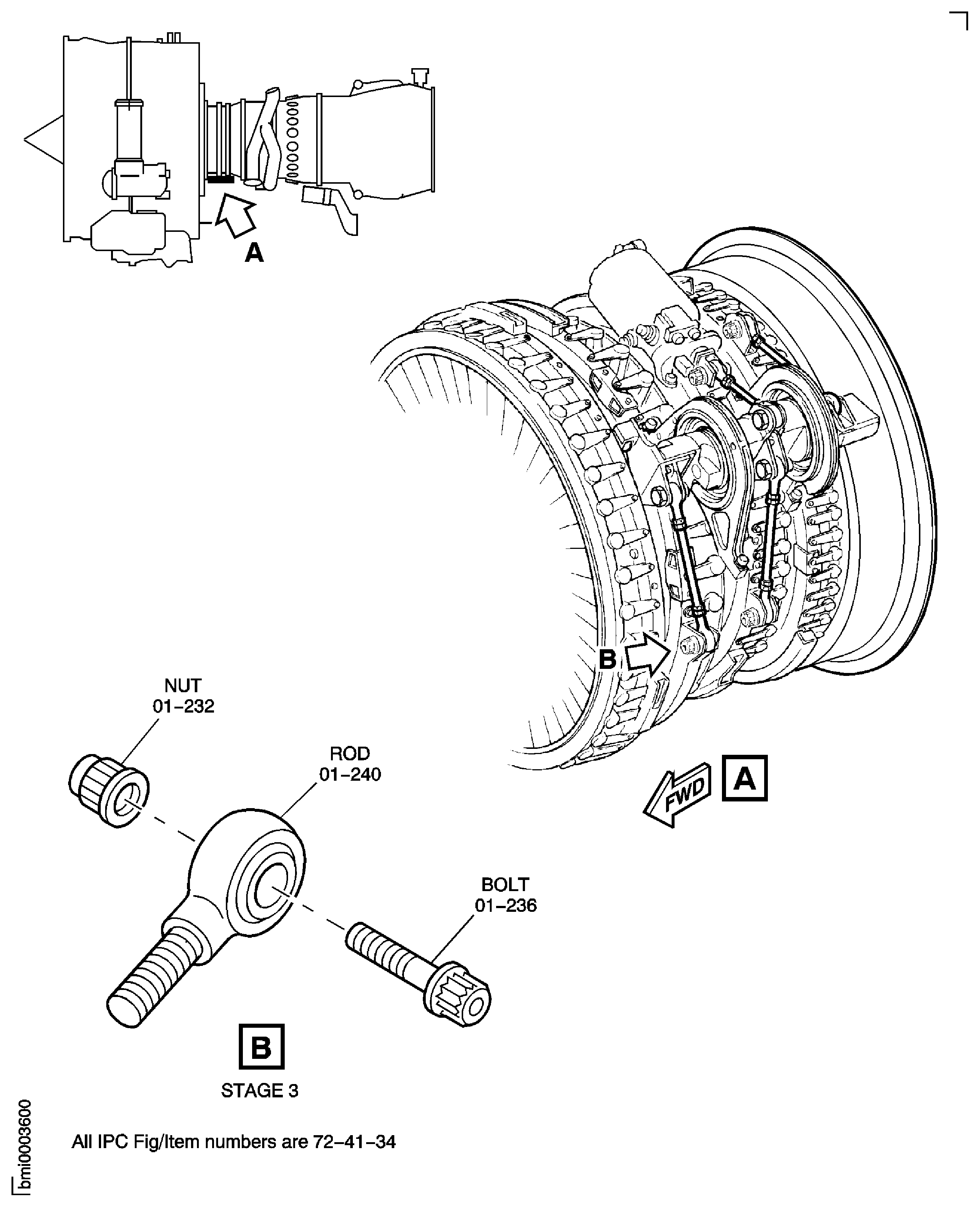
Figure: Install the HP Compressor Support Rods
Sheet 1

Figure: Install the HP Compressor Support Rods
Sheet 2
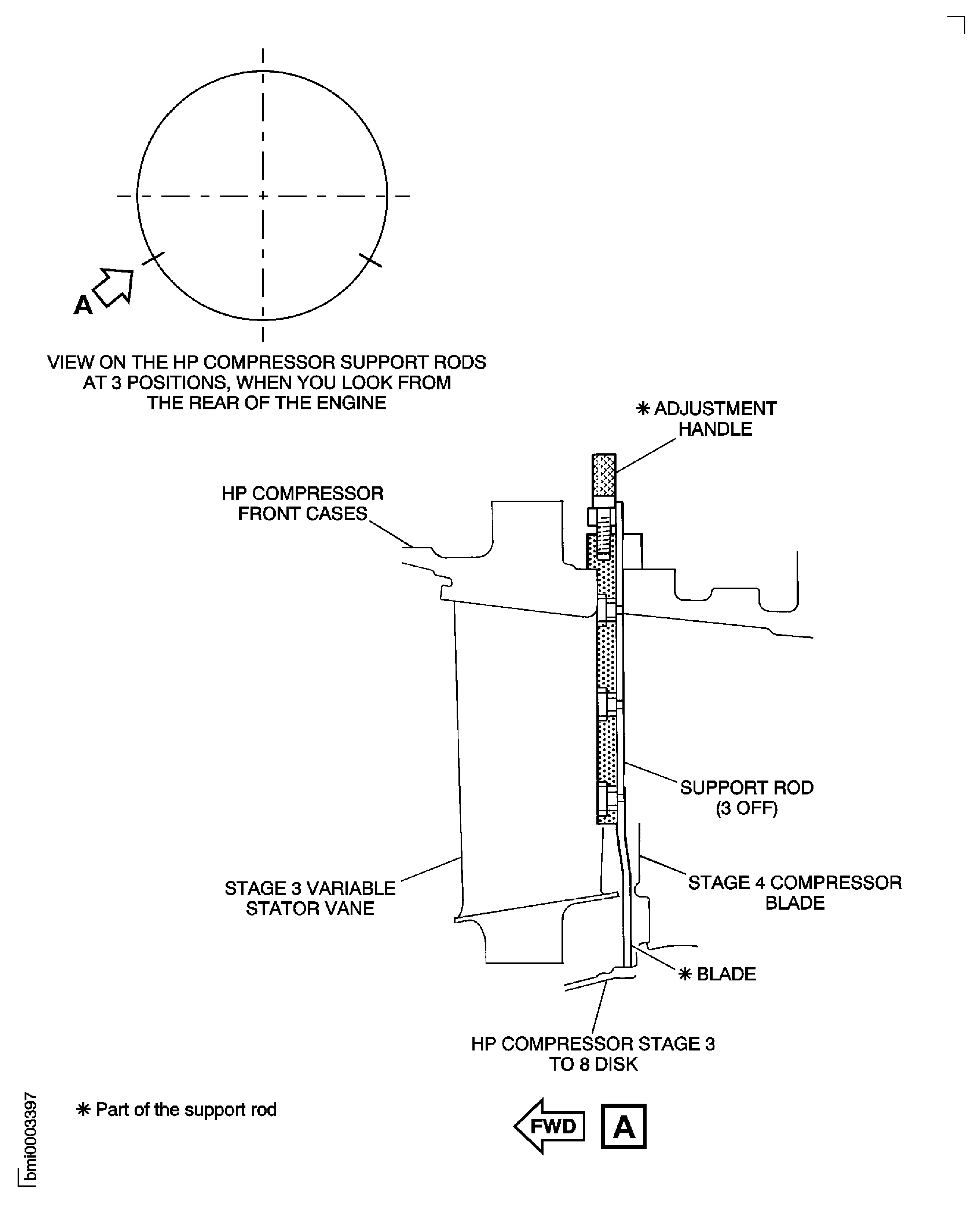
Figure: Install the HP Compressor Trunnions
Install the HP Compressor Trunnions

Figure: Remove the HP Compressor Assembly from the Build Stand IAE 1R19463
Sheet 1
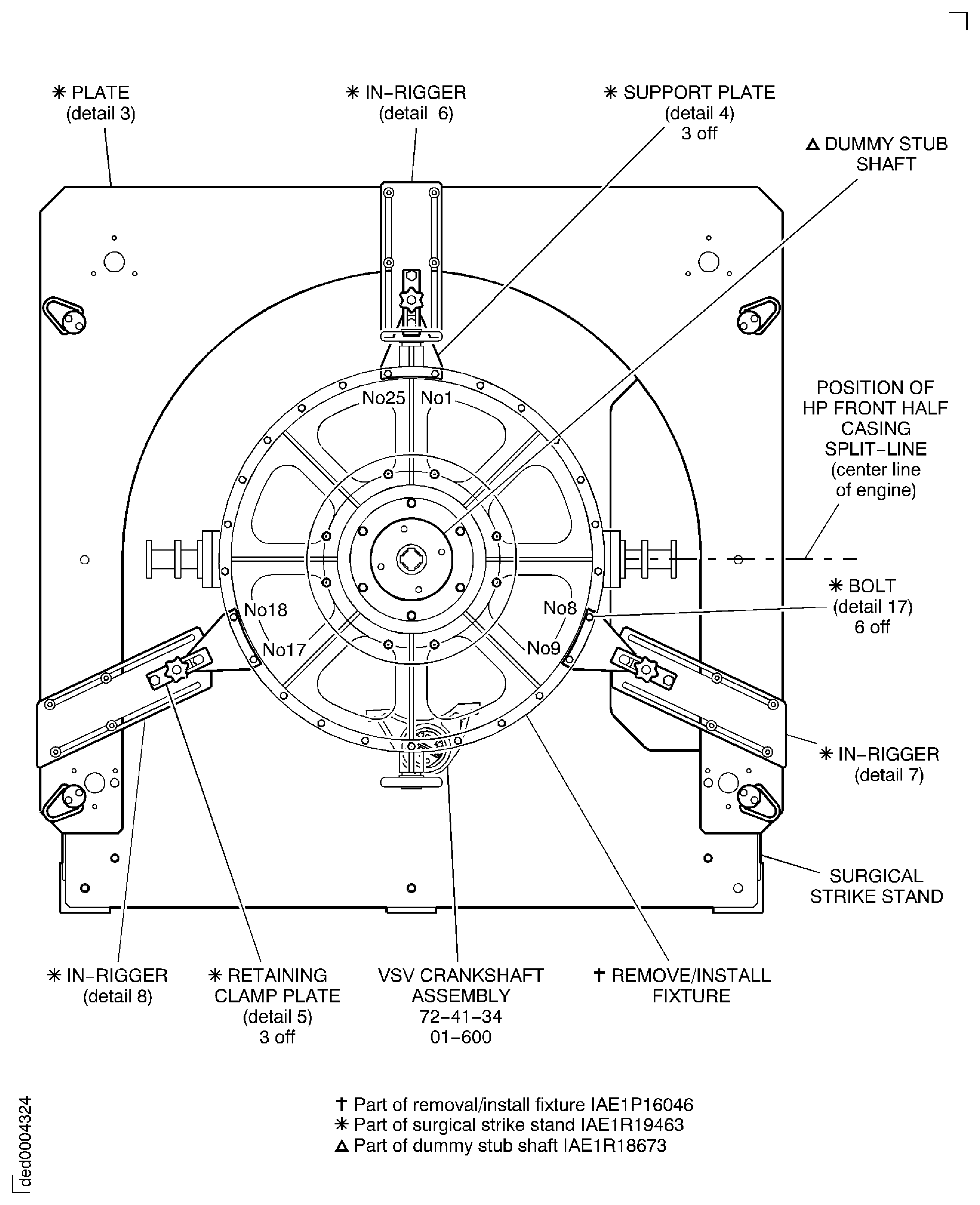
Figure: Remove the HP Compressor Assembly from the Build Stand IAE 1R19463
Sheet 2
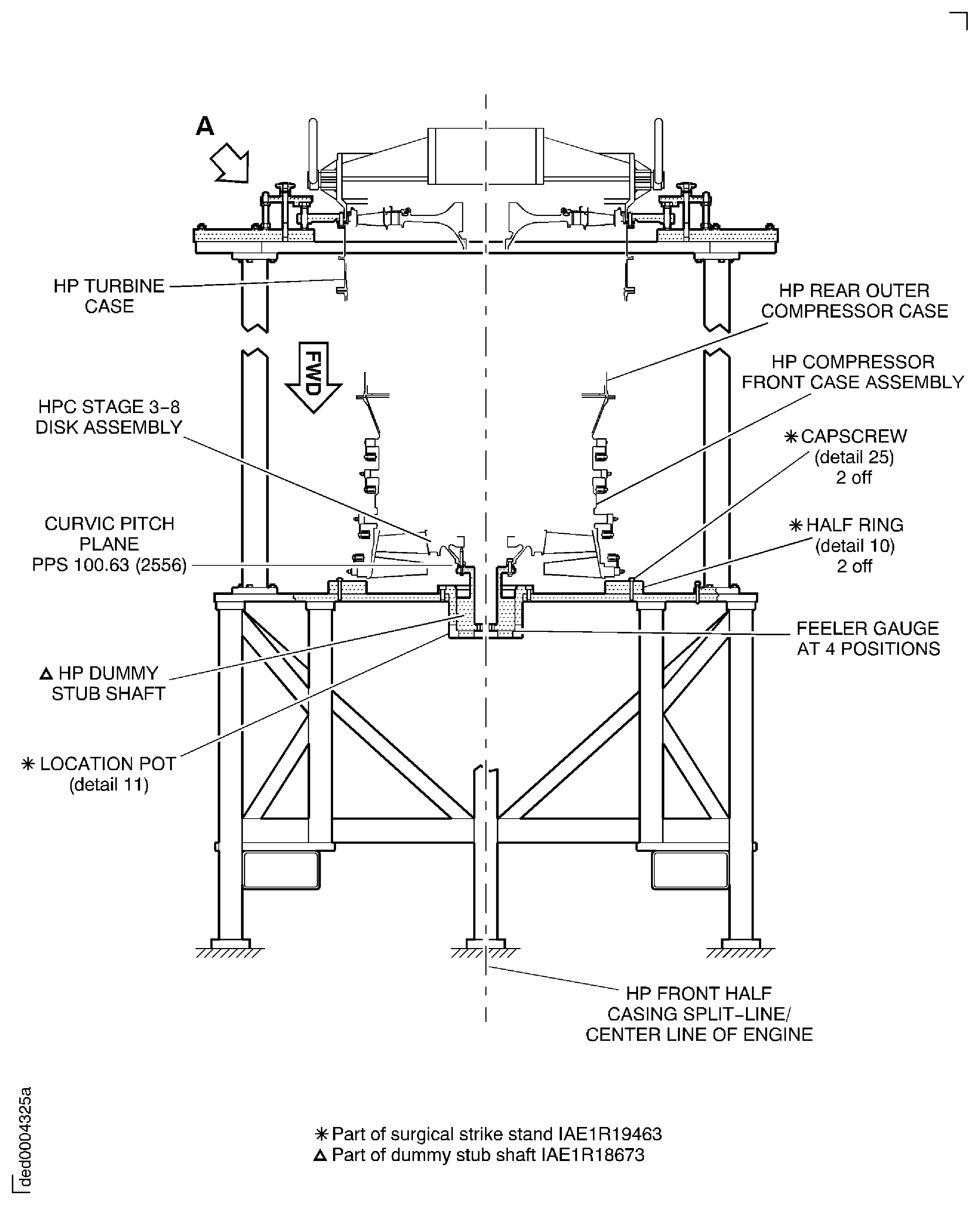
Figure: Remove the HP Compressor Assembly from the Build Stand IAE 1R19463
Sheet 3
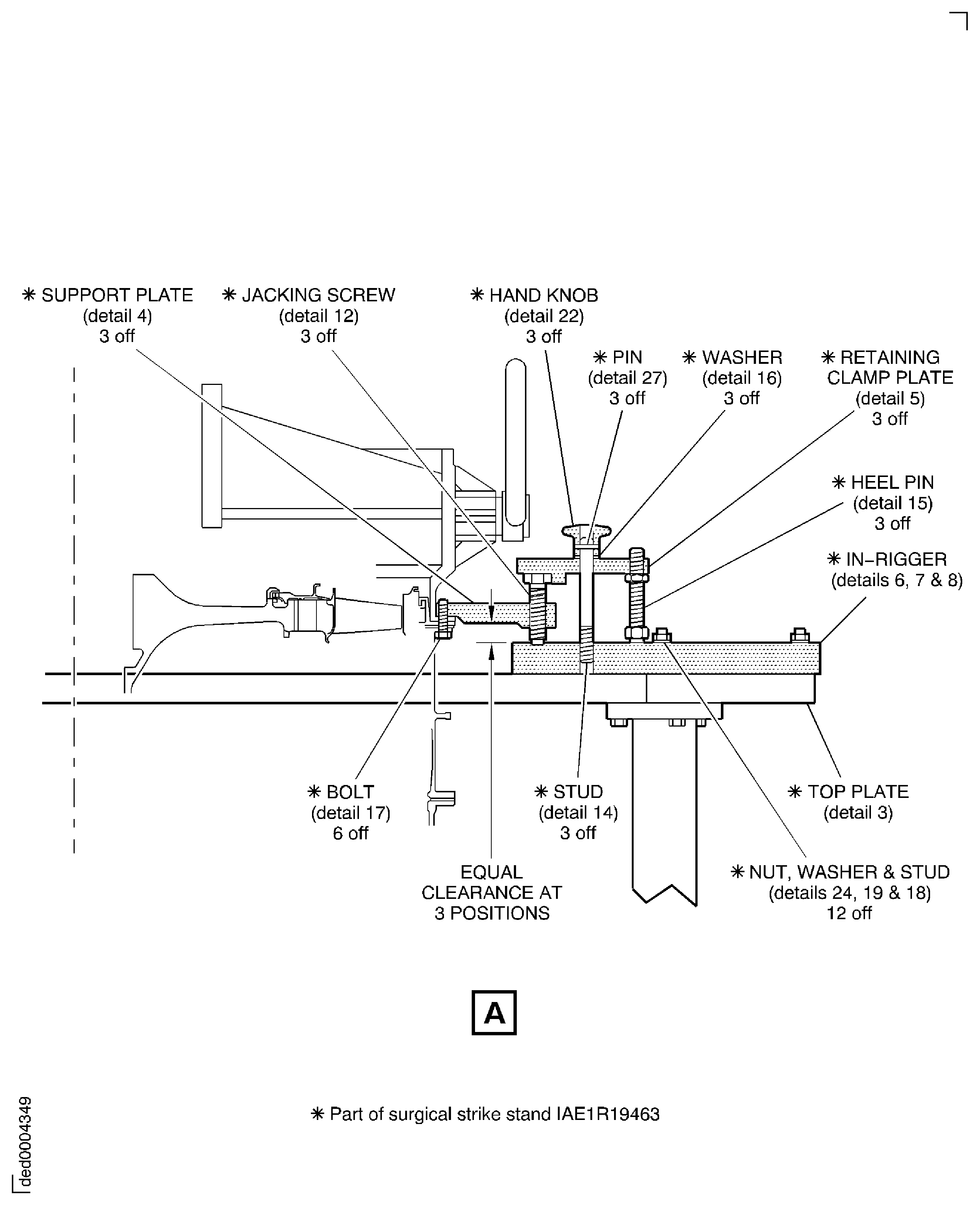
Figure: Install the Variable Inlet Guide Vane Front Shroud
Install the Variable Inlet Guide Vane Front Shroud
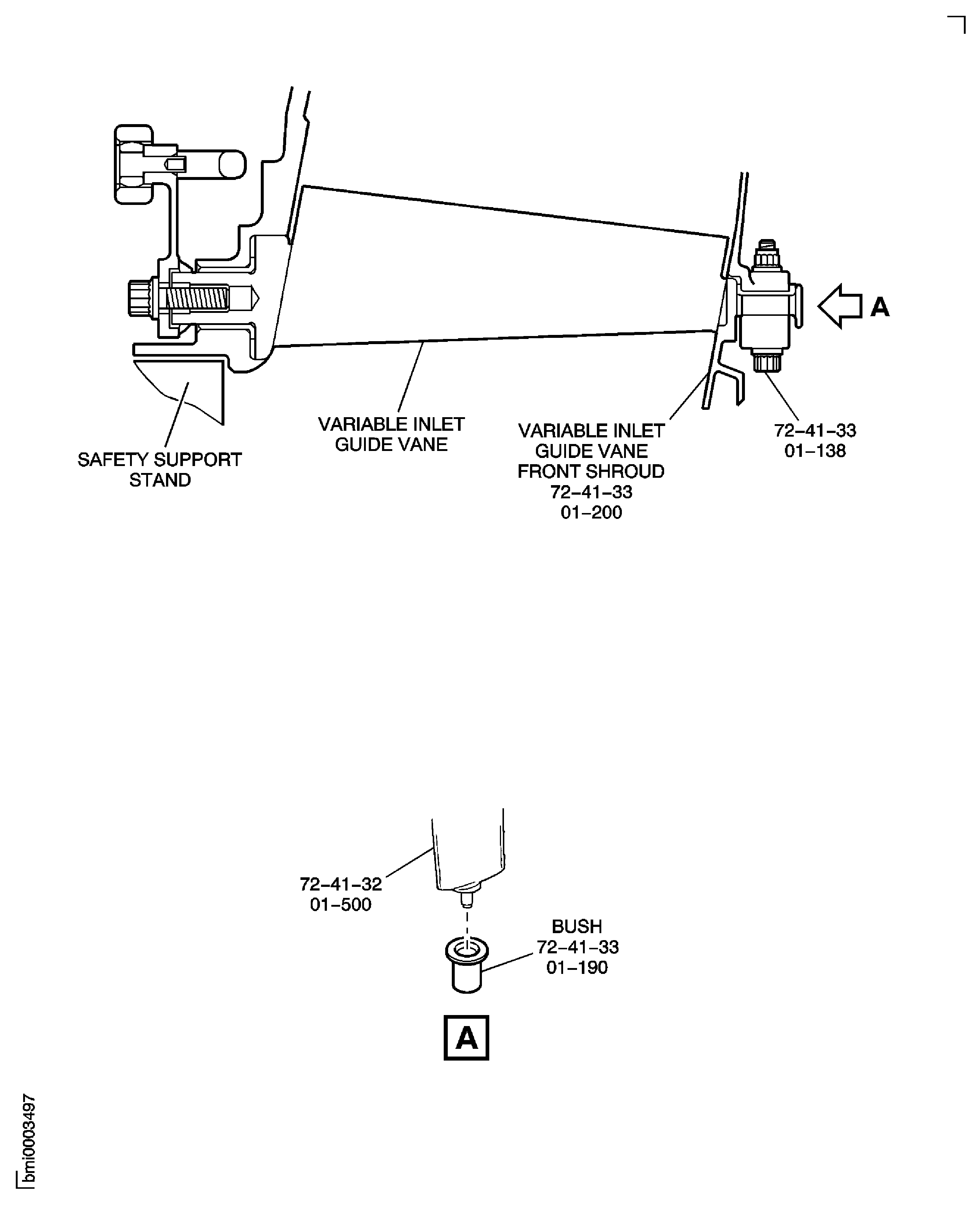
Figure: Install the Forward Lift Sling to the HP Compressor Trunnions
Install the Forward Lift Sling to the HP Compressor Trunnions

Figure: Install the Lift Slings on to the Trunnions
Install the Lift Slings on to the Trunnions

Figure: Remove the Dummy Stub Shaft from the Stage 3 Disk Curvic Coupling
Remove the Dummy Stub Shaft from the Stage 3 Disk Curvic Coupling
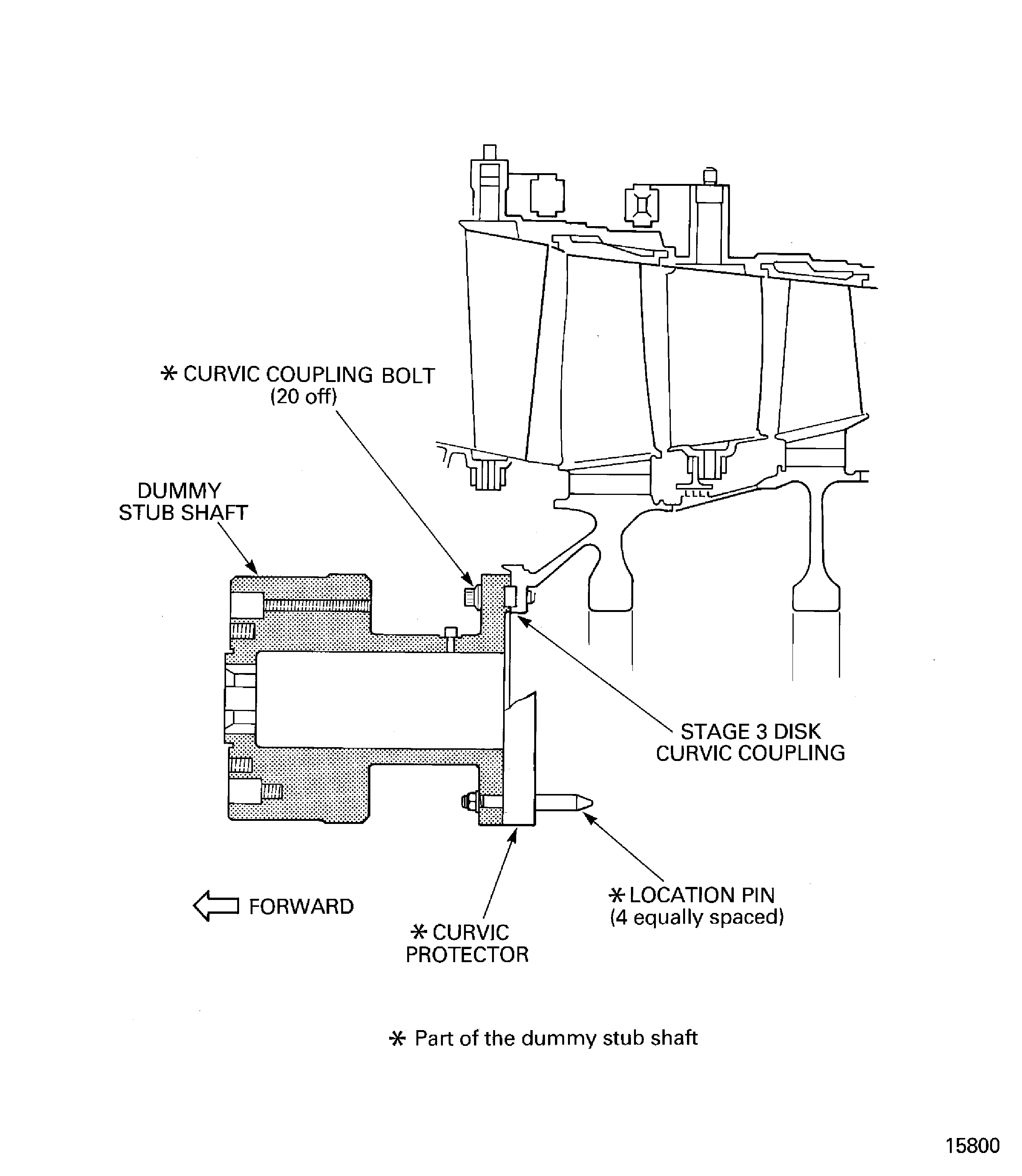
Figure: Remove the Remove/Install Fixture and Tie-rod Adapter from the HP System Module
Remove the Remove/Install Fixture and Tie-rod Adapter from the HP System Module

Figure: Check the No. 4 Front and Rear Bearing Compartment for Leaks
Check the No. 4 Front and Rear Bearing Compartment for Leaks

Figure: HPC Rear Shaft Inspection Location
HPC Rear Shaft Inspection Location
